Cisco ACI

ACI Cisco

Cisco ACI Components

Cisco Application Centric Infrastructure (ACI) represents a different way of approaching data centre networking. Rather than treating the network primarily as a collection of individually configured switches and interfaces, ACI uses application requirements and policy as the foundation for how connectivity, segmentation, and network behaviour are defined. This becomes particularly valuable as organizations operate physical servers, virtual machines, containers, and workloads across increasingly dynamic environments.

Cisco ACI brings the physical data centre fabric and software-defined policy model together through a centralized operational framework. The underlying network still provides the forwarding infrastructure, but administrators can define how applications and workloads should communicate without having to express every requirement as a series of device-by-device configurations. This separation between intent and implementation is central to the ACI model.

A major benefit is policy consistency. Instead of relying entirely on individual switch configurations, teams can define application relationships, network connectivity, and security requirements through policy. Those policies can then be applied across the fabric as workloads are deployed or changed, helping reduce configuration drift and making large environments easier to operate.

Security is another important part of the architecture. ACI supports segmentation and policy-based control between application tiers and workloads, allowing organizations to restrict communication according to defined requirements rather than relying solely on broad network boundaries. Integration with external security and operational platforms can further extend visibility and enforcement across the environment.

The model is also designed for scale. Modern data centres may contain large numbers of applications, virtual workloads, containers, and rapidly changing endpoints. A policy-driven fabric allows network operations to respond to those changes through automation and orchestration rather than requiring every network change to be handled manually. This can improve deployment consistency while reducing operational overhead.

ACI also provides a framework for connecting traditional physical infrastructure with virtualized and container-based workloads. This is important because most enterprise environments are not completely homogeneous: legacy applications, modern distributed applications, databases, virtualization platforms, and containerized services often coexist within the same broader architecture.

Hybrid and multi-cloud environments add another dimension. Organizations increasingly need consistent connectivity and policy across on-premises infrastructure and external cloud platforms. ACI can participate in these architectures through its integration and multi-site capabilities, helping organizations extend network and application policy across environments while recognizing that each cloud still has its own native networking and security model.

Cisco ACI is therefore best understood as a policy-driven data centre networking architecture, rather than simply a replacement for traditional switching. Its value comes from combining a scalable fabric with centralized policy, automation, segmentation, and application-aware operational models. For organizations managing complex data centre environments, this approach can provide a more consistent way to connect applications, enforce policy, and adapt the network as workloads evolve.

Cisco ACI • Interactive Architecture
ACI Fabric Architecture Explorer
Explore how APIC policy, the spine–leaf fabric and endpoint connectivity work together to create a policy-driven data-center network.
Learning objective: Understand how Cisco ACI separates policy and management from distributed forwarding — APIC defines intent while leaf and spine switches enforce and transport that policy.
MANAGEMENT / POLICY PLANE SPINE FABRIC LEAF / DATA-PLANE EDGE ENDPOINTS / WORKLOADS APIC CLUSTER Policy • Management • Orchestration SPINE 1 Fabric Transit SPINE 2 Fabric Transit LEAF 1 Endpoint Edge LEAF 2 Endpoint Edge LEAF 3 Endpoint Edge SERVER A EPG: WEB SERVER B EPG: APP SERVER C EPG: DB MULTI-PATH FABRIC / ECMP POLICY ENFORCEMENT AT THE LEAF EDGE
Fabric
Policy
Endpoint
Interactive Inspector
Cisco ACI Fabric
Fabric concept
Select a device or connection in the diagram to see how that component participates in the ACI architecture.
Selected component
Architecture overview
ACI concept
Policy-driven spine–leaf fabric
Why it matters
ACI separates centralized policy definition from distributed packet forwarding.

Highlights: Cisco ACI Components

The ACI Fabric

Cisco ACI is a software-defined networking (SDN) solution that integrates with software and hardware. With the ACI, we can create software policies and use hardware for forwarding, an efficient and highly scalable approach offering better performance. The hardware for ACI is based on the Cisco Nexus 9000 platform product line. The APIC centralized policy controller drives the software, which stores all configuration and statistical data.

–The Cisco Nexus Family–

To build the ACI underlay, you must exclusively use the Nexus 9000 family of switches. You can choose from modular Nexus 9500 switches or fixed 1U to 2U Nexus 9300 models. Specific models and line cards are dedicated to the spine function in ACI fabric; others can be used as leaves, and some can be used for both purposes. You can combine various leaf switches inside one fabric without any limitations.

a) Cisco ACI Fabric: Cisco ACI’s foundation lies in its fabric, which forms the backbone of the entire infrastructure. The ACI fabric comprises leaf switches, spine switches, and the application policy infrastructure controller (APIC). Each component ensures a scalable, agile, and resilient network.

b) Leaf Switches: Leaf switches serve as the access points for endpoints within the ACI fabric. They provide connectivity to servers, storage devices, and other network devices. With their high port density and advanced features, such as virtual port channels (vPCs) and fabric extenders (FEX), leaf switches enable efficient and flexible network designs.

c) Spine Switches: Spine switches serve as the core of the ACI fabric, providing high-bandwidth connectivity between the leaf switches. They use a non-blocking, multipath forwarding mechanism to ensure optimal traffic flow and eliminate bottlenecks. With their modular design and support for advanced protocols like Ethernet VPN (EVPN), spine switches offer scalability and resiliency.

d) Application Policy Infrastructure Controller (APIC): At the heart of Cisco ACI is the APIC, a centralized management and policy control plane. The APIC acts as a single control point, simplifying network operations and enabling policy-based automation. It provides a comprehensive view of the entire fabric, allowing administrators to define and enforce policies across the network.

e) Integration with Virtualization and Cloud Environments: Cisco ACI seamlessly integrates with virtualization platforms such as VMware vSphere and Microsoft Hyper-V and cloud environments like Amazon Web Services (AWS) and Microsoft Azure. This integration enables consistent policy enforcement and visibility across physical, virtual, and cloud infrastructures, enhancing agility and simplifying operations.

Cisco ACI — Policy‑Driven, Application‑Centric Networking

Cisco ACI (Application Centric Infrastructure) is Cisco’s flagship data‑center fabric built around policy‑driven automation, centralized control, and application‑aware networking. Instead of configuring individual switches, ACI abstracts the network into application policies, endpoint groups, and contracts. This creates a programmable, intent‑based fabric where the network automatically aligns with application requirements. Data analytics strengthens ACI by providing visibility into fabric health, policy behavior, endpoint movement, and application flows, ensuring that the fabric remains consistent, secure, and optimized.

Policy Model — Endpoint Groups, Contracts, and Intent

ACI’s core innovation is its policy model:

  • Endpoint Groups (EPGs) define logical groupings of workloads
  • Contracts define how EPGs communicate
  • Application Network Profiles (ANPs) map application tiers to policies
  • Tenants provide multi‑domain isolation

This model replaces traditional VLANs, ACLs, and manual segmentation with intent‑based policies. Analytics enhances this by identifying unused contracts, misaligned EPGs, shadow policies, and unexpected east‑west flows. With analytics, ACI’s policy model becomes adaptive and identity‑aware rather than static.

Fabric Architecture — Spine‑Leaf, VXLAN, and Distributed Control

ACI uses a spine‑leaf architecture with VXLAN overlays and a centralized policy controller (APIC). The fabric provides:

  • consistent forwarding across all leaf switches
  • distributed anycast gateways
  • scalable multi‑tenant segmentation
  • automated endpoint learning

Analytics correlates fabric telemetry—routing updates, VXLAN behavior, endpoint mobility, and link performance—to detect anomalies such as asymmetric routing, endpoint flapping, or misconfigured policies. This ensures the fabric remains stable and predictable even under dynamic workloads.

Security and Microsegmentation in ACI

ACI provides built‑in microsegmentation through EPGs and contracts. Security becomes application‑centric rather than IP‑centric. Analytics enhances ACI security by monitoring:

  • unusual endpoint movement
  • abnormal contract usage
  • unexpected east‑west communication
  • privilege escalation inside application tiers

This transforms ACI into a Zero Trust‑aligned data‑center fabric where segmentation is continuously validated and enforced.

Operational Visibility — Telemetry, Health Scores, and Assurance

ACI includes extensive telemetry and health scoring across:

  • fabric nodes
  • policies
  • endpoints
  • application flows

Analytics consumes this telemetry to provide deeper insights into performance, security, and policy alignment. Tools like ACI AppDynamics integration, Nexus Dashboard Insights, and fabric assurance engines use analytics to detect drift, highlight anomalies, and recommend remediation. ACI becomes a self‑optimizing fabric driven by real‑time intelligence.

ACI in Hybrid and Multi‑Cloud Architectures

ACI extends beyond the data center into cloud environments through ACI Anywhere and Cloud ACI. Policies can be pushed to AWS, Azure, and GCP, creating a unified segmentation and security model across hybrid environments. Analytics ensures consistency across on‑prem and cloud fabrics, detecting mismatches, drift, and cross‑cloud anomalies. This creates a seamless, policy‑driven hybrid architecture.

–ACI Architecture: Spine and Leaf–

To be used as ACI spines or leaves, Nexus 9000 switches must be equipped with powerful Cisco CloudScale ASICs manufactured using 16-nm technology. The following figure shows the Cisco ACI based on the Nexus 9000 series. Cisco Nexus 9300 and 9500 platform switches support Cisco ACI. As a result, organizations can use them as spines or leaves to utilize an automated, policy-based systems management approach fully. 
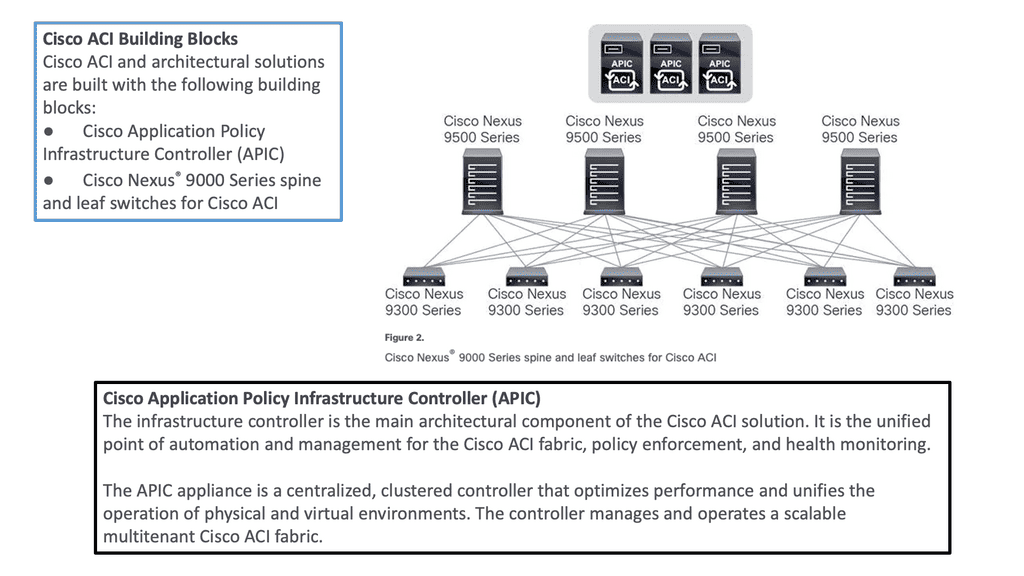
Cisco ACI Components
Diagram: Cisco ACI Components. Source is Cisco

**Hardware-based Underlay**

Server virtualization helped by decoupling workloads from the hardware, making the compute platform more scalable and agile. However, the server is not the main interconnection point for network traffic. So, we need to look at how we could virtualize the network infrastructure similarly to the agility gained from server virtualization.

**Mapping Network Endpoints**

This is carried out with software-defined networking and overlays that could map network endpoints and be spun up and down as needed without human intervention. In addition, the SDN architecture includes an SDN controller and an SDN network that enables an entirely new data center topology.

**Specialized Forwarding Chips**

In ACI, hardware-based underlay switching offers a significant advantage over software-only solutions due to specialized forwarding chips. Furthermore, thanks to Cisco’s ASIC development, ACI brings many advanced features, including security policy enforcement, microsegmentation, dynamic policy-based redirect (inserting external L4-L7 service devices into the data path), or detailed flow analytics—besides the vast performance and flexibility.


Cisco ACI • Fabric Mechanics

ACI Overlay & Underlay Lab

See how ACI builds the fabric: IS-IS provides the underlay, VXLAN carries the overlay, VTEPs connect endpoints, and COOP helps the fabric locate endpoints.
ACI FABRIC MECHANICS OVERLAY UNDERLAY ENDPOINTS VXLAN OVERLAY Leaf 1 VTEP Leaf 2 VTEP IS-IS UNDERLAY Spine Fabric transport Leaf 1 Underlay node Leaf 2 Underlay node COOP Endpoint database Server A Endpoint Server B Endpoint FABRIC TRANSPORT ATTACHMENT ATTACHMENT
IS-IS Underlay
VXLAN Overlay
COOP Control Plane
Endpoint Attachment
Selected Component
ACI Fabric Flow
Start here. ACI separates the physical transport network from the logical VXLAN overlay. Click a tab, node, or connection to explore how the pieces work together.
Technology
IS-IS + VXLAN + VTEP + COOP
Role
Build transport, carry overlay traffic, and locate endpoints.
Why it matters
This separation allows ACI to provide scalable fabric connectivity without making applications depend on the physical topology.

Cisco ACI Components

 Introduction to Leaf and Spine

The Cisco SDN ACI works with a Clos architecture, a fully meshed ACI network. Based on a spine leaf architecture. As a result, every Leaf is physically connected to every Spine, enabling traffic forwarding through non-blocking links. Physically, a leaf switch set creates a leaf layer attached to the spines in a full BIPARTITE graph. This means that each Leaf is connected to each Spine, and each Spine is connected to each Leaf. 

The ACI uses a horizontally elongated Leaf and Spine architecture with one hop to every host in an entirely messed ACI fabric, offering good throughput and convergence needed for today’s applications.

The ACI fabric: Does Not Aggregate Traffic

A key point in the spine-and-leaf design is the fabric concept, like a stretch network. One of the core ideas around a fabric is that it does not aggregate traffic. This does increase data center performance along with a non-blocking architecture. With the spine-leaf topology, we are spreading a fabric across multiple devices.

Required: Increased Bandwidth Available

The result of the fabric is that each edge device has the total bandwidth of the fabric available to every other edge device. This is one big difference from traditional data center designs; we aggregate the traffic by either stacking multiple streams onto a single link or carrying the streams serially.

Challenge: Oversubscription

With the traditional 3-tier design, we aggregate everything at the core, leading to oversubscription ratios that degrade performance. With the ACI Leaf and Spine design, we spread the load across all devices with equidistant endpoints, allowing us to carry the streams parallel.

Required: Routed Multipathing

Then, we have horizontal scaling load balancing.  Load balancing with this topology uses multipathing to achieve the desired bandwidth between the nodes. Even though this forwarding paradigm can be based on Layer 2 forwarding ( bridging) or Layer 3 forwarding ( routing), the ACI leverages a routed approach to the Leaf and Spine design, and we have Equal Cost Multi-Path (ECMP) for both Layer 2 and Layer 3 traffic. 

**Overlay and Underlay Design**

Mapping Traffic:

So you may be asking how we can have Layer 3 routed core and pass Layer 2 traffic. This is done using the overlay, which can map different traffic types to other overlays. So, we can have Layer 2 traffic mapped to an overlay over a routed core.

L3 active-active links: ACI links between the Leaf and the Spine switches are L3 active-active links. Therefore, we can intelligently load balance and traffic steer to avoid issues. We don’t need to rely on STP to block links or involve STP in fixing the topology.

Challenge: IP – Identity & Location

When networks were first developed, there was no such thing as an application moving from one place to another while it was in use. So, the original architects of IP, the communication protocol used between computers, used the IP address to indicate both the identity of a device connected to the network and its location on the network. Today, in the modern data center, we need to be able to communicate with an application or application tier, no matter where it is.

Required: Overlay Encapsulation

One day, it may be in location A and the next in location B, but its identity, which we communicate with, is the same on both days. An overlay is when we encapsulate an application’s original message with the location to which it needs to be delivered before sending it through the network. Once it arrives at its final destination, we unwrap it and deliver the original message as desired.

The identities of the devices (applications) communicating are in the original message, and the locations are in the encapsulation, thus separating the place from the identity. This wrapping and unwrapping is done on a per-packet basis and, therefore, must be done quickly and efficiently.

**Overlay and Underlay Components**

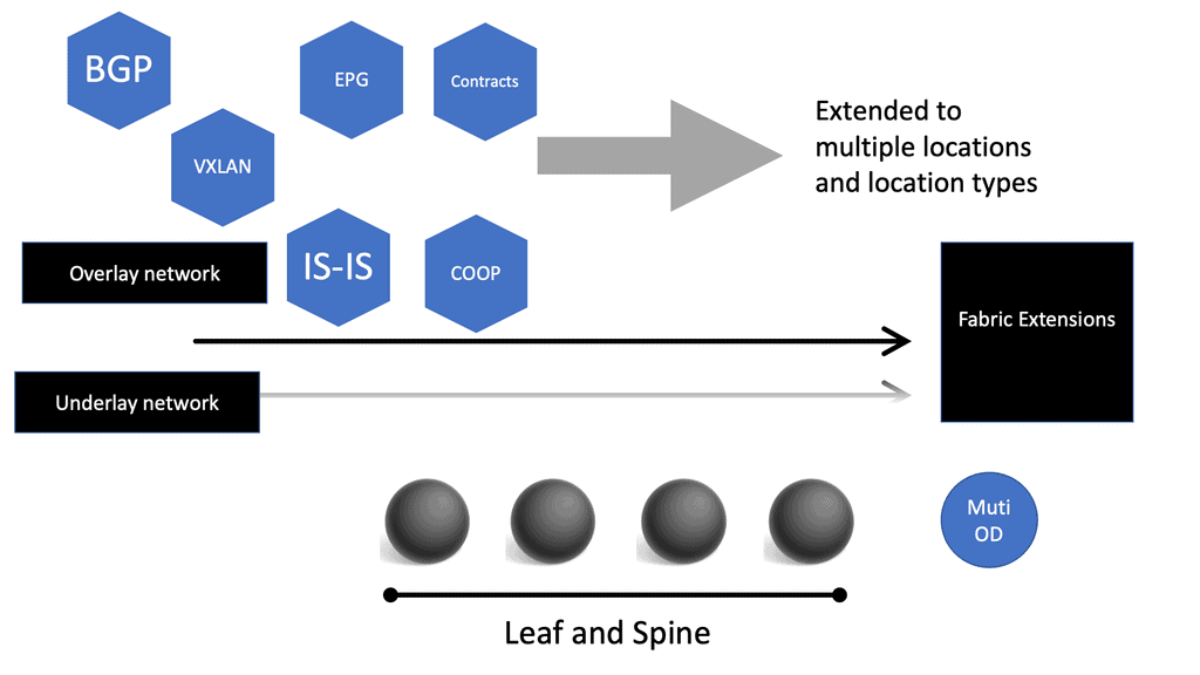
The Cisco SDN ACI has an overlay and underlay concept, which forms a virtual overlay solution. The role of the underlay is to glue together devices so the overlay can work and be built on top. So, the overlay, which is VXLAN, runs on top of the underlay, which is IS-IS. In the ACI, the IS-IS protocol provides the routing for the overlay, which is why we can provide ECMP from the Leaf to the Spine nodes. The routed underlay provides an ECMP network where all leaves can access Spine and have the same cost links. 
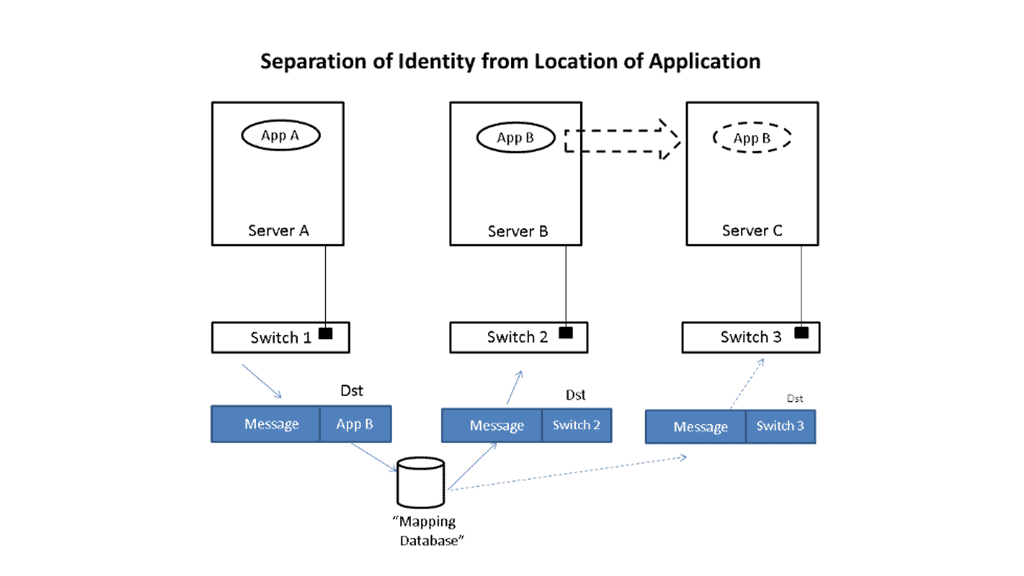
ACI overlay
Diagram: Overlay. Source Cisco

Underlay & Overlay Interaction

Example: 

Let’s take a simple example to illustrate how this is done. Imagine that application App-A wants to send a packet to App-B. App-A is located on a server attached to switch S1, and App-B is initially on switch S2. When App-A creates the message, it will put App-B as the destination and send it to the network; when the message is received at the edge of the network, whether a virtual edge in a hypervisor or a physical edge in a switch, the network will look up the location of App-B in a “mapping” database and see that it is attached to switch S2.

It will then put the address of S2 outside of the original message. So, we now have a new message addressed to switch S2. The network will forward this new message to S2 using traditional networking mechanisms. Note that the location of S2 is very static, i.e., it does not move, so using traditional mechanisms works just fine.

Upon receiving the new message, S2 will remove the outer address and thus recover the original message. Since App-B is directly connected to S2, it can easily forward the message to App-B. App-A never had to know where App-B was located, nor did the network’s core. Only the edge of the network, specifically the mapping database, had to know the location of App-B. The rest of the network only had to see the location of switch S2, which does not change.

Let’s now assume App-B moves to a new location switch S3. Now, when App-A sends a message to App-B, it does the same thing it did before, i.e., it addresses the message to App-B and gives the packet to the network. The network then looks up the location of App-B and finds that it is now attached to switch S3. So, it puts S3’s address on the message and forwards it accordingly. At S3, the message is received, the outer address is removed, and the original message is delivered as desired.

App-A did not track App-B’s movement at all. App-B’s address identified It, while the switch’s address, S2 or S3, identified its location. App-A can communicate freely with App-B no matter where It is located, allowing the system administrator to place App-B in any area and move it as desired, thus achieving the flexibility needed in the data center.

Multicast Distribution Tree (MDT)

We have a Multicast Distribution Tree MDT tree on top that is used to forward multi-destination traffic without having loops. The Multicast distribution tree is dynamically built to send flood traffic for specific protocols. Again, it does this without creating loops in the overlay network. The tunnels created for the endpoints to communicate will have tunnel endpoints. The tunnel endpoints are known as the VTEP. The VTEP addresses are assigned to each Leaf switch from a pool that you specify in the ACI startup and discovery process.

Normalize the transports

VXLAN tunnels in the ACI fabric normalize the transports in the ACI network. Therefore, traffic between endpoints can be delivered using the VXLAN tunnel, resulting in any transport network regardless of the device connecting to the fabric. 

So, using VXLAN in the overlay enables any network, and you don’t need to configure anything special on the endpoints for this to happen. The endpoints that connect to the ACI fabric do not need special software or hardware. The endpoints send regular packets to the leaf nodes they are connected to directly or indirectly. As endpoints come online, they send traffic to reach a destination.

Bridge Domains and VRF

Therefore, the Cisco SDN ACI under the hood will automatically start to build the VXLAN overlay network for you. The VXLAN network is based on the Bridge Domain (BD), or VRF ACI constructs deployed to the leaf switches. The Bridge Domain is for Layer 2, and the VRF is for Layer 3. So, as devices come online and send traffic to each other, the overlay will grow in reachability in the Bridge Domain or the VRF. 

Direct host routing for endoints

Routing within each tenant, VRF is based on host routing for endpoints directly connected to the Cisco ACI fabric. For IPv4, the host routing is based on the /32, giving the ACI a very accurate picture of the endpoints. Therefore, we have exact routing in the ACI.  In conjunction, we have a COOP database that runs on the Spines and offers remarkably optimized fabric to know where all the endpoints are located.

To facilitate this, every node in the fabric has a TEP address, and we have different types of TEPs depending on the device’s role. The Spine and the Leaf will have TEP addresses but will differ from each other.
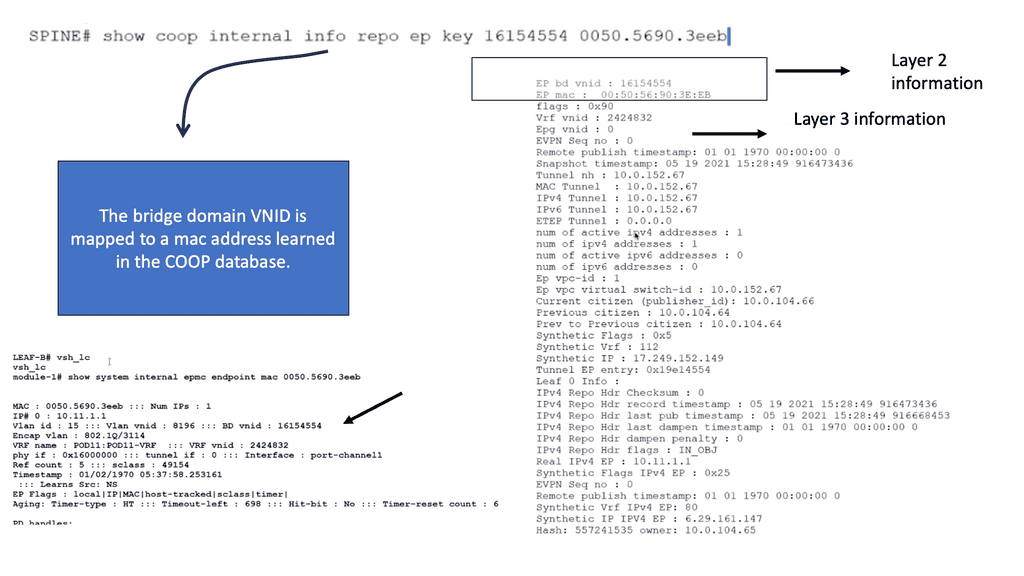
COOP database
Diagram: COOP database

The VTEP and PTEP

The Leaf’s nodes are the Virtual Tunnel Endpoints (VTEP), which are also known as the physical tunnel endpoints (PTEP) in ACI. These PTEP addresses represent the “WHERE” in the ACI fabric where an endpoint lives. Cisco ACI uses a dedicated VRF and a subinterface of the uplinks from the Leaf to the Spines as the infrastructure to carry VXLAN traffic. In Cisco ACI terminology, the transport infrastructure for VXLAN traffic is known as Overlay-1, which is part of the tenant “infra.” 

**The Spine TEP**

The Spines also have a PTEP and an additional proxy TEP, which are used for forwarding lookups into the mapping database. The Spines have a global view of where everything is, which is held in the COOP database synchronized across all Spine nodes. All of this is done automatically for you.

**Anycast IP Addressing**

For this to work, the Spines have an Anycast IP address known as the Proxy TEP. The Leaf can use this address if they do not know where an endpoint is, so they ask the Spine for any unknown endpoints, and then the Spine checks the COOP database. This brings many benefits to the ACI solution, especially for traffic optimizations and reducing flooded traffic in the ACI. Now, we have an optimized fabric for better performance.

The ACI optimizations

**Mouse and elephant flow**

This provides better performance for load balancing different flows. For example, in most data centers, we have latency-sensitive flows, known as mouse flows, and long-lived bandwidth-intensive flows, known as elephant flows. 

The ACI has more precisely load-balanced traffic using algorithms that optimize mouse and elephant flows and distribute traffic based on flow lets: flow let load-balancing. Within a Leaf, Spine latency is low and consistent from port to port.

The max latency of a packet from one port to another in the architecture is the same regardless of the network size. So you can scale the network without degrading performance. Scaling is often done on a POD-by-POD basis. For more extensive networks, each POD would be its Leaf and Spine network.

**ARP optimizations: Anycast gateways**

The ACI comes by default with a lot of traffic optimizations. Firstly, instead of using an ARP and broadcasting across the network, that can hamper performance. The Leaf can assume that the Spine will know where the destination is ( and it does via the COOP database ), so there is no need to broadcast to everyone to find a destination.

If the Spine knows where the endpoint is, it will forward the traffic to the other Leaf. If not, it will drop it.

**Fabric anycast addressing**

This again adds performance benefits to the ACI solution as the table sizes on the Leaf switches can be kept smaller than they would if they needed to know where all the destinations were, even if they were not or never needed to communicate with them. On the Leaf, we have an Anycast address too.

These fabric Anycast addresses are available for Layer 3 interfaces. On the Leaf ToR, we can establish an SVI that uses the same MAC address on every ToR; therefore, when an endpoint needs to route to a ToR, it doesn’t matter which ToR you use. The Anycast Address is spread across all ToR leaf switches. 

**Pervasive gateway**

Now we have predictable latency to the first hop, and you will use the local route VRF table within that ToR instead of traversing the fabric to a different ToR. This is the Pervasive Gateway feature that is used on all Leaf switches. The Cisco ACI has many advanced networking features, but the pervasive gateway is my favorite. It does take away all the configuration mess we had in the past.

ACI Cisco: Integrations

  • Routing Control Platform

Then came along Cisco SDN ACI, the ACI Cisco, which operates differently from the traditional data center with an application-centric infrastructure. The Cisco application-centric infrastructure achieves resource elasticity with automation through standard policies for data center operations and consistent policy management across multiple on-premises and cloud instances.

  • Extending & Integrating the fabric

What makes the Cisco ACI interesting is its several vital integrations. I’m not talking about extending the data center with multi-pod and multi-site, for example, with AlgoSec, Cisco AppDynamics, and SD-WAN. AlgoSec enables secure application delivery and policy across hybrid network estates, while AppDynamic lives in a world of distributed systems Observability. SD-WAN enabled path performance per application with virtual WANs.

Cisco Multi-Pod Design

Cisco ACI Multi-Pod is part of the “Single APIC Cluster / Single Domain” family of solutions, as a single APIC cluster is deployed to manage all the interconnected ACI networks. These separate ACI networks are named “pods,” Each looks like a regular two-tier spine-leaf topology. The same APIC cluster can manage several pods, and to increase the resiliency of the solution, the various controller nodes that make up the cluster can be deployed across different pods.
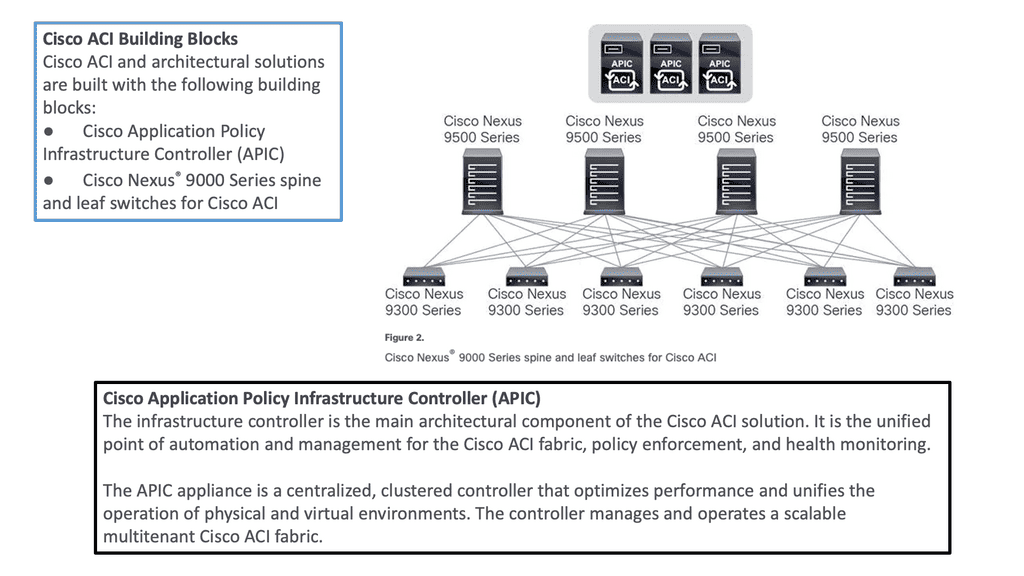
ACI Multi-Pod
Diagram: Cisco ACI Multi-Pod. Source Cisco.

ACI Cisco and AlgoSec

With AlgoSec integrated with the Cisco ACI, we can now provide automated security policy change management for multi-vendor devices and risk and compliance analysis. The AlgoSec Security Management Solution for Cisco ACI extends ACI’s policy-driven automation to secure various endpoints connected to the Cisco SDN ACI fabric.

These simplify network security policy management across on-premises firewalls, SDNs, and cloud environments. They also provide visibility into ACI’s security posture, even across multi-cloud environments. 

ACI Cisco and AppDynamics 

Then, with AppDynamics, we are heading into Observability and controllability. Now, we can correlate app health and network for optimal performance, deep monitoring, and fast root-cause analysis across complex distributed systems with numbers of business transactions that need to be tracked.

This will give your teams complete visibility of your entire technology stack, from your database servers to cloud-native and hybrid environments. In addition, AppDynamics works with agents that monitor application behavior in several ways. We will examine the types of agents and how they work later in this post.

ACI Cisco and SD-WAN 

SD-WAN brings a software-defined approach to the WAN. These enable a virtual WAN architecture to leverage transport services such as MPLS, LTE, and broadband internet services. So, SD-WAN is not a new technology; its benefits are well known, including improving application performance, increasing agility, and, in some cases, reducing costs.

The Cisco ACI and SD-WAN integration makes active-active data center design less risky than in the past. The following figures give a high-level overview of the Cisco ACI and SD-WAN integration. For pre-information generic to SD-WAN, go here: SD-WAN Tutorial
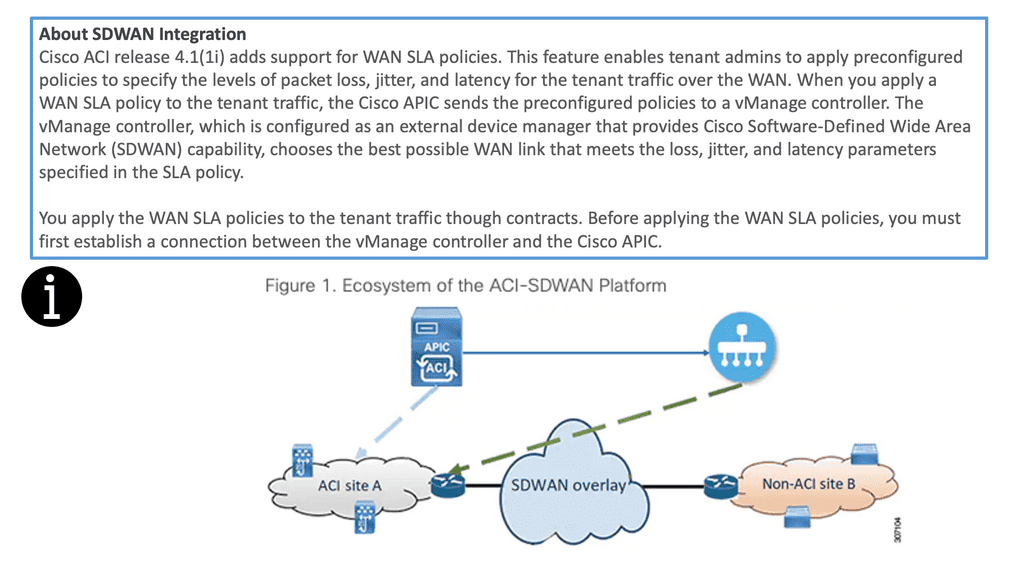
SD WAN integration
Diagram: Cisco ACI and SD-WAN integration

The Cisco SDN ACI with SD-WAN integration helps ensure an excellent application experience by defining application Service-Level Agreement (SLA) parameters. Cisco ACI releases 4.1(1i) and adds support for WAN SLA policies. This feature enables admins to apply pre-configured policies to specify the packet loss, jitter, and latency levels for the tenant traffic over the WAN.

When you apply a WAN SLA policy to the tenant traffic, the Cisco APIC sends the pre-configured policies to a vManage controller. The vManage controller, configured as an external device manager that provides SDWAN capability, chooses the best WAN link that meets the loss, jitter, and latency parameters specified in the SLA policy.

Openshift and Cisco SDN ACI

OpenShift Container Platform (formerly known as OpenShift Enterprise) or OCP is Red Hat’s offering for the on-premises private platform as a service (PaaS). OpenShift is based on the Origin open-source project and is a Kubernetes distribution, the defacto for container-based virtualization. The foundation of the OpenShift networking SDN is based on Kubernetes and, therefore, shares some of the same networking technology along with some enhancements, such as the OpenShift route construct.

Other data center integrations

Cisco SDN ACI has another integration with Cisco DNA Center/ISE that maps user identities consistently to endpoints and apps across the network, from campus to the data center. Cisco Software-Defined Access (SD-Access) provides policy-based automation from the edge to the data center and the cloud.

Cisco SD-Access provides automated end-to-end segmentation to separate user, device, and application traffic without redesigning the network. This integration will enable customers to use standard policies across Cisco SD-Access and Cisco ACI, simplifying customer policy management using Cisco technology in different operational domains.

OpenShift and Cisco ACI

OpenShift does this with an SDN layer and enhances Kubernetes networking to create a virtual network across all the nodes. It is made with the Open Switch standard. For OpenShift SDN, this pod network is established and maintained by the OpenShift SDN, configuring an overlay network using a virtual switch called the OVS bridge. This forms an OVS network that gets programmed with several OVS rules. The OVS is a popular open-source solution for virtual switching.

OpenShift SDN plugin

We mentioned that you could tailor the virtual network topology to suit your networking requirements, which can be determined by the OpenShift SDN plugin and the SDN model you select. With the default OpenShift SDN, several modes are available. This level of SDN mode you choose is concerned with managing connectivity between applications and providing external access to them. Some modes are more fine-grained than others. The Cisco ACI plugins offer the most granular.

Integrating ACI and OpenShift platform

The Cisco ACI CNI plugin for the OpenShift Container Platform provides a single, programmable network infrastructure, enterprise-grade security, and flexible micro-segmentation possibilities. The APIC can provide all networking needs for the workloads in the cluster. Kubernetes workloads become fabric endpoints, like Virtual Machines or Bare Metal endpoints.

Cisco ACI CNI Plugin

The Cisco ACI CNI plugin extends the ACI fabric capabilities to OpenShift clusters to provide IP Address Management, networking, load balancing, and security functions for OpenShift workloads. In addition, the Cisco ACI CNI plugin connects all OpenShift Pods to the integrated VXLAN overlay provided by Cisco ACI.

Cisco SDN ACI and AppDynamics

AppDynamis overview

So, an application requires multiple steps or services to work. These services may include logging in and searching to add something to a shopping cart. These services invoke various applications, web services, third-party APIs, and databases, known as business transactions.

The user’s critical path

A business transaction is the essential user interaction with the system and is the customer’s critical path. Therefore, business transactions are the things you care about. If they start to go, your system will degrade. So, you need ways to discover your business transactions and determine if there are any deviations from baselines. This should also be automated, as learning baseline and business transitions in deep systems is nearly impossible using the manual approach.

So, how do you discover all these business transactions?

AppDynamics automatically discovers business transactions and builds an application topology map of how the traffic flows. A topology map can view usage patterns and hidden flows, acting as a perfect feature for an Observability platform.

AppDynamic topology

AppDynamics will automatically discover the topology for all of your application components. It can then build a performance baseline by capturing metrics and traffic patterns. This allows you to highlight issues when services and components are slower than usual.

AppDynamics uses agents to collect all the information it needs. The agent monitors and records the calls that are made to a service. This is from the entry point and follows executions along its path through the call stack. 

Types of Agents for Infrastructure Visibility

If the agent is installed on all critical parts, you can get information about that specific instance, which can help you build a global picture. So we have an Application Agent, Network Agent, and Machine Agent for Server visibility and Hardware/OS.

  • App Agent: This agent will monitor apps and app servers, and example metrics will be slow transitions, stalled transactions, response times, wait times, block times, and errors.  
  • Network Agent: This agent monitors the network packets, TCP connection, and TCP socket. Example metrics include performance impact Events, Packet loss, and retransmissions, RTT for data transfers, TCP window size, and connection setup/teardown.
  • Machine Agent Server Visibility: This agent monitors the number of processes, services, caching, swapping, paging, and querying. Example Metrics include hardware/software interrupts, virtual memory/swapping, process faults, and CPU/DISK/Memory utilization by the process.
  • Machine Agent: Hardware/OS – disks, volumes, partitions, memory, CPU. Example metrics: CPU busy time, MEM utilization, and pieces file.

Automatic establishment of the baseline

A baseline is essential, a critical step in your monitoring strategy. Doing this manually is hard, if not impossible, with complex applications. It is much better to have this done automatically. You must automatically establish the baseline and alert yourself about deviations from it.

This will help you pinpoint the issue faster and resolve it before it can be affected. Platforms such as AppDynamics can help you here. Any malicious activity can be seen from deviations from the security baseline and performance issues from the network baseline.

Cisco ACI • Policy & Application Flow

ACI Policy & Application Flow Lab

Follow how ACI turns application requirements into policy: Tenant → VRF → Bridge Domain → EPG → Contract → Application Flow.
ACI POLICY MODEL TENANT & NETWORK CONTEXT APPLICATION GROUPS POLICY APPLICATION FLOW Tenant Administrative container NETWORK CONTEXT VRF Layer 3 routing context Bridge Domain Endpoint network Web EPG Web application endpoints App EPG Application endpoints CONTRACT ALLOWED APPLICATION FLOW Web Servers Endpoint group App Servers Endpoint group
Tenant / VRF
Network
EPG
Contract
Application Flow
Selected Component
ACI Policy Model
ACI expresses application connectivity through a hierarchy of objects. Start at the Tenant and follow the model down to the application flow.
Object
Tenant → VRF → Bridge Domain → EPG
Policy
Contracts define which EPGs can communicate.
Why it matters
ACI lets administrators describe application connectivity as policy rather than configuring every individual switch interface.

Summary: Cisco ACI Components

In the ever-evolving world of networking, organizations are constantly seeking ways to enhance their infrastructure’s performance, security, and scalability. Cisco ACI (Application Centric Infrastructure) presents a cutting-edge solution to these challenges. By unifying physical and virtual environments and leveraging network automation, Cisco ACI revolutionizes how networks are built and managed.

Understanding Cisco ACI Architecture

At the core of Cisco ACI lies a robust architecture that enables seamless integration between applications and the underlying network infrastructure. The architecture comprises three key components:

1. Application Policy Infrastructure Controller (APIC):

The APIC serves as the centralized management and policy engine of Cisco ACI. It provides a single point of control for configuring and managing the entire network fabric. Through its intuitive graphical user interface (GUI), administrators can define policies, allocate resources, and monitor network performance.

2. Nexus Switches:

Cisco Nexus switches form the backbone of the ACI fabric. These high-performance switches deliver ultra-low latency and high throughput, ensuring optimal data transfer between applications and the network. Nexus switches provide the necessary connectivity and intelligence to enable the automation and programmability features of Cisco ACI.

3. Application Network Profiles:

Application Network Profiles (ANPs) are a fundamental aspect of Cisco ACI. ANPs define the policies and characteristics required for specific applications or application groups. By encapsulating network, security, and quality of service (QoS) policies within ANPs, administrators can streamline the deployment and management of applications.

The Power of Network Automation

One of the most compelling aspects of Cisco ACI is its ability to automate network provisioning, configuration, and monitoring. Through the APIC’s powerful automation capabilities, network administrators can eliminate manual tasks, reduce human errors, and accelerate the deployment of applications. With Cisco ACI, organizations can achieve greater agility and operational efficiency, enabling them to rapidly adapt to evolving business needs.

Security and Microsegmentation with Cisco ACI

Security is a paramount concern for every organization. Cisco ACI addresses this by providing robust security features and microsegmentation capabilities. With microsegmentation, administrators can create granular security policies at the application level, effectively isolating workloads and preventing lateral movement of threats. Cisco ACI also integrates with leading security solutions, enabling seamless network enforcement and threat intelligence sharing.

Conclusion

Cisco ACI is a game-changer in the realm of network automation and infrastructure management. Its innovative architecture, coupled with powerful automation capabilities, empowers organizations to build agile, secure, and scalable networks. By leveraging Cisco ACI’s components, businesses can unlock new levels of efficiency, flexibility, and performance, ultimately driving growth and success in today’s digital landscape.

kubernetes security best practice

Kubernetes Security Best Practice

Kubernetes Securtiy Best Practices

Kubernetes provides a powerful control plane for deploying and operating containerised workloads, but its flexibility also creates a broad security surface. A production cluster contains APIs, identities, workloads, container images, secrets, network paths, nodes, admission controls, and supporting infrastructure. Securing Kubernetes therefore requires controls across the entire application and platform lifecycle.

The objective is not simply to secure the Kubernetes API or restrict who can create pods. A mature Kubernetes security strategy should reduce unnecessary privileges, control what workloads can run, restrict communication, protect sensitive data, monitor activity, and provide mechanisms for detecting and responding to abnormal behaviour.

Identity and Least Privilege

The Kubernetes API is a critical security boundary. Access should be based on authenticated identities and carefully defined authorisation policies.

Role-Based Access Control (RBAC) should follow the principle of least privilege, giving users and service accounts only the permissions they require. Broad cluster-wide permissions should be avoided where namespace-level access is sufficient.

Service accounts also require careful management. Workloads should not automatically receive powerful credentials simply because they run inside the cluster.

Workload Security

Pods and containers should run with the minimum privileges required by the application. Security contexts can be used to control user and group IDs, privilege escalation, Linux capabilities, filesystem behaviour, and other runtime characteristics.

Privileged containers and unnecessary host access should be treated as high-risk configurations because they can significantly weaken workload isolation.

Where appropriate, organisations should use mechanisms such as Pod Security Standards and admission policies to prevent insecure workload configurations from being deployed in the first place.

Container Image and Supply Chain Security

Kubernetes security begins before a workload reaches the cluster.

Container images should originate from trusted registries and controlled build pipelines. Images should be scanned for known vulnerabilities, unnecessary packages should be removed, and image provenance should be established where possible.

Production deployments can use immutable image references or digests rather than relying solely on mutable tags. Image signing and verification can provide additional assurance that approved artifacts are being deployed.

Software supply-chain security should also consider dependencies, build systems, CI/CD credentials, source repositories, and the tools responsible for producing deployment artifacts.

Network Policies and Segmentation

Kubernetes networking can allow workloads to communicate broadly unless appropriate restrictions are implemented.

NetworkPolicy can be used to define which pods are permitted to communicate with other workloads and external destinations. A default-deny approach can provide a stronger starting point, with only required communication paths explicitly permitted.

Segmentation should be based on application architecture and trust relationships rather than simply treating the cluster as one trusted network.

Ingress and egress paths also require protection. Externally exposed services should use appropriate authentication, encryption, rate limiting, and application-layer security controls where required.

Secrets and Sensitive Data

Passwords, API keys, certificates, tokens, and other sensitive information should be handled carefully throughout the Kubernetes lifecycle.

Kubernetes Secrets provide a mechanism for distributing sensitive configuration, but they should not automatically be considered a complete secrets-management solution. Access permissions, encryption at rest, auditability, rotation, and integration with external secrets-management systems should be considered according to the sensitivity of the workload.

Credentials should also be prevented from appearing in container images, source repositories, configuration files, or application logs.

API and Control Plane Security

The Kubernetes API server is one of the most important security components in the platform. Authentication, authorisation, encryption, audit logging, network exposure, and secure configuration should all be carefully controlled.

The control plane should not be unnecessarily exposed to untrusted networks. Administrative access should use strong authentication and tightly controlled privileges.

Admission controls can provide another important enforcement layer by validating or rejecting workloads that violate organisational security policies before they are accepted by the cluster.

Node and Runtime Security

Kubernetes workloads ultimately execute on nodes, making node security an essential part of cluster security.

Nodes should be patched and hardened, unnecessary services should be removed, and access to the underlying operating system should be restricted. Container runtimes and supporting Kubernetes components should also be kept current.

A compromised node can potentially affect multiple workloads, so workload isolation, node segmentation, runtime protections, and rapid replacement mechanisms are important components of defence in depth.

Logging, Monitoring, and Auditing

Security controls need visibility to be effective.

Kubernetes audit logs can provide information about API activity, while application logs, container runtime events, node telemetry, network data, and security alerts can provide additional context.

Monitoring should look for behaviours such as unexpected privilege changes, unusual API activity, suspicious workload creation, abnormal network connections, failed authentication attempts, and unexpected changes to cluster configuration.

Centralised collection and correlation can help security teams distinguish isolated operational events from indicators of a broader compromise.

Patch and Vulnerability Management

Kubernetes environments contain multiple software layers, including the Kubernetes components themselves, operating systems, container runtimes, images, applications, libraries, and infrastructure integrations.

Security updates should therefore be treated as a continuous lifecycle process. Vulnerability management should identify affected components, prioritise risk, apply patches or rebuild images, and verify that remediation has been successful.

Security as a Continuous Process

Kubernetes security is not achieved through a single configuration setting. It is a layered operating model:

Secure Identity → Least Privilege → Trusted Images → Admission Controls → Isolated Networking → Protected Secrets → Hardened Nodes → Runtime Monitoring → Audit and Response

The strongest Kubernetes environments assume that credentials can be compromised, applications can contain vulnerabilities, and individual workloads can fail or become malicious.

The objective is therefore to limit what a compromised identity or workload can access, detect suspicious behaviour quickly, and provide reliable mechanisms for containment and recovery.

By treating Kubernetes security as a continuous combination of prevention, isolation, detection, and response, organisations can significantly reduce the potential impact of vulnerabilities while maintaining the flexibility that makes Kubernetes valuable for modern application platforms.

Interactive Kubernetes Security Lab

Kubernetes Security Posture Builder

Start with a weak Kubernetes security posture and progressively harden the cluster. Select controls across identity, workloads, network, supply chain and observability, then validate the resulting security posture.

Scenario

Harden a production Kubernetes cluster

The cluster is running workloads but several security controls are missing. Your objective is to reduce privilege, constrain workload behaviour, protect the supply chain and improve visibility.

12
Security Score / 100
CRITICAL POSTURE

Security controls

Select controls you would introduce as part of a layered Kubernetes security strategy.

Identity & Access
Workload & Runtime
Network Security
Supply Chain & Data
Observability

Posture analysis

The score is a teaching aid. Real Kubernetes risk depends on architecture, workload sensitivity, threat model and implementation.

Identity protection LOW
Workload isolation LOW
Network controls LOW
Supply chain LOW
Visibility LOW
# Hardened configuration summary
RBAC: not configured
networkPolicy: not configured
podSecurity: not configured
imageVerification: not configured
auditLogging: not configured
[READY] Kubernetes security posture assessment initialized
[INFO] Cluster contains multiple unprotected security boundaries
Engineering takeaway: Kubernetes security is layered. RBAC controls API permissions, Pod Security controls workload security requirements, NetworkPolicy controls permitted network communication, image controls address supply-chain risk, and audit logging provides visibility into activity. No single control provides complete protection.

Highlights: Kubernetes Securtiy Best Practices

The Move to the Cloud

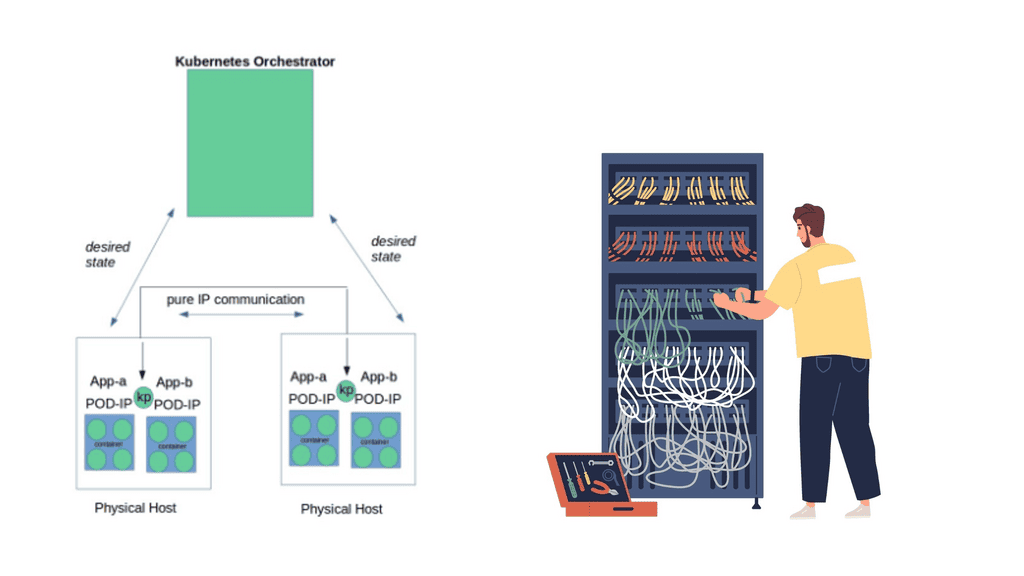
– Cloud workloads are typically managed with Kubernetes as they move to the cloud. Kubernetes’ popularity can be attributed to its declarative nature: It abstracts infrastructure details and allows users to specify which workloads they want to run. App teams only need to set up configurations in Kubernetes to deploy their applications; they don’t need to worry about how workloads are deployed, where workloads run, or other details like networking.

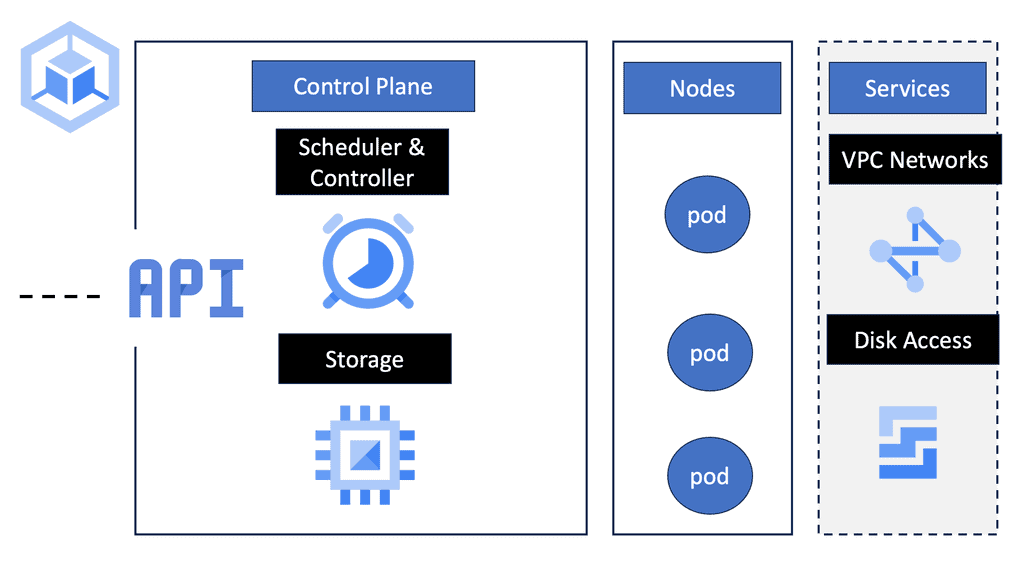
– To achieve this abstraction, Kubernetes manages the creation, shutdown, and restart of workloads. As a typical implementation, workloads can be scheduled on any available network resource (physical host or virtual machine) based on their requirements. Kubernetes clusters consist of resources that run workloads.

– As needed, Kubernetes restarts unresponsive nodes based on the status of workloads (which are deployed as pods in Kubernetes). It also manages the network between pods and hosts and pod communication. Network plug-ins allow you to select the type of networking technology. Although the network plug-in has some configuration options, you cannot directly control networking behavior (either IP address assignment or scheduling).

An Orchestration Tool

Kubernetes has quickly become the de facto orchestration tool for deploying Kubernetes microservices and containers to the cloud. It offers a way of running groups of resources as a cluster and provides an entirely different abstraction level to single container deployments, allowing better management. From a developer’s perspective, it will enable the rolling out of new features that align with business demands while not worrying about the underlying infrastructure complexities.

Security Pitfalls: But there are pitfalls to consider when considering Kubernetes security best practices and Docker container security. Security teams must maintain the required visibility, compliance, and control, which is difficult because they do not control the underlying infrastructure. To help you on your security journey, you should introduce a chaos engineering project, specifically chaos engineering kubernetes.

This will help you find the breaking points and performance-related issues that may indirectly create security gaps in your Kubernetes cluster, making the cluster acceptable to Kubernetes attack vectors.

Kubernetes Security Best Practices

Kubernetes security is about protecting clusters, nodes, pods, containers, identities, and the control plane in a dynamic, distributed environment. Because Kubernetes is highly automated and highly scalable, misconfigurations can spread quickly — so security must be layered, enforced, and continuously verified.

Below is a clean, easy‑to‑copy, production‑grade breakdown you can drop directly into your notes, blog, or architecture docs.


1. Secure the Control Plane

  • API server hardening — restrict access, enforce RBAC, enable audit logs.

  • etcd encryption — encrypt secrets at rest.

  • TLS everywhere — secure all communication between components.

  • Network segmentation — isolate control plane from worker nodes.

The control plane is the brain — protect it first.


2. Identity & Access Security

  • RBAC — least‑privilege roles and role bindings.

  • Service Accounts — avoid using default service accounts.

  • OIDC integration — integrate with enterprise identity providers.

  • Pod Security Standards — enforce restricted policies.

Identity is the new perimeter.


3. Container & Runtime Security

  • Image scanning — scan images for CVEs before deployment.

  • Trusted registries — block untrusted sources.

  • Drop capabilities — remove unnecessary Linux capabilities.

  • Seccomp profiles — restrict dangerous syscalls.

  • AppArmor / SELinux — enforce mandatory access control.

  • Read‑only root filesystem — prevent tampering.

Containers must be locked down by default.


4. Network Security

  • NetworkPolicies — restrict pod‑to‑pod communication.

  • Service Mesh — mTLS, identity‑aware routing, policy enforcement.

  • Ingress security — TLS, WAF, rate limiting.

  • Egress control — restrict outbound traffic.

Kubernetes networking is open by default — close it.


5. Secrets & Config Security

  • Encrypt secrets at rest

  • Use external secret stores (Vault, AWS KMS, Azure Key Vault)

  • Avoid secrets in environment variables

  • Rotate secrets regularly

Secrets must never be treated as normal config.


6. Node & OS Security

  • Harden nodes — disable unused services, enforce firewall rules.

  • Use minimal OS images — reduce attack surface.

  • Keep nodes patched — automate updates.

  • Limit root access — protect kubelet and container runtime.

Nodes are the foundation — secure them aggressively.


7. Supply Chain Security

  • Image signing — verify trusted images (cosign, sigstore).

  • Admission controllers — block unsafe deployments.

  • Policy engines — enforce OPA Gatekeeper or Kyverno.

  • SBOMs — track dependencies and vulnerabilities.

Supply chain attacks are now the #1 cloud threat.


8. Observability & Runtime Monitoring

  • Audit logs — track API calls and changes.

  • Prometheus + Grafana — metrics and dashboards.

  • OpenTelemetry — traces and logs.

  • Falco — detect runtime anomalies.

  • Cluster health monitoring — detect drift and misconfigurations.

Visibility is mandatory for security.


Outcome

Kubernetes security best practices deliver:

  • hardened control plane

  • secure workloads and containers

  • strong identity enforcement

  • Zero Trust network segmentation

  • protected supply chain

  • continuous compliance

  • runtime threat detection

  • reliable, production‑grade cluster posture

Kubernetes becomes a secure, resilient, enterprise‑ready platform.

Before you proceed, you may find the following posts helpful:

  1. OpenShift SDN
  2. Hands On Kubernetes
  3. Kubernetes Network Namespace


Kubernetes Securtiy Best Practices

Incident Investigation

Kubernetes Attack Path Investigation Lab

A workload has been compromised. Investigate the evidence and reconstruct how an attacker could move from a compromised Pod toward Kubernetes API resources, secrets and other workloads.

Incident Scenario

Compromised workload detected

The application Pod is behaving suspiciously. Determine which security weaknesses contribute to the attack path. Select the evidence that should be investigated before drawing a conclusion.

Investigation evidence

Select the evidence you believe contributes to the attack path. Not every Kubernetes workload has every weakness.

Potential attack path

Your investigation should connect workload compromise with identity, authorization, API access and lateral movement.

Compromised Pod
↓
ServiceAccount Identity
↓
Kubernetes API Server
↓
Excessive RBAC Permissions
↓
Secrets / Workloads
↓
Lateral Movement
Workload UNDER INVESTIGATION
API Access UNKNOWN
Authorization UNKNOWN
Lateral Movement UNKNOWN
[READY] Incident investigation initialized
[INFO] Select evidence before running the investigation
Engineering takeaway: a Kubernetes ServiceAccount does not automatically have full API permissions. The security risk depends on the RBAC bindings assigned to that identity. Attackers often chain multiple weaknesses: workload compromise, excessive permissions, API access, secrets exposure and unrestricted network paths.

As workloads move to the cloud, Kubernetes is the most common orchestrator for managing them. Kubernetes’s popularity is due to its declarative nature: It abstracts infrastructure details and allows users to specify the workloads they want to run and the desired outcomes.

However, securing, observing, and troubleshooting containerized workloads on Kubernetes is challenging. It requires a range of considerations, from infrastructure choices and cluster configuration to deployment controls, runtime, and network security. Keep in mind that Kubernetes is not secure by default.

Kubernetes Architecture

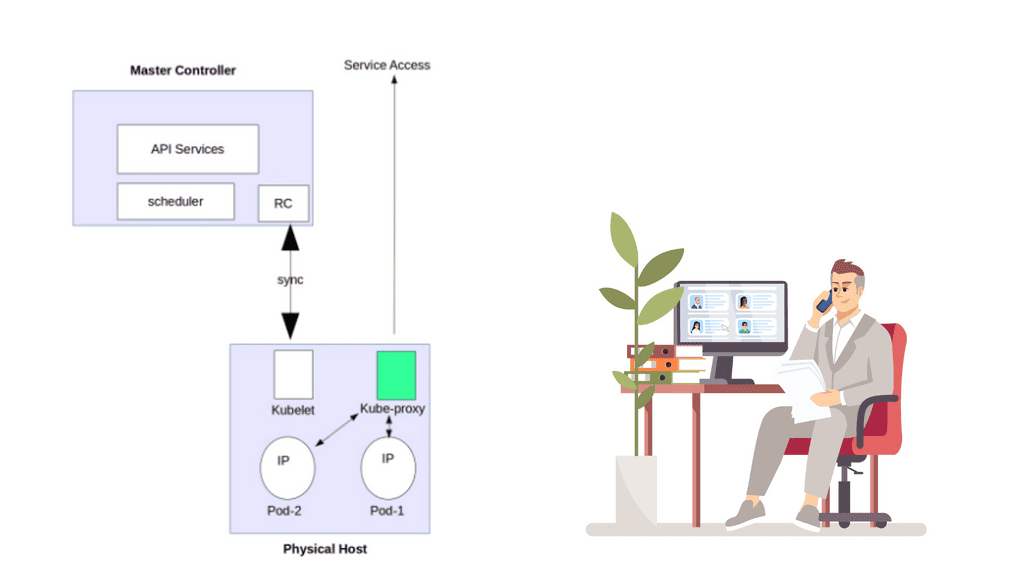
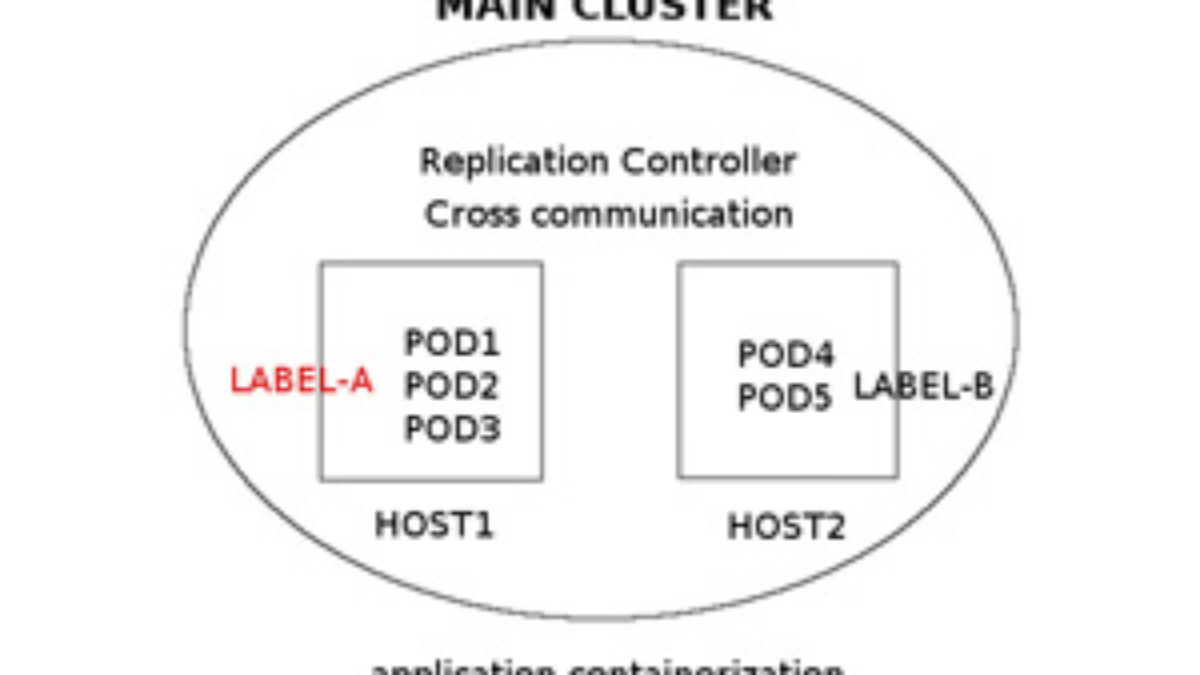
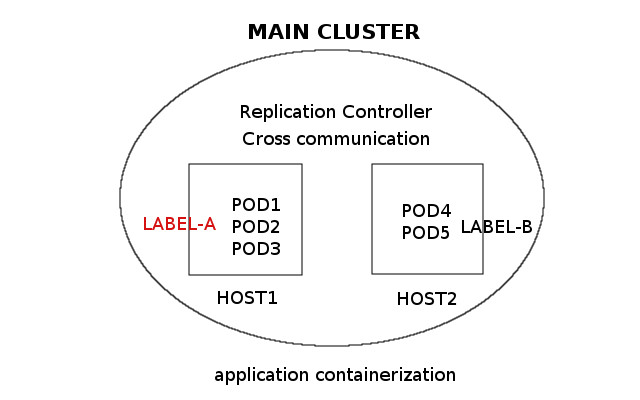
Before we delve into some of Kubernetes’ security best practices and attack vectors, let’s recap Kubernetes Networking 101. Within Kubernetes, four common constructs will always be: pods, services, labels, and replication controllers. All constructs combine to create an entire application stack.

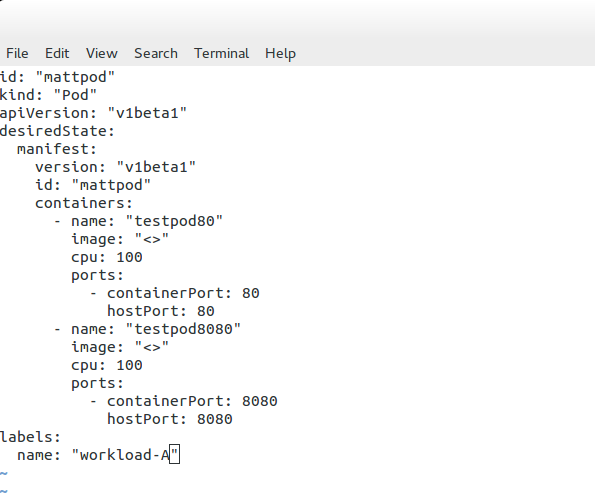
Pods

Pods are the smallest scheduling unit within a Kubernetes environment. They hold a set of closely related containers. Containers within a Pod share the same network namespace and must be installed on the same physical host. This enables processing locally without latency traversing from one physical host to another.

Labels

As I said, containers within a pod share the same network namespaces. As a result, the containers within a pod can reach each other’s ports on localhost. Therefore, we need to introduce a tagging mechanism known as labels. Labels offer another level of abstraction by tagging items as a group. They are essentially key-value pairs categorizing constructs. For example, labels distinguish containers as part of an application stack’s web or database tier.

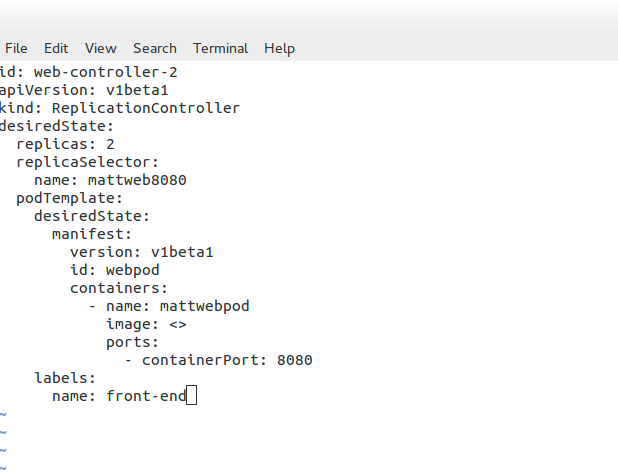
Replication Controllers (RC)

Then, we have replication controllers. Their primary purpose is to manage the pods’ lifecycle and state by ensuring the desired state always matches the actual state. The replication controllers ensure the correct numbers are running by creating or removing pods at any time.

Services

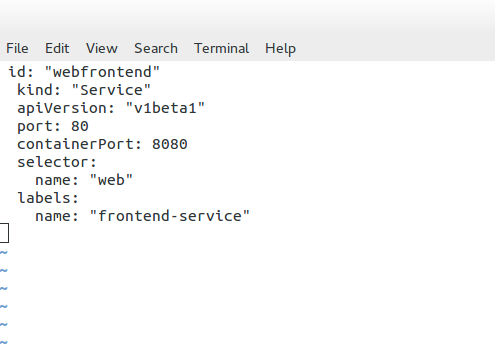
Other standard Kubernetes components are services. Services represent groups of pods acting as one, allowing pods to access services in other pods without directing service-destined traffic to the pod IP. Pods are targeted by accessing a service that represents a group of pods. A service can be analogous to a load balancer in front of a pod accepting front-end service-destined traffic.

Kubernetes API server

Finally, the Kubernetes API server validates and configures data for the API objects, which include the constructs mentioned above—pods, services, and replication controllers, to name a few. Also, consider the practice of chaos engineering to understand your Kubernetes environment better and test for resilience and breaking points. Chaos engineering Kubernetes breaks your system to help you better understand it.

Listing Kubernetes Security Controls

  • Regularly Update Kubernetes:

Keeping your Kubernetes environment up to date is one of the fundamental aspects of maintaining a secure cluster. Regularly updating Kubernetes ensures you have the latest security patches and bug fixes, reducing the risk of potential vulnerabilities.

  • Enable RBAC (Role-Based Access Control):

Implementing Role-Based Access Control (RBAC) is crucial for controlling and restricting user access within your Kubernetes cluster. By assigning appropriate roles and permissions to users, you can ensure that only authorized personnel can perform specific operations, minimizing the chances of unauthorized access and potential security breaches.

  • Use Network Policies:

Kubernetes Network Policies allow you to define and enforce rules for network traffic within your cluster. Effectively utilizing network policies can isolate workloads, control ingress and egress traffic, and prevent unauthorized communication between pods. This helps reduce the attack surface and enhance the overall security posture of your Kubernetes environment.

  • Employ Pod Security Policies:

Pod Security Policies (PSPs) enable you to define security configurations and restrictions for pods running in your Kubernetes cluster. By defining PSPs, you can enforce policies like running pods with non-root users, disallowing privileged containers, and restricting host namespace sharing. These policies help prevent malicious activities and reduce the impact of potential security breaches.

  • Implement Image Security:

Ensuring the security of container images is crucial to protect your Kubernetes environment. Employing image scanning tools and registries that provide vulnerability assessments allows you to identify and address potential security issues within your images. Additionally, only using trusted and verified images from reputable sources reduces the risk of running compromised or malicious containers.

  • Monitor and Audit Cluster Activity:

Implementing robust monitoring and auditing mechanisms is essential for promptly detecting and responding to security incidents. By leveraging Kubernetes-native monitoring solutions, you can gain visibility into cluster activity, detect anomalies, and generate alerts for suspicious behavior. Furthermore, regularly reviewing audit logs helps identify potential security breaches and provides valuable insights for enhancing the security posture of your Kubernetes environment.

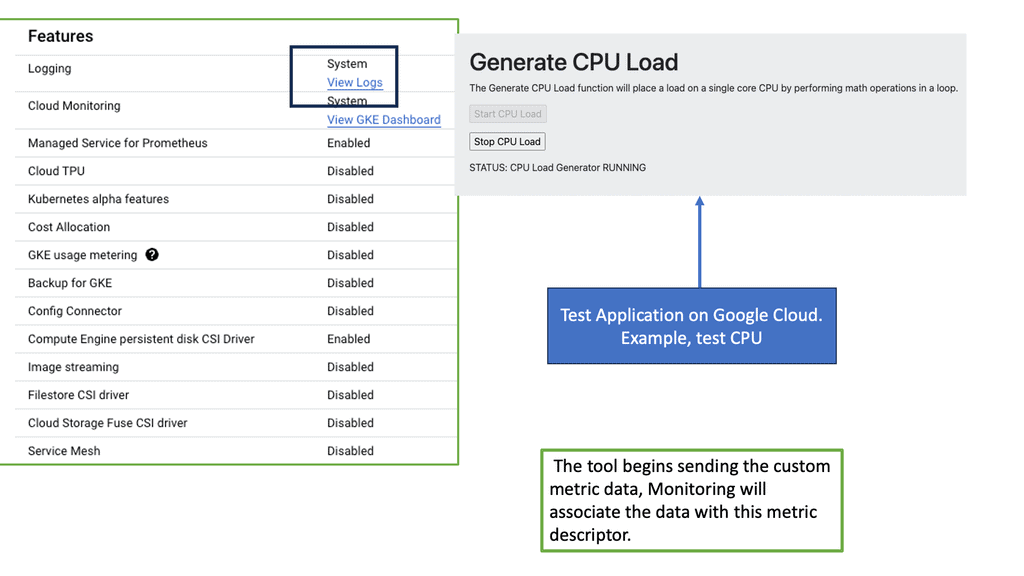
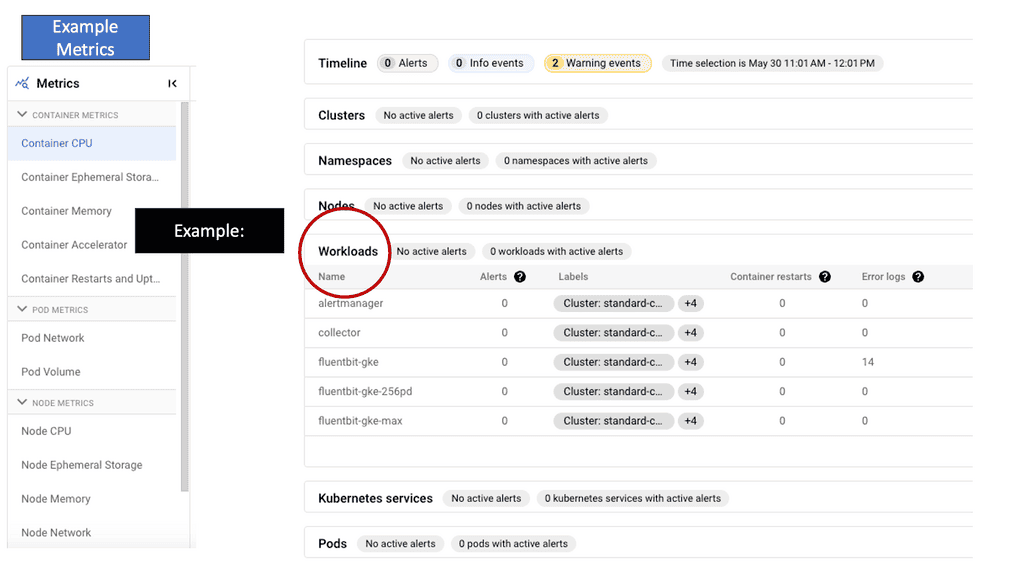
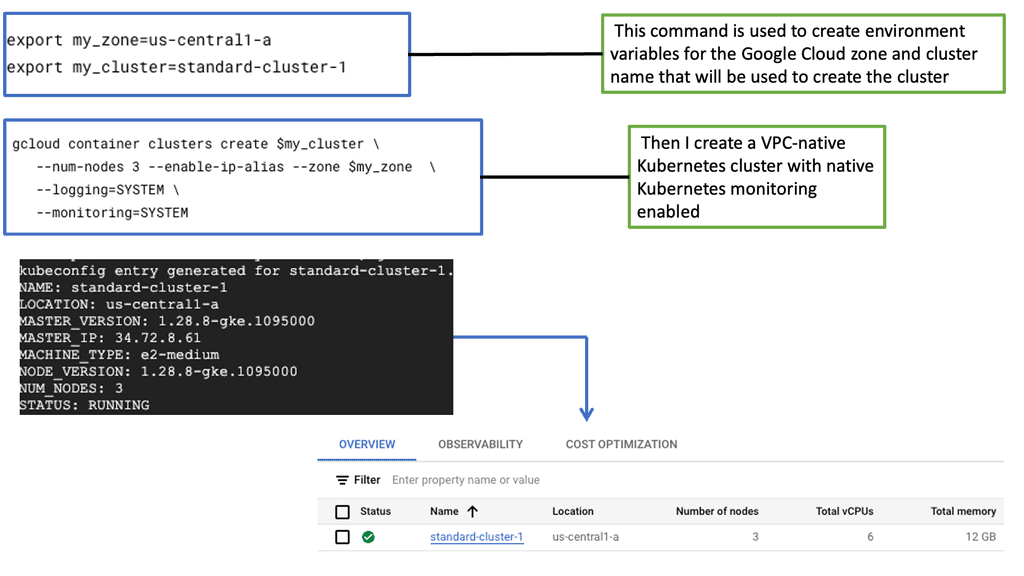
**Understanding GKE-Native Monitoring**

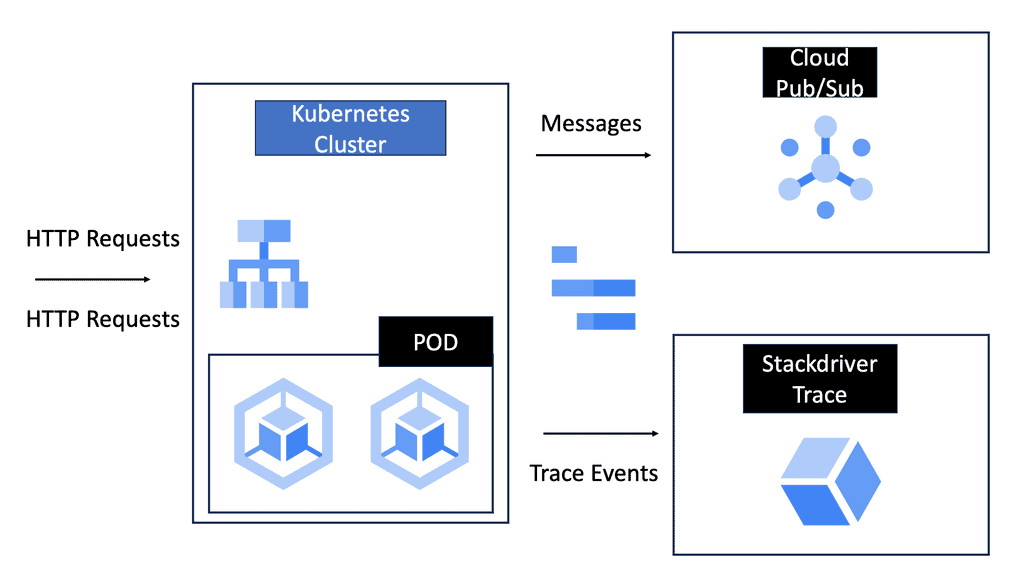
GKE-native monitoring provides a seamless and integrated way to collect, analyze, and visualize metrics and logs from your GKE clusters. By leveraging Google Cloud’s robust monitoring services like Stackdriver, GKE offers a comprehensive solution for monitoring the health and performance of your applications. With GKE-native monitoring, you gain valuable insights into resource utilization, latency, error rates, and more, enabling you to make data-driven decisions and ensure optimal performance.

Logging plays a crucial role in understanding your applications’ behavior and diagnosing issues. GKE-native logging allows you to capture and analyze logs from your GKE clusters effortlessly. With Stackdriver Logging, you can collect logs from various sources, including application logs, system logs, and even logs from managed services running on GKE. This unified logging platform provides powerful filtering, searching, and alerting capabilities, making troubleshooting issues easier and gaining deeper insights into your system.

Kubernetes Attack Vectors

The hot topic for security teams is improving Kubernetes security, implementing Kubernetes security best practices within the cluster, and making container networking deployments more secure. Kubernetes is a framework that provides infrastructure and features. However, thinking outside the box regarding Kubernetes’ best security practices would be best.

We are not saying that Kubernetes doesn’t have built-in security features to protect your application architecture! These include logging and monitoring, debugging and introspection, identity, and authorization. But ask yourself: Do these defaults cover all aspects of your security requirements? Remember that much of the complexity with Kubernetes can be abstract with OpenShift networking.

Traditional Security Constructs  

A: -) Traditional security constructs don’t work with containers, as we have seen with the introduction of Zero Trust Networking. Containers have a different security model as they are short-lived and immutable. For example, securing containers differs from securing a virtual machine (VM).

B: -) For one, the attack surface is smaller, as containers usually only live for about a week, as opposed to a VM that may stay online forever. As a result, we need to manage vulnerabilities and compliance throughout the container scheduler lifecycle—from build tools to image registries to production.

C: -) How do you measure security within a Kubernetes environment? No one can ever be 100% secure, but one should follow certain best practices to harden the gates against bad actors. You can have different levels of security within other parts of the Kubernetes domain. However, a general Kubernetes security best practice would be introducing as many layers of protection as possible between your Kubernetes environment and the bad actors to secure valuable company assets.

Hacker sophistication

Hackers are growing in sophistication. We started with script kiddies in the 1980s and are now entering a world of artificial intelligence ( AI ) and machine learning (ML) in the hands of bad actors. They have the tools to throw everything and anything at your Kubernetes environment, dynamically changing attack vectors on the fly. If you haven’t adequately secured the domain, once a bad actor gains access to your environment, they can move laterally throughout the application stack, silently accessing valuable assets.

Kubernetes Security Best Practice: Security 101

Now that you understand the most commonly used Kubernetes constructs let’s explore some of the best practices for central Kubernetes security and attack vectors.

**Kubernetes API**

Firstly, a bad actor can attack the Kubernetes API server to attack the cluster further. By design, each pod has a service account associated with it. The service account has full permissions and sufficient privileges to access the Kubernetes API server. A bad actor can get the token mounted in the pod and then use that token to gain access to the API server.

Unfortunately, once they can access the Kubernetes API server, they can get information, such as secrets, to compromise the cluster further. For example, a bad actor could access the database server where sensitive and regulatory data is held.

**Kubernetes API – Mitigate**

Another way to mitigate a Kubernetes API attack is to introduce role-based access control (RBAC). Essentially, RBAC gives rules to service accounts that can be assigned to the entire cluster. RBAC allows you to set permission on individual constructs such as pods and containers and then define rules based on personal use cases.

Another Kubernetes best practice would be to introduce an API server firewall. This firewall would work similarly to a standard firewall, where you can allow and block ranges of addresses. Essentially, this narrows the attack surface, hardening Kubernetes security.

**Secure pods with network policy**

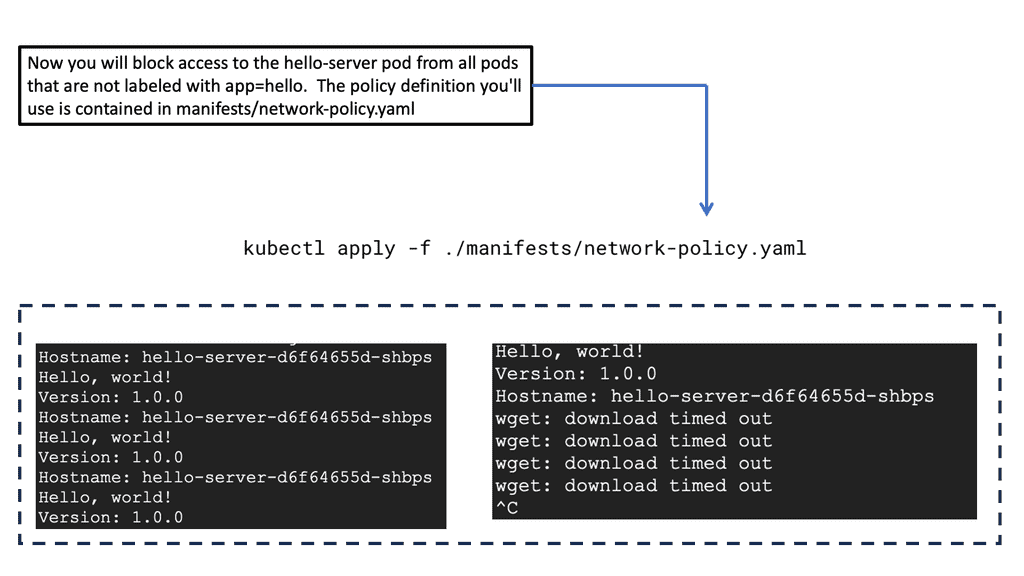
Introducing ingress and egress network policies would allow you to block network access to certain pods. Only then can certain pods communicate with each other. For example, network policies can be set up to restrict the web front end from communicating directly to the database tier.

There is also a risk of a user implementing unsecured pods. In this case, you can have network policies in place so that if an unsecured pod does appear in the Kubernetes environment, the Kubernetes API will reject it.

Remember, left to its defaults, intra-cluster pod-to-pod communication is open. You may think a bad actor could sniff this traffic, but that’s harder to do than in everyday environments. A better strategy to harden Kubernetes security would be to use a network policy that only allows certain pods to communicate with each other.

**Container escape**

In the past, an unpatched kernel or a bug in the web front-end allowed a bad actor to exit a container and gain access to other containers or even to the Kubelet process itself. Once the bad actor gets access to the Kubelet client, it can access the API server, gaining a further foothold in the Kubernetes environment.

**Sandboxed Pods**

One way to mitigate a container escape would be to introduce sandboxed pods inside a lightweight VM. A sandboxed pod provides additional barriers to security as it lies above the kernel itself. Providing layers of protection above the kernel brings many Kubernetes security advantages. As the sandboxed pod runs inside a VM, an additional bug is required to break out of the container if there is a kernel exploit.

**Scanning containers**

For adequate Kubernetes security, you should know if your container image is vulnerable. Running containers with vulnerabilities exposes the entire system to attacks. Scanning all container images to discover and remove known vulnerabilities would be best. The scanning function should integrate runtime enforcement and remediation capabilities, enabling a secure and compliant SDLC (Software Development Life Cycle).

**Restrict access to Kubectl**

Kubectl is a powerful command-line interface for running commands against Kubernetes clusters. It allows you to create and update resources in a Kubernetes environment. Due to its potential, one should restrict access to this tool with firewall rules.

Disabling the Kubernetes dashboard is a must, as it has been part of some high-profile compromises. Previously, bad actors accessed a publicly unrestricted Kubernetes dashboard and privileged account credentials to access resources and mine cryptocurrency.

As Kubernetes adoption continues to grow, ensuring the security of your cluster becomes increasingly essential. By following these Kubernetes security best practices, you can establish a robust security foundation for your infrastructure and applications.

Regularly updating Kubernetes, enabling RBAC, utilizing network policies, employing pod security policies, implementing image security measures, and monitoring cluster activity will significantly enhance your security posture. Embracing these best practices will protect your organization’s sensitive data and provide peace of mind in today’s ever-evolving threat landscape.

Containment & Segmentation

Kubernetes Network & Runtime Segmentation Lab

A frontend Pod has been compromised. Build a least-privilege security boundary around the application so that the compromised workload cannot freely reach the API or database.

Application topology

Protect the application dependency chain

The intended application flow is Internet → Ingress → Frontend → API → Database. The objective is to permit required traffic while preventing unnecessary lateral movement.

Internet external
→
Ingress entry point
→
Frontend workload
→
API service
→
Database data tier

Required traffic policy

These are the intended application dependencies. Everything else should be treated as unnecessary unless explicitly required.

Internet → Ingress Public application entry
ALLOW
Ingress → Frontend Application frontend
ALLOW
Frontend → API Required application call
ALLOW
API → Database Required data access
ALLOW
Frontend → Database Bypass of API tier
DENY
Database → Internet Unnecessary egress
DENY
API → Internet Restrict unless required
DENY

Containment controls

Apply multiple layers. Network segmentation alone does not replace workload or identity security.

⚠ COMPROMISED FRONTEND

The attacker attempts to bypass the API tier and connect directly to the Database.

[READY] Segmentation lab initialized
[INFO] Frontend compromise is simulated
[INFO] Apply controls before running the attack test
Engineering takeaway: Kubernetes NetworkPolicy can restrict which Pods may communicate, but effective enforcement depends on the cluster's network plugin and policy configuration. Combine network controls with least-privilege RBAC, workload security, runtime restrictions and controlled egress to reduce lateral movement and blast radius.
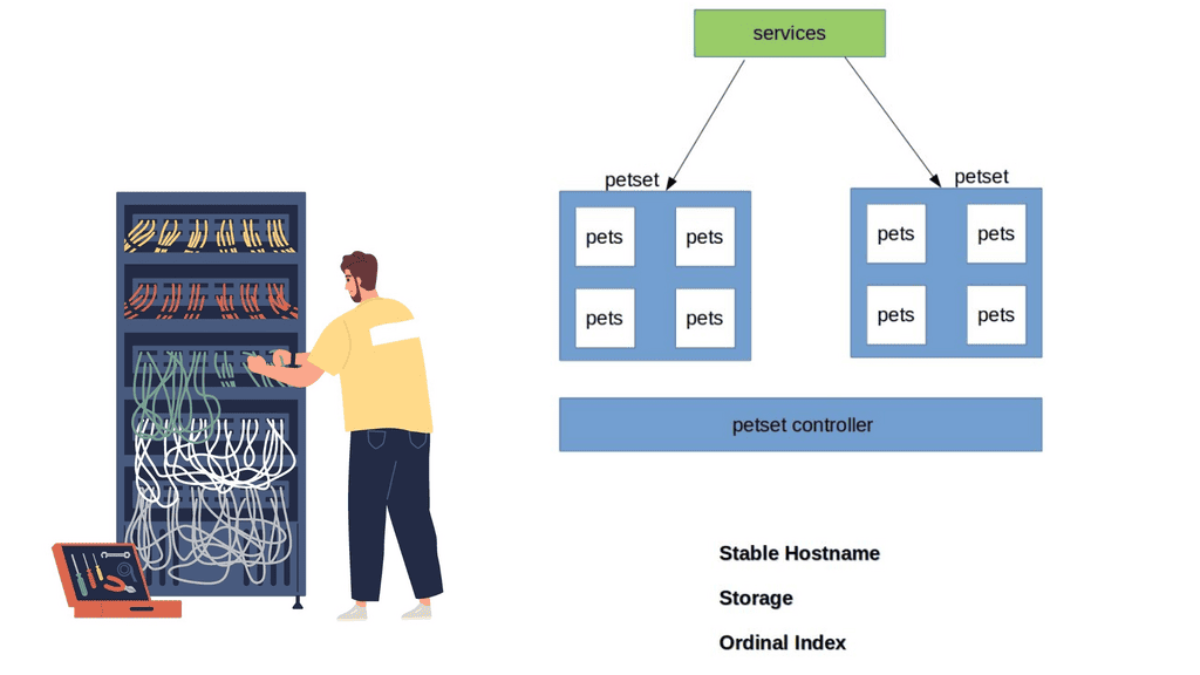
Kubernetes PetSets

Kubernetes Networking 101

Kubernetes Networking 101

Kubernetes networking is fundamental to how applications communicate inside and outside a cluster. Unlike traditional server networking, Kubernetes creates an abstraction around rapidly changing workloads: Pods can be created, destroyed, rescheduled, and moved between nodes while applications still need reliable ways to communicate. Understanding the Kubernetes network model therefore requires looking at how Pods, Nodes, Services, DNS, CNI plugins, and network policy work together.

Pods and the Kubernetes Network Model: A Pod is the smallest deployable unit in Kubernetes and receives its own IP address within the cluster network. Containers within the same Pod share the Pod’s network namespace and can communicate through localhost. Pods on different nodes must also be able to communicate across the cluster network without requiring application-level NAT between them. This connectivity is provided by the cluster’s networking implementation and is one of the fundamental assumptions of the Kubernetes network model.

Container Network Interface (CNI): Kubernetes does not itself implement the complete Pod networking data plane. Instead, networking is commonly provided through a CNI-based implementation. The CNI layer is responsible for tasks such as assigning Pod IP addresses and configuring the interfaces, routes, and connectivity required for Pods to communicate. Different networking implementations provide different capabilities, including routing, encapsulation, network policy enforcement, encryption, observability, and advanced traffic controls. Common technologies include Calico, Cilium, and Flannel, although their architectures and feature sets differ significantly.

Services and Service Discovery: Pod IP addresses are not normally treated as permanent application endpoints because Pods are ephemeral. Kubernetes Services provide a stable abstraction in front of a changing group of Pods. A Service selects matching Pods and provides a stable virtual endpoint through which clients can reach them. Kubernetes also maintains endpoint information, commonly represented through EndpointSlices, allowing the control plane and networking components to track the current set of usable backends.

Kubernetes DNS: Service discovery is closely integrated with cluster DNS. Applications can normally communicate with Services using DNS names rather than maintaining lists of Pod IP addresses. This allows applications to remain largely independent of where individual Pods are running. DNS therefore becomes an important part of the Kubernetes application networking model rather than simply an optional convenience.

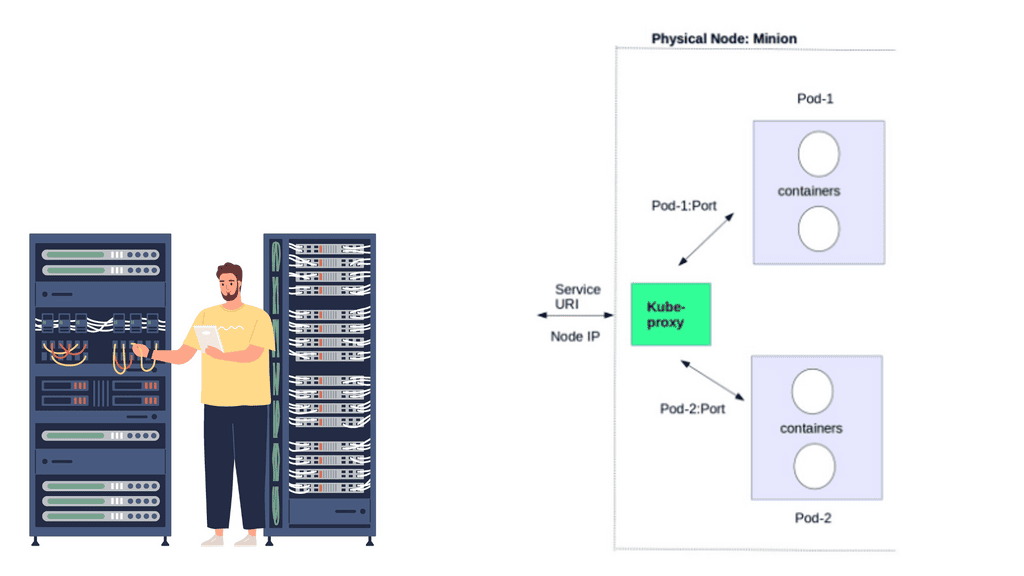
Service Traffic and Load Distribution: Traffic sent to a Service must ultimately be directed toward one of its available backend Pods. The exact implementation depends on the Kubernetes networking stack and configuration. Traditional deployments commonly use kube-proxy with mechanisms such as iptables or IPVS, while other networking implementations can provide Service handling directly through technologies such as eBPF. The important architectural distinction is between the stable Service abstraction presented to applications and the underlying mechanism used to reach individual backends.

Ingress and Gateway Networking: Kubernetes applications frequently need to receive traffic from outside the cluster. Ingress provides a widely used API for HTTP and HTTPS routing, but modern Kubernetes environments are increasingly adopting the Gateway API for more expressive traffic management. These APIs define how external traffic can be routed toward Services, while the actual data-plane implementation is provided by an ingress controller, gateway implementation, load balancer, or other networking technology.

Network Policies and Security: Kubernetes networking is not complete without understanding traffic control. NetworkPolicy can be used to define which connections are permitted between workloads and other network endpoints. Policies commonly restrict traffic according to namespaces, Pod labels, IP ranges, and ports. However, defining a NetworkPolicy object does not by itself guarantee enforcement; the cluster’s networking implementation must support and enforce the relevant policy capabilities. Effective Kubernetes security therefore combines network policy with identity, authentication, authorization, encryption, segmentation, and workload security.

North-South and East-West Traffic: Kubernetes networking can also be understood in terms of traffic direction. East-west traffic describes communication between workloads within the cluster or across cluster nodes. North-south trafficdescribes traffic entering or leaving the cluster. These paths may involve different components, policies, load balancers, gateways, firewalls, and routing mechanisms. Understanding both paths is essential when troubleshooting connectivity and designing secure production environments.

Observability and Troubleshooting: When Kubernetes networking fails, checking whether a Pod is “Running” is not enough. Engineers may need to examine Pod IP addresses, routes, DNS resolution, Services, EndpointSlices, NetworkPolicies, CNI configuration, node connectivity, firewall rules, load balancers, and application-level behaviour. Packet captures, flow telemetry, CNI observability, DNS diagnostics, and Kubernetes events can help identify where communication is failing.

Kubernetes networking therefore forms a layered system:

Pod → CNI Network → Node/Cluster Network → Service → DNS/Discovery → Gateway or Load Balancer → External Network

The exact implementation varies between Kubernetes distributions and networking platforms, but the underlying architectural principles remain consistent. Pods need network connectivity, Services provide stable application endpoints, DNS enables service discovery, networking implementations provide the data plane, and policies control permitted communication.

Mastering Kubernetes networking is consequently more than understanding how Pods obtain IP addresses. It means understanding how traffic moves, where identity and policy are applied, how Services locate workloads, how external traffic enters the cluster, and how the underlying networking implementation forwards and secures packets.

Widget 1 · Visualise

Follow the Packet: How Kubernetes Networking Works

Purpose: build the mental model before experimenting. Choose a traffic path and watch how Kubernetes moves traffic between Pods, Services and external clients. The goal is to understand the networking abstractions, not just memorise component names.

🌐
External Client
User / Internet traffic
🚪
Ingress
HTTP/HTTPS entry point
⚖️
Service
Stable virtual endpoint
📦
Pod
Application workload
Direct Pod-to-Pod communication
1 · Source
2 · Network path
3 · Destination
What changes?
Source Pod
Stable endpoint None
Routing abstraction Pod network
Application target Destination Pod
Learning Point
Pods communicate over the Kubernetes network using Pod IP addresses. The important mental model is that the application workload lives inside the Pod while Kubernetes provides the networking model around it.

Highlights: Kubernetes Networking 101

## The Basics of Kubernetes Networking

At its core, Kubernetes networking ensures that your containers can communicate with each other and with the outside world. Each pod in Kubernetes is assigned its own IP address, and these addresses are used to set up direct communication paths. Unlike traditional networking, there are no port mappings required, and every pod can communicate with every other pod without any NAT (Network Address Translation). This flat networking model simplifies communication but comes with its own set of challenges and considerations.

## Network Policies: Controlling Traffic Flow

Kubernetes allows you to control the traffic flow to and from your pods using Network Policies. These policies act as a firewall for your Kubernetes cluster, enabling you to define rules that dictate how pods can communicate with each other and with external services. By default, all communications are allowed, but you can create Network Policies to restrict access based on security requirements. Implementing these policies is crucial for maintaining a secure and efficient Kubernetes environment.

## Service Discovery and Load Balancing

In Kubernetes, services are used to expose your applications to the outside world and to enable communication within the cluster. Each service is assigned a unique IP address and acts as a load balancer, distributing traffic across the pods in the service. Kubernetes provides built-in service discovery, making it easy to locate other services using DNS. This seamless integration simplifies the process of deploying scalable applications, ensuring that your services are always reachable and responsive.

## Advanced Networking: CNI Plugins and Ingress Controllers

For more advanced networking requirements, Kubernetes supports CNI (Container Network Interface) plugins. These plugins allow you to extend the networking capabilities of your cluster, providing additional features such as custom IPAM (IP Address Management) and advanced routing. In addition to CNI plugins, Ingress Controllers are used to manage external HTTP and HTTPS traffic, offering more granular control over how your services are exposed to the outside world. Understanding and configuring these advanced networking features is key to leveraging the full potential of Kubernetes.

Kubernetes Components

To comprehend Kubernetes networking, we must first delve into the world of Pods. A Pod represents the smallest unit in the Kubernetes ecosystem, encapsulating one or more containers. Despite sharing the same network namespace, each Pod possesses a unique IP address, enabling inter-Pod communication. However, it is crucial to understand how Pods communicate with each other within a cluster.

Services act as an abstraction layer, facilitating the discovery and load balancing of Pods. By defining a Service, developers can decouple applications from specific Pod IP addresses, as Services provide a stable endpoint for internal communication. Furthermore, Services enable external access to Pods through the use of NodePorts or LoadBalancers, making them an essential component for networking in Kubernetes.

Ingress, a powerful Kubernetes resource, allows for the exposure of HTTP and HTTPS routes to external traffic. By implementing Ingress, developers can define rules and routes, effectively managing inbound traffic to their applications. This flexible and scalable approach simplifies networking complexities and provides a seamless experience for end-users accessing Kubernetes services.

Kubernetes Clusters in GKE

#### Why Choose Google Cloud for Your Kubernetes Cluster?

Google Cloud offers a unique advantage when it comes to running Kubernetes clusters. As the original creators of Kubernetes, Google offers deep integration between Kubernetes and its cloud services. Google Kubernetes Engine (GKE) provides a fully managed Kubernetes service, allowing developers to focus more on building and less on managing infrastructure. With GKE, you get the benefit of automatic upgrades, patching, and scaling, all backed by Google’s robust infrastructure. This ensures high availability and security for your applications, making it an ideal choice for businesses looking to leverage Kubernetes without the operational overhead.

#### Setting Up Your Kubernetes Cluster on Google Cloud

Setting up a Kubernetes cluster on Google Cloud is a straightforward process, thanks to the streamlined interface and comprehensive documentation provided by Google. First, you need to create a Google Cloud project and enable the Kubernetes Engine API. After that, you can use the Google Cloud Console or the `gcloud` command-line tool to create a new cluster. Google Cloud provides various configuration options, allowing you to customize the cluster to fit your specific needs, whether that’s optimizing for cost, performance, or a balance of both.

#### Best Practices for Managing Kubernetes Clusters

Once your Kubernetes cluster is up and running, managing it effectively becomes crucial. Google Cloud offers several tools and features to help with this. It’s recommended to use Google Cloud’s monitoring and logging services to keep track of your cluster’s performance and health. Implementing automated scaling helps you handle varying workloads without manual intervention. Additionally, consider using Kubernetes namespaces to organize your resources efficiently, enabling better resource allocation and access control across your teams.

Google Kubernetes EngineUnderstanding Pods and Services

One of the fundamental building blocks of Kubernetes networking is the concept of Pods and Services. Pods are the smallest unit in the platform and house one or more containers. Understanding how Pods communicate with each other and external entities is crucial. On the other hand, services provide a stable endpoint for accessing a group of Pods. 

– Cluster Networking: A robust networking solution is required for Pods and Services to communicate seamlessly within a Kubernetes cluster. We’ll dive into the inner workings of cluster networking, discussing popular networking plugins such as Calico, Flannel, and Cilium. 

– Ingress and Load Balancing: Kubernetes offers Ingress and load-balancing capabilities when exposing applications to the outside world. In this section, we’ll demystify Ingress, its role in routing external traffic to Services, and how to configure it effectively. We’ll also explore load-balancing options to ensure optimal traffic distribution across Pods.

– Network Security and Policies: With the increasing complexity of modern applications, network security becomes paramount. Kubernetes provides robust mechanisms to enforce network policies and secure communication between Pods. We’ll discuss how to define and apply network policies effectively, ensuring only authorized traffic flows within the cluster.

**Kubernetes networking aims to solve the following problems**

  1. Container-to-container communications with high coupling
  2. A pod-to-pod communication system
  3. Communicating from a pod to a service
  4. External-to-service communications

A virtual bridge network is a private network that containers attach to in the Docker networking model. Containers are allocated private IP addresses, so containers running on different machines cannot communicate. Docker allows developers to proxy traffic across nodes by mapping host ports to container ports. Docker administrators, usually system administrators, avoid port clashes in this scenario. In Kubernetes networking, it is handled differently.

The Kubernetes Networking Model

Kubernetes’ native networking model is capable of supporting multi-host cluster networking. Pods can communicate with each other by default, regardless of their hosts. Kubernetes relies on the CNI project to comply with the following requirements:

  • Without NAT, all containers must be able to communicate with each other.
  • Containers and nodes can communicate without NAT.
  • The IP address of a container matches the IP address of those outside the container.

A pod is a unit of work in Kubernetes. Containers in pods are always scheduled and run “together” on the same node. It is possible to separate instances of a service into distinct containers using this connectivity. Developers may run services in one container and log forwarders in another. Having processes running in separate containers allows them to have separate resource quotas (e.g., “the log forwarder cannot use more than 512 MB of memory”). Reducing the scope necessary to build a container also separates container build and deployment machinery.

The Kubernetes History

Google released Kubernetes, an open-source cluster management tool, in June 2014. Google has said it launches over 2 billion containers per week, and Kubernetes was designed to control and manage the orchestration of all these containers and container networking. Initially, they built a Borg and Omega system, resulting in Kubernetes.

All lessons learned from Borg to Kubernetes are now passed to the open-source community. Kubernetes went 1.0 in July 2015 and is now at version 1.3.0. The Kubernetes deployment supports GCE, AWS, Azure, vSphere, and bare metal, and there are a variety of Kubernetes networking configuration parameters. Kubernetes forms the base for OpenShift networking. 

Kubernetes information check.

For additional information, before you go with Kubernetes networking 101, the post on Kubernetes chaos engineering discusses the need to stress and break a system, which is the only way to understand and optimize fully. Chaos Engineering starts with a baseline and introduces several controlled experiments. Then we have Kubernetes security best practice discuss the Kubernetes attack vectors and how to protect against them.

Understanding Pods & Service 

Before diving into deploying pods and services, it’s crucial to understand what a pod is within the context of Kubernetes. A pod is the smallest deployment unit in Kubernetes and can consist of one or more containers. Pods are designed to run a single instance of a specific application, sharing the same network and storage resources. By grouping containers, pods enable efficient communication and coordination between them.

Note: Deploying Pods

Now that we have a basic understanding of pods let’s explore the process of deploying one. To deploy a pod, you must create a YAML file describing its specifications, including the container image, resource requirements, and any necessary environment variables. Once the YAML file is created, you can use the `kubectl` command-line tool to apply the configuration and create the pod. It’s essential to verify the pod’s status using `kubectl get pods` and ensure it runs successfully.

While pods enable the deployment of individual containers, services expose these pods to the external world. Services act as an abstraction layer, allowing applications to communicate with pods without knowing their specific IP addresses or ports. Kubernetes offers various services, such as ClusterIP, NodePort, and LoadBalancer, each catering to different networking requirements.

Note: YAML File Specifications 

You must create another YAML file defining its specifications to deploy a service. This includes selecting the appropriate service type, specifying the target port and protocol, and associating it with the corresponding pod using labels. Once the YAML file is ready, you can use `kubectl` to create the service. By default, services are assigned a ClusterIP, which enables communication within the cluster. Depending on your needs, you may expose the service externally using NodePort or LoadBalancer.

Note: Kubernetes Scaling Abilities

One of Kubernetes’ key advantages is its ability to scale applications effortlessly. By adjusting the replica count in the deployment YAML file and applying the changes, Kubernetes automatically creates or terminates pods to maintain the desired replicas. Additionally, Kubernetes provides various commands and tools to monitor and manage deployments, allowing you to upgrade or roll back to previous versions easily.

Kubernetes Networking vs Docker Swarm

### Understanding Kubernetes Networking

Kubernetes, often hailed as the king of container orchestration, offers a robust and flexible networking model. At its core, Kubernetes assigns each pod its own IP address, providing a flat network structure. This means that Kubernetes does not require you to map ports between containers, simplifying communication. The Kubernetes network model supports various plugins through the Container Network Interface (CNI), allowing seamless integration with different cloud providers and on-premise systems. Moreover, Kubernetes supports complex networking policies, enabling fine-grained control over traffic flow and security.

### Docker Swarm’s Networking Simplicity

Docker Swarm, on the other hand, is known for its simplicity and ease of use. It provides an overlay network that enables services to communicate with each other across nodes seamlessly. Swarm’s networking is straightforward to set up and manage, making it appealing for smaller teams or projects with less complex networking needs. Docker Swarm also supports load balancing and service discovery out of the box. However, it lacks the extensive networking plugins and policy features available in Kubernetes, which might limit its scalability in larger, more complex environments.

### Performance and Scalability: A Comparative Analysis

When it comes to performance, both Kubernetes and Docker Swarm have their pros and cons. Kubernetes is designed for scalability, capable of handling thousands of nodes and pods. Its networking model is highly efficient, ensuring minimal latency in communication. Docker Swarm, while efficient for smaller clusters, might face challenges scaling to the level of Kubernetes. The simplicity of Swarm’s networking can become a bottleneck in environments that require more sophisticated networking configurations and optimizations. Thus, choosing between the two often depends on the scale and complexity of the deployment.

### Security Considerations

Security is a paramount concern in any networking setup. Kubernetes offers a range of security features, including network policies, secrets management, and role-based access control (RBAC). These features allow administrators to define and enforce security rules at a granular level. Docker Swarm, though simpler in its networking approach, provides basic security features such as mutual TLS encryption and node certificates. While adequate for many use cases, Swarm’s security features may not meet the needs of organizations with stricter compliance requirements.


Widget 2 · Experiment

Service Discovery & Load-Balancing Lab

Purpose: experiment with what happens behind a Kubernetes Service. Change the number of replicas, the Service selector and endpoint health, then send requests and observe which Pods can receive traffic. This makes the difference between a stable Service endpoint and the individual Pod endpoints visible.

4 Pods
📡
Client
⚖️
web-service
Stable Service endpoint
🎯
Endpoints
Service selector: app=web — only matching healthy Pods are treated as usable endpoints in this illustrative experiment.
Live Result
Active endpoints 4
Requests sent 0
Requests served 0
Requests dropped 0
Traffic Distribution
What You Learned
A Service gives clients a stable destination while the backend Pods can change. Try increasing replicas and sending requests, then fail an endpoint and run the experiment again.

Kubernetes Networking 101

Google Cloud Data Centers

## Why Google Cloud for Kubernetes?

Google Cloud is a popular choice for running Kubernetes clusters due to its scalability, reliability, and integration with other Google Cloud services. Google Kubernetes Engine (GKE) allows users to quickly and easily deploy Kubernetes clusters, offering features like automatic scaling, monitoring, and seamless updates. With GKE, you can focus on developing your applications while Google handles the underlying infrastructure, ensuring your applications run smoothly.

## Setting Up Your First Kubernetes Cluster on Google Cloud

Deploying a Kubernetes cluster on Google Cloud involves several steps. First, you’ll need to set up a Google Cloud account and enable the Kubernetes Engine API. Then, using the Google Cloud Console or Cloud SDK, you can create a new Kubernetes cluster. Configuring your cluster involves selecting the appropriate machine types, defining node pools, and setting up networking and security policies. Once your cluster is set up, you can deploy applications, manage resources, and scale your infrastructure as needed.

## Best Practices for Managing Kubernetes Clusters

Effectively managing your Kubernetes clusters involves implementing several best practices. These include monitoring cluster performance using Google Cloud’s Stackdriver, automating deployments with CI/CD pipelines, and implementing robust security measures such as role-based access control (RBAC) and network policies. Additionally, regularly updating your clusters and applications ensures that you benefit from the latest features and security patches.

At a very high level, Kubernetes Networking 101 enables a group of hosts to be viewed as a single compute instance. The single compute instance, consisting of multiple physical hosts, is used to deploy containers. This offers an entirely different abstraction level to our single-container deployments.

Users start thinking about high-level application services and the concept of service design only. They are no longer concerned with individual container deployment, as the orchestrator looks after the deployment, scale, and management.

For example, if users specify to the orchestration system they want a specific type of application with defined requirements, now deploy it for me. The orchestrator manages the entire rollout, specifies the targeted hosts, and manages the container lifecycle. The user doesn’t get involved with host selection. This abstraction allows users to focus only on design and workload requirements – the orchestrator takes care of all the low-level deployment and management details.

Kubernetes Networking 101
Diagram: Kubernetes Networking 101

1. Pods:

Pods are the fundamental building blocks of Kubernetes. They consist of one or more containers that share a common network namespace. Each pod receives a unique IP address, allowing containers within the pod to communicate via localhost. However, communication between different pods requires additional networking components.

2. Services:

Services provide a stable and abstracted network endpoint to access a set of pods. By grouping pods based on a standard label, services ensure that applications can discover and communicate with each other seamlessly. Kubernetes offers four types of services: ClusterIP, NodePort, LoadBalancer, and ExternalName. Each service type caters to specific use cases, providing varying levels of accessibility.

3. Ingress:

Ingress is a Kubernetes resource that enables inbound connections to reach services within the cluster. It acts as a traffic controller, routing external requests to the appropriate service based on rules defined in the Ingress resource. Additionally, Ingress supports TLS termination, allowing secure communication with services.

Networking Concepts:

To comprehend Kubernetes networking fully, it is essential to grasp critical concepts that govern its behavior.

1. Cluster Networking:

Cluster networking refers to the communication between pods running on different nodes within a Kubernetes cluster. Kubernetes leverages various networking solutions, such as overlay networks and software-defined networking (SDN) to establish node connectivity. Popular SDN solutions include Calico, Flannel, and Weave.

2. DNS Resolution:

Kubernetes provides a built-in DNS service that enables easy discovery of services within the cluster. Each service is assigned a DNS name, which can be resolved to its corresponding IP address. This allows applications to communicate with services using their DNS names, enhancing flexibility and decoupling.

3. Network Policies:

Network policies define rules that dictate how pods communicate with each other. Administrators can enforce fine-grained access control and secure application traffic using network policies. Policies can be based on various criteria, such as IP addresses, ports, and protocols.

GKE Network Policies 

### Crafting Effective Network Policies

To create effective network policies, you must first grasp the structure and components that define them. Network policies in GKE are expressed in YAML format and consist of specifications that dictate how pods communicate with each other. This section will guide you through the essentials of crafting these policies, focusing on key elements such as pod selectors, ingress and egress rules, and the importance of defining explicit traffic paths.

### Implementing and Testing Your Policies

Once you have crafted your network policies, the next step is to implement and test them within your GKE environment. This section will provide a step-by-step guide on how to apply these policies and verify their effectiveness. We will cover common tools and commands used in testing, as well as strategies for troubleshooting and refining your policies to ensure they meet your desired outcomes.

### Best Practices for Network Policy Management

Managing network policies in a dynamic Kubernetes environment can be challenging. In this section, we’ll discuss best practices to streamline this process, including how to regularly audit and update your policies, integrate them with existing security frameworks, and utilize automation tools for enhanced management. Adopting these practices will help you maintain a secure and efficient network policy strategy in your GKE clusters.

Kubernetes network policy

Discussing Microservices

Distributed systems are more fine-grained now, with Kubernetes driving microservices. Microservices is a fast-moving topic involving the breaking down applications into many specific services. All services have their lifecycles, collaborating. Splitting the Monolith with microservices is not a new idea ( the term is ), but the emergence of new technologies has a profound effect.

The specific domains/containers require constant communication and access to each other’s services. Therefore, a strategy needs to be maintained to manage container interaction. For example, how do we scale containers? What’s the process for container failure? How do we react to container resource limits? 

Although Docker does help with container management, Kubernetes orchestration works on a different scale and looks at the entire application stack, allowing management at a service/application level.

We need a management and orchestration system to utilize containers’ and microservices’ portability fully. Containers can’t just be thrown into a sea of computing and expect to tie themselves together and work efficiently.

A management tool is required to govern and manage the life of containers, where they are placed, and to whom they can talk. Containers have a complicated existence, and many pieces are used to patch up their communication flow and management. We have updates, high availability, service discovery, patching, security, and networking. 

The most important aspect about Kubernetes or any content management system is that they are not concerned with individual container placement. Instead, the focus is on workload placement. Users enter high-level requirements, and the scheduler does the rest—where, when, and how many? 

Kubernetes networking 101 and network proximity.

Looking at workloads to analyze placement optimizes application deployment. For example, some processes that are part of the same service will benefit from network proximity. Front-end tiers sending large chunks of data to a backend database tier should be close to each other, not trombone across the network Kubernetes host for processing.

Likewise, when common data needs to be accessed and processed, it makes sense to put containers “close” to each other in a cluster. The following diagram displays the core Kubernetes architecture.

Kubernetes Networking 101: The Constructs

Kubernetes builds the application stack using four primary constructs: Pods, Services, Labels, and Replication Controllers. All constructs are configured and combined, creating a complete application stack with all management components—pods group similar containers on the same hosts.

Labels tag objects; replication controllers manage the desired state at a POD level, not container level, and services enable Pod-to-Pod communication. These constructs allow the management of your entire application lifecycle instead of individual application components. The construct definition is done through configuration files in YAML or JSON format.

The Kubernetes Pod

Pods are the smallest scheduling unit in Kubernetes and hold a set of closely related containers, all sharing fate and resources. Containers in a Pod share the same Kubernetes network namespace and must be installed on the same host. The main idea of keeping similar or related containers together is that processing is performed locally and does not incur any latency traversing from one physical host to another. As a result, local processing is always faster than remote processing. 

Pods essentially hold containers with related pieces of the application stack. The critical point is that they are ephemeral and follow a specific lifecycle. They should come and go without service interruption as any service-destined traffic directed should be towards the “service” endpoint IP address, not the Pod IP address.

Even Though Pods have a pod-wide-IP address, service reachability is carried out with service endpoints. Services are not as temporary ( although they can be deleted ) and don’t go away as much as Pods. They act as the front-end VIP to back-end Pods ( more on later ). This type of architecture hammers home the level of abstraction Kubernetes seeks.

Pod definition file

The following example displays a Pod definition file. We have basic configuration parameters, such as the Pod’s name and ID. Also, notice that the object type is set to “Pod.” This will be set according to the object we are defining. Later we will see this set as “service” for determining a service endpoint.

In this example, we define two containers – “testpod80” and “testpod8080”. We also have the option to specify the container image and Label. As Kubernetes assigns the same IP to the Pod where both containers live, we should be able to browse to the same IP but different port numbers, 80 or 8080. Traffic gets redirected to the respective container.

Kubernetes Pod

Kubernetes labels

Containers within a Pod share their network namespaces. All containers within can reach each other’s ports on localhost. This reduces the isolation between containers, but any more isolation would go against why we have Pods in the first place. They are meant to group “similar” containers sharing the same resource volumes, RAM, and CPU. For Pod segmentation, we have labels – a Kubernetes tagging system.

Labels offer another level of abstraction by tagging items as a group. They are essentially key-value pairs categorizing constructs. When we create Kubernetes constructs, we can set a label, which acts as a tag for that construct.

This means you can access a group of objects by specifying the label assigned to those objects. For example, labels distinguish containers as part of a web or database tier. The “selector” field tells Kubernetes which labels to use in finding Pods to forward traffic to.

Replication Controller

Container Scheduler

The replication controller ( RC ) manages the lifecycle and state of Pods. It ensures the desired state always matches the actual state. When you create an RC, you define how many copies ( aka replicas) of the Pod you want in the cluster.

The RC maintains that the correct numbers are running by creating or removing Pods at any time. Kubernetes doesn’t care about the number of containers running in a Pod; its only concern is the number of Pods. Therefore, it works at a Pod level.

The following is an example of an RC service definition file. Here, you can see that the desired state of replicas is “2.” A replica of 2 means that the number of pods each controller should maintain is 2. Changing the number up or down will either increase or decrease the number of Pods the replication controller manages.

For example, if the RC notices too many, it will stop some from returning the replication controller to the desired state. The RC keeps track of the desired state and returns it to the state specified in the service definition file. We may also assign a label for grouping replication controllers.

Kubernetes replication controller

Kubernetes Services

Service endpoints enable the abstraction of services and the ability to scale horizontally. Essentially, they are abstractions defining a logical set of Pods. Services represent groups of Pods acting as one, allowing Pods to access services in other Pods without directing service-destined traffic to the Pod IP. Remember, Pods are short-lived!

The service endpoint’s IP address is from the “Portal Net” range defined on the API service. The address is local to the host, so ensure it doesn’t clash with the docker0 bridge IP address.

Pods are targeted by accessing a service that represents a group of Pods. A service can be viewed with a similar analogy to a load balancer, sitting in front of Pods accepting front-end service-destined traffic. Services act as the main hooking point for service / Pod interactions. They offer high-level abstraction to Pods and the containers within.

All traffic gets redirected to the service IP endpoint, which redirects it to the correct backend. Traffic hits the service IP address ( Portal Net ), and a Netfilter IPtable rules forward to a local host high port number.

The proxy service creates a high port number, which forms the basis for load balancing. The load balancing object then listens to that port. The Kub proxy acts as a full proxy, maintaining two different TCP connections.

One separates the connection from the container to the proxy and another from the proxy to the load-balanced destination. The following is an example of a service definition file. The service listens on port 80 and sends traffic to the backend container port on 8080. Notice how the object kind is set to “service” and not “Pods” like in the previous definition file.

Kubernetes Services

Kubernetes Networking 101 Model

The Kubernetes networking model details that each Pod should have a routable IP address. This makes communication between Pods easier by not requiring any NAT or port mappings we had with earlier versions of Docker networking.

With Kubernetes, for example, we can have a web server and database server placed in the same Pod and use the local interface for cross-communication. Furthermore, there is no additional translation, so performance is better than that of a NAT approach.

Kubernetes network proxy

Kubernetes fulfills service -> Pods integration by enabling a network proxy called the Kube-proxy on every node in a cluster. The network proxy is always there, even if Pods are not running. Its main task is to route traffic to the correct Pod and can do TCP, UDP stream forwarding, or round-robin TCP, UDP forwarding.

The Kube proxy captures service-destination traffic and proxies requests from the service endpoint back to the application’s Pod. The traffic is forwarded to the Pods on the target port defined in the definition file, a random port assigned during service creation.

To make all this work, Kubernetes uses IPtables and Virtual IP addresses.

For example, when using Kubernetes alongside OpenContrail, the Kube-proxy is disabled on all hosts, and the OpenContrail router module implements connectivity via overlays ( MPLS over UDP encapsulation ). Another vendor on the forefront is Midokura, the co-founder behind OpenStack Project Kuryr. This project aims to bring any SDN plugin (MidoNet, Dragon flow, OVS, etc.) to Containers—more on these another time.

Kubernetes Pod-IP approach

The Pods IP address is reachable by all other Pods and hosts in the Kubernetes cluster. The address is not usually routable outside of the cluster. This should not be too much of a concern as most traffic stays within application tiers inside the cluster. Mapping external load-balancers achieves any inbound external traffic to services in the cluster.

The Pod-IP approach assumes that all Pods can reach each other without creating specific links. They can access each other by IP rather than through a port mapping on the physical host. Port mappings hide the original address by performing a masquerade – Source NAT.

Like your home residential router hides local PC and laptop IP addresses from the public Internet, cross-node communication is much simpler, as every Pod has an IP address. There isn’t any port mapping or NAT like there is with default docker networking. If the Kube proxy receives traffic for a Pod, not on its host, it simply forwards the traffic to the correct pod IP for that service.

The IP per POD offers a simplified approach to K8 networking. A unique IP per host would potentially need port mappings on the host IP as the number of containers increases. Managing port assignment would become an operational and management burden, similar to earlier versions of Docker. Conversely, a unique IP per container would surely hit scalability limits.

Kubernetes PAUSE container

Kubernetes has what’s known as a PAUSE container, also referred to as a Pod infrastructure container. It handles the networking by holding the networking namespace and IP address for the containers on that Pod. Some refer to the PAUSE container as an implementation detail you can safely ignore.

Each container uses a Pod’s “mapped container” mode to connect to the pause container. The mapped container mode is implemented with a source and target container grouping. The source container is the user-created container, and the target container is the infrastructure pause container.

Destination Pod IP traffic first lands on the pause container and gets translated to the backend containers. The pause container and the user-built containers all share the same network stack. Remember we created a service destination file with two containers – port 80 and port 8080? It is the pause container that listens on these port numbers.

In summary, the Kubernetes model introduces three methods of communication.

  • a) Pod-to-Pod communication directly by IP address. Kubernetes has a Pod-IP-wide metric simplifying communication.
  • b) Pod-to-Service Communication – Clients’ traffic is directed to the virtual service IP, which is then intercepted by the kub-proxy process ( running on all hosts) and directed to the correct Pod.
  • c) External-to-Internal Communication—External access is captured by an external load balancer that targets nodes in a cluster. The Kub proxy determines the correct Pod to send traffic to—more in a separate post.

Docker & Kubernetes networking comparison

Docker uses host-private networking. The Docker engine creates a default bridge, and every container gets a virtual ethernet to that bridge. The veth acts like a pipe – one end is mapped to the docker0 bridge namespace and the other to the container’s Linux namespace. This provides connectivity between containers on the same Docker bridge.

All containers are assigned an address from the 172.17.42.0 range and 172.17.42.1 to the default bridge acting as the container gateway. Any off-host traffic requires port mappings and NAT for communication. Therefore, the container’s IP address is hidden, and the network would see the container traffic coming from the docker nodes’ physical IP address. 

The effect is that containers can only talk to each other by IP address on the same virtual bridge. Any off-host container communication requires messy port allocations. Recently, there have been enhancements to docker networking and multi-host native connectivity without translations. Although there are enhancements to the Docker network, the NAT / Port mapping design is not a clean solution.

Docker Default networking
Diagram: Docker Default networking

The K8 model offers a different approach, and the docker0 bridge gets a routable IP address. Any outside host can access that Pod by IP address rather than through a port mapping on the physical host. Kubernetes has no NAT for container-to-container or container-to-node traffic.

Understanding Kubernetes networking is crucial for building scalable and resilient applications within a containerized environment. By leveraging its flexible architecture and components like Pods, Services, and Ingress, developers can enable seamless container communication and ensure efficient network management.

Moreover, comprehending network concepts like cluster networking, DNS resolution, and network policies empowers administrators to establish robust and secure communication channels within the Kubernetes ecosystem. Embracing Kubernetes networking capabilities unlocks the full potential of this powerful container orchestration platform.

Closing Points on Kubernetes Networking 101

At the heart of Kubernetes networking lies a flat network structure. This unique model ensures that every pod, a basic Kubernetes unit, can communicate with any other pod without NAT (Network Address Translation). This design principle simplifies communication processes, eliminating complex network configurations. However, achieving this simplicity requires comprehending core concepts such as Network Policies, Services, and Ingress, which facilitate and control internal and external traffic.

Services in Kubernetes act as an abstraction layer over a set of pods, providing a stable endpoint for client communication. As pods can dynamically scale or change due to Kubernetes’ orchestration, services ensure that there is a consistent way to access these pods. Services can be of different types, including ClusterIP, NodePort, and LoadBalancer, each serving unique roles and use cases. Understanding how to configure and utilize these services effectively is key to maintaining robust and scalable applications.

Network Policies in Kubernetes provide a mechanism to control the traffic flow to and from pods. They allow you to define rules that specify which connections are allowed or denied, enhancing the security of your applications. By leveraging Network Policies, you can enforce stringent security measures, ensuring that only authorized traffic can interact with your application components. This section will delve into creating and applying Network Policies to safeguard your Kubernetes environment.

Ingress in Kubernetes serves as an entry point for external traffic into the cluster, providing HTTP and HTTPS routing to services within the cluster. It offers functionalities such as load balancing, SSL termination, and name-based virtual hosting. Properly configuring Ingress resources is essential for directing external traffic efficiently and securely to your services. This section will guide you through setting up and managing Ingress controllers and resources to optimize your application’s accessibility and performance.

Widget 3 · Apply

Kubernetes Network Policy Challenge

Purpose: apply the networking model to a real access-control decision. Decide which application flows should be allowed and which should be blocked. Your goal is to permit the required application path while preventing unnecessary lateral access.

Scenario · Three-Tier Application
A Kubernetes application contains a frontend, API and database. The frontend needs the API. The API needs PostgreSQL on TCP 5432. The frontend should not connect directly to the database. Choose the correct NetworkPolicy outcome for each flow.
Traffic Decisions
🖥️
Frontend
app=frontend
TCP 443
⚙️
API
app=api
Frontend → API
🖥️
Frontend
app=frontend
TCP 5432
🗄️
Database
app=db
Frontend → DB
⚙️
API
app=api
TCP 5432
🗄️
Database
app=db
API → DB
🌐
External
outside cluster
TCP 5432
🗄️
Database
app=db
External → DB
Policy thinking: NetworkPolicy is based on selectors, directions and ports rather than simply naming individual Pod IP addresses. In this challenge, think in terms of application identity and required communication.
Policy Model
Frontend → API
Application dependency
API → DB : 5432
Required database access
Frontend → DB
Unnecessary lateral path
External → DB
Direct database exposure
Challenge Score
Correct decisions
— / 4
Result
Ready
Key Lesson
Good network policy design starts with the application's required communication paths. Allow what the workload needs and avoid exposing unrelated services.
container based virtualization

Container Networking

Container Networking

Container networking provides the connectivity layer that allows containers to communicate with each other, with host systems, with services and with external networks. As container platforms have evolved from individual hosts to distributed orchestration environments, networking has become an important part of application architecture rather than simply a mechanism for assigning an IP address to a container.

Containers are isolated using operating-system primitives such as Linux network namespaces. A network namespace provides an independent networking environment containing interfaces, addresses, routes, neighbour information and sockets. Virtual Ethernet pairs can then connect a container namespace to the host networking stack, allowing traffic to move between the isolated workload and the wider network.

On a single container host, a common architecture uses a virtual bridge to connect containers. Each container can have a virtual interface connected to the bridge, while the host provides routing, filtering and external connectivity. Depending on the platform, outbound traffic may be translated using NAT, while published ports provide controlled inbound access from the host or external network.

Container networking becomes more complex when workloads are distributed across multiple hosts. Containers may need to communicate regardless of which node they are running on. Overlay networks can provide logical connectivity across the underlying physical network, while routing-based designs can provide direct Layer 3 connectivity between container networks. The appropriate model depends on scale, performance requirements, infrastructure and the container platform.

Kubernetes introduces another important networking model. Pods, rather than individual containers, normally provide the primary workload networking boundary. Containers within the same Pod share a network namespace and therefore share the Pod IP address and port space. The Container Network Interface (CNI) provides the mechanisms required to connect Pod network namespaces to the cluster network.

Container networking also requires reliable IP address management. As workloads are dynamically created and removed, addresses must be allocated, tracked and reclaimed without creating conflicts. Larger platforms may therefore use dedicated IPAM mechanisms and carefully planned address ranges for containers, Pods, services and underlying infrastructure.

Service discovery is another fundamental requirement. Applications should not normally depend on dynamically changing container IP addresses. Container platforms can provide DNS-based discovery, virtual service addresses or other service abstractions that allow applications to locate services while the underlying workloads change.

Network isolation is equally important. Containers should not automatically have unrestricted access to every other workload or network segment. Security controls can restrict traffic between workloads based on namespaces, labels, identities, IP addresses, ports or other policy attributes. In Kubernetes environments, NetworkPolicy provides a standard policy model, although enforcement depends on the networking implementation.

Modern container networking can also use eBPF-based data planes. These implementations can provide high-performance packet processing, service load balancing, network policy enforcement, observability and routing directly within the Linux networking stack. eBPF does not replace the fundamental networking model; it provides an alternative way of implementing and extending parts of the data plane.

Different networking models involve different trade-offs. Host networking can reduce networking overhead but provides less isolation. Bridge networking is simple and effective for single-host environments. Overlay networking simplifies multi-host connectivity but introduces encapsulation and additional processing. Routed networking can provide efficient connectivity but requires appropriate routing integration with the underlying infrastructure.

Security should therefore be designed into the networking architecture from the beginning. Important controls include network segmentation, least-privilege communication policies, restricted exposed ports, encrypted traffic where appropriate, host firewalling, workload identity and monitoring of unexpected connections.

Troubleshooting container networking requires following the complete packet path rather than looking only at the container itself. Engineers may need to inspect the container or Pod network namespace, virtual interfaces, routes, DNS resolution, bridges or tunnels, service endpoints, network policies, node routing, host firewall rules and the underlying physical network.

Observability is particularly important in dynamic environments. Useful telemetry includes connection state, packet loss, latency, DNS behaviour, interface statistics, flow information, policy decisions and application-level errors. Tools such as ip, ss, tcpdump and platform-specific networking commands can be combined with metrics, logs and flow telemetry to identify where connectivity is failing.

The key principle is that container networking is an end-to-end system:

Workload → Network Namespace → Virtual Interface → Container Network → Service/Route → Node → Physical or Cloud Network

Effective container networking therefore requires more than selecting a network driver. It involves addressing, routing, service discovery, security, performance, observability and automation working together to provide predictable connectivity for dynamic workloads.

Container Networking • Interactive Lab

Follow a Packet Through Container Networking

See how an application packet moves from a container's isolated network namespace through a virtual interface and network fabric. Switch between local, multi-host and external traffic paths.

Packet Processing Path
[ready] Select a traffic path and trace the packet.
Network State
Namespace Isolated
Virtual Interface veth pair
Network Scope Single Host
Path Function L2 Bridge
Connectivity Ready
Engineering Insight
Containers have their own network namespace. A virtual Ethernet pair commonly connects that namespace to the host networking domain. The exact datapath depends on the runtime and networking implementation.

Highlights: Container Networking

Understanding Container Networking

Container networking refers to the process of establishing communication between containers and external networks. Unlike traditional networking methods, container networking provides isolation, scalability, and flexibility, making it ideal for modern application architectures. We can achieve better resource utilization and application performance by encapsulating applications and their dependencies within containers.

Container networking serves as the bridge that connects containers to each other and to external networks. It facilitates communication, data exchange, and resource sharing. This section will delve into the foundational concepts of container networking, covering topics such as network namespaces, virtual Ethernet devices, and bridge networks.

Key Points To Consider:

– Scalability and Resource Optimization: Container networking enables unprecedented scalability by allowing applications to be broken down into smaller, independent containers. These containers can be easily replicated and distributed across a cluster of machines, ensuring efficient resource utilization. With container networking, organizations can effortlessly scale their applications based on demand without incurring unnecessary costs or compromising performance.

– Enhanced Security and Isolation: One of the key advantages of container networking is the built-in security and isolation it offers. Each container operates within its own isolated environment, preventing any potential vulnerabilities from affecting other containers or the underlying host system. Container networking allows for the implementation of fine-grained access controls and network policies, ensuring that sensitive data and critical services remain safeguarded.

– Seamless Communication and Service Discovery: Container networking facilitates seamless communication between containers within and across different hosts. Containers can be connected through virtual networks, enabling them to exchange data and interact with each other effortlessly. Moreover, container orchestration platforms provide built-in service discovery mechanisms, allowing containers to locate and communicate easily with other services in the cluster, further simplifying the development and deployment process.

– Flexibility and Portability: Container networking offers unparalleled flexibility and portability, making it an ideal choice for modern application development. Containers can be easily moved or migrated between hosts, irrespective of the underlying infrastructure. This portability eliminates the need for tedious system configurations, making deployments swift and hassle-free. Furthermore, container networking enables developers to encapsulate the entire application stack, ensuring consistency across different environments, from development to production.

Connecting Containers

Container networking refers to establishing communication channels between containers and external resources, such as other containers, host machines, or the Internet. It allows containers to exchange data and access necessary services while maintaining isolation and security. By comprehending the basics of container networking, we can unlock its potential for building scalable and resilient applications.

Multiple networking models are available for containers, each with its advantages and use cases. We will explore three common models:

1. Bridge Networking: This model creates a bridge network interface on the host machine, enabling containers to communicate with each other through the bridge. It provides automatic DNS resolution and IP address assignment but lacks direct connectivity to the host network.

2. Overlay Networking: Overlay networks facilitate container communication on different hosts or multiple data centers. By encapsulating container traffic within virtual networks, overlay networking ensures seamless connectivity and flexibility, but it may introduce additional overhead.

3. Host Networking: This model allows containers to share the host network stack, leveraging its IP address and network interfaces. Host networking offers maximum performance but compromises container isolation and may lead to port conflicts.

Example: Docker Networking

GKE Network Policies

Why Network Policies Matter

The importance of network policies cannot be overstated. In a typical Kubernetes cluster, all pods can communicate with each other by default. While this might be convenient for development, it poses a significant security risk in production environments. Network policies provide a way to enforce rules that dictate which pods can communicate with each other. This level of control is crucial in maintaining a secure and robust microservices architecture. By implementing well-defined network policies, you can prevent potential attacks, such as lateral movement within the cluster, thus fortifying your application’s security posture.

### Crafting Effective Network Policies

Creating effective network policies requires a thorough understanding of your application’s architecture and communication patterns. Start by mapping out the data flow between your services. Identify which services need to communicate and which ones should be isolated. Use this information to define network policies that permit only the required traffic. When crafting these policies, it’s beneficial to follow the principle of least privilege—allow only what is necessary and deny everything else by default. This approach not only minimizes the attack surface but also simplifies policy management over time.

### Implementing Network Policies in GKE

Implementing network policies in GKE involves defining policy resources using YAML configuration files. These files specify the allowed ingress and egress rules for your pods. Begin by enabling network policy enforcement on your GKE cluster. Once enabled, you can apply your custom network policies using the `kubectl` command-line tool. It’s essential to test these policies in a controlled environment before deploying them to production. Regular audits and updates to your network policies are also crucial to adapt to changes in your application’s architecture and security requirements.

Kubernetes network policy

Understanding Docker’s Default Networking

– Docker’s default networking is based on a bridge network driver that creates a virtual network interface on the host machine. This bridge acts as a gateway, enabling containers to communicate with each other and the host. By default, Docker assigns IP addresses from a predefined range to containers, facilitating seamless connectivity within the network.
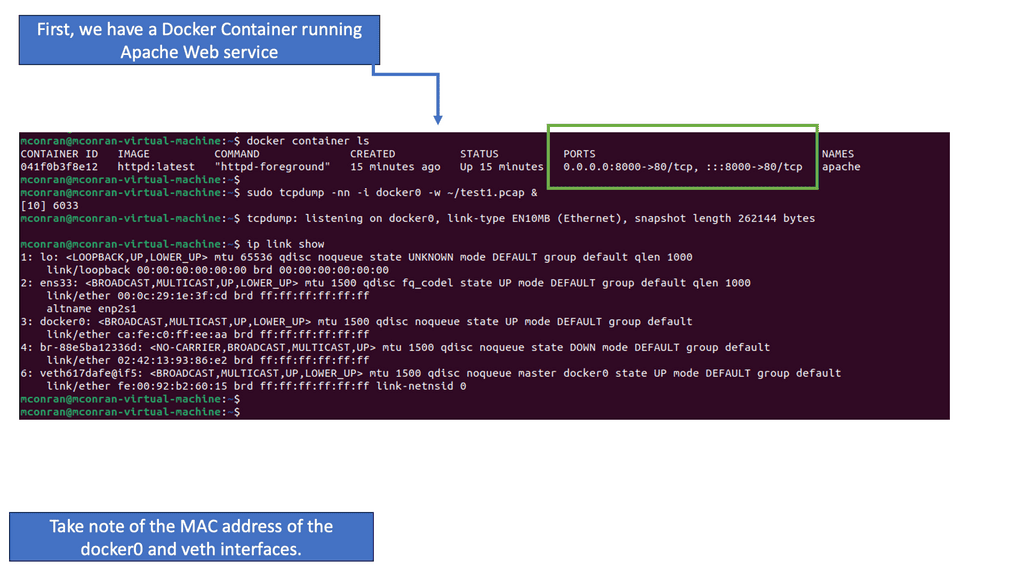
– One of the fundamental aspects of Docker’s default networking is container-to-container communication. Containers within the same bridge network can effortlessly communicate with each other using their respective IP addresses or container names. This opens up endless possibilities for building complex, interconnected systems composed of microservices.

– While container-to-container communication is vital, Docker also provides mechanisms to connect containers with the external world. We can expose services running inside containers to the host machine or the entire network by mapping container ports to host ports. This allows seamless integration of Dockerized applications with external systems.

– In addition to the default bridge network, Docker offers advanced networking techniques such as overlay networks. Overlay networks allow containers to communicate across multiple Docker hosts, enabling the creation of distributed systems and facilitating scalability. Understanding these advanced networking options expands the possibilities of using Docker in complex scenarios.

Container Orchestration

**Understanding Container Networking**

Container networking is a critical aspect of application deployment in GKE. It involves the communication between containers, nodes, and external services. In GKE, this process is streamlined with the integration of Kubernetes networking policies and the use of Google Cloud’s Virtual Private Cloud (VPC). These components work together to provide a secure and efficient networking environment, where each container can communicate with others while maintaining isolation and security.

**The Role of Kubernetes Networking Policies**

Kubernetes networking policies are essential for managing traffic flow within a GKE cluster. These policies define how pods communicate with each other and with external endpoints. By specifying rules for ingress and egress traffic, developers can fine-tune the security and performance of their applications. In GKE, networking policies are implemented using YAML configurations, providing a flexible and scalable approach to managing container networks.

**Integrating Google Cloud’s Virtual Private Cloud (VPC)**

Google Cloud’s VPC plays a pivotal role in enhancing the networking capabilities of GKE. With VPC, users can create isolated networks within Google Cloud, allowing for fine-grained control over IP address ranges, subnets, and routing. This integration ensures that containers within a GKE cluster can securely communicate with other Google Cloud services, on-premises resources, and the internet, while maintaining compliance with organizational security policies.

**Optimizing Performance with Container Networking**

Optimizing container networking in GKE involves balancing performance and security. By leveraging features like Network Endpoint Groups (NEGs) and Cloud Load Balancing, developers can ensure high availability and low latency for their applications. Additionally, monitoring tools provided by Google Cloud, such as Stackdriver, offer insights into network performance, enabling proactive management and troubleshooting of networking issues.

Google Kubernetes EngineUnderstanding Docker Swarm

At its core, Docker Swarm is a native clustering and orchestration solution for Docker containers. It enables the creation of a swarm, a group of Docker nodes that work together in a distributed system. Each node in the swarm can run multiple containers, forming a resilient and scalable infrastructure. By abstracting away the complexity of managing individual containers, Docker Swarm empowers developers and operators to focus on their applications’ logic rather than infrastructure intricacies.

Docker Swarm offers a plethora of features that streamline container deployment and management. Automatic load balancing, service discovery, and rolling updates are just a few of the capabilities that make Swarm an attractive choice for container orchestration. Additionally, Swarm provides fault tolerance, ensuring high availability even in the face of node failures. Its intuitive command-line interface and integration with Docker CLI make it easy to adopt and incorporate into existing workflows.

Benefits and Advantages

The advantages of Docker Swarm are manifold. Firstly, Swarm allows horizontal scaling, enabling applications to handle increased workloads effortlessly. Scaling up or down can be achieved seamlessly without downtime or disruptions. Furthermore, Swarm promotes fault tolerance through its replication and distribution mechanisms, ensuring that applications remain highly available even when faced with failures.

With built-in service discovery and load balancing, Swarm simplifies deploying and managing microservices architectures. Additionally, Swarm integrates well with other Docker tools and services, such as Docker Compose and Docker Registry, further enhancing its versatility.

What is Minikube?

Minikube is a lightweight, open-source tool that enables developers to run a single-node Kubernetes cluster locally. It provides a simplified way to set up and manage a Kubernetes environment on your machine, allowing developers to experiment, test, and develop applications without needing a full-scale production cluster. With Minikube, developers can replicate the production environment on their local machines, saving time and effort during development.

Example OpenShift: Network Services

The most common network service allows a source to reach an application endpoint. Nowadays, the network function no longer solely satisfies endpoint reachability; it is fully integrated into the application. In the case of OpenShift networking, the Route and Sevice construct provides both reachability and an abstraction layer for application access.

In the past, applications had three standard components: cache, web server, and database. Applications look very different now. Several services interact, are completely decoupled into units, and are packaged in containers; all are mobile and may move around.

Container Networking and the CNI

Running a container requires a host. On-premises data centers may use physical machines such as bare-metal servers, or virtual machines may be used in the cloud.

Docker daemon and client access interactive container registry. Containers can also be started, stopped, paused, and inspected, and container images pulled/pushed. Modern containers often comply with Open Container Initiative (OCI), and Docker is not the only option. Kubernetes and other alternatives to Docker can also be helpful.

Hosts and containers have a 1:N relationship. Typically, one host runs several containers. Facebook reports running 10 to 40 containers per host, depending on the machine’s beefiness.

You will likely have to deal with networking whether you use a single host or a cluster:

  • A single-host deployment almost always requires connecting to other containers on the same host; for example, WildFly might need to connect to a database.

  • During multi-host deployments, you must consider how containers communicate inside and between hosts. Your design decisions will likely be influenced by performance and security concerns. An Apache Spark or Apache Kafka cluster generally requires multiple hosts when a single host’s capacity is insufficient or for resilience reasons.

Docker networking

In a nutshell, Docker offers four single-host networking modes:

  • Bridge mode

This is the default network driver for apps running in standalone containers.

  • Host mode

It is also used for standalone containers, removing network isolation from the host.

  • Container mode

It lets you reuse another container’s network namespace. Used in Kubernetes.

  • No networking

It disables Docker networking support and allows you to set up custom networking.’

Knowledge Check: Container Security

Understanding Namespaces

Namespaces is a fundamental building block for achieving resource isolation within a Linux environment. They can virtualize system resources like process IDs, network interfaces, and file systems. By creating separate namespaces for different processes or groups of processes, we can ensure that each entity operates in its isolated environment, oblivious to other processes outside its namespace.

While namespaces focus on resource isolation, control groups take the concept further by enabling resource management. Control groups, commonly known as cgroups, allow administrators to allocate and limit system resources to specific processes or groups of processes, such as CPU, memory, and I/O. This fine-grained control enhances system performance, prevents resource starvation, and ensures fair distribution among entities.

**Network Security for Docker**

Securing the network connectivity of your Docker environment is essential to protect against potential attacks. Consider implementing these practices:

– Utilize Docker’s network security features, such as network segmentation and access control lists (ACLs).

– Enable and enforce firewall rules to control inbound and outbound traffic to and from containers.

– Consider using encrypted communication protocols (e.g., HTTPS) for containerized applications.

**Docker Host Security**

Securing the underlying Docker host is paramount for overall container security. Here are a few tips to enhance host security:

– Regularly update the host operating system and Docker daemon to patch known vulnerabilities.

– Employ strong access control measures to limit administrative privileges on the host.

– Implement intrusion detection and prevention systems to monitor and detect any unauthorized activities on the host.

container security

**Understanding SELinux**

SELinux is a mandatory access control (MAC) system that enforces fine-grained policies to restrict access and actions within a Linux system. It defines rules and labels for processes, files, and network resources, ensuring that only authorized activities are allowed.

When SELinux is enabled, it actively enforces access control policies on Docker containers and their associated network resources. SELinux labels define and implement rules regarding network communication, preventing unauthorized access or tampering.

One critical benefit of SELinux in Docker networking is its ability to mitigate network-based attacks. By leveraging SELinux’s access control capabilities, containers are isolated and protected from potential network threats. Unauthorized network interactions are blocked, reducing the attack surface and enhancing overall security.

Container Networking • Architecture Experiment

Which Container Network Model Fits the Job?

Change the networking model and traffic scenario to see how isolation, multi-host connectivity, performance characteristics and operational complexity change. The results are an educational comparison, not a benchmark.

Network Topology
HOST A
app-01
api-01
⇄
CONTAINER
NETWORK
⇄
HOST B
db-01
cache-01
Illustrative Behaviour
Isolation
70%
Performance
70%
Multi-host
30%
Simplicity
75%
[ready] Select a model and traffic scenario.
[lab] Results are illustrative networking behaviour.
Experiment Result
Network Scope Single Host
Namespace Isolated
Connectivity Available
Isolation Strong
Operational Trade-off Balanced
Engineering Insight
Bridge networking is a useful baseline for understanding container connectivity. It preserves network namespace isolation while providing a host-local virtual network.

Container Networking

Docker Networking

The Docker networking model uses a virtual bridge network by default, defined per host, and a private network where containers attach. The container’s IP address is allocated a private IP address, which indicates containers operating on different machines cannot communicate with each other.

In this case, you will have to map host ports to container ports and then proxy the traffic to reach across nodes with Docker. Therefore, it is up to the administrator to avoid port clashes between containers. Kubernetes networking handles this differently.

**Challenges in Container Networking**

Container networking presents several challenges that must be addressed to ensure optimal performance and reliability. Some of the key challenges include:

  • Network Isolation: Containers should be isolated from each other to prevent unauthorized access and potential security breaches.
  • IP Address Management: Containers are assigned unique IP addresses, which can quickly become challenging to manage as the number of containers grows.
  • Scalability: As the container ecosystem expands, the networking infrastructure must scale effortlessly to accommodate the increasing number of containers.
  • Service Discovery: Containers need a reliable mechanism to discover and communicate with other services within the network, especially in a microservices architecture.

**Solutions and Best Practices**

To overcome these challenges, several solutions and best practices have emerged in the realm of container networking:

1. Container Network Interface (CNI): CNI is a specification that defines how container runtimes interact with networking plugins. It enables easy integration of various networking solutions into container orchestration platforms like Kubernetes and Docker.

2. Overlay Networking: Overlay networks create a virtual network that spans multiple hosts, allowing containers to communicate seamlessly, regardless of physical location. Technologies like VXLAN, GRE, and WireGuard are commonly used for overlay networking.

3. Network Policies: Network policies define the rules and restrictions for incoming and outgoing traffic between containers. By implementing network policies, organizations can enforce security and control network traffic flow within their containerized environments.

4. Service Mesh: Service mesh technologies, such as Istio and Linkerd, provide advanced networking capabilities, including traffic management, load balancing, and observability. They enhance the resilience and reliability of containerized applications by offloading complex networking tasks from individual services.

Service Mesh & Networking

### What is a Cloud Service Mesh?

A Cloud Service Mesh is designed to handle the complex communication needs between various microservices within a cloud-native application. It provides a unified way to secure, connect, and observe services without the need to modify the application code. By abstracting the network logic from the business logic, a service mesh ensures that services can communicate seamlessly and securely, regardless of the underlying infrastructure.

### The Role of Container Networking

Container networking refers to the methods and protocols used to enable communication between containerized applications. Containers, which package applications and their dependencies, need an efficient way to communicate to ensure smooth operation. This is where Cloud Service Mesh comes into play. It provides advanced networking capabilities such as load balancing, traffic management, and secure communication channels specifically designed for containers. By integrating with container orchestrators like Kubernetes, a service mesh can automate and optimize these networking tasks.

### Key Benefits of Using a Cloud Service Mesh

1. **Enhanced Security**: A service mesh can handle encryption and secure communication between services, ensuring that data remains protected as it travels across the network.

2. **Observability**: It provides insights into service performance and operational metrics, making it easier to diagnose issues and optimize performance.

3. **Traffic Management**: With features like traffic splitting, retries, and circuit breaking, a service mesh allows more granular control over how traffic flows between services.

4. **Resilience**: By managing retries and failovers, a service mesh can improve the overall resilience of applications, ensuring they remain available even during partial failures.

### Challenges and Considerations

While the benefits are compelling, implementing a Cloud Service Mesh is not without its challenges. Complexity in setup and management, potential performance overhead, and the need for specialized knowledge are some of the hurdles that organizations might face. It’s essential to evaluate whether the benefits outweigh these challenges in the context of your specific use case.

### Real-World Use Cases

Several leading organizations have already adopted Cloud Service Mesh to streamline their container networking. For instance, companies in the finance and healthcare sectors leverage service meshes to ensure secure and compliant communication between microservices. Meanwhile, tech giants use it to manage massive, distributed systems with ease, ensuring high availability and optimal performance.

Container Networking: A Different Application Philosophy

Computing is distributed over multiple elements, and they all interact arbitrarily. Network integration allows the application to be divided into several microservice components. Microservices will enable the application to be packaged into pieces and deployed on different hosts or even different cloud providers.

The application stack no longer belongs to a single server. Small, composable units enhance application replication and fault tolerance services. Containers and the ability to interconnect them make all this possible.

Containers offer a single-purpose environment. They are a bunch of lightweight namespaces and processes sharing a common kernel. Typically, you don’t run a full stack in a single container.

Ideally, there is only one process per container, which makes them very lightweight. VMs with guest O/S are resource-heavy; containers are a far better option if the application can be containerized.

However, containers offer an utterly different endpoint type for the network. With virtual machines spinning, they arrive and disappear quickly, measured in milliseconds, not seconds or minutes. The speed is down to their light properties. Some containerized application transactions only live for the length of transaction time. The infrastructure and network must be pre-built to support this type of endpoint.

Despite containerization’s advantages, remember that Docker container security and Docker security options are enabled at each point in the defense layer.

Introducing Docker Network Types

Docker Default Networking 101

Docker networking comes with several Docker network types and setups. The latest release is Docker version 1.10, which has enhancements, including linking with user-defined networks. There are other solutions available to enhance Docker networking functionality.

Docker is pluggable and allows ecosystem partners to plug into Docker networking. Project Calico offers a pure IP-based solution that utilizes the same principles of the Internet. Every host is an IP router. Calico uses a Felix agent and a BGP BIRD demon. This would be a clean option if the application only needs Layer 3 connectivity. 

The weave is another solution that operates an overlay function and aims to fit the multi-data center requirements. Each host in a Weave network thinks it belongs to one large switched fabric. The physical locations are abstracted, and they all have reachability. A multi-datacenter solution must concern itself with metrics other than endpoint reachability.

Container Networking with Linux Kernel and User Namespaces

Several unique resources, such as network interfaces and file systems, appear isolated inside each container even though the containers share the Linux kernel. Global resources are abstracted to appear unique per container, an abstraction made available using Linux namespaces.

Namespaces initially provided resource isolation for the first Linux containers project, offering a process virtualization solution. They do not create additional operating system instances on the host but instead use a single system with resource isolation.

Similarly, FreeBSD, where Jails provides resource isolation while running one kernel instance. In 2002, mount namespaces were the first type of Linux namespace with kernel 2.4.19. User namespaces emerged with kernel 3.8. 

The Different Namespaces

Containers have namespaces for each type of resource. We have six namespaces. 

    • Mount namespace makes the container feel like it has its filesystem. 
    • UTS namespace offers individual hostnames and domain names. 
    • User namespace provides isolation between the user and group IDs. 
    • IPC namespace isolates message queue systems. 
    • PID namespace offers different PIDs inside the container.

Finally, the network namespace gives the container a separate network stack. When you issue the docker ps command, you will see what ports are bound; these ports are on the namespace network interface.

Docker Networking and Docker Network Types

Install docker creates three network types – bridge, host, and none. You cannot delete these networks; you only interact with the default bridge network. There is the option to create user-defined networks and customized plugins. 
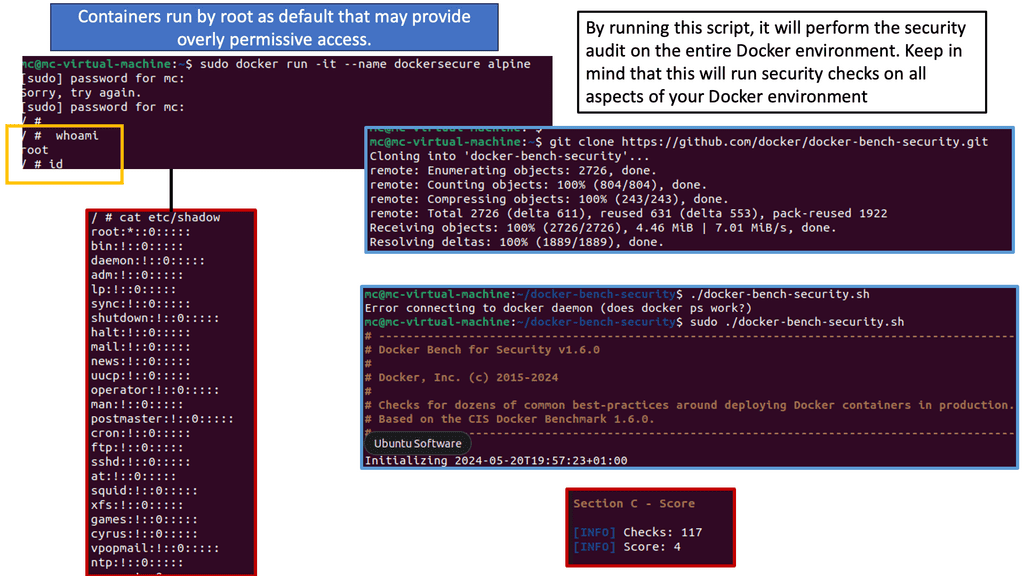
Network plugins (LibNetwork project) extend the docker network to support additional networking features such as IP VLAN or macvlan. User-defined networks can take the form of bridge or overlay networks.

Bridge networks have a single-host local scope, and overlay networks have a multi-host global scope. The diagram below displays the default bridge and the corresponding attached containers. The driver is “default,” meaning it has local scope.
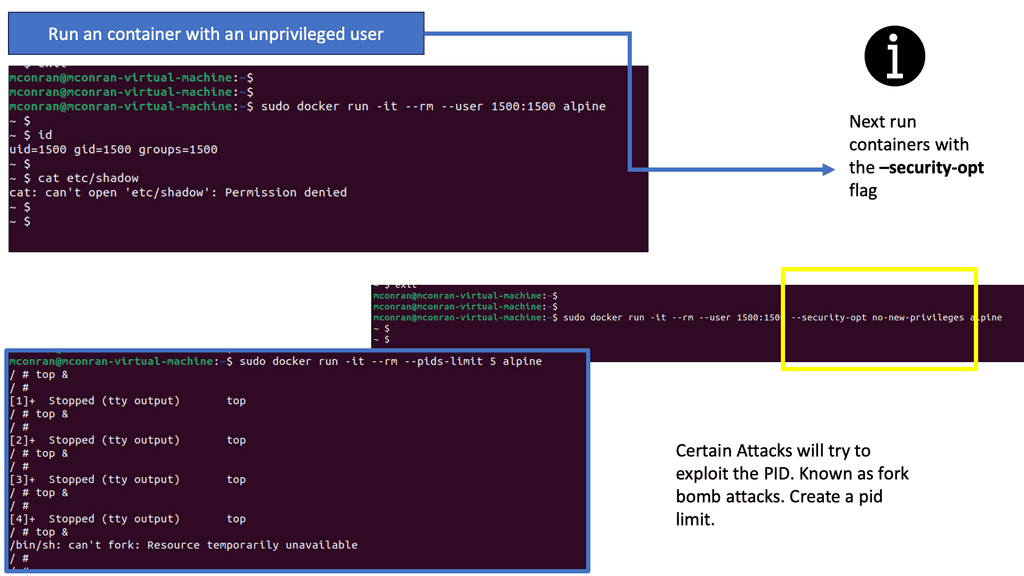
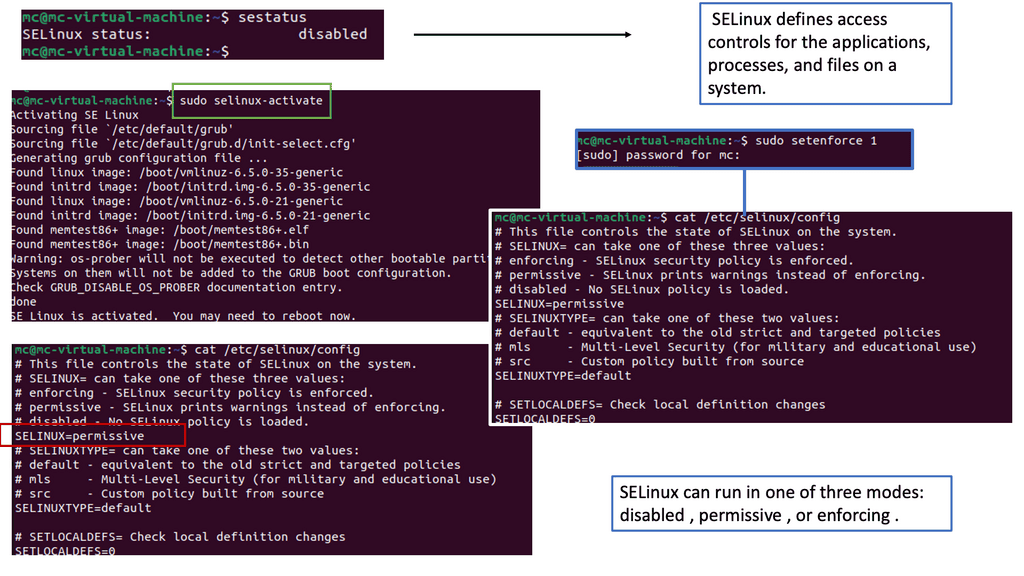
Container Networking

The user-defined bridge is similar to the default bridge0. Containers from the same host are added and can cross-communicate. External access is not prohibited, but you can expose network sections with port mappings.

The user-defined overlay networking feature enables multi-host networking using the VXLAN networking driver libnetwork and Docker’s libkv library. The overlay function requires a valid key-value store.

The Docker libkv library supports Consul, Etcd, and ZooKeeper. With Docker default networking, a veth pair is created—one inside the container and the other outside in the namespaces. All are connected via the docker bridge. The veth is mapped to appear as eth0 in the container, using Linux namespaces.

Container Networking

Container networking, port mapping, and traffic flow.

Docker container networking cross-communicates if they are on the same machine and thus connect to the same virtual bridge. Containers can also connect to multiple networks at the same time. By default, containers on different machines can not reach each other. Cross-communication on different nodes must be allocated ports on the machine’s IP address, which are then proxied to the containers.

Port mapping provides access to the container from the outside. Docker allocates a DNAT port in the range of 49153 – 65535. This additional functionality continues to use the default Docker0 bridge but adds IPtables rules for the DNAT.

When you spin up a container and do a port mapping, you can see it inside the docker ps command that you have a port mapping from, for example, the host 8080 to container 80. IPtables is setting a port mapping between 8080 and the IP addresses assigned to the container.

The problem with Docker is that you may have to coordinate ports and plenty of NAT. NAT was designed to address the shortage of IPv4 addresses and was only meant to be used for a short period. It is so ingrained in people’s minds we still see it come out in fresh designs.

Ports and NAT are problematic at scale and expose users to cluster-level issues outside their control. This can lead to port conflicts and many complexities in scheduling. 

Kubernetes

Kubernetes networking does not use any NAT. Instead, it applies IP addresses at the Pod scope level. Remember that containers within a Pod share network namespaces, including their IP address. This means containers within a Pod can all reach each other’s ports on localhost. Kubernetes makes finding and configuring Kubernetes services much easier due to the unique IP addresses per Pod model.

Kubernetes Networking 101

Kubernetes Networking 101: IP-per-pod-model

Kubernetes network namespace has two fundamental abstractions – Pods and Services. Pods are essentially scheduling ATOMs in Kubernetes. They represent a group of tightly integrated containers that share resources and fate. An example of an application container grouping in a Pod might be a file puller and a web server.

Frontend / Backend tiers usually fall outside this category as they can be scaled separately. Pods share a network namespace and talk to each other as local hosts.

Pods are assigned a private IP that is routable within the internal fabric. Docker doesn’t give you an IP; you must do weird things like going through a host and exposing a port. This is not a great idea, as port deployment may have issues and operational complexities.

With Kubernetes, all containers talk to each other, even across nodes, without NAT. The entire solution is NAT-less, flat address space. Pods can talk to Pods without any translations. Communications on ports can be done but with well-known port numbers, avoiding service discovery systems like DNS-SD, Consul, or Etcd.

Understanding Pod Networking

At the heart of Kubernetes networking lies the concept of pods. Pods are the basic building blocks of any Kubernetes cluster, encapsulating one or more containers that work together. To ensure seamless communication between pods, Kubernetes assigns each pod a unique IP address and exposes it to other pods within the cluster. 

While pods enable communication within a cluster, services take it further by providing a stable endpoint for accessing a set of pods. There are various services in Kubernetes, including ClusterIP, NodePort, and LoadBalancer, with their use cases and how they enable service discovery.

Container network and services

The second abstraction is services. Services are similar to a load balancer. They are groups of Pods that act as one. It may be better to reference the service with an IP address, not a Pod. This is because Pods can go away, but services are more dedicated.

A typical flow would be something like this: a client on a cluster looks for IP for a particular service. The Kubernetes nodes that it is running on do an iptables DNAT. Instead of going to the service, it reroutes to the Kube proxy, which is a proxy running on every Kubernetes node.

It programs iptables rules to trap access to service IPs and redirect them to the backends using round-robin load balancing. It also watches the API server to determine which pods are active and ready to serve requests.

Several implementations include Google Compute Engine, Flannel, Calico, and OVS with GRE/VxLAN to support the IP-per-pod model. OpenVSwitch connects Pods on different hosts with GRE or VxLAN. The Linux bridge replaces the docker0 bridge, encapsulating traffic to and from Pods. Flannel may also be used with Kubernetes.

It creates an overlay network and gives a subnet to each host. Flannel can be used on cloud providers that cannot offer an entire /24 to each host. Flannels’ flannel agent runs on each host and controls the IP assignment. Calico, already mentioned, is also an IP-based solution that relies on traditional BGP.

Closing Points on Container Networking 

Container networking refers to the methods and protocols that enable containers to communicate with each other, with other applications, and with external networks. Unlike traditional virtual machines, containers share the same operating system but operate in isolated environments. This isolation necessitates specialized networking solutions to facilitate connectivity. From simple bridge networks to more complex overlay networks, container networking offers a variety of options to suit different needs and environments.

1. **Bridge Networks**: The default networking option for many container platforms, bridge networks allow containers on the same host to communicate with each other. This setup is ideal for simple applications or when all containers are on a single machine.

2. **Overlay Networks**: Perfect for multi-host deployments, overlay networks create a virtual network that spans across multiple machines. This type of network is essential for scaling applications across different infrastructure and provides a level of abstraction that simplifies network management.

3. **Host Networks**: In this configuration, containers share the host’s network stack. This can lead to improved performance since there’s no network address translation (NAT) overhead, but it also means less isolation compared to other networking types.

4. **Macvlan Networks**: These networks assign a unique MAC address to each container, allowing them to appear as physical devices on the network. This is useful for legacy applications that require direct network access.

Several tools and technologies have emerged to facilitate container networking, each offering unique features and capabilities:

– **Docker Networking**: Docker provides built-in networking capabilities that cater to a range of use cases, from simple bridge networks to more robust overlay networks.

– **Kubernetes Networking**: As one of the most popular container orchestration platforms, Kubernetes offers powerful networking features through its network plugins and service mesh integrations.

– **Cilium**: Leveraging eBPF technology, Cilium provides advanced networking and security capabilities, making it a popular choice for Kubernetes environments.

– **Weave Net**: A simple yet effective solution, Weave Net offers automatic network creation and service discovery, making it easier to manage container networks.

Container Networking • Incident Investigation

Why Can't the API Container Reach the Database?

Diagnose the failure using the evidence rather than immediately rebuilding the containers. Choose the most likely investigation path, then evaluate your diagnosis.

Incident Scenario
PRODUCTION CONNECTIVITY ALERT

api-01 cannot establish a TCP connection to db-01:5432. The application reports a connection timeout. The database itself appears healthy.

Evidence Collected
API Container
RUNNING
Database Container
RUNNING
Local Network
REACHABLE
DB TCP/5432
LISTENING
API → DB
TIMEOUT
Recent Change
NETWORK POLICY
Suspected Packet Path
▣
api-01
Application
→
◇
Container Network
Virtual Path
→
◈
Policy / Filter
TCP/5432
→
▣
db-01
TCP/5432
Choose Your Investigation
Investigation Result
Diagnostic Score
— / 4
Select the investigation path that best matches the evidence.
Incident Console
[incident] api-01 → db-01 TCP/5432 timeout
[evidence] both containers are RUNNING
[evidence] database socket is LISTENING
[evidence] local network is REACHABLE
[change] network policy modified recently
[action] select a diagnosis
Engineering Insight
Good troubleshooting narrows the failure domain before making destructive changes. Here, the containers and database service are healthy, while the recent policy change provides a strong lead.
container

Container Scheduler

Container Scheduler

In modern application development and deployment, containerization has gained immense popularity. Containers allow developers to package their applications and dependencies into portable and isolated environments, making them easily deployable across different systems. However, as the number of containers grows, managing and orchestrating them becomes complex. This is where container schedulers come into play.

A container scheduler is a crucial component of container orchestration platforms. Its primary role is to manage the allocation and execution of containers across a cluster of machines or nodes. By efficiently distributing workloads, container schedulers ensure optimal resource utilization, high availability, and scalability.

Container schedulers serve as a crucial component in container orchestration frameworks, such as Kubernetes. They act as intelligent managers, overseeing the deployment and allocation of containers across a cluster of machines. By automating the scheduling process, container schedulers enable efficient resource utilization and workload distribution.

Enhanced Resource Utilization: Container schedulers optimize resource allocation by intelligently distributing containers based on available resources and workload requirements. This leads to better utilization of computing power, minimizing resource wastage.

Scalability and Load Balancing: Container schedulers enable horizontal scaling, allowing applications to seamlessly handle increased traffic and workload. With the ability to automatically scale up or down based on demand, container schedulers ensure optimal performance and prevent system overload.

High Availability: By distributing containers across multiple nodes, container schedulers enhance fault tolerance and ensure high availability. If one node fails, the scheduler automatically redirects containers to other healthy nodes, minimizing downtime and maximizing system reliability.

Microservices Architecture: Container schedulers are particularly beneficial in microservices-based applications. They enable efficient deployment, scaling, and management of individual microservices, facilitating agility and flexibility in development.

Cloud-Native Applications: Container schedulers are a fundamental component of cloud-native application development. They provide the necessary framework for deploying and managing containerized applications in dynamic and distributed environments.

DevOps and Continuous Deployment: Container schedulers play a vital role in enabling DevOps practices and continuous deployment. They automate the deployment process, allowing developers to focus on writing code while ensuring smooth and efficient application delivery.

Container schedulers have revolutionized the way organizations develop, deploy, and manage their applications. By optimizing resource utilization, enabling scalability, and enhancing availability, container schedulers empower businesses to build robust and efficient software systems. As technology continues to evolve, container schedulers will remain a critical tool in streamlining efficiency and scaling applications in the dynamic digital landscape.

Where Should the Container Run?

A scheduler does more than find an empty machine. It evaluates workload requirements against available node resources and placement constraints, then selects a suitable location. Experiment with resource demand, node conditions and placement policy.

Scheduler Decision Path
📦
web-deployment
2 CPU • 4 GB
→
🧠
Scheduler
Filter → Score → Select
Node A
Zone-A • SSD
CPU 45% RAM 40%
Node B
Zone-B • SSD
CPU 68% RAM 70%
Node C
Zone-A • Standard
CPU 25% RAM 30%
Node D
Zone-B • Standard
CPU 52% RAM 55%
Candidates
4
Filtered
0
Selected Node
—
Placement
READY
Scheduler Console
[LAB] Scheduling experiment ready.
[INFO] Four candidate nodes available.
[WAIT] Awaiting scheduling decision.
Engineering Insight
Scheduling is a decision process. A node may have available capacity but still be unsuitable because of workload requirements or placement constraints. Modern schedulers evaluate multiple signals before selecting a placement.

Highlights: Container Scheduler

### What Are Containerized Applications?

Containerized applications are a method of packaging software in a way that allows it to run consistently across different computing environments. Unlike traditional virtual machines, containers share the host system’s OS kernel but run in isolated user spaces. This means they are lightweight, fast, and can be deployed with minimal overhead. By encapsulating an application and its dependencies, containers ensure that software runs reliably no matter where it is deployed, be it on a developer’s laptop or in a cloud environment.

### Advantages of Containerization

The adoption of containerized applications brings numerous benefits to the table. First and foremost, they provide unmatched flexibility. Containers can be easily moved between on-premises servers and various cloud environments, offering unparalleled portability. They also enhance resource efficiency, allowing multiple containers to run on a single machine without the need for separate OS installations. Additionally, containers support microservices architectures, enabling developers to break down applications into manageable, scalable components. This modular approach not only accelerates development cycles but also simplifies updates and maintenance.

### Challenges in the Containerized Ecosystem

Despite their advantages, containerized applications come with their own set of challenges. Security is a primary concern, as the shared kernel approach can potentially expose the system to vulnerabilities. Proper isolation and management are crucial to maintaining a secure environment. Furthermore, the orchestration of containers at scale requires sophisticated tools and expertise. Technologies like Kubernetes have emerged to address these needs, but they introduce their own complexities that teams must navigate. Additionally, as organizations shift to containerized architectures, they must also consider the cultural and procedural changes necessary to fully leverage this technology.

### Technologies Powering Containerization

Several technologies have become integral to the containerized application ecosystem. Docker is perhaps the most well-known, providing a platform for developers to create, deploy, and run applications in containers. Kubernetes, on the other hand, offers robust orchestration capabilities, managing containerized applications in a cluster. It automates deployment, scaling, and operations, ensuring applications run smoothly in large, dynamic environments. Other tools like Helm and Prometheus play supporting roles, enhancing the management and monitoring of these applications.

Container Orchestration

– Orchestration and mass deployment tools are the first tools that add functionality to the Docker distribution and Linux container experience. Ansible Docker and New Relic’s Centurion tooling still function like traditional deployment tools but leverage the container as the distribution artifact. Their approach is pretty simple and easy to implement. Although Docker offers many benefits without much complexity, many of these tools have been replaced by more robust and flexible alternatives, like Kubernetes.

– In addition to Kubernetes or Apache Mesos with Marathon schedulers, fully automatic schedulers can manage a pool of hosts on your behalf. The free and commercial options ecosystems continue to grow rapidly, including HashiCorp’s Nomad, Mesosphere’s DC/OS (Datacenter Operating System), and Rancher.

– There is more to Docker than just a standalone solution. Despite its extensive feature set, someone will always need more than it can deliver alone. It is possible to improve or augment Docker’s functionality with various tools. Ansible for simple orchestration and Prometheus for monitoring the use of Docker APIs. Others take advantage of Docker’s plug-in architecture. Docker plug-ins are executable programs that receive and return data according to a specification.

**Virtualization**

Virtualization systems, such as VMware or KVM, allow you to run Linux kernels and operating systems on top of a virtualized layer, commonly called a hypervisor. On top of a hardware virtualization layer, each VM hosts its operating system kernel in a separate memory space, providing extreme isolation between workloads. A container is fundamentally different since it shares only one kernel and achieves all workload isolation within it. Operating systems are virtualized in this way.

**Docker and OCI Images**

There is almost no place today that does not use containers. Many production systems, including Kubernetes and most “serverless” cloud technologies, rely on Docker and OCI images as the packaging format for a significant and growing amount of software delivered into production environments.

Container Scheduling

Often, we want our containers to restart if they exit. Containers can come and go quickly, but some are very short-lived. You expect production applications, for example, to be constantly running after you tell them to do so. Schedulers may handle this for you if your system is more complex.

Docker’s cgroup-based CPU share constraints can have unexpected results, unlike VMs. Like the excellent command, they are relative limits, not hard limits. Suppose a container is limited to half the CPU share on a system that is not very busy. As the CPU is not busy, the CPU share limit would only have a limited effect since the scheduler pool is not competitive. Suddenly, the constraint will affect the first container when a second container using a lot of CPU is deployed to the same system. When allocating resources and constraining containers, keep this in mind.

  • Scheduling with Docker Swarm

Container scheduling lies at the heart of efficient resource allocation in containerized environments. It involves intelligently assigning containers to available resources based on various factors such as resource availability, load balancing, and fault tolerance. Docker Swarm simplifies this process by providing a built-in orchestration layer that automates container scheduling, making it seamless and hassle-free.

  • Scheduling with Apache Mesos

Apache Mesos is an open-source cluster manager designed to abstract and pool computing resources across data centers or cloud environments. As a distributed systems kernel, Mesos enables efficient resource utilization by offering a unified API for managing diverse workloads. With its modular architecture, Mesos ensures flexibility and scalability, making it a preferred choice for large-scale deployments.

  • Container Orchestration

Containerization has revolutionized software development by providing a consistent and isolated application environment. However, managing many containers across multiple hosts manually can be daunting. This is where container orchestration comes into play. Docker Swarm simplifies managing and scaling containers, making it easier to deploy applications seamlessly.

Docker Swarm offers a range of powerful features that enhance container orchestration. From declarative service definition to automatic load balancing and service discovery, Docker Swarm provides a robust platform for managing containerized applications. Its ability to distribute containers across a cluster of machines and handle failover seamlessly ensures high availability and fault tolerance.

Getting Started with Docker Swarm

You need to set up a Swarm cluster to start leveraging Docker Swarm’s benefits. This involves creating a Swarm manager, adding worker nodes, and joining them to the cluster. Docker Swarm provides a user-friendly command-line interface and APIs to manage the cluster, making it accessible to developers of all levels of expertise.

One of Docker Swarm’s most significant advantages is its ability to scale applications effortlessly. By leveraging the power of service replicas, Docker Swarm enables horizontal scaling, allowing you to handle increased traffic and demand. Swarm’s built-in load balancing also ensures that traffic is evenly distributed across containers, optimizing resource utilization.

Scheduling with Kubernetes

Kubernetes employs a sophisticated scheduling system to assign containers to appropriate nodes in a cluster. The scheduling process considers various factors such as resource requirements, node capacity, affinity, anti-affinity, and custom constraints. Using intelligent scheduling algorithms, Kubernetes optimizes resource allocation, load balancing, and fault tolerance.

**Traditional Application**

Applications started with single server deployments and no need for a container scheduler. However, this was an inefficient deployment model, yet it was widely adopted. Applications mapped to specific hardware do not scale. The landscape changed, and the application stack was divided into several tiers. Decoupling the application to a loosely coupled system is a more efficient solution. Nowadays, the application is divided into different components and spread across the network with various systems, dependencies, and physical servers.

Virtualization

**Example: OpenShift Networking**

An example of this is with OpenShift networking. OpenShift is based on Kubernetes and borrows many of the Kubernetes constructs. For pre-information, you may find this post informative on Kubernetes and Kubernetes Security Best Practice

**The Process of Decoupling**

The world of application containerization drives the ability to decouple the application. As a result, there has been a massive increase in containerized application deployments and the need for a container scheduler. With all these changes, remember the need for new security concerns to be addressed with Docker container security.

The Kubernetes team conducts regular surveys on container usage, and their recent figures show an increase in all areas of development, testing, pre-production, and production. Currently, Google initiates about 2 billion containers per week. Most of Google’s apps/services, such as its search engine, Docs, and Gmail, are packaged as Linux containers.


Container Scheduler • Experiment 02

How Do Scheduling Constraints Change Placement?

Change replicas, placement constraints and node failures to see how a scheduler narrows the candidate set. The goal is to understand why a perfectly healthy cluster can still leave a workload Pending.
AFFINITY • SPREAD • FAILURE
Workload
4
This is an educational simulation. Real Kubernetes scheduling involves plugins, scoring, taints/tolerations, topology rules, resource requests and other configuration-dependent behaviour.
What To Watch
Constraint first. A scheduler does not simply ask “which node has capacity?” It must first determine which nodes satisfy the workload's placement requirements.

A strict constraint can therefore make a workload unschedulable even when other nodes still have spare CPU and memory.
Cluster Placement View
Node A
READY
zone=A disk=SSD
CPU 45% RAM 40%
Node B
READY
zone=B disk=SSD
CPU 68% RAM 70%
Node C
READY
zone=A disk=Standard
CPU 25% RAM 30%
Node D
READY
zone=B disk=Standard
CPU 52% RAM 55%
Scheduled
0
Pending
0
Nodes Used
0
Constraint
—
Scheduler Event Console
scheduler: waiting for placement experiment... cluster state loaded • 4 candidate nodes no scheduling decision executed yet
Engineering Insight
Change the constraint mode and run the experiment. Compare the number of eligible nodes with the number of replicas requested.

Key lesson: scheduling constraints improve placement control and fault isolation, but overly restrictive constraints can reduce scheduling flexibility.

Container Scheduler

With a container orchestration layer, we are marrying the container scheduler’s decisions on where to place a container with the primitives provided by lower layers. The container scheduler knows where containers “live,” and we can consider it the absolute source of truth concerning a container’s location.

So, a container scheduler’s primary task is to start containers on the most suitable host and connect them. It also has to manage failures by performing automatic fail-overs and be able to scale containers when there is too much data to process/compute for a single instance.

Popular Container Schedulers:

1. Kubernetes: Kubernetes is an open-source container orchestration platform with a powerful scheduler. It provides extensive features for managing and orchestrating containers, making it widely adopted in the industry.

2. Docker Swarm: Docker Swarm is another popular container scheduler provided by Docker. It simplifies container orchestration by leveraging Docker’s ease of use and integrates well with existing workflows.

3. Apache Mesos: Mesos is a distributed systems kernel that provides a framework for managing and scheduling containers and other workloads. It offers high scalability and fault tolerance, making it suitable for large-scale deployments.

Understanding Container Schedulers

Container schedulers, such as Kubernetes and Docker Swarm, play a vital role in managing containers efficiently. These schedulers leverage a range of algorithms and policies to intelligently allocate resources, schedule tasks, and optimize performance. By abstracting away the complexities of machine management, container schedulers enable developers and operators to focus on application development and deployment, leading to increased productivity and streamlined operations.

Key Scheduling Features

To truly comprehend the value of container schedulers, it is essential to understand their key features and functionality. These schedulers excel in areas such as automatic scaling, load balancing, service discovery, and fault tolerance. By leveraging advanced scheduling techniques, such as bin packing and affinity/anti-affinity rules, container schedulers can effectively utilize available resources, distribute workloads evenly, and ensure high availability of services.

Kubernetes & Docker Swarm

There are two widely used container schedulers: Kubernetes and Docker Swarm. Both offer powerful features and a robust ecosystem, but they differ in terms of architecture, scalability, and community support. By examining their strengths and weaknesses, organizations can make informed decisions on selecting the most suitable container scheduler for their specific requirements.

Kubernetes Clusters Google Cloud  

### Understanding Kubernetes Clusters

At the heart of Kubernetes is the concept of clusters. A Kubernetes cluster consists of a set of worker machines, known as nodes, that run containerized applications. Every cluster has at least one node and a control plane that manages the nodes and the workloads within the cluster. The control plane decisions, such as scheduling, are managed by a component called the Kubernetes scheduler. This scheduler ensures that the pods are distributed efficiently across the nodes, optimizing resource utilization and maintaining system health.

### Google Cloud and Kubernetes: A Perfect Match

Google Cloud offers a powerful integration with Kubernetes through Google Kubernetes Engine (GKE). This managed service allows developers to deploy, manage, and scale their Kubernetes clusters with ease, leveraging Google’s robust infrastructure. GKE simplifies cluster management by automating tasks such as upgrades, repairs, and scaling, allowing developers to focus on building applications rather than infrastructure maintenance. Additionally, GKE provides advanced features like auto-scaling and multi-cluster support, making it an ideal choice for enterprises looking to harness the full potential of Kubernetes.

### The Role of Container Schedulers

A critical component of Kubernetes is its container scheduler, which optimizes the deployment of containers across the available resources. The scheduler considers various factors, such as resource requirements, hardware/software/policy constraints, and affinity/anti-affinity specifications, to decide where to place new pods. This ensures that applications run efficiently and reliably, even as workloads fluctuate. By automating these decisions, Kubernetes frees developers from manual resource allocation, enhancing productivity and reducing the risk of human error.

Google Kubernetes Engine**Key Features of Container Schedulers**

1. Resource Management: Container schedulers allocate appropriate resources to each container, considering factors such as CPU, memory, and storage requirements. This ensures that containers operate without resource contention, preventing performance degradation.

2. Scheduling Policies: Schedulers implement various scheduling policies to allocate containers based on priorities, constraints, and dependencies. They ensure containers are placed on suitable nodes that meet the required criteria, such as hardware capabilities or network proximity.

3. Scalability and Load Balancing: Container schedulers enable horizontal scalability by automatically scaling up or down the number of containers based on demand. They also distribute the workload evenly across nodes, preventing any single node from becoming overloaded.

4. High Availability: Schedulers monitor the health of containers and nodes, automatically rescheduling failed containers to healthy nodes. This ensures that applications remain available even in node failures or container crashes.

**Benefits of Container Schedulers**

1. Efficient Resource Utilization: Container schedulers optimize resource allocation, allowing organizations to maximize their infrastructure investments and reduce operational costs by eliminating resource wastage.

2. Improved Application Performance: Schedulers ensure containers have the necessary resources to operate at their best, preventing resource contention and bottlenecks.

3. Simplified Management: Container schedulers automate the deployment and management of containers, reducing manual effort and enabling faster application delivery.

4. Flexibility and Portability: With container schedulers, applications can be easily moved and deployed across different environments, whether on-premises, in the cloud, or in hybrid setups. This flexibility allows organizations to adapt to changing business needs.

Containers – Raising the Abstraction Level

Container networking raises the abstraction level. The abstraction level was at a VM level, but with containers, the abstraction is moved up one layer. So, instead of virtual hardware, you have an idealized O/S stack.

1 -)  Containers change the way applications are packaged. They allow application tiers to be packaged and isolated, so all dependencies are confined to individual islands and do not conflict with other stacks. Containers provide a simple way to package all application pieces into an easily deployable unit. The ability to create different units radically simplifies deployment.

2 -) It creates a predictable isolated stack with ALL userland dependencies. Each application is isolated from others, and dependencies are sealed in. Dependencies are the natural killer as they can slow down deployment lifecycles. Containers combat this and fundamentally change the operational landscape. Docker and Rocket are the main Linux application container stacks in production.

3 -) Containers don’t magically appear. They need assistance with where to go; this is the role of the container scheduler. The scheduler’s main job is to start the container on the correct host and connect it. In addition, the scheduler needs to monitor the containers and deal with container/host failures.

4 -) The schedulers are Docker Swarm, Google Kubernetes, and Apache Mesos. Docker Swarm is probably the easiest to start with, and it’s not attached to any cloud provider. The container sends several requirements to the cluster scheduler. For example, I have this amount of resources and want to run five copies of this software with this amount of CPU and disk space – now find me a place.

Kubernetes – Container scheduler

Hand on Kubernetes. Kubernetes is an open-source cluster solution for containerized environments. It aims to make deploying microservice-based applications easy by using the concepts of PODS and LABELS to group containers into logical units. All containers run inside a POD.

PODS are the main difference between Kubernetes and other scheduling solutions. Initially, Kubernetes focused on continuously running stateless and “cloud native” stateful applications. In the coming future, it is said to support other workload types.

container scheduler

Kubernetes Networking 101

Kubernetes is not just interested in the deployment phase but works across the entire operational model—scheduling, updating, maintenance, and scaling. Unlike orchestration systems, it actively ensures the state matches the user’s requirements. Kubernetes is also involved in monitoring and healing if something goes wrong.

The Google team refers to this as a flight control mechanism. It provides the cluster and the decoupling between it. The application containers view the world as a sea of computing, an entirely homogenous (similar kind) cluster. Every machine you create in your fleet looks the same. The application is completely decoupled from low-level computing.

The unit of work has changed

The user does not need to care about physical placement anymore. The unit of work has changed and become a service. The administrator only needs to care about services, such as the amount of CPU, RAM, and disk space. The unit of work presented is now at a service level. The physical location is abstracted, all taken care of by the Kubernetes components.

This does not mean that the application components can be spread randomly. For example, some application components require the same host. However, selecting the hosts is no longer the user’s job. Kubernetes provides an abstracted layer over the infrastructure, allowing this type of management.

Containers are scheduled using a homogenous pool of resources. The VM disappears, and you think about resources such as CPU and RAM. Everything else, like location, disappears.

Kubernetes pod and label

The main building blocks for Kubernetes clusters are PODS and LABELS. So, the first step is to create a cluster, and once complete, you can proceed to PODS and other services. The diagram below shows the creation of a Kubernetes cluster. It consists of a 3-node instance created in us-east1-b.

containers

A POD is a collection of applications running within a shared context. Containers within a POD share fate and some resources, such as volumes and IP addresses. They are usually installed on the same host. When you create a POD, you should also make a kubernetes replication controller.

It monitors POD health and starts new PODS as required. Most PODS should be built with a replication controller, but it may not be needed if your POD is short-lived and is writing non-persistent data that won’t survive a restart. There are two types of PODS a) single container and b) Multi-container.

The following diagram displays the full details of a POD named example-tglxm. Its label is run=example and is located in the default network (namespace).

Container POD

A POD may contain either a single container with a private volume or a group with a shared volume. If a container fails within a POD, the Kubelet automatically restarts it. However, if an entire POD or host fails, the replication controller needs to restart it.

Replication to another host must be specifically configured. It is not automatic by default. The Kubernetes replication controller dynamically resizes things and ensures that the required number of PODS and containers are running. If there are too many, it will kill some; if not enough, it will start some more.

Kubernetes operates with the concept of LABELS – a key-value pair attached to objects, such as a POD. A label is a tag that can be used to query against. Kubernetes is an abstraction, and you can query whatever item you want using a label in an entire cluster.

For example, you can select all frontend containers with a label called “frontend”; it then selects all front ends. The cluster can be anywhere. Labels can also be building blocks for other services, such as port mappings. For example, a POD whose labels match a specific service selector is accessible through the defined service’s port.

Closing Points on Container Scheduler

At its core, a container scheduler is a system that automates the deployment, scaling, and operation of application containers. It intelligently assigns workloads to available computing resources, ensuring optimal performance and availability. Popular container schedulers like Kubernetes, Docker Swarm, and Apache Mesos have become essential tools for organizations aiming to leverage the full potential of containerization.

Container schedulers come packed with features that enhance the management and orchestration of containers:

– **Automated Load Balancing**: They dynamically distribute incoming application traffic to ensure a balanced load across containers, preventing any single resource from becoming a bottleneck.

– **Self-Healing Capabilities**: In the event of a failure, container schedulers can automatically restart or reschedule containers to maintain application availability.

– **Efficient Resource Utilization**: By intelligently allocating resources based on demand, schedulers ensure that your infrastructure is used efficiently, minimizing costs and maximizing performance.

Selecting the right container scheduler depends on several factors, including your organization’s infrastructure, scale, and specific use cases. Kubernetes is the most widely adopted due to its rich feature set and community support, making it an excellent choice for complex, large-scale deployments. Docker Swarm, on the other hand, offers simplicity and ease of use, making it ideal for smaller projects or teams new to container orchestration.

To maximize the benefits of container schedulers, consider the following best practices:

– **Define Clear Resource Limits**: Set appropriate resource limits for your containers to prevent resource contention and ensure stable performance.

– **Implement Security Measures**: Use network policies and role-based access controls to secure your containerized environments.

– **Monitor and Optimize**: Continuously monitor your containerized applications and adjust resource allocations as needed to optimize performance.

Container Scheduler • Incident Investigation

Why Is the New Replica Pending?

A deployment needs four replicas, but only three are running. The cluster still has available capacity. Your job is to determine why the scheduler cannot place the fourth replica.
INCIDENT • POD PENDING
Incident Brief
web-api deployment: desired replicas = 4.
Current state: 3 replicas running, 1 replica Pending.
Important clue: the cluster has spare resources, but the workload uses zone=B affinity and pod anti-affinity.
Deployment
3 / 4 Running
Pending Pod
web-api-4
Node C
34% CPU
Scheduler
No Fit
Cluster Evidence
Node A
READY
zone=A SSD
CPU 91% 3 Pods
web-api-1
→
Node B
LOW CPU
zone=B SSD
CPU 91% 2 Pods
web-api-2
→
Node C
READY
zone=A Standard
CPU 34% 1 Pod
analytics-1
→
Node D
READY
zone=B Standard
CPU 28% 0 Pods
Candidate?
Evidence is intentionally simplified. Focus on the relationship between resource availability, node labels and placement constraints.
Scheduler Events
scheduler: attempting to place web-api-4 filter: checking node resources warning: Node B has insufficient available CPU filter: checking zone=B affinity filter: checking pod anti-affinity result: no suitable placement found
Choose Your Diagnosis
Investigation Score
—
Correct Action
—
What The Evidence Tells You
Do not jump straight to restarting workloads.

Start with the scheduler evidence: the cluster has capacity, but the scheduler reports that no node satisfies the complete set of requirements.

Your task is to identify which requirement is preventing placement.