Docker Security Options
Container security is no longer limited to protecting a Docker daemon or scanning an image for known vulnerabilities. Modern container environments span the software supply chain, container runtime, host operating system, network, secrets, registries, CI/CD pipelines, and often an orchestration platform such as Kubernetes.
Docker provides a powerful packaging and execution model, but containers are not equivalent to virtual machines. Containers share the host kernel, which means a compromised or misconfigured container can potentially expose the underlying host or other workloads. Effective container security therefore requires controls at multiple layers.
Understanding Container Security Risks
Common risks include vulnerable base images, malicious or tampered dependencies, exposed container services, excessive Linux capabilities, insecure filesystem permissions, leaked credentials, privileged containers, container breakout vulnerabilities, and compromised registries or build pipelines.
Security should therefore begin before a container reaches production. An image that is already compromised or contains a known critical vulnerability cannot be made secure simply by applying runtime controls later.
Image and Supply Chain Security
Container images should be built from trusted and maintained base images and kept as small as practical. Reducing unnecessary packages decreases the attack surface and limits the number of components requiring security updates.
Image scanning can identify known vulnerabilities in operating-system packages and application dependencies. However, vulnerability scanning should be combined with software supply-chain controls such as trusted registries, dependency management, image provenance, cryptographic signing or attestations, and controlled build pipelines.
Image tags such as latest should not be treated as a strong integrity mechanism because they can change over time. Production workflows can instead use immutable image references or digests so that the exact image being deployed is known.
Least Privilege at Runtime
A container should receive only the privileges required for its workload. Running containers as root when it is unnecessary increases the potential impact of a compromise.
Security controls can include non-root users, restricted Linux capabilities, read-only filesystems where practical, controlled device access, restricted privilege escalation, seccomp profiles, and mandatory access controls such as AppArmor or SELinux where supported.
Privileged containers deserve particular scrutiny because they can significantly weaken the isolation boundary between the workload and the host.
Secrets and Credentials
Secrets should never be embedded directly into container images or source repositories. Database passwords, API tokens, certificates, and other credentials should be managed through appropriate secret-management mechanisms and injected into workloads only when required.
Access to secrets should follow least-privilege principles, with appropriate rotation, auditing, and separation between development, testing, and production environments.
Container Network Security
Container networking can create additional attack paths if workloads are allowed unrestricted communication. Network segmentation should therefore be designed around application requirements rather than simply placing every container on the same network.
Docker networks, host firewalls, cloud security controls, and, in orchestrated environments, network policies can be used to restrict which workloads can communicate with one another and which services are exposed externally.
Encryption should also be considered whenever sensitive information crosses networks or leaves the host.
Runtime and Host Security
Container security depends heavily on the underlying host. Docker Engine, containerd, the Linux kernel, supporting packages, and host configuration must all be maintained and monitored.
The container runtime provides isolation mechanisms such as Linux namespaces and control groups, while additional security mechanisms can restrict system calls, capabilities, filesystem access, and interaction with the host.
A vulnerable host can undermine otherwise well-designed container controls, making host patching and configuration management an essential part of the overall security model.
Monitoring and Detection
Security does not end when a container starts successfully. Runtime activity should be monitored for unexpected processes, unusual network connections, privilege changes, filesystem modifications, resource anomalies, and other indicators of compromise.
Container logs, host telemetry, runtime events, vulnerability reports, and security alerts can be combined with broader observability and security monitoring platforms to provide operational context.
Continuous Container Security
Container security is a lifecycle rather than a single configuration task:
Build securely → Scan → Verify provenance → Store securely → Deploy with least privilege → Restrict network access → Monitor → Patch and rebuild
This approach recognises that vulnerabilities will continue to emerge in operating-system packages, application dependencies, runtimes, and the underlying infrastructure.
The objective is not to make a container permanently “secure.” Instead, organisations should build a repeatable security process that reduces attack surface, limits privileges, protects the supply chain, detects abnormal behaviour, and enables vulnerable workloads to be rebuilt and replaced quickly.
A strong Docker security strategy therefore treats the container as one component of a larger system. Image integrity, runtime isolation, host security, identity, secrets, networking, monitoring, and continuous vulnerability management must work together to protect the workload throughout its lifecycle.
Highlights: Docker Security Options
Docker Security Posture Builder
Start with a deliberately weak container configuration and progressively apply defense-in-depth controls. Your goal is to reduce privilege, constrain the runtime, protect the image and limit the blast radius.
Container is broadly exposed
Identity & Privilege
Runtime Isolation
Image & Supply Chain
Network & Data Protection
Hardened configuration
docker run my-app:latest
# root + broad privileges + writable filesystem
Docker Security Options
Core Docker Security Options
-
User namespaces
-
Seccomp profiles
-
AppArmor / SELinux
-
Linux capabilities
-
Read‑only filesystem
-
Rootless mode
-
cgroups resource limits
-
No New Privileges
-
Image signing
-
Network isolation
-
Secrets management
-
Health checks
1. Linux Security Features
User Namespaces
Maps container root to an unprivileged host user, reducing breakout risk.
Seccomp
Restricts dangerous system calls. Docker’s default profile blocks many high‑risk syscalls.
AppArmor / SELinux
Mandatory access control that limits filesystem access, kernel interactions, and process behavior.
Capabilities
Drop unnecessary Linux capabilities (e.g., NET_ADMIN, SYS_ADMIN) to reduce privilege.
2. Container Runtime Hardening
Rootless Mode
Runs Docker without host root privileges.
Read‑Only Filesystem
Prevents file tampering inside containers.
No New Privileges
Blocks privilege escalation even if binaries have setuid bits.
cgroups
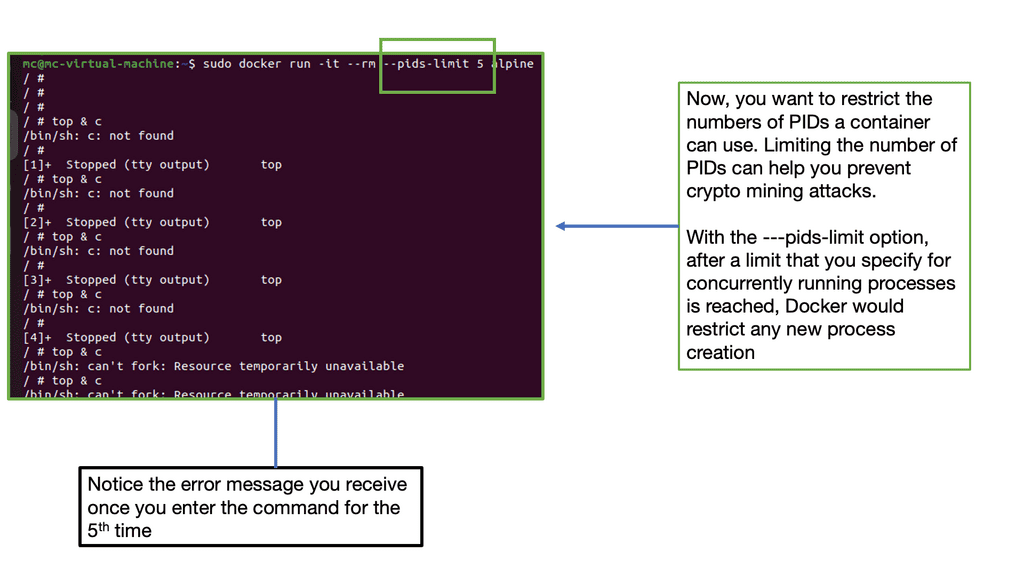
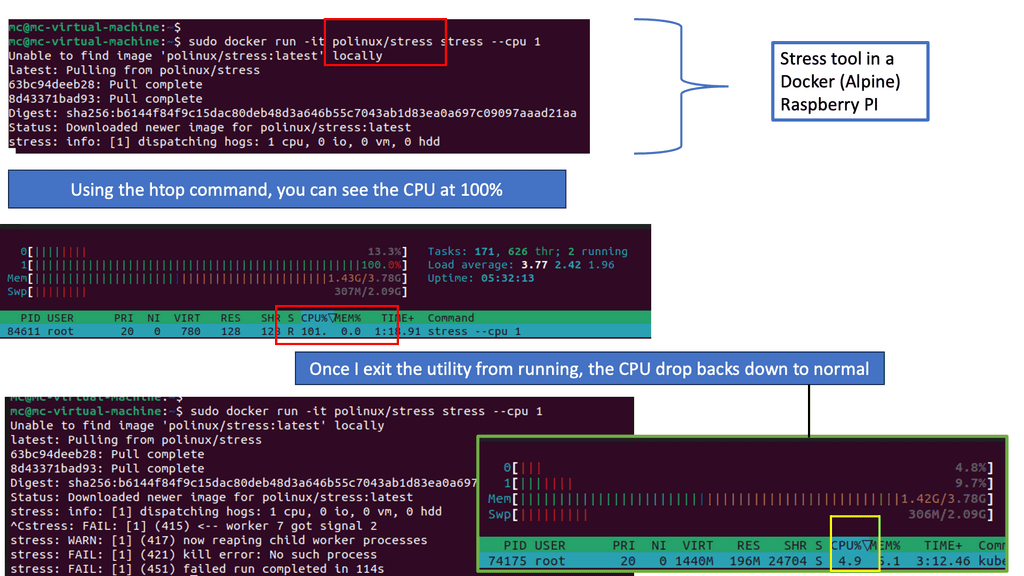
Limits CPU, memory, I/O, and PIDs to prevent resource exhaustion.
3. Image Security
Image Scanning
Scan images for vulnerabilities using tools like Trivy, Clair, or Anchore.
Image Signing
Verify trusted images using Notary or Sigstore.
Minimal Base Images
Use Alpine, Distroless, or Scratch to reduce attack surface.
4. Network Security
Isolated Networks
Use custom bridge or overlay networks with strict rules.
Firewall Rules
Restrict container ingress and egress.
Service Mesh
Add mTLS, identity‑aware routing, and policy enforcement.
5. Runtime Monitoring
Use tools like Falco, Sysdig, Prometheus, or OpenTelemetry to monitor:
-
syscalls
-
network flows
-
container lifecycle
-
anomalies
Outcome
Docker security options provide:
-
strong isolation
-
reduced breakout risk
-
hardened runtime
-
secure images
-
controlled network behavior
-
predictable resource usage
-
compliance with enterprise security standards
Container Security
The fact that containers share the kernel of the Linux server boosts their performance and makes them lightweight. Because of this, Linux containers pose the most significant security risk. Namespaces are not everywhere in the kernel, which is the main reason for this concern.
Because cgroups and standard namespaces provide some necessary isolation from the host’s core resources, containerized applications are more secure than noncontainerized applications. However, containers should not be used as a replacement for good security practices. It would be best if you run all your containers as you would run an application on a production system. The same should apply if your application runs as a nonprivileged user on a server.
Docker Attack Surface
So you are currently in the Virtual Machine world and considering transitioning to a containerized environment. You want to smoothen your application pipeline and gain the benefits of a Docker containerized environment. But you have heard from many that the containers are insecure and are concerned about Docker network security. There is a Docker attack surface to be concerned about.
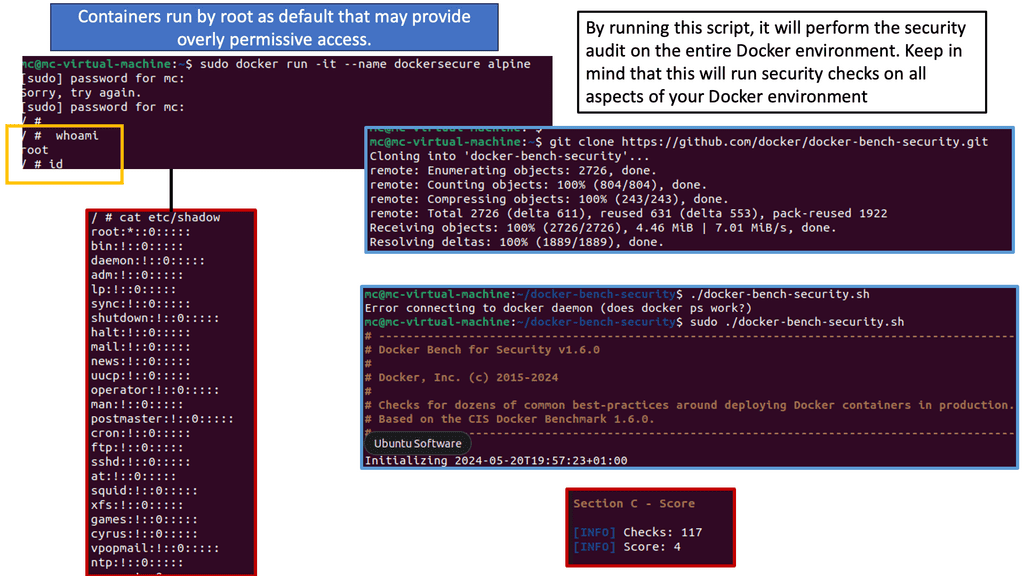
Example: Containers run as root
For example, containers run by root by default and have many capabilities that scare you. Yes, we have a lot of benefits to the containerized environment, and containers are the only way to do it for some application stacks. However, we have a new attack surface with some benefits of deploying containers and forcing you to examine Docker security options. The following post will discuss security issues, a container security video to help you get started, and an example of Docker escape techniques.
Understanding SELinux
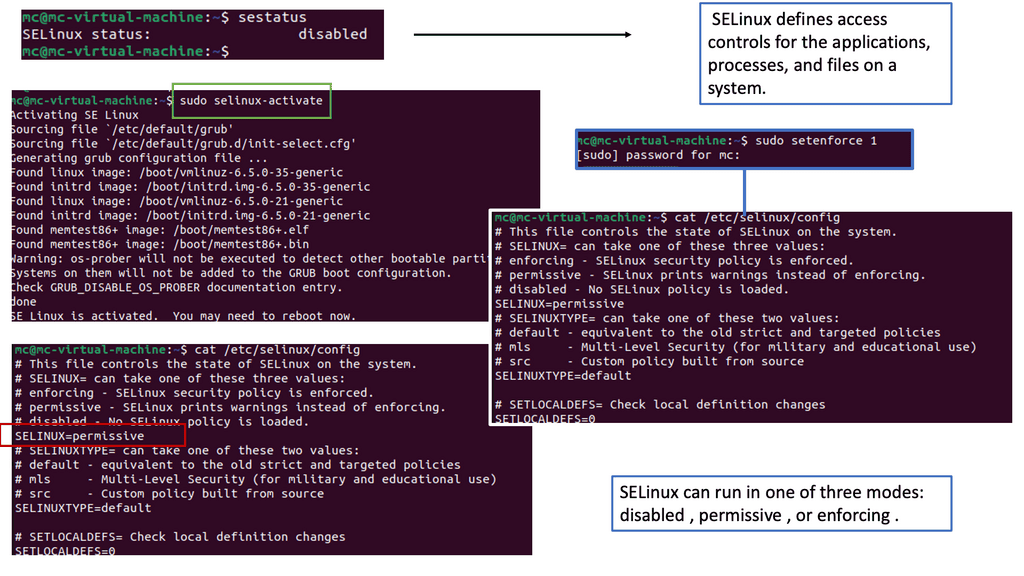
SELinux, which stands for Security-Enhanced Linux, is a security framework built into the Linux kernel. It provides a powerful set of security policies and access controls to enforce fine-grained restrictions on processes and resources. By leveraging SELinux, administrators can define and enforce access rules, reducing the attack surface of Docker containers.
It is important to understand how SELinux and Docker can be integrated to utilize SELinux in a Docker environment. Docker provides SELinux support through SELinux labels applied to Docker objects such as containers and volumes. These labels enforce SELinux policies and restrict container actions based on defined policies.
Advantages: SELinux
SELinux offers several benefits for Docker security. Firstly, it provides mandatory access controls, enabling administrators to define precisely what actions a container can perform. This prevents malicious containers from accessing sensitive resources or executing unauthorized commands. Secondly, SELinux helps mitigate container breakout attacks by isolating containers and limiting their interactions with the host system. Lastly, SELinux can help detect and prevent privilege escalation attempts within Docker containers.
**New Attacks and New Components**
Containers are secure by themselves, and the kernel is pretty much battle-tested. A container escape is hard to orchestrate unless misconfiguration could result in excessive privileges. So, even though the bad actors’ intent may stay the same, we must mitigate a range of new attacks and protect new components.
To combat these, you need to be aware of the most common Docker network security options and follow the recommended practices for Docker container security. A platform approach is also recommended, and OpenShift is a robust platform for securing and operating your containerized environment.
Understanding Docker Bench Security
Docker Bench Security, developed by the Center for Internet Security (CIS), is a script that automates the process of running security checks against Docker installations. It follows industry-standard best practices and provides a comprehensive report on potential vulnerabilities and misconfigurations.
Section 1: Installation and Configuration
To begin using Docker Bench Security, you first need to install it on your host system. The installation process is straightforward and well-documented. Once installed, you can configure the script to perform specific checks based on your needs and environment.
Section 2: Running Docker Bench
Running Docker Bench Security is as simple as executing a single command. The script will systematically analyze your Docker setup, checking for various security aspects such as host configuration, Docker daemon configuration, container runtime, networking, and more. It will generate a detailed report highlighting any security issues found.
The generated report from Docker Bench Security provides valuable insights into your Docker environment’s security posture. It categorizes the findings into different levels of severity, helping you prioritize and address the most critical vulnerabilities first. By understanding the report and taking necessary actions, you can significantly enhance the security of your Docker deployments.
Docker Attack Surface Investigation Lab
A container has been compromised. Investigate the configuration evidence and identify the conditions that allowed the attacker to increase impact beyond the container itself.
1. Examine the evidence
2. Reconstruct the attack path
Docker Security Options
Docker Security
To use Docker safely in production and development, you must know potential security issues and the primary tools and techniques for securing container-based systems. Your system’s defenses should also consist of multiple layers.
For example, your containers will most likely run in VMs so that if a container breakout occurs, another level of defense can prevent the attacker from getting to the host or other containers. Monitoring systems should be in place to alert admins in the case of unusual behavior. Finally, firewalls should restrict network access to containers, limiting the external attack surface.
Container Isolation:
One of Docker’s key security features is container isolation, which ensures that each container runs in its own isolated environment. By utilizing Linux kernel features such as namespaces and cgroups, Docker effectively isolates containers from each other and the host system, mitigating the risk of unauthorized access or interference between containers.
Image Vulnerability Scanning:
It is crucial to scan Docker images for vulnerabilities regularly to ensure their security. Docker Security Scanning is an automated service that helps identify known security issues in your containers’ base images and dependencies. By leveraging this feature, you can proactively address vulnerabilities and apply necessary patches, reducing the risk of potential exploits.
Docker Content Trust:
Docker Content Trust is a security feature that allows you to verify the authenticity and integrity of images you pull from Docker registries. By enabling this feature, Docker ensures that only signed and verified images are used, preventing the execution of untrusted or tampered images. This provides an additional layer of protection against malicious or compromised containers.
Role-Based Access Control (RBAC):
Controlling access to Docker resources is critical to maintaining a secure environment. Docker Enterprise Edition (EE) offers Role-Based Access Control (RBAC), which allows you to define granular access controls for users and teams. By assigning appropriate roles and permissions, you can restrict access to sensitive operations and ensure that only authorized individuals can manage Docker resources.
Network Segmentation:
Docker provides various networking options to facilitate communication between containers and the outside world. Implementing network segmentation techniques, such as bridge or overlay networks, helps isolate containers and restrict unnecessary network access. By carefully configuring the network settings, you can minimize the attack surface and protect your containers from potential network-based threats.
Container Runtime Security:
In addition to securing the container environment, it is equally important to focus on the security of the container runtime. Docker supports different container runtimes, such as Docker Engine and containerd. Regularly updating these runtimes to the latest stable versions ensures that you benefit from the latest security patches and bug fixes, reducing the risk of potential vulnerabilities.
**Docker Attack Surface**
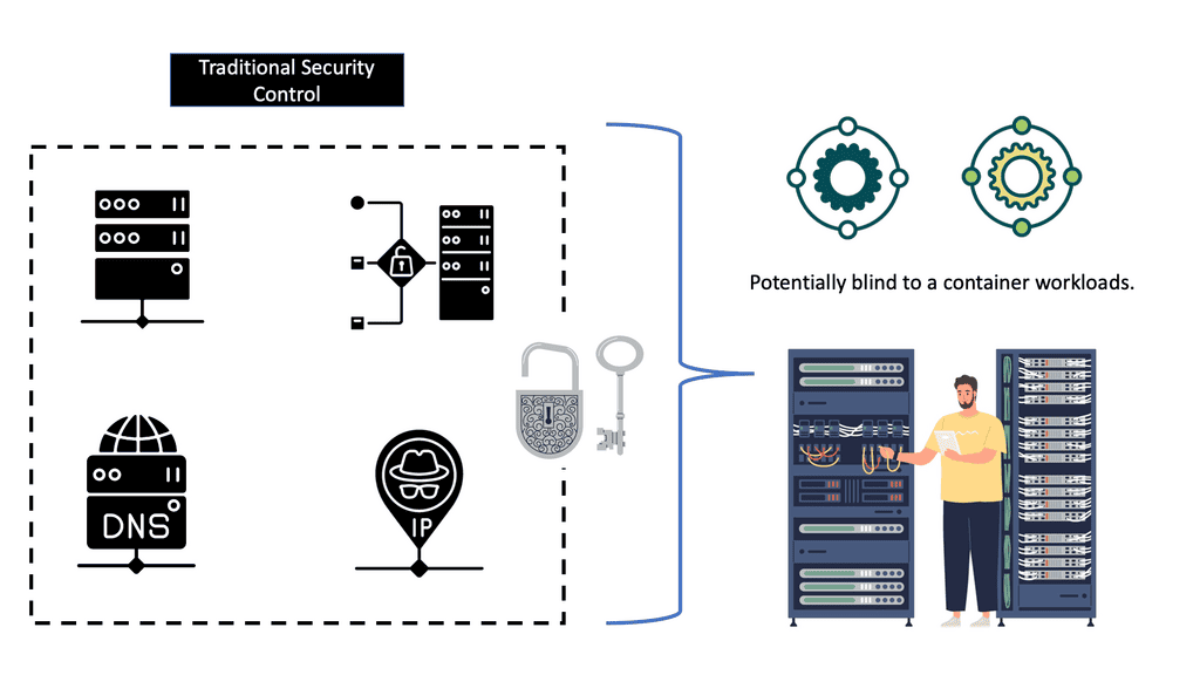
Often, the tools and appliances in place are entirely blind to containers. The tools look at a running process and think, if the process is secure, then I’m safe. One of my clients ran a container with the DockerFile and pulled an insecure image. The onsite tools did not know what an image was and could not scan it.
As a result, we had malware right in the network’s core, a little bit too close to the database server for my liking. Yes, we call containers a fancy process, and I’m to blame here, too, but we need to consider what is around the container to secure it fully. For a container to function, it needs the support of the infrastructure around it, such as the CI/CD pipeline and supply chain.
To improve your security posture, you must consider all the infrastructures. If you are looking for quick security tips on Docker network security, this course I created for Pluralsight may help you with Docker security options.
Ineffective Traditional Tools
Containers are not like traditional workloads. With a single command, we can run an entire application with all its dependencies. Legacy security tools and processes often assume largely static operations and must be adjusted to adapt to the rate of change in containerized environments. With non-cloud-native data centers, Layer 4 is coupled with the network topology at fixed network points and lacks the flexibility to support containerized applications.
There is often only inter-zone filtering and east-to-west traffic may go unchecked. A container changes the perimeter and moves right to the workload. Just look at a microservices architecture. It has many entry points compared to monolithic applications.
Docker container networking
When considering container networking, we are a world apart from the monolithic. Containers are short-lived and constantly spun down, and assets such as servers, IP addresses, firewalls, drives, and overlay networks are recycled to optimize utilization and enhance agility. Traditional perimeters designed with I.P. address-based security controls lag in a containerized environment.
Rapidly changing container infrastructure rules and signature-based controls can’t keep up with a containerized environment. Securing hyper-dynamic container infrastructure using traditional networks and endpoint controls won’t work. For this reason, you should adopt purpose-built tools and techniques for a containerized environment.
**The Need for Observability**
Not only do you need to implement good Docker security options, but you also need to be concerned about the recent observability tools. So, we need proper observability of the state of security and the practices used in the containerization environment, and we need to automate this as much as possible—not just the development but also the security testing, container scanning, and monitoring.
You are only as secure as the containers you have running. You need to be observable in systems and applications and proactive in these findings. It is not something you can buy; it is a cultural change. You want to know how the application works with the server, how the network is with the application, and what data transfer looks like in transfer and a stable state.
What level of observation do you need so you know that everything is performing as it should? There are several challenges to securing a containerized environment. Containerized technologies are dynamic and complex and require a new approach that can handle the agility and scale of today’s landscape. There are initial security concerns that you must understand before you get started with container security. This will help you explore a better starting strategy.
Docker attack surface: Container attack vectors
We must consider a different threat model and understand how security principles such as least privilege and in-depth defense apply to Docker security options. With Docker containers, we have a completely different way of running applications and, as a result, a different set of risks to deal with.
Instructions are built into Dockerfiles, which run applications differently from a normal workload. With the correct rights, a bad actor could put anything in the Dockerfile without the necessary guard rails that understand containers; there will be a threat.
Therefore, we must examine new network and security models, as old tools and methods won’t meet these demands. A new network and security model requires you to mitigate against a new attack vector. Bad actors’ intent stays the same. They are not going away anytime soon. But they now have a different and potentially easier attack surface if misconfigured.
I would consider the container attack surface pretty significant; bad actors will have many default tools if not locked down. For example, we have image vulnerabilities, access control exploits, container escapes, privilege escalation, application code exploits, attacks on the docker host, and all the docker components.
Docker security options: A final security note
Containers by themselves are secure, and the kernel is pretty much battle-tested. You will not often encounter kernel compromises, but they happen occasionally. A container escape is brutal to orchestrate unless misconfiguration could result in excessive privileges. From a security standpoint, it would be best to stay clear of setting container capabilities that provide excessive privileges.
Minimise container capabilities: Reduce the attack surface.
If you minimize the container’s capabilities, you are stripping down its functionality to a bare minimum—we mentioned this in the container security video. Therefore, the attack surface is limited, and the attack vector available to the attacker is minimized.
You also want to keep an eye on CAP_SYS_ADMIN. This flag grants access to an extensive range of privileged activities. Containers run many other capacities by default that can cause havoc.
As Docker continues to gain popularity, understanding and implementing proper security measures is essential to safeguarding your containers and infrastructure. By leveraging the security options discussed in this blog post, you can mitigate risks, protect against potential threats, and ensure the integrity and confidentiality of your applications. Stay vigilant, stay secure, and embrace the power of Docker while keeping your containers safe.
Container Network Segmentation Lab
Design least-privilege connectivity between application tiers, then test what happens when a frontend container is compromised and attempts lateral movement toward the database.
Target application topology
Required connectivity
Test the containment boundary
Attacker attempts: Frontend → Database
- Fortinet’s new FortiOS 7.4 enhances SASE - April 5, 2023
- Comcast SD-WAN Expansion to SMBs - April 4, 2023
- Cisco CloudLock - April 4, 2023