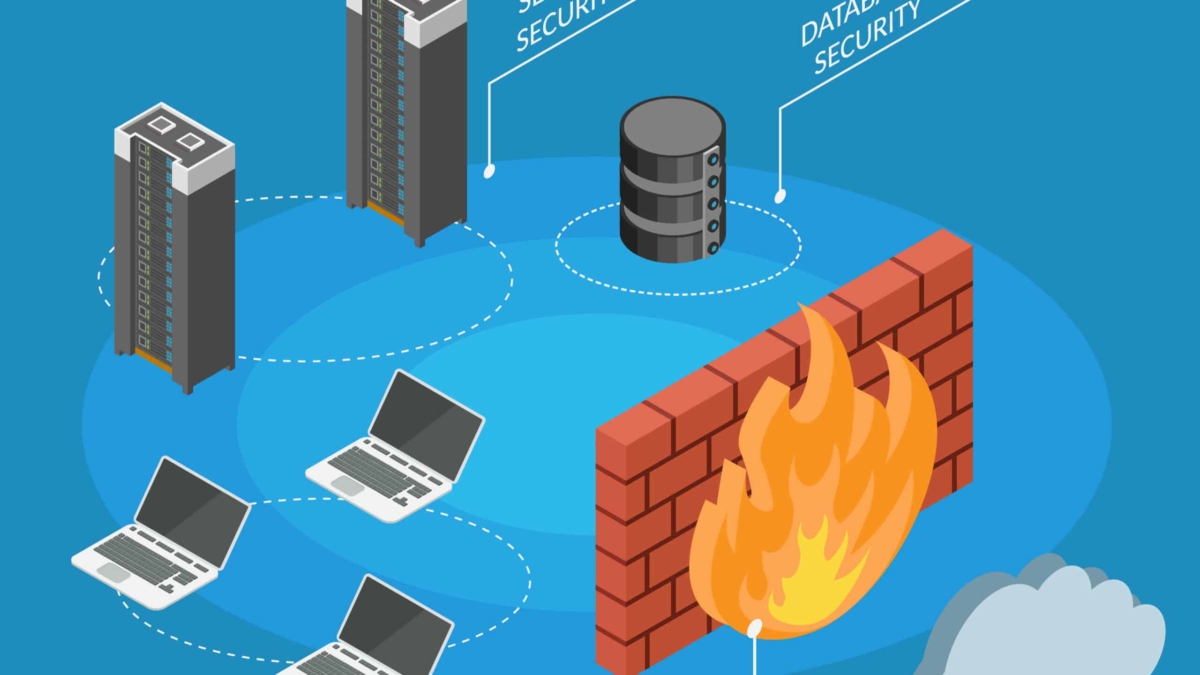
Enterprise Isometric Internet security firewall protection information

Network Security Components

ENGINEERING GUIDE · NETWORK SECURITY

Network Security Components — From Isolated Controls to an Integrated Security Fabric

Modern network security is not a single appliance or perimeter. It is a coordinated system of identity, access control, segmentation, inspection, endpoint protection, cloud controls, telemetry and response. The engineering challenge is understanding how these components work together to make — and validate — security decisions.

!
Engineering Observation A security component is only useful when we understand the decision it makes, the evidence it uses, where it is enforced, and how it connects to the rest of the architecture.
01 · IDENTITY

Establish Trust

Determine who or what is requesting access and establish the context required for a security decision.

02 · CONTROL

Enforce Policy

Apply authentication, authorization, ACLs, firewalls and segmentation to control permitted communication.

03 · INSPECT

Detect Threats

Inspect traffic, applications, endpoints and behaviour using IDS/IPS, NDR, WAF and endpoint controls.

04 · CORRELATE

Drive Response

Combine identity, network, endpoint and application telemetry so suspicious behaviour can be investigated and acted upon.

Security Decision Flow
IDENTITY
→
ACCESS
→
SEGMENT
→
INSPECT
→
PROTECT
→
OBSERVE
→
RESPOND
Engineering View

A security architecture is a decision system, not simply a collection of security appliances.

Identity Device Network Application Data Telemetry
Core Engineering Question

Can we prove that every security decision is intentional, visible and connected to the rest of the defence system?

Components Covered
Firewalls IDS / IPS NDR Identity NAC Segmentation EDR / XDR DLP VPN ZTNA SWG DNS Security CASB SIEM SOAR SASE
Interactive Security Architecture

Network Security Components

Security is not a single firewall. Modern protection combines identity, segmentation, inspection, endpoint controls and centralized intelligence. Select a layer to see its role in the security architecture.

Architecture Status
● DEFENDED
01
ID
Identity
Authentication, MFA and authorization
02
AC
Access Control
AAA, NAC and policy enforcement
03
FW
Firewall
Stateful inspection and filtering
04
SG
Segmentation
Macro and micro-segmentation
05
ID
IDS / IPS
Detection and threat prevention
06
EP
Endpoint
EDR, malware and workload security
07
SI
SIEM / SOAR
Correlation, visibility and response
Selected Component
Identity Security
Identity becomes the first security decision. Authentication verifies who or what is requesting access, while authorization determines what that identity is permitted to access.
MFA AAA Zero Trust Authorization
Security Mode
Protection Coverage 86%
Identity
OK
Firewall
ON
IDS
ON
SIEM
LIVE
Interactive Network Security Component

Firewall & Security Placement Explorer

Security controls work best when each layer protects a different part of the attack surface. Explore where firewalls, IDS/IPS, segmentation and application controls fit into a modern security architecture.
External
→
Perimeter
→
Internal
→
Workload
REQUEST
INSPECT
ENFORCE
WORKLOAD
FW
Firewall
Policy enforcement point

Controls traffic according to security policy and creates an enforcement boundary between trusted and untrusted zones.

Primary role Allow / deny traffic
Visibility Flows, sessions and policy
Placement Internet / internal boundary
Security value Defense in depth
SECURITY DECISION
A firewall should enforce the policy at the boundary where traffic crosses security zones.

Why placement matters

A single perimeter firewall cannot provide complete protection once an attacker reaches the internal network. Additional controls reduce lateral movement and protect individual workloads and applications.

MACRO

Protects larger network zones such as Internet, DMZ, user and server segments.

MICRO

Applies granular controls around individual workloads, applications or identities.

INTERACTIVE SECURITY ARCHITECTURE

How the Security Components Connect

Select an architectural layer to see the security decision it makes, the evidence it requires and the controls commonly deployed there.

ARCHITECTURE ACTIVE
Security Decision Chain · Select a Layer
LAYER 01 · TRUST

Identity Security

Identity establishes the context behind a connection. Modern security decisions increasingly consider the identity, device and session rather than relying only on network location.

Who is requesting access?
Identity, authentication state, device and session context
Authentication establishes identity; authorization determines what that identity may access.
MFA AAA RBAC ZTNA
Architecture Model
LAYERED
Primary Objective
CONTROL
Evidence Model
CORRELATED
SECTION 01 · DEFINE · TRUST BOUNDARY LAB

Map the Security Decision

A security architecture starts by understanding the relationship between the requester, the identity context, the destination and the boundary where policy is enforced. Change the variables and observe how the decision path changes.

Source
Identity Context
Destination
Boundary
Engineering Principle

Trust should be explicit. The network location alone should not automatically determine whether a request is safe.

01 · Source
Remote User Request origin
→
02 · Identity
Trusted Identity Authentication context
→
03 · Boundary
Identity-Aware Access Policy enforcement
→
04 · Destination
Internal Application Requested resource
Authenticated
Trusted posture
Application resource
Identity-aware enforcement
Low contextual risk
Least privilege
ALLOW
Identity, device and destination context provide sufficient evidence for the requested application access.
Decision Confidence 88%
16:00:01 [ARCH] Security decision engine initialised.
16:00:02 [AUTH] Identity context available.
16:00:03 [POLICY] Waiting for scenario evaluation.
ENGINEERING MODEL · NETWORK SECURITY

Security Is a System of Connected Decisions

Modern network security is not one firewall or one perimeter. It is a coordinated system in which identity, access, segmentation, inspection, protection and telemetry work together to control communication and reduce the attack surface.

01 · IDENTITY Establish Trust Understand who or what is requesting access and the context surrounding the request.
02 · CONTROL Enforce Policy Apply authentication, authorization, firewall and access policies at the appropriate boundary.
03 · INSPECT Understand Traffic Inspect network and application behaviour to identify unwanted or suspicious activity.
04 · CORRELATE Drive Response Combine security evidence so decisions can be investigated, explained and acted upon.
Identity
→
Access
→
Segmentation
→
Inspection
→
Protection
→
Telemetry
→
Response
01 · DEFINE · SECURITY ARCHITECTURE

Security Architecture & Trust Boundaries

Security begins by defining what is trusted, what is exposed, what is being accessed and where security decisions are enforced. The objective is not simply to deploy more controls, but to place the right control at the right point in the communication path.

A modern environment may contain users, endpoints, workloads, cloud services, branches and applications distributed across multiple networks. These systems cannot be protected effectively by treating the traditional Internet edge as the only security boundary.

Instead, security architecture creates a series of decision points. Identity establishes context, access controls determine whether communication should proceed, segmentation limits the reachable attack surface, and inspection and protection controls examine what happens after access has been permitted.

The security decision path

From request to protected workload
01 Identity Who is requesting?
→
02 Access What is permitted?
→
03 Segmentation Where can it go?
→
04 Inspection What is happening?
→
05 Protection What must be protected?
→
06 Telemetry What evidence exists?

Where are the trust boundaries?

A trust boundary is the point where the security assumptions about a connection, identity, device or workload change. The boundary may exist between the Internet and an organization, between a user and an application, between network segments or directly around an individual workload.

01 · EXPOSURE External Environment Internet users, remote systems, third-party services and other untrusted sources represent the outer attack surface.
02 · ACCESS Identity & Policy Authentication, authorization and contextual policy determine whether a request should receive access.
03 · ENFORCEMENT Security Boundary Firewalls, segmentation, access controls and inspection points enforce the architecture's security policy.
04 · ASSET Application & Data The final objective is protecting workloads, applications and data while preserving legitimate communication.

Four questions every architecture should answer

01
Who is requesting? Identify the user, device, workload or service and establish the relevant context.
02
What should be allowed? Determine which application, destination, service or resource the requester is permitted to access.
03
Where is it enforced? Place enforcement at an appropriate network, identity, workload or application boundary.
04
How do we know? Generate sufficient telemetry to explain the decision and investigate unexpected behaviour.
Engineering evidence
A security boundary must have a decision behind it

Simply placing a firewall, NAC system or segmentation control between two networks does not automatically create effective security. The architecture should identify what the boundary protects, what policy governs communication across it, what evidence supports the decision and what happens when the expected behaviour changes.

Security components form layers, not isolated products

Identity Layer
Establish context
Authentication, MFA, authorization and identity-aware policy establish who or what is requesting access.
Network Layer
Control reachability
Firewalls, ACLs, NAC and segmentation restrict which systems, networks and services can communicate.
Workload Layer
Protect the asset
Endpoint, application, workload and data controls provide protection closer to the resource being accessed.
Inspection Layer
Understand behaviour
IDS/IPS, NDR and application-aware inspection provide deeper visibility into traffic and behaviour.
Data Layer
Protect information
Encryption, DLP and application controls help protect sensitive data as it moves through the environment.
Intelligence Layer
Correlate evidence
Telemetry, SIEM and response workflows connect individual security signals into an operational picture.
Section 01 · Engineering Principle
A security architecture is a decision system, not a collection of appliances.

The strongest architectures make the security decision path explicit: identify the requester, understand the resource, determine the required level of trust, enforce policy at the appropriate boundary and generate evidence that allows the outcome to be verified. The remaining security components in this guide build on that foundation.

01 · DEFINE · SECURITY ARCHITECTURE

Security Architecture & Trust Boundaries

Step through a security decision from identity to enforcement and observe where trust is established, where policy is applied and where evidence is generated.
Ready
Live Security Decision Path
0 / 6
◉
USER
Identity
Request
◎
IDENTITY
Authentication
Trust
◇
ACCESS
Policy
Authorization
▣
WORKLOAD
Application
Data
Architecture principle: security is not one control. A request moves through multiple decision points where identity, context, policy and enforcement can each change the outcome.
Architecture Inspector
Click an architecture component to inspect its security responsibility.
Security Role
Current decision
Identity Unknown
Device trust Unknown
Authorization Pending
Enforcement Pending
Evidence None
Control Health
Live
IDENTITY
Authentication
READY
ACCESS
Authorization
READY
ENFORCEMENT
Policy control
READY
Decision Evidence
Live
Signal Value
Identity Pending
Device Pending
Policy Pending
Outcome Pending
Security Decision Timeline
Identity → enforcement
01
IDENTITY
User presents an identity to begin the access request.
02
AUTH
Authentication verifies whether the claimed identity can be trusted.
03
CONTEXT
Device and request context are evaluated before authorization.
04
POLICY
Authorization determines what the authenticated identity is permitted to access.
05
ENFORCE
A network, application or workload control enforces the decision.
06
EVIDENCE
Telemetry records the decision so it can be investigated later.
Architecture Telemetry
Live interpretation
Current Event
Press Step Forward to begin
Investigation Progress
Engineering takeaway: a security architecture should connect identity, policy, enforcement and telemetry rather than treating each control as an isolated product.
ENGINEERING MODEL · ACCESS CONTROL

Control Who Can Communicate With What

Access control turns security architecture into enforceable policy. Authentication establishes identity, authorization determines what that identity may access, and network controls enforce those decisions at appropriate boundaries.

01 · AUTHENTICATE Verify identity Establish that the user, device, workload or service is who it claims to be.
02 · AUTHORIZE Determine access Decide which resources, applications and services the requester is permitted to use.
03 · ENFORCE Apply policy Use ACLs, firewalls, NAC and other controls to enforce the security decision.
04 · ACCOUNT Record evidence Maintain useful audit and telemetry information so access decisions can be investigated later.
Identity
→
Policy
→
Firewall / ACL
→
Application
→
Audit
02 · CONTROL · ACCESS & FIREWALL ENFORCEMENT

Access Control & Firewall Enforcement

Once the security architecture defines its trust boundaries, the next requirement is enforcement. Access control determines who or what may communicate with a resource, while firewalls and related controls enforce that policy against actual network traffic.

This distinction is important. Authentication answers whether an identity has been established. Authorization answers what that identity is allowed to do. Enforcement is the point where the resulting policy is applied to a real connection, request or flow.

Effective access control therefore combines identity, context, policy and enforcement rather than relying on a single allow or deny rule.

From identity to enforcement

The access-control decision path
01 Identity User / Device / Workload
→
02 Authentication Establish identity
→
03 Authorization Determine permission
→
04 Enforcement Apply policy
→
05 Telemetry Record outcome

Authentication, authorization and accounting

AAA provides a useful conceptual model for access control. Authentication establishes identity, authorization determines permitted actions and accounting records relevant activity for auditing and investigation.

A · AUTHENTICATION
Who are you?
Credentials, certificates, MFA and other mechanisms can establish the identity of a user, device or service.
A · AUTHORIZATION
What can you do?
Policy determines which resources, applications, services or actions the authenticated identity is permitted to access.
A · ACCOUNTING
What happened?
Access and activity records provide evidence for auditing, troubleshooting and security investigation.

Where firewalls fit

Firewalls provide an enforcement point for network security policy. They can evaluate characteristics such as source and destination, protocol, ports, connection state and, depending on the platform, application or user context.

The important engineering question is not simply whether a firewall is present. It is whether the firewall is positioned where the required decision can actually be made and whether its policy matches the intended trust boundary.

Network enforcement
Packet & state policy
ACLs and stateful firewalls can control traffic according to addresses, protocols, ports and connection state.
Context-aware control
Identity & application
Modern platforms may combine network attributes with identity, application and other contextual information when enforcing policy.
Application boundary
WAF protection
A web application firewall focuses specifically on HTTP and HTTPS application-layer requests rather than acting as a general network firewall.

Good security policy is explicit

A well-designed policy should make its intent clear. The engineer should be able to identify the source, destination, service, identity or context where relevant, the expected action and the reason the communication is permitted.

01
Least privilege

Permit only the access required for the intended function. Broad connectivity should not become the default simply because it is operationally convenient.

02
Explicit policy

Rules should describe an intentional security requirement rather than becoming an accumulation of undocumented exceptions.

03
Context matters

Identity, device posture, application, location and risk can provide useful context beyond a simple source and destination address.

04
Evidence matters

Access decisions should generate sufficient telemetry to determine what was permitted, denied and why the decision occurred.

Engineering evidence
An allow rule is a security decision

Every permitted connection creates an exposure. The engineering task is therefore to understand why that connection is allowed, what boundary controls it, what identity or context is associated with it and how the resulting activity will be observed. Security policy should be explainable before it is deployed.

Access control becomes stronger when the layers agree

Identity should not have to operate independently from network policy. Authentication and authorization establish context, while firewalls, ACLs, NAC and segmentation provide enforcement. Endpoint and application controls add further protection closer to the resource.

This creates a layered model in which a single failure does not automatically provide unrestricted access to the rest of the environment. The architecture becomes progressively more difficult to bypass because different controls make different decisions at different points.

Section 02 · Engineering Principle
Authentication establishes identity. Authorization defines permission. Enforcement controls the communication.

Effective access control connects those three concepts with useful telemetry. The goal is not simply to create more rules, but to ensure that every important communication has an intentional policy, an appropriate enforcement point and enough evidence to explain the resulting decision.

02 · CONTROL · ACCESS & FIREWALL ENFORCEMENT

Access Control & Firewall Policy Builder

Build a security decision from identity, device context and destination. Step through the policy chain and see where authorization becomes enforcement.
Policy Ready
Live Policy Evaluation
0 / 6
Identity
Who is requesting access?
Device Trust
Can the endpoint be trusted?
Destination
What is being accessed?
◉
IDENTITY
Authentication
◇
CONTEXT
Device / Risk
▤
POLICY
Authorization
◈
FIREWALL
ACL / State
PENDING
Waiting for policy evaluation
Configure the request and press Step Forward.
Decision Inspector
Live
Identity Pending
Authentication Pending
Device Pending
Destination Pending
Decision Pending
Control Stack
Security enforcement
AAA / Identity
READY
Authentication verifies the security principal.
Authorization
READY
Identity and context are evaluated against policy.
Firewall / ACL
READY
The resulting decision is enforced on traffic.
Policy Evaluation Timeline
Identity → enforcement
01
IDENTITY
The request arrives with a claimed identity.
02
AUTH
Authentication verifies the identity.
03
CONTEXT
Device posture and destination are evaluated.
04
POLICY
Authorization calculates permit or deny.
05
FIREWALL
Firewall or ACL enforcement applies the decision.
06
OUTCOME
Access is either permitted or blocked.
Policy Telemetry
Live interpretation
Current Event
Configure a request and press Step Forward
Evaluation Progress
Engineering takeaway: authentication establishes identity; authorization determines permission; enforcement makes that decision real.
ENGINEERING MODEL · NETWORK SEGMENTATION

Contain the Attack Surface

Segmentation limits how far a user, device, workload or compromised system can communicate. Instead of treating the network as one trusted space, security boundaries divide it into controlled zones with explicit communication requirements.

01 · DEFINE Create zones Group systems according to function, trust level, sensitivity or business requirement.
02 · LIMIT Reduce reachability Prevent systems from communicating simply because they share network connectivity.
03 · CONTROL Permit required flows Define which applications, services and workloads are allowed to communicate across boundaries.
04 · CONTAIN Limit compromise A compromised system should have limited paths to other sensitive resources.
User Zone
→
Application Zone
→
Data Zone
→
Management Zone
03 · SEGMENT · CONTAIN THE ATTACK SURFACE

Network Segmentation & Workload Boundaries

Access control determines whether communication is permitted. Segmentation determines how much of the environment a system can reach in the first place. By creating explicit boundaries between systems with different trust, sensitivity or operational roles, the potential impact of a compromise can be reduced.

A flat network creates unnecessary reachability. If every endpoint, server and workload can communicate freely with every other system, a compromised device may have many possible paths toward more valuable resources.

Segmentation changes that model by introducing controlled boundaries. Communication between zones becomes intentional rather than an automatic consequence of network connectivity.

The segmentation model

Controlled communication between security zones
01 · USER User / Endpoint Zone Workstations, managed devices and user-facing systems that require controlled access to applications.
→
02 · APPLICATION Application Zone Business applications and services exposed only through the communication paths they actually require.
→
03 · DATA Data / Sensitive Zone Databases and sensitive resources protected behind additional policy and tightly controlled access paths.

Macro-segmentation and micro-segmentation

Segmentation can operate at different levels. Macro-segmentation creates larger security zones such as user, server, management and data networks. Micro-segmentation applies more granular policy around individual workloads, applications or groups of systems.

Macro-segmentation
Separate major trust zones
Large security boundaries provide a straightforward way to separate environments according to function, sensitivity or trust.
Example: User → Server → Database → Management
Micro-segmentation
Control workload-to-workload access
More granular controls can restrict communication between individual workloads or application tiers even when those workloads share an underlying network or cluster.
Example: Web Tier → API Tier → Database Tier

East-west traffic matters

Traditional perimeter security focuses heavily on north-south traffic entering or leaving an environment. Modern workloads also generate large amounts of east-west traffic between systems inside the environment.

If internal communication is implicitly trusted, an attacker who gains access to one workload may be able to move laterally toward other systems. Segmentation introduces additional policy decisions into this internal communication path.

Example workload boundary model
Tier 01 Web Front End Public-facing application component with controlled downstream access.
Tier 02 Application API Business logic reachable only from explicitly permitted application sources.
Tier 03 Database Sensitive data service with narrowly defined application access.
Tier 04 Management Administrative systems isolated from normal application traffic.

Segmentation requires explicit policy

01 · SOURCE Who initiates? Identify the system, workload, user or service generating the communication.
02 · DESTINATION What is reached? Determine which zone, workload, application or data resource is being accessed.
03 · SERVICE What is required? Define the protocol, port, application or service that actually needs to communicate.
04 · DECISION Should it cross? Permit only the communication required by the application's intended architecture.

Designing useful boundaries

01
Separate by sensitivity

Systems holding more sensitive information should not automatically inherit the same connectivity as ordinary workloads.

02
Separate by function

User, application, database and management systems often have different communication requirements and should be treated accordingly.

03
Minimise lateral paths

Restrict unnecessary east-west communication so compromise of one system does not automatically expose neighbouring workloads.

04
Make exceptions visible

Required cross-zone communication should be documented, intentional and observable rather than hidden inside broad connectivity rules.

Engineering evidence
Segmentation reduces reachability — it does not replace inspection

A segmentation boundary limits where traffic can travel, but it does not automatically determine whether permitted traffic is malicious. Segmentation therefore works alongside firewalls, identity controls, inspection and endpoint protection rather than replacing them.

Section 03 · Engineering Principle
Containment begins by controlling reachability.

A well-segmented environment assumes that connectivity should be intentional. Macro-segmentation establishes major trust boundaries, while micro-segmentation can provide more granular workload controls. Together they reduce unnecessary lateral paths and limit the potential impact of a compromised system.

ENGINEERING MODEL · THREAT INSPECTION

Inspect the Traffic That Crosses Your Boundaries

Segmentation controls where traffic can travel. Inspection determines what that traffic is doing. Modern security architectures combine prevention, detection, behavioural analysis and application-aware controls at appropriate points in the traffic path.

01 · FILTER Enforce policy Firewalls determine whether traffic matches an explicitly permitted communication policy.
02 · DETECT Identify threats IDS and NDR analyse traffic and behaviour for indicators of malicious or abnormal activity.
03 · PREVENT Block activity IPS can actively prevent traffic when configured detection and policy conditions are met.
04 · PROTECT Inspect applications WAF controls HTTP and HTTPS application traffic using application context rather than treating all traffic as generic packets.
Traffic
→
Policy
→
Detection
→
Prevention
→
Evidence
03 · SEGMENT · CONTAIN THE ATTACK SURFACE

Network Segmentation Investigation Lab

Follow a communication attempt across identity, access and workload boundaries. Change the segmentation policy and observe where the traffic is allowed or stopped.

SCENARIO Employee → Application
SEGMENTATION ENFORCED
STEP 0 / 6
LIVE SEGMENTATION TOPOLOGY Waiting for traffic
USER / ACCESS ZONE
WORKLOAD ZONE
USER
Employee
Trusted device
NAC
Identity + posture
SEGMENT
Policy enforced
WORKLOAD
Application zone
Traffic path: waiting for inspection
EVENT TIMELINE 0 events
ENGINEERING EVIDENCE LIVE READOUT
Current Event No event processed.
Security Principle Segmentation limits unnecessary communication paths.
Investigation Finding No finding yet.
04 · INSPECT · DETECT & PREVENT THREATS

Threat Inspection: IDS, IPS, NDR & WAF

Network inspection adds another layer of security between connectivity and trust. A firewall can enforce whether communication is permitted, while detection and prevention technologies examine permitted traffic for indicators of attack, abnormal behaviour or application-level exploitation.

These controls perform different jobs. IDS primarily detects and alerts. IPS can actively block or prevent traffic when its detection and policy conditions are met. NDR focuses on network behaviour and communication patterns, while a WAF is designed specifically to protect web applications at the HTTP and HTTPS application layer.

The inspection pipeline

From connectivity to security evidence
01 · FLOW Traffic arrives A user, workload or external system initiates communication toward a permitted destination.
→
02 · POLICY Firewall decision Network policy determines whether the communication should be allowed, denied or otherwise handled.
→
03 · DETECT Threat analysis IDS, IPS or NDR can evaluate traffic, protocols and behavioural indicators.
→
04 · EVIDENCE Record the signal Alerts, flow records and other telemetry provide evidence for investigation and correlation.

Detection is not the same as prevention

IDS · Detect
Identify suspicious activity
An intrusion detection system analyses traffic or events and generates alerts when configured indicators or behavioural conditions are observed.
IPS · Prevent
Act on detected threats
An intrusion prevention system can take an enforcement action against traffic when a detection matches configured prevention policy.
NDR · Behaviour
Understand communication patterns
Network detection and response looks for suspicious communication behaviour and relationships across network activity rather than relying only on individual signatures.

Where the inspection technologies fit

IDS
Intrusion Detection

Useful when visibility and alerting are required without the inspection system directly blocking the traffic path.

IPS
Intrusion Prevention

Adds an enforcement capability where detected traffic can be blocked or otherwise prevented according to policy.

NDR
Network Detection & Response

Builds a broader view of network behaviour, helping analysts identify unusual relationships, lateral movement and anomalous communication.

WAF
Web Application Firewall

Applies application-layer controls to HTTP and HTTPS traffic, protecting web applications from classes of application attacks.

Application-layer inspection

Network controls and application controls operate at different levels. A firewall may determine whether a connection between two systems is permitted, while a WAF can inspect the HTTP request itself and apply application-specific security rules.

Client Browser or application initiating the HTTP(S) request.
Web Application Firewall Inspects application-layer requests and applies web security policy before forwarding permitted traffic.
Application Web service receiving the request after policy evaluation.

Engineering inspection principles

01 · VISIBILITY Inspect the right traffic Place controls where meaningful traffic can be observed without creating unnecessary blind spots.
02 · CONTEXT Use more than packets Useful detection can combine addresses, ports, protocols, identities, application context and behavioural patterns.
03 · ACTION Match response to confidence Detection, alerting and blocking should be aligned with the confidence of the finding and the operational risk.
04 · EVIDENCE Preserve the signal Inspection becomes more valuable when its alerts and telemetry can be correlated with identity, endpoint and other security evidence.
Engineering evidence
Inspection only works when the traffic and context are visible

A security control cannot reliably detect what it cannot observe. Encrypted traffic, distributed workloads, cloud services and changing application architectures therefore make visibility, telemetry and appropriate inspection placement critical parts of the design.

Section 04 · Engineering Principle
Allowing traffic does not mean trusting it.

Firewalls control communication policy, IDS provides detection, IPS adds prevention, NDR analyses network behaviour and WAF protects application-layer traffic. Used together, these controls provide multiple inspection points between connectivity and the final security decision.

04 · INSPECT · DETECT & PREVENT THREATS

Threat Inspection Pipeline

Follow a traffic flow through multiple security inspection layers. Each control answers a different question: can the traffic pass, does it contain a known threat, does its behaviour look suspicious, and is the application request safe?

TRAFFIC Web Request
INSPECTION READY
STAGE 0 / 6
LIVE INSPECTION PIPELINE Waiting for traffic
SOURCE
User / Device
FIREWALL
Policy / State
IDS / IPS
Threat signatures
NDR
Behaviour
WAF
HTTP / App
Traffic path: waiting for inspection
INSPECTION TIMELINE 0 events
ENGINEERING EVIDENCE LIVE READOUT
Current Event No inspection event processed.
Control Function Waiting for traffic.
Investigation Finding No threat finding yet.
ENGINEERING MODEL · ENDPOINT & DATA PROTECTION

Protect the Endpoint and the Data It Handles

Network controls cannot provide complete protection once a workload, endpoint or application becomes the target. Security therefore extends to the systems themselves, the data they process and the cryptographic controls protecting information in transit and at rest.

01 · ENDPOINT Protect the device EPP and EDR provide prevention, detection and investigation capabilities directly on endpoints and workloads.
02 · DATA Control sensitive information DLP and data-aware policies help reduce inappropriate movement or exposure of sensitive information.
03 · TRANSIT Encrypt communication TLS, VPNs and other cryptographic mechanisms protect information while it moves between systems.
04 · ASSURE Validate posture Security controls should provide evidence that endpoints and data protections remain appropriately configured.
Endpoint
→
Application
→
Data
→
Encryption
→
Evidence
05 · PROTECT · ENDPOINTS, DATA & ENCRYPTION

Endpoint, Data & Encryption Protection

Network security does not end at the network boundary. The endpoint executes the workload, the application processes the information and the data itself may remain valuable even when network controls are operating correctly. Protection therefore needs to extend across the systems and information being defended.

Endpoint protection provides controls close to the workload. EPP can provide preventative protection, while EDR provides telemetry and investigation capabilities for suspicious endpoint activity. XDR can extend correlation across multiple security domains where supported.

Data protection adds another perspective. DLP can help identify and control inappropriate movement of sensitive information, while encryption protects information from unauthorised disclosure when data is stored or transmitted.

The protection stack

Protection follows the workload and the information
01 · DEVICE Endpoint Establish a security control point close to the system executing the workload.
→
02 · APPLICATION Process Monitor application and process activity that may indicate compromise or misuse.
→
03 · DATA Information Apply appropriate controls to sensitive information regardless of where the data is processed.
→
04 · EVIDENCE Telemetry Feed endpoint and data security signals into wider investigation and correlation workflows.

Endpoint protection is a local security boundary

EPP · Endpoint Protection Platform
Prevent common endpoint threats
Endpoint protection can provide preventative controls against malware and other known threats, alongside additional host security capabilities.
Prevention happens close to the workload rather than relying entirely on network inspection.
EDR · Endpoint Detection & Response
Investigate what the endpoint is doing
EDR collects endpoint telemetry that can help security teams investigate processes, files, connections and other indicators of suspicious activity.
Detection becomes more useful when endpoint evidence can be correlated with network and identity signals.

Endpoint controls should produce evidence

01 · POSTURE Is the device protected? Security status, configuration and protection state provide useful context for access decisions.
02 · PROCESS What is executing? Process activity can reveal behaviour that is invisible from network addresses alone.
03 · CONNECTION Where is it communicating? Endpoint connection telemetry can be correlated with network and application activity.
04 · RESPONSE Can it be contained? Security operations may need to isolate or otherwise contain a compromised endpoint.

Encryption protects information in transit

Encryption changes the security properties of communication by making captured traffic substantially less useful to an unauthorised observer. TLS is commonly used to protect application sessions, while VPN technologies can create encrypted tunnels across otherwise untrusted networks.

Simplified encrypted communication model
Source Application or endpoint generating the protected information.
→
TLS / VPN Protection Cryptographic protection is applied to the communication path according to the protocol and architecture being used.
→
Destination Intended application or endpoint receives the protected session.

Encryption is not the same as access control. A correctly encrypted connection can still be made by an unauthorised identity if authentication and authorization controls are weak. Encryption protects the information in transit; identity and policy determine who should be allowed to access it.

Protecting sensitive data

CLASSIFY Know what matters Security policy becomes more useful when sensitive information can be identified and assigned appropriate handling requirements.
CONTROL Limit movement DLP and access controls can help prevent sensitive information from being transferred through inappropriate channels.
PROTECT Use encryption Encryption can protect information during transport and, where implemented, while stored.
Engineering evidence
Security must follow the data, not just the network

Modern applications move across endpoints, data centres, cloud platforms and remote access environments. A security architecture that protects only the network path can therefore miss activity occurring directly on the endpoint or around the data itself.

Section 05 · Engineering Principle
Protect the system, the information and the communication between them.

Endpoint security provides local protection and telemetry. DLP helps control sensitive information, while encryption protects data during transport and storage when appropriately implemented. Together these controls extend the security architecture beyond the network boundary and closer to the actual workload and data.

05 · PROTECT · ENDPOINTS, DATA & ENCRYPTION

Endpoint & Data Protection Console

Security does not stop at the network boundary. Follow an endpoint and the data it handles through device posture, process activity, data protection, encryption and security evidence.

ASSET Managed Endpoint
PROTECTION READY
STAGE 0 / 6
PROTECTION STACK Waiting for asset
01 · ENDPOINT POSTURE
Device state, patching, security controls
READY
02 · PROCESS CONTROL
Process behaviour and endpoint detection
READY
03 · DATA PROTECTION
Classification, access and DLP controls
READY
04 · ENCRYPTION
TLS / VPN protection for data in transit
READY
05 · SECURITY EVIDENCE
Logs, telemetry and response context
READY
PROTECTION TIMELINE 0 events
ENGINEERING EVIDENCE LIVE READOUT
Current Control No control evaluated.
Security Function Waiting for the protection workflow.
Investigation Finding No finding yet.
ENGINEERING MODEL · CLOUD & REMOTE ACCESS

Secure Access Across a Distributed Environment

Users, applications and workloads increasingly connect from locations outside the traditional enterprise perimeter. Secure access therefore needs to combine identity, device context, encrypted connectivity and application-aware security controls.

01 · IDENTITY Verify the user Authentication establishes who is requesting access before a protected service is exposed.
02 · ACCESS Reach the application ZTNA and other access controls can restrict users to the applications they are authorised to use.
03 · PROTECT Secure the session VPN, TLS, SWG and DNS security provide protection around remote communication and internet access.
04 · CORRELATE Keep the evidence Access and security events should feed broader monitoring and investigation workflows.
User / Workload
→
Identity
→
Access Policy
→
Cloud / App
→
Telemetry
06 · CONNECT · SECURE CLOUD & REMOTE ACCESS

Secure Cloud, Internet & Remote Access

The traditional enterprise perimeter becomes less useful when users work remotely, applications move into cloud platforms and services are consumed directly from the internet. Security controls therefore need to follow the identity, device and application rather than assuming that everything important exists behind one physical firewall.

VPN remains useful when an encrypted tunnel to a private network is the appropriate access model. Zero Trust Network Access takes a different approach by providing identity- and application-aware access without necessarily placing the user onto the entire network.

The secure access journey

Identity and policy follow the connection
01 · REQUEST User or workload A user, endpoint or workload requests access to an internal, cloud-hosted or internet service.
→
02 · IDENTITY Verify context Authentication and policy establish whether the requesting identity should receive access.
→
03 · CONTROL Apply access policy ZTNA, VPN or other controls determine the permitted connectivity model.
→
04 · SERVICE Reach the application Access is provided to the intended service rather than assuming unrestricted network trust.

VPN and ZTNA solve different access problems

VPN · Encrypted Network Connectivity
Create a protected tunnel
A VPN can provide encrypted connectivity across an untrusted network and, depending on its design, provide access to a private network or defined network resources.
Typical model: Remote user → VPN tunnel → Private network
ZTNA · Application-Aware Access
Connect the user to the service
ZTNA can use identity and contextual policy to provide access to authorised applications without necessarily exposing the underlying network to the user.
Typical model: User → Identity Policy → Application

Cloud security is a collection of control functions

Cloud and internet security is rarely one product. Different control functions address different parts of the access path, including web traffic, DNS resolution, SaaS usage and identity-aware application access.

01 · SWG Secure Web Gateway Applies security policy to web access and can provide inspection, filtering and visibility for internet-bound traffic.
02 · DNS DNS Security Uses DNS requests as a policy and detection point, including blocking known malicious or inappropriate destinations where configured.
03 · CASB Cloud Access Security Broker Provides visibility and policy controls around the use of cloud applications and services.
04 · SASE Distributed Security Model SASE combines networking and security functions as a cloud-delivered architectural model for distributed users and locations.

Choosing the control point

Scenario
Primary question
Useful control
Security focus
Remote private access
Should this user reach the private environment?
VPN / ZTNA
Identity + access policy
Internet browsing
Should this destination be reachable?
SWG / DNS security
Web + destination policy
SaaS usage
How is the cloud service being used?
CASB
Application + data policy
Distributed workforce
Where should security policy execute?
SASE functions
Distributed enforcement

SASE as an architectural model

User / Branch Distributed users, branch locations and devices generating network requests.
SASE Security Functions Networking and security capabilities delivered closer to distributed users and applications, according to the architecture.
Cloud / Internet SaaS, public cloud and internet applications accessed through the controlled service path.

Secure access principles

01 · IDENTITY Start with the requester Access decisions should establish who or what is requesting the service before assuming trust.
02 · APPLICATION Expose what is required Where possible, access should be scoped to the application or service rather than unnecessarily exposing an entire network.
03 · CONTEXT Use more than credentials Device state, location, risk and other contextual signals can improve the quality of an access decision.
04 · TELEMETRY Record the decision Authentication, access and security events should remain available for monitoring and investigation.
Engineering evidence
The perimeter has moved closer to the user and application

Distributed applications and remote users do not eliminate network security. They change where security decisions need to occur. Identity, device context, application policy, web controls and cloud-delivered enforcement increasingly operate alongside traditional network boundaries.

Section 06 · Engineering Principle
Secure access should follow the user, device and application.

VPN provides an important encrypted connectivity model, while ZTNA can provide more granular application-aware access. SWG, DNS security, CASB and SASE extend policy into internet and cloud environments. Together, these controls adapt the security architecture to a distributed environment rather than relying on a single fixed perimeter.

06 · CONNECT · CLOUD & REMOTE ACCESS

Secure Cloud & Remote Access Journey

Follow a user or device from the initial access request through identity verification, device context, access policy, security services, application access and telemetry.

ACTOR Employee
ACCESS PENDING
STAGE 0 / 6
SECURE ACCESS PATH Waiting for access request
01 · TRUST
IDENTITY
Verify who is requesting access.
READY
02 · CONTEXT
DEVICE
Evaluate device posture and trust.
READY
03 · DECISION
ACCESS POLICY
Determine what the actor may reach.
READY
04 · PROTECT
SECURITY SERVICE
Apply VPN, ZTNA, SWG or related controls.
READY
05 · RESOURCE
APPLICATION
Reach the permitted cloud or internal service.
READY
06 · EVIDENCE
TELEMETRY
Record the access decision and session evidence.
READY
ACCESS TIMELINE 0 events
ENGINEERING EVIDENCE LIVE READOUT
Current Stage No access stage evaluated.
Security Function Waiting for the access workflow.
Investigation Finding No finding yet.
ENGINEERING MODEL · SECURITY INTELLIGENCE

Turn Security Signals Into Evidence

Individual security controls see different parts of an event. Identity systems see authentication, firewalls see connections, endpoints see processes and DNS controls see destinations. Security intelligence connects those signals so an investigation can understand the wider behaviour.

01 · COLLECT Gather telemetry Capture identity, network, endpoint, application and cloud security events.
02 · CORRELATE Connect the signals Relate events by identity, device, address, application, time and other useful context.
03 · INVESTIGATE Understand behaviour Determine whether apparently separate events form a meaningful security pattern.
04 · RESPOND Drive action Use validated findings to support analyst decisions or appropriate automated workflows.
Identity
+
Network
+
Endpoint
+
Application
→
Security Evidence
07 · CORRELATE · SECURITY INTELLIGENCE

SIEM, SOAR & Cross-Layer Security Intelligence

A modern security architecture produces enormous amounts of telemetry. The challenge is not simply collecting more events. It is connecting the right evidence so analysts can distinguish isolated activity from a meaningful attack pattern and then respond appropriately.

SIEM platforms provide centralised collection, search and correlation of security telemetry. SOAR extends the operational model by orchestrating response workflows and actions. Neither replaces the underlying security controls; both depend on the quality and context of the evidence they receive.

One event rarely tells the whole story

Different controls observe different parts of the same activity
IDENTITY Authentication Login attempts, MFA events, identity changes and access decisions.
NETWORK Connections Flows, firewall events, DNS activity and network security alerts.
ENDPOINT Processes Process execution, files, connections and endpoint detection telemetry.
APPLICATION Service activity Application authentication, errors, transactions and security events.
Raw Events Individual observations from separate control points.
→
Correlation Connect events using identity, asset, address, time and behavioural context.
→
Security Finding A contextualised event suitable for investigation.

SIEM and SOAR have different responsibilities

SIEM · Security Information & Event Management
Build the evidence picture
SIEM provides a central platform for collecting, searching and correlating security telemetry. It can help analysts identify relationships between events that would otherwise remain distributed across individual systems.
Primary role: collect → normalise → correlate → investigate
SOAR · Security Orchestration, Automation & Response
Orchestrate the response
SOAR can coordinate predefined workflows across security tools, reducing repetitive analyst tasks and helping execute approved response procedures.
Primary role: validate → orchestrate → execute → record

Security telemetry spans multiple layers

01 · IDENTITY Who? User, service account, authentication and authorization context.
02 · DEVICE What system? Endpoint identity, posture, process and security state.
03 · NETWORK Where? Source, destination, protocol, flow and network security context.
04 · APPLICATION What service? Application behaviour, transactions and service-level security events.
05 · TIME When? Temporal relationships can reveal sequences that isolated events hide.

Correlation turns separate events into an investigation

Example: a suspicious remote access sequence
09:14:02 Identity event Successful authentication from an unusual location.
09:14:18 Network event New connection established to an internal service.
09:14:41 Endpoint event Previously unseen process begins making outbound connections.
09:15:07 DNS event Endpoint resolves a newly observed external destination.
Correlation result: these events become more significant when linked by the same identity, endpoint and time window. The result is an investigation lead rather than four unrelated alerts.

Automation should follow validated evidence

01 · DETECT Generate the finding Correlation identifies behaviour that meets the defined detection criteria.
02 · VALIDATE Establish confidence Analysts or additional automated checks determine whether the finding is sufficiently reliable for action.
03 · RESPOND Execute the workflow Approved actions can then be orchestrated across identity, endpoint, network or other security systems.
Engineering evidence
More telemetry does not automatically mean better security

Effective security intelligence depends on useful context, consistent timestamps, meaningful asset and identity relationships, appropriate retention and well-tuned detection logic. A large event store without correlation can simply create a larger investigation queue.

Section 07 · Engineering Principle
Collect broadly, correlate intelligently and automate carefully.

SIEM provides the evidence and correlation layer while SOAR can orchestrate response workflows. The strongest architecture connects identity, endpoint, network and application telemetry so that security decisions are based on a contextual view of behaviour rather than an isolated alert.

07 · CORRELATE · SECURITY INTELLIGENCE

SIEM & SOAR Correlation Engine

Security events become useful when they are correlated across identity, network, endpoint and application layers. Build the evidence chain, calculate incident confidence and select an appropriate response.

SIGNALS 0 / 4
CONFIDENCE LOW
INCIDENT OPEN
SECURITY SIGNALS Waiting for telemetry
IDENTITY
Unusual Authentication
Authentication occurs from an unusual context or location.
WAIT
NETWORK
Suspicious Traffic
Network telemetry identifies unusual communication behaviour.
WAIT
ENDPOINT
Process Anomaly
Endpoint telemetry reports an unexpected process or execution chain.
WAIT
APPLICATION
Resource Access
Application telemetry shows access to a sensitive resource.
WAIT
CORRELATION CHAIN Confidence: LOW
Identity —
Network —
Endpoint —
Application —
CORRELATION TIMELINE 0 events
ENGINEERING EVIDENCE LIVE READOUT
Current Finding No correlated finding yet.
SIEM Function Collect and correlate security telemetry across layers.
SOAR Function No response workflow selected.
ENGINEERING MODEL · INTEGRATED SECURITY ARCHITECTURE

Validate the Security Architecture as a System

Security controls become more effective when they operate as a connected architecture rather than isolated point solutions. Validation asks whether identity, enforcement, segmentation, inspection, endpoint protection, telemetry and response work together as one security decision system.

01 · CONNECT
Integrate Controls Connect identity, policy, enforcement and telemetry.
02 · OBSERVE
Collect Evidence Make security decisions visible across the architecture.
03 · CORRELATE
Understand Context Combine signals instead of treating every alert independently.
04 · VALIDATE
Prove the Design Test whether the controls actually produce the intended outcome.
IDENTITY → ACCESS → SEGMENT → INSPECT → PROTECT → OBSERVE → RESPOND
Engineering Principle A security architecture should be evaluated as a decision chain, not as a collection of products.
Validation Question Can we prove that a security event is detected, understood, enforced and responded to across the complete control path?
08 · VALIDATE · INTEGRATED SECURITY ARCHITECTURE

Integrated Security Architecture

A mature security architecture connects individual controls into a decision and evidence chain. The objective is not to eliminate every point solution, but to ensure that identity, enforcement, detection, telemetry and response operate together.

SECURITY DECISION CHAIN
IDENTITY Who is the user, device or workload?
ACCESS CONTROL What is this identity permitted to reach?
SEGMENTATION Which trust boundary contains the resource?
INSPECTION Does the traffic or request contain suspicious behaviour?
PROTECTION Are endpoint, application and data controls active?
TELEMETRY Can the architecture produce evidence of the decision?
RESPONSE Can the appropriate action be executed and validated?
ARCHITECTURE PRINCIPLES
Least Privilege Grant only the access required for the task and context.
Explicit Policy Make security decisions intentional and explainable.
Continuous Visibility Capture telemetry across identity, network, endpoint and application layers.
Evidence-Based Response Use correlated evidence before escalating or containing an event.
Point Solutions Individual controls can provide strong protection, but disconnected systems increase integration and visibility gaps.
Integrated Architecture Controls remain specialised while sharing identity, telemetry, policy context and response workflows.
Engineering Test

If an attack crosses several security layers, can the organisation trace the event from initial identity signal through enforcement, detection, correlation and response?

The objective is integration, not simply accumulation.

Adding more security products does not automatically create a stronger architecture. The engineering question is whether each control has a defined role, produces useful evidence and connects to the controls responsible for the next security decision.

08 · VALIDATE · INTEGRATED SECURITY ARCHITECTURE

Integrated Security Assurance Console

Validate whether the complete security architecture can establish identity, enforce access, contain trust boundaries, inspect activity, protect assets, generate evidence and trigger an appropriate response.

CONTROLS 0 / 7
ASSURANCE 0%
ARCHITECTURE UNVALIDATED
END-TO-END CONTROL CHAIN Validation not started
01
Identity & Trust
Establish who or what is requesting access.
WAIT
02
Access Enforcement
Apply authentication, authorization and policy.
WAIT
03
Segmentation
Constrain communication within the intended trust boundary.
WAIT
04
Inspection & Detection
Inspect traffic, requests and behaviour for threats.
WAIT
05
Endpoint & Data Protection
Protect the endpoint, application and information.
WAIT
06
Telemetry & Correlation
Produce evidence and correlate events across layers.
WAIT
07
Response & Recovery
Execute, validate and recover from the security decision.
WAIT
ARCHITECTURE ASSURANCE 0%
Validate each layer to determine whether the architecture forms a complete security decision and evidence chain.
VALIDATION TIMELINE 0 events
ENGINEERING EVIDENCE LIVE READOUT
Current Finding No controls validated yet.
Architecture Test Can the security chain be traced from identity to response?
Final Assurance Architecture validation pending.
```
☕
Support Network Insight
Help support independent engineering guides, interactive networking tools, and future learning labs.
Support Network Insight ```
Interactive Security Fabric

Point Solutions vs Integrated Security

Modern security requires more than isolated tools. Explore how identity, device posture, segmentation, threat detection and security analytics combine to produce a stronger security decision.
Unified security decision
Identity
→
Device
→
Network
→
Threat
→
Intelligence
→
Enforcement
Combined Security Risk
LOW · 18%
ID
Identity
Identity security signal

Identity provides context about who is requesting access and whether authentication requirements have been satisfied.

Signal User + MFA
Question Who is requesting access?
Control Authentication
Value Identity-aware policy
CURRENT DECISION
Identity signal is healthy. Continue evaluating device and network context.

Why correlation matters

A single security product sees only part of the story. Correlating identity, device, network and threat telemetry creates a much stronger basis for enforcement.

IDENTITY Who is accessing the resource?
DEVICE Is the endpoint trusted and healthy?
NETWORK Is the requested communication permitted?
THREAT Is there evidence of malicious activity?
SIEM / SOAR Can multiple signals be correlated and acted upon?
African man in glasses gesturing while playing in virtual reality game

Virtual Firewalls

Virtual Firewalls

In cybersecurity, firewalls protect networks from unauthorized access and potential threats. Traditional firewalls have long been employed to safeguard organizations' digital assets. However, with the rise of virtualization technology, virtual firewalls have emerged as a powerful solution to meet the evolving security needs of the modern era. This blog post will delve into virtual firewalls, exploring their advantages and why they should be considered an integral part of any comprehensive cybersecurity strategy.

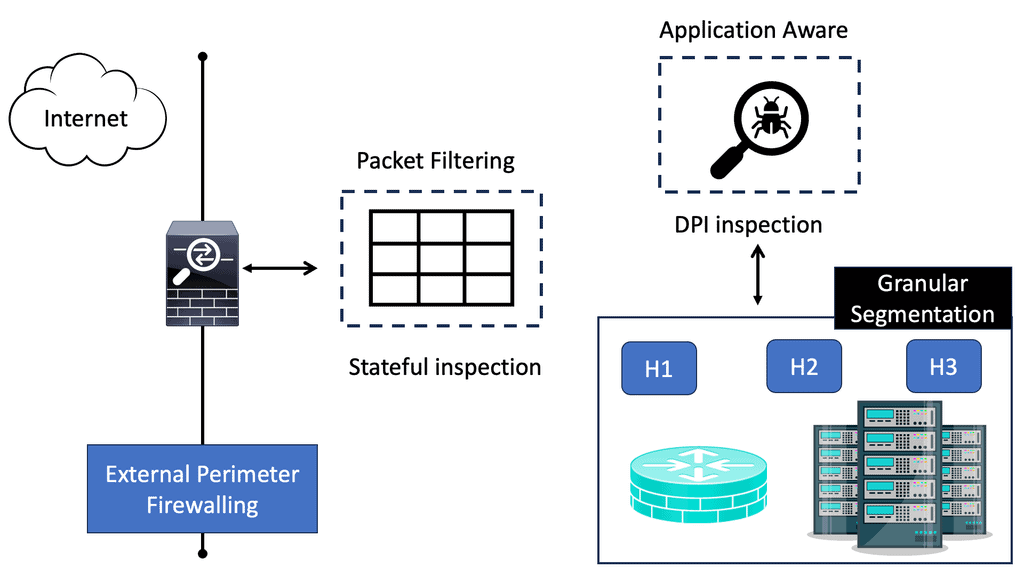
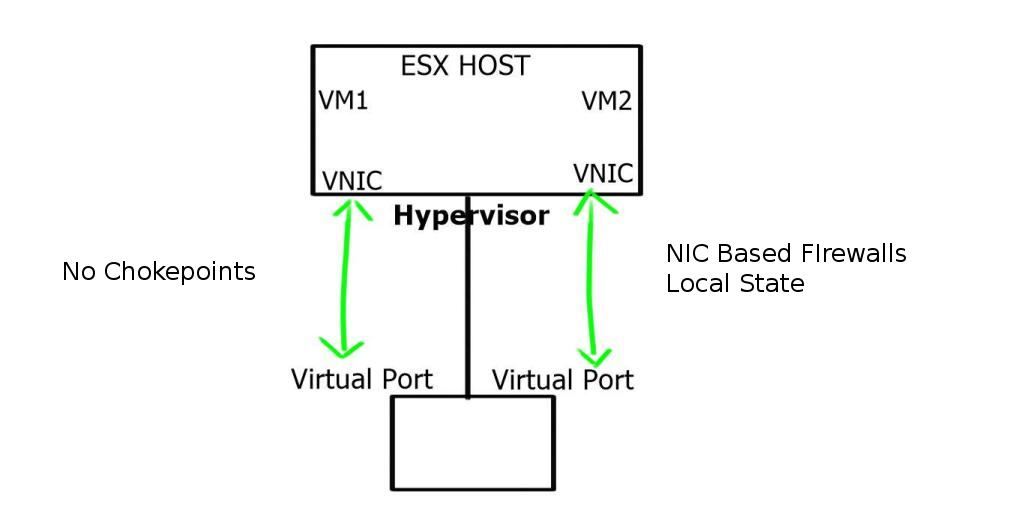
Virtual firewalls, or software firewalls, are software-based security solutions operating within a virtualized environment. Unlike traditional hardware firewalls, which are physical devices, virtual firewalls are implemented and managed at the software level. They are designed to protect virtual machines (VMs) and virtual networks by monitoring and controlling incoming and outgoing network traffic.

Virtual firewalls, also known as software firewalls, are security solutions designed to monitor and control network traffic within virtualized environments. Unlike traditional hardware firewalls, which operate at the network perimeter, virtual firewalls are deployed directly on virtual machines or within hypervisors. This positioning enables them to provide granular security policies and protect the internal network from threats that may originate within virtualized environments.

Segmentation: Virtual firewalls facilitate network segmentation by isolating virtual machines or groups of VMs, preventing lateral movement of threats within the virtual environment.
Intrusion Detection and Prevention: By analyzing network traffic, virtual firewalls can detect and prevent potential intrusions, helping organizations proactively defend against cyber threats.

Application Visibility and Control: With deep packet inspection capabilities, virtual firewalls provide organizations with comprehensive visibility into application-layer traffic, allowing them to enforce fine-grained policies and mitigate risks.

Enhanced Security: Virtual firewalls strengthen the overall security posture by augmenting traditional perimeter defenses, ensuring comprehensive protection within the virtualized environment.

Scalability and Flexibility: Virtual firewalls are highly scalable, allowing organizations to easily expand their virtual infrastructure while maintaining robust security measures. Additionally, they offer flexibility in terms of deployment options and configuration.

Centralized Management: Virtual firewalls can be managed centrally, simplifying administration and enabling consistent security policies across the virtualized environment.

Performance Impact: Virtual firewalls introduce additional processing overhead, which may impact network performance. It is essential to evaluate the performance implications and choose a solution that meets both security and performance requirements.

Integration with Existing Infrastructure: Organizations should assess the compatibility and integration capabilities of virtual firewalls with their existing virtualization platforms and network infrastructure.

Virtual firewalls have become indispensable tools in the fight against cyber threats, providing organizations with a robust layer of protection within virtualized environments. By leveraging their advanced features, such as segmentation, intrusion detection, and application control, businesses can fortify their digital fortresses and safeguard their critical assets. As the threat landscape continues to evolve, investing in virtual firewalls is a proactive step towards securing the future of your organization.

VIRTUAL FIREWALL · INTERACTIVE LAB 01

Where Should a Virtual Firewall Enforce Security?

Virtual firewalls can enforce policy at different points in a virtualised environment. Follow traffic from an external client or workload, through a virtual security boundary, to the protected application and see how placement changes the security model.

Virtual Security Path READY
SRC
Traffic Source Internet / workload
FW
Virtual Firewall Select a placement and inspection model.
APP
Protected Workload Application / service
Enforcement —
Traffic Scope —
Inspection —
Security Model —
Illustrative architecture model. Real virtual firewall products differ in enforcement point, inspection depth, performance model, integration and supported policy features.
Architecture Result
Select the traffic, enforcement model and inspection depth, then trace the flow.
Primary Boundary —
East-West Visibility —
Workload Mobility —
Central Chokepoint —
Traffic Trace
[READY] Virtual firewall trace awaiting input.
Engineering Insight

The major architectural question is where the security decision is enforced. A perimeter control can provide a strong north-south boundary, while workload-level or distributed enforcement can bring policy closer to east-west traffic.

Highlights: Virtual Firewalls

Background: Virtual Firewalls

– The virtual firewall (VF) is a network firewall appliance that runs within a virtualized environment and provides packet filtering and monitoring functions similar to those of a physical firewall. You can implement a VF on an existing guest virtual machine, as a traditional software firewall, as a virtual security appliance, as a virtual switch with enhanced security capabilities, or as a kernel process within the host hypervisor.

– A virtual firewall provides packet filtering and monitoring in a virtualized environment, even as another virtual machine, but also within the hypervisor. A guest VM running within a virtualized environment can be installed with VF as a traditional software firewall, a virtual security appliance designed to protect virtual networks, a virtual switch with additional security capabilities, or a kernel process that runs on top of all VM activity within the host hypervisor.

– There is a trend in virtual firewall technology to combine security-capable virtual switches with virtual security appliances. Virtual firewalls can incorporate additional networking features like VPN, QoS, and URL filtering.

Note: Types of Virtual Firewalls

a) Host-based Virtual Firewalls: Host-based virtual firewalls are installed on individual virtual machines (VMs) or servers. They monitor and control network traffic at the host level, providing added security for each VM.

b) Network-based Virtual Firewalls: Network-based virtual firewalls are deployed at the network perimeter, allowing for centralized monitoring and control of inbound and outbound traffic. They are instrumental in cloud environments where multiple VMs are running.

Virtual Firewall — Identity‑Driven Access Enforcement

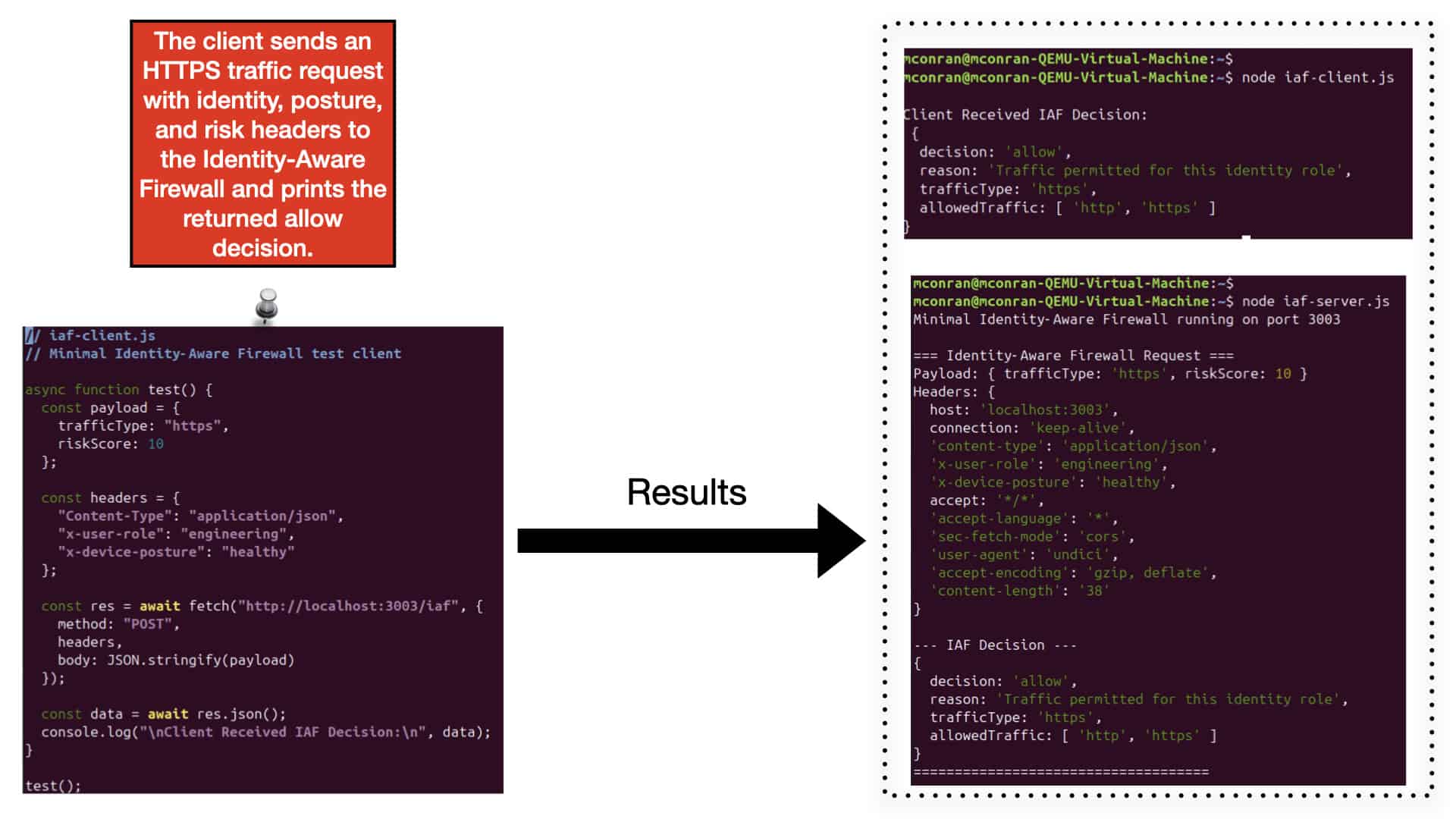
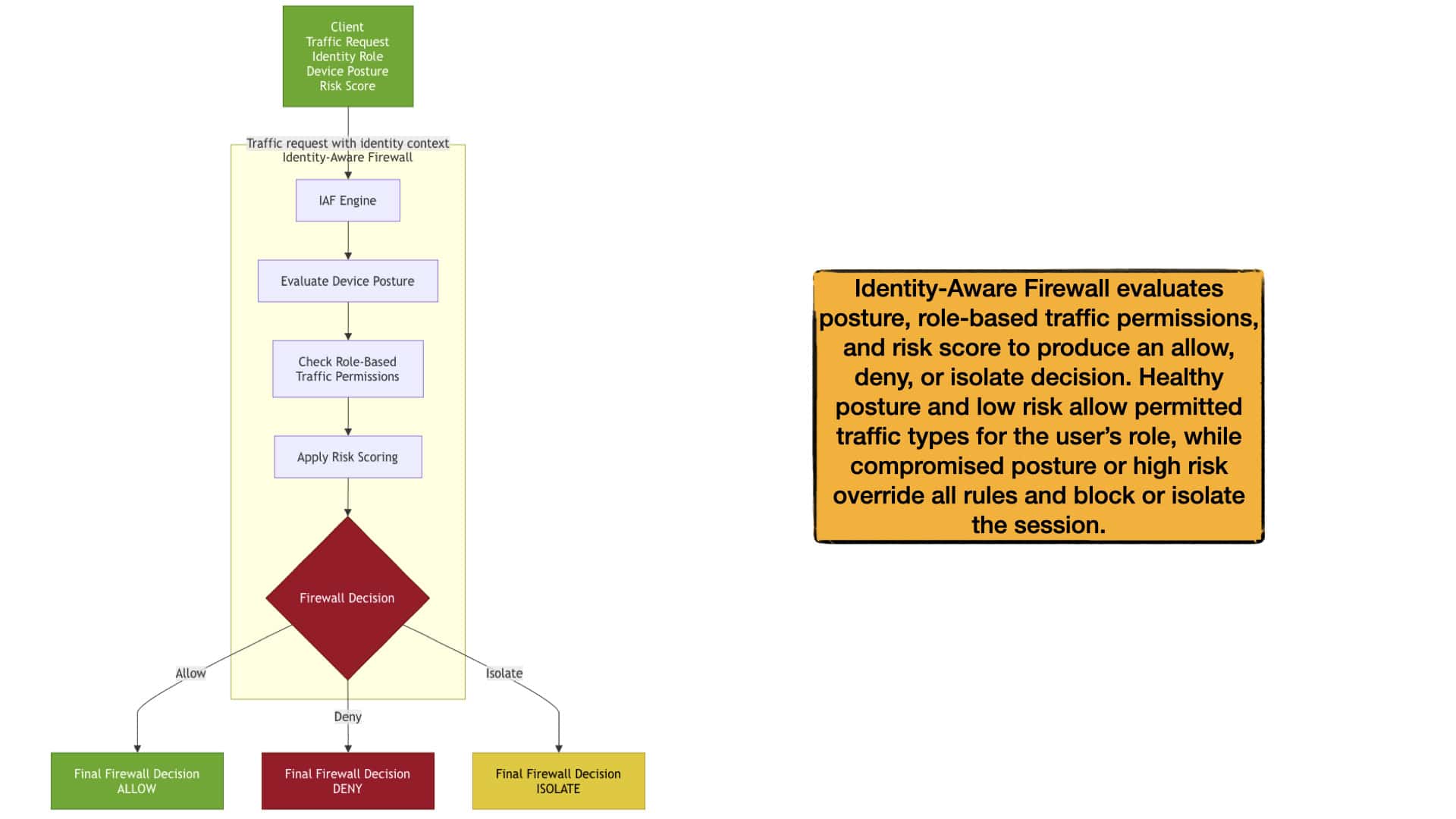
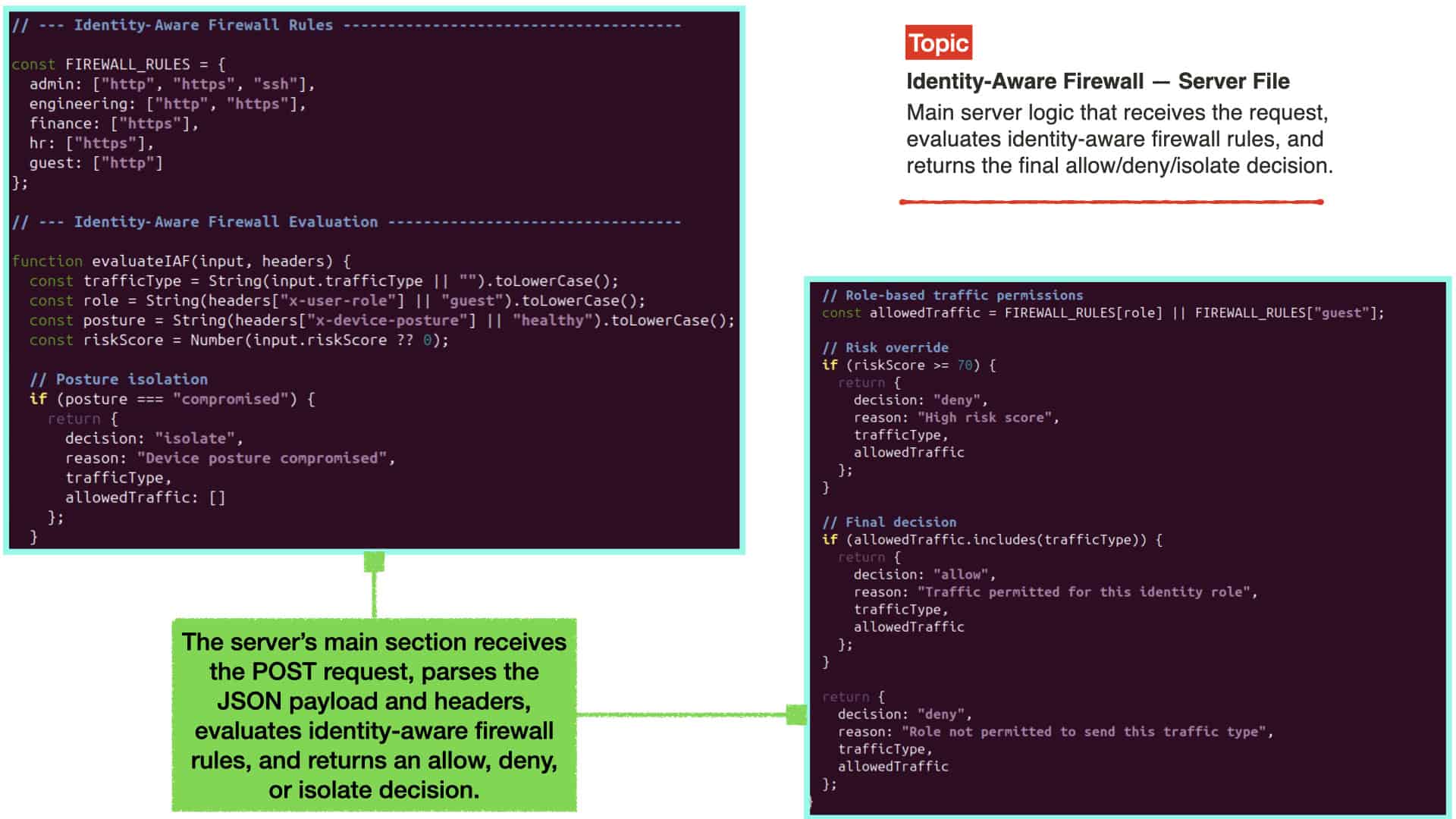
This lab demonstrates how a virtual firewall enforces identity‑driven access by validating user role, device posture, and behavioural context before allowing any traffic. Instead of relying on physical appliances or static network boundaries, the virtual firewall applies identity‑centric checks to determine whether a request should be permitted. This shows how modern virtual firewalls shift trust decisions away from IP‑based rules and toward identity‑focused security.

Identity aware firewall

When the server receives a request, it applies virtual firewall rules that combine identity permissions, posture validation, and risk scoring. Each identity role is mapped to specific allowed traffic types, while compromised posture or elevated risk immediately restricts access. Because the test payload represents a healthy device, low risk, and a role aligned with the requested traffic type, the virtual firewall returns an allow decision. This demonstrates how virtual firewalls use dynamic, context‑aware enforcement to prevent unauthorized access and lateral movement.
The lab provides complete visibility into how the virtual firewall evaluates and enforces access. The server logs the payload, identity headers, posture signals, risk score, and final decision, while the client displays the JSON response returned by the firewall. This end‑to‑end flow illustrates how virtual firewalls merge identity validation, posture assessment, and behavioural analytics into a unified enforcement pipeline. With this foundation, learners can expand into advanced virtual firewall topics such as adaptive access, identity‑driven segmentation, and continuous verification.

Integration with Virtualization Platforms:

Virtual firewalls seamlessly integrate with popular virtualization platforms such as VMware and Hyper-V. This integration enables centralized management, simplifying the configuration and monitoring of virtual firewalls across your virtualized infrastructure. Additionally, virtual firewalls can leverage the dynamic capabilities of virtualization platforms, adapting to changes in the virtual environment automatically.

Example Technology: Linux Firewalling

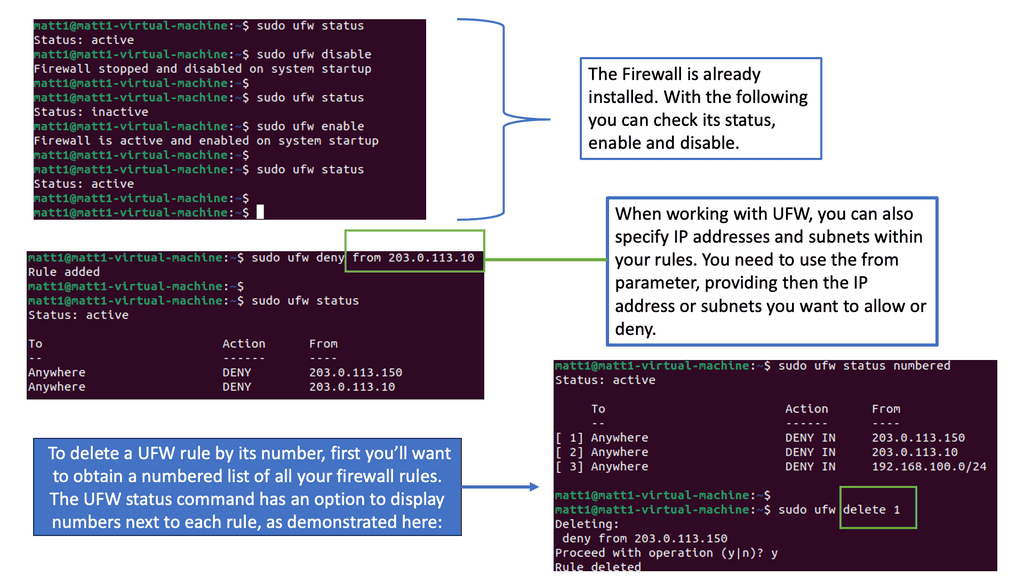
Understanding UFW Firewall

To begin our journey, let’s first understand a UFW firewall. UFW, short for Uncomplicated Firewall, is a user-friendly interface that simplifies managing netfilter firewall rules. It is built upon the robust iptables framework and provides an intuitive command-line interface for configuring firewall rules.

UFW firewall offers many features that contribute to a secure network environment. From simple rule management to support for IPv4 and IPv6 protocols, UFW ensures your network is protected against unauthorized access. It also provides flexible configuration options, allowing you to define rules based on ports, IP addresses, and more.
Implementing Virtual Firewalls:

Assessing Network Requirements: Before implementing virtual firewalls, it’s crucial to assess your network environment, identify potential vulnerabilities, and determine the specific security needs of your organization. This comprehensive assessment enables you to tailor your virtual firewall deployment to address specific threats and risks effectively.

Choosing the Right Virtual Firewall Solution: There are various virtual firewall solutions available in the market, each with its own set of features and capabilities. It’s essential to evaluate your organization’s requirements, such as throughput, performance, and integration with existing security infrastructure. This evaluation will help you select the most suitable virtual firewall solution for your network.

Configuring Security Policies: Once you have selected a virtual firewall solution, the next step is to configure security policies. This involves defining access control rules, setting up intrusion detection and prevention systems, and configuring virtual private networks (VPNs) if necessary. It’s crucial to align these policies with your organization’s security objectives and industry best practices.

Advantages of Virtual Firewalls:

1. Enhanced Flexibility: Virtual firewalls offer greater flexibility than their hardware counterparts. They are software-based and can be easily deployed, scaled, and managed in virtualized environments without additional hardware. This flexibility enables organizations to adapt to changing business requirements more effectively.

2. Cost-Effectiveness: Virtual firewalls eliminate the need to purchase and maintain physical hardware devices. Organizations can significantly reduce their capital and operational expenses by leveraging existing virtualization infrastructure. This cost-effectiveness makes virtual firewalls an attractive option for businesses of all sizes.

3. Centralized Management: Virtual firewalls can be centrally managed through a unified interface, providing administrators with a consolidated view of the entire virtualized network. This centralized management simplifies the configuration, monitoring, and enforcement of security policies across multiple virtual machines and networks, saving time and effort.

4. Segmentation and Isolation: Virtual firewalls enable organizations to segment their virtual networks into different security zones, isolating sensitive data and applications from potential threats. This segmentation ensures that the rest of the network remains protected even if one segment is compromised. By enforcing granular access control policies, virtual firewalls add a layer of security to prevent lateral movement within the virtualized environment.
5. Scalability: Virtual firewalls are software-based and can be easily scaled up or down to accommodate changing network demands. This scalability allows organizations to expand their virtual infrastructure without investing in additional physical hardware. With virtual firewalls, businesses can ensure that their security solutions grow with their evolving needs.

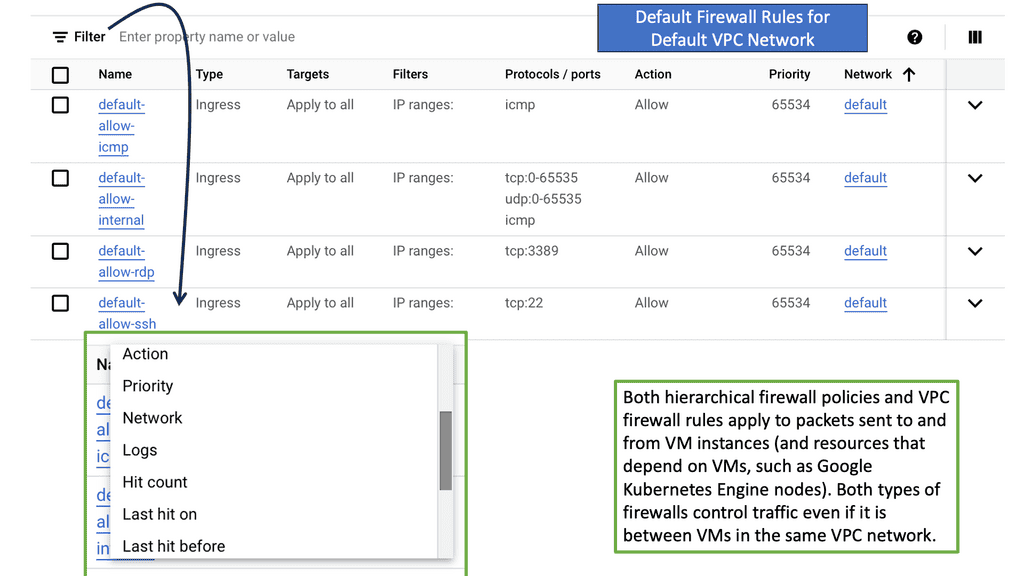
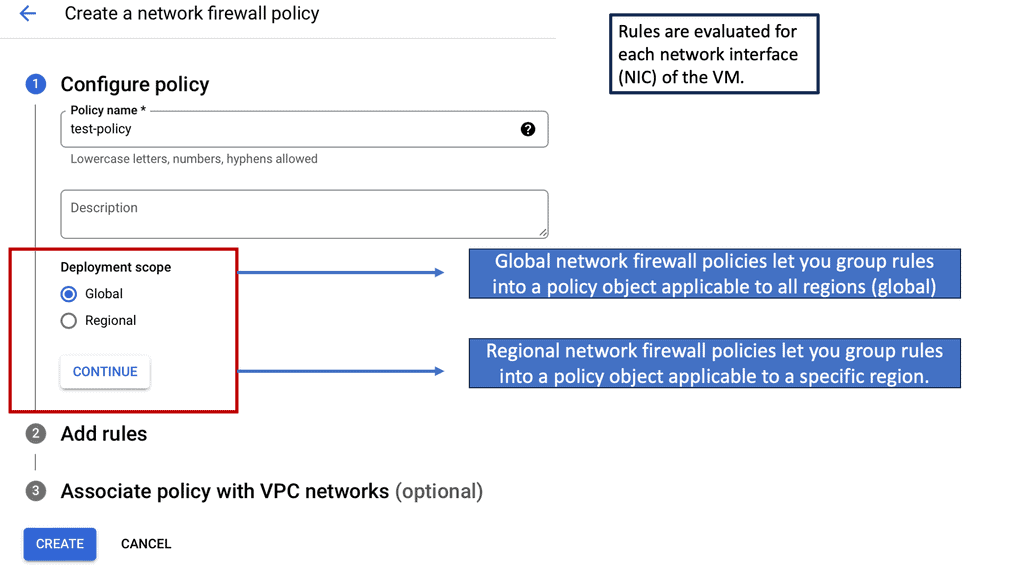
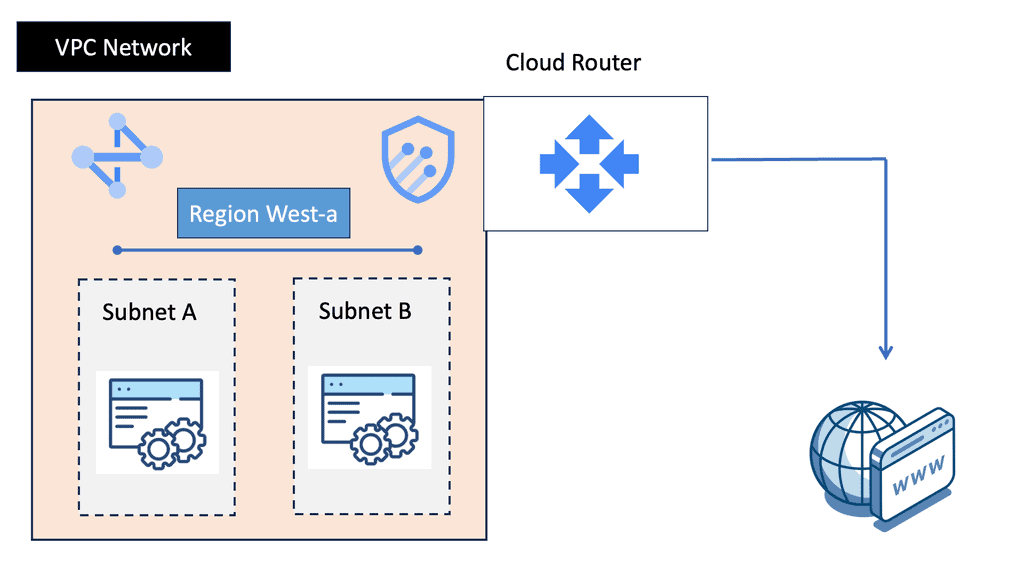
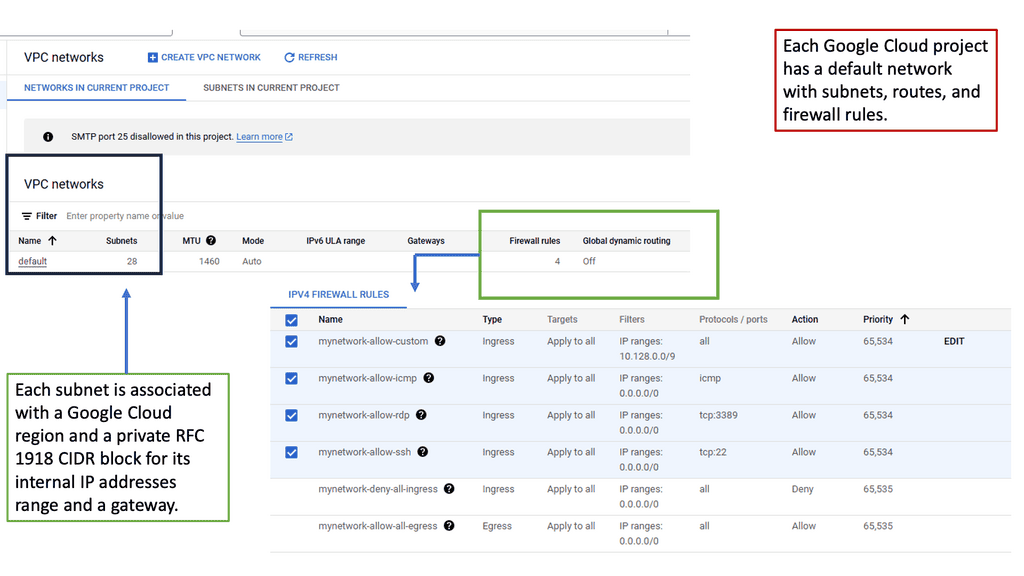
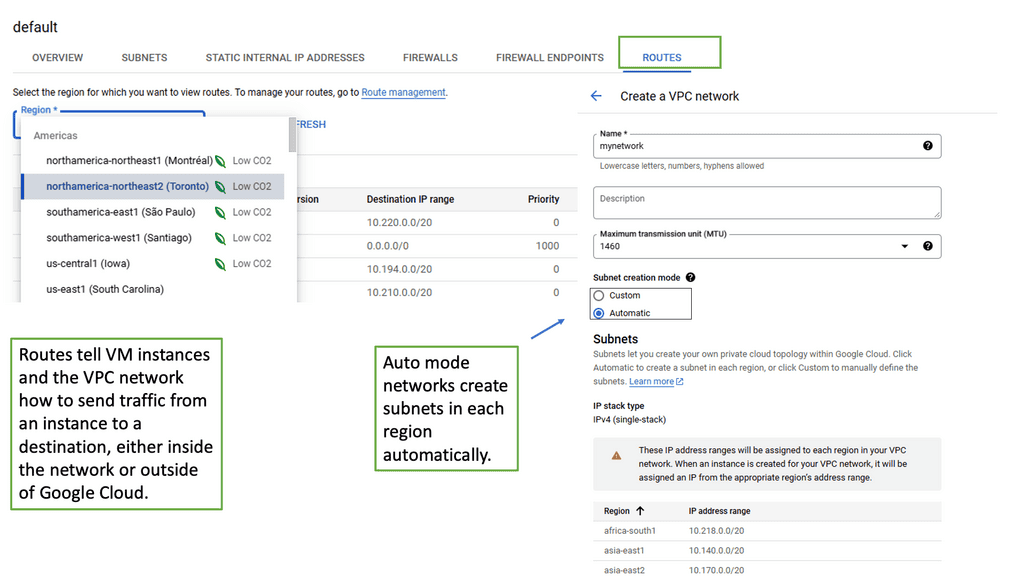
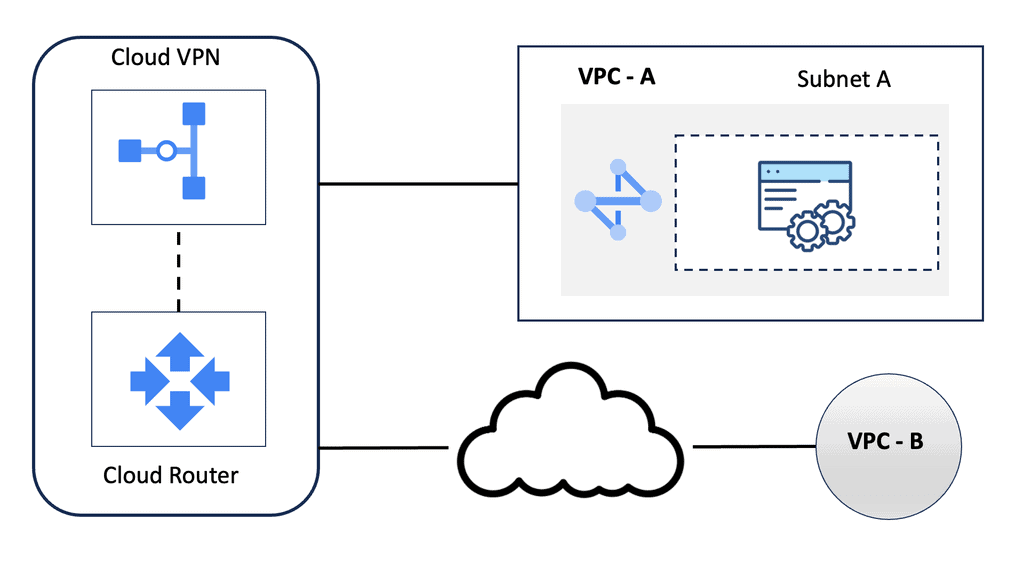
Example Default Firewall Rules in VPC Network

### What Are Default Firewall Rules?

When you create a new VPC network, it typically comes with a set of default firewall rules. These rules are designed to allow basic network functionality and to provide a base layer of security for your network. Understanding these default rules is crucial for managing your network’s security posture effectively.

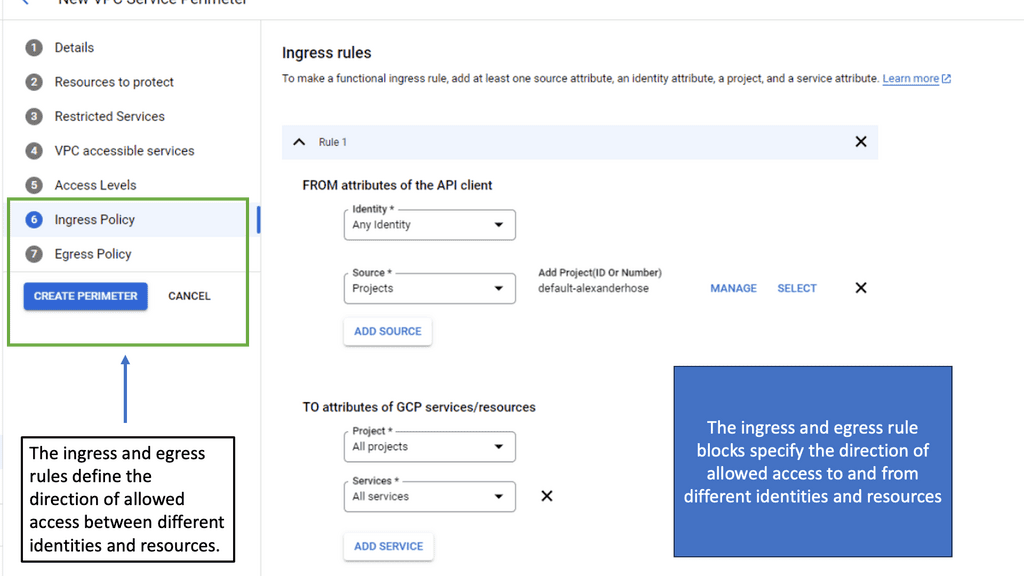
### The Role of Ingress and Egress Rules

Default firewall rules usually include both ingress (incoming) and egress (outgoing) rules. Ingress rules determine what traffic can enter your VPC, while egress rules control the traffic leaving your VPC. Typically, default rules allow all egress traffic, enabling your resources to communicate with external networks, but restrict ingress traffic to ensure that only authorized connections can be established.

### Customizing Default Rules

While default rules provide a starting point, they may not fit the specific needs of your application or organization. It’s essential to review and customize these rules based on your security policies and compliance requirements. This involves defining more specific rules that allow or deny traffic based on various parameters such as IP address ranges, protocols, and ports.

### Best Practices for Managing Firewall Rules

To maintain a secure and efficient VPC network, follow best practices when managing firewall rules. Regularly review and audit your rules to ensure they align with your security policies. Document changes and maintain a clear understanding of the purpose of each rule. Additionally, consider implementing a least privilege approach, where only necessary traffic is permitted, minimizing the potential attack surface.

distributed firewalls Distributed Firewalls

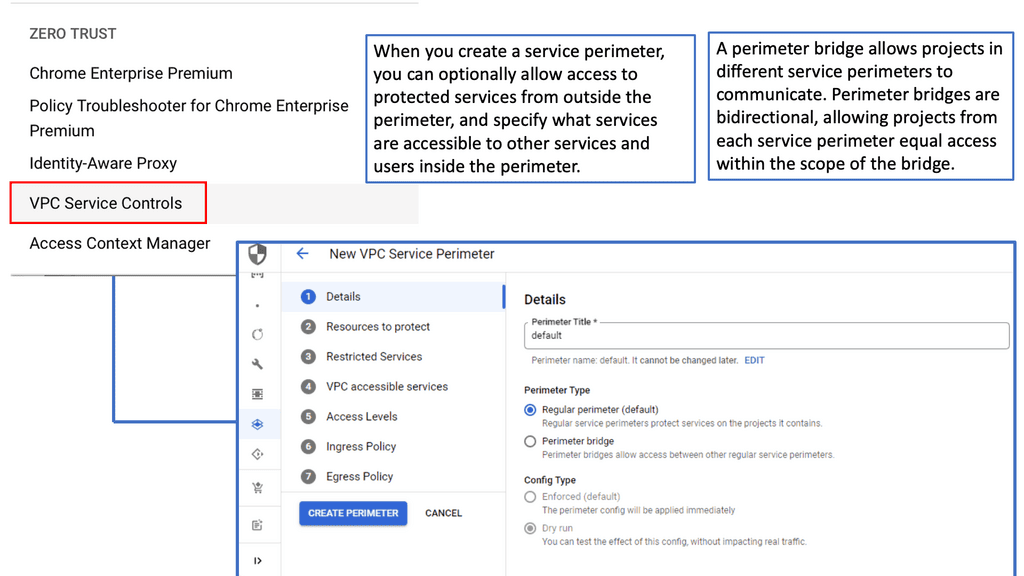
VPC Service Controls

**Understanding the Basics**

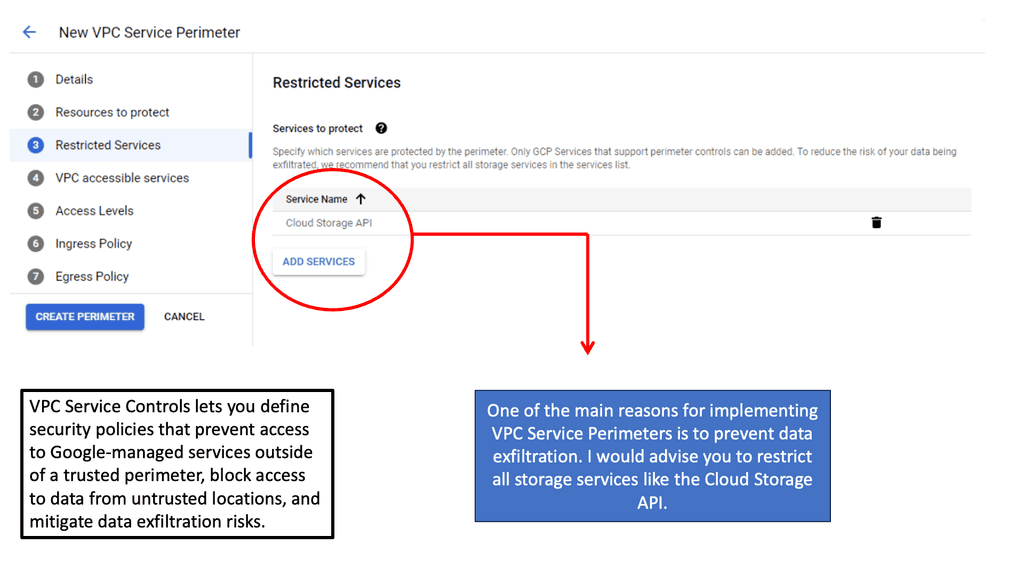
VPC Service Controls provide an additional layer of security by enabling organizations to set up a virtual perimeter that restricts data access and movement. By configuring service perimeters, businesses can enforce security policies that prevent data exfiltration and unauthorized access. This is particularly beneficial for organizations handling sensitive information, such as financial data or personal customer information, as it helps maintain compliance with stringent data protection regulations.
**Implementing VPC Service Controls**

Implementing VPC Service Controls involves creating service perimeters around the resources you want to protect. These perimeters act like a security fence, allowing only authorized access to the data within. To get started, identify the resources you want to include and configure policies that define who and what can access these resources. Google Cloud’s intuitive interface makes it easy to set up and manage these perimeters, ensuring that your cloud environment remains secure without compromising performance.
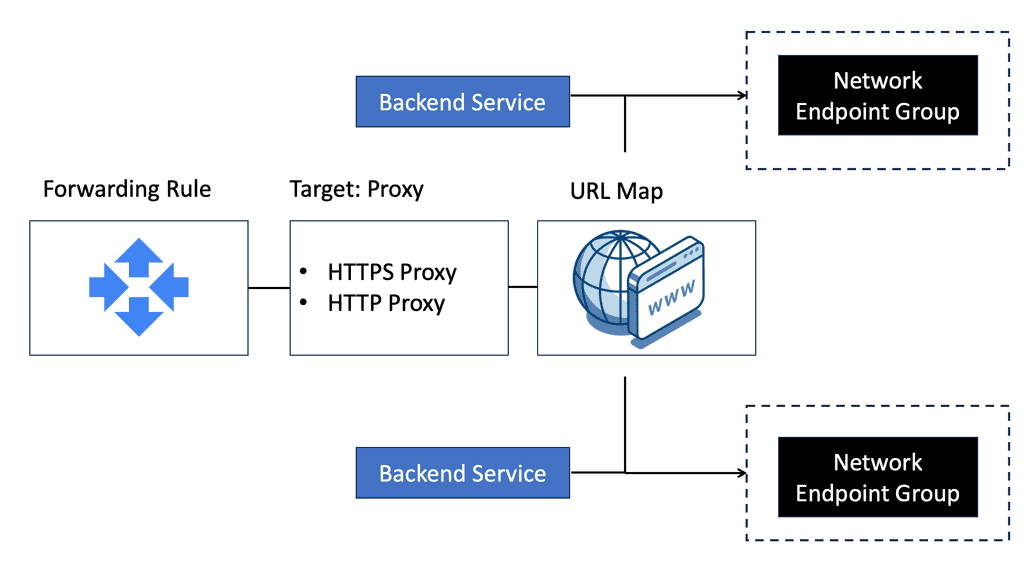
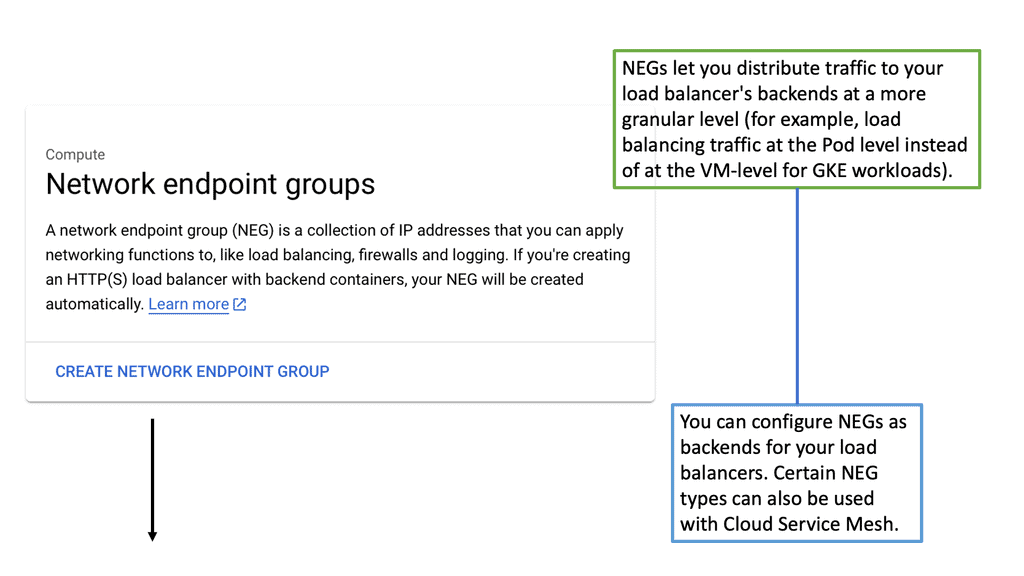
VPC Security Controls

Virtual Firewall with Cloud Armor

**What is Cloud Armor?**

Cloud Armor is a security service that offers advanced protection for your applications hosted on the cloud. It provides a robust shield against various cyber threats, including DDoS attacks, SQL injections, and cross-site scripting. By leveraging Google’s global infrastructure, Cloud Armor ensures that your applications remain secure and available, even during the most sophisticated attacks.

**Key Features of Cloud Armor**

One of the standout features of Cloud Armor is its ability to create and enforce edge security policies. These policies allow you to control and monitor traffic to your applications, ensuring that only legitimate users gain access. Additionally, Cloud Armor provides real-time monitoring and alerts, enabling you to respond swiftly to potential threats. With its customizable rules and rate limiting capabilities, you can fine-tune your security settings to meet your specific needs.

**Edge Security Policies: Your First Line of Defense**

Edge security policies are a critical component of Cloud Armor. These policies act as your first line of defense, filtering out malicious traffic before it reaches your applications. By defining rules based on IP addresses, geographic locations, and other criteria, you can block unwanted traffic and reduce the risk of attacks. Moreover, edge security policies help in mitigating DDoS attacks by distributing traffic across multiple regions, ensuring your applications remain accessible.

**Benefits of Using Cloud Armor**

Implementing Cloud Armor offers numerous benefits. Firstly, it enhances the security of your applications, protecting them from a wide range of cyber threats. Secondly, it ensures high availability, even during large-scale attacks, by distributing traffic and preventing overload. Thirdly, Cloud Armor’s real-time monitoring and alerts enable proactive threat management, allowing you to respond quickly to potential issues. Lastly, its customizable policies provide flexibility, ensuring your security settings align with your specific requirements.

**Range of attack vectors**

On-campus networks, mobile devices, and laptops are highly vulnerable to malware and ransomware, as well as to phishing, smishing, malicious websites, and infected applications. Thus, a solid network security design is essential to protect endpoints from such security threats and enforce endpoint network access control. End users can validate their identities before granting access to the network to determine who and what they can access.

Virtual firewalls, also known as cloud firewalls or virtualized NGFWs, grant or deny network access between untrusted zones. They provide inline network security and threat prevention in cloud-based environments, allowing security teams to gain visibility and control over cloud traffic. In addition to being highly scalable, virtual network firewalls are ideal for protecting virtualized environments because they are deployed in a virtualized form factor.

data center firewall
Diagram: The data center firewall.

Because Layer 4 firewalls cannot detect attacks at the application layer, virtual firewalls are ideal for cloud service providers (CSPs). Virtual firewalls can determine if requests are allowed based on their content by examining applications and not just port numbers. This feature can prevent DDoS attacks, HTTP floods, SQL injections, cross-site scripting attacks, parameter tampering attacks, and Slowloris attacks.

**Network Security Components**

This post discusses the network security components of virtual firewalls and the virtual firewall appliance that enables a zero-trust network design. In the Secure Access Service Edge (SASE ) world, virtual firewalling or any virtual device brings many advantages, such as having a stateful inspection firewall closer to the user sessions. Depending on the firewall design, the inspection and filtering are closer to the user’s sessions or workloads. Firstly, Let us start with the basics of IP networks and their operations.

**Virtual SDN Data Centers**

In a virtual data center design, IP networks deliver various services to consumers and businesses. As a result, they heavily rely on network availability for business continuity and productivity. As the reliance on IP networks grows, so does the threat and exposure to network-based attacks. New technologies and mechanisms address new requirements but also come with the risk of new threats. It’s a constant cat-and-mouse game. It’s your job as network admins to ensure the IP network and related services remain available.


VIRTUAL FIREWALL · INTERACTIVE LAB 02

How Should a Virtual Firewall Decide What to Allow?

A firewall does more than sit in the traffic path. It evaluates attributes such as source, destination, protocol, port, connection state and, where supported, identity or application context. Experiment with the policy model and see how the resulting security boundary changes.

Policy Decision Path READY
SRC
Internet External client
Firewall Policy Awaiting evaluation
DST
Web Server TCP 443
Decision —
Policy Match —
Session —
Context —
Illustrative policy engine. Real products differ in supported match fields, identity integration, application inspection, state tracking and enforcement architecture.
Firewall Decision
Configure the scenario and evaluate the policy.
Source —
Destination —
Protocol / Port —
Security Context —
Decision Trace
[READY] Policy engine awaiting evaluation.
Engineering Insight

Effective virtual firewall policy combines traffic attributes with the security context available to the enforcement point. Least-privilege policy should permit required communication while limiting unnecessary lateral movement.

Virtual Firewalls

The term “firewall” refers to a device or service that allows some traffic but denies other traffic. Positioning a firewall at a network gateway point in the network infrastructure is an aspect of secure design. A firewall so set at strategic points in the network intercepts and verifies all traffic crossing that gateway point. Some other places that firewalls are often deployed include in front of (i.e., on the public Internet side), behind (inside the data center), or in load-balancing systems.

Traffic Types and Virtual Firewalls

Firstly, a thorough understanding of the traffic types that enter and leave the network is critical. Network devices process some packets differently from others, resulting in different security implications. Transit IP packets, receive-adjacency IP packets, exception, and non-IP packets are all handled differently.

You also need to keep track of the plethora of security attacks, such as resource exhaustion attacks (direct attacks, transit attacks, reflection attacks), spoofing attacks, transport protocol attacks (UDP & TCP), and routing protocol/control plane attacks.

Various attacks target Layer 2, including MAC spoofing, STP, and CAM table overflow. Overlay virtual networking introduces two control planes, both of which require protection.

The introduction of cloud and workload mobility is changing the network landscape and security paradigm. Workload fluidity and the movement of network states are putting pressure on traditional physical security devices. It isn’t easy to move physical appliances around the network. Physical devices cannot follow workloads, which drives the world of virtual firewalls with distributed firewalls, NIC-based Firewalls, Microsegmentation, and Firewall VM-based appliances. 

**Session state**

Simple packet filters match on Layer 2 to 4 headers – MAC, IP, TCP, and UDP port numbers. If they don’t match the TCP SYN flags, it’s impossible to identify established sessions. Tracking the state of the TCP SYN tells you if this is the first packet of a session or a subsequent packet of an existing session. Matching on TCP flags allows you to differentiate between TCP SYN, SYN-ACK, and ACK.

Matching established TCP sessions would match on packets with the ACK/RST/FIN bit set. All packets without a SYN flag will not start a new session, and all packets with ACK/RST/FIN can appear anywhere in the established session.

Checking these three flags indicates if the session is established or not. In any adequately implemented TCP stack, the packet filtering engine will not open a new session unless it receives a TCP packet with the SYN flag. In the past, we used a trick. If a packet arrives with a destination port over 1024, it must be a packet from an established session, as no services were running on a high number of ports.

The term firewall originally referred to a wall to confine a potential fire. Regarding networking, a firewalling device is a barrier between a trusted and untrusted network. It can be classed into several generations. First-generation firewalls are simple packet filters, the second-generation refers to stateful devices, and the third-generation refers to application-based firewalls. A stateful firewall doesn’t mean it can examine the application layer and determine users’ actions.

A- The starting points of packet filters

Firewalls initially started with packet filters at each end and an application proxy in the middle. The application proxy would inspect the application level, and the packet filters would perform essential scrubbing. All sessions terminate on the application proxy where new sessions are initiated. Second-generation devices came into play, and we started tracking the sessions’ state.

Now, we have a single device that can do the same job as the packet filter combined with the application proxy. But it wasn’t inspected at the application level. The devices were stateful and could track the session’s state but could not go deeper into the application. For example, examine the HTTP content and inspect what users are doing. Generation 2 was a step back in terms of security.

We then moved into generation 3, which marketing people call next-generation firewalls. They offer Layer 7 inspection with packet filtering. Finally, niche devices called Application-Level firewalls, also known as web application Firewalls (WAF), are usually only concerned with HTTP traffic. They have similar functionality to reverse web proxy, terminating the HTTP session.

B- The rise of virtual firewalls and virtual firewall appliances

Almost all physical firewalls offer virtual contexts. Virtual contexts divide the firewall and solve many multi-tenancy issues. They provide separate management plans, but all the contexts share the same code. They also run over the same interfaces competing for the same bandwidth, so if one tenant gets DoS attacked, the others might be affected. However, virtual contexts constitute a significant drawback because they are tied to the physical device, so unlike VM-based firewalls, you lose all the benefits of virtualization. 

A firewall in a VM can run on any transport provided by the hypervisor. The VM thinks it has an ethernet interface, enabling you to put a VM-based firewall on top of any virtualization technology. The physical firewall must be integrated with the network virtualization solution, and many vendors have limited support for overlay networking solutions.

The physical interface supports VXLAN, but that doesn’t mean it can help the control plane in which the overlay network solution runs. For example, the network overlay solution might use IP multicast, OVSDB, or EVPN over VXLAN. Deploying Virtual firewalling offers underlay transport independence. It is flexible and easy to deploy and manage.

C- Virtual firewall appliance: VM and NIC-based firewalls

Traditionally, we used VLANs and IP subnets as security zones. This introduced problems with stretched VLANs, so they came with VXLAN and NVGRE. However, we are still using IP as the isolation mechanism. Generally, firewalls are implemented between subnets so all the traffic goes through the firewall, which can result in traffic trombones and network chokepoints.

The new world is all about VM and NIC-based firewalls. NIC-based firewalls are mostly packet filters or, at the very most, reflective ACLs. Vmware NSX distributed firewall does slightly more with some application-level functionality for SIP and FTP traffic.

virtual firewalls

NIC-based firewalls force you to redesign your security policy. Now, all the firewall rules are directly in front of the virtual NIC, offering optimal access to any traffic between VMs, as traffic does not need to go through a central firewall device. The session state is kept local and only specific to that VM. This makes them very scalable. It allows you to eliminate IP subnets as security zones and provides isolation between VMs in the same subnet.

This protects individual VMs by design, so all others are protected even if an attacker breaks into one VM. VMware calls this micro-segmentation in NSX. You can never fully replace physical firewalls with virtual firewalls. Performance and security audits come to mind. However, they can be used to augment each other. NIC is based on the east-to-west traffic and physical firewalls at the perimeter to filter north-to-south traffic.

Closing Points on Virtual Firewalls

Virtual firewalls, unlike their hardware counterparts, are software-based solutions that provide network security for virtualized environments. They operate within the cloud or on virtual machines, offering the flexibility to protect dynamic environments where traditional firewalls might fall short. With the rise of cloud computing, virtual firewalls have become indispensable, allowing organizations to enforce security policies consistently across their virtual infrastructures.

The advantages of virtual firewalls are numerous. Firstly, they offer scalability. As your business grows, so does your network, and virtual firewalls can expand seamlessly to accommodate this growth. Secondly, they are cost-effective. Without the need for physical hardware, virtual firewalls reduce both upfront costs and ongoing maintenance expenses. Additionally, they provide agility, enabling rapid deployment and configuration changes to adapt to evolving security needs. Finally, virtual firewalls enhance security by integrating with other security tools to provide a comprehensive defense strategy.

Deploying a virtual firewall requires careful planning to ensure it aligns with your organization’s specific needs. One common strategy is to implement them in a public cloud environment, where they can protect against threats targeting cloud-based applications and data. Another approach is using them within private cloud infrastructures to secure internal communications and sensitive data. Hybrid environments, which combine on-premises and cloud resources, can also benefit from virtual firewalls, allowing for a unified security policy across diverse platforms.

Effective management of virtual firewalls involves regular monitoring and updates. Keeping firewall software up-to-date ensures protection against the latest threats and vulnerabilities. Additionally, conducting regular security audits helps identify potential weaknesses in your network. Implementing a centralized management system can also streamline configuration and monitoring processes, making it easier to maintain a strong security posture. Educating your IT team about the latest trends and threats in cybersecurity further strengthens your defense strategy.

VIRTUAL FIREWALL · INCIDENT CHALLENGE

Why Can't the API Reach the Database?

The application is healthy, routing is working and the database is online. Yet API requests to TCP/5432 are failing. Your task is to identify where the security decision is being made and determine the most likely cause.

Incident Brief

After a workload migration, api-01 can no longer reach db-01. Web users can still reach the application. The failure affects only the east-west API → database flow.

API Workload Healthy
Database Healthy
Routing Reachable
TCP / 5432 Denied
Recent Change Workload Migration
Live Incident Path
East-West Application Flow INCIDENT
WEB
web-01 Frontend workload
Healthy
API
api-01 Application tier
Healthy
POLICY DENY TCP 5432
Security classification mismatch
DB
db-01 Database tier
Healthy
Routing HEALTHY
API REACHABLE
Policy DENY
Likely Layer SECURITY
Choose Your Investigation

What should you investigate first?

Investigation Score
0 / 4
Investigation Result
Select an investigation path to diagnose the incident.
Incident Console
[ALERT] API → Database TCP/5432 failure detected.
[CHECK] Routing path remains reachable.
[CHECK] Both workloads report healthy.
[CLUE] Failure began after workload migration.
Engineering Insight

East-west failures are often caused by the security policy classification rather than by basic routing. Distributed enforcement can continue filtering traffic even when the perimeter path is completely healthy.

The scenario is intentionally simplified. Real environments may involve routing, security groups, identity providers, service discovery, workload tags, distributed enforcement points and multiple policy layers.
data center design

Virtual Data Center Design

Virtual Data Center Design

Virtual data centers are a virtualized infrastructure that emulates the functions of a physical data center. By leveraging virtualization technologies, these environments provide a flexible and agile foundation for businesses to house their IT infrastructure. They allow for the consolidation of resources, improved scalability, and efficient resource allocation.

A well-designed virtual data center comprises several key components. These include virtual servers, storage systems, networking infrastructure, and management software. Each component plays a vital role in ensuring optimal performance, security, and resource utilization.

When embarking on virtual data center design, certain considerations must be taken into account. These include workload analysis, capacity planning, network architecture, security measures, and disaster recovery strategies. By meticulously planning and designing each aspect, organizations can create a robust and resilient virtual data center.

To maximize efficiency and performance, it is crucial to follow best practices in virtual data center design. These practices include implementing proper resource allocation, leveraging automation and orchestration tools, adopting a scalable architecture, regularly monitoring and optimizing performance, and ensuring adequate security measures.

Virtual data center design offers several tangible benefits. By consolidating resources and optimizing workloads, organizations can achieve higher performance levels. Additionally, virtual data centers enable efficient utilization of hardware, reducing energy consumption and overall costs.

Highlights: Virtual Data Center Design

Understanding Virtual Data Centers

Virtual data centers, also known as VDCs, are a cloud-based infrastructure that allows businesses to store, manage, and process their data in a virtual environment. Unlike traditional data centers, which require physical hardware and dedicated spaces, VDCs leverage virtualization technologies to create a flexible and scalable solution.

At the heart of any virtual data center are its fundamental components. These include virtual machines, storage systems, networking, and management tools. Virtual machines act as the primary workhorses, running applications and services that were once confined to physical servers.

Storage systems in a VDC can dynamically allocate space, ensuring efficient data management. Networking, on the other hand, involves virtual switches and routers that facilitate seamless communication between virtual machines. Lastly, management tools offer administrators a centralized platform to monitor and optimize the VDC’s operations.

Key Considerations:

a) Virtual Machines (VMs): At the heart of virtual data center design are virtual machines. These software emulations of physical computers allow businesses to run multiple operating systems and applications on a single physical server, maximizing resource utilization.

b) Hypervisors: Hypervisors play a crucial role in virtual data center design by enabling the creation and management of VMs. They abstract the underlying hardware, allowing multiple VMs to run independently on the same physical server.

c) Software-defined Networking (SDN): SDN is a fundamental component of virtual data centers. It separates the network control plane from the underlying hardware, providing centralized management and programmability. This enables efficient network configuration, monitoring, and security across the virtual infrastructure.

Benefits of Virtual Data Center Design

a) Scalability: Virtual data centers offer unparalleled scalability, allowing businesses to easily add or remove resources as their needs evolve. This flexibility ensures optimal resource allocation and cost-effectiveness.

b) Cost Savings: By eliminating the need for physical hardware, virtual data centers significantly reduce upfront capital expenditures. Additionally, the ability to consolidate multiple VMs on a single server leads to reduced power consumption and maintenance costs.

c) Improved Disaster Recovery: Virtual data centers simplify disaster recovery procedures by enabling efficient backup, replication, and restoration of virtual machines. This enhances business continuity and minimizes downtime in case of system failures or outages.

Design Factors for Data Center Networks

When designing a data center network, network professionals must consider factors unrelated to their area of specialization. To avoid a network topology becoming a bottleneck for expansion, a design must consider the data center’s growth rate (expressed as the number of servers, switch ports, customers, or any other metric).

Data center network designs must also consider application bandwidth demand. Network professionals commonly use the oversubscription concept to translate such demand into more relatable units (such as ports or switch modules).

**Oversubscription**

Oversubscription occurs when multiple elements share a common resource and the allocated resources per user exceed the maximum value that each can use. Oversubscription refers to the amount of bandwidth switches can offer downstream devices at each layer in data center networks. The ratio of upstream server traffic oversubscription at the access layer switch would be 4:1, for example, if it has 32 10 Gigabit Ethernet server ports and eight uplink 10 Gigabit Ethernet interfaces.

**Sizing Failure Domains**

Oversubscription ratios must be tested and fine-tuned to determine the optimal network design for the application’s current and future needs.

Business-related decisions also influence the failure domain sizing of a data center network. The number of servers per IP subnet, access switch, or aggregation switch may not be solely determined by technical aspects if an organization cannot afford to lose multiple application environments simultaneously.

Data center network designs are affected by application resilience because they require perfect harmony between application and network availability mechanisms. An example would be:

  • An active server connection should be connected to an isolated network using redundant Ethernet interfaces.
  • An application server must be able to respond faster to a connection failure than the network.

Last, a data center network designer must be aware of situations where all factors should be prioritized since benefiting one aspect could be detrimental to another. Traditionally, the topology between the aggregation and access layers illustrates this situation.

### Scalability: Preparing for Growth

As data demands grow, so too must the networks that support them. Scalability is a crucial consideration in the design of data center networks. This involves planning for increased bandwidth, additional server capacity, and more extensive storage options. Implementing modular designs and utilizing technologies such as software-defined networking (SDN) can help data centers scale efficiently without significant disruptions.

### Reliability: Ensuring Consistent Uptime

Reliability is non-negotiable for data centers as any downtime can lead to significant losses. Network design must include redundant systems, failover mechanisms, and robust disaster recovery plans. Technologies such as network redundancy protocols and geographic distribution of data centers enhance reliability, ensuring that networks remain operational even in the face of unexpected failures.

### Security: Protecting Critical Data

In an era where data breaches are increasingly common, securing data center networks is paramount. Effective design involves implementing strong encryption protocols, firewalls, and intrusion detection systems. Regular security audits and employing a zero-trust architecture can further fortify networks against cyber threats, ensuring that sensitive data remains protected.

### Efficiency: Maximizing Performance with Minimal Resources

Efficiency in data center networks is about maximizing performance while minimizing resource consumption. This can be achieved through optimizing network traffic flow, utilizing energy-efficient hardware, and implementing advanced cooling solutions. Furthermore, automation tools can streamline operations, reduce human error, and optimize resource allocation.

Google Cloud Data Centers

### Unpacking Google Cloud’s Network Connectivity Center

Google Cloud’s Network Connectivity Center is a centralized platform tailored to help businesses manage their network connections efficiently. It offers a unified view of all network assets, enabling organizations to oversee their entire network infrastructure from a single console. With NCC, businesses can connect their on-premises resources with Google Cloud services, creating a seamless and integrated network experience. This tool simplifies the management of complex networks by providing robust monitoring, visibility, and control over network traffic.

### Key Features of Network Connectivity Center

One of the standout features of the Network Connectivity Center is its ability to facilitate hybrid and multi-cloud environments. By supporting a variety of connection types, including VPNs, interconnects, and third-party routers, NCC allows businesses to connect to Google Cloud’s global network efficiently. Its intelligent routing capabilities ensure optimal performance and reliability, reducing latency and improving user experience. Additionally, NCC’s policy-based management tools empower organizations to enforce security protocols and compliance measures across their network infrastructure.

### Benefits of Using Network Connectivity Center

The benefits of integrating Google Cloud’s Network Connectivity Center into your organization’s operations are manifold. For starters, NCC enhances network visibility, providing detailed insights into network performance and traffic patterns. This allows businesses to proactively identify and resolve issues before they impact operations. Moreover, NCC’s scalability ensures that as your organization grows, your network infrastructure can seamlessly expand to meet new demands. By consolidating network management tasks, NCC also reduces operational complexity and costs, allowing IT teams to focus on strategic initiatives.

### How to Get Started with Network Connectivity Center

Getting started with Google Cloud’s Network Connectivity Center is a straightforward process. Begin by assessing your current network infrastructure and identifying areas where NCC could add value. Next, set up your NCC environment by integrating your existing network connections and configuring routing policies to suit your organizational needs. Google Cloud provides comprehensive documentation and support to guide you through the setup process, ensuring a smooth transition and optimal utilization of NCC’s capabilities.

Network Connectivity Center

Google Machine Types Families

The Basics: What Are Machine Type Families?

Machine type families in Google Cloud refer to the categorization of virtual machines (VMs) based on their capabilities and intended use cases. Each family is designed to optimize performance for specific workloads, offering a balance between processing power, memory, and cost. Understanding these families is crucial for anyone looking to leverage Google Cloud’s infrastructure effectively.

—

### The Core Families: Standard, High-Memory, and High-CPU

Google Cloud’s machine type families are primarily divided into three core categories: Standard, High-Memory, and High-CPU.

– **Standard**: These are the most versatile and widely used machine types, providing a balanced ratio of CPU to memory. They are ideal for general-purpose applications, such as web servers and small databases.

– **High-Memory**: As the name suggests, these machines come with a higher memory capacity, making them suitable for memory-intensive applications like large databases and real-time data processing.

– **High-CPU**: These machines offer a higher CPU-to-memory ratio, perfect for compute-intensive workloads like batch processing and scientific simulations.

—

### Choosing the Right Family: Factors to Consider

Selecting the appropriate machine type family involves evaluating your specific workload requirements. Key factors to consider include:

– **Workload Characteristics**: Determine whether your application is CPU-bound, memory-bound, or requires a balanced approach.

– **Performance Requirements**: Assess the performance metrics that your application demands to ensure optimal operation.

– **Cost Efficiency**: Consider your budget constraints and balance them against the performance benefits of different machine types.

By carefully analyzing these factors, you can select a machine type family that aligns with your operational goals while optimizing cost and performance.

VM instance types

GKE & Virtual Data Centers

**The Power of Virtual Data Centers**

Virtual data centers have revolutionized the way businesses approach IT infrastructure. By leveraging cloud-based solutions, companies can dynamically allocate resources, reduce costs, and enhance scalability. GKE plays a pivotal role in this transformation by providing a streamlined, scalable, and secure environment for running containerized applications. It abstracts the underlying hardware, allowing businesses to focus on innovation rather than infrastructure management.

**Key Features of Google Kubernetes Engine**

GKE stands out with its comprehensive suite of features designed to enhance operational efficiency. One of its key strengths lies in its ability to auto-scale applications, ensuring optimal performance even under fluctuating loads. Additionally, GKE provides robust security features, including network policies and Google Cloud’s security foundation, to safeguard applications against potential threats. The seamless integration with other Google Cloud services further enhances its appeal, offering a cohesive ecosystem for developers and IT professionals.

**Implementing GKE: Best Practices**

When transitioning to GKE, adopting best practices can significantly enhance the deployment process. Businesses should start by thoroughly understanding their application architecture and resource requirements. It’s crucial to configure clusters to match these specifications to maximize performance and cost-efficiency. Regularly updating to the latest Kubernetes versions and leveraging built-in monitoring tools can also help maintain a secure and efficient environment.

Google Kubernetes Engine

Segmentation with NEGs

**Understanding Network Endpoint Groups**

Network Endpoint Groups are a collection of network endpoints that provide flexibility in how you manage your services. These endpoints can be various resources in Google Cloud, such as Compute Engine instances, Kubernetes Pods, or App Engine services. With NEGs, you have the capability to direct traffic to different backends based on demand, which helps in load balancing and improves the overall performance of your applications. NEGs are particularly beneficial when you need to manage services that are distributed across different regions, ensuring low latency and high availability.

**Enhancing Data Center Security**

Security is a paramount concern for any organization operating in the cloud. NEGs offer several features that can significantly enhance data center security. By using NEGs, you can create more granular security policies, allowing for precise control over which endpoints can be accessed and by whom. This helps in minimizing the attack surface and protecting sensitive data from unauthorized access. Additionally, NEGs facilitate the implementation of security patches and updates without disrupting the entire network, ensuring that your data center remains secure against emerging threats.

**Integrating NEGs with Google Cloud Services**

Google Cloud provides seamless integration with NEGs, making it easier for organizations to manage their cloud infrastructure. By leveraging Google Cloud’s robust ecosystem, NEGs can be integrated with various services such as Google Cloud Load Balancing, Cloud Armor, and Traffic Director. This integration enhances the capability of NEGs to efficiently route traffic, protect against DDoS attacks, and provide real-time traffic management. The synergy between NEGs and Google Cloud services ensures that your applications are not only secure but also highly performant and resilient.

**Best Practices for Implementing NEGs**

Implementing NEGs requires careful planning to maximize their benefits. It is essential to understand your network architecture and identify the endpoints that need to be grouped. Regularly monitor and audit your NEGs to ensure they are configured correctly and are providing the desired level of performance and security. Additionally, take advantage of Google Cloud’s monitoring tools to gain insights into traffic patterns and make data-driven decisions to optimize your network.

network endpoint groups

Managed Instance Groups

**Understanding Managed Instance Groups**

Managed Instance Groups are an essential feature for anyone looking to deploy scalable applications on Google Cloud. A MIG consists of identical VM instances, all configured from a common instance template. This uniformity ensures that any updates or changes applied to the template automatically propagate across all instances in the group, maintaining consistency. Additionally, MIGs offer auto-scaling capabilities, enabling the system to adjust the number of instances based on current workload demands. This flexibility means that businesses can optimize resource usage and potentially reduce costs.

**Benefits of Using MIGs on Google Cloud**

One of the primary advantages of using Managed Instance Groups on Google Cloud is their integration with other Google Cloud services, such as load balancing. By distributing incoming traffic across multiple instances, load balancers prevent any single instance from becoming overwhelmed, ensuring high availability and reliability. Moreover, MIGs support automated updates and self-healing features. In the event of an instance failure, a MIG automatically replaces or repairs the instance, minimizing downtime and maintaining application performance.

**Best Practices for Implementing MIGs**

To fully leverage the potential of Managed Instance Groups, it’s crucial to follow some best practices. Firstly, use instance templates to define VM configurations and ensure consistency across your instances. Regularly update these templates to incorporate security patches and performance improvements. Secondly, configure auto-scaling policies to match your application’s needs, allowing your infrastructure to dynamically adjust to changes in demand. Lastly, monitor your MIGs using Google Cloud’s monitoring tools to gain insights into performance and usage patterns, enabling you to make informed decisions about your infrastructure.

Managed Instance Group

### The Importance of Health Checks

Health checks are pivotal in maintaining an efficient cloud load balancing system. They are automated procedures that periodically check the status of your servers to ensure they are functioning correctly. By regularly monitoring server health, load balancers can quickly detect and route traffic away from any servers that are down or underperforming.

The primary objective of these checks is to ensure the availability and reliability of your application. If a server fails a health check, the load balancer will automatically redirect traffic to other servers that are performing optimally, thereby minimizing downtime and maintaining seamless user experience.

### How Google Cloud Implements Health Checks

Google Cloud offers robust health checking mechanisms within its load balancing services. These health checks are customizable, allowing you to define the parameters that determine the health of your servers. You can specify the protocol, port, and request path that the load balancer should use to check the health of each server.

Google Cloud’s health checks are designed to be highly efficient and scalable, ensuring that even as your application grows, the health checks remain effective. They provide detailed insights into the status of your servers, enabling you to make informed decisions about resource allocation and server management.

### Customizing Your Health Checks

One of the standout features of Google Cloud’s health checks is their flexibility. You can customize health checks based on the specific needs of your application. For example, you can set the frequency of checks, the timeout period, and the number of consecutive successful or failed checks required to mark a server as healthy or unhealthy.

This level of customization ensures that your load balancing strategy is tailored to your application’s unique requirements, providing optimal performance and reliability.

What is Cloud Armor?

Cloud Armor is a security service designed to protect your applications and services from a wide array of cyber threats. It acts as a shield, leveraging Google’s global infrastructure to deliver comprehensive security at scale. By implementing Cloud Armor, users can benefit from advanced threat detection, real-time traffic analysis, and customizable security policies tailored to their specific needs.

### Edge Security Policies: Your First Line of Defense

One of the standout features of Cloud Armor is its edge security policies. These policies allow you to define and enforce rules at the edge of Google’s network, ensuring that malicious traffic is blocked before it can reach your applications. By configuring edge security policies, you can protect against Distributed Denial of Service (DDoS) attacks, SQL injections, cross-site scripting (XSS), and other common threats. This proactive approach not only enhances security but also improves the performance and availability of your services.

### Customizing Your Cloud Armor Setup

Cloud Armor offers extensive customization options, enabling you to tailor security measures to your unique requirements. Users can create and apply custom rules based on IP addresses, geographic regions, and even specific request patterns. This flexibility ensures that you can adapt your defenses to match the evolving threat landscape, providing a dynamic and responsive security posture.

### Real-Time Monitoring and Reporting

Visibility is a crucial component of any security strategy. With Cloud Armor, you gain access to real-time monitoring and detailed reports on traffic patterns and security events. This transparency allows you to quickly identify and respond to potential threats, minimizing the risk of data breaches and service disruptions. The intuitive dashboard provides actionable insights, helping you to make informed decisions about your security policies and configurations.

Network Connectivity Center – Hub and Spoke

Google Cloud Network Tiers

Understanding Network Tiers

Network tiers, within the context of Google Cloud, refer to the different levels of network service quality and performance offered to users. Google Cloud provides two primary network tiers: Premium Tier and Standard Tier. Each tier comes with its own features, advantages, and pricing models.

The Premium Tier is designed for businesses that require high-speed, low-latency network connections to ensure optimal performance for their critical applications. With Premium Tier, enterprises can benefit from Google’s global fiber network, which spans across hundreds of points of presence worldwide. This tier offers enhanced reliability, improved routing efficiency, and reduced packet loss, making it an ideal choice for latency-sensitive workloads.

While the Premium Tier boasts top-notch performance, the Standard Tier provides a cost-effective option for businesses with less demanding network requirements. With the Standard Tier, users can still enjoy reliable connectivity and security features, but at a lower price point. This tier is suitable for applications that are less sensitive to network latency and can tolerate occasional performance variations.

Understanding VPC Networking

VPC Networking forms the foundation of any cloud infrastructure, enabling secure communication and resource isolation. In Google Cloud, a VPC is a virtual network that allows users to define and manage their own private space within the cloud environment. It provides a secure and scalable environment for deploying applications and services.

Google Cloud VPC offers a plethora of powerful features that enhance network management and security. From customizable IP addressing to robust firewall rules, VPC empowers users with granular control over their network configuration. Furthermore, the integration with other Google Cloud services, such as Cloud Load Balancing and Cloud VPN, opens up a world of possibilities for building highly available and resilient architectures.

Understanding HA VPN

HA VPN, or High Availability Virtual Private Network, is a robust networking solution Google Cloud offers. It allows organizations to establish secure connections between their on-premises networks and Google Cloud. HA VPN ensures continuous availability and redundancy, making it ideal for mission-critical applications and services.

Configuring HA VPN is straightforward and requires a few key steps. First, you must set up a Virtual Private Cloud (VPC) network in Google Cloud. Then, establish a Cloud VPN gateway and configure the necessary parameters, such as encryption methods and routing options. Finally, the on-premises VPN gateway must be configured to secure a Google Cloud connection.

HA VPN offers several benefits for businesses seeking secure and reliable networking solutions. Firstly, it provides high availability by establishing redundant connections with automatic failover capabilities. This ensures continuous access to critical resources, even during network failures. HA VPN offers enhanced security through strong encryption protocols, keeping data safe during transmission.

Gaining Efficiency

Deploying multiple tenants on a shared infrastructure is far more efficient than having single tenants per physical device. With a virtualized infrastructure, each tenant requires isolation from all other tenants sharing the same physical infrastructure.

For a data center network design, each network container requires path isolation, for example, 802.1Q on a shared Ethernet link between two switches, and device virtualization at the different network layers, for example, Cisco Application Control Engine ( ACE ) or Cisco Firewall Services Module ( FWSM ) virtual context. To implement independent paths with this type of data center design, you can create Virtual Routing Forwarding ( VRF ) per tenant and map the VRF to Layer 2 segments.

ACI fabric Details
Diagram: Cisco ACI fabric Details

Example: Virtual Data Center Design. Cisco.

More recently, the Cisco ACI network enabled segmentation based on logical security zones known as endpoint groups, where security constructs known as contracts are needed to communicate between endpoint groups. The Cisco ACI still uses VRFs, but they are used differently. Then, we have the Ansible Architecture, which can be used with Ansible variables to automate the deployment of the network and security constructs for the virtual data center. This brings consistency and will eliminate human error.

Understanding VPC Peering

VPC peering is a networking feature that allows you to connect VPC networks securely. It enables communication between resources in different VPCs, even across different projects or organizations within Google Cloud. Establishing peering connections can extend your network reach and allow seamless data transfer between VPCs.

To establish VPC peering in Google Cloud, follow a few simple steps. Firstly, identify the VPC networks you want to connect and ensure they do not have overlapping IP ranges. Then, the necessary peering connections are created, specifying the VPC networks involved. Once the peering connections are established, you can configure the routes to enable traffic flow between the VPCs. Google Cloud provides intuitive documentation and user-friendly interfaces to guide you through the setup process.

Before you proceed, you may find the following posts helpful for pre-information:

  1. Context Firewall
  2. Virtual Device Context
  3. Dynamic Workload Scaling
  4. ASA Failover
  5. Data Center Design Guide

Virtual Data Center Design

Numerous kinds of data centers and service models are available. Their category relies on several critical criteria. Such as whether one or many organizations own them, how they serve in the topology of other data centers, and what technologies they use for computing and storage. The main types of data centers include:

  • Enterprise data centers.
  • Managed services data centers.
  • Colocation data centers.
  • Cloud data centers.

You may build and maintain your own hybrid cloud data centers, lease space within colocation facilities, also known as colos, consume shared compute and storage services, or even use public cloud-based services.

Data center network design:

Example Segmentation Technology: VRF-lite

VRF information from a static or dynamic routing protocol is carried across hop-by-hop in a Layer 3 domain. Multiple VLANs in the Layer 2 domain are mapped to the corresponding VRF. VRF-lite is known as a hop-by-hop virtualization technique. The VRF instance logically separates tenants on the same physical device from a control plane perspective.

From a data plane perspective, the VLAN tags provide path isolation on each point-to-point Ethernet link that connects to the Layer 3 network. VRFs provide per-tenant routing and forwarding tables and ensure no server-server traffic is permitted unless explicitly allowed.

virtual and forwarding


Service Modules in Active/Active Mode

Multiple virtual contexts

The service layer must also be virtualized for tenant separation. The network services layer can be designed with a dedicated Data Center Services Node ( DSN ) or external physical appliances connected to the core/aggregation. The Cisco DSN data center design cases use virtual device contexts (VDC), virtual PortChannel (vPC), virtual switching system (VSS), VRF, and Cisco FWSM and Cisco ACE virtualization. 

This post will look at a DSN as a self-contained Catalyst 6500 series with ACE and firewall service modules. Virtualization at the services layer can be accomplished by creating separate contexts representing separate virtual devices. Multiple contexts are similar to having multiple standalone devices.

The Cisco Firewall Services Module ( FWSM ) provides a stateful inspection firewall service within a Catalyst 6500. It also offers separation through a virtual security context that can be transparently implemented as Layer 2 or as a router “hop” at Layer 3. The Cisco Application Control Engine ( ACE ) module also provides a range of load-balancing capabilities within a Catalyst 6500.

FWSM  features

 ACE features

Route health injection (RHI)

Route health injection (RHI)

Virtualization (context and resource allocation)

Virtualization (context and resource allocation)

Application inspection

Probes and server farm (service health checks and load-balancing predictor)

Redundancy (active-active context failover)

Stickiness (source IP and cookie insert)

Security and inspection

Load balancing (protocols, stickiness, FTP inspection, and SSL termination)

Network Address Translation (NAT) and Port Address Translation (PAT )

NAT

URL filtering

Redundancy (active-active context failover)

Layer 2 and 3 firewalling

Protocol inspection

You can offer high availability and efficient load distribution with a context design. The first FWSM and ACE are primary for the first context and standby for the second context. The second FWSM and ACE are primary for the second context and standby for the first context. Traffic is not automatically load-balanced equally across the contexts. Additional configuration steps are needed to configure different subnets in specific contexts.

Virtual Firewall and Load Balancing
Diagram: Virtual Firewall and Load Balancing

Compute separation

Traditional security architecture placed the security device in a central position, either in “transparent” or “routed” mode. Before communication could occur, all inter-host traffic had to be routed and filtered by the firewall device located at the aggregation layer. This works well in low-virtualized environments when there are few VMs. Still, a high-density model ( heavily virtualized environment ) forces us to reconsider firewall scale requirements at the aggregation layer.

It is recommended that virtual firewalls be deployed at the access layer to address the challenge of VM density and the ability to move VMs while keeping their security policies. This creates intra and inter-tenant zones and enables finer security granularity within single or multiple VLANs.

Application tier separation

The Network-Centric model relies on VLAN separation for three-tier application deployment for each tier. Each tier should have its VLAN in one VRF instance. If VLAN-to-VLAN communication needs to occur, traffic must be routed via a default gateway where security policies can enforce traffic inspection or redirection.

vShield ( vApp ) virtual appliance can inspect inter-VM traffic among ESX hosts, and layers 2,3,4, and 7 filters are supported. A drawback of this approach is that the FW can become a choke point. Compared to the Network-Centric model, the Server-Centric model uses separate VM vNICs and daisy chain tiers.

 Data center network design with Security Groups

The concept of Security groups replacing subnet-level firewalls with per-VM firewalls/ACLs. With this approach, there is no traffic tromboning or single choke points. It can be implemented with Cloudstack, OpenStack ( Neutron plugin extension ), and VMware vShield Edge. Security groups are elementary; you assign VMs and specify filters between groups. 

Security groups are suitable for policy-based filtering but don’t consider other functionality where data plane states are required for replay attacks. Security groups give you echo-based functionality, which should be good enough for current TCP stacks that have been hardened over the last 30 years. But if you require full stateful inspection and do not regularly patch your servers, then you should implement a complete stateful-based firewall.

Google Cloud Security

Understanding Google Compute Resources

Google Compute Engine (GCE) is a robust cloud computing platform that enables organizations to create and manage virtual machines (VMs) in the cloud. GCE offers scalable infrastructure, high-performance computing, and a wide array of services. However, with great power comes great responsibility, and it is essential to ensure the security of your GCE resources.

FortiGate is a next-generation firewall (NGFW) solution developed by Fortinet. It offers advanced security features such as intrusion prevention system (IPS), virtual private networking (VPN), antivirus, and web filtering. By deploying FortiGate in your Google Compute environment, you can establish a secure perimeter around your resources and mitigate potential cyber threats.

– Enhanced Threat Protection: FortiGate provides real-time threat intelligence, leveraging its extensive security services and threat feeds to detect and prevent malicious activities targeting your Google Compute resources.

– Simplified Management: FortiGate offers a centralized management interface, allowing you to configure and monitor security policies across multiple instances of Google Compute Engine effortlessly.

– High Performance: FortiGate is designed to handle high traffic volumes while maintaining low latency, ensuring that your Google Compute resources can operate at optimal speeds without compromising security.

Summary: Virtual Data Center Design

In today’s digital age, data management and storage have become critical for businesses and organizations of all sizes. Traditional data centers have long been the go-to solution, but with technological advancements, virtual data centers have emerged as game-changers. In this blog post, we explored the world of virtual data centers, their benefits, and how they reshape how we handle data.

Understanding Virtual Data Centers

Virtual data centers, or VDCs, are cloud-based infrastructures providing a flexible and scalable data storage, processing, and management environment. Unlike traditional data centers that rely on physical servers and hardware, VDCs leverage virtualization technology to create a virtualized environment that can be accessed remotely. This virtualization allows for improved resource utilization, cost efficiency, and agility in managing data.

Benefits of Virtual Data Centers

Scalability and Flexibility

One of the key advantages of virtual data centers is their ability to scale resources up or down based on demand. With traditional data centers, scaling required significant investments in hardware and infrastructure. In contrast, VDCs enable businesses to quickly and efficiently allocate resources as needed, allowing for seamless expansion or contraction of data storage and processing capabilities.

Cost Efficiency

Virtual data centers eliminate the need for businesses to invest in physical hardware and infrastructure, resulting in substantial cost savings. The pay-as-you-go model of VDCs allows organizations to only pay for the resources they use, making it a cost-effective solution for businesses of all sizes.

Improved Data Security and Disaster Recovery

Data security is a top concern for organizations, and virtual data centers offer robust security measures. VDCs often provide advanced encryption, secure access controls, and regular backups, ensuring that data remains protected. Additionally, in the event of a disaster or system failure, VDCs offer reliable disaster recovery options, minimizing downtime and data loss.

Use Cases and Applications

Hybrid Cloud Integration

Virtual data centers seamlessly integrate with hybrid cloud environments, allowing businesses to leverage public and private cloud resources. This integration enables organizations to optimize their data management strategies, ensuring the right balance between security, performance, and cost-efficiency.

Big Data Analytics

As the volume of data continues to grow exponentially, virtual data centers provide a powerful platform for big data analytics. By leveraging the scalability and processing capabilities of VDCs, businesses can efficiently analyze vast amounts of data, gaining valuable insights and driving informed decision-making.

Conclusion:

Virtual data centers have revolutionized the way we manage and store data. With their scalability, cost-efficiency, and enhanced security measures, VDCs offer unparalleled flexibility and agility in today’s fast-paced digital landscape. Whether for small businesses looking to scale their operations or large enterprises needing robust data management solutions, virtual data centers have emerged as a game-changer, shaping the future of data storage and processing.