OpenShift Security Best Practices
Security is a fundamental requirement for modern container platforms, particularly when OpenShift is used to host business-critical applications and services. Securing an OpenShift environment requires more than protecting individual containers. The security model spans identities, workloads, images, namespaces, network traffic, cluster configuration, secrets, observability, and the underlying infrastructure.
OpenShift provides a number of security controls through its integration with Kubernetes, including role-based access control, security contexts, network policies, image controls, secrets management, admission mechanisms, and platform-level security features. The challenge for engineering teams is to combine these capabilities into a coherent security architecture rather than relying on a single defensive layer.
Container and Image Security:
Container security begins before a workload reaches the cluster. Images should be sourced from trusted registries, scanned for known vulnerabilities, and controlled through an appropriate image lifecycle. Teams should minimise unnecessary packages, avoid embedding credentials in images, use immutable image references where appropriate, and rebuild images when important vulnerabilities are identified. Runtime controls should also enforce least privilege and prevent containers from receiving unnecessary Linux capabilities or elevated permissions.
Identity and Access Control:
Access to OpenShift should follow the principle of least privilege. Role-Based Access Control determines which users and service accounts can perform specific actions within the cluster. Permissions should be assigned through appropriate roles and groups rather than broad administrative access. Authentication should integrate with the organisation’s identity provider, while privileged accounts and service accounts should be reviewed regularly to reduce unnecessary access.
Workload Security:
OpenShift workloads should run with secure security contexts and only the privileges they require. Controls around user IDs, Linux capabilities, privilege escalation, filesystem access, and host interaction help reduce the impact of a compromised workload. OpenShift’s Security Context Constraints can be used to control the security characteristics under which pods are permitted to run. These controls are particularly important because containers share the underlying host kernel and therefore should not be treated as completely isolated virtual machines.
Network Security:
Network segmentation limits the ability of a compromised workload to communicate with unrelated services. Kubernetes NetworkPolicy can be used to define permitted traffic between namespaces, pods, and external destinations. In OpenShift environments, network architecture should also consider ingress and egress paths, service exposure, cluster infrastructure, and any additional network controls provided by the platform. A secure design should make allowed communication explicit rather than assuming that workloads require unrestricted connectivity.
Secrets and Sensitive Data:
Credentials, API keys, certificates, and other sensitive information should not be embedded directly into container images or application source code. OpenShift Secrets provide a mechanism for managing sensitive configuration, although organisations should also consider encryption, access controls, rotation procedures, external secret-management platforms, and the risks associated with exposing secrets to workloads. Secret access should be restricted to the applications and service accounts that genuinely require it.
Monitoring, Logging, and Detection:
Security controls are significantly more effective when cluster activity can be observed and investigated. Centralised application and platform logs, audit events, metrics, and security telemetry can help identify unusual authentication activity, privilege changes, unexpected workload behaviour, and other indicators of compromise. Alerting should focus on meaningful security and operational conditions rather than generating large volumes of low-value notifications.
Platform Updates and Vulnerability Management:
Keeping OpenShift and its underlying components current is an important part of maintaining the cluster’s security posture. Organisations should maintain a defined process for evaluating OpenShift releases, security advisories, container image vulnerabilities, operating-system updates, and dependencies. Updates should be tested and deployed through controlled processes while avoiding unnecessary exposure from unsupported or obsolete platform versions.
Security Policies and Admission Controls:
Security should be enforced as early as possible in the workload lifecycle. Policy and admission controls can prevent deployments that violate organisational requirements, such as running privileged workloads unnecessarily, using unapproved registries, or deploying images that fail defined security checks. This approach moves security from a purely reactive operational function towards preventative controls built into the application delivery process.
Securing OpenShift therefore requires a layered approach. Image security protects what enters the platform, identity and RBAC control who can operate it, workload security limits what applications can do, network policies restrict communication, secrets management protects sensitive information, and observability provides the evidence required to detect and investigate abnormal behaviour.
A strong OpenShift security posture is not created by a single configuration or security product. It is an ongoing engineering process that combines least privilege, secure workload design, policy enforcement, vulnerability management, monitoring, and regular platform maintenance. As applications and infrastructure evolve, these controls should be continuously reviewed to ensure that security remains aligned with the risks and operational requirements of the environment.
Highlights: OpenShift Security Best Practices
OpenShift Security Posture Lab
Evaluate an OpenShift environment across multiple security layers. Decide whether each control represents a secure production posture or an avoidable security risk.
Production OpenShift Cluster Review
A security team is reviewing a production cluster before approving a new workload. Examine the configuration below and identify which controls should be accepted and which require remediation.
OpenShift Security
**Understanding the Security Landscape**
Before diving into specific security measures, it’s essential to understand the overall security landscape of OpenShift. OpenShift is built on top of Kubernetes, inheriting its security features while also providing additional layers of protection. These include role-based access control (RBAC), network policies, and security context constraints (SCCs). Understanding how these components interact is crucial for building a secure environment.
**Implementing Role-Based Access Control**
One of the foundational elements of OpenShift security is Role-Based Access Control (RBAC). RBAC allows administrators to define what actions users and service accounts can perform within the cluster. By assigning roles and permissions carefully, you can ensure that each user only has access to the resources and operations necessary for their role, minimizing the risk of unauthorized actions or data breaches.
**Network Policies for Enhanced Security**
Network policies are another vital aspect of securing an OpenShift environment. These policies determine how pods within a cluster can communicate with each other and with external resources. By creating strict network policies, you can isolate sensitive workloads, control traffic flow, and prevent unauthorized access, thus reducing the attack surface of your applications.
**Security Context Constraints and Pod Security**
Security Context Constraints (SCCs) are used to define the permissions and access controls for pods. By setting up SCCs, you can restrict the capabilities of pods, such as preventing them from running as a root user. This minimizes the risk of privilege escalation attacks and helps maintain the integrity of your applications. Regularly reviewing and updating SCCs is a best practice for maintaining a secure OpenShift environment.
OpenShift Security Best Practices
1- Implementing Strong Authentication: One of the fundamental aspects of OpenShift security is ensuring robust authentication mechanisms are in place. Utilize features like OpenShift’s built-in OAuth server or integrate with external authentication providers such as LDAP or Active Directory. Enforce multi-factor authentication for added security and regularly review and update access controls to restrict unauthorized access.
2- Container Image Security: Container images play a vital role in OpenShift deployments, and their security should not be overlooked. Follow these best practices: regularly update base images to patch security vulnerabilities, scan images for known vulnerabilities using tools like Clair or Anchor, utilize trusted registries for image storage, and implement image signing and verification to ensure image integrity.
3- Network Segmentation and Policies: Proper network segmentation is crucial to isolate workloads and minimize the impact of potential security breaches. Leverage OpenShift’s network policies to define and enforce communication rules between pods and projects. Implement ingress and egress filtering to control traffic flow and restrict access to sensitive resources. Regularly review and update network policies to align with your evolving security requirements.
4- Logging and Monitoring: Comprehensive logging and monitoring are essential for effectively detecting and responding to security incidents. Enable centralized logging by leveraging OpenShift’s logging infrastructure or integrating with external log management solutions. Implement robust monitoring tools to track resource usage, detect abnormal behavior, and set up alerts for security-related events. Regularly review and analyze logs to identify potential security threats and take proactive measures.
OpenShift Security Best Practices
OpenShift security is built on a layered, Kubernetes‑native model that protects clusters, containers, workloads, CI/CD pipelines, and the underlying infrastructure. Because OpenShift is used for enterprise‑grade, multi‑tenant, production workloads, its security posture must combine Zero Trust, platform hardening, runtime protection, and continuous compliance.
Below is a structured, high‑clarity section you can drop directly into your blog or architecture notes.
1. Cluster & Platform Hardening
Control‑plane isolation — Keep masters separate from worker nodes.
Secure etcd — Encrypt etcd at rest and restrict access.
API server restrictions — Limit API exposure, enforce RBAC, and use audit logging.
Network segmentation — Separate workloads using namespaces and NetworkPolicies.
TLS everywhere — Enforce TLS for all internal and external communication.
OpenShift’s architecture already enforces many defaults, but tightening them is essential for production.
2. Identity & Access Security
RBAC — Use roles and role bindings instead of cluster‑wide permissions.
OAuth integration — Integrate with SSO (AD, LDAP, SAML, OIDC).
Least privilege — Avoid cluster‑admin for developers.
ServiceAccount hardening — Use dedicated service accounts per workload.
Secrets management — Store secrets in encrypted form and rotate regularly.
Identity is the new perimeter — OpenShift must enforce it strictly.
3. Container & Runtime Security
Image scanning — Scan images for CVEs before deployment.
Trusted registries — Block untrusted registries.
Pod Security Standards — Enforce restricted PSP‑equivalent policies.
SELinux enforcing — Mandatory access control for containers.
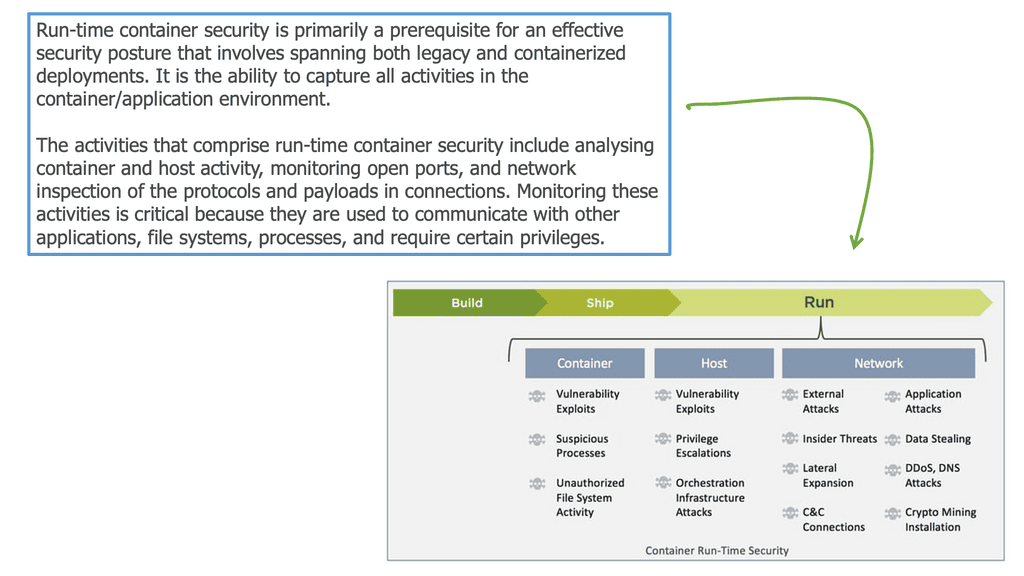
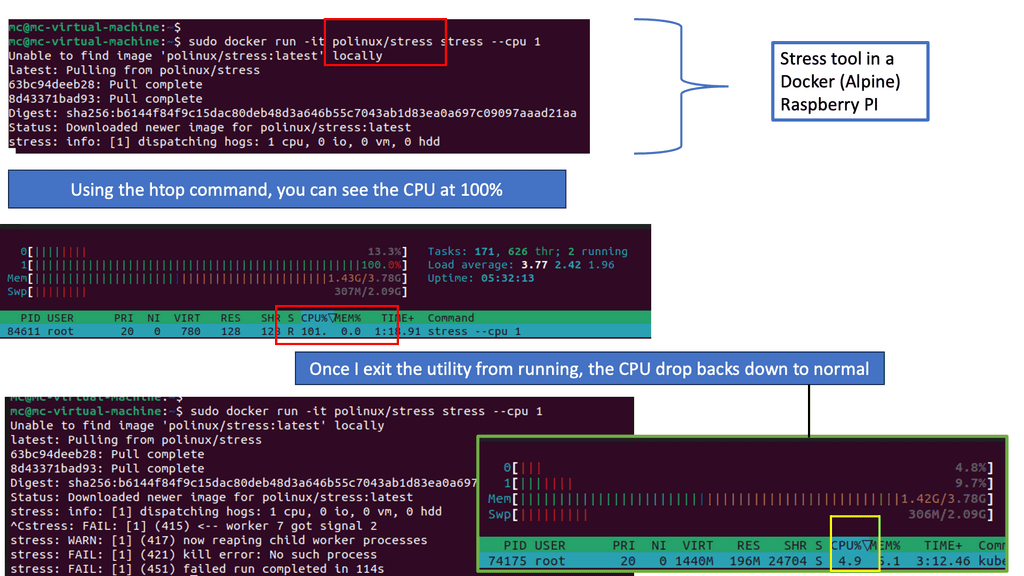
Runtime threat detection — Detect privilege escalation, crypto‑mining, and anomalous behavior.
OpenShift’s SELinux integration is one of its strongest security advantages.
4. Network Security
OpenShift SDN / OVN‑Kubernetes — Use NetworkPolicies to restrict pod‑to‑pod communication.
Ingress security — Enforce TLS, WAF, and rate limiting.
Egress control — Restrict outbound traffic to approved destinations.
Service Mesh — mTLS, identity‑aware routing, and policy enforcement.
Network segmentation is critical for multi‑tenant clusters.
5. Observability & Compliance
Audit logging — Track API calls, user actions, and cluster changes.
Metrics & traces — Use Prometheus, Grafana, and Jaeger.
Compliance Operator — Enforce CIS benchmarks and regulatory standards.
Cluster health monitoring — Detect drift, misconfigurations, and anomalies.
Observability is essential for detecting early signs of compromise.
6. CI/CD Pipeline Security
Secure build pipelines — Scan code, dependencies, and images.
Image signing — Use sigstore/cosign for trusted supply chain.
Admission controllers — Block deployments that violate security policies.
GitOps security — Protect ArgoCD/Flux credentials and enforce RBAC.
Supply chain security is now a mandatory requirement.
7. Node & OS Security
RHCOS hardening — Immutable OS reduces attack surface.
Node updates — Apply patches automatically using MachineConfig.
Kernel security — Use seccomp, SELinux, and cgroups.
Disable unnecessary services — Reduce exposure.
Nodes are the foundation — securing them protects the entire cluster.
Outcome
Implementing OpenShift security best practices delivers:
hardened cluster and control plane
secure workloads and containers
strong identity enforcement
Zero Trust network segmentation
protected CI/CD pipelines
continuous compliance
runtime threat detection
reliable, production‑grade security posture
OpenShift becomes a secure, resilient, enterprise‑ready Kubernetes platform.
Understanding Cluster Access
To begin our journey, let’s establish a solid understanding of cluster access. Cluster access refers to authenticating and authorizing users or entities to interact with an Openshift cluster. It involves managing user identities, permissions, and secure communication channels.
- Implementing Multi-Factor Authentication (MFA)
Multi-factor authentication (MFA) requires users to provide multiple forms of identification, adding an extra layer of security. Enabling MFA within your Openshift cluster can significantly reduce the risk of unauthorized access. This section will outline the steps to configure and enforce MFA for enhanced cluster access security.
- Role-Based Access Control (RBAC)
RBAC is a crucial component of Openshift security, allowing administrators to define and manage user permissions at a granular level. We will explore the concept of RBAC and its practical implementation within an Openshift cluster. Discover how to define roles, assign permissions, and effectively control access to various resources.
- Secure Communication Channels
Establishing secure communication channels is vital to protect data transmitted between cluster components. In this section, we will discuss the utilization of Transport Layer Security (TLS) certificates to encrypt communication and prevent eavesdropping or tampering. Learn how to generate and manage TLS certificates within your Openshift environment.
- Continuous Monitoring and Auditing
Maintaining a robust security posture involves constantly monitoring and auditing cluster access activities. Through integrating monitoring tools and auditing mechanisms, administrators can detect and respond to potential security breaches promptly. Uncover the best practices for implementing a comprehensive monitoring and auditing strategy within your Openshift cluster.
- Threat modelling
A threat model maps out the likelihood and impact of potential threats to your system. Your security team is busy evaluating the risks to your platform, so it is essential to think about and evaluate them.
OpenShift clusters are no different, so when hardening your cluster, keep that in mind. Using the Kubeadmin user is probably fine if you use CodeReadContainers on your laptop to learn OpenShift. Access control and RBAC rules are probably a good idea for your company’s production clusters exposed to the internet.
If you model threats beforehand, you can explain what you did to protect your infrastructure and why you may not have taken specific other actions.
**Stricter Security than Kubernetes**
OpenShift has stricter security policies than Kubernetes. For instance, running a container as root is forbidden. To enhance security, it also offers a secure-by-default option. Kubernetes doesn’t have built-in authentication or authorization capabilities, so developers must manually create bearer tokens and other authentication procedures.
OpenShift provides a range of security features, including role-based access control (RBAC), image scanning, and container isolation, that help ensure the safety of containerized applications.
SCC & Pod Security Investigation
Investigate a workload requesting excessive privileges. Identify which security controls increase the attack surface and decide whether the workload should be admitted.
“The application needs elevated privileges.”
A development team has submitted a production deployment. They claim the application requires broad host access, but the security team suspects several requests are unnecessary. Review the workload configuration before allowing it to run.
Workload security context
privileged: true
allowPrivilegeEscalation: true
runAsUser: 0
readOnlyRootFilesystem: false
capabilities:
add: ["SYS_ADMIN"]
hostNetwork: true
hostPID: true
Investigation decision
OpenShift Security Best Practices
Securing containerized environments
Securing containerized environments is considerably different from securing the traditional monolithic application because of the inherent nature of the microservices architecture. We went from one to many, and there is a clear difference in attack surface and entry points. So, there is much to consider for OpenShift network security and OpenShift security best practices, including many Docker security options.
The application stack previously had very few components, maybe just a cache, web server, and database separated and protected by a context firewall. The most common network service allows a source to reach an application, and the sole purpose of the network is to provide endpoint reachability.
As a result, the monolithic application has few entry points, such as ports 80 and 443. Not every monolithic component is exposed to external access and must accept requests directly, so we designed our networks around these facts. The following diagram provides information on the threats you must consider for container security.
Container Security Best Practices
1. Secure Authentication and Authorization: One of the fundamental aspects of OpenShift security is ensuring that only authorized users have access to the platform. Implementing robust authentication mechanisms, such as multifactor authentication (MFA) or integrating with existing identity management systems, is crucial to prevent unauthorized access. Additionally, defining fine-grained access controls and role-based access control (RBAC) policies will help enforce the principle of least privilege.
2. Container Image Security: OpenShift leverages containerization technology, which brings its security considerations. It is essential to use trusted container images from reputable sources and regularly update them to include the latest security patches. Implementing image scanning tools to detect vulnerabilities and malware within container images is also recommended. Furthermore, restricting privileged containers and enforcing resource limits will help mitigate potential security risks.
3. Network Security: OpenShift supports network isolation through software-defined networking (SDN). It is crucial to configure network policies to restrict communication between different components and namespaces, thus preventing lateral movement and unauthorized access. Implementing secure communication protocols, such as Transport Layer Security (TLS), between services and enforcing encryption for data in transit will further enhance network security.
4. Monitoring and Logging: A robust monitoring and logging strategy is essential for promptly detecting and responding to security incidents. OpenShift provides built-in monitoring capabilities, such as Prometheus and Grafana, which can be leveraged to monitor system health, resource usage, and potential security threats. Additionally, enabling centralized logging and auditing of OpenShift components will help identify and investigate security events.
5. Regular Vulnerability Assessments and Penetration Testing: To ensure the ongoing security of your OpenShift environment, it is crucial to conduct regular vulnerability assessments and penetration testing. These activities will help identify any weaknesses or vulnerabilities within the platform and its associated applications. Addressing these vulnerabilities promptly will minimize the risk of potential attacks and data breaches.
**OpenShift Security**
OpenShift delivers all the tools you need to run software on top of it with SRE paradigms, from a monitoring platform to an integrated CI/CD system that you can use to monitor and run both the software deployed to the OpenShift cluster and the cluster itself. So, the cluster and the workload that runs in it need to be secured.
From a security standpoint, OpenShift provides robust encryption controls to protect sensitive data, including platform secrets and application configuration data. In addition, OpenShift optionally utilizes FIPS 140-2 Level 1 compliant encryption modules to meet security standards for U.S. federal departments.
This post highlights OpenShift security and provides security best practices and considerations when planning and operating your OpenShift cluster. These will give you a starting point. However, as clusters and bad actors are ever-evolving, it is important to revise the steps you took.
**Central security architecture**
Therefore, we often see security enforcement in a fixed central place in the network infrastructure. This could be, for example, a significant security stack consisting of several security appliances. We are often referred to as a kludge of devices. As a result, the individual components within the application need not worry about carrying out any security checks as they occur centrally for them.
On the other hand, with the common microservices architecture, those internal components are specifically designed to operate independently and accept requests alone, which brings considerable benefits to scaling and deploying pipelines.
However, each component may now have entry points and accept external connections. Therefore, they need to be concerned with security individually and not rely on a central security stack to do this for them.
**The different container attack vectors**
These changes have considerable consequences for security and how you approach your OpenShift security best practices. The security principles still apply, and we still are concerned with reducing the blast radius, least privileges, etc. Still, they must be used from a different perspective and to multiple new components in a layered approach. Security is never done in isolation.
So, as the number of entry points to the system increases, the attack surface broadens, leading us to several docker container security attack vectors not seen with the monolithic. We have, for example, attacks on the Host, images, supply chain, and container runtime. There is also a considerable increase in the rate of change for these types of environments; an old joke says that a secure application is an application stack with no changes.
Open The Door To Bad Actors
So when you change, you can open the door to a bad actor. Today’s application varies considerably a few times daily for an agile stack. We have unit and security tests and other safety tests that can reduce mistakes, but no matter how much preparation you do, there is a chance of a breach whenever there is a change.
So, environmental changes affect security and some alarming technical challenges to how containers run as default, such as running as root by default and with a disturbing amount of capabilities and privileges. The following image displays attack vectors that are linked explicitly to containers.
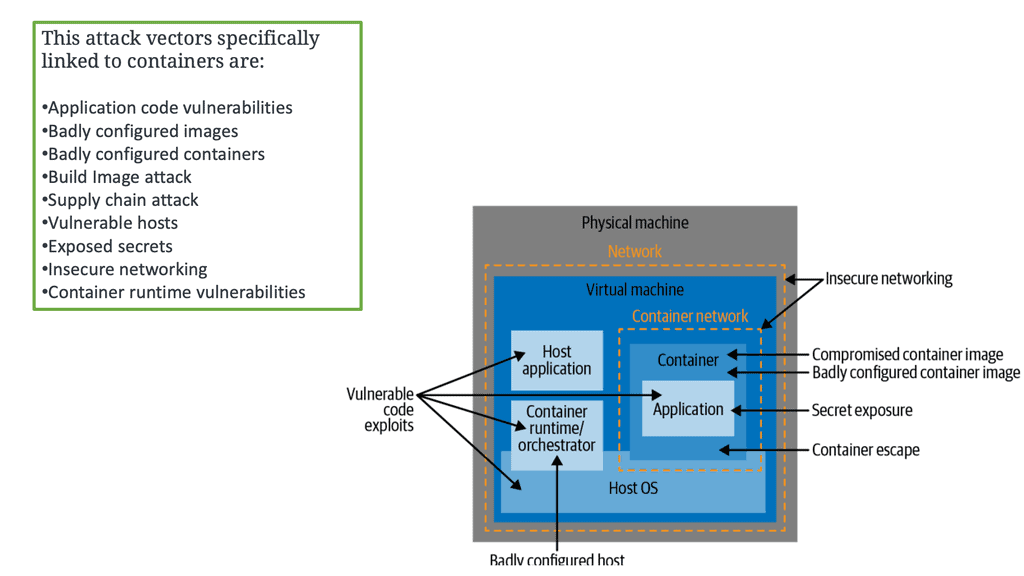
Challenges with Securing Containers
Containers running as root
As you know, containers run as root by default and share the Kernel of the Host OS. The container process is visible from the Host, which is a considerable security risk when a container compromise occurs. When a security vulnerability in the container runtime arose, and a container escape was performed, as the application ran as root, it could become root on the underlying Host.
Therefore, if a bad actor gets access to the Host and has the correct privileges, it can compromise all the hosts’ containers.
Risky Configuration
Containers often run with excessive privileges and capabilities—much more than they need to do their job efficiently. As a result, we need to consider what privileges the container has and whether it runs with any unnecessary capabilities it does not need.
Some of a container’s capabilities may be defaults that fall under risky configurations and should be avoided. You should keep an eye on the CAP_SYS_ADMIN flag, which grants access to an extensive range of privileged activities.
Excessive container isolation
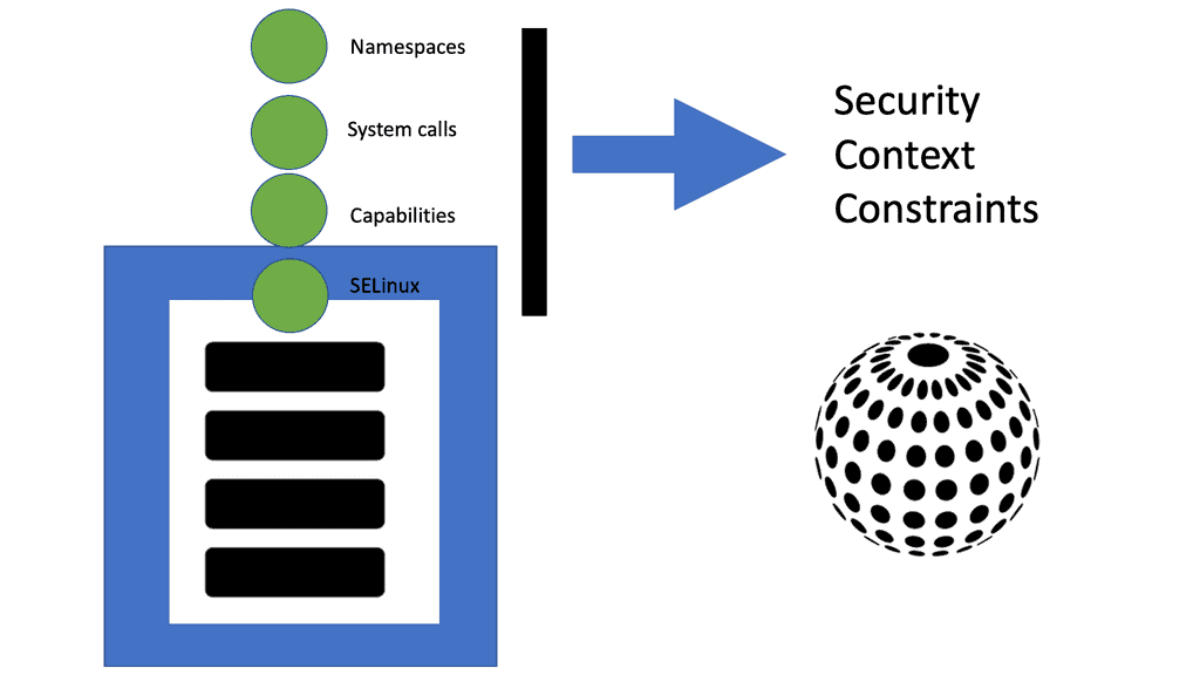
The container has isolation boundaries by default with namespace and control groups ( when configured correctly). However, granting excessive container capabilities will weaken the isolation between the container, this Host, and other containers on the same Host. This is essentially removing or dissolving the container’s ring-fence capabilities.
Starting OpenShift Security Best Practices
Then, we have security with OpenShift, which overcomes many of the default security risks you have with running containers. And OpenShift does much of this out of the box. If you want further information on securing an OpenShift cluster, kindly check out my course for Pluralsight on OpenShift Security and OpenShift Network Security.
OpenShift Container Platform (formerly known as OpenShift Enterprise) or OCP is Red Hat’s offering for the on-premises private platform (PaaS). OpenShift is based on the Origin open-source project and is a Kubernetes distribution.
The foundation of the OpenShift Container Platform and OpenShift Network Security is based on Kubernetes and, therefore, shares some of the same networking technology and some enhancements. However, as you know, Kubernetes is a complex beast and can be utilized by itself when trying to secure clusters. OpenShift does an excellent job of wrapping Kubernetes in a layer of security, such as using Security Context Constraints (SCCs) that give your cluster a good security base.
**Security Context Constraints**
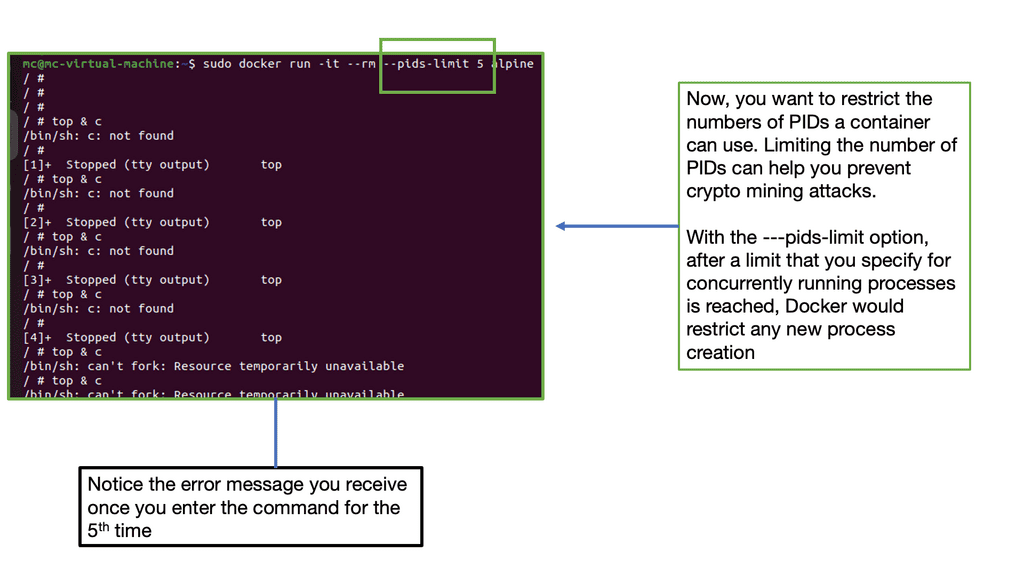
By default, OpenShift prevents the cluster container from accessing protected functions. These functions—Linux features such as shared file systems, root access, and some core capabilities such as the KILL command—can affect other containers running in the same Linux kernel, so the cluster limits access.
Most cloud-native applications work fine with these limitations, but some (especially stateful workloads) need greater access. Applications that require these functions can still use them but need the cluster’s permission.
The application’s security context specifies the permissions that the application needs, while the cluster’s security context constraints specify the permissions that the cluster allows. An SC with an SCC enables an application to request access while limiting the access that the cluster will grant.
What are security contexts and security context constraints?
A pod configures a container’s access with permissions requested in the pod’s security context and approved by the cluster’s security context constraints:
-A security context (SC), defined in a pod, enables a deployer to specify a container’s permissions to access protected functions. When the pod creates the container, it configures it to allow these permissions and block all others. The cluster will only deploy the pod if the permissions it requests are permitted by a corresponding SCC.
-A security context constraint (SCC), defined in a cluster, enables an administrator to control pod permissions, which manage containers’ access to protected Linux functions. Similarly to how role-based access control (RBAC) manages users’ access to a cluster’s resources, an SCC manages pods’ access to Linux functions.
By default, a pod is assigned an SCC named restricted that blocks access to protected functions in OpenShift v4.10 or earlier. Instead, in OpenShift v4.11 and later, the restricted-v2 SCC is used by default. For an application to access protected functions, the cluster must make an SCC that allows it to be available to the pod.
SCC grants access to protection functions
While an SCC grants access to protected functions, each pod needing access must request it. To request access to the functions its application needs, a pod specifies those permissions in the security context field of the pod manifest. The manifest also specifies the service account that should be able to grant this access.
When the manifest is deployed, the cluster associates the pod with the service account associated with the SCC. For the cluster to deploy the pod, the SCC must grant the permissions that the pod requests.
One way to envision this relationship is to think of the SCC as a lock that protects Linux functions, while the manifest is the key. The pod is allowed to deploy only if the key fits.
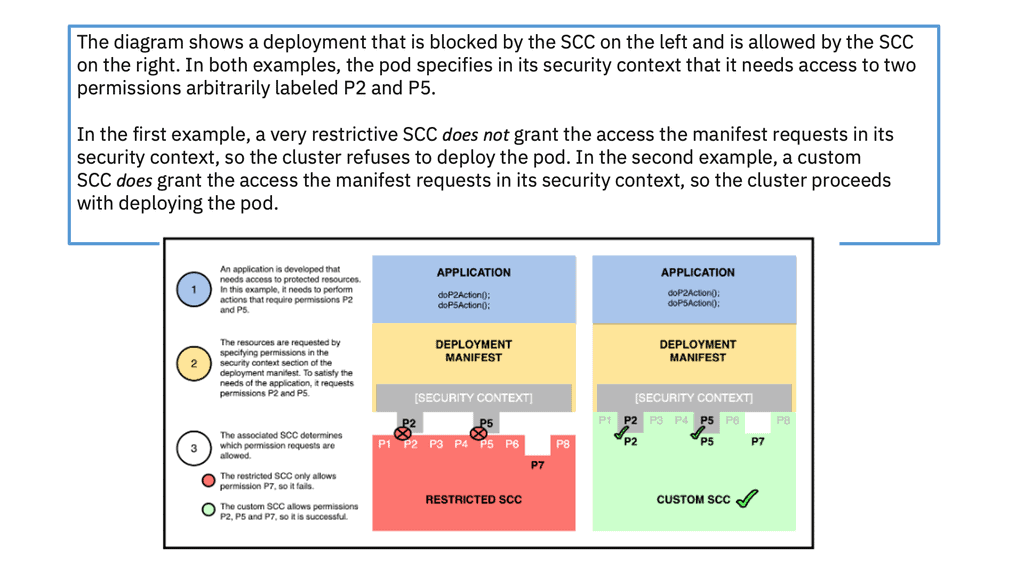
A final note: Security context constraint
When your application is deployed to OpenShift in a virtual data center design, the default security model will enforce that it is run using an assigned Unix user ID unique to the project for which you are deploying it. Now, we can prevent images from being run as the Unix root user. When hosting an application using OpenShift, the user ID that a container runs as will be assigned based on which project it is running in.
Containers cannot run as the root user by default—a big win for security. SCC also allows you to set different restrictions and security configurations for PODs.
So, instead of allowing your image to run as the root, which is a considerable security risk, you should run as an arbitrary user by specifying an unprivileged USER, setting the appropriate permissions on files and directories, and configuring your application to listen on unprivileged ports.
OpenShift Network Security
SCC defaults access:
Security context constraints let you drop privileges by default, which is essential and still the best practice. Red Hat OpenShift security context constraints (SCCs) ensure that no privileged containers run on OpenShift worker nodes by default—another big win for security. Access to the host network and host process IDs are denied by default. Users with the required permissions can adjust the default SCC policies to be more permissive.
So, when considering SCC, consider SCC admission controllers as restricting POD access, similar to how RBAC restricts user access. To control the behavior of pods, we have security context constraints (SCCs). These cluster-level resources define what resources pods can access and provide additional control.
Security context constraints let you drop privileges by default, which is a critical best practice. With Red Hat OpenShift SCCs, no privileged containers run on OpenShift worker nodes. Access to the host network and host process IDs is denied by default, a big win for OpenShift security.
Restricted security context constraints (SCCs):
A few SCCs are available by default, and you may have the head of the restricted SCC. By default, all pods, except those for builds and deployments, use a default service account assigned by the restricted SCC, which doesn’t allow privileged containers – that is, those running under the root user and listening on privileged ports are ports under <1024. SCC can be used to manage the following:
- Privilege Mode: This setting allows or denies a container from running in privilege mode. As you know, privilege mode bypasses any restriction such as control groups, Linux capabilities, secure computing profiles,
- Privilege Escalation: This setting enables or disables privilege escalation inside the container ( all privilege escalation flags)
- Linux Capabilities: This setting allows the addition or removal of specific Linux capabilities
- Seccomp profile – this setting shows which secure computing profiles are used in a pod.
- Root-only file system: this makes the root file system read-only
The goal is to assign the fewest possible capabilities for a pod to function fully. This least-privileged model ensures that pods can’t perform tasks on the system that aren’t related to their application’s proper function. The default value for the privileged option is False; setting the privileged option to True is the same as giving the pod the capabilities of the root user on the system. Although doing so shouldn’t be common practice, privileged pods can be helpful under certain circumstances.
OpenShift Network Security: Authentication
Authentication refers to the process of validating one’s identity. Usually, users aren’t created in OpenShift but are provided by an external entity, such as the LDAP server or GitHub. The only part where OpenShift steps in is authorization—determining roles and permissions for a user.
OpenShift supports integration with various identity management solutions in corporate environments, such as FreeIPA/Identity Management, Active Directory, GitHub, Gitlab, OpenStack Keystone, and OpenID.
OpenShift Network Security: Users and identities
A user is any human actor who can request the OpenShift API to access resources and perform actions. Users are typically created in an external identity provider, usually a corporate identity management solution such as Lightweight Directory Access Protocol (LDAP) or Active Directory.
To support multiple identity providers, OpenShift relies on the concept of identities as a bridge between users and identity providers. A new user and identity are created upon the first login by default. There are four ways to map users to identities:
OpenShift Network Security: Service accounts
Service accounts allow us to control API access without sharing users’ credentials. Pods and other non-human actors use them to perform various actions and are a central vehicle by which their access to resources is managed. By default, three service accounts are created in each project:
OpenShift Network Security: Authorization and role-based access control
Authorization in OpenShift is built around the following concepts:
Rules: Sets of actions allowed to be performed on specific resources.
Roles are collections of rules that allow them to be applied to a user according to a specific user profile. They can be used either at the cluster or project level.
Role bindings are associations between users or groups and roles. A given user or group can be associated with multiple roles.
If pre-defined roles aren’t sufficient, you can always create custom roles with just the specific rules you need.

OpenShift Network Segmentation Lab
Build a simple application security boundary using NetworkPolicy. Decide which traffic should be permitted and then test whether the policy limits lateral movement.
Protect the application tiers
Your namespace contains a frontend, an API service and a database. The API needs to reach the database, but the frontend should not connect directly to it. A compromised workload must also be prevented from freely moving across the namespace.
Application topology
port 443
port 8080
port 5432
target: database
allow: api → database:5432
deny: frontend → database
deny: unrelated → database
Assume the frontend pod has been compromised. Can the attacker directly connect to the database service?
Traffic investigation
- Fortinet’s new FortiOS 7.4 enhances SASE - April 5, 2023
- Comcast SD-WAN Expansion to SMBs - April 4, 2023
- Cisco CloudLock - April 4, 2023