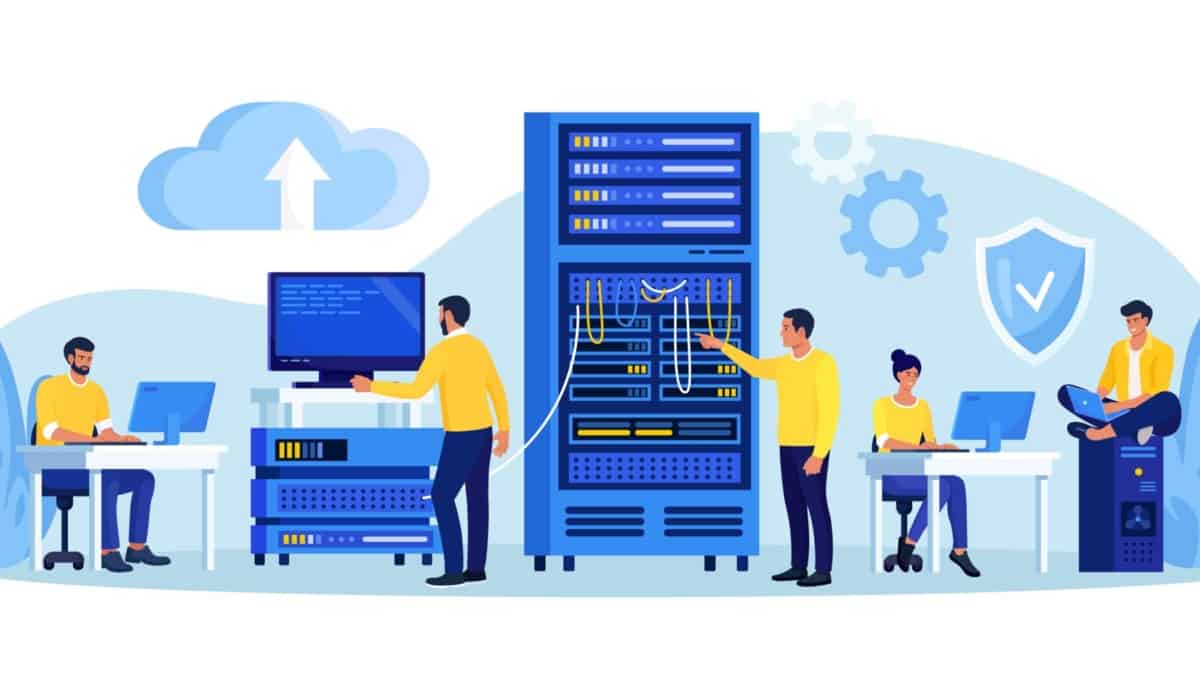
Green data center with eco friendly electricity usage tiny person concept. Database server technology for file storage hosting with ecological and carbon neutral power source vector illustration.

Data Center Design with Active Active design

Network Insight · High Availability Architecture

Active-Active Data Center Design: Building for Continuous Availability

What happens when one data center can no longer serve its workloads? An active-active architecture aims to keep multiple sites operational at the same time, distributing traffic and capacity while preparing services to withstand component, network and site failures.

Modern applications rarely depend on a single network, server or storage system. They operate across interconnected infrastructure, distributed services and, increasingly, multiple locations. Active-active design brings these components together into an architecture where more than one site can actively serve workloads. But operating two sites simultaneously is not simply a matter of duplicating hardware. Routing, application behavior, data consistency, traffic distribution and failure detection must work together.

Data Center A

Primary active site in this illustration

Applications Compute Storage
Serving workloads

Data Center B

Second active site in this illustration

Applications Compute Storage
Serving workloads

01 · Connectivity

Route around failures

Use diverse network paths and appropriate routing policies to preserve reachability when links or devices fail.

02 · Consistency

Keep application state safe

Design replication, quorum and application behavior around the consistency requirements of the service.

03 · Recovery

Prove service continuity

Test site isolation, traffic shifts and recovery behavior instead of assuming that redundancy guarantees availability.

i

The essential distinction: both sites can be active without every application being able to survive every failure. True service resilience depends on the complete design—including data consistency, health detection, routing, capacity and application recovery behavior.

Multi-site networking BGP and DCI Data consistency High availability Failure engineering
Section 01 · Foundations

Understanding Active-Active Data Center Design

Explore how two or more data center sites can serve workloads concurrently, how this differs from active-passive resilience, and why application behaviour, dependency design and failure handling matter as much as network redundancy.

Active vs. passiveAvailabilityFailure domains
Section 01 · Architecture Fundamentals

Understanding Active-Active Data Center Design

Active-active design allows two or more data center sites to serve production workloads concurrently. The objective is to use distributed capacity while maintaining service continuity when a component, network path or site becomes unavailable.

Traditional active-passive designs generally keep one site serving traffic while another is prepared to take over during a failure. In an active-active design, both sites perform useful production work during normal operation. Traffic may be distributed through global load balancing, application-aware routing, anycast services or other mechanisms appropriate to the application and network architecture.

This can improve resource utilisation and provide additional capacity options. It also introduces design questions that cannot be solved by routing alone: where application state lives, how data is replicated, how clients reach healthy services, and what happens when the sites lose contact with one another.

Three principles that shape the design

01

Concurrent workload

Both sites contribute to normal service delivery. Capacity planning must account for traffic distribution and whether surviving infrastructure can absorb additional demand after a failure.

02

Consistent service behaviour

Applications must handle sessions, shared state, data replication and concurrent updates according to their consistency and availability requirements.

03

Designed failure response

Health checks, routing policies, load balancers and application recovery logic must work together to direct clients towards services that can actually respond.

Important distinction: two active sites do not automatically provide application resilience. If both sites depend on the same database, identity service, WAN path or control-plane component, that shared dependency may still become a single point of failure.

Questions to answer before choosing active-active

  • Can the application safely run across multiple sites at the same time?
  • How much data loss, if any, is acceptable following a site failure?
  • What recovery time is required, and how will client traffic move to healthy services?
  • Can one surviving site handle the required workload during a major failure?
  • How will split-brain conditions, network partitions and inconsistent state be detected and handled?
Engineering takeaway

Active-active is an end-to-end service architecture, not simply a pair of interconnected data centers. Reliable outcomes depend on coordinated network design, application behaviour, data consistency, capacity planning and tested recovery procedures.

Interactive Lab 01 · Architecture explorer

What Happens When a Data Center Fails?

Switch the deployment model or simulate a site failure. Observe the illustrative traffic paths, site states and engineering implications. This is a conceptual model, not a live network simulator.

Choose a scenario
Two-site data center architecture Two data center sites connect to a shared user traffic entry point. The selected scenario changes the illustrative traffic paths and site status. Users / Traffic Entry DNS · GSLB · Load balancing Data Center A Data Center B Serving workloads Serving workloads Application stack A ACTIVE Application stack B ACTIVE Inter-site connectivity / replication Both sites serve traffic concurrently
Data Center A
Active · serving traffic
Data Center B
Active · serving traffic
SCENARIO: ACTIVE-ACTIVE

Both sites serve production traffic

Workloads at both sites are available to serve requests. Traffic distribution depends on application placement, routing, load balancing and health checks. Shared dependencies and data consistency still need deliberate design.

Engineering checks

  • Confirm application and data consistency.
  • Verify each site's independent capacity.
  • Test routing and service health during failure.
Illustrative topology · No live devices, routing protocols or production traffic are controlled.
Section 02 · Routing architecture

Multi-Site Network Architecture and BGP

Follow traffic between data centers and external networks. Understand how BGP exchanges reachability, how routing policy and multipath influence path selection, and how engineers avoid asymmetric traffic, route leaks and unexpected failover behaviour.

DCI designBGP policyTraffic engineering
Section 02 · Network Architecture

Multi-Site Network Architecture and BGP

An active-active design needs more than two functioning data centers. It needs predictable routing, resilient inter-site connectivity and a clear policy for how users and applications reach services when paths or entire sites fail.

The network provides the connectivity between data centers, users, applications and external services. In a multi-site architecture, Data Center Interconnect (DCI) links connect the sites, while routing and traffic-management systems determine which paths are available and where traffic should be sent.

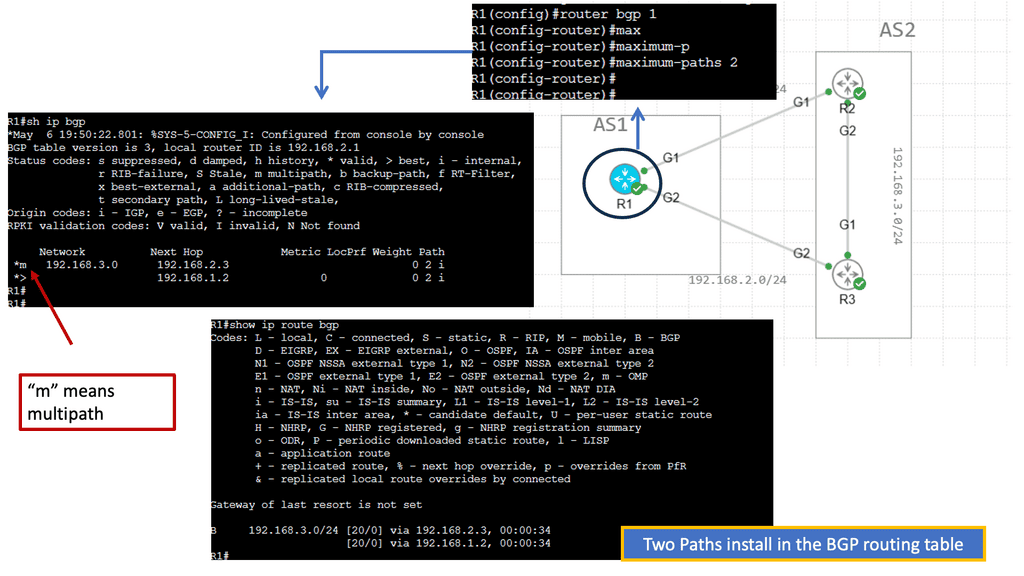
Border Gateway Protocol (BGP) is commonly used to exchange reachability information between sites, WAN networks and external networks. Its policy controls can influence path selection and traffic distribution. However, BGP does not by itself verify that an application is healthy or that its data is consistent.

The three network design layers

Layer 01

Data Center Interconnect

DCI may use routed IP connectivity, an optical transport service or an overlay architecture. Choose bandwidth, latency and path diversity according to application traffic and replication requirements—not simply the number of physical links.

Layer 02

Routing and reachability

BGP can advertise site prefixes and apply routing policy. Multipath forwarding may use multiple eligible routes when supported and correctly configured. Route selection and forwarding behaviour must be validated for the actual platform and topology.

Layer 03

Service traffic steering

DNS-based global load balancing, anycast, application load balancers or other steering mechanisms can direct clients towards available services. Health checks must reflect genuine service readiness, not just network reachability.

BGP: control the path, then validate the outcome

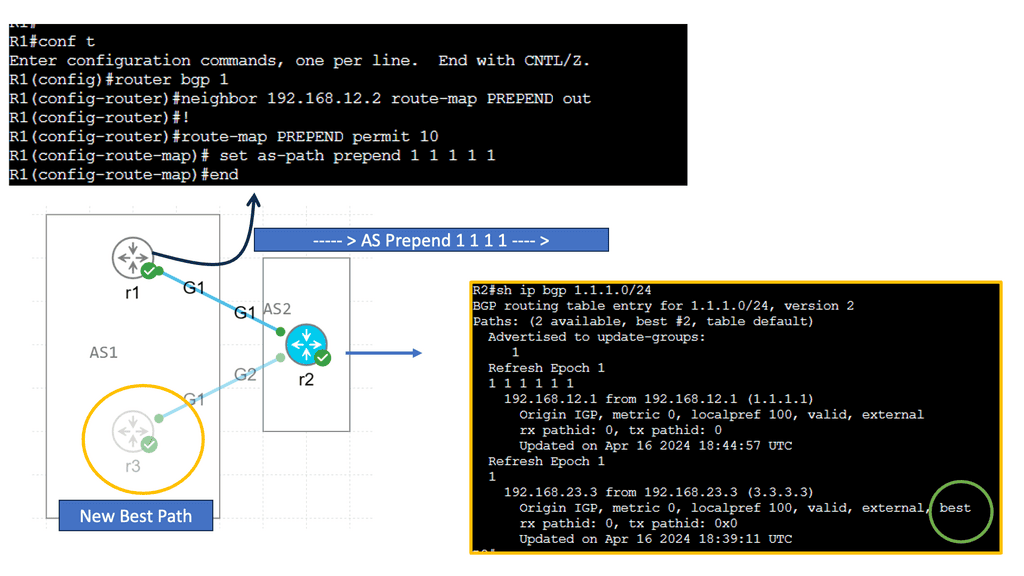
A common design advertises service or site prefixes from more than one location. The routing policy determines which advertisements are accepted and how paths are preferred. Depending on the design, engineers may use attributes such as LOCAL_PREF within an autonomous system, AS_PATH for inter-AS policy, or multipath features to support selected equal-cost paths.

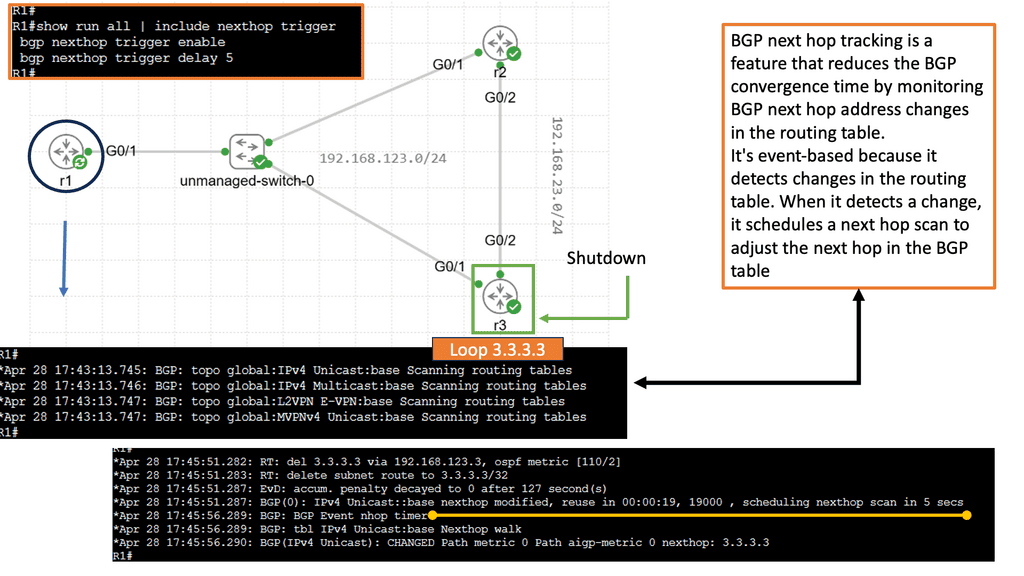
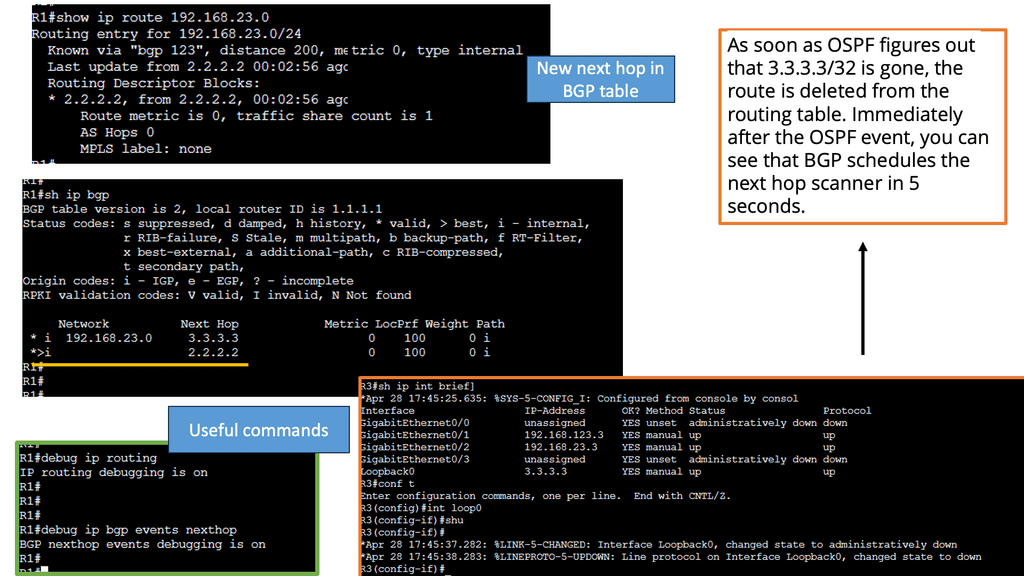
The important distinction is between route availability and service availability. A router may have a valid route to a site whose application is unhealthy. Conversely, an application may be healthy while a routing or traffic-steering policy prevents clients from reaching it. These systems need coordinated health signals and carefully tested failure behaviour.

Design warning — avoid accidental traffic tromboning. If a client reaches a service in one site but the application retrieves data or calls a dependency in the other site, traffic may cross the DCI unnecessarily. This can increase latency, consume inter-site bandwidth and complicate failure handling. Keep traffic local where practical, while preserving the required consistency and availability guarantees.

What should happen during a failure?

  • DCI link failure: traffic should use a surviving path where one exists, with convergence and capacity validated under load.
  • Border router failure: alternate routing paths should remain available without creating a forwarding loop or black hole.
  • Site failure: route withdrawal and service-health mechanisms should steer new traffic away from unavailable services.
  • Application failure: health checks should stop advertising or selecting an endpoint that cannot deliver the required service.
  • Network partition: routing and application policies must avoid unsafe assumptions about the remote site's state or data ownership.

Architecture checks before deployment

  • Identify shared physical and logical failure domains across DCI paths.
  • Document prefix advertisements, routing policy, route filtering and intended path preferences.
  • Check convergence behaviour and whether surviving links can carry the expected load.
  • Validate inbound and outbound traffic steering independently; they may follow different paths.
  • Test application health checks alongside routing changes and site-isolation scenarios.
Engineering takeaway

BGP and DCI establish and control network reachability; they do not guarantee that an application is usable. A resilient active-active design coordinates routing, traffic steering, application health, capacity and data consistency—and verifies the result through controlled failure tests.

Interactive Lab 02 · Multi-site routing

Trace the Route Between Data Centers

Explore how inter-site connectivity, BGP reachability and routing policy influence traffic. Simulate a DCI link failure or route withdrawal, then select a router or network to inspect its role.

Select a routing scenario
Illustrative multi-site BGP routing topology Two data centers with border routers connect through an inter-site link. An external network advertises a prefix. Select a node to inspect its role. SITE A · AS 65001 SITE B · AS 65001 Application A 10.10.10.0/24 Border Router A BGP / route policy Border Router B BGP / route policy Application B Service destination External Network AS 65002 Prefix advertisement DCI · inter-site path eBGP iBGP / local routing iBGP / local routing Illustrative route: 198.51.100.0/24 Conceptual diagram · BGP behaviour depends on topology and policy
Illustrative preferred path Illustrative alternate path Failed or withdrawn path
STATE: NORMAL ROUTING

Reachability is available through the configured paths

The diagram illustrates an available inter-site path and route advertisement. Actual forwarding depends on the installed route, routing policy, next-hop reachability and data-plane health.

Select a network component

Select either border router, an application network or the external AS in the diagram to explore its role in route propagation and traffic forwarding.

DCI statusAvailable
Illustrative routeAdvertised
Engineering focusValidate policy
ItemIllustrative stateWhat to verify
Inter-site pathAvailableIndependent physical paths, capacity and forwarding health.
Route advertisementPresentAccepted prefixes, next hop, policy and route installation.
Service reachabilityCheck requiredEnd-to-end application health, not only control-plane state.
Educational model only · No live BGP sessions or production routes are changed.
Section 03 · Overlays and mobility

Layer 2 Extension, Overlays and Workload Mobility

Compare stretched Layer 2 networks with routed Layer 3 designs, and examine how VXLAN/EVPN overlays can support multi-site connectivity. Consider workload mobility, broadcast scope, failure propagation and the risk of traffic tromboning before extending networks between sites.

VXLAN / EVPNLayer 2 vs. Layer 3Workload mobility
Section 03 · Layer 2 and Overlay Design

Layer 2 Extension, Overlays and Workload Mobility

Workload mobility across data centers can simplify some application migrations and recovery scenarios. The challenge is deciding how much network continuity is actually required—and whether extending a Layer 2 domain is the right way to achieve it.

In a multi-site environment, applications may need to move between sites for maintenance, capacity balancing, disaster recovery or infrastructure changes. Some workloads can move while retaining their IP addresses; others can reconnect through a new endpoint or service address. The application’s requirements should determine the network design, rather than assuming that every workload needs a stretched subnet.

A Layer 2 extension carries an Ethernet broadcast domain across multiple locations. This can preserve subnet membership and support certain migration workflows, but it also extends the domain’s failure and operational characteristics. A Layer 3 design keeps subnets local to each site and uses routing to connect them, often reducing the scope of Layer 2 failure propagation.

Approach A

Stretched Layer 2

The same VLAN or subnet is available across sites, subject to the chosen extension technology and design constraints.

  • Can support address-preserving workload mobility.
  • May carry broadcast and unknown-unicast traffic across the DCI.
  • Requires careful control of loops, failure domains and inter-site latency.
  • Can make partial failures harder to diagnose.
Approach B

Routed Layer 3

Each site uses its own routed subnets, and connectivity between sites is provided through routing and application-level service discovery or traffic steering.

  • Provides clearer Layer 3 failure boundaries.
  • Supports route summarisation and explicit traffic policy.
  • May require application, DNS or load-balancer changes during migration.
  • Often simplifies fault isolation and scaling.

VXLAN and EVPN: separating the overlay from the underlay

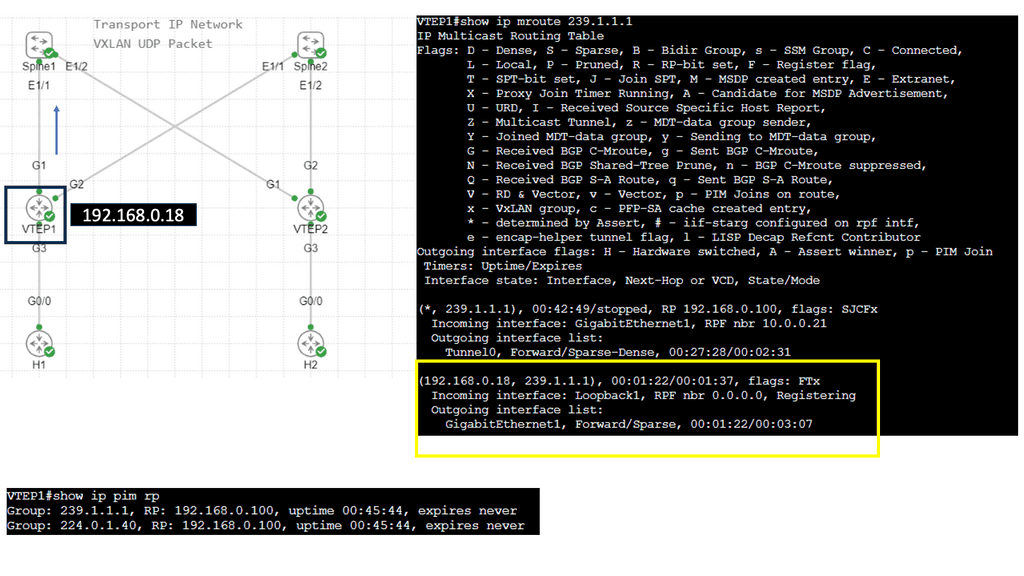
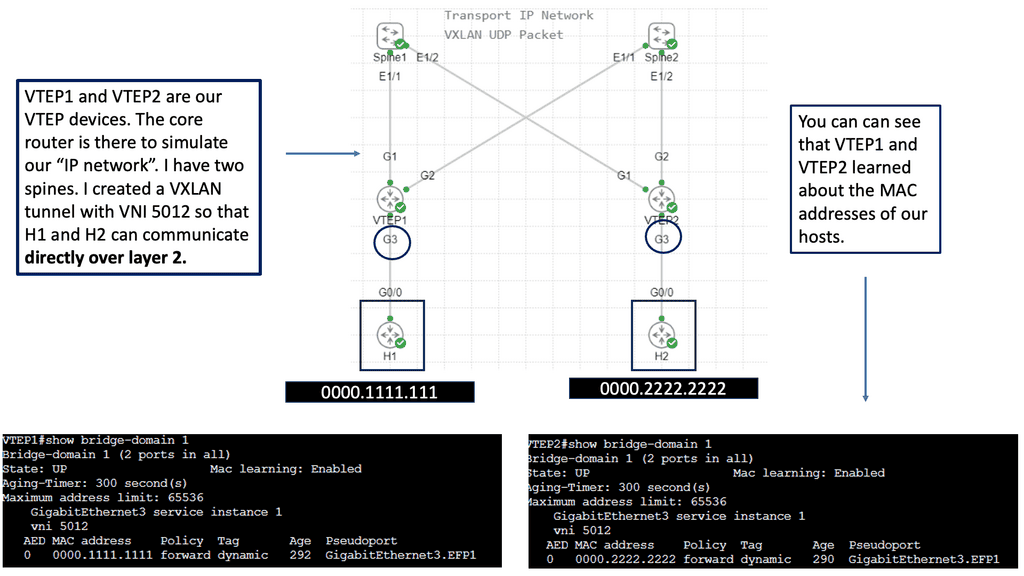
VXLAN (Virtual Extensible LAN) encapsulates Layer 2 frames in UDP packets so that virtual networks can be carried across an IP underlay. VXLAN Tunnel Endpoints (VTEPs) perform encapsulation and decapsulation. EVPN (Ethernet VPN), commonly used as a control plane for VXLAN fabrics, distributes MAC and IP reachability information and supports policy-driven tenant connectivity.

This separation allows an IP-routed fabric to carry multiple logical networks without requiring the physical underlay itself to be one large Layer 2 domain. EVPN can support distributed gateway designs and multi-homing, depending on the implementation. It does not, however, remove the need to design inter-site routing, failure handling and application consistency deliberately.

Where do OTV, FabricPath and LISP fit?

Legacy DCI

OTV

Overlay Transport Virtualization was designed to extend selected Layer 2 connectivity between data centers while limiting some traditional Layer 2 extension risks. Treat it as a platform- and lifecycle-dependent technology, not a universal modern default.

Fabric technology

FabricPath

Cisco FabricPath introduced a Layer 2 fabric approach using a fabric control plane rather than relying on conventional spanning tree for all forwarding decisions. It is mainly relevant when understanding existing or legacy environments.

Identifier / locator

LISP

Locator/ID Separation Protocol separates endpoint identity from routing location. It can support mobility and mapping use cases in appropriate architectures, but it is not interchangeable with VXLAN or EVPN.

Design principle: do not extend Layer 2 simply because an application currently uses a fixed IP address. First check whether the application can tolerate a different subnet, use a stable service endpoint, or reconnect through DNS or a load balancer. A routed design may meet the requirement with a smaller failure domain.

Workload mobility and traffic tromboning

Preserving a workload’s IP address does not guarantee that its traffic path remains optimal. After a workload moves, clients or dependent services may still reach it through a remote site. This can create traffic tromboning: packets travel across the DCI to reach a service and may cross back again to reach another dependency.

The result can be increased latency, unnecessary bandwidth consumption and a more complicated failure path. Mobility planning should therefore include endpoint discovery, routing updates, load-balancer behaviour, dependency locality and the time needed for existing sessions to recover.

Questions to resolve before extending a network

  • Does the workload genuinely require the same subnet at both sites?
  • What are the latency, bandwidth and MTU requirements across the DCI?
  • How are MAC/IP reachability and gateway behaviour handled after a move or failure?
  • Can a Layer 2 loop, broadcast event or control-plane issue affect both sites?
  • Will traffic remain local to the active workload and its dependencies?
  • What happens to established sessions when the workload or site becomes unavailable?
Engineering takeaway

VXLAN and EVPN can provide scalable overlay connectivity, while routed designs can keep site boundaries clearer. Choose Layer 2 extension only when the application and operational requirements justify it, and test mobility, failure isolation and traffic locality before relying on it for resilience.

Interactive design lab · 03

Layer 2 Extension, Overlays and Workload Mobility

Compare three ways to connect data-centre sites. Change the design, simulate an inter-site failure, and examine what happens to addressing, mobility and the fault domain.

1. Choose a connectivity design
2. Test the inter-site connection
Conceptual topology Shared Layer 2 segment
Two-site data-centre connectivity diagram Two data-centre sites with workloads and network gateways connected by an inter-site path. The selected mode changes the path labels and the illustrative failure state. DATA CENTRE A Primary site · example workload DATA CENTRE B Secondary site · example workload Application workload A VLAN 120 · 10.20.120.0/24 Application workload B VLAN 120 · 10.20.120.0/24 Site A gateway Local forwarding Site B gateway Local forwarding L2 extension One broadcast domain Inter-site path operational
✓
Shared segment is available

Both sites use the same example subnet. This can support address continuity, but it also extends Layer 2 dependencies across the sites.

Addressing Same subnet at both sites
Mobility approach Layer 2 continuity
Failure consideration Broadcast and loop control

Engineering trade-off

A stretched VLAN can make subnet continuity easier, but the design must deliberately control loop prevention, broadcast scope, gateway behaviour and inter-site failure handling.

  • Define the Layer 2 extension boundary
  • Test behaviour during link and site failure
  • Validate gateway redundancy and convergence
  • Confirm application recovery requirements
Educational topology only — not a live network simulator. VXLAN is an encapsulation technology; EVPN can provide a BGP-based control plane. Actual mobility, redundancy and failure behaviour depend on the chosen platform, configuration and application design.
Section 04 · Application resilience

Application, Storage and State Consistency

Network redundancy cannot guarantee application availability on its own. Examine stateless and stateful services, session continuity, synchronous and asynchronous replication, quorum, split-brain risk, and the trade-offs between recovery time and potential data loss.

Application stateReplicationRPO / RTO
Section 04 · Application and Data Resilience

Application, Storage and State Consistency

A network can keep routes available while an application remains unable to serve requests. Active-active resilience therefore depends on how application instances, user sessions and persistent data behave across sites—not just on redundant links and routers.

In an active-active environment, application instances in different data centers may process requests concurrently. That arrangement works well only when the application can manage shared state, concurrent operations and failures consistently. A stateless service is often easier to distribute because each request can be handled by any healthy instance, provided its dependencies are also available.

Stateful applications introduce more complexity. They may depend on databases, distributed caches, message queues, session stores or file systems. Each dependency needs an explicit availability and consistency strategy. Replicating the application tier alone does not make the whole service resilient if its database or identity provider remains a single point of failure.

Synchronous versus asynchronous replication

Replication determines how updates made at one site become available at another. The key trade-off is between acknowledgement latency, consistency guarantees and the amount of data that may be lost during a failure. These characteristics vary by platform and configuration; the terms alone do not guarantee a particular recovery outcome.

Replication model A

Synchronous replication

A write is acknowledged only after the configured synchronous durability or commit conditions have been met.

  • Can reduce the recovery point exposure for acknowledged writes.
  • Inter-site latency can affect write response times.
  • A link or site failure may affect write availability, depending on quorum and product design.
  • Requires careful planning for network partitions and failover.
Replication model B

Asynchronous replication

A write can be acknowledged before the remote replica has received or committed the update.

  • Can reduce the impact of remote-site latency on write acknowledgement.
  • Replication lag may leave the remote site temporarily behind.
  • A sudden failure can result in loss of updates not yet replicated.
  • Recovery procedures must account for lag and data reconciliation.

Important: synchronous replication does not automatically mean zero data loss in every failure scenario, and asynchronous replication does not always imply unacceptable loss. The real outcome depends on commit semantics, quorum, durable storage, topology and the failure being considered. Define the required Recovery Point Objective (RPO) and Recovery Time Objective (RTO), then validate them against the actual platform.

Three application-level challenges

Challenge 01

Session continuity

If a client moves between sites, its session may depend on local memory, a shared session store, a signed token or another mechanism. Design for reconnects and retries instead of assuming a transport path change preserves every session.

Challenge 02

Concurrent updates

Two active instances may attempt to modify the same logical record. Transactions, conflict resolution, idempotency and application-specific consistency rules must prevent duplicated or conflicting operations.

Challenge 03

Dependency availability

An application instance may be healthy while its database, authentication service, queue or external API is not. Service health should reflect the dependencies required to complete real user operations.

Quorum, network partitions and split-brain

A network partition can leave two sites running while preventing them from communicating. If both sides independently accept conflicting writes or claim ownership of the same resource, the system may enter a split-brain condition. Restoring connectivity does not necessarily reconcile the resulting state safely.

Distributed systems often use quorum, leases, fencing tokens, leader election or other coordination mechanisms to decide which operations are permitted during a partition. A two-site deployment may need a third failure-independent voting participant or witness, depending on the platform. A witness can help establish a decision, but it does not replace data replication or application-level recovery design.

Network partition is not the same as site failure. If the DCI fails, both sites may still be running and serving local clients. The architecture must decide whether each site can safely continue, whether one side must stop writes, and how service ownership is re-established when communication returns.

Questions to answer before production

  • Can application instances safely process requests concurrently in both sites?
  • Where is session state stored, and what happens when a client is redirected?
  • What RPO and RTO are required for each critical data store?
  • How are quorum, ownership and split-brain conditions handled during a partition?
  • Can the surviving site sustain the required transaction rate and connection load?
  • How will replication lag, failed writes, stale reads and recovery conflicts be detected?
  • Have failover and failback been tested with real application transactions, not just ping tests?
Engineering takeaway

Active-active application resilience requires an explicit strategy for state, replication, coordination and recovery. Network redundancy helps services communicate, but only the combined behaviour of the application, data platform and network determines whether service can continue safely during a failure.

Interactive design lab · 04

Application, Storage and State Consistency

A network can remain connected while an application becomes unsafe or unavailable. Explore replication modes, simulate an inter-site partition, and examine why two active sites need a deliberate write-ownership strategy.

1. Choose a data replication model
2. Choose a scenario
Application and data flow Synchronous data replication
Two-site application and data replication model Two data-centre sites contain application instances and data services. A solid path represents client and application connectivity, while a dashed path represents replication or inter-site coordination. DATA CENTRE A Serving requests · replica A DATA CENTRE B Serving requests · replica B Application instance A Accepting requests Application instance B Accepting requests Data replica A Commit acknowledgement Data replica B Remote copy Commit coordination Remote acknowledgement Inter-site coordination available
✓
Replication is operating normally

In this conceptual synchronous model, a write waits for the configured remote acknowledgement before it is confirmed. Real guarantees depend on the data platform and commit policy.

Write behaviour Waits for required acknowledgement
Data risk Depends on commit and quorum rules
Recovery priority Validate quorum and ownership

Engineering checks

A healthy network path does not prove that a transaction is durable or that both replicas agree. Check the application's consistency contract and the data platform's failure behaviour.

  • Confirm what a successful commit guarantees
  • Define quorum and write ownership
  • Measure replication delay and transaction errors
  • Test failover, fencing and safe recovery
Educational model only — no real transactions or replication occur. The diagram illustrates design trade-offs, not a guarantee that a particular database or storage platform behaves this way. Synchronous replication does not automatically prevent data loss in every failure; asynchronous replication may have a non-zero recovery point.
Section 05 · Operations and recovery

Failure Scenarios, Observability and Recovery

Move beyond theoretical redundancy and test how the architecture behaves under real failure conditions. Trace link loss, BGP changes, application dependency failures, replication lag and site isolation using telemetry, incident procedures and measured recovery objectives.

Failure testingTelemetryFailover and failback
Section 05 · Observability and Recovery

Failure Scenarios, Observability and Recovery

Active-active architecture must be designed around failure, not just normal operation. Reliable recovery depends on detecting what has failed, identifying the affected services, understanding the data state and directing traffic towards capacity that can safely serve it.

Redundant links and duplicated infrastructure reduce some risks, but they do not eliminate failures. A site can remain reachable while its applications are unhealthy; a routing session can remain established while packets are being dropped; and a database replica can be online while lagging behind the active data set. Effective operations require end-to-end observability across network, application and data layers.

Detect

Identify the real failure

Use telemetry and health checks to distinguish a failed link, an unreachable site, a degraded application and an unhealthy data dependency.

Decide

Choose a safe response

Determine whether traffic should move, whether writes can continue, and whether the surviving site has enough capacity to take additional work.

Validate

Prove service recovery

Confirm that users can complete meaningful transactions, not merely that interfaces are up or routing adjacencies have recovered.

Five failure scenarios to test

Inter-data-center link failure

One DCI path fails while both sites remain operational. Check route convergence, alternate-path capacity, packet loss and whether replication or application dependencies are affected.

Validate: path failover · latency · loss · capacity

Border router or routing failure

A border device fails, a route is withdrawn or a policy change directs traffic incorrectly. Verify that alternate routes are usable and that recovery does not create a forwarding loop or black hole.

Validate: BGP state · route changes · forwarding path

Application or dependency failure

Network connectivity remains available, but an application instance, database or identity service cannot complete requests. Check whether health signals remove the affected endpoint from service selection.

Validate: synthetic transactions · dependency health

Replication lag or data inconsistency

The remote data copy falls behind or a replication process stops. Establish whether the secondary site is safe to promote, what data could be missing and how consistency will be verified before normal service resumes.

Validate: replication lag · RPO · recovery procedure

Complete site loss or network partition

A site becomes unavailable, or both sites remain running but lose communication. Confirm the failover decision, capacity at the surviving site, data ownership and safeguards against split-brain.

Validate: site isolation · quorum · service continuity

A practical incident investigation sequence

During an incident, investigate from the observed user impact towards the underlying dependency. Correlating timestamps across routing events, interface counters, application logs and replication metrics helps distinguish the initiating failure from symptoms that appear later.

From alert to verified recovery Operational workflow
1 Scope impact

Identify affected users, services, sites and transactions.

2 Correlate signals

Compare network, application and data telemetry.

3 Apply safe recovery

Follow tested routing, failover and data procedures.

4 Verify service

Test transactions, data integrity and performance.

This is a general investigation pattern. Follow your incident procedures and service-specific recovery runbooks when making production changes.

What should you monitor?

Layer Useful signals What they help reveal
Network Interface errors, packet loss, latency, BGP changes, path utilisation Transport degradation, route changes and capacity pressure
Application Request success rate, latency, error rate, synthetic transactions Whether users can actually complete operations
Data Replication lag, commit failures, consistency checks, storage health Whether the remote site has a safe and sufficiently current data set
Platform CPU, memory, connection pools, queue depth, storage throughput Whether the surviving site can absorb additional workload
Recovery Failover duration, RTO/RPO achievement, recovery test results Whether the design meets its agreed recovery objectives

Do not confuse an infrastructure health check with a service health check. An interface can be up, a BGP session can be established and a server can respond to ping while a real transaction fails. Use application-aware probes and representative synthetic transactions wherever practical.

Failover, failback and recovery objectives

Recovery Time Objective (RTO) defines the target time to restore a service after disruption. Recovery Point Objective (RPO) defines the acceptable data-loss window, expressed as time or an equivalent recovery-point requirement. Different applications and data stores may need different objectives; a single pair of numbers should not automatically be applied to every service.

Failover is only half of the recovery story. Failback—returning service to its intended operating arrangement—can introduce another period of risk. Before returning workloads, confirm data consistency, replication health, routing policy, capacity and the correct ownership of stateful services. Avoid automatic failback if it could trigger repeated site switching or disrupt active sessions.

Operational readiness checklist

  • Document the expected behaviour for link, device, application, data and full-site failures.
  • Ensure alerts identify the affected service and provide enough context for investigation.
  • Test routing convergence and verify actual packet forwarding after route changes.
  • Confirm that the surviving site has enough compute, storage, network and application capacity.
  • Define who can authorise failover, data promotion and failback during an incident.
  • Record measured recovery times and data outcomes during controlled exercises.
  • Review failures and near misses to improve runbooks, monitoring and architecture.
Engineering takeaway

Resilience must be measured through observed service outcomes. Combine network telemetry, application health, data replication metrics and tested recovery procedures to determine whether the active-active architecture can withstand the failures it was designed to handle.

Interactive design lab · 05

Failure Scenarios, Observability and Recovery

Simulate a router failure, an inter-site partition or a complete site outage. Observe the illustrative network state, monitoring signals and recovery checks that matter before declaring an active-active service healthy.

1. Select a failure scenario
Illustrative topology and alternate path All paths operational
Active-active data-centre failure scenario Two data-centre sites connect through border routers and an inter-site link. A separate illustrative alternate path is shown. Select a scenario to change the topology and monitoring indicators. DATA CENTRE A Site healthy DATA CENTRE B Site healthy Application service A Serving requests Application service B Serving requests Border router A BGP established Border router B BGP established Inter-site path Illustrative alternate path
✓
Both sites are operational

The conceptual topology shows active services at both sites. Monitoring should confirm end-to-end transaction success, route health, replication status and available capacity.

Network reachability Primary and inter-site paths available
Application service Both sites serving
Recovery decision Monitor and validate health

Observability panel

Routing adjacencyHealthy
End-to-end transactionsHealthy
Inter-site connectivityHealthy
Replication / coordinationHealthy

Recovery checklist

A green interface or established BGP session is only one signal. Correlate network telemetry with application transactions, data health and the capacity of the surviving site.

  • Confirm the failure and its scope
  • Validate the alternate forwarding path
  • Check application and data integrity
  • Verify recovery objectives are met
Educational simulation only. No live devices, BGP sessions or monitoring systems are contacted. The alternate path is illustrative; real failover depends on topology, routing policy, detection timers, capacity, application dependencies and the platform's recovery behaviour.
Section 06 · Hybrid architecture

Cloud Connectivity and Modern Design Choices

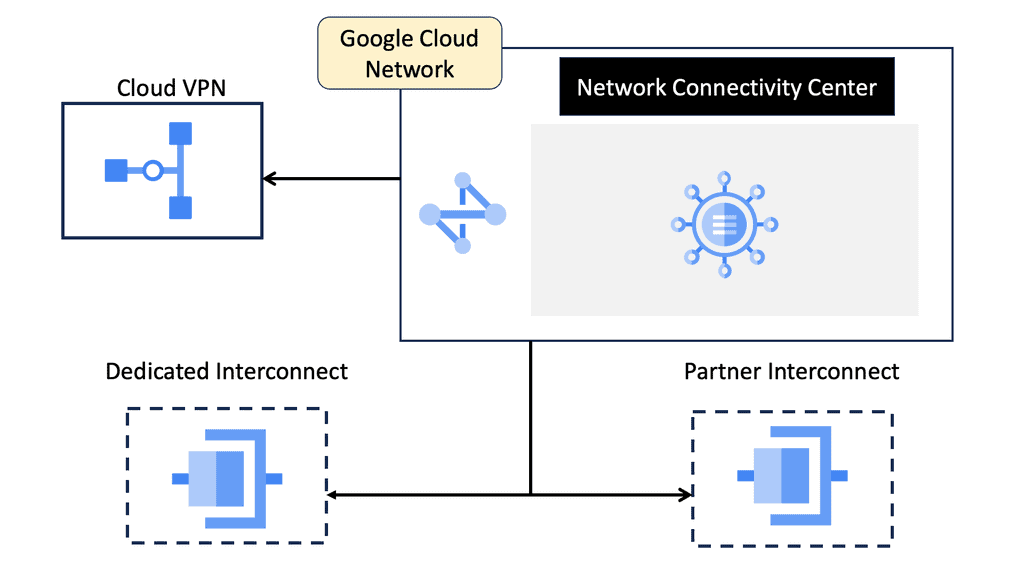
Explore how data centers connect to cloud networks using private connectivity, VPNs, dynamic routing, VPC peering and hub-based services such as Google Cloud Network Connectivity Center. Compare resilience, route control, security, latency and cost without assuming one cloud model fits every deployment.

Hybrid cloudVPC and BGPConnectivity choices
Active-Active Data Center Design · Section 06

Cloud Connectivity and Modern Design Choices

Active-active design does not stop at the data center perimeter. Applications may depend on private cloud services, public cloud workloads, shared identity systems, or data platforms in another environment. The challenge is to connect these resources without creating hidden dependencies, unnecessary latency, or new single points of failure.

1. Separate data center interconnect from hybrid cloud connectivity

A data center interconnect (DCI) connects separate data center sites. Hybrid cloud connectivity connects an enterprise network or data center to cloud networks and services. These designs can overlap, but they solve different problems and should be assessed independently.

For example, two active data centers may exchange application traffic over a dedicated DCI while each site also has its own connection to a cloud provider. Another design may route both sites through a shared cloud connectivity hub. The right choice depends on application placement, traffic patterns, security boundaries, and failure-domain requirements.

Illustrative hybrid connectivity model
Data Center A Active workloads Local routing and security
Data Center B Active workloads Independent failure domain
Enterprise / DCI edge Routing policy and controlled egress
Cloud network VPCs, cloud workloads and services
This is a conceptual view, not a required physical topology. Connectivity can be direct, hub-and-spoke, or provider-mediated. Redundancy must be verified across the complete path, not just at the visible connection.

2. Choose the connectivity model for the workload

Cloud connectivity is not one universal design. Dedicated private links, provider-managed private connectivity, and IPsec VPNs offer different trade-offs in capacity, latency, encryption, deployment time, and cost.

01
Private connectivity

Often suited to predictable, sustained traffic and workloads with demanding bandwidth or latency requirements. Validate provider availability, port and circuit diversity, routing hand-offs, and the actual end-to-end service commitment.

02
Site-to-site VPN

IPsec VPN can provide encrypted connectivity over an IP underlay. High-availability VPN designs use redundant tunnels or endpoints, but the underlying internet paths and provider failure domains still matter.

03
Cloud routing

Cloud routers and BGP sessions can exchange routes dynamically where supported. Define which prefixes are advertised, accepted, preferred, or filtered, and test behaviour when a peer or path fails.

04
Hub-and-spoke connectivity

A cloud transit or connectivity hub can simplify connections between multiple networks. It also becomes an important policy and operational component that needs its own resilience and capacity planning.

3. Understand VPCs, peering and cloud connectivity hubs

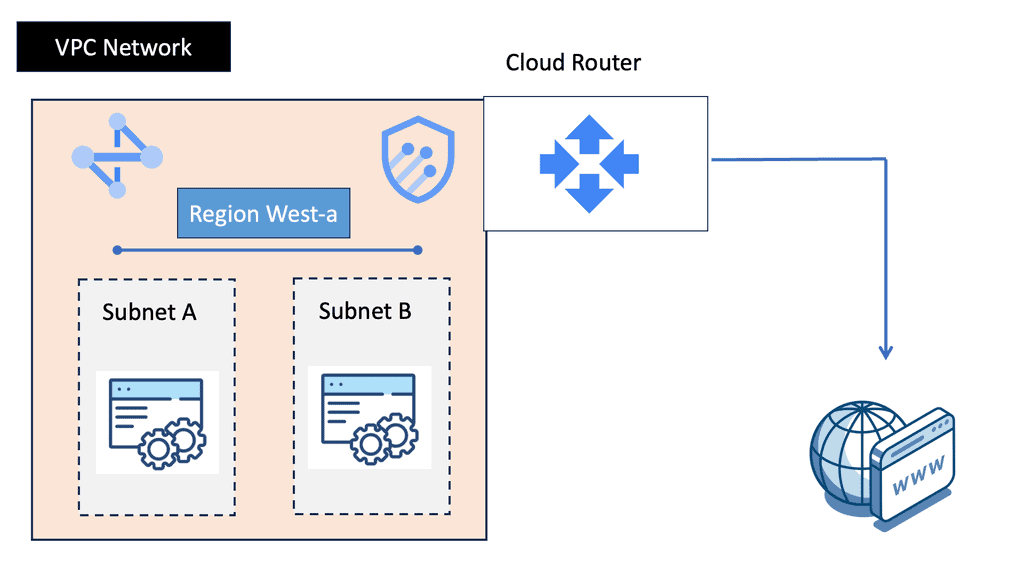
In Google Cloud, a Virtual Private Cloud (VPC) provides a logical network boundary for cloud resources. VPC connectivity, Cloud VPN, Cloud Router, and Network Connectivity Center (NCC) address different parts of hybrid and multi-network design. Other providers have comparable concepts, but their capabilities and terminology differ.

Building block Design role Important consideration
VPC network Provides a logical network environment for cloud resources. Plan address ranges, segmentation, route policy, and access controls.
VPC peering Connects eligible VPC networks through a peering relationship. Do not assume peering provides transitive routing through another VPC.
Cloud VPN Provides IPsec-based connectivity between networks. Plan tunnel redundancy, routing, encryption requirements, and failover testing.
Cloud Router / BGP Supports dynamic route exchange for compatible connectivity services. Validate advertised prefixes, learned routes, route priorities, and withdrawal behaviour.
Network Connectivity Center Provides a hub-based framework for supported network connectivity patterns. Check supported resources, topology constraints, route propagation, and configuration requirements.
Do not confuse connectivity with end-to-end resilience

A cloud hub, a pair of VPN tunnels, or two physical circuits does not automatically make an application highly available. Shared carrier infrastructure, common provider endpoints, route-policy errors, cloud-region dependencies, DNS, identity, and application state can still create a common failure mode.

4. Design the routing and failure behaviour

Once connectivity is established, define what happens when a link, tunnel, router, data center, or cloud attachment becomes unavailable. Routing must support the intended failover behaviour without creating loops, accidental transit, or unintended access between security zones.

Route control

Advertise only required prefixes. Apply explicit import and export policy, avoid overlapping address spaces, and understand how route preference changes during failure.

Path diversity

Check whether redundant connections use independent devices, facilities, carriers, cloud endpoints, and regions where the availability objective requires it.

Security boundaries

Apply segmentation, firewall policy, identity controls, and inspection requirements to both primary and failover paths. A backup route should not bypass required controls.

Application dependencies

Validate DNS, authentication, secrets, databases, monitoring, and other shared services. Network reachability alone does not prove that the service can operate.

5. Compare the design options before committing

Select connectivity according to measured workload requirements and operational constraints—not simply because a particular product or topology is available.

Design question What to evaluate
Traffic profile Peak and sustained throughput, burst behaviour, packet size, and growth expectations.
Performance Latency, jitter, packet loss, regional distance, and application sensitivity.
Availability Independent paths, redundant endpoints, provider failure domains, and tested recovery behaviour.
Routing Address planning, BGP policy, route propagation, failover timing, and prevention of unintended transit.
Security Encryption, segmentation, inspection, identity, and compliance requirements.
Operations and cost Provisioning lead time, monitoring, support ownership, data transfer charges, and ongoing operational effort.

6. Validate the architecture with failure tests

Test the complete application path, including the network and the dependencies it uses. Record what users experience, how quickly the system detects a failure, which routes change, and whether recovery occurs within the required objective.

  • Disconnect one connectivity path and verify traffic moves as designed.
  • Withdraw a route and confirm that only intended prefixes change reachability.
  • Test a cloud attachment or VPN endpoint failure where the environment permits.
  • Verify that security policy remains enforced on the alternate path.
  • Measure application recovery, not just routing convergence.
  • Document ownership, alerts, escalation, and restoration procedures.
Engineering takeaway

Active-active data center design and hybrid cloud connectivity should be designed together where workloads depend on both—but they are not the same problem. Choose private connectivity, VPN, peering, or a hub-based model according to workload needs, then validate route policy, failure-domain independence, security, and application recovery end to end.

Design note: cloud networking products and capabilities change over time. Confirm current provider documentation, regional availability, quotas, and supported topology before implementation.
Interactive design explorer · Section 6

Cloud Connectivity and Modern Design Choices

Choose a connectivity pattern to explore how an on-premises network can connect to cloud networks. Compare the conceptual architecture, routing considerations and security decisions before selecting a design for a real environment.

01 / Select a connectivity pattern
02 / Architecture view Encrypted tunnel
Site-to-site VPN cloud connectivity An on-premises network connects through a VPN gateway to a cloud network. The tunnel is conceptual; actual routing and redundancy depend on configuration. ON-PREMISES Enterprise network Core router BGP / static Workloads Private LAN CLOUD Virtual network Gateway VPN endpoint Cloud apps Private subnets IPsec VPN tunnel Routes configured at both ends Tunnel redundancy depends on deployment

Conceptual diagram, not a provider-specific reference architecture. Redundant tunnels, gateways and route exchange must be designed and tested explicitly.

03 / Design assessment

Site-to-site VPN

Build an encrypted connection between the enterprise network and the cloud provider's VPN endpoint. The internet may carry the tunnel traffic, while routing controls which prefixes can traverse it.

Connection model Encrypted tunnel
Routing focus Prefixes and failover
Security focus IKE / IPsec policy
Resilience focus Multiple tunnels
Engineering checks
  • Confirm tunnel encryption, authentication and key-management requirements.
  • Validate route advertisements, allowed prefixes and return-path symmetry.
  • Test failure detection, alternate paths, throughput and maximum packet size.
Watch-outs
  • A tunnel being established does not prove application reachability.
  • One tunnel or gateway can remain a single point of failure.

High availability is an end-to-end property

Consider independent circuits, gateways, cloud regions or zones where supported, route convergence, capacity under failure, and the application's own dependency model. Two connections that share the same failure domain may not provide meaningful redundancy.

Routing and security are separate decisions

Route exchange determines reachability; firewall policy, segmentation, identity and encryption determine what is permitted and protected. Validate both directions and test the application path rather than relying on a successful routing adjacency alone.

Network Insight · Article Summary

Active-Active Data Center Design: Key Takeaways

A practical recap of the architecture, routing, application dependencies, failure planning and cloud connectivity decisions behind a resilient multi-site data center.

Active-active data center design aims to use multiple sites to serve workloads concurrently while maintaining service continuity when links, network devices, applications or entire sites fail. Achieving this requires more than duplicating infrastructure: routing, application state, data consistency, security and recovery procedures must work together.

01

Architecture and workload placement

Define which services operate at each site, how traffic is distributed, and what happens when one location becomes unavailable. Active-active is a service and workload design decision, not simply a topology with two data centers.

02

Multi-site routing and BGP

Use explicit routing policy, controlled prefix advertisement and deliberate path selection. Validate convergence, asymmetric paths, route withdrawal and the capacity of the surviving site under failure conditions.

03

Layer 2 extension and overlays

Choose between routed inter-site connectivity, selective Layer 2 extension and overlay-based approaches according to workload requirements. Avoid extending broadcast domains across sites without a clear operational and failure-containment justification.

04

Application and data consistency

Understand replication lag, transaction behaviour, quorum, write ownership and recovery objectives. Network reachability alone cannot guarantee consistent data or prevent conflicting writes during a partition.

05

Failure detection and recovery

Monitor routing and infrastructure alongside application transactions, replication health and user-visible service availability. Test realistic failures and document safe failover, failback and recovery procedures.

06

Cloud connectivity and modern choices

Select VPN, private connectivity, network peering or hub-based connectivity based on reachability, routing, security and resilience requirements. Confirm provider-specific route propagation and service limitations before implementation.

Six engineering principles to carry into your design

  • Design around service availability, not device availability alone.
  • Ensure the surviving site has sufficient capacity for its intended failure role.
  • Keep routing policy, application behaviour and data consistency aligned.
  • Use Layer 2 extension only where the workload genuinely requires it.
  • Measure end-to-end service health, not just link and routing status.
  • Prove failover and recovery through repeatable tests and documented outcomes.

Final perspective: resilience must be engineered and tested

The strongest active-active designs make failure behaviour explicit. They define how traffic moves, how stateful applications continue safely, how data is protected, and how operators recognise and resolve degraded service. They also account for partial failures, where a site remains reachable but can no longer safely perform its intended role.

No single technology guarantees resilience. BGP, overlays, replication, cloud connectivity and redundant infrastructure are building blocks whose effectiveness depends on the requirements, implementation and operational testing around them.

The central takeaway

Build for the failure you need to survive, define the service outcome you must preserve, and test that outcome before relying on the architecture in production.
Network Insight · Data Center Architecture · Routing · High Availability · Cloud Networking
```
☕
Support Network Insight
Help support independent engineering guides, interactive networking tools, and future learning labs.
Support Network Insight ```

Data Center Network Design

Data Center Network Design

Data centers are crucial in today’s digital landscape, serving as the backbone of numerous businesses and organizations. A well-designed data center network ensures optimal performance, scalability, and reliability. This blog post will explore the critical aspects of data center network design and its significance in modern IT infrastructure.

Data center network design involves the architectural planning and implementation of networking infrastructure within a data center environment. It encompasses various components such as switches, routers, cables, and protocols. A well-designed network ensures seamless communication, high availability, and efficient data flow.

The traditional three-tier network architecture is being replaced by more streamlined and flexible designs. Two popular approaches gaining traction are the spine-leaf architecture and the fabric-based architecture. The spine-leaf design offers low latency, high bandwidth, and improved scalability, making it ideal for large-scale data centers. On the other hand, fabric-based architectures provide a unified and simplified network fabric, enabling efficient management and enhanced performance.

Network virtualization, powered by technologies like SDN, is transforming data center network design. By decoupling the network control plane from the underlying hardware, SDN enables centralized network management, automation, and programmability. This results in improved agility, better resource allocation, and faster deployment of applications and services.

With the rising number of cyber threats, ensuring robust security and resilience has become paramount. Data center network design should incorporate advanced security measures such as firewalls, intrusion detection systems, and encryption protocols. Additionally, implementing redundant links, load balancing, and disaster recovery mechanisms enhances network resilience and minimizes downtime.

Highlights: Data Center Network Design

Data Center Network Design

To embark on a successful network design journey, it is essential first to understand the data center’s specific requirements. Factors such as scalability, bandwidth, latency, and reliability need to be carefully assessed. By comprehending the data center’s unique needs, network architects can lay a solid foundation for an optimized design.

Efficiency and resilience are at the core of any well-designed data center network. Building on the requirements identified in the previous section, architects must consider redundancy, load balancing, and fault tolerance principles. The design should minimize single points of failure while maximizing resource utilization and network performance.

Various network topologies and architectures can be employed in data center network design. Each option offers unique advantages and trade-offs, from traditional hierarchical designs to modern approaches like leaf-spine architectures. This section will explore different topologies, highlighting their strengths and considerations.

Virtualization and SDN have revolutionized data center network design, offering increased flexibility and agility. By abstracting network functions from physical infrastructure, virtualization allows for dynamic resource allocation and improved scalability. SDN further enhances network programmability, enabling centralized management and automation. This section will delve into the benefits and implementation considerations of these technologies.

Network, security, and computing

– A data center architecture consists of three main components: the data center network, the data center security, and the data center computing architecture. In addition to these three types of architecture, there are also data center physical architectures and data center information architectures. The following are three typical compositions.

– Network architecture for data centers: Data center networks (DCNs) are arrangements of network devices interconnecting data center resources. They are a crucial research area for Internet companies and large cloud computing firms. The design of a data center depends on its network architecture.

– It is common for routers and switches to be arranged in hierarchies of two or three levels. There are three-tier DCNs: fat tree DCNs, DCells, and others. There has always been a focus on scalability, robustness, and reliability regarding data center network architectures.

– Data center security refers to physical practices and virtual technologies for protecting data centers from threats, attacks, and unauthorized access. It can be divided into two components: physical security and software security. A firewall between a data center’s external and internal networks can protect it from attack.

Data Center Network Design Considerations

a. Understanding the Requirements

Before embarking on the design process, it’s crucial to understand the data center’s unique requirements. Factors such as power and cooling, network connectivity, scalability, and security are vital in determining the design approach. By thoroughly assessing these requirements, architects can create a blueprint that aligns with the organization’s current and future needs.

b. Optimizing Physical Layout

The physical layout of a data center significantly impacts its efficiency and performance. This section will delve into rack placement, aisle design, cable management, and airflow optimization. By adopting best practices in physical layout design, data center operators can minimize energy consumption, reduce maintenance costs, and enhance overall operational efficiency.

c. Redundancy and Resilience

Data centers demand high levels of redundancy and resilience to ensure uninterrupted operations. This section will explore the concept of redundancy in power and cooling systems, backup generators, redundant network connectivity, and failover mechanisms. Implementing robust redundancy measures helps mitigate the risk of downtime and ensures continuous availability of critical services.

4. Security and Compliance

Data centers store sensitive and valuable information, making security a top priority. This section will discuss the importance of physical security measures, access controls, surveillance systems, and fire suppression mechanisms. Additionally, we will explore compliance standards and regulations that govern data center operations, such as SOC 2, ISO 27001, and GDPR.

5. Embracing Green Initiatives

As environmental sustainability gains importance, data centers seek ways to minimize their carbon footprint. This section will focus on energy-efficient design practices, including using renewable energy sources, efficient cooling techniques, and server virtualization. Data centers can contribute to a more sustainable future by adopting green initiatives.

Data Center Network Security 

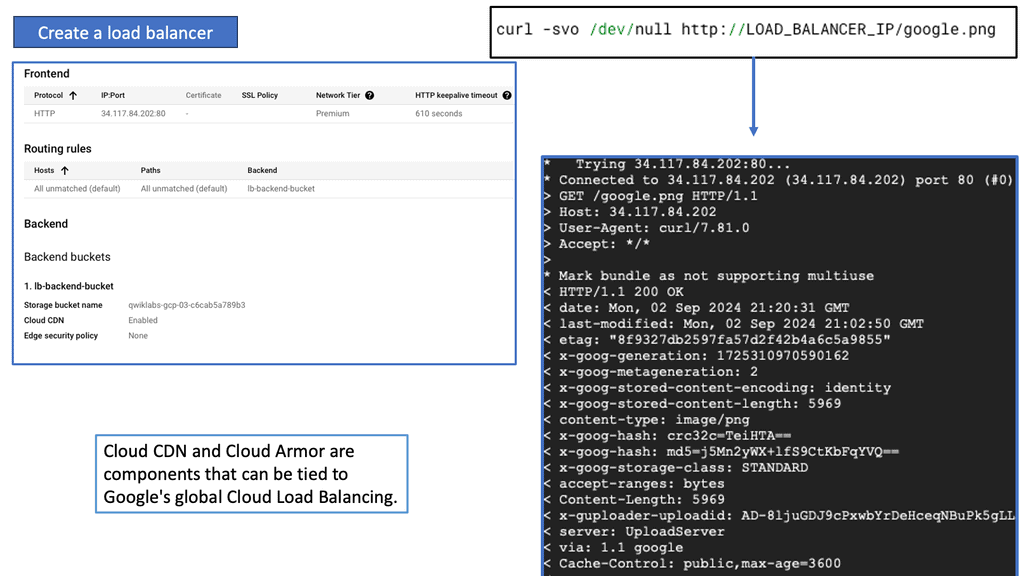
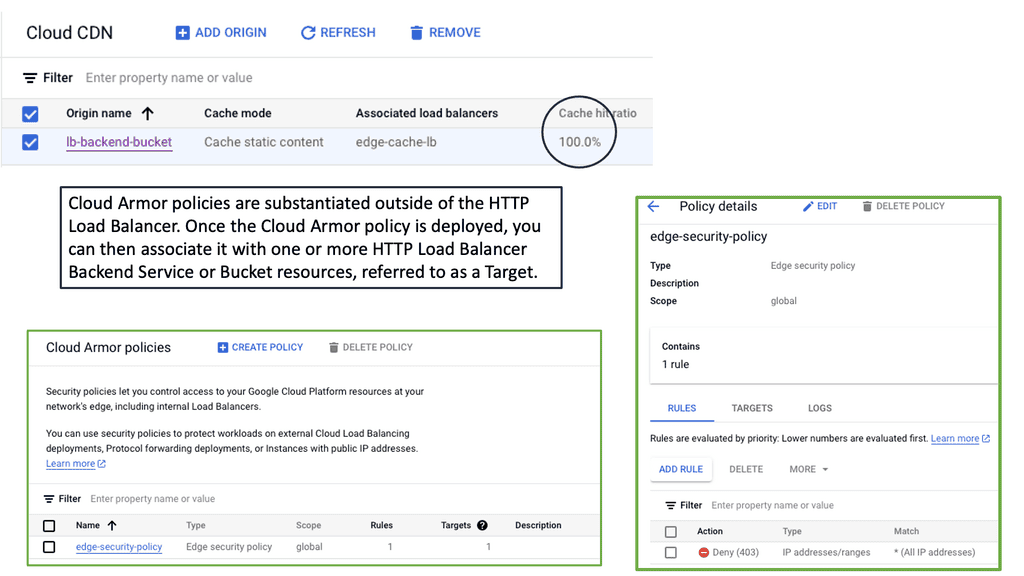
### What is Cloud Armor?

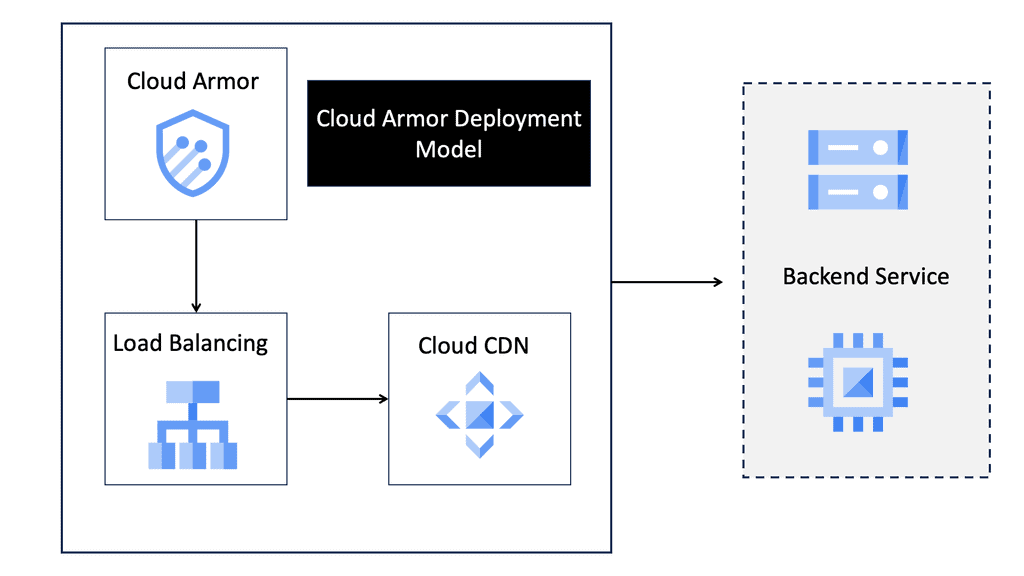
Cloud Armor is a security service offered by Google Cloud that provides protection against distributed denial-of-service (DDoS) attacks and other web-based threats. It leverages Google’s global infrastructure to offer scalable and reliable protection, ensuring that your applications and services remain available and secure even in the face of large-scale attacks.

### Key Features of Cloud Armor

Cloud Armor comes packed with several features that make it an indispensable tool for modern enterprises. Some of its key features include:

– **DDoS Protection:** Automatically detects and mitigates DDoS attacks, ensuring minimal disruption to your services.

– **Web Application Firewall (WAF):** Provides customizable rules to block malicious traffic and protect against common web vulnerabilities.

– **Edge Security Policies:** Allows you to define security policies at the edge of your network, ensuring threats are mitigated before they reach your core infrastructure.

– **Adaptive Protection:** Uses machine learning to identify and respond to evolving threats in real-time.

### Understanding Edge Security Policies

One of the standout features of Cloud Armor is its ability to implement edge security policies. These policies enable organizations to enforce security measures at the periphery of their network, providing an additional layer of defense. By stopping threats at the edge, you can prevent them from penetrating deeper into your network, thereby reducing the risk of data breaches and other security incidents.

Edge security policies can be tailored to your specific needs, allowing you to block traffic based on various criteria such as IP address, geographic location, and request patterns. This granular control helps you enforce stringent security measures while maintaining the performance and availability of your services.

### Benefits of Using Cloud Armor

Deploying Cloud Armor offers several benefits that can significantly enhance your security posture. These include:

– **Scalability:** Designed to handle traffic spikes and large-scale attacks, ensuring your services remain available even under heavy load.

– **Customization:** Flexible rules and policies allow you to tailor security measures to your unique requirements.

– **Proactive Defense:** Real-time threat detection and mitigation keep your applications protected against the latest cyber threats.

– **Cost-Effective:** By leveraging Google’s global infrastructure, you can achieve enterprise-level security without the need for significant upfront investment.

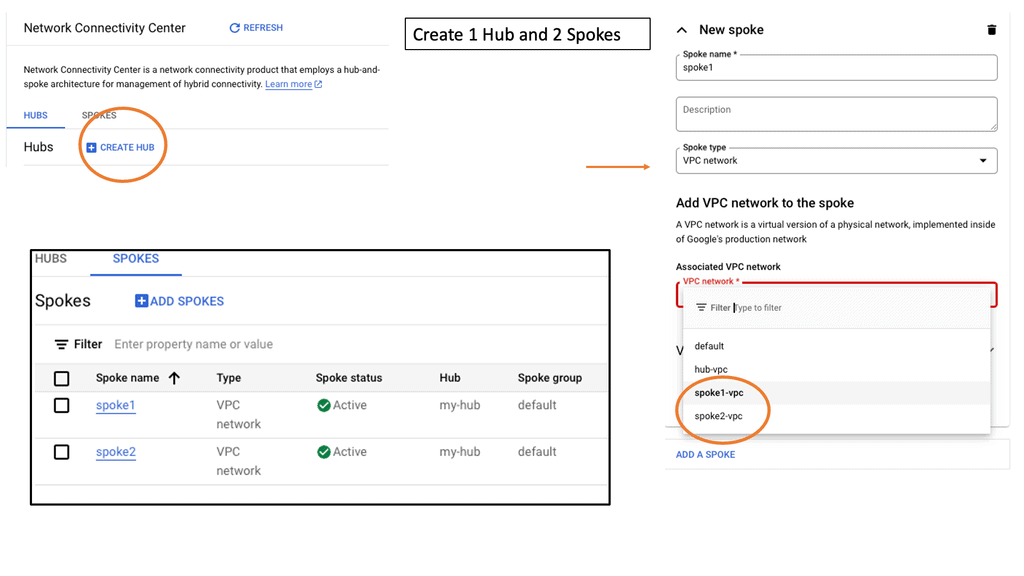
### What is Google Network Connectivity Center?

Google Network Connectivity Center is a unified platform designed to manage and monitor network connections across a variety of environments. Whether you’re dealing with on-premises data centers, cloud environments, or hybrid setups, NCC provides a centralized control point. It simplifies the complexities involved in network management, allowing IT teams to focus on optimizing performance rather than troubleshooting issues.

### Key Features of Google NCC

#### Unified Management

NCC offers a single pane of glass for managing network connections, making it easier to oversee and control your entire network infrastructure. This unified management approach reduces the need for multiple tools and interfaces, streamlining operations and increasing efficiency.

#### Flexible Connectivity Options

Google NCC supports a range of connectivity options, including VPNs, interconnects, and peering. This flexibility ensures that you can choose the best connectivity method for your specific needs, whether it’s connecting remote offices or integrating with third-party cloud services.

#### Real-Time Monitoring and Analytics

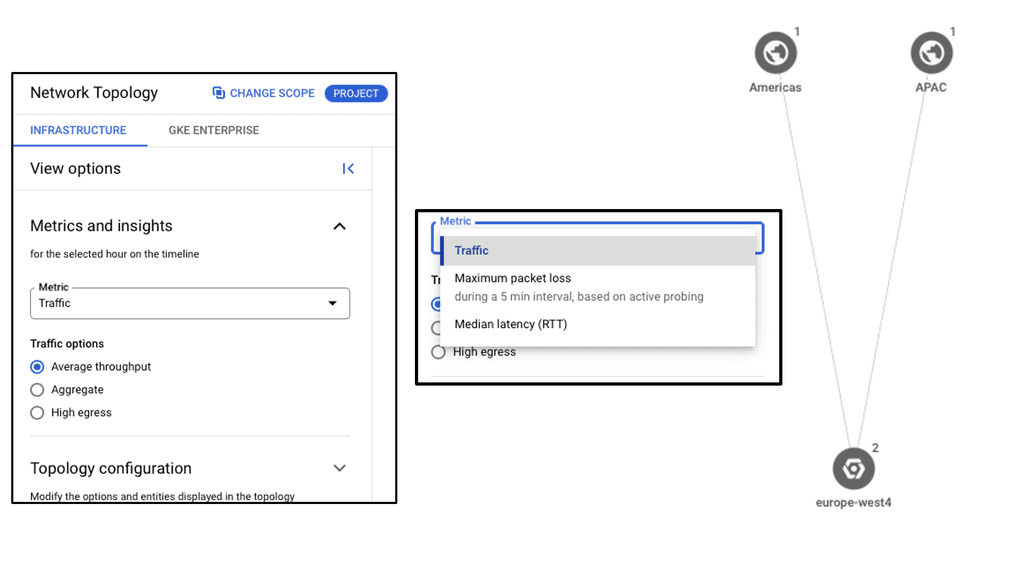
One of the standout features of NCC is its real-time monitoring and analytics capabilities. With detailed insights into network performance and traffic patterns, you can quickly identify and resolve issues, optimize resource allocation, and ensure consistent network performance.

Understanding Network Tiers

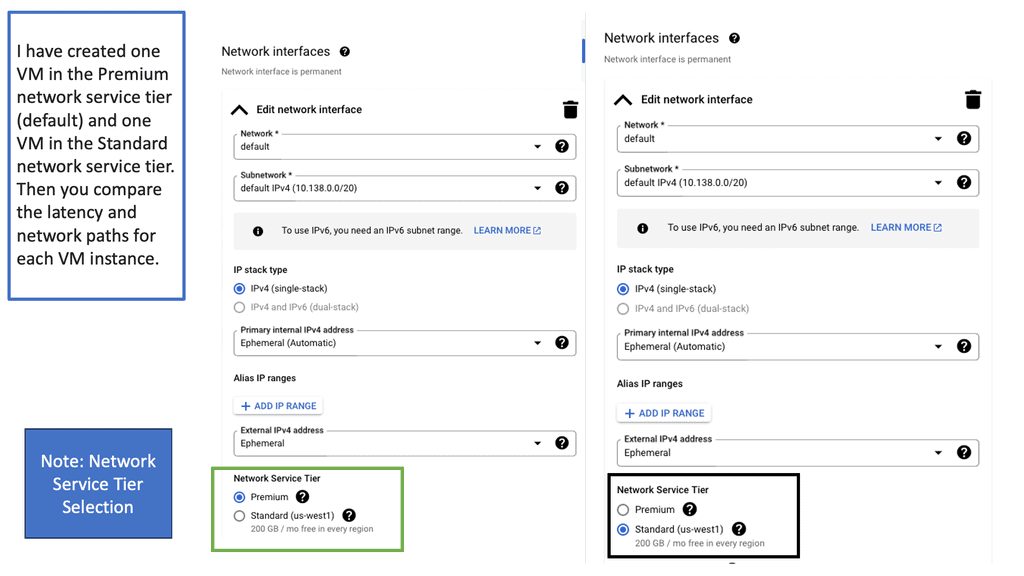
Network tiers are a concept that categorizes network traffic based on its importance and priority. By classifying traffic into different tiers, businesses can allocate resources accordingly and optimize their network usage. In the case of Google Cloud, there are two main network tiers: Premium Tier and Standard Tier.

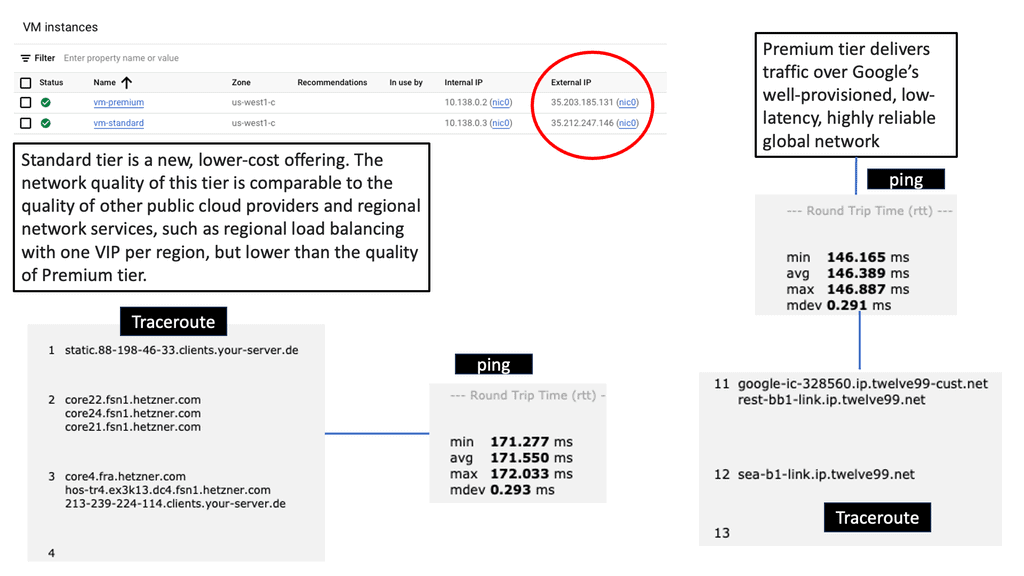
The Premium Tier is designed to deliver exceptional performance and reliability. It leverages Google’s global network infrastructure, ensuring low latency and high throughput for critical applications. By utilizing the Premium Tier, businesses can enhance user experience, reduce latency-related issues, and improve overall network performance.

While the Premium Tier offers top-tier performance, the Standard Tier provides a cost-effective solution for non-critical workloads. It offers reliable network connectivity at a lower price point, making it an excellent choice for applications that do not require ultra-low latency or high bandwidth. By strategically utilizing the Standard Tier, businesses can optimize their network spend without compromising on reliability.

Understanding VPC Networking

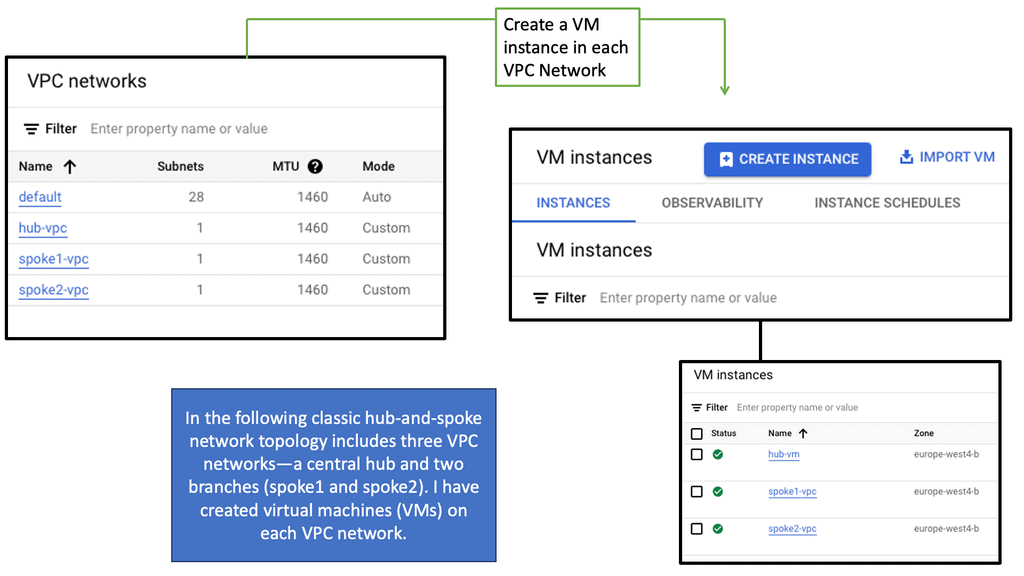
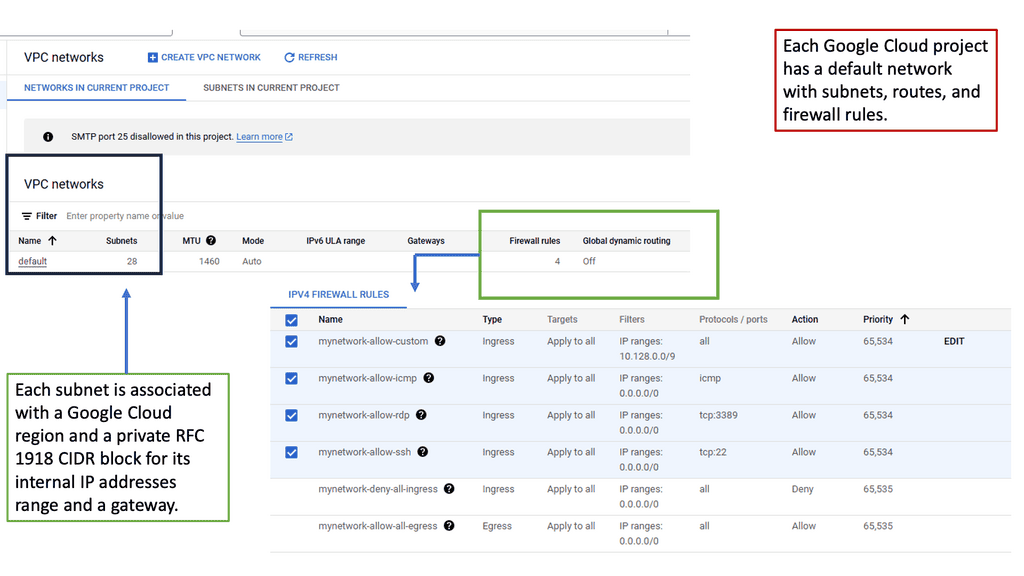
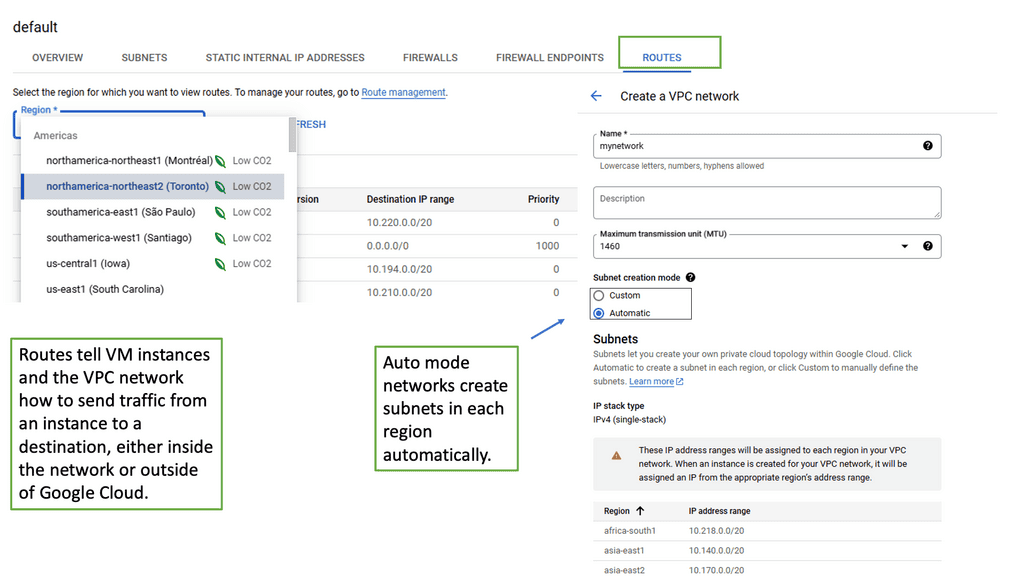
VPC, or Virtual Private Cloud, is a virtual network dedicated to a specific Google Cloud project. It allows users to define and manage their network resources, including subnets, IP addresses, and firewall rules. With VPC networking, businesses can create isolated environments and control the flow of traffic within their cloud infrastructure.

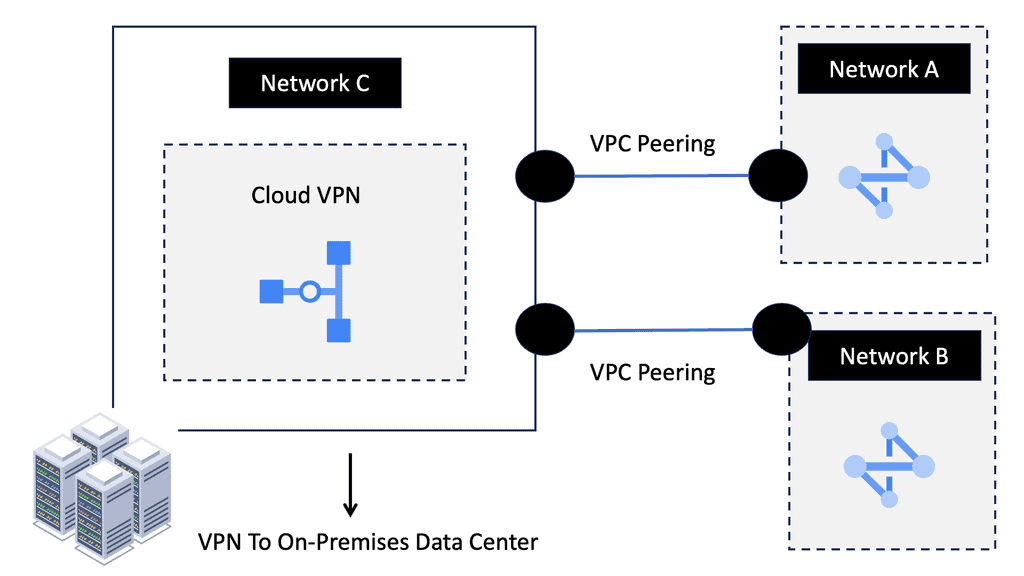
Google Cloud’s VPC networking offers a range of powerful features. Firstly, it provides global connectivity, allowing businesses to connect resources across regions seamlessly. Additionally, VPC peering enables secure communication between different VPC networks, facilitating collaboration and data sharing. Moreover, VPC networking offers granular control through firewall rules, ensuring robust security for applications and services.

What is Google Cloud CDN?

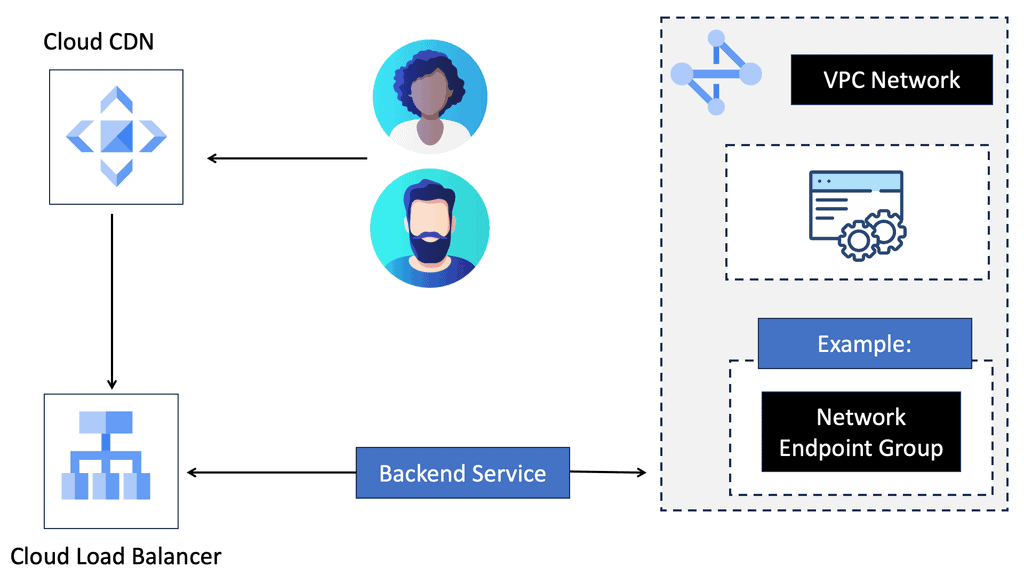
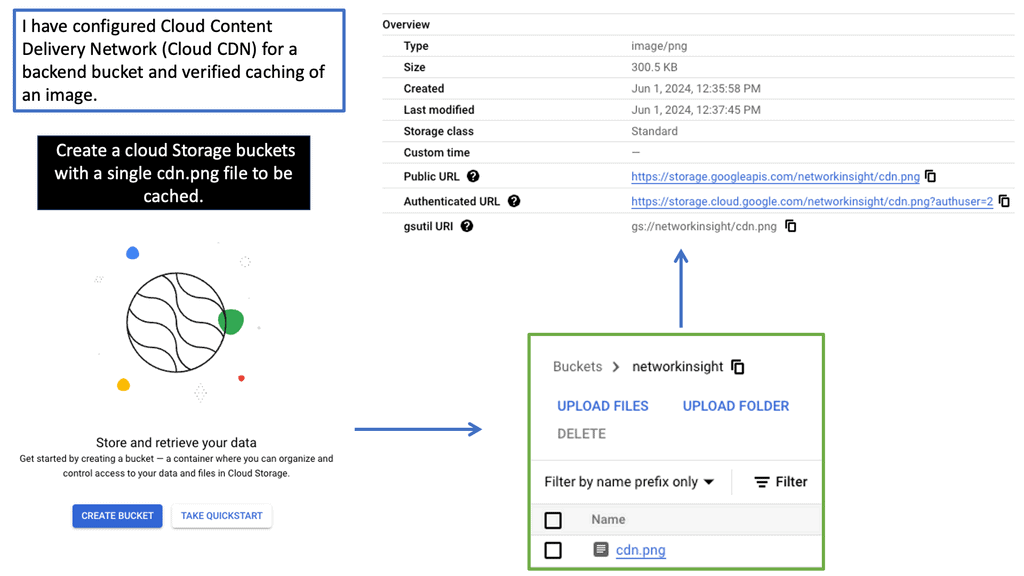
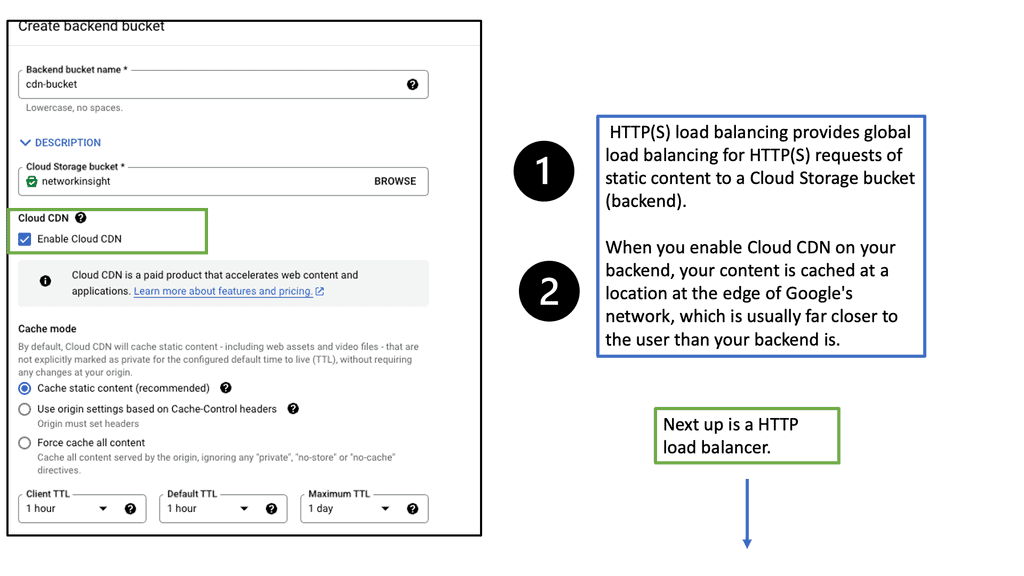
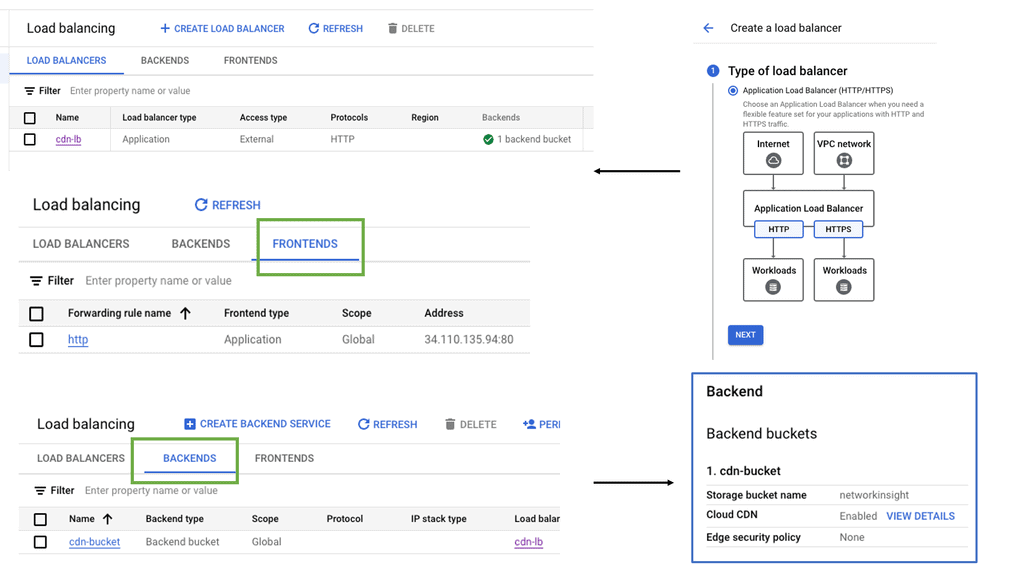
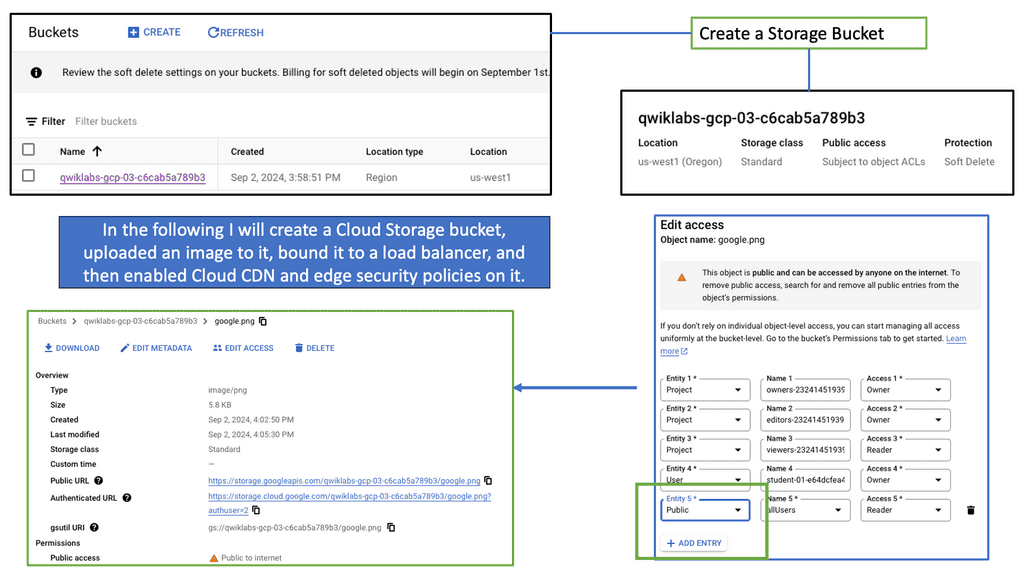
Google Cloud CDN, short for Content Delivery Network, is a globally distributed network of servers designed to deliver content to users at blazing-fast speed. Cloud CDN minimizes latency and ensures a seamless user experience by caching your content in strategic locations worldwide. Whether it’s static assets, dynamic content, or even streaming media, Cloud CDN optimizes the delivery process, reducing the load on your origin servers and improving overall performance.

Cloud CDN operates by leveraging Google’s extensive network infrastructure. When a user requests content from your website or application, Cloud CDN intelligently routes the request to the nearest edge location. If the content is already cached at that edge location, it is immediately delivered to the user, eliminating the need for a round trip to the origin server. This not only reduces latency but also saves bandwidth and server resources.

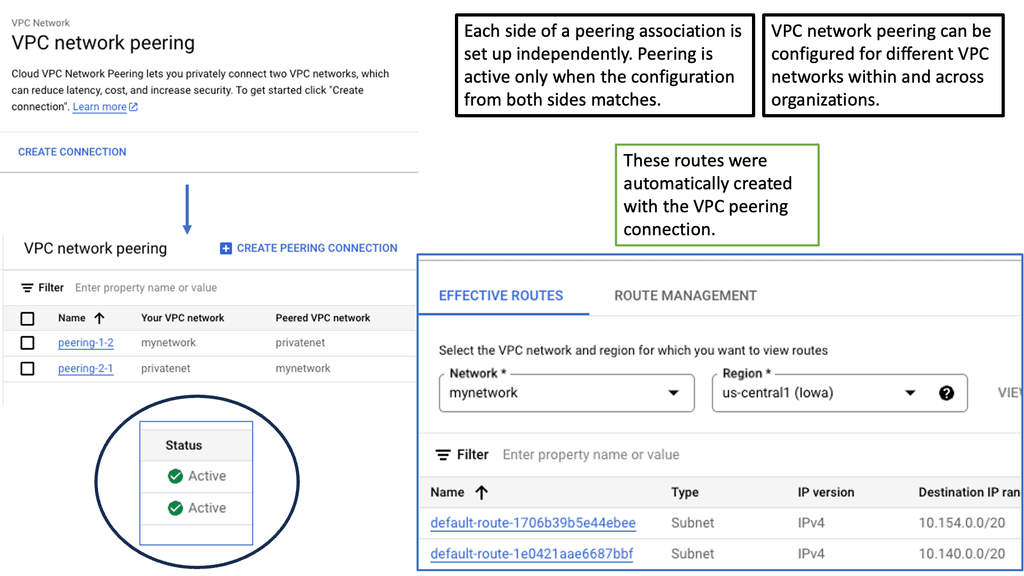
Understanding VPC Network Peering

VPC network peering connects VPC networks from different projects or within the same project within Google Cloud. It enables direct communication between these networks, eliminating the need for complex VPN setups or public IP addresses. This seamless connectivity can significantly enhance collaboration, data sharing, and network management.

Enhanced Security: VPC network peering ensures that communication between peered networks remains isolated from the public internet. This adds an extra layer of security by reducing the exposure to potential cyber threats.

Improved Performance: By leveraging VPC network peering, data can be transferred at incredibly high speeds between peered networks. This enables faster resource access, reduces latency, and enhances overall application performance.

Simplified Network Architecture: VPC network peering allows for a more streamlined and simplified network architecture. Instead of relying on complex gateways or routers, communication between VPCs can be established directly, making network management and troubleshooting more straightforward.

Data Center Network Types

a. The Three-Tier Data Center Network

The three-tier DCN architecture has been a traditional approach in data center networking. It consists of three layers: the access layer, the aggregation layer, and the core layer. Each layer serves a specific purpose, from connecting end devices to aggregating traffic and providing high-speed connectivity. This hierarchical design allows for scalability and redundancy, making it a popular choice for many data centers.

b. Unleashing the Power of Fat Tree Data Center Networks

The fat tree DCN, also known as the Clos network, has gained prominence recently due to its ability to handle large-scale data center deployments. Unlike the three-tier DCN, a fat tree network provides multiple paths between devices, enabling better load balancing and higher bandwidth capacity. Fat tree networks offer low-latency communication and enhanced fault tolerance by utilizing a non-blocking switching fabric, making them ideal for mission-critical applications.

c. Exploring the Revolutionary DCell Approach

The DCell architecture takes a novel approach to data center networking and offers a unique perspective on scalability and fault tolerance. DCell networks are based on a hierarchical structure of cells, where each cell consists of a group of servers connected together. This decentralized design eliminates the need for traditional core switches and enables direct server-to-server communication. With its self-organizing capabilities, DCell networks provide excellent scalability, fault tolerance, and efficient resource utilization.

Composition of Data Center Architecture

Routing and Switching:

Routing is the backbone of a data center network, guiding data packets through the labyrinthine pathways. It involves determining the optimal path for data to travel from source to destination, considering network congestion, latency, and cost factors. Advanced routing protocols like Border Gateway Protocol (BGP) enable dynamic route selection, ensuring efficient and fault-tolerant data delivery.

Switching complements routing by facilitating efficient data transmission within a local network. At the heart of a data center, switches act as intelligent traffic controllers, directing data packets to their intended destinations. With features like VLANs (Virtual Local Area Networks) and Quality of Service (QoS), switches prioritize and prioritize traffic, optimizing network performance and ensuring seamless communication.

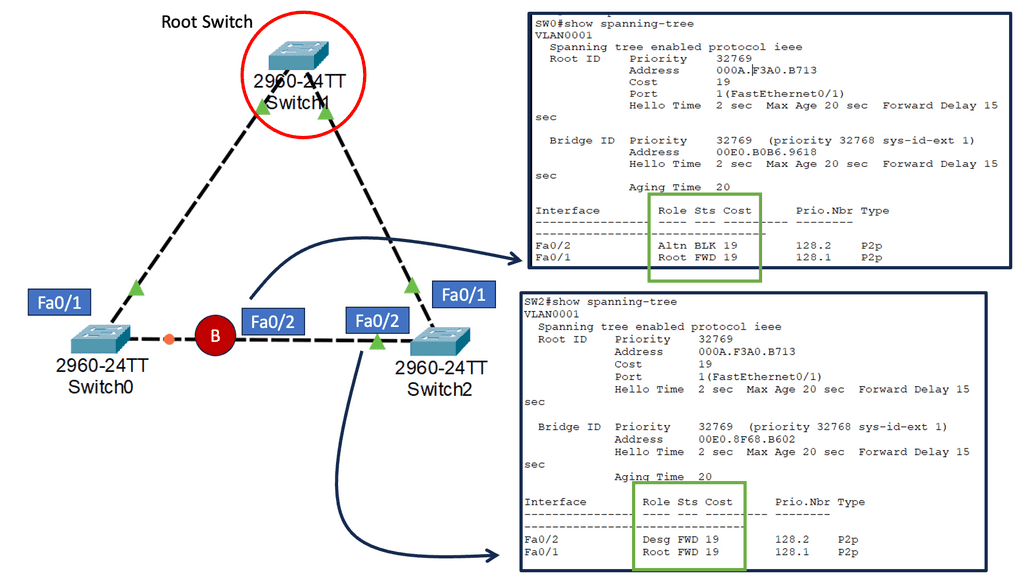
stp port states

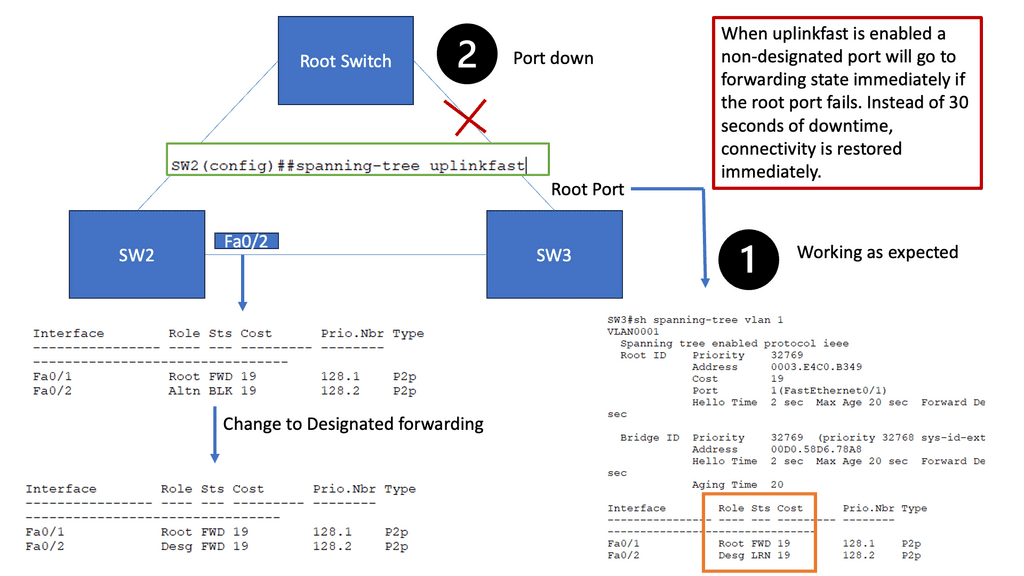
Example: Spanning Tree Uplink Fast

Spanning Tree Protocol (STP) prevents loops in Ethernet networks by creating a loop-free logical topology and blocking redundant paths. While STP ensures network stability, it can also introduce delays in network convergence. Network downtime caused by STP convergence can be a primary concern for businesses. Even a few seconds of downtime can result in significant losses in critical environments. This is where Spanning Tree Uplink Fast comes into play. Uplink Fast is an enhancement to STP that provides faster convergence times, reducing network downtime and improving overall network efficiency.

How Uplink Fast Works

Uplink Fast allows a switch to detect a link failure on its designated root port and immediately activate an alternate port. This process eliminates the need for the traditional STP convergence process, resulting in faster network recovery times. Uplink Fast is instrumental when network redundancy is crucial, such as in data centers or enterprise networks.

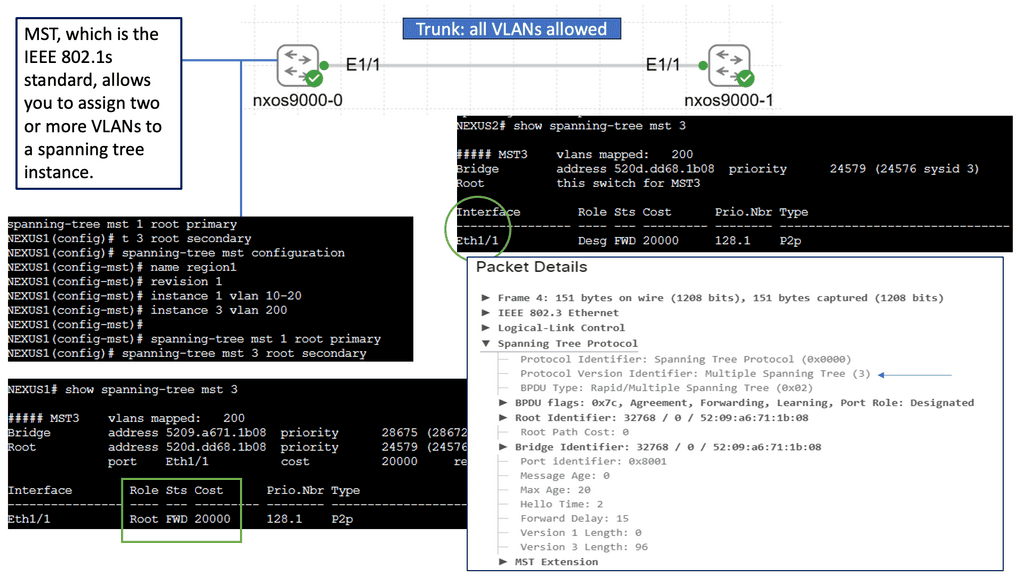
Introducing Spanning Tree MST

Spanning Tree MST enhances the traditional STP, providing a more efficient and flexible solution. MST allows network administrators to divide the network into multiple regions, each with its own Spanning Tree instance. By doing so, MST optimizes network resources and enables load balancing across multiple paths, leading to increased performance and redundancy.

To implement Spanning Tree MST, network switches need to be properly configured. This involves defining regions, assigning VLANs to instances, and configuring parameters such as root bridges and priorities. MST configuration can be complex, but with careful planning and understanding, it offers significant benefits.

Spanning Tree MST offers several key advantages. First, it enables efficient utilization of network resources by load-balancing traffic across multiple paths. Second, it provides enhanced redundancy, ensuring that if one path fails, traffic can automatically reroute through an alternate path. Third, MST simplifies network management by allowing administrators to control traffic flow and prioritize specific VLANs within each instance.

Data Center Security Technologies

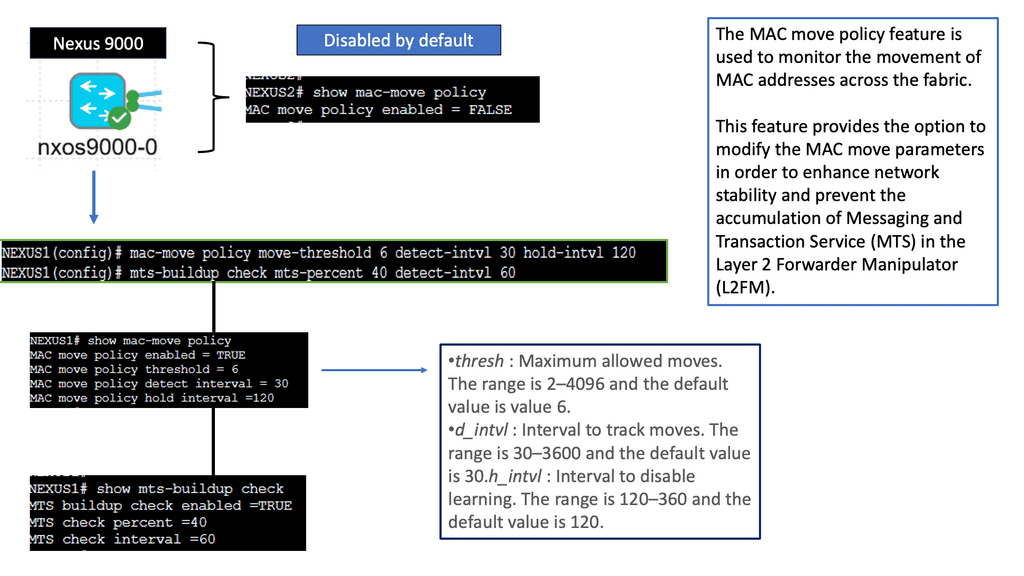
Understanding the MAC Move Policy

The MAC Move Policy is a crucial feature in Cisco NX-OS devices that governs the movement of MAC addresses within a network. By defining specific rules and criteria, administrators can control how MAC addresses are learned, aged, and moved across different interfaces and VLANs.

Configuring the MAC Move Policy

Proper configuration is essential to effectively utilizing the MAC Move Policy. This section will guide you through the step-by-step process of configuring the policy on Cisco NX-OS devices. From defining the MAC move parameters to implementing the policy on specific interfaces or VLANs, we will cover all the necessary commands and considerations to ensure a seamless configuration experience.

Understanding MAC ACLs

MAC ACLs, also known as Ethernet ACLs or Layer 2 ACLs, operate at the data link layer of the OSI model. Unlike traditional IP-based ACLs, which focus on network layer addresses, MAC ACLs allow administrators to filter traffic based on MAC addresses. This enables granular control over network access, providing an additional layer of defense against unauthorized devices.

By implementing MAC ACLs on the Nexus 9000 series, network administrators can exercise enhanced control over their network environment. MAC ACLs prevent MAC address spoofing, mitigating the risk of unauthorized devices gaining access. Furthermore, they enable the isolation of specific devices or groups of devices, ensuring that only designated entities can communicate within a given VLAN or network segment.

Understanding VLANs and ACLs

Before we embark on our journey to explore VLAN ACLs’ potential, let’s establish a solid foundation by understanding VLANs and ACLs individually. VLANs (Virtual Local Area Networks) allow us to logically segment networks, improving performance, scalability, and network management. On the other hand, ACLs (Access Control Lists) act as gatekeepers, controlling traffic flow and enforcing security policies.

VLAN ACLs serve as a crucial layer of defense in protecting our networks from unauthorized access, malicious activities, and potential breaches. By implementing VLAN ACLs, we can define granular rules that filter and restrict traffic between VLANs, ensuring that only desired communication occurs. This level of control empowers network administrators to mitigate risks, maintain data integrity, and enforce compliance.

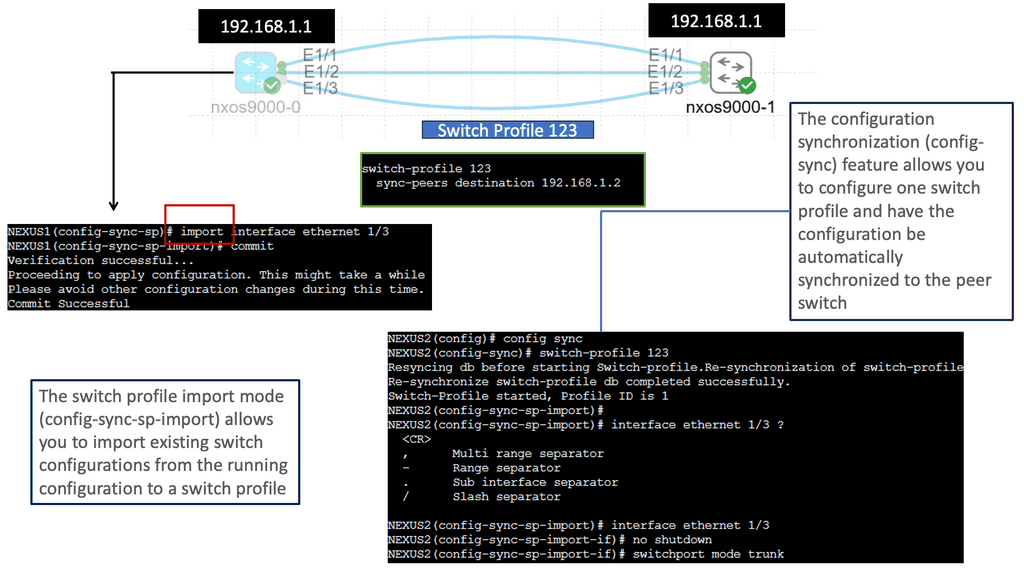
Understanding Nexus Switch Profiles

Nexus switch profiles are a feature of Cisco’s Nexus series switches that allow administrators to define and manage a group of switches as a single entity. By creating a profile, administrators can easily configure and monitor all switches within the group, eliminating the need for repetitive manual configurations. This centralization of management simplifies network administration and saves valuable time and resources.

One of the primary advantages of using Nexus switch profiles is the ability to streamline network operations. With a profile in place, administrators can make changes or updates to configurations across multiple switches simultaneously. This significantly reduces the risk of configuration errors and ensures consistent settings throughout the network. Furthermore, the centralized management approach simplifies troubleshooting and enables faster resolution of network issues.

Data Center Technologies

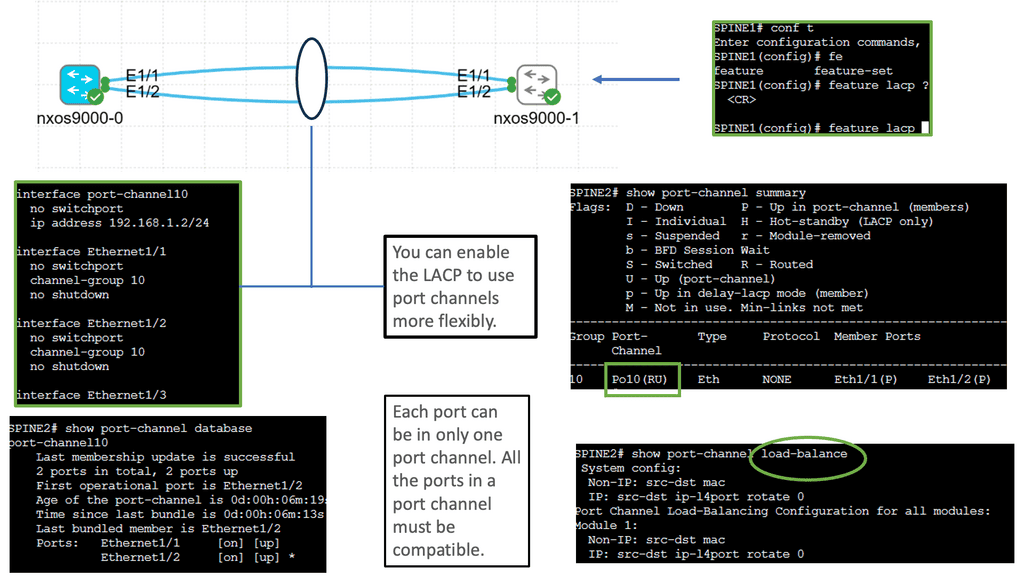
Understanding Layer 3 Etherchannel

Layer 3 Etherchannel is a link aggregation technique that combines multiple physical links between switches into a single logical channel. By bundling these links together, traffic can be distributed across them, increasing overall bandwidth capacity and providing load-balancing capabilities. Unlike Layer 2 Etherchannel, Layer 3 Etherchannel operates at the network layer, allowing traffic to be routed.

To configure Layer 3 Etherchannel, several steps need to be followed. First, the physical interfaces on the switches need to be identified and grouped into the Etherchannel bundle. Then, a logical interface, the Port-Channel interface, is created and assigned an IP address. Subsequently, routing protocols or static routes can be configured on the Port-Channel interface to enable communication between different networks.

Layer 3 Etherchannel supports various load-balancing algorithms, determining how traffic is distributed across the bundled links. Standard algorithms include source IP, destination IP, and round-robin. Each algorithm has advantages and considerations depending on the network requirements and traffic patterns.

Cisco Nexus 9000 Port Channel

Implementing Port Channels on Cisco Nexus 9000 switches offers several advantages. Firstly, it provides increased link bandwidth, allowing for efficient data transfer and reducing bottlenecks. Secondly, Port Channels enhance network resilience by providing link redundancy. In a link failure, traffic seamlessly switches to the remaining active links. Lastly, Port Channels enable load balancing, distributing network traffic evenly across the aggregated links for optimal utilization.

Setting up a Port Channel on Cisco Nexus 9000 switches is straightforward. Administrators can configure Port Channels using the Link Aggregation Control Protocol (LACP) or the Port Aggregation Protocol (PAgP). Administrators can maximize the benefits of this feature by adequately configuring interfaces and assigning them to the Port Channel.

Understanding Unidirectional Link Detection (UDLD)

UDLD is a layer 2 protocol that helps identify and mitigate the presence of unidirectional links in a network. It works by exchanging periodic messages between neighboring switches to verify bidirectional connectivity. By detecting unidirectional links, UDLD helps prevent potential network issues such as black holes, spanning-tree loops, and data loss.

Cisco Nexus 9000 switches offer seamless integration and support for UDLD. To enable UDLD on a Nexus 9000 switch, administrators can utilize simple commands within the switch configuration. By configuring UDLD timers, administrators can customize the frequency of UDLD messages exchanged between switches. Additionally, UDLD can be configured to operate in either standard or aggressive mode, depending on the specific needs of the network environment.

Understanding VRRP

VRRP, an essential networking protocol, provides automatic failover and load-balancing capabilities. It allows multiple routers to work as a virtual group, presenting a single IP address. By intelligently distributing network traffic, VRRP ensures seamless connectivity even in the face of router failures.

The Nexus 9000 Series, Cisco’s flagship product line, offers a range of cutting-edge features, including VRRP. Designed to meet the demands of modern networks, these switches deliver exceptional performance, scalability, and flexibility. With the Nexus 9000 Series, network administrators can harness the power of VRRP to build a robust and highly available network infrastructure.

Example: Data Center WAN Protocol

BGP, also known as the routing protocol of the Internet, is responsible for exchanging routing and reachability information among autonomous systems (AS). It enables routers to make intelligent decisions about the most optimal paths for data transmission. Unlike interior gateway protocols, BGP focuses on routing between different networks rather than within a single network.

BGP operates on a trust-based model, where routers form peer relationships to exchange routing information. These peers establish connections and exchange routing updates, allowing them to build a complete picture of network reachability. BGP uses a sophisticated algorithm that considers multiple factors, such as path length, quality of service, and policy-based decisions, to determine the best route for traffic.

Understanding BGP AS Prepend

AS Prepend involves adding additional Autonomous System (AS) numbers to the AS path attribute of BGP advertisements. By manipulating the AS path, network operators can influence inbound traffic routing decisions by neighboring autonomous systems. This technique makes a specific path appear less desirable, diverting traffic to alternative paths.

AS Prepend holds excellent potential for optimizing network routing in various scenarios. It can achieve load balancing across multiple links, redirect traffic to less congested paths, or prefer specific transit providers. By carefully implementing AS Prepend, network administrators can improve network performance, reduce latency, and enhance overall service quality.

BGP AS Prepend

Recap: Border Gateway Protocol (BGP) is data centers’ most commonly used routing protocol. It has been used to connect Internet systems worldwide for decades and can also be used outside a data center. The BGP protocol is a standard-based open-source software package. It’s more common to find BGP peering between data centers over the WAN. However, we see BGP often used purely inside the data center.

 Understanding Leaf and Spine Networks

Leaf and spine networks, also known as Clos networks, are a modern approach to data center architecture. The design revolves around a hierarchical structure consisting of two key components: leaf switches and spine switches. Leaf switches connect directly to endpoints, while spine switches interconnect the leaf switches, forming a non-blocking fabric. This architecture eliminates bottlenecks and enables seamless scalability.

BGP (Border Gateway Protocol) is a crucial routing protocol in leaf and spine networks. It ensures efficient data forwarding between leaf switches using a set of rules known as BGP route advertisements. By default, BGP requires every router to have a full mesh of connections with all other routers in the network, which can be resource-intensive. This is where BGP route reflection comes into play.

Understanding BGP Route Reflection

BGP route reflection, at its core, is a method that allows a BGP speaker to reflect routing information to its peers, alleviating the need for full-mesh connectivity. Designating specific BGP routers as route reflectors streamlines and manages the network structure.

The utilization of BGP route reflection offers several advantages. First, it reduces the number of required BGP peering sessions, resulting in a simplified and less resource-intensive network. Second, route reflection enhances scalability by eliminating the need for full-mesh connectivity, particularly in large-scale networks. Third, it improves convergence time and reduces BGP update processing overhead, enhancing overall network performance.

**The third wave of application architectures**

Google and Amazon, two of the world’s leading web-scale pioneers, developed a modern data center. The third wave of application architectures represents these organizations’ search and cloud applications. Towards the end of the 20th century, client-server architectures and monolithic single-machine applications dominated the landscape. This third wave of applications has three primary characteristics:

Unlike client-server architectures, modern data center applications involve a lot of communication between servers. In client-server architectures, clients communicate with monolithic servers, which either handle the request entirely themselves or communicate with fewer than a handful of other servers, such as database servers. Search (or Hadoop, its more popular variant) employs many mappers and reducers instead of search. In the cloud, virtual machines can reside on different nodes but must communicate seamlessly. In some cases, VMs are deployed on servers with the least load, scaled out, or balanced loads.

A microservices architecture also increases server-to-server communication. This architecture is based on separating a single function into smaller building blocks and interacting with them. Each block can be used in several applications and enhanced, modified, and fixed independently in such an architecture. Since diagrams usually show servers next to each other, East-West traffic is often called server communication. Traffic flows north-south between local networks and external networks.

**Scale and resilience**

The sheer size of modern data centers is characterized by rows and rows of dark, humming, blinking machines. As opposed to the few hundred or so servers of the past, a modern data center contains between a few hundred and a hundred thousand servers. To address the connectivity requirements at such scales, as well as the need for increased server-to-server connectivity, network design must be rethought. Unlike older architectures, modern data center applications assume failures as a given. Failures should be limited to the smallest possible footprint. Failures must have a limited “blast radius.” By minimizing the impact of network or server failures on the end-user experience, we aim to provide a stable and reliable experience.

**Data Center Goal: Interconnect networks**

The goal of data center design and interconnection network is to transport end-user traffic from A to B without any packet drops, yet the metrics we use to achieve this goal can be very different. The data center is evolving and progressing through various topology and technology changes, resulting in multiple network designs.  The new data center control planes we see today, such as Fabric Path, LISP, THRILL, and VXLAN, are driven by a change in the end user’s requirements; the application has changed. These new technologies may address new challenges, yet the fundamental question of where to create the Layer 2/Layer three boundaries and the need for Layer 2 in the access layer remains the same. The question stays the same, yet the technologies available to address this challenge have evolved.

Example Protocol: Understanding VXLAN

VXLAN, an encapsulation protocol, enables the creation of virtualized Layer 2 networks over an existing Layer 3 infrastructure. By extending the Layer 2 domain, VXLAN allows the seamless transfer of network traffic between geographically dispersed data centers. It achieves this by encapsulating Ethernet frames within IP packets, providing flexibility and scalability to network virtualization.

Scalability and Flexibility: VXLAN addresses the limitations of traditional VLANs by allowing for a significantly more significant number of virtual networks—up to 16 million—compared to the 4,096 limit of VLANs. This scalability enables organizations to allocate virtual networks more efficiently while accommodating the growing demands of cloud-based applications and services.

Enhanced Network Segmentation and Isolation: VXLAN provides improved network segmentation by creating logical networks that are isolated from one another, even if they share the same physical infrastructure. This isolation enhances security and enables more granular control over network traffic, facilitating efficient multi-tenancy in cloud environments.

VXLAN unicast mode

Modern Data Centers

There is a vast difference between modern data centers and what they used to be just a few years ago. Physical servers have evolved into virtual networks that support applications and workloads across pools of physical infrastructure and into a multi-cloud environment. There are multiple data centers, the edge, and public and private clouds where data exists and is connected. Both on-premises and cloud-based data centers must be able to communicate. Data centers are even part of the public cloud. Cloud-hosted applications use the cloud provider’s data center resources.

Unified Fabric

Through Cisco’s fabric-based data center infrastructure, tiered silos and inefficiencies of multiple network domains are eliminated, and a unified, flat fabric is provided instead, which allows local area networks (LANs), storage area networks (SANs), and network-attached storage (NASs) to be consolidated into one high-performance, fault-tolerant network. Creating large pools of virtualized network resources that can be easily moved and rapidly reconfigured with Cisco Unified Fabric provides massive scalability and resiliency to the data center.

This approach automatically deploys virtual machines and applications, thereby reducing complexity. Thanks to deep integration between server and network architecture, secure IT services can be delivered from any device within the data center, between data centers, or beyond. In addition to Cisco Nexus switches, Cisco Unified Fabric uses Cisco NX-OS as its operating system.

The use of Open Networking

We also have the Open Networking Foundation ( ONF ), which provides open networking. Open networking describes a network that uses open standards and commodity hardware. So, consider open networking in terms of hardware and software. Unlike a vendor approach like Cisco, this gives you much more choice with what hardware and software you use to make up and design your network.

Data Center Performance Parameters

TCP Performance Parameters

TCP (Transmission Control Protocol) is the backbone of modern Internet communication, ensuring reliable data transmission across networks. However, various parameters that determine TCP’s behavior can influence its performance. 

Understanding TCP Window Size: One crucial parameter that affects TCP performance is the window size. The TCP window size refers to the amount of data sent before an acknowledgment is required. A larger window size allows more data to be transmitted without waiting for acknowledgments, thus optimizing throughput. However, substantial window sizes can result in congestion and increased retransmissions.

Congestion Control Mechanisms: Congestion control mechanisms are vital in maintaining network stability and preventing congestion collapse. TCP utilizes algorithms such as Slow Start, Congestion Avoidance, and Fast Recovery to regulate data flow based on network conditions. These mechanisms ensure fairness and efficiency, improving TCP performance and avoiding network congestion.

Timeouts and Retransmission: TCP implements a reliable data transfer mechanism using acknowledgments and timeouts. When a packet is not acknowledged within a specific timeframe, it is considered lost, and TCP initiates retransmission. The selection of appropriate timeout values is crucial to balance reliability and responsiveness. Setting shorter timeouts may lead to unnecessary retransmissions, whereas longer ones can increase latency.

 Selective Acknowledgments and SACK Options: Selective acknowledgments (SACK) enhance TCP performance and recovery from packet loss. SACK lets the receiver inform the sender about specific out-of-order packets received successfully. This enables the sender to retransmit only the necessary packets, reducing unnecessary retransmissions and improving overall efficiency.

Maximum Segment Size (MSS): The Maximum Segment Size (MSS) is another crucial TCP performance parameter defining the maximum amount of data encapsulated within a single TCP segment. Optimizing the MSS can significantly impact performance, especially when network links have different MTU (Maximum Transmission Unit) sizes.

Understanding TCP MSS

TCP MSS refers to the maximum amount of data encapsulated within a single TCP segment. It represents the size of the payload, excluding headers and other overhead. The MSS value is negotiated during the TCP handshake process and remains constant throughout the connection.

The TCP MSS value has a direct impact on network performance and efficiency. Setting an appropriate MSS value ensures optimal network resource utilization and avoids unnecessary data packet fragmentation. Properly configuring TCP MSS becomes crucial when networks have different MTU (Maximum Transmission Unit) sizes.

Fragmentation occurs when the MSS value exceeds the MTU of a network path. This fragmentation can lead to performance degradation, increased latency, and potential packet loss. By carefully managing the TCP MSS value, network administrators can prevent or minimize fragmentation issues and enhance overall network performance.

Configuring TCP MSS requires a thorough understanding of the network infrastructure and the devices involved. It involves adjusting the MSS value at various points within the network, such as routers, firewalls, and load balancers. Aligning the TCP MSS value with the MTU of the underlying network ensures efficient data transmission and avoids unnecessary fragmentation.

Advanced Topics

VXLAN Flood and Learn Mechanism

The flood-and-learn mechanism in VXLAN plays a crucial role in facilitating communication between virtual machines within the overlay network. When a virtual machine sends a broadcast or unknown unicast frame, the frame is encapsulated in a VXLAN packet and flooded throughout the network. Each VXLAN tunnel endpoint (VTEP) learns the source MAC address and VTEP association, enabling subsequent unicast traffic to be directly delivered.

Multicast is a fundamental component of VXLAN flood and learn, offering several benefits. First, using multicast VXLAN reduces bandwidth consumption compared to traditional flooding techniques. Second, multicast enables efficient replicating broadcast, multicast, and unknown unicast traffic across the overlay network. Third, it enhances network scalability by eliminating the need to maintain a multicast group per tenant.

BGP Multipath

Understanding BGP Multipath

BGP multipath is a feature that enables the installation and usage of multiple paths for a single prefix in the routing table. Traditionally, BGP selects a single best path based on factors such as AS path length, origin type, and path attributes. However, with multipath enabled, BGP can utilize multiple paths simultaneously, distributing traffic across them for load balancing and redundancy purposes.

The utilization of BGP multipath brings several advantages to network operators. First, it enhances network resilience by providing redundant paths. In the event of a link failure or congestion, traffic can be automatically rerouted through available alternate paths, ensuring continuous connectivity. Additionally, BGP multipath facilitates load balancing, enabling more efficient utilization of network resources and better traffic distribution across multiple links.

Understanding BGP Next Hop Tracking

BGP next-hop tracking monitors the reachability of the next-hop IP address associated with a particular route. It allows routers to dynamically adjust their routing tables based on changes in the network topology. Routers can make informed decisions about forwarding traffic by continuously tracking the next hop, ensuring optimal path selection.

Enhanced Network Resiliency: BGP next-hop tracking enables routers to detect and respond to network changes quickly. If a next hop becomes unreachable, routers can automatically reroute traffic to an alternative path, minimizing downtime and improving network resiliency.

Load Balancing and Traffic Engineering: Network administrators gain granular control over traffic distribution with BGP next-hop tracking. By monitoring the reachability of multiple next hops, routers can intelligently distribute traffic across different paths, optimizing resource utilization and improving overall network performance.

Improved Network Convergence: Rapid convergence is crucial in dynamic networks. BGP next hop tracking facilitates faster convergence by promptly updating routing tables when next hops become unreachable. This ensures routing decisions are based on current information, reducing packet loss and minimizing network disruptions.

next hop tracking

Related: Before you proceed, you may find the following useful:

  1. ACI Networks
  2. IPv6 Attacks
  3. SDN Data Center
  4. Active Active Data Center Design
  5. Virtual Switch

Data Center Network Design

The Rise of Overlay Networking

What has the industry introduced to overcome these limitations and address the new challenges? – Network virtualization and overlay networking. In its simplest form, an overlay is a dynamic tunnel between two endpoints that enables Layer 2 frames to be transported between them. In addition, these overlay-based technologies provide a level of indirection that allows switching table sizes to not increase in the order of the number of supported end hosts.

Today’s overlays are Cisco FabricPath, THRILL, LISP, VXLAN, NVGRE, OTV, PBB, and Shorted Path Bridging. They are essentially virtual networks that sit on top of a physical network, and often, the physical network is unaware of the virtual layer above it.

Traditional Data Center Network Design

How do routers create a broadcast domain boundary? Firstly, using the traditional core, distribution, and access model, the access layer is layer 2, and servers served to each other in the access layer are in the same IP subnet and VLAN. The same access VLAN will span the access layer switches for east-to-west traffic, and any outbound traffic is via a First Hop Redundancy Protocol ( FHRP ) like Hot Standby Router Protocol ( HSRP ).

Servers in different VLANs are isolated from each other and cannot communicate directly; inter-VLAN communications require a Layer 3 device. Virtualization’s humble beginnings started with VLANs, which were used to segment traffic at Layer 2. It was expected to find single VLANs spanning an entire data center fabric.

VLAN and Virtualization

The virtualization side of VLANs comes from two servers physically connected to different switches. Assuming the VLAN spans both switches, the same VLAN can communicate with each server. Each VLAN can be defined as a broadcast domain in a single Ethernet switch or shared among connected switches.

Whenever a switch interface belonging to a VLAN receives a broadcast frame (the destination MAC is ffff.ffff.ffff), the device must forward it to all other ports defined in the same VLAN.

This approach is straightforward in design and is almost like a plug-and-play network. The first question is, why not connect everything in the data center into one large Layer 2 broadcast domain? Layer 2 is a plug-and-play network, so why not? STP also blocks links to prevent loops.

The issues of Layer 2

The reason is that there are many scaling issues in large layer 2 networks. Layer 2 networks don’t have controlled / efficient network discovery protocols. Address Resolution Protocol ( ARP ) is used to locate end hosts and uses Broadcasts and Unicast replies. A single host might not generate much traffic, but imagine what would happen if 10,000 hosts were connected to the same broadcast domain. VLANs span an entire data center fabric, which can bring a lot of instability due to loops and broadcast storms.

**No hierarchy in MAC addresses**

MAC addressing also lacks hierarchy. Unlike Layer 3 networks, which allow summarization and hierarchy addressing, MAC addresses are flat. Adding several thousand hosts to a single broadcast domain will create large forwarding information tables.

Because end hosts are potentially not static, they are likely to be attached and removed from the network at regular intervals, creating a high rate of change in the control plane. Of course, you can have a large Layer 2 data center with multiple tenants if they don’t need to communicate with each other.

The shared services requirements, such as WAAS or load balancing, can be solved by spinning up the service VM in the tenant’s Layer 2 broadcast domain. This design will hit scaling and management issues. There is a consensus to move from a Layer 2 design to a more robust and scalable Layer 3 design.

But why is Layer 2 still needed in data center topologies? One solution is Layer 2 VPN with EVPN. But first, let us look at Cisco DFA.

The Requirement for Layer 2 in Data Center Network Design

  • Servers that perform the same function might need to communicate with each other due to a clustering protocol or simply as part of the application’s inner functions. If the communication is clustering protocol heartbeats or some server-to-server application packets that are not routable, then you need this communication layer to be on the same VLAN, i.e., Layer 2 domain, as these types of packets are not routable and don’t understand the IP layer.

  • Stateful devices such as firewalls and load balancers need Layer 2 adjacency as they constantly exchange connection and session state information.

  • Dual-homed servers: Single server with two server NICs and one NIC to each switch will require a layer 2 adjacency if the adapter has a standby interface that uses the same MAC and IP addresses after a failure. In this situation, the active and standby interfaces must be on the same VLAN and use the same default gateway.

  • Suppose your virtualization solutions cannot handle Layer 3 VM mobility. In that case, you may need to stretch VLANs between PODS / Virtual Resource Pools or even data centers so you can move VMs around the data center at Layer 2 ( without changing their IP address ).

Data Center Design and Cisco DFA

Cisco took a giant step and recently introduced a data center fabric with Dynamic Fabric Automaton ( DFA ), similar to Juniper QFabric. This fabric offers Layer 2 switching and Layer 3 routing at the access layer / ToR. Firstly, it has a Fabric Path ( IS-IS for Layer 2 connectivity ) in the core, which gives optimal Layer 2 forwarding between all the edges.

Then they configure the same Layer 3 address on all the edges, which gives you optimal Layer 3 forwarding across the whole Fabric.

On the edge, you can have Layer 3 Leaf switches, such as the Nexus 6000 series, or integrate with Layer 2-only devices, like the Nexus 5500 series or the Nexus 1000v. You can connect external routers, USC, or FEX to the Fabric. In addition to running IS-IS as the data center control plane, DFA uses MP-iBGP, with some Spine nodes being the Route Reflector to exchange IP forwarding information.

Cisco FabricPath

DFA also employs a Cisco FabricPath technique called “Conversational Learning.” The first packet triggers a full RIB lookup, and the subsequent packets are switched in the hardware-implemented switching cache.

This technology provides Layer 2 mobility throughout the data center while providing optimal traffic flow using Layer 3 routing. Cisco commented, “DFA provides a scale-out architecture without congestion points in the network while providing optimized forwarding for all applications.”

Terminating Layer 3 at the access / ToR has clear advantages and disadvantages. Other benefits include reducing the size of the broadcast domain, which comes at the cost of reducing the mobility domain across which VMs can be moved.

Terminating Layer 3 at the accesses can also result in sub-optimal routing because there will be hair pinning or traffic tromboning of across-subnet traffic, taking multiple and unnecessary hops across the data center fabric.

The role of the Cisco Fabricpath

Cisco FabricPath is a Layer 2 technology that provides Layer 3 benefits, such as multipathing the classical Layer 2 networks using IS-IS at Layer 2. This eliminates the need for spanning tree protocol, avoiding the pitfalls of having large Layer 2 networks. As a result, Fabric Path enables a massive Layer 2 network that supports multipath ( ECMP ). THRILL is an IEEE standard that, like Fabric Path, is a Layer 2 technology that provides the same Layer 3 benefits as Cisco FabricPath to the Layer 2 networks using IS-IS.

LISP is popular in Active data centers for DCI route optimization/mobility. It separates the host’s location from the identifier ( EID ), allowing VMs to move across subnet boundaries while keeping the endpoint identification. LISP is often referred to as an Internet locator. 

That can enable some triangular routing designs. Popular encapsulation formats include VXLAN ( proposed by Cisco and VMware ) and STT (created by Nicira but will be deprecated over time as VXLAN comes to dominate ).

The role of OTV

OTV is a data center interconnect ( DCI ) technology enabling Layer 2 extension across data center sites. While Fabric Path can be a DCI technology with dark fiber over short distances, OTV has been explicitly designed for DCI. In contrast, the Fabric Path data center control plane is primarily used for intra-DC communications.

Failure boundary and site independence are preserved in OTV networks because OTV uses a data center control plane protocol to sync MAC addresses between sites and prevent unknown unicast floods. In addition, recent IOS versions can allow unknown unicast floods for certain VLANs, which are unavailable if you use Fabric Path as the DCI technology.

The Role of Software-defined Networking (SDN)

Another potential trade-off between data center control plane scaling, Layer 2 VM mobility, and optimal ingress/egress traffic flow would be software-defined networking ( SDN ). At a basic level, SDN can create direct paths through the network fabric to isolate private networks effectively.

An SDN network allows you to choose the correct forwarding information on a per-flow basis. This per-flow optimization eliminates VLAN separation in the data center fabric. Instead of using VLANs to enforce traffic separation, the SDN controller has a set of policies allowing traffic to be forwarded from a particular source to a destination.

The ACI Cisco borrows concepts of SDN to the data center. It operates over a leaf and spine design and traditional routing protocols such as BGP and IS-IS. However, it brings a new way to manage the data center with new constructs such as Endpoint Groups (EPGs). In addition, no more VLANs are needed in the data center as everything is routed over a Layer 3 core, with VXLAN as the overlay protocol.

**Closing Points: Data Center Design**

Data centers are the backbone of modern technology infrastructure, providing the foundation for storing, processing, and transmitting vast amounts of data. A critical aspect of data center design is the network architecture, which ensures efficient and reliable data transmission within and outside the facility.  1. Scalability and Flexibility

One of the primary goals of data center network design is to accommodate the ever-increasing demand for data processing and storage. Scalability ensures the network can grow seamlessly as the data center expands. This involves designing a network that supports many devices, servers, and users without compromising performance or reliability. Additionally, flexibility is essential to adapt to changing business requirements and technological advancements.

Redundancy and High Availability

Data centers must ensure uninterrupted access to data and services, making redundancy and high availability critical for network design. Redundancy involves duplicating essential components, such as switches, routers, and links, to eliminate single points of failure. This ensures that if one component fails, there are alternative paths for data transmission, minimizing downtime and maintaining uninterrupted operations. High availability further enhances reliability by providing automatic failover mechanisms and real-time monitoring to promptly detect and address network issues.

Traffic Optimization and Load Balancing

Efficient data flow within a data center is vital to prevent network congestion and bottlenecks. Traffic optimization techniques, such as Quality of Service (QoS) and traffic prioritization, can be implemented to ensure that critical applications and services receive the necessary bandwidth and resources. Load balancing is crucial in evenly distributing network traffic across multiple servers or paths, preventing overutilizing specific resources, and optimizing performance.

Security and Data Protection

Data centers house sensitive information and mission-critical applications, making security a top priority. The network design should incorporate robust security measures, including firewalls, intrusion detection systems, and encryption protocols, to safeguard data from unauthorized access and cyber threats. Data protection mechanisms, such as backups, replication, and disaster recovery plans, should also be integrated into the network design to ensure data integrity and availability.

Monitoring and Management

Proactive monitoring and effective management are essential for maintaining optimal network performance and addressing potential issues promptly. The network design should include comprehensive monitoring tools and centralized management systems that provide real-time visibility into network traffic, performance metrics, and security events. This enables administrators to promptly identify and resolve network bottlenecks, security breaches, and performance degradation.

Data center network design is critical in ensuring efficient, reliable, and secure data transmission within and outside the facility. Scalability, redundancy, traffic optimization, security, and monitoring are essential considerations for designing a robust, high-performance network. By implementing best practices and staying abreast of emerging technologies, data centers can build networks that meet the growing demands of the digital age while maintaining the highest levels of performance, availability, and security.

Example Product: Data Center Monitoring

#### Understanding Cisco ThousandEyes

Cisco ThousandEyes is a comprehensive network intelligence platform that offers deep insights into the performance and health of your data center. By leveraging cloud-based agents and on-premises appliances, ThousandEyes provides end-to-end visibility across your entire network, from your data center to the cloud and beyond. This holistic approach allows IT teams to quickly identify and resolve issues, ensuring that your data center operates at peak efficiency.

#### Key Features of Cisco ThousandEyes

One of the standout features of Cisco ThousandEyes is its ability to deliver real-time insights into network performance. With its advanced monitoring capabilities, ThousandEyes can detect anomalies, pinpoint bottlenecks, and provide actionable data to help you optimize your data center operations. Here are some of the key features that make ThousandEyes a valuable asset:

– **End-to-End Visibility:** Monitor the entire network path, from the user to the application, ensuring no blind spots.

– **Cloud and On-Premises Integration:** Seamlessly integrate with both cloud-based and on-premises infrastructure for comprehensive coverage.

– **Real-Time Alerts:** Receive instant notifications of any performance issues, allowing for swift resolution.

– **Detailed Reporting:** Generate in-depth reports that provide insights into network performance trends and potential areas for improvement.

#### Benefits of Using Cisco ThousandEyes for Data Center Performance

Implementing Cisco ThousandEyes in your data center can deliver a range of benefits that contribute to enhanced performance and reliability. Some of the key advantages include:

– **Proactive Issue Resolution:** By identifying potential problems before they escalate, ThousandEyes helps prevent downtime and ensures continuous service delivery.

– **Improved User Experience:** With optimized network performance, users enjoy faster, more reliable access to applications and services.

– **Cost Efficiency:** By reducing downtime and improving operational efficiency, ThousandEyes can help lower overall IT costs.

– **Scalability:** As your business grows, ThousandEyes can scale with you, providing consistent performance monitoring across expanding networks.

#### Real-World Applications

Many organizations have successfully leveraged Cisco ThousandEyes to boost their data center performance. For example, a global financial services company used ThousandEyes to monitor their network and quickly identify a latency issue affecting their trading platform. By resolving the issue promptly, they were able to maintain their competitive edge and deliver a seamless experience to their clients. Similarly, an e-commerce giant utilized ThousandEyes to ensure their website remained responsive during peak shopping seasons, resulting in increased customer satisfaction and sales.


Summary: Data Center Network Design

In today’s digital age, data centers are the backbone of countless industries, powering the storage, processing, and transmitting massive amounts of information. However, the efficiency and scalability of data center network design have become paramount concerns. In this blog post, we explored the challenges traditional data center network architectures face and delved into innovative solutions that are revolutionizing the field.

The Limitations of Traditional Designs

Traditional data center network designs, such as three-tier architectures, have long been the industry standard. However, these designs come with inherent limitations that hinder performance and flexibility. The oversubscription of network links, the complexity of managing multiple layers, and the lack of agility in scaling are just a few of the challenges that plague traditional designs.

Enter the Spine-and-Leaf Architecture

The spine-and-leaf architecture has emerged as a game-changer in data center network design. This approach replaces the hierarchical three-tier model with a more scalable and efficient structure. The spine-and-leaf design comprises spine switches, acting as the core, and leaf switches, connecting directly to the servers. This non-blocking, high-bandwidth architecture eliminates oversubscription and provides improved performance and scalability.

Embracing Software-Defined Networking (SDN)

Software-defined networking (SDN) is another revolutionary concept transforming data center network design. SDN abstracts the network control plane from the underlying infrastructure, allowing centralized network management and programmability. With SDN, data center administrators can dynamically allocate resources, optimize traffic flows, and respond rapidly to changing demands.

The Rise of Network Function Virtualization (NFV)

Network Function Virtualization (NFV) complements SDN by virtualizing network services traditionally implemented using dedicated hardware appliances. By decoupling network functions, such as firewalls, load balancers, and intrusion detection systems, from specialized hardware, NFV enables greater flexibility, scalability, and cost savings in data center network design.

Conclusion:

The landscape of data center network design is undergoing a significant transformation. Traditional architectures are being replaced by more scalable and efficient models like the spine-and-leaf architecture. Moreover, concepts like SDN and NFV empower administrators with unprecedented control and flexibility. As technology evolves, data center professionals must embrace these innovations and stay at the forefront of this paradigm shift.

SDN Data Center

SDN Data Center

NETWORK ARCHITECTURE · SOFTWARE-DEFINED NETWORKING

SDN Data Center: Architecture, Fabrics and Programmable Networks

Modern data centers must connect increasingly distributed applications, virtual machines, containers and services while maintaining predictable performance, security and availability. Software-Defined Networking (SDN) introduces a programmable approach to network control, enabling operators to express policies, automate configuration and coordinate network behaviour across a shared infrastructure.

The shift is not simply about replacing the command-line interface with software. It is about changing how network intent is translated into forwarding behaviour, how infrastructure responds to workload changes, and how engineers verify that the network is operating as designed. Understanding this distinction is essential when evaluating SDN architectures and deciding where automation and centralised control provide real operational value.

Traditional data center designs often relied on hierarchical switching, Layer 2 extension and Spanning Tree Protocol (STP) to manage redundant connectivity. As east-west traffic, virtualisation and workload mobility increased, operators adopted routed leaf-spine fabrics, Equal-Cost Multi-Path (ECMP) forwarding and overlay technologies such as VXLAN. SDN can coordinate these mechanisms through policy and automation, but the exact implementation depends on the platform and architecture.

From network infrastructure to programmable fabric

01 · ARCHITECTURE Separate responsibilities Understand the relationship between applications, control systems and the forwarding infrastructure.
02 · FABRIC Build resilient paths Explore leaf-spine connectivity, Layer 3 routing, ECMP and failure-aware forwarding.
03 · OVERLAY Connect virtual networks Examine VXLAN, network segmentation, virtual network identifiers and workload connectivity.
04 · OPERATIONS Verify network intent Use policy, telemetry and fault analysis to compare expected behaviour with observed network state.

The SDN control model

SDN separates the definition and coordination of network behaviour from packet forwarding. A controller or control system can translate application requirements and network policies into device configuration, forwarding rules or other platform-specific actions. The forwarding devices continue to process packets using their programmed state.

Conceptual SDN architecture
Applications Workload needs and services
→
Policy and APIs Intent and desired outcomes
→
Controller Coordination and configuration
→
Fabric Forwarding and enforcement

This is a conceptual model, not a requirement that every SDN deployment use one physical controller or a single centralised control process. Production architectures may distribute controller functions, retain routing protocols on network devices, and combine central policy with local forwarding decisions.

Why data center design matters

A programmable network is only as effective as the fabric underneath it. The physical topology, routing design, link capacity, failure domains and overlay configuration all influence how applications perform. Centralised policy cannot compensate for every physical bottleneck or incorrect forwarding assumption.

For this reason, SDN must be considered alongside data center architecture. A resilient leaf-spine fabric can provide multiple routed paths, while ECMP distributes eligible flows across equal-cost routes. VXLAN can provide virtual Layer 2 segments across a Layer 3 underlay, and policy systems can help coordinate tenant isolation and service connectivity.

Engineering principle

Separate desired network intent from actual forwarding state. A controller may report that a policy has been deployed, but operational verification must still establish reachability, path availability, segmentation, resource utilisation and application connectivity.

What this engineering guide covers

This guide develops the subject from the foundations of SDN through the design and operation of a modern data center fabric. It connects the architectural concepts to the protocols, forwarding mechanisms and operational evidence that engineers use to troubleshoot real networks.

Architecture and control Understand controllers, programmability, policy abstraction and the relationship between control and forwarding.
Fabric and overlays Relate leaf-spine topology, ECMP, VXLAN, routing and virtual network segmentation.
Operations and resilience Investigate convergence, link failures, telemetry, policy consistency and observable forwarding outcomes.

From theory to engineering evidence

Throughout the guide, the emphasis is on understanding cause and effect. When a link fails, which paths remain available? When a virtual workload moves, what must change in the network? When a controller applies a new policy, how can an engineer confirm that the intended result has reached the forwarding infrastructure?

These are operational questions, not just architectural definitions. Answering them requires an understanding of topology, routing, encapsulation, policy and telemetry—and the ability to correlate evidence from different parts of the network.

Engineering Guide · Introduction
Start with the architecture

The first section examines what Software-Defined Networking actually changes, how the application, control and infrastructure responsibilities relate to one another, and why SDN should not be treated as synonymous with OpenFlow or a single controller product.

Engineering Guide · Navigation

Explore the SDN Data Center

Follow the engineering path from programmable network architecture through resilient fabrics and overlays to automation, troubleshooting and operational security. Select a topic to jump directly to its introduction.
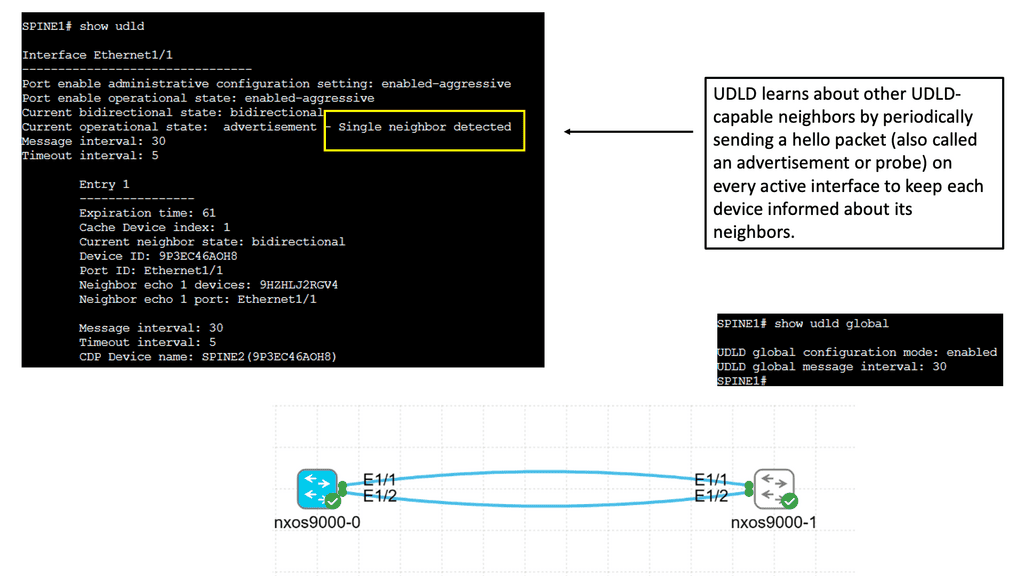
Section 01 · Architecture Fundamentals

Understanding SDN Architecture and Programmability

Software-Defined Networking separates network policy and control from packet forwarding through programmable interfaces and coordinated management. Explore the application, control and infrastructure layers, understand how they interact, and examine why SDN is an architectural approach rather than a single protocol or controller product.

Control vs. data plane SDN architecture Programmable interfaces
01 · ARCHITECTURE · CONTROL · PROGRAMMABILITY

SDN Architecture: The Control Plane and Network Programmability

Software-Defined Networking changes how network behaviour is configured, coordinated and managed. Rather than requiring engineers to configure every device independently for each network-wide change, SDN introduces software-based control and policy mechanisms that can coordinate infrastructure through programmable interfaces.

The central architectural idea is the separation of responsibilities between the systems that express network requirements, the control functions that translate those requirements into network behaviour, and the devices that forward packets. This separation can simplify operations and enable automation, but it does not mean that every routing decision moves into one central controller.

To understand an SDN data center, engineers must distinguish the control plane from the data plane, understand how controllers interact with network devices, and establish how a desired policy becomes observable forwarding behaviour.

The three conceptual layers of SDN

LAYER 01 Application layer Expresses application connectivity requirements, network services and higher-level policies.
LAYER 02 Control layer Coordinates network state, policy translation, topology information and infrastructure programming.
LAYER 03 Infrastructure layer Contains switches, routers and other forwarding elements that process traffic.
CROSS-LAYER Feedback and telemetry Reports configuration, device health, reachability and operational state to management and control systems.

These layers provide a useful architectural model rather than a mandatory physical deployment. Some platforms combine functions, distribute controller services across multiple systems, or retain substantial control-plane intelligence on individual switches and routers.

Control plane versus data plane

The control plane determines or coordinates how traffic should be forwarded. Depending on the architecture, it can include routing protocols, topology discovery, path calculation, policy processing and controller logic.

The data plane performs the actual packet-handling work. It examines packet headers, consults forwarding information and applies actions such as forwarding, encapsulation, decapsulation, marking or dropping. High-speed switches commonly execute these operations in specialised hardware.

From intent to packet forwarding
Network intent Desired connectivity and policy
→
Control logic Calculate or coordinate behaviour
→
Forwarding state Routes, rules and tables
→
Packet action Forward, modify or drop

Consider a workload that needs connectivity to an application in another network segment. The management system may express the required communication policy. A controller or orchestration system translates it into platform-specific configuration. Switches and routers then apply the resulting forwarding and enforcement state to real packets.

Each stage introduces a separate verification requirement. A policy can be accepted by the management system but fail during deployment; configuration can be installed while a route is missing; and a valid route can exist while a security rule prevents the application flow.

Engineering distinction

A controller's intended network state, a device's installed configuration and the forwarding behaviour observed by a packet capture are three different forms of evidence. Reliable troubleshooting correlates them instead of assuming that success at one layer proves success at every other layer.

What does an SDN controller actually do?

An SDN controller provides software-based mechanisms for coordinating network behaviour. Its responsibilities depend on the product and architecture, but can include maintaining a topology view, translating policy, calculating paths, managing forwarding rules, programming devices and collecting operational information.

Some controllers directly install forwarding entries in compatible switches. Others configure devices through management APIs, coordinate existing routing protocols, or distribute policy through agents and platform-specific components. An SDN controller should therefore be understood by the functions it performs, not simply by its product name.

Controller responsibilities
Topology and network state Build or maintain a view of devices, links, connectivity and relevant operational information.
Policy translation Convert higher-level requirements into configuration or forwarding instructions supported by the platform.
Infrastructure programming Communicate with network devices through supported protocols, APIs or management interfaces.
Verification and feedback Compare expected outcomes with reported configuration, connectivity and operational telemetry.

Northbound and southbound interfaces

SDN architectures commonly describe interfaces according to the direction in which information or control is exchanged. Northbound interfaces allow applications and orchestration systems to interact with controller services. Southbound interfaces connect control functions to network infrastructure.

Interface Purpose Examples
Northbound Expose network services, intent or operational information to applications and orchestration systems. REST APIs, controller SDKs and policy interfaces.
Southbound Exchange configuration, control information or forwarding instructions with infrastructure. OpenFlow, NETCONF, RESTCONF and platform-specific APIs, depending on the implementation.
Telemetry and feedback Return device state, counters, events and performance information for monitoring and verification. Streaming telemetry, counters, logs and event notifications.

These categories describe interface roles, not a requirement that every protocol be used in every SDN design. NETCONF and RESTCONF, for example, are management protocols rather than equivalents of OpenFlow's flow-programming model. The correct interface depends on the device capabilities and the operation being performed.

SDN and OpenFlow are not the same thing

OpenFlow is a protocol historically associated with SDN that allows a controller to communicate with compatible forwarding devices and manage flow-table behaviour. It helped demonstrate how packet forwarding could be programmed through an external control system.

SDN is the broader architectural approach. A network can use SDN principles without using OpenFlow. Modern data center platforms may combine controller-based policy, routing protocols, management APIs, overlays and distributed forwarding intelligence.

Open Networking Foundation initiatives helped advance the development and standardisation of SDN concepts and OpenFlow. In practice, engineers should evaluate the interfaces, supported features and operational model of the specific implementation rather than assume that every SDN product uses the same protocol stack.

Centralised policy does not mean one central forwarding engine

The term centralised control can be misleading if interpreted too literally. A controller may provide a global policy view while switches continue to forward packets locally. Distributed routing protocols can also operate alongside a controller, exchanging reachability information and maintaining forwarding tables.

This combination is particularly important in data centers. A controller might define tenant segmentation and application connectivity, while the underlay uses BGP or an IGP to establish IP reachability between leaf and spine switches. ECMP can then distribute eligible traffic across available equal-cost paths.

Separating these responsibilities allows policy orchestration and packet forwarding to work together without requiring every packet to pass through the controller.

Automation, consistency and failure handling

Programmability enables engineers to express repeatable network changes in software. Rather than manually configuring every device, an automation workflow can generate and deploy configuration, validate prerequisites and check the resulting state.

Automation does not automatically guarantee correctness. Incorrect intent, incomplete device support, stale topology data, failed deployment or partial updates can produce inconsistent outcomes. A robust implementation needs validation, access controls, change tracking, rollback or recovery procedures, and independent operational verification.

What to verify during an SDN change
Desired state Is the requested connectivity or segmentation policy valid and consistent with the intended design?
Deployment state Did all relevant controllers and devices accept and install the required changes?
Forwarding state Do the installed routes, next hops, forwarding entries and policy rules match the expected outcome?
Observed behaviour Can the required application traffic pass, and do telemetry and tests confirm the result?

Applying the architecture to a data center

Imagine a tenant needs a new application segment that can communicate with a database but must remain isolated from another tenant. The application or orchestration layer defines the connectivity intent. The control system translates it into the supported policy and configuration. The data center fabric provides the actual transport, while security enforcement ensures that only permitted communication is allowed.

The engineering task is to trace this chain end to end. Confirm that the policy exists, that the relevant devices received it, that the underlay can reach the required destinations, and that the overlay and security configuration support the intended traffic.

Section 01 takeaway

SDN provides programmable coordination of network behaviour. The control plane determines or coordinates how the network should operate, while the data plane performs packet forwarding. Successful operation depends on translating intent into valid device state and verifying the resulting traffic behaviour.

Engineering Lab · Section 01
SDN Architecture and Intent Verification

In the interactive lab, inspect a conceptual SDN data center and follow a policy change from application intent through controller processing to infrastructure configuration and packet forwarding. Examine the control and data planes separately, identify the role of northbound and southbound interfaces, and investigate what happens when intended policy and observed network state disagree.

Network Insight / Interactive Engineering Lab 01

SDN Architecture & Programmability

Trace how a programmable network separates decision-making from packet forwarding. Step through a simulated packet-in event, controller decision, flow-rule installation and data-plane forwarding. Then break a link and investigate the recovery.
Ready
Programmable Network Topology
Event 0 / 8
Primary path Alternate path Ethernet Control channel SDN CONTROLLER Policy / topology / rules HOST A 10.1.0.10 SWITCH 1 Ingress / flow match No rule yet SWITCH 2 Forwarding No rule yet SWITCH 3 Alternate route Standby HOST B 10.1.0.20 DATA PLANE Packet forwarding across switch links CONTROL PLANE Controller communicates with switches
Active forwarding path Controller channel Alternate path Failed link
Topology note: the controller makes logical forwarding decisions and programs the switches. User packets normally travel through the data plane; they do not pass through the controller.
Two Logical Planes
Architecture
Control Plane Decides

Maintains network state, applies policy and determines which forwarding behaviour should be installed.

Data Plane Forwards

Matches packets against forwarding entries and performs actions such as output, drop or header modification.

Controller stateInitialising
Installed flow rules0
Forwarding pathNot selected
Link conditionAll links available
Flow Table
Simulated entries
MatchActionState
10.1.0.10 → .20Pending—
Important: this table represents illustrative flow entries in the lab. Real switch rule syntax and controller protocols depend on the SDN platform.
Packet & Controller Event Timeline
Step-by-step trace
01Ingress Host A sends a packet to Host B; Switch 1 receives it.
02Match Switch 1 checks its flow table and finds no matching entry in this scenario.
03Packet-in The switch reports the table miss to the controller using the configured control mechanism.
04Decision The controller evaluates topology and policy, then selects a forwarding path.
05Install The controller sends flow-modification instructions to the relevant switches.
06Forward The packet is forwarded along the installed path toward Host B.
07Failure A link fails; the network must detect the change and determine whether an alternate route is usable.
08Recovery The lab models a controller-directed update to use the alternate path through Switch 3.
Live Engineering Readout
Lab telemetry
Current Event
Ready to begin
Select Step Forward to trace how a controller and programmable switches coordinate packet delivery.
Simulation Progress

Engineer Challenge

Run the packet trace, inject a link failure, and continue the simulation. Can the network deliver traffic without using the failed primary link?

Challenge status: not yet attempted.
Engineering takeaway: separating the control plane from the data plane makes forwarding behaviour programmable, but recovery still depends on detection, topology knowledge and valid forwarding updates.
Section 02 · Fabric Engineering

Leaf–Spine Fabrics, ECMP and Network Resilience

Modern data centers need predictable connectivity, usable redundant paths and reliable recovery from failures. Discover how leaf–spine topologies, routed underlays, BGP and Equal-Cost Multipath work together, and learn why routing convergence, forwarding state and available capacity must all be considered during an incident.

Leaf–spine topology BGP and ECMP Failure recovery
02 · FABRIC · ROUTING · RESILIENCE

SDN Data Center Fabrics: Leaf–Spine, ECMP and Resilient Forwarding

A programmable network needs a dependable transport foundation. In modern data centers, that foundation is often a routed leaf–spine fabric: a predictable topology designed to provide multiple paths, scalable east–west connectivity and fast recovery when links or devices fail.

Software-defined control and the physical fabric solve different problems. SDN provides mechanisms to coordinate policy and network configuration. The fabric provides the paths over which packets travel. Understanding how these parts work together is essential when designing, automating or troubleshooting a data center.

Why data centers moved beyond large Layer 2 domains

Traditional data center designs often relied on extensive Layer 2 connectivity. Spanning Tree Protocol (STP) prevents Layer 2 loops by blocking selected redundant paths. This protects the network from looping Ethernet frames, but some physical links may not forward traffic while the topology is stable.

As east–west traffic between servers, application tiers and storage increased, engineers looked for designs that could use redundant links more effectively. Routed leaf–spine fabrics provide multiple Layer 3 paths and can use Equal-Cost Multipath (ECMP) forwarding where supported and correctly configured.

This does not make STP obsolete. Layer 2 still exists at access edges and within particular designs. The key architectural choice is to limit where Layer 2 must extend and use routed connectivity for the scalable fabric wherever the design permits.

Understanding the leaf–spine topology

Conceptual routed data center fabric
Spine 1 Layer 3 transit
Spine 2 Layer 3 transit
Leaf 1 Compute rack A
Leaf 2 Compute rack B
Leaf 3 Storage / services
Leaf 4 Application tier

Simplified illustration: production fabrics generally connect each leaf to multiple spines. The actual number of devices, link speeds, redundancy and routing design depend on capacity and availability requirements.

Leaf switches connect directly to servers, hypervisors, storage systems or other network edges. Spine switches provide transit between leaves. In a conventional two-tier design, leaf switches connect to the spine layer rather than to one another.

Leaf layer

Provides workload attachment, Layer 3 gateways where required, access policy and connectivity to the fabric. It is commonly the point where server-facing links enter the network.

Spine layer

Provides high-capacity transit between leaves. Multiple spines create alternate paths and help scale fabric capacity without requiring every leaf to connect directly to every other leaf.

Underlay

The routed IP network connecting the fabric devices. It provides reachability between relevant interfaces and endpoints used by the routing and overlay systems.

Overlay

A logical network built over the underlay, often using VXLAN to carry tenant or segment traffic between tunnel endpoints. The overlay does not remove the need for working underlay reachability.

ECMP: using multiple equal-cost paths

Equal-Cost Multipath routing allows a router to install multiple eligible next hops for a destination when the routing system determines that those paths have the same cost. Instead of selecting only one next hop, the device can distribute eligible flows across the available paths.

In a leaf–spine fabric, a leaf may have a route to a remote subnet through several spine switches. If the routes qualify for ECMP, the leaf can use those next hops to distribute traffic across the fabric.

Example: two eligible next hops

Leaf 1 has two equal-cost routes to a remote destination: one through Spine 1 and one through Spine 2. If both next hops are installed and usable, eligible flows can be spread across the two paths. If a path becomes unavailable, routing and forwarding mechanisms can remove or stop using that next hop.

How ECMP distributes traffic

Many implementations use a hash calculated from packet or flow fields to select a next hop. This commonly keeps packets belonging to the same flow on the same path, reducing packet reordering. The exact hash inputs and resilience behaviour vary by platform.

ECMP does not necessarily divide every individual flow evenly. A large flow can dominate one path, and uneven flow sizes can create unequal utilisation even when the hashing mechanism is working correctly. Some platforms support additional techniques to improve distribution or reduce disruption when the set of next hops changes.

How BGP and other routing protocols support the fabric

A routed data center fabric needs a way to exchange reachability information. BGP is widely used in data center underlays because it provides policy controls, scalable route exchange and well-defined operational mechanisms. Other routing protocols, such as OSPF or IS-IS, can also be used depending on the design.

With an eBGP underlay, adjacent fabric devices in different autonomous systems exchange routes using external BGP sessions. Some designs use iBGP with a suitable route-reflection or control-plane architecture. The choice depends on the topology, operational model and requirements.

BGP multipath allows multiple paths to be installed when they satisfy the implementation's multipath eligibility rules and relevant configuration. Equal-cost forwarding is not guaranteed simply because BGP has learned more than one route: engineers must verify which paths were selected, which next hops were installed and how the forwarding hardware uses them.

Component Primary role What to verify
BGP or IGP Exchanges routes and establishes network reachability. Neighbour state, learned routes, route selection and next hops.
ECMP Uses multiple eligible equal-cost forwarding paths. Installed next hops, path eligibility and traffic distribution.
Forwarding hardware Applies the programmed forwarding decision to packets. Hardware programming, counters, drops and interface state.
SDN or automation layer Coordinates policy, configuration and operational workflows. Deployment status, device consistency and observed results.

Link failures and convergence

Redundant physical links do not automatically guarantee uninterrupted service. When a link or spine fails, the network must detect the failure, update relevant state and move traffic onto usable paths. The speed and impact of that process depend on the failure-detection method, routing protocol behaviour, hardware support and topology.

01
Detect the failure An interface may go down, a neighbour session may fail, or a configured liveness mechanism may detect loss of connectivity.
02
Update routing and forwarding state The device withdraws or invalidates affected reachability and adjusts the usable next-hop set according to its control-plane and forwarding implementation.
03
Use surviving paths Traffic can use remaining eligible paths if those paths have sufficient capacity and the destination remains reachable.
04
Validate service recovery Check route state, next-hop installation, packet loss, application connectivity and relevant telemetry rather than relying only on the interface status.

Some platforms support fast reroute or other mechanisms that can reduce interruption before full routing convergence completes. These features have specific design and support requirements. They should be validated under realistic failure conditions instead of assumed to be active by default.

Capacity planning and oversubscription

Fabric resilience is also a capacity question. A design may have multiple paths but still experience congestion if surviving links cannot carry the offered load after a failure.

Oversubscription compares the potential aggregate bandwidth offered by downstream links with the available upstream capacity. The acceptable ratio depends on the workloads. Traffic patterns dominated by short server-to-server exchanges can have different needs from storage traffic, distributed analytics or GPU clusters with heavy all-to-all communication.

Engineers should size the fabric for normal operation and consider what happens when one or more links or devices are unavailable. Monitoring utilisation, queue drops, latency and flow distribution helps establish whether the fabric behaves as designed.

Where SDN fits into fabric operations

SDN does not replace the physical fabric or make routing protocols unnecessary. Instead, programmable systems can standardise device provisioning, apply configuration templates, coordinate policy, collect telemetry and validate expected state.

For example, an automation system may deploy a new leaf switch with consistent interface settings, routing configuration and monitoring. The routing protocol still establishes reachability, while the automation layer checks that the device joins the fabric and receives the intended configuration.

This division of responsibilities supports repeatability while preserving the importance of routing fundamentals. If a workload cannot reach a destination, engineers still need to inspect the route, next hop, interface state, forwarding entry and any relevant policy or overlay dependency.

Section 02 takeaway

A routed leaf–spine fabric provides a scalable transport foundation. Routing establishes reachability, ECMP can use multiple eligible paths, and failure handling determines how traffic recovers. SDN and automation help coordinate and verify the design, but correct forwarding, capacity and resilience must still be proven through operational evidence.

Engineering Lab · Section 02
Leaf–Spine Path Selection and Link-Failure Investigation

In the interactive lab, trace traffic between two leaf switches through multiple spines. Inspect route selection and ECMP next hops, simulate a link failure, and compare the expected path with the surviving forwarding state. The investigation will distinguish routing convergence from application recovery and highlight how to verify whether remaining paths have sufficient capacity.

Section 03 · Network Virtualisation

VXLAN Overlays and Logical Network Segmentation

Virtualised networks allow multiple logical environments to share a physical fabric while maintaining defined connectivity boundaries. Follow the packet through the VXLAN encapsulation process, examine VTEPs and VNIs, and learn how underlay reachability, endpoint discovery, MTU and security policy affect end-to-end communication.

Underlay vs. overlay VXLAN and VTEPs Tenant isolation
03 · VIRTUALISATION · VXLAN · SEGMENTATION

Network Virtualisation: VXLAN, Overlays and Tenant Segmentation

Network virtualisation separates logical network design from the physical links and switches that carry traffic. It allows an infrastructure team to create multiple isolated network segments over a shared IP fabric, supporting multi-tenant environments, flexible workload placement and consistent policy.

Software-defined networking can help automate how these logical networks are created and managed. In many data centers, VXLAN provides the overlay encapsulation, while the routed IP underlay supplies connectivity between the devices that terminate those tunnels.

Underlay and overlay: two different responsibilities

The underlay is the physical or routed transport network. It provides IP reachability between fabric endpoints, including Virtual Tunnel Endpoints (VTEPs) when VXLAN is used.

The overlay is a logical network carried across that transport. VXLAN encapsulates an inner Ethernet frame inside an outer transport packet, allowing Layer 2 segments to extend across an IP network without requiring the underlay to behave as one large Layer 2 domain.

How an overlay packet travels
Source workload Inner Ethernet frame
→
Source VTEP Adds VXLAN and outer headers
→
IP underlay Routes outer packet
→
Destination VTEP Removes encapsulation
→
Destination workload Receives inner frame

Conceptual packet path. The underlay forwards using the outer IP header; the overlay identifies the logical segment and carries the original Ethernet frame.

What VXLAN contributes

VXLAN is an encapsulation technology, not a complete network automation or policy system by itself. It carries Ethernet frames over an IP network and uses a 24-bit VXLAN Network Identifier (VNI) to identify a logical Layer 2 segment.

VTEP

A VXLAN Tunnel Endpoint performs encapsulation and decapsulation. It maps local traffic to the appropriate VXLAN segment and sends encapsulated traffic toward the remote VTEP.

VNI

The VXLAN Network Identifier distinguishes logical VXLAN segments. A VNI is not the same thing as a VLAN ID, even though implementations can map VLANs to VNIs.

Outer IP header

Identifies the tunnel endpoints and enables the underlay routers to forward the encapsulated packet toward the destination VTEP.

Inner Ethernet frame

Carries the original workload traffic through the overlay. The destination VTEP decapsulates the packet and forwards the inner frame within the correct logical segment.

Engineering distinction

VXLAN provides encapsulation and segment identification. It does not, by itself, determine every endpoint location, distribute all required forwarding information, enforce a complete security policy or guarantee underlay reachability. Those responsibilities depend on the control-plane design, platform and surrounding network services.

How endpoints and VTEPs discover each other

A VTEP needs sufficient forwarding information to reach the correct remote VTEP and deliver traffic to the intended endpoint. Different VXLAN designs use different control-plane approaches.

Control-plane learning

Some deployments use data-plane learning, where information about remote endpoints is learned from traffic. Other designs use a control plane to distribute endpoint reachability before traffic needs to be forwarded. In BGP EVPN designs, BGP EVPN distributes MAC and IP reachability information and supports additional services according to the configured architecture.

A control plane can reduce dependence on flood-and-learn behaviour and improve how endpoint information is distributed across a fabric. However, correct operation still depends on consistent configuration, route exchange, VNI membership, endpoint learning and the availability of the underlying transport.

Tenant segmentation and policy

Virtual networks allow different applications, customers or organisational units to share physical infrastructure while maintaining logical separation. For example, production services, development workloads and shared infrastructure services can occupy different logical segments.

Segmentation is not automatically equivalent to a complete security boundary. Engineers must determine which communication is allowed between segments and implement the appropriate routing, gateway controls, distributed firewall rules, access policies or other enforcement mechanisms.

Design element Question it answers Typical verification
VLAN / VNI mapping Which logical segment does this traffic belong to? VLAN configuration, VNI mapping and segment membership.
VTEP reachability Can the source tunnel endpoint reach the destination VTEP? Underlay routes, next hops and IP connectivity.
Endpoint information Where should the destination MAC or IP be forwarded? MAC tables, ARP/ND state and control-plane advertisements.
Inter-segment policy Is communication between these segments permitted? Gateway routes, ACLs, firewall rules and policy counters.
MTU Can encapsulated packets traverse the underlay without unwanted fragmentation or drops? Interface MTU, encapsulation overhead and packet-drop counters.

Why the underlay MTU matters

VXLAN adds outer headers around the original Ethernet frame. This increases packet size. If the underlay MTU is not designed to accommodate the encapsulated packet, traffic may be fragmented where permitted or dropped, depending on the packet size, configuration and forwarding behaviour.

MTU problems can be deceptive: small packets may work while larger transfers fail or perform poorly. A reliable deployment validates the intended MTU end to end and checks counters and packet behaviour rather than assuming that successful ping tests prove every packet size will work.

How SDN and automation manage virtual networks

An SDN controller or automation platform can provide a consistent workflow for provisioning logical networks, mapping segments, distributing configuration and applying policy. Depending on the implementation, it may also integrate with virtualisation platforms, IP address management, inventory and telemetry systems.

The implementation model varies. Some systems use a central orchestration layer to coordinate configuration across devices; others rely on distributed control-plane protocols, local device decisions or a combination of both. A central management interface does not necessarily mean all packet-forwarding decisions are made by one central process.

Overlay troubleshooting: follow the packet in layers

1. Verify the workload Confirm the source and destination addressing, local interface, VLAN or segment attachment, and the intended security policy.
2. Verify the underlay Check that the source VTEP can reach the destination VTEP through the routed fabric.
3. Verify the overlay Inspect VNI membership, remote endpoint information, MAC learning and relevant EVPN routes where applicable.
4. Verify forwarding and policy Check tunnel state, forwarding entries, MTU, packet drops and any gateway or firewall rules affecting the flow.
Section 03 takeaway

Network virtualisation creates logical networks over shared transport. VXLAN carries Layer 2 frames across an IP underlay, while VTEPs, VNIs, endpoint reachability and policy determine how traffic is delivered. Troubleshooting should separate underlay reachability, overlay state and security enforcement instead of treating the virtual network as one opaque system.

Engineering Lab · Section 03
VXLAN Overlay Reachability and Tenant Isolation

The planned interactive lab will trace a packet from a source workload through its VTEP and routed underlay to a remote endpoint. Investigate a missing route, incorrect segment mapping or policy restriction, then identify which evidence proves whether the fault belongs to the underlay, overlay or security layer.

Network Insight / Interactive Engineering Lab 02

Leaf–Spine Fabrics, ECMP & Resilience

Explore a two-spine data centre fabric. Trace traffic from one leaf to another, inspect equal-cost paths, then disable a spine-facing link and observe how the available forwarding paths change.
Fabric healthy
Leaf–Spine Topology
Packets delivered: 0
Path A Path B SPINE LAYER LEAF LAYER SPINE 1 ECMP next hop Available SPINE 2 ECMP next hop Available LEAF 1 Source rack 2 uplinks 10.10.1.0/24 LEAF 2 Destination rack 2 uplinks 10.10.2.0/24 HOST A 10.10.1.10 HOST B 10.10.2.20 Conceptual topology: each leaf connects to each spine.
Selected path Remaining / alternate path Failed link
Fabric principle: every leaf connects to both spines. This creates multiple routed paths between racks without requiring leaf-to-leaf links.
Fabric Telemetry
Live model
Available Paths
2
Leaf 1 to Leaf 2
Delivered Packets
0
Simulated traffic
ECMP modeRound Robin
Current next hopNot selected
Spine 1 linkUp
Spine 2 linkUp
Last packetNot sent
ECMP Path Options
Next-hop candidates
Path A · Spine 1AVAILABLE
Host A → Leaf 1 → Spine 1 → Leaf 2 → Host B
Path B · Spine 2AVAILABLE
Host A → Leaf 1 → Spine 2 → Leaf 2 → Host B
ECMP: Equal-Cost Multi-Path allows routing to use multiple paths with equal routing cost. Actual traffic distribution depends on the forwarding platform and its hashing or load-sharing implementation.
Fabric Event Timeline
Packet and failure trace
01IngressHost A sends traffic to Host B through Leaf 1.
02RouteLeaf 1 has two equal-cost next-hop candidates: Spine 1 and Spine 2.
03ECMPThe simulated ECMP policy selects one available spine path.
04ForwardTraffic crosses the selected spine and reaches Leaf 2.
05FailureA spine-facing link is taken out of service in the lab.
06RebalanceThe failed candidate is excluded and the remaining path is selected.
Engineering Readout
Interpret the result
Current Event
Ready to send traffic
Send a packet to see the ECMP path selection model in action.
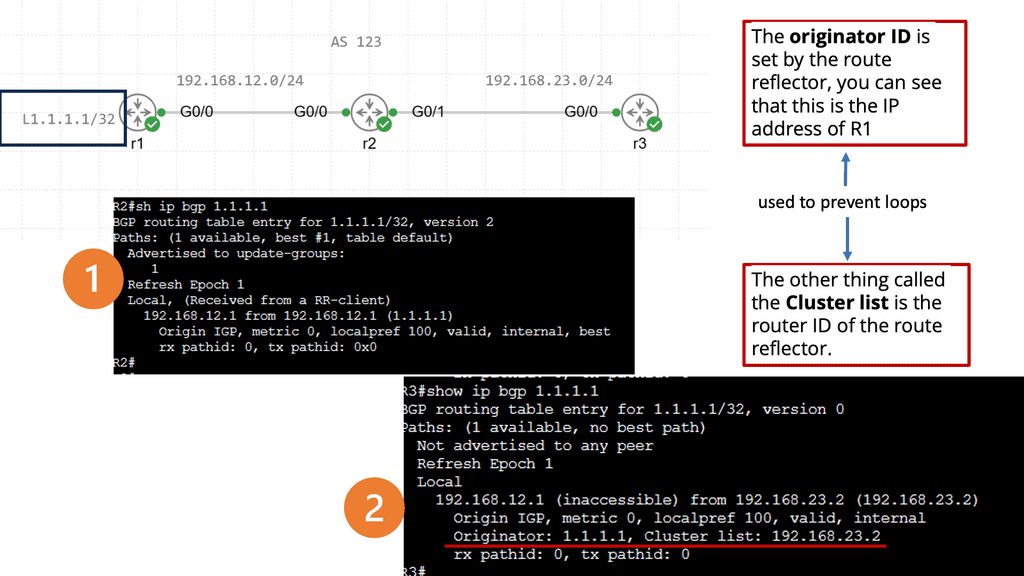
Trace Progress

Engineer Challenge

Send several packets, fail Spine 1's path, then send more traffic. Check whether the selected path avoids the failed link.

Challenge status: not yet attempted.
Engineering takeaway: redundant physical links provide path choices, but routing and forwarding must recognise failures before traffic can use the remaining path.
Section 04 · Programmable Operations

SDN Controllers, Automation and Policy-Based Operations

Network automation should deliver a verified outcome, not merely execute configuration commands. Explore the relationship between intent, controllers, APIs and distributed routing, then examine idempotency, controlled deployments, access security and the evidence required to confirm that a network change has succeeded.

Controllers and APIs Desired-state workflows Change validation
04 · CONTROLLERS · AUTOMATION · POLICY

SDN Controllers, Network Automation and Policy-Based Operations

The operational value of Software-Defined Networking is not simply that a network has a controller. It is the ability to express intent, translate that intent into consistent configuration or policy, and verify that the network behaves as expected. Controllers and automation systems can help make these workflows repeatable, observable and easier to manage at scale.

The exact implementation varies by platform. Some architectures use a controller to calculate or distribute network state; others combine central orchestration with distributed routing protocols and local forwarding decisions. Understanding that division is essential when designing resilient automation.
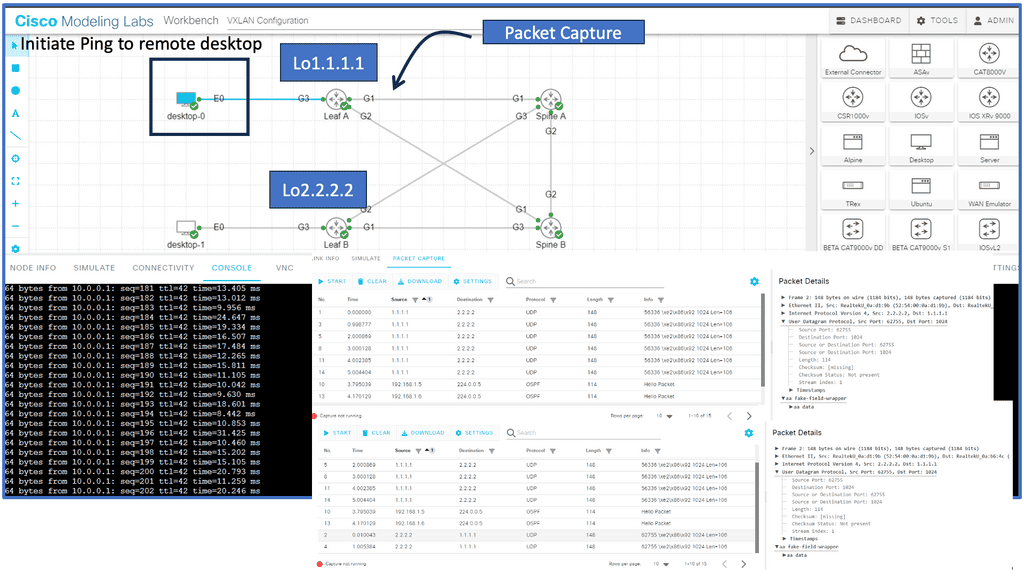
From network intent to verified forwarding

A useful operational model separates what the organisation wants the network to do from the configuration used to achieve it. An engineer might request connectivity between two application tiers, isolation for a tenant, or a resilient path to a service. The management system then translates the requirement into configuration, policy and validation checks.

STEP 01
Define intent
Specify connectivity, segmentation, performance and security requirements.
STEP 02
Translate policy
Map the requested outcome to device configuration, routes, services and rules.
STEP 03
Deploy changes
Apply configuration through supported APIs, protocols or management interfaces.
STEP 04
Verify outcome
Compare observed state with intended state and investigate any discrepancy.

What an SDN controller actually does

The term controller covers several different roles. A controller may maintain topology information, calculate paths, manage policy, coordinate provisioning or expose an API to orchestration tools. Not every controller performs every role, and not every SDN architecture relies on one controller for all control-plane decisions.

A simplified management and forwarding relationship
Applications and operators Business intent, workflows and service requirements
→
Controller / orchestrator Policy, coordination and supported APIs
→
Network devices Routing, local decisions and packet forwarding

Conceptual model only. Production systems may separate orchestration, control-plane services, device management and telemetry into several components. Data-plane forwarding normally continues locally even when a management interface is temporarily unavailable, subject to platform design.

Centralised management does not mean every decision is centralised

A common misunderstanding is that SDN always removes distributed control protocols. In practice, many systems use a central management layer while routing protocols such as BGP, OSPF or IS-IS continue to exchange reachability information between network devices.

Logical centralisation means that policy or control can be coordinated through a common abstraction. The underlying implementation may still be distributed across multiple controller instances and network devices for scale and resilience. The design must define which component owns each decision and what happens when components lose connectivity.
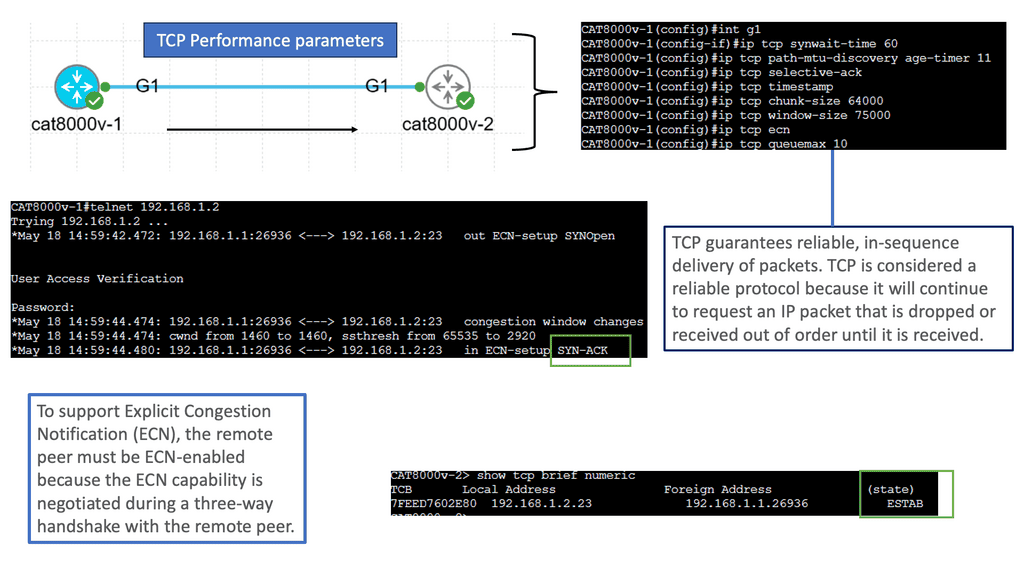
Central orchestration

Coordinates workflows, inventory, templates and service deployment across the infrastructure. It can help maintain consistent configuration but must handle partial failures and incomplete deployments.

Distributed routing

Network devices exchange reachability and make routing decisions according to protocol rules and local state. The routing system remains responsible for the behaviour defined by its configuration.
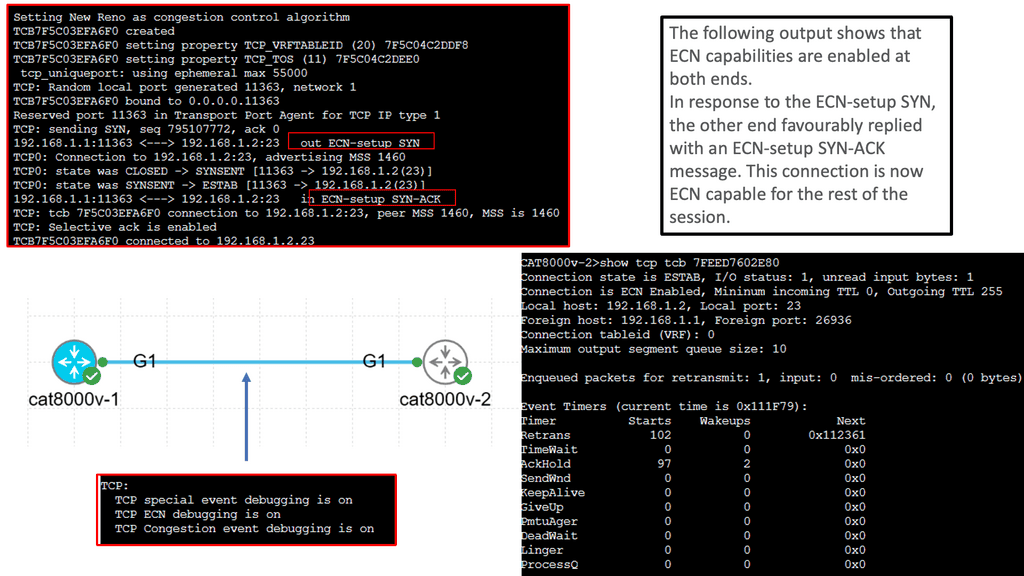
Local forwarding

Forwarding hardware or software applies installed forwarding entries to packets. A loss of management-plane access does not necessarily stop existing forwarding.

Telemetry and assurance

Monitoring systems collect operational evidence, detect anomalies and help compare actual network behaviour with intended service outcomes.

Programmable interfaces: APIs, models and device configuration

Programmability gives software a supported way to interact with network infrastructure. Depending on the platform, this may include REST APIs, NETCONF, RESTCONF, gNMI, YANG data models, command-line interfaces or vendor-specific management systems. These technologies are not interchangeable; each has its own capabilities, data models, transport and operational requirements.

A reliable automation workflow should avoid relying on fragile assumptions about device output or configuration syntax. Where supported, structured data models and APIs can make it easier to validate input, detect errors and compare configuration with expected state.

Mechanism Typical purpose Engineering consideration
REST API Integrate applications with controller or device services. Authentication, API versioning, error handling and request limits.
NETCONF / RESTCONF Access structured configuration and operational data where supported. Data-model support, transaction behaviour and device compatibility.
YANG Define structured data models for configuration and state. Model revisions and implementation-specific support.
gNMI Provide model-driven management and telemetry in supported systems. Subscription design, data volume and operational-state interpretation.
CLI automation Automate devices where command-line workflows are required. Prompt handling, parsing, idempotency and platform-specific syntax.
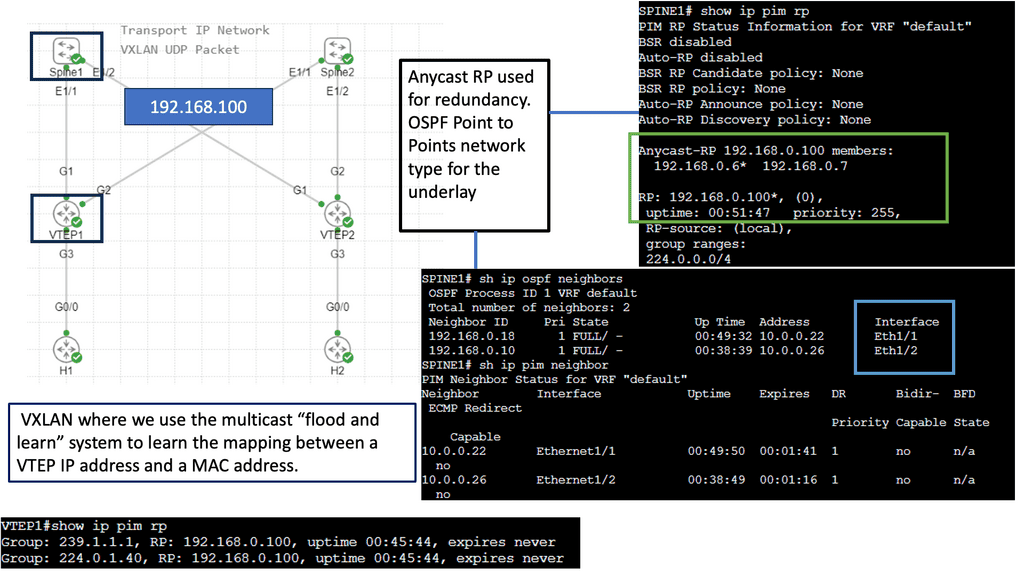
Configuration management and idempotency

An automation task should ideally be safe to run more than once. This property is known as idempotency: repeating an operation should not create unintended duplicate state or progressively change the result.

For example, an automation workflow should check whether a required VLAN, routing neighbour or policy object already exists before creating or modifying it. It should also distinguish between the configuration it intends to apply and the operational state the device actually reports.

Desired state is not proof of operational state

A successful API response can indicate that a request was accepted, but it does not by itself prove that the intended service is working. Confirm the resulting device configuration, protocol state, installed forwarding entries and end-to-end connectivity where appropriate.

Change control: validate before and after deployment

Network automation increases the speed and consistency of change, but it can also propagate an incorrect policy or configuration across many devices. Production workflows should therefore include validation, controlled rollout, logging and recovery procedures.

BEFORE
Pre-checks
Confirm inventory, dependencies, baseline state and permitted change scope.
CHANGE
Controlled rollout
Apply a limited change, with safeguards and clear failure handling.
AFTER
Post-checks
Verify configuration, routing, forwarding and service reachability.
RECOVERY
Rollback or repair
Restore a known-good state or apply a documented corrective action if checks fail.

Security and resilience of the management plane

Controllers and automation systems can have broad privileges. Their compromise or misconfiguration may affect a large part of the network. Protecting these systems is therefore part of the network architecture, not an optional operational detail.

Least privilege Give services and operators only the permissions required for their specific tasks.
Authentication and secrets Use supported authentication, protect credentials and rotate secrets according to operational policy.
Management-plane isolation Restrict management access to approved networks, identities and administrative paths.
Audit and recovery Record changes, monitor controller health and maintain tested recovery procedures for failed deployments.

How to troubleshoot an automation failure

When an automated change fails, avoid assuming that the controller is the only possible source of the problem. Work through the workflow and identify the first point where observed behaviour differs from the intended result.

Check the input request, policy translation, API response, device configuration, routing state, forwarding state and service-level result. This sequence helps distinguish a rejected request from a partially deployed change or a network that is configured correctly but cannot provide the expected service.

Section 04 takeaway

Controllers and automation systems coordinate intent, policy and configuration. Reliable SDN operations require more than issuing commands: they require idempotent workflows, access controls, change validation, operational telemetry and proof that the intended network outcome has been achieved.

Engineering Lab · Section 04
Policy Deployment, State Validation and Change Recovery

The planned interactive lab will follow a policy change from intent through deployment to observed network state. Inspect a failed or incomplete change, identify where the workflow diverged from the expected result, and determine which configuration, routing and forwarding evidence is needed before declaring the service healthy.

Network Insight / Interactive Engineering Lab 04

Fabric Capacity, Congestion & Resilience

Increase traffic demand, observe per-uplink utilisation, then remove an uplink and investigate how the remaining path absorbs the load.
Nominal capacity
Leaf–Spine Traffic Topology
Demand: 0 units
SPINE LAYER Redundant uplinks HOST ACCESS SPINE 1 Path A Available SPINE 2 Path B Available LEAF 1 Ingress 2 uplinks Rack A LEAF 2 Egress 2 uplinks Rack B HOST A Traffic source HOST B Traffic sink Illustrative capacity model: 100 units per uplink
Active traffic path Available alternate High utilisation Failed uplink
Model assumption: each leaf-to-spine uplink has a teaching capacity of 100 traffic units. Traffic is split across available paths for this exercise; this is a simplified capacity model, not a packet-level simulator or a benchmark of real hardware.
Capacity Dashboard
Illustrative units
Offered demand
0
Traffic units
Active capacity
200
Traffic units
Forwarded
0
Traffic units
Excess demand
0
Unserved in model
Path A · Spine 10 / 100
Path B · Spine 20 / 100
Overall utilisation0%
No traffic has been offered. Add demand to establish a baseline.
Operations Event Log
Latest event first
READYBoth spine paths are available. Aggregate illustrative capacity is 200 units.
Engineer Diagnosis
Observe · Compare · Explain
Current finding
The fabric is ready for a traffic test.
Increase demand in stages. Compare forwarded traffic with the available capacity, then repeat the experiment after removing an uplink.

Challenge: Survive the Uplink Failure

Add 60 units of demand, fail Leaf 1–Spine 1, then add another 60 units. Compare the available capacity before and after the failure.

Status: awaiting the initial traffic test.
Key concept: redundancy provides an alternate path, but it does not guarantee the remaining path has enough capacity to carry the full traffic load without congestion or drops.
Section 05 · Assurance and Troubleshooting

SDN Operations, Security and Intent-Based Networking

Reliable network operations depend on evidence that the service is working as intended. Learn how to correlate telemetry and events, isolate faults across physical, control and forwarding layers, secure programmable infrastructure, and use intent-based workflows to compare expected network behaviour with observed results.

Telemetry and assurance Incident investigation Intent-based networking
05 · OPERATIONS · ASSURANCE · SECURITY

SDN Operations, Troubleshooting, Security and Intent-Based Networking

A network is not successful simply because it has a controller, programmable interfaces or automated configuration. It is successful when it delivers the required connectivity, performance and security—and when engineers can prove that it continues to do so during changes and failures.

Effective SDN operations connect configuration management with observability, troubleshooting, security controls and service validation. This is where network automation becomes an operational discipline rather than just a way to issue commands faster.

From device monitoring to network assurance

Traditional monitoring often starts with individual device metrics: interface state, CPU, memory, routing neighbours and packet drops. These remain important, but they do not always explain whether an application can communicate with its intended destination.

Network assurance connects those individual signals to a broader question: does the network meet its intended service requirements? A useful assurance process compares expected state with observed state and gathers enough evidence to identify the source of a discrepancy.

01 · OBSERVE
Collect telemetry
Gather interface counters, routes, events, logs and performance measurements.
02 · CORRELATE
Build context
Relate device events to topology, services, policy and affected workloads.
03 · DIAGNOSE
Find the fault
Test hypotheses against routing, forwarding and end-to-end evidence.
04 · VALIDATE
Prove recovery
Confirm the intended service has recovered and check for remaining impact.

Build a layered troubleshooting method

When a service fails, begin with the observed symptom and follow the actual packet path. Avoid changing several configuration elements at once: doing so can hide the original cause and make recovery more difficult.

Physical and interface state

Check link status, errors, discards, optical levels where relevant, speed and duplex settings, and the health of connected devices.

Control-plane state

Verify routing neighbours, learned routes, selected paths, route policies and whether the expected prefixes are being advertised and received.

Forwarding state

Inspect the installed next hops, forwarding entries, adjacency resolution, tunnel state and counters to confirm that the data plane matches the routing intent.

Service and policy state

Test source-to-destination reachability, application ports, segmentation rules, firewall policy, DNS and other service dependencies relevant to the failure.

Operational principle

A healthy routing neighbour does not prove that a specific application flow will succeed. A route in the routing table does not prove that the correct next hop is installed in forwarding hardware. Each layer needs evidence appropriate to the question being investigated.

Telemetry, logs and event correlation

Telemetry can expose changes in interface utilisation, queue drops, route state, device health and other operational signals. Logs provide event context, while flow records and packet captures can help show where traffic is going or being lost.

These sources become more useful when they share reliable timestamps and are correlated with the topology and configuration in effect at the time. For example, a burst of packet loss may align with a link failure, a routing change or an automated policy deployment.

Correlation helps narrow the investigation, but timing alone does not prove causation. Engineers should verify the suspected relationship using route changes, interface counters, forwarding state or controlled reproduction where possible.

Security boundaries in an SDN environment

Programmability creates opportunities to enforce consistent policy, but it also increases the importance of securing the management plane and validating policy changes. An incorrectly scoped rule or compromised automation credential can have consequences across many devices or tenants.

Identity and access Authenticate users and services, apply least privilege and review administrative permissions.
Tenant separation Validate segment boundaries, permitted routes and the controls governing inter-tenant communication.
Change auditing Record who or what initiated a change, what was modified and whether post-change checks succeeded.
Resilience and recovery Protect controller access, monitor critical services and test recovery procedures before they are needed.

Intent-based networking: intent, policy and assurance

Intent-based networking aims to express desired network outcomes at a higher level than individual device commands. Instead of manually configuring every relevant device, an operator defines an outcome—such as approved connectivity between application tiers—and a system translates it into supported configuration and policy.

A more complete intent-based workflow also checks whether the requested outcome has been achieved. It may detect a mismatch, explain the affected components and recommend or perform a corrective action within approved safeguards.

The label alone does not guarantee autonomous correction or closed-loop operation. Capabilities vary by platform, and remediation should be bounded by policy, testing, approval requirements and a clear rollback strategy.

INTENT
Define the outcome
Specify the service, security and performance requirements.
TRANSLATE
Derive the policy
Convert the outcome into supported configuration and network controls.
ASSURE
Compare actual state
Measure operational evidence against the intended outcome.
IMPROVE
Correct safely
Investigate deviations and apply authorised corrective action when appropriate.

Common failure patterns and the evidence to collect

Symptom Possible causes Evidence to inspect
Configuration deployment fails Authentication, schema mismatch, invalid input or unsupported feature. API response, controller logs, validation output and device configuration.
Route exists but traffic fails Incorrect next hop, unresolved adjacency, ACL, MTU or forwarding issue. Routing table, forwarding entries, counters and packet-path tests.
Service fails after a change Policy mismatch, partial deployment or unexpected dependency. Change audit, before-and-after state, affected routes and service tests.
Traffic loss after link failure Convergence delay, insufficient remaining capacity or missing alternate path. Interface events, neighbour state, route updates, ECMP next hops and drops.
Unexpected cross-segment access Incorrect segmentation or overly permissive policy. VLAN/VNI mapping, gateway routing, firewall rules and access-policy counters.

Measure operational success

Automation success should be measured by more than the number of commands executed or devices configured. Useful measures include deployment success rate, change failure rate, recovery time, configuration drift, service availability and the time needed to diagnose a fault.

Baselines matter. Record normal behaviour before introducing a new workflow, then compare results over a meaningful period. A reduction in manual effort is valuable, but not if it comes at the cost of less reliable change or weaker security.

Section 05 takeaway

Mature SDN operations combine programmability with observability, layered troubleshooting, security controls and measurable assurance. Intent-based workflows can help close the loop between desired and observed network behaviour, but reliable outcomes still depend on sound architecture, trustworthy evidence and controlled remediation.

Engineering Lab · Section 05
Network Incident Investigation and Assurance

The planned interactive lab will present a network service incident with multiple possible causes. Inspect topology, event history, routing state, forwarding evidence and policy before selecting a diagnosis. The objective is to build a defensible explanation of the failure, identify the corrective action and verify recovery using observed network state.

Network Insight / Interactive Engineering Lab 05

ECMP Path Selection & Flow Distribution

Explore how multiple flows are assigned to equal-cost paths. Compare deterministic flow hashing with a simplified round-robin model, then remove a spine path and inspect the reassignment.
Two paths available
ECMP Forwarding Topology
0 active flows
SPINE LAYER Equal-cost paths across the fabric SPINE 1 ECMP Path A Available SPINE 2 ECMP Path B Available LEAF 1 Ingress ECMP next hops 2 available LEAF 2 Egress Destination prefix 10.20.0.0/24 HOST A Flow source HOST B Flow destination Conceptual flow assignment · not packet-level emulation
Path A · Spine 1 Path B · Spine 2 Failed path
Important: ECMP normally distributes flows using a hash over selected packet-header fields. A flow generally remains on one next hop to avoid excessive reordering. The round-robin option here is a teaching comparison, not a claim that production ECMP typically schedules individual packets this way.
Distribution Summary
Current flow assignments
Active flows
0
Generated sessions
Available paths
2
Equal-cost next hops
Path A flows
0
Via Spine 1
Path B flows
0
Via Spine 2
Add flows to observe how the selected distribution method assigns next hops.
Engineering note: an even flow count does not guarantee equal bandwidth. A single high-volume flow can dominate a path even when the number of assigned flows is balanced.
Flow Assignment Table
Up to 24 flows displayed
No flows yet. Select “Add 4 Flows” to begin the experiment.
Engineer Diagnosis
Inspect · Compare · Explain
Current finding
The fabric has two available equal-cost paths.
Generate several flows and compare their next-hop assignments. Then fail one path and observe the simplified reassignment behaviour.

Challenge: Explain ECMP Rebalancing

Generate at least 8 flows using flow hashing. Fail Spine 1's path and inspect the assignments. Switch to round-robin and repeat. Explain why a path failure can cause flows to move and why production devices may use resilient hashing to reduce unnecessary remapping.

Status: generate at least 8 flows to begin.
Remember: ECMP chooses among eligible equal-cost next hops. Routing determines which paths are available; forwarding hardware or software performs the per-flow selection.
Network Insight · Engineering Conclusion

Conclusion: Building and Operating an SDN Data Centre

Software-defined networking is more than a programmable network interface. It is an architectural approach that brings together scalable forwarding, network virtualisation, centralised policy, automation and evidence-driven operations.

Throughout this guide, we have examined how SDN changes the way data centre networks are designed, controlled and operated. The central engineering lesson is that programmability creates value only when it is supported by sound architecture, predictable forwarding, reliable state, and effective verification.

Five engineering principles to take forward

01
Design the architecture first

Separate forwarding responsibilities from control and management functions where appropriate. Define clear interfaces, failure boundaries and operational ownership before introducing automation.

02
Engineer for scale and resilience

Leaf–spine fabrics, ECMP and multiple paths can provide scalable east–west connectivity. Validate capacity, flow distribution, convergence and the impact of link or device failures.

03
Make virtual networks understandable

VXLAN overlays and tenant segmentation provide logical separation over shared infrastructure. Correct VTEP reachability, VNI mappings, endpoint learning and policy enforcement remain essential.

04
Automate with explicit intent

Controllers, APIs and configuration pipelines should translate defined requirements into controlled changes. Validate inputs, manage dependencies, check results and maintain a clear rollback path.

05
Operate from evidence

Telemetry, logs, counters, flow data and state inspection help engineers distinguish a control-plane issue from a forwarding, overlay, policy or application problem.

06
Secure the complete system

Protect controller access, APIs, credentials and automation pipelines. Apply least privilege, segment management traffic, audit changes and test failure recovery as part of routine operations.

From design principles to operational practice

A successful SDN deployment should be evaluated against measurable outcomes: predictable forwarding, adequate capacity, reliable convergence, effective segmentation, repeatable changes and recoverable failures. A topology diagram or successful configuration alone does not prove that the network is behaving as intended.

Engineers should test both normal operation and failure conditions. Introduce controlled faults, observe how state changes across the fabric, verify the resulting forwarding path and compare the outcome with the original design intent. This turns SDN from a collection of technologies into an operational system that can be understood and validated.

The engineering takeaway

Build for predictable behaviour, automate with guardrails, and verify every important outcome. The strongest SDN data centre is not simply the one with the most automation; it is the one whose architecture, policies, forwarding and recovery behaviour can be explained and tested.

Practical review checklist

  • Can you explain how control, management and forwarding responsibilities interact?
  • Have you tested ECMP distribution, available capacity and single-link or device failures?
  • Can you trace an endpoint across the overlay and verify its tenant and policy context?
  • Are automated changes validated, observable, auditable and reversible?
  • Can the operations team diagnose a fault using evidence rather than assumptions?

SDN continues to evolve alongside cloud-native infrastructure, network APIs, intent-based operations and AI-assisted data centre management. The underlying engineering disciplines remain the same: understand the architecture, observe the system, test the failure modes and verify that the network delivers the behaviour its users depend on.

Use these principles as a foundation for evaluating new designs, investigating production incidents and developing more reliable, programmable network infrastructure.

```
☕
Support Network Insight
Help support independent engineering guides, interactive networking tools, and future learning labs.
Support Network Insight ```