fabricpath design

Data Center Fabric

Data Center Fabric

In today's digital age, where vast amounts of data are generated and processed, data centers play a vital role in ensuring seamless and efficient operations. At the heart of these data centers lies the concept of data center fabric – a sophisticated infrastructure that forms the backbone of modern computing. In this blog post, we will delve into the intricacies of data center fabric, exploring its importance, components, and benefits.

Data center fabric refers to the underlying architecture and interconnectivity of networking resources within a data center. It is designed to efficiently handle data traffic between various components, such as servers, storage devices, and switches while ensuring high performance, scalability, and reliability. Think of it as the circulatory system of a data center, facilitating the flow of data and enabling seamless communication between different entities.

A well-designed data center fabric consists of several key components. Firstly, network switches play a vital role in facilitating connectivity among different devices. These switches are often equipped with advanced features such as high port density, low latency, and support for various protocols. Secondly, the physical cabling infrastructure, including fiber optic cables, ensures fast and reliable data transfer. Lastly, network management tools and software provide centralized control and monitoring capabilities, optimizing the overall performance and security of the fabric.

Data center fabric offers numerous benefits that contribute to the efficiency and effectiveness of data center operations. Firstly, it enables seamless scalability, allowing organizations to easily expand their infrastructure as their needs grow. Additionally, data center fabric enhances network resiliency by providing redundant paths and minimizing single points of failure. This ensures high availability and minimizes the risk of downtime. Moreover, the centralized management of the fabric simplifies network administration and troubleshooting, saving valuable time and resources.

As the demand for digital services continues to skyrocket, data center fabric plays a pivotal role in shaping the digital landscape. Its high-speed and reliable connectivity enable the smooth functioning of cloud computing, e-commerce platforms, content delivery networks, and other services that rely on data centers. Furthermore, data center fabric empowers enterprises to adopt emerging technologies such as artificial intelligence, big data analytics, and Internet of Things (IoT), which heavily depend on robust network infrastructure.

Highlights: Data Center Fabric

Understanding Data Center Fabric

– Data center fabric refers to the underlying network infrastructure that interconnects various elements within a data center. It encompasses a combination of switches, routers, and other networking devices that enable high-speed, reliable, and scalable communication between servers, storage systems, and other components.

– Data center fabric is built upon a robust and scalable architecture that ensures efficient data flow and minimizes bottlenecks. Traditionally, this architecture relied on a three-tier model consisting of core, aggregation, and access layers. However, with the advent of modern technologies, a flatter two-tier model and even fabric-based architectures have gained prominence, offering increased flexibility, reduced latency, and simplified management.

– Implementing a well-designed data center fabric brings forth a multitude of benefits. Firstly, it enhances network performance by providing high bandwidth and low latency, facilitating rapid data transfer and real-time applications. Secondly, data center fabric enables seamless scalability, allowing organizations to effortlessly expand their infrastructure as their needs grow. Moreover, it improves resiliency by offering redundant paths and reducing the risk of single points of failure.

– Designing an efficient and reliable data center fabric requires careful planning and consideration. Factors such as network topology, traffic patterns, bandwidth requirements, and security must be thoroughly evaluated. Additionally, selecting the appropriate switching technologies, such as Ethernet or Fibre Channel, and implementing effective traffic management mechanisms are essential to ensure optimal performance and resource utilization.

**The role of a data center fabric**

In a data center, network devices are typically deployed in two (or sometimes three) highly interconnected layers or fabrics. Unlike traditional multitier architectures, data center fabrics flatten the network architecture, reducing distances between endpoints. This design results in very low latency and very high efficiency.

All data center fabrics share another design goal. In addition to providing a solid layer of connectivity, they transport the complexity of virtualization, segmentation, stretched Ethernet segments, workload mobility, and other services to an overlay that rides on top of the fabric. Underlays are fabrics used in conjunction with overlays.


Data Analytics with Data Center Fabric

Data analytics becomes the intelligence layer that exposes how a data‑center fabric actually behaves under real operational pressure. Modern fabrics—leaf‑spine, superspine, Clos, EVPN‑VXLAN, SR‑based fabrics, or cloud‑native mesh fabrics—generate massive telemetry at every hop: link‑utilization curves, ECMP distribution, buffer‑pressure spikes, queue‑depth evolution, adjacency stability, VTEP health, and east‑west flow patterns. Analytics ingests this telemetry to transform the fabric from a static topology diagram into a measurable, observable system. It reveals hidden issues such as uneven spine utilization, microburst‑driven latency pockets, noisy leaf nodes causing control‑plane churn, asymmetric VXLAN tunnel selection, or congestion domains that only appear under bursty microservice traffic. By correlating fabric behavior with application flows, analytics gives engineers precise visibility into how the fabric truly performs under load.

When analytics is integrated directly with the fabric’s control‑plane and orchestration layers, the data‑center fabric becomes adaptive rather than static. Real‑time analytics feeds SDN controllers, EVPN route reflectors, SR‑TE engines, load‑balancers, and service‑mesh routers with exact state: per‑path congestion, tunnel health, VNI consistency, adjacency churn, and cross‑fabric symmetry. With this intelligence, the system can rebalance ECMP groups, adjust SR‑TE policies, shift workloads to healthier leafs, tune buffer profiles, or pre‑emptively isolate a degraded tier before it impacts service. In multi‑site or stretched‑fabric designs, analytics validates cross‑domain consistency, detects drift between control‑plane instances, and predicts when fabric components are approaching instability thresholds. Data analytics transforms the data‑center fabric into a self‑optimizing, feedback‑driven architecture capable of maintaining predictable performance even during failures, scaling events, or heavy east‑west bursts.

Fabric Design as a Virtualized Substrate

A data center fabric design and virtualization lab models the routed underlay and the virtualized overlays that ride on top of it. The physical fabric—leaf/spine, core, and aggregation—is represented as a clean, ECMP‑driven topology, while virtual networks (VRFs, VXLAN VNIs, tenant segments) are mapped onto that substrate. In your simulator, each fabric component and virtual construct is expressed as JSON objects, which feed into the engine pipeline. This lets you evaluate how well the fabric supports multi‑tenant isolation, scalable addressing, and consistent forwarding, turning abstract design principles into concrete, testable behavior.
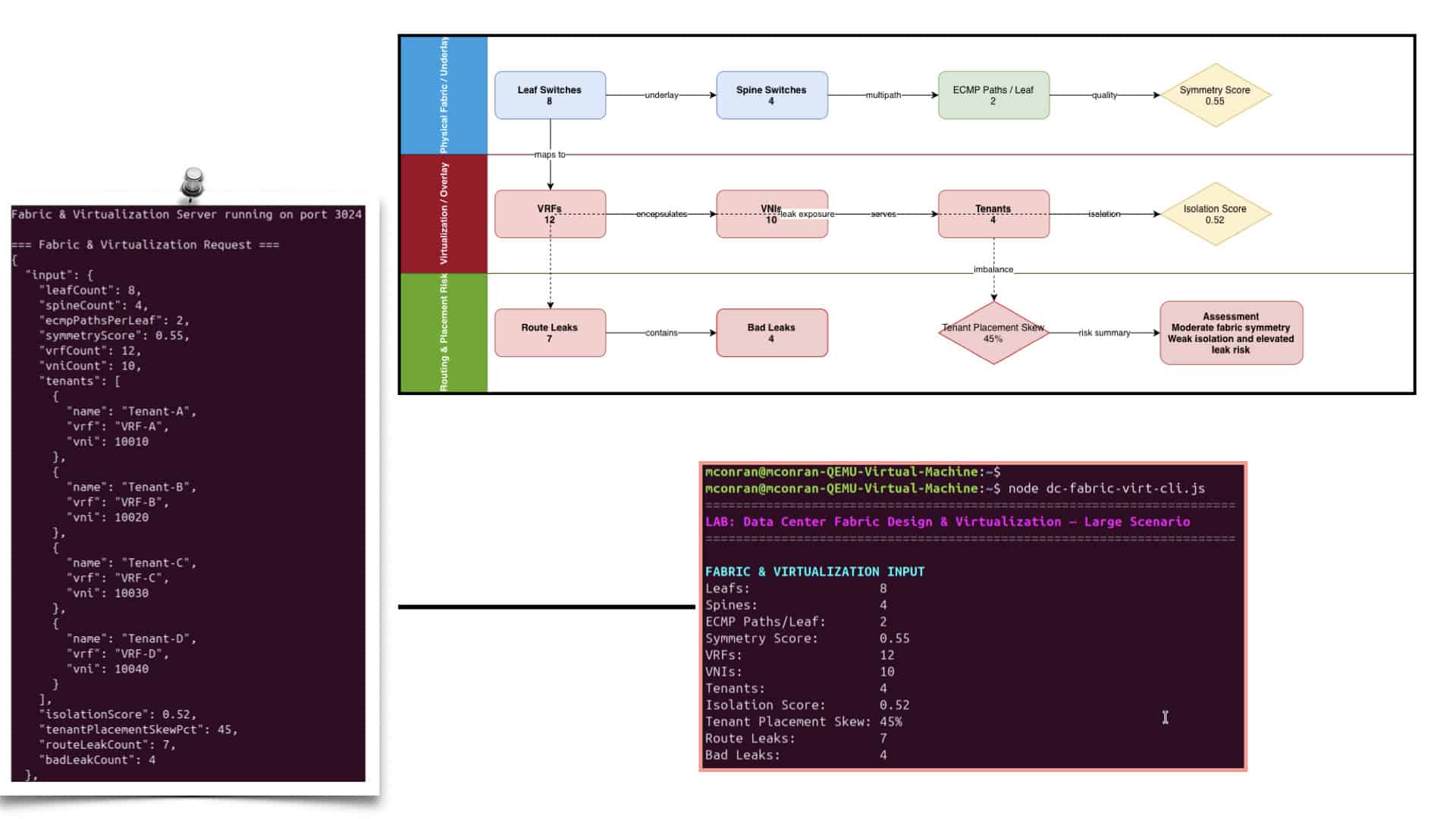
The data center fabric design and virtualization lab uses dedicated engines to score both the physical and virtual layers. A fabric‑design engine checks leaf/spine symmetry, ECMP path diversity, and failure domain boundaries. A virtualization engine evaluates VRF/VNI mapping, tenant isolation, and route leaking behavior. A capacity/placement engine analyzes how virtual networks are distributed across the fabric and whether any nodes are overloaded. These engines feed into an enhanced cinematic pipeline that not only shows decisions, but also renders ASCII topologies—leaf/spine diagrams, tenant overlays, and virtual segments—directly in the CLI output, making the lab visually intuitive and screenshot‑friendly.
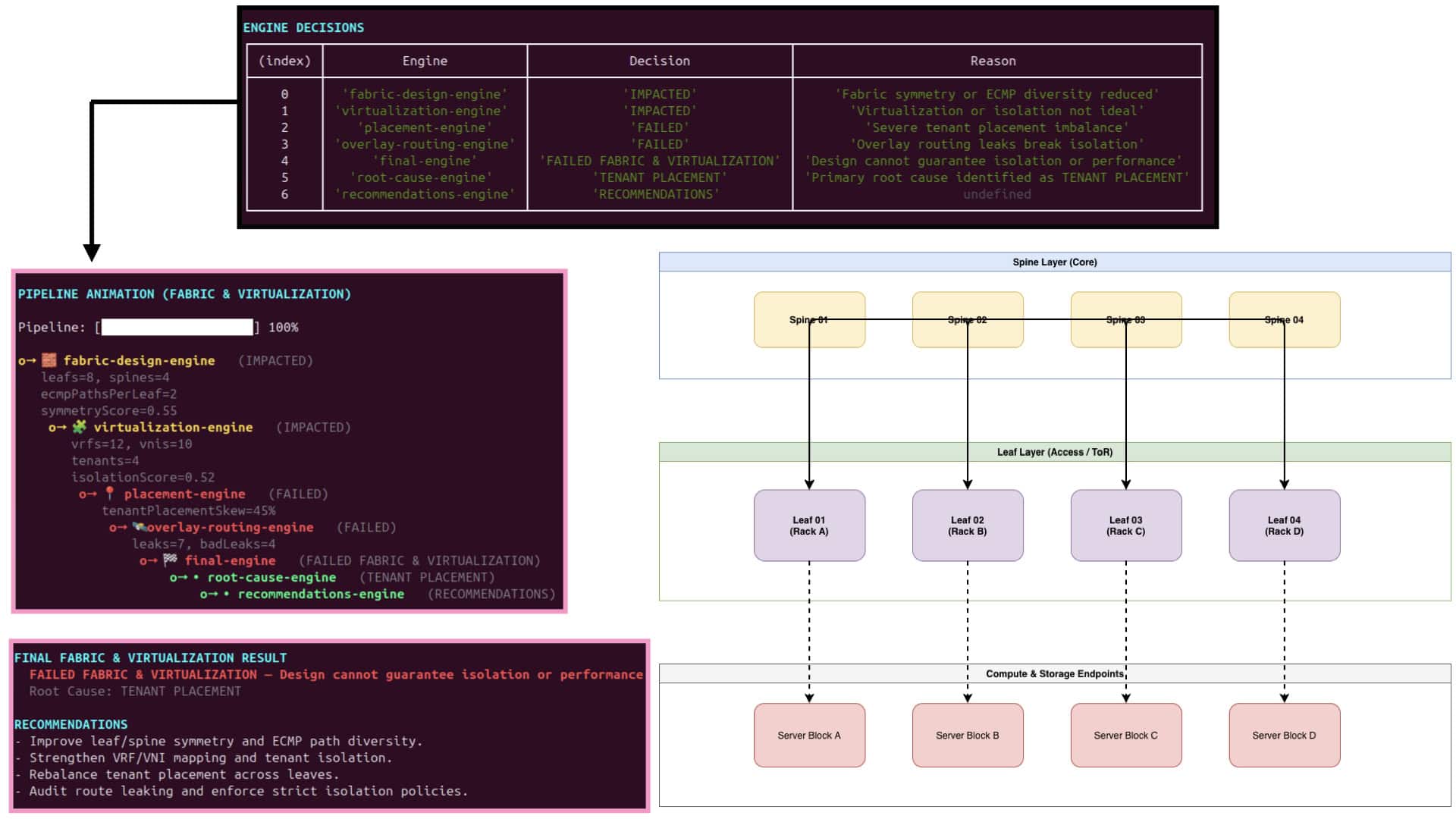
To emphasize data center fabric design and virtualization, the lab’s CLI output includes richer visuals and topologies. The simulator can draw ASCII leaf‑spine fabrics, highlight active ECMP paths, and overlay virtual networks as labeled segments across the physical topology. Each engine step in the pipeline is accompanied by a small topology snippet: which leaves host which tenants, how VNIs map to VRFs, and how traffic flows across the fabric under normal and failure conditions. This combination of structured engine output and visual topology rendering turns the CLI into a powerful teaching tool for modern fabric and virtualization design.

**Advent of Network Virtualisation**

Due to the advent of network virtualization, applications have also evolved from traditional client/server architecture to highly distributed microservices architectures composed of cloud-native workloads. A scale-out approach connects all components to different access switches instead of having all components on the same physical server

Data center fabric refers to the interconnected network of switches, routers, and other networking devices that form the backbone of a data center. It serves as the highway for data traffic, allowing efficient communication between various components within the data center infrastructure.  

1. Network Switches: Network switches form the core of the data center fabric, providing connectivity between servers, storage devices, and other networking equipment. These switches are designed to handle massive data traffic, offering high bandwidth and low latency to ensure optimal performance.

2. Cabling Infrastructure: A well-designed cabling infrastructure is crucial for data center fabric. High-speed fiber optic cables are commonly used to connect various components within the data center, ensuring rapid data transmission and minimizing signal loss.

3. Network Virtualization: Network virtualization technologies, such as software-defined networking (SDN), play a significant role in the data center fabric. By decoupling the network control plane from the physical infrastructure, SDN enables centralized management, improved agility, and flexibility in allocating resources within the data center fabric.

4. Redundancy and High Availability: Data center fabric incorporates redundancy mechanisms to ensure high availability. By implementing redundant switches and links, it provides failover capabilities, minimizing the risk of downtime and maximizing system reliability.

5. Scalability: One of the defining features of data center fabric is its ability to scale horizontally. With the ever-increasing demand for computational power, data center fabric allows for the seamless addition of new devices and resources, ensuring the data center can keep up with growing requirements.

Data Center Fabric with VPC

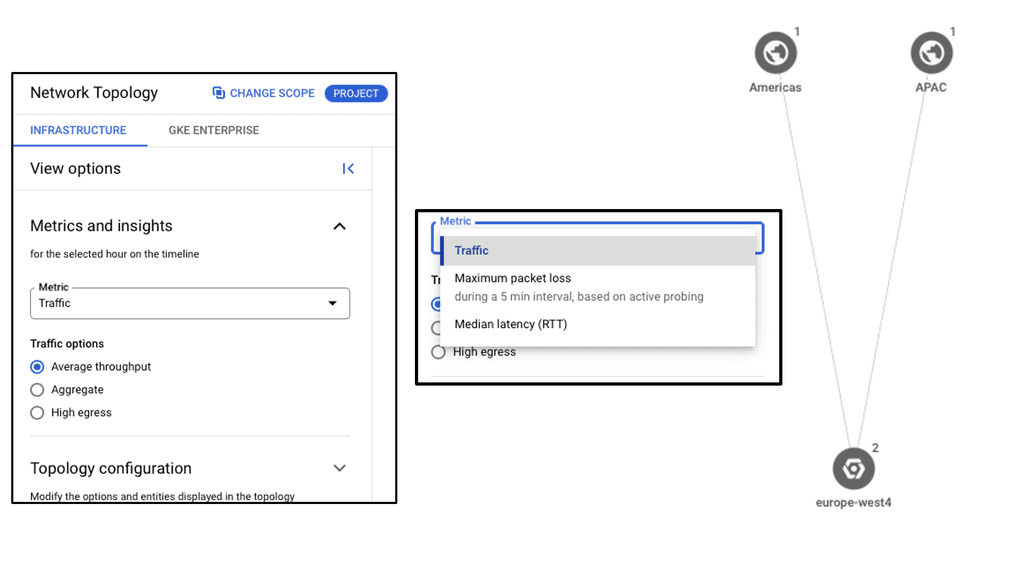
Data center fabric serves as the foundational layer for cloud providers like Google Cloud, facilitating high-speed data transfer and scalability. It allows for the integration of various network components, creating a unified infrastructure that supports the demands of cloud services. By leveraging a robust fabric, Google Cloud VPC can offer customers a resilient and flexible environment, ensuring that resources are efficiently allocated and managed across diverse workloads.

**Understanding the Basics of VPC**

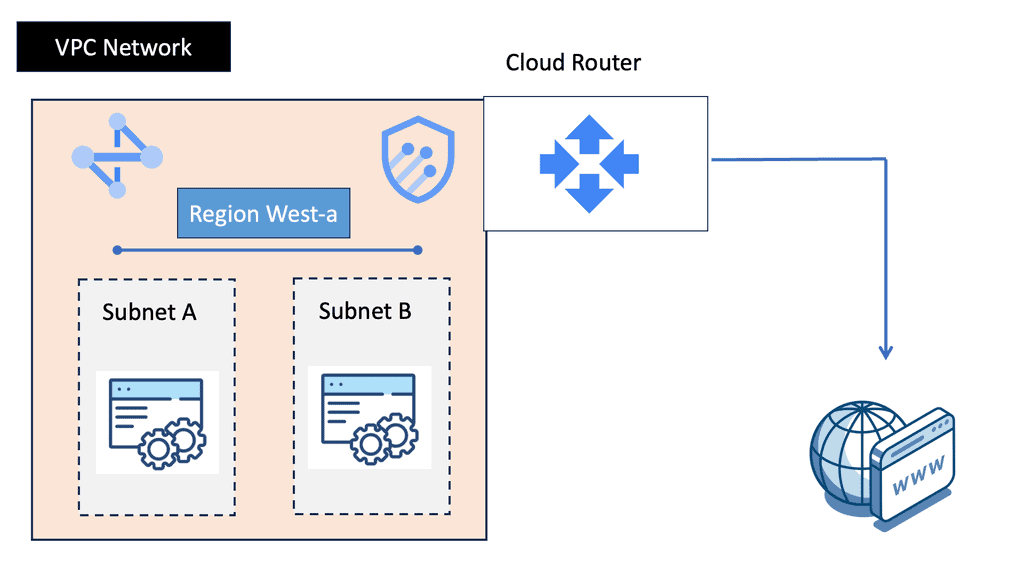
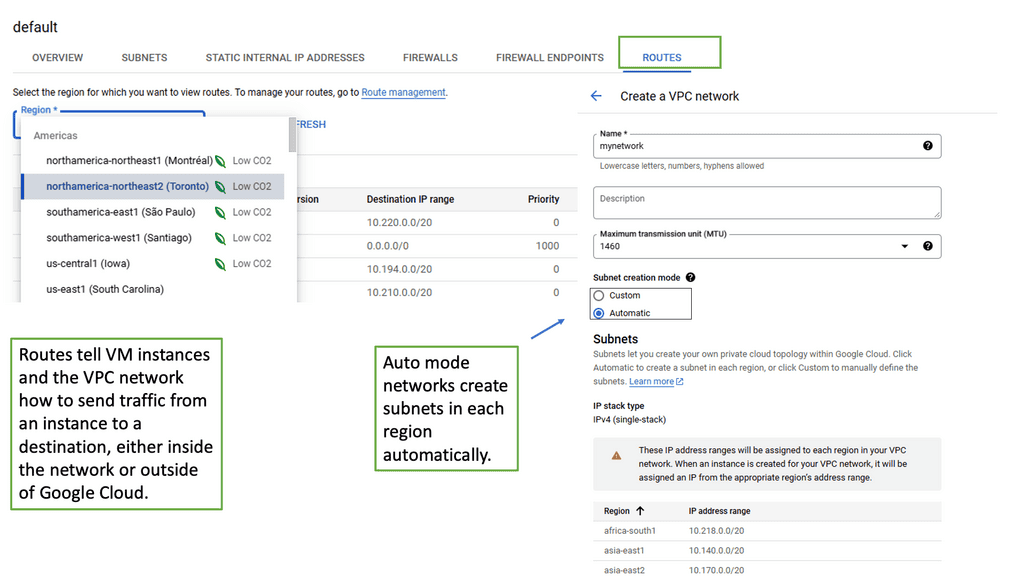
A Virtual Private Cloud (VPC) is essentially a private network within a public cloud. It allows users to create and manage their own isolated network segments within Google Cloud. With VPC, you can define your own IP address range, create subnets, and configure firewalls and routes. This level of control ensures that your resources are both secure and efficiently organized. Google Cloud’s VPC offers global reach and a high degree of flexibility, making it a preferred choice for many enterprises.
**Key Features and Benefits**

One of the standout features of Google Cloud’s VPC is its global reach, allowing for seamless communication across different regions. This global VPC capability means you can connect resources across the globe without the need for complex VPN setups. Additionally, VPC’s dynamic scalability ensures that your network can grow alongside your business needs. With features like private Google access, you can communicate securely with Google services without exposing your data to the public internet.

**Setting Up a VPC on Google Cloud**

Setting up a VPC on Google Cloud is straightforward, thanks to the intuitive interface and comprehensive documentation provided by Google. Start by defining your network’s IP address range and creating subnets in your desired regions. Configure firewall rules to control traffic in and out of your network, ensuring only authorized access. Google Cloud also provides tools like Cloud VPN and Cloud Interconnect to integrate your VPC with on-premises infrastructure, offering a hybrid cloud solution.
Example: IP Fabric with Clos

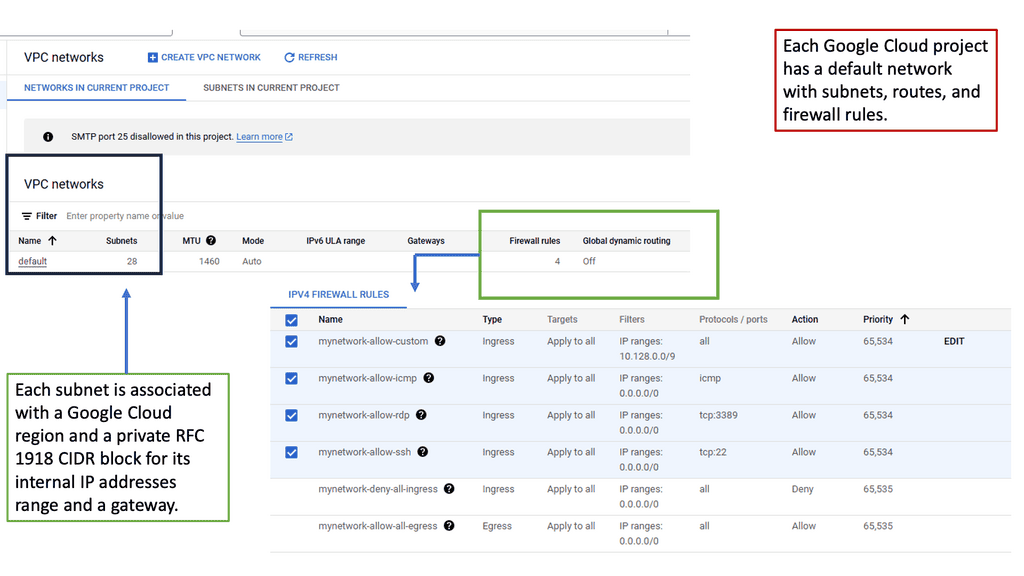
Clos fabrics provide physical connectivity between switches, facilitating the network’s goal of connecting workloads and servers in the fabric (and the outside world). Routing protocols are used to connect these endpoints. According to RFC 7938, BGP is the preferred routing protocol, with spines and leaves peering externally at each other (eBGP). A VXLAN-based fabric is built upon such a fabric, which is called an IP fabric.

Data centers typically use Clos fabrics or two-tier spine-and-leaf architectures. In this fabric, data passes through three devices before reaching its destination. Through a leaf device, east-west data center traffic travels upstream from one server to another and downstream to the destination server. The fundamental nature of fabric design is changed due to the absence of a network core.

  • With a spine-and-leaf fabric, intelligence is moved to the edges rather than centralized (for example, to implement policies). Endpoint devices (such as top-of-rack switches) or leaf devices (such as top-of-rack switches) can implement it. As a transit layer, the spine devices serve as leaf devices.
  • Spine-and-leaf fabrics allow east-west traffic flows to be accommodated more quickly than traditional hierarchical networks.
  • In east-west or north-south traffic, spine-and-leaf fabrics become equal. The exact number of devices processes it. This practice can significantly simplify the process of building fabrics with strict delay and jitter requirements.

 Google Cloud – Network Connectivity Center

**What is Google Network Connectivity Center?**

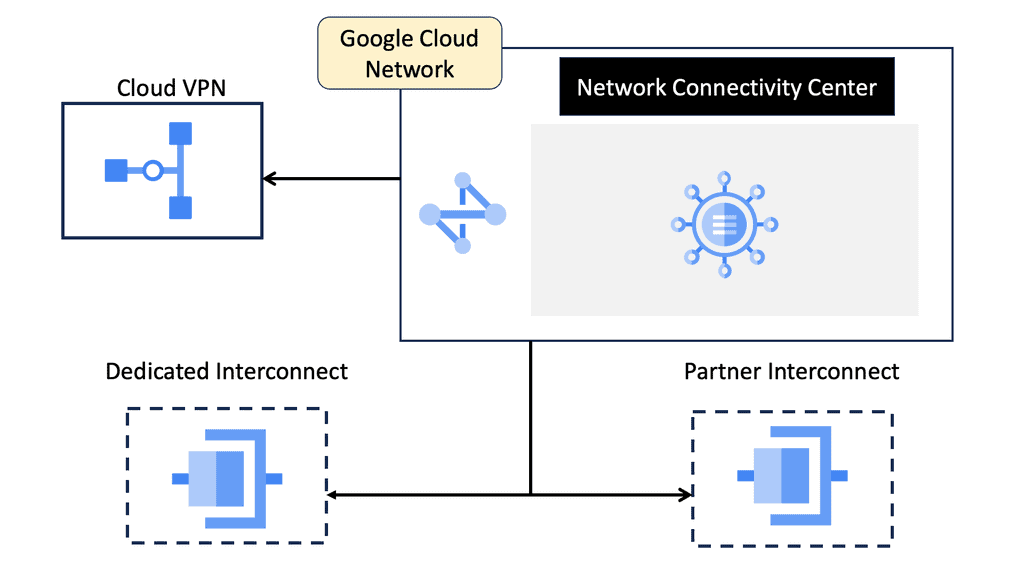
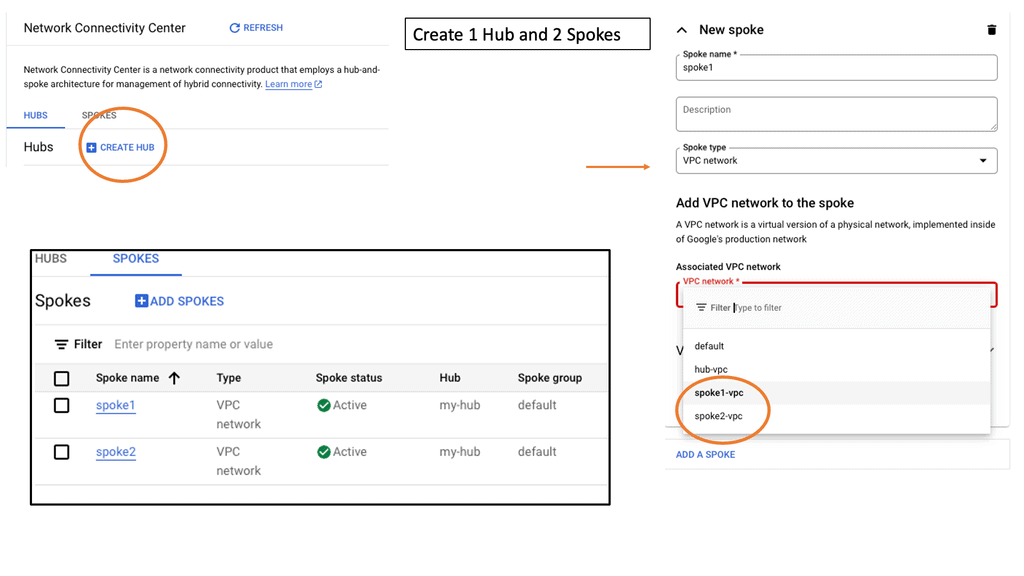
Google Network Connectivity Center is a centralized hub for managing network connectivity across various environments. Whether it’s on-premises data centers, virtual private clouds (VPCs), or other cloud services, NCC provides a unified platform to oversee and optimize network operations. By leveraging Google’s robust infrastructure, enterprises can ensure reliable and efficient connectivity, overcoming the complexities of traditional network management.
**Key Features of NCC**

1. **Centralized Management**: One of the standout features of NCC is its ability to provide a single pane of glass for network management. This centralized approach simplifies the oversight of complex network configurations, reducing the risk of misconfigurations and improving operational efficiency.

2. **Automated Routing**: NCC utilizes Google’s advanced algorithms to automate routing decisions, ensuring optimal data flow between different network endpoints. This automation not only enhances performance but also reduces the manual effort required to manage network routes.

3. **Integrated Security**: Security is a top priority for any network. NCC incorporates robust security features, including encryption and authentication, to protect data as it traverses different network segments. This integrated security framework helps safeguard sensitive information and ensures compliance with industry standards.
**Benefits for NCC Data Centers**

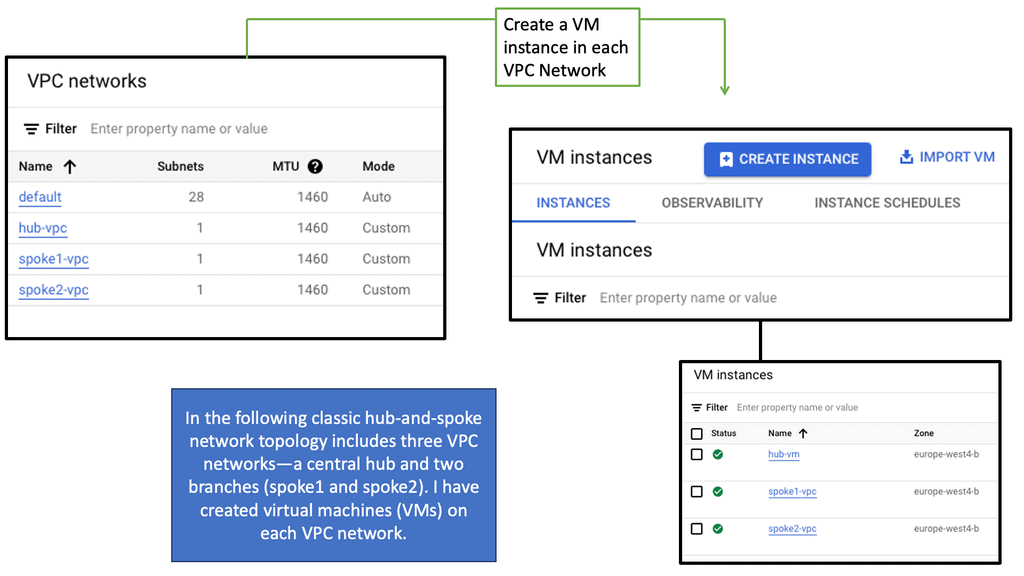
1. **Enhanced Connectivity**: With NCC, data centers can achieve seamless connectivity across diverse environments. This enhanced connectivity translates to improved application performance and a better user experience, as data can be accessed and transferred without significant delays or interruptions.

2. **Scalability**: As businesses grow, their network requirements evolve. NCC offers the scalability needed to accommodate this growth, allowing enterprises to expand their network infrastructure without compromising performance or reliability.

3. **Cost Efficiency**: By streamlining network management and reducing the need for manual intervention, NCC can lead to significant cost savings. Enterprises can allocate resources more effectively and focus on strategic initiatives rather than routine network maintenance.

**Impact on Hybrid and Multi-Cloud Environments**

Hybrid and multi-cloud environments are becoming increasingly common as organizations seek to leverage the best of both worlds. NCC plays a crucial role in these environments by providing a cohesive network management solution. It bridges the gap between different cloud services and on-premises infrastructure, enabling a more integrated and efficient network architecture.

Behind the Scenes of Google Cloud Data Centers

– Google Cloud data centers are marvels of engineering, built to handle massive amounts of data traffic and ensure the highest levels of performance and reliability. These facilities are spread across the globe, strategically located to provide efficient access to users worldwide. From the towering racks of servers to the intricate cooling systems, every aspect is meticulously designed to create an optimal computing environment.

– At the heart of Google Cloud data centers lies the concept of data center fabric. This refers to the underlying network infrastructure that interconnects all the components within a data center, enabling seamless communication and data transfer. Data center fabric is a crucial element in ensuring high-speed, low-latency connectivity between servers, storage systems, and other critical components.

A. Reliable Infrastructure: Google Cloud data centers leverage the power of data center fabric to ensure a reliable and robust infrastructure. By implementing a highly redundant fabric architecture, Google Cloud can provide a stable and resilient environment for hosting critical applications and services.

B. Global Interconnectivity: Google Cloud’s data center fabric extends across multiple regions, enabling seamless interconnectivity between data centers worldwide. This global network backbone ensures efficient data transfer and low-latency communication, allowing businesses to operate on a global scale..

Google Cloud Network Tiers

Understanding Network Tiers

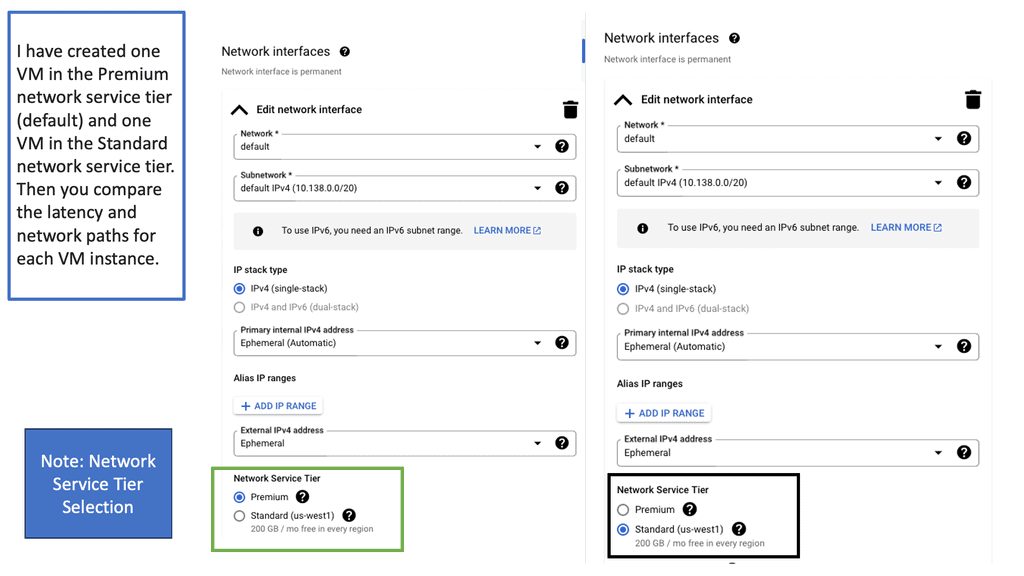
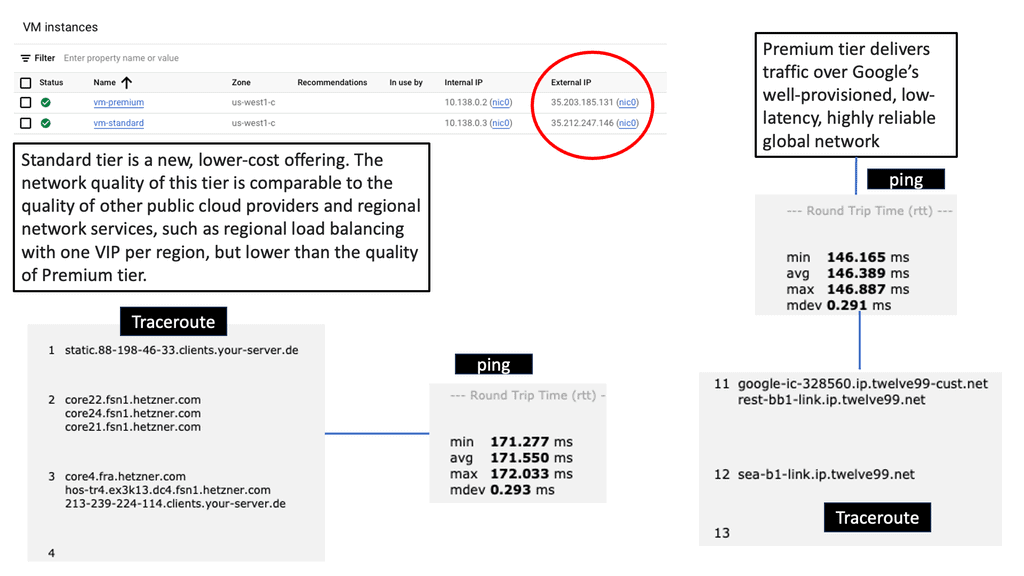
Network tiers in Google Cloud refer to the different service levels offered for egress traffic from your virtual machines (VMs) to the internet. Google Cloud provides two primary network tiers: Premium Tier and Standard Tier. Each tier offers distinct features and cost structures, allowing you to tailor your network setup to your specific requirements.

The Premium Tier is designed for businesses that prioritize top-notch performance and global connectivity. It leverages Google’s vast private network infrastructure, ensuring low-latency and high-bandwidth connections between your VMs and the internet. With its global reach, the Premium Tier enables efficient data transfer across regions, making it an ideal choice for latency-sensitive applications and global workloads.

If cost optimization is a critical factor for your business, the Standard Tier provides a compelling solution. While it may not offer the same performance capabilities as the Premium Tier, the Standard Tier delivers cost-effective egress traffic pricing, making it suitable for applications with less stringent latency requirements. The Standard Tier still ensures reliable connectivity and offers a robust network backbone to support your workloads.
What is VPC Peering?

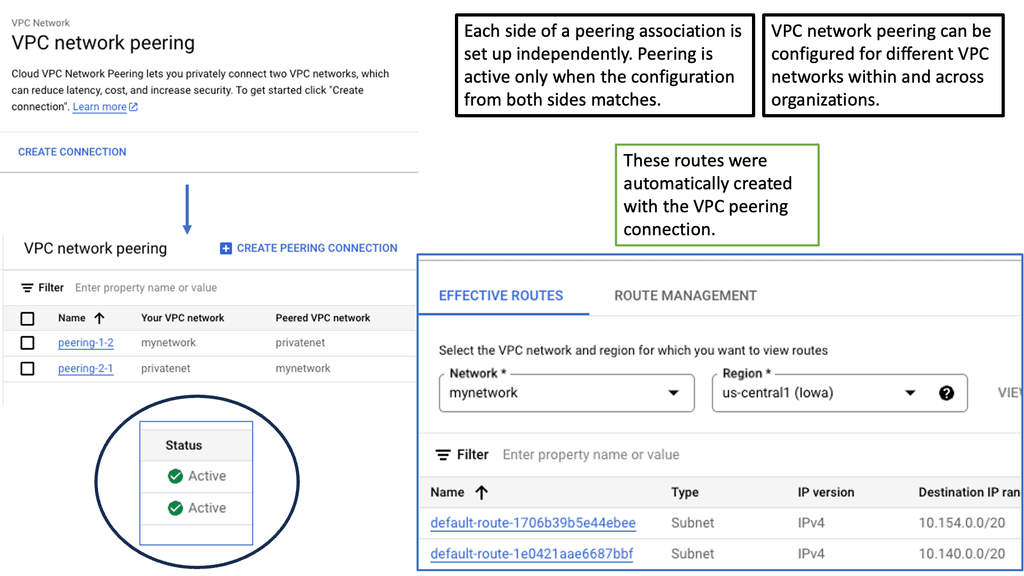
VPC peering is a connection between two Virtual Private Cloud networks that enables communication between them using private IP addresses. It allows resources within separate VPC networks to interact as if they were on the same network. Unlike traditional VPN connections or public internet connectivity, VPC peering ensures secure and direct communication between VPC networks.
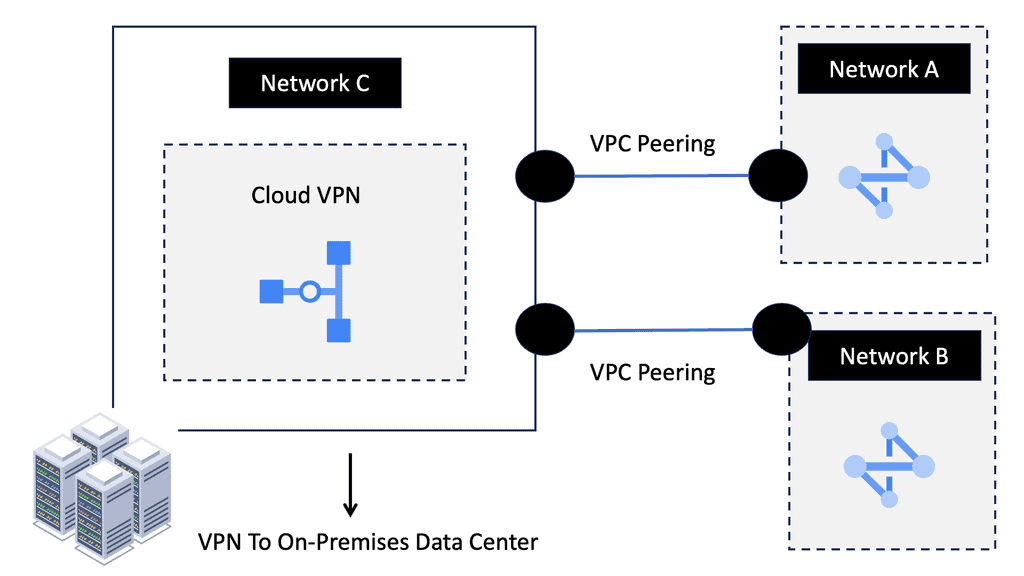
a) Enhanced Connectivity: VPC peering simplifies establishing private connections between VPC networks, enabling seamless data transfer and communication.

b) Cost Efficiency: By leveraging VPC peering, businesses can reduce their reliance on costly external network connections or VPNs, leading to potential cost savings.

c) Low Latency: With VPC peering, data travels through Google’s private network infrastructure, resulting in minimal latency and faster response times.

d) Scalability and Flexibility: VPC peering allows you to connect multiple VPC networks within the same project or across different projects, ensuring scalability as your infrastructure grows.
**Data Center Fabric Performance**

1. Low Latency: Data center fabric minimizes the delay in data transmission, enabling real-time communication and faster application response times. This is crucial for latency-sensitive applications like financial trading or online gaming.

2. High Bandwidth: By utilizing technologies like high-speed Ethernet and InfiniBand, data center fabric can achieve impressive bandwidth capacities. This allows data centers to handle heavy workloads and support bandwidth-hungry applications such as big data analytics or video streaming.

3. Scalability: Data center fabric is designed to scale seamlessly, accommodating the ever-increasing demands of modern data centers. Its modular structure and distributed architecture enable easy expansion without compromising performance or introducing bottlenecks.

Optimizing Performance with Data Center Fabric

1. Traffic Optimization: The intelligent routing capabilities of data center fabric help optimize traffic flow, ensuring efficient data delivery and minimizing congestion. By intelligently distributing traffic across multiple paths, it balances the load and prevents bottlenecks.

2. Redundancy and Resilience: Data center fabric incorporates redundancy mechanisms to ensure high availability and fault tolerance. In the event of a link or node failure, it dynamically reroutes traffic to alternative paths, minimizing downtime and maintaining uninterrupted services.

Understanding TCP Performance Parameters

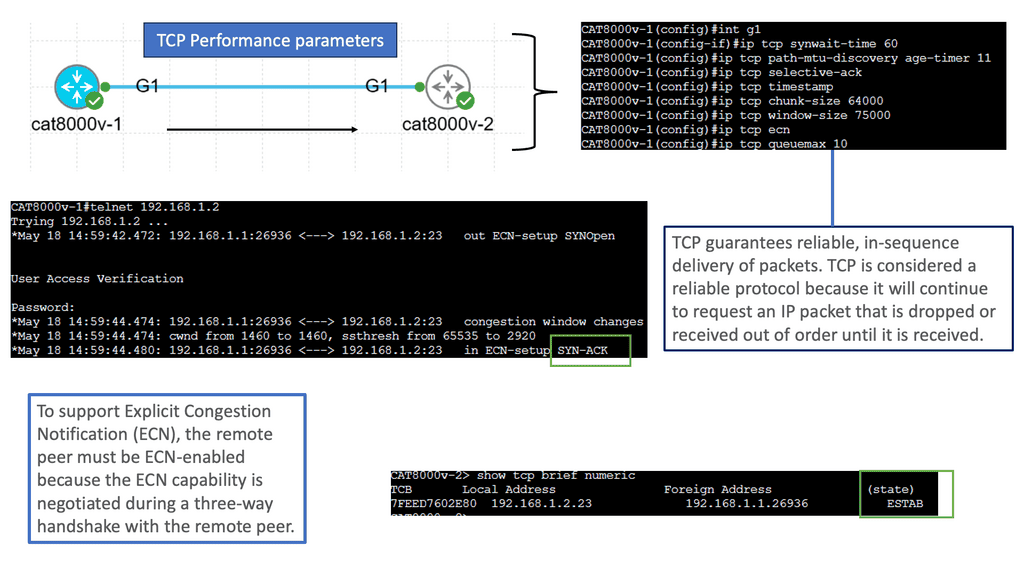
TCP performance parameters are crucial settings that determine how TCP behaves during data transmission. These parameters govern various aspects, such as congestion control, retransmission timeouts, and window sizes. Network administrators can optimize TCP performance based on specific requirements by fine-tuning these parameters.

Let’s explore some of the essential TCP performance parameters that can significantly impact network performance:

1. Congestion Window (CWND): The congestion window represents the number of unacknowledged packets a sender can transmit before expecting an acknowledgment. Properly adjusting CWND based on network conditions can prevent congestion and improve overall throughput.

2. Maximum Segment Size (MSS): MSS refers to the largest amount of data a TCP segment can carry. Optimizing the MSS value based on the network’s Maximum Transmission Unit (MTU) can enhance performance by reducing unnecessary fragmentation and reassembly.

3. Retransmission Timeout (RTO): RTO determines the time a sender waits before retransmitting unacknowledged packets. Adjusting RTO based on network latency and congestion levels can prevent unnecessary retransmissions and improve efficiency.

It is crucial to consider the specific network environment and requirements to optimize TCP performance. Here are some best practices for optimizing TCP performance parameters:

1. Analyze Network Characteristics: Understanding network characteristics such as latency, bandwidth, and congestion levels is paramount. Conducting thorough network analysis helps determine the ideal values for TCP performance parameters.

2. Test and Evaluate: Performing controlled tests and evaluations with different parameter configurations can provide valuable insights into the impact of specific settings. It allows network administrators to fine-tune parameters for optimal performance.

3. Keep Up with Updates: TCP performance parameters are not static; new developments and enhancements continually emerge. Staying updated with the latest research, standards, and recommendations ensures the utilization of the most effective TCP performance parameters.
Understanding TCP MSS

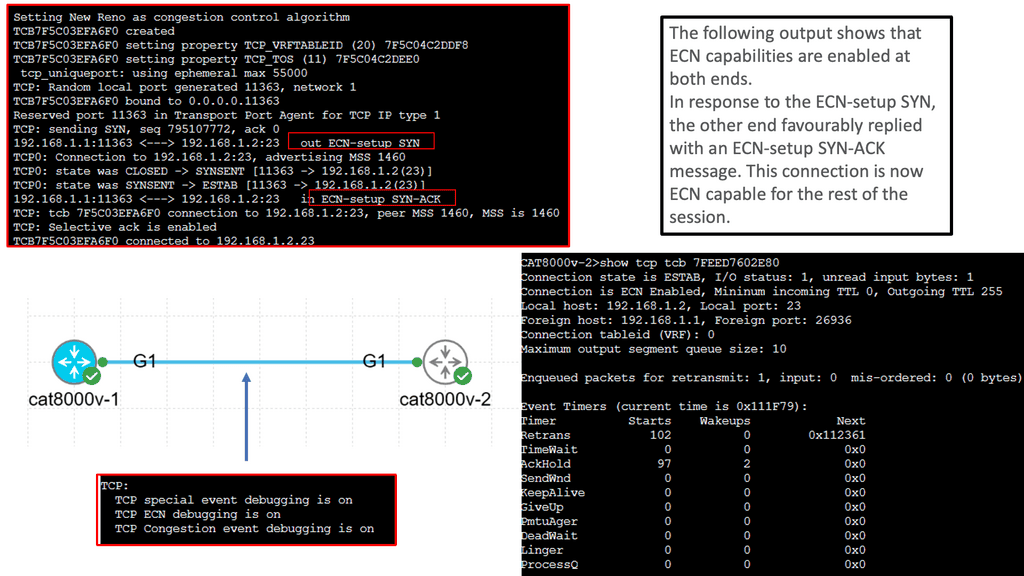
TCP MSS refers to the maximum amount of data encapsulated within a single TCP segment. It plays a vital role in ensuring efficient data transmission across networks. By limiting the segment size, TCP MSS helps prevent fragmentation, reduces latency, and provides reliable delivery of data packets. To comprehend TCP MSS fully, let’s explore its essential components and how they interact.

Various factors impact TCP MSS, including network infrastructure, operating systems, and application configurations. Network devices such as routers and firewalls often impose limitations on MSS due to MTU (Maximum Transmission Unit) constraints. Additionally, the MSS value can be adjusted at the operating system level or within specific applications. Understanding these factors is crucial for optimizing TCP MSS in different scenarios.

Aligning TCP MSS with the underlying network infrastructure is essential to achieving optimal network performance. This section will discuss several strategies for optimizing TCP MSS. Firstly, Path MTU Discovery (PMTUD) can dynamically adjust the MSS value based on the network path’s MTU. Additionally, tweaking TCP stack parameters, such as the TCP window size, can enhance performance and throughput. We will also explore the benefits of setting appropriate MSS values for VPN tunnels and IPv6 deployments.

Understanding VRRP

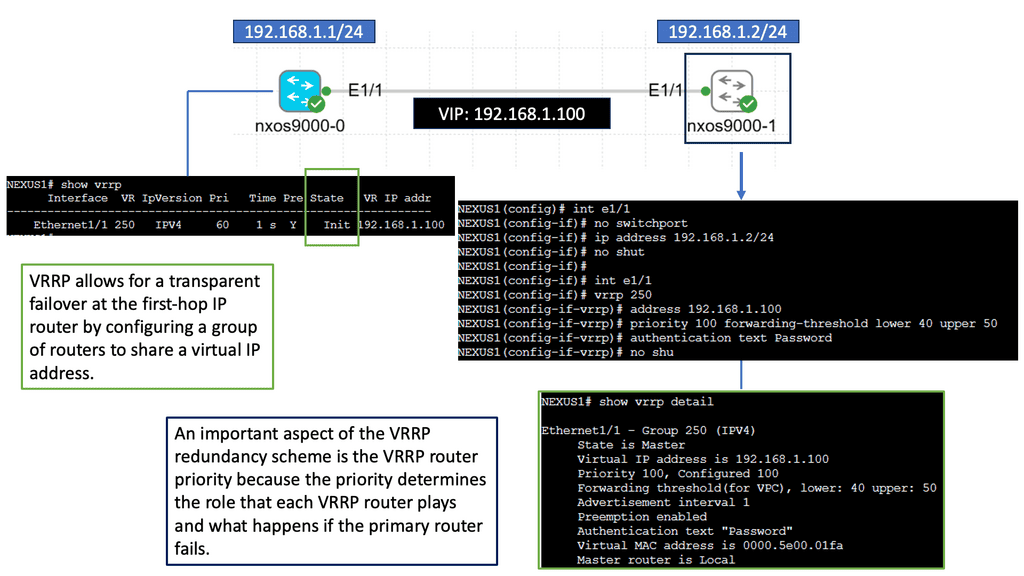
VRRP, also known as Virtual Router Redundancy Protocol, is a network protocol that enables multiple routers to work together as a single virtual router. It provides redundancy and ensures high availability by electing a master router and one or more backup routers. The Nexus 9000 Series takes VRRP to the next level with its cutting-edge features and performance enhancements.

The Nexus 9000 Series VRRP offers numerous benefits for network administrators and businesses. First, it ensures uninterrupted network connectivity by seamlessly transitioning from the master router to a backup router in case of failures. This high availability feature minimizes downtime and enhances productivity. Nexus 9000 Series VRRP also provides load-balancing capabilities, distributing traffic efficiently across multiple routers for optimized performance.
Understanding Unidirectional Links

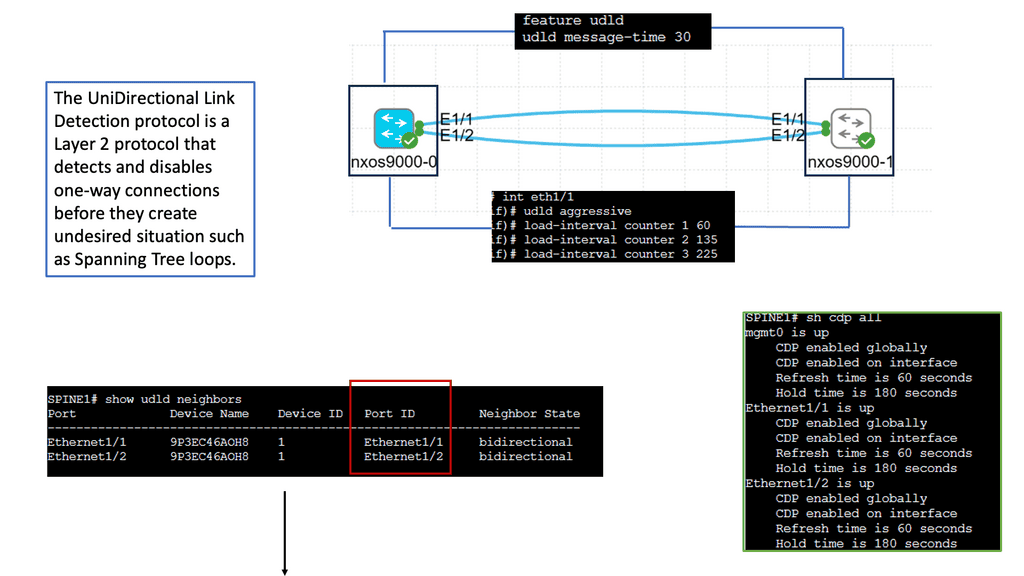
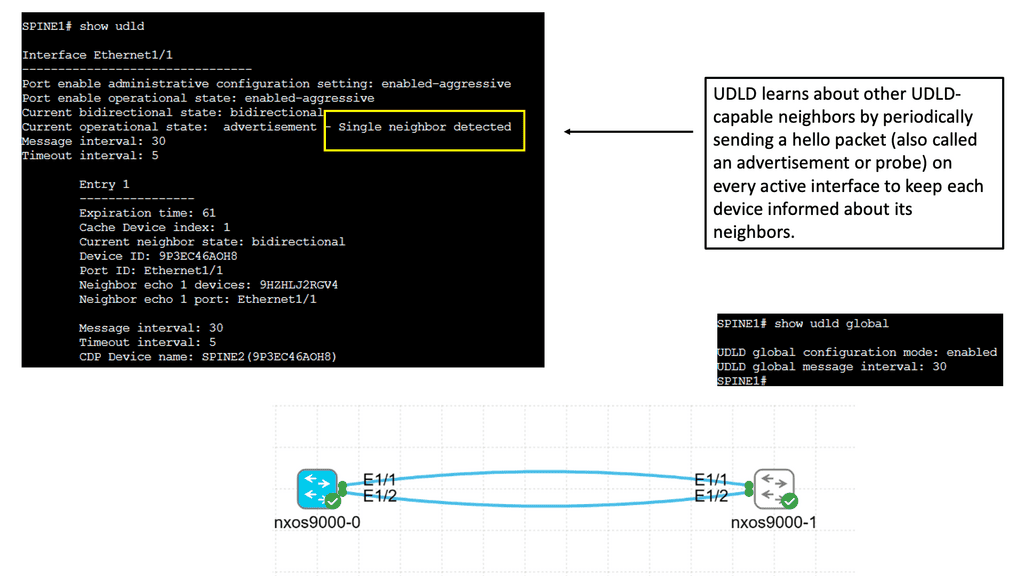
Unidirectional links occur when traffic can flow in only one direction, causing communication breakdowns and network instability. Various factors, such as faulty cables, hardware malfunctions, or misconfiguration, can cause these links. Identifying and resolving unidirectional links is vital to maintaining a robust network infrastructure.

Cisco Nexus 9000 switches offer an advanced feature called Unidirectional Link Detection (UDLD) to address the issue of unidirectional links. UDLD actively monitors the status of connections and detects any unidirectional link failures. By periodically exchanging heartbeat messages between switches, UDLD ensures bidirectional connectivity and helps prevent potential network outages.

Implementing UDLD on Cisco Nexus 9000 switches brings several advantages to network administrators and organizations. Firstly, it enhances network reliability by proactively detecting and alerting about potential unidirectional link failures. Secondly, it minimizes the impact of such failures by triggering fast convergence and facilitating rapid link recovery. Additionally, UDLD helps troubleshoot network issues by providing detailed information about the affected links and their status.
Routing and Switching in Data Center Fabric

The Role of Routing in Data Center Fabric

Routing is vital to the data center fabric, directing network traffic along the most optimal paths. It involves examining IP addresses, determining the best routes, and forwarding packets accordingly. With advanced routing protocols, data centers can achieve high availability, load balancing, and fault tolerance, ensuring uninterrupted connectivity and minimal downtime.

The Significance of Switching in Data Center Fabric

Switching plays a crucial role in data center fabric by facilitating the connection of multiple devices within the network. It involves efficiently transferring data packets between different servers, storage systems, and endpoints. Switches provide the necessary intelligence to route packets to their destinations, ensuring fast and reliable data transmission.

Understanding Spanning Tree Protocol

The first step in comprehending spanning tree uplink fast is to grasp the fundamentals of the spanning tree protocol (STP). STP ensures a loop-free network topology by identifying and blocking redundant paths. Maintaining a tree-like structure enables the efficient transfer of data packets within a network.
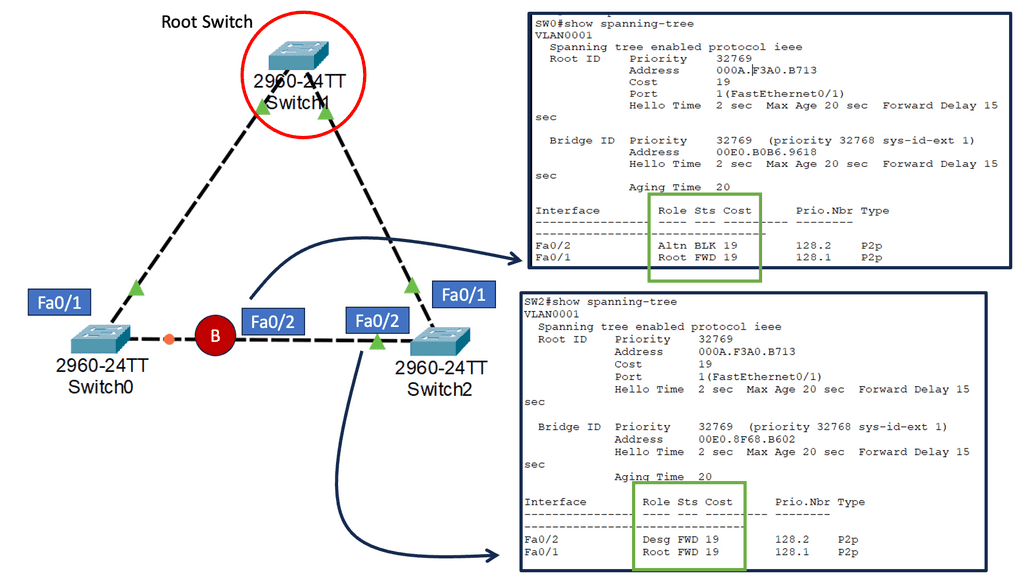
stp port states

The Need for Uplink Fast

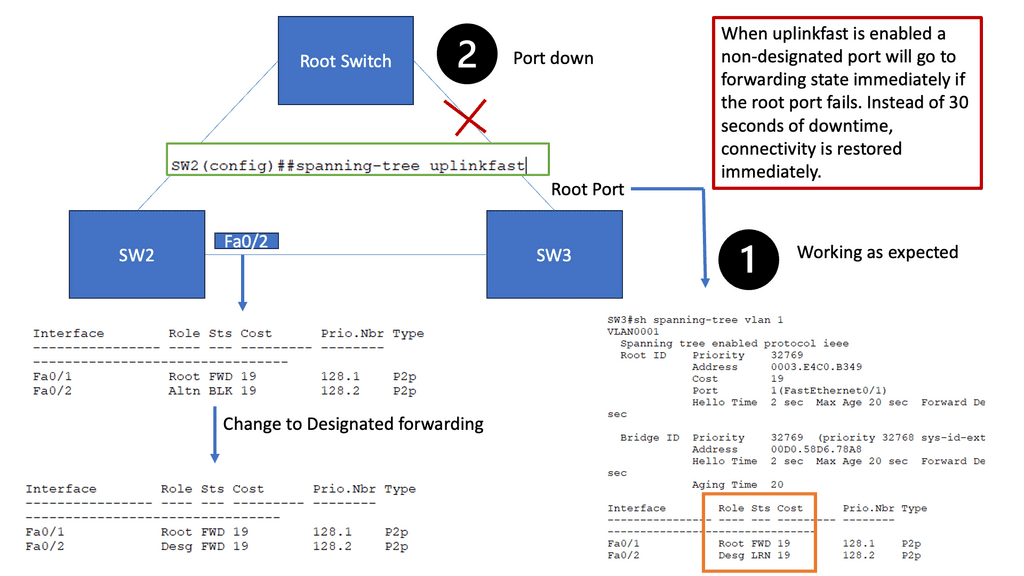
While STP is a vital guardian against network loops, it can also introduce delays when switching between redundant paths. This is where spanning tree uplink fast comes into play. By bypassing STP’s listening and learning states on direct uplinks, uplink fast significantly reduces the convergence time during network failures or topology changes.

Uplink fast operates by utilizing the port roles defined in STP. When an uplink port becomes available, uplink fast leverages the port fast feature to transition it directly to the forwarding state. This eliminates the delay caused by the listening and learning states, allowing for faster convergence and improved network performance.
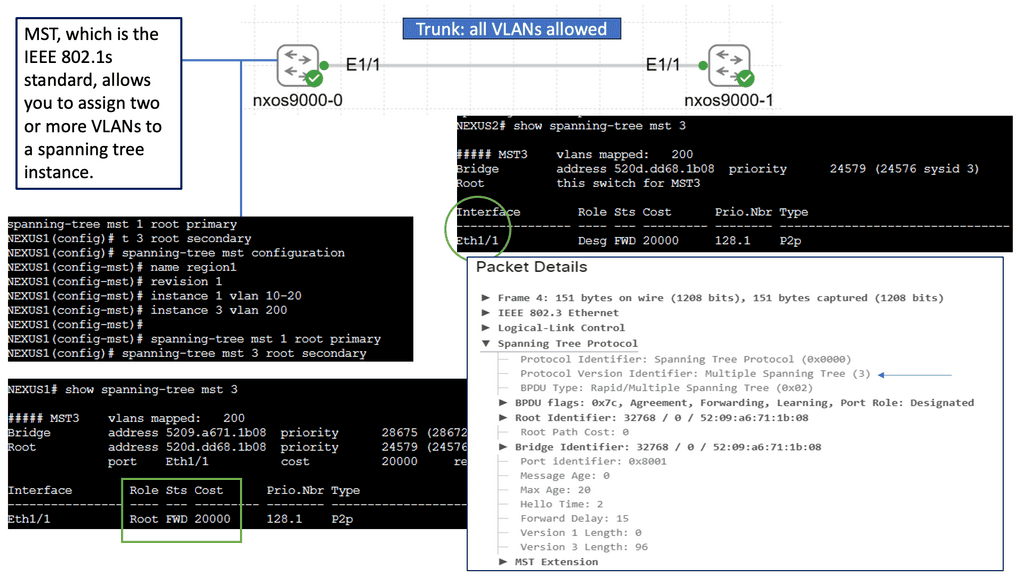
Unveiling Multiple Spanning Tree (MST)

MST builds upon the foundation of STP by allowing multiple instances of spanning trees to coexist within a network. This enables network administrators to divide the network into various regions, each with its independent spanning tree. By doing so, MST better utilizes redundant links and enhances network performance. It also allows for much finer control over network traffic and load balancing.

Enhanced Network Resiliency: The primary advantage of STP and MST is the improved resiliency they offer. By eliminating loops and providing alternate paths, these protocols ensure that network failures or link disruptions do not lead to complete network downtime. They enable rapid convergence and automatic rerouting, minimizing the impact of failures on network operations.

Load Balancing and Bandwidth Optimization: Another significant advantage of STP and MST is distributing traffic across multiple paths. By intelligently utilizing redundant links, these protocols enable load balancing, preventing congestion and maximizing available bandwidth. This results in improved network performance and efficient utilization of network resources.

Simplified Network Management: STP and MST simplify network management by automating choosing the best paths and ensuring network stability. These protocols automatically adjust to changes in network topology, making it easier for administrators to maintain and troubleshoot the network. Additionally, with MST’s ability to divide the network into regions, administrators gain more granular control over network traffic and can apply specific configurations to different areas.
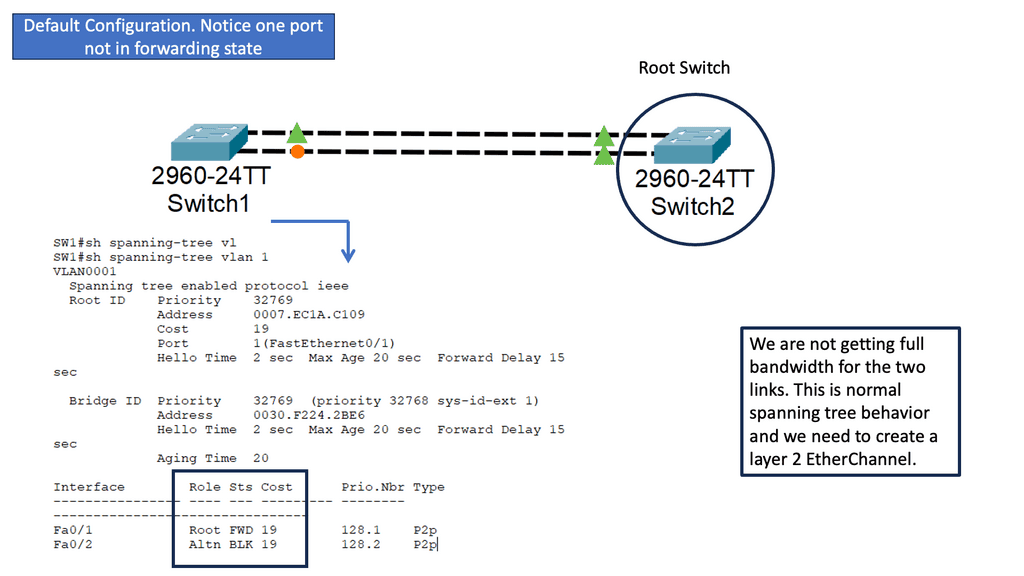
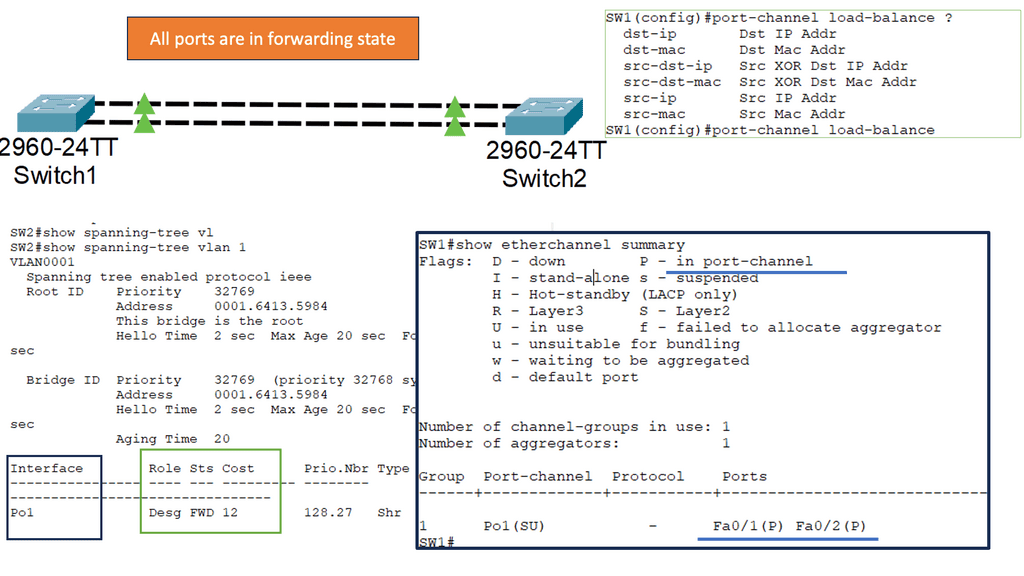
Understanding Layer 2 EtherChannel

Layer 2 EtherChannel, or link aggregation or port channel, bundles multiple physical links to act as a single logical link. This increases bandwidth, improves load balancing, and provides redundancy in case of link failures. This technique allows network administrators to maximize network capacity and achieve greater efficiency.

Setting up Layer 2 Etherchannel requires careful configuration. First, the switches involved need to be compatible and support Etherchannel. Second, the ports on each switch participating in the Etherchannel must be properly configured. This consists of configuring the same channel group number, mode (such as “on” or “active”), and load balancing algorithm. Once the configuration is complete, the Etherchannel will be formed, and the bundled links will act as a single logical link.
Understanding Layer 3 Etherchannel

Layer 3 etherchannel, also known as routed etherchannel, combines the strengths of link aggregation and routing. It allows for bundling multiple physical links into a single logical link, enabling load balancing and fault tolerance at Layer 3. This technology operates at the network layer of the OSI model, making it a valuable tool for optimizing network performance.

Increased Bandwidth: Layer 3 etherchannel provides a higher overall bandwidth capacity by aggregating multiple links. This helps alleviate network congestion and facilitates smooth data transmission across the network.

-Load Balancing: Layer 3 etherchannel intelligently distributes traffic across the bundled links, distributing the load evenly and preventing bottlenecks. This ensures efficient utilization of available resources and minimizes latency.

-Redundancy and High Availability: With Layer 3 etherchannel, if one link fails, the traffic seamlessly switches to the remaining active links, ensuring uninterrupted connectivity. This redundancy feature enhances network reliability and minimizes downtime.

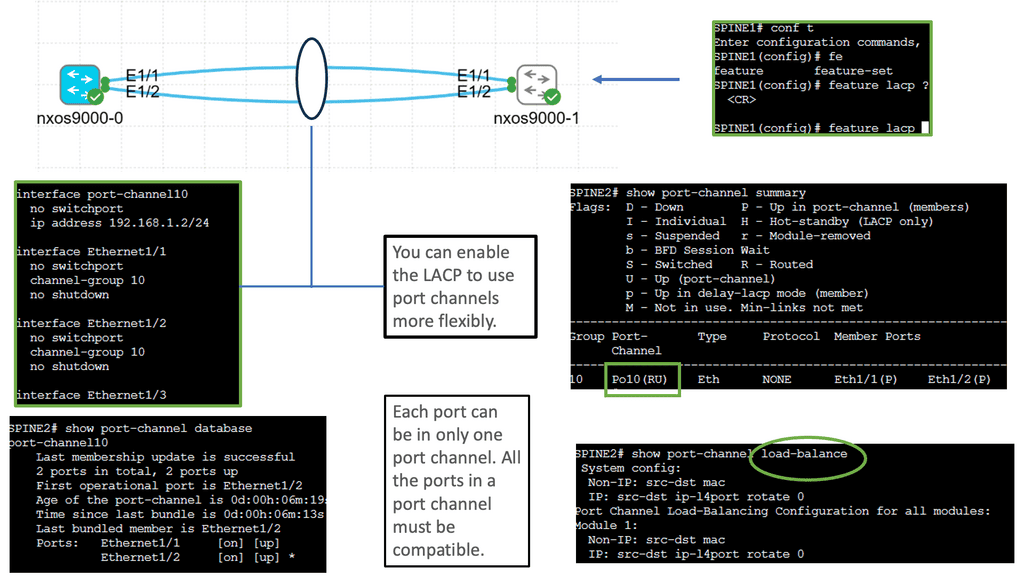
Understanding Cisco Nexus 9000 Port Channel

Cisco Nexus 9000 Port Channel is a technology that allows multiple physical links to be bundled into a single logical link. This aggregation enables higher bandwidth utilization and load balancing across the network. By combining the capacity of multiple ports, organizations can overcome bandwidth limitations and achieve greater throughput.

One critical advantage of the Cisco Nexus 9000 Port Channel is its ability to enhance network reliability. By creating redundant links, the port channel provides built-in failover capabilities. In a link failure, traffic seamlessly switches to the available links, ensuring uninterrupted connectivity. This redundancy safeguards against network downtime and maximizes uptime for critical applications.
Understanding Virtual Port Channel (VPC)

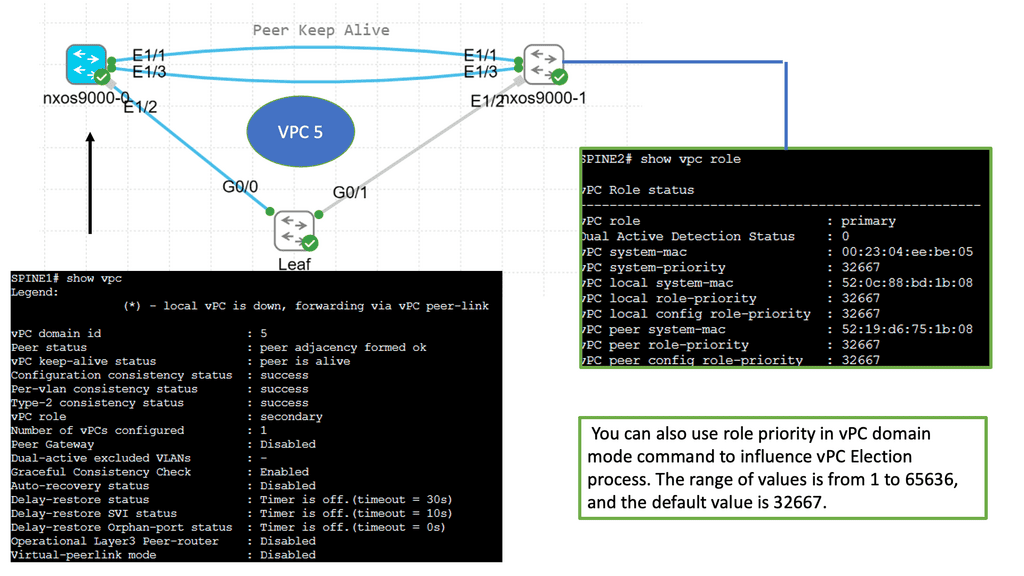
VPC is a technology that allows the formation of a virtual link between two Cisco Nexus switches. It enables the switches to appear as a single logical entity, providing redundancy and load balancing. By combining multiple physical links, VPC enhances network resiliency and performance.

Configuring VPC involves a series of steps that ensure seamless operation. First, the Nexus switches must establish a peer link to facilitate control plane communication. Next, the VPC domain is created, and a unique domain ID is assigned. Then, the member ports are added to the VPC domain, forming a port channel. Finally, the VPC peer-keepalive link is configured to monitor the health of the VPC peers.
**Data Center Fabric Security**

  • Network Segmentation and Isolation

One of the key security characteristics of data center fabric lies in its ability to implement network segmentation and isolation. By dividing the network into smaller, isolated segments, potential threats can be contained, preventing unauthorized access to sensitive data. This segmentation also improves network performance and allows for easier management of security policies.

  • Secure Virtualization

Data center fabric leverages virtualization technologies to efficiently allocate computing resources. However, security remains a top priority within this virtualized environment. Robust virtualization security measures such as hypervisor hardening, secure virtual machine migration, and access control mechanisms are implemented to ensure the integrity and confidentiality of the virtualized infrastructure.

  • Intrusion Prevention and Detection

Protecting the data center fabric from external and internal threats requires advanced intrusion prevention and detection systems. These systems continuously monitor network traffic, analyzing patterns and behaviors to detect any suspicious activity. With real-time alerts and automated responses, potential threats can be neutralized before they cause significant damage.

Understanding MAC ACLs

MAC ACLs, or Media Access Control Access Control Lists, provide granular control over network traffic by filtering packets based on their source and destination MAC addresses. Unlike traditional IP-based ACLs, MAC ACLs operate at the data link layer, enabling network administrators to enforce security policies more fundamentally. By understanding the basics of MAC ACLs, you can harness their power to fortify your network defenses.

Monitoring and troubleshooting MAC ACLs are vital aspects of maintaining a secure network. This section will discuss various tools and techniques available on the Nexus 9000 platform to monitor MAC ACL hits, analyze traffic patterns, and troubleshoot any issues that may arise. By gaining insights into these methods, you can ensure the ongoing effectiveness of your MAC ACL configurations.

The Role of ACLs in Network Security

Access Control Lists (ACLs) act as traffic filters, allowing or denying network traffic based on specific criteria. While traditional ACLs operate at the router or switch level, VLAN ACLs provide an additional layer of security by filtering traffic within VLANs themselves. This granular control ensures only authorized communication between devices within the same VLAN.

To configure VLAN ACLs, administrators must define rules determining which traffic is permitted and which is blocked within a specific VLAN. These rules can be based on source and destination IP addresses, protocols, ports, or any combination of these factors. By carefully crafting ACL rules, network administrators can enforce security policies, prevent unauthorized access, and mitigate potential threats.

Understanding Nexus Switch Profiles

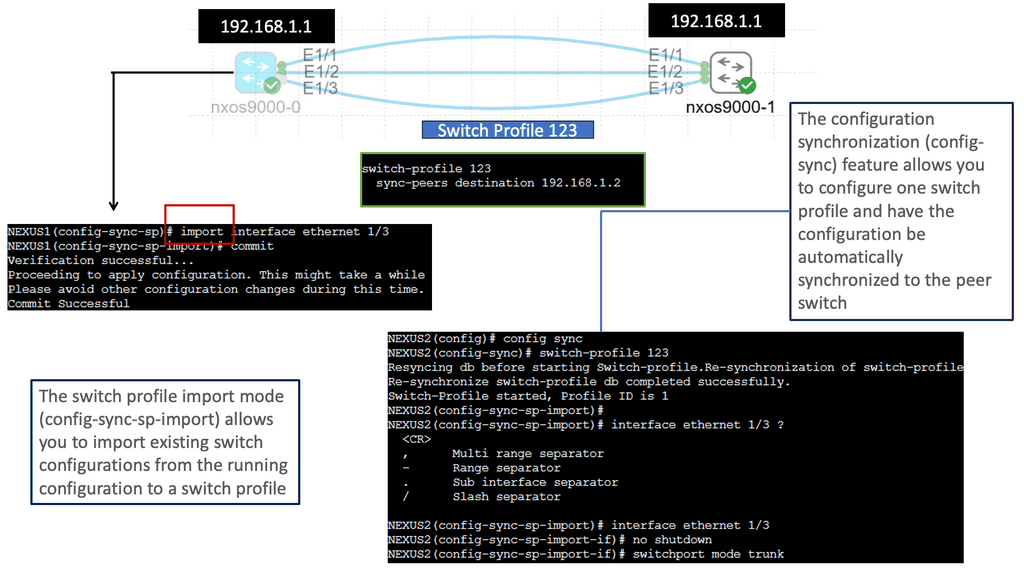
Nexus Switch Profiles are a powerful tool Cisco provides for network administrators to streamline and automate network configurations. These profiles enable consistent deployment of settings across multiple switches, eliminating the need for manual configurations on each device individually. By creating a centralized profile, administrators can ensure uniformity in network settings, reducing the chances of misconfigurations and enhancing network reliability.

a. Simplified Configuration Management: With Nexus Switch Profiles, administrators can define a set of configurations for various network devices. These configurations can then be easily applied to multiple switches simultaneously, reducing the time and effort required for manual configuration tasks.

b. Scalability and Flexibility: Nexus Switch Profiles allow for easy replication of configurations across numerous switches, making them ideal for large-scale network deployments. Additionally, these profiles can be modified and updated according to the network’s evolving needs, ensuring flexibility and adaptability.

c. Enhanced Consistency and Compliance: Administrators can ensure consistent network behavior and compliance with organizational policies by enforcing a standardized set of configurations through Nexus Switch Profiles, which helps maintain network stability and security.
Understanding Virtual Routing and Forwarding

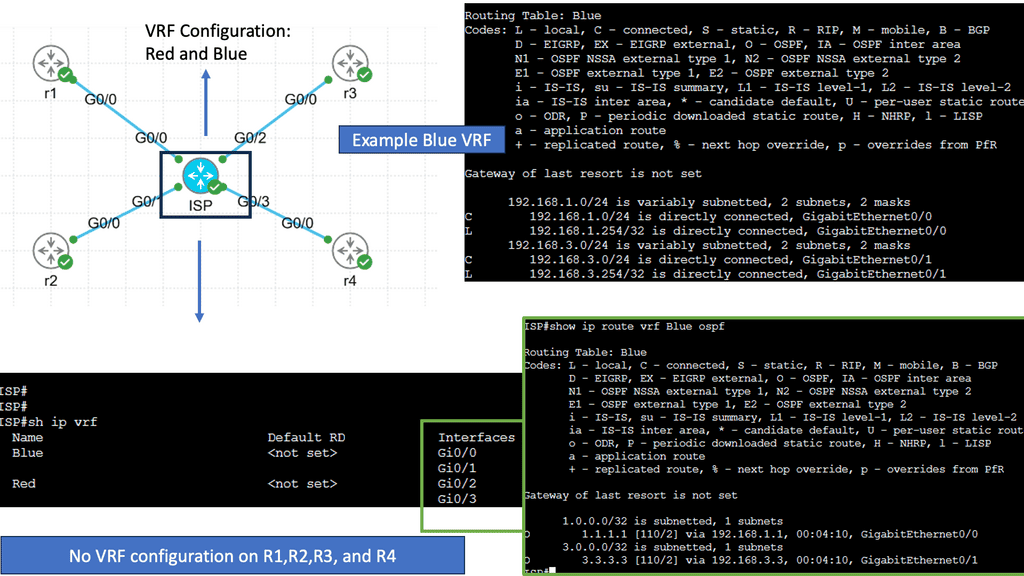
Virtual routing and forwarding, also known as VRF, is a mechanism that enables multiple virtual routing tables to coexist within a single physical router or switch. Each VRF instance operates independently, segregating network traffic and providing isolated routing domains. Organizations can achieve network segmentation by creating these virtual instances, allowing different departments or customers to maintain their distinct routing environments.

Real-World Applications of VRF

VRF finds applications in various scenarios across different industries. In large enterprises, VRF facilitates the segregation of network traffic between different departments, optimizing performance and security. Internet service providers (ISPs) utilize VRF to offer virtual private network services to their customers, ensuring secure and isolated connectivity. Moreover, VRF is instrumental in multi-tenant environments, enabling cloud service providers to offer isolated network domains to their clients.
VXLAN Fabric

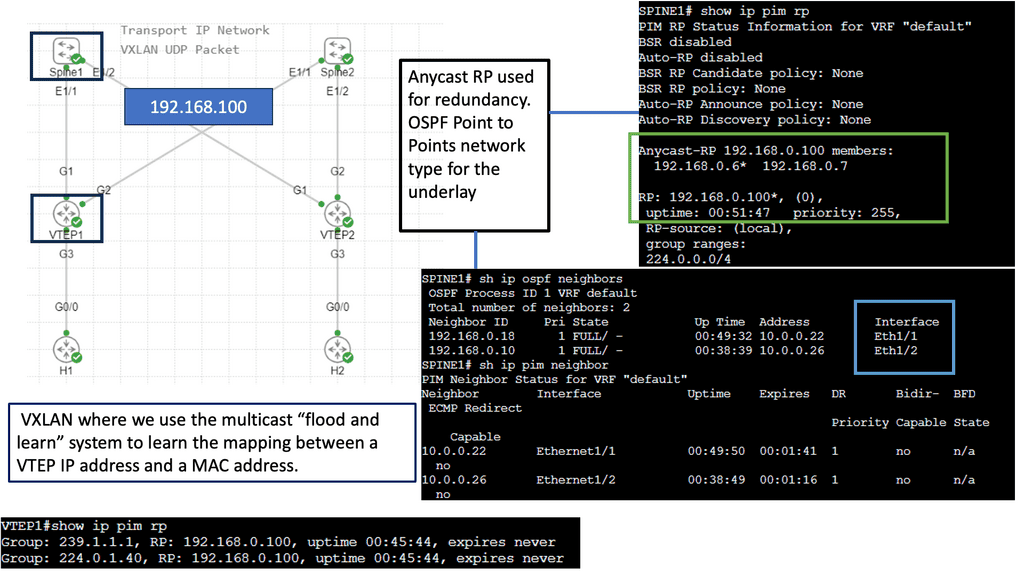
While utilizing the same physically connected 3-stage Clos network, VXLAN fabrics introduce an abstraction level into the network that elevates workloads and the services they provide into another layer called the overlay. An encapsulation method such as Generic Routing Encapsulation (GRE) or MPLS (which adds an MPLS label) is used to accomplish this. In these tunneling mechanisms, packets are tunneled from one point to another utilizing the underlying network. A VXLAN header is added to IP packets containing a UDP header, a VXLAN header, and an IP header. VXLAN Tunnel Endpoints (VTEPs) are devices configured to encapsulate VXLAN traffic.

Flood and Learn Mechanism

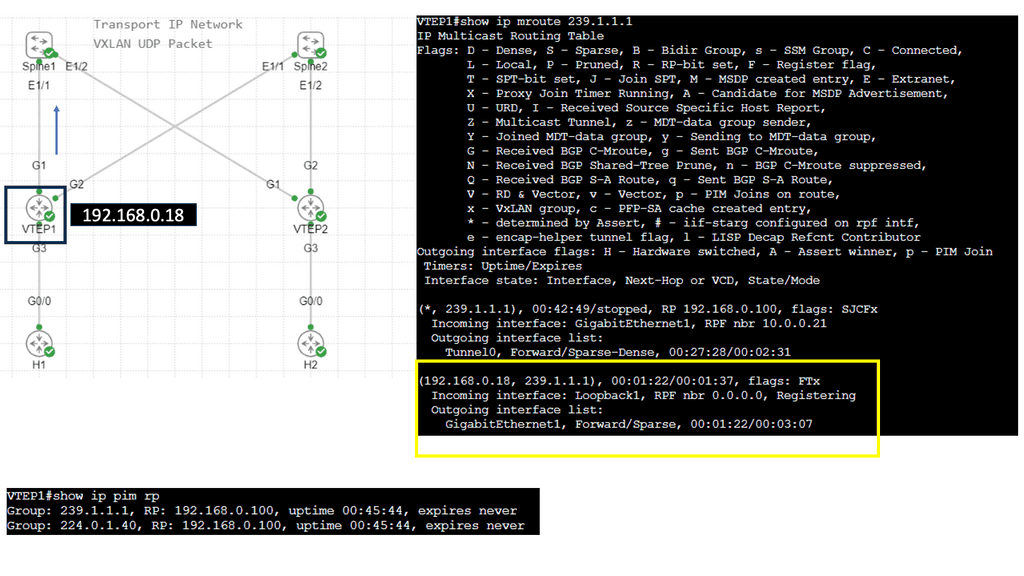
At the heart of VXLAN lies the Flood and Learn mechanism, which plays a crucial role in efficiently forwarding network traffic. When a VM sends a frame to a destination VM residing in a different VXLAN segment, the frame is flooded across the VXLAN overlay network. The frame is efficiently distributed using multicast to all relevant VTEPs (VXLAN Tunnel Endpoint) within the same VXLAN segment. Each VTEP learns the MAC (Media Access Control) addresses of the VMs within its segment, allowing for optimized forwarding of subsequent frames.

Multicast plays a pivotal role in VXLAN Flood and Learn, offering several advantages over unicast or broadcast-based approaches. First, multicast enables efficient traffic distribution by replicating frames only to the relevant VTEPs within a VXLAN segment. This reduces unnecessary network overhead and enhances overall performance. Additionally, multicast allows for dynamic membership management, ensuring that VTEPs join and leave multicast groups as needed without manual configuration.

VXLAN Flood and Learn with Multicast has found widespread adoption in various use cases. Data center networks, particularly those with high VM density, benefit from the scalability and flexibility provided by VXLAN. Large-scale VM migrations and workload mobility can be seamlessly achieved by leveraging multicast without compromising network performance. Furthermore, VXLAN Flood and Learn enables efficient utilization of network resources, optimizing bandwidth usage and reducing latency.
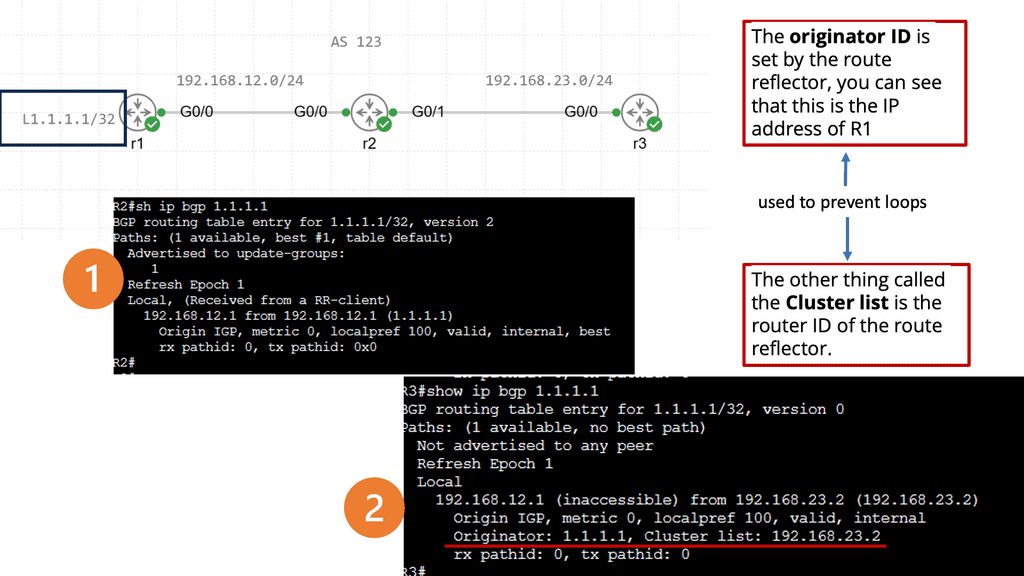
Understanding BGP Route Reflection

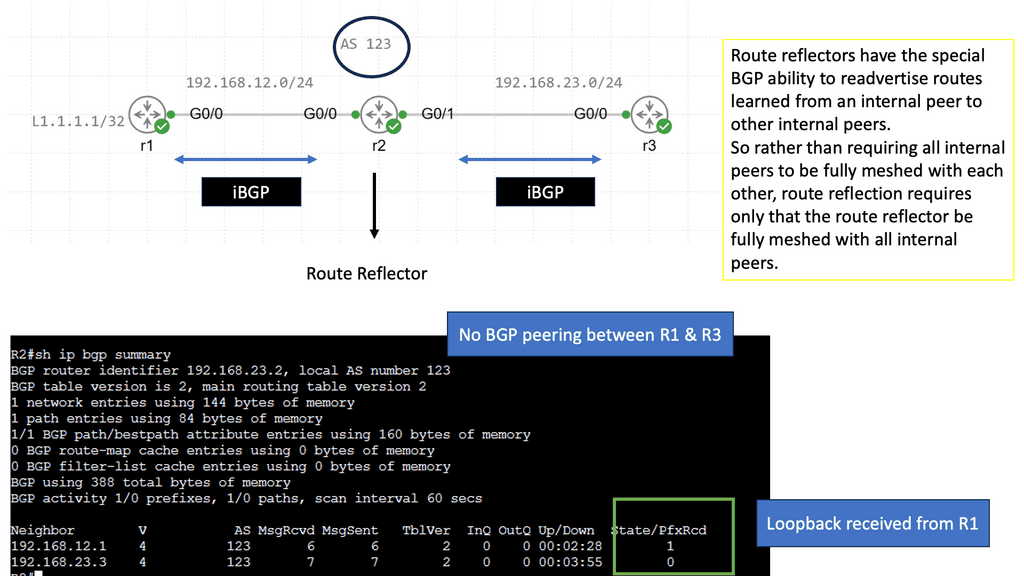
BGP route reflection is a mechanism that alleviates the full mesh requirement in BGP networks. Establishing a full mesh of BGP peers in large-scale networks can become impractical, leading to increased complexity and resource consumption. Route reflection enables route information to be selectively propagated across BGP speakers, resulting in a more scalable and manageable network infrastructure.

To implement BGP route reflection, a network administrator must identify routers that will act as route reflectors. These routers are responsible for reflecting BGP updates from one client to another, ensuring the propagation of routing information without requiring a full mesh. Careful design considerations, such as route reflector hierarchy and cluster configuration, are essential for optimal scalability and performance.
Example: Data Center Fabric – FabricPath

Network devices are deployed in highly interconnected layers, represented as a fabric. Unlike traditional multitier architectures, a data center fabric effectively flattens the network architecture, reducing the distance between endpoints within the data center. An example of a data center fabric is FabricPath.

Cisco has validated FabricPath as an Intra-DC Layer 2 multipath technology. Design cases are also available where FabricPath is deployed for DCI ( Data Center Interconnect ). Regarding a FabricPath DCI option, design carefully over short distances with reliable interconnects, such as Dark Fiber or Protected Dense Wavelength Division Multiplexing (DWDM ).

FabricPath designs are suitable for a range of topologies. Unlike hierarchical virtual Port Channel ( vPC ) designs, FabricPath does not need to follow any topology. It can accommodate any design type: full mesh, partial mesh, hub, and spoke topologies.

Example: Data Center Fabric – Cisco ACI 

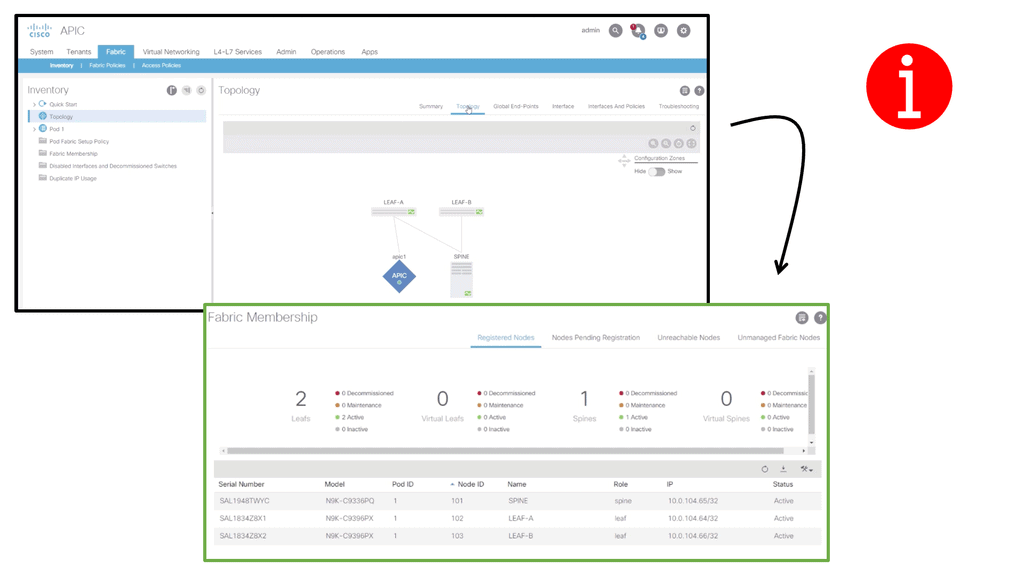
ACI Cisco is a software-defined networking (SDN) architecture that brings automation and policy-driven application profiles to data centers. By decoupling network hardware and software, ACI provides a flexible and scalable infrastructure to meet dynamic business requirements. It enables businesses to move from traditional, manual network configurations to a more intuitive and automated approach.

One of the defining features of Cisco ACI is its application-centric approach. It allows IT teams to define policies based on application requirements rather than individual network components. This approach simplifies network management, reduces complexity, and ensures that network resources are aligned with the needs of the applications they support.
SDN data center
Diagram: Cisco ACI fabric checking.

Related: Before you proceed, you may find the following posts helpful:

  1. What Is FabricPath
  2. Data Center Topologies
  3. ACI Networks
  4. Active Active Data Center Design
  5. Redundant Links

Data Center Fabric

Flattening the network architecture

In this current data center network design, network devices are deployed in two interconnected layers, representing a fabric. Sometimes, massive data centers are interconnected with three layers. Unlike conventional multitier architectures, a data center fabric flattens the network architecture, reducing the distance between endpoints within the data center. This design results in high efficiency and low latency. Very well suited for east-to-west traffic flows.

Data center fabrics provide a solid layer of connectivity in the physical network and move the complexity of delivering use cases for network virtualization, segmentation, stretched Ethernet segments, workload mobility, and various other services to an overlay that rides on top of the fabric.

When paired with an overlay, the fabric itself is called the underlay. The overlay could be deployed with, for example, VXLAN. To gain network visibility into user traffic, you would examine the overlay, and the underlay is used to route traffic between the overlay endpoints.

VXLAN, short for Virtual Extensible LAN, is a network virtualization technology that enables the creation of virtual networks over an existing physical network infrastructure. It provides a scalable and flexible approach to address the challenges posed by traditional VLANs, such as limited scalability, spanning domain constraints, and the need for manual configuration.

Guide on overlay networking with VXLAN

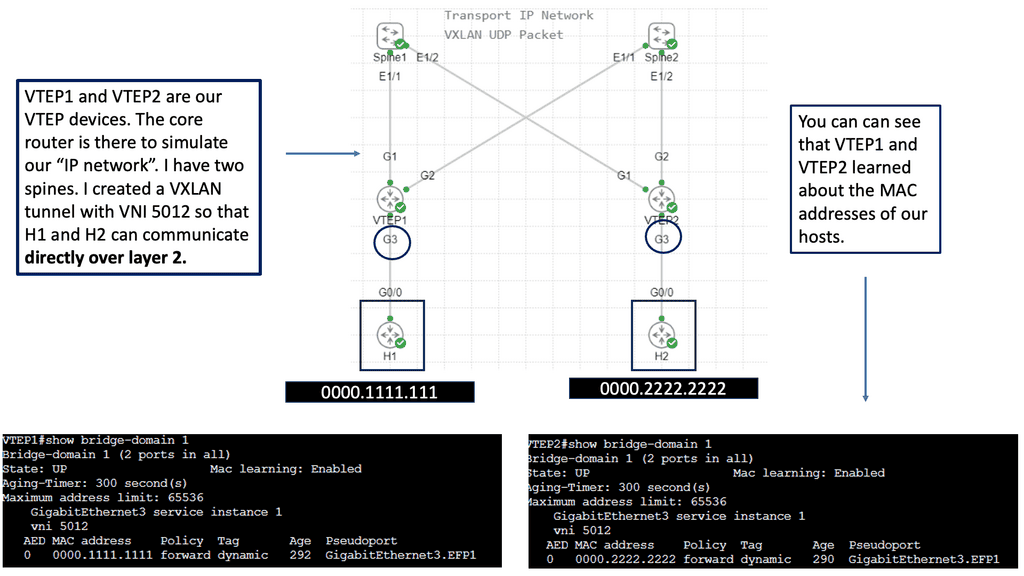
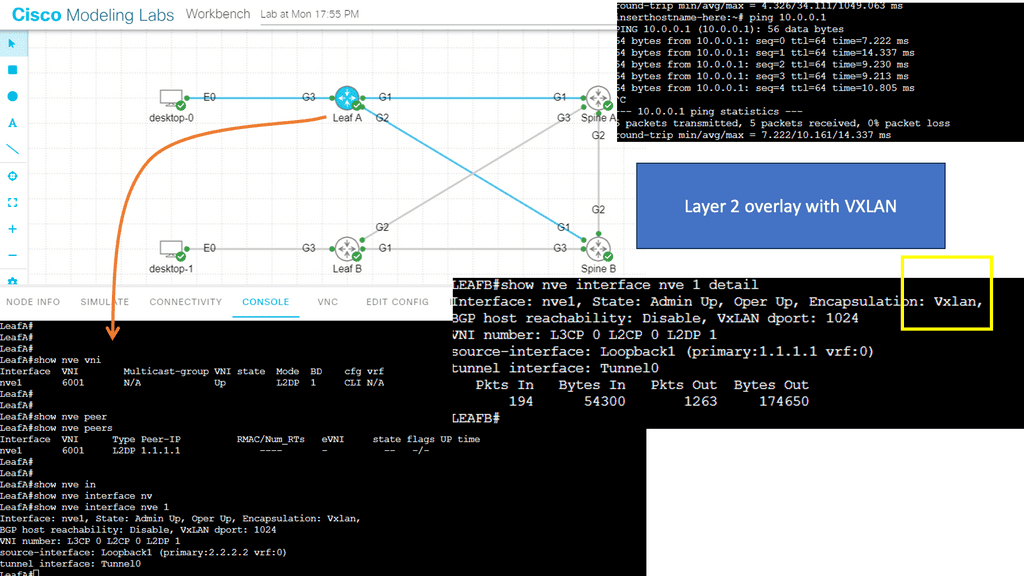
The following example shows VLXAN tunnel endpoints on Leaf A and Leaf B. The bridge domain is mapped to a VNI on G3 on both leaf switches. This enables a Layer 2 overlay for the two hosts to communicate. This VXLAN overlay goes across Spine A and Spine B.

Note that the Spine layer, which acts as the core network, a WAN network, or any other type of Routed Layer 3 network, has no VXLAN configuration. We have flattened the network while providing Layer 2 connectivity over a routed core.
VXLAN overlay
Diagram: VXLAN Overlay

Fabricpath Design: Problem Statement

Key Features of Cisco Fabric Path:

Transparent Interconnection: Cisco Fabric Path allows for creating a multi-path forwarding infrastructure that provides transparent Layer 2 connectivity between devices within a network. This enables the efficient utilization of available bandwidth and simplifies network design.

Scalability: With Cisco Fabric Path, organizations can quickly scale their network infrastructure to accommodate growing data loads. It supports up to 16 million virtual network segments, enabling seamless expansion of network resources without compromising performance.

Fault Tolerance: Cisco Fabric Path incorporates advanced fault-tolerant mechanisms like loop-free topology and equal-cost multipath routing. These features ensure high availability and resiliency, minimizing the impact of network failures and disruptions.

Traffic Optimization: Cisco Fabric Path employs intelligent load-balancing techniques to distribute traffic across multiple paths, optimizing network utilization and reducing congestion. This results in improved application performance and enhanced user experience.

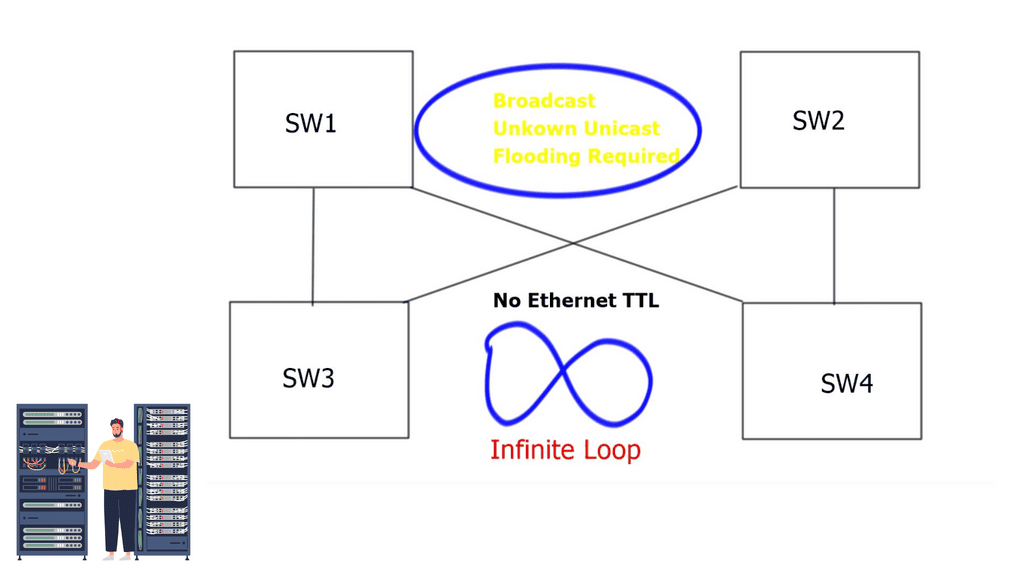
The problem with traditional classical Ethernet is the flooding behavior of unknown unicasts and broadcasts and the process of MAC learning. All switches must learn all MAC addresses, leading to inefficient resource use. In addition, Ethernet has no Time-to-Live ( TTL ) value, and if precautions are not in place, it could cause an infinite loop.
data center fabric

Deploying Spanning Tree Protocol ( STP ) at Layer 2 blocks loops, but STP has many known limitations. One of its most significant flaws is that it offers a single topology for all traffic with one active forwarding path. Scaling the data center with classical Ethernet and spanning trees is inefficient as it blocks all but one path. With spanning trees’ default behavior, the benefits of adding extra spines do not influence bandwidth or scalability.
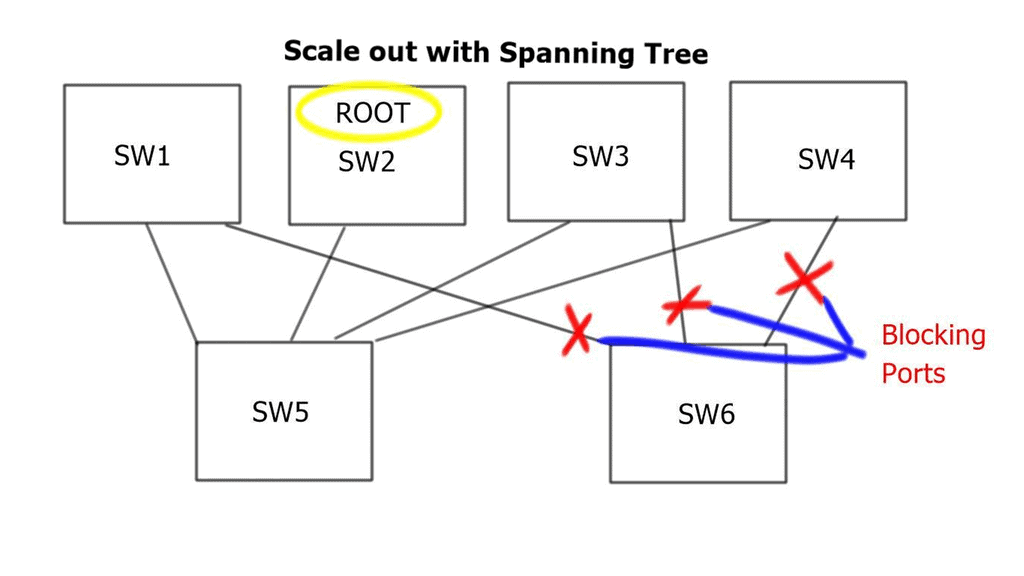
Possible alternatives

Multichassis EtherChannel 

To overcome these limitations, Cisco introduced Multichassis EtherChannel ( MEC ). MEC comes in two flavors: Virtual Switching System ( VSS ) with Catalyst 6500 series or Virtual Port Channel ( vPC ) with Nexus Series. Both offer active/active forwarding but present scalability challenges when scaling out Spine / Core layers. Additionally, complexity increases when deploying additional spines.

Multiprotocol Label Switching 

Another option would be to scale out with Multiprotocol Label Switching ( MPLS ). Replace Layer 2 switching with Layer 3 forwarding and MPLS with Layer 2 pseudowires. This type of complexity would lead to an operational nightmare. The prevalent option is to deploy Layer 2 multipath with THRILL or FabricPath. In intra-DC communication, Layer 2 and Layer 3 designs are possible in two forms: Traditional DC design and Switched DC design.
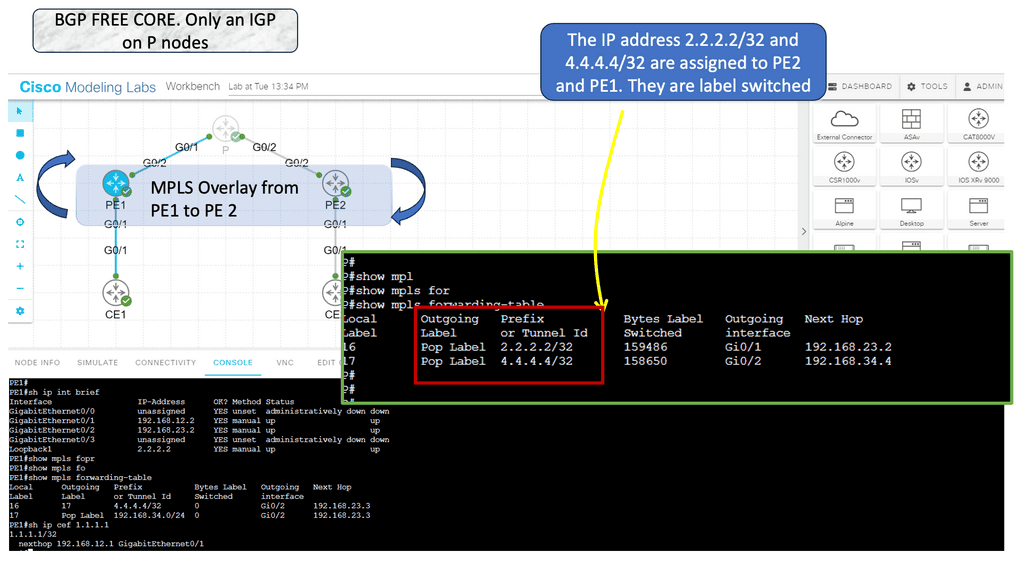
MPLS overlay

FabricPath VLANs use Conversational Learning, meaning a subset of MAC addresses is learned at the network’s edge. Conversation learning consists of a three-way handshake. Each interface learns the MAC addresses of interested hosts. Compared to classical Ethernet, each switch device learns all MAC addresses for that VLAN.

  1. Traditional DC design replaces hierarchical vPC and STP with FabricPath. The core, distribution, and access elements stay the same. The same layered hierarchical model exists, but with FabricPath in the core.
  2. Switched DC design based on Clos Fabrics. Integrate additional Spines for Layer 2 and Layer 3 forwarding.

Traditional data center design
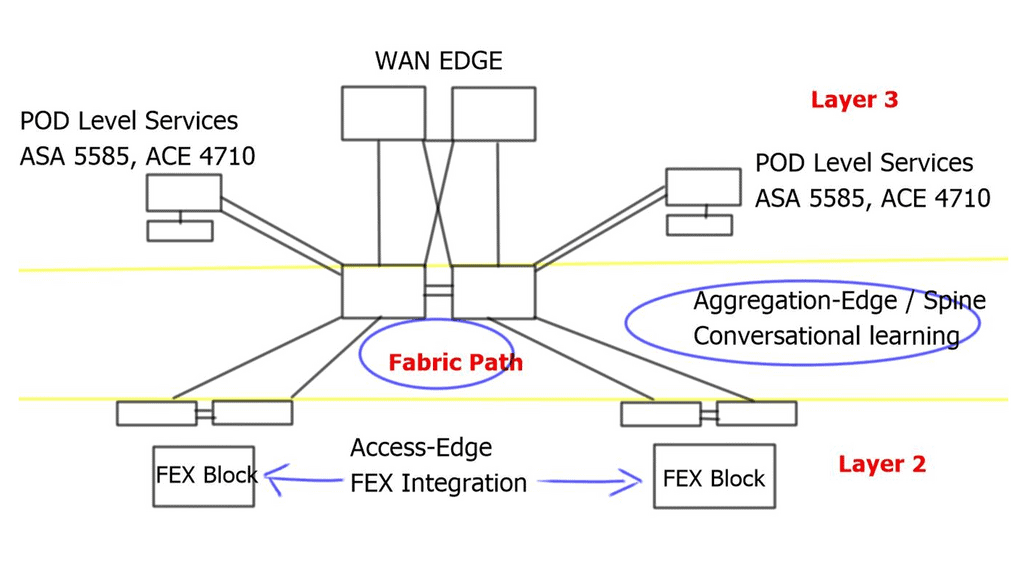
what is data center fabric
Diagram: what is data center fabric


Fabric Path in the core replaces vPC. It still uses port channels, but the hierarchical vPC technology previously used to provide active/active forwarding is not required. Instead, designs are based on modular units called PODs; within each POD, traditional DC technologies exist, such as vPC. Active/active ( dual-active paths ) forwarding based on a two-node Spine, Hot Standby Router Protocol ( HSRP ), announces the virtual MAC of the emulated switch from each of the two cores. For this to work, implement vPC+ on the inter-spine peer links.


Switched data center design
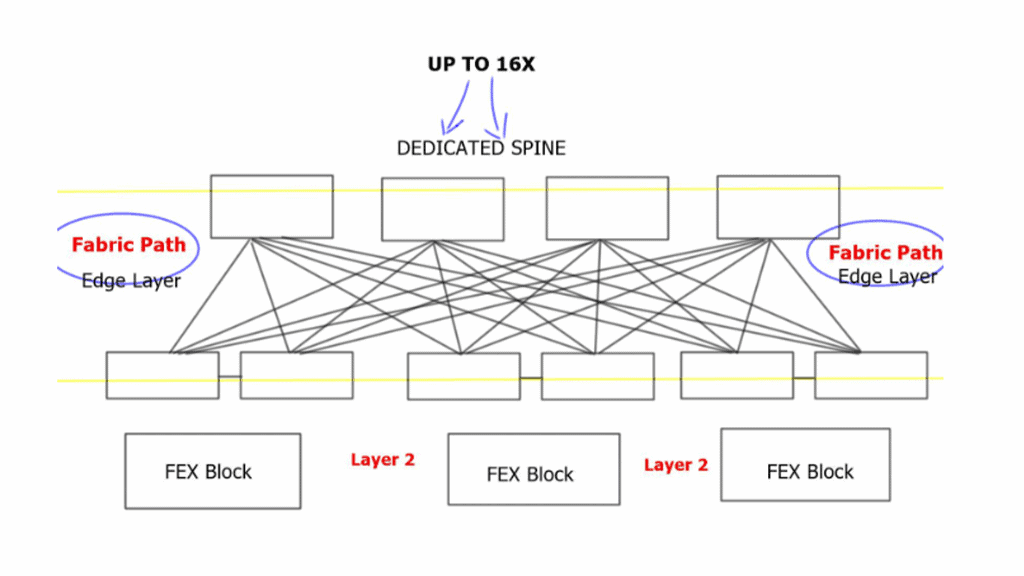
Switched Fabric Data Center
Diagram: Switched Fabric Data Center

Each edge node has equidistant endpoints to each other, offering predictable network characteristics. From FabricPath’s outlook, the entire Spine Layer is one large Fabric-based POD. In the traditional model presented above, port and MAC address capacity are key factors influencing the ability to scale out. The key advantage of Clos-type architecture is that it expands the overall port and bandwidth capacity within each POD.

Implementing load balancing 4 wide spines challenges traditional First Hop Redundancy Protocol ( FHRP ) like HSRP, which works with 2 active pairs by default. Implementing load balancing 4 wide spines with VLANs allowed on certain links is possible but can cause link polarization. 

For optimized designs, utilize a redundancy protocol to work with a 4-node gateway. Deploy Gateway Load Balancing Protocol ( GLBP ) and Anycast FHRP. GLBP uses a weighting parameter that allows Address Resolution Protocol ( ARP ) requests to be answered by MAC addresses pointing to different routers. Anycast FHRP is the recommended solution for designs with 4 or more spine nodes.

FabricPath Key Points:

  • FabricPath removes the requirement for a spanning tree and offers a more flexible and scalable design to its vPC-based Layer 2 alternative. No requirement for a spanning tree, enabling Equal Cost Multipath ( ECMP ).

  • FabricPath no longer forwards using spanning tree. Offering designers bi-sectional bandwidth and up to 16-way ECMP. 16 x 10Gbps links equate to 2.56 terabits per second between switches.

  • Data Centers with FabricPath are easy to extend and scale.

  • Layer 2 troubleshooting tools for FabricPath including FabricPath PING and Traceroute can now test multiple equal paths.

  • Control plane based on Intermediate System-to-Intermediate System ( IS-IS ).

  • Loop prevention is now in the data plane based on the TTL field.

Summary: Data Center Fabric

In the fast-paced digital age, where data rules supreme, the backbone of reliable and efficient data processing lies within data center fabrics. These intricate systems of interconnections enable the seamless flow of data, ensuring businesses and individuals can harness technology’s power. In this blog post, we dived deep into the world of data center fabric, exploring its architecture, benefits, and role in shaping our digital landscape.

Understanding Data Center Fabric

Data center fabric refers to the underlying framework that connects various components within a data center, including servers, storage, and networking devices. It comprises a complex network of switches, routers, and interconnecting cables, all working to facilitate data transmission and communication.

The Architecture of Data Center Fabric

Data center fabrics adopt a leaf-spine architecture called a Clos network. This design consists of leaf switches that directly connect to servers and spine switches that interconnect the leaf switches. The leaf-spine architecture ensures high bandwidth, low latency, and scalability, allowing data centers to handle increasing workloads and traffic demands.

Benefits of Data Center Fabric

  • Enhanced Performance:

Data center fabrics offer improved performance by minimizing latency and providing high-speed connectivity. The low-latency nature of fabrics ensures quick data transfers, enabling real-time processing and reducing bottlenecks.

  • Scalability and Flexibility:

With the ever-growing data requirements of modern businesses, scalability is crucial. Data center fabrics allow adding or removing switches seamlessly, accommodating changing demands without disrupting operations. This scalability is a significant advantage, especially in cloud computing environments.

  • Improved Resilience and Redundancy:

Data center fabrics are designed to provide redundancy and fault tolerance. In case of a link or switch failure, the fabric’s distributed nature allows traffic to be rerouted dynamically, ensuring uninterrupted service availability. This resiliency is vital for mission-critical applications and services.

Hyper-Scale Data Centers:

Tech giants like Google, Facebook, and Amazon heavily rely on data center fabrics to support their massive workloads. These hyper-scale data centers utilize fabric architectures to handle the vast amounts of data millions of users worldwide generate.

Enterprise Data Centers:

Medium to large-scale enterprises leverage data center fabrics for efficient data processing and seamless connectivity. Fabric architectures enable these organizations to enhance their IT infrastructure, ensuring optimal performance and reliability.

Conclusion:

The data center fabric is the backbone of modern digital infrastructure, enabling rapid and secure data transmission. With its scalable architecture, enhanced performance, and fault-tolerant design, data center fabrics have become indispensable in the age of cloud computing, big data, and the Internet of Things. As technology evolves, data center fabrics will play a vital role in powering the digital revolution.

IP Forwarding Example

Forwarding Routing Protocols

Network Engineering · IP Forwarding

IP Forwarding: How Routers Move Packets Through a Network

IP forwarding is the process that moves packets from an incoming interface towards their next destination. Every routed packet depends on a forwarding decision: which destination prefix matches, which next hop should be used, and which outgoing interface can deliver the packet closer to its destination.

Routing and forwarding are closely connected, but they perform different jobs. Routing protocols and static configuration provide reachability information. The router uses that information to populate its routing state and construct the forwarding information used to process packets. Understanding this relationship is essential when diagnosing unreachable networks, unexpected paths, asymmetric traffic and failures following a topology change.

This engineering guide follows the forwarding process from the routing information a router learns to the decision made for an individual packet. Rather than treating routing protocols as isolated topics, we'll connect their behaviour to the forwarding result an engineer can observe and troubleshoot.

What you will learn

01 · FUNDAMENTALS Separate routing from forwarding Understand the control plane, data plane and the different responsibilities each performs.
02 · ROUTING STATE Follow routes into the FIB Examine how routing information becomes an installed forwarding entry and a usable next hop.
03 · PACKET DECISIONS Trace a packet's forwarding path Explore longest-prefix matching, next-hop resolution and equal-cost multipath forwarding.
04 · CONVERGENCE Understand routing changes Compare routing protocol behaviour and investigate how failures affect reachability and forwarding.
The engineering principle

A routing table entry alone does not prove that a packet will reach its destination. Engineers must establish the installed forwarding entry, next-hop reachability, interface state and behaviour along the actual path. When forwarding fails, the objective is to identify the precise stage where the expected packet journey breaks down.

How to use this guide

Read, experiment, diagnose

The guide is organised into five sections, each beginning with an introduction and followed by technical explanations and a practical interactive lab. Use the table of contents to navigate directly to a topic, then work through its experiment to test the forwarding behaviour and understand the evidence behind each result.

Section 1 · Foundations

IP Routing and Forwarding Fundamentals

Before troubleshooting a routing problem, establish what a router actually does with a packet. Routing determines usable paths through a network; forwarding applies the installed forwarding state to move each packet toward its destination.

From an incoming packet to an outgoing interface

A router receives a frame on an interface, processes its Layer 2 header, examines the network-layer packet and performs a lookup using the destination IP address and the applicable routing context. The result identifies a forwarding action, typically including a next hop and an outgoing interface. The router then prepares the outgoing Layer 2 frame and transmits it, provided the required state and policies allow it.

Receive frame→ Inspect IP packet→ Look up destination→ Resolve next hop→ Transmit frame

Layer 2 switching

A switch uses Ethernet forwarding information, VLAN context and destination MAC addresses to decide where to send a frame within a Layer 2 domain.

Layer 3 routing

A router uses IP forwarding information to determine how a packet should progress between IP networks. The outgoing frame normally has a new Layer 2 header for the next link.

Control plane

Routing protocols and local configuration build and maintain routing information. Route selection determines which paths are eligible to be installed for forwarding.

Forwarding plane

The forwarding plane applies installed entries to packets. A route visible in routing state is not sufficient proof that end-to-end delivery will succeed.

Engineering principle

Keep route calculation separate from packet forwarding. When traffic fails, verify both the control-plane decision and the data-plane path rather than assuming one proves the other.

Prepare for the interactive lab: Trace the packet journey

Follow a packet across a simple routed topology. Identify the ingress interface, destination lookup, next hop and egress interface. Use the observed forwarding steps to explain where delivery could fail.

Section 01 · Fundamentals · Observe

IP Routing and Forwarding Fundamentals

Before investigating routing tables or packet-processing decisions, we need to understand the basic journey of an IP packet. A host generates traffic, a network device examines the destination, and each router along the path determines how to move that packet towards its destination network.

The terms routing and forwarding are often used together, but they describe different operations. Routing establishes reachability and selects routes. Forwarding uses the installed forwarding information to process individual packets. This distinction provides the foundation for understanding how networks operate and where to investigate when traffic fails.

1.1 · Layer 2 switching and Layer 3 routing

Devices on the same IP subnet can generally communicate through Layer 2 switching, provided the required addressing, VLAN and connectivity conditions are in place. Ethernet switches learn source MAC addresses and use their MAC address tables to determine how to forward Ethernet frames within a bridged network.

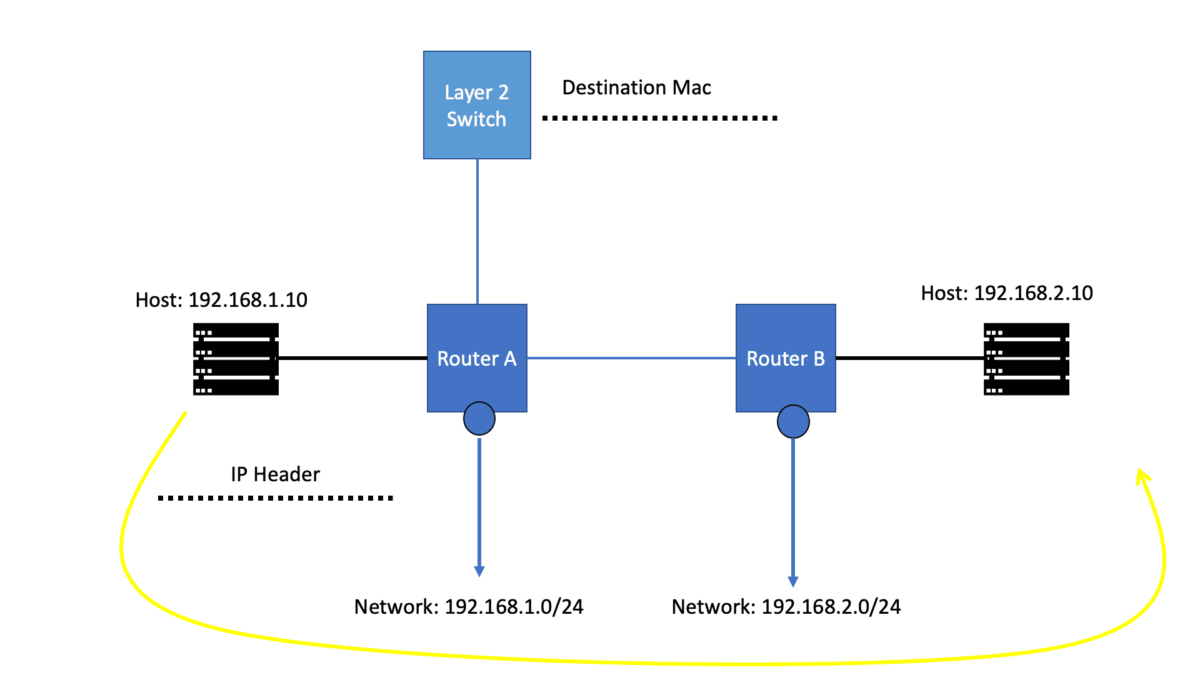
Communication with a destination outside the local IP subnet normally requires a Layer 3 forwarding decision. The host sends the packet to its configured default gateway, encapsulated in an Ethernet frame addressed to the gateway's MAC address. The router removes the incoming Layer 2 encapsulation, examines the IP destination and determines the next forwarding action.

Layer 2 · Local delivery
Switching frames

A switch uses its MAC address table and VLAN context to select an egress port, flood eligible unknown traffic, or filter a frame when appropriate. The destination IP prefix is not the normal basis of Ethernet switching.

Layer 3 · Routed delivery
Forwarding IP packets

A router performs a Layer 3 lookup against the packet's destination IP address, selects a matching forwarding entry, resolves the next hop and chooses an outgoing interface when a usable route is available.

1.2 · What happens when a packet reaches a router?

Consider a client in subnet 192.168.10.0/24 sending traffic to a server in subnet 192.168.20.0/24. The client identifies that the destination is outside its local subnet and sends the packet to its default gateway, for example 192.168.10.1.

The router then performs a series of operations. The precise implementation varies between platforms, but the logical forwarding process can be understood as follows.

  1. Receive and validate. The router receives the frame, processes the Layer 2 encapsulation and performs the applicable packet validation.
  2. Identify the IP destination. The router examines the destination address in the IP header and looks for a matching entry in its forwarding information.
  3. Select the forwarding action. The lookup identifies the applicable route or forwarding action, including a next hop and outgoing interface where required. A more specific matching prefix takes precedence over a less specific prefix.
  4. Resolve the next hop. The router uses its forwarding state and neighbour-resolution information to determine how to reach the next hop on the outgoing link.
  5. Transmit the packet. Where forwarding is permitted and the required information is available, the router updates relevant Layer 3 fields, constructs the appropriate outgoing Layer 2 frame and transmits it towards the next hop.

This process repeats at each routed hop until the packet reaches its destination network or encounters a condition that prevents successful delivery. A router does not normally need to know the entire end-to-end path in advance; it makes a forwarding decision using its own installed forwarding information.

1.3 · Routing control plane versus forwarding data plane

The control plane learns and evaluates reachability information. Routes may originate from directly connected networks, static configuration or dynamic routing protocols. A router evaluates candidate routes according to its routing process and installs eligible routes into its routing information base (RIB).

The forwarding plane uses the resulting forwarding information base (FIB) to make packet-forwarding decisions. The FIB is optimised for lookup and may be programmed into specialised forwarding hardware. The RIB and FIB are related, but they are not interchangeable: the presence of a route in one view does not by itself prove successful end-to-end delivery.

Engineering evidence · What should you verify?

When a destination is unreachable, inspect the route selected for the destination, the corresponding forwarding entry, next-hop reachability, outgoing interface state and relevant Layer 2 adjacency information. Then test the path and confirm where the observed behaviour first differs from the expected forwarding decision.

1.4 · Why routing protocols matter to forwarding

Routing protocols help routers learn and maintain reachability as networks change. RIP uses hop count as its metric. OSPF and IS-IS distribute link-state information and calculate paths using their respective link-state algorithms and metrics. EIGRP uses a composite metric and a diffusing computation mechanism, while BGP exchanges reachability between routing peers and applies policy to route selection and advertisement.

These protocols do not forward every application packet themselves. They contribute routing information that can affect which routes are selected and installed. Forwarding then applies the installed decision to traffic. Understanding this relationship is essential when investigating a route change, a failed link, a missing next hop or a forwarding path that differs from expectations.

Interactive Lab · Section 01

Trace the packet journey

In the interactive lab immediately below this section, follow a packet from a client to a remote subnet. Examine the local gateway decision, the router's destination lookup and the outgoing interface. Then change a forwarding condition and observe how the packet journey changes. Use the engineering readout to connect each action to the underlying networking principle.

Interactive Lab 01 · Forwarding Fundamentals

Trace the IP Packet

Follow a packet from a client to a remote server. Watch the router make a Layer 3 decision and rebuild the Layer 2 frame.

READY TO TRACE

Live packet path

STEP 0 / 8
CLIENT 192.168.1.10 Host SWITCH 1 Layer 2 MAC forwarding ROUTER Gi0/0 · LAN Gi0/1 · A Gi0/2 · B SWITCH 2 Layer 2 MAC forwarding SERVER A 10.1.1.10 Network A SERVER B 10.2.2.10 Network B
Active forwarding path Packet location Failed link
192.168.1.10End-to-end source
10.1.1.10Selected server
64Router decrements TTL
CreatedAwaiting first step
CURRENT EVENT
Ready to begin

Step forward to see how a host sends an IP packet to a destination on another subnet.

Packet journey0% complete

Frame & interface telemetry

LIVE
Current deviceClient
Ingress interface—
Egress interface—
Ethernet source MAC—
Ethernet destination MAC—
Layer 2 actionNo frame sent yet
Layer 3 actionPacket not yet routed

Forwarding decision

ROUTER LOOKUP
Connected networkOutgoing interfaceStatus
10.1.1.0/24Gi0/1Connected
10.2.2.0/24Gi0/2Connected
What should the router do?

The destination IP determines the Layer 3 forwarding decision. The router uses its forwarding table to select an outgoing interface.

Fault injection

Simulates the selected router interface becoming unavailable. Reset restores the link.

Packet event timeline

0 / 8 EVENTS

Section 2 · Routing State

Routing Tables, RIB and FIB

To understand why a router chooses a particular path, inspect the routing information it has learned, the route it selects and the forwarding entry it installs. The RIB and FIB are related, but they serve different purposes.

From route learning to packet forwarding

Connected routes, static configuration and routing protocols can supply candidate routes. The routing process evaluates those candidates using route preference, protocol-specific selection rules and policy. An eligible selected route may then be programmed into the forwarding information base, where it supports packet lookups.

1. LearnReceive or create candidate routing information.
2. SelectApply route preference, protocol rules and policy.
3. InstallProgram eligible forwarding information into the FIB.

Routing Information Base (RIB)

Contains routing information maintained by the routing system, including routes from different sources and the routes selected for use. The exact display and organization depend on the platform.

Forwarding Information Base (FIB)

Contains the entries used by the forwarding plane to make packet-forwarding decisions. These entries may include prefixes, next hops, interfaces and platform-specific forwarding actions.

Route selection

Determines which route is preferred for a destination among available candidates. Administrative distance, preference and protocol-specific rules vary by implementation.

Longest-prefix match

During a destination lookup, the most specific matching prefix is normally preferred among applicable FIB entries. This forwarding lookup is distinct from route selection.

Engineering principle

Do not stop when a route appears in the RIB. Check the selected route, the corresponding FIB entry and whether its next hop is resolved and usable.

Prepare for the interactive lab: Inspect the RIB and FIB

Compare routing information with installed forwarding entries. Follow a destination prefix through route selection and installation, then investigate what a missing or unresolved FIB entry means for packet delivery.

Section 02 · Routing State · Inspect

Routing Tables, RIB and FIB

A router can learn several possible paths to a destination, but learning a route is not the same as forwarding a packet. To understand the actual forwarding outcome, distinguish the information learned by routing protocols, the routes selected by the routing process and the forwarding entries used to handle traffic.

The Routing Information Base (RIB) and Forwarding Information Base (FIB) serve related but different roles. The RIB represents routing information and selected routes maintained by the routing system. The FIB contains the forwarding information derived from eligible routes and used for destination lookups. Their exact implementation and display vary across platforms.

2.1 · From route learning to packet forwarding

A router may learn reachability through connected interfaces, static configuration or routing protocols such as OSPF, IS-IS and BGP. It evaluates candidate routes using the relevant protocol rules, route preferences and configuration. The selected route can then be installed into the routing table and used to program forwarding state.

Control plane
RIB · Routing Information Base

Holds routing information and selected routes. It supports route evaluation, route installation and the control-plane processes that maintain reachability.

Forwarding plane
FIB · Forwarding Information Base

Holds destination-prefix forwarding entries used to select a next hop, outgoing interface or other forwarding action. Hardware platforms may program these entries into an ASIC or another forwarding engine.

2.2 · The route does not tell the whole story

Consider the destination prefix 10.20.30.0/24. A router might learn a route to this prefix from OSPF and another candidate from a different source. The router's route-selection process determines which route is eligible for installation according to the platform's routing rules and configuration.

Once the selected route is installed, the forwarding system needs sufficient information to carry traffic towards the destination. That can include a resolved next hop, an outgoing interface and Layer 2 adjacency information. If next-hop resolution fails or the interface is unavailable, the route information alone does not guarantee successful packet delivery.

Information layer Primary question What to investigate
Learned route How did the router learn the destination? Protocol state, received advertisements, connected networks and static configuration.
RIB / routing table Which route was selected for installation? Prefix length, route preference, metric, policy and competing candidates.
FIB / forwarding table What forwarding action will a destination lookup use? Matching prefix, next hop, outgoing interface and programmed forwarding state.
Adjacency / neighbour state Can the router transmit towards the next hop? ARP or IPv6 neighbour discovery, Layer 2 reachability and interface status.

2.3 · Longest-prefix match in the FIB

When forwarding a normal unicast IP packet, the router looks for matching destination prefixes in its forwarding information. Where multiple prefixes match, the most specific matching prefix is normally selected. This is known as longest-prefix match.

For example, a forwarding table may contain 10.20.0.0/16 through one next hop and 10.20.30.0/24 through another. A packet addressed to 10.20.30.45 matches both prefixes, but the /24 is more specific than the /16 and therefore takes precedence for that destination, assuming both entries are usable and the lookup is in the same forwarding context.

Engineering principle · Route selection is not longest-prefix match

Route selection determines which route or routes are installed for a given prefix. Longest-prefix match determines which installed forwarding prefix applies to a packet's destination. These are separate decisions and should be checked separately during troubleshooting.

2.4 · Why the RIB and FIB can appear different

A routing table may contain routes that are not installed in the active forwarding table. A route might lose to a competing route for the same prefix, depend on an unresolved next hop, or be affected by platform-specific forwarding constraints. The exact causes and diagnostic commands differ by vendor and operating system.

Some platforms also expose additional tables, such as protocol databases, Adj-RIB-In and Adj-RIB-Out for BGP, hardware forwarding views, or separate routing and forwarding instances. These views answer different questions. A BGP route received from a peer, for example, is not necessarily the best route, the route installed in the main RIB, or the entry ultimately used to forward a packet.

Troubleshooting sequence · Follow the evidence

Start with the destination prefix. Confirm the route source and selected route, inspect the forwarding entry, verify next-hop resolution and interface state, then test packet delivery. If the route is present but traffic fails, avoid assuming the routing protocol is at fault until the forwarding path has been checked.

2.5 · What to examine in the interactive lab

In the experiment below, use a destination address to compare candidate routes with the selected RIB entry and the resulting FIB lookup. Change prefix specificity or next-hop availability and observe which parts of the routing and forwarding state change. The goal is to identify the exact decision that explains the packet's outcome.

Interactive Lab · Section 02

Inspect the RIB and FIB

Use the interactive lab immediately below this section to inspect candidate routes, identify the selected route and trace the destination lookup through the forwarding table. Compare longest-prefix match with route selection, then introduce a next-hop or interface problem and examine the evidence before deciding where the failure occurs.

Interactive Lab 02 · Routing Information to Forwarding

RIB vs FIB: How a Route Becomes Forwarding State

Inspect candidate routes, install the selected route into the forwarding table, and trace a packet using the resulting forwarding entry.

ROUTE NOT INSTALLED

Control-plane to data-plane topology

STEP 0 / 7
ROUTINGPROCESSOSPF / BGP RIBRoute candidatesControl plane FIBSelected routesForwarding entries ROUTERLookupEgress interfaceNext hop NETWORK A10.1.1.0/24Gi0/1 NETWORK B10.2.2.0/24Gi0/2
Active processing stage Lookup marker Unavailable route
10.1.1.10Longest-prefix match
—Awaiting lookup
CandidateControl-plane state
EmptyForwarding state
CURRENT EVENT
Inspect the candidate routes

The routing process can learn multiple paths. The router selects a route for installation, then makes forwarding state available to the data plane.

Route installation sequence0% complete

Live forwarding lookup

DATA PLANE
Lookup resultNot run
Matched prefix—
Next hop—
Egress interface—
FIB entryNot installed
Forwarding outcomeWaiting for FIB
Key engineering principle

The RIB contains routing information. The FIB is the forwarding-oriented structure used to make packet decisions.

Routing Information Base (RIB)

CANDIDATE ROUTES
PrefixSourcePreferenceRIB role
10.1.1.0/24ConnectedDirectAvailable
10.2.2.0/24OSPFCost 10Available
10.2.2.128/25StaticAdmin 5More specific

Teaching model: a simplified set of route candidates. Real operating systems use platform-specific route-selection and installation rules.

Forwarding Information Base (FIB)

INSTALLED ENTRIES
PrefixNext hopInterfaceStatus
10.1.1.0/24DirectGi0/1Not installed
10.2.2.0/2410.0.0.2Gi0/2Not installed
10.2.2.128/2510.0.0.3Gi0/3Not installed

Engineering event timeline

0 / 7 EVENTS
Ready. Press Step Forward to inspect the RIB-to-FIB process.Lab 02 · Routing tables and forwarding state

Section 3 · Packet Processing

Forwarding Decisions and Packet Processing

A forwarding decision turns a destination address into a concrete action. Understanding the lookup, next-hop resolution, interface selection and packet handling sequence helps explain why a route can exist while traffic still fails.

How a router chooses the next step

The router evaluates the packet in the context of the receiving interface, routing table or VRF, destination address and applicable forwarding policies. It looks for a matching forwarding entry, resolves the selected next hop and determines how the packet should leave the device. The precise internal pipeline differs across router operating systems and hardware platforms.

Destination lookup

The forwarding lookup normally uses longest-prefix match among applicable entries. A more-specific prefix can therefore be used instead of a less-specific covering route.

Next-hop resolution

The router must have a usable forwarding action. For a directly connected Ethernet next hop, this often requires neighbor resolution through ARP for IPv4 or Neighbor Discovery for IPv6.

Header and Layer 2 handling

For ordinary routed IP forwarding, the IP hop limit or TTL is decremented and the IPv4 header checksum is updated. The outgoing Layer 2 header is prepared for the next link.

Policy and multipath

ACLs, firewall rules, VRFs, tunnels and other platform features can affect packet handling. With ECMP, eligible flows are commonly distributed using a hash rather than every packet being sent over every path.

Questions to ask when a forwarding result is unexpected

  • Which routing context is handling the packet?
  • Which prefix matches the destination, and is it the most specific applicable entry?
  • Is the selected next hop reachable and resolved?
  • Are interface state, access policies or encapsulation preventing transmission?
  • If multiple paths exist, which ECMP member is selected for this flow?
Engineering principle

Explain the actual forwarding action, not just the route that you expected to be used. Confirm the lookup result and next-hop resolution with platform state and traffic evidence.

Prepare for the interactive lab: Make and verify a forwarding decision

Use a destination address to test prefix matching, identify the selected next hop and outgoing interface, and examine how a more-specific route or an unresolved adjacency changes the forwarding outcome.

Section 03 · Packet Processing · Decide

Forwarding Decisions and Packet Processing

A forwarding table provides the information a router needs to move traffic, but the packet still has to pass through the forwarding process. The router must identify the applicable destination prefix, determine the next forwarding action, resolve the outgoing adjacency and apply the relevant interface and policy rules.

Understanding this sequence helps separate a route-selection problem from a packet-processing problem. A route may be correct while traffic is dropped because of an unresolved neighbour, an interface failure, an access-control rule, a forwarding policy or another data-plane condition.

3.1 · The forwarding lookup

For ordinary unicast forwarding, the destination IP address is the primary input to the route lookup. The router compares that address with its installed forwarding prefixes and selects the most specific usable match. The result identifies a forwarding action, which may include a next hop, outgoing interface or a special action such as discard.

Lookup input
Destination IP address

The destination address is checked against the forwarding table. For example, a packet addressed to 10.20.30.45 may match both a /16 route and a more specific /24 route.

Lookup result
Forwarding action

The selected entry determines how the router should handle the packet, subject to next-hop resolution, interface availability, policy and other forwarding requirements.

3.2 · Longest-prefix match in practice

Imagine a router with the following forwarding entries: 10.20.0.0/16 via Router A and 10.20.30.0/24 via Router B. A packet destined for 10.20.30.45 matches both entries. Because /24 is more specific than /16, the router selects the /24 entry if it is installed and usable in the applicable forwarding context.

Destination prefix Example next hop Specificity
10.20.0.0/16 Router A Less specific · 16 network bits
10.20.30.0/24 Router B More specific · 24 network bits
10.20.30.45 Router B is selected Both prefixes match; /24 wins

Longest-prefix match is not the same as comparing OSPF costs, BGP local preference or administrative distance. Those mechanisms help determine which route is installed for a prefix. The forwarding lookup then determines which installed prefix matches a particular destination address.

3.3 · Next-hop resolution and outgoing encapsulation

After selecting a forwarding entry, the router must be able to transmit towards the selected next hop. On an Ethernet link, this commonly requires a usable neighbour entry mapping the next-hop IP address to a MAC address. IPv4 commonly uses ARP, while IPv6 uses Neighbor Discovery.

If the next hop is unresolved, the router may initiate neighbour discovery, queue packets temporarily or drop packets, depending on the platform and circumstances. A valid destination route therefore does not guarantee that the outgoing Layer 2 frame can be constructed immediately.

  1. Match the destination. Find the most specific usable forwarding entry for the destination address.
  2. Identify the next hop. Determine whether the route is directly connected or forwards through another router or forwarding action.
  3. Resolve the adjacency. Confirm that the required neighbour and Layer 2 information are available on the outgoing link.
  4. Prepare the outgoing frame. Construct the appropriate Layer 2 encapsulation for the outgoing interface and next hop.
  5. Transmit or report a failure. Forward the packet when the required conditions are met, or apply the relevant drop, exception or error-handling behaviour.

3.4 · Header processing and policy checks

Forwarding can involve more than a destination lookup. Routers normally decrement the IPv4 Time to Live (TTL) or IPv6 Hop Limit when forwarding a packet. IPv4 routers also update the IPv4 header checksum after changing the TTL. If the TTL or Hop Limit expires, the packet is not forwarded normally.

Depending on the device and configuration, forwarding may also be affected by access-control lists, firewall rules, policy-based routing, VRF context, tunnelling, quality-of-service classification, NAT or other features. These mechanisms can change the selected path or prevent a packet from being forwarded even when a matching route exists.

Engineering principle · A matching route is only one condition

Confirm the forwarding entry, but also check the forwarding context, next-hop resolution, interface state and applicable policy. If the route looks correct but packets fail, collect evidence from each stage rather than assuming the routing table explains the entire outcome.

3.5 · ECMP and multiple forwarding paths

Equal-Cost Multipath (ECMP) allows a router to use multiple eligible next hops for a destination when the routing and forwarding system determines that the paths qualify. The forwarding plane commonly uses a hash based on selected packet fields to distribute traffic across those paths.

The exact hash inputs and load-sharing behaviour depend on the platform and configuration. Distribution is not necessarily equal for every individual flow, and a single flow is commonly kept on one path to reduce packet reordering. When a next hop fails, the forwarding system may remove it from the usable path set and redistribute affected traffic.

3.6 · Diagnose the packet, not just the route

A useful troubleshooting method follows the packet through the forwarding process. Verify the source and destination, identify the applicable routing or VRF context, inspect the selected forwarding entry, check the next hop and interface, and then examine policy or counters that could explain a drop. A packet capture or controlled test can help establish where observed behaviour differs from the expected path.

Interactive Lab · Section 03

Make and verify a forwarding decision

In the interactive lab immediately below this section, enter or select a destination, compare matching prefixes, and observe the chosen next hop. Then test a changed forwarding condition, such as a more specific route, unavailable adjacency or failed outgoing interface. Use the readout to identify the decision that changes the packet's outcome.

Interactive Lab 03 · Packet Processing

Inside the Forwarding Decision

Change the destination, inspect competing prefixes, and watch the router select a route, decrement TTL, and rewrite the Ethernet header.

READY TO TRACE

Live packet-processing path

STEP 0 / 7
INGRESS HOST 192.168.10.10 TTL 64 INGRESS Gi0/0 Decapsulate ROUTER FIB lookup TTL − 1 Rewrite L2 EGRESS A 10.20.1.0/24 Gi0/1 EGRESS B 10.20.2.0/24 Gi0/2
Active processing stage Forwarding completed Failed egress
10.20.1.25IP header destination
—Awaiting lookup
64Hop limit in IPv4 header
CreatedAwaiting first step
CURRENT EVENT
Ready to process packet

Advance the packet through ingress processing, FIB lookup, and egress encapsulation.

Packet processing sequence0% complete

Live forwarding decision

FIB LOOKUP
Ingress interface—
Matched route—
Next hop—
Egress interface—
New source MAC—
New destination MAC—
OutcomeWaiting for lookup
Engineering principle

The router uses the destination IP to select a forwarding entry. It does not choose the route based on the destination Ethernet MAC from the incoming frame.

Forwarding table

LONGEST-PREFIX MATCH
PrefixNext hopInterfacePrefix length
10.20.1.0/24DirectGi0/1/24
10.20.0.0/16192.0.2.2Gi0/2/16
10.20.2.0/24DirectGi0/2/24
172.16.0.0/16192.0.2.5Gi0/3/16

The forwarding table uses the most-specific matching prefix. The /24 for 10.20.2.0/24 wins over the overlapping 10.20.0.0/16 entry.

Packet header inspection

BEFORE / AFTER
Header fieldIngressAfter routing
Source IP192.168.10.10192.168.10.10
Destination IP10.20.1.2510.20.1.25
TTL64—
Ethernet source02:00:00:00:00:10—
Ethernet destination02:00:00:00:00:01—
Remember

For ordinary IPv4 routing without NAT, the source and destination IP addresses remain unchanged across the router. The TTL decreases and the Ethernet header is rebuilt for the outgoing link.

Packet-processing timeline

0 / 7 EVENTS

Section 4 · Network Change

Routing Protocols and Convergence

Forwarding depends on routing information that can change. When a link fails or a better route becomes available, routers must detect the change, update their routing state and install the appropriate forwarding entries. This process is known as convergence.

How routing protocols contribute

Different routing protocols discover and evaluate paths in different ways. RIP uses a distance-vector approach based on hop count. OSPF and IS-IS are link-state protocols that calculate paths from a network topology. BGP exchanges reachability information and path attributes, with policy playing a central role in route selection. EIGRP is generally classified as an advanced distance-vector routing protocol.

Detect the change

A physical interface event, adjacency loss, protocol timer or other detection mechanism identifies a possible topology or reachability change.

Recalculate or reselect

The routing system processes the new information using the protocol's algorithms, attributes and policies. Not every learned route becomes the selected route.

Update forwarding state

Eligible routing changes are installed into the forwarding plane. Programming, next-hop resolution and platform behaviour can affect when the new path becomes usable.

Verify traffic recovery

Check the forwarding path and real traffic. A routing protocol returning to a stable state does not alone prove that end-to-end connectivity has recovered.

A simplified convergence timeline

1 · EventA link or adjacency changes.
2 · DetectionThe router recognizes the change.
3 · Route updateRouting information is recalculated or reselected.
4 · RecoveryForwarding is updated and traffic is tested.
Engineering principle

Convergence is a sequence of events, not a single switch. Measure detection, route processing, forwarding installation and observed traffic recovery separately.

Prepare for the interactive lab: Simulate a link failure and recovery

Observe the network before and after a link failure. Identify the lost path, check whether an alternate route is available, and verify the routing and forwarding changes needed to restore connectivity.

Section 04 · Routing Protocols · Converge

Routing Protocols and Convergence

Forwarding depends on the routes installed in a router, and those routes can change as network conditions change. Routing protocols exchange reachability information, evaluate paths and react to events such as a failed link, a recovered interface or a newly advertised prefix. Convergence is the process through which the routing system responds to these changes and reaches a new stable state.

A routing change does not instantly guarantee that every router has the same information or that every forwarding device has updated its forwarding state. During a failure, some packets may be lost, a path may temporarily be unavailable, or different parts of the network may briefly have different views of reachability.

4.1 · How routing protocols learn paths

Routing protocols use different mechanisms to distribute reachability and calculate routes. Understanding their differences helps explain why they react differently to topology changes and why their metrics cannot be compared directly across protocols.

Distance vector
RIP

RIP exchanges routing information with neighbouring routers and uses hop count as its metric. Its simplicity is useful for learning the distance-vector model, although its convergence and scalability are limited compared with many modern routing designs.

Link state
OSPF and IS-IS

Routers distribute link-state information within the relevant routing domain and calculate paths using a shortest-path algorithm. The resulting route depends on topology, configured metrics and protocol rules.

Path vector
BGP

BGP exchanges reachability between peers and carries path attributes used for route selection and policy. Attributes such as AS_PATH and LOCAL_PREF help determine which route is preferred and how routes are advertised.

Advanced distance vector
EIGRP

EIGRP uses a composite metric and a diffusing computation mechanism to maintain loop-free paths. Its behaviour differs from both classic distance-vector protocols and link-state protocols.

4.2 · Route metrics and path selection

A routing protocol's metric helps compare candidate paths according to that protocol's calculation rules. RIP uses hop count. OSPF uses interface costs accumulated along a path; in many implementations, the default cost is derived from interface bandwidth and a configured reference bandwidth. Operators can adjust costs to influence path selection.

BGP follows a different model. It evaluates a sequence of path attributes and policy rules, which may include LOCAL_PREF, AS_PATH, origin, MED and other implementation-specific tie-breakers. The exact decision sequence depends on the BGP implementation and configuration.

Protocol Routing model Example path-selection input
RIP Distance vector Hop count
OSPF Link state Accumulated OSPF interface cost
IS-IS Link state Accumulated link metric
BGP Path vector Path attributes and routing policy
EIGRP Advanced distance vector Composite metric and feasibility conditions

These metrics describe different things. An OSPF cost of 20 and a BGP LOCAL_PREF of 200 are not values on a common scale. A router first applies the relevant routing-protocol rules and route preferences to determine which route is eligible for installation. Forwarding then uses the installed result.

4.3 · What happens when a link fails?

Consider a router that can reach a destination through a primary link and an alternative path. When the primary link fails, the router must detect the failure, update relevant routing state, calculate or select an alternative route, and update the forwarding information when the new path becomes usable.

  1. Detect the event. A physical interface transition, protocol adjacency failure or configured liveness mechanism identifies that a neighbour or path is no longer available.
  2. Update routing information. The routing protocol processes the event and updates its topology or neighbour state as appropriate.
  3. Recalculate or select a route. The router determines whether another eligible path is available and applies the relevant route-selection rules.
  4. Update forwarding state. The selected forwarding action is programmed or refreshed, subject to the platform's implementation and any forwarding dependencies.
  5. Verify recovery. Confirm that the new path is installed and usable, then test traffic and examine packet loss, counters and end-to-end reachability.

4.4 · Convergence is more than a routing-table update

Convergence time depends on failure detection, protocol behaviour, topology, configuration, route calculation, implementation and forwarding-programming time. A network with an alternate route may recover more quickly than one that must discover a new path, but a backup path alone does not guarantee hitless recovery.

During convergence, a router may temporarily have stale information, a neighbour may be unreachable, or traffic may encounter a transient forwarding inconsistency. Depending on the topology and protocol, these conditions can result in packet loss, transient loops or blackholing. Fast-reroute and precomputed backup mechanisms can reduce disruption, but their coverage and behaviour must be verified for the actual design.

Engineering principle · Measure the whole recovery path

Record the failure-detection time, routing-state change, route-selection outcome, forwarding-table update and first successful traffic test. These are related events, but they are not necessarily simultaneous. Use timestamps and packet-level evidence instead of treating a changed routing table as proof that the application path has recovered.

4.5 · ECMP, alternate paths and topology design

Networks often use redundant links to provide resilience. With ECMP, multiple qualifying next hops can be installed for a destination, allowing traffic to use more than one path. In other designs, one route may be preferred while another remains available as a backup.

The result depends on topology, metric design, route policy and forwarding-platform behaviour. A backup path should be checked for reachability, capacity, policy consistency and the ability to carry the expected traffic after a failure. In leaf-spine networks, for example, routed links and ECMP can provide multiple Layer 3 paths without relying on spanning tree to block redundant routed links.

4.6 · Investigating convergence with evidence

When a route disappears or traffic is interrupted, inspect the relevant interface and neighbour state, routing-protocol events, candidate and selected routes, forwarding entries and traffic counters. Compare the observed sequence with the expected failure and recovery process. If routing state has converged but traffic still fails, continue into next-hop resolution, interface state and policy rather than stopping at the routing protocol.

Interactive Lab · Section 04

Simulate a link failure and recovery

In the interactive lab immediately below this section, observe the initial route, introduce a link failure and follow the routing and forwarding changes. Compare the primary and alternate paths, then verify when traffic can use the recovered forwarding state. Focus on the order of events, not just the final route.

Interactive Lab 04 · Convergence Simulator

Routing Protocols & Convergence

Break a routing path, observe how the network detects the change, and step through the control-plane updates that lead to a new forwarding decision.

Stable · Primary path active

Network topology

Stage 0 / 5
OSPF adjacency Primary Backup Backup R1Ingress R2Primary R3Backup R4Egress 10.40.0.0/24
Convergence stage0 / 5
Selected next hopR2
Route stateStable

Routing table · R1

Illustrative RIB
PrefixNext hopMetricState
10.40.0.0/24R210Active
10.40.0.0/24R320Backup

Control-plane explanation

Primary route selected

R1 has a usable route through R2. The backup path through R3 is available but has a higher illustrative metric.

Convergence event log

Newest event last
Network stable. Primary path R1 → R2 → R4 is selected.

Engineering takeaway

Convergence is a sequence

Failure detection, routing-protocol processing, route selection, and forwarding-table programming are related but distinct steps. A backup route does not mean every router switches instantaneously.

Educational model: stages and metrics are illustrative, not a timing prediction for a particular vendor, protocol, or production network.

Section 5 · Advanced Operations

Advanced Forwarding, Failures and Troubleshooting

Real networks add layers of forwarding context, redundancy and policy. VRFs, multipath routing, tunnels, access controls and asymmetric paths can make failures difficult to diagnose. A reliable investigation follows the packet and tests each dependency using observable evidence.

Why a valid route may not mean successful delivery

A destination can have a valid route while traffic is dropped, misdirected or unable to reach its destination. The router may be using a different VRF than expected, a next hop may be unresolved, a policy may reject the packet, or a downstream device may lack a usable return path. Troubleshooting requires checking the complete forwarding chain rather than relying on a single routing-table entry.

VRFs and routing context

Virtual routing and forwarding instances maintain separate routing contexts on supported platforms. Verify that the route lookup is occurring in the intended VRF and that the connected interfaces and next hops belong to the correct context.

ECMP and alternate paths

Equal-cost multipath can distribute eligible flows across multiple next hops. A failure affecting one path or one hashed flow may not affect every connection identically.

Blackholing and policy drops

Traffic can be discarded by a missing route, an unusable forwarding action, a null route, an access-control rule or a downstream policy. Counters and packet captures help distinguish these cases.

Asymmetric routing

The forward and return directions may use different paths. Stateful firewalls, filtering and missing reverse routes can cause failures even when one direction appears healthy.

A repeatable incident-investigation method

  • Scope the incident: record source, destination, protocol, VRF, time and observed symptoms.
  • Trace the forward route: inspect the selected route, FIB entry, next hop and outgoing interface at each relevant hop.
  • Check dependencies: verify interface state, ARP or IPv6 Neighbor Discovery, encapsulation and applicable policies.
  • Investigate alternate paths: inspect ECMP members, recent topology changes and any route or link failures.
  • Verify the return path: trace responses back to the source and check for asymmetric-path or stateful-filtering problems.
  • Confirm the result: repeat the test, compare counters and captures, and document the evidence supporting the diagnosis.
Engineering principle

Diagnose the failing forwarding dependency before changing the network. A controlled test with a clear before-and-after comparison is more useful than making several changes at once.

Prepare for the interactive lab: Investigate a forwarding incident

Work through a simulated fault, identify the affected forwarding dependency and collect evidence before selecting a corrective action. Verify the result against routing state, forwarding state and the observed packet path.

Section 05 · Advanced Forwarding · Diagnose

Advanced Forwarding, Failures and Troubleshooting

Real networks combine routing protocols, forwarding tables, neighbour resolution, security policy, redundancy and platform-specific forwarding behaviour. When traffic fails, the challenge is to identify which part of that chain is responsible. A systematic investigation follows the evidence from the destination route through the forwarding path and out to the application.

This final section brings the earlier concepts together. It examines forwarding instances, ECMP, blackholing, asymmetric paths and the practical sequence an engineer can use to isolate a fault without confusing a routing symptom with the underlying cause.

5.1 · Forwarding contexts and VRFs

Large networks often separate routing and forwarding into distinct logical contexts. A Virtual Routing and Forwarding instance (VRF) maintains a separate routing context so that different tenants, services or network domains can use overlapping IP address space without sharing one common routing table.

Routing context
Separate route state

Each VRF has its own routing context and eligible routes. A destination may be reachable in one VRF but absent from another, even on the same physical router.

Forwarding context
Lookup in the correct table

The packet must be processed in the intended forwarding context. Inspecting only the default routing table can produce a misleading diagnosis when the traffic belongs to another VRF or routing instance.

VRF-aware troubleshooting begins by confirming the ingress interface, routing instance, source and destination addresses, and any configured route leaking or inter-VRF policy. A route in the wrong routing context does not automatically make a destination reachable to the affected traffic.

5.2 · ECMP and resilient forwarding

Equal-Cost Multipath can install multiple eligible next hops for a destination. The forwarding system commonly uses a hash of selected packet fields to assign flows to paths. This can improve aggregate link utilisation and provide alternative paths when one next hop becomes unavailable.

However, ECMP does not mean every packet is sent over every path, and traffic is not guaranteed to be divided evenly. Hash inputs, flow distribution, resilient hashing and failure handling vary by implementation. When investigating a path-specific fault, determine which next hop the affected flow is actually using.

5.3 · Common forwarding failure patterns

Observed symptom Possible cause Evidence to collect
No matching route Missing prefix, failed advertisement, wrong VRF or routing policy. Routing table, protocol state, prefix advertisements and lookup context.
Route exists, traffic fails Unresolved next hop, down interface, policy drop or stale forwarding state. FIB entry, neighbour table, interface counters and policy counters.
Only some flows fail ECMP path-specific issue, hash distribution, inconsistent policy or a partial failure. Flow details, selected next hop, per-link counters and path-specific tests.
Traffic fails after a change Convergence delay, unexpected route selection, incomplete programming or a dependency failure. Event timestamps, routing logs, FIB changes and packet tests.
One direction works Asymmetric return path, reverse-route problem, stateful firewall or policy mismatch. Forward and return paths, reverse routing state, ACLs and session state.

5.4 · Blackholing and asymmetric routing

A forwarding blackhole occurs when traffic is directed into a path that does not deliver it to the intended destination. This can happen when a route remains installed despite a downstream failure, a next hop is unusable, a discard route matches the destination or a forwarding dependency is broken. The precise cause must be established from the active route, forwarding entry and packet path.

Asymmetric routing occurs when traffic in one direction follows a different path from traffic in the other direction. It is not inherently a fault, but it can expose problems with stateful firewalls, NAT, path-specific policy or monitoring systems that assume both directions traverse the same devices.

Engineering principle · Test both directions

Confirm forward-path reachability and return-path reachability independently. A successful ping or connection in one direction does not prove that the reverse route, stateful policy or application response path is working correctly.

5.5 · A repeatable forwarding troubleshooting method

A disciplined sequence prevents engineers from changing routing configuration before they have established where the packet is failing. Start with a defined test flow and work through each layer, recording the observed state.

  1. Define the affected flow. Record the source, destination, protocol, ports where relevant, ingress interface and routing context.
  2. Check the selected route. Verify that the destination has an eligible route in the correct RIB or routing instance, and understand why that route was selected.
  3. Inspect the forwarding entry. Confirm the longest-prefix match, next hop, outgoing interface and any special forwarding action.
  4. Verify the next hop and link. Check neighbour resolution, interface state, VLAN or Layer 2 reachability where applicable, and relevant link counters.
  5. Check policy and packet processing. Examine access-control rules, firewall state, VRF selection, encapsulation and other features that could affect the flow.
  6. Test the path and return traffic. Use appropriate pings, traceroutes, packet captures or application tests. Interpret each tool's limits: control-plane probes and application traffic may be treated differently.
  7. Correlate events and verify recovery. Compare routing events, forwarding updates, counters and test results. After a change, confirm that the original failure is resolved and that the intended forwarding behaviour remains stable.

5.6 · Design for failure, not just normal operation

A robust forwarding design should be evaluated under both normal and degraded conditions. Redundant links, alternative next hops, ECMP, fast-reroute mechanisms, appropriate routing timers and consistent policy can reduce disruption, but each introduces behaviours that need to be validated.

Test realistic failure scenarios: a link going down, a neighbour becoming unavailable, a route being withdrawn, a next hop failing while the interface remains up, or only one ECMP path experiencing loss. Observe the routing state, forwarding state and actual traffic separately. This is the difference between assuming resilience and demonstrating it.

Final engineering takeaway

A successful forwarding diagnosis connects three kinds of evidence: the route the control plane selected, the action the forwarding plane installed, and the behaviour observed in real traffic. When those three views agree, the network's behaviour is easier to explain, verify and maintain.

Interactive Lab · Section 05

Investigate a forwarding incident

In the interactive lab immediately below this section, investigate a simulated fault using routing state, forwarding entries, interface and neighbour information, and traffic evidence. Identify the most likely failure point, make a controlled change and run the test again. The objective is to justify the diagnosis from evidence, not merely to make the symptom disappear.

Interactive Lab 05 · Advanced Troubleshooting

Advanced Forwarding, Failures & Troubleshooting

Investigate a forwarding failure by changing the destination, injecting a link fault, and checking the route, next hop, and forwarding outcome. Learn to distinguish a routing problem from a forwarding-path problem.

Healthy · Forwarding normally
Scenario: the destination is reachable through the primary next hop. Run diagnosis to inspect the forwarding state.

Forwarding topology

Router R1 · ingress
Primary Available Backup Available R1Ingress R2Primary R3Backup R4Egress 10.50.1.0/24
Route match10.50.1.0/24
Next hopR2
Forwarding resultReady

R1 forwarding table

Illustrative FIB
PrefixNext hopInterfaceState
10.50.1.0/24R2Gi0/1Ready
10.50.2.0/24R3Gi0/2Ready
0.0.0.0/0——No default

Diagnosis result

Ready to diagnose

Choose a destination and run the diagnosis. The lab will compare the destination against the available forwarding entries and report the expected outcome.

Troubleshooting checklist

Evidence-led workflow
01Identify the source and destination IP addresses.
02Find the longest matching prefix in the forwarding table.
03Verify the next hop and outgoing interface.
04Check link state, adjacency, and the next-hop resolution.
05Confirm the route is installed in the FIB and test again.

Engineering lesson

Routing and forwarding are different

Routing protocols help determine reachability and route preference. The forwarding plane uses the installed forwarding entry to process each packet. A route in a routing table is not, by itself, proof that packets can reach their destination.

Educational model: this lab simulates selected routing and forwarding conditions. It does not inspect a live router or perform real packet captures.

Conclusion · Engineering Takeaways

From Routing Decisions to Packet Forwarding

IP forwarding is the point where a network's control-plane decisions meet the packets travelling through it. Understanding how routes are selected, installed and used by forwarding hardware makes it easier to explain both normal traffic flow and unexpected failures.

What this guide has established

A router does more than look up a destination address. It receives a packet, evaluates the forwarding context, selects a matching forwarding entry, resolves the next hop and outgoing interface, updates the relevant packet fields, and transmits the packet. Each step creates evidence that can be inspected when traffic behaves unexpectedly.

The core engineering principle

A route in the routing table does not, by itself, prove that a packet will be forwarded successfully. Verify the installed forwarding entry, the next-hop resolution, the outgoing interface, applicable policies and the actual packet path.

Five principles to take into production

01

Separate routing from forwarding

Routing determines which paths are eligible and selected. Forwarding uses installed forwarding state to process individual packets.

02

Inspect both RIB and FIB

The RIB records routing information and route selection. The FIB supplies the entries used for packet forwarding. Differences between them can reveal installation or resolution issues.

03

Check longest-prefix match

Forwarding normally selects the most specific matching destination prefix among applicable entries, subject to the device's forwarding context and policies.

04

Account for convergence

A routing change can take time to propagate and be installed. During that interval, traffic may be interrupted, lost or sent along a temporarily different path.

05

Follow the packet's actual path

Validate the source and destination, route lookup, next hop, interface, encapsulation, policy and return path. Use counters, logs and packet captures to corroborate the result.

06

Test failures, not just success

Remove a link, change a route or introduce a policy constraint in a controlled lab. Observe how the routing and forwarding state changes before drawing conclusions.

A practical troubleshooting sequence

When a destination is unreachable, work through the path in a repeatable order instead of assuming the routing protocol is at fault.

  • Define the flow: identify source, destination, protocol and relevant VRF or routing context.
  • Check route selection: confirm the active route and the most specific matching prefix.
  • Verify the FIB: inspect the installed forwarding entry and its next-hop resolution.
  • Inspect the egress path: validate interface state, Layer 2 adjacency, encapsulation and policies.
  • Trace the return path: check for asymmetric routing, filtering or missing reverse routes.
  • Re-test and record evidence: compare counters, logs, packet captures and state before and after the change.

Continue learning with Network Insight

Use the resources below to move from the forwarding fundamentals in this article to practical routing investigations and interactive BGP experiments.

Learning Resource

BGP Learning Centre

Explore BGP architecture, route propagation, best-path selection and fault investigation, with a structured route from concepts to practical experiments.

Explore the Learning Centre ↗
Interactive Simulator

BGP Core Simulator

Investigate routing behaviour in an interactive environment. Explore route propagation, best-path decisions and how topology or link changes affect the network.

Launch the Simulator ↗
☕
Support Network Insight
Help support the development of interactive networking labs, BGP simulations, and educational content.
Support the Project