Cisco ACI

ACI Cisco

Cisco ACI Components

Cisco Application Centric Infrastructure (ACI) represents a different way of approaching data centre networking. Rather than treating the network primarily as a collection of individually configured switches and interfaces, ACI uses application requirements and policy as the foundation for how connectivity, segmentation, and network behaviour are defined. This becomes particularly valuable as organizations operate physical servers, virtual machines, containers, and workloads across increasingly dynamic environments.

Cisco ACI brings the physical data centre fabric and software-defined policy model together through a centralized operational framework. The underlying network still provides the forwarding infrastructure, but administrators can define how applications and workloads should communicate without having to express every requirement as a series of device-by-device configurations. This separation between intent and implementation is central to the ACI model.

A major benefit is policy consistency. Instead of relying entirely on individual switch configurations, teams can define application relationships, network connectivity, and security requirements through policy. Those policies can then be applied across the fabric as workloads are deployed or changed, helping reduce configuration drift and making large environments easier to operate.

Security is another important part of the architecture. ACI supports segmentation and policy-based control between application tiers and workloads, allowing organizations to restrict communication according to defined requirements rather than relying solely on broad network boundaries. Integration with external security and operational platforms can further extend visibility and enforcement across the environment.

The model is also designed for scale. Modern data centres may contain large numbers of applications, virtual workloads, containers, and rapidly changing endpoints. A policy-driven fabric allows network operations to respond to those changes through automation and orchestration rather than requiring every network change to be handled manually. This can improve deployment consistency while reducing operational overhead.

ACI also provides a framework for connecting traditional physical infrastructure with virtualized and container-based workloads. This is important because most enterprise environments are not completely homogeneous: legacy applications, modern distributed applications, databases, virtualization platforms, and containerized services often coexist within the same broader architecture.

Hybrid and multi-cloud environments add another dimension. Organizations increasingly need consistent connectivity and policy across on-premises infrastructure and external cloud platforms. ACI can participate in these architectures through its integration and multi-site capabilities, helping organizations extend network and application policy across environments while recognizing that each cloud still has its own native networking and security model.

Cisco ACI is therefore best understood as a policy-driven data centre networking architecture, rather than simply a replacement for traditional switching. Its value comes from combining a scalable fabric with centralized policy, automation, segmentation, and application-aware operational models. For organizations managing complex data centre environments, this approach can provide a more consistent way to connect applications, enforce policy, and adapt the network as workloads evolve.

Cisco ACI • Interactive Architecture
ACI Fabric Architecture Explorer
Explore how APIC policy, the spine–leaf fabric and endpoint connectivity work together to create a policy-driven data-center network.
Learning objective: Understand how Cisco ACI separates policy and management from distributed forwarding — APIC defines intent while leaf and spine switches enforce and transport that policy.
MANAGEMENT / POLICY PLANE SPINE FABRIC LEAF / DATA-PLANE EDGE ENDPOINTS / WORKLOADS APIC CLUSTER Policy • Management • Orchestration SPINE 1 Fabric Transit SPINE 2 Fabric Transit LEAF 1 Endpoint Edge LEAF 2 Endpoint Edge LEAF 3 Endpoint Edge SERVER A EPG: WEB SERVER B EPG: APP SERVER C EPG: DB MULTI-PATH FABRIC / ECMP POLICY ENFORCEMENT AT THE LEAF EDGE
Fabric
Policy
Endpoint
Interactive Inspector
Cisco ACI Fabric
Fabric concept
Select a device or connection in the diagram to see how that component participates in the ACI architecture.
Selected component
Architecture overview
ACI concept
Policy-driven spine–leaf fabric
Why it matters
ACI separates centralized policy definition from distributed packet forwarding.

Highlights: Cisco ACI Components

The ACI Fabric

Cisco ACI is a software-defined networking (SDN) solution that integrates with software and hardware. With the ACI, we can create software policies and use hardware for forwarding, an efficient and highly scalable approach offering better performance. The hardware for ACI is based on the Cisco Nexus 9000 platform product line. The APIC centralized policy controller drives the software, which stores all configuration and statistical data.

–The Cisco Nexus Family–

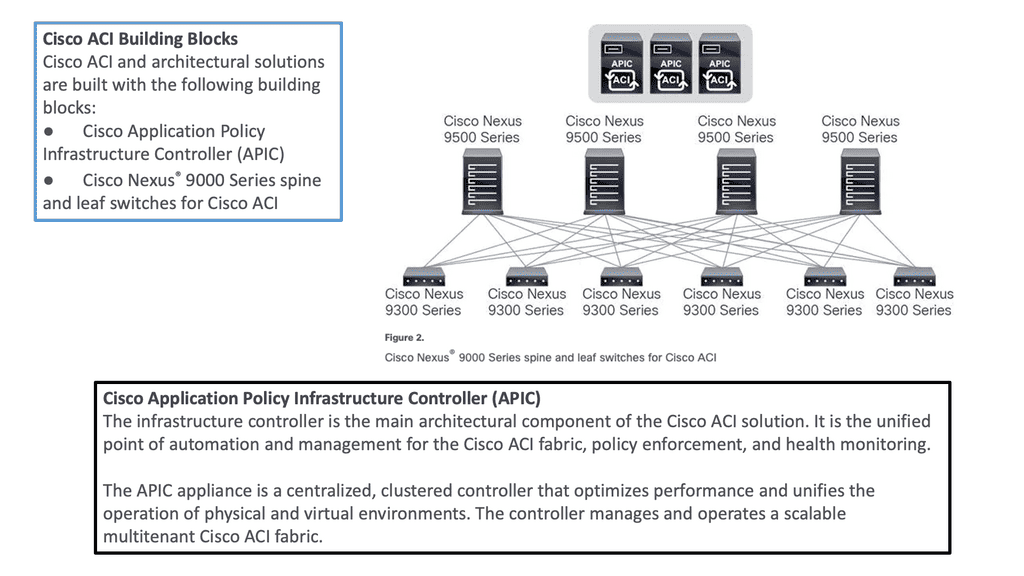
To build the ACI underlay, you must exclusively use the Nexus 9000 family of switches. You can choose from modular Nexus 9500 switches or fixed 1U to 2U Nexus 9300 models. Specific models and line cards are dedicated to the spine function in ACI fabric; others can be used as leaves, and some can be used for both purposes. You can combine various leaf switches inside one fabric without any limitations.

a) Cisco ACI Fabric: Cisco ACI’s foundation lies in its fabric, which forms the backbone of the entire infrastructure. The ACI fabric comprises leaf switches, spine switches, and the application policy infrastructure controller (APIC). Each component ensures a scalable, agile, and resilient network.

b) Leaf Switches: Leaf switches serve as the access points for endpoints within the ACI fabric. They provide connectivity to servers, storage devices, and other network devices. With their high port density and advanced features, such as virtual port channels (vPCs) and fabric extenders (FEX), leaf switches enable efficient and flexible network designs.

c) Spine Switches: Spine switches serve as the core of the ACI fabric, providing high-bandwidth connectivity between the leaf switches. They use a non-blocking, multipath forwarding mechanism to ensure optimal traffic flow and eliminate bottlenecks. With their modular design and support for advanced protocols like Ethernet VPN (EVPN), spine switches offer scalability and resiliency.

d) Application Policy Infrastructure Controller (APIC): At the heart of Cisco ACI is the APIC, a centralized management and policy control plane. The APIC acts as a single control point, simplifying network operations and enabling policy-based automation. It provides a comprehensive view of the entire fabric, allowing administrators to define and enforce policies across the network.

e) Integration with Virtualization and Cloud Environments: Cisco ACI seamlessly integrates with virtualization platforms such as VMware vSphere and Microsoft Hyper-V and cloud environments like Amazon Web Services (AWS) and Microsoft Azure. This integration enables consistent policy enforcement and visibility across physical, virtual, and cloud infrastructures, enhancing agility and simplifying operations.

Cisco ACI — Policy‑Driven, Application‑Centric Networking

Cisco ACI (Application Centric Infrastructure) is Cisco’s flagship data‑center fabric built around policy‑driven automation, centralized control, and application‑aware networking. Instead of configuring individual switches, ACI abstracts the network into application policies, endpoint groups, and contracts. This creates a programmable, intent‑based fabric where the network automatically aligns with application requirements. Data analytics strengthens ACI by providing visibility into fabric health, policy behavior, endpoint movement, and application flows, ensuring that the fabric remains consistent, secure, and optimized.

Policy Model — Endpoint Groups, Contracts, and Intent

ACI’s core innovation is its policy model:

  • Endpoint Groups (EPGs) define logical groupings of workloads
  • Contracts define how EPGs communicate
  • Application Network Profiles (ANPs) map application tiers to policies
  • Tenants provide multi‑domain isolation

This model replaces traditional VLANs, ACLs, and manual segmentation with intent‑based policies. Analytics enhances this by identifying unused contracts, misaligned EPGs, shadow policies, and unexpected east‑west flows. With analytics, ACI’s policy model becomes adaptive and identity‑aware rather than static.

Fabric Architecture — Spine‑Leaf, VXLAN, and Distributed Control

ACI uses a spine‑leaf architecture with VXLAN overlays and a centralized policy controller (APIC). The fabric provides:

  • consistent forwarding across all leaf switches
  • distributed anycast gateways
  • scalable multi‑tenant segmentation
  • automated endpoint learning

Analytics correlates fabric telemetry—routing updates, VXLAN behavior, endpoint mobility, and link performance—to detect anomalies such as asymmetric routing, endpoint flapping, or misconfigured policies. This ensures the fabric remains stable and predictable even under dynamic workloads.

Security and Microsegmentation in ACI

ACI provides built‑in microsegmentation through EPGs and contracts. Security becomes application‑centric rather than IP‑centric. Analytics enhances ACI security by monitoring:

  • unusual endpoint movement
  • abnormal contract usage
  • unexpected east‑west communication
  • privilege escalation inside application tiers

This transforms ACI into a Zero Trust‑aligned data‑center fabric where segmentation is continuously validated and enforced.

Operational Visibility — Telemetry, Health Scores, and Assurance

ACI includes extensive telemetry and health scoring across:

  • fabric nodes
  • policies
  • endpoints
  • application flows

Analytics consumes this telemetry to provide deeper insights into performance, security, and policy alignment. Tools like ACI AppDynamics integration, Nexus Dashboard Insights, and fabric assurance engines use analytics to detect drift, highlight anomalies, and recommend remediation. ACI becomes a self‑optimizing fabric driven by real‑time intelligence.

ACI in Hybrid and Multi‑Cloud Architectures

ACI extends beyond the data center into cloud environments through ACI Anywhere and Cloud ACI. Policies can be pushed to AWS, Azure, and GCP, creating a unified segmentation and security model across hybrid environments. Analytics ensures consistency across on‑prem and cloud fabrics, detecting mismatches, drift, and cross‑cloud anomalies. This creates a seamless, policy‑driven hybrid architecture.

–ACI Architecture: Spine and Leaf–

To be used as ACI spines or leaves, Nexus 9000 switches must be equipped with powerful Cisco CloudScale ASICs manufactured using 16-nm technology. The following figure shows the Cisco ACI based on the Nexus 9000 series. Cisco Nexus 9300 and 9500 platform switches support Cisco ACI. As a result, organizations can use them as spines or leaves to utilize an automated, policy-based systems management approach fully. 
Cisco ACI Components
Diagram: Cisco ACI Components. Source is Cisco

**Hardware-based Underlay**

Server virtualization helped by decoupling workloads from the hardware, making the compute platform more scalable and agile. However, the server is not the main interconnection point for network traffic. So, we need to look at how we could virtualize the network infrastructure similarly to the agility gained from server virtualization.

**Mapping Network Endpoints**

This is carried out with software-defined networking and overlays that could map network endpoints and be spun up and down as needed without human intervention. In addition, the SDN architecture includes an SDN controller and an SDN network that enables an entirely new data center topology.

**Specialized Forwarding Chips**

In ACI, hardware-based underlay switching offers a significant advantage over software-only solutions due to specialized forwarding chips. Furthermore, thanks to Cisco’s ASIC development, ACI brings many advanced features, including security policy enforcement, microsegmentation, dynamic policy-based redirect (inserting external L4-L7 service devices into the data path), or detailed flow analytics—besides the vast performance and flexibility.


Cisco ACI • Fabric Mechanics

ACI Overlay & Underlay Lab

See how ACI builds the fabric: IS-IS provides the underlay, VXLAN carries the overlay, VTEPs connect endpoints, and COOP helps the fabric locate endpoints.
ACI FABRIC MECHANICS OVERLAY UNDERLAY ENDPOINTS VXLAN OVERLAY Leaf 1 VTEP Leaf 2 VTEP IS-IS UNDERLAY Spine Fabric transport Leaf 1 Underlay node Leaf 2 Underlay node COOP Endpoint database Server A Endpoint Server B Endpoint FABRIC TRANSPORT ATTACHMENT ATTACHMENT
IS-IS Underlay
VXLAN Overlay
COOP Control Plane
Endpoint Attachment
Selected Component
ACI Fabric Flow
Start here. ACI separates the physical transport network from the logical VXLAN overlay. Click a tab, node, or connection to explore how the pieces work together.
Technology
IS-IS + VXLAN + VTEP + COOP
Role
Build transport, carry overlay traffic, and locate endpoints.
Why it matters
This separation allows ACI to provide scalable fabric connectivity without making applications depend on the physical topology.

Cisco ACI Components

 Introduction to Leaf and Spine

The Cisco SDN ACI works with a Clos architecture, a fully meshed ACI network. Based on a spine leaf architecture. As a result, every Leaf is physically connected to every Spine, enabling traffic forwarding through non-blocking links. Physically, a leaf switch set creates a leaf layer attached to the spines in a full BIPARTITE graph. This means that each Leaf is connected to each Spine, and each Spine is connected to each Leaf. 

The ACI uses a horizontally elongated Leaf and Spine architecture with one hop to every host in an entirely messed ACI fabric, offering good throughput and convergence needed for today’s applications.

The ACI fabric: Does Not Aggregate Traffic

A key point in the spine-and-leaf design is the fabric concept, like a stretch network. One of the core ideas around a fabric is that it does not aggregate traffic. This does increase data center performance along with a non-blocking architecture. With the spine-leaf topology, we are spreading a fabric across multiple devices.

Required: Increased Bandwidth Available

The result of the fabric is that each edge device has the total bandwidth of the fabric available to every other edge device. This is one big difference from traditional data center designs; we aggregate the traffic by either stacking multiple streams onto a single link or carrying the streams serially.

Challenge: Oversubscription

With the traditional 3-tier design, we aggregate everything at the core, leading to oversubscription ratios that degrade performance. With the ACI Leaf and Spine design, we spread the load across all devices with equidistant endpoints, allowing us to carry the streams parallel.

Required: Routed Multipathing

Then, we have horizontal scaling load balancing.  Load balancing with this topology uses multipathing to achieve the desired bandwidth between the nodes. Even though this forwarding paradigm can be based on Layer 2 forwarding ( bridging) or Layer 3 forwarding ( routing), the ACI leverages a routed approach to the Leaf and Spine design, and we have Equal Cost Multi-Path (ECMP) for both Layer 2 and Layer 3 traffic. 

**Overlay and Underlay Design**

Mapping Traffic:

So you may be asking how we can have Layer 3 routed core and pass Layer 2 traffic. This is done using the overlay, which can map different traffic types to other overlays. So, we can have Layer 2 traffic mapped to an overlay over a routed core.

L3 active-active links: ACI links between the Leaf and the Spine switches are L3 active-active links. Therefore, we can intelligently load balance and traffic steer to avoid issues. We don’t need to rely on STP to block links or involve STP in fixing the topology.

Challenge: IP – Identity & Location

When networks were first developed, there was no such thing as an application moving from one place to another while it was in use. So, the original architects of IP, the communication protocol used between computers, used the IP address to indicate both the identity of a device connected to the network and its location on the network. Today, in the modern data center, we need to be able to communicate with an application or application tier, no matter where it is.

Required: Overlay Encapsulation

One day, it may be in location A and the next in location B, but its identity, which we communicate with, is the same on both days. An overlay is when we encapsulate an application’s original message with the location to which it needs to be delivered before sending it through the network. Once it arrives at its final destination, we unwrap it and deliver the original message as desired.

The identities of the devices (applications) communicating are in the original message, and the locations are in the encapsulation, thus separating the place from the identity. This wrapping and unwrapping is done on a per-packet basis and, therefore, must be done quickly and efficiently.

**Overlay and Underlay Components**

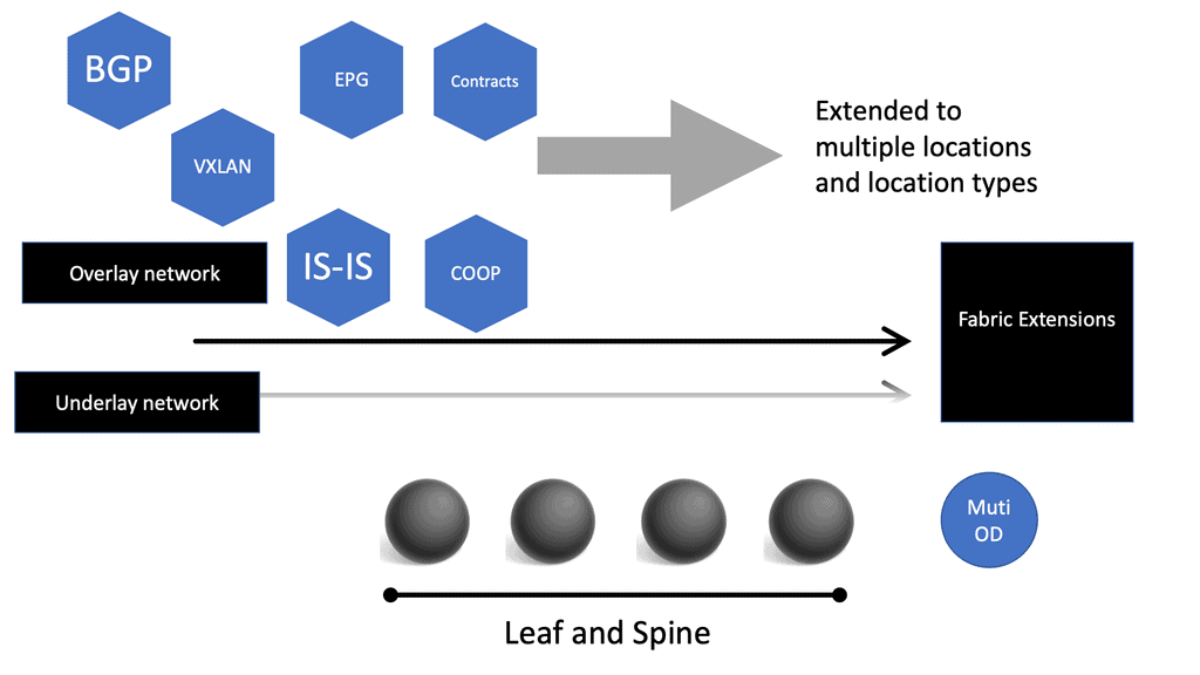
The Cisco SDN ACI has an overlay and underlay concept, which forms a virtual overlay solution. The role of the underlay is to glue together devices so the overlay can work and be built on top. So, the overlay, which is VXLAN, runs on top of the underlay, which is IS-IS. In the ACI, the IS-IS protocol provides the routing for the overlay, which is why we can provide ECMP from the Leaf to the Spine nodes. The routed underlay provides an ECMP network where all leaves can access Spine and have the same cost links. 
ACI overlay
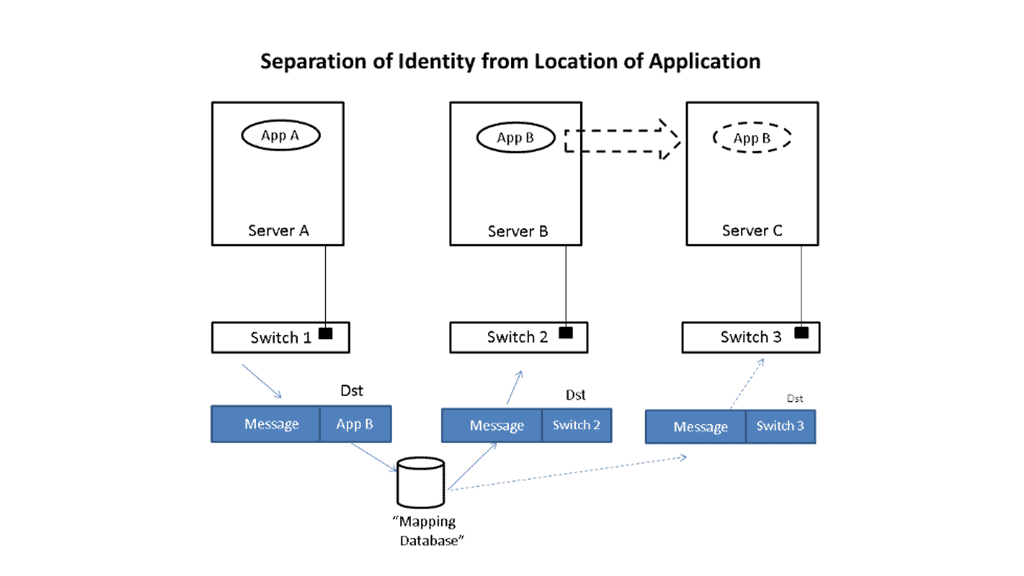
Diagram: Overlay. Source Cisco

Underlay & Overlay Interaction

Example: 

Let’s take a simple example to illustrate how this is done. Imagine that application App-A wants to send a packet to App-B. App-A is located on a server attached to switch S1, and App-B is initially on switch S2. When App-A creates the message, it will put App-B as the destination and send it to the network; when the message is received at the edge of the network, whether a virtual edge in a hypervisor or a physical edge in a switch, the network will look up the location of App-B in a “mapping” database and see that it is attached to switch S2.

It will then put the address of S2 outside of the original message. So, we now have a new message addressed to switch S2. The network will forward this new message to S2 using traditional networking mechanisms. Note that the location of S2 is very static, i.e., it does not move, so using traditional mechanisms works just fine.

Upon receiving the new message, S2 will remove the outer address and thus recover the original message. Since App-B is directly connected to S2, it can easily forward the message to App-B. App-A never had to know where App-B was located, nor did the network’s core. Only the edge of the network, specifically the mapping database, had to know the location of App-B. The rest of the network only had to see the location of switch S2, which does not change.

Let’s now assume App-B moves to a new location switch S3. Now, when App-A sends a message to App-B, it does the same thing it did before, i.e., it addresses the message to App-B and gives the packet to the network. The network then looks up the location of App-B and finds that it is now attached to switch S3. So, it puts S3’s address on the message and forwards it accordingly. At S3, the message is received, the outer address is removed, and the original message is delivered as desired.

App-A did not track App-B’s movement at all. App-B’s address identified It, while the switch’s address, S2 or S3, identified its location. App-A can communicate freely with App-B no matter where It is located, allowing the system administrator to place App-B in any area and move it as desired, thus achieving the flexibility needed in the data center.

Multicast Distribution Tree (MDT)

We have a Multicast Distribution Tree MDT tree on top that is used to forward multi-destination traffic without having loops. The Multicast distribution tree is dynamically built to send flood traffic for specific protocols. Again, it does this without creating loops in the overlay network. The tunnels created for the endpoints to communicate will have tunnel endpoints. The tunnel endpoints are known as the VTEP. The VTEP addresses are assigned to each Leaf switch from a pool that you specify in the ACI startup and discovery process.

Normalize the transports

VXLAN tunnels in the ACI fabric normalize the transports in the ACI network. Therefore, traffic between endpoints can be delivered using the VXLAN tunnel, resulting in any transport network regardless of the device connecting to the fabric. 

So, using VXLAN in the overlay enables any network, and you don’t need to configure anything special on the endpoints for this to happen. The endpoints that connect to the ACI fabric do not need special software or hardware. The endpoints send regular packets to the leaf nodes they are connected to directly or indirectly. As endpoints come online, they send traffic to reach a destination.

Bridge Domains and VRF

Therefore, the Cisco SDN ACI under the hood will automatically start to build the VXLAN overlay network for you. The VXLAN network is based on the Bridge Domain (BD), or VRF ACI constructs deployed to the leaf switches. The Bridge Domain is for Layer 2, and the VRF is for Layer 3. So, as devices come online and send traffic to each other, the overlay will grow in reachability in the Bridge Domain or the VRF. 

Direct host routing for endoints

Routing within each tenant, VRF is based on host routing for endpoints directly connected to the Cisco ACI fabric. For IPv4, the host routing is based on the /32, giving the ACI a very accurate picture of the endpoints. Therefore, we have exact routing in the ACI.  In conjunction, we have a COOP database that runs on the Spines and offers remarkably optimized fabric to know where all the endpoints are located.

To facilitate this, every node in the fabric has a TEP address, and we have different types of TEPs depending on the device’s role. The Spine and the Leaf will have TEP addresses but will differ from each other.
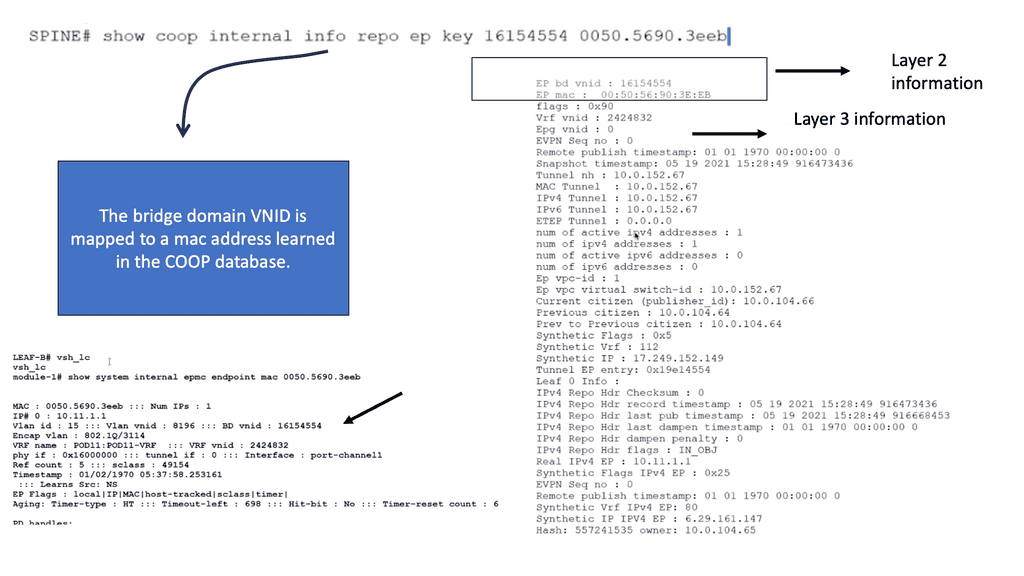
COOP database
Diagram: COOP database

The VTEP and PTEP

The Leaf’s nodes are the Virtual Tunnel Endpoints (VTEP), which are also known as the physical tunnel endpoints (PTEP) in ACI. These PTEP addresses represent the “WHERE” in the ACI fabric where an endpoint lives. Cisco ACI uses a dedicated VRF and a subinterface of the uplinks from the Leaf to the Spines as the infrastructure to carry VXLAN traffic. In Cisco ACI terminology, the transport infrastructure for VXLAN traffic is known as Overlay-1, which is part of the tenant “infra.” 

**The Spine TEP**

The Spines also have a PTEP and an additional proxy TEP, which are used for forwarding lookups into the mapping database. The Spines have a global view of where everything is, which is held in the COOP database synchronized across all Spine nodes. All of this is done automatically for you.

**Anycast IP Addressing**

For this to work, the Spines have an Anycast IP address known as the Proxy TEP. The Leaf can use this address if they do not know where an endpoint is, so they ask the Spine for any unknown endpoints, and then the Spine checks the COOP database. This brings many benefits to the ACI solution, especially for traffic optimizations and reducing flooded traffic in the ACI. Now, we have an optimized fabric for better performance.

The ACI optimizations

**Mouse and elephant flow**

This provides better performance for load balancing different flows. For example, in most data centers, we have latency-sensitive flows, known as mouse flows, and long-lived bandwidth-intensive flows, known as elephant flows. 

The ACI has more precisely load-balanced traffic using algorithms that optimize mouse and elephant flows and distribute traffic based on flow lets: flow let load-balancing. Within a Leaf, Spine latency is low and consistent from port to port.

The max latency of a packet from one port to another in the architecture is the same regardless of the network size. So you can scale the network without degrading performance. Scaling is often done on a POD-by-POD basis. For more extensive networks, each POD would be its Leaf and Spine network.

**ARP optimizations: Anycast gateways**

The ACI comes by default with a lot of traffic optimizations. Firstly, instead of using an ARP and broadcasting across the network, that can hamper performance. The Leaf can assume that the Spine will know where the destination is ( and it does via the COOP database ), so there is no need to broadcast to everyone to find a destination.

If the Spine knows where the endpoint is, it will forward the traffic to the other Leaf. If not, it will drop it.

**Fabric anycast addressing**

This again adds performance benefits to the ACI solution as the table sizes on the Leaf switches can be kept smaller than they would if they needed to know where all the destinations were, even if they were not or never needed to communicate with them. On the Leaf, we have an Anycast address too.

These fabric Anycast addresses are available for Layer 3 interfaces. On the Leaf ToR, we can establish an SVI that uses the same MAC address on every ToR; therefore, when an endpoint needs to route to a ToR, it doesn’t matter which ToR you use. The Anycast Address is spread across all ToR leaf switches. 

**Pervasive gateway**

Now we have predictable latency to the first hop, and you will use the local route VRF table within that ToR instead of traversing the fabric to a different ToR. This is the Pervasive Gateway feature that is used on all Leaf switches. The Cisco ACI has many advanced networking features, but the pervasive gateway is my favorite. It does take away all the configuration mess we had in the past.

ACI Cisco: Integrations

  • Routing Control Platform

Then came along Cisco SDN ACI, the ACI Cisco, which operates differently from the traditional data center with an application-centric infrastructure. The Cisco application-centric infrastructure achieves resource elasticity with automation through standard policies for data center operations and consistent policy management across multiple on-premises and cloud instances.

  • Extending & Integrating the fabric

What makes the Cisco ACI interesting is its several vital integrations. I’m not talking about extending the data center with multi-pod and multi-site, for example, with AlgoSec, Cisco AppDynamics, and SD-WAN. AlgoSec enables secure application delivery and policy across hybrid network estates, while AppDynamic lives in a world of distributed systems Observability. SD-WAN enabled path performance per application with virtual WANs.

Cisco Multi-Pod Design

Cisco ACI Multi-Pod is part of the “Single APIC Cluster / Single Domain” family of solutions, as a single APIC cluster is deployed to manage all the interconnected ACI networks. These separate ACI networks are named “pods,” Each looks like a regular two-tier spine-leaf topology. The same APIC cluster can manage several pods, and to increase the resiliency of the solution, the various controller nodes that make up the cluster can be deployed across different pods.
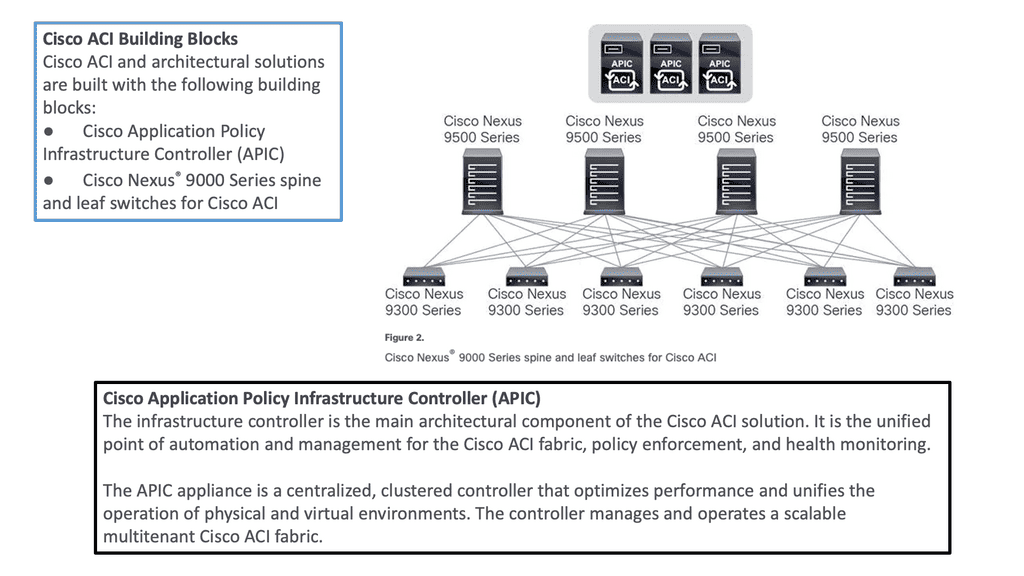
ACI Multi-Pod
Diagram: Cisco ACI Multi-Pod. Source Cisco.

ACI Cisco and AlgoSec

With AlgoSec integrated with the Cisco ACI, we can now provide automated security policy change management for multi-vendor devices and risk and compliance analysis. The AlgoSec Security Management Solution for Cisco ACI extends ACI’s policy-driven automation to secure various endpoints connected to the Cisco SDN ACI fabric.

These simplify network security policy management across on-premises firewalls, SDNs, and cloud environments. They also provide visibility into ACI’s security posture, even across multi-cloud environments. 

ACI Cisco and AppDynamics 

Then, with AppDynamics, we are heading into Observability and controllability. Now, we can correlate app health and network for optimal performance, deep monitoring, and fast root-cause analysis across complex distributed systems with numbers of business transactions that need to be tracked.

This will give your teams complete visibility of your entire technology stack, from your database servers to cloud-native and hybrid environments. In addition, AppDynamics works with agents that monitor application behavior in several ways. We will examine the types of agents and how they work later in this post.

ACI Cisco and SD-WAN 

SD-WAN brings a software-defined approach to the WAN. These enable a virtual WAN architecture to leverage transport services such as MPLS, LTE, and broadband internet services. So, SD-WAN is not a new technology; its benefits are well known, including improving application performance, increasing agility, and, in some cases, reducing costs.

The Cisco ACI and SD-WAN integration makes active-active data center design less risky than in the past. The following figures give a high-level overview of the Cisco ACI and SD-WAN integration. For pre-information generic to SD-WAN, go here: SD-WAN Tutorial
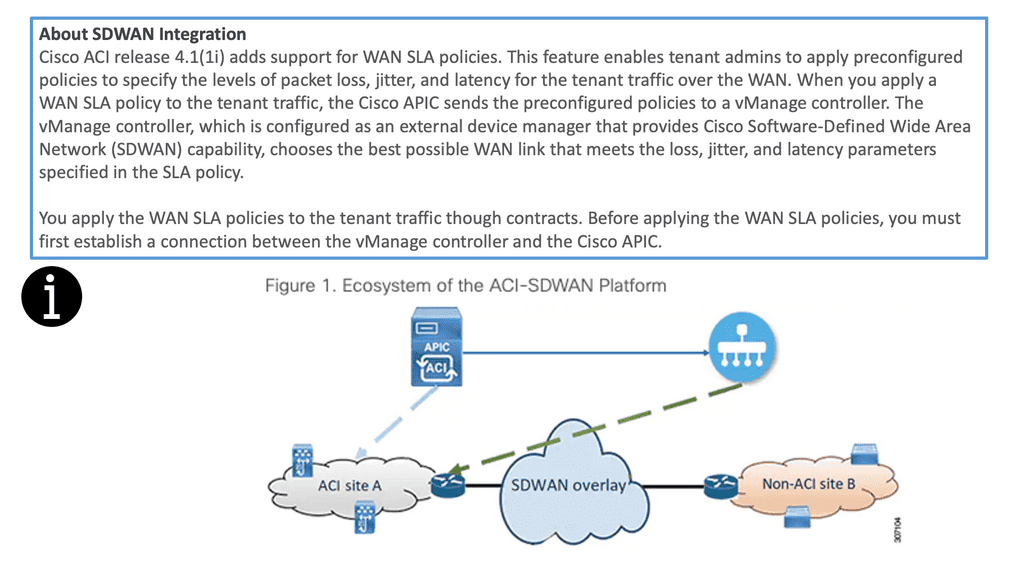
SD WAN integration
Diagram: Cisco ACI and SD-WAN integration

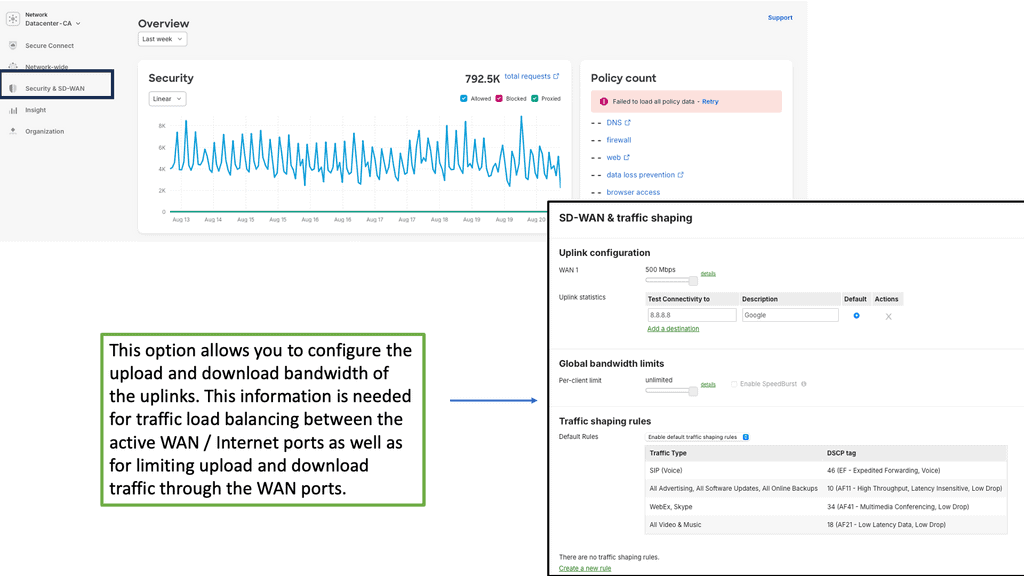
The Cisco SDN ACI with SD-WAN integration helps ensure an excellent application experience by defining application Service-Level Agreement (SLA) parameters. Cisco ACI releases 4.1(1i) and adds support for WAN SLA policies. This feature enables admins to apply pre-configured policies to specify the packet loss, jitter, and latency levels for the tenant traffic over the WAN.

When you apply a WAN SLA policy to the tenant traffic, the Cisco APIC sends the pre-configured policies to a vManage controller. The vManage controller, configured as an external device manager that provides SDWAN capability, chooses the best WAN link that meets the loss, jitter, and latency parameters specified in the SLA policy.

Openshift and Cisco SDN ACI

OpenShift Container Platform (formerly known as OpenShift Enterprise) or OCP is Red Hat’s offering for the on-premises private platform as a service (PaaS). OpenShift is based on the Origin open-source project and is a Kubernetes distribution, the defacto for container-based virtualization. The foundation of the OpenShift networking SDN is based on Kubernetes and, therefore, shares some of the same networking technology along with some enhancements, such as the OpenShift route construct.

Other data center integrations

Cisco SDN ACI has another integration with Cisco DNA Center/ISE that maps user identities consistently to endpoints and apps across the network, from campus to the data center. Cisco Software-Defined Access (SD-Access) provides policy-based automation from the edge to the data center and the cloud.

Cisco SD-Access provides automated end-to-end segmentation to separate user, device, and application traffic without redesigning the network. This integration will enable customers to use standard policies across Cisco SD-Access and Cisco ACI, simplifying customer policy management using Cisco technology in different operational domains.

OpenShift and Cisco ACI

OpenShift does this with an SDN layer and enhances Kubernetes networking to create a virtual network across all the nodes. It is made with the Open Switch standard. For OpenShift SDN, this pod network is established and maintained by the OpenShift SDN, configuring an overlay network using a virtual switch called the OVS bridge. This forms an OVS network that gets programmed with several OVS rules. The OVS is a popular open-source solution for virtual switching.

OpenShift SDN plugin

We mentioned that you could tailor the virtual network topology to suit your networking requirements, which can be determined by the OpenShift SDN plugin and the SDN model you select. With the default OpenShift SDN, several modes are available. This level of SDN mode you choose is concerned with managing connectivity between applications and providing external access to them. Some modes are more fine-grained than others. The Cisco ACI plugins offer the most granular.

Integrating ACI and OpenShift platform

The Cisco ACI CNI plugin for the OpenShift Container Platform provides a single, programmable network infrastructure, enterprise-grade security, and flexible micro-segmentation possibilities. The APIC can provide all networking needs for the workloads in the cluster. Kubernetes workloads become fabric endpoints, like Virtual Machines or Bare Metal endpoints.

Cisco ACI CNI Plugin

The Cisco ACI CNI plugin extends the ACI fabric capabilities to OpenShift clusters to provide IP Address Management, networking, load balancing, and security functions for OpenShift workloads. In addition, the Cisco ACI CNI plugin connects all OpenShift Pods to the integrated VXLAN overlay provided by Cisco ACI.

Cisco SDN ACI and AppDynamics

AppDynamis overview

So, an application requires multiple steps or services to work. These services may include logging in and searching to add something to a shopping cart. These services invoke various applications, web services, third-party APIs, and databases, known as business transactions.

The user’s critical path

A business transaction is the essential user interaction with the system and is the customer’s critical path. Therefore, business transactions are the things you care about. If they start to go, your system will degrade. So, you need ways to discover your business transactions and determine if there are any deviations from baselines. This should also be automated, as learning baseline and business transitions in deep systems is nearly impossible using the manual approach.

So, how do you discover all these business transactions?

AppDynamics automatically discovers business transactions and builds an application topology map of how the traffic flows. A topology map can view usage patterns and hidden flows, acting as a perfect feature for an Observability platform.

AppDynamic topology

AppDynamics will automatically discover the topology for all of your application components. It can then build a performance baseline by capturing metrics and traffic patterns. This allows you to highlight issues when services and components are slower than usual.

AppDynamics uses agents to collect all the information it needs. The agent monitors and records the calls that are made to a service. This is from the entry point and follows executions along its path through the call stack. 

Types of Agents for Infrastructure Visibility

If the agent is installed on all critical parts, you can get information about that specific instance, which can help you build a global picture. So we have an Application Agent, Network Agent, and Machine Agent for Server visibility and Hardware/OS.

  • App Agent: This agent will monitor apps and app servers, and example metrics will be slow transitions, stalled transactions, response times, wait times, block times, and errors.  
  • Network Agent: This agent monitors the network packets, TCP connection, and TCP socket. Example metrics include performance impact Events, Packet loss, and retransmissions, RTT for data transfers, TCP window size, and connection setup/teardown.
  • Machine Agent Server Visibility: This agent monitors the number of processes, services, caching, swapping, paging, and querying. Example Metrics include hardware/software interrupts, virtual memory/swapping, process faults, and CPU/DISK/Memory utilization by the process.
  • Machine Agent: Hardware/OS – disks, volumes, partitions, memory, CPU. Example metrics: CPU busy time, MEM utilization, and pieces file.

Automatic establishment of the baseline

A baseline is essential, a critical step in your monitoring strategy. Doing this manually is hard, if not impossible, with complex applications. It is much better to have this done automatically. You must automatically establish the baseline and alert yourself about deviations from it.

This will help you pinpoint the issue faster and resolve it before it can be affected. Platforms such as AppDynamics can help you here. Any malicious activity can be seen from deviations from the security baseline and performance issues from the network baseline.
Cisco ACI • Policy & Application Flow

ACI Policy & Application Flow Lab

Follow how ACI turns application requirements into policy: Tenant → VRF → Bridge Domain → EPG → Contract → Application Flow.
ACI POLICY MODEL TENANT & NETWORK CONTEXT APPLICATION GROUPS POLICY APPLICATION FLOW Tenant Administrative container NETWORK CONTEXT VRF Layer 3 routing context Bridge Domain Endpoint network Web EPG Web application endpoints App EPG Application endpoints CONTRACT ALLOWED APPLICATION FLOW Web Servers Endpoint group App Servers Endpoint group
Tenant / VRF
Network
EPG
Contract
Application Flow
Selected Component
ACI Policy Model
ACI expresses application connectivity through a hierarchy of objects. Start at the Tenant and follow the model down to the application flow.
Object
Tenant → VRF → Bridge Domain → EPG
Policy
Contracts define which EPGs can communicate.
Why it matters
ACI lets administrators describe application connectivity as policy rather than configuring every individual switch interface.

Summary: Cisco ACI Components

In the ever-evolving world of networking, organizations are constantly seeking ways to enhance their infrastructure’s performance, security, and scalability. Cisco ACI (Application Centric Infrastructure) presents a cutting-edge solution to these challenges. By unifying physical and virtual environments and leveraging network automation, Cisco ACI revolutionizes how networks are built and managed.

Understanding Cisco ACI Architecture

At the core of Cisco ACI lies a robust architecture that enables seamless integration between applications and the underlying network infrastructure. The architecture comprises three key components:

1. Application Policy Infrastructure Controller (APIC):

The APIC serves as the centralized management and policy engine of Cisco ACI. It provides a single point of control for configuring and managing the entire network fabric. Through its intuitive graphical user interface (GUI), administrators can define policies, allocate resources, and monitor network performance.

2. Nexus Switches:

Cisco Nexus switches form the backbone of the ACI fabric. These high-performance switches deliver ultra-low latency and high throughput, ensuring optimal data transfer between applications and the network. Nexus switches provide the necessary connectivity and intelligence to enable the automation and programmability features of Cisco ACI.

3. Application Network Profiles:

Application Network Profiles (ANPs) are a fundamental aspect of Cisco ACI. ANPs define the policies and characteristics required for specific applications or application groups. By encapsulating network, security, and quality of service (QoS) policies within ANPs, administrators can streamline the deployment and management of applications.

The Power of Network Automation

One of the most compelling aspects of Cisco ACI is its ability to automate network provisioning, configuration, and monitoring. Through the APIC’s powerful automation capabilities, network administrators can eliminate manual tasks, reduce human errors, and accelerate the deployment of applications. With Cisco ACI, organizations can achieve greater agility and operational efficiency, enabling them to rapidly adapt to evolving business needs.

Security and Microsegmentation with Cisco ACI

Security is a paramount concern for every organization. Cisco ACI addresses this by providing robust security features and microsegmentation capabilities. With microsegmentation, administrators can create granular security policies at the application level, effectively isolating workloads and preventing lateral movement of threats. Cisco ACI also integrates with leading security solutions, enabling seamless network enforcement and threat intelligence sharing.

Conclusion

Cisco ACI is a game-changer in the realm of network automation and infrastructure management. Its innovative architecture, coupled with powerful automation capabilities, empowers organizations to build agile, secure, and scalable networks. By leveraging Cisco ACI’s components, businesses can unlock new levels of efficiency, flexibility, and performance, ultimately driving growth and success in today’s digital landscape.

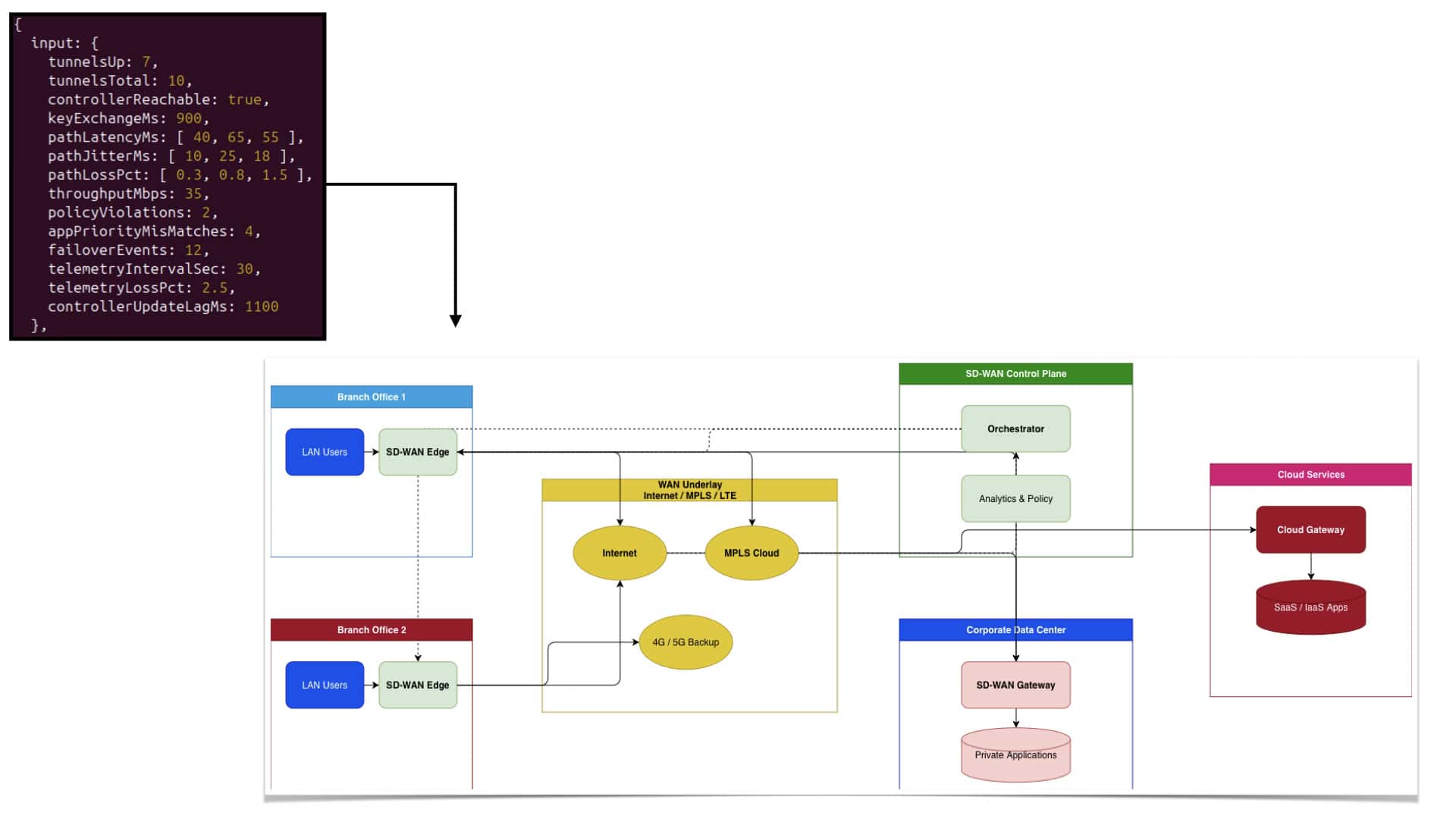
SD-WAN topology

SD WAN | SD WAN Tutorial

Enterprise WANs have changed significantly as applications move beyond traditional data centres and users become increasingly distributed. Branch offices may depend on cloud platforms, SaaS applications, Internet services, and private applications at the same time, while connectivity may combine MPLS, broadband, fibre, and cellular services. SD-WAN provides an architecture for managing this complexity by separating WAN policy and control from the individual transport services carrying the traffic.

Software-Defined Wide Area Networking uses software-based policy and orchestration to manage connectivity across multiple WAN transports. Rather than treating every circuit as an independent network, SD-WAN creates a consistent operational framework in which paths can be monitored, selected, and controlled according to application and business requirements. This provides greater flexibility than architectures built around a single fixed transport.

Centralised management is an important part of the model. Network teams can define policies and operational requirements from a common management framework and apply them across multiple locations. This can simplify deployment and reduce repetitive configuration, while also helping organisations maintain more consistent routing, security, and application policies as the WAN grows.

SD-WAN can also make forwarding decisions based on current network conditions. Depending on the implementation, measurements such as latency, packet loss, jitter, link availability, and application requirements can influence path selection. If the quality of one transport deteriorates, traffic can potentially be moved to another suitable path without requiring the WAN to depend entirely on static routing decisions.

The ability to combine different connectivity types is another major advantage. MPLS can coexist with broadband Internet, dedicated Internet access, 4G, or 5G, allowing organisations to build WAN connectivity around the requirements and availability of individual sites. Multiple transports can provide additional resilience while also giving the organisation greater flexibility when adding bandwidth or deploying new locations.

Security is an important part of modern SD-WAN architecture, but it should be viewed as one layer rather than the entire security strategy. SD-WAN deployments can use encrypted tunnels, segmentation, access controls, and integration with security services. Additional capabilities such as firewalls, secure web gateways, zero-trust access, and threat inspection may be integrated depending on the architecture and requirements.

The growth of cloud and SaaS applications has also changed how WAN traffic should be designed. Sending every application flow back through a central data centre can introduce unnecessary latency and consume network capacity. SD-WAN can support more direct connectivity to cloud and Internet services while applying policy to determine which traffic should use which path and security control.

Application visibility and traffic control are equally important. Organisations can identify critical application flows, apply quality requirements, monitor performance, and understand how traffic is being forwarded across the WAN. This moves WAN management beyond simply asking whether a circuit is operational and towards understanding whether users and applications are receiving the connectivity they require.

SD-WAN can also simplify the process of expanding a distributed network. New branches, additional transports, cloud connections, and acquired sites can be incorporated into a common policy framework rather than requiring every location to be configured independently. This does not remove the need for careful network design, but it can reduce operational complexity as the environment scales.

The broader significance of SD-WAN is therefore not simply replacing MPLS with Internet connectivity. Its value comes from creating a software-defined control layer across diverse transports and using policy, telemetry, application awareness, and automation to make the WAN more adaptable. For organisations operating distributed applications and users, SD-WAN provides a foundation for building a more flexible, observable, and policy-driven WAN architecture.

SD WAN Tutorial

SD-WAN TUTORIAL • WIDGET 1

SD-WAN Architecture & Control Loop

See how the SD-WAN edge, controller, policy engine and overlay fabric work together to turn application intent into forwarding decisions.

SD-WAN Controller Orchestration • Policy • Analytics Policy Engine Intent • SLA • Segmentation Branch Edge A Tunnel • Routing • QoS Branch Edge B Tunnel • Routing • QoS Overlay Fabric Encrypted logical connectivity Applications / Flows CONTROL / POLICY FORWARDING TELEMETRY UNDERLAY MPLS • DIA • LTE/5G UNDERLAY MPLS • DIA • LTE/5G
EDUCATION PANEL

SD-WAN Architecture

SD-WAN separates centralized intent and policy from distributed forwarding. The controller coordinates the fabric while edge devices perform the actual forwarding.

Control Centralized orchestration
Policy Application + SLA intent
Forwarding Distributed at the edge
Feedback Continuous telemetry
CURRENT SYSTEM STATE Controller → Policy → Edge → Forwarding
C

Controller

Provides centralized orchestration, configuration, policy distribution and network-wide visibility.

P

Policy Engine

Converts business and application intent into rules for steering, segmentation, QoS and resilience.

E

Edge Forwarding

The distributed edge evaluates the policy and performs the actual data-plane forwarding across available transports.

SD-WAN control loop: policy defines intent → edges execute forwarding → telemetry reports network conditions → the system can adapt its decisions.

Highlights: SD WAN Tutorial

Network Abstraction

– In an era where digital transformation is no longer a luxury but a necessity, businesses are constantly looking for ways to optimize their network infrastructure.

Enter Software-Defined Wide Area Networking (SD-WAN), a revolutionary technology that is transforming how organizations approach WAN architecture.

– SD-WAN is not just a buzzword; it is a robust solution designed to simplify the management and operation of a WAN by decoupling the networking hardware from its control mechanism. 

### The Basics of SD-WAN Technology

At its core, SD-WAN is a virtualized WAN architecture that allows enterprises to leverage any combination of transport services, including MPLS, LTE, and broadband internet services, to securely connect users to applications.

Unlike traditional WANs, which require proprietary hardware and complex configurations, SD-WAN uses a centralized control function to direct traffic across the WAN, increasing application performance and delivering a high-quality user experience. This separation of the data plane from the control plane is what makes SD-WAN a game-changer in the world of networking.

### WAN Virtualization: The Heart of SD-WAN

WAN virtualization is a critical component of SD-WAN. It abstracts the underlying network infrastructure, creating a virtual overlay that provides seamless connectivity across different network types. This virtualization enables businesses to manage network traffic more effectively, prioritize critical applications, and ensure reliable performance irrespective of the physical network.

With WAN virtualization, businesses can rapidly deploy new applications and services, respond to changes in network conditions, and optimize bandwidth usage without costly hardware upgrades.

### Benefits of Adopting SD-WAN

The benefits of adopting SD-WAN are manifold. Firstly, it offers cost savings by reducing the need for expensive MPLS circuits and allowing the use of more cost-effective broadband connections. Secondly, it provides enhanced security through integrated encryption and advanced threat protection. Additionally, SD-WAN simplifies network management by providing a centralized dashboard that offers visibility into network traffic and performance. This simplification leads to improved agility, allowing IT teams to deploy and manage applications with greater speed and efficiency.

### The Future of Networking with SD-WAN

As businesses continue to embrace cloud services and remote work becomes increasingly prevalent, the demand for flexible, scalable, and secure networking solutions will only grow. SD-WAN is well-positioned to meet these demands, offering a future-proof solution that can adapt to the ever-changing landscape of enterprise networking. With its ability to integrate with cloud platforms and support IoT deployments, SD-WAN is paving the way for the next generation of network connectivity.

SD‑WAN Tutorial — A Step‑By‑Step Guide to Modern WAN Transformation

This SD‑WAN tutorial walks through the core concepts, components, and workflow of deploying an SD‑WAN fabric. Instead of focusing on architecture theory, this guide shows how SD‑WAN actually works from the perspective of engineers building and operating the WAN. The goal is to understand SD‑WAN as a practical system: how edges form tunnels, how controllers push policy, how applications are identified, and how traffic is steered across multiple transports.

Step 1 — Understand the SD‑WAN Building Blocks

SD‑WAN consists of three major components:

  • SD‑WAN Edge

Physical or virtual appliances at branches, data centers, or cloud VPCs. They form encrypted tunnels and enforce routing, QoS, and security.

  • SD‑WAN Controller / Orchestrator

The central brain that manages configuration, templates, policies, and analytics.

  • SD‑WAN Overlay Fabric

The virtual WAN created by encrypted tunnels across broadband, MPLS, LTE/5G, or fiber.

Before deployment, engineers must understand how these components interact and how the controller drives the entire fabric.

Step 2 — Build the Underlay Connectivity

SD‑WAN still needs basic IP reachability between sites. This is the underlay.

Typical underlay transports include:

  • broadband DIA
  • MPLS
  • LTE/5G
  • fiber circuits
  • satellite links

Each SD‑WAN edge receives an IP address on each transport. Once underlay reachability exists, the SD‑WAN fabric can be built on top.

Step 3 — Form the SD‑WAN Overlay Tunnels

The SD‑WAN edges automatically establish encrypted tunnels (IPsec or DTLS) to:

  • regional hubs
  • cloud gateways
  • other branch edges
  • data‑center edges

These tunnels form the overlay fabric, which is where SD‑WAN applies:

  • application‑aware routing
  • segmentation
  • QoS
  • dynamic failover
  • tunnel bonding or packet duplication

The overlay is the “intelligent” part of SD‑WAN.

Step 4 — Enable Application Recognition

SD‑WAN identifies applications using:

  • DPI (deep packet inspection)
  • TLS fingerprinting
  • DNS metadata
  • IP/port heuristics
  • cloud app signatures

This allows SD‑WAN to classify traffic into categories such as:

  • real‑time voice/video
  • SaaS (Microsoft 365, Salesforce, Zoom)
  • business‑critical apps
  • best‑effort internet traffic

Application recognition is essential because SD‑WAN routing decisions are application‑driven, not IP‑driven.

Step 5 — Configure Traffic Steering Policies

Traffic steering is the heart of SD‑WAN. Policies define:

  • which path each application should use
  • what SLA thresholds trigger failover
  • how load balancing should behave
  • when to duplicate packets for voice/video
  • how to prioritize business‑critical flows

Example:

  • Voice uses the lowest‑latency link
  • SaaS uses the highest‑throughput link
  • ERP uses MPLS or private circuits
  • Best‑effort traffic uses broadband

Policies are pushed from the controller to all edges.

Step 6 — Monitor Link Health and Real‑Time Telemetry

SD‑WAN continuously measures:

  • latency
  • jitter
  • packet loss
  • throughput
  • MOS scores (for voice)
  • tunnel stability

This telemetry feeds the controller, which updates dashboards and analytics.

If a link degrades, SD‑WAN automatically reroutes traffic based on policy.

Step 7 — Integrate Security Services

Modern SD‑WAN platforms embed or integrate:

  • NGFW
  • URL filtering
  • DNS security
  • CASB
  • SWG
  • ZTNA
  • segmentation policies

This transforms SD‑WAN from a connectivity tool into a secure edge platform.

Step 8 — Extend SD‑WAN to Cloud and SaaS

SD‑WAN integrates with cloud providers using:

  • cloud gateways
  • virtual SD‑WAN edges in VPC/VNet
  • optimized SaaS on‑ramps
  • direct peering with cloud PoPs

This ensures consistent performance for cloud workloads and SaaS applications.

Step 9 — Automate Operations and Optimize Performance

SD‑WAN controllers provide:

  • centralized templates
  • automated configuration pushes
  • real‑time analytics
  • AI‑driven optimization
  • drift detection
  • SLA reporting

This reduces operational overhead and ensures the WAN adapts to changing conditions.

Outcome — A Modern, Adaptive, Cloud‑Ready WAN

By following these steps, SD‑WAN delivers:

  • better SaaS performance
  • reduced MPLS dependency
  • improved uptime
  • centralized policy control
  • consistent security
  • simplified operations

SD‑WAN becomes a dynamic, application‑aware WAN built for cloud, mobility, and distributed enterprises.

SD‑WAN as a Dynamic, Application‑Aware Overlay

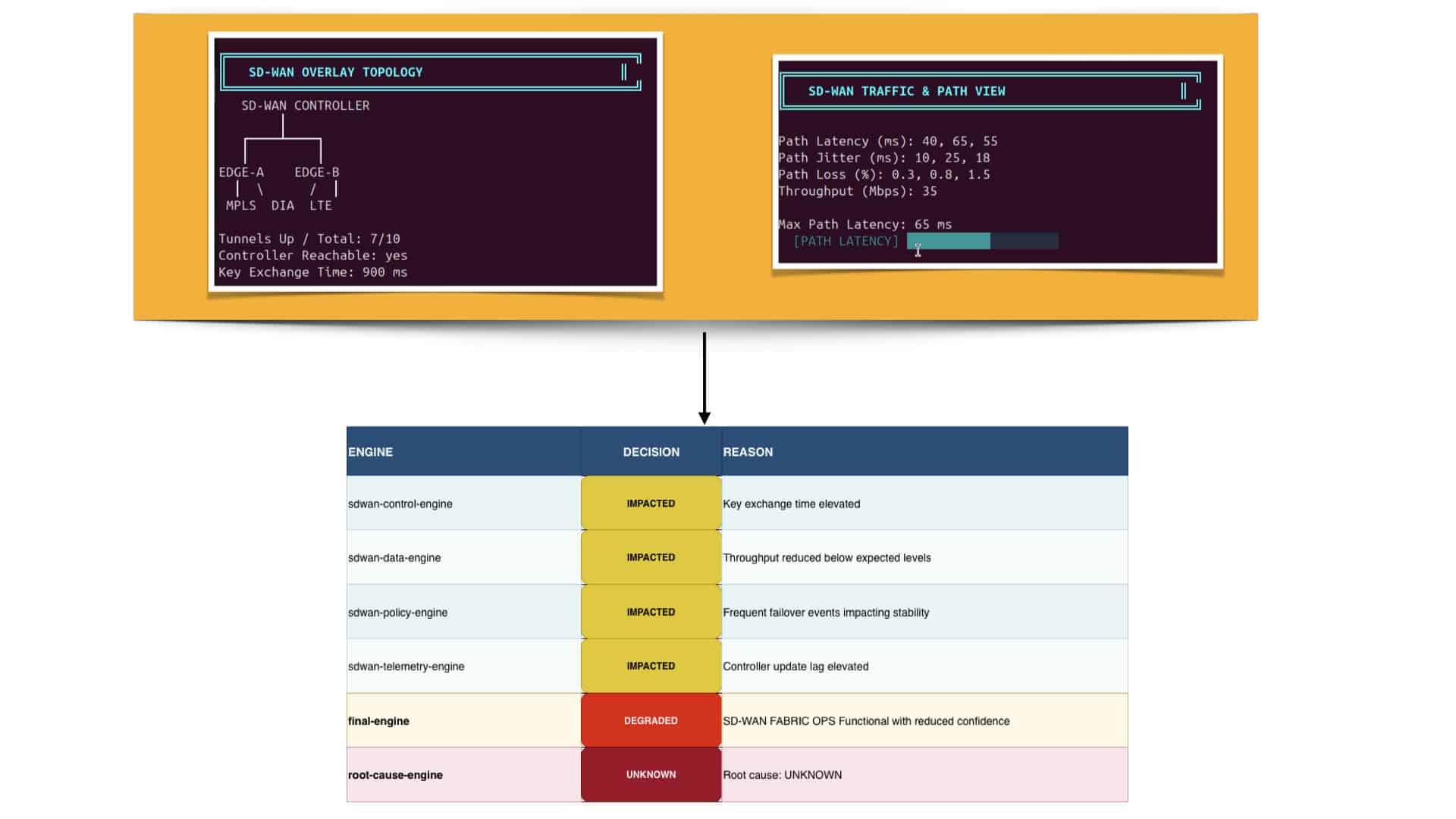
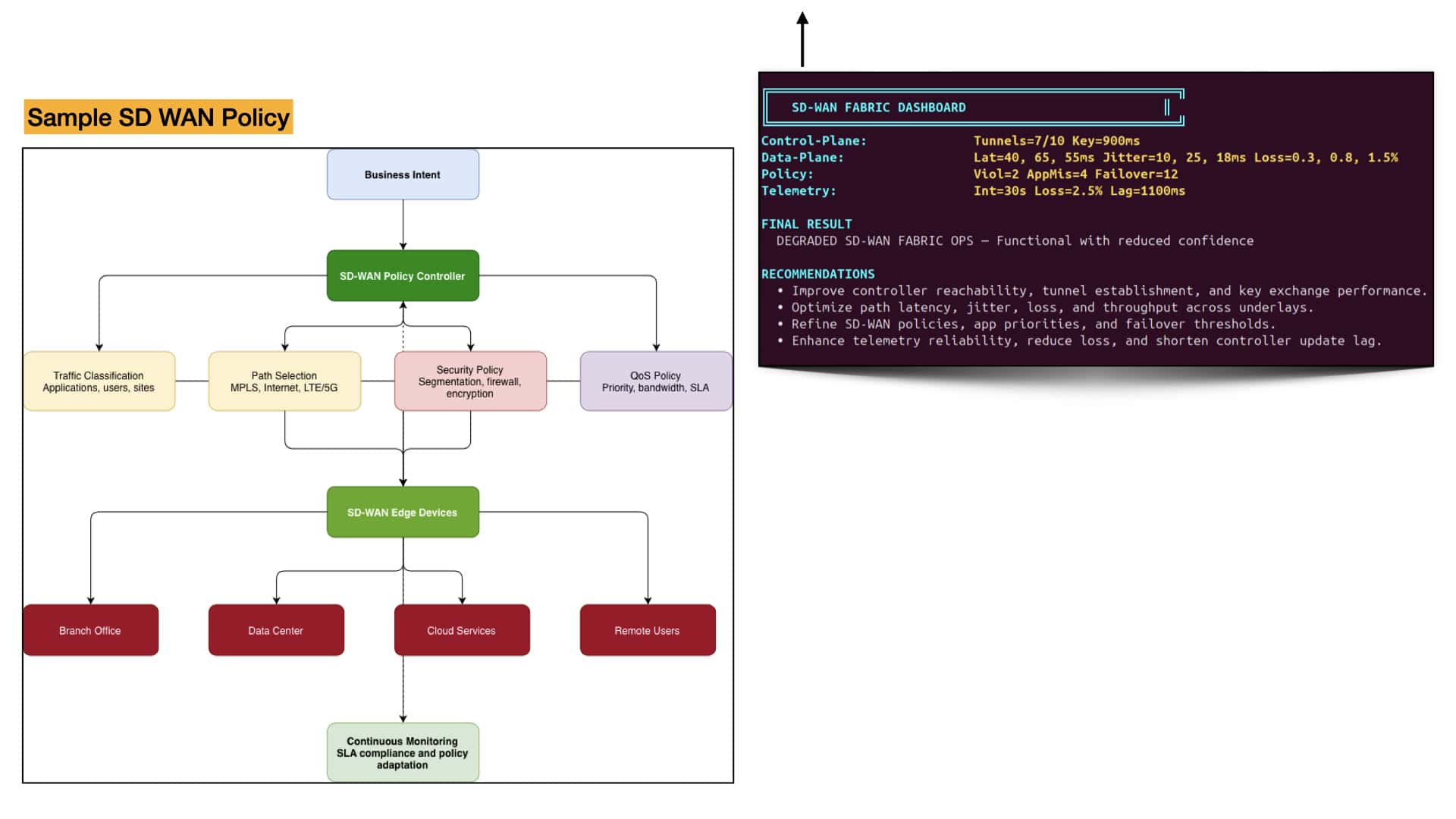
SD‑WAN transforms the WAN from a static, route‑driven network into a dynamic overlay that continuously adapts to real‑time conditions. Instead of relying on fixed routing metrics, SD‑WAN evaluates latency, jitter, loss, and throughput across MPLS, DIA, LTE, and private WAN paths, selecting the best route for each application. This lab models that intelligence by simulating how SD‑WAN edges measure link health and steer flows based on performance thresholds, business intent, and application identity. The result is a WAN that behaves more like a self‑optimizing fabric than a traditional routing domain.

At the heart of SD‑WAN is a distributed system of controllers and edge nodes that coordinate control‑plane signaling, data‑plane forwarding, and policy enforcement. The control‑plane establishes secure tunnels, exchanges keys, and maintains overlay reachability. The data‑plane evaluates path quality and executes forwarding decisions. The policy engine ensures that voice, video, SaaS, and critical business apps receive the correct priority and failover behavior. In your JavaScript lab, these engines operate independently but feed into a unified decision model, mirroring how real SD‑WAN platforms maintain consistency across thousands of edges.

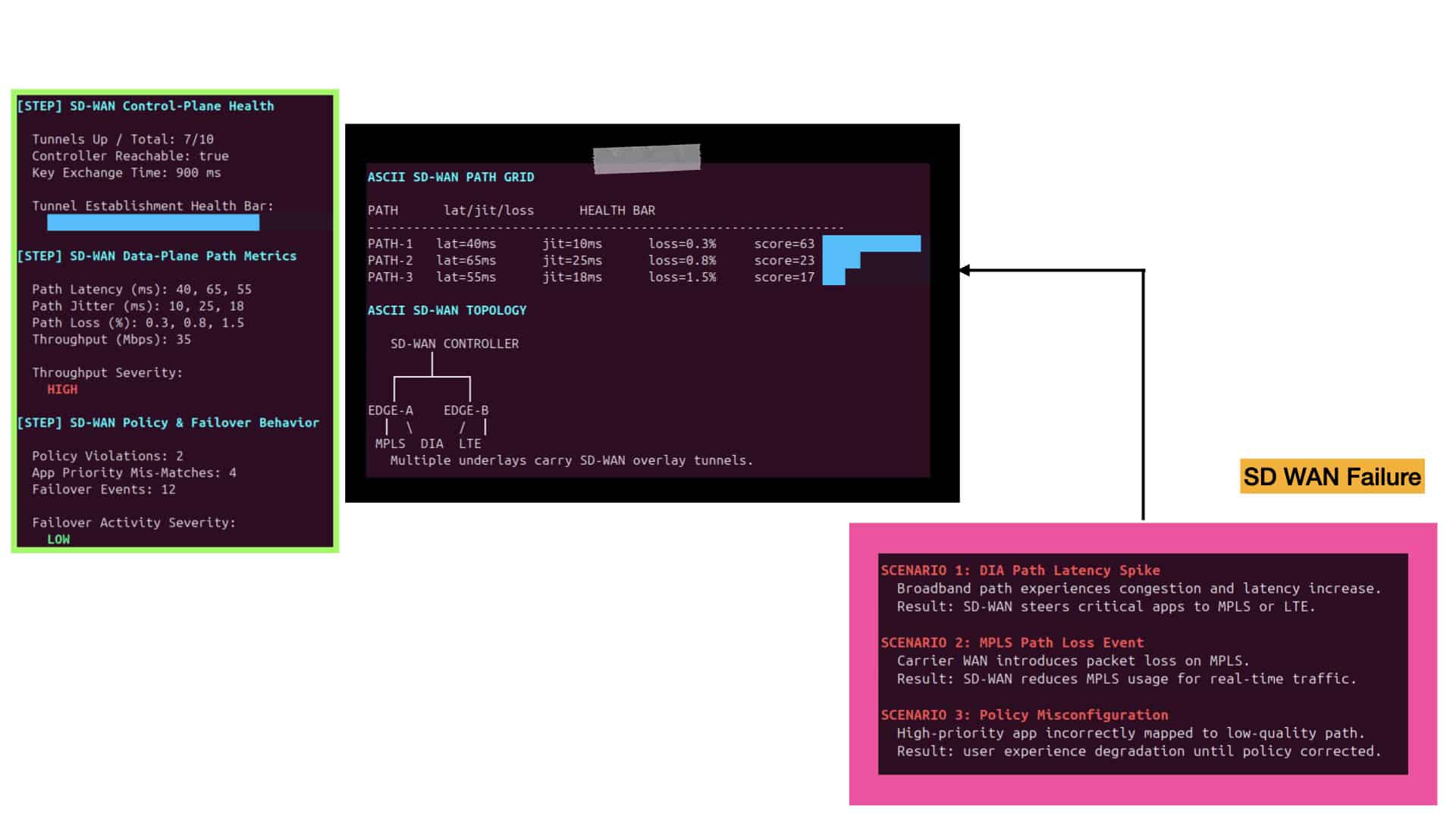
SD‑WAN’s most powerful capability is its telemetry system, which continuously streams link metrics to the controller. This feedback loop allows the overlay to react instantly to congestion, carrier issues, or brownouts. When telemetry shows rising latency or jitter, the SD‑WAN fabric shifts flows to healthier paths without breaking sessions. Your lab visualizes this behavior through ASCII dashboards that show link degradation, controller update lag, and telemetry loss. These visuals make it clear how SD‑WAN maintains resilience by treating the WAN as a living system that constantly senses and adapts.

SD‑WAN shines when the WAN misbehaves, and your lab captures this through detailed failure simulations. Latency spikes on DIA, packet loss on MPLS, LTE congestion, and policy misconfigurations all trigger adaptive responses from the overlay. The cinematic CLI shows how flows migrate between underlays, how failover events accumulate, and how policy violations impact user experience. By modeling these scenarios, the lab demonstrates why SD‑WAN is the modern standard for enterprise WANs: it delivers continuity, visibility, and control even when the underlying network is unpredictable.

SD‑WAN Traffic Steering Begins With Path Diversity

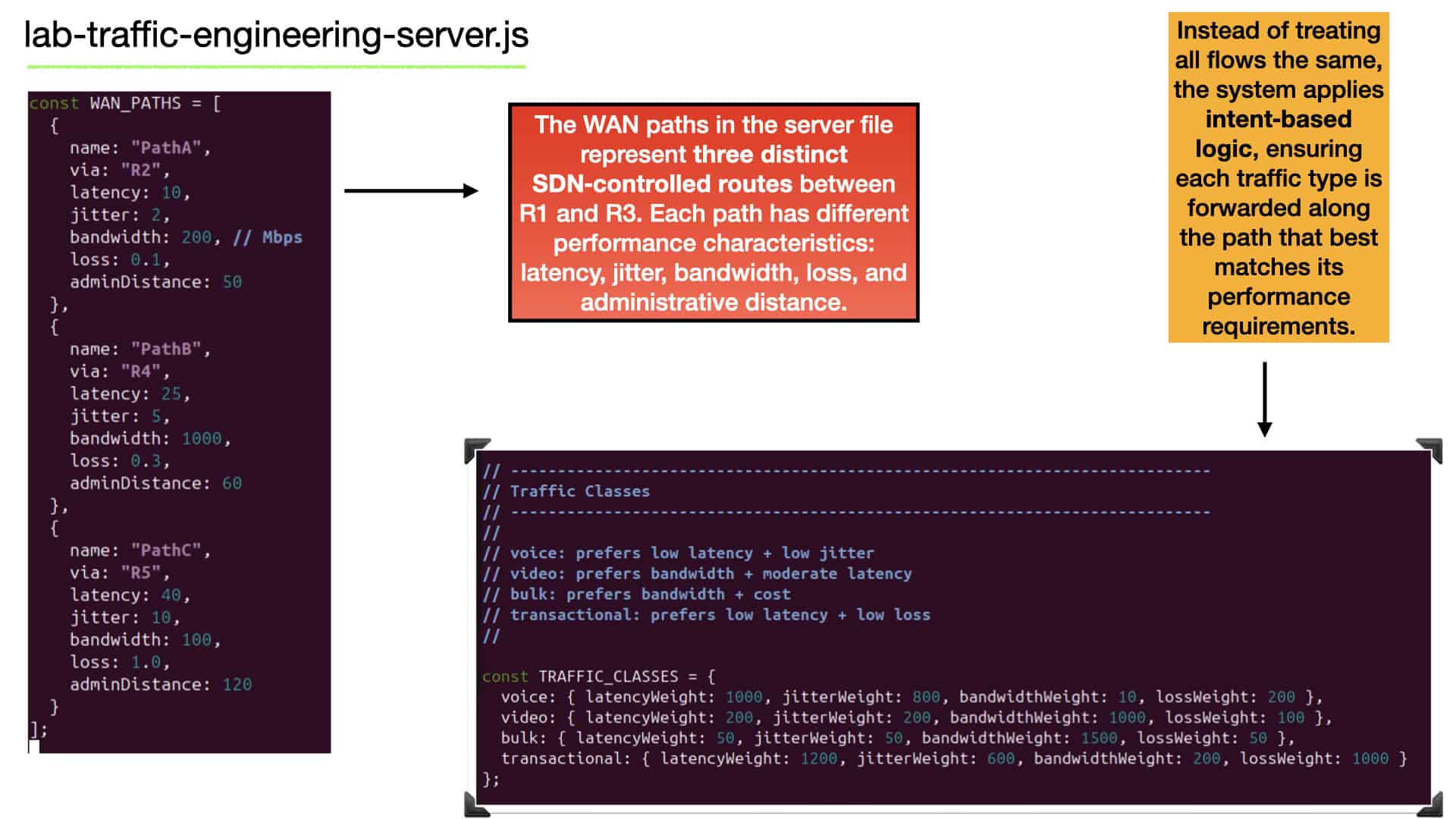
SD‑WAN traffic steering starts by exposing multiple underlay paths — MPLS, broadband, LTE, DIA — and treating them as dynamic forwarding options rather than fixed routes. Each path has different characteristics such as latency, jitter, bandwidth, and loss, and SD‑WAN continuously measures these metrics in real time. Instead of relying on traditional routing protocols alone, SD‑WAN uses this visibility to build a multi‑path environment where every application can be steered toward the most suitable underlay. This transforms the WAN from a static routing domain into an adaptive, performance‑aware fabric.

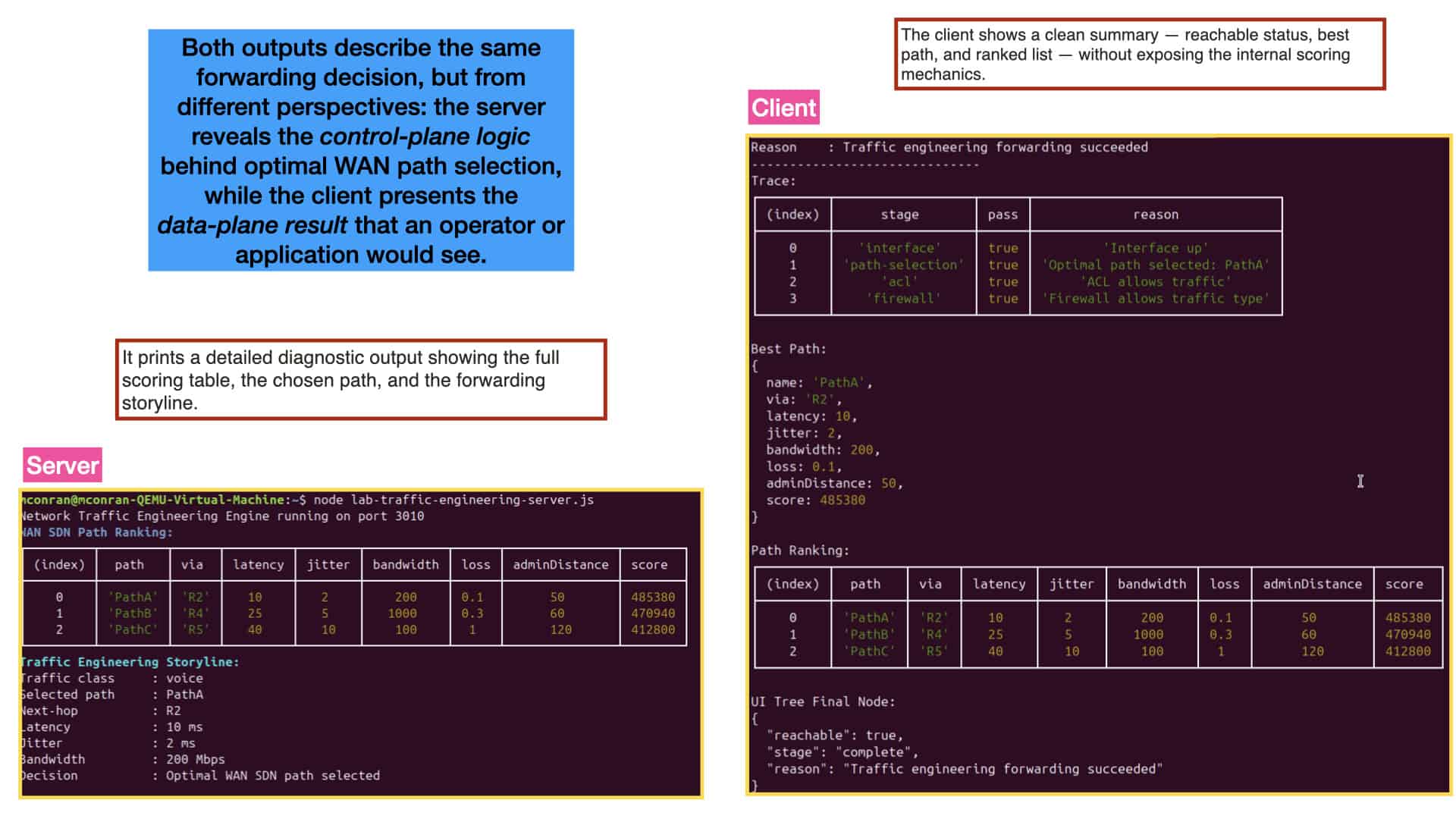
Once SD‑WAN has real‑time metrics for all available paths, it applies application‑aware policies to determine the best route for each flow. Voice may be steered to the lowest‑latency path, video to the highest‑bandwidth path, transactional traffic to the lowest‑loss path, and bulk transfers to the most cost‑efficient path. SD‑WAN evaluates all paths using these intent‑based rules, producing a ranked list of optimal routes. The highest‑scoring path becomes the forwarding decision, ensuring each application is dynamically steered to the underlay that maximizes its performance.

After SD‑WAN selects the optimal path, the forwarding pipeline ensures the route is valid and permitted. Interfaces must be operational, ACLs must allow the destination, and security policies must permit the application’s traffic type. Even if SD‑WAN identifies the best underlay path, forwarding will not proceed unless all data‑plane checks pass. This mirrors real SD‑WAN systems: the controller chooses the best application‑specific path, while the router enforces operational and security constraints before forwarding. The final forwarding action is therefore both SD‑WAN‑optimized and fully compliant with network policy.

Picture This: Personal Note – 

Now imagine these virtual WANs individually holding a single application running over the WAN, but consider them end-to-end instead of being in one location, i.e., on a server. The individual WAN runs to the cloud or enterprise location, having secure, isolated paths with different policies and topologies. Wide Area Network (WAN) virtualization is an emerging technology revolutionizing how networks are designed and managed.

Note: WAN virtualization allows for decoupling the physical network infrastructure from the logical network, enabling the same physical infrastructure for multiple logical networks. It allows organizations to utilize a single physical infrastructure to create multiple virtual networks, each with unique characteristics. WAN virtualization is a core requirement enabling SD-WAN.

SD WAN Overlay & Underlay Design 

This SD-WAN tutorial will address the SD-WAN vendor’s approach to an underlay and an overlay, including the SD-WAN requirements. The underlay consists of the physical or virtual infrastructure and the overlay network, the SD WAN overlay to which the applications are mapped.

SD-WAN solutions are designed to provide secure, reliable, and high-performance connectivity across multiple locations and networks. Organizations can manage their network configurations, policies, and security infrastructure with SD-WAN.

In addition, SD-WAN solutions can be deployed over any type of existing WAN infrastructure, such as MPLS, Frame Relay, and more. SD-WAN offers enhanced security features like encryption, authentication, and access control. This ensures that data is secure and confidential and that only authorized users can access the network.

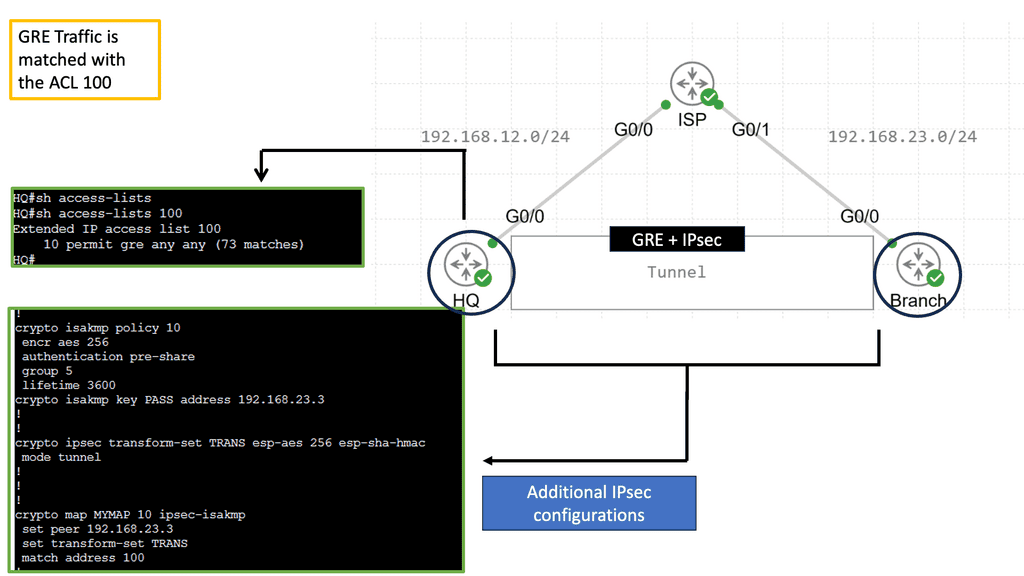
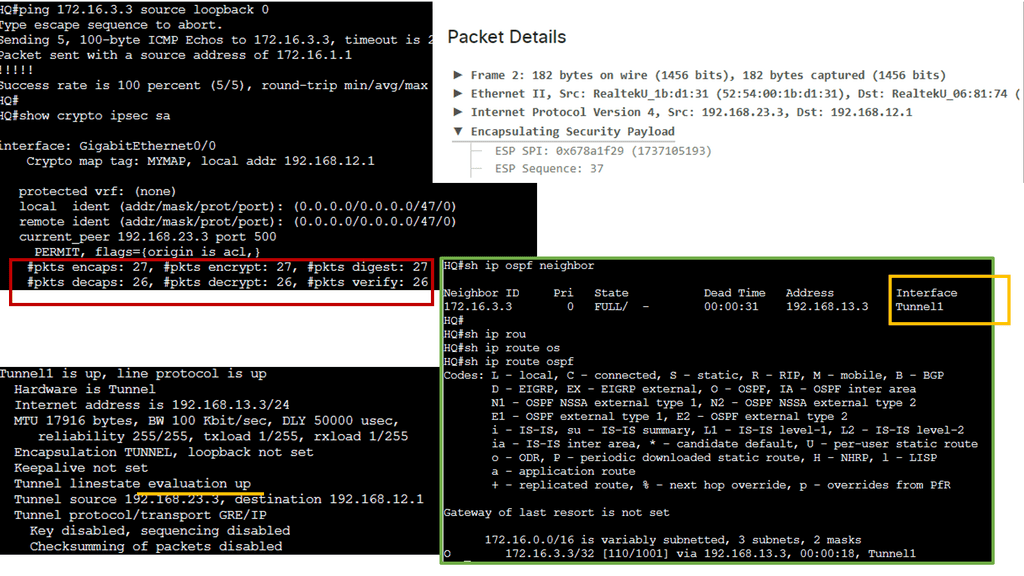
Example Technology: GRE Overlay with IPsec

GRE with IPsec ipsec plus GRE

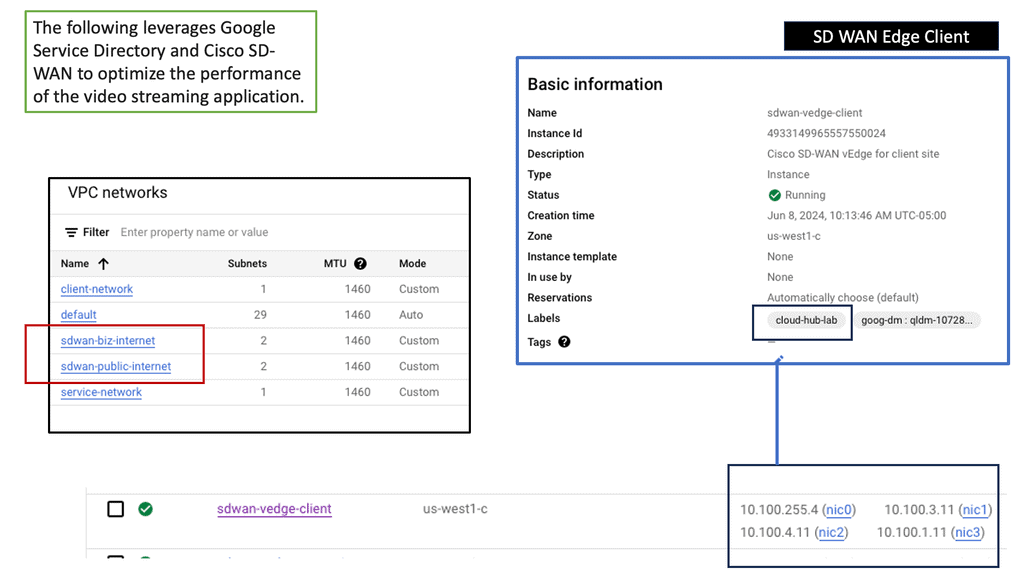
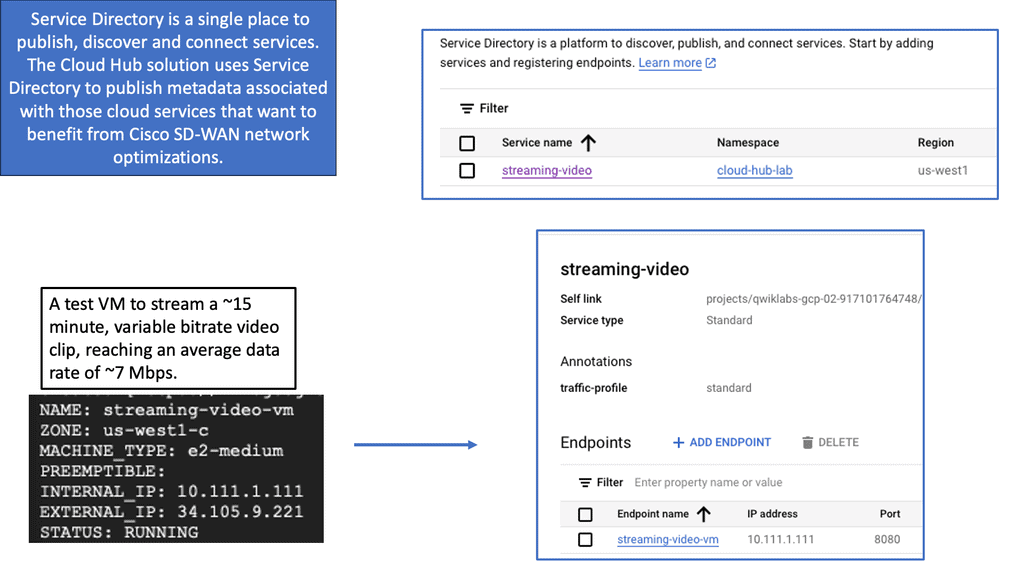
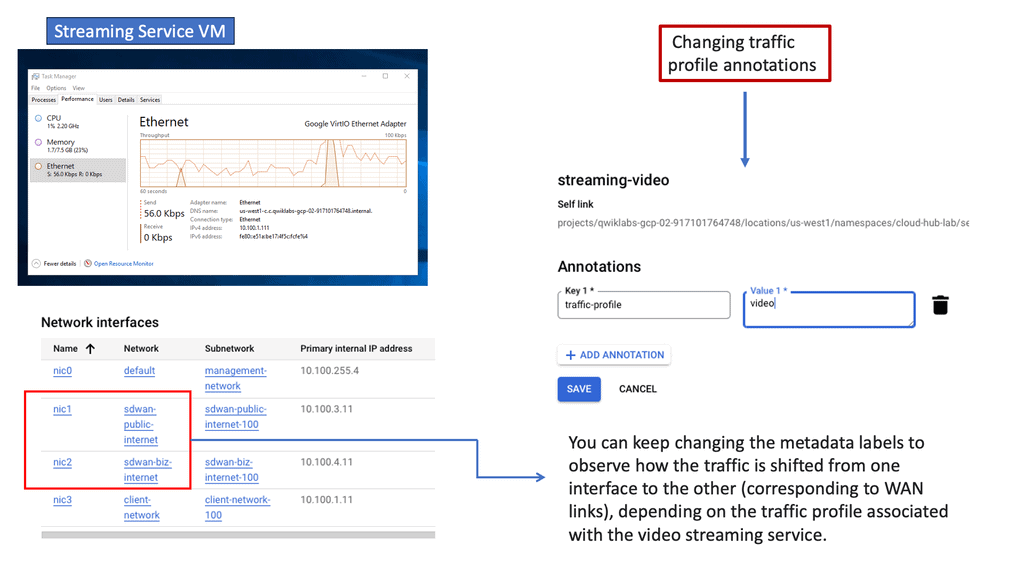
Google SD WAN Cloud Hub

The integration of SD-WAN with Google Cloud takes connectivity to new heights. By deploying an SD-WAN Cloud Hub, businesses can seamlessly connect their branch networks to the cloud, leveraging the power of Google Cloud’s infrastructure.

This enables organizations to optimize network performance, reduce latency, and enhance overall user experience. The centralized management capabilities of SD-WAN further simplify network operations, allowing businesses to efficiently control traffic routing, prioritize critical applications, and ensure maximum uptime.

Seamless Integration

One of the standout aspects of SD-WAN Cloud Hub is its seamless integration with Google Cloud. Organizations can extend their on-premises network to Google Cloud, enabling them to leverage Google Cloud’s extensive services and resources. This integration empowers businesses to adopt a hybrid cloud strategy, seamlessly connecting their on-premises infrastructure with the scalability and flexibility of Google Cloud.

SD-WAN Enables

A) Performance-Based Routing

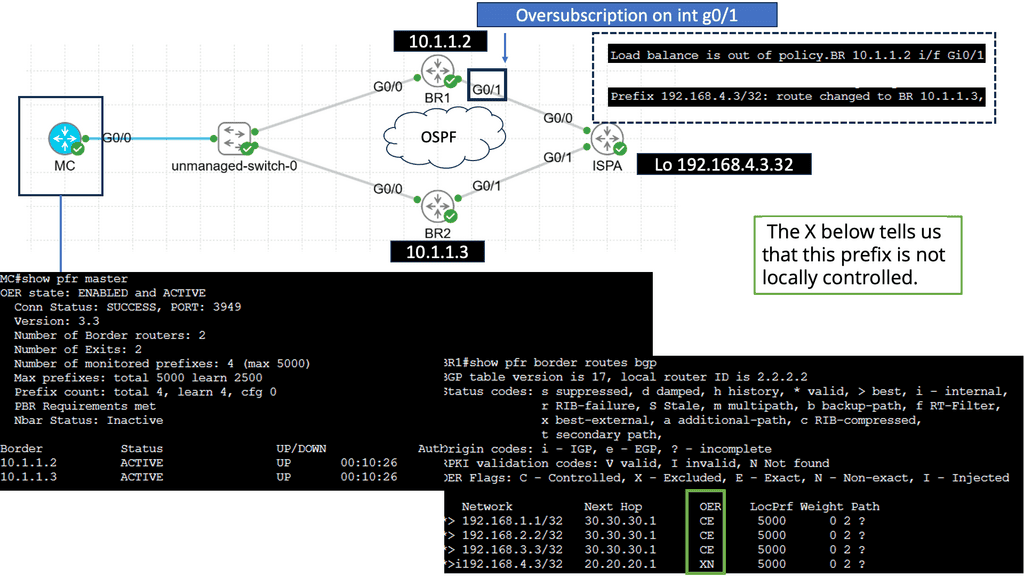
Performance-based routing is a dynamic routing technique that selects the best path for data transmission based on real-time performance metrics. Unlike traditional routing protocols that solely consider static factors like hop count, performance-based routing considers parameters such as latency, packet loss, and bandwidth availability.

-Enhanced Network Performance: Performance-based routing minimizes latency and packet loss by dynamically selecting the optimal path, improving overall network performance. This leads to faster data transfer speeds and better user experiences for applications and services.

-Efficient Bandwidth Utilization: Performance-based routing intelligently allocates network resources by diverting traffic to less congested routes. This ensures that available bandwidth is utilized optimally, preventing bottlenecks and congestion in the network.

-Redundancy and Failover: Another advantage of performance-based routing is its ability to provide built-in redundancy and failover mechanisms. By constantly monitoring performance metrics, it can automatically reroute traffic when a network link or node fails, ensuring uninterrupted connectivity.

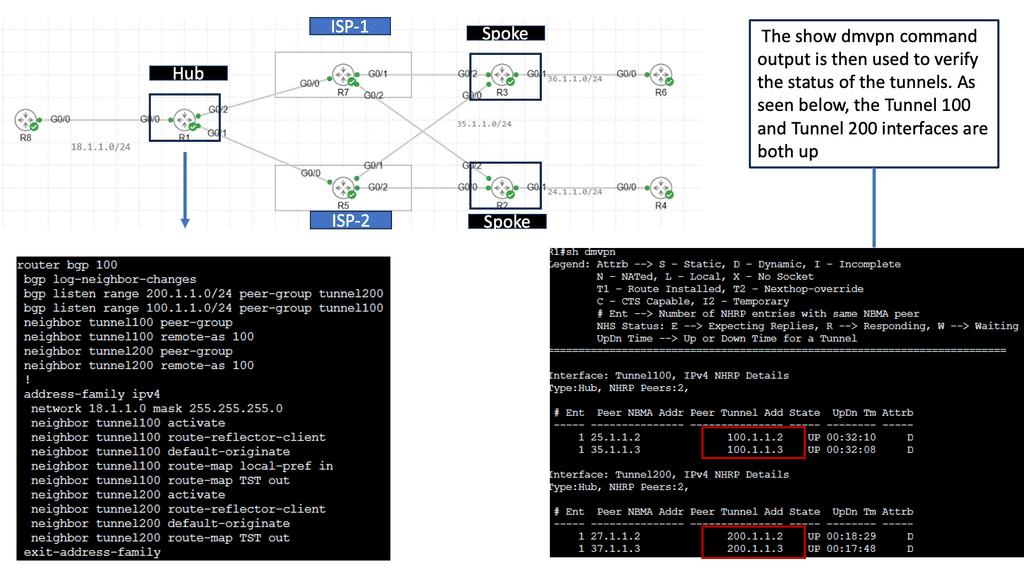
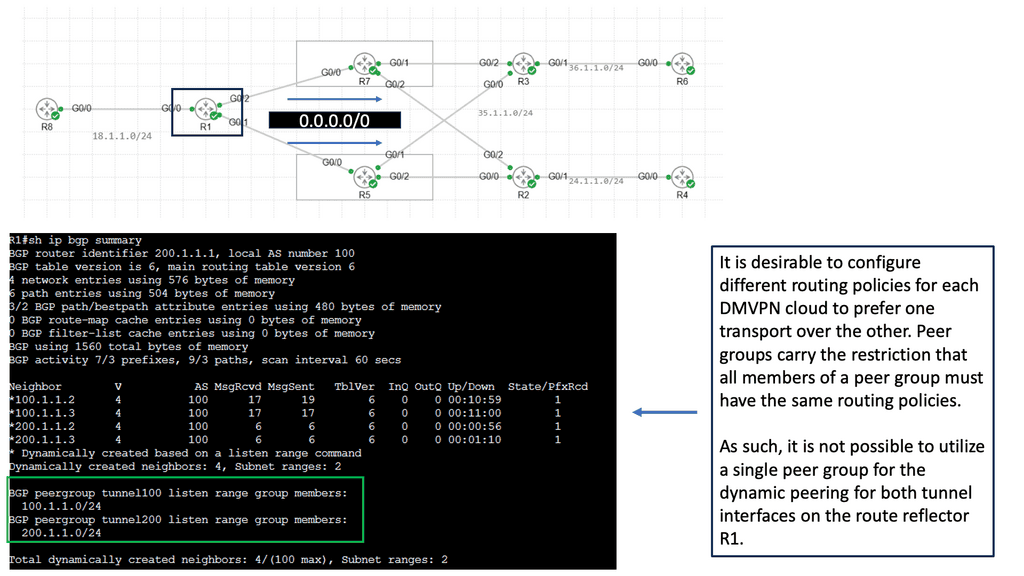
B) Understanding DMVPN Phase 3

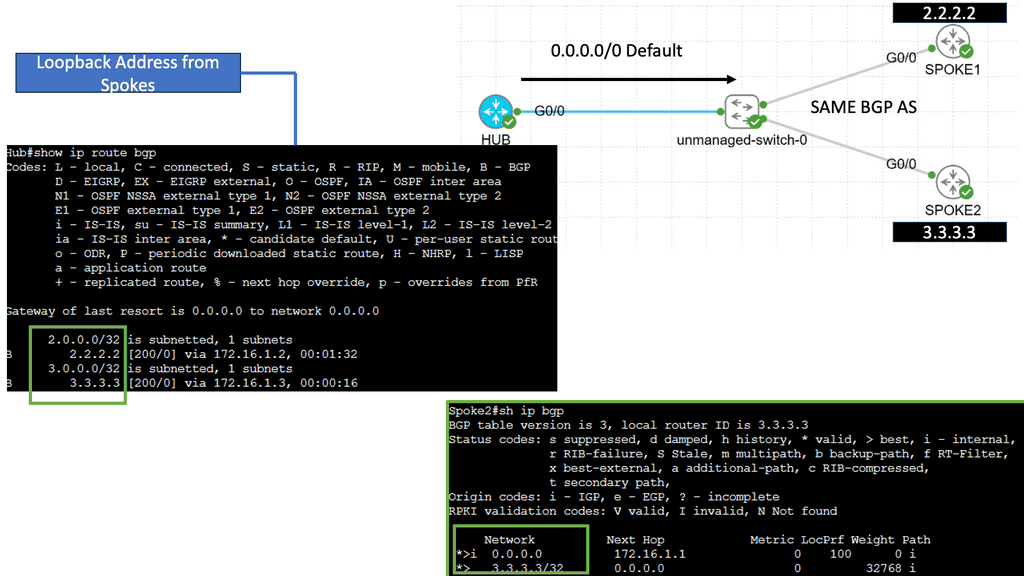
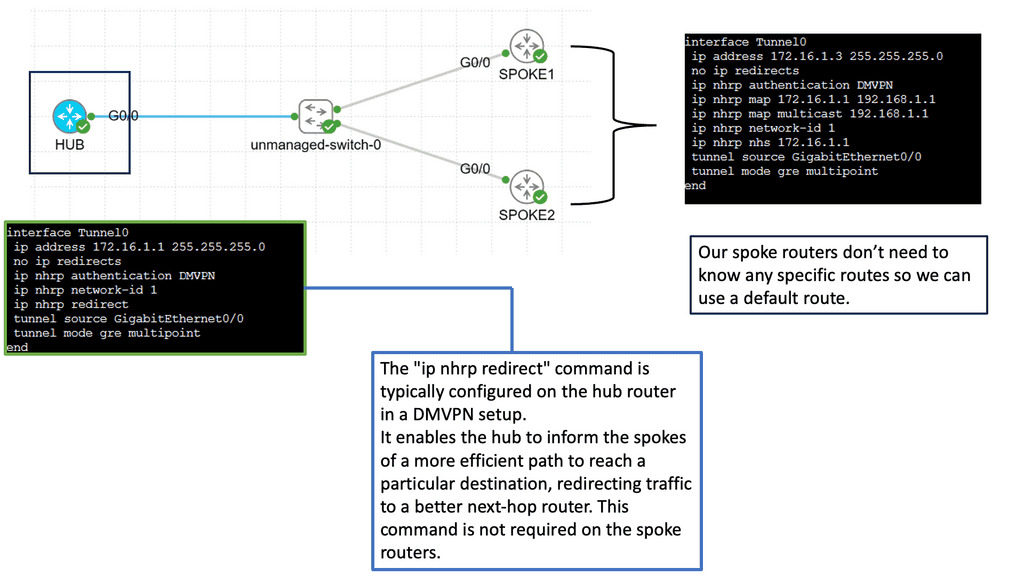
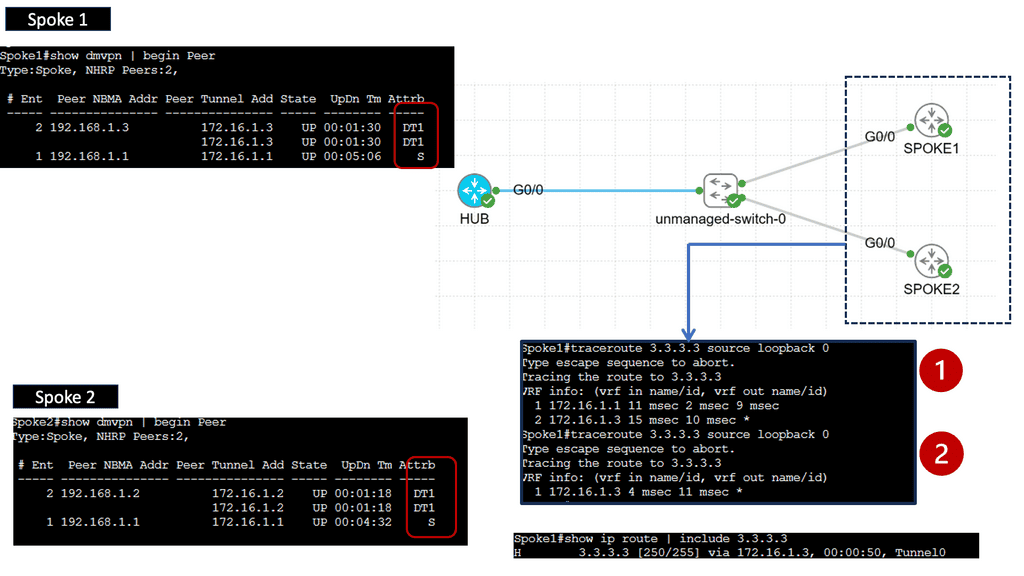
DMVPN Phase 3 is an advanced networking solution that provides scalable and efficient connectivity for organizations with distributed networks. Unlike its predecessors, DMVPN Phase 3 introduces the concept of Spokes connecting directly with each other, eliminating the need for traffic to traverse through the Hub. This dynamic spoke-to-spoke tunneling architecture enhances network performance and reduces latency, making it an ideal choice for modern network infrastructures.

DMVPN Phase 3 offers many advantages for organizations seeking streamlined network connectivity. First, it provides enhanced scalability, allowing for easy addition or removal of spokes without impacting the overall network. Additionally, direct spoke-to-spoke communication reduces the dependency on the Hub, resulting in improved network resiliency and reduced bandwidth consumption. Moreover, DMVPN Phase 3 supports dynamic routing protocols, enabling efficient and automated network management.

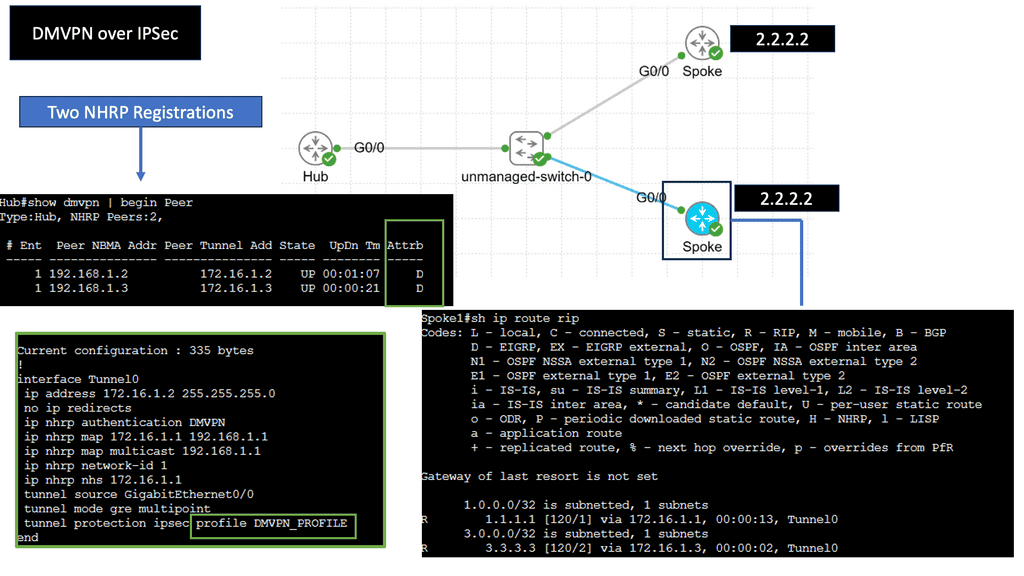
C) Securing DMVPN with IPSec

DMVPN is a Cisco proprietary solution that simplifies the deployment of VPN networks, offering scalability, flexibility, and ease of management. It utilizes multipoint GRE tunnels to establish secure connections between multiple sites, creating a virtual mesh network. This architecture eliminates the need for point-to-point tunnels between every site, reducing overhead and enhancing scalability.

IPsec, short for Internet Protocol Security, is a widely used protocol suite that provides secure communication over IP networks. With features like authentication, encryption, and data integrity, IPsec ensures confidentiality and integrity of data transmitted over the network. When combined with DMVPN, IPsec adds an additional layer of security to the virtual network, safeguarding sensitive information from unauthorized access.

DMVPN over IPsec offers numerous advantages for organizations. Firstly, it enables dynamic and on-demand connectivity, adding new sites seamlessly without manual configuration. This scalability reduces administrative overhead and streamlines network expansion. Secondly, DMVPN over IPsec provides enhanced security, ensuring that data remains confidential and protected from potential threats. Lastly, it improves network performance by leveraging multipoint connectivity, optimizing bandwidth usage, and reducing latency.

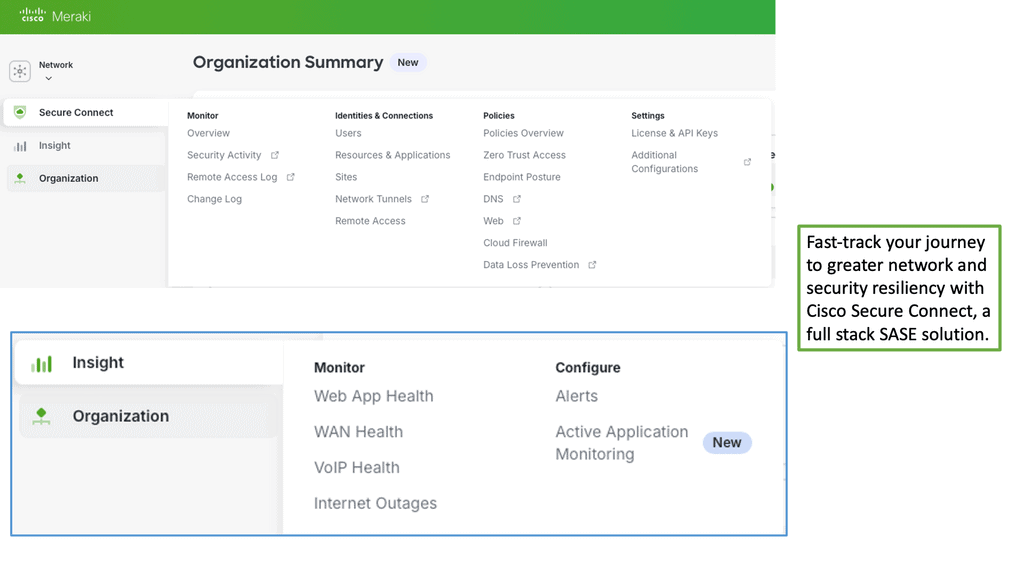
Example Product: Cisco Meraki

### Centralized Management

One of the standout features of the Cisco Meraki platform is its centralized management system. Gone are the days of configuring each device individually. With Meraki, all your network devices can be managed from a single, intuitive dashboard. This not only simplifies the administration process but also ensures that your network remains consistent and secure. The centralized dashboard provides real-time monitoring, configuration, and troubleshooting capabilities, allowing IT administrators to manage their entire network with ease and efficiency.

### Robust Security Features

Security is a top priority for any network, and Cisco Meraki excels in this area. The platform offers a comprehensive suite of security features designed to protect your network from a wide range of threats. Built-in firewall, intrusion detection, and prevention systems work seamlessly to safeguard your data. Additionally, Meraki’s advanced malware protection and content filtering ensure that harmful content is kept at bay. With automatic firmware updates, your network is always protected against the latest vulnerabilities, giving you peace of mind.

### Unparalleled Scalability

As your business grows, so does your network. Cisco Meraki is designed to scale effortlessly with your organization. Whether you are managing a small business or a large enterprise, Meraki’s cloud-based architecture allows you to add new devices and locations without the need for complex configurations or costly hardware investments. The platform supports a wide range of devices, including switches, routers, access points, and security cameras, all of which can be easily integrated into your existing network.

### Seamless Integration and Automation

Integration and automation are key to streamlining network management, and Cisco Meraki shines in these areas. The platform supports API integrations, allowing you to connect with third-party applications and services. This opens up a world of possibilities for automating routine tasks, such as device provisioning, network monitoring, and reporting. By leveraging these capabilities, businesses can reduce manual workload, minimize errors, and improve overall operational efficiency.

### Enhanced User Experience

User experience is at the heart of the Cisco Meraki platform. The user-friendly dashboard is designed with simplicity in mind, making it accessible even to those with limited technical expertise. Detailed analytics and reporting tools provide valuable insights into network performance, helping administrators make informed decisions. Additionally, the platform’s mobile app allows for on-the-go management, ensuring that your network is always within reach.


SD-WAN TUTORIAL • WIDGET 2

SD-WAN Deployment Journey

Follow the engineering sequence from physical connectivity to an automated, application-aware WAN. Select a stage to see what is built, what information is produced, and why it matters.
FOUNDATION IDENTITY DECISION OBSERVATION Underlay Reachability Overlay Secure tunnels Applications Recognition Policy SLA + intent Path decision Telemetry Measure paths Security Services + policy Cloud / SaaS On-ramp Automation Templates + AI MPLS Broadband LTE / 5G TRANSPORT OPTIONS
STEP 1 • BUILD

Establish the WAN foundation

Start with working underlay connectivity. SD-WAN does not remove the physical WAN; it abstracts multiple transports and uses them as the foundation for the overlay.

What happens Branches obtain reachability through transports such as MPLS, broadband, fiber or cellular.
Why it matters The overlay can only operate reliably when the underlying paths provide basic IP connectivity.
Engineering output Reachable WAN edges with multiple transport choices.
Next: form the secure overlay tunnels that abstract those transports.
01

Build

Establish underlay reachability and transport diversity.

02

Recognize

Identify applications and classify business traffic.

03

Steer

Apply policy and SLA requirements to path selection.

04

Monitor

Continuously measure latency, loss, jitter and health.

SD WAN Tutorial

Transition: The era of client-server

The design for the WAN and branch sites was conceived in the client-server era. At that time, the WAN design satisfies the applications’ needs. Then, applications and data resided behind the central firewall in the on-premises data center. Today, we are in a different space with hybrid IT and multi-cloud designs, making applications and data distribution. Data is now omnipresent. The type of WAN and branch originating in the client-server era was not designed with cloud applications. 

Hub and spoke designs:

The “hub and spoke” model was designed for client/server environments where almost all of an organization’s data and applications resided in the data center (i.e., the hub location) and were accessed by workers in branch locations (i.e., the spokes).  Internet traffic would enter the enterprise through a single ingress/egress point, typically into the data center, which would then pass through the hub and to the users in branch offices.

Push to the Cloud:

The birth of the cloud resulted in a significant shift in how we consume applications, traffic types, and network topology. There was a big push to the cloud, and almost everything was offered as a SaaS. In addition, the cloud era changed traffic patterns, as traffic goes directly to the cloud from the branch site and doesn’t need to be backhauled to the on-premise data center.

**Challenge: Hub and spoke design**

The hub and spoke model needs to be updated. Because the model is centralized, day-to-day operations may be relatively inflexible, and changes at the hub, even in a single route, may have unexpected consequences throughout the network. It may be difficult or even impossible to handle occasional periods of high demand between two spokes.

The result of the cloud acceleration means that the best access point is only sometimes in the central location. Why would branch sites direct all internet-bound traffic to the central HQ, causing traffic tromboning and adding to latency when it can go directly to the cloud? The hub-and-spoke design could be an efficient topology for cloud-based applications. 

**Active/Active and Active/Passive**

Historically, WANs are built on “active-passive,” where a branch can be connected using two or more links, but only the primary link is active and passing traffic. In this scenario, the backup connection only becomes active if the primary connection fails. While this might seem sensible, it could be more efficient.

Interest in active-active routing protocols has always existed, but it was challenging to configure and expensive to implement. In addition, active/active designs with traditional routing protocols are complex to design, inflexible, and a nightmare to troubleshoot.

Convergence & Application Performance:

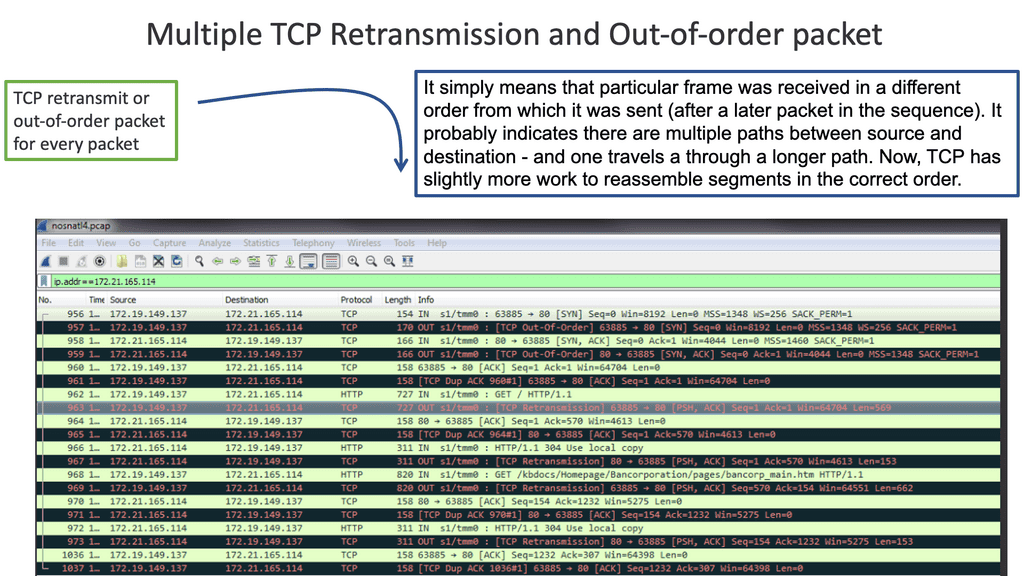
Convergence and application performance problems can arise from active-active WAN edge designs. For example, active-active packets that reach the other end could be out-of-order packets due to each link propagating at different speeds. Also, the remote end has to reassemble, resulting in additional jitter and delay. Both high jitter and delay are bad for network performance.

Packet reordering:

The issues arising from active-active are often known as spray and pray. It increases bandwidth but decreases good output. Spraying packets down both links can result in 20% drops or packet reordering. There will also be firewall issues as they may see asymmetric routes.

TCP out of order packets
Diagram: TCP out-of-order packets. Source F5.

Key SD-WAN Requirements 

1: SD-WAN requirement and active-active paths

For an active-active design, one must know the application session and design that eliminates asymmetric routing. In addition, it would help if you slice up the WAN so application flows can work efficiently over either link. SD-WAN does this. Also, WAN designs can be active–standby, which requires routing protocol convergence in the event of primary link failure.

Routing Protocol Convergence

Unfortunately, routing protocols are known to converge slowly. The emergence of SD-WAN technologies with multi-path capabilities combined with the ubiquity of broadband has made active-active highly attractive and something any business can deploy and manage quickly and easily.

SD-WAN solution enables the creation of virtual overlays that bond multiple underlay links. Virtual overlays would allow enterprises to classify and categorize applications based on their unique service level requirements and provide fast failover should an underlay link experience congestion, a brownout, or an outage.

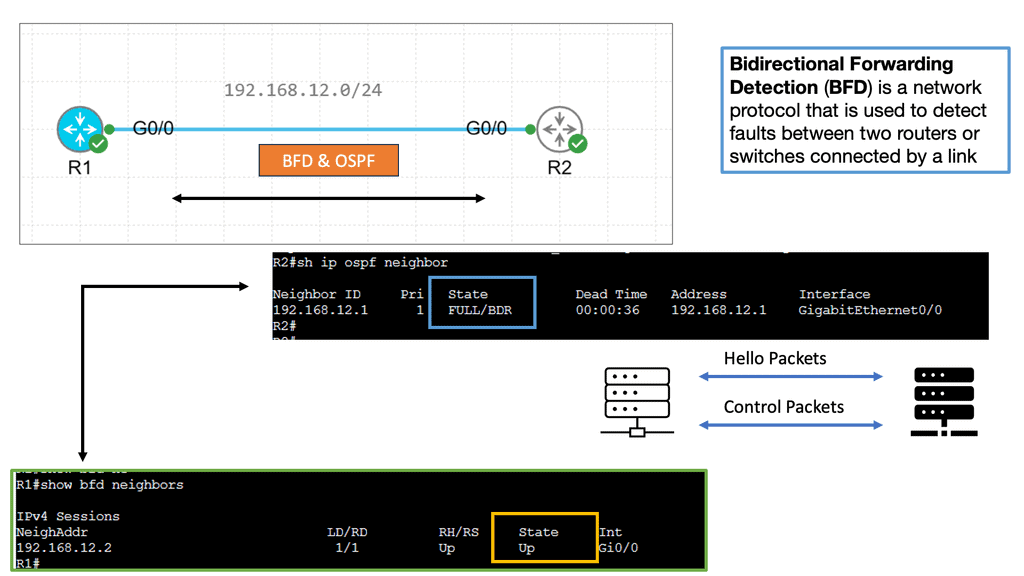
Example: BFD improving convergence

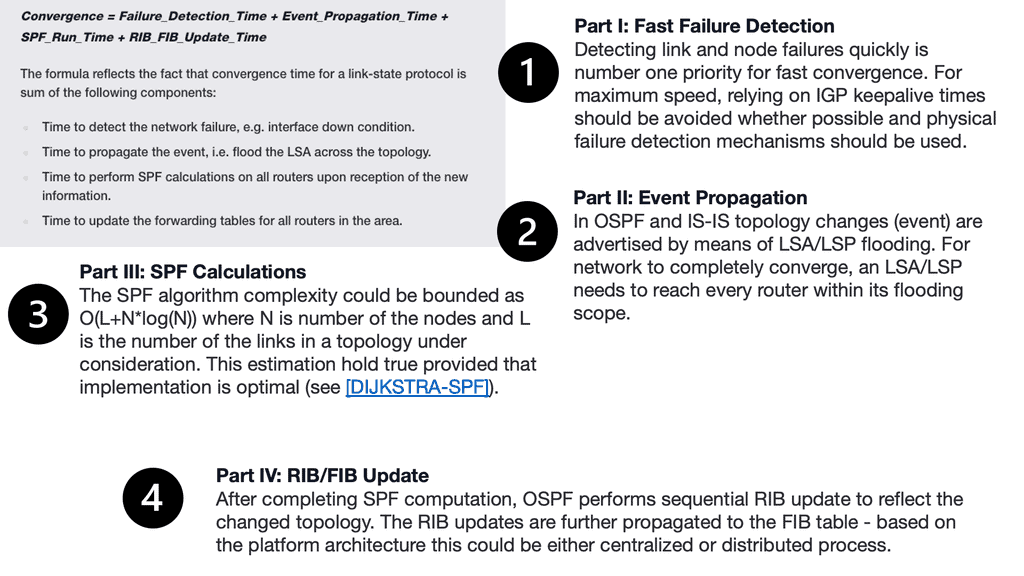
There is traditional routing regardless of the mechanism used to speed up convergence and failure detection. These several convergence steps need to be carried out:

a ) Detecting the topology change,

b ) Notifying the rest of the network about the change,

c ) Calculating the new best path, and

d) switching to the new best path.

Traditional WAN protocols route down one path and, by default, have no awareness of what’s happening at the application level. For this reason, there have been many attempts to enhance Wan’s behavior. 

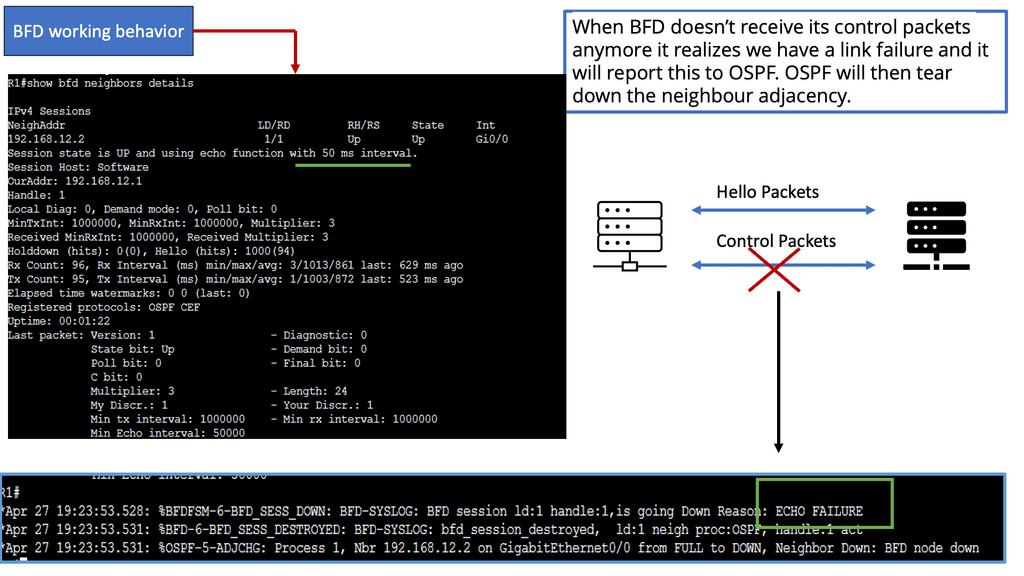
Example Convergence Time with OSPF
Diagram:Example Convergence Time with OSPF. Source INE.
Example Convergence Time with OSPF
Diagram:Example Convergence Time with OSPF. Source INE.

2: SD-WAN requirements: Flexible topologies

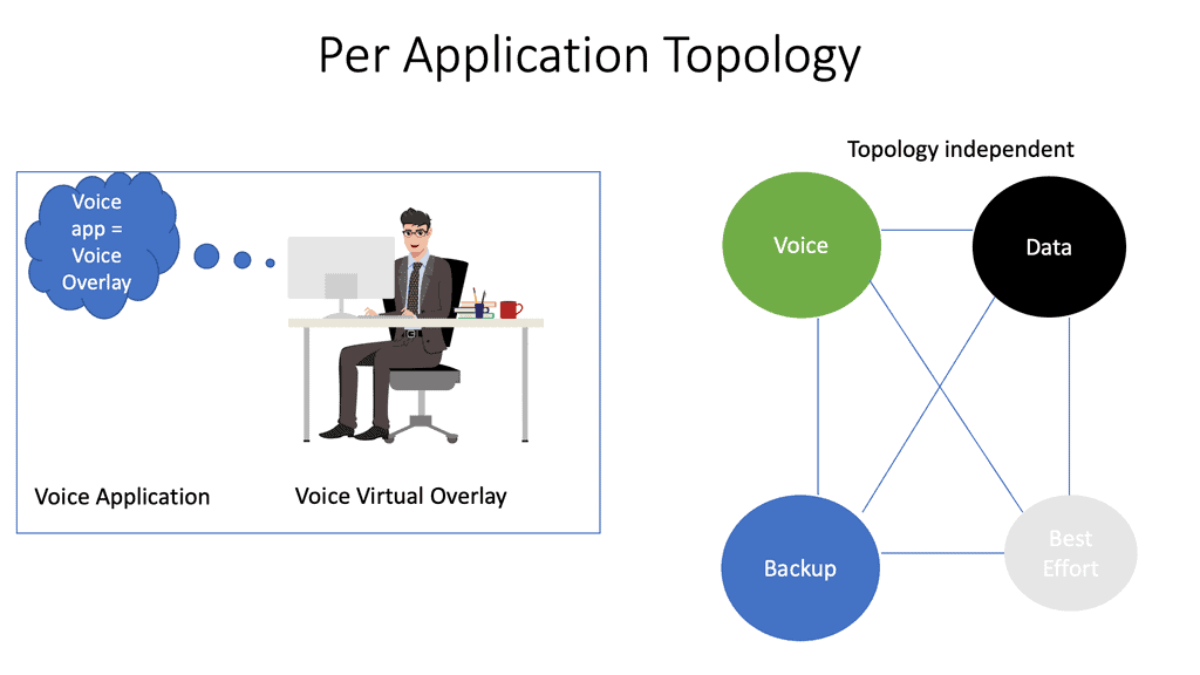
For example, using DPI, we can have Voice over IP traffic go over MPLS. Here, the SD-WAN will look at real-time protocol and session initiation protocol. We can also have less critical applications that can go to the Internet. MPLS can be used only for a specific app.

As a result, the best-effort traffic is pinned to the Internet, and only critical apps get an SLA and go on the MPLS path. Now, we better utilize the transports, and circuits never need to be dormant. With SD-WAN, we are using the B/W that you have available to ensure an optimized experience.

The SD-WAN’s value is that the solution tracks network and path conditions in real time, revealing performance issues as they occur. Then, it dynamically redirects data traffic to the following available path.

Then, when the network recovers to its normal state, the SD-WAN solution can redirect the data’s traffic path to its original location. Therefore, the effects of network degradation, such as brownouts and soft failure, can be minimized.

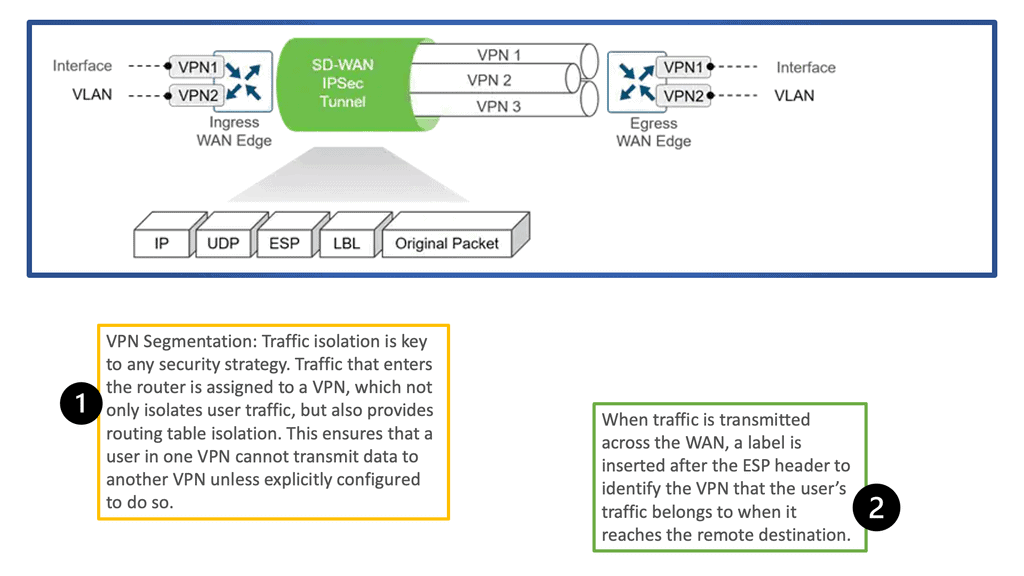
VPN Segmentation
Diagram: VPN Segmentation. Source Cisco.

3: SD-WAN requirements: Encryption key rotation

Data security has never been a more important consideration than it is today. Therefore, businesses and other organizations must take robust measures to keep data and information safely under lock and key. Encryption keys must be rotated regularly (the standard interval is every 90 days) to reduce the risk of compromised data security.

However, regular VPN-based encryption key rotation can be complicated and disruptive, often requiring downtime. SD-WAN can offer automatic key rotation, allowing network administrators to pre-program rotations without manual intervention or system downtime.

4: SD-WAN requirements: Push to the cloud 

Another critical feature of SD-WAN technology is cloud breakout. This lets you connect branch office users to cloud-hosted applications directly and securely, eliminating the inefficiencies of backhauling cloud-destined traffic through the data center. Given the ever-growing importance of SaaS and IaaS services, efficient and reliable access to the cloud is crucial for many businesses and other organizations. By simplifying how branch traffic is routed, SD-WAN makes setting up breakouts quicker and easier.

**The changing perimeter location**

Users are no longer positioned in one location with corporate-owned static devices. Instead, they are dispersed; additional latency degrades application performance when connecting to central areas. Applications and network devices can be optimized, but the only solution is to shorten the link by moving to cloud-based applications. There is a huge push and a rapid flux for cloud-based applications. Most are now moving away from on-premise in-house hosting to cloud-based management.

**SaaS-based Applications**

The ready-made global footprint enables the usage of SaaS-based platforms that negate the drawbacks of dispersed users tromboning to a central data center to access applications. Logically positioned cloud platforms are closer to the mobile user. In addition, hosting these applications on the cloud is far more efficient than making them available over the public Internet.

5: SD-WAN requirements: Decentralization of traffic

A lot of traffic is now decentralized from the central data center to remote branch sites. Many branches do not run high bandwidth-intensive applications. These types of branch sites are known as light edges. Despite the traffic change, the traditional branch sites rely on hub sites for most security and network services.

The branch sites should connect to the cloud applications directly over the Internet without tromboning traffic to data centers for Internet access or security services. An option should exist to extend the security perimeter into the branch sites without requiring expensive onsite firewalls and IPS/IDS. SD-WAN builds a dynamic security fabric without the appliance sprawl of multiple security devices and vendors.

**The ability to service chain traffic** 

Also, service chaining. Service chaining through SD-WAN allows organizations to reroute their data traffic through one service or multiple services, including intrusion detection and prevention devices or cloud-based security services. It thereby enables firms to declutter their branch office networks.

After all, they can automate handling particular types of traffic flows and assemble connected network services into a single chain.

6: SD-WAN requirements: Bandwidth-intensive applications 

Exponential growth in demand for high-bandwidth applications such as multimedia in cellular networks has triggered the need to develop new technologies capable of providing the required high-bandwidth, reliable links in wireless environments. Video streaming is the biggest user of internet bandwidth—more than half of total global traffic. The Cartesian study confirms historical trends reflecting consumer usage that remains highly asymmetric, as video streaming remains the most popular.

**Richer and hungry applications**

Richer applications, multimedia traffic, and growth in the cloud application consumption model drive the need for additional bandwidth. Unfortunately, the congestion leads to packet drops, ultimately degrading application performance and user experience.

SD-WAN offers flexible bandwidth allocation, so you don’t manually allocate bandwidth for specific applications. Instead, SD-WAN allows you to classify applications and specify a particular service level requirement. This way, you can ensure your set-up is better equipped to run smoothly, minimizing the risk of glitchy and delayed performance on an audio conference call.

7: SD-WAN requirements: Organic growth 

We also have organic business growth, a big driver for additional bandwidth requirements. The challenge is that existing network infrastructures are static and need help to respond adequately to this growth in a reasonable period. The last mile of MPLS locks you in, destroying agility. Circuit lead times impede the organization’s productivity and create an overall lag.

A WAN solution should be simple. To serve the new era of applications, we need to increase the link capacity by buying more bandwidth. However, life is more complex. The WAN is an expensive part of the network, and employing link oversubscription to reduce the congestion is too costly.

Bandwidth is expensive to cater to new application requirements not met by the existing TDM-based MPLS architectures. At the same time, feature-rich MPLS is expensive for relatively low bandwidth. You will need more bandwidth to beat latency.

On the more traditional side, MPLS and private ethernet lines (EPLs) can range in cost from $700 to $10,000 per month, depending on bandwidth size and distance of the link itself. Some enterprises must also account for redundancies at each site as uptime for higher-priority sites comes into play. Cost becomes exponential when you have a large number of sites to deploy.

8: SD-WAN requirements: Limitations of protocols 

We already mentioned some problems with routing protocols, but leaving IPsec to default raises challenges. IPSec architecture is point-to-point, not site-to-site. Therefore, it does not natively support redundant uplinks. Complex configurations and potentially additional protocols are required when sites have multiple uplinks to multiple providers. 

Left to its defaults, IPsec is not abstracted, and one session cannot be sent over various uplinks. This will cause challenges with transport failover and path selection. Secure tunnels should be torn up and down immediately, and new sites should be incorporated into a secure overlay without much delay or manual intervention.

9: SD-WAN requirements: Internet of Things (IoT) 

As millions of IoT devices come online, how do we further segment and secure this traffic without complicating the network design? Many dumb IoT devices will require communication with the IoT platform in a remote location. Therefore, will there be increased signaling traffic over the WAN? 

Security and bandwidth consumption are vital issues concerning the introduction of IP-enabled objects. Although encryption is a great way to prevent hackers from accessing data, it is also one of the leading IoT security challenges.

These drives like the storage and processing capabilities found on a traditional computer. The result is increased attacks where hackers can easily manipulate the algorithms designed for protection. Also, Weak credentials and login details leave nearly all IoT devices vulnerable to password hacking and brute force. Any company that uses factory default credentials on its devices places its business, assets, customers, and valuable information at risk of being susceptible to a brute-force attack.

10: SD-WAN requirements: Visibility

Many service provider challenges include the need for more visibility into customer traffic. The lack of granular details of traffic profiles leads to expensive over-provision of bandwidth and link resilience. In addition, upgrades at both the packet and optical layers often need complete traffic visibility and justification.

In case of an unexpected traffic spike, many networks are left at half capacity. As a result, much money is spent on link underutilization, which should be spent on innovation. This link between underutilization and oversubscription is due to a need for more visibility.

**SD-WAN Use Case**

DMVPN: Exploring Single Hub Dual Cloud Architecture

Single Hub Dual Cloud architecture takes the traditional DMVPN setup to the next level. Instead of relying on a single cloud (service provider) for connectivity, this configuration utilizes two separate clouds, providing redundancy and improved performance. The hub device is the central point of contact for all remote sites, ensuring seamless communication between them.

1. Enhanced Redundancy: The Single Hub Dual Cloud configuration offers built-in redundancy with two separate clouds. If one cloud experiences downtime or connectivity issues, the network seamlessly switches to the alternate cloud, ensuring uninterrupted communication.

2. Improved Performance: By distributing the load across two clouds, Single Hub Dual Cloud architecture can handle higher traffic volumes efficiently. This leads to improved network performance and reduced latency for end-users.

3. Scalability: This architecture allows for easy scalability as new sites can be seamlessly added to the network without disrupting the existing infrastructure. The hub device manages the routing and connectivity, simplifying network management and reducing administrative overhead.

SD-WAN TUTORIAL • WIDGET 3

SD-WAN Failure & Adaptation Lab

Break a WAN path, observe the telemetry, and see how application-aware policy can move traffic toward a healthier transport. This is a simplified educational simulation — not a vendor-specific implementation.
Branch Edge Application traffic Policy + forwarding Cloud / SaaS Application destination Internet / cloud service MPLS 28 ms • 0.1% loss BROADBAND / DIA 18 ms • 0.4% loss LTE / 5G 42 ms • 1.2% loss TELEMETRY → POLICY → FORWARDING Healthy paths • policy satisfied
SCENARIO • HEALTHY

Normal operation

Multiple transports are available and the selected path satisfies the application's policy requirements.

LATENCY 28 ms
LOSS 0.1%
JITTER 4 ms
01 • TELEMETRY Path measurements are within the configured SLA.
02 • POLICY DECISION Keep the current path; no steering action is required.
03 • FORWARDING Application traffic remains on the selected path.
CONTROL LOOP
Measure
→
Compare
→
Steer
Voice

Highly sensitive to latency, jitter and packet loss.

SaaS

Often prioritizes application performance and available throughput.

ERP

Can require predictable performance, security and reliability.