Green data center with eco friendly electricity usage tiny person concept. Database server technology for file storage hosting with ecological and carbon neutral power source vector illustration.

Data Center – Site Selection | Content routing

Data Center Site Selection

In today's interconnected world, data centers play a crucial role in ensuring the smooth functioning of the internet. Behind the scenes, intricate routing mechanisms are in place to efficiently transfer data between different locations. In this blog post, we will delve into the fascinating world of data center routing locations and discover how they contribute to the seamless browsing experience we enjoy daily.

Data centers are the backbone of our digital infrastructure, housing vast amounts of data and serving as hubs for internet traffic. One crucial aspect of data center operations is routing, which determines the path that data takes from its source to the intended destination. Understanding the fundamentals of data center routing is essential to grasp the significance of routing locations.

When it comes to selecting routing locations for data centers, several factors come into play. Proximity to major internet exchange points, network latency considerations, and redundancy requirements all influence the decision-making process. We will explore these factors in detail and shed light on the complex considerations involved in determining optimal routing locations.

Data center routing locations are strategically distributed across the globe to ensure efficient data transfer and minimize latency. We will take a virtual trip around the world, uncovering key regions where routing locations are concentrated. From the bustling connectivity hubs of North America and Europe to emerging markets in Asia and South America, we'll explore the diverse geography of data center routing.

Content Delivery Networks (CDNs) play a vital role in optimizing the delivery of web content by caching and distributing it across multiple data centers. CDNs strategically position their servers in various routing locations to minimize latency and ensure rapid content delivery to end-users. We will examine the symbiotic relationship between data center routing and CDNs, highlighting their collaborative efforts to enhance web browsing experiences.

Highlights: Data Center Site Selection

Understanding Geographic Routing in Data Centers

In today’s hyper-connected world, data centers play a crucial role in ensuring seamless digital experiences. Geographic routing within data centers refers to the strategic distribution of data across various global locations to optimize performance, enhance reliability, and reduce latency. This process involves directing user requests to the nearest or most efficient data center based on their geographical location. By understanding and implementing geographic routing, companies can significantly improve the speed and quality of their services.

**The Importance of Geographic Proximity**

One of the primary reasons for geographic routing is to minimize latency—the delay between a user’s request and the response from the server. When data centers are geographically closer to the end-users, the time taken for data to travel back and forth is reduced. This proximity not only accelerates the delivery of content and services but also enhances user satisfaction by providing a smoother and faster experience. In a world where milliseconds matter, especially in sectors like finance and gaming, geographic routing becomes a game-changer.

**Challenges and Considerations**

While geographic routing offers numerous benefits, it also presents several challenges. One major consideration is the complexity of managing multiple data centers spread across the globe. Companies must ensure consistent data synchronization, security, and compliance with local regulations. Additionally, unforeseen events such as natural disasters or political instability can impact data center operations. Therefore, businesses need to adopt robust disaster recovery plans and flexible routing algorithms to adapt to changing circumstances.

**Technological Innovations Driving Geographic Routing**

Recent advancements in technology have significantly enhanced geographic routing capabilities. Machine learning algorithms can now predict traffic patterns and dynamically adjust routing paths to optimize performance. Moreover, edge computing—bringing computation and data storage closer to the location of need—further complements geographic routing by reducing latency and bandwidth usage. As these technologies continue to evolve, they promise to make geographic routing even more efficient and reliable.

Data Analytics with Content Routing

Data analytics is the intelligence layer that exposes how data‑center content routing actually behaves under real operational pressure. In modern fabrics—where applications, microservices, east‑west flows, and distributed storage constantly exchange content—analytics continuously collects telemetry such as path‑latency, queue depth, ECMP distribution, cache‑hit ratios, service‑mesh routing decisions, and content‑replication behavior. This transforms content routing from a conceptual design into a measurable, observable system.

Analytics reveals hidden issues like asymmetric content paths, overloaded leaf pairs, microburst‑driven latency, stale cache propagation, or noisy nodes causing control‑plane churn. By correlating content‑flow behavior with topology structure and application performance, engineers gain precise visibility into how content actually moves through the data center.

When analytics is integrated directly with routing engines, service meshes, and orchestration layers, content routing becomes adaptive rather than static. Real‑time analytics feeds SDN controllers, load‑balancers, API gateways, and distributed caches with exact state: per‑path congestion, service‑instance health, replication lag, and cross‑fabric consistency. With this intelligence, the system can rebalance content flows across spines, adjust routing weights, shift microservices to healthier nodes, or pre‑emptively isolate a degraded tier before it impacts user experience. In multi‑site or stretched‑fabric designs, analytics validates symmetry across domains, detects drift between routing instances, and predicts when content‑distribution patterns are approaching instability thresholds.

The result is a data‑center routing fabric that learns from telemetry, optimizes itself continuously, and maintains predictable performance even during failures or heavy east‑west bursts. Data analytics transforms content routing into a self‑optimizing, feedback‑driven architecture.

Global Site Selection as a Latency‑Aware Architecture

A data center site selection system determines which global region should serve a user request by evaluating latency, load, and content availability across multiple sites. Instead of relying on simple geographic proximity, modern architectures use real‑time telemetry—round‑trip delay, congestion, cache‑hit ratios, and residency policies—to choose the optimal site. Your lab models this behavior by representing each region (EU, US, APAC, Edge POPs) as structured objects containing performance and policy attributes. This transforms global routing from a static map into a dynamic decision engine that reacts to user distribution and content demand.
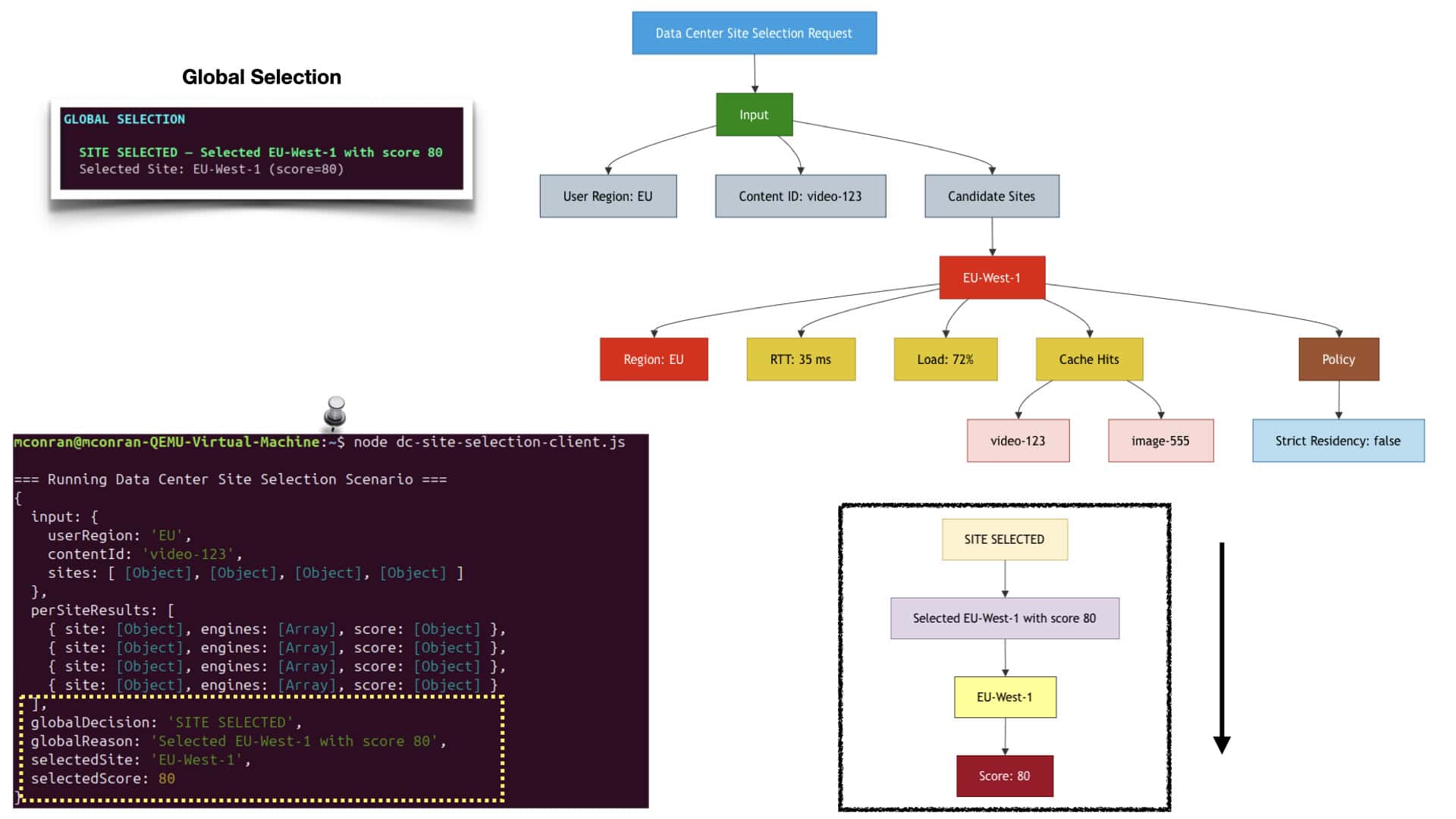
The content routing pipeline uses modular engines to score each site’s ability to serve a specific piece of content. The latency engine measures round‑trip delay, the load engine checks saturation, the cache engine determines whether the requested content is already present, and the geo‑engine enforces residency or compliance constraints. These engines feed into your cinematic pipeline, producing a step‑by‑step visual of how each region is evaluated and how composite scores are calculated. The result is a realistic simulation of global traffic steering, similar to how CDNs and hyperscalers route video, images, and API traffic across continents.
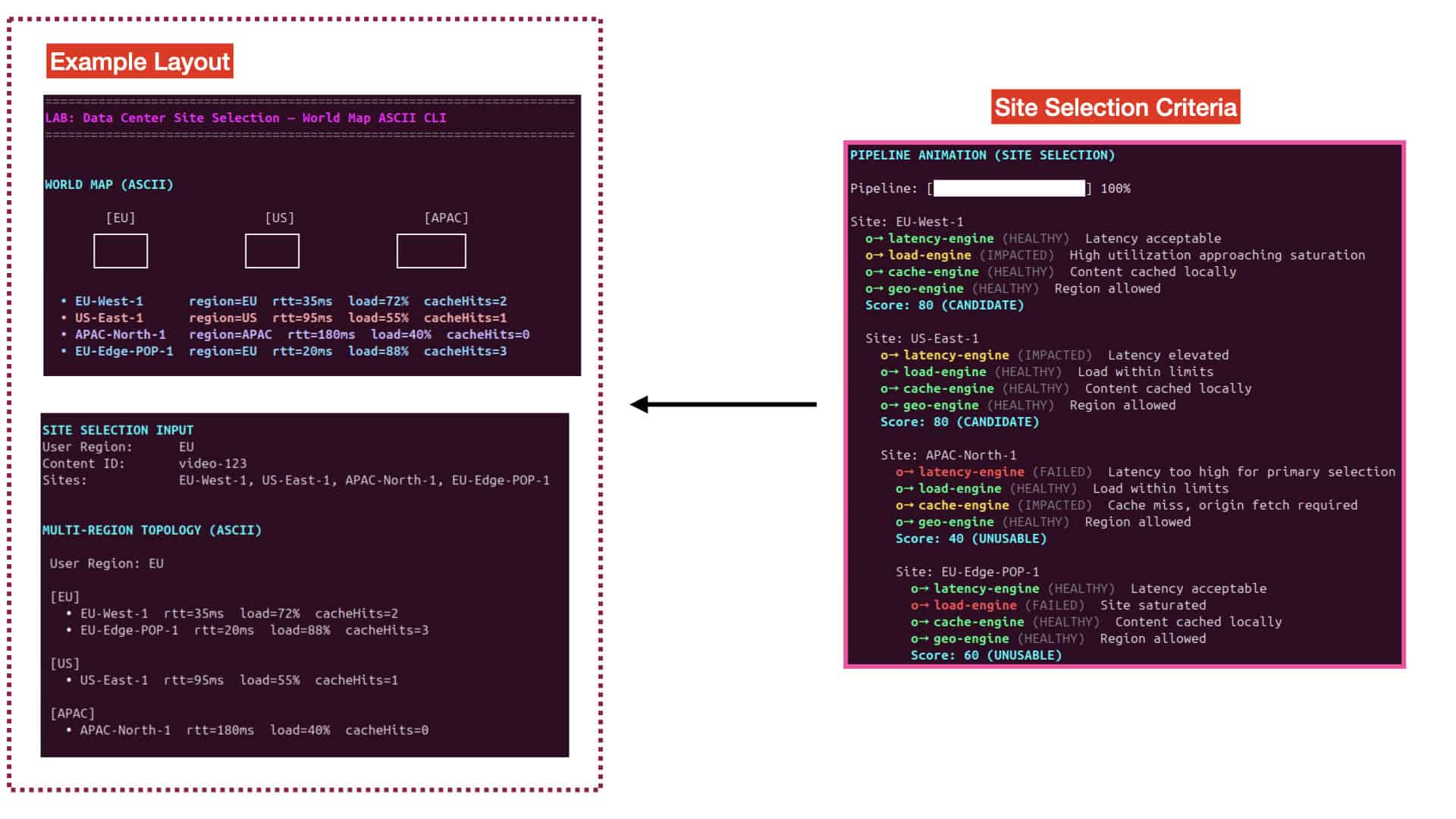
To emphasize data center site selection with content routing, the lab includes a multi‑region topology renderer and a world‑map ASCII visual that highlight how user requests traverse the global network. Regions are grouped visually, sites are color‑coded, and latency, load, and cache metrics are displayed directly under each location. The cinematic CLI animates the evaluation of EU, US, and APAC sites, showing how content flows from user → region → edge → origin. This visual layer makes global routing intuitive and screenshot‑ready, revealing how geography, performance, and content availability combine to determine the optimal site.

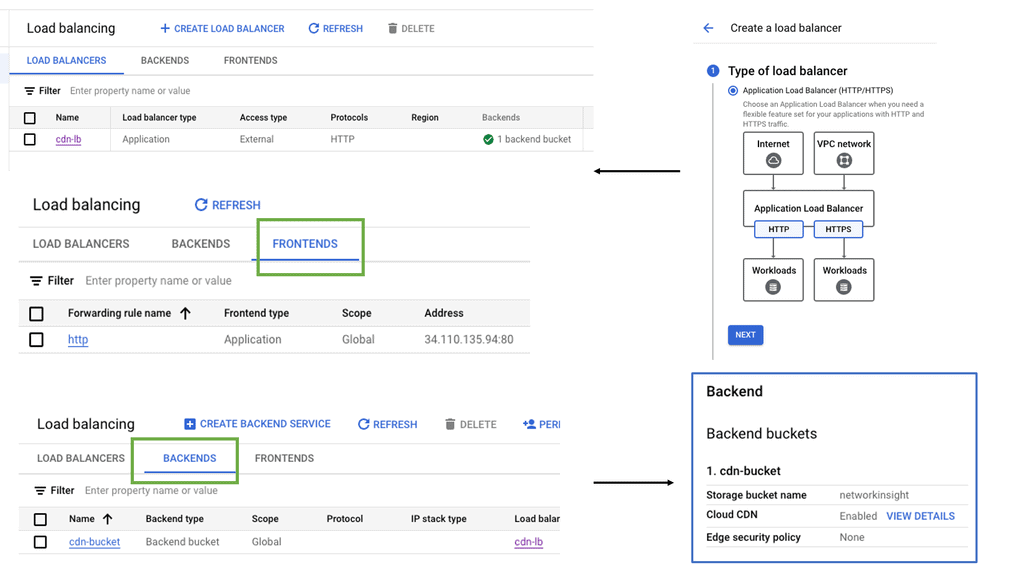
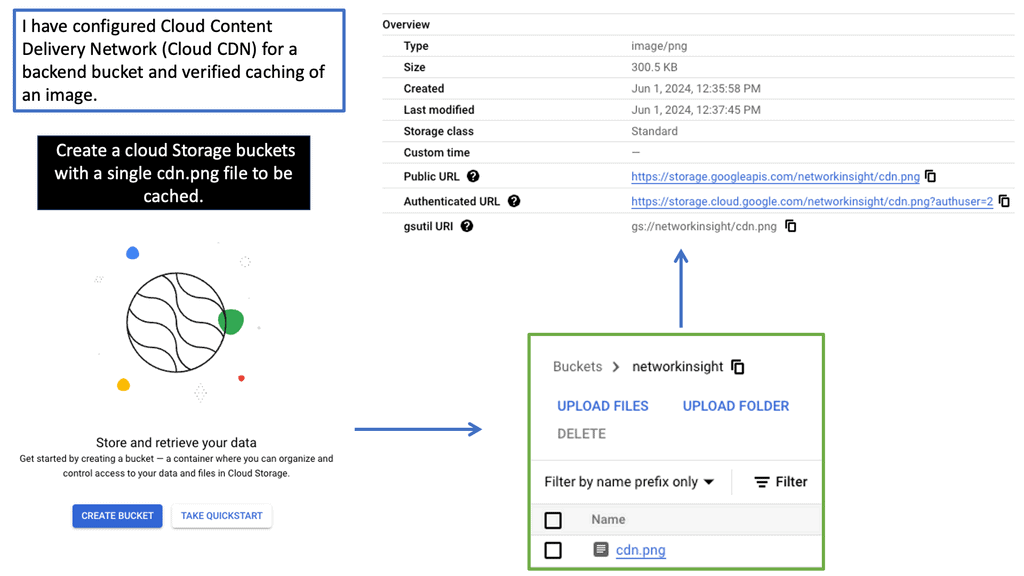
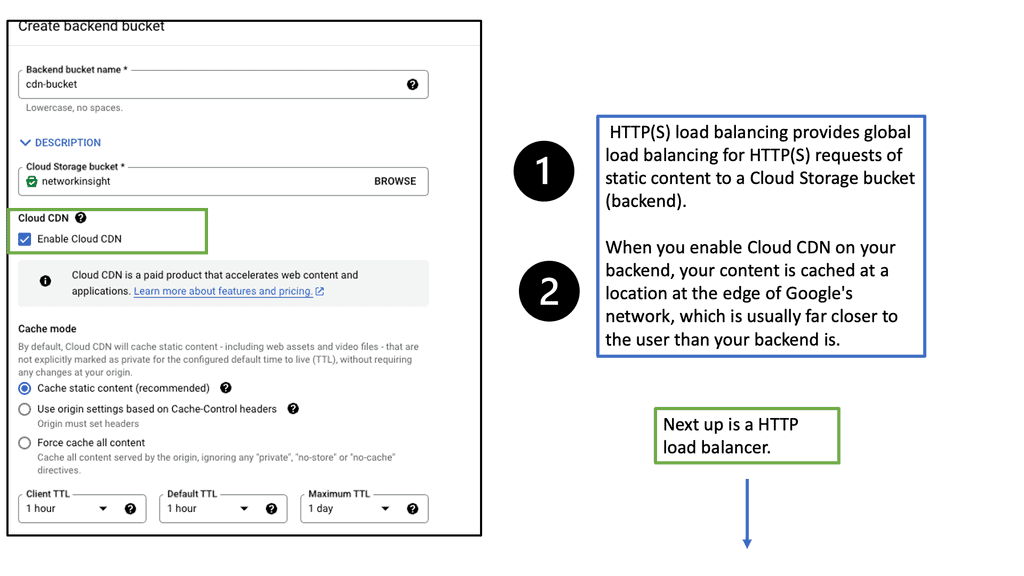
Google Cloud CDN

A CDN is a globally distributed network of servers that stores and delivers website content to users based on their geographic location. By caching and serving content from servers closest to the end users, CDNs significantly reduce latency and enhance the overall user experience.

Google Cloud CDN is a robust and scalable CDN solution offered by Google Cloud Platform. Built on Google’s global network infrastructure, it seamlessly integrates with other Google Cloud services, providing high-performance content delivery worldwide. With its vast network of edge locations, Google Cloud CDN ensures low-latency access to content, regardless of the user’s location.
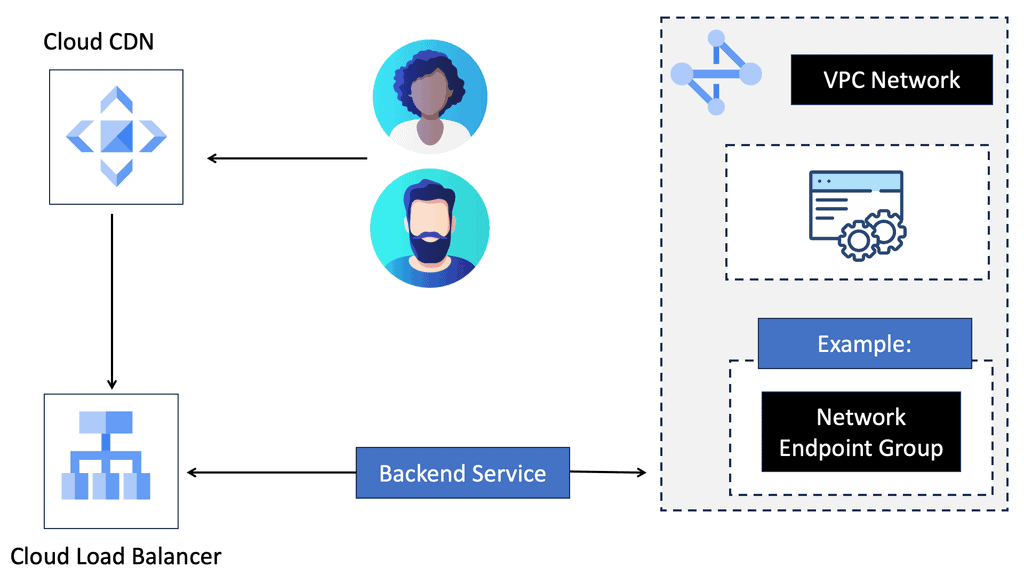
– Global Edge Caching: Google Cloud CDN caches content at edge locations worldwide, ensuring faster retrieval and reduced latency for end-users.

– Security and Scalability: With built-in DDoS protection and automatic scaling, Google Cloud CDN guarantees the availability and security of your content, even during traffic spikes.

– Intelligent Caching: Leveraging machine learning algorithms, Google Cloud CDN intelligently caches frequently accessed content, further optimizing delivery and reducing origin server load.

– Real-time Analytics: Google Cloud CDN provides comprehensive analytics and monitoring tools to help you gain insights into your content delivery performance.
Routing IP addresses: The Process

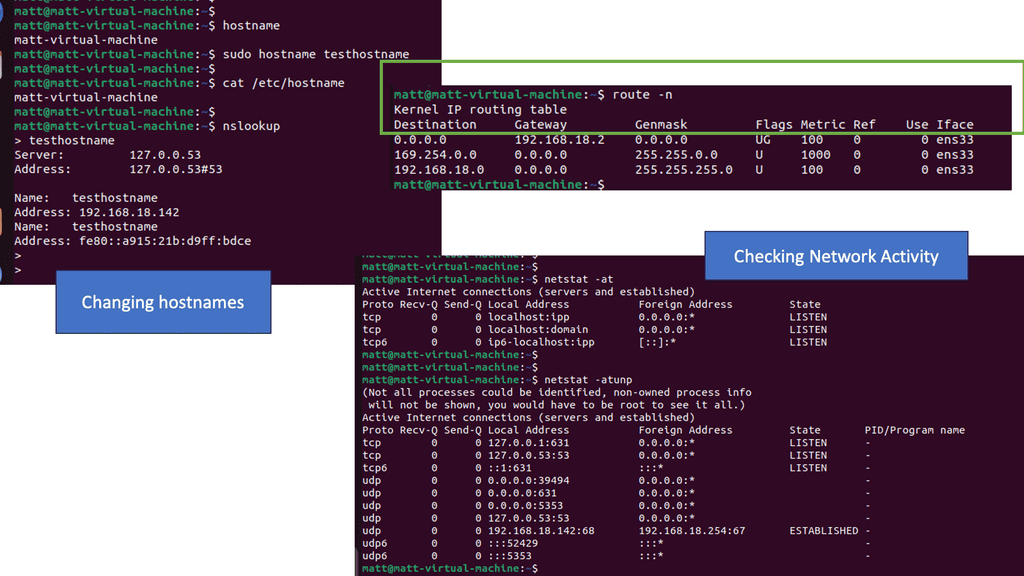
In IP routing, routers must make packet-forwarding decisions independently of each other. Therefore, IP routers are only concerned with finding the next hop to a packet’s final destination. The IP routing protocol is myopic in this sense. IP’s myopia allows it to route around failures easily, but it is also a weakness. In most cases, the packet will be routed to its destination via another router unless the router is on the same subnet (more on this later).

In the routing table, a router looks up a packet’s destination IP address to determine the next hop. A packet is then forwarded to the network interface returned by this lookup by the router.
RIB and the FIB

All the different pieces of information learned from all the other methods (connected, static, and routing protocols) are stored in the RIB. A software component called the RIB manager selects all these different methods. Every routing protocol has a unique number called the distance2. If more than one protocol has the same prefix, the RIB manager picks the protocol with the lowest distance. The shortest distance is found on connected routes. Routes obtained via a routing protocol have a greater distance than static routes.

Routing to a data center

Let us address how users are routed to a data center. Well, there are several data center site selection criteria or even checklists that you can follow to ensure your users follow the most optimal path and limit sub-optimal routing. Distributed workloads with multi-site architecture open up several questions regarding the methods for site selection, path optimization for ingress/egress flows, and data replication (synchronous/asynchronous) for storage. 

### Understanding Routing Protocols

Routing protocols are the rules that dictate how data is transferred from one point to another within a network. They are the unsung heroes of the digital world, enabling seamless communication between servers, devices, and users. In data centers, common routing protocols include BGP (Border Gateway Protocol), OSPF (Open Shortest Path First), and EIGRP (Enhanced Interior Gateway Routing Protocol). Each protocol has its unique strengths, making them suitable for different network configurations and requirements.

Border Gateway Protocol (BGP) is a cornerstone of internet routing, and its importance extends to data centers. BGP is designed to manage how packets are routed across the internet by exchanging routing information between different networks. In a data center environment, BGP helps in optimizing paths, ensuring redundancy, and providing failover capabilities. This makes it indispensable for maintaining the robustness and resilience of network infrastructure.

### Understanding Border Gateway Protocol (BGP)

At the heart of data center routing lies the Border Gateway Protocol, or BGP. BGP is the protocol used to exchange routing information across the internet, making it a cornerstone of global internet infrastructure. It enables data centers to communicate with each other and decide the best routes for data packets. What makes BGP unique is its ability to determine paths based on various attributes, which helps in managing network policies and ensuring data is routed through the most efficient paths available.

### How BGP Enhances Data Center Efficiency

BGP doesn’t just facilitate communication between data centers; it enhances their efficiency. By allowing data centers to dynamically adjust routing paths, BGP helps in managing traffic loads, avoiding congestion, and preventing outages. For example, if a particular route becomes congested, BGP can reroute traffic through alternative paths, ensuring that data continues to flow smoothly. This adaptability is essential for maintaining the performance and reliability of data centers.

BGP AS Prepending

AS Path prepending is a simple yet powerful technique for manipulating BGP route selection. By adding additional AS numbers to the AS Path attribute, network administrators can influence the inbound traffic flow to their network. Essentially, the longer the AS Path, the less attractive the route appears to neighboring ASes, leading to traffic routed through alternate paths.

AS Path prepending offers several benefits for network administrators. Firstly, it provides a cost-effective way to balance inbound traffic across multiple links, thereby preventing congestion on a single path. Secondly, it enhances network resilience by providing redundancy and alternate paths in case of link failures. Lastly, AS Path prepending can be used strategically to optimize outbound traffic flow and improve network performance.

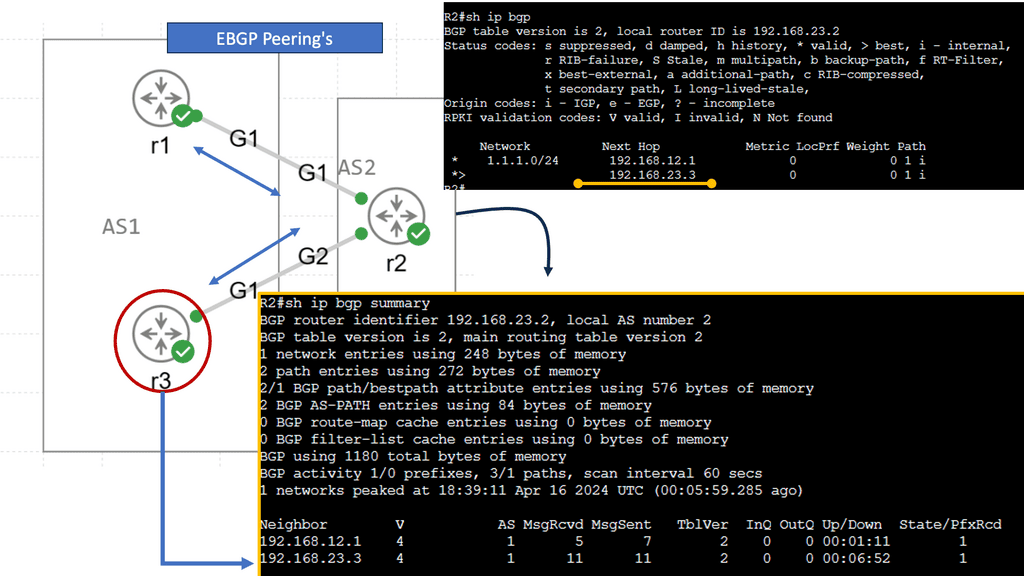
In my example, AS 1 wants to ensure traffic enters the autonomous system through R2. We can add our autonomous system number multiple times, so the as-path becomes longer. Since BGP prefers a shorter AS path, we can influence our routing. This is called AS path pretending. Below, the default behavior is shown without pretending to be configured. 
BGP Configuration

First, create a route map and use set as-path prepend to add your own AS number multiple times. Don’t forget to add the route map to your BGP neighbor configuration. It should be outbound since you are sending this to your remote neighbor! Let’s check the BGP table! Now we see that 192.168.23.3 is our next-hop IP address. The AS Path for the second entry has also become longer. That’s it!
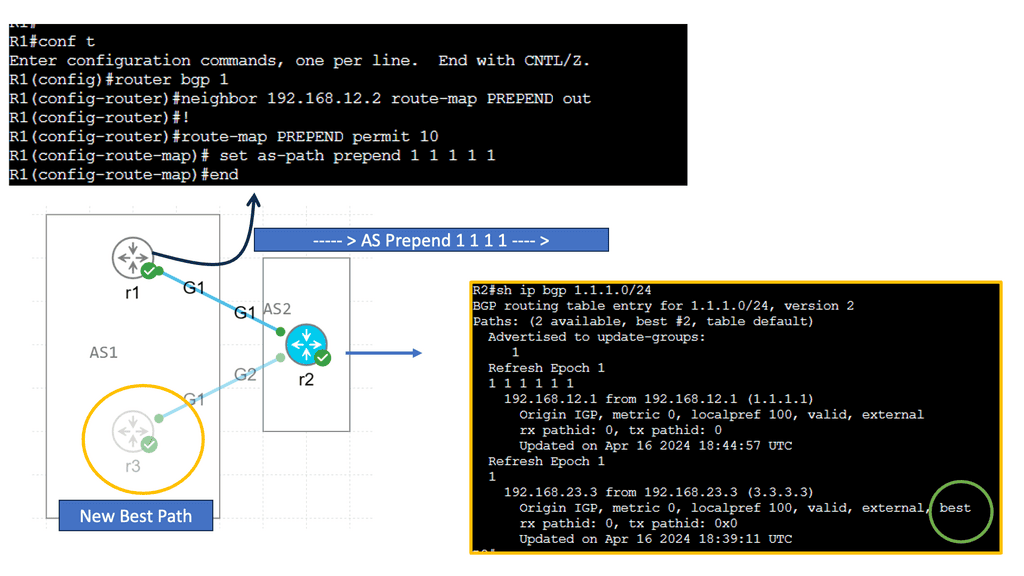
BGP AS Prepend

Distributing the load

Furthermore, once the content is distributed to multiple data centers, you need to manage the request for the distributed content and the load by routing users’ requests to the appropriate data center. Routing in the data center is known as content routing. Content routing takes a user’s request and sends it to the relevant data center.

Note on Content Routing 

Content routing is a critical subset of data center routing, focusing on directing user requests to the most appropriate server based on various factors such as location, server load, and network conditions. This approach not only enhances user experience by reducing latency but also optimizes resource utilization within the data center. Content routing relies on advanced algorithms and technologies like load balancing and Anycast networking to make real-time decisions about the best path for data to travel.

Example: Distributing Load with Load Balancing

**The Role of Load Balancing**

Load balancing is a critical aspect of data center routing. It involves distributing incoming network traffic across multiple servers to ensure no single server becomes overwhelmed. This distribution improves the availability and reliability of applications, enhances user experience, and reduces downtime. Load balancers also monitor server health and reroute traffic if a server becomes unavailable, maintaining seamless connectivity.

**Types of Load Balancing**

There are several types of load balancing methods, each with its own advantages:

1. **Round Robin:** This method distributes requests sequentially across servers, ensuring an even distribution.

2. **Least Connections:** Directs traffic to the server with the fewest connections, optimizing resource use.

3. **IP Hash:** Routes requests based on a unique hash of the client’s IP address, ensuring consistent connections to the same server.
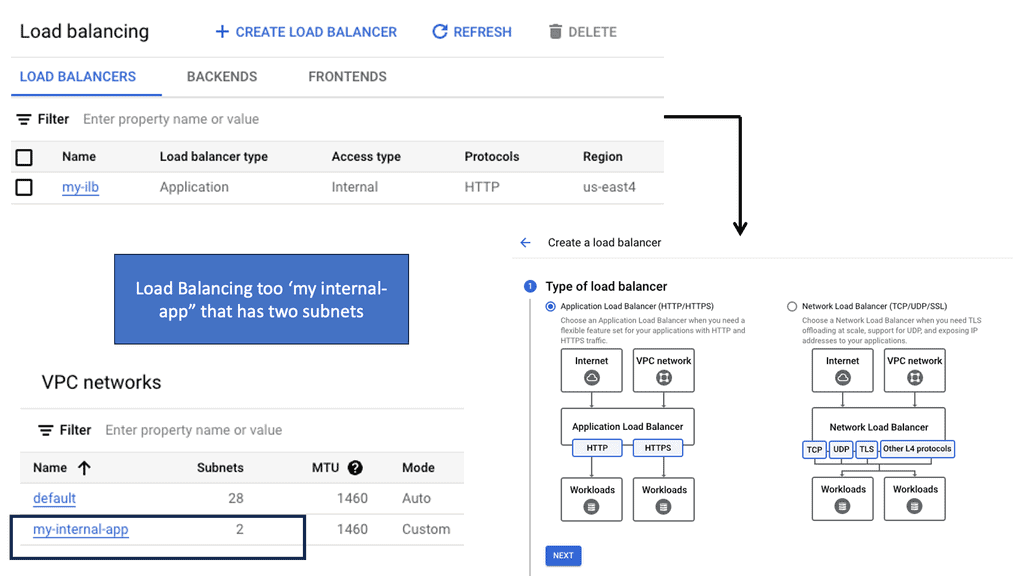
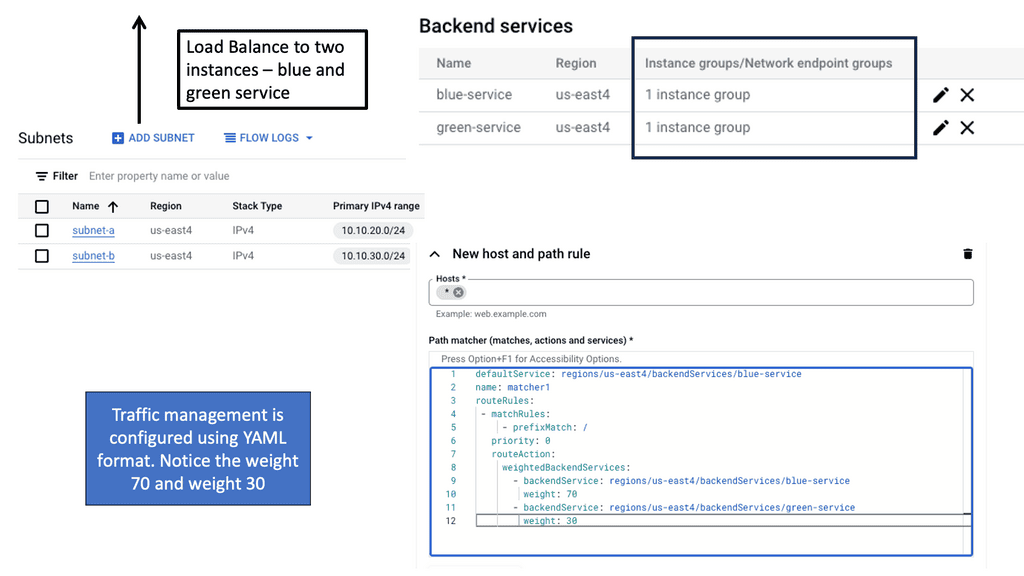
Example Data Center Peering: VPC Peering

**The Importance of Efficient Routing**

Efficient routing to a data center is essential for maintaining the speed and reliability of network services. As businesses increasingly rely on cloud-based applications and services, the demand for seamless connectivity continues to grow. Poor routing can lead to latency issues, bottlenecks, and even outages, which can be detrimental to business operations. By optimizing routing paths, organizations can improve performance and ensure a smooth flow of data.
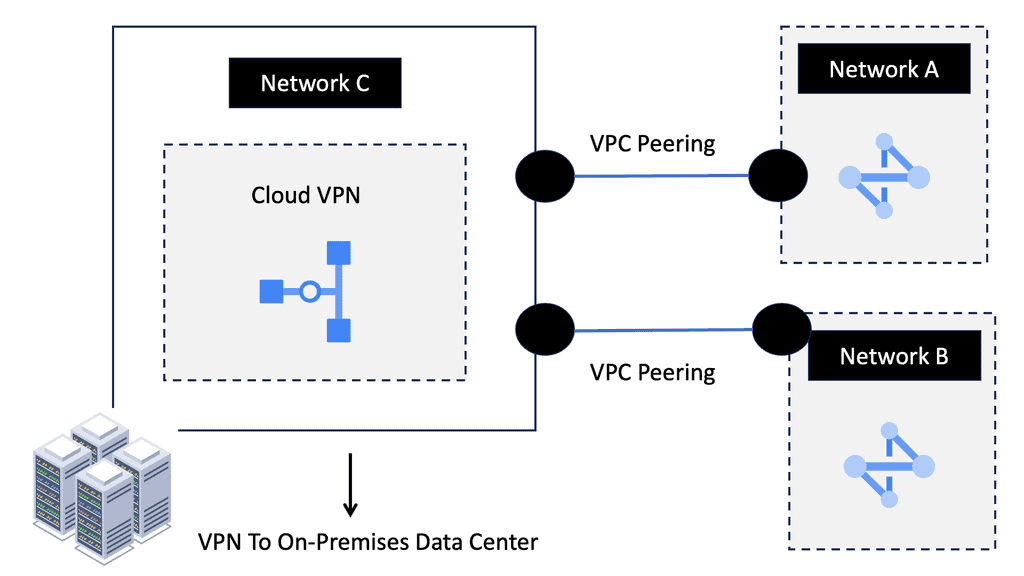
**VPC Peering: A Key Component**

Virtual Private Cloud (VPC) peering is a vital aspect of data center routing. It allows the interconnection of two VPCs, enabling them to communicate as if they were on the same network. This setup enhances the flexibility and scalability of network architectures, making it easier for businesses to manage workloads across multiple environments. VPC peering eliminates the need for complex gateways, reducing latency and potential points of failure.
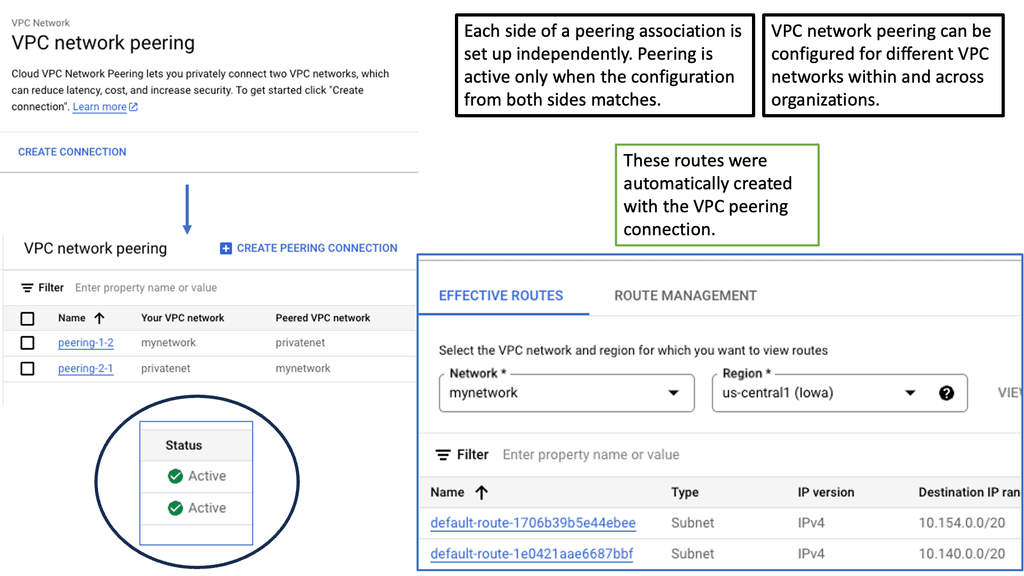
Before you proceed, you may find the following post helpful:

  1. DNS Security Solutions
  2. BGP FlowSpec
  3. DNS Reflection Attack
  4. DNS Security Designs
  5. Data Center Topologies
  6. WAN Virtualization

Data Center Site Selection

Data Center Interconnect (DCI)

Before we get started on your journey with a data center site selection checklist, it may be helpful to know how data centers interconnect. Data Center Interconnect (DCI) solutions have been known for quite some time; they are mainly used to help geographically separated data centers.

Layer 2 extensions might be required at different layers in the data center to enable the resiliency and clustering mechanisms offered by the other applications. For example, Cisco’s OTV can be used as a DCI solution.

OTV provides Layer 2 extension between remote data centers using MAC address routing. A control plane protocol exchanges MAC address reachability information between network devices, providing the LAN extension functionality. This has a tremendous advantage over traditional data center interconnect solutions, which generally depend on data plane learning and flooding across the transport to learn reachability information.

Data Center Site Selection Criteria

  • Proximity-based site selection

Different data center site selection criteria can route users to the most optimum data centers. For example, proximity-based site selection involves selecting a geographically closer data center, which generally improves response time. Additionally, you can route requests based on the data center’s load or application availability.

Things become interesting when workloads want to move across geographically dispersed data centers while maintaining active connections to front-end users and backed systems. All these elements put increasing pressure on the data center interconnect ( DCI ) and the technology used to support workload mobility.

  • Multi-site load distribution & site-to-site recovery

Data center site selection can be used for site-to-site recovery and multi-site load distribution. Multi-site load distribution requires a mechanism that enables the same application to be accessed by both data centers, i.e., an active/active setup.

For site-to-site load balancing, you must use an active/active scenario ( also known as hot standby ) in which both data centers host the same active application. Logically active / standby means that some applications will be active on one site while others will be on standby at the other sites.
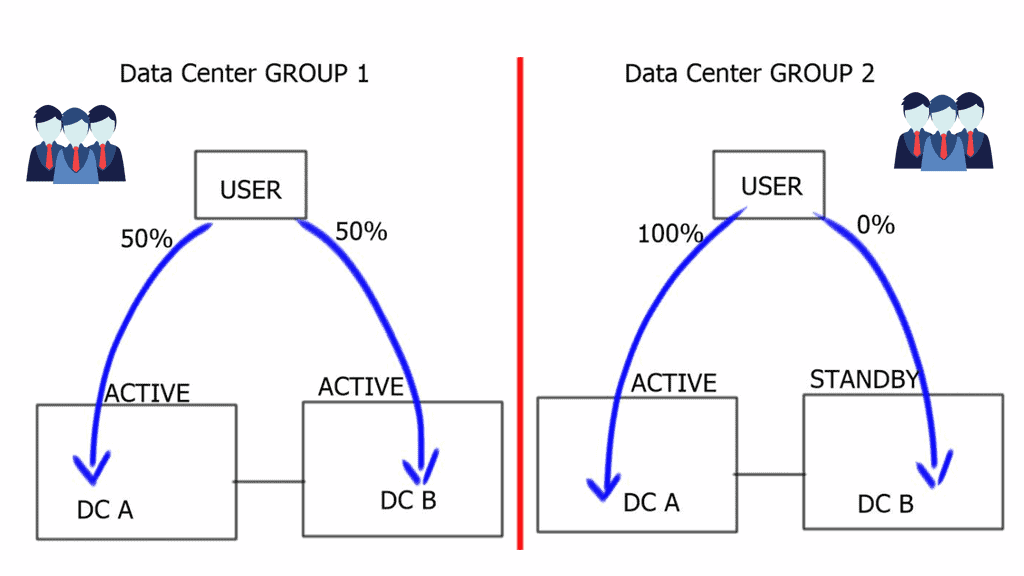
data center site selection checklist
Data Center Site Selection. Dual Data Centers.

Data center site selection is vital, and determining which data center to target your request can be based on several factors, such as proximity and load. Different applications will prefer different site selection mechanisms. For example, video streaming will choose the closest data center ( proximity selection ). Other types of applications would prefer data centers that are least loaded, and others work efficiently with the standard round-robin metric. The three traditional methods for data center site selection criteria are Ingress site selection DNS-based, HTTP redirection, and Route Health Injection.

Data Center Site Selection Checklist

Hypertext Transfer Protocol ( HTTP ) redirection

Applications can have built-in HTTP redirection in their browsers. This enables them to communicate with a secondary server if the primary server is not available. When redirection is required, the server will send an HTTP Redirect ( 307 ) to the client and send the client to the correct site with the required content. One advantage of this mechanism is that you have visibility into the requested content, but as you have probably already guessed, it only works with HTTP traffic.
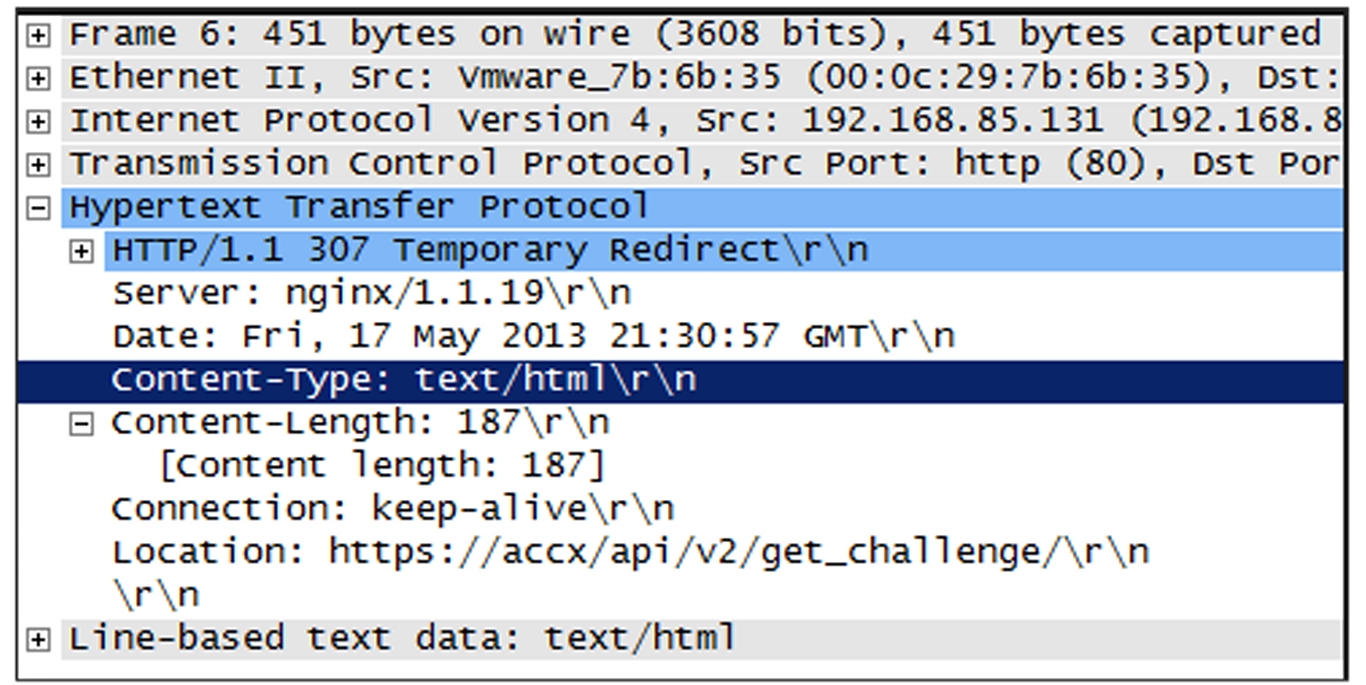
HTTP Redirect
Diagram: HTTP redirect.

DNS-based request routing

DNS-based request routing, or DNS load balancing, distributes incoming network traffic across multiple servers or locations based on the DNS responses. Traditionally, DNS has been primarily used to translate human-readable domain names into IP addresses. However, DNS-based request routing can now be vital in optimizing network traffic flow.

**How does it work?**

When a user initiates a request to access a website or application, their device sends a DNS query to a DNS resolver. Instead of providing a single IP address in response, the DNS resolver returns a list of IP addresses associated with the requested domain. Each IP address corresponds to a different server or location that can handle the request.

The control point for geographic load distribution in DNS-based request routing resides within DNS. DNS-based request routing uses DNS for both site-to-site recovery and multi-site load distribution. A DNS request, either recursive or iterative, is accepted by the client and directed to a data center based on configurable parameters. This provides the ability to distribute the load among multiple data centers with an active/active design based on criteria such as least loaded, proximity, round-robin, and round-trip time ( RTT ).

The support for legacy applications

DNS-based request routing becomes challenging if you have to support legacy applications without DNS name resolution. These applications have hard-coded IP addresses used to communicate with other servers. When there is a combination of legacy and non-legacy applications, the solution might be to use DNS-based request routing and IGP/BGP.

Another caveat for this approach is that the refresh rate for the DNS cache may impact the convergence time. Once a VM moves to the secondary site, there will also be increased traffic flow on the data center interconnect link—previously established connections are hairpinned.

Route Health Injection ( RHI )

Route Health Injection (RHI) is a method for improving network resilience by dynamically injecting alternative routes. It involves monitoring network devices and routing protocols to identify potential failures or performance degradation. By preemptively injecting alternative routes, RHI enables networks to reroute traffic and maintain optimal connectivity quickly.

How does Route Health Injection work?

Route Health Injection operates by continuously monitoring the health of network devices and analyzing routing protocol information. It leverages various metrics such as latency, packet loss, and link utilization to assess the overall health of network paths. When a potential issue is detected, RHI dynamically injects alternative routes to bypass the affected network segment, allowing traffic to flow seamlessly.

RHI is implemented in front of the application and, depending on its implementation, allows the same address or a different address to be advertised. It’s a route injected by a local load balancer that influences the ingress traffic path. RHI injects a static route when the VIP ( Virtual IP address ) becomes available and withdraws the static route when the VIP is no longer active. The VIP is used to represent an application.

A key point: Data center active-active scenario

Route Health Injection can be used for an active/active scenario as both data centers can use the same VIP to represent the server cluster for each application. RHI can create a lot of churns as routes are constantly being added and removed. If the number of supported applications grows, the network’s number of network host routes grows linearly. The decision to use RHI should come down to the scale and size of the data center’s application footprint.

RHI is commonly used on Intranets as the propagation of more specifics is not permitted on the Default Free Zone ( DFZ ). Specific requirements require RHI to be used with BGP/IGP for external-facing clients. Due to the drawbacks of DNS caching, RHI is often preferred over DNS solutions for Internet-facing applications.

A quick point: Ansible Automation

Ansible could be a good automation tool for bringing automation into the data center. Ansible can come from Ansible CLI, with Ansible Core, or a platform approach with Ansible Tower. Can these automation tools assist in our data center operations? Ansible variables can be used to remove site-specific information to make your playbooks more flexible.

For data center configuration or simply checking routing tables, you can have a single playbook that uses Ansible variables to perform operations on both data centers. I use this to check the routing tables of each data center. Once playbook using Ansible variables against one inventory for all my data centers. This can quickly help you when troubleshooting data center site selection.

BGP AS prepending

This can be used for active / standby site selection, not a multi-load distribution method. BGP uses the best path algorithm to determine the best Path to a specific destination. One of those steps that all router manufacturers widely use is AS Path—the lower the number of ASs in the path list, the better the route.

Specific routes are advertised from both data centers, with additional AS Paths added to the secondary site’s routes. When BGP goes through its site selection processes, it will choose the Path with the least AS Paths, i.e., the primary site without AS Prepending.

BGP conditional advertisements

BGP Conditional Advertisements are helpful when you are concerned that some manufacturers may have AS Path explicitly removed. A condition must be met with conditional route advertisement before an advertisement occurs. The routers on the secondary site monitor a set of prefixes located on the first site, and when those prefixes are not reachable at the first site, the secondary sites begin to advertise.

Its configuration is based on community”no-export” and iBGP between the sites. If routes were redistributed between BGP > IGP and advertised to the IBGP peer, the secondary site would advertise those routes, defeating the purpose of a conditional advertisement.
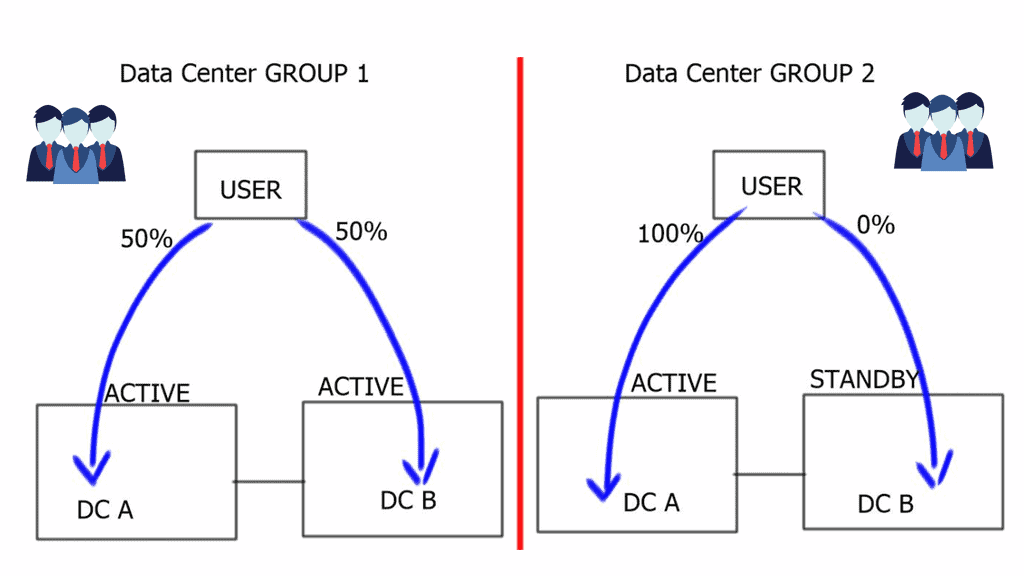
data center site selection checklist
How do users get routed to a data center?

The RHI method used internally or externally with BGP is proper when using IP as the site selection method. For example, this may be the case when you have hard-coded IP addresses in the application used primarily with legacy applications or are concerned about DNS caching issues. Site selection based on RHI and BGP requires no changes to DNS.

However, its main drawback is that it cannot be used for active/active data centers and is primarily positioned as an active / standby method. This is because there is only ever one routing table entry in the routing table.

Additionally, for the final data center site selection checklist. There are designs where you can use IP Anycast in conjunction with BGP, IGP, and RHI to achieve an active/active scenario, and I will discuss this later. With this setup, there is no need for BGP conditional route advertisement or AS Path prepending.

Closing Points: Data Center Selection

Strategic routing is essential for optimizing network performance and ensuring that data reaches its destination quickly and efficiently. With the ever-increasing demand for faster internet speeds and lower latency, data centers need to be strategically located and correctly interconnected. Routing decisions are based on various factors, including geographical proximity, load balancing, and redundancy. By intelligently directing traffic, companies can ensure optimal performance and user satisfaction.

One of the primary considerations in data center routing is load balancing. This technique involves distributing incoming network traffic across multiple servers or data centers to ensure no single server becomes overwhelmed. Load balancing not only enhances the speed and efficiency of data processing but also provides redundancy, ensuring that if one server goes down, others can take over. This seamless transfer of data minimizes downtime and maintains the continuity of services.

Redundancy is a critical factor in ensuring the reliability of data center operations. By having multiple routes to reach a data center, companies can avoid potential disruptions caused by network failures. Redundant pathways ensure that even if one connection is lost, data can still be rerouted through an alternative path. This built-in resilience is vital for maintaining the stability and reliability of data services that businesses and consumers depend on.

Technological advancements have revolutionized data center routing. Techniques such as Anycast routing allow the same IP address to be used by multiple data centers, directing the data to the nearest or most optimal location. Additionally, software-defined networking (SDN) provides dynamic management of routing policies, enabling rapid responses to changing network conditions. These innovations enhance the flexibility and efficiency of data routing, ensuring that the data highway remains smooth and fast.
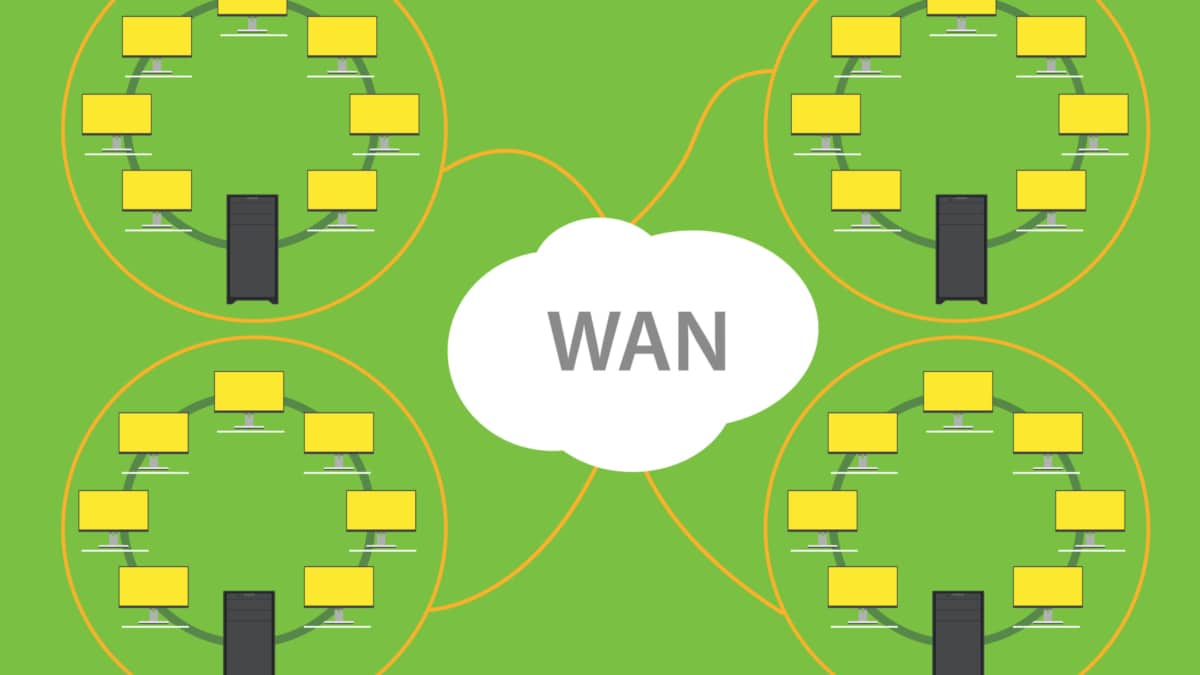
WAN Design Requirements

Spine Leaf Architecture

Network Architecture · Data Center Fabrics

Spine–Leaf Architecture: Designing Scalable Data Center Fabrics

Modern data centers must move increasing volumes of traffic between distributed applications, virtual machines, containers and storage systems. Traditional hierarchical networks can struggle to deliver the bandwidth, predictable latency and flexibility these workloads demand. Spine–leaf architecture addresses these challenges through a scalable, multi-path network fabric.

Also known as a folded-Clos architecture, a conventional two-tier spine–leaf fabric consists of leaf switches that connect servers and other endpoints, and spine switches that interconnect the leaf layer. Each leaf connects to every spine, creating multiple equal-cost paths between endpoints attached to different leaves. Routing protocols and Equal-Cost Multipath (ECMP) forwarding allow eligible traffic flows to use these alternative paths.

This design is particularly suited to east–west traffic: communication between application servers, distributed services, virtualised workloads and storage systems inside the data center. Rather than forcing traffic through multiple hierarchical aggregation layers, the fabric provides a consistent path structure that can improve capacity planning, simplify expansion and make network behaviour easier to reason about.

The engineering principles behind the fabric
Predictable paths Inter-leaf traffic normally traverses one spine, providing a consistent hop count across the fabric.
Multipath forwarding ECMP distributes eligible flows across available equal-cost routes instead of relying on a single uplink.
Scale-out capacity Add leaf switches for endpoint capacity or additional spines when the design and port budgets permit.
Failure resilience Redundant paths can preserve connectivity after failures, subject to topology, routing and remaining capacity.

However, a spine–leaf diagram alone does not guarantee a non-blocking network. Switch forwarding capacity, link speeds, oversubscription, ECMP hashing, routing convergence and application traffic patterns all influence actual performance. Resilient designs must account for both normal operating conditions and the capacity remaining after a component fails.

What this guide explores

Move from topology fundamentals to real engineering decisions: compare traditional and spine–leaf designs, calculate oversubscription, trace ECMP paths, investigate failures, examine routed underlays and VXLAN/EVPN overlays, and understand how telemetry helps engineers diagnose and optimise a data center fabric.

Interactive Reading Guide
7 SECTIONS · ONE FABRIC

Explore the Spine–Leaf Architecture Guide

Move from the fundamentals of fabric design to capacity planning, resilience, overlays and real-world operations. Select any section to jump directly to its explanation.

FUNDAMENTALS → IMPLEMENTATION
Section 01 · Architecture Fundamentals

Traditional Three-Tier vs. Spine–Leaf Architecture

Data center architecture determines how traffic moves between servers, how bandwidth is distributed, and how the network responds as workloads grow. Understanding the difference between traditional hierarchical designs and spine–leaf fabrics is the starting point for making informed capacity, resilience and routing decisions.

The traditional three-tier model

Traditional data centers commonly use three logical network layers: access, aggregation and core. Access switches connect servers and endpoints. Aggregation switches collect access-layer traffic and may provide Layer 3 routing, policy enforcement and connectivity between network segments. Core switches provide high-speed transport between aggregation blocks and other network domains.

This hierarchy can work well for traffic patterns that move predominantly between access networks and external destinations. However, the aggregation and core layers can become capacity constraints when large numbers of distributed applications exchange traffic internally. Scaling may require additional uplinks, larger chassis or redesigns of existing aggregation blocks.

Traditional design

Three-tier hierarchy

Core
↓ ↑
Aggregation / Distribution
↓ ↑
Access switches
↓ ↑
Servers and endpoints

Multiple hierarchical layers can introduce additional hops and concentrate traffic on aggregation uplinks.

Modern fabric

Two-tier spine–leaf

Spine switches
↕ Multiple routed paths
Leaf switches
↕
Servers and endpoints

Each leaf connects to every spine, providing equal-cost paths between different leaves in a conventional full fabric.

Why the design approach changed

Virtualisation, cloud platforms, distributed databases and containerised applications have increased the importance of east–west traffic—communication between workloads inside the data center. An application request may trigger multiple exchanges between services, storage systems and compute nodes before a response is returned.

Spine–leaf architecture addresses this pattern through a regular, repeatable topology. Endpoints connect to leaf switches, and each leaf connects to every spine. Traffic between endpoints attached to different leaves normally travels from the source leaf to a spine and then to the destination leaf. In a conventional two-tier fabric, this provides a predictable inter-leaf hop count.

Multiple routed paths allow Equal-Cost Multipath (ECMP) to forward eligible flows across available links. This can improve aggregate bandwidth utilisation and provide alternative paths when links or spine devices fail. The actual result depends on link capacity, routing convergence, traffic distribution and the fabric's remaining resources.

Key architectural differences

Design consideration Traditional three-tier Spine–leaf fabric
Topology Hierarchical access, aggregation and core Leaf and spine switching tiers
Inter-leaf path May traverse aggregation and core layers Normally one spine between different leaves
Multipath forwarding Depends on the design and supported protocols Commonly uses ECMP over routed links
Scaling May require uplink or hierarchical redesign Add leaves or spines within design limits
Capacity planning Focuses on hierarchical uplinks and aggregation Focuses on leaf uplinks, spine capacity and oversubscription
Failure behaviour Depends on redundancy and available alternate paths Remaining ECMP paths can maintain connectivity if reachable

What engineers must still consider

Spine–leaf is not automatically non-blocking, congestion-free or fault-tolerant in every deployment. The architect must calculate uplink capacity, understand oversubscription, verify the forwarding capabilities of the switches and test the consequences of losing a spine or a leaf uplink. Redundant server connections also require an appropriate design, such as supported LACP or multichassis link aggregation where needed.

Engineering takeaway

The key difference is not simply two tiers instead of three. Spine–leaf creates a regular multipath fabric that makes inter-leaf connectivity and scale-out capacity more predictable. Good engineering still depends on the routing design, available bandwidth, failure strategy and workload requirements.

Interactive Architecture Explorer · 01

Compare the Network Architectures

Switch architectures, select network devices to inspect their roles, and animate an illustrative server-to-server path. This simplified diagram explains the design concepts rather than representing a vendor-specific production configuration.

Network devices Connections Servers
Selected device / concept
Leaf switches

Leaf switches connect servers and provide uplinks into the spine layer.

Architecture insight
2 tiers
A common spine–leaf fabric has leaf and spine layers. Actual topology and capacity depend on the design.

Traffic animation is illustrative. Actual forwarding paths depend on routing, ECMP hashing, link state, topology and the configured network.

Section 02 · Fabric and Routing

Spine–Leaf Fabric Architecture: Routing, ECMP and Traffic Flow

The defining feature of a spine–leaf network is its regular connectivity pattern. Every leaf switch connects to every spine switch, while servers and other endpoints attach to the leaf layer. This creates a predictable physical fabric in which routing and multipath forwarding determine how traffic reaches its destination.

Understanding the role of each layer

Leaf switches provide endpoint connectivity. They commonly connect to physical servers, virtualisation hosts, storage systems, firewalls and external network services. Depending on the design, leaf switches may also host Layer 3 gateway functions and VXLAN tunnel endpoints (VTEPs).

Spine switches provide the transit fabric between leaves. In a routed Layer 3 design, each leaf-to-spine connection is normally a point-to-point routed link. Spine switches forward traffic between the relevant leaf-facing interfaces without requiring the spine tier to act as a shared Layer 2 segment.

Tier 01

Leaf layer

Connects endpoints, advertises reachable routes and forwards traffic towards the destination leaf or an upstream service.

Tier 02

Spine layer

Interconnects the leaf switches and provides multiple transit paths across the fabric.

Routing

Underlay control plane

Protocols such as eBGP or OSPF establish Layer 3 reachability. The protocol and route design depend on the chosen fabric.

How a packet crosses the fabric

Consider Server A connected to Leaf 1 and Server B connected to Leaf 2. When Server A sends traffic to Server B, Leaf 1 performs its forwarding lookup and selects an appropriate next hop. In a conventional routed fabric, the packet travels across one of the available leaf-to-spine links. The selected spine then forwards it across its connection to Leaf 2, which delivers the packet to Server B.

Illustrative inter-leaf forwarding path
Server A
→
Leaf 1
→
Spine
→
Leaf 2
→
Server B
The diagram illustrates the forwarding sequence, not a complete physical topology. A full fabric normally has multiple spines and a connection from each leaf to every spine.

Endpoints attached to the same leaf may communicate directly through that switch when the destination is locally reachable. Traffic between different leaves normally traverses a spine. This regular structure provides a consistent inter-leaf hop count, although the actual latency still depends on link speeds, congestion, forwarding performance and workload behaviour.

Equal-Cost Multipath (ECMP)

ECMP allows a router to install multiple next hops for a destination when the routing protocol identifies paths with equal routing cost. In a spine–leaf fabric, a leaf can commonly reach a destination prefix through multiple spine switches. Traffic can therefore use several available paths instead of depending on a single uplink.

Many implementations use a hash based on packet or flow fields to select a next hop. This typically keeps packets from a flow on the same path, helping preserve packet ordering. Consequently, ECMP does not guarantee that every link receives exactly the same amount of traffic: hash distribution, flow sizes and traffic patterns can create uneven utilisation.

Engineering factor What it means
Equal routing cost Multiple next hops are eligible for forwarding to a destination according to the routing implementation.
Flow hashing Traffic is mapped to paths using selected header fields; one large flow may dominate an individual link.
Available path count The number of usable paths depends on topology, routing policy, installed routes and hardware limits.
Failure convergence Following a failure, routes and forwarding state must update before traffic can reliably use alternate paths.

Underlay and overlay: two different responsibilities

The underlay provides IP reachability across the physical fabric. In a VXLAN/EVPN design, leaf switches commonly advertise VTEP loopback reachability through the underlay. The overlay carries tenant or workload traffic using VXLAN encapsulation between VTEPs, while EVPN can distribute endpoint and reachability information.

Keeping these functions distinct helps engineers troubleshoot connectivity. A workload communication problem may arise from underlay routing, overlay control-plane information, endpoint learning, policy enforcement or the physical links themselves. Verifying each layer separately narrows the fault domain.

Engineering takeaway

Spine–leaf provides a repeatable physical topology; routing establishes reachability, and ECMP enables multipath forwarding. Predictable performance still requires careful capacity planning, balanced traffic distribution and validation of failure behaviour.

Interactive Fabric Lab · 02

Trace a Route Through the Spine–Leaf Fabric

Follow traffic from Server A to Server B. Compare two illustrative equal-cost paths, inspect the role of each device, and step through forwarding. The example assumes a routed underlay with ECMP-capable paths between the leaf switches.

Path A Path B Other links
Step 1 of 4 · Traffic enters Leaf 1
Forwarding stage
Leaf 1 receives traffic

Leaf 1 receives the packet from Server A and performs a forwarding lookup. The route and next-hop information determine how it proceeds.

Fabric principle
ECMP
Equal-cost multipath can provide more than one eligible next hop to the destination.

Important: ECMP makes eligible equal-cost next hops available; it does not guarantee that every flow or link carries exactly the same amount of traffic. The forwarding choice depends on the routing table, hashing algorithm, flow characteristics and current topology.

Section 03 · Capacity Engineering

Spine–Leaf Capacity Planning: Bandwidth, Oversubscription and Growth

A spine–leaf fabric can provide predictable paths and substantial aggregate bandwidth, but its real capacity depends on link speeds, the number of uplinks, traffic distribution and the amount of bandwidth required during failures. Capacity planning must account for both normal operation and degraded conditions.

What oversubscription actually means

Oversubscription compares the bandwidth offered by a group of downstream interfaces with the bandwidth available through its upstream links. It is a useful design indicator, not a prediction that every link will be congested. Actual utilisation depends on workload demand, traffic locality, flow sizes and how traffic is distributed across available paths.

Core design formula
Oversubscription ratio = Downstream bandwidth ÷ Upstream bandwidth
Calculate both sides using comparable bandwidth units and clearly define which interfaces and traffic direction are included.
1:1

Nominally non-oversubscribed

The defined downstream capacity equals the available upstream capacity. This does not guarantee zero contention in every traffic pattern or at every point in the network.

3:1

Oversubscribed fabric

The defined downstream capacity is three times the upstream capacity. The design relies on demand not requiring every downstream interface to transmit at full rate simultaneously.

Workload-led

Capacity matched to demand

The target ratio should reflect measured traffic, service objectives, growth expectations and the cost of additional links.

Worked example: calculating leaf uplink capacity

Consider a leaf switch with 48 server-facing ports operating at 25 Gbps and four uplinks to the spine layer, each operating at 100 Gbps. This simplified example assumes all stated ports can transmit at their nominal line rate and compares aggregate downstream port capacity with aggregate uplink capacity.

Example fabric capacity calculation
Server-facing capacity
48 × 25 Gbps = 1,200 Gbps
Aggregate spine uplinks
4 × 100 Gbps = 400 Gbps
Nominal oversubscription ratio
1,200 ÷ 400 = 3:1
Illustrative uplink capacity per leaf
400 Gbps

The resulting 3:1 ratio means the aggregate server-facing port capacity is three times the aggregate uplink capacity. It does not mean the leaf will always experience congestion. If most traffic remains local to the leaf, less bandwidth may need to cross the fabric. If many servers simultaneously send large flows to endpoints on other leaves, uplinks can become a bottleneck.

This example also excludes protocol overhead, port breakout constraints, oversubscription elsewhere in the network and implementation-specific forwarding limits. Production designs should use the actual hardware configuration and expected traffic patterns rather than relying on this ratio alone.

Plan for failures, not just normal operation

Aggregate capacity changes when a link or spine fails. If a leaf has four 100 Gbps uplinks, losing one leaves three uplinks, or 300 Gbps of nominal uplink bandwidth, assuming the remaining links and paths are operational and usable. The example's downstream-to-uplink ratio therefore rises from 3:1 to 4:1.

The actual impact depends on the failure location, routing convergence, ECMP next-hop changes and the distribution of traffic across the surviving links. A resilient design must consider whether the remaining fabric can support critical workloads while operating in this reduced-capacity state.

Design scenario Capacity question What to validate
Normal operation Can the fabric support expected peak demand? Utilisation, flow distribution, latency and congestion.
Single uplink failure Can remaining leaf uplinks carry priority traffic? Surviving bandwidth, routing convergence and ECMP rebalancing.
Spine failure Can the remaining spines handle redistributed traffic? Remaining path capacity, failure-domain impact and link utilisation.
Growth phase Will new endpoints exceed the planned fabric capacity? Port availability, uplink capacity, spine capacity and expansion limits.

Capacity planning is an ongoing engineering task

Design decisions should be revisited using interface counters, telemetry, flow records and application performance measurements. Monitor sustained utilisation as well as short-lived bursts, packet drops, queue behaviour and latency. A fabric can show moderate average utilisation while still experiencing congestion during brief high-demand periods.

Growth planning should also include the physical limits of the chosen platform: available ports, supported speeds, optics, cabling, power, cooling and the number of endpoints that can be added without redesigning the fabric.

Engineering takeaway

Calculate oversubscription explicitly, validate the ratio against real workload behaviour, and repeat the capacity calculation after relevant failures. A well-designed spine–leaf fabric is not simply one with many links; it is one whose available bandwidth meets service requirements under both normal and degraded conditions.

Interactive Capacity Planner · 03

Calculate Leaf Oversubscription

Change the number and speed of server-facing ports and the uplinks connecting a leaf to the spine layer. See the nominal bandwidth ratio, then simulate the loss of one uplink to understand how redundancy affects available capacity.

1. Configure the leaf switch

Start with a typical example, then adjust the values to explore different port-density and uplink designs.

48 ports
8 ports64 ports
25 Gb/s
10 Gb/s100 Gb/s
2. Configure the fabric uplinks

Uplink capacity is the sum of the configured uplink line rates. These controls assume all configured links are available before failure.

4 links
1 link8 links
100 Gb/s
25 Gb/s400 Gb/s
Worked example

48 × 25 Gb/s server ports provide 1,200 Gb/s of nominal server-facing line rate. Four × 100 Gb/s uplinks provide 400 Gb/s of nominal uplink line rate, giving a 3:1 ratio.

3. Review the capacity results

Values are nominal line-rate calculations per direction, not a prediction of real application throughput.

Server-facing capacity
1,200
Gb/s aggregate
Uplink capacity
400
Gb/s aggregate
Uplink capacity per server port
8.33
Gb/s average capacity share
Uplink links available
Before failure simulation
Downlink-to-uplink ratio
Server-facing line rate ÷ uplink line rate
3:1
Uplink capacity compared with downlink capacity 33.3%
Illustrative 3:1 oversubscription

The aggregate server-facing line rate is three times the nominal uplink line rate. Actual contention depends on the traffic pattern and active demand.

4. Simulate one uplink failure

This calculation removes one uplink's capacity. It assumes the remaining links can continue forwarding; real convergence and link distribution depend on the platform and routing design.

Remaining uplink capacity 300 Gb/s
Remaining uplinks 3 of 4
Ratio after failure 4:1
Uplink capacity reduction 25%

Engineering note: Ethernet is full-duplex, so line rate is normally stated per direction; do not double these values when calculating a one-direction oversubscription ratio. The ratio alone does not establish a safe or unsafe design. Validate expected traffic, burst behaviour, ECMP distribution, failure scenarios, buffer behaviour and application requirements.

Section 04 · Resilience Engineering

Failure Domains, Resilience and High Availability

A resilient spine–leaf fabric is designed to keep essential communication working when links or devices fail. Its regular topology provides multiple potential paths between leaves, but redundancy alone does not guarantee uninterrupted service. Routing convergence, remaining capacity, device dependencies and the location of the failure all influence the outcome.

Understand the main failure domains

A failure domain is the part of a network whose operation may be affected by a particular fault. A single link failure may have a limited impact, while a failed leaf can disconnect the servers attached to it. A spine failure may affect traffic across multiple leaves, even when the fabric has alternative spines available.

Link failure

One path is lost

If other usable paths remain, routing can select alternate next hops. Available bandwidth falls, and traffic may need to redistribute across the surviving links.

Spine failure

Fabric capacity is reduced

Leaves may continue communicating through the remaining spines. The remaining fabric must have sufficient capacity to carry the traffic that is redirected onto it.

Leaf failure

Attached endpoints are at risk

Servers connected only to the failed leaf can lose network connectivity. Dual-homing or redundant attachment may help, but only when the complete design supports it.

How ECMP helps the fabric recover

Equal-Cost Multipath (ECMP) allows a router to install multiple eligible next hops with the same routing cost. Traffic can then be distributed across those paths, commonly using a hash of packet or flow fields. If a next hop becomes unavailable and the routing system detects the change, the forwarding table can be updated to use the remaining eligible paths.

ECMP does not make every flow move instantly or guarantee perfectly even link utilisation. The result depends on the routing protocol, failure detection, convergence behaviour, hash inputs, flow sizes and the forwarding hardware. A small number of large flows can produce uneven utilisation even when several paths are available.

Illustrative failure sequence: one spine becomes unavailable
Normal
Multiple paths are available Leaves have routes through several spines. Eligible traffic is distributed across the installed equal-cost next hops.
Failure
A spine or its path fails Failure detection and routing updates determine when the affected next hop is removed or becomes unusable.
Recompute
Forwarding uses surviving paths The routing and forwarding systems update their usable next hops. Some packets may be lost or delayed during detection and convergence.
Validate
Service continues if the design permits Confirm that critical flows recover and that surviving links and spines can handle the redistributed traffic.

Redundancy must include enough surviving capacity

Consider a leaf with four 100 Gbps uplinks to separate spines. Before a failure, the nominal aggregate uplink capacity is 400 Gbps. If one uplink becomes unavailable, the remaining three links provide 300 Gbps of nominal aggregate capacity, assuming each remaining link is usable at its stated rate.

That reduction matters even if routing converges successfully. If traffic demand exceeds the capacity available after the failure, congestion or packet loss may occur. Capacity planning should therefore evaluate expected demand with a link or spine unavailable, not just the normal operating state.

Failure Potential consequence Design and test focus
Leaf-to-spine link Fewer uplinks and reduced capacity from the affected leaf. Confirm alternate routes, detection time and surviving uplink utilisation.
Entire spine Multiple leaves lose one set of paths through the fabric. Check remaining spine capacity and traffic redistribution across the fabric.
Leaf switch Endpoints attached only to that leaf may become unreachable. Validate server attachment redundancy, gateway placement and application recovery.
Power or shared dependency Several devices or links may fail together. Review power feeds, cabling paths, rack placement and common failure dependencies.

Design for independent failure domains

Two links do not necessarily provide independent protection if they share a physical path, power source or intermediate device. Likewise, connecting a server to two switches does not automatically create active-active resilience. The server NIC configuration, switching design, gateway behaviour and routing or multi-chassis technology must work together.

Depending on the architecture, server redundancy may use routed connectivity, Layer 2 link aggregation, a multi-chassis link aggregation mechanism or another supported host-attachment design. Choose the method according to platform capabilities and the required failure behaviour rather than assuming that one method fits every fabric.

Test recovery instead of assuming it

A practical resilience test should deliberately remove a link or device in a controlled environment, observe routing and forwarding changes, and measure the effect on representative application traffic. Check packet loss, recovery time, latency, route changes and the utilisation of surviving links. Repeat the test for the failures that matter to the service.

Engineering takeaway

A resilient spine–leaf fabric needs alternate paths, working failure detection, correct routing behaviour and sufficient surviving capacity. Validate the whole system—including server attachment and shared physical dependencies—under realistic failure conditions. Redundant topology is the starting point; tested recovery is the outcome that matters.

Interactive Resilience Lab · 04

What Happens When a Fabric Component Fails?

Select a failure scenario to see how a simplified routed spine–leaf fabric is affected. You can also select an individual spine or leaf to inspect its role. Green links represent available connections; red links indicate failed or affected connections.

Available connection Failed / affected Other connection
Available spine paths between Leaf 1 and Leaf 2
2
Illustrative paths through operational spines
Fabric connectivity
Available
For the selected source and destination in this model
Nominal transit capacity
100%
Simplified relative capacity, not measured throughput
Normal operation

Both spine paths are available in this simplified topology. Actual traffic distribution depends on routing state, ECMP hashing and link capacity.

Component inspection
Spine–leaf resilience

Select a device in the diagram to inspect its role. Use the failure controls to explore how losing a component changes the available paths.

This is a conceptual failure model, not a live network simulation. It assumes a two-spine, two-leaf routed fabric with independent links and enough remaining capacity to carry traffic after a single spine or uplink failure. Real outcomes depend on topology, routing convergence, link speeds, platform limits, endpoint attachment and traffic demand. A failed leaf can disconnect endpoints attached only to that leaf.

Section 05 · Fabric Architecture

Underlay, VXLAN/EVPN and Cisco ACI

Spine–leaf describes a physical and logical fabric topology, but it does not prescribe a single way to provide network services. A common design uses a routed Layer 3 underlay to connect the switches and an overlay to provide logical Layer 2 or Layer 3 connectivity across that fabric. Cisco ACI is another approach, combining a spine–leaf fabric with a policy-driven architecture and centralised controller-based management.

Separate transport from network services

The underlay and overlay solve different problems. The underlay provides IP reachability between the relevant fabric endpoints, while an overlay can create logical network segments that are independent of the physical location of a workload. Keeping these roles distinct makes the architecture easier to reason about, operate and troubleshoot.

01

Physical fabric

Leaf and spine switches, server-facing interfaces, fabric links, transceivers, cabling and physical capacity. This layer determines the available ports, speeds and physical paths.

02

Routed underlay

IP addressing, routing adjacencies and routes that provide reachability across the fabric. Common designs use an IGP or BGP, depending on the operational model and requirements.

03

Overlay and segmentation

VXLAN can encapsulate tenant traffic across the IP fabric. EVPN commonly distributes MAC and IP reachability information and supports control-plane functions for VXLAN overlays.

04

Policy and operations

Network policy, tenant segmentation, automation, telemetry and troubleshooting workflows define how the fabric is configured, monitored and managed.

What VXLAN and EVPN contribute

VXLAN provides an encapsulation mechanism that carries an inner Ethernet frame across an IP network. The outer IP packet travels through the underlay, allowing logical Layer 2 segments to span multiple switches without requiring the same physical Layer 2 segment to extend across the entire fabric.

EVPN is a control-plane mechanism commonly used with VXLAN to advertise endpoint reachability and support MAC learning and IP-related information. It can help the fabric make forwarding decisions without relying solely on data-plane flooding and learning. Exact behaviour depends on the EVPN design, device capabilities and configuration.

Illustrative packet journey between two logical segments
1 · Source workload
A server sends traffic into its attached leaf.
2 · Overlay processing
The leaf applies the configured forwarding and encapsulation behaviour.
3 · Underlay forwarding
The outer IP packet is routed across the leaf–spine fabric.
4 · Destination leaf
The destination tunnel endpoint processes the encapsulated traffic.
5 · Destination workload
The decapsulated frame is forwarded according to the destination network and policy.

This is an illustrative forwarding sequence, not a claim that every packet must cross a spine. Traffic between endpoints on the same leaf may be forwarded locally, depending on the network and forwarding configuration. Traffic between different leaves typically traverses the routed fabric.

Why the underlay still matters

An overlay does not remove the need for a reliable underlay. Tunnel endpoints must have the IP reachability required to communicate, and the physical fabric must provide sufficient bandwidth and predictable forwarding. If underlay routes, interfaces or MTU settings are incorrect, overlay services can fail even when their logical configuration appears valid.

Reachability

Routing and next hops

Verify interface addressing, routing adjacencies, route installation and reachability between relevant tunnel endpoints.

Encapsulation

MTU and packet handling

Account for encapsulation overhead and verify that the path supports the required packet sizes without unintended drops.

Forwarding

ECMP and capacity

Check usable next hops, traffic distribution, link utilisation and whether surviving paths can support the workload.

Where Cisco ACI fits

Cisco Application Centric Infrastructure (ACI) uses a spine–leaf fabric with a policy-driven operational model. In a typical ACI deployment, the Application Policy Infrastructure Controller (APIC) provides centralised policy and fabric management. The fabric switches enforce the configured policy and perform the forwarding functions supported by the platform.

ACI is not simply another name for VXLAN/EVPN. It is a broader architecture with its own policy model, management components and control mechanisms. By contrast, a conventional spine–leaf network can be assembled using routed switching and separately selected overlay and automation technologies.

Design area Routed spine–leaf with VXLAN/EVPN Cisco ACI
Architecture A routed fabric with an overlay and control-plane choices selected for the deployment. An integrated fabric architecture with a policy-driven model.
Configuration model Commonly uses switch configuration, automation and selected management or controller tools. Uses ACI constructs and APIC-based policy and fabric management.
Segmentation Implemented through the selected overlay, routing and policy design. Implemented through ACI policy constructs and supported fabric features.
Operational considerations Requires a consistent design and operational model across the selected protocols and tools. Requires understanding of ACI policy, fabric operation, controller health and platform-specific behaviour.

Neither approach is universally better. Selection depends on operational skills, policy requirements, interoperability, automation, platform constraints, lifecycle costs and the organisation's preferred way of managing change.

Engineering takeaway

Keep the roles clear: the physical fabric provides connectivity, the routed underlay provides IP reachability, and an overlay such as VXLAN/EVPN can provide logical network services. Cisco ACI packages fabric operation and policy into a broader architecture. Whichever model you choose, validate routing, encapsulation, MTU, segmentation and failure behaviour as one end-to-end system.

Interactive Overlay Lab · 05

Trace a Packet Through Underlay and Overlay

A modern data-centre fabric can separate IP transport from tenant connectivity. Explore the routed underlay, the VXLAN data plane and the EVPN control plane, then step through an illustrative packet journey between endpoints connected to different leaf switches.

TENANT ENDPOINTS ROUTED SPINE FABRIC Leaf 1 · VTEP VTEP 192.0.2.11 Leaf 2 · VTEP VTEP 192.0.2.12 Spine 1 IP transit Spine 2 IP transit Endpoint A 10.10.1.10 Endpoint B 10.10.1.20 TENANT SEGMENT · VNI 10010 Illustrative VXLAN overlay EVPN CONTROL PLANE Advertises endpoint reachability
Routed underlay VXLAN overlay EVPN control plane
Transport
Routed underlay

Provides IP reachability between VTEP addresses across the leaf–spine fabric. Routing and ECMP select available transport paths.

Data plane
VXLAN overlay

Encapsulates an inner Ethernet frame in an outer IP/UDP/VXLAN packet, carrying a VNI to identify the overlay segment.

Reachability
EVPN control plane

Uses BGP EVPN routes to distribute MAC and, where applicable, IP reachability information so VTEPs can learn remote endpoints.

Step 1 of 4 · Packet journey
VXLAN data plane
Encapsulate at the source VTEP

Leaf 1 receives Endpoint A's Ethernet frame, identifies the tenant segment and encapsulates the frame in VXLAN for the destination VTEP on Leaf 2.

Inner source: 10.10.1.10
Inner destination: 10.10.1.20
VNI: 10010
Outer destination: 192.0.2.12

Conceptual example only. The IP addresses and VNI are illustrative. Exact EVPN route types, gateway placement, ARP/ND handling, multicast or ingress-replication behaviour and policy depend on the implementation. Cisco ACI is a distinct policy-driven fabric architecture; it should not be treated as simply another name for a generic VXLAN/EVPN deployment.

Section 06 · Operations and Observability

Telemetry, Analytics and Troubleshooting a Spine–Leaf Fabric

A spine–leaf fabric can have many equal-cost paths, high aggregate bandwidth and redundant links, yet applications can still suffer from packet loss, latency or intermittent connectivity. Effective operations combine physical interface health, routing state, forwarding behaviour and application-level evidence to locate the actual fault rather than treating every symptom as a switch problem.

Build visibility across the fabric

No single monitoring source explains every network problem. Interface counters can reveal physical errors and congestion; routing information shows which paths are eligible; flow telemetry helps explain where traffic is going; and application measurements show whether the network is meeting service requirements. Correlating these sources provides a more reliable picture than examining isolated counters or alerts.

Physical layer

Interfaces and optics

Monitor link state, CRC errors, discards, interface resets, transceiver alarms and changes in error counters over time.

Control plane

Routing and neighbours

Check routing adjacencies, installed routes, next-hop changes, ECMP membership and evidence of repeated convergence.

Traffic behaviour

Flows and utilisation

Identify heavy flows, asymmetric traffic patterns, sustained utilisation, bursts, queue drops and uneven path loading.

Service layer

Latency and reachability

Correlate network events with application latency, packet loss, connection failures and the timing of user-visible incidents.

Know what each monitoring source can tell you

Source Useful evidence Important limitation
SNMP or interface polling Interface status, byte and packet counters, errors and discards. Polling intervals may miss short bursts; counter changes need context.
Streaming telemetry Frequent structured measurements of supported interface, queue, routing or device state. Available metrics and sampling behaviour vary by platform and configuration.
Flow records Traffic conversations, source and destination patterns, protocol usage and traffic-volume estimates. Sampling and export configuration affect what is visible; flow records do not necessarily explain every packet drop.
Routing and forwarding tables Selected routes, next hops, ECMP paths and forwarding entries. A valid route does not prove that the physical path is healthy or that application traffic is performing well.
Active probes and application monitoring Reachability, round-trip time, loss and application response behaviour. Results depend on probe placement, test traffic and the path taken by the measured flow.

A systematic troubleshooting workflow

Start with the observed symptom and narrow the scope. Determine which endpoints, applications, leaves and paths are affected. Establish when the issue began, compare current state with a known-good baseline, and look for changes that match the incident timeline.

01

Define the impact

Identify affected source and destination endpoints, the application or service, whether the issue is constant or intermittent, and whether it affects one leaf or multiple leaves.

02

Check physical health

Inspect interface state, error counters, discards, optics, cabling and queue statistics along the likely path. Compare counter changes over a consistent time interval.

03

Verify routing and ECMP

Confirm reachability and installed routes. Check whether the expected next hops are present, whether adjacencies are stable and whether a recent failure changed path selection.

04

Examine traffic and congestion

Compare utilisation across relevant uplinks, inspect available queue and drop metrics, and look for large flows or uneven ECMP distribution. High average utilisation is not the only possible cause of congestion.

05

Correlate with application evidence

Compare network events with application latency, retransmissions, connection errors and probe results. Check endpoint, host and service health before concluding that the fabric is responsible.

06

Verify the fix

Repeat the same tests, confirm counters stop increasing abnormally, validate the intended paths and check application performance. Record the cause and the evidence that demonstrated recovery.

Example: diagnosing intermittent application latency

Imagine that an application communicates between servers connected to different leaf switches. Users report occasional delays, but the links remain up and routing adjacencies appear stable. The correct response is to gather evidence across several layers rather than assuming that the fabric has sufficient capacity because no interface is continuously saturated.

Observation Possible interpretation Next check
Interface errors increase A physical link, optic, cable or interface issue may be present. Identify the affected interface and inspect physical diagnostics and error-counter changes.
Queue drops rise during bursts Short periods of congestion may be affecting latency or packet delivery. Correlate queue statistics with traffic bursts and the affected flows.
One uplink is much busier than others ECMP hashing or a small number of large flows may create uneven utilisation. Inspect available flow data, hash behaviour and per-link counters.
Routes change near the incident time A link event or routing instability may have altered the forwarding path. Review logs, adjacency events, route changes and convergence timing.
Fabric indicators appear normal The cause may lie at the host, virtual switch, application or another dependency. Compare endpoint metrics, service logs, packet captures and independent probes.

Build useful baselines and alerts

Alerting is more effective when it combines thresholds with trends and context. A brief utilisation spike may be expected, while a sustained rise in discards or recurring routing changes may deserve immediate investigation. Establish baselines for normal and peak periods, and tune alert thresholds to the platform and service requirements.

Useful operational dashboards bring together topology, interface health, link utilisation, routing state, device events and service performance. Time synchronisation across devices and monitoring systems is essential when correlating an incident. Retain enough historical data to compare the period before, during and after the fault.

Engineering takeaway

Troubleshoot from evidence, not assumptions. Correlate physical health, routing and ECMP state, traffic distribution, congestion indicators and application symptoms. The aim is to identify the fault domain, demonstrate the cause with observable data, and verify that the corrective action restores the required service.

Interactive Troubleshooting Lab · 06

Diagnose a Spine–Leaf Fabric Incident

Choose a symptom, inspect the simulated telemetry and work through the diagnostic sequence. The objective is to identify evidence that supports a hypothesis before changing the network.

Incident summary
Investigation required

Application response times rise during busy periods. Determine whether congestion, physical errors or another fault is supported by evidence.

Simulated telemetry snapshot
Utilisation
92%
Busy uplink
CRC errors
0
No increase observed
Path state
Up
Routes present
Spine 1 IP transit Spine 2 IP transit Leaf 1 Endpoint access Leaf 2 Endpoint access Server A Source Server B Destination
Normal Warning / investigate Suspected fault Verified / recovered
Diagnostic workflow · Select a step
Investigation focus
Establish the scope before changing anything

Identify which applications, source and destination endpoints, paths and time windows are affected. Compare the symptoms with a known-good baseline.

01Record the first observed failure and its duration.
02Check whether the issue affects one flow or many.

Training simulation: all metrics and fault indicators are illustrative, not live device telemetry. High utilisation alone does not prove congestion; correlate it with drops, queue behaviour, latency and the affected traffic. A route being present does not prove the complete data path is healthy.

Section 07 · Design and Implementation

Spine–Leaf Design Decisions and Implementation Checklist

A successful spine–leaf deployment starts with workload requirements, not a switch count or a preferred topology diagram. The design should establish the required connectivity, performance, resilience and operational model before hardware, routing protocols and overlays are selected. Each decision should be validated against the services the fabric must support.

Start with requirements, not assumptions

Document how many endpoints must connect, where workloads communicate, which applications are sensitive to latency, and how much traffic is expected to cross between leaves. Include planned growth, maintenance requirements, failure scenarios and operational constraints. These inputs determine the appropriate topology, link speeds, oversubscription target and expansion strategy.

Connectivity

Endpoint and port needs

Estimate server counts, port speeds, dual-homing requirements, network segments and the number of leaf switches needed.

Performance

Traffic and latency

Understand east–west traffic, peak demand, workload locality, latency targets and expected flow distribution.

Resilience

Failure requirements

Define which failures the fabric must tolerate and what performance is required while operating in a degraded state.

Operations

Management and skills

Plan configuration, automation, monitoring, troubleshooting, maintenance windows and team expertise.

Work through the design in a controlled sequence

01

Choose the physical topology

Determine the number of leaves and spines, required endpoint density, cabling paths and supported link speeds. Check platform port limits and expansion constraints before finalising the topology.

02

Define the routed underlay

Select the addressing plan, routing protocol, link addressing, route policy and failure-detection approach. Keep the design consistent and document how routes should behave during faults.

03

Set capacity and oversubscription targets

Calculate aggregate server-facing bandwidth and uplink capacity. Test expected peak traffic, account for ECMP behaviour, and verify remaining capacity after relevant link or spine failures.

04

Select segmentation and overlay services

Decide whether routed connectivity alone meets requirements or whether VXLAN/EVPN, another overlay or a policy-driven fabric architecture is needed. Document Layer 2 and Layer 3 service boundaries and security controls.

05

Plan endpoint and gateway redundancy

Define server attachment, gateway placement, link aggregation or other supported redundancy mechanisms. Validate the complete design rather than assuming two connections guarantee continuity.

06

Build observability into the deployment

Establish telemetry, interface and queue monitoring, routing event collection, flow visibility, time synchronisation and application-level performance baselines.

07

Validate before production rollout

Test connectivity, expected forwarding paths, policy enforcement, failure recovery, degraded capacity and operational procedures. Record the results and resolve gaps before expanding the deployment.

Implementation readiness checklist

Use the following checklist during design review and pre-production validation. Each item should have supporting evidence, such as a calculation, configuration review, test result or documented decision.

✓
Topology and physical capacity Leaf and spine counts, port density, link speeds, cabling, power and expansion limits have been reviewed.
✓
Routing and reachability Addressing, routing adjacencies, route selection, ECMP membership and intended forwarding behaviour are documented.
✓
Capacity and degraded operation Oversubscription calculations reflect expected workloads, and surviving capacity has been evaluated for relevant failures.
✓
Segmentation and security Network boundaries, routing policy, access controls and overlay behaviour meet the intended service requirements.
✓
Endpoint and gateway resilience Host connectivity, gateway availability and any link-aggregation or multi-chassis mechanisms have been tested for the intended failures.
✓
Monitoring and alerting Interface health, routing changes, traffic distribution, congestion and application symptoms can be correlated during an incident.
✓
Failure and recovery tests Link and device failures have been tested in a controlled environment, including convergence, packet loss and service recovery.
✓
Operational ownership Configuration standards, change control, escalation paths, maintenance procedures and recovery documentation are available.

Common design mistakes to avoid

Assumption Why it can be misleading Better approach
More spines always solve capacity problems Endpoint links, leaf uplinks, hardware limits or traffic distribution may remain the bottleneck. Identify the actual constraint and recalculate end-to-end capacity.
ECMP guarantees equal utilisation Hashing and flow-size differences can create uneven traffic distribution. Inspect per-link counters and available flow telemetry under realistic loads.
Redundancy guarantees uninterrupted service Convergence, shared dependencies, endpoint design and reduced capacity can still interrupt or degrade applications. Define failure requirements and measure recovery through controlled tests.
An overlay removes underlay complexity Tunnel endpoints still depend on routing, MTU, physical connectivity and correct forwarding state. Troubleshoot underlay and overlay as separate but connected layers.
Average utilisation tells the whole story Short bursts, queue congestion, packet drops or a few large flows can affect service even when averages look acceptable. Combine time-series metrics, queue data, flow evidence and application measurements.

Plan for the full lifecycle

The fabric should be designed for more than its initial deployment. Establish how new leaves will be added, how capacity will be reassessed, how software and hardware will be maintained, and how configuration changes will be tested. Define measurable service targets and periodically review whether the fabric still meets them as workload patterns and business requirements change.

A scalable architecture is one that can grow predictably without introducing unmanaged complexity. That requires consistent configuration, clear ownership, repeatable validation and operational evidence—not just a topology that looks symmetrical.

Engineering takeaway

Design from workload requirements, calculate capacity explicitly, separate underlay and overlay responsibilities, and test failure behaviour before production. A robust spine–leaf fabric balances performance, resilience, operational simplicity and the cost of future growth.

Interactive Design Workshop · 07

Build a Spine–Leaf Design Readiness Plan

Configure a sample fabric, review its nominal bandwidth and consider what happens when an uplink fails. Then complete the readiness checklist to assess whether the design has been specified, tested and documented.

1. Configure the fabric
48
25 Gb/s
4
100 Gb/s
2

The drawing shows up to five representative spines. The configured spine count is used in the design inputs, not as proof of available switch capacity.

2. Review the design
Aggregate downlink
1.20 Tb/s
Per leaf, nominal line rate
Aggregate uplink
400 Gb/s
Per leaf, nominal line rate
Oversubscription
3.00:1
Downlink capacity : uplink capacity
After one uplink fails
4.00:1
Remaining uplink line rate: 300 Gb/s
Uplink capacity relative to downlinks 33%
3. Implementation-readiness checklist
0 of 8 complete
Design review result
Design review not yet complete

Use the capacity calculation as an initial check, complete the readiness items and validate the design against workload and failure requirements.

Capacity model assumptions: nominal port line rates are compared in one direction and are not doubled for full duplex. The model does not account for protocol overhead, internal switch fabric limits, traffic locality or real flow distributions. After one uplink fails, one uplink's capacity is removed. The topology is illustrative and does not prove that the selected switches have sufficient ports, bandwidth or forwarding capacity. Validate the physical design and required failure scenarios before deployment.

```
☕
Support Network Insight
Help support independent engineering guides, interactive networking tools, and future learning labs.
Support Network Insight ```
SDN Data Center

SDN Data Center

NETWORK ARCHITECTURE · SOFTWARE-DEFINED NETWORKING

SDN Data Center: Architecture, Fabrics and Programmable Networks

Modern data centers must connect increasingly distributed applications, virtual machines, containers and services while maintaining predictable performance, security and availability. Software-Defined Networking (SDN) introduces a programmable approach to network control, enabling operators to express policies, automate configuration and coordinate network behaviour across a shared infrastructure.

The shift is not simply about replacing the command-line interface with software. It is about changing how network intent is translated into forwarding behaviour, how infrastructure responds to workload changes, and how engineers verify that the network is operating as designed. Understanding this distinction is essential when evaluating SDN architectures and deciding where automation and centralised control provide real operational value.

Traditional data center designs often relied on hierarchical switching, Layer 2 extension and Spanning Tree Protocol (STP) to manage redundant connectivity. As east-west traffic, virtualisation and workload mobility increased, operators adopted routed leaf-spine fabrics, Equal-Cost Multi-Path (ECMP) forwarding and overlay technologies such as VXLAN. SDN can coordinate these mechanisms through policy and automation, but the exact implementation depends on the platform and architecture.

From network infrastructure to programmable fabric

01 · ARCHITECTURE Separate responsibilities Understand the relationship between applications, control systems and the forwarding infrastructure.
02 · FABRIC Build resilient paths Explore leaf-spine connectivity, Layer 3 routing, ECMP and failure-aware forwarding.
03 · OVERLAY Connect virtual networks Examine VXLAN, network segmentation, virtual network identifiers and workload connectivity.
04 · OPERATIONS Verify network intent Use policy, telemetry and fault analysis to compare expected behaviour with observed network state.

The SDN control model

SDN separates the definition and coordination of network behaviour from packet forwarding. A controller or control system can translate application requirements and network policies into device configuration, forwarding rules or other platform-specific actions. The forwarding devices continue to process packets using their programmed state.

Conceptual SDN architecture
Applications Workload needs and services
→
Policy and APIs Intent and desired outcomes
→
Controller Coordination and configuration
→
Fabric Forwarding and enforcement

This is a conceptual model, not a requirement that every SDN deployment use one physical controller or a single centralised control process. Production architectures may distribute controller functions, retain routing protocols on network devices, and combine central policy with local forwarding decisions.

Why data center design matters

A programmable network is only as effective as the fabric underneath it. The physical topology, routing design, link capacity, failure domains and overlay configuration all influence how applications perform. Centralised policy cannot compensate for every physical bottleneck or incorrect forwarding assumption.

For this reason, SDN must be considered alongside data center architecture. A resilient leaf-spine fabric can provide multiple routed paths, while ECMP distributes eligible flows across equal-cost routes. VXLAN can provide virtual Layer 2 segments across a Layer 3 underlay, and policy systems can help coordinate tenant isolation and service connectivity.

Engineering principle

Separate desired network intent from actual forwarding state. A controller may report that a policy has been deployed, but operational verification must still establish reachability, path availability, segmentation, resource utilisation and application connectivity.

What this engineering guide covers

This guide develops the subject from the foundations of SDN through the design and operation of a modern data center fabric. It connects the architectural concepts to the protocols, forwarding mechanisms and operational evidence that engineers use to troubleshoot real networks.

Architecture and control Understand controllers, programmability, policy abstraction and the relationship between control and forwarding.
Fabric and overlays Relate leaf-spine topology, ECMP, VXLAN, routing and virtual network segmentation.
Operations and resilience Investigate convergence, link failures, telemetry, policy consistency and observable forwarding outcomes.

From theory to engineering evidence

Throughout the guide, the emphasis is on understanding cause and effect. When a link fails, which paths remain available? When a virtual workload moves, what must change in the network? When a controller applies a new policy, how can an engineer confirm that the intended result has reached the forwarding infrastructure?

These are operational questions, not just architectural definitions. Answering them requires an understanding of topology, routing, encapsulation, policy and telemetry—and the ability to correlate evidence from different parts of the network.

Engineering Guide · Introduction
Start with the architecture

The first section examines what Software-Defined Networking actually changes, how the application, control and infrastructure responsibilities relate to one another, and why SDN should not be treated as synonymous with OpenFlow or a single controller product.

Engineering Guide · Navigation

Explore the SDN Data Center

Follow the engineering path from programmable network architecture through resilient fabrics and overlays to automation, troubleshooting and operational security. Select a topic to jump directly to its introduction.

Section 01 · Architecture Fundamentals

Understanding SDN Architecture and Programmability

Software-Defined Networking separates network policy and control from packet forwarding through programmable interfaces and coordinated management. Explore the application, control and infrastructure layers, understand how they interact, and examine why SDN is an architectural approach rather than a single protocol or controller product.

Control vs. data plane SDN architecture Programmable interfaces
01 · ARCHITECTURE · CONTROL · PROGRAMMABILITY

SDN Architecture: The Control Plane and Network Programmability

Software-Defined Networking changes how network behaviour is configured, coordinated and managed. Rather than requiring engineers to configure every device independently for each network-wide change, SDN introduces software-based control and policy mechanisms that can coordinate infrastructure through programmable interfaces.

The central architectural idea is the separation of responsibilities between the systems that express network requirements, the control functions that translate those requirements into network behaviour, and the devices that forward packets. This separation can simplify operations and enable automation, but it does not mean that every routing decision moves into one central controller.

To understand an SDN data center, engineers must distinguish the control plane from the data plane, understand how controllers interact with network devices, and establish how a desired policy becomes observable forwarding behaviour.

The three conceptual layers of SDN

LAYER 01 Application layer Expresses application connectivity requirements, network services and higher-level policies.
LAYER 02 Control layer Coordinates network state, policy translation, topology information and infrastructure programming.
LAYER 03 Infrastructure layer Contains switches, routers and other forwarding elements that process traffic.
CROSS-LAYER Feedback and telemetry Reports configuration, device health, reachability and operational state to management and control systems.

These layers provide a useful architectural model rather than a mandatory physical deployment. Some platforms combine functions, distribute controller services across multiple systems, or retain substantial control-plane intelligence on individual switches and routers.

Control plane versus data plane

The control plane determines or coordinates how traffic should be forwarded. Depending on the architecture, it can include routing protocols, topology discovery, path calculation, policy processing and controller logic.

The data plane performs the actual packet-handling work. It examines packet headers, consults forwarding information and applies actions such as forwarding, encapsulation, decapsulation, marking or dropping. High-speed switches commonly execute these operations in specialised hardware.

From intent to packet forwarding
Network intent Desired connectivity and policy
→
Control logic Calculate or coordinate behaviour
→
Forwarding state Routes, rules and tables
→
Packet action Forward, modify or drop

Consider a workload that needs connectivity to an application in another network segment. The management system may express the required communication policy. A controller or orchestration system translates it into platform-specific configuration. Switches and routers then apply the resulting forwarding and enforcement state to real packets.

Each stage introduces a separate verification requirement. A policy can be accepted by the management system but fail during deployment; configuration can be installed while a route is missing; and a valid route can exist while a security rule prevents the application flow.

Engineering distinction

A controller's intended network state, a device's installed configuration and the forwarding behaviour observed by a packet capture are three different forms of evidence. Reliable troubleshooting correlates them instead of assuming that success at one layer proves success at every other layer.

What does an SDN controller actually do?

An SDN controller provides software-based mechanisms for coordinating network behaviour. Its responsibilities depend on the product and architecture, but can include maintaining a topology view, translating policy, calculating paths, managing forwarding rules, programming devices and collecting operational information.

Some controllers directly install forwarding entries in compatible switches. Others configure devices through management APIs, coordinate existing routing protocols, or distribute policy through agents and platform-specific components. An SDN controller should therefore be understood by the functions it performs, not simply by its product name.

Controller responsibilities
Topology and network state Build or maintain a view of devices, links, connectivity and relevant operational information.
Policy translation Convert higher-level requirements into configuration or forwarding instructions supported by the platform.
Infrastructure programming Communicate with network devices through supported protocols, APIs or management interfaces.
Verification and feedback Compare expected outcomes with reported configuration, connectivity and operational telemetry.

Northbound and southbound interfaces

SDN architectures commonly describe interfaces according to the direction in which information or control is exchanged. Northbound interfaces allow applications and orchestration systems to interact with controller services. Southbound interfaces connect control functions to network infrastructure.

Interface Purpose Examples
Northbound Expose network services, intent or operational information to applications and orchestration systems. REST APIs, controller SDKs and policy interfaces.
Southbound Exchange configuration, control information or forwarding instructions with infrastructure. OpenFlow, NETCONF, RESTCONF and platform-specific APIs, depending on the implementation.
Telemetry and feedback Return device state, counters, events and performance information for monitoring and verification. Streaming telemetry, counters, logs and event notifications.

These categories describe interface roles, not a requirement that every protocol be used in every SDN design. NETCONF and RESTCONF, for example, are management protocols rather than equivalents of OpenFlow's flow-programming model. The correct interface depends on the device capabilities and the operation being performed.

SDN and OpenFlow are not the same thing

OpenFlow is a protocol historically associated with SDN that allows a controller to communicate with compatible forwarding devices and manage flow-table behaviour. It helped demonstrate how packet forwarding could be programmed through an external control system.

SDN is the broader architectural approach. A network can use SDN principles without using OpenFlow. Modern data center platforms may combine controller-based policy, routing protocols, management APIs, overlays and distributed forwarding intelligence.

Open Networking Foundation initiatives helped advance the development and standardisation of SDN concepts and OpenFlow. In practice, engineers should evaluate the interfaces, supported features and operational model of the specific implementation rather than assume that every SDN product uses the same protocol stack.

Centralised policy does not mean one central forwarding engine

The term centralised control can be misleading if interpreted too literally. A controller may provide a global policy view while switches continue to forward packets locally. Distributed routing protocols can also operate alongside a controller, exchanging reachability information and maintaining forwarding tables.

This combination is particularly important in data centers. A controller might define tenant segmentation and application connectivity, while the underlay uses BGP or an IGP to establish IP reachability between leaf and spine switches. ECMP can then distribute eligible traffic across available equal-cost paths.

Separating these responsibilities allows policy orchestration and packet forwarding to work together without requiring every packet to pass through the controller.

Automation, consistency and failure handling

Programmability enables engineers to express repeatable network changes in software. Rather than manually configuring every device, an automation workflow can generate and deploy configuration, validate prerequisites and check the resulting state.

Automation does not automatically guarantee correctness. Incorrect intent, incomplete device support, stale topology data, failed deployment or partial updates can produce inconsistent outcomes. A robust implementation needs validation, access controls, change tracking, rollback or recovery procedures, and independent operational verification.

What to verify during an SDN change
Desired state Is the requested connectivity or segmentation policy valid and consistent with the intended design?
Deployment state Did all relevant controllers and devices accept and install the required changes?
Forwarding state Do the installed routes, next hops, forwarding entries and policy rules match the expected outcome?
Observed behaviour Can the required application traffic pass, and do telemetry and tests confirm the result?

Applying the architecture to a data center

Imagine a tenant needs a new application segment that can communicate with a database but must remain isolated from another tenant. The application or orchestration layer defines the connectivity intent. The control system translates it into the supported policy and configuration. The data center fabric provides the actual transport, while security enforcement ensures that only permitted communication is allowed.

The engineering task is to trace this chain end to end. Confirm that the policy exists, that the relevant devices received it, that the underlay can reach the required destinations, and that the overlay and security configuration support the intended traffic.

Section 01 takeaway

SDN provides programmable coordination of network behaviour. The control plane determines or coordinates how the network should operate, while the data plane performs packet forwarding. Successful operation depends on translating intent into valid device state and verifying the resulting traffic behaviour.

Engineering Lab · Section 01
SDN Architecture and Intent Verification

In the interactive lab, inspect a conceptual SDN data center and follow a policy change from application intent through controller processing to infrastructure configuration and packet forwarding. Examine the control and data planes separately, identify the role of northbound and southbound interfaces, and investigate what happens when intended policy and observed network state disagree.

Network Insight / Interactive Engineering Lab 01

SDN Architecture & Programmability

Trace how a programmable network separates decision-making from packet forwarding. Step through a simulated packet-in event, controller decision, flow-rule installation and data-plane forwarding. Then break a link and investigate the recovery.
Ready
Programmable Network Topology
Event 0 / 8
Primary path Alternate path Ethernet Control channel SDN CONTROLLER Policy / topology / rules HOST A 10.1.0.10 SWITCH 1 Ingress / flow match No rule yet SWITCH 2 Forwarding No rule yet SWITCH 3 Alternate route Standby HOST B 10.1.0.20 DATA PLANE Packet forwarding across switch links CONTROL PLANE Controller communicates with switches
Active forwarding path Controller channel Alternate path Failed link
Topology note: the controller makes logical forwarding decisions and programs the switches. User packets normally travel through the data plane; they do not pass through the controller.
Two Logical Planes
Architecture
Control Plane Decides

Maintains network state, applies policy and determines which forwarding behaviour should be installed.

Data Plane Forwards

Matches packets against forwarding entries and performs actions such as output, drop or header modification.

Controller stateInitialising
Installed flow rules0
Forwarding pathNot selected
Link conditionAll links available
Flow Table
Simulated entries
MatchActionState
10.1.0.10 → .20Pending—
Important: this table represents illustrative flow entries in the lab. Real switch rule syntax and controller protocols depend on the SDN platform.
Packet & Controller Event Timeline
Step-by-step trace
01Ingress Host A sends a packet to Host B; Switch 1 receives it.
02Match Switch 1 checks its flow table and finds no matching entry in this scenario.
03Packet-in The switch reports the table miss to the controller using the configured control mechanism.
04Decision The controller evaluates topology and policy, then selects a forwarding path.
05Install The controller sends flow-modification instructions to the relevant switches.
06Forward The packet is forwarded along the installed path toward Host B.
07Failure A link fails; the network must detect the change and determine whether an alternate route is usable.
08Recovery The lab models a controller-directed update to use the alternate path through Switch 3.
Live Engineering Readout
Lab telemetry
Current Event
Ready to begin
Select Step Forward to trace how a controller and programmable switches coordinate packet delivery.
Simulation Progress

Engineer Challenge

Run the packet trace, inject a link failure, and continue the simulation. Can the network deliver traffic without using the failed primary link?

Challenge status: not yet attempted.
Engineering takeaway: separating the control plane from the data plane makes forwarding behaviour programmable, but recovery still depends on detection, topology knowledge and valid forwarding updates.
Section 02 · Fabric Engineering

Leaf–Spine Fabrics, ECMP and Network Resilience

Modern data centers need predictable connectivity, usable redundant paths and reliable recovery from failures. Discover how leaf–spine topologies, routed underlays, BGP and Equal-Cost Multipath work together, and learn why routing convergence, forwarding state and available capacity must all be considered during an incident.

Leaf–spine topology BGP and ECMP Failure recovery
02 · FABRIC · ROUTING · RESILIENCE

SDN Data Center Fabrics: Leaf–Spine, ECMP and Resilient Forwarding

A programmable network needs a dependable transport foundation. In modern data centers, that foundation is often a routed leaf–spine fabric: a predictable topology designed to provide multiple paths, scalable east–west connectivity and fast recovery when links or devices fail.

Software-defined control and the physical fabric solve different problems. SDN provides mechanisms to coordinate policy and network configuration. The fabric provides the paths over which packets travel. Understanding how these parts work together is essential when designing, automating or troubleshooting a data center.

Why data centers moved beyond large Layer 2 domains

Traditional data center designs often relied on extensive Layer 2 connectivity. Spanning Tree Protocol (STP) prevents Layer 2 loops by blocking selected redundant paths. This protects the network from looping Ethernet frames, but some physical links may not forward traffic while the topology is stable.

As east–west traffic between servers, application tiers and storage increased, engineers looked for designs that could use redundant links more effectively. Routed leaf–spine fabrics provide multiple Layer 3 paths and can use Equal-Cost Multipath (ECMP) forwarding where supported and correctly configured.

This does not make STP obsolete. Layer 2 still exists at access edges and within particular designs. The key architectural choice is to limit where Layer 2 must extend and use routed connectivity for the scalable fabric wherever the design permits.

Understanding the leaf–spine topology

Conceptual routed data center fabric
Spine 1 Layer 3 transit
Spine 2 Layer 3 transit
Leaf 1 Compute rack A
Leaf 2 Compute rack B
Leaf 3 Storage / services
Leaf 4 Application tier

Simplified illustration: production fabrics generally connect each leaf to multiple spines. The actual number of devices, link speeds, redundancy and routing design depend on capacity and availability requirements.

Leaf switches connect directly to servers, hypervisors, storage systems or other network edges. Spine switches provide transit between leaves. In a conventional two-tier design, leaf switches connect to the spine layer rather than to one another.

Leaf layer

Provides workload attachment, Layer 3 gateways where required, access policy and connectivity to the fabric. It is commonly the point where server-facing links enter the network.

Spine layer

Provides high-capacity transit between leaves. Multiple spines create alternate paths and help scale fabric capacity without requiring every leaf to connect directly to every other leaf.

Underlay

The routed IP network connecting the fabric devices. It provides reachability between relevant interfaces and endpoints used by the routing and overlay systems.

Overlay

A logical network built over the underlay, often using VXLAN to carry tenant or segment traffic between tunnel endpoints. The overlay does not remove the need for working underlay reachability.

ECMP: using multiple equal-cost paths

Equal-Cost Multipath routing allows a router to install multiple eligible next hops for a destination when the routing system determines that those paths have the same cost. Instead of selecting only one next hop, the device can distribute eligible flows across the available paths.

In a leaf–spine fabric, a leaf may have a route to a remote subnet through several spine switches. If the routes qualify for ECMP, the leaf can use those next hops to distribute traffic across the fabric.

Example: two eligible next hops

Leaf 1 has two equal-cost routes to a remote destination: one through Spine 1 and one through Spine 2. If both next hops are installed and usable, eligible flows can be spread across the two paths. If a path becomes unavailable, routing and forwarding mechanisms can remove or stop using that next hop.

How ECMP distributes traffic

Many implementations use a hash calculated from packet or flow fields to select a next hop. This commonly keeps packets belonging to the same flow on the same path, reducing packet reordering. The exact hash inputs and resilience behaviour vary by platform.

ECMP does not necessarily divide every individual flow evenly. A large flow can dominate one path, and uneven flow sizes can create unequal utilisation even when the hashing mechanism is working correctly. Some platforms support additional techniques to improve distribution or reduce disruption when the set of next hops changes.

How BGP and other routing protocols support the fabric

A routed data center fabric needs a way to exchange reachability information. BGP is widely used in data center underlays because it provides policy controls, scalable route exchange and well-defined operational mechanisms. Other routing protocols, such as OSPF or IS-IS, can also be used depending on the design.

With an eBGP underlay, adjacent fabric devices in different autonomous systems exchange routes using external BGP sessions. Some designs use iBGP with a suitable route-reflection or control-plane architecture. The choice depends on the topology, operational model and requirements.

BGP multipath allows multiple paths to be installed when they satisfy the implementation's multipath eligibility rules and relevant configuration. Equal-cost forwarding is not guaranteed simply because BGP has learned more than one route: engineers must verify which paths were selected, which next hops were installed and how the forwarding hardware uses them.

Component Primary role What to verify
BGP or IGP Exchanges routes and establishes network reachability. Neighbour state, learned routes, route selection and next hops.
ECMP Uses multiple eligible equal-cost forwarding paths. Installed next hops, path eligibility and traffic distribution.
Forwarding hardware Applies the programmed forwarding decision to packets. Hardware programming, counters, drops and interface state.
SDN or automation layer Coordinates policy, configuration and operational workflows. Deployment status, device consistency and observed results.

Link failures and convergence

Redundant physical links do not automatically guarantee uninterrupted service. When a link or spine fails, the network must detect the failure, update relevant state and move traffic onto usable paths. The speed and impact of that process depend on the failure-detection method, routing protocol behaviour, hardware support and topology.

01
Detect the failure An interface may go down, a neighbour session may fail, or a configured liveness mechanism may detect loss of connectivity.
02
Update routing and forwarding state The device withdraws or invalidates affected reachability and adjusts the usable next-hop set according to its control-plane and forwarding implementation.
03
Use surviving paths Traffic can use remaining eligible paths if those paths have sufficient capacity and the destination remains reachable.
04
Validate service recovery Check route state, next-hop installation, packet loss, application connectivity and relevant telemetry rather than relying only on the interface status.

Some platforms support fast reroute or other mechanisms that can reduce interruption before full routing convergence completes. These features have specific design and support requirements. They should be validated under realistic failure conditions instead of assumed to be active by default.

Capacity planning and oversubscription

Fabric resilience is also a capacity question. A design may have multiple paths but still experience congestion if surviving links cannot carry the offered load after a failure.

Oversubscription compares the potential aggregate bandwidth offered by downstream links with the available upstream capacity. The acceptable ratio depends on the workloads. Traffic patterns dominated by short server-to-server exchanges can have different needs from storage traffic, distributed analytics or GPU clusters with heavy all-to-all communication.

Engineers should size the fabric for normal operation and consider what happens when one or more links or devices are unavailable. Monitoring utilisation, queue drops, latency and flow distribution helps establish whether the fabric behaves as designed.

Where SDN fits into fabric operations

SDN does not replace the physical fabric or make routing protocols unnecessary. Instead, programmable systems can standardise device provisioning, apply configuration templates, coordinate policy, collect telemetry and validate expected state.

For example, an automation system may deploy a new leaf switch with consistent interface settings, routing configuration and monitoring. The routing protocol still establishes reachability, while the automation layer checks that the device joins the fabric and receives the intended configuration.

This division of responsibilities supports repeatability while preserving the importance of routing fundamentals. If a workload cannot reach a destination, engineers still need to inspect the route, next hop, interface state, forwarding entry and any relevant policy or overlay dependency.

Section 02 takeaway

A routed leaf–spine fabric provides a scalable transport foundation. Routing establishes reachability, ECMP can use multiple eligible paths, and failure handling determines how traffic recovers. SDN and automation help coordinate and verify the design, but correct forwarding, capacity and resilience must still be proven through operational evidence.

Engineering Lab · Section 02
Leaf–Spine Path Selection and Link-Failure Investigation

In the interactive lab, trace traffic between two leaf switches through multiple spines. Inspect route selection and ECMP next hops, simulate a link failure, and compare the expected path with the surviving forwarding state. The investigation will distinguish routing convergence from application recovery and highlight how to verify whether remaining paths have sufficient capacity.

Section 03 · Network Virtualisation

VXLAN Overlays and Logical Network Segmentation

Virtualised networks allow multiple logical environments to share a physical fabric while maintaining defined connectivity boundaries. Follow the packet through the VXLAN encapsulation process, examine VTEPs and VNIs, and learn how underlay reachability, endpoint discovery, MTU and security policy affect end-to-end communication.

Underlay vs. overlay VXLAN and VTEPs Tenant isolation
03 · VIRTUALISATION · VXLAN · SEGMENTATION

Network Virtualisation: VXLAN, Overlays and Tenant Segmentation

Network virtualisation separates logical network design from the physical links and switches that carry traffic. It allows an infrastructure team to create multiple isolated network segments over a shared IP fabric, supporting multi-tenant environments, flexible workload placement and consistent policy.

Software-defined networking can help automate how these logical networks are created and managed. In many data centers, VXLAN provides the overlay encapsulation, while the routed IP underlay supplies connectivity between the devices that terminate those tunnels.

Underlay and overlay: two different responsibilities

The underlay is the physical or routed transport network. It provides IP reachability between fabric endpoints, including Virtual Tunnel Endpoints (VTEPs) when VXLAN is used.

The overlay is a logical network carried across that transport. VXLAN encapsulates an inner Ethernet frame inside an outer transport packet, allowing Layer 2 segments to extend across an IP network without requiring the underlay to behave as one large Layer 2 domain.

How an overlay packet travels
Source workload Inner Ethernet frame
→
Source VTEP Adds VXLAN and outer headers
→
IP underlay Routes outer packet
→
Destination VTEP Removes encapsulation
→
Destination workload Receives inner frame

Conceptual packet path. The underlay forwards using the outer IP header; the overlay identifies the logical segment and carries the original Ethernet frame.

What VXLAN contributes

VXLAN is an encapsulation technology, not a complete network automation or policy system by itself. It carries Ethernet frames over an IP network and uses a 24-bit VXLAN Network Identifier (VNI) to identify a logical Layer 2 segment.

VTEP

A VXLAN Tunnel Endpoint performs encapsulation and decapsulation. It maps local traffic to the appropriate VXLAN segment and sends encapsulated traffic toward the remote VTEP.

VNI

The VXLAN Network Identifier distinguishes logical VXLAN segments. A VNI is not the same thing as a VLAN ID, even though implementations can map VLANs to VNIs.

Outer IP header

Identifies the tunnel endpoints and enables the underlay routers to forward the encapsulated packet toward the destination VTEP.

Inner Ethernet frame

Carries the original workload traffic through the overlay. The destination VTEP decapsulates the packet and forwards the inner frame within the correct logical segment.

Engineering distinction

VXLAN provides encapsulation and segment identification. It does not, by itself, determine every endpoint location, distribute all required forwarding information, enforce a complete security policy or guarantee underlay reachability. Those responsibilities depend on the control-plane design, platform and surrounding network services.

How endpoints and VTEPs discover each other

A VTEP needs sufficient forwarding information to reach the correct remote VTEP and deliver traffic to the intended endpoint. Different VXLAN designs use different control-plane approaches.

Control-plane learning

Some deployments use data-plane learning, where information about remote endpoints is learned from traffic. Other designs use a control plane to distribute endpoint reachability before traffic needs to be forwarded. In BGP EVPN designs, BGP EVPN distributes MAC and IP reachability information and supports additional services according to the configured architecture.

A control plane can reduce dependence on flood-and-learn behaviour and improve how endpoint information is distributed across a fabric. However, correct operation still depends on consistent configuration, route exchange, VNI membership, endpoint learning and the availability of the underlying transport.

Tenant segmentation and policy

Virtual networks allow different applications, customers or organisational units to share physical infrastructure while maintaining logical separation. For example, production services, development workloads and shared infrastructure services can occupy different logical segments.

Segmentation is not automatically equivalent to a complete security boundary. Engineers must determine which communication is allowed between segments and implement the appropriate routing, gateway controls, distributed firewall rules, access policies or other enforcement mechanisms.

Design element Question it answers Typical verification
VLAN / VNI mapping Which logical segment does this traffic belong to? VLAN configuration, VNI mapping and segment membership.
VTEP reachability Can the source tunnel endpoint reach the destination VTEP? Underlay routes, next hops and IP connectivity.
Endpoint information Where should the destination MAC or IP be forwarded? MAC tables, ARP/ND state and control-plane advertisements.
Inter-segment policy Is communication between these segments permitted? Gateway routes, ACLs, firewall rules and policy counters.
MTU Can encapsulated packets traverse the underlay without unwanted fragmentation or drops? Interface MTU, encapsulation overhead and packet-drop counters.

Why the underlay MTU matters

VXLAN adds outer headers around the original Ethernet frame. This increases packet size. If the underlay MTU is not designed to accommodate the encapsulated packet, traffic may be fragmented where permitted or dropped, depending on the packet size, configuration and forwarding behaviour.

MTU problems can be deceptive: small packets may work while larger transfers fail or perform poorly. A reliable deployment validates the intended MTU end to end and checks counters and packet behaviour rather than assuming that successful ping tests prove every packet size will work.

How SDN and automation manage virtual networks

An SDN controller or automation platform can provide a consistent workflow for provisioning logical networks, mapping segments, distributing configuration and applying policy. Depending on the implementation, it may also integrate with virtualisation platforms, IP address management, inventory and telemetry systems.

The implementation model varies. Some systems use a central orchestration layer to coordinate configuration across devices; others rely on distributed control-plane protocols, local device decisions or a combination of both. A central management interface does not necessarily mean all packet-forwarding decisions are made by one central process.

Overlay troubleshooting: follow the packet in layers

1. Verify the workload Confirm the source and destination addressing, local interface, VLAN or segment attachment, and the intended security policy.
2. Verify the underlay Check that the source VTEP can reach the destination VTEP through the routed fabric.
3. Verify the overlay Inspect VNI membership, remote endpoint information, MAC learning and relevant EVPN routes where applicable.
4. Verify forwarding and policy Check tunnel state, forwarding entries, MTU, packet drops and any gateway or firewall rules affecting the flow.
Section 03 takeaway

Network virtualisation creates logical networks over shared transport. VXLAN carries Layer 2 frames across an IP underlay, while VTEPs, VNIs, endpoint reachability and policy determine how traffic is delivered. Troubleshooting should separate underlay reachability, overlay state and security enforcement instead of treating the virtual network as one opaque system.

Engineering Lab · Section 03
VXLAN Overlay Reachability and Tenant Isolation

The planned interactive lab will trace a packet from a source workload through its VTEP and routed underlay to a remote endpoint. Investigate a missing route, incorrect segment mapping or policy restriction, then identify which evidence proves whether the fault belongs to the underlay, overlay or security layer.

Network Insight / Interactive Engineering Lab 02

Leaf–Spine Fabrics, ECMP & Resilience

Explore a two-spine data centre fabric. Trace traffic from one leaf to another, inspect equal-cost paths, then disable a spine-facing link and observe how the available forwarding paths change.
Fabric healthy
Leaf–Spine Topology
Packets delivered: 0
Path A Path B SPINE LAYER LEAF LAYER SPINE 1 ECMP next hop Available SPINE 2 ECMP next hop Available LEAF 1 Source rack 2 uplinks 10.10.1.0/24 LEAF 2 Destination rack 2 uplinks 10.10.2.0/24 HOST A 10.10.1.10 HOST B 10.10.2.20 Conceptual topology: each leaf connects to each spine.
Selected path Remaining / alternate path Failed link
Fabric principle: every leaf connects to both spines. This creates multiple routed paths between racks without requiring leaf-to-leaf links.
Fabric Telemetry
Live model
Available Paths
2
Leaf 1 to Leaf 2
Delivered Packets
0
Simulated traffic
ECMP modeRound Robin
Current next hopNot selected
Spine 1 linkUp
Spine 2 linkUp
Last packetNot sent
ECMP Path Options
Next-hop candidates
Path A · Spine 1AVAILABLE
Host A → Leaf 1 → Spine 1 → Leaf 2 → Host B
Path B · Spine 2AVAILABLE
Host A → Leaf 1 → Spine 2 → Leaf 2 → Host B
ECMP: Equal-Cost Multi-Path allows routing to use multiple paths with equal routing cost. Actual traffic distribution depends on the forwarding platform and its hashing or load-sharing implementation.
Fabric Event Timeline
Packet and failure trace
01IngressHost A sends traffic to Host B through Leaf 1.
02RouteLeaf 1 has two equal-cost next-hop candidates: Spine 1 and Spine 2.
03ECMPThe simulated ECMP policy selects one available spine path.
04ForwardTraffic crosses the selected spine and reaches Leaf 2.
05FailureA spine-facing link is taken out of service in the lab.
06RebalanceThe failed candidate is excluded and the remaining path is selected.
Engineering Readout
Interpret the result
Current Event
Ready to send traffic
Send a packet to see the ECMP path selection model in action.
Trace Progress

Engineer Challenge

Send several packets, fail Spine 1's path, then send more traffic. Check whether the selected path avoids the failed link.

Challenge status: not yet attempted.
Engineering takeaway: redundant physical links provide path choices, but routing and forwarding must recognise failures before traffic can use the remaining path.
Section 04 · Programmable Operations

SDN Controllers, Automation and Policy-Based Operations

Network automation should deliver a verified outcome, not merely execute configuration commands. Explore the relationship between intent, controllers, APIs and distributed routing, then examine idempotency, controlled deployments, access security and the evidence required to confirm that a network change has succeeded.

Controllers and APIs Desired-state workflows Change validation
04 · CONTROLLERS · AUTOMATION · POLICY

SDN Controllers, Network Automation and Policy-Based Operations

The operational value of Software-Defined Networking is not simply that a network has a controller. It is the ability to express intent, translate that intent into consistent configuration or policy, and verify that the network behaves as expected. Controllers and automation systems can help make these workflows repeatable, observable and easier to manage at scale.

The exact implementation varies by platform. Some architectures use a controller to calculate or distribute network state; others combine central orchestration with distributed routing protocols and local forwarding decisions. Understanding that division is essential when designing resilient automation.

From network intent to verified forwarding

A useful operational model separates what the organisation wants the network to do from the configuration used to achieve it. An engineer might request connectivity between two application tiers, isolation for a tenant, or a resilient path to a service. The management system then translates the requirement into configuration, policy and validation checks.

STEP 01
Define intent
Specify connectivity, segmentation, performance and security requirements.
STEP 02
Translate policy
Map the requested outcome to device configuration, routes, services and rules.
STEP 03
Deploy changes
Apply configuration through supported APIs, protocols or management interfaces.
STEP 04
Verify outcome
Compare observed state with intended state and investigate any discrepancy.

What an SDN controller actually does

The term controller covers several different roles. A controller may maintain topology information, calculate paths, manage policy, coordinate provisioning or expose an API to orchestration tools. Not every controller performs every role, and not every SDN architecture relies on one controller for all control-plane decisions.

A simplified management and forwarding relationship
Applications and operators Business intent, workflows and service requirements
→
Controller / orchestrator Policy, coordination and supported APIs
→
Network devices Routing, local decisions and packet forwarding

Conceptual model only. Production systems may separate orchestration, control-plane services, device management and telemetry into several components. Data-plane forwarding normally continues locally even when a management interface is temporarily unavailable, subject to platform design.

Centralised management does not mean every decision is centralised

A common misunderstanding is that SDN always removes distributed control protocols. In practice, many systems use a central management layer while routing protocols such as BGP, OSPF or IS-IS continue to exchange reachability information between network devices.

Logical centralisation means that policy or control can be coordinated through a common abstraction. The underlying implementation may still be distributed across multiple controller instances and network devices for scale and resilience. The design must define which component owns each decision and what happens when components lose connectivity.

Central orchestration

Coordinates workflows, inventory, templates and service deployment across the infrastructure. It can help maintain consistent configuration but must handle partial failures and incomplete deployments.

Distributed routing

Network devices exchange reachability and make routing decisions according to protocol rules and local state. The routing system remains responsible for the behaviour defined by its configuration.

Local forwarding

Forwarding hardware or software applies installed forwarding entries to packets. A loss of management-plane access does not necessarily stop existing forwarding.

Telemetry and assurance

Monitoring systems collect operational evidence, detect anomalies and help compare actual network behaviour with intended service outcomes.

Programmable interfaces: APIs, models and device configuration

Programmability gives software a supported way to interact with network infrastructure. Depending on the platform, this may include REST APIs, NETCONF, RESTCONF, gNMI, YANG data models, command-line interfaces or vendor-specific management systems. These technologies are not interchangeable; each has its own capabilities, data models, transport and operational requirements.

A reliable automation workflow should avoid relying on fragile assumptions about device output or configuration syntax. Where supported, structured data models and APIs can make it easier to validate input, detect errors and compare configuration with expected state.

Mechanism Typical purpose Engineering consideration
REST API Integrate applications with controller or device services. Authentication, API versioning, error handling and request limits.
NETCONF / RESTCONF Access structured configuration and operational data where supported. Data-model support, transaction behaviour and device compatibility.
YANG Define structured data models for configuration and state. Model revisions and implementation-specific support.
gNMI Provide model-driven management and telemetry in supported systems. Subscription design, data volume and operational-state interpretation.
CLI automation Automate devices where command-line workflows are required. Prompt handling, parsing, idempotency and platform-specific syntax.

Configuration management and idempotency

An automation task should ideally be safe to run more than once. This property is known as idempotency: repeating an operation should not create unintended duplicate state or progressively change the result.

For example, an automation workflow should check whether a required VLAN, routing neighbour or policy object already exists before creating or modifying it. It should also distinguish between the configuration it intends to apply and the operational state the device actually reports.

Desired state is not proof of operational state

A successful API response can indicate that a request was accepted, but it does not by itself prove that the intended service is working. Confirm the resulting device configuration, protocol state, installed forwarding entries and end-to-end connectivity where appropriate.

Change control: validate before and after deployment

Network automation increases the speed and consistency of change, but it can also propagate an incorrect policy or configuration across many devices. Production workflows should therefore include validation, controlled rollout, logging and recovery procedures.

BEFORE
Pre-checks
Confirm inventory, dependencies, baseline state and permitted change scope.
CHANGE
Controlled rollout
Apply a limited change, with safeguards and clear failure handling.
AFTER
Post-checks
Verify configuration, routing, forwarding and service reachability.
RECOVERY
Rollback or repair
Restore a known-good state or apply a documented corrective action if checks fail.

Security and resilience of the management plane

Controllers and automation systems can have broad privileges. Their compromise or misconfiguration may affect a large part of the network. Protecting these systems is therefore part of the network architecture, not an optional operational detail.

Least privilege Give services and operators only the permissions required for their specific tasks.
Authentication and secrets Use supported authentication, protect credentials and rotate secrets according to operational policy.
Management-plane isolation Restrict management access to approved networks, identities and administrative paths.
Audit and recovery Record changes, monitor controller health and maintain tested recovery procedures for failed deployments.

How to troubleshoot an automation failure

When an automated change fails, avoid assuming that the controller is the only possible source of the problem. Work through the workflow and identify the first point where observed behaviour differs from the intended result.

Check the input request, policy translation, API response, device configuration, routing state, forwarding state and service-level result. This sequence helps distinguish a rejected request from a partially deployed change or a network that is configured correctly but cannot provide the expected service.

Section 04 takeaway

Controllers and automation systems coordinate intent, policy and configuration. Reliable SDN operations require more than issuing commands: they require idempotent workflows, access controls, change validation, operational telemetry and proof that the intended network outcome has been achieved.

Engineering Lab · Section 04
Policy Deployment, State Validation and Change Recovery

The planned interactive lab will follow a policy change from intent through deployment to observed network state. Inspect a failed or incomplete change, identify where the workflow diverged from the expected result, and determine which configuration, routing and forwarding evidence is needed before declaring the service healthy.

Network Insight / Interactive Engineering Lab 04

Fabric Capacity, Congestion & Resilience

Increase traffic demand, observe per-uplink utilisation, then remove an uplink and investigate how the remaining path absorbs the load.
Nominal capacity
Leaf–Spine Traffic Topology
Demand: 0 units
SPINE LAYER Redundant uplinks HOST ACCESS SPINE 1 Path A Available SPINE 2 Path B Available LEAF 1 Ingress 2 uplinks Rack A LEAF 2 Egress 2 uplinks Rack B HOST A Traffic source HOST B Traffic sink Illustrative capacity model: 100 units per uplink
Active traffic path Available alternate High utilisation Failed uplink
Model assumption: each leaf-to-spine uplink has a teaching capacity of 100 traffic units. Traffic is split across available paths for this exercise; this is a simplified capacity model, not a packet-level simulator or a benchmark of real hardware.
Capacity Dashboard
Illustrative units
Offered demand
0
Traffic units
Active capacity
200
Traffic units
Forwarded
0
Traffic units
Excess demand
0
Unserved in model
Path A · Spine 10 / 100
Path B · Spine 20 / 100
Overall utilisation0%
No traffic has been offered. Add demand to establish a baseline.
Operations Event Log
Latest event first
READYBoth spine paths are available. Aggregate illustrative capacity is 200 units.
Engineer Diagnosis
Observe · Compare · Explain
Current finding
The fabric is ready for a traffic test.
Increase demand in stages. Compare forwarded traffic with the available capacity, then repeat the experiment after removing an uplink.

Challenge: Survive the Uplink Failure

Add 60 units of demand, fail Leaf 1–Spine 1, then add another 60 units. Compare the available capacity before and after the failure.

Status: awaiting the initial traffic test.
Key concept: redundancy provides an alternate path, but it does not guarantee the remaining path has enough capacity to carry the full traffic load without congestion or drops.
Section 05 · Assurance and Troubleshooting

SDN Operations, Security and Intent-Based Networking

Reliable network operations depend on evidence that the service is working as intended. Learn how to correlate telemetry and events, isolate faults across physical, control and forwarding layers, secure programmable infrastructure, and use intent-based workflows to compare expected network behaviour with observed results.

Telemetry and assurance Incident investigation Intent-based networking
05 · OPERATIONS · ASSURANCE · SECURITY

SDN Operations, Troubleshooting, Security and Intent-Based Networking

A network is not successful simply because it has a controller, programmable interfaces or automated configuration. It is successful when it delivers the required connectivity, performance and security—and when engineers can prove that it continues to do so during changes and failures.

Effective SDN operations connect configuration management with observability, troubleshooting, security controls and service validation. This is where network automation becomes an operational discipline rather than just a way to issue commands faster.

From device monitoring to network assurance

Traditional monitoring often starts with individual device metrics: interface state, CPU, memory, routing neighbours and packet drops. These remain important, but they do not always explain whether an application can communicate with its intended destination.

Network assurance connects those individual signals to a broader question: does the network meet its intended service requirements? A useful assurance process compares expected state with observed state and gathers enough evidence to identify the source of a discrepancy.

01 · OBSERVE
Collect telemetry
Gather interface counters, routes, events, logs and performance measurements.
02 · CORRELATE
Build context
Relate device events to topology, services, policy and affected workloads.
03 · DIAGNOSE
Find the fault
Test hypotheses against routing, forwarding and end-to-end evidence.
04 · VALIDATE
Prove recovery
Confirm the intended service has recovered and check for remaining impact.

Build a layered troubleshooting method

When a service fails, begin with the observed symptom and follow the actual packet path. Avoid changing several configuration elements at once: doing so can hide the original cause and make recovery more difficult.

Physical and interface state

Check link status, errors, discards, optical levels where relevant, speed and duplex settings, and the health of connected devices.

Control-plane state

Verify routing neighbours, learned routes, selected paths, route policies and whether the expected prefixes are being advertised and received.

Forwarding state

Inspect the installed next hops, forwarding entries, adjacency resolution, tunnel state and counters to confirm that the data plane matches the routing intent.

Service and policy state

Test source-to-destination reachability, application ports, segmentation rules, firewall policy, DNS and other service dependencies relevant to the failure.

Operational principle

A healthy routing neighbour does not prove that a specific application flow will succeed. A route in the routing table does not prove that the correct next hop is installed in forwarding hardware. Each layer needs evidence appropriate to the question being investigated.

Telemetry, logs and event correlation

Telemetry can expose changes in interface utilisation, queue drops, route state, device health and other operational signals. Logs provide event context, while flow records and packet captures can help show where traffic is going or being lost.

These sources become more useful when they share reliable timestamps and are correlated with the topology and configuration in effect at the time. For example, a burst of packet loss may align with a link failure, a routing change or an automated policy deployment.

Correlation helps narrow the investigation, but timing alone does not prove causation. Engineers should verify the suspected relationship using route changes, interface counters, forwarding state or controlled reproduction where possible.

Security boundaries in an SDN environment

Programmability creates opportunities to enforce consistent policy, but it also increases the importance of securing the management plane and validating policy changes. An incorrectly scoped rule or compromised automation credential can have consequences across many devices or tenants.

Identity and access Authenticate users and services, apply least privilege and review administrative permissions.
Tenant separation Validate segment boundaries, permitted routes and the controls governing inter-tenant communication.
Change auditing Record who or what initiated a change, what was modified and whether post-change checks succeeded.
Resilience and recovery Protect controller access, monitor critical services and test recovery procedures before they are needed.

Intent-based networking: intent, policy and assurance

Intent-based networking aims to express desired network outcomes at a higher level than individual device commands. Instead of manually configuring every relevant device, an operator defines an outcome—such as approved connectivity between application tiers—and a system translates it into supported configuration and policy.

A more complete intent-based workflow also checks whether the requested outcome has been achieved. It may detect a mismatch, explain the affected components and recommend or perform a corrective action within approved safeguards.

The label alone does not guarantee autonomous correction or closed-loop operation. Capabilities vary by platform, and remediation should be bounded by policy, testing, approval requirements and a clear rollback strategy.

INTENT
Define the outcome
Specify the service, security and performance requirements.
TRANSLATE
Derive the policy
Convert the outcome into supported configuration and network controls.
ASSURE
Compare actual state
Measure operational evidence against the intended outcome.
IMPROVE
Correct safely
Investigate deviations and apply authorised corrective action when appropriate.

Common failure patterns and the evidence to collect

Symptom Possible causes Evidence to inspect
Configuration deployment fails Authentication, schema mismatch, invalid input or unsupported feature. API response, controller logs, validation output and device configuration.
Route exists but traffic fails Incorrect next hop, unresolved adjacency, ACL, MTU or forwarding issue. Routing table, forwarding entries, counters and packet-path tests.
Service fails after a change Policy mismatch, partial deployment or unexpected dependency. Change audit, before-and-after state, affected routes and service tests.
Traffic loss after link failure Convergence delay, insufficient remaining capacity or missing alternate path. Interface events, neighbour state, route updates, ECMP next hops and drops.
Unexpected cross-segment access Incorrect segmentation or overly permissive policy. VLAN/VNI mapping, gateway routing, firewall rules and access-policy counters.

Measure operational success

Automation success should be measured by more than the number of commands executed or devices configured. Useful measures include deployment success rate, change failure rate, recovery time, configuration drift, service availability and the time needed to diagnose a fault.

Baselines matter. Record normal behaviour before introducing a new workflow, then compare results over a meaningful period. A reduction in manual effort is valuable, but not if it comes at the cost of less reliable change or weaker security.

Section 05 takeaway

Mature SDN operations combine programmability with observability, layered troubleshooting, security controls and measurable assurance. Intent-based workflows can help close the loop between desired and observed network behaviour, but reliable outcomes still depend on sound architecture, trustworthy evidence and controlled remediation.

Engineering Lab · Section 05
Network Incident Investigation and Assurance

The planned interactive lab will present a network service incident with multiple possible causes. Inspect topology, event history, routing state, forwarding evidence and policy before selecting a diagnosis. The objective is to build a defensible explanation of the failure, identify the corrective action and verify recovery using observed network state.

Network Insight / Interactive Engineering Lab 05

ECMP Path Selection & Flow Distribution

Explore how multiple flows are assigned to equal-cost paths. Compare deterministic flow hashing with a simplified round-robin model, then remove a spine path and inspect the reassignment.
Two paths available
ECMP Forwarding Topology
0 active flows
SPINE LAYER Equal-cost paths across the fabric SPINE 1 ECMP Path A Available SPINE 2 ECMP Path B Available LEAF 1 Ingress ECMP next hops 2 available LEAF 2 Egress Destination prefix 10.20.0.0/24 HOST A Flow source HOST B Flow destination Conceptual flow assignment · not packet-level emulation
Path A · Spine 1 Path B · Spine 2 Failed path
Important: ECMP normally distributes flows using a hash over selected packet-header fields. A flow generally remains on one next hop to avoid excessive reordering. The round-robin option here is a teaching comparison, not a claim that production ECMP typically schedules individual packets this way.
Distribution Summary
Current flow assignments
Active flows
0
Generated sessions
Available paths
2
Equal-cost next hops
Path A flows
0
Via Spine 1
Path B flows
0
Via Spine 2
Add flows to observe how the selected distribution method assigns next hops.
Engineering note: an even flow count does not guarantee equal bandwidth. A single high-volume flow can dominate a path even when the number of assigned flows is balanced.
Flow Assignment Table
Up to 24 flows displayed
No flows yet. Select “Add 4 Flows” to begin the experiment.
Engineer Diagnosis
Inspect · Compare · Explain
Current finding
The fabric has two available equal-cost paths.
Generate several flows and compare their next-hop assignments. Then fail one path and observe the simplified reassignment behaviour.

Challenge: Explain ECMP Rebalancing

Generate at least 8 flows using flow hashing. Fail Spine 1's path and inspect the assignments. Switch to round-robin and repeat. Explain why a path failure can cause flows to move and why production devices may use resilient hashing to reduce unnecessary remapping.

Status: generate at least 8 flows to begin.
Remember: ECMP chooses among eligible equal-cost next hops. Routing determines which paths are available; forwarding hardware or software performs the per-flow selection.
Network Insight · Engineering Conclusion

Conclusion: Building and Operating an SDN Data Centre

Software-defined networking is more than a programmable network interface. It is an architectural approach that brings together scalable forwarding, network virtualisation, centralised policy, automation and evidence-driven operations.

Throughout this guide, we have examined how SDN changes the way data centre networks are designed, controlled and operated. The central engineering lesson is that programmability creates value only when it is supported by sound architecture, predictable forwarding, reliable state, and effective verification.

Five engineering principles to take forward

01
Design the architecture first

Separate forwarding responsibilities from control and management functions where appropriate. Define clear interfaces, failure boundaries and operational ownership before introducing automation.

02
Engineer for scale and resilience

Leaf–spine fabrics, ECMP and multiple paths can provide scalable east–west connectivity. Validate capacity, flow distribution, convergence and the impact of link or device failures.

03
Make virtual networks understandable

VXLAN overlays and tenant segmentation provide logical separation over shared infrastructure. Correct VTEP reachability, VNI mappings, endpoint learning and policy enforcement remain essential.

04
Automate with explicit intent

Controllers, APIs and configuration pipelines should translate defined requirements into controlled changes. Validate inputs, manage dependencies, check results and maintain a clear rollback path.

05
Operate from evidence

Telemetry, logs, counters, flow data and state inspection help engineers distinguish a control-plane issue from a forwarding, overlay, policy or application problem.

06
Secure the complete system

Protect controller access, APIs, credentials and automation pipelines. Apply least privilege, segment management traffic, audit changes and test failure recovery as part of routine operations.

From design principles to operational practice

A successful SDN deployment should be evaluated against measurable outcomes: predictable forwarding, adequate capacity, reliable convergence, effective segmentation, repeatable changes and recoverable failures. A topology diagram or successful configuration alone does not prove that the network is behaving as intended.

Engineers should test both normal operation and failure conditions. Introduce controlled faults, observe how state changes across the fabric, verify the resulting forwarding path and compare the outcome with the original design intent. This turns SDN from a collection of technologies into an operational system that can be understood and validated.

The engineering takeaway

Build for predictable behaviour, automate with guardrails, and verify every important outcome. The strongest SDN data centre is not simply the one with the most automation; it is the one whose architecture, policies, forwarding and recovery behaviour can be explained and tested.

Practical review checklist

  • Can you explain how control, management and forwarding responsibilities interact?
  • Have you tested ECMP distribution, available capacity and single-link or device failures?
  • Can you trace an endpoint across the overlay and verify its tenant and policy context?
  • Are automated changes validated, observable, auditable and reversible?
  • Can the operations team diagnose a fault using evidence rather than assumptions?

SDN continues to evolve alongside cloud-native infrastructure, network APIs, intent-based operations and AI-assisted data centre management. The underlying engineering disciplines remain the same: understand the architecture, observe the system, test the failure modes and verify that the network delivers the behaviour its users depend on.

Use these principles as a foundation for evaluating new designs, investigating production incidents and developing more reliable, programmable network infrastructure.

```
☕
Support Network Insight
Help support independent engineering guides, interactive networking tools, and future learning labs.
Support Network Insight ```