Dynamic Workload Scaling

Dynamic Workload Scaling ( DWS )


Dynamic Workload Scaling ( DWS ) 

In today’s fast-paced digital landscape, businesses strive to deliver high-quality services while minimizing costs and maximizing efficiency. To achieve this, organizations are increasingly adopting dynamic workload scaling techniques. This blog post will explore the concept of dynamic workload scaling, its benefits, and how it can help businesses optimize their operations.

  • Adjustment of resources

Dynamic workload scaling refers to the automated adjustment of computing resources to match the changing demands of a workload. This technique allows organizations to scale their infrastructure up or down in real time based on the workload requirements. By dynamically allocating resources, businesses can ensure that their systems operate optimally, regardless of varying workloads.

  • Defined Thresholds

Dynamic workload scaling is all about monitoring and distributing traffic at user-defined thresholds. Data centers are under pressure to support the ability to burst new transactions to available Virtual Machines ( VM ). In some cases, the VMs used to handle the additional load will be geographically dispersed, with both data centers connected by a Data Center Interconnect ( DCI ) link. The ability to migrate workloads within an enterprise hybrid cloud or in a hybrid cloud solution between enterprise and service provider is critical for business continuity for planned and unplanned outages.


Before you proceed, you may find the following post helpful:

  1. Network Security Components
  2. Virtual Data Center Design
  3. How To Scale Load Balancer
  4. Distributed Systems Observability
  5. Active Active Data Center Design
  6. Cisco Secure Firewall


Dynamic Workloads

Key Dynamic Workload Scaling Discussion Points:


  • Introduction to Dynamic Workload Scaling and what is involved.

  • Highlighting the details of dynamic workloads and how they can be implemented.

  • Critical points on how Cisco approaches Dynamic Workload Scaling.

  • A final note on design considerations.


Back to basics with OTV.

Overlay Transport Virtualization (OTV) is an IP-based technology to provide a Layer 2 extension between data centers. OTV is transport agnostic, indicating that the transport infrastructure between data centers can be dark fiber, MPLS, IP routed WAN, ATM, Frame Relay, etc.

The sole prerequisite is that the data centers must have IP reachability between them. OTV permits multipoint services for Layer 2 extension and separated Layer 2 domains between data centers, maintaining an IP-based interconnection’s fault-isolation, resiliency, and load-balancing benefits.

Unlike traditional Layer 2 extension technologies, OTV introduces the Layer 2 MAC routing concept. The MAC-routing concept enables a control-plane protocol to advertise the reachability of Layer 2 MAC addresses. As a result, the MAC-routing idea has enormous advantages over traditional Layer 2 extension technologies that traditionally leveraged data plane learning, flooding Layer 2 traffic across the transport infrastructure.


Cisco and Dynamic Workloads

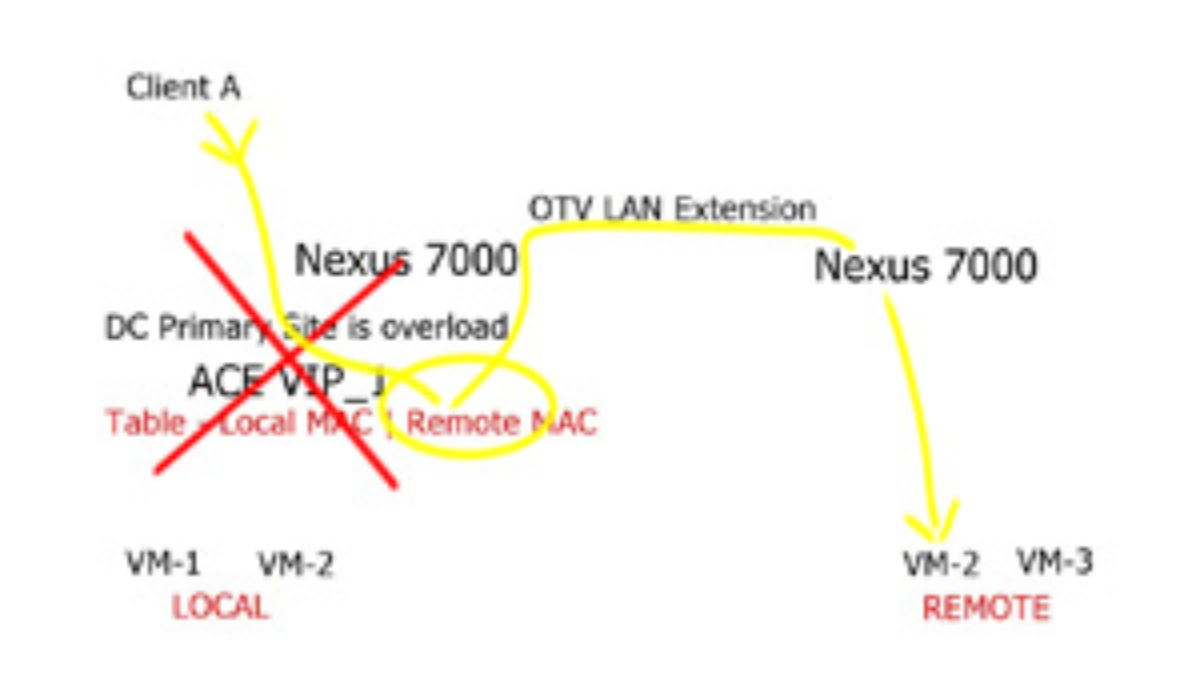
A new technology introduced by Cisco, called Dynamic Workload Scaling ( DWS ), satisfies the requirement of dynamically bursting workloads based on user-defined thresholds to available resource pools ( VMs ). It is tightly integrated with Cisco Application Control Engine ( ACE ) and Cisco’s Dynamic MAC-in-IP encapsulation technology known as Overlay Transport Virtualization ( OTV ), enabling resource distribution across Data Center sites. OTV provides the LAN extension method that keeps the virtual machine’s state as it passes locations, and ACE delivers the load-balancing functionality.
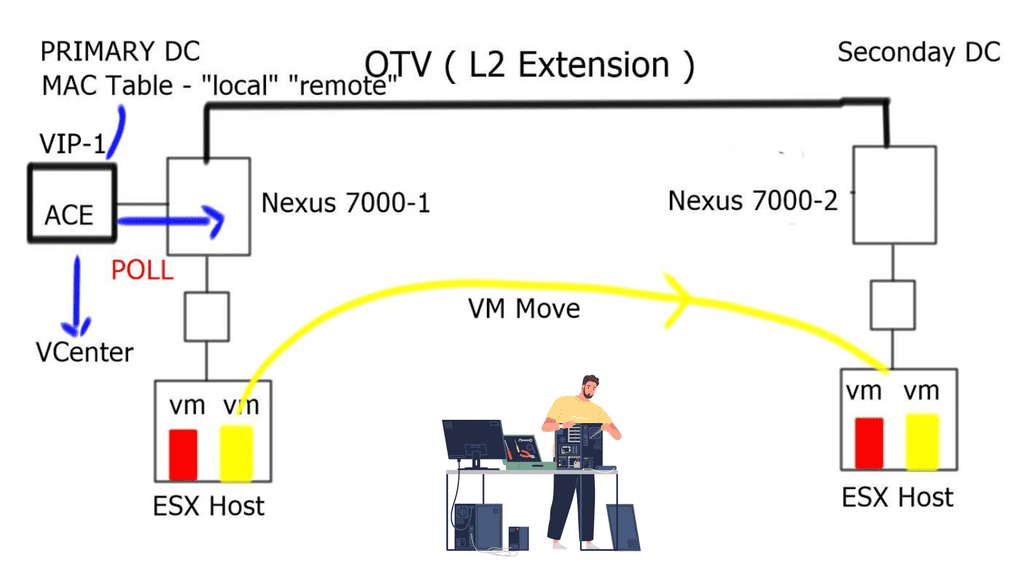
 

dynamic workloads
Dynamic workload and dynamic workload scaling.


Dynamic workload scaling: How does it work?  

  • DWS monitors the VM capacity for an application and expands that application to another resource pool during periods of peak usage. We provide a perfect solution for distributed applications among geographically dispersed data centers.
  • DWS uses the ACE and OTV technologies to build a MAC table. It monitors the local MAC entries and those located via the OTV link to determine if a MAC entry is considered “Local” or “Remote.”
  • The ACE monitors the utilization of the “local” VM. From these values, the ACE can compute the average load of the local Data Center.
  • DWS uses two APIs. One is to monitor the server load information polled from VMware’s VCenter, and another API is to poll OTV information from the Nexus 7000.
  • During normal load conditions, when the data center is experiencing low utilization, the ACE can load incoming balance traffic to the local VMs.
  • However, when the data center experiences high utilization and crosses the predefined thresholds, the ACE will add the “remote” VM to its load-balancing mechanism.
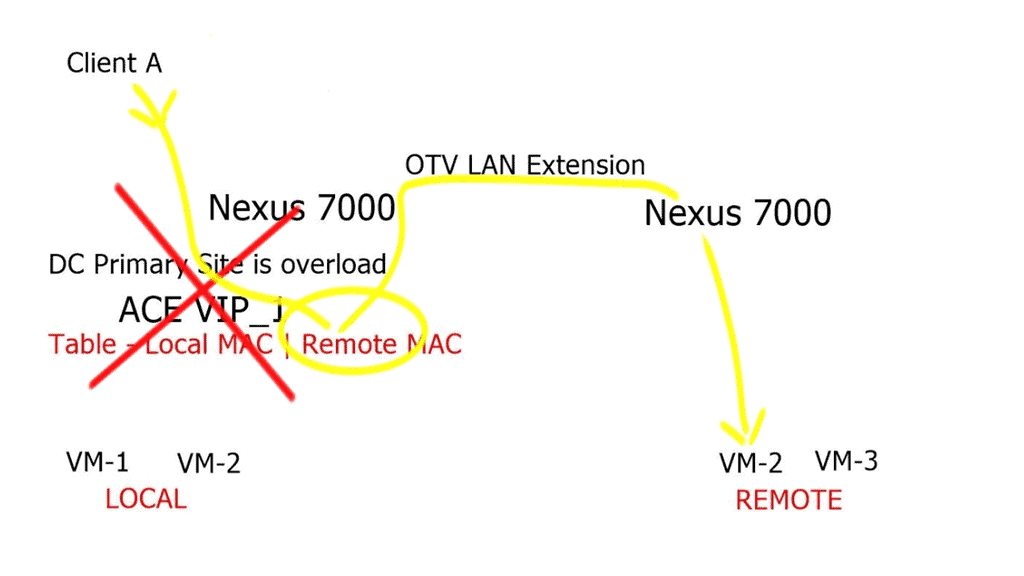
workload scaling
Workload scaling and its operations.


Dynamic workload scaling: Design considerations

During congestion, the ACE adds the “remote” VM to its load-balancing algorithm. The remote VM placed in the secondary data center could add additional load on the DCI. Essentially hair-pining traffic for some time as ingress traffic for the “remote” VM continues to flow via the primary data center. DWS should be used with Locator Identity Separation Protocol ( LISP ) to enable automatic move detection and optimal ingress path selection.


Benefits of Dynamic Workload Scaling:

1. Improved Efficiency:

Dynamic workload scaling enables businesses to allocate resources precisely as needed, eliminating the inefficiencies associated with over-provisioning or under-utilization. Organizations can optimize resource utilization and reduce operational costs by automatically scaling resources up during periods of high demand and scaling them down during periods of low demand.

2. Enhanced Performance:

With dynamic workload scaling, businesses can effectively handle sudden spikes in workload without compromising performance. Organizations can maintain consistent service levels and ensure smooth operations during peak times by automatically provisioning additional resources when required. This leads to improved customer satisfaction and retention.

3. Cost Optimization:

Traditional static infrastructure requires businesses to provision resources based on anticipated peak workloads, often leading to over-provisioning and unnecessary costs. Dynamic workload scaling allows organizations to provision resources on demand, resulting in cost savings by paying only for the resources utilized. Additionally, by scaling down resources during periods of low demand, businesses can further reduce operational expenses.

4. Scalability and Flexibility:

Dynamic workload scaling allows businesses to scale their operations as needed. Whether expanding to accommodate business growth or handling seasonal fluctuations, organizations can easily adjust their resources to match the workload demands. This scalability and flexibility enable businesses to respond quickly to changing market conditions and stay competitive.

Dynamic workload scaling has emerged as a crucial technique for optimizing efficiency and performance in today’s digital landscape. By dynamically allocating computing resources based on workload requirements, businesses can improve efficiency, enhance performance, optimize costs, and achieve scalability. Implementing robust monitoring systems, automation, and leveraging cloud computing services are critical steps toward successful dynamic workload scaling. Organizations can stay agile and competitive and deliver exceptional customer service by adopting this approach.

Key Features of Cisco Dynamic Workload Scaling:

Intelligent Automation:

Cisco’s dynamic workload scaling solutions leverage intelligent automation capabilities to monitor real-time workload demands. By analyzing historical data and utilizing machine learning algorithms, Cisco’s automation tools can accurately predict future workload requirements and proactively scale resources accordingly.

Application-Aware Scaling:

Cisco’s dynamic workload scaling solutions are designed to understand the unique requirements of different applications. By utilizing application-aware scaling, Cisco can allocate resources based on the specific needs of each workload, ensuring optimal performance and minimizing resource wastage.

Seamless Integration:

Cisco’s dynamic workload scaling solutions seamlessly integrate with existing IT infrastructures, allowing businesses to leverage their current investments. This ensures a smooth transition to dynamic workload scaling without extensive infrastructure overhauls.

Conclusion:

In today’s dynamic business environment, efficiently managing and scaling workloads is critical for organizational success. Cisco’s dynamic workload scaling solutions provide businesses with the flexibility, performance optimization, and cost savings necessary to thrive in an ever-changing landscape. By leveraging intelligent automation, application-aware scaling, and seamless integration, Cisco empowers organizations to adapt and scale their workloads effortlessly. Embrace Cisco’s dynamic workload scaling and unlock the full potential of your business operations.

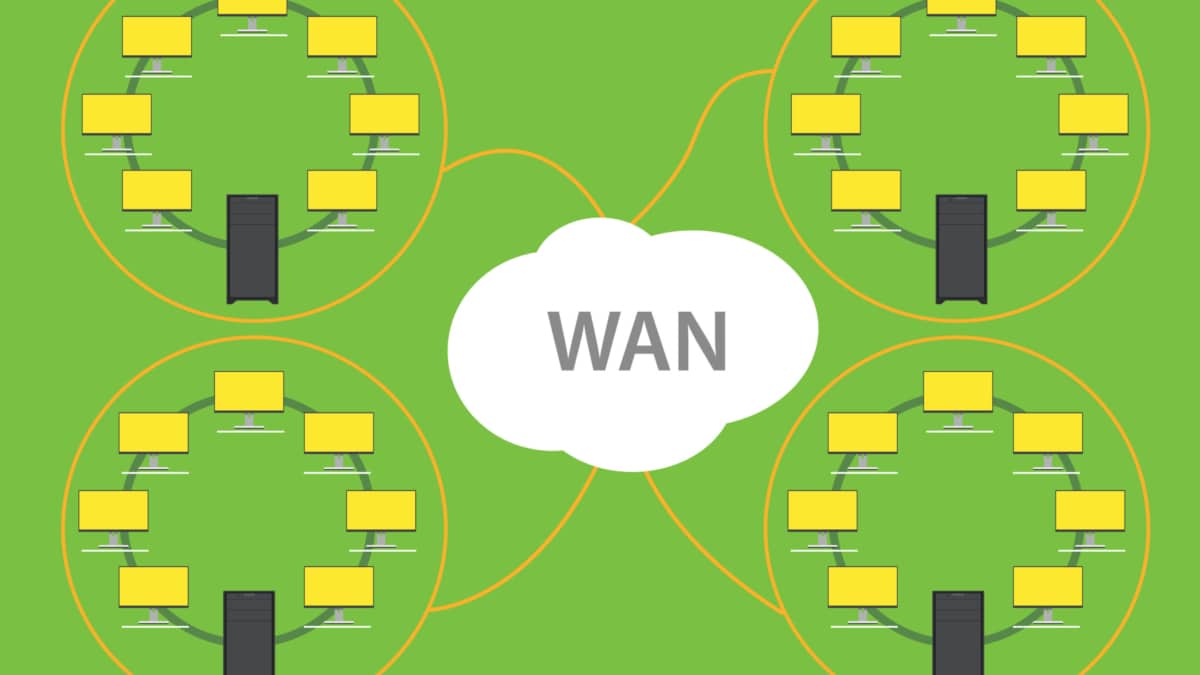
 

WAN Design Requirements

LISP Protocol and VM Mobility

LISP Protocol and VM Mobility

The networking world is constantly evolving, with new technologies emerging to meet the demands of an increasingly connected world. One such technology that has gained significant attention is the LISP protocol. In this blog post, we will delve into the intricacies of the LISP protocol, exploring its purpose, benefits, and how it bridges the gap in modern networking and its use case with VM mobility.

LISP, which stands for Locator/ID Separation Protocol, is a network protocol that separates the identity of a device from its location. Unlike traditional IP addressing schemes, which rely on a tightly coupled relationship between the IP address and the device's physical location, LISP separates these two aspects, allowing for more flexibility and scalability in network design.

LISP, in simple terms, is a network protocol that separates the location of an IP address (Locator) from its identity (Identifier). By doing so, it provides enhanced flexibility, scalability, and security in managing network traffic. LISP accomplishes this by introducing two key components: the Mapping System (MS) and the Tunnel Router (TR). The MS maintains a database of mappings between Locators and Identifiers, while the TR encapsulates packets using these mappings for efficient routing.

VM mobility refers to the seamless movement of virtual machines across physical hosts or data centers. LISP Protocol plays a crucial role in enabling this mobility by decoupling the VM's IP address from its location. When a VM moves to a new host or data center, LISP dynamically updates the mappings in the MS, ensuring uninterrupted connectivity. By leveraging LISP, organizations can achieve live migration of VMs, load balancing, and disaster recovery with minimal disruption.

The combination of LISP Protocol and VM mobility brings forth a plethora of advantages. Firstly, it enhances network scalability by reducing the impact of IP address renumbering. Secondly, it enables efficient load balancing by distributing VMs across different hosts. Thirdly, it simplifies disaster recovery strategies by facilitating VM migration to remote data centers. Lastly, LISP empowers organizations with the flexibility to seamlessly scale their networks to meet growing demands.

While LISP Protocol and VM mobility offer significant benefits, there are a few challenges to consider. These include the need for proper configuration, compatibility with existing network infrastructure, and potential security concerns. However, the networking industry is consistently working towards addressing these challenges and further improving the LISP Protocol for broader adoption and seamless integration.

The combination of LISP Protocol and VM mobility opens up new horizons in network virtualization and mobility. By decoupling the IP address from its physical location, LISP enables organizations to achieve greater flexibility, scalability, and efficiency in managing network traffic. As the networking landscape continues to evolve, embracing LISP Protocol and VM mobility will undoubtedly pave the way for a more dynamic and agile networking infrastructure.

Highlights: LISP Protocol and VM Mobility

Understanding LISP Protocol

– The LISP protocol, short for Locator/Identifier Separation Protocol, is a network architecture that separates the identity of a device (identifier) from its location (locator). It provides a scalable solution for routing and mobility while simplifying network design and reducing overhead. By decoupling the identifier and locator roles, LISP enables seamless communication and mobility across networks.

– Virtual machine mobility revolutionized the way we manage and deploy applications. With VM mobility, we can move virtual machines between physical hosts without interrupting services or requiring manual reconfiguration. This flexibility allows for dynamic resource allocation, load balancing, and disaster recovery. However, VM mobility also presents challenges in maintaining consistent network connectivity during migrations.

**LISP & VM Mobility**

The integration of LISP protocol and VM mobility brings forth a powerful combination. LISP provides a scalable and efficient routing infrastructure, while VM mobility enables dynamic movement of virtual machines. By leveraging LISP’s locator/identifier separation, VMs can maintain their identity while seamlessly moving across different networks or physical hosts. This synergy enhances network agility, simplifies management, and optimizes resource utilization.

The benefits of combining LISP and VM mobility are evident in various use cases. Data centers can achieve seamless workload mobility and improved load balancing. Service providers can enhance their network scalability and simplify multi-tenancy. Enterprises can optimize their network infrastructure for cloud computing and enable efficient disaster recovery strategies. The possibilities are vast, and the benefits are substantial.

How Does LISP Work

Locator Identity Separation Protocol ( LISP ) provides a set of functions that allow Endpoint identifiers ( EID ) to be mapped to an RLOC address space. The mapping between these two endpoints offers the separation of IP addresses into two numbering schemes ( similar to the “who” and the “where” analogy ), offering many traffic engineering and IP mobility benefits for the geographic dispersion of data centers beneficial for VM mobility.

LISP Components

The LISP protocol operates by creating a mapping system that separates the device’s Endpoint Identifier (EID), from its location, the Routing Locator (RLOC). This separation is achieved using a distributed database called the LISP Mapping System (LMS), which maintains the mapping between EIDs and RLOCs. When a packet is sent to a destination EID, it is encapsulated and routed based on the RLOC, allowing for efficient and scalable communication.

Before you proceed, you may find the following posts helpful:

  1. LISP Hybrid Cloud 
  2. LISP Control Plane
  3. Triangular Routing
  4. Active Active Data Center Design
  5. Application Aware Networking


LISP Protocol and VM Mobility

Virtualization

1- Virtualization can be applied to subsystems such as disks and a whole machine. A virtual machine (VM) is implemented by adding a software layer to an actual device to sustain the desired virtual machine’s architecture. In general, a virtual machine can circumvent real compatibility and hardware resource limitations to enable a more elevated degree of software portability and flexibility.

2- In the dynamic world of modern computing, the ability to seamlessly move virtual machines (VMs) between different physical hosts has become a critical aspect of managing resources and ensuring optimal performance. This blog post explores VM mobility and its significance in today’s rapidly evolving computing landscape.

3- VM mobility refers to transferring a virtual machine from one physical host to another without disrupting operation. Virtualization technologies such as hypervisors make this capability possible, enabling the abstraction of hardware resources and allowing multiple VMs to coexist on a single physical machine.

LISP and VM Mobility

The Locator/Identifier Separation Protocol (LISP) is an innovative networking architecture that decouples the identity (Identifier) of a device or VM from its location (Locator). By separating the two, LISP provides a scalable and flexible solution for VM mobility.

**How LISP Enhances VM Mobility**

1. Improved Scalability:

LISP introduces a level of indirection by assigning Endpoint Identifiers (EIDs) to VMs. These EIDs act as unique identifiers, allowing VMs to retain their identity even when moved to different locations. This enables enterprises to scale their VM deployments without worrying about the limitations imposed by the underlying network infrastructure.

2. Seamless VM Mobility:

LISP simplifies moving VMs by abstracting the location information using Routing Locators (RLOCs). When a VM is migrated, LISP updates the mapping between the EID and RLOC, allowing the VM to maintain uninterrupted connectivity. This eliminates the need for complex network reconfigurations, reducing downtime and improving overall agility.

3. Load Balancing and Disaster Recovery:

LISP enables efficient load balancing and disaster recovery strategies by providing the ability to distribute VMs across multiple physical hosts or data centers. With LISP, VMs can be dynamically moved to optimize resource utilization or to ensure business continuity in the event of a failure. This improves application performance and enhances the overall resilience of the IT infrastructure.

4. Interoperability and Flexibility:

LISP is designed to be interoperable with existing network infrastructure, allowing organizations to gradually adopt the protocol without disrupting their current operations. It integrates seamlessly with IPv4 and IPv6 networks, making it a future-proof solution for VM mobility.

Basic LISP Traffic flow

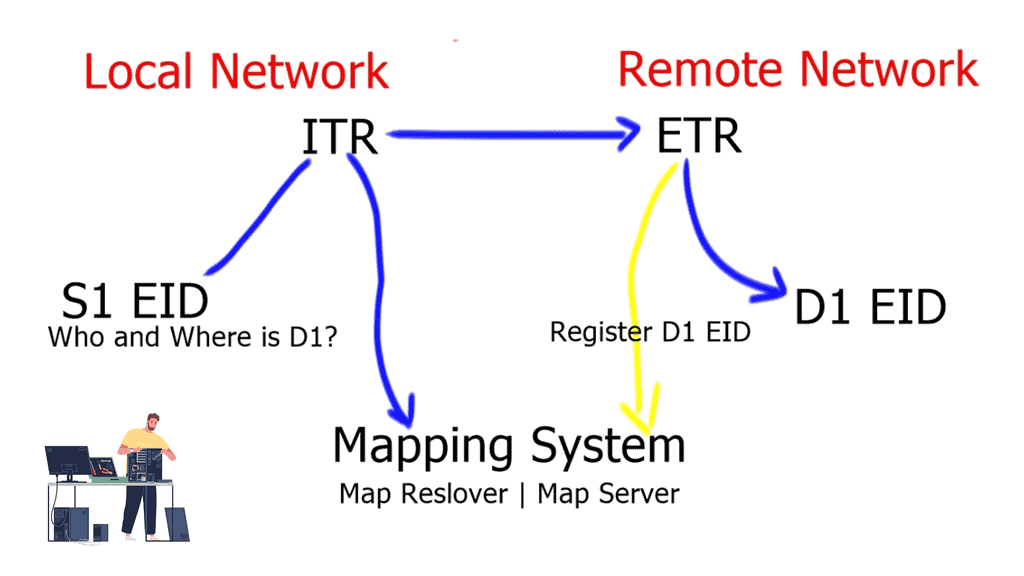
A device ( S1 ) initiates a connection and wants to communicate with another external device ( D1 ). D1 is located in a remote network. S1 will create a packet with the EID of S1 as the source IP address and the EID of D1 as the destination IP address. As the packets flow to the network’s edge on their way to D1, they are met by an Ingress Tunnel Router ( ITR ).

The ITR maps the destination EID to a destination RLOC and then encapsulates the original packet with an additional header with the source IP address of the ITR RLOC and the destination IP address of the RLOC of an Egress Tunnel Router ( ETR ). The ETR is located on the remote site next to the destination device D1.

LISP protocol

The magic is how these mappings are defined, especially regarding VM mobility. There is no routing convergence, and any changes to the mapping systems are unknown to the source and destination hosts. We are offering complete transparency.

LISP Terminology

LISP namespaces:

LSP Name Component

LISP Protocol Description 

End-point Identifiers  ( EID ) Addresses

The EID is allocated to an end host from an EID-prefix block. The EID associates where a host is located and identifies endpoints. The remote host obtains a destination the same way it obtains a normal destination address today, for example through DNS or SIP. The procedure a host uses to send IP packets does not change. EIDs are not routable.

Route Locator ( RLOC ) Addresses

The RLOC is an address or group of prefixes that map to an Egress Tunnel Router ( ETR ). Reachability within the RLOC space is achieved by traditional routing methods. The RLOC address must be routable.

LISP site devices:

LISP Component

LISP Protocol Description 

Ingress Tunnel Router ( ITR )

An ITR is a LISP Site device that sits in a LISP site and receives packets from internal hosts. It in turn encapsulates them to remote LISP sites. To determine where to send the packet the ITR performs an EID-to-RLOC mapping lookup. The ITR should be the first-hop or default router within a site for the source hosts.

Egress Tunnel Router ( ETR )

An ETR is a LISP Site device that receives LISP-encapsulated IP packets from the Internet, decapsulates them, and forwards them to local EIDs at the site. An ETR only accepts an IP packet where the destination address is the “outer” IP header and is one of its own configured RLOCs. The ETR should be the last hop router directly connected to the destination.

LISP infrastructure devices:

LISP Component Name

LISP Protocol Description

Map-Server ( MS )

The map server contains the EID-to-RLOC mappings and the ETRs register their EIDs to the map server. The map-server advertises these, usually as an aggregate into the LISP mapping system.

Map-Resolver ( MR )

When resolving EID-to-RLOC mappings the ITRs send LISP Map-Requests to Map-Resolvers. The Map-Resolver is typically an Anycast address. This improves the mapping lookup performance by choosing the map-resolver that is topologically closest to the requesting ITR.

Proxy ITR ( PITR )

Provides connectivity to non-LISP sites. It acts like an ITR but does so on behalf of non-LISP sites.

Proxy ETR ( PETR )

Acts like an ETR but does so on behalf of LISP sites that want to communicate to destinations at non-LISP sites.

VM Mobility

LISP Host Mobility

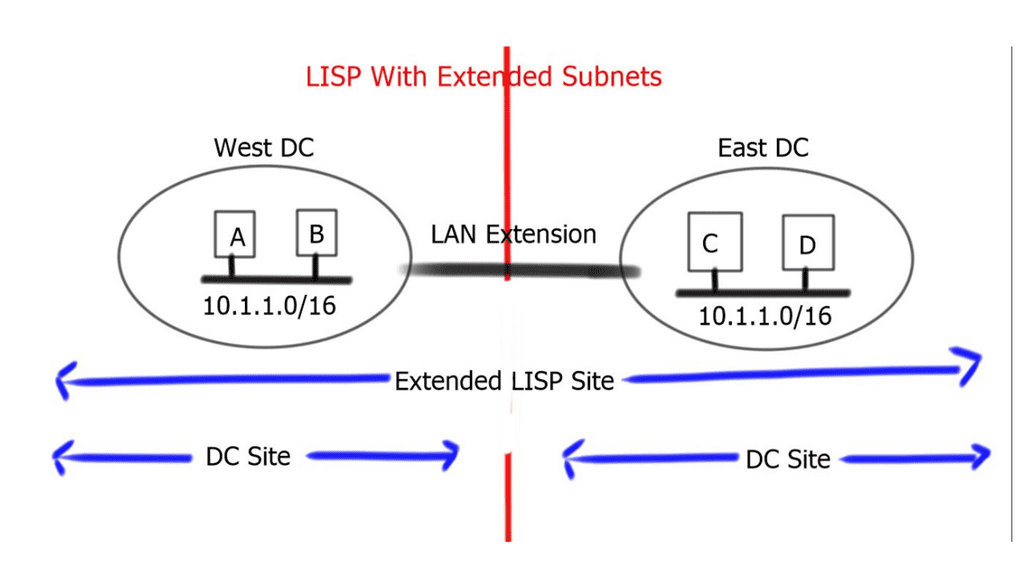
LISP VM Mobility ( LISP Host Mobility ) functionality allows any IP address ( End host ) to move from its subnet to either a) a completely different subnet, known as “across subnet,” or b) an extension of its subnet in a different location, known as “extended subnet,” while keeping its original IP address.

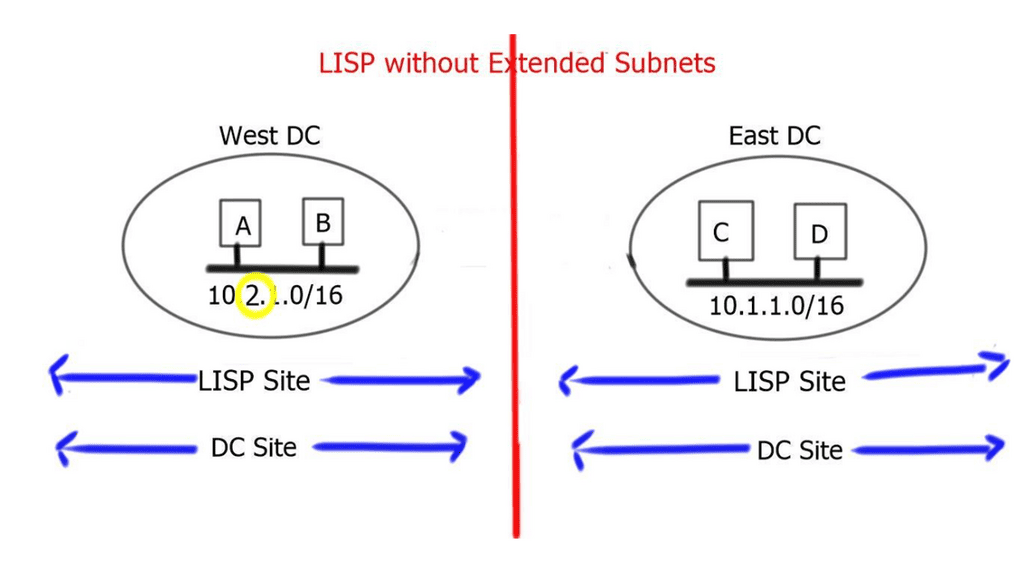
When the end host carries its own Layer 3 address to the remote site, and the prefix is the same as the remote site, it is known as an “extended subnet.” Extended subnet mode requires a Layer 2 LAN extension. On the other hand, when the end hosts carry a different network prefix to the remote site, it is known as “across subnets.” When this is the case, a Layer 2 extension is not needed between sites.

LAN extension considerations

LISP does not remove the need for a LAN extension if a VM wants to perform a “hot” migration between two dispersed sites. The LAN extension is deployed to stretch a VLAN/IP subnet between separate locations. LISP complements LAN extensions with efficient move detection methods and ingress traffic engineering.

LISP works with all LAN extensions – whether back-to-back vPC and VSS over dark fiber, VPLS, Overlay Transport Virtualization ( OTV ), or Ethernet over MPLS/IP. LAN extension best practices should still be applied to the data center edges. These include but are not limited to – End-to-end Loop Prevention and STP isolation.

A LISP site with a LAN extension extends a single site across two physical data center sites. This is because the extended subnet functionality of LISP makes two DC sites a single LISP site. On the other hand, when LISP is deployed without a LAN extension, a single LISP site is not extended between two data centers, and we end up having separate LISP sites.

LISP extended subnet

VM mobility
VM mobility: LISP protocol and extended subnets

To avoid asymmetric traffic handling, the LAN extension technology must filter Hot Standby Router Protocol ( HSRP ) HELLO messages across the two data centers. This creates an active-active HSRP setup. HSRP localization optimizes egress traffic flows. LISP optimizes ingress traffic flows.

The default gateway and virtual MAC address must remain consistent in both data centers. This is because the moved VM will continue to send to the same gateway MAC address. This is accomplished by configuring the same HSRP gateway IP address and group in both data centers. When an active-active HSRP domain is used, re-ARP is not needed during mobility events.

The LAN extension technology must have multicast enabled to support the proper operation of LISP. Once a dynamic EID is detected, the multicast group IP addresses send a map-notify message by the xTR to all other xTRs. The multicast messages are delivered leveraging the LAN extension.

LISP across subnet 

VM mobility
VM mobility: LISP protocol across Subnets

LISP across subnets requires the mobile VM to access the same gateway IP address, even if they move across subnets. This will prevent egress traffic triangulation back to the original data center. This can be achieved by manually setting the vMAC address associated with the HSRP group to be consistent across sites.

Proxy ARP must be configured under local and remote SVIs to correctly handle new ARP requests generated by the migrated workload. With this deployment, there is no need to deploy a LAN extension to stretch VLAN/IP between sites. This is why it is considered to address “cold” migration scenarios, such as Disaster Recovery ( DR ) or cloud bursting and workload mobility according to demands.

**Benefits of LISP**

1. Scalability: By separating the identifier from the location, LISP provides a scalable solution for network design. It allows for hierarchical addressing, reducing the size of the global routing table and enabling efficient routing across large networks.

2. Mobility: LISP’s separation of identity and location mainly benefits mobile devices. As devices move between networks, their EIDs remain constant while the RLOCs are updated dynamically. This enables seamless mobility without disrupting ongoing connections.

3. Multihoming: LISP allows a device to have multiple RLOCs, enabling multihoming capabilities without complex network configurations. This ensures redundancy, load balancing, and improved network reliability.

4. Security: LISP provides enhanced security features, such as cryptographic authentication and integrity checks, to ensure the integrity and authenticity of the mapping information. This helps mitigate potential attacks, such as IP spoofing.

**Applications of LISP**

1. Data Center Interconnection: LISP can interconnect geographically dispersed data centers, providing efficient and scalable communication between locations.

2. Internet of Things (IoT): With the exponential growth of IoT devices, LISP offers an efficient solution for managing these devices’ addressing and communication needs, ensuring seamless connectivity in large-scale deployments.

3. Content Delivery Networks (CDNs): LISP can optimize content delivery by allowing CDNs to cache content closer to end-users, reducing latency and improving overall performance.

Closing Points: LISP and VM Mobility

LISP is a network architecture and protocol that separates the two functions of IP addresses: identifying endpoints and routing traffic. By doing so, it allows for more efficient routing and a reduction in the complexity of network management. This separation is fundamental to enabling VM mobility, as it allows VMs to maintain consistent identities even as their physical locations change.

One of the primary benefits of LISP VM Mobility is the enhanced flexibility it provides. Businesses can move VMs across different data centers or cloud environments without having to reconfigure their network settings. This capability is particularly beneficial for disaster recovery scenarios, load balancing, and maintenance operations. Additionally, LISP VM Mobility can lead to cost savings by optimizing resource utilization and reducing the need for redundant infrastructure.

To implement LISP VM Mobility, organizations need to ensure that their network infrastructure supports the LISP protocol. This may involve updating network equipment and software to be compatible with LISP. Additionally, IT teams should be trained to manage and troubleshoot LISP-enabled environments effectively. By taking these steps, businesses can harness the full potential of LISP VM Mobility to drive innovation and efficiency.

Despite its advantages, LISP VM Mobility is not without challenges. Organizations must carefully plan the transition to ensure compatibility and minimize disruptions. Security is another critical consideration, as the dynamic nature of VM mobility can introduce new vulnerabilities. Implementing robust security measures, such as encryption and access controls, is essential to safeguarding data as it moves across networks.


Summary: LISP Protocol and VM Mobility

LISP (Locator/ID Separation Protocol) and VM (Virtual Machine) Mobility are two powerful technologies that have revolutionized the world of networking and virtualization. In this blog post, we delved into the intricacies of LISP and VM Mobility, exploring their benefits, use cases, and seamless integration.

Understanding LISP

LISP, a groundbreaking protocol, separates the role of a device’s identity (ID) from its location (Locator). By decoupling these two aspects, LISP enables efficient routing and scalable network architectures. It provides a solution to overcome the limitations of traditional IP-based routing, enabling enhanced mobility and flexibility in network design.

Unraveling VM Mobility

VM Mobility, on the other hand, refers to the ability to seamlessly move virtual machines across different physical hosts or data centers without disrupting their operations. This technology empowers businesses with the flexibility to optimize resource allocation, enhance resilience, and improve disaster recovery capabilities.

The Synergy between LISP and VM Mobility

When LISP and VM Mobility join forces, they create a powerful combination that amplifies the benefits of both technologies. By leveraging LISP’s efficient routing and location independence, VM Mobility becomes even more agile and robust. With LISP, virtual machines can be effortlessly moved between hosts or data centers, maintaining seamless connectivity and preserving the user experience.

Real-World Applications

Integrating LISP and VM Mobility opens up various possibilities across various industries. In the healthcare sector, for instance, virtual machines hosting critical patient data can be migrated between locations without compromising accessibility or security. Similarly, in cloud computing, LISP and VM Mobility enable dynamic resource allocation, load balancing, and efficient disaster recovery strategies.

Conclusion:

In conclusion, combining LISP and VM Mobility ushers a new era of network agility and virtual machine management. Decoupling identity and location through LISP empowers organizations to seamlessly move virtual machines across different hosts or data centers, enhancing flexibility, scalability, and resilience. As technology continues to evolve, LISP and VM Mobility will undoubtedly play a crucial role in shaping the future of networking and virtualization.

Green data center with eco friendly electricity usage tiny person concept. Database server technology for file storage hosting with ecological and carbon neutral power source vector illustration.

Data Center Design with Active Active design

Network Insight · High Availability Architecture

Active-Active Data Center Design: Building for Continuous Availability

What happens when one data center can no longer serve its workloads? An active-active architecture aims to keep multiple sites operational at the same time, distributing traffic and capacity while preparing services to withstand component, network and site failures.

Modern applications rarely depend on a single network, server or storage system. They operate across interconnected infrastructure, distributed services and, increasingly, multiple locations. Active-active design brings these components together into an architecture where more than one site can actively serve workloads. But operating two sites simultaneously is not simply a matter of duplicating hardware. Routing, application behavior, data consistency, traffic distribution and failure detection must work together.

Data Center A

Primary active site in this illustration

Applications Compute Storage
Serving workloads

Data Center B

Second active site in this illustration

Applications Compute Storage
Serving workloads

01 · Connectivity

Route around failures

Use diverse network paths and appropriate routing policies to preserve reachability when links or devices fail.

02 · Consistency

Keep application state safe

Design replication, quorum and application behavior around the consistency requirements of the service.

03 · Recovery

Prove service continuity

Test site isolation, traffic shifts and recovery behavior instead of assuming that redundancy guarantees availability.

i

The essential distinction: both sites can be active without every application being able to survive every failure. True service resilience depends on the complete design—including data consistency, health detection, routing, capacity and application recovery behavior.

Multi-site networking BGP and DCI Data consistency High availability Failure engineering
Section 01 · Foundations

Understanding Active-Active Data Center Design

Explore how two or more data center sites can serve workloads concurrently, how this differs from active-passive resilience, and why application behaviour, dependency design and failure handling matter as much as network redundancy.

Active vs. passiveAvailabilityFailure domains
Section 01 · Architecture Fundamentals

Understanding Active-Active Data Center Design

Active-active design allows two or more data center sites to serve production workloads concurrently. The objective is to use distributed capacity while maintaining service continuity when a component, network path or site becomes unavailable.

Traditional active-passive designs generally keep one site serving traffic while another is prepared to take over during a failure. In an active-active design, both sites perform useful production work during normal operation. Traffic may be distributed through global load balancing, application-aware routing, anycast services or other mechanisms appropriate to the application and network architecture.

This can improve resource utilisation and provide additional capacity options. It also introduces design questions that cannot be solved by routing alone: where application state lives, how data is replicated, how clients reach healthy services, and what happens when the sites lose contact with one another.

Three principles that shape the design

01

Concurrent workload

Both sites contribute to normal service delivery. Capacity planning must account for traffic distribution and whether surviving infrastructure can absorb additional demand after a failure.

02

Consistent service behaviour

Applications must handle sessions, shared state, data replication and concurrent updates according to their consistency and availability requirements.

03

Designed failure response

Health checks, routing policies, load balancers and application recovery logic must work together to direct clients towards services that can actually respond.

Important distinction: two active sites do not automatically provide application resilience. If both sites depend on the same database, identity service, WAN path or control-plane component, that shared dependency may still become a single point of failure.

Questions to answer before choosing active-active

  • Can the application safely run across multiple sites at the same time?
  • How much data loss, if any, is acceptable following a site failure?
  • What recovery time is required, and how will client traffic move to healthy services?
  • Can one surviving site handle the required workload during a major failure?
  • How will split-brain conditions, network partitions and inconsistent state be detected and handled?
Engineering takeaway

Active-active is an end-to-end service architecture, not simply a pair of interconnected data centers. Reliable outcomes depend on coordinated network design, application behaviour, data consistency, capacity planning and tested recovery procedures.

Interactive Lab 01 · Architecture explorer

What Happens When a Data Center Fails?

Switch the deployment model or simulate a site failure. Observe the illustrative traffic paths, site states and engineering implications. This is a conceptual model, not a live network simulator.

Choose a scenario
Two-site data center architecture Two data center sites connect to a shared user traffic entry point. The selected scenario changes the illustrative traffic paths and site status. Users / Traffic Entry DNS · GSLB · Load balancing Data Center A Data Center B Serving workloads Serving workloads Application stack A ACTIVE Application stack B ACTIVE Inter-site connectivity / replication Both sites serve traffic concurrently
Data Center A
Active · serving traffic
Data Center B
Active · serving traffic
SCENARIO: ACTIVE-ACTIVE

Both sites serve production traffic

Workloads at both sites are available to serve requests. Traffic distribution depends on application placement, routing, load balancing and health checks. Shared dependencies and data consistency still need deliberate design.

Engineering checks

  • Confirm application and data consistency.
  • Verify each site's independent capacity.
  • Test routing and service health during failure.
Illustrative topology · No live devices, routing protocols or production traffic are controlled.
Section 02 · Routing architecture

Multi-Site Network Architecture and BGP

Follow traffic between data centers and external networks. Understand how BGP exchanges reachability, how routing policy and multipath influence path selection, and how engineers avoid asymmetric traffic, route leaks and unexpected failover behaviour.

DCI designBGP policyTraffic engineering
Section 02 · Network Architecture

Multi-Site Network Architecture and BGP

An active-active design needs more than two functioning data centers. It needs predictable routing, resilient inter-site connectivity and a clear policy for how users and applications reach services when paths or entire sites fail.

The network provides the connectivity between data centers, users, applications and external services. In a multi-site architecture, Data Center Interconnect (DCI) links connect the sites, while routing and traffic-management systems determine which paths are available and where traffic should be sent.

Border Gateway Protocol (BGP) is commonly used to exchange reachability information between sites, WAN networks and external networks. Its policy controls can influence path selection and traffic distribution. However, BGP does not by itself verify that an application is healthy or that its data is consistent.

The three network design layers

Layer 01

Data Center Interconnect

DCI may use routed IP connectivity, an optical transport service or an overlay architecture. Choose bandwidth, latency and path diversity according to application traffic and replication requirements—not simply the number of physical links.

Layer 02

Routing and reachability

BGP can advertise site prefixes and apply routing policy. Multipath forwarding may use multiple eligible routes when supported and correctly configured. Route selection and forwarding behaviour must be validated for the actual platform and topology.

Layer 03

Service traffic steering

DNS-based global load balancing, anycast, application load balancers or other steering mechanisms can direct clients towards available services. Health checks must reflect genuine service readiness, not just network reachability.

BGP: control the path, then validate the outcome

A common design advertises service or site prefixes from more than one location. The routing policy determines which advertisements are accepted and how paths are preferred. Depending on the design, engineers may use attributes such as LOCAL_PREF within an autonomous system, AS_PATH for inter-AS policy, or multipath features to support selected equal-cost paths.

The important distinction is between route availability and service availability. A router may have a valid route to a site whose application is unhealthy. Conversely, an application may be healthy while a routing or traffic-steering policy prevents clients from reaching it. These systems need coordinated health signals and carefully tested failure behaviour.

Design warning — avoid accidental traffic tromboning. If a client reaches a service in one site but the application retrieves data or calls a dependency in the other site, traffic may cross the DCI unnecessarily. This can increase latency, consume inter-site bandwidth and complicate failure handling. Keep traffic local where practical, while preserving the required consistency and availability guarantees.

What should happen during a failure?

  • DCI link failure: traffic should use a surviving path where one exists, with convergence and capacity validated under load.
  • Border router failure: alternate routing paths should remain available without creating a forwarding loop or black hole.
  • Site failure: route withdrawal and service-health mechanisms should steer new traffic away from unavailable services.
  • Application failure: health checks should stop advertising or selecting an endpoint that cannot deliver the required service.
  • Network partition: routing and application policies must avoid unsafe assumptions about the remote site's state or data ownership.

Architecture checks before deployment

  • Identify shared physical and logical failure domains across DCI paths.
  • Document prefix advertisements, routing policy, route filtering and intended path preferences.
  • Check convergence behaviour and whether surviving links can carry the expected load.
  • Validate inbound and outbound traffic steering independently; they may follow different paths.
  • Test application health checks alongside routing changes and site-isolation scenarios.
Engineering takeaway

BGP and DCI establish and control network reachability; they do not guarantee that an application is usable. A resilient active-active design coordinates routing, traffic steering, application health, capacity and data consistency—and verifies the result through controlled failure tests.

Interactive Lab 02 · Multi-site routing

Trace the Route Between Data Centers

Explore how inter-site connectivity, BGP reachability and routing policy influence traffic. Simulate a DCI link failure or route withdrawal, then select a router or network to inspect its role.

Select a routing scenario
Illustrative multi-site BGP routing topology Two data centers with border routers connect through an inter-site link. An external network advertises a prefix. Select a node to inspect its role. SITE A · AS 65001 SITE B · AS 65001 Application A 10.10.10.0/24 Border Router A BGP / route policy Border Router B BGP / route policy Application B Service destination External Network AS 65002 Prefix advertisement DCI · inter-site path eBGP iBGP / local routing iBGP / local routing Illustrative route: 198.51.100.0/24 Conceptual diagram · BGP behaviour depends on topology and policy
Illustrative preferred path Illustrative alternate path Failed or withdrawn path
STATE: NORMAL ROUTING

Reachability is available through the configured paths

The diagram illustrates an available inter-site path and route advertisement. Actual forwarding depends on the installed route, routing policy, next-hop reachability and data-plane health.

Select a network component

Select either border router, an application network or the external AS in the diagram to explore its role in route propagation and traffic forwarding.

DCI statusAvailable
Illustrative routeAdvertised
Engineering focusValidate policy
ItemIllustrative stateWhat to verify
Inter-site pathAvailableIndependent physical paths, capacity and forwarding health.
Route advertisementPresentAccepted prefixes, next hop, policy and route installation.
Service reachabilityCheck requiredEnd-to-end application health, not only control-plane state.
Educational model only · No live BGP sessions or production routes are changed.
Section 03 · Overlays and mobility

Layer 2 Extension, Overlays and Workload Mobility

Compare stretched Layer 2 networks with routed Layer 3 designs, and examine how VXLAN/EVPN overlays can support multi-site connectivity. Consider workload mobility, broadcast scope, failure propagation and the risk of traffic tromboning before extending networks between sites.

VXLAN / EVPNLayer 2 vs. Layer 3Workload mobility
Section 03 · Layer 2 and Overlay Design

Layer 2 Extension, Overlays and Workload Mobility

Workload mobility across data centers can simplify some application migrations and recovery scenarios. The challenge is deciding how much network continuity is actually required—and whether extending a Layer 2 domain is the right way to achieve it.

In a multi-site environment, applications may need to move between sites for maintenance, capacity balancing, disaster recovery or infrastructure changes. Some workloads can move while retaining their IP addresses; others can reconnect through a new endpoint or service address. The application’s requirements should determine the network design, rather than assuming that every workload needs a stretched subnet.

A Layer 2 extension carries an Ethernet broadcast domain across multiple locations. This can preserve subnet membership and support certain migration workflows, but it also extends the domain’s failure and operational characteristics. A Layer 3 design keeps subnets local to each site and uses routing to connect them, often reducing the scope of Layer 2 failure propagation.

Approach A

Stretched Layer 2

The same VLAN or subnet is available across sites, subject to the chosen extension technology and design constraints.

  • Can support address-preserving workload mobility.
  • May carry broadcast and unknown-unicast traffic across the DCI.
  • Requires careful control of loops, failure domains and inter-site latency.
  • Can make partial failures harder to diagnose.
Approach B

Routed Layer 3

Each site uses its own routed subnets, and connectivity between sites is provided through routing and application-level service discovery or traffic steering.

  • Provides clearer Layer 3 failure boundaries.
  • Supports route summarisation and explicit traffic policy.
  • May require application, DNS or load-balancer changes during migration.
  • Often simplifies fault isolation and scaling.

VXLAN and EVPN: separating the overlay from the underlay

VXLAN (Virtual Extensible LAN) encapsulates Layer 2 frames in UDP packets so that virtual networks can be carried across an IP underlay. VXLAN Tunnel Endpoints (VTEPs) perform encapsulation and decapsulation. EVPN (Ethernet VPN), commonly used as a control plane for VXLAN fabrics, distributes MAC and IP reachability information and supports policy-driven tenant connectivity.

This separation allows an IP-routed fabric to carry multiple logical networks without requiring the physical underlay itself to be one large Layer 2 domain. EVPN can support distributed gateway designs and multi-homing, depending on the implementation. It does not, however, remove the need to design inter-site routing, failure handling and application consistency deliberately.

Where do OTV, FabricPath and LISP fit?

Legacy DCI

OTV

Overlay Transport Virtualization was designed to extend selected Layer 2 connectivity between data centers while limiting some traditional Layer 2 extension risks. Treat it as a platform- and lifecycle-dependent technology, not a universal modern default.

Fabric technology

FabricPath

Cisco FabricPath introduced a Layer 2 fabric approach using a fabric control plane rather than relying on conventional spanning tree for all forwarding decisions. It is mainly relevant when understanding existing or legacy environments.

Identifier / locator

LISP

Locator/ID Separation Protocol separates endpoint identity from routing location. It can support mobility and mapping use cases in appropriate architectures, but it is not interchangeable with VXLAN or EVPN.

Design principle: do not extend Layer 2 simply because an application currently uses a fixed IP address. First check whether the application can tolerate a different subnet, use a stable service endpoint, or reconnect through DNS or a load balancer. A routed design may meet the requirement with a smaller failure domain.

Workload mobility and traffic tromboning

Preserving a workload’s IP address does not guarantee that its traffic path remains optimal. After a workload moves, clients or dependent services may still reach it through a remote site. This can create traffic tromboning: packets travel across the DCI to reach a service and may cross back again to reach another dependency.

The result can be increased latency, unnecessary bandwidth consumption and a more complicated failure path. Mobility planning should therefore include endpoint discovery, routing updates, load-balancer behaviour, dependency locality and the time needed for existing sessions to recover.

Questions to resolve before extending a network

  • Does the workload genuinely require the same subnet at both sites?
  • What are the latency, bandwidth and MTU requirements across the DCI?
  • How are MAC/IP reachability and gateway behaviour handled after a move or failure?
  • Can a Layer 2 loop, broadcast event or control-plane issue affect both sites?
  • Will traffic remain local to the active workload and its dependencies?
  • What happens to established sessions when the workload or site becomes unavailable?
Engineering takeaway

VXLAN and EVPN can provide scalable overlay connectivity, while routed designs can keep site boundaries clearer. Choose Layer 2 extension only when the application and operational requirements justify it, and test mobility, failure isolation and traffic locality before relying on it for resilience.

Interactive design lab · 03

Layer 2 Extension, Overlays and Workload Mobility

Compare three ways to connect data-centre sites. Change the design, simulate an inter-site failure, and examine what happens to addressing, mobility and the fault domain.

1. Choose a connectivity design
2. Test the inter-site connection
Conceptual topology Shared Layer 2 segment
Two-site data-centre connectivity diagram Two data-centre sites with workloads and network gateways connected by an inter-site path. The selected mode changes the path labels and the illustrative failure state. DATA CENTRE A Primary site · example workload DATA CENTRE B Secondary site · example workload Application workload A VLAN 120 · 10.20.120.0/24 Application workload B VLAN 120 · 10.20.120.0/24 Site A gateway Local forwarding Site B gateway Local forwarding L2 extension One broadcast domain Inter-site path operational
✓
Shared segment is available

Both sites use the same example subnet. This can support address continuity, but it also extends Layer 2 dependencies across the sites.

Addressing Same subnet at both sites
Mobility approach Layer 2 continuity
Failure consideration Broadcast and loop control

Engineering trade-off

A stretched VLAN can make subnet continuity easier, but the design must deliberately control loop prevention, broadcast scope, gateway behaviour and inter-site failure handling.

  • Define the Layer 2 extension boundary
  • Test behaviour during link and site failure
  • Validate gateway redundancy and convergence
  • Confirm application recovery requirements
Educational topology only — not a live network simulator. VXLAN is an encapsulation technology; EVPN can provide a BGP-based control plane. Actual mobility, redundancy and failure behaviour depend on the chosen platform, configuration and application design.
Section 04 · Application resilience

Application, Storage and State Consistency

Network redundancy cannot guarantee application availability on its own. Examine stateless and stateful services, session continuity, synchronous and asynchronous replication, quorum, split-brain risk, and the trade-offs between recovery time and potential data loss.

Application stateReplicationRPO / RTO
Section 04 · Application and Data Resilience

Application, Storage and State Consistency

A network can keep routes available while an application remains unable to serve requests. Active-active resilience therefore depends on how application instances, user sessions and persistent data behave across sites—not just on redundant links and routers.

In an active-active environment, application instances in different data centers may process requests concurrently. That arrangement works well only when the application can manage shared state, concurrent operations and failures consistently. A stateless service is often easier to distribute because each request can be handled by any healthy instance, provided its dependencies are also available.

Stateful applications introduce more complexity. They may depend on databases, distributed caches, message queues, session stores or file systems. Each dependency needs an explicit availability and consistency strategy. Replicating the application tier alone does not make the whole service resilient if its database or identity provider remains a single point of failure.

Synchronous versus asynchronous replication

Replication determines how updates made at one site become available at another. The key trade-off is between acknowledgement latency, consistency guarantees and the amount of data that may be lost during a failure. These characteristics vary by platform and configuration; the terms alone do not guarantee a particular recovery outcome.

Replication model A

Synchronous replication

A write is acknowledged only after the configured synchronous durability or commit conditions have been met.

  • Can reduce the recovery point exposure for acknowledged writes.
  • Inter-site latency can affect write response times.
  • A link or site failure may affect write availability, depending on quorum and product design.
  • Requires careful planning for network partitions and failover.
Replication model B

Asynchronous replication

A write can be acknowledged before the remote replica has received or committed the update.

  • Can reduce the impact of remote-site latency on write acknowledgement.
  • Replication lag may leave the remote site temporarily behind.
  • A sudden failure can result in loss of updates not yet replicated.
  • Recovery procedures must account for lag and data reconciliation.

Important: synchronous replication does not automatically mean zero data loss in every failure scenario, and asynchronous replication does not always imply unacceptable loss. The real outcome depends on commit semantics, quorum, durable storage, topology and the failure being considered. Define the required Recovery Point Objective (RPO) and Recovery Time Objective (RTO), then validate them against the actual platform.

Three application-level challenges

Challenge 01

Session continuity

If a client moves between sites, its session may depend on local memory, a shared session store, a signed token or another mechanism. Design for reconnects and retries instead of assuming a transport path change preserves every session.

Challenge 02

Concurrent updates

Two active instances may attempt to modify the same logical record. Transactions, conflict resolution, idempotency and application-specific consistency rules must prevent duplicated or conflicting operations.

Challenge 03

Dependency availability

An application instance may be healthy while its database, authentication service, queue or external API is not. Service health should reflect the dependencies required to complete real user operations.

Quorum, network partitions and split-brain

A network partition can leave two sites running while preventing them from communicating. If both sides independently accept conflicting writes or claim ownership of the same resource, the system may enter a split-brain condition. Restoring connectivity does not necessarily reconcile the resulting state safely.

Distributed systems often use quorum, leases, fencing tokens, leader election or other coordination mechanisms to decide which operations are permitted during a partition. A two-site deployment may need a third failure-independent voting participant or witness, depending on the platform. A witness can help establish a decision, but it does not replace data replication or application-level recovery design.

Network partition is not the same as site failure. If the DCI fails, both sites may still be running and serving local clients. The architecture must decide whether each site can safely continue, whether one side must stop writes, and how service ownership is re-established when communication returns.

Questions to answer before production

  • Can application instances safely process requests concurrently in both sites?
  • Where is session state stored, and what happens when a client is redirected?
  • What RPO and RTO are required for each critical data store?
  • How are quorum, ownership and split-brain conditions handled during a partition?
  • Can the surviving site sustain the required transaction rate and connection load?
  • How will replication lag, failed writes, stale reads and recovery conflicts be detected?
  • Have failover and failback been tested with real application transactions, not just ping tests?
Engineering takeaway

Active-active application resilience requires an explicit strategy for state, replication, coordination and recovery. Network redundancy helps services communicate, but only the combined behaviour of the application, data platform and network determines whether service can continue safely during a failure.

Interactive design lab · 04

Application, Storage and State Consistency

A network can remain connected while an application becomes unsafe or unavailable. Explore replication modes, simulate an inter-site partition, and examine why two active sites need a deliberate write-ownership strategy.

1. Choose a data replication model
2. Choose a scenario
Application and data flow Synchronous data replication
Two-site application and data replication model Two data-centre sites contain application instances and data services. A solid path represents client and application connectivity, while a dashed path represents replication or inter-site coordination. DATA CENTRE A Serving requests · replica A DATA CENTRE B Serving requests · replica B Application instance A Accepting requests Application instance B Accepting requests Data replica A Commit acknowledgement Data replica B Remote copy Commit coordination Remote acknowledgement Inter-site coordination available
✓
Replication is operating normally

In this conceptual synchronous model, a write waits for the configured remote acknowledgement before it is confirmed. Real guarantees depend on the data platform and commit policy.

Write behaviour Waits for required acknowledgement
Data risk Depends on commit and quorum rules
Recovery priority Validate quorum and ownership

Engineering checks

A healthy network path does not prove that a transaction is durable or that both replicas agree. Check the application's consistency contract and the data platform's failure behaviour.

  • Confirm what a successful commit guarantees
  • Define quorum and write ownership
  • Measure replication delay and transaction errors
  • Test failover, fencing and safe recovery
Educational model only — no real transactions or replication occur. The diagram illustrates design trade-offs, not a guarantee that a particular database or storage platform behaves this way. Synchronous replication does not automatically prevent data loss in every failure; asynchronous replication may have a non-zero recovery point.
Section 05 · Operations and recovery

Failure Scenarios, Observability and Recovery

Move beyond theoretical redundancy and test how the architecture behaves under real failure conditions. Trace link loss, BGP changes, application dependency failures, replication lag and site isolation using telemetry, incident procedures and measured recovery objectives.

Failure testingTelemetryFailover and failback
Section 05 · Observability and Recovery

Failure Scenarios, Observability and Recovery

Active-active architecture must be designed around failure, not just normal operation. Reliable recovery depends on detecting what has failed, identifying the affected services, understanding the data state and directing traffic towards capacity that can safely serve it.

Redundant links and duplicated infrastructure reduce some risks, but they do not eliminate failures. A site can remain reachable while its applications are unhealthy; a routing session can remain established while packets are being dropped; and a database replica can be online while lagging behind the active data set. Effective operations require end-to-end observability across network, application and data layers.

Detect

Identify the real failure

Use telemetry and health checks to distinguish a failed link, an unreachable site, a degraded application and an unhealthy data dependency.

Decide

Choose a safe response

Determine whether traffic should move, whether writes can continue, and whether the surviving site has enough capacity to take additional work.

Validate

Prove service recovery

Confirm that users can complete meaningful transactions, not merely that interfaces are up or routing adjacencies have recovered.

Five failure scenarios to test

Inter-data-center link failure

One DCI path fails while both sites remain operational. Check route convergence, alternate-path capacity, packet loss and whether replication or application dependencies are affected.

Validate: path failover · latency · loss · capacity

Border router or routing failure

A border device fails, a route is withdrawn or a policy change directs traffic incorrectly. Verify that alternate routes are usable and that recovery does not create a forwarding loop or black hole.

Validate: BGP state · route changes · forwarding path

Application or dependency failure

Network connectivity remains available, but an application instance, database or identity service cannot complete requests. Check whether health signals remove the affected endpoint from service selection.

Validate: synthetic transactions · dependency health

Replication lag or data inconsistency

The remote data copy falls behind or a replication process stops. Establish whether the secondary site is safe to promote, what data could be missing and how consistency will be verified before normal service resumes.

Validate: replication lag · RPO · recovery procedure

Complete site loss or network partition

A site becomes unavailable, or both sites remain running but lose communication. Confirm the failover decision, capacity at the surviving site, data ownership and safeguards against split-brain.

Validate: site isolation · quorum · service continuity

A practical incident investigation sequence

During an incident, investigate from the observed user impact towards the underlying dependency. Correlating timestamps across routing events, interface counters, application logs and replication metrics helps distinguish the initiating failure from symptoms that appear later.

From alert to verified recovery Operational workflow
1 Scope impact

Identify affected users, services, sites and transactions.

2 Correlate signals

Compare network, application and data telemetry.

3 Apply safe recovery

Follow tested routing, failover and data procedures.

4 Verify service

Test transactions, data integrity and performance.

This is a general investigation pattern. Follow your incident procedures and service-specific recovery runbooks when making production changes.

What should you monitor?

Layer Useful signals What they help reveal
Network Interface errors, packet loss, latency, BGP changes, path utilisation Transport degradation, route changes and capacity pressure
Application Request success rate, latency, error rate, synthetic transactions Whether users can actually complete operations
Data Replication lag, commit failures, consistency checks, storage health Whether the remote site has a safe and sufficiently current data set
Platform CPU, memory, connection pools, queue depth, storage throughput Whether the surviving site can absorb additional workload
Recovery Failover duration, RTO/RPO achievement, recovery test results Whether the design meets its agreed recovery objectives

Do not confuse an infrastructure health check with a service health check. An interface can be up, a BGP session can be established and a server can respond to ping while a real transaction fails. Use application-aware probes and representative synthetic transactions wherever practical.

Failover, failback and recovery objectives

Recovery Time Objective (RTO) defines the target time to restore a service after disruption. Recovery Point Objective (RPO) defines the acceptable data-loss window, expressed as time or an equivalent recovery-point requirement. Different applications and data stores may need different objectives; a single pair of numbers should not automatically be applied to every service.

Failover is only half of the recovery story. Failback—returning service to its intended operating arrangement—can introduce another period of risk. Before returning workloads, confirm data consistency, replication health, routing policy, capacity and the correct ownership of stateful services. Avoid automatic failback if it could trigger repeated site switching or disrupt active sessions.

Operational readiness checklist

  • Document the expected behaviour for link, device, application, data and full-site failures.
  • Ensure alerts identify the affected service and provide enough context for investigation.
  • Test routing convergence and verify actual packet forwarding after route changes.
  • Confirm that the surviving site has enough compute, storage, network and application capacity.
  • Define who can authorise failover, data promotion and failback during an incident.
  • Record measured recovery times and data outcomes during controlled exercises.
  • Review failures and near misses to improve runbooks, monitoring and architecture.
Engineering takeaway

Resilience must be measured through observed service outcomes. Combine network telemetry, application health, data replication metrics and tested recovery procedures to determine whether the active-active architecture can withstand the failures it was designed to handle.

Interactive design lab · 05

Failure Scenarios, Observability and Recovery

Simulate a router failure, an inter-site partition or a complete site outage. Observe the illustrative network state, monitoring signals and recovery checks that matter before declaring an active-active service healthy.

1. Select a failure scenario
Illustrative topology and alternate path All paths operational
Active-active data-centre failure scenario Two data-centre sites connect through border routers and an inter-site link. A separate illustrative alternate path is shown. Select a scenario to change the topology and monitoring indicators. DATA CENTRE A Site healthy DATA CENTRE B Site healthy Application service A Serving requests Application service B Serving requests Border router A BGP established Border router B BGP established Inter-site path Illustrative alternate path
✓
Both sites are operational

The conceptual topology shows active services at both sites. Monitoring should confirm end-to-end transaction success, route health, replication status and available capacity.

Network reachability Primary and inter-site paths available
Application service Both sites serving
Recovery decision Monitor and validate health

Observability panel

Routing adjacencyHealthy
End-to-end transactionsHealthy
Inter-site connectivityHealthy
Replication / coordinationHealthy

Recovery checklist

A green interface or established BGP session is only one signal. Correlate network telemetry with application transactions, data health and the capacity of the surviving site.

  • Confirm the failure and its scope
  • Validate the alternate forwarding path
  • Check application and data integrity
  • Verify recovery objectives are met
Educational simulation only. No live devices, BGP sessions or monitoring systems are contacted. The alternate path is illustrative; real failover depends on topology, routing policy, detection timers, capacity, application dependencies and the platform's recovery behaviour.
Section 06 · Hybrid architecture

Cloud Connectivity and Modern Design Choices

Explore how data centers connect to cloud networks using private connectivity, VPNs, dynamic routing, VPC peering and hub-based services such as Google Cloud Network Connectivity Center. Compare resilience, route control, security, latency and cost without assuming one cloud model fits every deployment.

Hybrid cloudVPC and BGPConnectivity choices
Active-Active Data Center Design · Section 06

Cloud Connectivity and Modern Design Choices

Active-active design does not stop at the data center perimeter. Applications may depend on private cloud services, public cloud workloads, shared identity systems, or data platforms in another environment. The challenge is to connect these resources without creating hidden dependencies, unnecessary latency, or new single points of failure.

1. Separate data center interconnect from hybrid cloud connectivity

A data center interconnect (DCI) connects separate data center sites. Hybrid cloud connectivity connects an enterprise network or data center to cloud networks and services. These designs can overlap, but they solve different problems and should be assessed independently.

For example, two active data centers may exchange application traffic over a dedicated DCI while each site also has its own connection to a cloud provider. Another design may route both sites through a shared cloud connectivity hub. The right choice depends on application placement, traffic patterns, security boundaries, and failure-domain requirements.

Illustrative hybrid connectivity model
Data Center A Active workloads Local routing and security
Data Center B Active workloads Independent failure domain
Enterprise / DCI edge Routing policy and controlled egress
Cloud network VPCs, cloud workloads and services
This is a conceptual view, not a required physical topology. Connectivity can be direct, hub-and-spoke, or provider-mediated. Redundancy must be verified across the complete path, not just at the visible connection.

2. Choose the connectivity model for the workload

Cloud connectivity is not one universal design. Dedicated private links, provider-managed private connectivity, and IPsec VPNs offer different trade-offs in capacity, latency, encryption, deployment time, and cost.

01
Private connectivity

Often suited to predictable, sustained traffic and workloads with demanding bandwidth or latency requirements. Validate provider availability, port and circuit diversity, routing hand-offs, and the actual end-to-end service commitment.

02
Site-to-site VPN

IPsec VPN can provide encrypted connectivity over an IP underlay. High-availability VPN designs use redundant tunnels or endpoints, but the underlying internet paths and provider failure domains still matter.

03
Cloud routing

Cloud routers and BGP sessions can exchange routes dynamically where supported. Define which prefixes are advertised, accepted, preferred, or filtered, and test behaviour when a peer or path fails.

04
Hub-and-spoke connectivity

A cloud transit or connectivity hub can simplify connections between multiple networks. It also becomes an important policy and operational component that needs its own resilience and capacity planning.

3. Understand VPCs, peering and cloud connectivity hubs

In Google Cloud, a Virtual Private Cloud (VPC) provides a logical network boundary for cloud resources. VPC connectivity, Cloud VPN, Cloud Router, and Network Connectivity Center (NCC) address different parts of hybrid and multi-network design. Other providers have comparable concepts, but their capabilities and terminology differ.

Building block Design role Important consideration
VPC network Provides a logical network environment for cloud resources. Plan address ranges, segmentation, route policy, and access controls.
VPC peering Connects eligible VPC networks through a peering relationship. Do not assume peering provides transitive routing through another VPC.
Cloud VPN Provides IPsec-based connectivity between networks. Plan tunnel redundancy, routing, encryption requirements, and failover testing.
Cloud Router / BGP Supports dynamic route exchange for compatible connectivity services. Validate advertised prefixes, learned routes, route priorities, and withdrawal behaviour.
Network Connectivity Center Provides a hub-based framework for supported network connectivity patterns. Check supported resources, topology constraints, route propagation, and configuration requirements.
Do not confuse connectivity with end-to-end resilience

A cloud hub, a pair of VPN tunnels, or two physical circuits does not automatically make an application highly available. Shared carrier infrastructure, common provider endpoints, route-policy errors, cloud-region dependencies, DNS, identity, and application state can still create a common failure mode.

4. Design the routing and failure behaviour

Once connectivity is established, define what happens when a link, tunnel, router, data center, or cloud attachment becomes unavailable. Routing must support the intended failover behaviour without creating loops, accidental transit, or unintended access between security zones.

Route control

Advertise only required prefixes. Apply explicit import and export policy, avoid overlapping address spaces, and understand how route preference changes during failure.

Path diversity

Check whether redundant connections use independent devices, facilities, carriers, cloud endpoints, and regions where the availability objective requires it.

Security boundaries

Apply segmentation, firewall policy, identity controls, and inspection requirements to both primary and failover paths. A backup route should not bypass required controls.

Application dependencies

Validate DNS, authentication, secrets, databases, monitoring, and other shared services. Network reachability alone does not prove that the service can operate.

5. Compare the design options before committing

Select connectivity according to measured workload requirements and operational constraints—not simply because a particular product or topology is available.

Design question What to evaluate
Traffic profile Peak and sustained throughput, burst behaviour, packet size, and growth expectations.
Performance Latency, jitter, packet loss, regional distance, and application sensitivity.
Availability Independent paths, redundant endpoints, provider failure domains, and tested recovery behaviour.
Routing Address planning, BGP policy, route propagation, failover timing, and prevention of unintended transit.
Security Encryption, segmentation, inspection, identity, and compliance requirements.
Operations and cost Provisioning lead time, monitoring, support ownership, data transfer charges, and ongoing operational effort.

6. Validate the architecture with failure tests

Test the complete application path, including the network and the dependencies it uses. Record what users experience, how quickly the system detects a failure, which routes change, and whether recovery occurs within the required objective.

  • Disconnect one connectivity path and verify traffic moves as designed.
  • Withdraw a route and confirm that only intended prefixes change reachability.
  • Test a cloud attachment or VPN endpoint failure where the environment permits.
  • Verify that security policy remains enforced on the alternate path.
  • Measure application recovery, not just routing convergence.
  • Document ownership, alerts, escalation, and restoration procedures.
Engineering takeaway

Active-active data center design and hybrid cloud connectivity should be designed together where workloads depend on both—but they are not the same problem. Choose private connectivity, VPN, peering, or a hub-based model according to workload needs, then validate route policy, failure-domain independence, security, and application recovery end to end.

Design note: cloud networking products and capabilities change over time. Confirm current provider documentation, regional availability, quotas, and supported topology before implementation.
Interactive design explorer · Section 6

Cloud Connectivity and Modern Design Choices

Choose a connectivity pattern to explore how an on-premises network can connect to cloud networks. Compare the conceptual architecture, routing considerations and security decisions before selecting a design for a real environment.

01 / Select a connectivity pattern
02 / Architecture view Encrypted tunnel
Site-to-site VPN cloud connectivity An on-premises network connects through a VPN gateway to a cloud network. The tunnel is conceptual; actual routing and redundancy depend on configuration. ON-PREMISES Enterprise network Core router BGP / static Workloads Private LAN CLOUD Virtual network Gateway VPN endpoint Cloud apps Private subnets IPsec VPN tunnel Routes configured at both ends Tunnel redundancy depends on deployment

Conceptual diagram, not a provider-specific reference architecture. Redundant tunnels, gateways and route exchange must be designed and tested explicitly.

03 / Design assessment

Site-to-site VPN

Build an encrypted connection between the enterprise network and the cloud provider's VPN endpoint. The internet may carry the tunnel traffic, while routing controls which prefixes can traverse it.

Connection model Encrypted tunnel
Routing focus Prefixes and failover
Security focus IKE / IPsec policy
Resilience focus Multiple tunnels
Engineering checks
  • Confirm tunnel encryption, authentication and key-management requirements.
  • Validate route advertisements, allowed prefixes and return-path symmetry.
  • Test failure detection, alternate paths, throughput and maximum packet size.
Watch-outs
  • A tunnel being established does not prove application reachability.
  • One tunnel or gateway can remain a single point of failure.

High availability is an end-to-end property

Consider independent circuits, gateways, cloud regions or zones where supported, route convergence, capacity under failure, and the application's own dependency model. Two connections that share the same failure domain may not provide meaningful redundancy.

Routing and security are separate decisions

Route exchange determines reachability; firewall policy, segmentation, identity and encryption determine what is permitted and protected. Validate both directions and test the application path rather than relying on a successful routing adjacency alone.

Network Insight · Article Summary

Active-Active Data Center Design: Key Takeaways

A practical recap of the architecture, routing, application dependencies, failure planning and cloud connectivity decisions behind a resilient multi-site data center.

Active-active data center design aims to use multiple sites to serve workloads concurrently while maintaining service continuity when links, network devices, applications or entire sites fail. Achieving this requires more than duplicating infrastructure: routing, application state, data consistency, security and recovery procedures must work together.

01

Architecture and workload placement

Define which services operate at each site, how traffic is distributed, and what happens when one location becomes unavailable. Active-active is a service and workload design decision, not simply a topology with two data centers.

02

Multi-site routing and BGP

Use explicit routing policy, controlled prefix advertisement and deliberate path selection. Validate convergence, asymmetric paths, route withdrawal and the capacity of the surviving site under failure conditions.

03

Layer 2 extension and overlays

Choose between routed inter-site connectivity, selective Layer 2 extension and overlay-based approaches according to workload requirements. Avoid extending broadcast domains across sites without a clear operational and failure-containment justification.

04

Application and data consistency

Understand replication lag, transaction behaviour, quorum, write ownership and recovery objectives. Network reachability alone cannot guarantee consistent data or prevent conflicting writes during a partition.

05

Failure detection and recovery

Monitor routing and infrastructure alongside application transactions, replication health and user-visible service availability. Test realistic failures and document safe failover, failback and recovery procedures.

06

Cloud connectivity and modern choices

Select VPN, private connectivity, network peering or hub-based connectivity based on reachability, routing, security and resilience requirements. Confirm provider-specific route propagation and service limitations before implementation.

Six engineering principles to carry into your design

  • Design around service availability, not device availability alone.
  • Ensure the surviving site has sufficient capacity for its intended failure role.
  • Keep routing policy, application behaviour and data consistency aligned.
  • Use Layer 2 extension only where the workload genuinely requires it.
  • Measure end-to-end service health, not just link and routing status.
  • Prove failover and recovery through repeatable tests and documented outcomes.

Final perspective: resilience must be engineered and tested

The strongest active-active designs make failure behaviour explicit. They define how traffic moves, how stateful applications continue safely, how data is protected, and how operators recognise and resolve degraded service. They also account for partial failures, where a site remains reachable but can no longer safely perform its intended role.

No single technology guarantees resilience. BGP, overlays, replication, cloud connectivity and redundant infrastructure are building blocks whose effectiveness depends on the requirements, implementation and operational testing around them.

The central takeaway

Build for the failure you need to survive, define the service outcome you must preserve, and test that outcome before relying on the architecture in production.

Network Insight · Data Center Architecture · Routing · High Availability · Cloud Networking
```
☕
Support Network Insight
Help support independent engineering guides, interactive networking tools, and future learning labs.
Support Network Insight ```