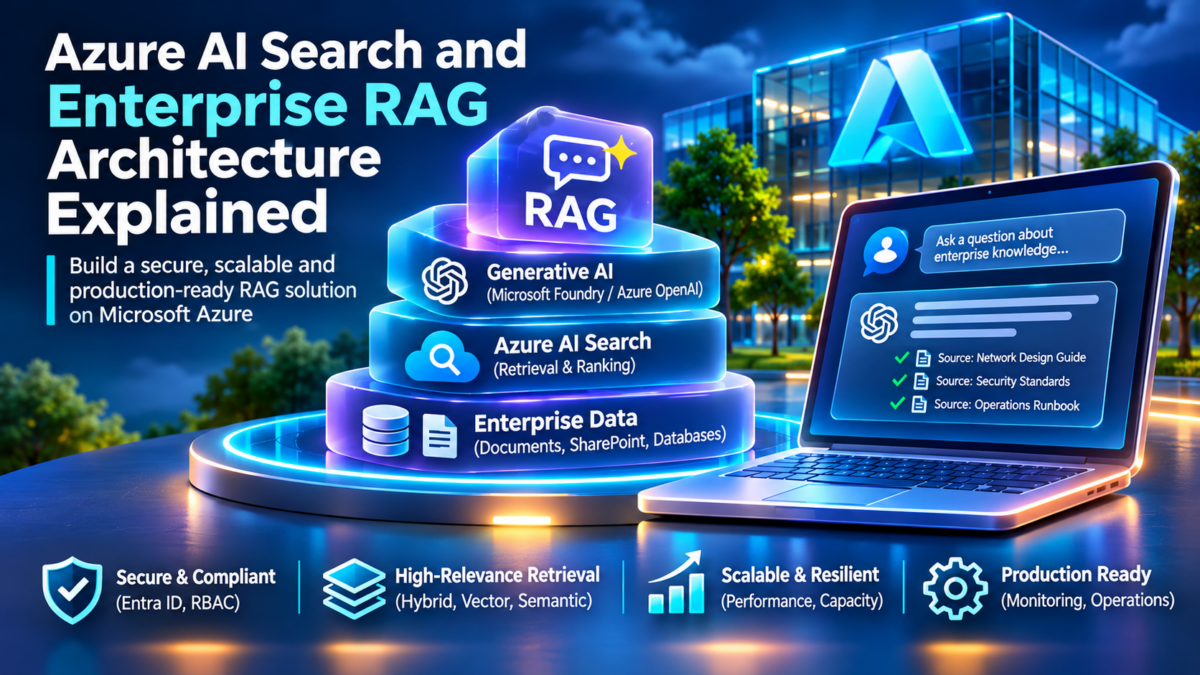
Azure AI Search &
Enterprise RAG Architecture
Enterprise generative AI applications must do more than generate fluent responses. They need to retrieve relevant organizational information, enforce authorization boundaries, construct reliable model context and return answers grounded in trustworthy sources. Azure AI Search provides enterprise retrieval capabilities, while Microsoft Foundry and Azure OpenAI support model integration, orchestration and grounded generation. Together, these technologies can form the foundation of a production Retrieval-Augmented Generation architecture.
Interactive Enterprise RAG Architecture
CONCEPTUAL ENGINEERING MODELEnd-to-End Enterprise RAG
A user submits a question. The orchestration layer retrieves relevant enterprise content through Azure AI Search, assembles grounded context, invokes a model endpoint and returns a response with supporting source references.
Select another scenario to investigate individual retrieval and security mechanisms.
Architecture Engineering
Enterprise RAG combines retrieval, authorization, ranking, model inference and observability. Production correctness depends on the interaction of these components rather than model quality alone.
Why Enterprise RAG Architecture Matters
Large language models learn statistical patterns during training, but they do not automatically possess current access to an organization's private documents, operational knowledge, technical procedures or changing business information. Fine-tuning can alter model behaviour, but it is not a general replacement for retrieving fresh, authorized enterprise evidence.
Retrieval-Augmented Generation (RAG) addresses this challenge by retrieving relevant information at query time and supplying selected passages to a language model as grounding context. This separates the retrieval of organizational knowledge from the model's generation process. It can improve factual grounding, support source citations and allow enterprise knowledge to be updated without retraining the underlying model.
A production RAG system is not simply a vector database connected to a chatbot. It is a distributed application architecture involving document ingestion, text extraction, chunking, embedding generation, search indexing, lexical and vector retrieval, ranking, identity propagation, model inference, observability and evaluation.
Enterprise Knowledge Plane
Enterprise documents are discovered, parsed, normalized, chunked and indexed. Metadata, document identifiers, freshness information and access-control attributes must be preserved throughout ingestion.
Retrieval and Ranking Plane
Azure AI Search supports keyword, vector and hybrid retrieval. Reciprocal rank fusion and semantic ranking can improve the relevance of candidate documents before grounding context is assembled.
Generation and Trust Plane
The orchestration layer selects authorized evidence, constructs model prompts, invokes inference endpoints and returns answers with source references, safety controls and operational telemetry.
Azure AI Search as the Enterprise Retrieval Layer
Azure AI Search is a managed search platform that provides indexing and retrieval capabilities across structured and unstructured information. For RAG architectures, its key capabilities include full-text search, vector search, hybrid queries, semantic ranking, filtering and integration with document ingestion and enrichment workflows.
In a hybrid retrieval workflow, a query can generate both lexical and vector search results. Azure AI Search can combine ranked lists using reciprocal rank fusion (RRF). An optional semantic ranker can then rerank eligible candidate results to improve relevance. The application selects the resulting passages for inclusion in the model's context.
Retrieval quality depends on many design choices: document chunk boundaries, embedding models, index schema, metadata filters, vector dimensions, search parameters, semantic configuration and query formulation. These choices influence relevance, latency, operating cost and the quality of generated responses.
Microsoft Foundry, Azure OpenAI and Grounded Generation
Microsoft Foundry provides capabilities for building and operating AI applications and integrating supported models and services. Azure OpenAI deployments can supply language models and embedding models used by RAG applications, depending on the selected architecture.
The orchestration layer connects retrieval and generation. It manages the user query, applies authorization rules, retrieves relevant evidence, constructs a bounded prompt context, invokes the selected model and returns the generated answer.
Grounding is not a guarantee of factual correctness. Retrieved passages may be irrelevant, outdated, contradictory or malicious. Production systems therefore need source validation, retrieval evaluation, prompt-injection defenses, citation verification and appropriate monitoring.
Security, Private Networking and Production Operations
Enterprise RAG systems often process sensitive organizational information. Security must be designed across the entire request path, including application authentication, search authorization, storage permissions, model access, network isolation and observability.
Microsoft Entra ID, managed identities, role-based access control and Azure Private Link can support secure service connectivity. However, network isolation and service-level authorization do not automatically enforce per-document user permissions. Document-level authorization must be implemented using supported permission-aware retrieval capabilities or correctly applied security filters.
Operationally, engineers must also investigate indexing failures, missing search results, stale embeddings, poor chunk selection, high query latency, token consumption, model throttling and unexpected retrieval behaviour. These failure modes make observability and structured troubleshooting essential parts of the architecture.
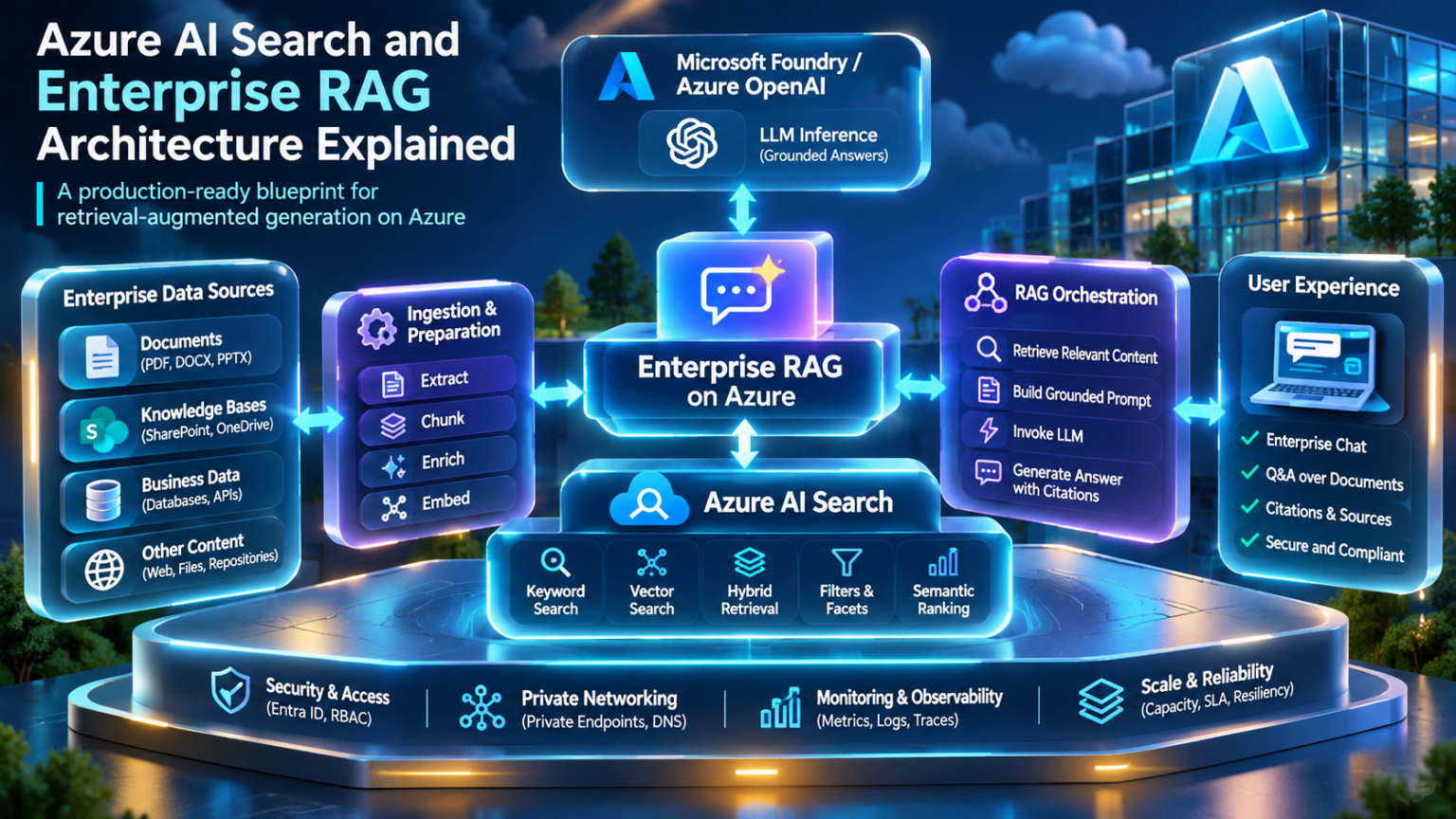
Explore the Enterprise RAG Architecture
Nine connected engineering domains, from enterprise knowledge ingestion and Azure AI Search indexing to secure model inference, performance engineering and production operations. Select any section to explore its role in the architecture.
Understand the end-to-end architecture connecting enterprise knowledge, Azure AI Search, retrieval and grounded generation.
Enterprise RAG Architecture Fundamentals
Retrieval-Augmented Generation (RAG) is an application architecture that combines information retrieval with generative AI. Rather than relying exclusively on information represented in a language model's parameters, the application retrieves relevant external knowledge and supplies selected evidence to the model during inference.
In enterprise environments, this approach enables generative AI applications to work with internal documentation, technical procedures, operational records, policies and other organizational knowledge. However, successful enterprise RAG requires much more than embedding documents into a vector index.
A production architecture must coordinate knowledge ingestion, indexing, retrieval, ranking, authorization, context assembly, model inference, citation handling and observability. Each component introduces independent design decisions and potential failure modes.
1.1 — The Three Architectural Planes
Enterprise RAG can be understood through three logical planes. These planes represent functional responsibilities rather than mandatory separately deployed services.
Knowledge and Ingestion Plane
Connects to enterprise data sources, extracts content, creates document chunks, generates embeddings, maintains metadata and updates the search index.
Retrieval and Orchestration Plane
Processes user queries, enforces retrieval authorization, performs lexical or vector search, ranks results and assembles bounded grounding context.
Generation and Trust Plane
Invokes the language model, produces answers, handles citations, applies application safety controls and records operational telemetry for evaluation.
1.2 — Interactive Enterprise RAG Request Lifecycle
Select each stage to inspect how an enterprise question travels through retrieval and generation. The diagram models logical application processing, not a prescribed Azure resource deployment.
RAG Request Lifecycle Explorer
6 LOGICAL STAGESStage 1 — Query Processing
The application receives a user question and establishes request context. Query normalization, conversation history handling and input validation may occur before retrieval.
Important architectural distinction: Authorization is shown as one stage for teaching purposes, but production systems must preserve authorization across retrieval, context assembly and response handling. Ranking and retrieval may also occur inside the same Azure AI Search query operation.
1.3 — Retrieval Is Not Generation
A foundational RAG design principle is the separation of retrieval from generation. Retrieval determines which evidence is relevant and authorized. Generation transforms selected evidence into a natural-language answer.
Azure AI Search
Maintains searchable indexes, evaluates keyword and vector queries, applies supported filters, combines ranked results and optionally performs semantic reranking.
Language Model Endpoint
Processes instructions and retrieved context to generate an answer. The model does not automatically verify source truth, authorization or citation accuracy.
This separation allows organizations to update their searchable knowledge without retraining the language model. However, new documents must still be processed and indexed, and retrieval quality must be evaluated independently of answer quality.
1.4 — Enterprise Knowledge Ingestion
The RAG lifecycle begins before a user submits a question. Enterprise documents must first become searchable knowledge.
Chunking is particularly important because search systems frequently retrieve passages rather than entire documents. Chunk size, overlap, semantic boundaries and metadata preservation influence the relevance and completeness of retrieved evidence.
Embeddings convert supported text inputs into numerical vector representations. Documents and queries must use compatible embedding configurations. Vector similarity can then identify semantically related passages even when the query and document do not share identical terminology.
1.5 — Query-Time Processing
When a user asks a question, the application may normalize the query, apply authorization context and create a vector representation. Azure AI Search can execute lexical, vector or hybrid retrieval depending on the query and index configuration.
| Processing stage | Engineering responsibility | Typical failure |
|---|---|---|
| Query preparation | Normalize user intent and prepare retrieval inputs. | Ambiguous or poorly formulated queries. |
| Authorization | Restrict retrieval to documents the user may access. | Missing or incorrectly applied permission filters. |
| Retrieval | Find candidate documents using text and vector search. | Relevant documents missing from results. |
| Ranking | Prioritize the most relevant candidate passages. | Low-quality passages selected for grounding. |
| Context assembly | Construct a bounded evidence set for the model. | Truncation or excessive irrelevant context. |
| Generation | Produce a response based on instructions and evidence. | Unsupported claims or ignored evidence. |
| Validation | Check citations, policy requirements and output quality. | Incorrect citations or unsafe disclosures. |
1.6 — Grounding and Context Engineering
Grounding context is the set of retrieved passages supplied to a language model to support its answer. Effective context engineering involves selecting relevant evidence, preserving source identifiers, controlling token consumption and separating retrieved content from trusted application instructions.
Retrieved content should be treated as untrusted data, even when it originates from an internal repository. A malicious or compromised document may contain instructions intended to manipulate model behaviour. Application controls must prevent retrieved text from overriding higher-trust instructions or authorization rules.
1.7 — Production Architecture Decisions
The following decisions strongly influence the reliability and maintainability of an enterprise RAG platform.
01 — Should we use keyword, vector or hybrid retrieval?
Keyword retrieval is useful for exact names, identifiers and terminology. Vector retrieval helps find semantically related passages. Hybrid retrieval combines both approaches and is often a strong starting point for enterprise knowledge search, subject to workload-specific evaluation.
02 — How should we handle document permissions?
Preserve authorization metadata during ingestion and enforce permissions at query time using supported permission-aware retrieval capabilities or validated security filters. Service RBAC alone does not automatically implement per-document user authorization.
03 — How large should document chunks be?
There is no universal optimal chunk size. Engineers should evaluate semantic boundaries, document structure, embedding behaviour, retrieval recall, context-window consumption and answer quality using representative enterprise questions.
04 — Where should orchestration run?
Orchestration may run in application services, supported managed AI workflows or other enterprise platforms. The choice depends on required control, networking, identity, observability, deployment constraints and operational ownership.
05 — How do we measure RAG quality?
Evaluate retrieval relevance, recall against known evidence, groundedness, citation correctness, answer usefulness, latency, failure rates and operational cost. Use representative datasets and human review where appropriate.
1.8 — Common Enterprise RAG Failure Modes
Missing Evidence
The document exists but was not indexed, has stale content, is filtered out or ranks below the retrieval cutoff.
Incorrect Grounding
Retrieval returns weak or conflicting passages, causing the model to produce an unsupported or misleading answer.
Authorization Leakage
Incorrect identity propagation or document filters expose content outside the requesting user's permissions.
Engineering takeaway: Enterprise RAG is a distributed information retrieval and inference architecture. Its reliability depends on the quality of the complete pipeline, not simply the capabilities of the selected language model.
Enterprise RAG Architecture Explorer
Explore how enterprise applications retrieve authorized knowledge from Azure AI Search and use Microsoft Foundry or Azure OpenAI model deployments to construct grounded responses. Investigate the retrieval data plane, authorization boundaries, model inference and operational failure scenarios.
Interactive Azure Enterprise RAG LaboratoryEnterprise RAG request architecture
Selected architecture component
Request telemetry
Retrieved enterprise knowledge
Synthetic documents demonstrate retrieval relevance and document-level access filtering. Scores are illustrative, not Azure AI Search scoring outputs.
Grounded answer and citations
Engineering trace console
Azure AI Search Architecture and Index Design
Azure AI Search is a managed information retrieval service that enables applications to index, search and rank enterprise content. In a Retrieval-Augmented Generation architecture, it provides the retrieval foundation that connects organizational knowledge to generative AI applications.
Designing an Azure AI Search deployment requires understanding more than search queries. Engineers must define index schemas, field attributes, text analyzers, vector configurations, semantic ranking settings, data ingestion workflows, partitions, replicas and capacity limits. These decisions affect retrieval quality, performance, operational cost and reliability.
2.1 — Azure AI Search Service Architecture
An Azure AI Search service hosts one or more search indexes and exposes APIs for document indexing, query execution and management. Each index defines a schema describing how documents are represented and which operations can be performed on their fields.
Search services use partitions to distribute index storage and processing resources, while replicas provide additional copies of search processing capacity for query throughput and availability. Actual scaling limits and service capabilities depend on the selected pricing tier, region and service characteristics.
Search Service
The managed Azure resource containing indexes, search infrastructure, query endpoints, authentication configuration and operational capacity.
Search Index
A collection of searchable documents with a defined field schema, including text, metadata, filterable attributes and optional vector fields.
Query Engine
Executes full-text, vector and hybrid queries, applies filters and ranking mechanisms, and returns selected document fields to the application.
2.2 — Interactive Azure AI Search Architecture
Explore the logical processing stages involved in transforming enterprise documents into searchable indexes and executing retrieval queries. Select a component to highlight its architectural role.
Search Service Architecture Explorer
LOGICAL SERVICE MODELDocument Ingestion Architecture
Documents are extracted and transformed into searchable index records. Depending on the architecture, this may use Azure AI Search indexers, skillsets, integrated vectorization or external ingestion code.
Architecture note: The diagram is conceptual. The search index is not a separate external service from Azure AI Search, and RRF or semantic ranking are query processing capabilities rather than necessarily independent deployed systems.
2.3 — Search Index Schema Engineering
A search index defines the structure of searchable documents. Each field has a data type and supported attributes that control whether it can be searched, filtered, sorted, faceted or returned.
A typical enterprise RAG index contains a document identifier, content text, title, source URI, chunk identifier, access-control metadata and an optional embedding vector.
Interactive Index Field Inspector
Select a field to inspect its role in the enterprise RAG schema.
Document Key
The key field uniquely identifies each search document. It is required and commonly uses an Edm.String value. For chunked documents, each chunk should have its own unique key.
Typical attributes: key=true, searchable=false.
2.4 — Example Enterprise RAG Index Schema
The following is a simplified illustrative index definition. It demonstrates text fields, metadata, vector configuration and an HNSW vector search profile. The embedding dimensions must match the selected embedding model's configured output.
The schema is an educational example, not a complete production deployment. Actual implementations should specify an appropriate supported API version, validate field attributes, define semantic configuration where required, and implement secure indexing and permission handling.
2.5 — Text Indexing, Analyzers and Inverted Indexes
Full-text retrieval relies on text analysis and indexing structures that map terms to documents. An analyzer may tokenize text, normalize case, apply language-specific processing and produce tokens for indexing or querying.
Analyzers
Determine how searchable text is tokenized and normalized. Analyzer selection affects matching behaviour, especially for languages, identifiers and specialized terminology.
Inverted Index
Maps indexed terms to matching documents. This supports efficient lexical retrieval and relevance scoring such as BM25.
Engineers should consider how technical identifiers, product names, error codes and domain-specific terminology are tokenized. Inappropriate analysis can reduce retrieval precision even when the source document exists in the index.
2.6 — Vector Index Architecture and HNSW
Vector search represents content as numerical embeddings. Azure AI Search supports vector fields with configured dimensions and vector search profiles. Approximate nearest-neighbour search can use Hierarchical Navigable Small World (HNSW) graph structures to find similar vectors efficiently.
HNSW trades additional index resources and approximation behaviour for efficient nearest-neighbour retrieval. Relevant design parameters include graph connectivity, construction effort, search effort and vector compression options where supported.
Dimensions
Must match the embedding output used by the application and the index field configuration.
Similarity Metric
Determines how vector proximity is measured. The metric should align with embedding model recommendations.
Search Effort
Influences retrieval recall, latency and resource use. Evaluate against representative production queries.
2.7 — Semantic Configuration and Hybrid Retrieval
Azure AI Search supports hybrid queries that combine text and vector retrieval. Ranked result lists can be merged using reciprocal rank fusion. Optional semantic ranking can then rerank eligible candidate results based on semantic relevance.
A semantic configuration identifies fields used for semantic processing, including prioritized title, content and keyword fields. The selected fields and their content quality affect semantic ranking effectiveness.
2.8 — Replicas, Partitions and Search Units
Azure AI Search capacity is provisioned through combinations of replicas and partitions. A search unit is a capacity accounting unit based on one replica-partition combination.
Increasing replicas generally provides additional query-serving capacity and supports availability objectives. Increasing partitions distributes storage and indexing resources. The effects on latency and throughput depend on workload characteristics, tier limits and index configuration.
Capacity model: This explorer calculates the logical search-unit count only. It does not estimate actual storage, throughput, cost or availability guarantees. Not all combinations are supported in every tier or region.
2.9 — Indexing Strategies and Operational Design
Enterprise search indexes must remain synchronized with changing source data. Common approaches include scheduled indexers, change-detection mechanisms, application-managed push indexing and event-driven ingestion pipelines.
Production systems should address document deletion, incremental updates, embedding model changes, schema evolution, failed indexing operations and reindexing strategies.
01 — Why is a document missing from search results?
Investigate source ingestion, indexer execution, document keys, indexing errors, searchable field configuration, filters, query analysis and ranking cutoffs. Confirm that the document actually exists in the expected index.
02 — Why is vector retrieval returning poor matches?
Verify embedding model compatibility, dimensions, query preprocessing, vector profile configuration, similarity metric, chunk quality and retrieval parameters. Evaluate relevance using representative queries.
03 — When should replicas be increased?
Consider additional replicas when measured query throughput, latency or availability requirements justify scaling. Benchmark realistic workloads rather than assuming linear performance improvement.
04 — When should partitions be increased?
Evaluate partition scaling when index storage, vector index size, ingestion demand or other partition constraints require additional capacity. Check the supported limits of the selected service tier.
05 — How should index schema changes be deployed?
Some index changes require rebuilding or creating a new index. Production migrations can use versioned indexes, controlled ingestion and index aliases where supported, allowing applications to transition with reduced disruption.
2.10 — Production Index Design Principles
Design for Retrieval Quality
Evaluate index schemas, analyzers, chunking and vector configurations against actual enterprise search questions and expected evidence.
Preserve Security Metadata
Maintain document identifiers, ownership and authorization attributes so retrieval can enforce appropriate access rules.
Plan for Index Evolution
Support reindexing, embedding changes, schema migrations, monitoring and controlled production rollout.
Engineering takeaway: Azure AI Search index design determines how enterprise knowledge becomes retrievable. Index schemas, analyzers, vector profiles, ranking configuration and capacity planning must be designed together to support reliable, secure and performant enterprise RAG.
Azure AI Search Index Designer
Design a conceptual Azure AI Search index for enterprise retrieval-augmented generation. Configure fields, vector search, partitions and replicas, then validate the design and inspect a generated index definition.
Interactive Search Architecture Laboratory1. Search service configuration
2. Index field schema
Configure searchable content, filterable metadata, vector fields and source identifiers.
| Field | Type | Searchable | Filterable | Retrievable | Action |
|---|
3. Search service architecture
Partitions divide indexed data. Replicas provide additional copies for query availability and throughput. Actual placement and limits depend on the service tier and supported configuration.
4. Capacity planning
5. Index definition preview
6. Engineering validation
Engineering trace console
Embeddings, Vector Search and Similarity Algorithms
Vector search enables enterprise retrieval systems to identify semantically related information using numerical representations of text, images or other supported content. In Azure AI Search, vector fields and configured search algorithms provide a foundation for semantic retrieval in Retrieval-Augmented Generation systems.
Understanding vector retrieval requires knowledge of embedding generation, vector dimensions, similarity metrics, approximate nearest-neighbour algorithms, HNSW graph structures, index compression and retrieval tuning. These concepts determine how efficiently and accurately relevant enterprise evidence can be discovered.
3.1 — What Is an Embedding?
An embedding is a numerical vector produced by a machine learning model. Embedding models transform supported inputs into representations designed to capture useful relationships between inputs.
For example, the phrases "GPU interconnect performance" and "accelerator communication bandwidth" may produce vectors that are relatively close in a suitable embedding space, even though they use different words.
Embedding similarity is learned from model training and is not a guarantee of semantic equivalence. Domain-specific terminology, abbreviations and technical identifiers may still require lexical retrieval or specialized evaluation.
3.2 — Interactive Vector Similarity Explorer
The following visualization uses a simplified two-dimensional vector space to demonstrate how similarity metrics compare query vectors with candidate document vectors. Production embeddings operate in much higher-dimensional spaces.
Vector Space and Similarity Explorer
ILLUSTRATIVE 2D MODELCosine Similarity
Cosine similarity compares vector orientation rather than magnitude. It is commonly used to evaluate similarity between embedding vectors, subject to model and index configuration.
Model limitation: This visualization demonstrates mathematical relationships using fixed 2D vectors. The metric values are calculated from the displayed coordinates, not generated by an embedding model. Real Azure AI Search scores may use metric-specific transformations and should not be interpreted as raw cosine similarity without checking the relevant API semantics.
3.3 — Cosine Similarity
Cosine similarity measures the cosine of the angle between two nonzero vectors. It is calculated as the dot product divided by the product of their magnitudes.
Cosine similarity is useful when vector direction carries more meaning than magnitude. For nonzero vectors that have been normalized to unit length, cosine similarity and dot product produce the same numerical value.
3.4 — Dot Product and Euclidean Distance
Dot Product
Multiplies corresponding vector components and sums the results. Unlike cosine similarity, the unnormalized dot product is influenced by vector magnitude.
Euclidean Distance
Measures straight-line distance between two vectors. Smaller distances indicate greater geometric proximity.
The relationship between metrics depends on vector normalization. Engineers should select similarity configurations that match the recommendations of their embedding model and the capabilities of the chosen vector index.
3.5 — Exact KNN vs Approximate Nearest Neighbours
Exact nearest-neighbour search evaluates vector similarity against the relevant candidate set to identify the closest matches. It can provide exact results under the chosen metric but may become computationally expensive as vector collections grow.
Approximate nearest-neighbour (ANN) algorithms use indexing structures and search heuristics to reduce the amount of work needed to identify likely nearest neighbours. This improves scalability while introducing a potential trade-off between search latency and recall.
| Property | Exact KNN | Approximate NN |
|---|---|---|
| Search method | Evaluates the candidate vector set exhaustively. | Uses an index or search heuristic to reduce comparisons. |
| Accuracy | Exact under the chosen metric and candidate set. | May omit some true nearest neighbours. |
| Latency | Can be expensive for large collections. | Often more efficient at scale. |
| Engineering trade-off | Compute and query cost. | Recall, index resources and search effort. |
3.6 — HNSW Graph Architecture
Hierarchical Navigable Small World (HNSW) is an approximate nearest-neighbour algorithm based on a multi-layer graph. Each indexed vector is represented as a graph node connected to selected neighbouring nodes.
Upper graph layers contain fewer nodes and provide longer-range navigation. Lower layers contain more nodes and support increasingly fine-grained nearest-neighbour exploration.
HNSW search typically begins at an entry point in an upper layer and progressively navigates toward nodes closer to the query vector. At lower layers, candidate exploration helps identify likely nearest neighbours.
m
Influences graph connectivity during index construction. Higher connectivity can increase memory and construction cost.
efConstruction
Controls candidate exploration during graph construction, influencing index build effort and graph quality.
efSearch
Influences search-time candidate exploration where configurable. Higher effort can improve recall at additional query cost.
3.7 — Azure AI Search Vector Profiles
Azure AI Search vector search configuration associates vector fields with vector search profiles. Profiles reference algorithms and may also reference supported vectorization or compression configurations.
HNSW and exhaustive KNN are supported vector search algorithm approaches, with configuration and availability depending on the applicable API version and service capabilities.
3.8 — Vector Compression and Memory Engineering
High-dimensional embeddings consume storage and memory resources. A simple uncompressed float32 vector requires approximately four bytes per dimension before accounting for index overhead, metadata and other storage structures.
Azure AI Search supports vector compression capabilities in applicable configurations. Compression can reduce vector resource consumption but may affect retrieval accuracy. Rescoring or oversampling capabilities may help mitigate some accuracy loss where supported.
3.9 — Filtering and Vector Retrieval
Enterprise vector queries frequently require metadata filtering. Examples include restricting results to a tenant, department, document classification or authorized group.
The interaction between filters and approximate vector retrieval matters. Filter placement and supported filtering modes can influence recall, latency and candidate selection.
Security consideration: Filtering is not automatically equivalent to secure authorization. Permission constraints must be derived from trusted identity information, applied consistently and validated against unauthorized retrieval scenarios.
3.10 — Production Vector Search Troubleshooting
01 — Why are semantically relevant documents missing?
Investigate embedding compatibility, chunking quality, query preprocessing, index freshness, retrieval k, filtering behaviour, approximate search recall and the selected similarity metric.
02 — Why did vector search latency increase?
Examine query concurrency, index size, graph configuration, search effort, filter selectivity, partition capacity and service resource utilization.
03 — Why do similarity scores appear unexpected?
Confirm the configured metric, vector normalization, embedding model behaviour and Azure AI Search score transformations. Do not assume that reported scores are raw cosine values.
04 — When should exhaustive KNN be considered?
Exact search can be useful for evaluation baselines, smaller candidate sets or scenarios where approximate recall needs to be measured against exact results. Benchmark cost and latency.
05 — How should vector compression be evaluated?
Compare storage savings, query latency, retrieval recall, ranking quality and downstream answer quality using representative enterprise workloads.
3.11 — Engineering Design Principles
Align Embedding Models
Use compatible document and query embedding configurations, including dimensions and preprocessing behaviour.
Measure Retrieval Recall
Evaluate approximate search against known relevant documents and exact-search baselines where appropriate.
Optimize the Full Pipeline
Balance vector index efficiency, retrieval quality, context selection and final generated answer usefulness.
Engineering takeaway: Vector search transforms semantic relationships into a searchable numerical space. Production performance depends on embedding quality, similarity configuration, indexing algorithms, filtering, capacity and rigorous retrieval evaluation—not simply vector database selection.
Vector Similarity and HNSW Explorer
Investigate how embedding vectors are compared and how approximate nearest-neighbour search explores a graph rather than exhaustively scoring every vector. Move the query point, select a similarity metric, and compare exact search with a conceptual HNSW traversal.
Interactive Vector Search LaboratoryEmbedding vector space
Blue nodes represent synthetic document embeddings. Green nodes have been visited by the graph search. Gold nodes are selected results. The red point represents the query embedding.
Search telemetry
Nearest-neighbour results
Engineering trace console
Hybrid Search and Semantic Ranking
Enterprise search queries frequently combine exact technical terminology with broader semantic intent. Hybrid retrieval addresses this challenge by combining lexical search with vector similarity search, allowing Azure AI Search to retrieve evidence through complementary ranking mechanisms.
A production retrieval pipeline may use BM25 lexical scoring, vector similarity, reciprocal rank fusion (RRF), semantic reranking and application-side context selection. Each stage influences which documents are ultimately supplied to a generative AI model.
4.1 — Why Hybrid Retrieval Matters
Keyword retrieval excels when exact terms matter. Examples include device names, error codes, product identifiers, protocol names and configuration values. Vector retrieval can identify semantically related passages even when the query and document use different wording.
Neither method is universally superior. A vector model may miss an exact identifier, while lexical retrieval may fail to connect conceptually similar expressions. Hybrid retrieval combines both candidate sets to improve the opportunity to find relevant enterprise evidence.
Lexical Search
Uses analyzed terms and relevance scoring such as BM25 to identify keyword matches.
Vector Search
Uses embedding similarity to identify semantically related documents or passages.
Hybrid Search
Combines lexical and vector ranked result lists using reciprocal rank fusion.
4.2 — Interactive Hybrid Retrieval Architecture
Select a query scenario to compare lexical, vector and fused rankings. The ranking data is illustrative, but the reciprocal rank fusion calculation follows the standard mathematical form.
Hybrid Retrieval and RRF Explorer
INTERACTIVE RANKING MODELBM25 Ranking
Vector Ranking
Fused RRF Ranking
Technical Identifier Query
Exact technical identifiers often benefit from lexical retrieval. Hybrid search retains semantic candidates while allowing exact keyword matches to contribute to the fused ranking.
Model assumptions: The ranking lists are fixed educational examples. The RRF score uses k = 60 and adds reciprocal rank contributions from the two lists. Actual Azure AI Search ranking behaviour may involve additional query branches, weighting and service configuration.
4.3 — BM25 Lexical Ranking
BM25 is a probabilistic information retrieval scoring method that ranks documents using factors such as term frequency, inverse document frequency and document length normalization.
In enterprise search, BM25 is particularly useful for matching explicit terminology. A document containing a rare technical identifier may receive a strong lexical relevance score even when its broader semantic meaning is similar to other documents.
4.4 — Reciprocal Rank Fusion
Reciprocal rank fusion combines multiple ranked result lists using each document's position rather than attempting to directly compare raw scores produced by different retrieval systems.
A document appearing near the top of multiple ranked lists can receive a strong fused score. Documents present in only one list can still contribute to the final candidate set.
4.5 — Semantic Ranking and Reranking
Semantic ranking is a separate relevance-processing stage that can reorder eligible search results using language-model-based semantic analysis.
In Azure AI Search, semantic ranking operates on an eligible candidate set and uses configured semantic fields to evaluate relevance. It does not replace the initial retrieval stage.
Candidate Generation
BM25 and vector retrieval identify potentially relevant documents. Hybrid fusion combines their rankings.
Semantic Reranking
Eligible candidate documents are evaluated using semantic relevance signals to improve ordering before context selection.
Semantic ranking effectiveness depends on the quality and availability of fields used for semantic processing. Poor document extraction, missing content or unsuitable semantic configuration can reduce reranking quality.
4.6 — Query Rewriting and Retrieval Expansion
Query rewriting transforms an original user question into one or more retrieval-oriented queries. This can help resolve ambiguity, expand terminology or improve the likelihood of finding relevant evidence.
Query rewriting may be performed by the application or by supported search capabilities, depending on the architecture and feature configuration. It must be evaluated carefully because excessive rewriting can change user intent or introduce irrelevant terms.
4.7 — Hybrid Search Tuning
Hybrid retrieval introduces several tuning decisions, including lexical query formulation, vector retrieval depth, filtering behaviour, weighting, semantic ranking configuration and the number of passages selected for grounding.
| Parameter | Engineering impact | Risk |
|---|---|---|
| Lexical query | Controls exact-term matching. | Important identifiers may be missed. |
| Vector k | Controls vector candidate count. | Relevant passages may be excluded. |
| Vector weighting | Changes contribution of vector results where supported. | One retrieval branch may dominate. |
| Semantic configuration | Determines fields used for semantic ranking. | Weak or missing fields reduce quality. |
| Metadata filters | Restrict eligible documents. | Incorrect filters remove relevant evidence. |
| Context cutoff | Limits passages sent to the model. | Relevant evidence may be truncated. |
4.8 — Measuring Retrieval Quality
Retrieval quality should be evaluated independently from model answer quality. A strong language model cannot reliably ground its response in evidence that the retrieval pipeline failed to return.
Recall@k
Measures the fraction of relevant documents retrieved within the top k results.
Precision@k
Measures the proportion of retrieved top-k documents that are relevant.
NDCG
Evaluates ranking quality using graded relevance and document positions.
Representative evaluation datasets should include exact identifiers, ambiguous questions, paraphrased requests, multi-document questions, access-restricted content and queries with no valid answer.
4.9 — Production Retrieval Troubleshooting
01 — Why does hybrid search rank the wrong document first?
Inspect lexical and vector result lists independently, compare rank fusion behaviour, review semantic ranking, filters, document content and query formulation.
02 — Why are exact technical identifiers missing?
Examine analyzers, tokenization, searchable fields, query syntax, index freshness and whether lexical retrieval is included.
03 — Why does semantic ranking not improve relevance?
Check semantic configuration, eligible candidate quality, content field completeness, document extraction and evaluation datasets.
04 — Why did retrieval latency increase?
Measure lexical search, vector search, semantic ranking, query rewriting and service resource consumption separately. Additional ranking stages can increase processing cost.
05 — How should retrieval changes be deployed?
Use a fixed evaluation dataset, compare retrieval metrics, measure latency and cost, and roll out configuration changes gradually with monitoring and rollback plans.
4.10 — Production Hybrid Retrieval Principles
Preserve Exact Matching
Technical identifiers and precise terminology often require lexical retrieval alongside semantic search.
Evaluate Every Ranking Stage
Measure lexical, vector, fused and reranked results independently to locate relevance regressions.
Optimize Grounding Quality
The objective is not simply a high search score, but selecting reliable evidence for the final generated answer.
Engineering takeaway: Hybrid retrieval combines complementary lexical and semantic evidence discovery. RRF and optional semantic ranking can improve candidate ordering, but production effectiveness must be verified through retrieval evaluation and grounded answer quality.
Hybrid Retrieval Ranking Simulator
Investigate how enterprise search combines lexical matching and vector similarity, merges result lists using Reciprocal Rank Fusion, and applies a conceptual semantic reranking stage before context is passed to a retrieval-augmented generation system.
Interactive Retrieval Engineering LaboratoryRetrieval and ranking pipeline
Lexical retrieval ranking
Vector retrieval ranking
RRF merged ranking
Final retrieval ranking
Engineering trace console
Enterprise Data Ingestion and Indexing Pipelines
A Retrieval-Augmented Generation system can only retrieve information that has been correctly discovered, processed and indexed. Enterprise data ingestion transforms source documents into structured, searchable knowledge while preserving the metadata required for relevance, freshness, traceability and authorization.
Production ingestion architectures must coordinate data connectors, document parsing, text extraction, chunking, enrichment, embedding generation, index projections, incremental synchronization and failure recovery. These processes determine whether enterprise knowledge is available to the retrieval layer.
5.1 — Enterprise Data Ingestion Architecture
Enterprise knowledge is rarely stored in one consistent format. It may reside in object storage, document repositories, databases, application platforms or internal knowledge systems.
An ingestion pipeline must normalize these sources into records that match the Azure AI Search index schema. Different source types may require different extraction and transformation approaches.
Document Repositories
PDFs, office documents, knowledge articles, manuals and technical procedures.
Structured Systems
Databases, application records, inventories and operational metadata.
Cloud Storage
Azure Blob Storage and other supported repositories used as enterprise content ingestion sources.
5.2 — Interactive Document Ingestion Pipeline
Select each stage to inspect how enterprise content moves from its original source into a searchable index.
Enterprise Ingestion Pipeline Explorer
7 LOGICAL STAGESStage 1 — Enterprise Source Discovery
The ingestion pipeline discovers documents and records from supported repositories. It establishes source identity, access metadata and synchronization requirements.
Architecture note: The pipeline is conceptual. Extraction, enrichment, chunking and vectorization may be implemented through Azure AI Search indexers and skillsets or through external application-managed processing. Not every deployment uses every stage as a separate service.
5.3 — Document Parsing and Text Extraction
Source documents must be transformed into text and metadata suitable for indexing. Extraction quality varies according to document format, structure, encoding and the selected processing technology.
Common challenges include multi-column layouts, tables, scanned pages, embedded images, headers, footers and inconsistent document formatting.
Text-Based Documents
Extract paragraphs, headings, metadata and source references while preserving logical document structure.
Scanned and Complex Documents
May require OCR, layout analysis or document intelligence processing before useful searchable text can be created.
5.4 — Document Chunking Architecture
Chunking divides larger documents into smaller retrieval units. The goal is to create passages that are sufficiently focused for search while retaining enough context to support grounded generation.
Chunk size and overlap influence index size, embedding cost, retrieval relevance and downstream token consumption.
Interactive Document Chunking Explorer
Adjust chunk size and overlap to inspect a simplified fixed-length document segmentation model.
Educational model: a 1,000-token document with fixed token windows. Actual semantic chunking respects content structure and may produce different boundaries.
5.5 — Integrated Vectorization
Azure AI Search supports integrated vectorization workflows in applicable configurations. These can coordinate content processing, embedding generation and indexing through supported skillsets and vectorization integrations.
Alternatively, an external ingestion service can perform chunking and embedding generation before pushing documents into the search index.
The choice depends on supported source types, transformation requirements, operational control, deployment constraints, authentication and cost.
5.6 — Index Projections and Parent-Child Relationships
A single enterprise document may generate multiple searchable chunks. The index must preserve the relationship between each chunk and its original source document.
Useful fields include the parent document identifier, chunk identifier, source URI, document title, version, modification timestamp and authorization metadata.
5.7 — Incremental Indexing and Change Detection
Enterprise documents change continuously. Ingestion systems must detect updates, process modified content, remove deleted records and keep indexed knowledge synchronized with source systems.
| Change event | Required pipeline action | Failure risk |
|---|---|---|
| New document | Extract, chunk, embed and index. | Knowledge unavailable to retrieval. |
| Modified document | Refresh affected chunks and metadata. | Stale evidence returned. |
| Deleted document | Remove or invalidate indexed records. | Deleted content remains searchable. |
| Permission change | Update authorization metadata or permission-aware index state. | Unauthorized content exposure. |
| Embedding model change | Evaluate compatibility and re-embedding requirements. | Inconsistent vector representations. |
5.8 — Security Metadata Preservation
Document authorization is a critical enterprise ingestion requirement. Source permissions must be translated into retrieval-time authorization controls without unintentionally broadening access.
A document may inherit permissions from a repository, folder, tenant, department or group. The ingestion pipeline must preserve sufficient information to enforce the intended access policy during search.
Security principle: A document being indexed does not imply that every application user should be able to retrieve it. Authorization must be enforced using trusted identity context and supported permission-aware retrieval or validated filtering logic.
5.9 — Ingestion Observability and Failure Recovery
Production ingestion systems should record source discovery, extraction outcomes, chunk counts, embedding failures, indexing status, processing latency and synchronization checkpoints.
Retry behaviour must distinguish transient failures from permanently invalid documents. Idempotent processing and stable document identifiers help prevent duplicate records during retries.
01 — Why is a document missing from the index?
Check source connectivity, indexer execution, extraction errors, supported formats, document keys, indexing responses and filters.
02 — Why are document chunks incomplete?
Investigate extraction quality, tokenization, chunk boundaries, source formatting, enrichment failures and index projection configuration.
03 — Why did embedding generation fail?
Examine model endpoint access, authentication, quota limits, input size, supported model configuration and transient service errors.
04 — Why is deleted content still searchable?
Confirm source deletion detection, synchronization scheduling, document identity, index cleanup and retention behaviour.
05 — How should large-scale reindexing be managed?
Consider versioned indexes, controlled backfills, capacity planning, validation datasets, monitoring and safe application cutover.
5.10 — Production Ingestion Design Principles
Preserve Source Fidelity
Maintain document identity, metadata, meaningful structure and traceable source references.
Design for Change
Support incremental updates, deletions, reindexing and embedding model migrations.
Validate Ingestion Quality
Monitor extraction success, chunk completeness, indexing failures and authorization metadata.
Engineering takeaway: Enterprise RAG retrieval quality begins with ingestion quality. A well-designed indexing pipeline preserves content, context, identity and freshness while producing searchable records that support reliable, permission-aware retrieval.
Enterprise Document Ingestion Pipeline Lab
Explore how enterprise content moves through document extraction, chunking, metadata enrichment, embedding generation and Azure AI Search indexing. Configure ingestion behaviour, inject failures and inspect the resulting searchable knowledge records.
Interactive RAG Ingestion Engineering LaboratoryEnterprise ingestion architecture
Source document inventory
Generated document chunks
Engineering trace console
Microsoft Foundry and Azure OpenAI RAG Integration
Enterprise Retrieval-Augmented Generation combines information retrieval with language model inference. Microsoft Foundry and Azure OpenAI model deployments provide model capabilities, while Azure AI Search supplies relevant enterprise evidence that can be incorporated into a grounded generation workflow.
A production RAG application must coordinate user identity, query processing, retrieval, prompt assembly, model invocation, response validation, citations, observability and failure handling. The quality of the final response depends on the entire pipeline, not only the language model.
6.1 — Enterprise RAG Integration Architecture
A typical architecture separates application orchestration from search and inference services. The application receives the user request, establishes authorization context, retrieves relevant evidence and constructs the model input.
Azure AI Search is responsible for searching indexed enterprise content. Model deployments provide embedding generation and language generation, depending on the selected architecture and model capabilities.
Application Orchestration
Coordinates user requests, retrieval, access enforcement, prompt construction and response processing.
Azure AI Search
Retrieves indexed enterprise content through lexical, vector or hybrid search.
Model Inference
Processes instructions, questions and retrieved context to generate a response.
6.2 — Interactive End-to-End RAG Request Lifecycle
Select a processing stage to inspect how a user request becomes a grounded response. The diagram illustrates a common application-managed RAG architecture.
Enterprise RAG Request Flow Explorer
7 PROCESSING STAGESStage 1 — Enterprise User Request
The application receives the user question and establishes the request context required for retrieval and inference.
Architecture note: This diagram represents a logical application-managed RAG workflow. Microsoft Foundry and Azure AI Search also support other integration patterns. Service availability, APIs and deployment options depend on the chosen product configuration and region.
6.3 — Query Processing and Retrieval Orchestration
Before retrieving documents, the application may normalize the question, identify intent, resolve conversational references and construct search queries.
The retrieval request must incorporate trusted authorization context so that the search results do not include information the user is prohibited from accessing.
6.4 — Prompt Construction and Context Assembly
Retrieved documents must be converted into model-readable context. Prompt construction typically combines application instructions, the user question and selected evidence.
The application should preserve source identifiers so that citations can be mapped back to actual retrieved records. It should also handle the possibility that retrieved evidence is incomplete, contradictory or irrelevant.
Interactive RAG Prompt Construction Explorer
Toggle individual prompt components to inspect how retrieval context and response constraints change the model input.
Educational prompt assembly model. This widget does not call a live model endpoint or execute inference.
6.5 — Grounding and Citation Engineering
Grounding supplies retrieved evidence to the language model so that generated answers can be based on enterprise information rather than solely on model parameters.
However, including documents in the prompt does not guarantee factual correctness. The model may still misinterpret evidence, combine incompatible passages or generate unsupported statements.
Evidence Selection
Choose relevant passages while preserving sufficient surrounding context.
Source Attribution
Associate response claims with verified source document identifiers.
Uncertainty Handling
Detect when evidence is missing or insufficient and avoid unsupported certainty.
6.6 — Model Deployment and Inference Configuration
Azure OpenAI and Microsoft Foundry model deployment configurations influence inference latency, throughput, quotas, supported features and operational cost.
Engineers should distinguish between model selection, deployment configuration, endpoint authentication and application-level request orchestration.
| Design area | Engineering consideration | Operational risk |
|---|---|---|
| Model selection | Capability, context limits, quality and supported features. | Model does not meet workload requirements. |
| Deployment capacity | Throughput, concurrency and quota planning. | Throttling or high latency. |
| Authentication | Managed identity or other supported secure credentials. | Unauthorized access or credential exposure. |
| Prompt size | Context window and retrieved evidence budget. | Truncation, cost growth or request failure. |
| Response validation | Schema checks, source verification and policy controls. | Unsupported or malformed output. |
6.7 — Identity, Networking and Security Boundaries
A production RAG application often accesses multiple services, each with its own authentication, authorization and networking requirements.
Managed identities can reduce the need to distribute long-lived application secrets. Private networking can reduce public exposure where supported and correctly configured.
Security boundary: Application authorization, search-service access and source-document permissions are different controls. A workload identity having permission to query an index does not automatically enforce each end user's document access rights.
6.8 — Latency and Token Budget Engineering
RAG response latency includes query processing, embedding generation where required, retrieval, optional semantic ranking, prompt assembly, model inference and response validation.
Large retrieved contexts can increase token usage, processing time and cost. Engineers should balance evidence coverage against the amount of context supplied to the model.
6.9 — Production RAG Integration Troubleshooting
01 — Why is the model generating unsupported answers?
Inspect retrieved evidence, prompt construction, context truncation, source attribution, model behaviour and response validation. Evaluate groundedness using representative tests.
02 — Why are citations incorrect or missing?
Verify source identifiers, chunk-to-document mappings, citation formatting, retrieval metadata and claim-to-evidence alignment.
03 — Why are inference requests being throttled?
Examine deployment quota, concurrency, token consumption, request rates, retry behaviour and supported capacity options.
04 — Why does retrieval work but model inference fail?
Check endpoint configuration, model deployment identifiers, authentication, networking, request schema, quota and service diagnostics.
05 — How should RAG incidents be traced?
Correlate request identifiers across application logs, search requests, model calls and validation stages. Record useful telemetry without exposing sensitive prompts or source content.
6.10 — Production RAG Integration Principles
Separate Responsibilities
Keep orchestration, retrieval, model inference and authorization boundaries explicit.
Validate Evidence
Evaluate retrieval quality, grounding, citation accuracy and unsupported response behaviour.
Engineer for Operations
Monitor latency, quotas, failures, token usage, model behaviour and service dependencies.
Engineering takeaway: Enterprise RAG integration is an orchestration problem as much as a model problem. Reliable systems combine permission-aware retrieval, carefully assembled evidence, secure model access, source verification and end-to-end observability.
End-to-End RAG Request Flow Simulator
Trace a complete enterprise RAG request through application orchestration, Azure AI Search retrieval, context construction, Microsoft Foundry or Azure OpenAI inference, and grounded answer delivery. Explore how retrieval depth, prompt budgets and model failures affect the resulting response.
Interactive Foundry and Azure OpenAI RAG LaboratoryEnterprise RAG execution architecture
Constructed model prompt
Retrieved knowledge context
No retrieved sources yet.
Generated response and citations
Engineering trace console
Enterprise RAG Security and Private Networking
Enterprise Retrieval-Augmented Generation introduces security boundaries between users, applications, search services, model endpoints and enterprise knowledge repositories. A secure architecture must prevent unauthorized retrieval, protect sensitive data and ensure that retrieved content cannot override trusted application instructions.
Production security requires Microsoft Entra ID, workload identities, role-based access control, private networking, document-level authorization, tenant isolation, secure ingestion, prompt injection defenses and operational auditing. These controls must work together across the entire RAG lifecycle.
7.1 — Zero-Trust Enterprise RAG Architecture
Zero-trust design assumes that network location alone does not establish trust. Every request must be evaluated according to identity, authorization, resource sensitivity and application policy.
A RAG application must distinguish between the identity of the end user and the identity of the application workload. These identities serve different purposes and may have different permissions.
User Identity
Authenticates the person requesting enterprise information and establishes their authorization context.
Workload Identity
Authorizes the application to access search services, model endpoints and supporting infrastructure.
Document Permissions
Determine which enterprise records the authenticated user may retrieve and use for grounding.
7.2 — Interactive Zero-Trust RAG Security Architecture
Select a security boundary to explore how identity, authorization and private connectivity protect the enterprise RAG pipeline.
Zero-Trust RAG Architecture Explorer
6 SECURITY BOUNDARIESBoundary 1 — User Authentication
Microsoft Entra ID can authenticate enterprise users and provide identity claims that the application validates before making authorization decisions.
Network design note: The diagram represents logical security relationships rather than exact packet paths. Private endpoints are deployed for supported individual services, and private DNS, routing, firewall policies and service configuration must be engineered separately.
7.3 — Microsoft Entra ID and Managed Identities
Microsoft Entra ID provides identity services for users and workloads. Applications can use supported identity flows to authenticate users and obtain authorization information.
Managed identities allow supported Azure workloads to obtain tokens for accessing services without embedding long-lived secrets directly into application code.
7.4 — Azure RBAC and Service Permissions
Azure role-based access control governs access to supported Azure resources and operations. In Azure AI Search, roles can distinguish service administration, index management and search data access.
Production deployments should grant workloads only the permissions necessary for their responsibilities. Ingestion applications and query applications frequently require different access.
Ingestion Workload
Requires appropriate permissions to create or update indexed content, depending on the ingestion architecture.
Query Workload
Requires permission to execute search queries, but should not automatically receive administrative or indexing privileges.
7.5 — Document-Level Authorization
Document-level authorization is essential when a shared enterprise index contains information with different access restrictions.
A search result must not become visible merely because it is relevant to the query. The application must enforce the user's effective permissions using supported permission-aware retrieval or carefully validated security filtering.
Interactive Document Access Decision Simulator
Select a user identity and a document classification to inspect an illustrative access policy. The simulator demonstrates authorization logic rather than making real Azure access decisions.
Illustrative role policy only. Real authorization must evaluate trusted identity, effective permissions, source ACLs and applicable organizational rules.
7.6 — Azure Private Link and Network Isolation
Azure Private Link enables private connectivity to supported Azure services through private endpoints. A private endpoint exposes a service connection through a private IP address within a virtual network.
Private connectivity does not remove the need for authentication or authorization. It also requires correct DNS resolution, routing, network security and service-side public access configuration.
7.7 — Multi-Tenant RAG Isolation
Multi-tenant applications must prevent one tenant from retrieving another tenant's enterprise content. Tenant identity must come from a trusted authentication and authorization process, not from an unverified user-supplied search parameter.
Isolation can be designed through separate services, separate indexes or shared indexes with rigorously enforced tenant-aware filtering, depending on requirements.
| Isolation model | Advantage | Trade-off |
|---|---|---|
| Separate search services | Strong resource separation. | Higher operational and capacity overhead. |
| Separate indexes | Clear logical content boundaries. | Index lifecycle management complexity. |
| Shared index | Potentially efficient resource utilization. | Requires robust tenant filtering and security validation. |
7.8 — Prompt Injection and Untrusted Retrieved Content
Retrieved enterprise documents are data, not trusted application instructions. A malicious or compromised document may contain text designed to redirect the model, disclose information or misuse connected tools.
Prompt injection defenses should include clear trust boundaries, restricted tool permissions, source validation, output controls and application-side enforcement of sensitive actions.
Threat-model principle: Prompt wording alone is not a reliable security boundary. Sensitive operations, document access and tool permissions must be enforced by application controls outside the model.
7.9 — Security Logging and Audit Architecture
Security telemetry should support investigation of unauthorized requests, permission failures, unusual retrieval patterns, authentication problems and suspected data leakage.
Logging design must also protect sensitive content. Raw prompts, retrieved documents and generated responses may contain confidential information and should be retained only according to applicable policies.
Identity Events
Authentication outcomes, workload identity activity and authorization failures.
Retrieval Events
Search request identifiers, permission-filter outcomes and anomalous access patterns.
Model and Tool Events
Model invocation metadata, policy decisions and sensitive tool operations.
7.10 — Production Security Troubleshooting
01 — Why is an authorized user receiving no search results?
Inspect identity claims, group membership, authorization filters, source ACL synchronization, index metadata and retrieval query construction.
02 — Why can the application access Search but the user cannot?
Distinguish workload-level Azure RBAC from end-user document authorization. Confirm both access layers are configured and enforced correctly.
03 — Why does a private endpoint connection fail?
Examine private endpoint approval, private DNS, routing, network security, service configuration, authentication and public access settings.
04 — How should a suspected document data leak be investigated?
Review authenticated identity, effective permissions, retrieval filters, indexed ACL metadata, application logs and response traces. Contain access while preserving relevant audit evidence.
05 — How should prompt injection incidents be handled?
Identify the untrusted source, examine model and tool activity, validate whether any protected action occurred, quarantine malicious content and strengthen application-level controls.
7.11 — Production Zero-Trust RAG Design Principles
Enforce Least Privilege
Separate user permissions, workload identities, service roles and document-level access.
Protect Every Boundary
Combine identity, private networking, authorization and application controls.
Assume Retrieved Data Is Untrusted
Prevent source content from overriding trusted instructions or gaining tool privileges.
Engineering takeaway: Secure enterprise RAG requires more than private endpoints and model authentication. The architecture must enforce trusted identity, least privilege, document-level authorization, tenant boundaries, untrusted-content isolation and auditable security decisions.
Secure Enterprise RAG Architecture Lab
Evaluate how Microsoft Entra ID, managed identities, Azure Private Link, service RBAC and document-level authorization protect enterprise knowledge during retrieval and model inference. Inject failures to identify where trust boundaries must be enforced.
Interactive Enterprise RAG Security LaboratoryEnterprise RAG security architecture
This is a conceptual trust-boundary diagram. Private endpoints restrict supported network paths; they do not replace identity validation, service authorization or document-level access checks.
Security evaluation telemetry
Enterprise document access results
Security investigation console
RAG Performance, Scalability and Cost Optimization
Production Retrieval-Augmented Generation systems must balance response latency, retrieval relevance, inference throughput, infrastructure capacity and operational cost. Optimizing one component does not guarantee better end-to-end performance.
RAG performance engineering requires distributed latency analysis, Azure AI Search capacity planning, vector retrieval optimization, model deployment sizing, token budget management, caching, concurrency control and continuous quality evaluation.
8.1 — Understanding End-to-End RAG Latency
RAG request latency is the combined result of multiple dependent processing stages. In a sequential workflow, each stage contributes to total response time.
Some operations may run in parallel, while others depend on earlier results. Engineers should therefore measure actual request traces rather than assume that all stage durations are simply additive.
8.2 — Interactive RAG Performance Architecture
Select a component to inspect its performance characteristics, capacity constraints and optimization opportunities.
RAG Performance Bottleneck Explorer
6 PERFORMANCE DOMAINSDomain 1 — API Gateway and Request Control
The application gateway manages request admission, authentication, rate limits and routing. Excessive queueing or overloaded application workers can increase latency before retrieval begins.
8.3 — Azure AI Search Replicas and Partitions
Azure AI Search capacity is influenced by the configured number of replicas and partitions, within the limits of the selected service tier.
Replicas provide additional copies of the search service's index data to support availability and query workload distribution. Partitions distribute index storage and processing capacity across the service.
Increasing capacity may improve throughput or storage headroom, but performance effects depend on query complexity, index design, vector workload and service configuration.
Replicas
Primarily used to increase query serving capacity and support availability. Additional replicas do not automatically improve individual query relevance.
Partitions
Increase distributed storage and index capacity. Their performance impact depends on the workload and index distribution.
8.4 — Vector Retrieval Performance
Vector retrieval performance depends on index size, vector dimensions, algorithm configuration, query concurrency and available search capacity.
Approximate nearest neighbor algorithms such as HNSW can reduce the amount of work required to identify relevant candidate vectors, with trade-offs between recall, memory usage, indexing overhead and query latency.
| Parameter | Performance implication | Engineering trade-off |
|---|---|---|
| Vector dimensions | Influence storage and computation. | Model compatibility and retrieval quality. |
| HNSW configuration | Influences graph traversal and index resource usage. | Recall versus latency and memory. |
| Candidate count | Changes retrieval and reranking workload. | Evidence coverage versus processing cost. |
| Metadata filtering | May alter candidate selection and query work. | Authorization and relevance constraints. |
| Concurrent queries | Increases demand on search capacity. | Throughput versus tail latency. |
8.5 — Interactive RAG Latency and Cost Calculator
Adjust the workload parameters to estimate a simplified request latency and model token cost. The calculator uses explicitly illustrative assumptions rather than live Azure pricing or measured service performance.
RAG Performance and Token Economics Model
Estimated Uncached Latency Breakdown
Assumptions: fixed overhead = 170 ms; illustrative input price = $2 per million tokens; output price = $8 per million tokens; cache hits bypass retrieval and inference. These are editable educational assumptions, not current Azure model prices. Search capacity, embedding, networking, storage, monitoring and other charges are excluded.
8.6 — Model Inference Throughput and Concurrency
Model inference is often a major contributor to RAG response latency. Its performance depends on deployment capacity, model characteristics, prompt length, generated output length and concurrent request demand.
Engineers should monitor request rates, token rates, throttling, queueing and latency distributions. A deployment that performs well for one request may behave differently under sustained concurrent load.
Time to First Token
Measures when the user begins receiving streamed model output.
Completion Latency
Measures total time required to generate the response.
Token Throughput
Measures token processing and generation demand against deployment capacity.
8.7 — Token Budget and Context Optimization
Retrieved passages consume model input tokens. Increasing the number of chunks may improve evidence coverage, but can also introduce redundant information, irrelevant context and additional cost.
A production system should select an evidence budget based on retrieval quality, model context limits, expected response requirements and application cost targets.
8.8 — Caching Strategies for Enterprise RAG
Caching can reduce repeated processing, but must be designed carefully when enterprise content is sensitive or frequently updated.
Cache keys and validity rules may need to account for tenant identity, user permissions, source document versions, model configuration and retrieval policy.
| Cache type | Potential benefit | Important risk |
|---|---|---|
| Query embedding cache | Avoid repeated embedding computation. | Model version and query normalization mismatch. |
| Retrieval result cache | Reduce repeated search operations. | Stale documents or outdated permissions. |
| Response cache | Avoid repeated inference. | Cross-user data exposure or outdated answers. |
| Application metadata cache | Reduce repeated metadata lookups. | Incorrect authorization or stale configuration. |
Security requirement: Cached RAG responses must not bypass current authorization. Cache isolation and invalidation are especially important when source permissions or enterprise documents change.
8.9 — Cost Architecture and Capacity Planning
RAG operating cost can include search service capacity, embedding generation, model inference, storage, networking, orchestration, monitoring and data ingestion.
Search service cost and model token cost have different scaling characteristics. A lightly used search service may still incur provisioned capacity charges, while model consumption may vary with request and token volume.
8.10 — Production Performance Troubleshooting
01 — Why is RAG latency increasing?
Compare stage-level traces, query concurrency, search latency, embedding calls, model inference, queueing, retries and downstream service health.
02 — Why is Azure AI Search becoming slow?
Investigate query complexity, vector index configuration, filter behaviour, concurrency, replica and partition capacity, indexing activity and service diagnostics.
03 — Why did model inference cost increase?
Examine request volume, prompt size, retrieved chunk count, conversation history, output length, cache effectiveness and deployment pricing.
04 — Why does scaling replicas not improve response time?
Determine whether the bottleneck is actually search throughput. Individual query complexity, model inference or application processing may dominate latency.
05 — How should capacity be tested?
Use representative queries, realistic index sizes, concurrency profiles, authorization filters and quality evaluation. Measure p50, p95, p99, throughput, failures and operating cost.
8.11 — Production Optimization Principles
Measure Before Scaling
Identify the actual bottleneck using stage-level latency and workload telemetry.
Optimize Evidence
Balance retrieval relevance, context size, grounding quality and token consumption.
Plan for Peak Demand
Size search and inference capacity using realistic concurrency, growth and availability targets.
Engineering takeaway: Enterprise RAG optimization requires a whole-system perspective. Search capacity, retrieval relevance, model throughput, prompt size, caching and security controls must be evaluated together against latency, quality and cost objectives.
RAG Performance and Capacity Planner
Model an enterprise RAG workload across application orchestration, Azure AI Search retrieval and model inference. Explore the relationship between request rates, replica scaling, search units, embedding storage, token throughput and response latency.
Interactive RAG Capacity Engineering LaboratoryEnterprise RAG capacity architecture
Illustrative request latency breakdown
Latency estimates are illustrative and assume simplified utilization-dependent queueing. Actual model inference and search latency must be measured under production-like load.
Capacity utilization
Azure AI Search workload utilization
Model token throughput utilization
Capacity engineering console
Production RAG Troubleshooting and Observability
Enterprise Retrieval-Augmented Generation systems depend on multiple services, data pipelines, search indexes, model deployments and security controls. When a generated answer is incorrect, incomplete or unavailable, the root cause may exist anywhere across this distributed architecture.
Effective troubleshooting requires end-to-end observability, distributed tracing, retrieval evaluation, indexing diagnostics, authorization analysis, grounding validation, model inference telemetry and structured incident response. Engineers must distinguish between failures in retrieving evidence and failures in generating answers from that evidence.
9.1 — Understanding Production RAG Failure Domains
A RAG application can return an incorrect answer even when every underlying service reports a successful request. Search may return irrelevant passages, an index may contain outdated content, or the model may misinterpret valid evidence.
Production monitoring must therefore measure both system health and answer quality. Infrastructure availability alone cannot establish that the RAG application is operating correctly.
Data and Indexing
Missing documents, stale indexes, extraction errors, embedding failures and incorrect chunk metadata.
Retrieval and Security
Poor ranking, incorrect filters, authorization failures and incomplete evidence selection.
Inference and Grounding
Unsupported answers, citation errors, prompt truncation, model failures and excessive latency.
9.2 — Interactive Production RAG Incident Investigation
Select a production incident to inspect the affected architecture component, representative telemetry, likely causes and the recommended investigation path.
RAG Incident Investigation Explorer
INTERACTIVE DIAGNOSTICSMissing Enterprise Document
Diagnostic model: The telemetry and incidents shown above are educational examples. They do not connect to live Azure services. Real investigations require correlated application logs, search diagnostics, identity events and model endpoint telemetry.
9.3 — Distributed Tracing for Enterprise RAG
Distributed tracing links individual operations within a single user request. A trace may include application processing, embedding calls, Azure AI Search queries, model inference and response validation.
Correlation identifiers allow engineers to determine which component contributed to latency, failure or unexpected application behaviour.
9.4 — Troubleshooting Missing Documents
When a user reports that expected information is missing, the investigation should begin by determining whether the source document exists in the index.
If the document is indexed, the next step is to determine whether the retrieval query, metadata filters or ranking configuration excluded it.
Indexing Failure
Check indexer execution, source connectivity, extraction, enrichment, document keys, embedding generation and indexing response status.
Retrieval Exclusion
Confirm that the document is searchable, then inspect query terms, vector candidates, metadata filters, semantic ranking and authorization.
9.5 — Diagnosing Retrieval Relevance Problems
Retrieval relevance problems occur when the search system fails to return the evidence needed to answer the question, or ranks useful evidence below less relevant material.
Engineers should compare lexical retrieval, vector retrieval, fused rankings and optional semantic reranking separately. This helps isolate whether the problem originates from candidate generation or later ranking stages.
| Symptom | Potential cause | Diagnostic action |
|---|---|---|
| Exact identifier missing | Analyzer or lexical query mismatch. | Inspect tokenization and searchable fields. |
| Semantic match missing | Embedding, chunking or vector candidate issue. | Evaluate vector recall and embedding compatibility. |
| Relevant document ranked low | Fusion or reranking behaviour. | Compare intermediate ranking lists. |
| Unexpected result exclusion | Incorrect metadata or security filter. | Inspect trusted filter construction and indexed metadata. |
| Outdated evidence | Index synchronization lag. | Compare source versions and indexing checkpoints. |
9.6 — Hallucination and Grounding Investigations
A hallucination occurs when a generated answer includes unsupported or incorrect information. In RAG systems, this may result from missing evidence, irrelevant retrieval, poor context construction or model behaviour.
Grounding evaluation should determine whether individual claims are supported by the retrieved source material. Citation presence alone does not prove that the cited source supports the associated statement.
9.7 — Retrieval and Answer Quality Evaluation
Production RAG evaluation should use representative questions with known relevant evidence and expected answer characteristics.
Evaluation must distinguish retrieval metrics from answer-level metrics. A search system can achieve strong retrieval scores while the model still produces an unsupported response.
Recall@k
Measures how much relevant evidence is retrieved within the top k results.
NDCG
Evaluates ranked results using graded relevance and position-aware weighting.
Groundedness
Evaluates whether generated claims are supported by the retrieved evidence.
Answer Relevance
Measures how well the response addresses the actual user question.
Citation Accuracy
Checks whether cited sources genuinely support the associated claims.
Latency and Failures
Tracks request latency, throttling, errors and service availability under realistic load.
9.8 — Production Observability Architecture
A production observability strategy should combine metrics, logs, traces and quality evaluation results into a coherent operational view.
Azure Monitor, Application Insights and supported service diagnostics can provide relevant telemetry, depending on the deployed services and configuration. Application-specific retrieval and grounding metrics generally require additional instrumentation.
9.9 — Production Incident Response Methodology
RAG incident response should follow a structured process that identifies the user impact, isolates the failing component and verifies recovery.
| Phase | Engineering action | Expected outcome |
|---|---|---|
| 1. Detect | Identify abnormal telemetry or user-reported quality failures. | Incident confirmed. |
| 2. Scope | Determine affected users, tenants, queries and services. | Impact understood. |
| 3. Isolate | Inspect ingestion, retrieval, authorization and inference independently. | Failure domain identified. |
| 4. Mitigate | Apply safe rollback, reindexing, capacity or policy corrections. | User impact reduced. |
| 5. Validate | Repeat affected queries and quality evaluations. | Recovery demonstrated. |
| 6. Improve | Update monitoring, tests, runbooks and preventive controls. | Recurrence risk reduced. |
9.10 — Advanced Production Troubleshooting Runbooks
Runbook 01 — Search returns zero results
Verify index existence, indexed document count, searchable fields, query syntax, vector configuration, filters, authorization and ingestion status. Compare an authorized known-document query with the failing request.
Runbook 02 — RAG answers contain incorrect citations
Trace the retrieved chunk identifiers, parent document mappings, prompt source references and generated citation claims. Confirm that each cited passage supports its corresponding statement.
Runbook 03 — Model inference becomes slow
Inspect request concurrency, token usage, deployment capacity, throttling, prompt size, generated output length and model endpoint telemetry. Compare time to first token with total completion latency.
Runbook 04 — Users see stale enterprise information
Compare source modification timestamps with indexed document versions. Investigate change detection, indexing schedules, processing failures, cache invalidation and deleted-document handling.
Runbook 05 — Authorized documents disappear
Inspect effective user permissions, identity claims, group membership, document ACL metadata, tenant filters and permission synchronization. Do not bypass authorization controls merely to restore search results.
Runbook 06 — Retrieval relevance degrades after an update
Compare index schema, embedding model versions, chunking strategy, analyzers, vector profiles, hybrid search configuration, semantic ranking settings and evaluation results against the previous known-good deployment.
9.11 — Production Reliability and Continuous Improvement
Reliable enterprise RAG systems require continuous evaluation as source documents, user questions, models and retrieval configurations change.
A mature operating model includes regression testing, controlled deployments, trace-based troubleshooting, relevance evaluation, security validation and periodic capacity review.
Regression Evaluation
Maintain representative retrieval and answer quality test datasets for every major change.
Operational Visibility
Correlate ingestion, retrieval, authorization, model and application telemetry.
Controlled Recovery
Design safe rollback, reindexing, capacity adjustment and incident validation procedures.
Engineering takeaway: Production RAG troubleshooting is not limited to checking whether Azure AI Search or a model endpoint is available. Engineers must trace the entire evidence lifecycle, from source ingestion and authorization through retrieval, grounding, inference and final response validation.
Guide 15 — Editorial Engineering Summary
Across the nine sections of this guide, we have examined the complete enterprise RAG architecture: data ingestion, index design, embeddings, hybrid retrieval, semantic ranking, model integration, private networking, security, performance engineering and production operations.
The central engineering principle is that enterprise RAG quality depends on the entire architecture, not simply the underlying language model. Reliable systems require accurate data, relevant retrieval, enforced authorization, grounded generation and measurable operational performance.
Enterprise RAG Incident Investigation Simulator
Investigate production incidents across the enterprise retrieval pipeline. Inspect distributed traces, service telemetry and logs, execute diagnostic commands, identify the root cause, apply remediation and validate recovery.
Production RAG Troubleshooting LaboratoryActive production incident
Live RAG dependency topology
Red indicates the simulated affected component. Green indicates a remediated component. The topology illustrates dependencies, not exact Azure network or control-plane flows.
Observability investigation
Diagnostic command console
Incident investigation timeline

- Azure Virtual WAN and Secure Hub Architecture Explained - November 19, 2026
- Azure ExpressRoute and Hybrid Cloud Networking Explained - November 19, 2026
- Azure Private Link and Private Endpoint Architecture Explained - November 19, 2026