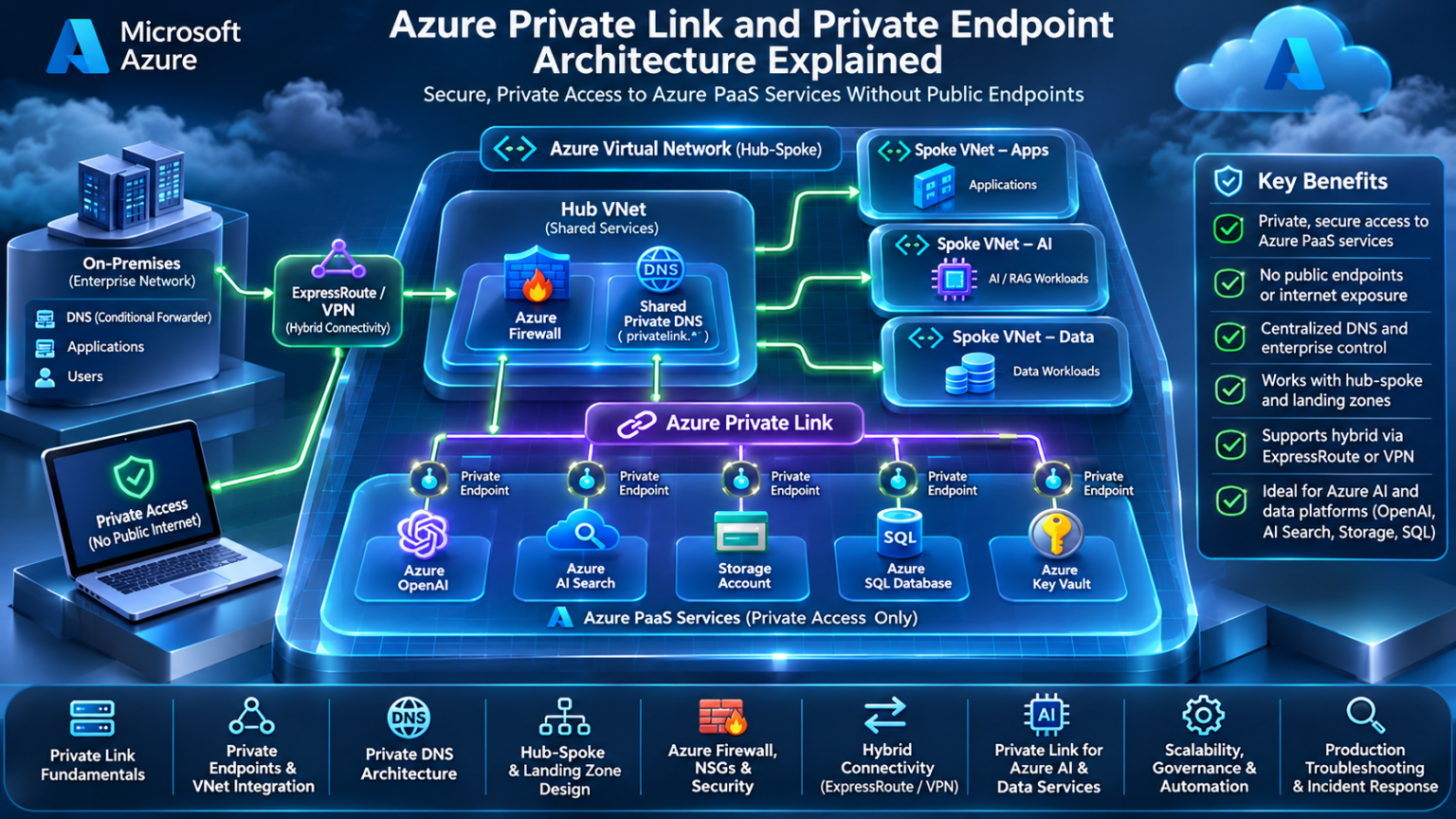
Azure Private Link and Private Endpoint Architecture Explained
Private connectivity is a foundational requirement for modern enterprise cloud architecture. Azure Private Link allows supported services to be accessed through private endpoint IP addresses, while Azure networking, DNS and security controls determine how clients discover and reach those services.
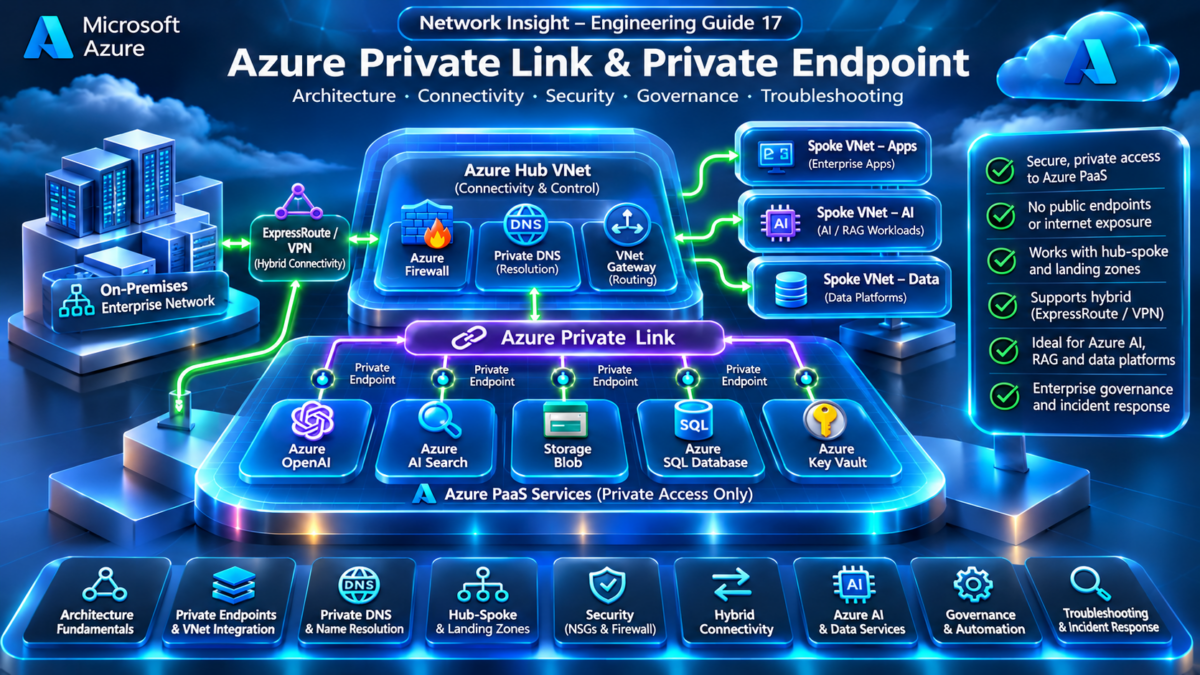
This engineering guide explores the architecture behind Azure Private Link, private endpoints, Private DNS, hub-spoke networks, hybrid connectivity and secure access to Azure AI and data services. It also examines the operational challenges that arise when private connectivity is deployed across complex enterprise environments.
Azure Private Connectivity Architecture Explorer
INTERACTIVE ARCHITECTUREPrivate Endpoint Traffic Flow
A client resolves the service hostname to the private endpoint IP and sends traffic through the VNet routing path. The private endpoint provides private connectivity to the supported Azure service.
Why Azure Private Link Matters
Traditional cloud architectures often rely on public service endpoints, with network access restricted through firewalls, service policies or public IP allowlists. Azure Private Link provides an alternative connectivity model for supported services by exposing a private endpoint within a customer VNet.
Private Service Access
Applications can reach supported Azure services using private endpoint IP addresses instead of connecting to the service's public endpoint.
Enterprise Network Integration
Private endpoints can be reached from connected VNets and on-premises networks when routing, DNS and relevant policies are correctly configured.
Security and Governance
Private connectivity can be combined with service authentication, authorization, firewall policy, DNS governance and public network access restrictions.
The Four Architectural Systems Behind Private Link
A successful Private Link deployment is not simply the creation of a private endpoint. Four systems must work together:
Private Endpoint
A network interface associated with a private IP in the consumer VNet, representing connectivity to a supported service resource or subresource.
DNS Architecture
Resolves the service's normal hostname to the appropriate private endpoint address through the relevant DNS resolution path.
Network Reachability
VNet routing, peering, hybrid gateways and applicable security policies must allow traffic to reach the endpoint IP.
Service Connection and Authorization
The private endpoint connection must be in an appropriate approval state. Service-level authentication and authorization remain necessary; private connectivity does not automatically grant access to the underlying data or application.
Important engineering distinction: Private Link provides a private connectivity mechanism. It does not automatically disable a service's public network access, configure all required DNS records, or replace identity-based authorization. Those controls must be designed and validated separately.
What This Engineering Guide Will Teach
Across nine detailed engineering sections, we will examine the complete Private Link lifecycle: architecture, deployment, DNS, hub-spoke design, security enforcement, hybrid connectivity, Azure AI integration, governance, and production troubleshooting.
The goal is to move beyond basic configuration and understand why a private endpoint works, why it fails, how traffic reaches it, and how to engineer the architecture reliably at enterprise scale.
Explore Azure Private Link Architecture
Navigate nine advanced engineering sections covering private endpoint architecture, DNS, hub-spoke connectivity, security, hybrid networks, AI services, governance and production troubleshooting.
Explore the relationship between Azure VNets, private endpoints, DNS resolution, network security and supported Azure PaaS services.
Understanding the Azure Private Link Service Model
Azure Private Link provides a private connectivity model that allows consumers to access supported Azure services through a private endpoint inside an Azure Virtual Network.
The private endpoint represents a specific service resource or subresource and is assigned a private IP address from the selected subnet. Client applications communicate with this private IP rather than requiring a connection to the service's public endpoint.
Private Link connectivity is built around three primary architectural elements: the service consumer, the private endpoint, and the service provider.
1.1 — Private Link Consumer and Provider Architecture
The consumer is the application or network that requires access to a service. The provider is the Azure PaaS service or privately published service that receives the connection.
For supported Azure PaaS services, Microsoft manages the underlying service-side Private Link integration. For customer-hosted services, an Azure Private Link Service can be used to publish a service through a supported Standard Load Balancer configuration.
Service Consumer
A VM, container, application, connected VNet or hybrid client that needs private service access.
Private Endpoint
A private IP interface in the consumer VNet, associated with a supported target resource or subresource.
Service Provider
A supported Azure service or a privately published customer service exposed through Private Link.
1.2 — Interactive Private Link Connection Lifecycle Explorer
Select each stage to investigate how a private endpoint is created, approved, resolved through DNS, and used for application traffic.
Private Link Connection Lifecycle
ARCHITECTURE EXPLORERStage 1 — Private Endpoint Request
1.3 — Private Endpoint IP Address Allocation
When a private endpoint is deployed, Azure allocates a private IP address from the chosen subnet, or uses a supported static private IP configuration. The endpoint is associated with the selected Private Link resource and its supported subresource or group ID.
Some services require separate private endpoints for different subresources. For example, Azure Storage can expose different private endpoint connections for Blob, File, Queue and Table services.
1.4 — Connection Approval and Authorization
A private endpoint connection has a lifecycle that may include pending, approved, rejected or disconnected states. The exact approval experience depends on the target service, permissions and connection configuration.
When manual approval is required, the service owner must approve the private endpoint connection before it can be used successfully.
Approval establishes the Private Link connection; it does not grant application-level access. Azure RBAC, service authentication, database credentials, managed identities and other relevant authorization mechanisms still apply.
Connection Approval
Controls whether the requested private endpoint connection is accepted by the target service.
Service Authorization
Determines whether the connecting identity is allowed to perform operations against the underlying service.
1.5 — DNS as a Critical Architecture Dependency
Most applications connect to Azure services through DNS hostnames rather than directly referencing IP addresses.
Private Link deployments therefore require a DNS architecture that resolves the intended service hostname to the private endpoint IP. Azure Private DNS zones, DNS zone groups, custom DNS servers and Azure DNS Private Resolver may all participate in the resolution path.
Engineering consideration: DNS resolution is often the first operational dependency to investigate when a newly deployed private endpoint appears unreachable. A healthy private endpoint does not guarantee that every client resolves the service hostname to its private IP address.
1.6 — Private Link Versus VNet Service Endpoints
Azure Private Link and VNet service endpoints are different networking mechanisms. They should not be treated as interchangeable.
| Characteristic | Private Link | VNet Service Endpoint |
|---|---|---|
| Destination addressing | Private endpoint IP in a VNet | Service's public endpoint address |
| DNS requirement | Private endpoint DNS resolution is normally required | Generally uses normal service DNS resolution |
| Service connectivity | Private Link connection to a supported resource | Subnet identity extended to supported Azure services |
| Hybrid private-IP access | Supported through connected network paths and DNS | Does not provide a private endpoint IP for hybrid clients |
| Network security model | Private endpoint connection and applicable service/network controls | Service firewall rules allowing selected VNets/subnets |
1.7 — Private Link Security Boundaries
Private Link reduces the need to access supported services through public endpoint addresses, but it does not automatically establish a complete Zero Trust architecture.
Production deployments should consider public network access settings, service authorization, network segmentation, endpoint approval, DNS governance, logging and endpoint lifecycle management.
Network Reachability
Restrict which connected workloads and networks can reach the private endpoint.
Identity and Access
Enforce service-specific authentication, authorization and least privilege.
Operational Governance
Monitor connection states, DNS changes, endpoint ownership and public access policy.
1.8 — Production Architecture Validation
Before considering a Private Link deployment complete, engineers should validate both control-plane configuration and end-to-end application connectivity.
Section 1 engineering takeaway: Azure Private Link is a combination of service connection state, private IP addressing, DNS resolution, network reachability and service-level authorization. Engineers must validate all five elements rather than assuming that private endpoint creation alone guarantees secure application connectivity.
Azure Private Link Architecture Explorer
Investigate the Azure Private Link architecture from consumer workload to Azure PaaS provider. Configure a private endpoint, inspect DNS and connection approval, and trace whether traffic uses a private endpoint IP or a public service endpoint.
Azure Private Connectivity Engineering LaboratoryAnimated Azure Private Link architecture
Private Link traffic-flow inspection
| Architecture layer | Observed state |
|---|---|
| Run a traffic trace. | |
Azure network diagnostic console
Engineering Private Endpoints Inside Azure Virtual Networks
A private endpoint is deployed into an Azure Virtual Network subnet and receives a private IP address used to access a supported Azure service. Its placement, subnet configuration, routing policies and DNS integration determine how applications reach the service.
Private endpoint design must consider more than the target service. Engineers must account for subnet capacity, network policy support, VNet peering, address allocation, traffic inspection and the operational lifecycle of endpoint resources.
2.1 — Private Endpoint Network Interface Architecture
Azure creates a network interface resource associated with the private endpoint. The interface is assigned a private IP from the selected subnet and is used to represent the endpoint's private connectivity within the consumer VNet.
The interface is managed as part of the private endpoint resource. Engineers should not treat it as a conventional VM NIC or attempt to manage it independently in the same way as a VM interface.
Private Endpoint Resource
Defines the target service connection, subnet association and connection lifecycle.
Managed Network Interface
Holds the endpoint's private IP configuration and represents its VNet attachment.
Target Subresource
Identifies the supported service component, such as an Azure Storage Blob endpoint.
2.2 — Interactive VNet Integration Architecture Explorer
Explore five common deployment conditions: local subnet access, VNet peering, static IP allocation, NSG filtering and custom routing.
Private Endpoint VNet Integration Explorer
NETWORK ENGINEERINGLocal VNet Private Endpoint Access
2.3 — Subnet Design and Address Capacity
Private endpoints consume private IP addresses from the selected subnet. Enterprise designs should therefore reserve sufficient address capacity for expected service growth.
Private endpoints may be placed in dedicated subnets for governance and operational clarity, although a dedicated subnet is not a universal Azure requirement.
2.4 — Dynamic and Static Private IP Allocation
Private endpoints can use dynamically allocated private IP addresses. Supported scenarios also allow static IP configuration when creating a private endpoint.
Static allocation can help with address planning and integration requirements, but must be supported by the target resource and subresource configuration. Engineers should validate service-specific behaviour before selecting static IP assignment.
Dynamic Allocation
Azure selects an available address from the endpoint subnet during deployment.
Static Allocation
An explicitly selected private address is configured where supported, with service-specific IP configuration requirements.
2.5 — Private Endpoint Network Policies
Private endpoint subnets have specific network policy behaviour. Azure supports configuring private endpoint network policies to enable applicable network security group and route-table processing.
Engineers must distinguish between security policies on application subnets and policies affecting private endpoint traffic. The exact enforcement behaviour depends on the network path and endpoint subnet configuration.
Routing nuance: Private endpoint traffic can be influenced by user-defined routes when private endpoint route-table network policies are enabled and the routes satisfy Azure's route-selection requirements. A broad default route alone should not be assumed to override the private endpoint's more-specific system route.
2.6 — VNet Peering and Private Endpoint Reachability
A private endpoint is not limited to clients inside its own VNet. Workloads in peered VNets can reach its private IP when peering, routing, DNS and applicable security controls permit the connection.
VNet peering provides private connectivity between VNets, but it is not automatically transitive. Hub-spoke designs that require traffic to traverse intermediate network appliances must account for Azure routing and peering behaviour.
Local VNet
Clients connect to private endpoints in their own VNet through private IP routing.
Peered VNet
Clients in connected VNets can access the endpoint with suitable routes and DNS.
Hybrid Network
On-premises clients may connect over ExpressRoute or VPN with correct DNS and private address reachability.
2.7 — Routing and Traffic Inspection
Azure creates a system route for the private endpoint IP. The resulting forwarding behaviour must be understood when designing centralized security inspection or custom routing.
In architectures that require traffic inspection, engineers should validate supported network policy configurations, route specificity, next-hop behaviour and the placement of network virtual appliances or Azure Firewall.
2.8 — Resource Organization and Governance
Private endpoints are Azure resources with their own lifecycle and access control. Large environments should define naming standards, ownership, deployment permissions and cleanup procedures.
Endpoint resources, private DNS zone groups and target service connections should be tracked together to avoid orphaned resources or incorrect DNS mappings during service migrations.
Resource Ownership
Assign clear responsibility for endpoint creation, approval, modification and deletion.
Infrastructure as Code
Use repeatable deployment patterns with Terraform, Bicep or Azure Resource Manager.
DNS Coordination
Manage private DNS records and zone links as part of the endpoint lifecycle.
Operational Validation
Test routing, DNS, approval state and service authorization after changes.
2.9 — Production Deployment Validation
| Validation area | Engineering check | Failure symptom |
|---|---|---|
| Subnet capacity | Available IP addresses and planned growth | Endpoint provisioning fails |
| Endpoint IP | Correct allocation and subnet association | Unexpected destination addressing |
| Connection state | Approved Private Link connection | Private connectivity unavailable |
| VNet connectivity | Peering and effective routes | Endpoint IP unreachable |
| Network policies | NSG and UDR behaviour | Traffic blocked or bypasses inspection |
| DNS | Hostname resolves to intended private IP | Client connects to wrong destination |
Section 2 engineering takeaway: Private endpoint reliability depends on correct subnet design, private IP allocation, endpoint network policies, VNet connectivity and route selection. Engineers should treat private endpoint placement as an architectural decision rather than simply a deployment setting.
Private Endpoint Deployment Explorer
Engineer Azure private endpoint deployments. Select a VNet subnet, allocate a private IP, choose the correct target subresource, configure connection approval and inspect deployment readiness, subnet policies and private DNS integration.
Azure Private Endpoint Deployment LaboratoryAnimated Azure private endpoint deployment architecture
Private endpoint deployment state
| Resource attribute | Configured value |
|---|---|
| Validate a deployment. | |
Azure deployment engineering console
Engineering DNS Resolution for Azure Private Link
DNS is one of the most critical dependencies in an Azure Private Link architecture. Even when a private endpoint has been successfully deployed and approved, applications may fail to connect if the service hostname does not resolve to the correct private endpoint IP address.
Enterprise environments introduce additional complexity through hub-spoke networks, custom DNS servers, hybrid connectivity, multiple Azure subscriptions and overlapping service resolution requirements.
A reliable Private Link DNS design must account for the complete query path: client resolver, DNS forwarding, private zone lookup, CNAME processing, private A record selection and application connectivity.
3.1 — Understanding Private Link DNS Resolution
Azure services normally expose public DNS hostnames. When a supported service is configured with Private Link, the DNS resolution chain can include a service-specific privatelink hostname.
Inside a correctly configured private DNS environment, the private zone contains an A record that maps the service-specific name to the private endpoint IP.
Important: The precise private DNS zone name depends on the Azure service and subresource. For example, Azure SQL, Storage, Key Vault and Azure AI services do not all use the same Private Link DNS namespace.
3.2 — Interactive Private DNS Resolution Path Explorer
Select a resolution scenario to inspect how DNS queries travel through Azure, private DNS zones, hybrid resolvers and forwarding infrastructure.
Azure Private DNS Resolution Path Explorer
DNS ARCHITECTURE ANALYSISAzure VNet Private DNS Resolution
3.3 — Azure Private DNS Zones
Azure Private DNS zones provide private DNS namespaces that can be linked to one or more Azure VNets. For Private Link, these zones commonly contain service-specific A records pointing to private endpoint addresses.
A private DNS zone link determines which VNets can use that zone through Azure-provided DNS resolution. It does not automatically make the zone resolvable from every peered VNet or every on-premises network.
Private DNS Zone
Stores the private DNS records for the relevant service namespace.
VNet Link
Associates the private DNS zone with VNets that need to resolve its records.
DNS Zone Group
Can integrate a private endpoint with supported private DNS zones and automate relevant record management.
3.4 — Hub-Spoke DNS Architecture
In enterprise landing zones, DNS infrastructure is often centralized in a hub VNet while applications operate in multiple spoke VNets.
A centralized Azure DNS Private Resolver or custom DNS forwarder can provide a consistent resolution path, provided the private DNS zones, VNet links and forwarding rules are configured appropriately.
3.5 — Azure DNS Private Resolver
Azure DNS Private Resolver is a managed service for DNS resolution between Azure VNets and connected external networks. It can reduce the need to operate dedicated DNS forwarding virtual machines.
Inbound Endpoint
Accepts DNS queries from connected networks through a private IP address in the resolver VNet.
Outbound Endpoint
Supports DNS forwarding rules that send matching queries toward configured DNS servers.
DNS forwarding rulesets can be linked to VNets so matching DNS queries are forwarded through an associated outbound endpoint. The design must avoid forwarding loops and ensure the target resolver can answer the requested namespace.
3.6 — Hybrid DNS and Conditional Forwarding
Hybrid environments require on-premises DNS infrastructure to resolve Azure Private Link hostnames to the correct private endpoint IPs.
A common approach is to forward the relevant Private Link DNS namespace to an Azure DNS Private Resolver inbound endpoint or a custom DNS forwarder in Azure.
Design consideration: Microsoft's recommended forwarding design can depend on the service and DNS topology. Engineers should verify how the public service hostname, CNAME chain and private zone are resolved before creating conditional forwarding rules.
3.7 — Split-Horizon DNS and Resolution Boundaries
Split-horizon DNS means the same service hostname can resolve differently depending on the client's DNS environment.
A client using a correctly configured private DNS path may receive the private endpoint IP, while a client using public DNS may receive a public service address or another public resolution result.
| Client environment | DNS path | Possible result |
|---|---|---|
| Azure VNet with private zone access | Azure private DNS | Private endpoint IP |
| Peered VNet without suitable DNS integration | Unconfigured or public resolver | Public resolution or DNS failure |
| On-premises with forwarding | Corporate DNS to Azure resolver | Private endpoint IP |
| External internet client | Public DNS | Public DNS result; service access depends on policy |
3.8 — Common Private Link DNS Failure Modes
Missing Private A Record
The private zone does not contain the required record for the target endpoint.
Incorrect VNet Link
The query originates from a VNet without an appropriate private zone resolution path.
Wrong DNS Forwarder
Queries are sent to a resolver that cannot answer the private namespace correctly.
Stale Cached Address
Clients or intermediate resolvers retain an outdated endpoint IP.
Overlapping Private Zones
Inconsistent zone records or resolution paths produce unexpected answers.
Forwarding Loop
DNS servers repeatedly forward queries between each other instead of resolving them.
3.9 — Production DNS Troubleshooting Workflow
Troubleshooting should begin at the affected client rather than assuming the Azure private DNS zone is responsible.
Section 3 engineering takeaway: Private Link DNS is a distributed resolution architecture spanning service hostnames, private zones, VNet links, forwarding rules and client DNS settings. Successful endpoint deployment does not guarantee successful DNS resolution. Production designs must validate the entire query path from client to final private IP answer.
Azure Private DNS Resolution Simulator
Trace Azure Private Link DNS resolution across Azure VNets, custom DNS servers, Azure Private DNS Resolver and on-premises networks. Investigate private DNS zones, conditional forwarding, CNAME resolution and split-horizon DNS behavior.
Azure Private DNS and Hybrid Resolution LaboratoryAnimated Azure Private DNS architecture
DNS query and resolution stages
| Resolution stage | Observed behavior |
|---|---|
| Run a DNS resolution simulation. | |
DNS engineering diagnostic console
Designing Private Link for Enterprise Azure Landing Zones
Enterprise Azure environments rarely consist of a single virtual network. Production architectures commonly use hub-spoke networking, multiple subscriptions, centralized security services, shared DNS infrastructure and hybrid connectivity.
Azure Private Link must integrate with these architectures without creating inconsistent DNS resolution, uncontrolled network paths or difficult-to-manage endpoint sprawl.
The central design question is whether private endpoints should be deployed centrally in shared connectivity networks, distributed into application spokes, or placed according to a hybrid model.
4.1 — Hub-Spoke Architecture Fundamentals
In a traditional Azure hub-spoke design, the hub VNet provides shared connectivity and network services while spoke VNets host applications and business workloads.
Common hub components include Azure Firewall, VPN or ExpressRoute gateways, DNS infrastructure, Azure DNS Private Resolver and shared management services.
Connectivity Hub
Shared routing, hybrid gateways, DNS and security infrastructure.
Application Spokes
Workload VNets with independent application and security boundaries.
Private Endpoint Layer
Private connectivity to supported Azure PaaS and application services.
4.2 — Interactive Enterprise Private Link Topology Explorer
Explore six enterprise design scenarios to understand private endpoint placement, traffic flow, DNS dependencies and routing considerations.
Enterprise Private Link Topology Explorer
LANDING ZONE ARCHITECTURECentralized Private Endpoint Architecture
4.3 — Centralized Private Endpoint Design
A centralized model deploys private endpoints into shared connectivity or services VNets. Application spokes access those endpoints through connected private network paths.
This approach can simplify endpoint inventory, shared-service access and DNS coordination, but it also introduces dependencies on centralized networking and governance.
Centralized Management
Shared endpoint deployment standards, common ownership and consolidated operational visibility.
Shared Dependencies
Applications depend on centralized DNS, routing, network connectivity and endpoint lifecycle management.
4.4 — Distributed Private Endpoint Design
A distributed architecture places private endpoints inside application spokes, often close to the workloads that consume them.
This model provides stronger application-level ownership and can reduce cross-VNet dependencies. However, it may increase the number of private endpoints and complicate shared DNS record management for common services.
Application Isolation
Teams manage endpoints alongside their workloads and application deployment lifecycles.
Endpoint Proliferation
Multiple endpoints for shared services require careful DNS, naming and resource governance.
Architectural consideration: Multiple private endpoints for the same service can create DNS design challenges, particularly when different networks must resolve the same service hostname to different endpoint IPs. The DNS resolution architecture must match the intended client-to-endpoint mapping.
4.5 — Centralized DNS in Enterprise Landing Zones
DNS architecture is frequently centralized independently of private endpoint placement. An enterprise can use distributed private endpoints while still operating a shared DNS resolution service.
Azure DNS Private Resolver, private DNS zones, DNS forwarding rules and VNet links must be designed together to provide consistent resolution across subscriptions and spokes.
4.6 — Azure Firewall and Traffic Inspection
Many enterprise landing zones require traffic between application networks and private endpoints to pass through centralized security inspection.
However, deploying Azure Firewall in a hub does not automatically force all Private Link traffic through it. Engineers must validate effective routes, peering behaviour, private endpoint network policies and applicable UDR configurations.
Route Selection
Determine which next hop Azure selects for traffic to the endpoint IP.
Firewall Policy
Define allowed sources, destinations, protocols and logging requirements.
Return Path
Validate traffic symmetry and supported routing behaviour where inspection is required.
4.7 — Cross-Subscription and Cross-Tenant Architecture
Enterprise Azure deployments frequently separate connectivity resources, application workloads and PaaS services into different subscriptions.
Private endpoints can be created across supported subscription boundaries when the appropriate permissions and connection approval requirements are satisfied. Cross-tenant designs require additional consideration of resource IDs, authorization and approval processes.
4.8 — Scaling Private Link Across Enterprise Environments
Large Azure environments may contain hundreds or thousands of private endpoints distributed across regions, applications and subscriptions.
A scalable design should define endpoint ownership, private DNS zone strategy, network address capacity, deployment automation, service connection approval and operational monitoring.
Address Planning
Reserve sufficient private endpoint subnet capacity across regions.
DNS Governance
Avoid inconsistent records, duplicated zones and unexpected resolution paths.
Deployment Automation
Standardize endpoints, approvals, DNS integration and validation.
4.9 — Enterprise Architecture Decision Matrix
| Design factor | Centralized endpoints | Distributed endpoints |
|---|---|---|
| Operational ownership | Shared connectivity team | Application or platform teams |
| DNS complexity | Often simpler for shared access | Requires careful multi-endpoint planning |
| Network dependencies | Shared VNet connectivity | More localized endpoint placement |
| Application isolation | Shared endpoint architecture | Greater application-level separation |
| Endpoint inventory | Centralized inventory | Distributed inventory |
| Best fit | Shared enterprise services | Application-owned services |
Section 4 engineering takeaway: Private Link architecture in enterprise landing zones is a balance between centralized governance and application autonomy. The correct design depends on endpoint ownership, DNS architecture, network connectivity, security inspection and operational scale. A hybrid model is often appropriate when different workloads have different connectivity and isolation requirements.
Hub-Spoke Private Link Design Lab
Design and troubleshoot a centralized Azure Private Link architecture across multiple application spokes. Evaluate endpoint placement, hub-spoke peering, shared DNS, user-defined routes, Azure Firewall inspection and service reachability.
Azure Enterprise Landing Zone Architecture LaboratoryAnimated enterprise hub-spoke Private Link topology
Enterprise landing-zone traffic analysis
| Architecture component | Observed state |
|---|---|
| Run a traffic simulation. | |
Azure routing and Private Link console
Securing Azure Private Link with Network and Identity Controls
Azure Private Link provides private connectivity to supported services, but private connectivity is not equivalent to complete security enforcement. Production architectures require coordinated controls across routing, firewall inspection, network security groups, service authorization and public network access policy.
The security architecture must determine which workloads can reach a private endpoint, which traffic is inspected, which identities are authorized to access the target service, and whether public access paths remain enabled.
5.1 — Private Link Security Architecture Layers
Private Link security operates across multiple architectural layers. Each layer addresses a different risk and should be validated independently.
Network Reachability
Controls which networks and workloads can route traffic to the endpoint IP.
Traffic Inspection
Applies supported firewall, NSG and network policy enforcement.
Service Authorization
Uses identity, permissions and service-specific access controls.
5.2 — Interactive Private Endpoint Security Enforcement Explorer
Select a security scenario to investigate traffic inspection, NSG enforcement, public access restrictions and identity-based authorization.
Private Endpoint Security Enforcement Explorer
ZERO TRUST ENGINEERINGAllowed Private Link Traffic
5.3 — Azure Firewall Inspection of Private Endpoint Traffic
Azure Firewall can be used to inspect traffic destined for private endpoints when the network architecture directs that traffic through the firewall.
Routing must be explicitly designed and validated. The presence of a firewall in a hub VNet does not automatically guarantee inspection of all private endpoint traffic.
Important routing consideration: Private endpoint system routes are highly specific. Supported UDR overrides require appropriate private endpoint network policy configuration and route specificity. A generic default route must not be assumed to force endpoint traffic through Azure Firewall.
5.4 — Network Security Groups and Private Endpoint Policies
Azure network security groups filter traffic according to source, destination, protocol, port and rule priority.
For private endpoints, relevant NSG behaviour depends on the private endpoint subnet's network policy configuration and the applicable traffic path.
Application Subnet NSG
Can restrict workload egress according to the configured network rules.
Private Endpoint Subnet NSG
Can apply supported endpoint filtering when private endpoint NSG network policies are enabled.
5.5 — Route Specificity and Security Inspection
Azure routing decisions use longest-prefix matching and other route-selection rules. Private endpoints introduce highly specific destination routes that must be considered when implementing centralized inspection.
Where private endpoint route-table policies support UDR-based steering, engineers should verify the effective route to the endpoint IP and the actual next hop selected.
Effective Routes
Inspect the source workload's actual route table.
UDR Prefix
Validate route specificity and supported policy rules.
Next-Hop Behaviour
Confirm whether traffic reaches the intended firewall or NVA.
5.6 — Public Network Access Restrictions
Creating a private endpoint does not universally disable a service's public network access.
Supported Azure services expose service-specific controls for disabling or restricting public endpoint access. These settings must be reviewed independently of the Private Link connection state.
| Configuration | Private access | Public access |
|---|---|---|
| Private endpoint created, public access enabled | Available if correctly configured | May remain available subject to service policy |
| Private endpoint created, public access disabled | Available if correctly configured | Blocked by service public access policy |
| Private endpoint rejected | Private Link connection unavailable | Depends on independent public access settings |
5.7 — Identity-Based Authorization
Private Link controls connectivity, not application-level permissions.
A client may successfully connect to a private endpoint but still receive an authorization failure because its identity lacks permission to access the underlying service.
5.8 — Zero Trust Private Link Architecture
A Zero Trust approach assumes that network location alone does not establish trust.
Private Link should be combined with least-privilege access, identity validation, endpoint governance, network segmentation, logging and continuous monitoring.
Verify Identity
Authenticate workloads and authorize every relevant service operation.
Restrict Reachability
Limit endpoint access to intended application networks.
Monitor Continuously
Review connection state, DNS changes, network logs and service access events.
5.9 — Production Security Validation Matrix
| Security layer | Validation | Failure symptom |
|---|---|---|
| DNS | Correct private endpoint IP | Unexpected public or wrong destination |
| Routing | Expected next hop | Inspection bypass or timeout |
| Azure Firewall | Policy match and logs | Denied or uninspected traffic |
| NSG | Applicable rules and network policies | Connection blocked |
| Private Link | Approved connection | Private connectivity unavailable |
| Public access | Service-specific public access settings | Unintended public exposure |
| Identity | Authentication and authorization | 401 / 403 or service-specific denial |
Section 5 engineering takeaway: Azure Private Link is a private connectivity mechanism, not a complete security boundary by itself. Production security depends on correct routing, firewall and NSG enforcement, public access restrictions, endpoint approval, service authorization and continuous validation.
Private Endpoint Security Policy Explorer
Investigate Azure Private Link security enforcement across network security groups, private endpoint network policies, user-defined routes, Azure Firewall and service authentication. Identify which security layer blocks traffic, which controls are bypassed and which remain effective.
Azure Private Link Security Engineering LaboratoryAnimated Azure Private Link security enforcement architecture
Layered security decision table
| Security layer | Effective decision |
|---|---|
| Run a security evaluation. | |
Security engineering packet trace
Connecting On-Premises Networks to Azure Private Endpoints
Azure Private Link can provide private connectivity to supported Azure services from on-premises networks when those networks have private IP reachability to the endpoint through ExpressRoute, VPN or another supported connected network path.
Hybrid Private Link architectures introduce dependencies across enterprise routing, BGP advertisements, DNS forwarding, firewall policy, endpoint placement and Azure network connectivity.
Engineers must verify both the DNS resolution path and the packet forwarding path. A successful DNS query does not prove that the endpoint IP is reachable from the originating network.
6.1 — Hybrid Private Link Architecture Fundamentals
In a hybrid deployment, the application may reside in a corporate data centre while the private endpoint exists inside an Azure VNet.
The corporate network uses a private connectivity path into Azure. The application resolves the service hostname to the endpoint's private IP and sends traffic toward that address.
Corporate Network
Applications, enterprise DNS, routers and security infrastructure.
Private Connectivity
ExpressRoute or site-to-site VPN providing connectivity to Azure.
Azure Private Endpoint
Private IP destination mapped to the supported Azure service.
6.2 — Interactive Hybrid Private Link Connectivity Explorer
Explore six hybrid networking scenarios: ExpressRoute, VPN, BGP routing, DNS forwarding, asymmetric routing and firewall denial.
Hybrid Private Link Connectivity Explorer
HYBRID NETWORK ENGINEERINGExpressRoute Private Link Connectivity
6.3 — ExpressRoute Private Link Connectivity
ExpressRoute provides private connectivity between enterprise networks and Microsoft cloud infrastructure through a connectivity provider.
For Private Link access, on-premises clients must have a route to the VNet address space containing the private endpoint, along with an appropriate DNS resolution path.
6.4 — Site-to-Site VPN Architecture
Site-to-site VPN provides encrypted connectivity between enterprise networks and Azure over IPsec tunnels.
Private endpoint traffic can traverse this connection when the tunnel, routing, DNS and network security configuration support the destination.
Tunnel Availability
Validate IKE/IPsec state, tunnel health and negotiated connectivity parameters.
Private Route Reachability
Confirm that both Azure and on-premises networks have suitable forward and return routes.
6.5 — BGP Route Propagation
BGP is commonly used to exchange network prefixes across ExpressRoute and route-based VPN connections.
On-premises routers must learn a suitable route toward the Azure VNet containing the private endpoint. Azure must also have an appropriate return path to the on-premises source.
The private endpoint IP does not necessarily require a dedicated host-route advertisement to the enterprise network. A suitable advertised VNet prefix can provide reachability, depending on the topology and route policies.
Engineering consideration: BGP session establishment alone does not prove that a private endpoint is reachable. Route advertisement, route filtering, effective routes, DNS and network policy must all be validated.
6.6 — On-Premises DNS Forwarding
Hybrid Private Link connectivity depends on DNS resolution that returns the intended private endpoint IP address.
Corporate DNS infrastructure can forward the relevant Azure Private Link DNS namespace to an Azure DNS Private Resolver inbound endpoint or an appropriately configured DNS forwarder in Azure.
6.7 — Hybrid Security Boundaries
Hybrid connectivity introduces multiple security enforcement points, including on-premises firewalls, VPN gateways, Azure Firewall, network security groups and service-level authorization.
A successful route to a private endpoint does not imply that the application is authorized to use the target service.
Corporate Firewall
Restricts outbound traffic from on-premises workloads.
Azure Network Policy
Applies supported routing, firewall and NSG controls.
Service Authorization
Validates workload identity and service permissions.
6.8 — Asymmetric Routing and Return Path Design
Hybrid network paths can become asymmetric when traffic enters Azure through one connection but returns through another.
This may be acceptable for some forwarding designs, but it can disrupt stateful firewall inspection or other systems that require consistent bidirectional flow.
Engineers should inspect both directions of the traffic path, particularly when ExpressRoute, VPN and centralized network appliances coexist.
6.9 — Hybrid Private Link Troubleshooting Matrix
| Failure domain | Validation | Typical symptom |
|---|---|---|
| DNS | Resolve service FQDN from on-premises client | Wrong or public IP returned |
| ExpressRoute / VPN | Verify circuit or tunnel availability | Azure private network unreachable |
| BGP | Inspect received and advertised prefixes | Missing route to endpoint subnet |
| Azure routing | Review effective routes and next hops | Traffic blackholed or misrouted |
| Firewall | Inspect on-premises and Azure firewall logs | Connection denied or timed out |
| Private Link | Confirm endpoint IP and approval state | Private connection unavailable |
| Service identity | Validate credentials and permissions | Application authorization failure |
Section 6 engineering takeaway: Hybrid Azure Private Link connectivity requires coordinated DNS resolution, private routing, ExpressRoute or VPN connectivity, BGP prefix exchange, firewall policy and service authorization. Engineers must validate the complete path from on-premises application to private endpoint and back.
Hybrid Connectivity Traffic Flow Simulator
Trace private Azure PaaS connectivity from an on-premises enterprise network through ExpressRoute or site-to-site VPN. Inspect hybrid DNS forwarding, Azure Private DNS Resolver, BGP route propagation, private endpoint routing, firewall inspection and return-path symmetry.
Azure Hybrid Private Link Engineering LaboratoryAnimated hybrid Private Link architecture
Hybrid connectivity state analysis
| Engineering component | Observed state |
|---|---|
| Run a hybrid traffic trace. | |
Hybrid routing and DNS diagnostic console
Building Private AI and Data Architectures with Azure Private Link
Modern enterprise AI applications rarely depend on a single cloud service. A production RAG application may use Azure OpenAI for inference, Azure AI Search for retrieval, Azure Storage for documents, Azure SQL for application data, and Azure Key Vault for secrets.
Each service introduces a separate network connectivity boundary. Azure Private Link allows supported services to be accessed through private endpoints, reducing reliance on public network paths.
However, a private endpoint for one component does not automatically secure every dependency in the AI architecture. Engineers must identify each data flow, deploy the appropriate endpoints, configure DNS, restrict public access where supported, and validate application identities.
7.1 — Enterprise AI Private Connectivity Architecture
An enterprise AI workload typically contains several independent service connections. The application may connect to an inference endpoint, a retrieval index, object storage, a database and a secrets service.
These are separate connections with potentially different DNS zones, authorization mechanisms, service-specific subresources and network policies.
Inference
Azure OpenAI or supported Foundry model endpoints generate responses from prompts and retrieved context.
Retrieval
Azure AI Search provides indexing, vector search and retrieval capabilities for RAG applications.
Enterprise Data
Storage, databases and Key Vault support documents, application state, secrets and access controls.
7.2 — Interactive Enterprise AI Private Connectivity Explorer
Select a component or failure scenario to examine the network path between an AI application and its dependent Azure services.
Enterprise AI Private Connectivity Architecture Explorer
MULTI-SERVICE AI ARCHITECTUREComplete Enterprise RAG Private Connectivity
Architecture interpretation: The diagram groups multiple private endpoints into a logical connectivity layer. In an actual Azure deployment, each endpoint has its own resource, network interface and supported target connection. Private endpoints do not act as generic application proxies, and application requests normally connect directly to the appropriate endpoint IP.
7.3 — Azure OpenAI Private Endpoint Architecture
Azure OpenAI workloads can use supported private endpoint configurations to access model inference services privately.
The application resolves the service hostname through the appropriate DNS configuration and connects to the private endpoint IP. The service then enforces its authentication and authorization requirements.
Private networking is particularly important for enterprise AI workloads that process confidential documents, regulated data or proprietary business information.
Microsoft Foundry consideration: Foundry resources, projects, hosted model endpoints and associated services may have different networking capabilities and dependencies. A private endpoint on one resource should not be assumed to make every Foundry feature, tool connection or external model provider private. Validate the networking support for the specific resource and deployment model.
7.4 — Azure AI Search Private Link Architecture
Azure AI Search provides search indexing, vector retrieval and other search capabilities used in enterprise RAG systems.
Applications can access supported search services through private endpoints. However, the network design must also account for how the search service obtains documents, performs indexing and connects to other Azure resources.
Application to Search
The application queries the search service through its private endpoint, subject to DNS, networking and authorization.
Search to Data Source
Search indexers and other service-originated operations may require separate supported outbound connectivity arrangements.
Azure AI Search supports service-specific mechanisms for private outbound access, including shared private link resources for supported scenarios. These are distinct from the inbound private endpoint used by applications to query the search service.
7.5 — Azure Storage Private Endpoint Architecture
Azure Storage is frequently used to hold documents, training artifacts, embeddings, application assets and RAG source material.
A storage account can expose multiple service endpoints, such as Blob, File, Queue and Table. Private endpoint connectivity is configured for the required supported subresource.
Engineers must not assume that a private endpoint for Blob automatically provides private connectivity to every other storage subresource.
| Storage service | Typical Private Link DNS zone | Example use |
|---|---|---|
| Blob | privatelink.blob.core.windows.net | RAG documents and artifacts |
| File | privatelink.file.core.windows.net | Shared file storage |
| Queue | privatelink.queue.core.windows.net | Asynchronous processing |
| Table | privatelink.table.core.windows.net | Structured NoSQL storage |
| DFS | privatelink.dfs.core.windows.net | ADLS Gen2 operations |
For Azure Data Lake Storage Gen2, some workflows may require both Blob and DFS private endpoint connectivity. The exact requirement depends on the operations and services involved.
7.6 — Azure SQL Database and Private Link
Azure SQL Database can be accessed through a supported private endpoint associated with its logical SQL server.
Private connectivity allows application workloads to reach the SQL service using private addressing while SQL authentication, Microsoft Entra authentication and database permissions remain separate controls.
SQL connectivity can involve service-specific connection policies and port requirements. Engineers should validate the selected connection policy rather than assuming every SQL client session always uses exactly the same network flow.
7.7 — Azure Key Vault Private Connectivity
Azure Key Vault stores secrets, cryptographic keys and certificates used by applications and infrastructure.
A private endpoint can provide private network connectivity to a supported Key Vault resource, but access remains governed by Microsoft Entra authentication and the configured authorization model.
Private Network Path
The application resolves and reaches the vault through its private endpoint.
Managed Identity
The workload authenticates using a supported identity mechanism.
Least Privilege
Only required secret, key or certificate operations are authorized.
7.8 — End-to-End Private RAG Architecture
An enterprise RAG architecture combines multiple independent workflows.
During ingestion, documents may move from a source repository into Storage, through processing and embedding pipelines, and into a search index.
During inference, the application retrieves relevant content from Azure AI Search, constructs a prompt and sends it to the selected model endpoint.
The architecture must validate both workflows separately because indexing services, model services, application runtimes and storage systems may use different networking mechanisms.
End-to-end privacy requirement: A fully private RAG design requires more than private endpoints for Azure OpenAI and Azure AI Search. Document ingestion, embedding generation, indexing, application hosting, monitoring, management operations and external integrations must also be evaluated for public network dependencies and supported private connectivity.
7.9 — Production AI Private Link Validation Matrix
| Component | Validation | Potential failure |
|---|---|---|
| Azure OpenAI | Endpoint DNS, connectivity, authentication and model access | Inference timeout or authorization error |
| Azure AI Search | Inbound endpoint and separate indexer dependencies | Query succeeds but indexing fails |
| Azure Storage | Correct subresource endpoints and DNS zones | Blob works but DFS or File operations fail |
| Azure SQL | DNS, connection policy, network and database authentication | Database connection failure |
| Azure Key Vault | Private DNS, network path and secret permissions | Secret retrieval denied |
| Private DNS | Correct zone, record and resolver path for every service | Public or incorrect IP resolution |
| Identity | Managed identities, RBAC and service-specific authorization | 401, 403 or service-specific denial |
| Public access | Review each resource's supported public network controls | Unintended public connectivity |
7.10 — Production Troubleshooting Sequence
When an enterprise AI application fails, engineers should isolate the failing service connection instead of assuming the entire Private Link architecture is unavailable.
Section 7 engineering takeaway: Enterprise AI architectures contain multiple independent network and security boundaries. Azure Private Link provides private connectivity to supported services, but a secure production deployment also requires service-specific DNS, private endpoint planning, identity authorization, data flow analysis and careful treatment of service-originated outbound connections.
Azure AI Private Connectivity Architecture Lab
Investigate private networking for enterprise AI applications. Trace RAG retrieval, model inference, document ingestion and secure service dependencies across Azure OpenAI, Azure AI Search, Azure Storage, Azure SQL and Key Vault.
Enterprise AI / RAG Private Link LaboratoryAnimated private enterprise AI architecture
AI service dependency and security analysis
| Service / dependency | Observed state |
|---|---|
| Run an AI workflow. | |
AI application engineering trace
Operating Azure Private Link at Enterprise Scale
Deploying a single private endpoint is relatively straightforward. Operating hundreds or thousands of private endpoints across subscriptions, regions, applications and Azure services introduces a different class of engineering challenges.
Enterprise-scale Private Link requires standardized deployment patterns, consistent DNS ownership, automated policy enforcement, IP address planning, endpoint lifecycle management and reliable operational monitoring.
Without governance, private endpoints can become difficult to inventory, DNS records can drift from actual resources, and network teams can lose visibility into which applications depend on which private connections.
8.1 — Enterprise Private Link Governance Architecture
A mature governance model separates deployment automation, policy enforcement, network ownership, DNS management and application responsibility.
Platform Team
Defines approved endpoint patterns, network standards and shared services.
Application Team
Owns service requirements, deployment requests and application validation.
Security Team
Defines network restrictions, public access policy and compliance controls.
8.2 — Interactive Private Link Governance and Automation Explorer
Explore six operational scenarios covering infrastructure as code, Azure Policy, DNS governance, endpoint approvals, IP capacity and configuration drift.
Private Link Governance and Automation Explorer
ENTERPRISE AUTOMATIONTerraform Private Endpoint Deployment
8.3 — Terraform Private Endpoint Deployment
Terraform provides a declarative way to deploy private endpoints, network associations and supporting Azure resources.
A production Terraform module should expose the target resource ID, supported subresource, endpoint subnet, DNS zone integration, naming standards and deployment tags.
Infrastructure as code should be combined with deployment validation. A successful Terraform apply does not necessarily prove that DNS, routing, endpoint approval and application connectivity are correct.
8.4 — Bicep and Azure-Native Deployment Automation
Bicep provides an Azure-native declarative deployment model that can be used to create private endpoints, DNS zone groups and associated network resources.
Enterprises may use Terraform, Bicep or a combination of tools. The most important consideration is consistency across deployment environments and the avoidance of conflicting ownership.
Reusable Modules
Standardize endpoint naming, subnet selection, DNS zone associations and tagging requirements.
Deployment Validation
Test connection approval, DNS resolution, private routing and service authorization.
8.5 — Azure Policy for Private Link Governance
Azure Policy can evaluate Azure resources against organizational requirements and, where supported, deny or modify deployments or deploy related configurations.
Private Link governance policies may address public network access settings, required private connectivity patterns, approved resource locations, tagging and supported DNS configurations.
8.6 — Private DNS Governance at Scale
DNS is one of the most difficult operational challenges in large Private Link deployments.
Organizations must define which team owns private DNS zones, which VNets can resolve them, how records are created and removed, and how applications with multiple endpoints for the same service are handled.
Zone Ownership
Assign clear responsibility for shared private DNS zones.
Record Lifecycle
Coordinate endpoint creation, modification and deletion with DNS record management.
Resolution Validation
Test service FQDN resolution from representative workloads and network locations.
DNS governance warning: Multiple private endpoints targeting the same service can create conflicting DNS expectations when clients in different VNets require different private IP answers. A single shared private DNS zone should not be assumed to support every multi-endpoint topology without additional DNS design.
8.7 — Private Endpoint Approval Workflows
Private endpoint connections may require approval by the target service owner, depending on the service, permissions and connection configuration.
Enterprise deployment pipelines should account for approval dependencies rather than assuming that endpoint creation immediately provides usable connectivity.
8.8 — IP Address Capacity and Regional Scale
Each private endpoint consumes one or more private IP configurations, depending on the supported service and endpoint design.
Capacity planning must consider subnet size, Azure-reserved addresses, expected service growth, regional architecture and endpoint lifecycle.
| Subnet | Total addresses | Azure-reserved addresses | Remaining addresses |
|---|---|---|---|
| /28 | 16 | 5 | 11 |
| /27 | 32 | 5 | 27 |
| /26 | 64 | 5 | 59 |
| /25 | 128 | 5 | 123 |
| /24 | 256 | 5 | 251 |
These figures represent theoretical remaining subnet addresses after Azure reservations, not guaranteed private endpoint capacity. Other resources, service-specific IP requirements and platform limits must also be considered.
8.9 — Drift Detection and Operational Monitoring
Configuration drift occurs when deployed resources no longer match the intended infrastructure definition.
Examples include manually changed DNS records, deleted endpoints, modified network policies, altered public access settings and unapproved service connections.
Infrastructure Drift
Compare deployed Azure resources with Terraform or Bicep definitions and approved configuration baselines.
Network Validation
Monitor DNS resolution, private endpoint connectivity, route changes and security enforcement.
8.10 — Enterprise Governance Decision Matrix
| Governance area | Recommended engineering practice | Risk without governance |
|---|---|---|
| Deployment | Reusable IaC modules and validated pipelines | Inconsistent endpoint configurations |
| DNS | Central ownership and controlled record lifecycle | Incorrect private resolution |
| Security | Policy enforcement and public access review | Unintended public exposure |
| IP addressing | Subnet capacity planning and inventory | Deployment failures |
| Approval | Documented service connection workflows | Pending or rejected connections |
| Monitoring | Continuous configuration and connectivity validation | Undetected service failures |
Section 8 engineering takeaway: Enterprise Private Link success depends on repeatable infrastructure automation, clear resource ownership, controlled DNS architecture, policy enforcement, endpoint approval management, address capacity planning and continuous drift detection. Private connectivity must be treated as an operational platform capability rather than a collection of manually created endpoints.
Private Link Governance and Deployment Planner
Plan and assess Azure Private Link at enterprise scale. Model subscription growth, private endpoint capacity, DNS governance, Azure Policy enforcement, infrastructure as code and deployment security. Generate an engineering readiness assessment before rolling out private endpoints across multiple environments.
Azure Private Link Governance / Capacity / Automation LabEnterprise Private Link governance architecture
Enterprise governance readiness score
Run an assessment to calculate governance readiness.
Deployment capacity and governance analysis
| Engineering control | Assessment |
|---|---|
| Run an enterprise deployment assessment. | |
Governance assessment console
Troubleshooting Azure Private Link in Production Networks
Azure Private Link failures are often difficult to diagnose because multiple independent components must work together: DNS resolution, endpoint connection approval, IP routing, network security, hybrid connectivity, TLS and application authorization.
A private endpoint may appear healthy in the Azure portal while an application still experiences connection timeouts, unexpected public DNS resolution, HTTP authorization failures or intermittent connectivity.
Effective troubleshooting requires a structured investigation that isolates the failing layer instead of making configuration changes across the entire network.
9.1 — Understanding the Private Link Failure Domains
Private Link connectivity spans several architectural layers. Each layer has its own failure conditions and diagnostic evidence.
DNS Resolution
Incorrect records, missing zones, forwarding errors and stale resolver caches.
Private Endpoint State
Pending, rejected or disconnected endpoint connections.
Routing
Missing routes, wrong next hops, ineffective UDRs and hybrid path failures.
Security Policy
Firewall denies, NSG restrictions and unsupported inspection assumptions.
Service Authorization
Invalid credentials, missing RBAC permissions and service-specific access denials.
Hybrid Connectivity
ExpressRoute, VPN, BGP, DNS forwarding and return-path problems.
9.2 — Interactive Private Link Incident Investigation Console
Select a production incident to inspect the affected network path, expected diagnostic evidence, likely root cause and recommended remediation.
Private Link Incident Investigation Console
PRODUCTION NETWORK DIAGNOSTICSHealthy Azure Private Link Connection
9.3 — DNS Resolution Failures
DNS is one of the most frequent causes of Private Link connectivity problems.
A client may resolve the target service hostname to a public address, an outdated private address or no address at all.
Troubleshooting should begin from the actual workload environment using its configured DNS resolver.
DNS troubleshooting principle: Always test resolution from the affected application environment. A successful DNS lookup from a different VM or VNet does not prove that the failing workload uses the same DNS path.
9.4 — Private Endpoint Connection State Failures
Private endpoint creation and private endpoint connection approval are separate stages in the deployment lifecycle.
Depending on the service and approval configuration, a connection may remain pending, be rejected or become disconnected.
| Connection state | Meaning | Engineering action |
|---|---|---|
| Approved | Private Link connection accepted | Continue DNS and network validation |
| Pending | Awaiting connection approval | Check service owner approval workflow |
| Rejected | Connection request denied | Investigate rejection and request correction |
| Disconnected | Connection no longer established | Inspect target service and endpoint lifecycle |
9.5 — Routing and Next-Hop Failures
Correct DNS resolution does not guarantee that the application can reach the endpoint IP.
Routing problems may arise from missing VNet connectivity, incorrect UDRs, unsupported assumptions about private endpoint route overrides or hybrid route propagation failures.
9.6 — Azure Firewall and NSG Drops
Security policies can block Private Link traffic even when DNS and routing are correct.
Engineers should inspect the applicable firewall rules, NSG effective rules, endpoint subnet network policy settings and available diagnostic logs.
Azure Firewall
Check whether the flow reaches the firewall, which rule matches and whether the firewall permits the connection.
Network Security Groups
Verify source, destination, protocol, port, priority and whether the relevant NSG policies apply.
9.7 — Hybrid Private Link Failures
On-premises clients introduce additional failure domains, including ExpressRoute, site-to-site VPN, BGP, DNS forwarding and hybrid firewall policies.
A successful Azure-to-Azure connectivity test does not prove that an on-premises client can reach the same endpoint.
9.8 — Authentication and Authorization Failures
A private endpoint may be fully operational while the application still receives an HTTP 401, HTTP 403 or service-specific authorization error.
This often indicates that the network path is functioning, but the request does not satisfy the service's authentication or authorization requirements.
9.9 — Azure Diagnostic Tools and Operational Evidence
Production investigations should combine DNS tests, network configuration inspection, service diagnostics and application telemetry.
No single diagnostic tool provides a complete view of every Private Link connectivity failure.
DNS Query Tools
nslookup, dig and Resolve-DnsName validate hostname resolution.
Network Watcher
Supported connectivity tests and route diagnostics help isolate network failures.
Azure Firewall Logs
Reveal applicable policy decisions when traffic traverses the firewall.
Private Endpoint State
Confirms connection approval, resource association and assigned private IPs.
Service Diagnostics
Application and service logs help distinguish network and identity errors.
Infrastructure State
Terraform, Azure Policy and resource change history reveal configuration drift.
9.10 — Production Root-Cause Analysis Workflow
A reliable investigation follows a consistent sequence from application symptom to validated root cause.
9.11 — Production Failure Classification Matrix
| Symptom | Likely investigation | Primary evidence |
|---|---|---|
| Hostname resolves publicly | Private DNS integration | DNS answer and resolver path |
| NXDOMAIN or missing answer | Private zone and forwarding | DNS zone records and query trace |
| Private IP resolves but connection times out | Routing and security policy | Effective routes and firewall logs |
| Private endpoint pending | Connection approval | Private endpoint connection state |
| Azure VM succeeds, on-premises fails | Hybrid DNS and routing | Corporate DNS, BGP and VPN/ER state |
| TCP succeeds but HTTP 403 | Service authorization or service access policy | Application and service diagnostics |
| Connection works intermittently | DNS caches, multiple resolvers or network path changes | Time-correlated query, route and connection evidence |
Section 9 engineering takeaway: Production Azure Private Link troubleshooting is an exercise in isolating failure domains. Start with the application hostname, validate DNS, confirm endpoint approval, inspect routing and security enforcement, then investigate service authorization. A structured approach reduces unnecessary changes and helps engineers identify the actual root cause.
Guide 17 — Engineering Conclusion
Azure Private Link is a foundational component of modern enterprise Azure networking, particularly for organizations adopting private PaaS connectivity, hybrid cloud, secure AI platforms and Zero Trust architectures.
Production success depends on understanding the relationship between private endpoints, DNS, VNet topology, routing, firewall policy, identity, hybrid connectivity, governance and troubleshooting.
Engineers who understand these dependencies can build private Azure architectures that are more predictable, secure, maintainable and easier to troubleshoot at scale.
Private Link Incident Investigation Simulator
Investigate and remediate Azure Private Link production incidents. Analyze DNS responses, effective routing, security policies, private endpoint approvals and application connectivity. Apply repairs and validate whether the incident has been resolved.
Production Troubleshooting / Root Cause / Remediation LabAnimated production incident architecture
Incident investigation evidence
| Diagnostic check | Observed result |
|---|---|
| Run an investigation. | |
Production diagnostic console

- Azure Virtual WAN and Secure Hub Architecture Explained - November 19, 2026
- Azure ExpressRoute and Hybrid Cloud Networking Explained - November 19, 2026
- Azure Private Link and Private Endpoint Architecture Explained - November 19, 2026