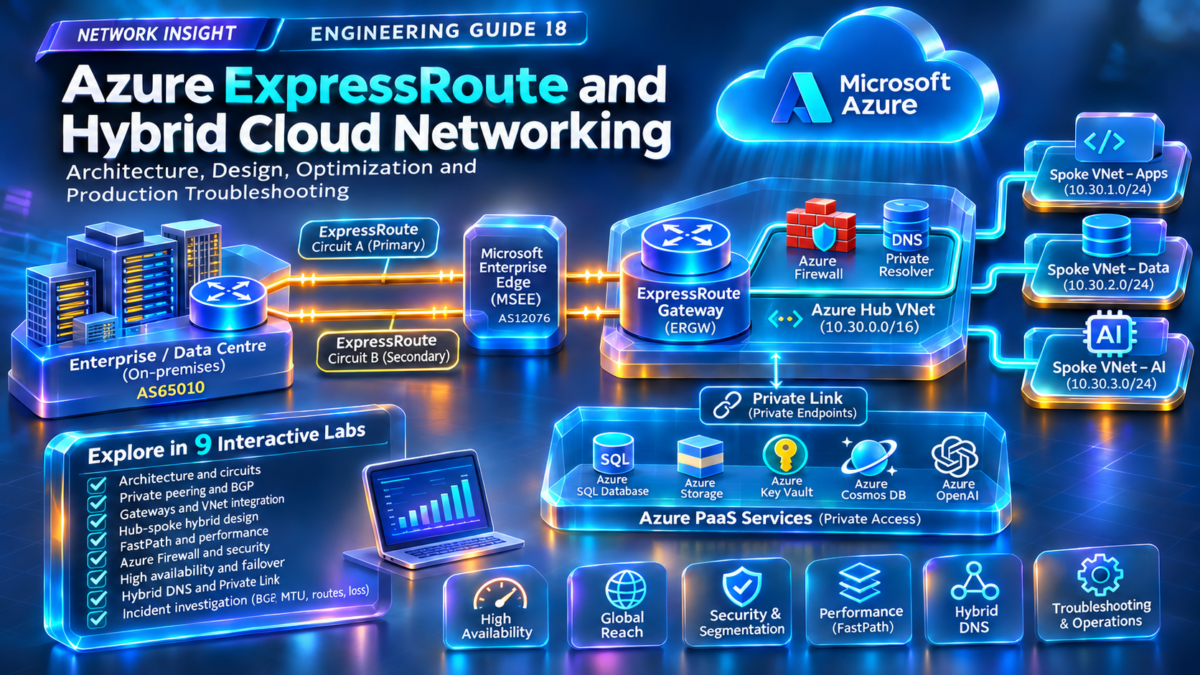
Azure ExpressRoute & Hybrid Cloud Networking Architecture
Explore how enterprise data centres connect privately to Microsoft Azure through redundant ExpressRoute connectivity, BGP routing, Microsoft Enterprise Edge infrastructure, Azure hub-spoke networks and private application endpoints.
Interactive Hybrid Connectivity Architecture
Select an architecture mode or a component to investigate how private hybrid traffic moves between the enterprise WAN and Azure.
How ExpressRoute connects an enterprise to Azure
ExpressRoute provides private connectivity between enterprise networks and Microsoft cloud services through a connectivity provider. Azure private peering enables private IP connectivity to supported Azure virtual networks through ExpressRoute gateways or eligible FastPath configurations.
Select any component in the topology for a more detailed engineering explanation.
Private enterprise connectivity
ExpressRoute traffic traverses a provider connectivity model rather than the public internet. Circuits connect customer routing infrastructure to Microsoft Enterprise Edge infrastructure.
BGP route exchange
Azure private peering uses eBGP to exchange routes between the customer or provider routing domain and Microsoft. Routing design determines reachability and recovery behavior.
Hub, spokes and private services
ExpressRoute gateways connect supported VNets to hybrid networks. Hub-spoke design, route tables, DNS and Private Link determine how applications are reached.
What you will engineer in this guide
Across nine technical sections, we will investigate private peering, BGP best-path behavior, gateway integration, hub-spoke routing, FastPath, hybrid security, circuit resilience, DNS resolution and production troubleshooting.
Network Insight Engineering Model: This diagram is conceptual. Two paths represent redundant connectivity, not necessarily two independently provisioned ExpressRoute circuits. BGP peer placement, physical redundancy, gateway traffic flow and firewall inspection depend on the actual deployment. The failure mode is an illustrative routing scenario, not a guarantee of automatic failover or a live connection test.
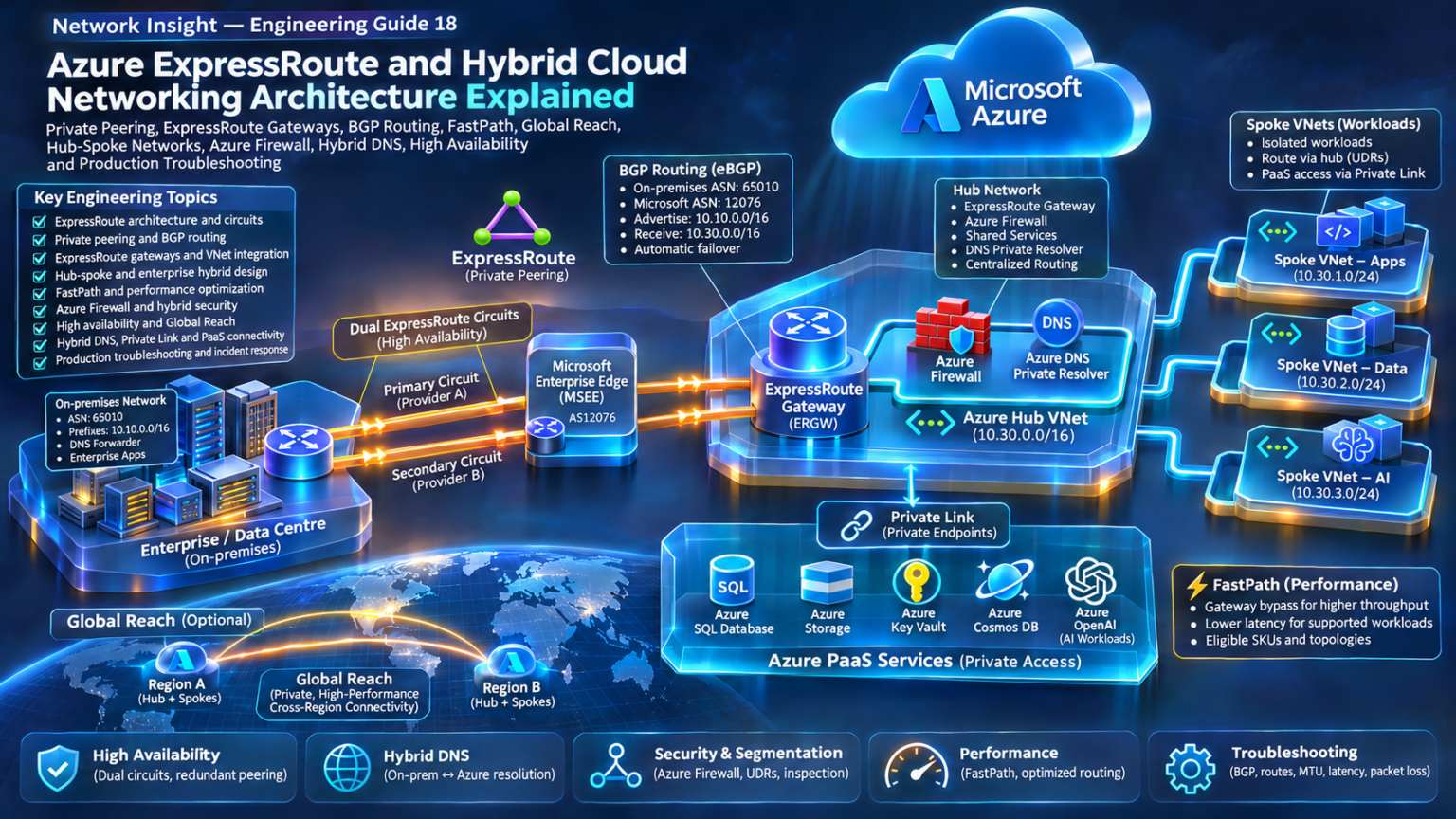
Explore Azure ExpressRoute Architecture
Follow the complete hybrid networking journey—from ExpressRoute circuits and BGP peering to multi-region connectivity, FastPath, Azure Firewall, Private Link and production troubleshooting.
ExpressRoute Architecture Fundamentals: Circuits, Connectivity Providers and Microsoft Enterprise Edge
Azure ExpressRoute is a private connectivity service that enables organizations to extend enterprise networks into Microsoft cloud environments through supported connectivity providers or direct connections at Microsoft peering locations.
Unlike a conventional site-to-site VPN that establishes an encrypted tunnel across the public internet, ExpressRoute uses a private connectivity model between the customer network and Microsoft's edge infrastructure. This gives enterprises greater control over network connectivity, routing architecture, bandwidth provisioning and operational resilience.
However, ExpressRoute is not simply a private cable into an Azure virtual network. It is a layered service consisting of physical or provider connectivity, an ExpressRoute circuit, peering configuration, BGP routing, and Azure network integration. Understanding the responsibilities and failure domains of these layers is essential when designing production hybrid cloud infrastructure.
1.1 The ExpressRoute connectivity architecture
An ExpressRoute deployment typically begins inside an enterprise data centre, campus or wide-area network. Customer edge routing infrastructure connects to a service provider or directly to Microsoft through ExpressRoute Direct. The connection reaches Microsoft Enterprise Edge routers, where private peering enables route exchange between the enterprise and Microsoft.
The diagram illustrates redundant connectivity through customer edge devices, provider transport and Microsoft Enterprise Edge infrastructure. The two paths represent a logical redundancy model. They do not necessarily indicate two separate ExpressRoute circuits or two independent connectivity providers.
1.2 The five fundamental ExpressRoute components
Customer Edge Infrastructure
Customer edge routers connect the enterprise routing domain to the ExpressRoute connectivity service. They may establish BGP sessions directly with Microsoft or use a provider-managed routing model.
CE routersEnterprise ASNConnectivity Provider
The connectivity provider supplies the transport service between enterprise infrastructure and a Microsoft peering location. Different providers offer different connectivity models, geographic coverage and resilience options.
Private transportPeering locationExpressRoute Circuit
The ExpressRoute circuit is the logical connectivity resource provisioned through Azure. It defines the selected bandwidth, peering location, provider association and commercial service configuration.
Circuit bandwidthService keyMicrosoft Enterprise Edge
MSEE routers provide redundant Microsoft-side peering infrastructure. They exchange routes with the customer or provider network using BGP and provide access into Microsoft's network.
Primary peeringSecondary peeringExpressRoute Virtual Network Gateway
An ExpressRoute virtual network gateway connects an ExpressRoute circuit to an Azure virtual network. The gateway is deployed into a dedicated GatewaySubnet and supports the VNet's hybrid connectivity.
GatewaySubnetVNet connectionAzure Hub and Spoke Networks
A hub VNet commonly hosts shared connectivity services, while spoke VNets host applications and workloads. Gateway transit, VNet peering and route configuration determine hybrid reachability.
Hub-spokeRoute propagationEngineering distinction: An ExpressRoute circuit is not the same thing as an ExpressRoute gateway. The circuit provides connectivity to Microsoft edge infrastructure. The virtual network gateway connects that circuit to an Azure VNet. They are separate resources with different provisioning, capacity and failure considerations.
1.3 ExpressRoute connectivity models
Microsoft supports several connectivity approaches. The correct model depends on the enterprise's existing WAN architecture, proximity to Microsoft peering locations, service-provider relationships and required bandwidth.
| Connectivity model | Architecture | Typical consideration |
|---|---|---|
| Cloud Exchange Colocation | Cross-connect through a colocation or exchange provider that has connectivity to Microsoft. | Useful when enterprise infrastructure already exists in a supported exchange facility. |
| Point-to-Point Ethernet | Dedicated Ethernet connectivity from an enterprise location to a provider or Microsoft peering location. | Appropriate where a dedicated transport connection is required. |
| Any-to-Any IPVPN | Provider-managed WAN connectivity, often integrated with an existing enterprise MPLS or IPVPN environment. | Can simplify integration with a multi-site enterprise WAN. |
| ExpressRoute Direct | Direct physical connectivity to Microsoft at supported peering locations, using dedicated port pairs. | Suitable for high-bandwidth requirements and organizations that manage their own connectivity infrastructure. |
1.4 Primary and secondary connectivity
ExpressRoute circuits are designed with redundant Microsoft edge connectivity. Azure private peering uses primary and secondary BGP sessions, allowing routing information to be exchanged through redundant peering paths.
However, redundant BGP sessions do not automatically guarantee complete end-to-end resilience. A deployment may still contain shared customer routers, provider equipment, access facilities, physical conduits, power systems or peering locations.
Production architecture principle: Distinguish between redundancy within a single ExpressRoute circuit and resilience achieved through multiple circuits, independent connectivity providers or geographically separated peering locations. These designs address different failure domains.
1.5 The ExpressRoute circuit provisioning lifecycle
An ExpressRoute deployment moves through several stages before application traffic can traverse the private connection.
Choose the provider, peering location, bandwidth, SKU and billing model.
Authorize the provider using the service key and complete connectivity provisioning.
Configure Azure private peering, VLAN identifiers, IP addressing and BGP parameters.
Deploy an eligible ExpressRoute gateway and establish a VNet connection to the circuit.
Verify BGP routes, effective routes, DNS resolution, security controls and application reachability.
The exact responsibilities differ by connectivity model. For example, an enterprise using ExpressRoute Direct manages different physical connectivity tasks from an enterprise consuming a provider-managed IPVPN service.
1.6 Physical connectivity versus logical routing
A useful troubleshooting technique is to divide ExpressRoute into three operational layers.
Physical and Provider Transport
Includes ports, optical links, cross-connects, provider circuits, VLAN transport and Microsoft peering-location connectivity. Failures here can prevent BGP adjacency establishment.
Private Peering and BGP
Includes BGP neighbors, ASNs, advertised prefixes, accepted routes and routing policy. An operational transport path does not guarantee successful BGP route exchange.
Azure Forwarding and Application Reachability
Includes gateway connectivity, effective routes, security policies, return paths and workload forwarding. BGP can be established while applications remain unreachable.
End-to-End Troubleshooting
Validate each layer independently. Check provider connectivity, peering state, learned routes, VNet routing, network security and application behavior before assigning a root cause.
1.7 Production design checklist
1.8 Important architectural limitations
ExpressRoute provides private connectivity, but private connectivity should not be confused with automatic end-to-end encryption. Organizations requiring encrypted traffic must use suitable encryption mechanisms and validate that those mechanisms are supported by the chosen design.
Similarly, ExpressRoute is not an automatic solution for route propagation between every Azure network. VNet peering, gateway transit, Azure Virtual WAN and supported routing configurations determine which networks can communicate.
Performance also depends on the complete network path. Circuit bandwidth, provider transport, ExpressRoute gateway capacity, application characteristics and Azure routing architecture may all influence observed throughput and latency.
Section 1 — Engineering Takeaway
Azure ExpressRoute is best understood as a layered hybrid connectivity architecture rather than a single network connection. The circuit provides private connectivity to Microsoft, redundant peering enables BGP route exchange, and Azure networking components deliver reachability to applications. Production resilience requires validating the entire path—from enterprise routers and provider transport to Microsoft edge infrastructure, Azure gateways and workload routing.
ExpressRoute Architecture Explorer
Investigate how enterprise traffic crosses a connectivity provider network, reaches redundant Microsoft Enterprise Edge routers, and enters Azure through private peering and an ExpressRoute virtual network gateway.
Live hybrid network topology
Two logical ExpressRoute paths share one provisioned circuit. Select a path or introduce a fault to observe the routing state.
ExpressRoute circuit and peering inventory
| Component | Example configuration | State |
|---|---|---|
| ExpressRoute circuit | 10 Gbps · illustrative service | Provisioned |
| Primary private peering | eBGP · CE ↔ MSEE 1 | Established |
| Secondary private peering | eBGP · CE ↔ MSEE 2 | Established |
| Customer ASN | 65010 | Configured |
| Azure gateway | Hub VNet · GatewaySubnet | Connected* |
| Private endpoint | 10.20.4.10 | Reachable* |
*Illustrative logical states, not measurements from a live Azure deployment.
Failure injection
Change the operational state of each ExpressRoute peering path.
Component inspector
A provisioned ExpressRoute circuit supplies private connectivity between a customer network and Microsoft edge infrastructure through a connectivity provider.
Select any node in the topology to inspect its engineering role.
Engineering event console
Engineering challenge
Can the Azure private endpoint remain reachable when one ExpressRoute path fails?
Run the challenge to evaluate path redundancy and expected BGP failover behavior.
ExpressRoute Private Peering and BGP Routing Architecture
Azure ExpressRoute private peering uses Border Gateway Protocol (BGP) to exchange routing information between enterprise networks and Microsoft. The BGP control plane determines which on-premises prefixes are advertised toward Azure and which Azure virtual network prefixes become reachable from the enterprise.
Although ExpressRoute provides private transport to Microsoft, the existence of a circuit does not automatically create application connectivity. Engineers must establish the required peering sessions, configure compatible autonomous system numbers, advertise appropriate IP prefixes, and ensure that routes propagate into the intended Azure virtual networks.
2.1 Redundant ExpressRoute BGP peering
A standard ExpressRoute circuit provides redundant Microsoft edge connectivity. Azure private peering establishes separate BGP sessions across the primary and secondary peering paths, helping maintain routing availability when one path fails.
The diagram illustrates two redundant private peering paths. The ASN 65010 is an example customer ASN, while 12076 is Microsoft's ExpressRoute peering ASN. The actual customer or provider ASN, VLAN configuration and addressing depend on the deployment.
Important: Primary and secondary ExpressRoute BGP sessions should normally both be operational. They are not inherently an active/standby pair. Depending on routing policies and path selection, traffic can use both paths. A label such as primary or secondary does not guarantee a preferred forwarding direction.
2.2 How an ExpressRoute BGP session is established
Confirm that the provider or Direct connectivity and required VLAN transport are operational.
Configure the private peering VLAN, customer ASN and primary/secondary peering subnets.
Each customer or provider router establishes its supported BGP adjacency with Microsoft.
Peers advertise and receive permitted prefixes, subject to policy and service limits.
2.3 ASN design and IP addressing
BGP uses autonomous system numbers to identify routing domains. In a typical private peering deployment, Microsoft uses ASN 12076, while the customer supplies its own valid ASN or uses an appropriate provider-managed ASN.
The primary and secondary BGP peering connections require separate addressing. ExpressRoute private peering commonly uses two distinct /30 IPv4 subnets, one for each peering path. IPv6 configurations have their own addressing requirements.
| Parameter | Illustrative value | Engineering purpose |
|---|---|---|
| Customer ASN | 65010 | Identifies the customer BGP routing domain. |
| Microsoft ASN | 12076 | Identifies Microsoft ExpressRoute peering. |
| Primary peering subnet | 192.0.2.0/30 | Example IPv4 addresses for the primary adjacency. |
| Secondary peering subnet | 192.0.2.4/30 | Example IPv4 addresses for the secondary adjacency. |
| Enterprise advertised prefix | 10.20.0.0/16 | Illustrative enterprise network reachable from Azure. |
| Azure workload prefix | 10.60.0.0/16 | Illustrative Azure network prefix reachable from on-premises. |
The 192.0.2.0/24 range is reserved for documentation and is used here only as an illustrative addressing example. Production peering addresses must comply with the applicable ExpressRoute configuration requirements.
2.4 Prefix advertisement and route propagation
Once private peering is established, the enterprise advertises selected on-premises routes toward Microsoft. Azure can advertise reachable VNet address prefixes back toward the enterprise through the ExpressRoute connectivity architecture.
The presence of a prefix in a BGP routing table does not necessarily mean that every Azure workload can reach it. Gateway connections, route propagation settings, VNet peering, effective routes and security policy must also permit the traffic.
2.5 BGP route selection across redundant paths
When multiple routes exist for the same destination prefix, routing devices apply their own BGP best-path selection algorithms and local policies. The selected route may depend on attributes such as local preference, AS-path length, MED and other vendor-specific tie-breakers.
The enterprise can influence outbound traffic through its own routing policy. Influencing Azure-to-on-premises traffic requires understanding Microsoft's documented ExpressRoute routing behavior and the supported mechanisms for the relevant connectivity scenario.
Local Preference
Commonly used inside an enterprise autonomous system to influence outbound route selection. Higher local preference is preferred, but the attribute is not normally advertised across an eBGP boundary.
AS-Path Length
AS-path information can influence BGP route selection. AS-path prepending may influence inbound routing in supported scenarios, but its effect depends on the remote network's policies.
Multi-Exit Discriminator
MED can express a preference between alternative entry points under applicable BGP selection rules. Its treatment is implementation- and policy-dependent and should not be assumed to control Azure routing universally.
Next-Hop Reachability
A route can be learned but remain unusable when its next hop cannot be resolved. Routing recursion and forwarding-table installation must be validated independently of BGP adjacency state.
2.6 Primary/secondary peering and failover
If one private peering session fails, routes learned exclusively through that session may be withdrawn. When another healthy peering path advertises the same destination and the necessary forwarding infrastructure remains available, the routing system can converge toward an alternative path.
The recovery time depends on failure detection, BGP timers or supported fast-failure mechanisms, route convergence, network equipment behavior and the application traffic pattern. ExpressRoute redundancy alone does not guarantee zero packet loss or uninterrupted sessions.
Failure-domain distinction: A secondary BGP session on the same ExpressRoute circuit provides redundancy against certain failures. It does not necessarily protect against a complete peering-location outage, a provider-wide incident or a common physical access failure. Geographic resilience generally requires additional architecture.
2.7 Asymmetric routing and hybrid application flows
Asymmetric routing occurs when the forward and return directions of a connection traverse different network paths. This is not automatically a fault in IP networking, but it can become a problem when traffic crosses stateful firewalls, network appliances or policies that require consistent connection state.
For example, a request may travel from an enterprise data centre to an Azure workload through one ExpressRoute path, while the response follows another path. If stateful inspection is deployed asymmetrically, packets may be dropped even though BGP routes and network reachability appear correct.
Enterprise to Azure
Customer router → provider transport → Microsoft edge → Azure network forwarding → workload.
Azure to Enterprise
Workload → effective Azure route → Microsoft edge → selected provider or circuit path → enterprise router.
2.8 BGP troubleshooting methodology
A production troubleshooting workflow should distinguish between BGP session establishment, route learning, route selection, route installation and end-to-end forwarding.
| Symptom | Possible cause | Investigation |
|---|---|---|
| BGP Idle / Active | Transport failure, peer addressing, ASN mismatch or connectivity issue. | Check peering status, provider transport, VLAN configuration and neighbor settings. |
| BGP Established, no routes | Missing advertisements, route policy or unsupported prefix configuration. | Inspect advertised and received routes, prefix filters and circuit configuration. |
| Route learned, not selected | Alternative route preferred or local policy affecting best-path selection. | Inspect BGP attributes and the device's selected routing-table entry. |
| Route selected, no forwarding | Next-hop, effective routing, security filtering or return-path problem. | Trace forwarding and validate Azure effective routes and security controls. |
| Intermittent connectivity | Session flapping, provider instability or asymmetric stateful inspection. | Correlate BGP events, interface counters, network logs and application failures. |
2.9 Production BGP engineering checklist
Section 2 — Engineering Takeaway
ExpressRoute private peering provides the BGP control plane that connects enterprise routing domains with Microsoft's network. Redundant sessions improve availability, but successful hybrid connectivity requires more than an Established neighbor state. Engineers must validate advertised prefixes, route selection, Azure route propagation, next-hop reachability and end-to-end forwarding. These distinctions become particularly important when multiple ExpressRoute circuits, hub-spoke networks and stateful security appliances are introduced.
ExpressRoute BGP Route Selection Simulator
Engineer Azure private-peering route selection across two redundant Microsoft Enterprise Edge sessions. Change BGP attributes, advertise or withdraw routes, and investigate the resulting forwarding decision.
Live BGP peering topology
The diagram shows two independent eBGP sessions over the redundant ExpressRoute circuit paths.
Adj-RIB-In — received BGP routes
| Peer | Prefix | Local Pref | AS Path | Next Hop | Decision |
|---|
BGP decision explanation
Engineering event console
BGP route-policy controls
Modify the customer-side import policy and the simulated AS-path attributes received from each peer.
BGP session failures
Prefix advertisement controls
Withdraw a prefix without bringing down its BGP session.
Engineering challenge
Configure the secondary path to win while both BGP sessions remain established.
ExpressRoute Gateways, GatewaySubnet Design and Azure VNet Integration
An ExpressRoute circuit provides private connectivity to Microsoft's network, but an Azure virtual network requires a supported connection architecture before workloads can communicate with on-premises systems. ExpressRoute virtual network gateways provide the integration point between circuit connectivity and Azure VNet routing.
The gateway architecture influences throughput, route propagation, network design, resilience and operational troubleshooting. In enterprise deployments, ExpressRoute gateways are frequently deployed in centralized hub VNets, allowing connected spoke networks to use supported gateway transit patterns.
3.1 ExpressRoute gateway and hub-spoke architecture
A common design places an ExpressRoute virtual network gateway inside a dedicated GatewaySubnet in the Azure hub VNet. The hub is connected to the ExpressRoute circuit, while application spokes connect to the hub using VNet peering.
This diagram represents a logical connectivity model. The hub gateway exchanges routing information for the connected hybrid environment, while VNet peering and supported gateway transit configuration allow spokes to use the hub's remote connectivity.
Engineering distinction: VNet peering is not automatically transitive. Connecting Spoke A and Spoke B to the same hub does not, by itself, create arbitrary spoke-to-spoke forwarding. Gateway transit provides a specific supported way for peered VNets to use remote gateway connectivity; other transit requirements may need an NVA, Azure Firewall or another supported routing architecture.
3.2 GatewaySubnet architecture
Azure virtual network gateways are deployed into a dedicated subnet named GatewaySubnet. This subnet hosts the gateway infrastructure and must be planned as part of the VNet address space.
Microsoft recommends using a sufficiently large GatewaySubnet to support gateway requirements and future changes. A /27 or larger address range is commonly recommended for many gateway deployments, although specific gateway features, SKUs and deployment patterns may have additional requirements.
Dedicated GatewaySubnet
The subnet must use the reserved name GatewaySubnet and should not host ordinary application virtual machines or unrelated workloads.
Subnet isolationAddress Space Planning
Allocate sufficient subnet capacity and avoid overlapping enterprise, hub and spoke address ranges. Address overlap can prevent intended routing behavior.
CIDR planningGateway Route Handling
Gateway infrastructure participates in hybrid connectivity and route propagation. Avoid unsupported or overly restrictive GatewaySubnet route and security configurations.
Routing controlLifecycle Management
Gateway deployments and changes may require significant provisioning time. Plan maintenance windows, upgrade paths and recovery procedures.
Operational readiness3.3 ExpressRoute gateway SKUs and capacity planning
ExpressRoute gateway SKUs determine supported capacity and capabilities. Azure has introduced newer gateway families alongside legacy options, so engineers should verify current regional availability, throughput characteristics, feature support and upgrade paths before selecting a SKU.
| Gateway family | Architecture consideration | Production guidance |
|---|---|---|
| Standard / HighPerformance | Legacy ExpressRoute gateway options encountered in existing deployments. | Review migration and lifecycle guidance before designing new infrastructure around legacy SKUs. |
| UltraPerformance | Higher-capacity legacy gateway option, historically associated with FastPath capabilities. | Validate current support and compatibility for the intended deployment. |
| ErGw1AZ / ErGw2AZ / ErGw3AZ | Availability-zone-capable ExpressRoute gateway SKUs with differing scale and capabilities. | Choose according to current throughput, availability, scale and feature requirements. |
| ErGwScale | Scalable gateway architecture with capacity and feature considerations specific to the SKU. | Check regional availability, scaling configuration and compatibility with required features. |
Capacity planning: Circuit bandwidth and virtual network gateway throughput are separate considerations. Purchasing a high-bandwidth ExpressRoute circuit does not guarantee equivalent throughput through every connected VNet gateway. FastPath can alter the eligible data-plane forwarding path, but it also has SKU and topology restrictions.
3.4 Connecting an ExpressRoute circuit to a VNet
An ExpressRoute circuit can be connected to supported Azure virtual networks using ExpressRoute gateway connections. Circuit authorization and cross-subscription connection mechanisms may be required depending on resource ownership.
Create the hub VNet and correctly sized GatewaySubnet.
Select an eligible ExpressRoute gateway SKU and deployment configuration.
Create the gateway-to-circuit connection using the appropriate resource authorization.
Inspect connection state, learned routes, effective routes and application connectivity.
3.5 Gateway transit in hub-spoke networks
Gateway transit enables a peered spoke VNet to use the hub VNet's virtual network gateway for supported remote connectivity. The hub-side peering must permit gateway transit, while the spoke-side peering must be configured to use the remote gateway.
The design must respect Azure peering constraints, including limitations on gateway ownership and remote gateway use. Engineers should also validate that security controls and route tables do not override the intended hybrid route.
3.6 Azure effective routes and propagation
Azure forwarding decisions depend on the effective routes associated with a workload's network interface and subnet. Routes can originate from system routing, BGP propagation and user-defined route tables.
For a hybrid workload, engineers should verify that the on-premises prefix is present, that the selected next hop is appropriate, and that no more-specific or higher-priority route unexpectedly diverts traffic.
| Route source | Role | Engineering concern |
|---|---|---|
| System routes | Provide default Azure VNet and platform routing behavior. | Understand VNet, peering and default next-hop behavior. |
| BGP propagated routes | Introduce learned hybrid prefixes into eligible Azure routing contexts. | Verify propagation is enabled where required and that prefixes are learned. |
| User-defined routes | Allow explicit routing through supported next hops. | Check for route precedence, forced inspection and blackholing. |
| VNet peering routes | Provide reachability to directly peered VNet address spaces. | Do not assume arbitrary transitive routing between peers. |
3.7 Route selection and forced routing
Azure route selection considers longest-prefix matching first. When matching routes have equal prefix lengths, route source precedence and applicable platform rules influence the selected route. In the standard Azure VNet routing model, user-defined routes take precedence over BGP routes, which take precedence over system routes for equal-length matches.
This becomes important when organizations introduce Azure Firewall, third-party NVAs or forced inspection patterns. A user-defined route may redirect traffic toward a security appliance even when a valid ExpressRoute route is available.
Production troubleshooting principle: Never assume that a learned BGP prefix is the active forwarding route. Inspect the effective route for the workload NIC and confirm the next hop, route source and return path.
3.8 ExpressRoute gateway versus FastPath
In a conventional gateway forwarding model, eligible hybrid traffic uses the virtual network gateway data path. ExpressRoute FastPath changes the forwarding architecture for supported traffic by allowing the data plane to bypass the gateway, subject to gateway SKU, circuit type, configuration and feature restrictions.
FastPath does not remove the need to understand gateway connectivity and routing control. Engineers must also account for differences in supported topologies and services, including cases where traffic does not use the FastPath data plane.
3.9 Production gateway troubleshooting
Circuit Connected, VNet Unreachable
Investigate the gateway connection, private peering advertisements, Azure effective routes, security rules and return-path reachability.
Hub Reachable, Spoke Unreachable
Verify hub-spoke peering, gateway transit, remote gateway settings, route propagation and workload security controls.
Unexpected Traffic Path
Inspect user-defined routes, more-specific prefixes, network appliances and asymmetric routing behavior.
Throughput Below Expectation
Compare circuit bandwidth, gateway capacity, packet characteristics, workload performance and FastPath eligibility.
3.10 Production gateway engineering checklist
Section 3 — Engineering Takeaway
ExpressRoute gateways integrate private circuit connectivity with Azure virtual networks. The GatewaySubnet, gateway SKU, circuit connection and VNet peering configuration form the foundation of hybrid route propagation. In hub-spoke environments, gateway transit enables supported spoke connectivity, but it does not create unrestricted transitive networking. Production engineers must validate effective routes, security policies, gateway capacity and return-path behavior before considering the design operational.
ExpressRoute Gateway Traffic Flow Explorer
Explore how an ExpressRoute gateway connects private hybrid networks to Azure hub-and-spoke VNets. Configure gateway transit, route propagation, and user-defined routes, then trace forwarding behavior.
Interactive Azure hybrid topology
Click architecture components to inspect their role. Configure routing and run packet traces to test reachability.
Effective routing table
Inspect the modeled routes visible from the Azure spoke network perspective.
| Destination | Next hop | Source | Status |
|---|
Forwarding decision engine
Gateway and route event console
Gateway transit configuration
Configure the logical prerequisites for using the hub ExpressRoute gateway.
Failure and route injection
Component inspector
The ExpressRoute virtual network gateway connects the hub VNet to an ExpressRoute circuit and participates in hybrid routing.
Engineering challenge
Make Spoke A unreachable while keeping Spoke B reachable and the ExpressRoute gateway connected.
Hub-Spoke, Multi-Region and Enterprise Hybrid Networking with ExpressRoute
Enterprise hybrid cloud networking requires more than connecting an individual Azure virtual network to an on-premises data centre. Large organizations must provide controlled connectivity across multiple application environments, business units, Azure regions and security boundaries.
A centralized hub-spoke architecture is one of the most widely used approaches for organizing Azure enterprise networks. ExpressRoute connectivity is integrated into a hub, while application VNets connect as spokes. This creates a common foundation for hybrid routing, shared services, centralized security and operational governance.
4.1 Enterprise multi-region ExpressRoute architecture
In a multi-region design, organizations may deploy ExpressRoute circuits and regional network hubs to reduce dependence on a single connectivity location. Each region can host application spokes and shared network services, with routing policies determining how traffic reaches on-premises networks and other Azure environments.
This topology illustrates two regional ExpressRoute connectivity paths and two Azure hubs. It is a conceptual architecture rather than a statement that ExpressRoute automatically creates inter-region transit. Connectivity between hubs requires a supported design such as global VNet peering, routed network appliances or Azure Virtual WAN.
Architecture principle: Multi-region deployment improves design flexibility, but true geographic resilience depends on independent circuits, peering locations, provider paths, regional services and tested routing behavior. Two Azure hubs alone do not guarantee recovery from a regional or connectivity failure.
4.2 The role of the central connectivity hub
A hub VNet provides a common location for network services that multiple application spokes need to consume. These services may include ExpressRoute gateways, Azure Firewall, DNS infrastructure, network virtual appliances, VPN gateways and management connectivity.
Hybrid Connectivity
ExpressRoute and supported VPN gateway configurations provide connectivity between Azure and enterprise networks. Gateway transit can extend this connectivity to eligible spokes.
ExpressRouteGateway transitCentralized Security
Azure Firewall or network virtual appliances can inspect selected traffic flows when effective routing directs those flows through the inspection layer.
FirewallUDRShared DNS Services
DNS forwarders and Azure DNS Private Resolver can support hybrid name resolution for private endpoints, enterprise applications and internal services.
Hybrid DNSPrivate LinkNetwork Operations
Centralized monitoring, flow analysis, routing diagnostics and operational controls help engineers investigate connectivity across multiple application environments.
ObservabilityTroubleshooting4.3 Hub-spoke routing and gateway transit
VNet peering provides private connectivity between directly peered Azure VNets. A hub and spoke can exchange traffic through peering, subject to route selection and security policy. However, VNet peering is not automatically transitive.
Gateway transit is a specific supported mechanism that allows a spoke to use the hub's remote connectivity. It does not turn the hub into a general-purpose router for every possible spoke-to-spoke or cross-region traffic flow.
| Traffic flow | Typical connectivity mechanism | Important limitation |
|---|---|---|
| On-premises → Hub VNet | ExpressRoute circuit and hub gateway. | Requires correct BGP routes, gateway connection and security configuration. |
| On-premises → Spoke VNet | Hub gateway transit and supported VNet peering configuration. | Remote gateway use and route propagation must be configured correctly. |
| Spoke A → Spoke B | Direct peering or a supported routed transit architecture. | Two spokes peered only to the hub do not automatically gain transit. |
| Region A → Region B | Global VNet peering or another supported inter-region routing design. | Inter-region reachability and security routing must be explicitly planned. |
| Spoke → Central Firewall | User-defined routes and supported appliance forwarding. | Return-path symmetry and stateful inspection require validation. |
4.4 Enterprise route segmentation
Large organizations often separate workloads by environment, business function, sensitivity or operational ownership. Examples include production, development, shared services, regulated workloads and disaster recovery.
A hub-spoke topology provides structural separation, but VNet boundaries alone are not a complete security segmentation strategy. Network security groups, firewalls, application policies, identity controls and explicit routing must work together.
Production Networks
Host business-critical workloads with controlled hybrid access and restrictive east-west communication policies.
Development Networks
Separate non-production environments and limit access to sensitive enterprise systems.
Shared Services
Centralize approved DNS, monitoring, identity integration and management services.
Recovery Environments
Provide alternative workload placement with independently validated network connectivity and recovery routing.
4.5 Azure Virtual WAN versus traditional hub-spoke
Azure Virtual WAN offers a managed networking architecture for connecting branches, VPNs, ExpressRoute circuits and Azure VNets through virtual hubs. It provides a different operational model from a traditional customer-managed hub VNet.
Virtual WAN can simplify connectivity management across distributed environments, but it introduces its own routing, security, scale, feature and cost considerations.
| Design consideration | Traditional hub-spoke | Azure Virtual WAN |
|---|---|---|
| Hub ownership | Customer manages hub VNet resources and networking configuration. | Microsoft-managed virtual hub architecture. |
| ExpressRoute integration | ExpressRoute gateway deployed into a hub VNet. | ExpressRoute gateway capability integrated into supported virtual hubs. |
| Routing control | VNet peering, gateway transit, UDRs and network appliances. | Virtual hub route tables, routing intent and supported routing policies. |
| Security integration | Customer designs Azure Firewall or NVA routing paths. | Supports secured virtual hub designs and managed security integration. |
| Operational complexity | Greater direct control over networking components. | Managed connectivity model with platform-specific behavior and limitations. |
Design decision: Azure Virtual WAN is not simply a traditional hub-spoke network with a different name. The routing model, gateway ownership, network appliance integration and supported transit behavior differ. Engineers should select the architecture based on connectivity requirements rather than assuming feature parity.
4.6 Multi-region route design
Multi-region ExpressRoute architectures require careful planning of how enterprise prefixes are advertised, how Azure networks select routes and what happens when a regional path becomes unavailable.
The design must consider whether circuits are connected to multiple VNets, whether ExpressRoute Premium capabilities are required, how geographic scope affects connectivity and whether route advertisements create unexpected transit paths.
Identify primary, secondary and recovery regions with their application requirements.
Choose circuit locations, providers and independent failure domains.
Define BGP advertisements, gateway connections and supported transit patterns.
Validate path failure, route convergence, security and application recovery.
4.7 Avoiding unintended transit and route leaks
Complex hybrid networks can unintentionally advertise routes between environments that were intended to remain separate. This becomes particularly important when multiple ExpressRoute circuits, regional hubs, network appliances and on-premises routing domains interact.
Route filtering, address planning, effective route inspection and documented routing ownership help prevent unexpected connectivity. Organizations should avoid assuming that a route learned in one part of the network should automatically be propagated everywhere.
4.8 Enterprise hybrid security architecture
A centralized hub can provide security inspection for selected hybrid and east-west flows. However, inspection is only effective when the routing architecture actually directs traffic through the firewall or network virtual appliance.
Engineers must validate forward and return paths, user-defined routes, route propagation, firewall policies and supported next-hop behavior. Incorrect forced routing can cause asymmetric traffic, blackholing or loss of connectivity.
4.9 Production architecture checklist
Section 4 — Engineering Takeaway
Enterprise ExpressRoute architecture scales through deliberate hub-spoke design, regional connectivity planning and controlled route propagation. Centralized hubs provide shared connectivity and security services, while application spokes support workload isolation. Azure Virtual WAN offers an alternative managed architecture, but its routing and operational behavior differ from traditional hub-spoke networks. Successful enterprise designs must validate transit boundaries, effective routes, security inspection and geographic resilience across the complete hybrid network.
Enterprise Hybrid Network Design Lab
Compare centralized hub-spoke networking, multi-region connectivity, and Azure Virtual WAN. Configure hybrid routing, simulate regional failures, and examine how architectural decisions affect enterprise reachability.
Architecture selection
A centralized Azure hub connects enterprise traffic to regional spokes using an ExpressRoute gateway and explicitly configured VNet peering.
Interactive enterprise hybrid topology
Enterprise routing and connectivity inventory
| Destination | Region | Connectivity | State |
|---|
Architecture decision analysis
Engineering event console
Enterprise design controls
Regional failure injection
Architecture inspector
Select a topology component to inspect its function in the hybrid network.
Engineering challenge
Design a dual-region environment where Region B remains reachable after Region A connectivity fails.
ExpressRoute FastPath, Gateway Bypass and Hybrid Network Performance
Azure ExpressRoute FastPath is a forwarding optimization that allows supported traffic to bypass the virtual network gateway data path. By reducing the role of the gateway in eligible packet forwarding, FastPath can improve the performance characteristics of high-throughput hybrid workloads.
FastPath is particularly relevant to enterprise applications that exchange large volumes of data between on-premises infrastructure and Azure. Examples include data-intensive analytics, storage replication, high-performance computing and distributed application platforms.
However, FastPath is not a universal acceleration feature. Its availability depends on the ExpressRoute circuit, gateway SKU, deployment configuration, workload connectivity model and supported Azure networking features.
5.1 Conventional gateway forwarding versus FastPath
In the conventional ExpressRoute gateway forwarding model, traffic entering Azure through the ExpressRoute circuit traverses the virtual network gateway data path before reaching the destination workload.
With FastPath enabled and applicable to the traffic flow, forwarding can bypass that gateway data path. The ExpressRoute gateway remains relevant to the network's control-plane and connectivity architecture.
The diagram compares two logical forwarding models. It does not imply that every packet is eligible for FastPath, that both paths are simultaneously selected for a given flow, or that the illustrated path lengths represent actual latency.
Critical distinction: FastPath bypasses the ExpressRoute virtual network gateway data plane for supported traffic. It does not eliminate the gateway resource, replace BGP routing, bypass the ExpressRoute circuit, or automatically bypass security policies and network appliances elsewhere in the traffic path.
5.2 Why gateway forwarding can become a bottleneck
A conventional ExpressRoute gateway has finite forwarding capacity. If the total workload demand exceeds the gateway's practical throughput capabilities, the gateway can become a limiting component even when the ExpressRoute circuit itself has additional available bandwidth.
The actual throughput observed by applications also depends on packet size, flow distribution, protocol behavior, host performance, network appliance capacity and the wider connectivity path.
Gateway Throughput
Gateway SKU and deployment architecture determine the available gateway forwarding capabilities. Aggregate application demand must be evaluated against supported gateway performance.
Gateway SKUCircuit Bandwidth
ExpressRoute circuit bandwidth provides a connectivity capacity boundary. It does not guarantee that every application or VNet gateway can consume the full circuit bandwidth.
Circuit capacityPacket and Flow Characteristics
Packet sizes, connection counts, TCP windows, congestion behavior and traffic distribution can influence real application throughput.
Packet processingNetwork Appliance Processing
Firewalls, proxies and network virtual appliances can introduce additional forwarding constraints when the routing architecture directs traffic through them.
Inspection capacity5.3 FastPath eligibility and deployment requirements
FastPath support depends on the current ExpressRoute service capabilities, circuit configuration and gateway architecture. Historically, specific high-performance ExpressRoute gateway SKUs have supported FastPath, while newer gateway families and scalable gateway designs have introduced additional options.
Engineers must validate the precise feature combination against current Microsoft documentation. Eligibility can differ for standard virtual network connections, VNet peering scenarios, private endpoints, and other supported connectivity patterns.
| Requirement | Engineering question | Validation |
|---|---|---|
| Gateway SKU | Does the selected ExpressRoute gateway support FastPath? | Check the current SKU capability matrix. |
| Circuit configuration | Is the circuit type and connectivity model supported? | Review circuit and gateway compatibility. |
| FastPath setting | Is FastPath enabled on the appropriate connection? | Inspect the ExpressRoute connection configuration. |
| Workload topology | Is the destination reachable through a supported FastPath topology? | Check VNet, peering and workload support. |
| Feature limitations | Are any network features incompatible or restricted? | Review current Microsoft FastPath limitations. |
Documentation requirement: FastPath eligibility and limitations can change as Azure networking features evolve. Do not assume that a gateway SKU, peered VNet, private endpoint or appliance topology supports FastPath solely because ExpressRoute connectivity is operational. Validate the exact deployment combination before relying on FastPath for capacity planning.
5.4 Throughput and latency engineering
FastPath can reduce the forwarding work performed by the virtual network gateway for eligible traffic. This may improve achievable throughput and reduce gateway-related forwarding overhead, but it does not guarantee a specific latency reduction or application performance increase.
Latency is influenced by geographic distance, provider routing, physical transport, packet processing, congestion and application behavior. A FastPath-enabled design still uses the ExpressRoute connectivity infrastructure and remains subject to the performance of the wider path.
Throughput
Measure sustained application data transfer rates and compare them with circuit, gateway, host and appliance capacities.
Round-Trip Latency
Measure end-to-end RTT between representative enterprise and Azure endpoints. Separate geographic and provider latency from gateway-related overhead.
Packet Loss
Monitor loss during normal operation, congestion, route changes and failover scenarios.
Application Response Time
Validate application-level performance rather than relying exclusively on synthetic network throughput tests.
5.5 Performance capacity planning
A useful engineering approach is to treat end-to-end capacity as a series of independent constraints. The effective throughput of a hybrid application cannot exceed the capacity of its limiting component.
| Component | Potential constraint | Investigation |
|---|---|---|
| Enterprise WAN | Access circuit bandwidth, router capacity or QoS policy. | Inspect interfaces, shaping and congestion counters. |
| Connectivity provider | Provisioned transport capacity or provider network conditions. | Review provider monitoring and service commitments. |
| ExpressRoute circuit | Provisioned circuit bandwidth. | Inspect circuit utilization and traffic trends. |
| VNet gateway | Gateway forwarding capacity when applicable. | Compare gateway SKU and observed workload demand. |
| Security appliance | Firewall or NVA throughput and session processing. | Inspect appliance metrics and connection statistics. |
| Azure workload | VM networking limits, storage or application processing. | Measure host and application performance. |
5.6 FastPath and hub-spoke architectures
Hub-spoke networks introduce additional routing considerations. Traffic may originate from on-premises infrastructure and terminate in a spoke VNet connected to an ExpressRoute-enabled hub.
Whether that traffic can use FastPath depends on the supported gateway and peering architecture. Engineers should not assume that all spoke traffic bypasses the gateway or that FastPath changes the behavior of VNet peering, user-defined routes or stateful network inspection.
5.7 FastPath and Azure Firewall
FastPath does not automatically remove the need for security inspection. If the network design requires hybrid traffic to traverse Azure Firewall or a network virtual appliance, the forwarding architecture must explicitly support and enforce that inspection path.
Route selection, user-defined routes, appliance next hops and return-path behavior remain essential. A high-performance forwarding path that bypasses required inspection would be a security design failure rather than a successful optimization.
Security architecture principle: Optimize forwarding only after defining the required security path. FastPath eligibility and firewall inspection are separate design questions, and both must be validated for the actual traffic flow.
5.8 Performance validation methodology
Measure throughput, RTT, loss and application response times before changes.
Confirm gateway SKU, connection settings and supported workload topology.
Use representative flows and monitor circuit, gateway and host metrics.
Assess bottlenecks, operational stability and application-level improvements.
5.9 Production troubleshooting scenarios
FastPath Enabled, No Performance Gain
The bottleneck may be elsewhere in the path, or the tested traffic may not be eligible for FastPath. Validate topology support and application-level constraints.
High Circuit Utilization
Even with FastPath, the ExpressRoute circuit remains a capacity boundary. Investigate aggregate utilization, congestion and traffic distribution.
Spoke Workload Underperforming
Inspect gateway transit, effective routes, FastPath support for the topology, security appliances and workload networking limits.
Unexpected Security Path
Validate whether routing directs traffic through the required inspection devices and whether the return path is consistent with stateful firewall behavior.
5.10 Production FastPath checklist
Section 5 — Engineering Takeaway
ExpressRoute FastPath optimizes the data-plane architecture for supported hybrid traffic by bypassing the virtual network gateway forwarding path. Its value depends on the actual performance bottleneck, gateway capabilities, workload topology and service limitations. Engineers should treat FastPath as a targeted forwarding optimization rather than a universal performance guarantee, validating eligibility, capacity, security routing and application behavior before deploying it in production.
ExpressRoute FastPath Performance Simulator
Compare traditional ExpressRoute gateway forwarding with FastPath-enabled traffic flow. Evaluate gateway eligibility, forwarding architecture, and illustrative performance under changing traffic demand.
FastPath and gateway forwarding architecture
FastPath can bypass the ExpressRoute gateway in the supported data plane while the gateway remains necessary for control-plane connectivity.
Performance analysis
Compare the illustrative capacity of the gateway-forwarded path with the FastPath forwarding model.
| Metric | Gateway path | FastPath model |
|---|
Traffic demand: 2 Gbps
FastPath eligibility diagnostics
Engineering event console
FastPath configuration
Performance fault injection
Engineering challenge
Configure an eligible FastPath design that can serve at least 6 Gbps of simulated traffic without a modeled forwarding bottleneck.
Azure Firewall, Forced Routing and Hybrid Security with ExpressRoute
ExpressRoute provides private network connectivity between enterprise infrastructure and Microsoft cloud environments, but private transport does not automatically enforce application security, traffic inspection or encryption.
Enterprise hybrid cloud security requires a deliberate combination of routing controls, network segmentation, firewall inspection, identity-based access policies and encryption. Azure Firewall and supported network virtual appliances can provide centralized inspection when traffic is explicitly directed through the security layer.
6.1 Centralized hybrid firewall architecture
A common enterprise design places Azure Firewall inside a connectivity hub. ExpressRoute delivers hybrid connectivity to the hub, while user-defined routes and supported routing mechanisms steer selected traffic through the firewall before it reaches protected application networks.
The diagram represents a logical inspection path. Azure Firewall does not automatically intercept all ExpressRoute traffic. The actual path depends on effective routes, supported next hops, peering configuration and the network's security architecture.
Security design principle: A firewall deployed in the hub does not guarantee that traffic passes through it. Engineers must verify the actual forwarding path in both directions and confirm that the intended security controls apply to the relevant traffic flows.
6.2 Azure Firewall in hybrid networks
Azure Firewall is a managed, stateful network security service that can enforce network and application rules for supported traffic. It is commonly used in centralized Azure connectivity architectures to control access between application networks, hybrid environments and external destinations.
Network Rules
Control traffic using source and destination addresses, ports and protocols. These rules are relevant to hybrid application access and network segmentation.
L3/L4Application Rules
Apply supported application-level controls for eligible protocols and destinations, including FQDN-based policies where appropriate.
Application policyThreat Protection
Depending on the selected tier and configuration, Azure Firewall can provide additional threat intelligence and intrusion prevention capabilities.
Threat controlsLogging and Monitoring
Firewall diagnostics and network telemetry support security investigations, traffic analysis and operational troubleshooting.
Observability6.3 User-defined routes and forced inspection
User-defined routes allow engineers to override selected Azure system or propagated routes and direct traffic toward supported next hops. In hybrid security designs, UDRs are frequently used to steer application traffic through Azure Firewall or a network virtual appliance.
However, routing from an ExpressRoute gateway toward a firewall requires special care. GatewaySubnet route configuration and gateway-to-appliance forwarding must follow supported Azure patterns. Engineers should not assume that placing a default route on the GatewaySubnet is a valid or safe solution.
| Routing element | Security purpose | Engineering concern |
|---|---|---|
| Spoke subnet UDR | Direct selected traffic toward a centralized firewall. | Verify the next hop is reachable and the route matches intended destinations. |
| Gateway route propagation | Distribute learned hybrid prefixes where supported. | Ensure propagated routes are not unintentionally suppressed. |
| Hub-spoke peering | Provide connectivity between application spokes and shared security services. | Validate forwarded traffic settings and routing behavior. |
| Firewall route tables | Control onward forwarding toward enterprise or Azure destinations. | Prevent loops, blackholes and asymmetric return paths. |
6.4 Stateful inspection and asymmetric routing
Stateful firewalls track connection information to determine whether packets belong to permitted sessions. If the forward path traverses the firewall but the return path bypasses it, the firewall may not observe the complete connection.
This can cause intermittent application failures, unexpected packet drops or sessions that work in one direction but not the other.
Operational requirement: Validate bidirectional routing through stateful inspection points. A successful BGP session or an Azure route entry does not prove that a TCP connection will survive asymmetric firewall traversal.
6.5 Hybrid network segmentation
Enterprise hybrid environments frequently contain workloads with different security requirements. Production applications, development systems, regulated services and shared infrastructure should not automatically receive unrestricted connectivity merely because they share ExpressRoute access.
Production Applications
Allow only approved enterprise-to-application flows, using explicit security policies and monitored access paths.
Development and Testing
Restrict access to production databases, identity infrastructure and sensitive enterprise services.
Shared Infrastructure
Control DNS, management, monitoring and identity-related traffic using narrowly scoped policies.
Private PaaS Services
Combine private endpoints, DNS controls and supported routing policies to limit access to managed Azure services.
6.6 ExpressRoute private connectivity and encryption
ExpressRoute provides private connectivity, but private transport is not equivalent to automatic end-to-end encryption. Enterprises handling sensitive data may require additional cryptographic protection.
Application-layer encryption such as TLS is often appropriate for protecting data in transit. Other encryption mechanisms may be available for supported architectures, but their compatibility and operational impact must be evaluated independently.
| Security mechanism | Purpose | Important distinction |
|---|---|---|
| ExpressRoute private transport | Provide private connectivity to Microsoft's network. | Does not inherently encrypt all application traffic. |
| TLS | Encrypt supported application sessions. | Protection depends on correct application and certificate configuration. |
| IPsec | Provide network-layer encryption for supported tunnel architectures. | Requires compatible endpoints, routing and capacity planning. |
| MACsec | Protect supported link-layer connectivity. | Availability and scope depend on the specific connectivity model. |
6.7 Azure Firewall and FastPath
FastPath changes the forwarding architecture for supported ExpressRoute traffic by bypassing the virtual network gateway data path. It does not automatically eliminate the need for security inspection.
Engineers must verify how FastPath eligibility, effective routes and network appliance forwarding interact in the actual deployment. Security requirements should determine the required traffic path before performance optimization is introduced.
6.8 Hybrid security validation workflow
Document permitted source, destination, protocol and application flows.
Configure supported route steering toward the required inspection layer.
Inspect forward and return paths through stateful security devices.
Review firewall logs, effective routes and application connectivity.
6.9 Production security troubleshooting
Traffic Bypasses Firewall
Inspect effective routes, VNet peering, route propagation and whether the intended traffic flow is actually steered through the firewall.
One-Way Connectivity
Investigate asymmetric routing, missing return routes, stateful inspection and network security rules.
Private Endpoint Unreachable
Validate private DNS resolution, endpoint IP addressing, route behavior and supported inspection paths.
Unexpected Packet Drops
Correlate firewall diagnostics, rule evaluation, route tables, connection state and application logs.
6.10 Production hybrid security checklist
Section 6 — Engineering Takeaway
ExpressRoute provides the private connectivity foundation for enterprise hybrid networking, but security must be engineered separately. Azure Firewall, supported route steering, network segmentation and encryption protect workloads only when the forwarding architecture applies those controls correctly. Production designs must validate effective routes, stateful return paths, gateway limitations and security telemetry to ensure that private connectivity remains both operational and appropriately protected.
Hybrid Firewall Traffic Inspection Lab
Investigate how ExpressRoute traffic reaches Azure workloads through centralized firewall inspection. Configure routing and policy, simulate bypass and asymmetric return paths, and inspect stateful security decisions.
Hybrid security packet-flow architecture
The green path represents inspected traffic. The gold path illustrates a direct route that bypasses the firewall.
Security policy and route evaluation
| Flow | Source | Destination | Next hop | Result |
|---|
Stateful inspection diagnostics
Firewall event console
Routing and security controls
Failure injection
Engineering challenge
Configure symmetric firewall inspection and permit HTTPS while denying SSH.
ExpressRoute High Availability, Global Reach and Hybrid Disaster Recovery
High availability in Azure ExpressRoute is achieved through a layered network design. Redundant BGP peering sessions protect against certain individual path failures, while independent circuits, geographically diverse peering locations and alternative connectivity mechanisms provide broader resilience.
A production hybrid network must account for failures across physical access, connectivity providers, Microsoft peering infrastructure, Azure gateways, regional networking services and enterprise routing systems. A circuit that reports a healthy state does not necessarily guarantee application reachability.
7.1 Layered ExpressRoute resilience architecture
The most resilient ExpressRoute designs separate connectivity across independent failure domains. Two BGP sessions on one circuit are valuable, but they do not provide the same protection as circuits deployed through different peering locations with appropriately diverse access paths.
This is a logical resilience diagram. It assumes that the Azure connectivity architecture supports the intended multiple circuit connections and that any VPN backup has been separately deployed and configured. The VPN line is a contingency concept, not an automatically provisioned ExpressRoute feature.
Resilience principle: Two ExpressRoute circuits do not guarantee independence unless the underlying physical access, providers, peering locations and operational dependencies have been assessed. A shared building entry, provider backbone or peering facility can create a common failure domain.
7.2 ExpressRoute redundancy layers
Primary and Secondary BGP Peering
Each standard ExpressRoute circuit provides redundant private peering paths. Both BGP sessions should normally be operational and can participate in routing.
BGP redundancyIndependent ExpressRoute Circuits
Multiple circuits can provide resilience against failures that affect an individual circuit or its associated connectivity infrastructure.
Circuit diversityGeographically Diverse Peering
Circuits provisioned through separate peering locations can reduce dependence on a single metropolitan or facility-level failure domain.
Geographic resilienceAlternative Connectivity
Site-to-site VPN can provide an additional connectivity option for supported workloads when designed with appropriate gateways and routing policies.
Recovery path7.3 Failure domains and expected behavior
A high-availability design should explicitly document which failures are covered by each redundancy layer. This prevents engineers from mistaking component-level redundancy for complete service resilience.
| Failure scenario | Potential protection | Validation requirement |
|---|---|---|
| One BGP peering session fails | Remaining healthy peering path on the circuit. | Confirm alternate routes and forwarding remain usable. |
| One circuit becomes unavailable | Second circuit with independent connectivity. | Validate route convergence and circuit capacity. |
| Connectivity provider outage | Diverse provider or genuinely independent transport. | Verify physical and operational provider diversity. |
| Peering location outage | Circuit through another peering location. | Check geographic diversity and routing behavior. |
| Azure gateway disruption | Supported gateway redundancy or alternative regional connectivity. | Review gateway SKU, topology and recovery dependencies. |
| Regional application failure | Workload replication and recovery in another region. | Test application, DNS, routing and data recovery together. |
7.4 BGP convergence and failover behavior
When a BGP adjacency fails, the routing system may withdraw routes learned through that peer and select another available path. This process depends on failure detection, BGP timers, router behavior, route policies and downstream route propagation.
A physically failed interface may be detected quickly, while a forwarding failure that leaves the BGP session established can require additional diagnostics. Engineers must distinguish control-plane availability from data-plane health.
An interface, BGP session or monitored connectivity dependency becomes unavailable.
Invalid routes are removed or replaced according to the relevant routing implementation.
Eligible backup routes are evaluated and installed where available.
Forwarding resumes if the alternate path, security controls and application dependencies are healthy.
Important: BGP convergence does not guarantee uninterrupted TCP sessions, zero packet loss or a specific recovery time. Application recovery objectives must be validated using actual failure tests rather than inferred from routing protocol behavior.
7.5 ExpressRoute Global Reach architecture
ExpressRoute Global Reach is a service capability that allows supported on-premises networks connected through separate ExpressRoute circuits to communicate through Microsoft's network. It can be useful when organizations need private connectivity between geographically distributed data centres or enterprise locations.
Global Reach should not be confused with ordinary Azure VNet connectivity. Its purpose is to connect eligible on-premises networks through supported ExpressRoute circuit relationships, subject to service availability, circuit configuration, routing and commercial requirements.
For example, an enterprise could use Global Reach to connect data centres in different locations without requiring the traffic to traverse an Azure application VNet. The exact service availability and permitted circuit combinations must be verified for the intended regions and peering locations.
7.6 Global Reach routing and security
Global Reach introduces another enterprise routing relationship. Engineers should review which prefixes are advertised, how routes are selected, and whether connectivity between the on-premises networks is appropriately controlled.
Because Global Reach can provide a private path between enterprise locations, it must be included in the organization's security architecture. Route advertisements and network segmentation should prevent unintended connectivity between business units or protected environments.
Prefix Governance
Document and validate the on-premises prefixes intended to be reachable through the Global Reach relationship.
Route Selection
Understand how Global Reach routes interact with other enterprise WAN paths and local routing policies.
Security Boundaries
Apply enterprise security policy to inter-data-centre traffic rather than treating private transport as an automatic trust boundary.
Operational Monitoring
Monitor route advertisements, connectivity status, utilization and application reachability across the participating sites.
7.7 Site-to-site VPN as an ExpressRoute backup
An IPsec site-to-site VPN can provide an alternative hybrid connectivity path for eligible deployments. However, a VPN backup is not automatically activated by the presence of an ExpressRoute circuit.
The architecture requires supported gateway configurations, reachable VPN endpoints, route advertisements and deliberate route preference. Engineers must also account for differences in bandwidth, latency, encryption overhead and operational behavior.
| Design element | ExpressRoute path | VPN contingency |
|---|---|---|
| Transport | Private connectivity through the ExpressRoute service. | IPsec tunnel over the underlying IP transport. |
| Encryption | Not automatically end-to-end encrypted. | IPsec encryption for tunnel traffic. |
| Capacity | Based on circuit and connected network capacity. | Based on VPN gateway, tunnel and Internet-path constraints. |
| Route selection | ExpressRoute routing and BGP policies. | Supported VPN routing and preference behavior. |
| Failover | Requires an alternative healthy route. | Requires compatible deployment and tested routing convergence. |
Backup design requirement: When ExpressRoute and VPN coexist, Azure routing preferences and gateway capabilities must be understood before designing failover. A VPN tunnel being connected does not prove that application traffic will switch to it when ExpressRoute fails.
7.8 Disaster recovery across Azure regions
Network recovery is only one part of disaster recovery. An alternative ExpressRoute circuit or regional gateway is useful only if the destination workloads, data services, DNS configuration and application dependencies are available.
For multi-region workloads, organizations should define recovery time objectives and recovery point objectives, then test whether the network architecture supports the required application recovery process.
7.9 Illustrative failure investigation
7.10 Production resilience checklist
Section 7 — Engineering Takeaway
ExpressRoute resilience depends on multiple independent layers: redundant BGP peering, diverse circuits, geographically separate connectivity infrastructure and appropriately designed recovery paths. Global Reach can extend private connectivity between eligible enterprise sites, while site-to-site VPN can provide an additional contingency option. Production readiness requires testing route convergence, application recovery, security enforcement and failure-domain independence rather than relying solely on circuit or BGP status indicators.
ExpressRoute Resiliency and Failover Simulator
Test redundant private-peering paths, circuit-level resilience, secondary-region connectivity, VPN backup and Global Reach. Investigate which failures can be tolerated by the architecture and which require additional redundancy.
Redundant hybrid connectivity topology
Blue indicates the selected path, gold indicates an available backup, and red indicates a failed component.
Failover route-selection table
| Path | Preference | Availability | Selected |
|---|
Failover decision engine
ExpressRoute Global Reach test
Global Reach can provide private connectivity between eligible on-premises networks through supported ExpressRoute circuits.
Failover event console
Resilience configuration
Failure injection
Engineering challenge
Maintain hybrid connectivity after both ExpressRoute circuits fail by providing a viable backup path.
Hybrid DNS, Private Link and Private Azure PaaS Connectivity over ExpressRoute
ExpressRoute provides private connectivity between enterprise networks and Azure, but routing alone is not sufficient to access private Azure platform services reliably. Hybrid DNS resolution must return the correct private endpoint addresses, and the enterprise network must have a valid forwarding path to those addresses.
Azure Private Link, private endpoints, Azure DNS Private Resolver and private DNS zones form a critical part of modern hybrid cloud architecture. Together, these technologies allow on-premises applications to access supported Azure PaaS services through private IP addresses rather than relying on public service endpoints.
8.1 End-to-end hybrid DNS and Private Link architecture
A common architecture places Azure DNS Private Resolver in a shared services or connectivity VNet. On-premises DNS servers conditionally forward appropriate private DNS queries to a resolver inbound endpoint. Azure private DNS zones are linked to the relevant VNets, and the resulting private endpoint IP addresses are reachable over ExpressRoute.
The upper path represents DNS resolution. The lower path represents the subsequent application connection to the private IP address returned by DNS. These are separate network transactions and may follow different forwarding paths.
Architecture principle: Successful DNS resolution does not prove that private endpoint traffic is reachable. Likewise, a valid ExpressRoute route does not guarantee that the client resolves the intended private address. DNS and network forwarding must be validated independently.
8.2 Azure Private Link and private endpoints
Azure Private Link allows supported Azure services to be accessed privately through a private endpoint in a virtual network. The private endpoint is represented by a network interface with a private IP address from the selected subnet.
Clients can connect to that private address through supported VNet connectivity, including ExpressRoute, provided that routing, DNS and service access policies are configured correctly.
Private Endpoint
Provides a private IP-based access point for a supported service. The endpoint resides in a selected VNet subnet.
Private IPPrivate DNS Zone
Provides private DNS records used to resolve supported service hostnames to private endpoint addresses.
Name resolutionService Connection
Associates the private endpoint with a supported Azure resource or Private Link service, subject to the service's connection approval requirements.
Service associationHybrid Routing
Provides reachability between enterprise clients and the private endpoint subnet through supported Azure connectivity.
ExpressRoute8.3 Azure DNS Private Resolver architecture
Azure DNS Private Resolver is a managed DNS forwarding service designed to support name resolution between Azure and external networks. It can reduce the need to operate dedicated DNS forwarding virtual machines in certain hybrid architectures.
The service supports inbound and outbound endpoint capabilities. Inbound endpoints receive DNS queries from reachable clients or DNS servers, while outbound endpoints are associated with forwarding rulesets for forwarding selected queries to external DNS servers.
| Component | Purpose | Engineering consideration |
|---|---|---|
| Inbound endpoint | Receives DNS queries from on-premises or other reachable networks. | Requires IP reachability and appropriate DNS forwarding configuration. |
| Outbound endpoint | Supports forwarding queries to configured external DNS targets. | Used with DNS forwarding rulesets and supported VNet links. |
| DNS forwarding ruleset | Defines domain-based forwarding behavior. | Rules must avoid unintended loops and conflicting forwarding paths. |
| Private DNS zone | Stores private DNS records for supported Azure services. | Must be linked to appropriate VNets for the intended resolution model. |
8.4 Conditional forwarding from on-premises DNS
In a typical hybrid deployment, enterprise DNS servers are configured to forward queries for the appropriate Azure private DNS namespaces toward an Azure DNS Private Resolver inbound endpoint.
The forwarding configuration must match the actual service namespace and the organization's DNS design. Private Link DNS behavior commonly involves public service hostnames resolving through CNAME records into private DNS namespaces.
DNS design warning: Avoid creating broad private DNS overrides for public Azure service zones without understanding the consequences. Incorrect private zone design can prevent clients from resolving other services that should remain publicly resolvable.
8.5 ExpressRoute routing to private endpoints
Once DNS returns a private endpoint address, the enterprise network must have a valid route to the Azure subnet containing that address. The Azure environment must also have a supported return path to the client network.
Engineers should verify the ExpressRoute private peering routes, connected VNet gateway, hub-spoke connectivity, effective routes and any firewall inspection requirements.
Confirm the hostname resolves to the expected private endpoint IP.
Confirm enterprise routing reaches the relevant Azure address space.
Check effective routes, firewalls, NSGs and supported endpoint policies.
Validate the actual service connection and authentication behavior.
8.6 Private Link and hub-spoke networking
Private endpoints are often deployed in application or shared-service spokes, while ExpressRoute connectivity and DNS infrastructure are centralized in a hub. This architecture allows multiple enterprise environments to consume private Azure services through a common hybrid connectivity foundation.
However, hub-spoke deployment requires careful coordination between private DNS zone links, resolver reachability, VNet peering, gateway transit and any route tables used for inspection.
DNS Zone Visibility
Ensure the resolver's resolution context can access the correct private DNS records.
Endpoint Reachability
Verify on-premises routes and Azure forwarding paths reach the private endpoint subnet.
Security Inspection
Apply supported route and security controls without breaking private endpoint access.
Operational Ownership
Document which teams manage DNS zones, endpoint approvals, networking and service policies.
8.7 Enterprise AI and Azure PaaS connectivity
Private endpoint architectures are especially relevant to enterprise AI environments where applications consume Azure-hosted models, search services, storage systems and data platforms.
For example, a private enterprise retrieval-augmented generation environment may require connectivity to Azure AI Search, Azure Storage and supported model endpoints. Each service can have its own Private Link support, DNS namespaces and network access requirements.
| Service category | Hybrid access requirement | Operational concern |
|---|---|---|
| Azure Storage | Private endpoint and service-specific DNS resolution. | Blob, file and other storage subresources may require distinct endpoint configurations. |
| Azure SQL | Private connectivity and correct service DNS resolution. | Database authentication and service firewall settings remain relevant. |
| Azure AI Search | Supported private endpoint access and application connectivity. | Validate search service networking and dependent data connections. |
| Azure-hosted AI model services | Service-specific private endpoint and DNS configuration. | Verify endpoint type, API access and feature compatibility. |
8.8 DNS and private endpoint troubleshooting
Hybrid Private Link failures commonly fall into one of four categories: incorrect DNS responses, missing network routes, security policy restrictions or service-level access problems.
Public IP Returned
Check conditional forwarding, private DNS zone records, zone links and resolver configuration.
Private IP Unreachable
Inspect ExpressRoute routes, Azure gateway connectivity, VNet peering and security controls.
DNS Query Timeout
Verify resolver inbound endpoint reachability, UDP/TCP port 53 and DNS forwarding behavior.
Connection Rejected
Validate endpoint approval, service configuration, application authentication and network access policy.
8.9 Production hybrid DNS checklist
Section 8 — Engineering Takeaway
Private Azure PaaS connectivity over ExpressRoute depends on two independent but complementary systems: DNS resolution and network forwarding. Azure Private Link supplies private service endpoints, Azure DNS Private Resolver and private DNS zones support hybrid name resolution, and ExpressRoute provides the private network path. Production engineers must validate the complete chain from service hostname to private IP address, route selection, security enforcement and application authentication.
Hybrid DNS and Private Endpoint Resolution Lab
Trace DNS queries from on-premises to Azure DNS Private Resolver, inspect private DNS records, and verify private endpoint reachability across ExpressRoute. Diagnose failures in name resolution, route propagation and application connectivity.
Interactive hybrid DNS architecture
The DNS query is forwarded from the enterprise DNS server to the Azure DNS Private Resolver inbound endpoint. The application then uses the resolved IP to establish a separate network connection.
DNS resolution diagnostics
| DNS component | Expected value | State |
|---|
DNS and application diagnostic console
Hybrid DNS engineering notes
Private Link: A private endpoint provides a private IP for a supported Azure service. Successful DNS resolution alone does not guarantee application connectivity; ExpressRoute routing, NSGs, firewalls and service authorization must also permit the traffic.
Cache behavior: A DNS cache may retain a previously resolved address until its TTL expires or the cache is cleared. This lab models cache persistence without a real-time TTL countdown.
DNS and connectivity configuration
DNS failure injection
Engineering challenge
Resolve the Azure service to its private endpoint IP and establish a permitted application connection across ExpressRoute.
Production ExpressRoute Troubleshooting: BGP, Routing, Gateways, MTU and Application Failures
Troubleshooting Azure ExpressRoute requires engineers to investigate the complete hybrid forwarding chain rather than focusing on a single circuit, gateway or BGP session. A circuit can be operational while applications remain unreachable because of missing prefixes, incorrect route selection, security inspection, DNS failures or endpoint-level problems.
The most effective production troubleshooting methodology separates the connectivity underlay, routing control plane, Azure forwarding plane, security path and application layer. Each stage should be validated independently before the investigation moves deeper into the architecture.
9.1 End-to-end ExpressRoute troubleshooting architecture
A typical enterprise-to-Azure application connection crosses several independently managed components. Each component can introduce a different failure mode and requires a different set of diagnostic tools.
This diagram is a logical investigation model. The precise Azure data path depends on the deployment, including FastPath, VNet peering and appliance routing. It should not be interpreted as requiring every packet to traverse all illustrated components.
Core troubleshooting principle: Establish the last known working point and the first failing point. This narrows the fault domain and prevents unnecessary changes to healthy network components.
9.2 The seven-stage ExpressRoute investigation methodology
Check enterprise interfaces, provider transport and circuit provisioning status.
Verify both private peering sessions and inspect BGP error conditions.
Validate advertised, received, accepted and selected routes.
Inspect gateway connections, VNet peering, UDRs and effective routes.
Check NSGs, firewall rules, stateful sessions and return paths.
Validate service resolution, private endpoint IPs and application access.
Measure loss, latency, throughput and application behavior after remediation.
9.3 ExpressRoute BGP session failures
Private peering relies on BGP sessions between customer or provider edge infrastructure and Microsoft Enterprise Edge routers. If a session does not reach the Established state, route exchange through that adjacency cannot operate normally.
Engineers should investigate interface status, peering VLAN configuration, BGP peer addresses, autonomous system numbers, authentication where configured, TCP reachability and the underlying provider circuit.
| BGP symptom | Possible cause | Investigation |
|---|---|---|
| Idle / Active | Peer reachability, addressing, transport or configuration failure. | Check interface, VLAN, peer IP, ASN, TCP/179 and provider status. |
| Session flapping | Transport instability, BGP timers or control-plane disruption. | Review logs, interface errors, session resets and circuit events. |
| Established | Session is up, but routes may still be missing or unusable. | Inspect received, advertised and selected prefixes. |
| One peer down | Individual redundant path or peer failure. | Validate the remaining peer and assess redundancy exposure. |
9.4 Missing BGP prefixes and incorrect route selection
An established BGP session proves that the peers have formed an adjacency. It does not prove that the expected prefixes are advertised, accepted, selected or installed for forwarding.
A missing route may result from prefix filters, route maps, unsupported or invalid advertisements, routing policy, address overlap or an upstream route that was never learned.
Prefix Not Advertised
The originating router may lack the route, or an outbound policy may suppress the advertisement.
Adj-RIB-OutPrefix Not Accepted
Inbound filtering, service limits or route validation can prevent the expected prefix from being used.
Policy filteringRoute Not Selected
Another route may win based on BGP policy, route preference or more-specific matching.
Best pathRoute Not Forwarding
The control plane may contain the prefix while the actual forwarding path is blocked or misdirected.
Data planeImportant distinction: A prefix appearing in a BGP routing table does not guarantee that the same prefix is installed in the forwarding table or selected by an Azure workload's effective routes.
9.5 ExpressRoute gateway and VNet connectivity failures
When the ExpressRoute circuit and BGP peering are healthy but Azure workloads remain unreachable, the investigation should move toward the virtual network gateway, gateway connection, VNet peering and effective routes.
Gateway transit misconfiguration, missing route propagation, unsupported gateway combinations and incorrect UDRs are common categories of failure in hub-spoke environments.
| Observed condition | Likely fault domain | Recommended validation |
|---|---|---|
| Circuit healthy, hub unreachable | Gateway connection or routing. | Inspect gateway connection state and required prefixes. |
| Hub reachable, spoke unreachable | Peering, gateway transit or spoke security. | Check remote gateway settings and effective routes. |
| Only one subnet fails | Subnet UDR, NSG or workload policy. | Compare effective routes and security controls with a working subnet. |
| Traffic follows unexpected path | Route precedence or more-specific prefix. | Inspect active next hops and route sources. |
9.6 Asymmetric routing and firewall session failures
Asymmetric routing occurs when the forward and return traffic paths differ. Asymmetry is not inherently invalid in every network, but it can cause failures when stateful firewalls or network appliances require visibility into both directions of a connection.
In ExpressRoute architectures, asymmetry can arise from multiple circuits, route preference, forced inspection, UDRs, VPN coexistence or differences between on-premises and Azure routing decisions.
Investigation method: Trace both directions of the connection. Validate source and destination prefixes, selected next hops, firewall session state and whether route changes introduce a different return path.
9.7 MTU, MSS and packet fragmentation
MTU problems can produce difficult-to-diagnose application failures. Small packets may succeed while larger transfers stall, particularly when the path includes tunnels, encapsulation or devices with different effective MTU constraints.
Path MTU Discovery depends on appropriate packet-too-big or fragmentation-needed signaling. Blocking the relevant ICMP messages can contribute to black-hole behavior for some traffic patterns.
Small Requests Work
Connectivity tests succeed, but larger application responses fail or time out.
TCP Sessions Stall
TCP establishes successfully, but data transfer becomes slow or stops after larger segments are transmitted.
Fragmentation or Drops
Intermediate network devices cannot forward certain packet sizes under the current path conditions.
MSS Misalignment
TCP MSS values may be unsuitable for an encapsulated or constrained path.
9.8 Latency, packet loss and throughput investigation
Performance incidents should be analyzed separately from complete connectivity failures. A route may be valid and an application reachable while the network experiences congestion, loss, retransmissions or processing bottlenecks.
Engineers should measure the complete path, including enterprise WAN interfaces, provider transport, ExpressRoute utilization, gateway capacity where applicable, security appliances and Azure workload networking limits.
| Metric | What it indicates | Potential investigation |
|---|---|---|
| Round-trip latency | Time required for packets to travel between endpoints and return. | Review geography, provider routing, congestion and processing overhead. |
| Packet loss | Packets are dropped or fail to reach the destination. | Inspect interface errors, congestion, security policy and path stability. |
| Throughput | Actual data transfer rate achieved by the workload. | Compare circuit, gateway, appliance, host and application limits. |
| TCP retransmissions | Transport-layer recovery from missing or unacknowledged segments. | Correlate with loss, congestion, MTU and endpoint behavior. |
9.9 Production CLI and Azure diagnostic playbook
A structured investigation combines customer-edge router commands, Azure resource inspection and endpoint testing. The exact commands vary by network operating system and Azure deployment.
9.10 Incident evidence and root-cause analysis
Production troubleshooting should produce a documented explanation of the failure, not merely restore connectivity. A complete root-cause analysis should identify the affected service, failure domain, trigger, contributing conditions, recovery actions and preventative controls.
Identify affected applications, users, regions and the incident timeline.
Preserve BGP logs, circuit events, route tables and relevant diagnostics.
Distinguish the initiating failure from secondary symptoms.
Improve monitoring, route controls, resilience and operational procedures.
9.11 Production ExpressRoute troubleshooting checklist
Section 9 — Engineering Takeaway
ExpressRoute troubleshooting is an end-to-end engineering discipline. Successful diagnosis requires separating physical connectivity, BGP control-plane behavior, route selection, Azure forwarding, security inspection, DNS resolution and application performance. Engineers should verify each stage independently, trace both forward and return paths, and validate recovery under realistic failure conditions. A healthy circuit or established BGP session is only one part of proving that the complete hybrid service is operational.
Production ExpressRoute Troubleshooting: BGP, Routing, Gateways, MTU and Application Failures
Troubleshooting Azure ExpressRoute requires engineers to investigate the complete hybrid forwarding chain rather than focusing on a single circuit, gateway or BGP session. A circuit can be operational while applications remain unreachable because of missing prefixes, incorrect route selection, security inspection, DNS failures or endpoint-level problems.
The most effective production troubleshooting methodology separates the connectivity underlay, routing control plane, Azure forwarding plane, security path and application layer. Each stage should be validated independently before the investigation moves deeper into the architecture.
9.1 End-to-end ExpressRoute troubleshooting architecture
A typical enterprise-to-Azure application connection crosses several independently managed components. Each component can introduce a different failure mode and requires a different set of diagnostic tools.
This diagram is a logical investigation model. The precise Azure data path depends on the deployment, including FastPath, VNet peering and appliance routing. It should not be interpreted as requiring every packet to traverse all illustrated components.
Core troubleshooting principle: Establish the last known working point and the first failing point. This narrows the fault domain and prevents unnecessary changes to healthy network components.
9.2 The seven-stage ExpressRoute investigation methodology
Check enterprise interfaces, provider transport and circuit provisioning status.
Verify both private peering sessions and inspect BGP error conditions.
Validate advertised, received, accepted and selected routes.
Inspect gateway connections, VNet peering, UDRs and effective routes.
Check NSGs, firewall rules, stateful sessions and return paths.
Validate service resolution, private endpoint IPs and application access.
Measure loss, latency, throughput and application behavior after remediation.
9.3 ExpressRoute BGP session failures
Private peering relies on BGP sessions between customer or provider edge infrastructure and Microsoft Enterprise Edge routers. If a session does not reach the Established state, route exchange through that adjacency cannot operate normally.
Engineers should investigate interface status, peering VLAN configuration, BGP peer addresses, autonomous system numbers, authentication where configured, TCP reachability and the underlying provider circuit.
| BGP symptom | Possible cause | Investigation |
|---|---|---|
| Idle / Active | Peer reachability, addressing, transport or configuration failure. | Check interface, VLAN, peer IP, ASN, TCP/179 and provider status. |
| Session flapping | Transport instability, BGP timers or control-plane disruption. | Review logs, interface errors, session resets and circuit events. |
| Established | Session is up, but routes may still be missing or unusable. | Inspect received, advertised and selected prefixes. |
| One peer down | Individual redundant path or peer failure. | Validate the remaining peer and assess redundancy exposure. |
9.4 Missing BGP prefixes and incorrect route selection
An established BGP session proves that the peers have formed an adjacency. It does not prove that the expected prefixes are advertised, accepted, selected or installed for forwarding.
A missing route may result from prefix filters, route maps, unsupported or invalid advertisements, routing policy, address overlap or an upstream route that was never learned.
Prefix Not Advertised
The originating router may lack the route, or an outbound policy may suppress the advertisement.
Adj-RIB-OutPrefix Not Accepted
Inbound filtering, service limits or route validation can prevent the expected prefix from being used.
Policy filteringRoute Not Selected
Another route may win based on BGP policy, route preference or more-specific matching.
Best pathRoute Not Forwarding
The control plane may contain the prefix while the actual forwarding path is blocked or misdirected.
Data planeImportant distinction: A prefix appearing in a BGP routing table does not guarantee that the same prefix is installed in the forwarding table or selected by an Azure workload's effective routes.
9.5 ExpressRoute gateway and VNet connectivity failures
When the ExpressRoute circuit and BGP peering are healthy but Azure workloads remain unreachable, the investigation should move toward the virtual network gateway, gateway connection, VNet peering and effective routes.
Gateway transit misconfiguration, missing route propagation, unsupported gateway combinations and incorrect UDRs are common categories of failure in hub-spoke environments.
| Observed condition | Likely fault domain | Recommended validation |
|---|---|---|
| Circuit healthy, hub unreachable | Gateway connection or routing. | Inspect gateway connection state and required prefixes. |
| Hub reachable, spoke unreachable | Peering, gateway transit or spoke security. | Check remote gateway settings and effective routes. |
| Only one subnet fails | Subnet UDR, NSG or workload policy. | Compare effective routes and security controls with a working subnet. |
| Traffic follows unexpected path | Route precedence or more-specific prefix. | Inspect active next hops and route sources. |
9.6 Asymmetric routing and firewall session failures
Asymmetric routing occurs when the forward and return traffic paths differ. Asymmetry is not inherently invalid in every network, but it can cause failures when stateful firewalls or network appliances require visibility into both directions of a connection.
In ExpressRoute architectures, asymmetry can arise from multiple circuits, route preference, forced inspection, UDRs, VPN coexistence or differences between on-premises and Azure routing decisions.
Investigation method: Trace both directions of the connection. Validate source and destination prefixes, selected next hops, firewall session state and whether route changes introduce a different return path.
9.7 MTU, MSS and packet fragmentation
MTU problems can produce difficult-to-diagnose application failures. Small packets may succeed while larger transfers stall, particularly when the path includes tunnels, encapsulation or devices with different effective MTU constraints.
Path MTU Discovery depends on appropriate packet-too-big or fragmentation-needed signaling. Blocking the relevant ICMP messages can contribute to black-hole behavior for some traffic patterns.
Small Requests Work
Connectivity tests succeed, but larger application responses fail or time out.
TCP Sessions Stall
TCP establishes successfully, but data transfer becomes slow or stops after larger segments are transmitted.
Fragmentation or Drops
Intermediate network devices cannot forward certain packet sizes under the current path conditions.
MSS Misalignment
TCP MSS values may be unsuitable for an encapsulated or constrained path.
9.8 Latency, packet loss and throughput investigation
Performance incidents should be analyzed separately from complete connectivity failures. A route may be valid and an application reachable while the network experiences congestion, loss, retransmissions or processing bottlenecks.
Engineers should measure the complete path, including enterprise WAN interfaces, provider transport, ExpressRoute utilization, gateway capacity where applicable, security appliances and Azure workload networking limits.
| Metric | What it indicates | Potential investigation |
|---|---|---|
| Round-trip latency | Time required for packets to travel between endpoints and return. | Review geography, provider routing, congestion and processing overhead. |
| Packet loss | Packets are dropped or fail to reach the destination. | Inspect interface errors, congestion, security policy and path stability. |
| Throughput | Actual data transfer rate achieved by the workload. | Compare circuit, gateway, appliance, host and application limits. |
| TCP retransmissions | Transport-layer recovery from missing or unacknowledged segments. | Correlate with loss, congestion, MTU and endpoint behavior. |
9.9 Production CLI and Azure diagnostic playbook
A structured investigation combines customer-edge router commands, Azure resource inspection and endpoint testing. The exact commands vary by network operating system and Azure deployment.
9.10 Incident evidence and root-cause analysis
Production troubleshooting should produce a documented explanation of the failure, not merely restore connectivity. A complete root-cause analysis should identify the affected service, failure domain, trigger, contributing conditions, recovery actions and preventative controls.
Identify affected applications, users, regions and the incident timeline.
Preserve BGP logs, circuit events, route tables and relevant diagnostics.
Distinguish the initiating failure from secondary symptoms.
Improve monitoring, route controls, resilience and operational procedures.
9.11 Production ExpressRoute troubleshooting checklist
Section 9 — Engineering Takeaway
ExpressRoute troubleshooting is an end-to-end engineering discipline. Successful diagnosis requires separating physical connectivity, BGP control-plane behavior, route selection, Azure forwarding, security inspection, DNS resolution and application performance. Engineers should verify each stage independently, trace both forward and return paths, and validate recovery under realistic failure conditions. A healthy circuit or established BGP session is only one part of proving that the complete hybrid service is operational.
ExpressRoute Incident Investigation Simulator
Diagnose hybrid connectivity failures using structured evidence, routing tables, simulated command outputs and corrective actions. Investigate the incident, identify the root cause, apply remediation and validate recovery.
Production hybrid network topology
Incident investigation workspace
Simulated diagnostic command output
Routing and incident evidence
| Diagnostic | Expected | Observed | Status |
|---|
Root-cause analysis
Production incident scenarios
Diagnostic commands
Root-cause selection
Remediation and recovery
Investigation progress
0% complete

- Azure Virtual WAN and Secure Hub Architecture Explained - November 19, 2026
- Azure ExpressRoute and Hybrid Cloud Networking Explained - November 19, 2026
- Azure Private Link and Private Endpoint Architecture Explained - November 19, 2026