
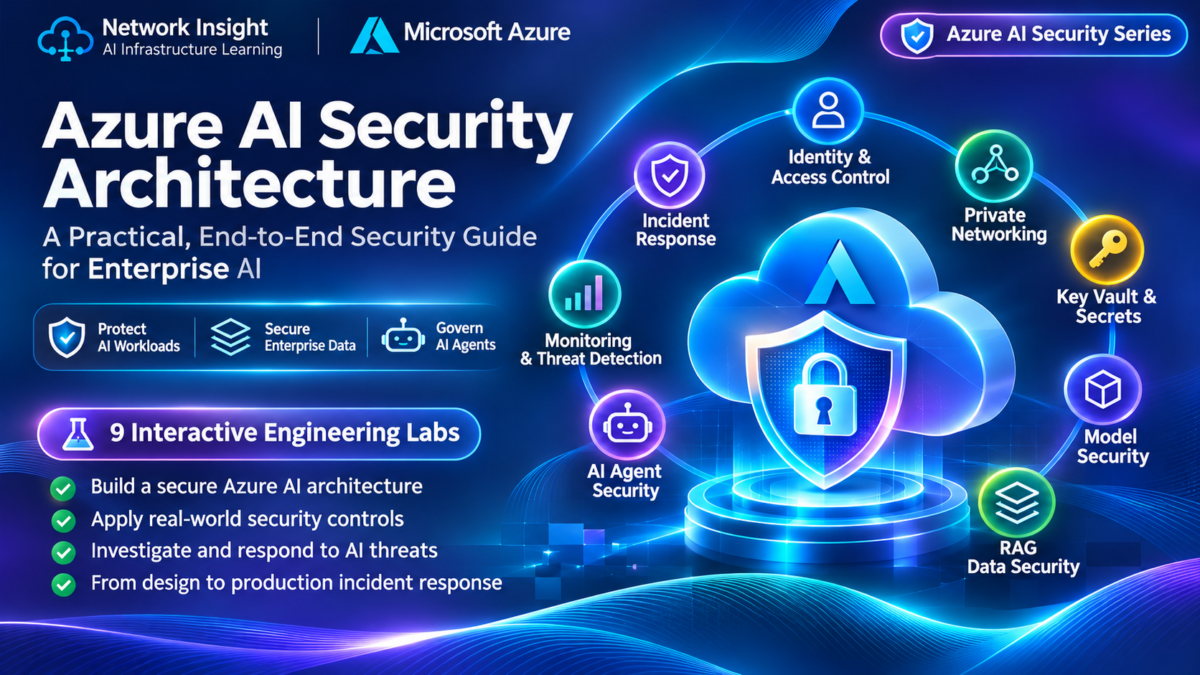
Azure AI Security Architecture Explained
Enterprise artificial intelligence introduces a new set of security boundaries across cloud networking, identity, model inference, enterprise data, and autonomous AI agents. Microsoft Azure provides the infrastructure and security controls needed to protect these workloads, but secure architecture depends on how those controls are connected and enforced.
An enterprise AI application may authenticate through Microsoft Entra ID, connect to Microsoft Foundry or Azure OpenAI endpoints, retrieve business information through Azure AI Search, and invoke downstream services using managed identities. Each connection creates an authorization decision, a potential attack surface, and an opportunity to apply Zero Trust principles.
This guide examines how architects design secure Azure AI environments, isolate inference workloads, protect credentials and data, restrict agent permissions, and investigate security incidents across the complete AI request path.
Understanding the Azure AI Security Boundary
Azure AI security is not a single firewall, identity policy, or encryption setting. It is a layered architecture in which independent security controls protect users, applications, model endpoints, enterprise information, and downstream tools.
The objective is to establish explicit trust boundaries and ensure that each request is authenticated, authorized, constrained, and observable as it moves through the system.
Identity and network isolation solve different security problems. A private endpoint can restrict the network path to a service, but it does not replace application-level authentication or authorization.
Similarly, a managed identity can eliminate the need for stored application credentials, but the identity must still receive only the permissions necessary for its workload.
A successful network connection does not imply authorization. A valid identity does not imply unrestricted data access. A trusted AI model does not imply that its generated tool requests should be executed without independent validation.
Six Security Controls That Define Enterprise AI
A secure Azure AI deployment combines multiple controls to reduce the likelihood and impact of unauthorized access, data exposure, service compromise, and unsafe agent behavior.
Verify Every Principal
Authenticate users and workloads through Microsoft Entra ID and managed identities. Apply least-privilege access to Azure resources.
Isolate Sensitive Services
Use private endpoints, controlled routing, DNS configuration and network policies to restrict access paths.
Protect Credentials and Keys
Use Azure Key Vault, managed identity access and controlled key rotation. Avoid embedding credentials in application code.
Enforce Retrieval Permissions
Ensure RAG retrieval respects user and document authorization boundaries. Protect sensitive content throughout processing.
Constrain Autonomous Actions
Limit tool permissions, validate requested actions, and require approvals for sensitive operations.
Observe and Investigate
Correlate access logs, identity events, network telemetry and AI application security signals.
From Azure AI Architecture to Security Investigation
Throughout this guide, we will examine how enterprise AI security controls operate together and how engineering teams diagnose failures at the boundaries between identities, networks, model endpoints, retrieval systems, and AI agents.
You will learn how to distinguish network connectivity failures from authorization failures, trace workload identity permissions, evaluate private endpoint designs, protect RAG data access, and investigate security incidents involving AI agents.
By the end of this guide, you should be able to reason about Azure AI trust boundaries, identify security control gaps, and apply a structured methodology to investigate and improve enterprise AI security architecture.
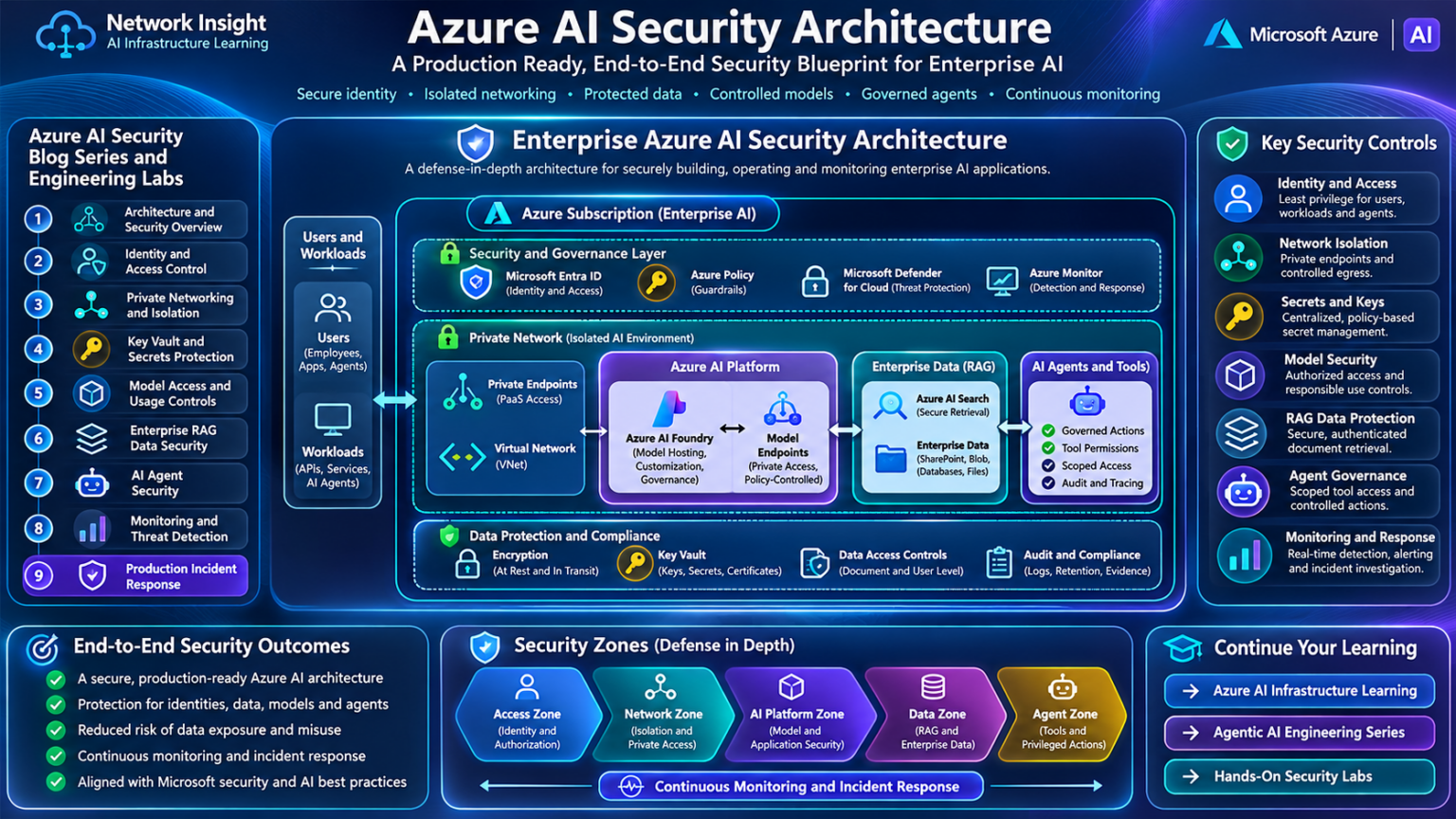
Explore the Azure AI Security Universe
Nine interconnected security domains. One enterprise Zero Trust architecture. Navigate from identity and private networking to secure retrieval, autonomous agents, threat detection, and production troubleshooting.
Azure AI Security Architecture
Zero Trust principles, trust boundaries, enterprise security layers, and secure AI request flows.
Identity and Managed Identities
Microsoft Entra ID, workload authentication, token validation, RBAC, and delegated permissions.
Private Link and Network Isolation
Private endpoints, Azure VNets, private DNS, routing, and network access boundaries.
Azure Key Vault and Secrets
Credential protection, secretless authentication, cryptographic keys, and access policies.
Microsoft Foundry and Model Security
Secure model deployments, inference endpoint authorization, and policy enforcement.
RAG and Enterprise Data Security
Azure AI Search, document authorization, vector indexes, security trimming, and data leakage prevention.
AI Agent Security and Tool Permissions
Agent identities, tool authorization, prompt injection, privilege boundaries, and approval gates.
Threat Protection and Monitoring
Microsoft Defender for Cloud, Sentinel, Azure Monitor, threat detection, and security telemetry.
Production Security Troubleshooting
Identity failures, private connectivity, RAG exposure, agent incidents, and root-cause investigations.
Azure AI Security Architecture and Zero Trust
Securing enterprise AI infrastructure requires a Zero Trust approach in which every identity, network connection, model invocation, data retrieval, and automated tool action is evaluated against explicit security policies.
Azure AI applications often combine cloud networking, Microsoft Entra ID, model-serving endpoints, enterprise search systems, and agent orchestration. Each component introduces its own security controls and trust boundaries. A secure architecture must connect these controls without assuming that access to one service grants access to another.
Applying Zero Trust to Enterprise AI Workloads
Zero Trust is a security architecture based on explicit verification, least-privilege access, and the assumption that security breaches may occur.
In an Azure AI environment, Zero Trust applies not only to human users but also to applications, managed identities, model endpoints, retrieval pipelines, and AI agents.
Verify Explicitly
Authenticate principals and evaluate authorization using identity, resource, policy, and relevant request context.
Least Privilege
Grant users and workloads only the permissions required for their approved operations.
Assume Breach
Segment services, limit lateral movement, monitor suspicious activity, and prepare for containment.
Continuous Evaluation
Reassess access as identities, permissions, workloads, and security conditions change.
AI introduces an additional consideration: a model may generate instructions or recommend actions, but the model output should not independently establish authorization.
Model-generated instructions are not security credentials. Sensitive operations must be authorized by trusted application logic and the relevant downstream service, independently of what an AI model requests.
Understanding the Layers of Azure AI Security
Enterprise AI security is implemented across several architectural layers. Each layer enforces a different type of control and protects a different set of resources.
A private network path can reduce exposure to public connectivity, but it does not replace resource authentication or authorization.
Likewise, Azure RBAC can govern access to Azure resources, while application-specific authorization may still be required to control document retrieval, model usage, and downstream agent actions.
Where Security Decisions Must Be Enforced
A trust boundary is a point where a request, identity, or data item moves between components with different security assumptions or privileges.
| Trust Boundary | Security Decision | Example Control |
|---|---|---|
| User → Application | Is this user authenticated and permitted to use the application? | Microsoft Entra ID and application authorization |
| Application → AI Endpoint | Can this workload invoke the selected model deployment? | Managed identity, supported endpoint authentication and permissions |
| Network → Private Service | Is the service reachable through an approved network path? | Private Endpoint, DNS and network access controls |
| RAG Pipeline → Data | Is the requesting principal entitled to retrieve this information? | Document-level authorization and retrieval filtering |
| AI Agent → Tool | Is this specific action permitted for this user and workload? | Tool allowlists, scoped credentials and approval policies |
Security controls should be enforced by trusted services at the appropriate boundary. For example, a model may suggest retrieving a document, but the retrieval layer must independently verify whether that document is accessible.
Following an Authorized Azure AI Request
Consider an employee using an enterprise AI assistant to summarize an internal business document.
This workflow illustrates the distinction between identity authentication, network connectivity, resource authorization, and data-level permissions.
A request can succeed at one boundary and fail at another. For example, a valid application identity may reach an Azure AI endpoint while lacking the required permission to invoke a deployment.
Securing Network Paths to Azure AI Services
Azure Private Link allows supported Azure services to be accessed through private endpoints associated with a virtual network.
This can help reduce exposure to public network paths when combined with appropriate public access restrictions, routing, and DNS configuration.
Private Endpoints
Provide private IP connectivity to supported Azure service resources through Private Link.
Private DNS
Resolve supported service hostnames to the appropriate private endpoint addresses.
Network Segmentation
Separate application, management, data and supporting infrastructure according to workload needs.
Controlled Egress
Apply approved outbound access paths and policies to reduce unintended external communication.
Private Link provides a connectivity mechanism, not a universal authorization mechanism. Private endpoint availability and supported network configurations vary across Azure AI services and deployment types.
Managed Identities and Least-Privilege AI Workloads
Managed identities allow supported Azure workloads to obtain Microsoft Entra tokens without embedding long-lived application secrets in their code.
The receiving service must still validate the token and enforce the permissions associated with that identity.
A model-serving application may require permission to invoke an AI endpoint and separate permission to query a search index. These capabilities should not automatically grant access to storage administration, credential management, or unrelated Azure resources.
Preventing AI Systems from Exceeding Their Authority
Retrieval-Augmented Generation introduces a security boundary between the AI application and enterprise information.
The retrieval system must enforce document permissions independently of the model's generated queries or responses.
AI agents introduce another boundary when they invoke tools, APIs, databases, or operational systems. Tool access should be constrained by trusted authorization logic, scoped identities, and appropriate approvals.
Treat prompts, retrieved documents, and model outputs as potentially untrusted instructions. They must not be allowed to override the application's authorization policies.
Investigating Unauthorized Enterprise Data Retrieval
An enterprise AI assistant can successfully authenticate users and connect to its model endpoint. However, a security review identifies that some retrieved documents are not consistently filtered by user permissions.
Incident: AI Assistant Returns Restricted Documents
The application is operational, and its Azure resource permissions appear valid. The problem is located at the boundary between the retrieval application and enterprise document authorization.
The key lesson is that a correctly authenticated AI application can still expose information if the retrieval pipeline does not enforce the end user's access rights.
Building a Defensible Azure AI Security Architecture
Enterprise AI security should be designed as a collection of independently enforced controls rather than a single trusted application boundary.
Architects should document identity relationships, network access paths, resource permissions, document authorization, tool capabilities, and security monitoring requirements.
They should also test failure scenarios, including unauthorized retrieval, denied model invocation, incorrect private DNS resolution, excessive agent permissions, and compromised application credentials.
Azure AI Zero Trust architecture requires explicit verification across identity, network, model, data, and agent trust boundaries. Private connectivity reduces network exposure, managed identities support credential-free workload authentication, and application-level authorization protects sensitive data and actions. Security is effective only when these controls are independently enforced, monitored, and validated across the complete enterprise AI workflow.
Enterprise AI Zero Trust Architecture Explorer
Trace an enterprise AI request across identity, network, application, model, data and agent security boundaries. Investigate which control permits or denies access and why.
Configure the Enterprise AI Request
Azure Enterprise AI Security Boundaries
Each node represents a conceptual enforcement point. A denied decision stops the request before downstream resources are accessed.
Ready to evaluate the request.
Security Decision Trace
Inspect the decision made at each enforcement point.
Engineering Investigation
Zero Trust Principle
Authentication alone does not establish authorization. A verified identity may still be denied by network policy, resource permissions, data ACLs or agent tool restrictions.
Each boundary must evaluate the relevant identity, request context and policy before granting access.
Identity, Authentication, and Managed Identities
Identity is one of the most important security foundations in Azure AI architecture. Every application, model-serving workload, retrieval service, and autonomous agent requires a trustworthy mechanism for proving its identity and obtaining only the permissions needed to perform approved operations.
Microsoft Entra ID provides identity and token services, while Azure RBAC and service-specific authorization mechanisms govern access to protected resources. Managed identities allow supported Azure workloads to authenticate without storing long-lived application secrets.
Understanding Identity in Azure AI Systems
An enterprise AI solution typically contains multiple identities. Human users authenticate to the application, while backend workloads authenticate separately when invoking model endpoints, search services, storage, or tools.
These identities should not be treated as interchangeable. A backend application's permission to query Azure AI Search does not automatically mean that every signed-in user is entitled to view every retrieved document.
User Identity
Represents the employee or customer interacting with the AI application. User permissions may determine which information and features are available.
Managed Identity
Represents an eligible Azure workload. The Azure platform manages its credentials and enables supported token acquisition flows.
Service Principal
Represents an application or service identity in a Microsoft Entra tenant. Authentication may use certificates, federated credentials, or secrets.
Agent Execution Identity
Represents the identity used when an AI agent invokes external tools. Permissions must remain constrained to authorized operations.
Separate human identity, workload identity, and resource authorization. A valid workload token should never be interpreted as proof that an end user is entitled to all data accessible by the workload.
How Azure AI Workloads Obtain Access Tokens
Azure workloads commonly use Microsoft Entra OAuth 2.0 access tokens when communicating with services that support Entra authentication.
In a managed identity flow, the workload requests a token through the supported Azure identity endpoint. Microsoft Entra issues a token for the requested resource audience when the identity and request satisfy the applicable requirements.
The resource validates the token according to its supported authentication mechanism, including relevant issuer, audience, signature, lifetime, and identity claims.
Authentication alone is insufficient. The resource must also determine whether the principal has permission to perform the requested operation.
System-Assigned and User-Assigned Managed Identities
Azure supports system-assigned and user-assigned managed identities. Both can eliminate the need for application-managed credentials in supported environments.
| Characteristic | System-Assigned | User-Assigned |
|---|---|---|
| Lifecycle | Associated with the lifecycle of its Azure resource | Managed as a separate Azure resource |
| Sharing | Bound to one resource | Can be assigned to multiple supported resources |
| Typical Use | Dedicated application or workload identity | Reusable identity across selected workloads |
| Permissions | Assigned to the identity's principal | Assigned to the user-assigned identity's principal |
| Security Consideration | Resource and identity lifecycle are coupled | Shared permissions may increase the impact of compromise |
Identity selection should reflect workload ownership, deployment lifecycle, operational separation, and the scope of permissions.
Reusing a user-assigned identity can simplify deployment patterns, but it also requires careful analysis of which resources will share the same authorization privileges.
Separating Management Permissions from Data Access
Azure role-based access control assigns permissions to security principals at supported scopes, such as a resource, resource group, or subscription.
Azure AI architectures must distinguish between management-plane permissions and data-plane operations.
Management Plane
Controls operations such as creating, updating, or configuring Azure resources through Azure Resource Manager.
Data Plane
Controls supported service operations, such as invoking model endpoints, querying indexes, or reading data.
Role Scope
Determines where a role assignment applies. Broader scopes can grant access to more resources than intended.
Least Privilege
Prefer narrowly scoped service roles and avoid granting administrative permissions solely to enable inference.
Azure resource management roles do not universally grant service data-plane permissions. Verify the actual role definition, resource scope, and authentication mode for the service being accessed.
Following a Model Invocation Through Identity Controls
Consider a private enterprise application that invokes an Azure-hosted model using a managed identity.
The model endpoint must independently enforce the supported authorization requirements for the operation.
A correctly issued token can still be rejected if it targets the wrong audience, lacks required permissions, or is presented to an incompatible authentication endpoint.
Understanding Authentication and Authorization Errors
Identity-related failures often appear as application errors, but the root cause may be an incorrect token, missing role assignment, wrong principal, or unsupported authentication configuration.
| Symptom | Possible Cause | Engineering Check |
|---|---|---|
| HTTP 401 | Missing, invalid, expired, or incorrectly targeted token | Inspect token audience, issuer, validity and authentication configuration |
| HTTP 403 | Authenticated principal lacks permission or is blocked by policy | Review role assignments, scope and service-specific access rules |
| Token Acquisition Failure | Managed identity unavailable or incorrectly configured | Verify identity assignment, hosting support and token request settings |
| Wrong Principal | Application selects an unintended identity | Confirm client ID and the principal actually used |
| Intermittent Authorization | Role propagation, token caching or inconsistent configuration | Correlate timestamps, token claims and resource permissions |
Engineers should avoid assuming that every 403 response is caused by Azure RBAC. Some services also enforce network restrictions, resource policies, or application-specific permissions.
Designing Least-Privilege AI Service Access
A robust AI identity design assigns different responsibilities to different principals wherever practical.
For example, a frontend application may authenticate users, a model-serving backend may invoke an inference endpoint, and a retrieval service may query an enterprise search index.
Separating these identities can reduce unnecessary privilege sharing and make security auditing easier.
Use managed identities where supported, scope role assignments narrowly, separate deployment administration from runtime access, and maintain explicit authorization checks for end-user data and agent actions.
Investigating a Model Endpoint Authorization Failure
An enterprise AI assistant has been deployed successfully. The application can reach its Azure model endpoint, but inference requests consistently fail with an authorization error.
Incident: Model Invocation Returns HTTP 403
Network connectivity and DNS resolution are functioning. The application obtains an access token, but the receiving service denies the requested operation.
The investigation demonstrates why successful token acquisition is not proof of authorization. The receiving resource must permit the requested operation.
Building a Secure Identity Foundation for Azure AI
Production AI platforms should document every workload identity, its assigned permissions, its resource scope, and the services it is allowed to access.
Security reviews should include identity ownership, privileged role assignments, token handling, access logging, credential rotation where applicable, and separation between deployment and runtime roles.
Engineers should also test negative authorization scenarios: invalid tokens, missing roles, wrong audiences, unauthorized model invocations, and attempts to retrieve restricted data.
Microsoft Entra ID, managed identities, OAuth access tokens, and Azure RBAC provide important foundations for secure Azure AI workloads. Authentication establishes identity; authorization determines permitted operations. Secure engineering requires narrowly scoped permissions, explicit service access controls, separation of user and workload privileges, and reliable troubleshooting across token and permission boundaries.
Managed Identity & Token Authorization Lab
Follow an Azure AI workload through identity selection, Microsoft Entra token issuance, audience validation, role assignment and protected resource authorization.
Configure the Workload Identity Request
Azure Workload Identity Authorization Pipeline
Follow the token request from the Azure workload to the protected resource's data-plane authorization decision.
Ready to begin authorization evaluation.
Decoded Token Claims
Illustrative token metadata for the configured Azure workload identity and target resource.
Identity & Authorization Trace
Investigate the first failing check and distinguish authentication from authorization.
Azure Private Link and Network Isolation
Secure Azure AI infrastructure requires deliberate control over how applications, model endpoints, enterprise search services, storage systems, and supporting workloads communicate across cloud networks.
Azure Private Link enables private connectivity to supported Azure services, while virtual networks, DNS configuration, network security policies, and public access restrictions establish the surrounding security architecture. Together, these controls can reduce unintended exposure and create predictable connectivity paths for enterprise AI applications.
Why Private Networking Matters for Azure AI
Enterprise AI applications frequently exchange sensitive prompts, retrieved documents, inference responses, and operational metadata with cloud services.
Network architecture determines which systems can establish connectivity to those services and how traffic is routed between application infrastructure and managed Azure resources.
Reduced Network Exposure
Private endpoints provide private connectivity to supported resources, reducing dependence on publicly reachable service endpoints.
Controlled Access Paths
Virtual network architecture helps define which workloads can reach model and data services.
Predictable Name Resolution
Private DNS configuration enables applications to resolve supported service names to private addresses.
Security Segmentation
Application, management, and data access environments can be separated according to their security requirements.
Private network connectivity does not automatically grant access to Azure AI resources. Authentication, authorization, and service-level access controls remain necessary.
Connecting AI Applications to Private Azure Services
Azure Private Link allows a supported service resource to be accessed through a private endpoint associated with a virtual network subnet.
The private endpoint is a network interface with a private IP address. Applications connect to the service through that address when DNS and routing are configured appropriately.
Private endpoints can be placed in a dedicated subnet or other appropriately designed subnets, depending on organizational requirements.
The placement of the private endpoint does not require the managed Azure service itself to run inside the customer virtual network.
How Azure AI Private Endpoint Name Resolution Works
DNS is a critical dependency in Private Link architecture. Applications normally connect to service hostnames rather than hardcoded private IP addresses.
When Private Link is configured, the relevant DNS resolution path must return the private endpoint address to clients that should use private connectivity.
Private DNS zone names and endpoint requirements differ by Azure service and resource type.
Hybrid environments may require DNS forwarding between on-premises resolvers and Azure-hosted DNS infrastructure.
A private endpoint may be correctly deployed while the application still resolves the service hostname to a public address. Engineers should validate DNS from the actual application network environment.
Restricting Exposure to Azure AI Resources
Where supported, disabling public network access can help ensure that clients use approved private connectivity paths to reach an Azure AI resource.
A private endpoint alone does not necessarily disable the service's public endpoint or prevent public network access.
| Control | Purpose | Engineering Consideration |
|---|---|---|
| Private Endpoint | Provides private connectivity to a supported resource | Requires approved connection and correct DNS/routing |
| Public Network Access Restriction | Limits or disables supported public access paths | Behavior and availability depend on service configuration |
| Network Security Groups | Filter permitted traffic at supported subnet or interface boundaries | Private endpoint network policies must be considered |
| Azure Firewall | Applies centralized network security policies | Only inspects traffic that is actually routed through it |
| Private DNS Zones | Support private resolution of service endpoints | Correct zone links and hybrid DNS forwarding are essential |
| Microsoft Entra ID / RBAC | Enforce supported identity-based access controls | Network reachability is separate from authorization |
Designing Security Zones for Enterprise AI
Network segmentation helps prevent every workload from having unrestricted connectivity to every supporting Azure service.
Application Zone
Hosts approved enterprise applications and API services that initiate model inference requests.
Private Service Access Zone
Contains private endpoint interfaces for selected Azure AI and data services.
Management Zone
Supports controlled administration, monitoring, deployment and operational access to infrastructure.
Hybrid Connectivity Zone
Connects approved on-premises environments through VPN or ExpressRoute where needed.
Segmentation should follow actual workload trust requirements, not simply the number of Azure services deployed.
Following an AI Request Through Private Connectivity
Consider an enterprise AI application deployed in a network-integrated Azure compute environment.
The sequence highlights how network connectivity and identity-based authorization operate together while enforcing different controls.
Extending Private Azure AI Access to Enterprise Networks
Some organizations require employees or applications in on-premises data centres to access Azure AI services through private network paths.
VPN Gateway or ExpressRoute can provide connectivity between enterprise networks and Azure virtual networks.
Private DNS resolution, routing, security policies, and identity authorization must be coordinated across the hybrid environment.
ExpressRoute connectivity does not automatically configure Private Link, private DNS, or Azure AI service authorization. These remain separate architectural requirements.
Investigating a Private Azure AI Connectivity Failure
An enterprise AI application has been migrated to use a private endpoint. Public network access has been restricted, but the application can no longer reach its model endpoint.
Incident: Private Model Endpoint Unreachable
The private endpoint resource exists and its connection is approved. However, application requests fail before reaching the model-serving service.
A common cause is incorrect private DNS configuration, which can leave clients resolving the service hostname to a public address despite the presence of a private endpoint.
The correct investigation starts from the actual client environment and verifies DNS, routing, transport connectivity, and service authorization separately.
Engineering a Defensible Private Azure AI Architecture
Secure private connectivity requires more than creating a private endpoint. Architects must ensure that DNS, routing, segmentation, public access restrictions, and identity controls work together.
Production validation should include positive and negative connectivity tests, private DNS verification, unauthorized access attempts, firewall rule reviews, and hybrid network failure scenarios.
The design should also document which resources use Private Link, which public paths remain available, and which identities can access each protected service.
Azure Private Link provides private connectivity to supported AI and data services, while virtual networks, private DNS, network policies, and public access restrictions define the surrounding security architecture. Effective network isolation requires validating the complete client-to-service path and preserving independent identity and authorization controls.
Private Link, DNS & Network Isolation Lab
Trace an Azure AI connection from an application subnet through private DNS, VNet routing, network security controls and an approved private endpoint.
Configure the Private Connectivity Scenario
Azure AI Private Endpoint Connection Path
Each stage represents a diagnostic checkpoint. A failed checkpoint stops the simulated connection.
Ready to investigate private connectivity.
Azure Network Diagnostic Console
Run synthetic DNS, route, endpoint and TCP connectivity checks.
Engineering Investigation
Private Link Engineering Principle
A private endpoint provides a private IP interface for access to a supported Azure service. Successful connectivity also requires correct name resolution, an effective network path, applicable security filtering and an approved endpoint connection.
Disabling public network access does not create private connectivity automatically. DNS and network reachability must still be configured correctly.
Azure Key Vault and Secrets Management
Azure AI applications depend on sensitive configuration, service credentials, encryption keys, and certificates. Protecting these assets is essential for preventing unauthorized access to model endpoints, enterprise data, and supporting infrastructure.
Azure Key Vault provides managed capabilities for storing and controlling access to secrets, cryptographic keys, and certificates. Combined with managed identities and appropriate authorization policies, it helps reduce credential exposure and centralize sensitive asset management.
Why Secrets Management Matters for AI Infrastructure
AI applications often communicate with multiple downstream systems, including model endpoints, databases, search indexes, storage services, and external APIs.
If credentials are embedded in source code, deployment packages, container images, or configuration files, they may be exposed through repository access, logs, backups, or compromised workloads.
Centralized Secret Storage
Store sensitive application credentials in a dedicated protected service instead of embedding them in code.
Identity-Based Access
Use managed identities and narrowly scoped permissions to retrieve protected assets.
Controlled Rotation
Replace credentials and cryptographic material through planned lifecycle procedures.
Security Monitoring
Observe supported access events and investigate unexpected secret retrieval or permission changes.
Prefer eliminating application-managed credentials through managed identity authentication wherever supported. Use Key Vault for credentials and cryptographic assets that remain necessary.
How Azure AI Workloads Access Protected Assets
A secure Azure AI application can authenticate through its managed identity and request an authorized secret from Azure Key Vault.
The application does not need to embed a permanent Key Vault password. Instead, it obtains a supported access token and presents that token when requesting a protected asset.
Key Vault authorization determines whether the identity can read a secret, use a cryptographic key, or perform another supported operation.
Retrieving a secret does not automatically authorize access to the downstream service. The downstream service still validates the supplied credential or authentication mechanism.
Secrets, Cryptographic Keys, and Certificates
Azure Key Vault supports several types of protected assets, each with different security and lifecycle requirements.
| Asset Type | Typical AI Use Case | Security Consideration |
|---|---|---|
| Secrets | External API credentials or connection strings | Limit retrieval permissions and prevent disclosure in logs |
| Cryptographic Keys | Supported encryption, decryption or signing operations | Restrict key operations and manage versions and rotation |
| Certificates | TLS or certificate-based application authentication | Manage renewal, private key access and deployment dependencies |
| Key Versions | Controlled cryptographic lifecycle changes | Preserve access to required historical versions when necessary |
Secrets are generally retrieved as values by authorized clients. Cryptographic keys can support operations performed by the Key Vault service without exporting the private key material, depending on the key type and supported operation.
Storing a secret in Key Vault does not make that secret impossible to extract. A principal with permission to read the secret can obtain its value. Strong access control and workload security remain essential.
Securing Key Vault with Azure RBAC and Managed Identities
Azure Key Vault supports Azure RBAC for data-plane authorization. Existing deployments may also use the legacy access policy model.
For new designs, Azure RBAC is generally preferred because it provides centralized role assignment and scope management.
Runtime Identity
Assign a managed identity to the workload that requires access to Key Vault assets.
Data-Plane Permissions
Grant only the supported secret, key or certificate operations required by the workload.
Network Restrictions
Use supported firewall settings and private endpoints to control connectivity to the vault.
Administrative Separation
Separate permissions for managing the vault from permissions to access protected data.
Role assignment scope should be kept as narrow as practical. An AI inference application that only needs to retrieve one credential should not receive broad administrative access.
Following a Managed Identity Secret Retrieval
Consider an Azure-hosted AI application that must access an external service requiring an API key.
This approach reduces the need to embed long-lived credentials in application configuration.
However, the application must still protect the retrieved value in memory, avoid accidental logging, and limit its lifetime and distribution.
Designing Credential and Key Rotation
Credentials and cryptographic material should have documented lifecycle procedures, including creation, access, rotation, revocation, and recovery.
Azure Key Vault supports versioned objects and rotation capabilities for supported asset types and scenarios.
| Lifecycle Stage | Engineering Objective | Operational Check |
|---|---|---|
| Provision | Create the credential or key through an approved process | Validate ownership, permissions and intended consumers |
| Distribute | Allow authorized workloads to access required material | Verify managed identity and Key Vault permissions |
| Rotate | Introduce replacement credentials or key versions | Test application refresh and compatibility |
| Revoke | Disable compromised or obsolete access | Confirm consumers no longer rely on the old credential |
| Recover | Restore approved assets after accidental deletion or failure | Validate soft delete, purge protection and recovery procedures |
Creating a new Key Vault secret version does not automatically update every application or rotate the corresponding credential at an external service. Consumers and downstream systems must be coordinated.
Protecting AI Data with Cryptographic Controls
Azure AI security also involves protecting information at rest and in transit.
Azure services commonly provide encryption capabilities, while selected services support customer-managed keys for additional control over encryption key management.
Customer-managed key support, required permissions, and configuration procedures vary by Azure service, resource type and deployment model.
Disabling, deleting, or making a customer-managed encryption key inaccessible can disrupt a dependent service. Key rotation, recovery, and permission changes must be tested against the specific service integration.
Investigating a Key Vault Authorization Failure
An Azure AI application is deployed with a managed identity. The application can authenticate successfully, but it fails when retrieving a required secret from Key Vault.
Incident: Secret Retrieval Returns HTTP 403
The workload obtains an access token, but the Key Vault service denies the secret retrieval operation.
A 403 response may reflect authorization restrictions or supported network access policies. Engineers should inspect the detailed service error and relevant diagnostic information rather than assuming that every denial is an Azure RBAC issue.
Building a Defensible Secrets Management Architecture
A production Azure AI environment should maintain an inventory of required credentials, cryptographic keys, certificates, and their consuming workloads.
Security reviews should verify Key Vault access assignments, private connectivity requirements, diagnostic logging, rotation procedures, and recovery controls.
Engineers should also validate negative scenarios: unauthorized secret reads, incorrect identities, expired credentials, inaccessible keys, and failed credential rotation.
Azure Key Vault provides centralized protection and access control for secrets, cryptographic keys, and certificates. Managed identities reduce reliance on stored application credentials, while Azure RBAC, network restrictions, lifecycle management, and security monitoring help enforce least privilege. Effective secrets security depends on protecting both the stored assets and the workloads authorized to use them.
Key Vault Secrets & Key Access Investigation
Investigate how an Azure AI application retrieves secrets, invokes cryptographic key operations and responds to authorization, versioning and lifecycle failures.
Configure the Key Vault Operation
Azure Key Vault Data-Plane Enforcement
Follow a simulated Key Vault operation through network admission, permission evaluation, object state and final operation handling.
Ready to investigate the Key Vault request.
Vault Operation Trace
Inspect each enforcement decision and the first failure encountered.
Key Vault Audit Evidence
Illustrative audit records containing the operation, result and authorization context.
Securing Microsoft Foundry and Model Endpoints
Model inference endpoints are critical security boundaries in enterprise AI infrastructure. They process application prompts, potentially sensitive context, and generated responses, while consuming resources that may be expensive or operationally constrained.
Securing Microsoft Foundry and Azure OpenAI deployments requires coordinated controls across network access, workload identity, model invocation permissions, gateway policies, content safety, and monitoring. A model endpoint should never be treated as an unrestricted backend simply because it is accessible from a trusted application.
Why AI Model Endpoints Require Dedicated Protection
Traditional APIs usually execute defined operations against predictable input structures. Generative AI endpoints accept complex natural-language requests that may contain sensitive information, adversarial instructions, or unusually large input contexts.
In addition to conventional authentication and network controls, AI endpoints require attention to request size, model access, abuse patterns, content safety, resource consumption, and downstream application behavior.
Unauthorized Invocation
Prevent identities without approved permissions from calling protected model deployments.
Inference Resource Abuse
Control request volume, token consumption, and workload behavior to protect capacity and operational budgets.
Sensitive Data Exposure
Limit unnecessary disclosure of confidential information through prompts, logs, responses, and integrations.
Unsafe Model Interactions
Apply appropriate content safeguards, input validation, output handling, and application-level controls.
Model endpoint security is broader than API authentication. It combines access control, request governance, resource protection, application safeguards, and security telemetry.
Designing a Protected Azure AI Request Path
A common enterprise pattern places a trusted application or API gateway between users and the model-serving resource. The gateway can enforce selected application policies before forwarding approved requests.
The gateway may authenticate callers and apply application-level policies, while the model-serving resource independently validates the identity or credential used for backend access.
Network isolation can reduce public exposure, but gateway placement and backend connectivity must be designed to prevent unintended bypass paths.
Controlling Which Workloads Can Invoke Models
Supported Azure AI endpoints can use Microsoft Entra authentication and service-specific authorization mechanisms. Some configurations also support API key authentication.
Where available, managed identity authentication reduces reliance on application-stored credentials. The calling identity must still possess the permissions required for the selected service operation.
| Security Control | Purpose | Engineering Check |
|---|---|---|
| Microsoft Entra Authentication | Establishes a supported workload identity | Validate token audience and principal |
| Azure RBAC | Grants supported resource or inference permissions | Inspect data-plane roles and assignment scope |
| API Key Authentication | Allows supported credential-based endpoint access | Protect keys and disable key-based access where supported and appropriate |
| Private Connectivity | Restricts network access paths | Verify private DNS, routing and public access settings |
| Gateway Authorization | Applies application-specific caller and model policies | Ensure gateway controls cannot be bypassed |
A gateway subscription key or successful gateway authentication does not automatically provide authorization at the model backend. Conversely, a valid backend credential may bypass gateway controls if direct endpoint access remains possible.
Using Azure API Management for Inference Governance
Azure API Management can serve as a centralized policy enforcement layer for supported AI inference APIs.
Depending on the chosen configuration and available policies, it can validate callers, route requests, enforce consumption limits, transform headers, and collect operational telemetry.
Request Authentication
Validate approved client identities and apply API access policies before requests reach the model.
Token and Rate Limits
Apply supported throttling and token consumption policies to reduce excessive demand.
Model Routing
Direct approved workloads to selected deployments, versions or regional backends according to policy.
Request Observability
Capture useful request metadata, errors and consumption metrics without unnecessarily logging sensitive prompt content.
Rate limiting is not a substitute for identity authorization. It protects consumption and availability but does not establish whether a caller should access a particular model.
Following a Model Request Through Security Controls
Consider an employee submitting a prompt to an enterprise AI assistant that uses a private Azure model deployment.
Each step has a distinct responsibility. The gateway governs application access, the model service enforces supported backend authorization, and the application remains responsible for appropriate handling of generated content.
Protecting Applications Against Unsafe AI Interactions
Model endpoint security also involves managing potentially harmful or adversarial content. This includes unsafe requests, prompt injection, sensitive information disclosure, and inappropriate downstream actions.
Azure AI services offer content safety capabilities for supported models and deployment types. Their behavior and configurability vary by service and model.
Input Safeguards
Apply supported content filtering and application validation to inbound prompts.
Output Safeguards
Validate model responses before exposing sensitive workflows or rendering generated content.
Prompt Injection Defense
Treat external documents and model-generated instructions as untrusted inputs to privileged logic.
Data Minimization
Limit unnecessary sensitive information in prompts, responses and diagnostic logging pipelines.
Content filters and model safety mechanisms are defense-in-depth controls, not guarantees against prompt injection or unauthorized tool execution. Sensitive operations require deterministic authorization outside the model.
Detecting Abnormal Model Invocation Patterns
Production model endpoints should be monitored for security-relevant and operational anomalies.
Unexpected increases in request volume, token consumption, authentication failures, or access from unusual application identities may warrant investigation.
| Signal | Potential Concern | Investigation |
|---|---|---|
| Repeated 401 Responses | Invalid tokens or unauthorized clients | Inspect authentication configuration and caller identity |
| Repeated 403 Responses | Denied permissions or service access policies | Review roles, network controls and endpoint configuration |
| High Token Consumption | Unexpected usage, abuse or application loops | Correlate request volume, consumers and workload behavior |
| 429 Responses | Quota or rate limits exceeded | Inspect capacity, consumption and throttling policies |
| Unusual Model Access | Unexpected caller or deployment usage | Compare identity, gateway logs and approved access patterns |
Monitoring should preserve useful investigation metadata while minimizing unnecessary collection of prompts, retrieved documents, or generated sensitive content.
Investigating Unauthorized Model Invocation
An enterprise AI platform uses Azure API Management to control access to a private model deployment. Security monitoring identifies unexpected inference consumption attributed to an application that should not be using the model.
Incident: Unexpected Inference Usage Bypasses Gateway Policy
Gateway telemetry does not account for all observed backend inference consumption. The investigation must determine whether another approved or unintended network path and credential can invoke the model directly.
This incident illustrates a common architectural risk: policies applied at an API gateway are effective only for requests that actually traverse that gateway.
Building a Defensible Azure AI Model Endpoint Architecture
Secure model-serving platforms should document approved callers, model deployments, authentication methods, network access paths, gateway policies, and operational limits.
Engineers should validate unauthorized invocation, incorrect identity roles, gateway bypass attempts, excessive request volume, unexpected token consumption, and content safety failure scenarios.
Security teams should also review model access whenever deployments, application identities, or network configurations change.
Microsoft Foundry and Azure model endpoints require coordinated security controls across authentication, authorization, private connectivity, API governance, content safeguards, and monitoring. Azure API Management can provide a valuable policy enforcement layer, but backend access must remain independently protected. Secure inference architecture prevents unauthorized model usage, reduces resource abuse, and protects sensitive application workflows.
Model Endpoint Authorization & Policy Enforcement
Investigate how enterprise security policies determine whether an application can invoke a Microsoft Foundry model deployment.
Configure the Inference Security Request
Microsoft Foundry Model Security Pipeline
Follow the request through deployment governance, invocation authorization, content policy, token budget and gateway rate limiting.
Ready to evaluate model endpoint security.
Inference Security Decision Trace
Inspect policy enforcement events and identify the first rejected control.
Enterprise Security Policy
RAG and Enterprise Data Security
Retrieval-Augmented Generation connects large language models to enterprise knowledge sources. While this improves answer relevance and enables access to current business information, it also creates a critical security boundary between AI applications and protected organizational data.
Secure RAG architecture must ensure that retrieved documents are authorized for the requesting user or workload. Azure AI Search, Microsoft Entra ID, document metadata, application-level authorization, and appropriate network controls can be combined to enforce these requirements.
Why Enterprise Retrieval Requires Independent Authorization
In a conventional RAG workflow, an application converts a user request into a search query, retrieves relevant documents or passages, and supplies that context to a model.
The security challenge is that relevance is not the same as authorization. A document can be highly relevant to a question while remaining restricted to a different department, security group, or user.
Identity-Aware Retrieval
Associate retrieval requests with the authenticated user and relevant authorization context.
Document-Level Permissions
Apply access restrictions to individual documents or indexed content according to source policy.
Protected Search Infrastructure
Secure search services, indexes, ingestion pipelines, and supporting storage.
Controlled Model Context
Ensure unauthorized content is excluded before constructing the model prompt.
The model must not decide which enterprise documents a user is authorized to access. Retrieval authorization must be enforced by trusted application or search-layer controls before restricted content reaches the model.
Designing an Authorization-Aware Retrieval Pipeline
A secure RAG pipeline separates user authentication, document authorization, search execution, and model generation.
The ingestion pipeline must preserve appropriate authorization metadata when documents are indexed or transformed.
If documents are split into smaller chunks, each chunk must remain associated with the permissions of its source document.
Understanding Security Trimming in Azure AI Search
Security trimming refers to excluding search results that the requesting principal is not authorized to access.
One implementation uses document metadata containing authorized user or group identifiers and applies trusted filters to search requests.
Azure AI Search also supports selected document-level access control capabilities, depending on the data source, indexing configuration, and supported features.
| Control | Purpose | Security Consideration |
|---|---|---|
| Document ACL Metadata | Associates documents with permitted users or groups | Metadata must accurately reflect source permissions |
| Security Filters | Exclude documents outside the requesting principal's permissions | Filters must be generated by trusted logic, not user-controlled text |
| Source Permission Synchronization | Maintains alignment with changing enterprise access rights | Revoked permissions must propagate to retrieval controls |
| Chunk Permission Inheritance | Preserves authorization when documents are split | Every searchable chunk must retain effective access restrictions |
| Application Authorization | Applies business-specific access rules | Must be enforced independently of model-generated instructions |
A metadata-based security filter is only as trustworthy as its identity mapping, indexed permissions, and application enforcement. It must not be confused with automatic inheritance of every source system's authorization behavior.
Protecting Embeddings, Chunks, and Search Indexes
Vector search introduces additional data structures that must be protected. Embeddings are numerical representations of content, while searchable chunks may contain substantial portions of the original enterprise information.
Embeddings should not be assumed to provide confidentiality or anonymization. Sensitive information may still be exposed through associated content, metadata, retrieval behavior, or other attacks.
Index Access Control
Restrict which workloads can query, update, or administer search indexes.
Secure Ingestion
Validate document sources, transformations, metadata, and ingestion identities.
Data Classification
Apply appropriate handling requirements to confidential, regulated, or restricted content.
Retention and Deletion
Ensure deleted or revoked source content is removed or restricted in dependent indexes and caches.
Following a User Request Through Document Authorization
Consider an employee asking an enterprise AI assistant to summarize an internal financial planning document.
Authorization should be enforced before retrieved content is supplied to the model.
Filtering the final generated answer alone is not a reliable substitute for restricting the underlying retrieval.
Reducing Sensitive Information Exposure in RAG
Data leakage can occur at several points in a RAG system, including ingestion, indexing, retrieval, prompt construction, logging, caching, and response delivery.
| Exposure Point | Potential Risk | Recommended Control |
|---|---|---|
| Document Ingestion | Restricted content indexed without correct permissions | Preserve source ACLs and validate ingestion policy |
| Search Query | Missing or manipulated security filter | Construct authorization filters in trusted application code |
| Model Prompt | Unauthorized documents included as context | Enforce retrieval authorization before prompt assembly |
| Application Logs | Confidential passages written to telemetry | Minimize and protect logged content |
| Response Cache | One user's answer reused for another user | Partition or authorize cache entries by security context |
Content filters and data loss prevention mechanisms can supplement retrieval authorization, but they cannot replace correct document-level access enforcement.
Prompt Injection and Untrusted Enterprise Content
Retrieved documents may contain malicious or misleading instructions. For example, an attacker could place text inside an indexed document instructing the assistant to ignore security rules or disclose information.
Such content should be treated as untrusted data rather than authoritative instructions.
The application should separate system instructions, user requests, retrieved evidence, and tool authorization decisions.
Retrieved text must not be allowed to modify trusted authorization policies, grant new permissions, or trigger privileged tool operations without independent checks.
Investigating Unauthorized Document Retrieval
An enterprise AI assistant is deployed with Azure AI Search and a model endpoint. Employees report that some generated answers contain information from documents belonging to restricted departments.
Incident: Restricted Documents Appear in AI Answers
Authentication and model invocation are functioning. The suspected failure occurs in the retrieval authorization boundary.
The incident demonstrates that a model can generate a technically accurate answer while violating enterprise data access requirements.
Correct remediation focuses on the trusted retrieval layer, not merely changing the model's prompt.
Building a Defensible Enterprise Retrieval Architecture
Secure RAG systems require explicit ownership of source permissions, identity mapping, document indexing, retrieval authorization, and model context construction.
Production testing should include users with different access rights, revoked group membership, deleted documents, stale indexes, unauthorized search requests, and cross-user cache access.
Security teams should also monitor changes to index permissions, ingestion identities, retrieval logic, and sensitive data exposure patterns.
RAG security depends on enforcing enterprise data authorization before information enters the model context. Azure AI Search can participate in secure retrieval architectures, but document-level permissions require deliberate implementation and validation. Identity-aware security trimming, protected indexes, controlled ingestion, and careful prompt construction are essential to preventing unauthorized information disclosure.
Secure RAG & Document Authorization Explorer
Investigate how enterprise document permissions, tenant isolation and retrieval filtering determine which information can enter an AI model's context.
Configure the Enterprise Retrieval Request
Enterprise RAG Security Pipeline
Follow a user query through identity context, retrieval, tenant filtering, document authorization and model context assembly.
Ready to evaluate enterprise retrieval security.
Enterprise Document Index
Six synthetic records with distinct tenant, classification and access-control attributes.
RAG Security Decision Trace
Inspect the retrieval candidates and document-level access decisions.
Security Investigation
Secure RAG Principle
Search relevance and document authorization are independent properties. A highly relevant document must not enter the model context unless the requesting principal is authorized to access it.
Authorization must also account for tenant boundaries, document ACL changes, cached results, citations and downstream response generation.
AI Agent Security and Tool Permissions
AI agents extend generative AI beyond answering questions. They can select tools, retrieve enterprise information, invoke APIs, update records, and coordinate multi-step business workflows.
This introduces a new security challenge: model-generated decisions may lead to real actions in enterprise systems. Secure agent architecture must ensure that every tool operation is independently authenticated, authorized, validated, and constrained by explicit policy.
Why Autonomous AI Changes the Enterprise Threat Model
Traditional applications typically follow predefined execution paths. AI agents may dynamically select actions based on user requests, retrieved documents, model outputs, and previous tool results.
The model's reasoning can influence which operation is requested, but it must not determine whether that operation is authorized.
Dynamic Tool Invocation
Agents may select tools and construct parameters at runtime rather than following fixed API sequences.
Privilege Escalation Risk
An overly privileged tool identity can allow the agent to perform unintended operations.
Untrusted Instructions
External documents, messages and tool responses may contain malicious instructions.
Autonomous Side Effects
Tool execution can modify records, send messages, trigger workflows or affect production systems.
Treat the AI model as an untrusted decision proposer. A trusted execution layer must enforce authorization before performing any privileged action.
Separating Agent Reasoning from Tool Authorization
A secure enterprise agent architecture separates user identity, model reasoning, tool authorization, and actual API execution.
The policy enforcement layer should inspect each proposed tool operation before execution.
Authorization decisions should be based on trusted identity claims, resource permissions, business rules, and approved execution context.
Managed Identities, Delegated Permissions, and Workload Access
An enterprise AI agent may access systems through an application identity or through delegated user authorization.
These models provide different security properties and should not be treated as interchangeable.
| Identity Model | Typical Use | Security Consideration |
|---|---|---|
| Managed Identity | Azure-hosted workload authenticating to supported services | Permissions belong to the workload identity, not automatically to the end user |
| Delegated User Access | Calling supported APIs on behalf of an authenticated user | Requires appropriate delegated scopes, consent and token flow |
| Application Permissions | Background automation without a signed-in user | May grant broad access and requires strong administrative governance |
| Service-Specific Credentials | Connecting to external systems without supported federation | Use protected storage, rotation and tightly scoped permissions |
An agent running under a managed identity does not automatically inherit the permissions of the user who requested the task. User-scoped operations require explicit authorization design, including supported delegated token flows where appropriate.
Applying Least Privilege to Agent Tool Execution
Tool permissions should be designed around specific operations rather than granting an agent broad access to an entire service.
For example, a support agent may need permission to read knowledge articles and update assigned support tickets, but should not receive permission to delete databases or change production infrastructure.
| Tool Operation | Risk Level | Suggested Policy |
|---|---|---|
| Read Approved Knowledge | Low to Medium | Allow with document-level authorization |
| Query Operational Metrics | Low to Medium | Allow within approved resource scope |
| Update Assigned Support Ticket | Medium | Validate ownership, fields and approval requirements |
| Send External Communication | Medium to High | Require recipient, content and business-policy validation |
| Modify Production Firewall | High | Deny by default; require separately authorized change workflow |
| Delete Enterprise Data | Critical | Deny unless explicitly approved through a tightly controlled workflow |
Risk classifications should be adjusted to the organization, data sensitivity, and potential operational impact.
Following an Agent Tool Request Through Authorization
Consider an AI operations agent asked to investigate a network incident and update a support ticket with its findings.
The agent's proposed action is not sufficient authorization to execute the tool.
The trusted application must verify that the operation is permitted for the relevant principal, resource, and business context.
Preventing Untrusted Content from Controlling Privileged Tools
Prompt injection becomes particularly dangerous when an AI agent can execute tools.
A malicious document, webpage, email, or API response may contain instructions attempting to redirect the agent toward unauthorized actions.
Untrusted Data Boundaries
Treat retrieved content and tool responses as data, not trusted instructions.
Independent Authorization
Enforce tool permissions outside the model before executing privileged operations.
Parameter Validation
Validate target resources, arguments, destinations and allowed operations.
Execution Isolation
Restrict tool environments, network access, credentials and execution privileges.
Prompt instructions, model confidence, or agent-generated explanations must never replace deterministic tool authorization.
Controlling High-Impact Autonomous Operations
Some agent operations require human approval because they can affect production systems, financial records, external communications, or sensitive data.
Approval gates should operate within a trusted workflow that records the exact proposed action, target, parameters, and approving identity.
A human approval should authorize a specific operation, not grant the agent unrestricted access for subsequent actions.
Approval is not a replacement for permission checks. The system must still validate authorization and ensure that the executed operation matches what was approved.
Investigating an Agent Privilege Escalation Attempt
An enterprise AI operations agent is designed to investigate network incidents and create remediation recommendations.
During an investigation, the agent retrieves a troubleshooting document containing malicious instructions to modify a production firewall rule automatically.
Incident: Prompt Injection Attempts a Privileged Firewall Change
The agent proposes a production configuration change that was not authorized by the user. The tool enforcement layer must prevent execution and preserve evidence for investigation.
The critical control is not whether the model recognizes the malicious text. It is whether the trusted authorization layer prevents an unauthorized action regardless of the model's output.
Building a Defensible Enterprise Agent Architecture
Production AI agents require documented tool inventories, approved operations, identity mappings, resource scopes, and audit trails.
Security validation should include unauthorized tool requests, malicious retrieved content, cross-user data access, excessive permissions, invalid approval states, and unexpected tool execution sequences.
Organizations should also establish operational limits for autonomous workflows, including execution time, retry behavior, resource consumption, and the maximum impact of an individual task.
Secure AI agents require a strict separation between model reasoning and privileged tool execution. Microsoft Entra ID, managed identities, delegated permissions, and application authorization can establish trusted access boundaries. Every tool operation must be independently validated, scoped, and audited. High-impact actions should require explicit authorization and appropriate approval workflows.
AI Agent Tool Permissions & Privilege Boundaries
Investigate whether an autonomous AI agent can execute an enterprise tool operation under identity, permission, approval and security policies.
Configure the Agent Tool Invocation
AI Agent Tool Execution Security Pipeline
Follow the agent request through instruction trust, tool allowlisting, operation authorization, approval policy and final execution control.
Ready to evaluate the agent tool request.
Agent Tool Security Trace
Inspect the enforcement decisions before the simulated tool invocation.
Enterprise Tool Permission Policy
Azure AI Threat Protection and Monitoring
Enterprise AI infrastructure introduces security signals across identities, model endpoints, retrieval services, network controls, storage systems, and autonomous agent workflows. Detecting threats requires correlating activity across these components rather than monitoring each service independently.
Microsoft Defender for Cloud, Microsoft Sentinel, Azure Monitor, Microsoft Entra logs, and service-specific diagnostics can support a layered security monitoring architecture for Azure AI workloads.
Why AI Infrastructure Requires Correlated Security Telemetry
An AI security incident may begin with an identity compromise, continue through unauthorized model invocation, and result in excessive retrieval or disclosure of enterprise data.
Individual logs may appear routine until correlated with other activity from the same principal, application, network, or execution session.
Identity Monitoring
Investigate suspicious sign-ins, workload authentication anomalies, and privileged permission changes.
Model Endpoint Monitoring
Observe inference volume, access failures, throttling and unexpected consumption.
Data Access Monitoring
Track supported search, storage, and Key Vault activity for abnormal patterns.
Agent Execution Monitoring
Record tool requests, authorization decisions, approval outcomes, and privileged operations.
A single anomaly does not necessarily indicate compromise. Security investigations should correlate identities, resources, timestamps, request identifiers, and business context before drawing conclusions.
Connecting Azure AI Security Signals to a Central SOC
A mature AI security monitoring design collects relevant telemetry from multiple Azure services and application components.
Microsoft Defender for Cloud helps assess security posture and provides threat detection for supported resources and enabled protection plans.
Microsoft Sentinel provides a security information and event management platform for correlating supported security data and investigating incidents.
Azure Monitor and Log Analytics provide important telemetry collection and investigation capabilities.
Mapping AI Threats to Observable Security Signals
Security monitoring should begin with a threat model rather than collecting every available log without purpose.
| Threat Scenario | Potential Signal | Relevant Telemetry |
|---|---|---|
| Identity Compromise | Unexpected authentication or privilege changes | Microsoft Entra sign-in and audit logs |
| Unauthorized Model Usage | Unexpected inference consumption or denied access | Model service and gateway telemetry |
| Secret Access Abuse | Unusual Key Vault reads or access failures | Key Vault diagnostic logs |
| RAG Data Exposure | Abnormal retrieval patterns or missing authorization decisions | Application retrieval audit logs and supported search diagnostics |
| Agent Tool Abuse | Denied privileged tool requests or unusual execution chains | Custom agent and tool gateway audit logs |
| Network Policy Violation | Unexpected connection attempts or denied flows | Supported firewall and network diagnostics |
Infrastructure telemetry does not necessarily reveal which enterprise document an AI user retrieved or which tool arguments an agent attempted to execute. Application-level audit instrumentation is often required for these details.
Cloud Security Posture and AI Workload Protection
Microsoft Defender for Cloud provides security posture management capabilities and threat protection for supported Azure resources and workloads.
Depending on enabled plans and supported resource types, it can surface security recommendations, exposure concerns, and relevant threat alerts.
Security Posture
Identify selected misconfigurations, exposed resources and security improvement opportunities.
Resource Protection
Apply available Defender protection capabilities to supported Azure workloads.
Security Recommendations
Prioritize relevant configuration improvements according to resource exposure and risk.
Threat Investigation
Use supported alerts alongside other evidence to investigate possible compromise.
Security teams should confirm which Azure AI resources and deployment types are covered by their enabled Defender capabilities.
Correlating AI Security Events Across the Enterprise
Microsoft Sentinel can correlate security events across configured data sources and support investigation workflows.
For Azure AI, useful correlations may connect identity activity, Key Vault access, model endpoint consumption, retrieval operations, and agent tool execution.
Correlation quality depends on consistent identifiers, reliable timestamps, adequate retention, and correctly configured data ingestion.
Correlating Identity, Model Usage, and Data Access
Consider a hypothetical sequence of events involving a compromised application credential. Each event may appear in a different telemetry source.
The timeline illustrates the value of correlating security signals. It does not, by itself, prove credential compromise or data exfiltration.
Balancing Investigation Visibility with Data Protection
AI telemetry can contain sensitive information, especially when prompts, retrieved documents, generated responses, or tool arguments are recorded.
Security teams should define which information is necessary for incident investigation and avoid collecting unnecessary sensitive content.
| Telemetry Field | Security Value | Privacy Consideration |
|---|---|---|
| Request ID | Correlates related service events | Generally lower sensitivity than prompt content |
| Principal ID | Identifies the calling workload or user | Requires appropriate access and retention controls |
| Resource ID | Identifies the affected Azure resource | May reveal infrastructure details |
| Tool Name and Decision | Supports agent authorization investigations | Avoid recording sensitive parameters unnecessarily |
| Prompt or Retrieved Content | May assist specialized investigations | Potentially highly sensitive; minimize or omit by default |
Prefer structured security metadata over unrestricted prompt and response logging. Apply access controls, retention limits, and appropriate protection to collected telemetry.
Investigating Suspicious Azure AI Consumption and Retrieval
An enterprise AI assistant experiences an unexpected increase in model inference requests.
At approximately the same time, application telemetry shows repeated retrieval operations against sensitive enterprise knowledge collections.
Incident: Possible Unauthorized AI Workload Activity
Security analysts must determine whether the activity represents a legitimate workload change, an application defect, or unauthorized use of an AI service identity.
The investigation should preserve relevant evidence before making disruptive changes, where operationally and legally appropriate.
Analysts should distinguish between attempted access, successful retrieval, model processing, and confirmed external disclosure.
Building a Defensible AI Threat Monitoring Programme
Production AI security operations require documented telemetry coverage, threat scenarios, detection rules, escalation procedures, and response playbooks.
Engineers should validate that expected diagnostic data is actually collected, that security alerts contain sufficient context, and that investigators can correlate activity across identity, network, model, retrieval and agent boundaries.
Detection engineering should also test false positives, missing telemetry, ingestion delays, compromised workload identities, and unauthorized agent tool execution attempts.
Azure AI threat monitoring requires visibility across the complete application architecture. Microsoft Defender for Cloud, Microsoft Sentinel, Azure Monitor, identity logs, service diagnostics, and custom application audit events can provide complementary security evidence. Effective detection depends on deliberate instrumentation, meaningful correlation, and tested incident response procedures rather than assuming that cloud services automatically expose every AI security event.
AI Threat Detection & Security Investigation Console
Investigate suspicious Azure AI activity through correlated security telemetry, incident timelines, affected resources and containment decisions.
Configure the Security Investigation
Security Event Timeline
Select an event to inspect its evidence and correlation context.
Selected Event Evidence
Threat Correlation Engine
Simulated correlation decisions and incident analysis.
Security Response Decision
Investigation Actions
No containment action selected.
Production Azure AI Security Troubleshooting
Troubleshooting enterprise AI security requires more than checking whether a model endpoint is responding. Engineers must understand the complete request path across identity, network connectivity, authorization, secrets management, retrieval services, model inference, and autonomous agent execution.
A structured investigation methodology helps distinguish configuration errors, legitimate authorization failures, operational outages, and genuine security incidents. The objective is to identify the failing trust boundary without weakening controls simply to restore connectivity.
Understanding the Complete Azure AI Security Path
Enterprise AI applications depend on multiple interconnected services. A failure in one component may appear as an application error somewhere else.
For example, a model invocation failure might originate from an expired token, an incorrect role assignment, private DNS misconfiguration, or an unavailable service endpoint.
Investigate each trust boundary independently. Successful network connectivity does not prove authorization, and successful authentication does not prove that an operation is permitted.
The Seven-Stage Azure AI Security Troubleshooting Method
A repeatable method reduces the risk of making unnecessary configuration changes during an incident.
This sequence is a diagnostic framework, not a rigid execution order. Active threats may require immediate containment and evidence preservation before deeper troubleshooting.
Diagnosing Authentication and Authorization Failures
Identity problems are common because AI applications often authenticate to multiple services using different token audiences, scopes, roles, and workload identities.
Engineers should identify the actual principal making each request rather than assuming that all downstream calls use the signed-in user's identity.
Token Validation
Check issuer, audience, expiry, and applicable claims for the target service.
Managed Identity
Confirm the intended identity is attached, selected and authorized.
Role Assignments
Verify the required data-plane permissions and assignment scope.
Delegated Access
Validate supported user-delegated token flows and consent requirements.
Do not resolve an authorization failure by assigning broad administrative privileges. Determine the exact operation, required permission, principal and resource scope.
Diagnosing Azure Private Link Connectivity Failures
Private endpoints introduce dependencies on virtual network routing, private DNS zones, endpoint approval, and service-specific network configuration.
A client may successfully resolve a hostname while still using an unintended public endpoint address.
Engineers should verify DNS resolution from the actual application environment, then test supported transport connectivity and service authorization separately.
| Observed Symptom | Possible Cause | Engineering Check |
|---|---|---|
| DNS Resolves to Unexpected Address | Incorrect private DNS configuration | Inspect resolver path, zone links and service records |
| Connection Timeout | Routing, firewall or endpoint connectivity problem | Test connectivity from the application subnet |
| HTTP 401 | Missing or invalid authentication | Inspect credentials and token requirements |
| HTTP 403 | Permission denial or service access restriction | Inspect RBAC, firewall and service-specific policies |
| Intermittent Failure | Inconsistent DNS, routing or backend configuration | Compare successful and failed request paths |
Mapping Symptoms to the Correct Azure Security Boundary
The fastest investigation begins by identifying which service rejected the request or produced unexpected behavior.
| Component | Typical Failure | Investigation Focus |
|---|---|---|
| Microsoft Entra ID | Token acquisition or authentication failure | Principal, audience, credentials and consent |
| Azure Private Link | Unreachable or incorrectly resolved endpoint | DNS, routing, endpoint state and network policy |
| Azure Key Vault | Secret or key access denied | Identity, data-plane permissions and network access |
| Microsoft Foundry Model Endpoint | Inference request rejected or throttled | Authentication, deployment, quota and service diagnostics |
| Azure AI Search | Missing, unexpected or unauthorized retrieval | Index content, ACLs, security filters and query behavior |
| AI Agent Runtime | Unauthorized or failed tool execution | Tool policy, execution identity, parameters and approvals |
| Security Monitoring | Missing incident evidence | Diagnostic settings, application instrumentation and retention |
Building a Reliable Cross-Service Investigation Timeline
Complex incidents require engineers to reconstruct the order of events across services.
Timestamps, request identifiers, resource identifiers, principal identifiers, and application correlation IDs help connect related operations.
A retrieval attempt is not proof of successful retrieval. A proposed tool operation is not proof of execution. Investigations must distinguish attempts, authorization decisions, successful operations, and confirmed impact.
Restoring Service Without Weakening Zero Trust Controls
Production troubleshooting can create security risks when engineers temporarily disable controls to isolate a problem.
Removing network restrictions, enabling broad permissions, exposing public endpoints, or disabling authorization checks may restore functionality while creating a much larger security exposure.
Preserve the Security Baseline
Record existing configurations and authorization boundaries before making changes.
Test One Boundary at a Time
Isolate identity, network, service access and application authorization independently.
Use Controlled Remediation
Apply the smallest justified change with appropriate approval and rollback planning.
Verify Negative Tests
Confirm authorized users succeed and unauthorized users remain blocked after remediation.
A successful request is not sufficient evidence of a correct security fix. Engineers must verify that unauthorized paths remain denied.
Investigating a Multi-Layer Azure AI Security Failure
Consider an enterprise AI assistant that retrieves internal documents and uses an agent to update operational tickets.
Security monitoring detects unusual inference consumption, unexpected retrieval activity, and an attempted privileged tool operation.
Incident: Suspected AI Workload Compromise
The investigation must determine whether an unauthorized identity accessed model services, whether restricted documents were retrieved, and whether an agent attempted or successfully executed a privileged action.
The incident should conclude with a documented root cause, impact assessment, corrective actions, and validation of the restored security boundaries.
Building Production-Ready Azure AI Security Operations
Enterprise Azure AI security depends on consistent enforcement across the entire application lifecycle.
Identity and network controls protect access to services. Retrieval authorization protects enterprise knowledge. Tool policies constrain autonomous agent behavior. Monitoring and incident response provide the evidence required to investigate failures and threats.
A production-ready design should include documented security boundaries, least-privilege identities, private connectivity where appropriate, protected secrets, authorized retrieval, controlled agent execution, and tested incident response procedures.
Azure AI security is an end-to-end architecture discipline, not a single product feature. Engineers must understand how Microsoft Entra ID, Azure Private Link, Key Vault, Microsoft Foundry, Azure AI Search, agent tool gateways, and security monitoring systems interact. Effective troubleshooting isolates the failing trust boundary, preserves evidence, applies least-privilege remediation, and verifies that unauthorized access remains blocked.
Production Azure AI Security Incident Response
Investigate a compromised enterprise AI architecture, correlate security failures and restore the environment through controlled remediation and verification.
Select the Production Security Incident
Enterprise Azure AI Security Architecture
Investigate the five security domains supporting the production AI application.
Security Investigation Console
Run diagnostics and inspect the affected production security controls.
Apply Security Remediation
Select the corrective actions required to restore a secure operating state.

- Azure Machine Learning Architecture Explained - November 15, 2026
- Azure GPU Infrastructure and AI Compute Explained - November 15, 2026
- Azure AI RAG Architecture Explained - November 15, 2026