
Azure AI Agent Architecture Explained: From Model Inference to Autonomous Enterprise Workflows
Artificial intelligence is evolving from systems that generate responses into software architectures capable of planning tasks, selecting tools, retrieving enterprise knowledge, maintaining execution context, and coordinating complex workflows.
Microsoft Azure provides services and development frameworks that can support the construction of enterprise AI agents. Microsoft Foundry, model endpoints, application runtimes, retrieval systems, enterprise APIs, and orchestration components can be combined to create agent-driven applications.
Understanding these systems requires more than learning how to write prompts. Engineers must understand the relationship between model reasoning, application control flow, tool execution, persistent state, memory, and distributed agent coordination.
Execution control · State management · Result evaluation
This guide examines how Azure AI agents are designed, deployed, and operated. Readers will explore Microsoft Foundry agent capabilities, planning and orchestration, MCP tool integration, agent memory, retrieval-augmented workflows, multi-agent coordination, observability, evaluation, and production troubleshooting. Each section connects architectural concepts to practical enterprise engineering decisions.
Explore the Azure AI Agent Architecture
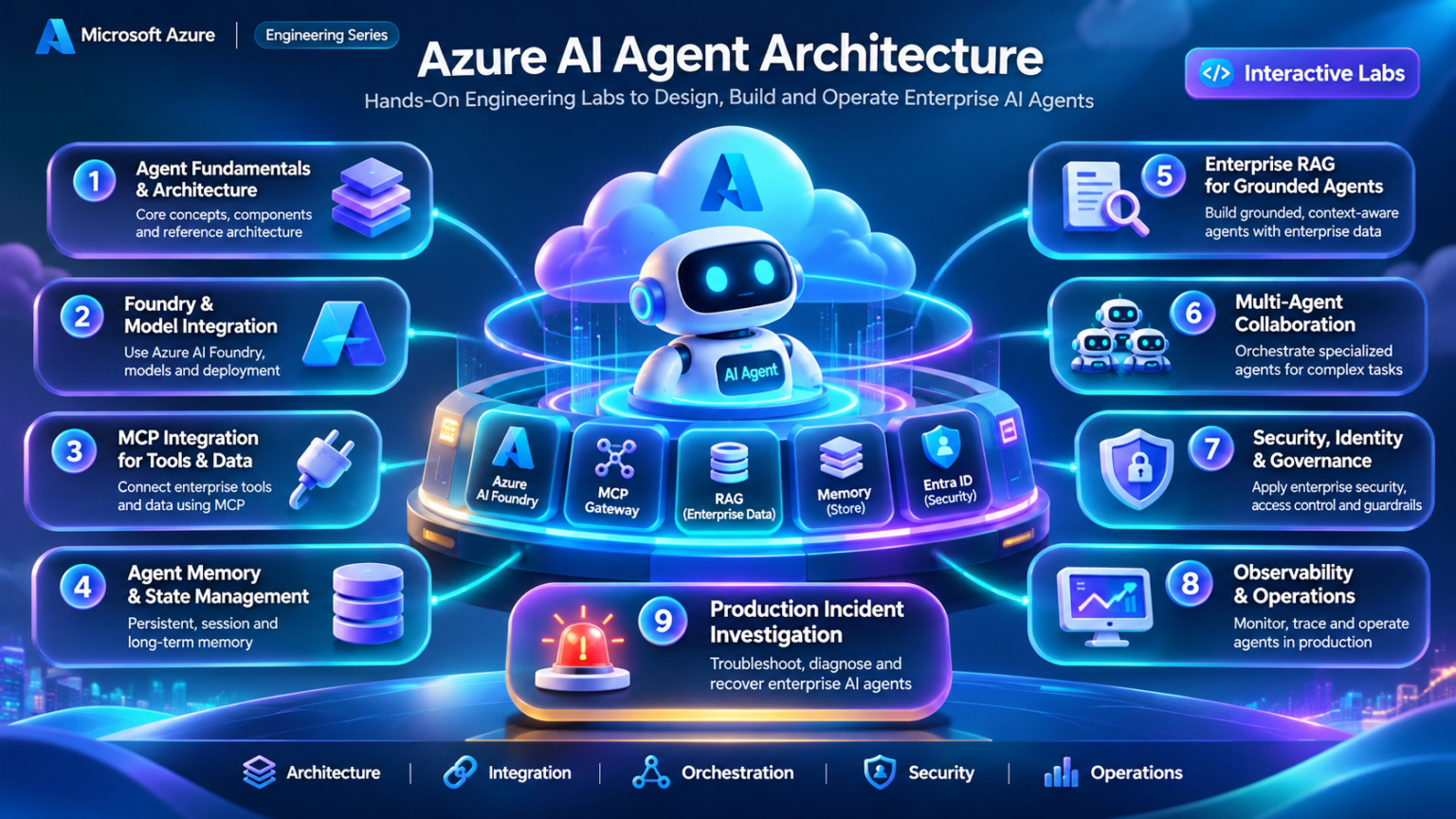
Nine interconnected engineering domains form the foundation of production-ready AI agents. Select any node to explore its architecture, implementation patterns, and operational considerations.
AGENTS Enterprise Orchestration
Azure AI Agent Architecture
An enterprise AI agent combines a language model with an execution environment capable of managing tasks, invoking tools, retrieving information, maintaining state, and evaluating intermediate results. The resulting architecture is fundamentally different from a simple request-response interaction with a model endpoint.
Microsoft Azure provides model services, managed agent capabilities, application hosting environments, identity services, and enterprise integration options that engineers can combine to build agent-driven applications.
What Makes an AI Agent Different from a Model?
A language model processes an input and generates an output. An AI agent extends this capability by operating inside an application runtime that can select actions, execute tools, inspect results, and continue working toward a defined objective.
The model may propose an action, but the application or managed runtime determines whether that action can be executed, which credentials are used, and how the result is returned to the model.
Language Model
Interprets instructions, generates text or structured outputs, and may propose tool invocations.
Agent Runtime
Maintains execution context, coordinates model calls, manages tool results, and enforces operational limits.
Enterprise Tools
Connect the agent to search services, APIs, databases, workflows, and external systems.
Control and Governance
Establishes authorization, execution boundaries, monitoring, approvals, and recovery procedures.
Model intelligence and agent autonomy are not the same thing. Autonomy is shaped by the permissions, tools, workflow logic, and execution constraints provided by the runtime.
The Internal Anatomy of an Enterprise AI Agent
A production agent typically contains several cooperating components rather than a single monolithic AI process.
| Component | Responsibility | Engineering Consideration |
|---|---|---|
| Model Endpoint | Inference and structured output generation | Latency, context limits, model selection and cost |
| Orchestrator | Coordinates task execution and model/tool interactions | Retries, limits, dependencies and termination |
| Tool Registry | Exposes available actions and their schemas | Tool discovery, validation and authorization |
| Memory and State | Maintains context and selected persistent information | Consistency, retention, isolation and recovery |
| Knowledge Retrieval | Supplies relevant external information | Freshness, relevance and document permissions |
| Observability | Records execution and operational signals | Tracing, evaluation, privacy and troubleshooting |
From User Intent to Enterprise Action
An agent execution pipeline transforms a business objective into a sequence of model decisions, authorized tool operations, and evaluated results.
The pipeline may repeat planning, tool invocation, and observation multiple times. A bounded execution policy should determine when the workflow completes, pauses, escalates, or fails.
Understanding Agent State Transitions
Agent state represents the current execution position and the information required to continue safely.
These are conceptual lifecycle states. Actual APIs and frameworks may expose different status names and transition rules.
Durable workflows should persist sufficient state to recover from process interruption without repeating irreversible operations.
Managed Agent Services Versus Custom Agent Runtimes
Azure agent architectures can combine managed platform capabilities with application-owned orchestration logic.
Microsoft Foundry offers agent development and managed capabilities, while custom runtimes may be hosted in services such as Azure Container Apps, Azure Kubernetes Service, or other supported compute environments.
Managed Agent Capabilities
Use supported platform features for agent execution, model integration, and selected operational concerns.
Custom Orchestration
Implement specialized workflows, execution policies, scheduling, and enterprise integrations.
Managed services do not eliminate the need for application-level authorization, tool safety, observability, and business process controls.
Separating Conversation Context, Execution State, and Long-Term Memory
Agent memory is frequently discussed as a single capability, but production systems distinguish between several categories of state.
Conversation Context
Recent messages, instructions and tool results included in model requests.
Workflow State
Task progress, checkpoints, pending operations and execution metadata.
Persistent Memory
Selected information retained across sessions according to application policy.
Retrieved Knowledge
External information retrieved when required rather than permanently stored in the model context.
These categories have different retention, consistency, privacy, and authorization requirements. They should not be treated as interchangeable.
Where Agent Decisions Become Real-World Actions
The most important architectural boundary is the transition from model-generated intent to an externally executed operation.
A model may suggest invoking an API, but the execution environment should independently validate the requested action, arguments, identity, permissions, and required approvals.
Tool Authorization
Determine whether the principal may invoke the requested operation.
Argument Validation
Validate structured parameters before executing downstream API requests.
Approval Boundaries
Require human approval for designated high-impact operations.
Execution Limits
Enforce bounded retries, timeouts, budgets and permitted action sequences.
Example: An AI Agent Investigates a Network Incident
Consider an enterprise operations agent tasked with investigating unexpected network connectivity failures.
Designing Agents as Reliable Distributed Applications
Enterprise AI agents should be engineered as distributed applications with explicit dependencies, state transitions, authorization boundaries, and failure-handling mechanisms.
Model outputs are probabilistic, while enterprise operations often require deterministic policy enforcement. The architecture must reconcile these different characteristics.
Architecture Challenge: Preventing Unsafe Agent Execution
An operations agent proposes a configuration change based on incomplete evidence. The runtime must ensure the proposed action does not bypass established engineering controls.
Azure AI agent architecture is the integration of model inference, orchestration, execution state, memory, knowledge retrieval, enterprise tools, and deterministic control boundaries. Microsoft Foundry can provide managed capabilities, while custom application logic remains important for specialized workflows and enterprise governance. Reliable agents require explicit execution limits, recoverable state, authorized actions, and measurable outcomes.
Azure AI Agent Architecture Explorer
Explore the components required to build, orchestrate and operate enterprise AI agents using Microsoft Foundry and Azure services.
Configure the Agent Architecture
Microsoft Foundry Enterprise Agent Architecture
Select any component to inspect its engineering responsibilities. Execute a request to animate the conceptual processing sequence.
Agent Execution Trace
Observe how the configured architecture processes the request.
Architecture Engineering Assessment
Select a component in the architecture diagram to inspect its role.
Microsoft Foundry Agent Service
Microsoft Foundry Agent Service provides managed capabilities for building and operating AI agents that combine model inference with tools, instructions, contextual information, and execution workflows.
Instead of treating every AI interaction as an isolated model request, an agent application can coordinate multiple execution steps, retrieve external information, invoke tools, and preserve relevant state. The precise lifecycle and state model depend on the selected agent implementation and supported API version.
How Microsoft Foundry Fits into Enterprise AI Applications
Microsoft Foundry provides an environment for working with models and agent capabilities, while the surrounding enterprise application supplies user experience, business context, and integration with existing systems.
Managed agent capabilities can reduce the amount of infrastructure an engineering team needs to build itself. However, the application remains responsible for its business-specific authorization and operational requirements.
Model integration · Supported tools and state
Configuring Agent Instructions, Models, and Tools
An agent definition establishes the intended behavior of an agent and its available capabilities.
Depending on the supported implementation, this may include instructions, a model configuration, tool declarations, and additional execution settings.
Agent Instructions
Describe the agent's responsibilities, expected behavior, and task boundaries.
Model Configuration
Select a supported model deployment and relevant inference settings.
Tool Configuration
Declare supported tool capabilities and their invocation interfaces.
Execution Policies
Define application controls such as timeouts, permissions, approvals, and task limits.
Instructions influence model behavior but are not an authorization mechanism. Tool permissions and execution restrictions must be enforced independently.
Understanding Sessions, Conversations, and Agent Runs
Agent applications need a way to associate requests with the appropriate conversation and execution context.
Some agent APIs use explicit threads, messages, and runs. Other implementations expose different conversation or response abstractions.
Engineers should design against the lifecycle actually supported by their selected Foundry agent implementation rather than assuming that every API shares the same objects.
| Concept | Engineering Role | Design Concern |
|---|---|---|
| Conversation Context | Associates related messages and interactions | Isolation, retention and context limits |
| Execution Instance | Represents a particular agent task execution | Status, timeouts and failure handling |
| Tool Request | Represents a requested external operation | Authorization, validation and auditability |
| Execution Result | Captures output or terminal outcome | Completeness, provenance and error reporting |
How an Agent Request Moves Through Foundry
A typical managed-agent workflow begins with an application request and proceeds through model execution, optional tool activity, and result generation.
Tool execution may require additional application involvement, depending on the tool type and agent implementation.
Production systems should account for failures, cancellation, partial completion, and duplicate requests.
Connecting Foundry Agents to Enterprise Capabilities
Agent usefulness depends on access to appropriate information and operations.
Model deployments provide inference. Retrieval systems provide knowledge. Tools connect the agent to enterprise applications and external services.
Model Endpoints
Support inference, reasoning tasks, and structured response generation.
Knowledge Retrieval
Connect approved enterprise content through supported search and retrieval mechanisms.
API and MCP Tools
Expose selected operations through supported interfaces and application integration layers.
Workflow Services
Integrate with business processes, approval systems, and enterprise automation.
Understanding the Shared Engineering Responsibility Model
Managed agent capabilities can simplify infrastructure management, but they do not remove the need for application engineering.
| Capability | Managed Platform Contribution | Application Responsibility |
|---|---|---|
| Model Access | Supported model integration interfaces | Model selection, quality and usage controls |
| Agent Execution | Supported managed runtime capabilities | Business workflow design and execution policy |
| Tool Integration | Supported tool connection mechanisms | Authorization, API contracts and approvals |
| Conversation State | Implementation-specific state capabilities | Retention, isolation and recovery requirements |
| Security | Available platform security controls | Least privilege and end-to-end policy enforcement |
| Observability | Supported diagnostics and tracing integrations | Detection logic, evaluations and operational response |
Designing Foundry Agent Applications for Enterprise Environments
Production deployment requires more than publishing an agent definition.
Engineers must consider application hosting, identity, network connectivity, secrets management, observability, deployment versioning, and service limits.
Application Hosting
Host the application frontend and backend in suitable Azure compute services.
Identity and Access
Use supported Microsoft Entra authentication and least-privilege resource access.
Network Architecture
Configure supported private connectivity and approved enterprise network paths where required.
Operations
Establish monitoring, evaluation, deployment controls, and incident response procedures.
Do not assume every Foundry agent deployment option supports identical networking, tools, hosting, or observability capabilities. Validate requirements against the selected service configuration.
Example: A Foundry Agent Investigates an Application Incident
Consider an enterprise support application that uses an AI agent to investigate a service incident.
Operating Managed Agents as Production Services
Managed agents still depend on external model endpoints, network services, retrieval systems, and enterprise APIs.
Engineers should establish clear failure handling for unavailable tools, expired credentials, model throttling, partial execution, and inconsistent external state.
Production Scenario: An Agent Tool Becomes Unavailable
An agent attempts to retrieve operational information from an enterprise API, but the downstream service becomes unavailable.
Microsoft Foundry Agent Service can provide managed capabilities for building and executing AI agents. Enterprise architecture still requires careful decisions about model configuration, conversation context, tools, identity, network connectivity, observability, and operational recovery. The correct implementation depends on the selected Foundry agent model and its supported APIs and deployment capabilities.
Microsoft Foundry Agent Lifecycle Simulator
Investigate agent execution state transitions, asynchronous tool calls, retry behavior and run completion in a managed agent architecture.
Configure the Agent Execution
Agent Run State Machine
Observe how the agent moves between execution states as the runtime processes the task.
Agent Runtime Execution Trace
Review the state transitions and execution events.
Engineering Diagnosis
Runtime Engineering Principles
Agent execution is not necessarily a single model request. It may involve multiple inference calls, tool invocations, asynchronous waiting and retries.
Reliable production runtimes need explicit timeout handling, retry budgets, cancellation semantics, state persistence and execution tracing.
Agent Reasoning and Orchestration
Agent orchestration is the engineering discipline of coordinating model decisions, tool operations, workflow dependencies, execution state, and recovery behavior to complete a task reliably.
While language models can propose plans and select actions, the surrounding orchestration architecture determines which operations are allowed, how dependencies are managed, when execution should pause, and what constitutes successful task completion.
Separating Model Reasoning from Workflow Control
An AI model can interpret a task, generate a plan, and propose the next operation. However, a production workflow must translate those proposals into controlled application behavior.
Orchestration provides this control layer. It coordinates model calls, validates proposed tool operations, manages dependencies, records execution state, and determines when a workflow should terminate.
Model Reasoning
Interprets tasks, evaluates information, and proposes actions or next steps.
Workflow Engine
Coordinates execution order, dependencies, branching, and task completion.
Execution Policy
Applies tool permissions, timeouts, retry limits, and approval requirements.
State Management
Records task progress, intermediate outputs, pending actions, and recovery checkpoints.
The model may recommend an action, but the orchestrator should independently determine whether the action can execute.
Inside an Enterprise AI Agent Workflow
An enterprise orchestration system connects the application entry point to model inference, tool execution, workflow state, and validation.
State management · Checkpoints · Termination control
Deterministic Workflows Versus Model-Directed Agents
Not every enterprise AI workflow requires the model to choose every execution step.
Deterministic orchestration follows predefined transitions. Model-directed orchestration allows the model to select among permitted actions according to the available context.
| Characteristic | Deterministic Workflow | Model-Directed Workflow |
|---|---|---|
| Execution Path | Predefined graph or conditional logic | Selected dynamically within runtime constraints |
| Flexibility | Predictable and bounded | Adaptable to changing task context |
| Testing | Defined transitions and expected outcomes | Scenario evaluations and policy assertions |
| Failure Handling | Explicit branches and recovery rules | Runtime limits plus validated model decisions |
| Suitable Use | Approvals, regulated workflows and repeatable operations | Research, investigation and exploratory tasks |
Many production systems use a hybrid architecture: deterministic workflow boundaries surrounding selected model-directed decision points.
Turning Complex Objectives into Executable Tasks
Complex objectives often require decomposition into smaller tasks with explicit dependencies.
For example, an incident investigation may require collecting metrics, retrieving configuration state, correlating events, testing hypotheses, and producing a final report.
Sequential Tasks
Each operation depends on the successful completion of a previous step.
Parallel Tasks
Independent information-gathering operations execute concurrently where supported.
Conditional Branches
Execution follows different paths based on validated results and policy.
Human-Gated Tasks
Selected actions pause until an authorized reviewer approves or rejects the request.
Maintaining Reliable State Across Agent Operations
Agent workflows may execute across multiple model calls, tools, and application processes.
Without reliable state management, a failed process may lose progress or repeat an operation that has already changed an external system.
Persisting conversation messages alone is not equivalent to durable workflow state. Engineers should also track completed operations, pending approvals, tool outcomes, and recovery information.
Retries, Timeouts, Idempotency, and Safe Recovery
Enterprise agents interact with systems that can fail independently. Model requests may be throttled, APIs may time out, and downstream services may become unavailable.
A robust orchestrator should distinguish temporary failures from permanent authorization or validation errors.
| Failure | Recommended Control | Engineering Risk |
|---|---|---|
| Model Throttling | Bounded retry with appropriate backoff | Uncontrolled retries increase load and cost |
| Tool Timeout | Inspect execution status before retrying | Operation may have completed despite timeout |
| Invalid Tool Arguments | Reject or correct through validated logic | Unsafe or malformed downstream operations |
| Authorization Denial | Stop execution and report the policy failure | Retrying cannot replace missing permissions |
| Process Restart | Resume from durable checkpoints | Duplicate side effects or lost workflow progress |
Never blindly retry a non-idempotent operation after a timeout. First determine whether the operation succeeded, and use idempotency keys or equivalent safeguards where supported.
Introducing Approval Gates for High-Impact Actions
Some agent operations should require explicit human authorization before execution.
Examples include modifying production infrastructure, changing access permissions, deleting records, or initiating high-value business transactions.
Prepare
Generate a structured proposal with scope, expected effect, and supporting evidence.
Validate
Apply deterministic policy checks before requesting approval.
Approve
Pause execution until an authorized reviewer makes a decision.
Execute and Verify
Revalidate relevant conditions, execute through approved tools, and record the result.
Example: An Agent Coordinates a Network Troubleshooting Workflow
Consider an enterprise agent investigating intermittent connectivity between application servers and a database service.
Designing Agent Orchestration for Reliability and Control
Production orchestration must balance model flexibility with deterministic engineering controls.
Workflow graphs, execution policies, durable checkpoints, authorization gates, and observable tool operations provide the structure required for reliable enterprise execution.
Engineering Scenario: An Agent Repeats a Failed Operation
An agent attempts to create an incident ticket. The API times out before the agent receives confirmation. A naive retry could create a duplicate ticket.
Agent reasoning determines possible actions, while orchestration governs how those actions execute. Enterprise Azure AI architectures should combine model-directed intelligence with deterministic policies, durable workflow state, bounded retries, idempotent operations, human approvals, and observable execution. The objective is not maximum autonomy, but reliable completion of authorized business tasks.
Agent Planning & Orchestration Workflow Lab
Investigate how an AI agent decomposes tasks, selects tools, evaluates dependencies and recovers from execution failures.
Configure the Orchestration Workflow
Agent Orchestration Decision Graph
The execution engine follows the selected path, evaluates dependencies and applies recovery logic.
Orchestration Decision Trace
Review the execution decisions and recovery events.
Engineering Diagnosis
Orchestration Engineering Principles
Agent planning produces a sequence or graph of operations, but execution must validate real dependencies, tool capabilities and observed results.
Replanning is not equivalent to unlimited retries. Production systems need bounded execution, failure classification, idempotency safeguards and clear completion criteria.
MCP and Enterprise Tool Integration
The Model Context Protocol provides a standardized interface through which AI applications can discover and interact with tools, resources, and prompts exposed by compatible MCP servers.
In enterprise Azure architectures, MCP can act as an integration boundary between AI agent applications and operational systems, databases, internal APIs, and business services. The protocol standardizes communication; authorization and business policy remain essential implementation responsibilities.
Why AI Agents Need a Standardized Tool Interface
Traditional applications often integrate directly with service-specific APIs. Agent applications may need access to many different tools and information sources.
MCP introduces a common protocol for advertising capabilities, invoking tools, accessing resources, and exchanging relevant contextual information.
Standardized Discovery
Clients can discover supported tools and their declared interfaces.
Structured Invocation
Tool calls use defined names and structured input arguments.
Reusable Integration
Compatible clients can integrate with an MCP server without implementing a separate custom protocol.
Controlled Access
Applications and servers can enforce access restrictions around exposed capabilities.
Hosts, Clients, Servers, and Enterprise Systems
MCP uses a host-client-server architecture. The host is the AI application environment. It manages one or more MCP clients, each communicating with an MCP server.
MCP servers expose capabilities and may connect to downstream enterprise systems using their native APIs or data interfaces.
Structured requests · Response handling
Tools, Resources, and Prompts
MCP defines several capability categories with different responsibilities. These should not be treated as interchangeable.
| Capability | Purpose | Enterprise Example |
|---|---|---|
| Tools | Expose callable operations with structured arguments | Retrieve incident details or create an approved ticket |
| Resources | Expose identifiable content for client consumption | Read an approved operational document |
| Prompts | Expose reusable prompt templates and arguments | Provide an incident-analysis prompt template |
MCP tool descriptions and schemas describe capabilities; they do not automatically grant authorization to use those capabilities.
How an Agent Learns Which Tools Are Available
After establishing a compatible MCP connection and completing initialization, a client can request the server's available tools.
A tool declaration commonly includes a name, description, and input schema. These declarations help the host present appropriate tools to the model or application workflow.
{
  "name": "get_network_incident",
  "description": "Retrieve an approved incident",
  "inputSchema": {
    "type": "object",
    "properties": {
      "incident_id": {
        "type": "string"
      }
    },
    "required": ["incident_id"]
  }
}
The schema enables structural validation of tool arguments. The server must still enforce authorization and validate business-specific constraints.
From Tool Selection to Verified Result
A tool invocation passes through several distinct stages. The model may propose a tool call, but the host and server control actual execution.
MCP commonly uses JSON-RPC messages over supported transports, including stdio and Streamable HTTP. The appropriate transport depends on the deployment environment and client/server support.
Separating MCP Connectivity from Tool Permissions
Establishing an MCP connection does not imply that every tool operation is authorized.
A secure architecture must consider the authenticated user, application identity, server permissions, and downstream resource authorization.
Host Policy
Determines which MCP servers and tools the agent may use.
Server Authorization
Validates caller permissions and operation scope before executing requests.
Downstream Identity
Uses appropriate credentials or delegated identity when accessing enterprise services.
Audit and Approval
Records significant actions and requires approval for designated high-impact operations.
Tool descriptions, model instructions, and prompt content must never replace deterministic access-control checks. Avoid granting broad service credentials merely because an agent can invoke a tool.
Connecting MCP Servers to Azure Enterprise Services
MCP servers can provide controlled interfaces to Azure services and enterprise systems, subject to the capabilities of the selected host, server, and integration architecture.
| Integration | Example MCP Capability | Engineering Consideration |
|---|---|---|
| Azure Monitor | Query approved diagnostic information | Query scope, permissions and data exposure |
| Azure AI Search | Retrieve selected enterprise knowledge | Document authorization and relevance |
| Azure Storage | Access approved blobs or metadata | Data-plane roles and resource scope |
| Azure Functions | Invoke controlled business operations | Input validation, identity and execution limits |
| Enterprise APIs | Create or retrieve business records | Delegated permissions, audit and idempotency |
These are architectural integration examples, not guarantees that a particular managed Foundry agent configuration natively supports every listed connection.
Example: An AI Agent Uses MCP to Investigate an Incident
Consider an Azure-hosted operations agent investigating a reported application outage.
Reliability, Security, and Troubleshooting
Production MCP integration requires engineers to consider protocol compatibility, transport configuration, authentication, tool availability, schema validation, and downstream service behavior.
Failures should be classified according to the layer where they occur rather than treating every unsuccessful tool call as a model problem.
Engineering Scenario: An MCP Tool Invocation Fails
An Azure AI agent discovers a diagnostic tool successfully, but the subsequent invocation fails when the MCP server attempts to access a downstream enterprise API.
MCP standardizes how AI applications discover and invoke external capabilities. Its host-client-server architecture separates agent reasoning from tool implementation, while structured schemas and protocol messages support interoperable integration. Enterprise deployment still requires independent authorization, secure credentials, bounded execution, reliable downstream APIs, and comprehensive observability.
MCP Tool Discovery & Invocation Simulator
Explore how an Azure AI agent discovers enterprise tools, negotiates MCP capabilities, validates arguments, and invokes external operations through a protocol client.
Configure the MCP Tool Interaction
MCP Enterprise Tool Integration Architecture
The agent host contains an MCP client that communicates with an MCP server. The server exposes approved tools backed by enterprise services.
MCP Protocol Execution Trace
Observe the sequence of protocol operations.
Protocol Engineering Assessment
JSON-RPC Message Inspector
Agent Memory and Context Management
Enterprise AI agents require mechanisms for maintaining conversation context, tracking workflow execution, retrieving relevant knowledge, and selectively preserving information across sessions.
These capabilities are often grouped under the term agent memory, but they represent distinct engineering responsibilities with different storage, consistency, retention, and authorization requirements.
Why AI Agents Need More Than a Context Window
A language model receives a bounded input context for each inference request. This context may include instructions, conversation messages, tool results, and retrieved information.
The model does not automatically maintain a durable, authoritative record of every previous interaction. Applications must explicitly manage what information is retained, retrieved, summarized, or discarded.
Short-Term Context
Information supplied within the current model request or active conversation.
Workflow State
Execution progress, completed actions, pending approvals, and recovery checkpoints.
Persistent Memory
Selected information retained across interactions according to application policy.
Retrieved Knowledge
External information fetched when relevant to the current task.
Conversation history, durable workflow state, persistent memory, and enterprise knowledge should be managed as separate information categories.
The Four-Layer Enterprise Agent Memory Model
A useful reference architecture separates the agent runtime from the different stores and retrieval mechanisms used to construct model context.
State updates · Retrieval coordination
Managing Limited Model Context Efficiently
A model's context window limits the amount of information that can be processed in a single request, including relevant input and generated output constraints.
As conversations and tool interactions grow, applications must decide which information is most important to retain in the active context.
Illustrative Context Allocation
Example allocation for a hypothetical request budget. Percentages are illustrative, not Azure service defaults.
Context Selection
Include only information relevant to the current task.
Summarization
Compress older interactions while preserving important decisions and unresolved issues.
Retrieval
Fetch relevant knowledge when required instead of retaining everything in context.
Budget Enforcement
Reserve sufficient capacity for model output, tool responses, and required instructions.
Designing Long-Term Memory for Enterprise Agents
Persistent memory allows an application to retain selected information beyond the immediate model request or session.
This may include approved user preferences, previous task outcomes, operational observations, or structured records.
| Memory Type | Example | Engineering Requirement |
|---|---|---|
| Semantic Memory | Approved facts or preferences | Provenance, accuracy and correction |
| Episodic Memory | Previous task events and outcomes | Retention, traceability and relevance |
| Procedural Memory | Stored workflow instructions or approved procedures | Versioning, authorization and change control |
| Operational State | Current task progress and pending operations | Consistency, recovery and idempotency |
These categories describe useful application design patterns. They are not universal storage objects automatically provided by every Azure agent service.
How Agent Memory Is Created, Retrieved, and Maintained
Memory management should follow an explicit lifecycle rather than storing every interaction indefinitely.
Model-generated summaries and inferred facts should not automatically become authoritative enterprise records. Apply validation and provenance controls before persistence.
Choosing the Right Azure Services for Agent Memory
Azure offers several storage and retrieval services that can support agent memory architectures.
Service selection should depend on data structure, query requirements, consistency, scalability, retention, and authorization needs.
| Azure Service | Potential Role | Design Consideration |
|---|---|---|
| Azure Cosmos DB | Structured conversation and persistent memory records | Partitioning, consistency and access control |
| Azure Blob Storage | Documents, artifacts and large historical records | Retention, encryption and data lifecycle |
| Azure AI Search | Indexed retrieval and vector-based memory discovery | Relevance, indexing and document authorization |
| Azure SQL Database | Transactional state and structured operational records | Transactions, schemas and concurrency |
| Azure Cache for Redis | Low-latency transient context or cached data | Expiration, eviction and durability requirements |
A vector index is not automatically a reliable system of record. Durable task state and authoritative business records should use storage systems appropriate for their consistency and transaction requirements.
Protecting Enterprise Agent Memory
Agent memory can contain sensitive conversation context, business information, operational data, and previous tool results.
Applications must ensure that retained information is accessible only to authorized users, agents, and services.
Tenant Isolation
Separate memory records according to organizational and application boundaries.
Authorization
Enforce access checks when writing and retrieving memory.
Retention Controls
Apply expiration, deletion, and data minimization policies.
Memory Integrity
Protect against untrusted content, poisoned records, and unauthorized modifications.
Example: An Operations Agent Resumes a Previous Investigation
Consider an AI operations agent that investigated a network incident yesterday and must resume the task today.
Diagnosing Missing, Stale, or Incorrect Agent Context
Memory-related failures can produce incorrect conclusions even when the underlying model and tools operate normally.
Engineers should inspect the full context assembly process, including source records, retrieval filters, summarization, authorization, and final prompt construction.
Engineering Scenario: An Agent Uses Outdated Incident Information
An operations agent retrieves an older incident summary and incorrectly assumes that a previously observed routing failure is still active.
Enterprise agent memory architecture requires more than storing conversation messages. Reliable systems distinguish working context, durable workflow state, persistent memory, and retrieved enterprise knowledge. Azure storage and search services can support these capabilities, but engineers must explicitly design context selection, retention, authorization, consistency, provenance, and recovery.
Agent Memory & Context Management Explorer
Investigate how an enterprise AI agent allocates context-window capacity, preserves conversation state, retrieves persistent memory and manages token budgets.
Configure the Agent Memory Strategy
Enterprise Agent Memory Architecture
Four logical memory and context sources contribute information to the agent's model request.
Live Context Window Allocation
Inspect the proportion of context consumed by instructions, conversation history, persistent memory, retrieved knowledge and reserved output capacity.
Context Engineering Trace
Review token allocation, compaction and context-quality decisions.
Memory Engineering Assessment
Context Engineering Principles
A model's context window is finite. Applications must reserve sufficient capacity for instructions, current input, retrieved information and output.
Persistent memory is not automatically included in every request. The application must select relevant, trustworthy information and explicitly place it into the model's working context.
RAG and Agent Knowledge Retrieval
Retrieval-Augmented Generation allows AI agents to incorporate relevant external information into model requests without relying exclusively on knowledge encoded during training.
In Azure enterprise architectures, Azure AI Search can provide keyword, vector, and hybrid retrieval over indexed content. The agent application then assembles authorized evidence into the model context to support grounded responses and decisions.
Why Enterprise Agents Need Retrieval-Augmented Generation
Foundation models do not inherently possess current, authoritative access to an organization's internal documentation, operational records, or business knowledge.
RAG addresses this limitation by retrieving relevant information from approved sources and supplying it as context for generation.
Current Knowledge
Retrieve recently indexed information without retraining the underlying model.
Enterprise Grounding
Base responses on relevant organizational documents and records.
Evidence Traceability
Associate retrieved passages with source identifiers and document references.
Knowledge Separation
Maintain enterprise content independently from the model's trained parameters.
RAG improves access to external evidence, but it does not guarantee factual correctness. Retrieval quality, document freshness, access control, and response validation remain critical.
Inside an Azure AI Agent Retrieval Pipeline
A typical enterprise RAG architecture separates document ingestion from query-time retrieval and response generation.
Hybrid retrieval · Ranking · Context assembly
Preparing Enterprise Documents for Retrieval
Retrieval quality depends heavily on the ingestion pipeline. Documents must be extracted, segmented, enriched, and indexed in a form suitable for search.
Chunking strategy influences retrieval precision and the amount of contextual information available to the model.
Metadata such as source identifiers, document versions, timestamps, and authorization attributes supports traceability and policy enforcement.
Keyword, Vector, Hybrid, and Semantic Search
Azure AI Search supports multiple retrieval approaches with different strengths.
| Strategy | How It Works | Typical Strength |
|---|---|---|
| Keyword Search | Matches indexed terms using lexical relevance | Exact identifiers, error messages and terminology |
| Vector Search | Compares vector representations for semantic similarity | Conceptual or paraphrased queries |
| Hybrid Search | Combines text and vector result sets | Balancing lexical and semantic retrieval |
| Semantic Ranking | Reranks eligible retrieved results using semantic models | Improving relevance of candidate results |
For technical operations, hybrid retrieval can be particularly useful because exact identifiers such as interface names, error codes, and configuration strings matter alongside semantic meaning.
Turning Retrieved Passages into Useful Agent Evidence
After retrieval, the application selects relevant passages and incorporates them into the model request.
This process must consider token budgets, relevance, document freshness, conflicting evidence, and source traceability.
Evidence Selection
Choose passages relevant to the current question or investigation.
Context Packaging
Include source metadata and organize passages within the request budget.
Source Attribution
Associate factual claims with the supporting retrieved records.
Uncertainty Handling
Identify missing, contradictory, or insufficient evidence rather than inventing conclusions.
Enforcing Document Authorization and Retrieval Boundaries
Enterprise knowledge retrieval must respect document permissions and data classification.
A successful search query does not automatically mean every returned document is appropriate for the requesting user or agent.
Identity Context
Establish the authorized user or workload identity.
Permission Filtering
Enforce applicable document access restrictions during retrieval.
Tenant Isolation
Prevent cross-tenant or cross-customer information exposure.
Prompt Injection Defense
Treat retrieved documents as untrusted data, not privileged instructions.
An application's access to a search index must not be confused with an end user's permission to read every indexed document. Enforce document-level authorization using supported search features or correctly implemented application controls.
Evaluating RAG Accuracy, Relevance, and Freshness
Production RAG systems require continuous evaluation of retrieval and generation quality.
Retrieval metrics should be distinguished from model response metrics because an accurate model cannot reliably cite evidence that the retrieval stage failed to provide.
| Metric | What It Evaluates | Engineering Use |
|---|---|---|
| Recall@K | Relevant items retrieved within the top K | Detect missing evidence |
| Precision@K | Proportion of top K results that are relevant | Reduce irrelevant context |
| Groundedness | Whether generated claims are supported by supplied evidence | Detect unsupported assertions |
| Freshness | Whether indexed content reflects current source state | Identify stale knowledge |
| Retrieval Latency | Time required to retrieve and rank evidence | Control end-to-end response delay |
Example: An Azure AI Agent Investigates a Routing Incident
Consider an operations agent asked to investigate unexpected BGP route selection in an enterprise network.
Diagnosing Missing, Stale, and Incorrect Retrieval Results
RAG failures can originate from ingestion, indexing, query formulation, permission filtering, ranking, or context assembly.
Engineers should investigate the retrieval pipeline before attributing every incorrect answer to model behavior.
Engineering Scenario: An Agent Retrieves an Outdated Network Runbook
An agent investigating a BGP incident retrieves an older troubleshooting procedure that no longer reflects the organization's current routing policy.
RAG connects Azure AI agents to external enterprise knowledge through ingestion, indexing, retrieval, ranking, and context assembly. Azure AI Search provides powerful lexical, vector, hybrid, and semantic retrieval capabilities, but production engineering must also address document permissions, source freshness, evidence provenance, retrieval quality, and response validation.
Agent RAG Retrieval Strategy & Knowledge Selection Lab
Investigate how an Azure AI agent chooses enterprise knowledge sources, ranks retrieved evidence, manages context budgets and determines whether an answer is sufficiently grounded.
Configure the Agent Retrieval Strategy
Agent Knowledge Retrieval Decision Pipeline
Observe how the agent routes its knowledge request, retrieves candidates and selects evidence for the model context.
Retrieved Knowledge Candidates
Document cards show synthetic relevance scores and selection decisions for the configured retrieval.
Agent Retrieval Decision Trace
Review source routing, candidate scoring and evidence selection decisions.
Knowledge Engineering Assessment
Agent Retrieval Principles
Retrieval is not always required. An agent should determine whether external evidence is necessary before invoking enterprise search or knowledge APIs.
Retrieved evidence must be relevant, authorized, sufficiently current and appropriate for the requested task. A high retrieval score alone does not guarantee factual correctness.
Multi-Agent Systems and Agent Collaboration
Multi-agent architectures divide complex workflows among specialized AI agents, each responsible for a defined capability, task, or operational domain.
In Azure enterprise environments, a multi-agent system may coordinate research, planning, analysis, execution, and validation through a central supervisor or other orchestration patterns.
Why Use Multiple Specialized Agents?
A single agent can handle many workflows, but complex enterprise tasks may benefit from separating responsibilities across specialized agents.
Each specialist can operate with a focused set of instructions, tools, context, and permissions.
Task Specialization
Assign focused responsibilities to agents with appropriate domain knowledge and tools.
Delegation
Route tasks to agents best suited to perform the required work.
Parallel Execution
Run independent tasks concurrently when dependencies and system limits permit.
Independent Validation
Use separate verification steps to assess results before final decisions.
Multi-agent systems introduce additional coordination, latency, cost, and failure modes. They should be used when specialization or workflow decomposition provides measurable value over a simpler single-agent design.
Inside a Supervisor-Based Agent System
A supervisor architecture uses a coordinating component to decompose work, delegate tasks, collect outputs, and determine the next workflow action.
Delegation · Result aggregation · Workflow control
Supervisor, Sequential, Parallel, and Handoff Architectures
Multi-agent systems can use several coordination patterns depending on task dependencies, autonomy requirements, and execution constraints.
| Pattern | Execution Model | Suitable Use Case |
|---|---|---|
| Supervisor | Central component assigns tasks and aggregates results | Controlled enterprise workflows |
| Sequential | Agents execute in a defined dependency order | Research, analysis, validation pipelines |
| Parallel | Independent agents work concurrently | Multiple independent diagnostic investigations |
| Handoff | Control transfers between specialized agents | Domain-specific conversational workflows |
| Graph-Based | Execution follows conditional transitions and dependencies | Complex workflows with branching and recovery |
These patterns can be implemented using application orchestration frameworks and supported Azure agent capabilities. The exact features depend on the chosen runtime and service configuration.
How a Supervisor Delegates Work to Specialist Agents
Delegation should follow explicit task contracts and execution limits. A supervisor must know what an agent is expected to deliver and how completion will be evaluated.
Each delegated task should define inputs, expected outputs, authorization scope, timeout limits, and completion criteria. Structured contracts improve reliability and troubleshooting.
Managing Context and State Across Multiple Agents
Multi-agent workflows require mechanisms for exchanging task results and maintaining consistent execution state.
Shared state should not imply unrestricted access to all conversations, tools, or enterprise data.
Task State
Track assigned work, progress, dependencies, and completion.
Evidence References
Share validated source identifiers instead of unnecessarily duplicating large contexts.
Concurrency Control
Prevent conflicting updates and duplicate side effects during parallel execution.
Recovery State
Preserve checkpoints and execution history for safe retries and recovery.
Building Multi-Agent Workflows with Azure Services
Azure provides infrastructure and AI services that can support multi-agent application designs.
The appropriate implementation depends on whether orchestration is managed by a supported agent platform, implemented in application code, or coordinated through external workflow services.
| Component | Potential Responsibility | Engineering Consideration |
|---|---|---|
| Microsoft Foundry Agent Service | Managed agent capabilities where supported | Feature support, identity and deployment model |
| Application Orchestrator | Task routing, workflow logic and delegation | Deterministic policy and execution boundaries |
| Azure Functions | Event-driven workflow steps and integrations | Timeouts, retries and idempotency |
| Azure Service Bus | Reliable asynchronous task messaging | Duplicate delivery, ordering and dead-letter handling |
| Azure Cosmos DB | Persistent workflow and task records | Consistency, concurrency and access control |
| Azure Monitor | Operational metrics, logs and diagnostics | Correlation and end-to-end observability |
Multi-agent orchestration is not automatically provided by every Azure AI deployment. Some architectures require custom coordination logic, external frameworks, or additional managed services.
Preventing Coordination Failures and Unsafe Agent Actions
Multi-agent architectures create additional operational risks because several components may depend on one another or execute concurrently.
Execution Budgets
Bound agent iterations, token usage, execution time, and tool calls.
Failure Isolation
Prevent one failed specialist from indefinitely blocking the entire workflow.
Approval Gates
Require appropriate authorization for high-impact operations.
Result Verification
Check specialist outputs against evidence and explicit acceptance criteria.
Example: Coordinated Investigation of an Enterprise Network Incident
Consider an enterprise AI system investigating intermittent application connectivity between Azure-hosted services and an on-premises data centre.
Diagnosing Delegation, State, and Coordination Failures
Production troubleshooting should distinguish agent reasoning failures from orchestration, messaging, authorization, and state management failures.
Engineering Scenario: Two Agents Produce Conflicting Incident Conclusions
A research agent identifies an older network design, while an operations agent retrieves current telemetry indicating that the architecture has changed.
Multi-agent systems provide a structured way to distribute complex enterprise tasks among specialized AI components. Reliable architectures require explicit delegation contracts, bounded autonomy, secure tool access, controlled shared state, deterministic orchestration policies, and end-to-end traceability.
Multi-Agent Delegation & Coordination Simulator
Explore how specialist AI agents collaborate on an enterprise task through delegation, sequential dependencies, parallel execution and shared-state coordination.
Configure the Multi-Agent Team
Enterprise Multi-Agent Architecture
A coordinator delegates an investigation to specialist agents and aggregates their findings.
Multi-Agent Execution Timeline
Observe specialist progress as the coordinator advances through the workflow.
Multi-Agent Coordination Trace
Review delegation, execution, recovery and result aggregation events.
Coordination Engineering Assessment
Multi-Agent Engineering Principles
Multi-agent systems introduce distributed coordination challenges beyond single-agent planning: ownership, dependencies, partial failures, state consistency and aggregation.
Parallel execution can reduce elapsed time when tasks are independent. Sequential execution is required when later tasks depend on earlier results.
Agent Observability and Evaluation
Enterprise AI agents require visibility into execution behavior, model inference, tool calls, retrieval operations, orchestration decisions, and final response quality.
Observability explains what happened during execution. Evaluation determines whether the agent's behavior and outputs satisfy defined quality, safety, and business requirements.
Why Traditional Application Monitoring Is Not Enough
Conventional application monitoring focuses on infrastructure health, request latency, error rates, and service availability.
AI agents introduce additional execution stages involving model decisions, tool selection, retrieval quality, and multi-step workflow behavior.
Execution Visibility
Track workflow steps, agent decisions, and completion states.
Model Telemetry
Observe inference latency, token usage, errors, and deployment behavior.
Tool and Retrieval Traces
Inspect MCP operations, downstream APIs, and RAG retrieval stages.
Quality Evaluation
Assess answer correctness, groundedness, task completion, and policy compliance.
A successful HTTP response does not guarantee that an agent completed the requested task correctly. Operational success and semantic task success must be measured separately.
Inside an Enterprise AI Agent Telemetry Pipeline
A production observability architecture collects telemetry across the agent runtime, model endpoints, retrieval systems, and external tools.
Model calls · Tool invocations · State transitions
Following a Request Across Models, Tools, and Agents
Distributed tracing connects related operations into an execution hierarchy.
A trace represents an end-to-end operation, while spans describe individual steps such as model inference, retrieval, or tool execution.
Consistent trace and span identifiers help correlate agent activity across services. Avoid recording sensitive prompt content or credentials in telemetry unless explicitly justified and protected.
Measuring Latency, Token Usage, Reliability, and Cost
Agent performance should be measured across the full execution path rather than focusing only on model response time.
| Metric | What It Measures | Engineering Value |
|---|---|---|
| End-to-End Latency | Total time to complete an agent request | Understand user experience and workflow delay |
| Model Latency | Time spent on inference operations | Identify model-related bottlenecks |
| Token Usage | Input and output tokens consumed | Estimate workload consumption and cost |
| Tool Error Rate | Failed external tool invocations | Identify integration reliability problems |
| Task Completion Rate | Share of evaluated tasks completed successfully | Measure practical agent effectiveness |
| Retry Rate | Repeated attempts after failures | Detect instability and excess resource usage |
Evaluating Correctness, Groundedness, and Task Completion
Agent evaluation measures whether outputs and actions satisfy defined requirements.
Evaluations may use reference answers, deterministic checks, human review, or model-based judges, depending on the task and risk level.
Correctness
Determine whether the answer or action matches expected outcomes.
Groundedness
Check whether factual claims are supported by available evidence.
Task Success
Verify that the requested workflow reached its intended completion criteria.
Policy Compliance
Evaluate whether tool usage and outputs respected required restrictions.
Model-based evaluation scores are estimates rather than authoritative proof of correctness. High-impact workflows should include deterministic verification and appropriate human review.
From Test Datasets to Production Quality Monitoring
Reliable evaluation should be incorporated into the agent development and release lifecycle.
Using Azure Monitor and Application Insights
Azure Monitor, Application Insights, and Log Analytics can support collection, investigation, and analysis of telemetry from instrumented agent applications.
| Capability | Potential Role | Engineering Consideration |
|---|---|---|
| Application Insights | Application traces, dependencies and performance telemetry | Instrumentation and trace correlation |
| Log Analytics | Query and analyze collected logs and telemetry | Data schema, retention and access control |
| Azure Monitor Alerts | Detect defined operational conditions | Threshold selection and alert noise |
| OpenTelemetry | Instrument traces, metrics and logs | Semantic conventions and SDK compatibility |
| Agent Evaluation Pipeline | Assess output quality and workflow success | Dataset coverage and evaluation reliability |
Observability features vary across Azure services and SDK versions. Production teams should verify which model, tool, and orchestration events are available for their chosen architecture.
Example: Investigating Slow AI Agent Responses
Consider an enterprise AI operations agent whose response latency increases after a new MCP integration is deployed.
Diagnosing Agent Failures with Traces and Evaluation Evidence
Production incidents may involve several interacting causes: slow inference, failed tool calls, poor retrieval, incorrect delegation, or invalid agent outputs.
Engineering Scenario: An Agent Completes Successfully but Produces an Incorrect Answer
An enterprise agent returns an HTTP success response, but evaluation detects that its incident summary is unsupported by the retrieved evidence.
Enterprise AI observability requires correlated traces, metrics, logs, and workflow events across the agent execution path. Evaluation adds a separate quality dimension by measuring correctness, groundedness, task success, and policy compliance. Together, observability and evaluation allow engineers to diagnose failures, manage cost, improve reliability, and validate production agent behavior.
Agent Observability & Evaluation Console
Investigate distributed agent traces, model latency, tool execution, token usage, response quality and production performance thresholds.
Configure the Agent Telemetry Investigation
Distributed Agent Execution Trace
The waterfall visualizes model, retrieval and enterprise tool operations. Longer spans indicate higher modeled execution latency.
Agent Evaluation Dashboard
Quality metrics represent synthetic evaluation scores for the selected execution scenario.
Agent Telemetry Event Trace
Review latency, token and evaluation events.
Observability Engineering Assessment
Production Observability Principles
Agent monitoring should correlate model calls, tool operations, retrieval steps and application events using trace and span identifiers.
Evaluation measures response quality separately from runtime health. A fast, inexpensive agent can still produce inaccurate or ungrounded answers.
Production AI Agent Troubleshooting
Production AI agent failures can originate from model inference, tool integration, retrieval, orchestration, identity, state management, or downstream enterprise systems.
Reliable troubleshooting requires engineers to reconstruct execution, isolate the failing component, understand the impact, and validate recovery against both operational and task-level requirements.
Why AI Agent Incidents Are Different from Traditional Application Failures
Traditional application failures often manifest through explicit exceptions, unavailable services, or invalid responses.
AI agents can fail in less obvious ways. A workflow may complete technically while producing an incorrect conclusion, using the wrong tool, or relying on outdated evidence.
Operational Failures
Timeouts, API errors, unavailable services, and failed tool calls.
Reasoning and Planning Failures
Incorrect task decomposition, unsuitable tool selection, and ineffective execution plans.
Knowledge Failures
Missing, stale, or irrelevant retrieved information leading to unsupported answers.
Control Failures
Unauthorized actions, excessive retries, incorrect state, and missing approval gates.
Separate infrastructure health, execution success, answer quality, and authorization compliance. Each represents a different dimension of agent reliability.
Inside an AI Agent Incident Investigation Pipeline
A structured investigation collects evidence across the complete agent execution path.
Failure classification · Impact assessment
Mapping Agent Symptoms to Likely Failure Domains
A diagnostic matrix helps engineers narrow the investigation based on observed symptoms and supporting telemetry.
| Symptom | Possible Cause | First Diagnostic Check |
|---|---|---|
| Model Request Fails | Quota, rate limit, deployment or service error | Inspect response codes, quotas and model telemetry |
| Tool Invocation Fails | Authentication, schema mismatch or API outage | Inspect tool request metadata and downstream errors |
| Incorrect Answer | Missing evidence, poor context or unsupported inference | Compare retrieved sources with generated claims |
| Repeated Agent Loop | Missing termination rule or repeated unsuccessful action | Inspect step history, limits and state transitions |
| Missing Workflow Context | State persistence or context propagation failure | Inspect task identifiers, checkpoints and state versions |
| Unauthorized Operation | Incorrect permissions or missing enforcement | Review identity, policy decisions and audit records |
Symptoms are not definitive root causes. A slow model response may be caused by repeated orchestration calls, and an incorrect answer may originate from stale retrieval data. Correlate evidence before applying changes.
Troubleshooting Azure Model Endpoint Problems
Model inference problems may involve capacity, quotas, request formatting, latency, model configuration, or deployment availability.
Rate Limits and Capacity
Inspect throttling, request rates, token consumption, and available deployment capacity.
Request Validation
Verify model identifiers, input formats, context limits, and supported parameters.
Latency Analysis
Separate inference latency from retrieval, orchestration, and downstream tool delays.
Response Quality
Evaluate output correctness, grounding, task completion, and regression behavior.
Investigating Enterprise Tool Integration Problems
Agent tool failures can occur at several boundaries: tool discovery, schema validation, authentication, network connectivity, or downstream service execution.
MCP standardizes communication between compatible clients and servers, but it does not eliminate the need for application-level authorization, timeout handling, and operational diagnostics.
| Failure | Investigation | Potential Remediation |
|---|---|---|
| Tool Not Available | Inspect server connection and tool discovery | Restore connectivity or correct registration |
| Invalid Tool Arguments | Compare submitted arguments with the declared schema | Correct schema handling and input validation |
| Authentication Failure | Inspect identity, token validity and permissions | Correct credentials or approved access configuration |
| Downstream Timeout | Inspect dependency latency and retry behavior | Apply bounded timeouts, retries or fallback handling |
| Unexpected Tool Result | Validate response structure and business semantics | Improve result validation and error classification |
Diagnosing Infinite Loops, Lost Context, and Duplicate Actions
Orchestration failures are especially important in long-running agent workflows and multi-agent systems.
A workflow can repeatedly call the same tool, lose its execution state, or produce duplicate side effects after a retry.
Loop Detection
Track repeated actions, iteration counts, and termination conditions.
Checkpoint Integrity
Verify persisted workflow state, version identifiers, and recovery checkpoints.
Idempotency
Prevent repeated execution of state-changing operations during retries.
Delegation Integrity
Check task ownership, handoff state, and specialist agent completion records.
State-changing operations should use explicit authorization, bounded execution, and appropriate idempotency controls. A model-generated request must never be treated as sufficient authorization for a privileged action.
A Six-Stage Approach to Restoring Agent Reliability
Incident recovery should be structured, evidence-driven, and reversible where possible.
Recovery verification should include both technical checks and task-level evaluations to confirm that the agent has returned to acceptable behavior.
Example: An AI Network Troubleshooting Agent Fails During a Routing Incident
Consider an enterprise agent investigating a BGP routing incident across Azure-connected infrastructure.
The agent retrieves outdated routing documentation, encounters a failed telemetry tool call, and repeatedly attempts the same diagnostic operation.
Designing AI Agents That Can Be Diagnosed and Recovered
Troubleshooting becomes substantially more effective when observability, security, evaluation, and recovery controls are designed into the architecture from the beginning.
Production Readiness: Three Essential Engineering Controls
A reliable agent platform must provide sufficient evidence to explain execution behavior, contain failures, and verify successful recovery.
Production AI agent troubleshooting requires a complete understanding of the architecture: model inference, orchestration, MCP integrations, memory, RAG retrieval, multi-agent coordination, and observability. By combining distributed tracing, explicit authorization, controlled execution, incident classification, and systematic evaluation, enterprise teams can build Azure AI agents that are not only capable, but also diagnosable, recoverable, and operationally trustworthy.
Production Agent Incident Investigation Simulator
Investigate enterprise AI agent incidents through diagnostic evidence, dependency analysis, root-cause selection and remediation validation.
Select a Production Incident
Production Agent Dependency Architecture
Investigate which dependency is responsible for the current incident.
Production Incident Investigation Console
Inspect synthetic logs, traces and dependency evidence.
Engineering Incident Assessment
Investigation Workflow
Investigate the incident, review evidence, select the root cause, apply a remediation and validate the recovered agent.
The engineering score rewards correct diagnosis and validated recovery. Incorrect actions reduce the score.

- Azure Machine Learning Architecture Explained - November 15, 2026
- Azure GPU Infrastructure and AI Compute Explained - November 15, 2026
- Azure AI RAG Architecture Explained - November 15, 2026