
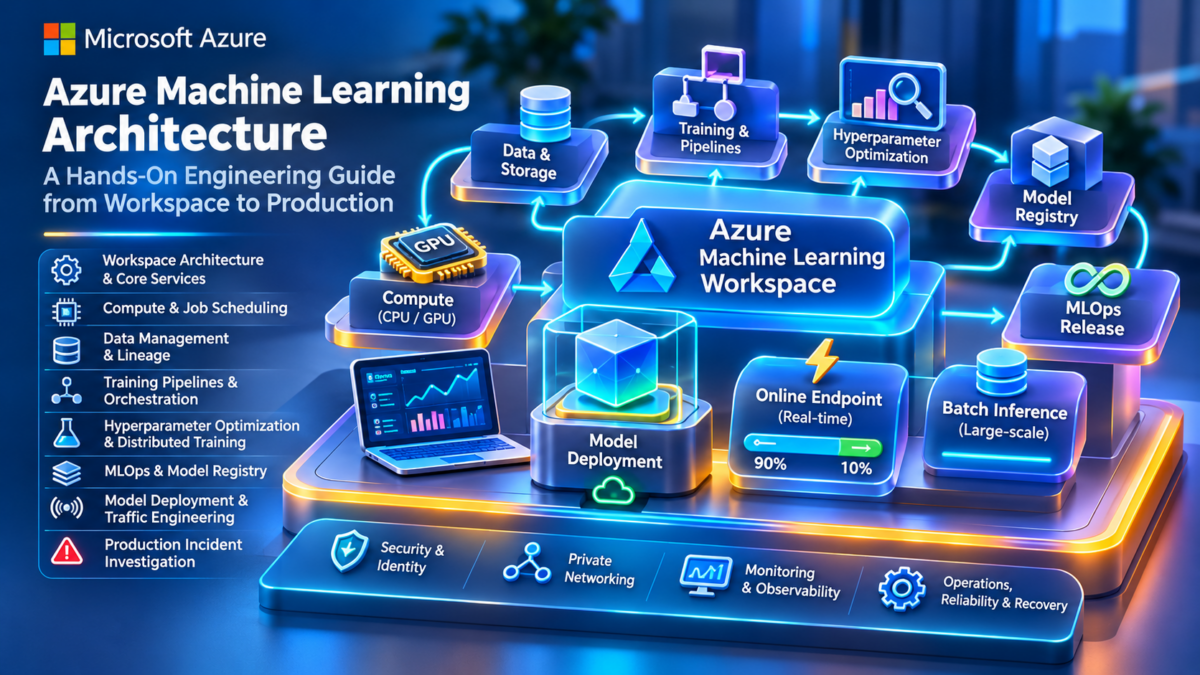
Azure Machine Learning Architecture Explained
Understand how Microsoft Azure Machine Learning connects data engineering, scalable compute, model training, experiment tracking, MLOps, model deployment, and production monitoring into a unified machine learning engineering platform.
Modern machine learning infrastructure involves much more than training a model. Engineers must coordinate datasets, compute resources, training environments, model artifacts, deployment endpoints, security boundaries, and operational monitoring across the complete machine learning lifecycle.
Azure Machine Learning provides managed services and orchestration capabilities for building, training, tracking, registering, and deploying machine learning models. It integrates with Azure infrastructure and common machine learning frameworks, while allowing engineering teams to manage their own code, environments, and model logic.
From Raw Data to Production Machine Learning
An Azure Machine Learning workflow begins with data assets and preparation, progresses through training and evaluation, produces versioned model artifacts, and ultimately delivers predictions through online or batch inference.
The Azure ML workspace provides a central organizational boundary for jobs, data assets, models, environments, and connections to supporting Azure resources. Training compute and deployment infrastructure execute the actual workloads.
The Three Layers of Azure ML Engineering
01 / Platform and Control Plane
Azure ML workspaces, identities, asset metadata, jobs, orchestration, model registration, and management operations coordinate the machine learning lifecycle.
02 / Compute and Data Plane
CPU and GPU compute targets, training containers, datasets, storage services, and networking resources execute the actual machine learning workloads.
03 / Deployment and Operations
Online and batch endpoints, model releases, monitoring, security controls, and operational automation support production machine learning systems.
Separating these architectural layers helps engineers understand where different problems originate. A job scheduling failure, for example, requires a different investigation from a CUDA training error or a production endpoint returning unsuccessful predictions.
Across nine sections, we will examine Azure ML workspace design, compute architecture, data assets, training pipelines, distributed training, hyperparameter optimization, model registries, MLOps, production endpoints, security, monitoring, and troubleshooting. Each section will also include a dedicated interactive engineering experience focused on a distinct part of the machine learning lifecycle.
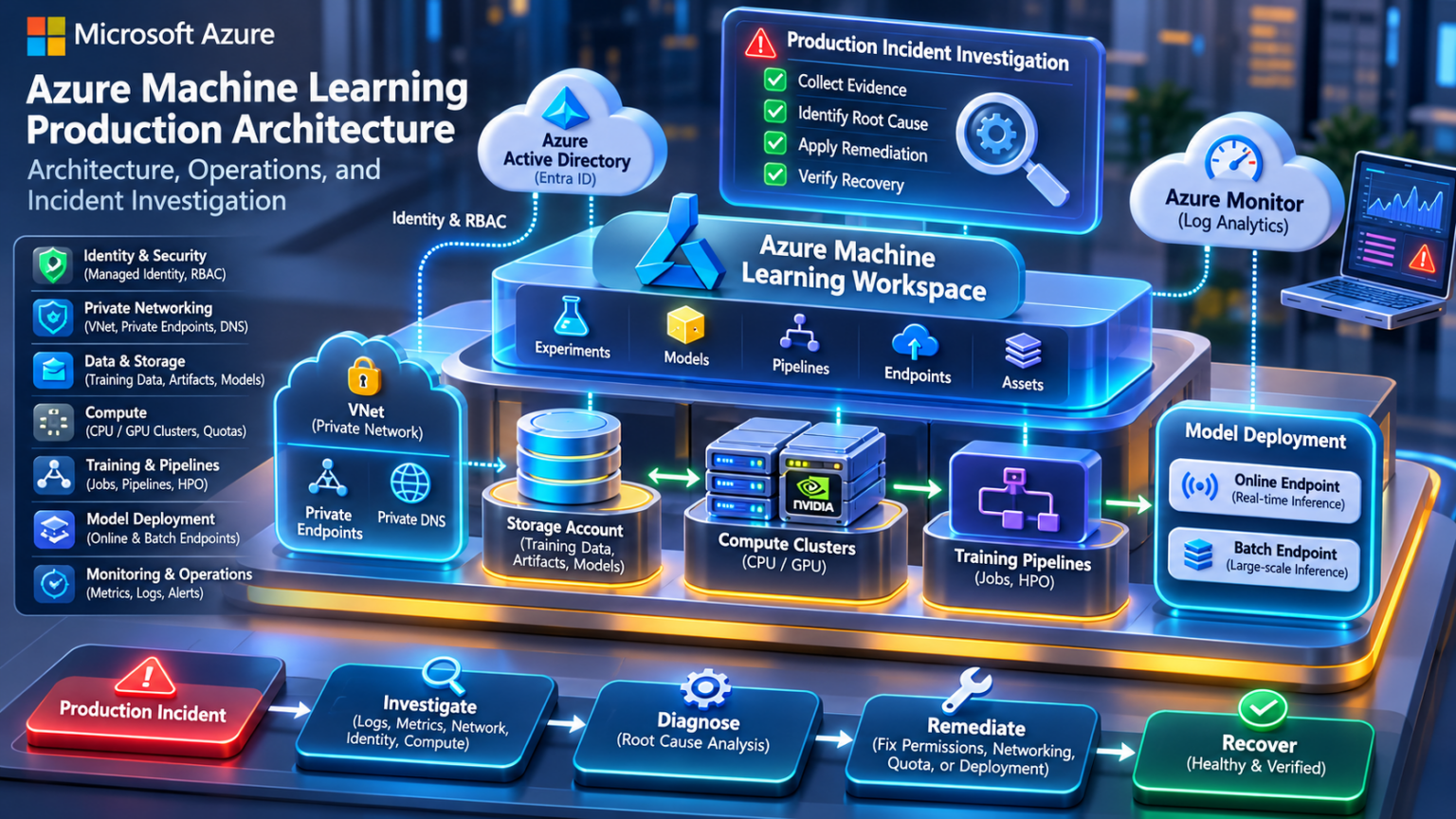
Explore the Azure ML Architecture
Follow the complete engineering journey from Azure ML workspace architecture and GPU compute to distributed training, MLOps, production inference, security, monitoring, and troubleshooting. Select any gradient circle to explore its section.
Understanding Azure Machine Learning Architecture
Azure Machine Learning is a managed machine learning platform that coordinates data assets, compute, training jobs, experiments, model artifacts, and deployment services across the machine learning lifecycle.
Understanding its architecture requires separating the management and orchestration responsibilities of the platform from the compute and data infrastructure that executes workloads.
What Azure Machine Learning Actually Provides
Azure Machine Learning provides managed capabilities for developing, training, tracking, registering, and deploying machine learning models. It brings together compute orchestration, data asset management, experiment tracking, and model lifecycle operations within a common engineering environment.
Rather than requiring teams to manually coordinate every virtual machine, training process, dataset, and model artifact, Azure ML provides abstractions for defining jobs, selecting compute, tracking execution, and managing outputs.
Managed Orchestration
Azure ML coordinates training jobs, pipeline dependencies, compute allocation, and execution metadata.
Compute Abstraction
Engineers define compute requirements and select supported execution targets without manually orchestrating every workload process.
Asset Management
Versioned data, environments, models, and reusable components support reproducible machine learning workflows.
Production Lifecycle
Model registration, endpoint deployment, monitoring, and automation help transition models into production.
The Azure ML Control Plane and Data Plane
Azure Machine Learning can be understood through two logical architectural layers: the control plane and the data plane.
The control plane handles management, job definitions, orchestration, and metadata. The data plane includes compute environments and storage services that execute workloads and process data.
The Azure ML Workspace as the Engineering Boundary
An Azure Machine Learning workspace is the primary organizational resource for managing machine learning assets, jobs, experiments, models, and connections to supporting services.
Workspaces help teams establish development environments, manage access, and organize workloads. Enterprises may use separate workspaces for development, testing, and production.
| Workspace Component | Architectural Responsibility | Engineering Consideration |
|---|---|---|
| Jobs and Experiments | Track workload execution and results | Reproducibility and diagnostics |
| Data Assets | Reference versioned machine learning data | Data access and lineage |
| Environments | Define reproducible software dependencies | Container and package compatibility |
| Models | Manage registered model artifacts | Versioning and deployment |
| Compute Targets | Provide execution infrastructure | Quota, cost, and scheduling |
| Connections | Represent access to external services | Identity, credentials, and permissions |
Why an Azure ML Workspace Depends on Other Services
Azure ML integrates with supporting Azure resources for data persistence, container image management, secrets, encryption, and operational monitoring.
Azure Storage
Stores datasets, job outputs, logs, and model artifacts according to the configured storage architecture.
Azure Container Registry
Stores container images used by supported training and deployment workflows.
Azure Key Vault
Supports secure management of secrets and cryptographic material used by the platform and integrations.
Monitoring Services
Azure Monitor and related diagnostic capabilities help collect operational information and investigate failures.
Not every supporting resource is necessarily provisioned or configured in the same way for every workspace. Enterprise deployments may use existing resources, managed networking, private connectivity, and customer-managed security configurations.
How a Training Job Moves Through Azure ML
A machine learning engineer submits a job definition describing the training code, input data, software environment, compute target, and execution configuration.
Azure ML validates and orchestrates the request, prepares the execution environment, and runs the workload on the selected compute infrastructure.
The exact execution sequence varies with the selected compute target, data access method, environment, and job type. Training outputs can subsequently be evaluated and registered as versioned model assets.
What Azure Manages and What Engineers Still Own
Azure ML simplifies infrastructure management, but it does not remove engineering responsibility for data quality, model correctness, security, performance, and production reliability.
| Area | Azure ML Responsibility | Engineering Team Responsibility |
|---|---|---|
| Job Orchestration | Managed scheduling and execution coordination | Job definitions, dependencies, and failure handling |
| Compute | Provisioning and lifecycle capabilities for supported targets | Compute selection, quotas, configuration, and cost control |
| Data | Data asset and datastore abstractions | Data quality, access, classification, and governance |
| Training | Execution environment and experiment tracking capabilities | Model code, hyperparameters, and evaluation |
| Deployment | Managed endpoint capabilities for supported deployment types | Model behavior, scaling requirements, and release decisions |
| Security | Integration with Azure identity and security services | Permissions, network policy, secrets, and compliance configuration |
Connecting Development, Training, and Production
A production machine learning system is not a single training job. It is a repeatable lifecycle connecting data, experimentation, model evaluation, registration, deployment, and monitoring.
Development
Engineers develop model code, prepare datasets, and define reproducible environments.
Training and Evaluation
Compute resources execute experiments while metrics and artifacts are recorded for comparison.
Model Promotion
Validated model versions move through controlled release and deployment processes.
Production Operations
Teams monitor inference quality, service performance, data changes, and operational reliability.
A reproducible machine learning system should preserve the relationship between data versions, training code, environment versions, experiment metrics, and deployed model artifacts.
Diagnosing an Azure ML Job That Cannot Start
Consider a training job that remains queued or fails before model execution begins.
The problem may originate from compute capacity, quota limits, invalid job configuration, inaccessible data, container image preparation, or identity permissions.
| Observed Symptom | Potential Fault Domain | Investigation |
|---|---|---|
| Job remains queued | Compute scheduling or capacity | Inspect cluster state, quotas, and provisioning events |
| Environment preparation fails | Container image or dependency configuration | Inspect environment build logs and registry access |
| Input data unavailable | Storage, identity, or networking | Inspect datastore configuration and data access permissions |
| Training process exits | Application code or runtime | Inspect job logs and application exceptions |
| Output persistence fails | Storage access or capacity | Inspect output paths, permissions, and storage errors |
A job that cannot obtain compute resources should not be investigated in the same way as a job that starts successfully and later fails during model training. Identify the execution stage before investigating the underlying infrastructure.
Azure ML as an Orchestration and Lifecycle Platform
Azure Machine Learning connects managed platform capabilities with the underlying Azure compute, networking, storage, and security infrastructure required to execute machine learning workloads.
Its architectural value comes from coordinating the complete model lifecycle while providing engineers with repeatable abstractions for jobs, assets, environments, compute, and deployments.
Azure Machine Learning is best understood as a managed orchestration and model lifecycle platform operating across Azure infrastructure. Engineers must understand both the control plane that coordinates workloads and the data plane that executes them to design, secure, scale, and troubleshoot reliable ML systems.
Azure Machine Learning Architecture Explorer
Trace the complete machine learning lifecycle across Azure Machine Learning workspaces, data assets, pipelines, training compute, model registries, managed endpoints and monitoring. Explore how the control plane coordinates workloads while the data plane performs data processing, training and inference.
Configure the Machine Learning Workload
Architecture SimulationAzure Machine Learning Reference Architecture
Simplified logical architectureArchitecture Step Inspector
Azure ML Execution Trace
Engineering Assessment
Control Plane vs Data Plane
Azure ML Workspaces and Resource Architecture
An Azure Machine Learning workspace provides a central organizational boundary for machine learning assets, jobs, experiments, compute targets, models, and connections to supporting Azure services.
Enterprise workspace design requires understanding the relationships between Azure ML, storage, identity, secrets, container images, networking, and environment isolation.
The Workspace as a Machine Learning Engineering Boundary
The Azure Machine Learning workspace is the primary management resource for organizing machine learning development and operations. It provides a common context for jobs, data assets, models, environments, and compute resources.
Engineers use workspaces to coordinate experimentation, track training results, manage model versions, and define deployment workflows. Workspaces can also support team separation and controlled access to machine learning resources.
Asset Organization
Organizes data assets, model versions, reusable components, environments, and related metadata.
Job Management
Provides a management context for training jobs, pipelines, experiments, and execution tracking.
Resource Integration
Connects machine learning workloads with Azure storage, compute, container images, and supporting services.
Governance
Supports identity integration, access management, resource organization, and enterprise security controls.
How Azure ML Connects to Supporting Azure Services
An Azure ML workspace relies on supporting services to store data, manage secrets, prepare container environments, and provide operational visibility.
The workspace organizes machine learning resources, but the underlying data and container images reside in their respective Azure services. Workspace access alone does not automatically grant access to every dependent resource.
Storage, Secrets, Images, and Monitoring
| Azure Resource | Primary Function | Engineering Consideration |
|---|---|---|
| Azure Storage | Persist data, outputs, and artifacts | Access control, network reachability, performance, and lifecycle |
| Azure Key Vault | Protect secrets and cryptographic material | Managed identity permissions and secure access patterns |
| Azure Container Registry | Store and distribute container images | Image pull permissions, network access, and versioning |
| Azure Monitor | Collect and analyze operational telemetry | Diagnostic configuration, retention, and alerting |
| Azure Compute | Execute training and inference workloads | Quota, availability, networking, and cost |
These dependencies should be considered during initial architecture design rather than added only after a deployment fails.
Designing Secure Access to Azure ML Resources
Azure Machine Learning integrates with Microsoft Entra ID and Azure role-based access control to manage access to workspace resources and operations.
Managed identities can be used by supported Azure ML resources and workloads to access other Azure services without embedding long-lived credentials in application code.
User Identity
Controls which engineers and administrators can manage workspace resources and submit jobs.
Managed Identity
Provides an Azure identity for supported services and workloads to access dependent resources.
Azure RBAC
Assigns permissions at appropriate scopes, including workspace and dependent resource scopes.
Least Privilege
Restricts access to the actions and resources needed for each workload or operational role.
A user with permission to submit an Azure ML job may still lack permission to read the required storage data. Validate both the management permissions and the runtime identity used for data access.
Private Connectivity and Workspace Isolation
Enterprise Azure ML deployments often require controlled connectivity between workspaces, compute resources, storage accounts, registries, and external services.
Depending on the architecture, private endpoints, managed virtual networks, private DNS, and network access controls may be used to reduce exposure and enforce connectivity requirements.
| Network Component | Role | Potential Failure |
|---|---|---|
| Private Endpoint | Private connectivity to supported services | Endpoint or DNS configuration issue |
| Private DNS | Resolve service names to private addresses | Incorrect resolution or missing zone links |
| NSGs | Control permitted network traffic where applicable | Required traffic blocked |
| Outbound Connectivity | Permit required dependencies and external access | Image builds, package retrieval, or service calls fail |
| Managed Virtual Network | Managed network isolation for supported workspace workloads | Missing or incorrectly configured outbound rules |
Private connectivity to an Azure ML workspace does not automatically make every storage, registry, and compute dependency privately reachable. Each required service path must be validated separately.
Development, Testing, and Production Workspaces
Production machine learning systems benefit from separating experimentation from controlled deployment environments.
Different workspaces can provide distinct identity, access, networking, and resource configurations while supporting controlled promotion of models and deployment artifacts.
Model artifacts can be promoted between environments using controlled MLOps workflows. The promotion process should preserve model identity, version information, evaluation evidence, and deployment configuration.
Resource Organization, Policies, and Lifecycle Management
Enterprise Azure ML design should account for subscription structure, resource groups, naming conventions, tagging, budgets, policy enforcement, and operational ownership.
Resource Organization
Use consistent naming, tagging, resource groups, and environment boundaries.
Policy Enforcement
Apply supported Azure policies and governance controls to resource creation and configuration.
Cost Management
Monitor compute, storage, and supporting service consumption across environments.
Lifecycle Management
Define retention, cleanup, and ownership policies for jobs, artifacts, and unused resources.
Diagnosing a Workspace Dependency Failure
Consider an Azure ML training job that fails during environment preparation before the model begins training.
Potential causes include inaccessible container images, missing registry permissions, private DNS failures, blocked outbound connectivity, or invalid environment configuration.
| Symptom | Potential Cause | Investigation |
|---|---|---|
| Image pull failure | Registry identity or connectivity | Check registry access and runtime identity |
| Storage access denied | Missing permissions or incorrect identity | Check data-plane RBAC and credential configuration |
| Private endpoint unreachable | Routing or DNS issue | Validate DNS resolution and network path |
| Environment build fails | Dependency resolution or network access | Inspect environment build logs |
| Workspace operation denied | Management-plane authorization | Inspect Azure RBAC assignments and scope |
Distinguish an Azure ML workspace authorization problem from a storage, registry, or network access problem. Each dependency has its own access and connectivity requirements.
Designing Azure ML Workspaces for Enterprise Operations
Azure Machine Learning workspaces are central to the platform architecture, but production reliability depends on the correct integration of supporting Azure services.
Storage, identity, networking, container registries, compute, and monitoring must be designed together to support secure and repeatable machine learning workflows.
A production-ready Azure ML workspace is not simply a workspace resource. It is an integrated architecture of managed machine learning services, dependent Azure resources, identities, network paths, and governance controls. Understanding these dependencies is essential for secure deployment, reliable operations, and effective troubleshooting.
Workspace Dependency & Isolation Lab
Investigate Azure Machine Learning workspace dependencies, resource configuration and environment isolation. Diagnose missing storage, Key Vault, container registry, identity and networking controls across development, staging and production.
Configure Workspace Architecture
Azure ML Multi-Environment Architecture
Inspect the supporting Azure resources attached to each machine learning workspace.
Workspace Dependency Inspector
Architecture Validation Trace
Engineering Assessment
Workspace Architecture Principle
Azure ML Compute Architecture and Job Scheduling
Azure Machine Learning supports different compute execution models for interactive development, model training, pipeline execution, and supported deployment workloads.
Choosing the correct compute architecture requires understanding workload characteristics, CPU and GPU requirements, cluster capacity, quota constraints, autoscaling, and execution scheduling.
Compute as the Execution Layer of Azure ML
Azure ML provides managed abstractions for provisioning and using compute resources. Engineers can execute workloads on supported compute instances, compute clusters, and serverless execution environments.
Compute selection influences job startup time, resource availability, training performance, operational cost, and scheduling behavior.
Compute Instances
Managed development machines for interactive notebooks, experimentation, and supported development workflows.
Compute Clusters
Managed pools of CPU or GPU virtual machines used for scalable training and batch execution.
Serverless Compute
Supported jobs can use Azure ML managed execution without maintaining a dedicated compute cluster.
Attached Compute
Supported external compute targets can be integrated for particular workload and deployment scenarios.
How Azure ML Orchestrates Compute Resources
Azure ML receives job definitions and coordinates execution on the selected compute target. The actual scheduling and provisioning behavior depends on the compute model.
Choosing the Right Azure ML Compute Model
| Compute Type | Typical Workload | Scaling Model | Key Consideration |
|---|---|---|---|
| Compute Instance | Notebooks and interactive development | Individual managed machine | Stop or schedule shutdown when unused |
| CPU Compute Cluster | Preprocessing and CPU training | Configurable node scaling | VM quota and workload concurrency |
| GPU Compute Cluster | Deep learning and accelerated training | Configurable GPU node scaling | GPU capacity, memory, and distributed training |
| Serverless Compute | Supported training and processing jobs | Managed allocation per supported workload | Availability, quotas, and supported configurations |
| Attached Compute | Supported external execution environments | Depends on attached platform | Integration and lifecycle responsibility |
Use compute instances for interactive development, scalable compute clusters for repeatable training workloads, and serverless execution where the required workload configuration is supported.
GPU VM Selection and Training Requirements
GPU compute is used for workloads that benefit from hardware acceleration, including deep learning, large neural networks, and distributed training.
The appropriate GPU VM depends on model size, accelerator memory, framework compatibility, training strategy, and interconnect requirements.
GPU Memory
Determines whether model parameters, activations, and optimizer states fit within the available accelerator memory.
Accelerator Architecture
GPU generation, tensor processing capabilities, and supported precision formats affect training efficiency.
GPU Interconnect
NVLink and supported high-speed networking technologies can influence distributed training communication performance.
Runtime Compatibility
NVIDIA drivers, CUDA libraries, containers, and machine learning frameworks must be compatible.
Not every Azure GPU VM supports the same interconnect, RDMA capability, GPU memory, or accelerator configuration. Verify the exact VM SKU and regional availability before designing a distributed training architecture.
How Jobs Are Placed on Compute Resources
A submitted Azure ML job references an execution target or supported compute configuration. The platform coordinates resource allocation and workload execution.
Jobs may wait for available capacity when compute resources are unavailable or insufficient for their requirements.
| Scheduling Factor | Impact | Engineering Action |
|---|---|---|
| VM Capacity | Requested VM resources may be unavailable | Evaluate alternative VM sizes or regions |
| Subscription Quota | Insufficient allowed vCPU or VM-family quota | Review quota usage and request increases where appropriate |
| Cluster Maximum Nodes | Additional jobs cannot expand the cluster beyond its configured limit | Review cluster scaling limits |
| Job Resource Requirements | Distributed jobs require appropriate resources | Validate node count and per-node process configuration |
| Environment Preparation | Image builds and data setup delay execution | Inspect preparation stages and logs |
Scaling Azure ML Compute Clusters
Azure ML compute clusters can scale between configured minimum and maximum node counts according to supported workload demand and scaling behavior.
A cluster configured with zero minimum nodes can reduce idle compute consumption, although subsequent jobs may experience startup delays while nodes are provisioned.
In this illustrative example, a cluster can scale from zero to four GPU nodes. If each node contains four GPUs, the maximum accelerator capacity is sixteen GPUs.
Configuring a maximum of four nodes does not guarantee that four nodes can be provisioned immediately. Regional capacity, subscription quotas, and VM-family availability remain independent constraints.
Estimating Compute Requirements for ML Workloads
Capacity planning should consider concurrent jobs, required node counts, GPUs per node, execution duration, and resource availability.
For example, a distributed training job requiring eight GPUs could use two four-GPU nodes, assuming the selected VM architecture and training configuration support that arrangement.
The total GPU count is calculated as: Number of Nodes × GPUs per Node. However, GPU count alone does not determine training performance.
Memory capacity, data loading, communication overhead, and distributed training efficiency also affect the achievable throughput.
Investigating Jobs That Remain Queued or Fail to Start
Compute-related failures should be investigated according to the stage at which the job stops progressing.
| Symptom | Potential Cause | Investigation |
|---|---|---|
| Job remains queued | Insufficient compute capacity or scaling limit | Inspect cluster state and provisioning events |
| Node provisioning fails | Regional capacity, quota, or network configuration | Inspect quota and provisioning diagnostics |
| GPU unavailable | Incorrect VM target or runtime configuration | Validate GPU hardware and driver visibility |
| Training process crashes | Memory exhaustion or application error | Inspect job logs and runtime diagnostics |
| Training slower than expected | Data bottleneck, GPU underutilization, or communication overhead | Profile GPU, CPU, storage, and network performance |
Distinguish a scheduling problem from a provisioning problem and a runtime failure. A job waiting for GPU capacity requires a different investigation from a job that successfully starts but fails because of CUDA memory exhaustion.
Designing Compute for Reliable Azure ML Operations
Azure Machine Learning provides multiple compute execution models that support interactive development, training, batch workloads, and selected managed execution scenarios.
Production compute design requires balancing workload requirements, performance, regional availability, quotas, scaling, and operational cost.
Azure ML compute architecture is not simply about choosing a GPU VM. It involves selecting the correct execution model, understanding job scheduling, planning capacity, configuring scaling, and troubleshooting the relationship between platform orchestration and underlying Azure infrastructure.
ML Compute Placement Simulator
Schedule machine learning jobs across Azure ML compute targets. Investigate GPU allocation, node capacity, autoscaling, quota constraints and job placement decisions through an interactive scheduling simulation.
Configure the Compute Scheduler
Azure ML Compute Allocation
Inspect compute nodes and their allocated accelerator slots.
Queued Jobs
Running Jobs
Completed Jobs
Scheduling Decision Inspector
Compute Scheduling Trace
Engineering Assessment
Compute Architecture Principle
Azure ML Data Assets and Feature Engineering
Data architecture is a fundamental part of reliable machine learning. Azure Machine Learning provides data assets, datastores, and supported data access modes that connect training jobs to data stored in Azure and other supported locations.
Production ML systems must manage dataset versions, access permissions, data movement, transformations, feature consistency, and lineage across the training lifecycle.
How Azure ML Organizes Machine Learning Data
Azure Machine Learning uses datastores and data assets to connect machine learning workflows to underlying data.
A datastore represents a configured connection to a supported storage location. A data asset provides a reusable, versioned reference to data that can be used in Azure ML jobs and pipelines.
Datastores
Represent configured storage connections used to access data from supported storage services.
Data Assets
Provide named, versioned references to data used by training and processing jobs.
Data Access Modes
Determine how supported jobs access input data, including download and mount-based approaches.
Feature Engineering
Transforms raw datasets into model-ready representations through repeatable processing steps.
From Azure Storage to Training Compute
Azure ML data workflows commonly involve data stored in Azure Storage, registered data assets, pipeline components, and compute resources that process or consume the data.
URI Files, URI Folders, and MLTable
Azure ML supports different data asset types for representing files, directories, and tabular data.
| Data Asset Type | Purpose | Typical Use |
|---|---|---|
| URI File | Reference an individual file | Configuration files, single datasets, model inputs |
| URI Folder | Reference a directory or collection of files | Image datasets, document collections, training files |
| MLTable | Define a tabular dataset using an MLTable specification | Structured training data and tabular processing |
Selecting the appropriate asset type helps standardize data consumption and improves the reproducibility of training workflows.
A data asset version identifies a registered data reference and its metadata. Reproducibility also requires controlling the underlying data content. If referenced files are overwritten, the same asset version may no longer represent identical training data.
Downloading, Mounting, and Direct Data Access
The way training compute accesses data influences startup time, storage consumption, throughput, and application behavior.
| Access Mode | Behavior | Engineering Tradeoff |
|---|---|---|
| Download | Stages supported input data onto compute storage before execution | Local access after staging, but startup time and disk capacity matter |
| Read-only Mount | Exposes supported remote data through a mounted filesystem interface | Reduces the need for full upfront staging; access performance depends on workload and storage |
| Direct | Passes a supported data location reference to the application | Application code manages access using suitable libraries and credentials |
| Evaluation Mode | Supported tabular workflows can use MLTable evaluation capabilities | Availability depends on asset type and supported job configuration |
Not every data asset type and job configuration supports every access mode. Verify compatibility with the Azure ML SDK version, component input type, and execution environment.
Transforming Raw Data into Model-Ready Features
Feature engineering converts raw source data into representations suitable for machine learning algorithms.
Common transformations include missing-value handling, categorical encoding, normalization, feature extraction, aggregation, and dataset splitting.
Feature engineering should be implemented as repeatable code or pipeline components rather than relying on undocumented manual transformations.
Features used during training must be generated consistently during inference. Differences in encoding, normalization, missing-value handling, or feature ordering can reduce prediction quality even when the model endpoint is operating correctly.
Tracking Which Data Produced a Model
Production ML engineering requires knowing which datasets, code, environments, and training parameters contributed to a particular model artifact.
Data Version
Record the registered data asset version and immutable source data reference where possible.
Transformation Version
Track preprocessing code, feature definitions, and transformation configurations.
Training Job
Associate the dataset with the training job, parameters, environment, and experiment metrics.
Model Artifact
Preserve the relationship between training inputs, evaluation results, and registered model versions.
Azure ML job metadata and registered assets support lineage analysis, but comprehensive data provenance may also require additional governance processes and source data controls.
Understanding Data Loading and Training Bottlenecks
GPU training performance can be limited by data loading even when sufficient accelerator capacity is available.
Small-file overhead, insufficient data loader parallelism, storage throughput, network latency, and expensive preprocessing can prevent GPUs from receiving training batches quickly enough.
| Bottleneck | Observed Symptom | Engineering Response |
|---|---|---|
| Small-file overhead | High metadata and file-open activity | Evaluate data packaging and access patterns |
| Insufficient parallelism | GPU waits for batches | Tune data loader workers and preprocessing |
| Storage throughput | Slow dataset reads | Measure storage and network throughput |
| Expensive transformations | CPU preprocessing saturation | Profile transformations and consider preprocessing ahead of training |
| Repeated data staging | Long job initialization | Evaluate caching, mount behavior, and dataset organization |
Diagnosing Data Access and Pipeline Failures
Data failures may occur before a training process starts, during dataset loading, or while writing processed outputs.
| Symptom | Potential Cause | Investigation |
|---|---|---|
| Input path unavailable | Incorrect data asset reference or missing source | Validate asset version and underlying storage path |
| Access denied | Incorrect identity or storage permissions | Inspect runtime identity and data-plane RBAC |
| Data mount failure | Unsupported configuration or connectivity issue | Inspect mount diagnostics and storage reachability |
| Unexpected model results | Data quality or feature inconsistency | Compare dataset schema and preprocessing versions |
| Low GPU utilization | Data loading bottleneck | Profile data pipeline throughput and batch preparation |
Separate storage connectivity problems from authorization problems, data format errors, and performance bottlenecks. Each requires a different investigation and remediation path.
Designing Reproducible Azure ML Data Pipelines
Azure Machine Learning provides abstractions for connecting training jobs to datasets and managing versioned data references.
Reliable production data architecture requires consistent feature engineering, controlled access, immutable or reproducible datasets, performance validation, and lineage tracking.
Machine learning data architecture is not simply about storing datasets. It is about controlling how data is referenced, accessed, transformed, versioned, and delivered to compute resources. These decisions directly influence model reproducibility, training performance, security, and production reliability.
Data Access & Lineage Explorer
Trace versioned Azure ML data assets through datastore access, preprocessing, feature engineering and derived dataset registration. Investigate reproducibility, data quality and lineage across the machine learning lifecycle.
Configure the Data Engineering Pipeline
Azure ML Data Lineage Graph
Follow the transformation path from source data to registered feature dataset.
Data Lineage Inspector
Data Pipeline Execution Trace
Engineering Assessment
Data Engineering Principle
Azure ML Training Pipelines and Experiment Tracking
Azure Machine Learning pipelines organize complex machine learning workflows into reusable components with explicit inputs, outputs, execution dependencies, and compute requirements.
Combined with experiment tracking, versioned assets, and model artifacts, pipelines provide a foundation for repeatable training, evaluation, and MLOps automation.
Why Machine Learning Workflows Need Orchestration
A production machine learning workflow usually includes multiple processing stages rather than a single training script.
Data preparation, feature engineering, model training, evaluation, and artifact generation may have different compute requirements and execution dependencies.
Reusable Components
Package individual processing steps with defined inputs, outputs, environments, and execution logic.
Dependency Management
Coordinate execution order using data dependencies between pipeline components.
Execution Tracking
Track pipeline jobs, component execution states, logs, outputs, and errors.
Reproducibility
Combine versioned data, code, environments, and model artifacts into repeatable training workflows.
From Data Preparation to Model Evaluation
Azure ML pipeline jobs represent workflows containing connected components. Dependencies are established through component input and output relationships.
Building Reusable Machine Learning Components
Azure ML components encapsulate individual workload operations. A component can define command execution, input and output contracts, an environment, and related configuration.
| Component Property | Purpose | Engineering Consideration |
|---|---|---|
| Inputs | Define data and parameter dependencies | Validate asset types and schemas |
| Outputs | Expose generated artifacts to downstream steps | Use stable output contracts |
| Environment | Define software dependencies | Pin package and image versions |
| Command | Specify execution behavior | Handle errors and exit codes correctly |
| Compute | Select execution infrastructure | Match workload requirements to available capacity |
| Version | Identify reusable component definitions | Preserve compatibility and reproducibility |
Each component should perform a clearly defined operation and expose predictable outputs. This makes pipeline failures easier to isolate and allows components to be reused across workflows.
Defining a Pipeline with Azure ML SDK v2
Azure ML SDK v2 provides Python interfaces for defining command components and connecting them into pipeline jobs.
The following simplified example shows how two command components can be connected through an output-to-input dependency.
The dependency is created when the training component consumes the preparation component's output. Azure ML can use that relationship to determine execution order.
This example illustrates pipeline composition rather than a complete deployable project. It assumes registered environments, valid scripts, suitable compute, and the required Azure ML configuration. A real implementation also submits the pipeline using an authenticated MLClient.
Using MLflow to Track Training Runs
Experiment tracking records the configuration and results of machine learning runs so engineers can compare training outcomes.
Azure ML integrates with MLflow for supported experiment tracking workflows, including metrics, parameters, and artifacts.
Parameters
Record learning rates, batch sizes, optimizer choices, and other training configuration values.
Metrics
Track accuracy, loss, precision, recall, and other evaluation measures.
Artifacts
Preserve generated model files, evaluation reports, plots, and other run outputs.
Run Metadata
Associate results with execution context, training jobs, and experiment identifiers.
In an Azure ML training environment, MLflow must be configured with the appropriate tracking integration and permissions.
Comparing Model Training Runs
Tracking experiments allows engineers to evaluate whether configuration changes actually improve model performance.
| Illustrative Run | Learning Rate | Batch Size | Validation Accuracy | Validation Loss |
|---|---|---|---|---|
| Run A | 0.01 | 32 | 89% | 0.31 |
| Run B | 0.001 | 32 | 93% | 0.18 |
| Run C | 0.0001 | 64 | 91% | 0.24 |
In this illustrative comparison, Run B has the highest validation accuracy and lowest validation loss. However, model selection should also consider statistical reliability, inference cost, latency, robustness, and business requirements.
A higher accuracy score does not automatically mean a model is production-ready. Evaluation should include appropriate datasets, leakage checks, reproducibility, and deployment requirements.
Optimizing Pipeline Execution and Resource Usage
Pipeline performance depends on component duration, dependency structure, compute provisioning, data staging, and opportunities for parallel execution.
For a strictly sequential workflow, these stages require approximately 29 minutes of processing time, excluding provisioning, data transfer, and orchestration overhead.
Independent branches may execute concurrently when dependencies and compute capacity permit. This can reduce the critical path of the pipeline.
Parallel execution is not always beneficial. Additional compute consumption, duplicated data movement, and resource contention can increase cost without improving overall completion time.
Investigating Failed Pipeline Components
Pipeline troubleshooting should begin by identifying the first failed component and determining whether the failure occurred during scheduling, environment preparation, data access, or application execution.
| Symptom | Potential Cause | Investigation |
|---|---|---|
| Downstream component does not start | Upstream dependency failed or did not produce expected output | Inspect dependency graph and upstream job status |
| Input validation failure | Incorrect asset type or component input contract | Compare input and output definitions |
| Environment preparation fails | Missing image or incompatible dependency | Inspect environment build and preparation logs |
| Training step exits unexpectedly | Application exception or resource exhaustion | Inspect training logs and resource metrics |
| Metrics missing | MLflow configuration or logging issue | Verify tracking integration and run logging code |
| Pipeline execution is slow | Provisioning, staging, or critical-path bottleneck | Analyze component timings and dependencies |
Start with the pipeline job status, identify the failed component, inspect its execution stage, review logs and outputs, then investigate the relevant compute, data, environment, or application fault domain.
Building Reproducible Azure ML Training Systems
Azure ML pipelines provide an orchestration framework for organizing reusable machine learning components and coordinating execution dependencies.
Experiment tracking complements pipeline orchestration by recording parameters, metrics, artifacts, and execution context for model comparison and reproducibility.
A production-ready training system should be designed as a reproducible dependency graph, not a collection of manually executed scripts. Reusable components, versioned inputs, controlled environments, experiment tracking, and clear failure boundaries are essential for reliable Azure Machine Learning operations.
ML Pipeline Execution & Recovery Lab
Execute a dependency-aware machine learning pipeline, inspect component states, inject failures, diagnose blocked downstream jobs and recover execution. Explore experiment tracking and pipeline reproducibility through an interactive engineering simulation.
Configure the ML Pipeline
Azure ML Pipeline Dependency Graph
Component execution depends on upstream job completion. Parallel branches can execute concurrently when dependencies are satisfied.
Pipeline Dependency Inspector
Pipeline Execution Trace
Engineering Assessment
Experiment Tracking & Reproducibility
Distributed Training and Hyperparameter Optimization
Distributed machine learning allows training workloads to use multiple GPUs and multiple compute nodes, while hyperparameter optimization evaluates different training configurations to improve model performance.
Azure Machine Learning supports distributed training configurations and hyperparameter sweep jobs, enabling engineers to coordinate accelerated workloads across suitable compute infrastructure.
Why Machine Learning Training Becomes Distributed
As models and datasets grow, a single GPU may not provide enough memory or computational throughput to complete training efficiently.
Distributed training allows multiple accelerators to participate in model optimization. The training framework coordinates workload partitioning, computation, and communication between participating processes.
Single-GPU Training
One accelerator performs model computation and maintains the required training state within available memory.
Multi-GPU Training
Multiple accelerators within a node cooperate to process training workloads.
Multi-Node Training
Distributed processes execute across multiple compute nodes and exchange training information over the network.
Distributed Optimization
Communication, synchronization, and workload partitioning determine the efficiency of distributed execution.
How Azure ML Coordinates Multi-Node Training
Azure ML orchestrates the training job and provisions the requested supported compute resources. The training framework handles the distributed computation and synchronization.
Data Parallelism, Model Parallelism, and Hybrid Approaches
Different training strategies distribute model computation and memory requirements in different ways.
| Strategy | How It Works | Typical Engineering Challenge |
|---|---|---|
| Data Parallelism | Each worker processes a different data partition using a model replica | Gradient synchronization overhead |
| Model Parallelism | Model computation or parameters are partitioned across devices | Communication and memory placement |
| Pipeline Parallelism | Different model stages execute on different devices | Pipeline bubbles and stage balancing |
| Tensor Parallelism | Individual tensor operations are partitioned across accelerators | High-frequency collective communication |
| Hybrid Parallelism | Combines multiple parallelism strategies | Complex placement and communication topology |
Data parallelism is commonly suitable when a model fits within each worker's memory. Larger models may require parameter sharding, model parallelism, or other memory optimization techniques.
Understanding Gradient Synchronization and Collective Operations
Distributed data parallel training requires workers to coordinate model updates. Gradient synchronization is commonly implemented through collective communication operations such as AllReduce.
NVIDIA NCCL is commonly used by supported GPU training frameworks to perform high-performance collective communication.
Forward Pass
Each worker processes its assigned training data and calculates model outputs.
Backward Pass
Workers calculate gradients from their respective training batches.
Gradient Synchronization
Collective operations combine gradients across participating workers.
Optimizer Update
Workers apply coordinated model updates according to the selected distributed training strategy.
Multi-node GPU training can generate significant communication traffic. Interconnect latency, bandwidth, congestion, and collective communication efficiency may limit training scalability. RDMA availability and configuration must be verified for the selected Azure VM architecture.
Configuring Distributed Training in Azure ML
Azure ML supports distributed training configurations for supported frameworks and execution models.
For PyTorch, a distributed job can specify the number of processes per node and the number of compute instances required.
In this illustrative configuration, Azure ML requests two compute instances and four PyTorch worker processes per instance, resulting in eight worker processes.
The training script must implement the distributed training logic expected by PyTorch. Process counts must match the intended accelerator layout, and the compute environment must provide compatible runtime dependencies.
Automating Model Configuration Search
Hyperparameters control aspects of model training such as learning rate, batch size, regularization, and optimizer configuration.
Hyperparameter optimization evaluates multiple training configurations and compares results using a selected objective metric.
| Search Strategy | Approach | Engineering Tradeoff |
|---|---|---|
| Grid Search | Evaluates combinations from a defined parameter grid | Systematic but can become expensive |
| Random Search | Samples parameter configurations from defined distributions | Often efficient for exploring larger spaces |
| Bayesian Optimization | Uses previous trial results to guide subsequent selections | Adaptive search with additional optimization overhead |
Azure ML sweep jobs can coordinate multiple trials, apply supported sampling strategies, and evaluate results against a primary metric.
Defining a Hyperparameter Sweep
The Azure ML SDK v2 supports sweep jobs built from command jobs with configurable search spaces, sampling algorithms, objectives, and trial limits.
This example defines a random search over learning rate values, with a maximum of twenty trials and four concurrent trials.
The training script must log the selected primary metric so the sweep can compare trial outcomes.
The maximum concurrency setting does not guarantee that four trials run simultaneously. Actual concurrency depends on available compute capacity, quotas, and the resource requirements of each trial.
Measuring Distributed Training Performance
Adding GPUs does not guarantee linear speedup. Communication overhead, synchronization, data loading, and workload imbalance can reduce scaling efficiency.
In this example, speedup is approximately 3.33× because a 100-minute workload completes in 30 minutes. Dividing this speedup by four GPUs produces approximately 83.3% scaling efficiency.
| Symptom | Potential Cause | Investigation |
|---|---|---|
| Low GPU utilization | Data loading or CPU bottleneck | Profile batch preparation and host resources |
| Poor multi-node scaling | Communication overhead or network limitations | Inspect collective communication and network performance |
| Distributed job hangs | Worker mismatch, communication failure, or synchronization issue | Inspect process logs, ranks, and distributed initialization |
| CUDA out-of-memory | Model state or batch size exceeds memory | Inspect GPU memory and training configuration |
| Sweep trials remain queued | Insufficient compute or quota | Inspect cluster capacity and concurrent trial settings |
Designing Efficient Distributed Training Systems
Azure Machine Learning provides orchestration capabilities for supported distributed training workloads and hyperparameter optimization jobs.
Successful distributed training requires coordinated compute allocation, compatible GPU environments, correct framework configuration, efficient communication, and careful capacity planning.
Distributed training is a combined compute, networking, and software architecture challenge. Hyperparameter optimization adds another scheduling and resource management dimension. Engineers must balance accelerator utilization, communication efficiency, search quality, and operational cost to build scalable Azure ML training systems.
Hyperparameter Search & Distributed Training Lab
Explore hyperparameter optimization, trial scheduling and GPU resource allocation in Azure Machine Learning. Compare search strategies, evaluate model performance and investigate the relationship between experiment budgets and compute consumption.
Configure Hyperparameter Optimization
GPU Resource Allocation
Each trial consumes a configurable number of GPUs until execution completes.
Hyperparameter Trial Queue
Hyperparameter Experiment Inspector
Hyperparameter Sweep Trace
Engineering Assessment
Distributed Training Principle
Azure ML Model Registry, Versioning, and MLOps
Model registration and MLOps connect machine learning experimentation with controlled, repeatable production deployment. Azure Machine Learning provides model asset management, registries, deployment integrations, and automation capabilities that support this lifecycle.
A production MLOps architecture must preserve model identity, evaluation evidence, environment compatibility, approval decisions, and rollback capabilities.
Why Models Need a Managed Release Lifecycle
A trained model artifact is not automatically ready for production. It must be evaluated, versioned, validated against deployment requirements, and released through a controlled process.
MLOps combines machine learning lifecycle practices with software engineering and operational automation.
Model Registration
Create named, versioned model assets that can be referenced by downstream workflows.
Model Validation
Evaluate accuracy, robustness, compatibility, and operational requirements before release.
Release Automation
Use CI/CD pipelines to coordinate testing, artifact promotion, and deployment.
Production Governance
Maintain approval evidence, version traceability, monitoring, and rollback procedures.
From Training Artifacts to Production Models
A model release workflow should connect training outputs, model registration, evaluation, approval, and production deployment.
Understanding Model Names, Versions, and Metadata
Azure ML model assets can be registered with a name, version, type, path, and descriptive metadata.
Versioned models allow teams to distinguish training outputs and reference specific artifacts in downstream workflows.
| Model Property | Purpose | Engineering Value |
|---|---|---|
| Name | Logical model identity | Consistent reference across workflows |
| Version | Distinguishes registered model assets | Controlled selection and rollback |
| Type | Identifies the model artifact format or packaging | Deployment compatibility |
| Path | References the registered model content | Artifact traceability |
| Tags and Properties | Store descriptive metadata | Search, governance, and release context |
A model version identifies a registered artifact, but production reproducibility also depends on preserving the training dataset, source code, software environment, and relevant training configuration.
Workspace Models Versus Shared Registries
Azure ML supports model assets within workspaces and registries that can be used to share supported assets across workspaces.
Shared registries can help enterprises establish reusable model, environment, and component assets for multi-workspace MLOps workflows.
| Capability | Workspace Asset | Azure ML Registry |
|---|---|---|
| Primary Scope | Workspace-centric asset management | Shared asset distribution across supported workspaces |
| Typical Use | Experimentation and workspace workflows | Enterprise asset reuse and controlled sharing |
| Versioning | Named asset versions | Named asset versions |
| Governance | Workspace and resource access controls | Registry access controls and organizational release processes |
Sharing a registered model does not automatically validate it for every target environment. Deployment compatibility, access permissions, and release approval remain separate engineering concerns.
Registering a Model with Azure ML SDK v2
The Azure ML SDK v2 provides interfaces for creating and managing model assets.
This example registers a custom model artifact with a specific name and version. The local model directory must exist, and the MLClient must be authenticated and configured for the target workspace.
Registering a model does not create a serving endpoint. Deployment requires additional configuration such as a compatible runtime, scoring logic where applicable, compute resources, and endpoint settings.
Connecting Azure ML to Engineering Delivery Pipelines
CI/CD automation can coordinate source control, testing, model validation, registration, and deployment across environments.
Azure DevOps and GitHub Actions are examples of automation platforms that can integrate with Azure ML using supported APIs, SDKs, and command-line tooling.
Continuous Integration
Validate code, component definitions, dependencies, and infrastructure configuration.
Model Validation
Check evaluation thresholds, model behavior, and deployment compatibility.
Continuous Delivery
Promote approved artifacts and deploy model versions through controlled release workflows.
Operational Validation
Perform smoke tests, inspect service health, and verify monitoring before expanding production traffic.
Moving Models from Development to Production
Enterprise MLOps workflows often separate experimentation from production deployment through distinct Azure ML workspaces and controlled release processes.
Model promotion should preserve artifact identity and relevant metadata. Ideally, the same validated model artifact is promoted rather than retraining a different model independently in each environment.
Model approval should not rely solely on a single accuracy metric. Security, robustness, latency, resource consumption, compatibility, and operational recovery should be evaluated according to the application requirements.
Investigating a Failed Production Model Release
Consider a production model deployment that completes successfully but causes higher inference latency and lower prediction quality.
The engineering team must determine whether the problem originates from the model, software environment, serving configuration, resource capacity, or input data distribution.
| Symptom | Potential Cause | Investigation |
|---|---|---|
| Prediction quality declines | Model regression, feature mismatch, or data shift | Compare evaluation results and production input characteristics |
| Inference latency increases | Runtime change, larger model, or insufficient capacity | Compare deployment metrics and resource utilization |
| Deployment fails to start | Environment, image, or model compatibility issue | Inspect deployment events and container logs |
| Unexpected model version served | Incorrect release configuration or deployment reference | Verify endpoint deployments and referenced model versions |
| Rollback fails | Previous deployment unavailable or incompatible | Validate retained artifacts, deployment definitions, and rollback procedure |
A reliable rollback strategy should preserve the previous model artifact, compatible environment, deployment configuration, and a tested method for restoring service. A model version alone is not a complete rollback plan.
Building Governed Azure ML Release Pipelines
Azure Machine Learning provides model and asset management capabilities that support versioned machine learning delivery.
Enterprise MLOps combines these capabilities with automated testing, approval workflows, environment promotion, deployment monitoring, and operational recovery procedures.
Production MLOps is not simply model registration or automated deployment. It is a controlled release architecture that preserves model identity, evaluation evidence, software compatibility, approval decisions, and rollback capabilities throughout the machine learning lifecycle.
Model Registry & MLOps Release Pipeline Simulator
Promote registered machine learning models through validation, staging, approval and production release. Investigate model versioning, deployment quality gates, release failures and rollback through an interactive MLOps engineering workflow.
Configure the Model Release
Azure ML Model Registry
Registered model versions remain available independently of which version is currently deployed.
MLOps Release Pipeline
Model Release Inspector
Release Audit Trail
Engineering Assessment
MLOps Release Principle
Azure ML Model Deployment, Online Endpoints, and Batch Inference
Model deployment converts validated machine learning artifacts into inference workloads that can serve applications or process datasets at scale.
Azure Machine Learning supports managed online endpoints, supported Kubernetes online deployments, and batch endpoints for different inference requirements.
From Registered Models to Production Predictions
A registered model is an artifact that can be referenced by deployment workflows. Production inference requires additional serving infrastructure and runtime configuration.
The serving architecture must load the model, process incoming data, execute prediction logic, and return or store the resulting outputs.
Model Artifact
A registered and versioned model produced by training and evaluation workflows.
Serving Environment
The runtime dependencies, model loading logic, and inference software required to execute predictions.
Endpoint
Provides a managed interface for supported inference workloads and deployment management.
Operational Controls
Authentication, traffic routing, monitoring, scaling, and recovery procedures support production operations.
How Managed Online Endpoints Route Inference Requests
Azure ML managed online endpoints provide an Azure-managed serving option for supported real-time inference workloads.
An endpoint can contain multiple deployments, each referencing a model and serving configuration. Supported traffic routing settings determine how normal endpoint requests are distributed between deployments.
Managed Online, Kubernetes Online, and Batch Endpoints
Azure ML offers different deployment models for different operational requirements.
| Deployment Model | Typical Workload | Infrastructure Responsibility | Primary Consideration |
|---|---|---|---|
| Managed Online Endpoint | Low-latency, request-response inference | Azure manages supported serving infrastructure | Latency, availability, scaling, and deployment cost |
| Kubernetes Online Endpoint | Online inference on supported attached Kubernetes infrastructure | Customer manages the Kubernetes cluster and related infrastructure | Cluster operations, capacity, networking, and integration |
| Batch Endpoint | Asynchronous inference over datasets or files | Azure ML orchestrates supported batch execution | Job completion time, throughput, and output management |
Choose online inference when applications require predictions in response to individual requests. Choose batch inference when datasets can be processed asynchronously without an immediate response to each record.
Releasing New Model Versions Without Immediate Full Cutover
Blue-green deployment maintains an established model deployment while introducing a new candidate version.
Traffic can be shifted gradually between supported deployments, allowing engineers to observe operational behavior before completing a release.
Deploy Candidate
Create a new deployment referencing the approved candidate model and serving environment.
Validate Health
Confirm model loading, readiness, request handling, and basic inference correctness.
Shift Traffic
Route a controlled portion of endpoint traffic to the candidate deployment.
Promote or Roll Back
Expand traffic if release criteria pass, or restore routing to the previous healthy deployment.
A 10% traffic allocation is a routing configuration, not a guarantee that exactly 10% of a small number of requests will reach a deployment. Validate traffic behavior over a meaningful sample and account for explicitly targeted deployment requests.
Creating an Azure ML Online Endpoint with SDK v2
The Azure ML SDK v2 provides Python interfaces for creating managed online endpoints and associated deployments.
This example creates a managed online endpoint and a deployment using a registered model, a registered environment, and a scoring script.
The example assumes a configured MLClient, registered assets, valid scoring code, available VM quota, and suitable permissions. Production deployments should additionally configure appropriate identity, network access, authentication, logging, and operational controls.
Processing Large Datasets Without Synchronous Requests
Batch endpoints support asynchronous inference workflows that process data collections and write prediction outputs to configured destinations.
Rather than requiring an immediate prediction response, a batch invocation creates a job that can process data using suitable compute resources.
| Characteristic | Online Inference | Batch Inference |
|---|---|---|
| Execution | Request-response | Asynchronous job |
| Latency Goal | Low response latency | Acceptable overall completion time |
| Input Pattern | Individual requests or small payloads | Collections of files or datasets |
| Output Pattern | Inference response | Stored prediction outputs |
| Capacity Planning | Concurrent requests and service throughput | Data volume, parallelism, and job duration |
Batch endpoint behavior depends on the selected deployment type, input format, compute configuration, and supported output settings. A batch endpoint should not be treated as a synchronous REST model-serving replacement.
Latency, Throughput, Concurrency, and Scaling
Production online inference must be sized for expected request rates, model execution time, memory requirements, and service-level objectives.
End-to-end latency includes more than model execution. Authentication, request routing, serialization, preprocessing, inference, and response handling can all contribute.
In this illustrative scenario, the three application processing stages total 115 milliseconds. Actual end-to-end latency may be higher because of network transport, routing, queueing, and other service overhead.
Increasing instance count may improve serving capacity, but throughput does not always scale linearly. Concurrency limits, model memory, CPU or GPU utilization, and request characteristics can constrain performance.
Investigating Endpoint Failures and Inference Degradation
Production inference troubleshooting should distinguish endpoint configuration failures, deployment startup failures, request authentication problems, model execution errors, and resource saturation.
| Symptom | Potential Cause | Investigation |
|---|---|---|
| Deployment unhealthy | Model load failure, scoring error, or runtime configuration | Inspect deployment events and container logs |
| 401 or 403 response | Authentication or authorization failure | Validate endpoint authentication and caller permissions |
| High inference latency | Model execution, queueing, or insufficient capacity | Inspect latency metrics, utilization, and request concurrency |
| Increased 5xx errors | Application failures, resource pressure, or deployment instability | Correlate request failures with deployment logs |
| Unexpected model responses | Incorrect deployment version or feature transformation | Verify routing, model versions, and input processing |
| Batch job fails | Input access, scoring exceptions, or compute issues | Inspect batch job status and execution logs |
An endpoint can be technically healthy while producing poor predictions. Operational health and model quality must be monitored separately. Successful HTTP responses do not prove that the model is behaving correctly.
Designing Reliable Azure ML Inference Services
Azure Machine Learning provides deployment options for synchronous and asynchronous inference workloads. Managed online endpoints support request-response serving, while batch endpoints support asynchronous data processing.
Production inference architecture requires careful model packaging, runtime compatibility, authentication, capacity planning, monitoring, and release management.
A production model endpoint is more than a deployed model. It is an operational service with authentication, traffic routing, compute resources, latency requirements, deployment health, model quality, and recovery responsibilities. Reliable Azure ML inference depends on engineering all of these layers together.
Model Deployment & Traffic Engineering Lab
Investigate Azure ML managed online endpoints, blue-green deployments, weighted traffic routing, canary releases, inference latency, error rates and batch processing through an interactive deployment engineering simulator.
Configure Inference Deployment
Azure ML Online Endpoint Traffic Architecture
Distribute incoming inference requests between two model deployments using configurable traffic weights.
Inference Deployment Inspector
Inference Execution Trace
Engineering Assessment
Online vs Batch Inference
Production Azure ML Security, Monitoring, and Troubleshooting
Production Azure Machine Learning environments require coordinated identity, network, data protection, monitoring, and incident response controls across the complete machine learning lifecycle.
Reliable operation depends on understanding the boundaries between Azure-managed services, customer-managed infrastructure, model behavior, and application responsibilities.
Applying Zero-Trust Principles to Azure Machine Learning
A production Azure ML environment contains multiple identities, resources, and communication paths. Security must account for both the Azure ML control plane and the infrastructure that executes training and inference.
Zero-trust principles emphasize explicit verification, least-privilege access, and minimizing unnecessary connectivity.
Identity Verification
Authenticate users, automation workflows, and workloads using appropriate Microsoft Entra identities.
Least-Privilege Access
Use Azure RBAC and resource-specific permissions to limit access to required operations.
Network Isolation
Restrict unnecessary public exposure and configure supported private connectivity patterns.
Continuous Verification
Monitor access, resource changes, deployment activity, and suspicious operational behavior.
Understanding Azure ML Security and Trust Boundaries
Azure ML security architecture spans identities, workspace resources, compute environments, storage, and deployed inference services.
Managed Identities, RBAC, and Storage Permissions
Azure ML workloads may require access to storage accounts, registries, secrets, and other Azure services.
Managed identities allow supported Azure resources to authenticate without embedding long-lived credentials in application code.
| Identity or Control | Primary Purpose | Engineering Check |
|---|---|---|
| Microsoft Entra ID | Identity authentication | Verify principal and authentication context |
| Azure RBAC | Azure resource authorization | Inspect role assignments and scopes |
| Managed Identity | Workload authentication to supported services | Confirm identity assignment and permissions |
| Storage Data Roles | Authorize applicable storage data-plane operations | Check required data access permissions |
| Key Vault Permissions | Control secret and key access | Verify vault authorization model and access |
Permission to manage an Azure ML workspace does not automatically grant access to every storage object, secret, or external resource. Resource management permissions and data-plane authorization must be evaluated separately.
Securing Azure ML Connectivity and Data Paths
Azure ML environments may use public connectivity or supported private networking configurations depending on security requirements and service capabilities.
Private endpoints, managed virtual network configurations, firewall controls, and private DNS can help reduce unnecessary exposure and constrain resource access.
Private Endpoints
Provide private connectivity to supported Azure resources through Azure Private Link.
Private DNS
Resolve supported service hostnames to private addresses when private endpoint configurations require it.
Outbound Dependencies
Account for required access to data, package repositories, registries, and other approved destinations.
Network Diagnostics
Investigate DNS, routing, firewall policy, and service-specific connectivity failures.
Configuring a private endpoint for one Azure ML resource does not automatically privatize every dependency or outbound connection. Each required service path must be validated against the selected network architecture.
Monitoring Infrastructure Health and Model Behavior
Production monitoring should distinguish platform health, workload execution, inference performance, and model quality.
Azure Monitor and Azure ML monitoring capabilities provide different sources of operational telemetry. Available metrics, logs, and monitoring features depend on the resource and deployment configuration.
| Monitoring Layer | Signals | Operational Question |
|---|---|---|
| Compute | CPU/GPU utilization, memory, job state | Is the workload resource constrained? |
| Training | Job logs, experiment metrics, failures | Did the training workflow complete correctly? |
| Inference | Latency, errors, request volume, deployment health | Is the serving system meeting operational targets? |
| Data | Input quality, schema changes, distribution changes | Has the production input population changed? |
| Model | Prediction distributions, quality metrics where labels are available | Is the model still performing acceptably? |
| Security | Authentication failures, authorization events, configuration changes | Are access controls behaving as expected? |
A deployment can return successful HTTP responses while producing poor predictions. Infrastructure metrics alone cannot establish model quality. Data quality, drift, and model evaluation require their own monitoring strategy.
Detecting Changes in Production Machine Learning Inputs
Machine learning models are trained using historical datasets. Production inputs may evolve as user behavior, systems, or business conditions change.
Data drift describes changes in input distributions. Model performance degradation may also result from changes in relationships between inputs and target outcomes.
Data Drift
Monitor differences between reference and production feature distributions.
Data Quality
Identify missing values, invalid types, unexpected categories, and schema changes.
Model Quality
Compare predictions with observed outcomes when reliable ground-truth labels become available.
Remediation
Investigate upstream changes, review feature pipelines, and retrain or roll back models when justified.
A detected distribution shift is an investigation signal, not automatic proof that predictions are incorrect. Drift thresholds should be evaluated alongside business context, data quality, and measured model performance.
Diagnosing a Production Azure ML Failure
Consider a production endpoint that begins returning errors shortly after a new model deployment.
Engineers should establish a timeline, identify the affected layer, inspect evidence, and restore service before implementing a permanent corrective action.
| Failure Domain | Typical Evidence | Engineering Investigation |
|---|---|---|
| Identity | 401/403 responses, authorization errors | Check caller identity, roles, and resource permissions |
| Networking | DNS failures, connection timeouts | Inspect private DNS, routing, and network policy |
| Compute | Capacity failures, resource exhaustion | Inspect quota, allocation, and resource metrics |
| Environment | Image startup or dependency failures | Inspect runtime compatibility and container logs |
| Application | Scoring exceptions, invalid inputs | Inspect scoring code and request payloads |
| Model | Prediction regression or unexpected outputs | Compare versions, features, and evaluation evidence |
Using Azure CLI to Investigate ML Workloads
Azure CLI with the Azure ML extension provides commands for inspecting workspaces, jobs, endpoints, and deployments.
The following commands illustrate a basic investigation workflow. Replace the placeholder values with the appropriate resource identifiers.
Endpoint and deployment inspection helps establish the current serving configuration, while deployment logs provide evidence about startup failures, scoring exceptions, and runtime behavior.
Use read-only inspection commands first. Avoid changing traffic, deleting deployments, or restarting production resources before understanding the incident and following the appropriate change-control process.
Azure ML Production Engineering Checklist
Before deploying business-critical machine learning services, validate security, reliability, monitoring, and recovery capabilities.
Production Azure Machine Learning is a complete infrastructure and operations discipline. Reliable ML systems require secure identities, controlled network paths, reproducible assets, observable compute, monitored inference, model quality validation, and tested incident recovery. The strongest architectures treat these requirements as one integrated engineering system.
Production Incident Investigation Lab
Investigate production Azure ML incidents across identity, private networking, storage, compute, model deployment and monitoring. Examine evidence, identify root causes, apply remediation and verify infrastructure recovery.
Select a Production Incident
Azure ML Production Dependency Map
Inspect the operational components supporting a production machine learning workload.
Incident Investigation Inspector
Azure ML Diagnostic Console
Engineering Assessment
Production Troubleshooting Principle

- Azure Machine Learning Architecture Explained - November 15, 2026
- Azure GPU Infrastructure and AI Compute Explained - November 15, 2026
- Azure AI RAG Architecture Explained - November 15, 2026