Border Gateway Protocol Complexity

What is BGP Protocol in Networking

NETWORK INSIGHT · BGP ENGINEERING GUIDE

What Is BGP? From Routing Fundamentals to Internet-Scale Engineering

The Border Gateway Protocol (BGP) connects independently administered networks and allows them to exchange information about reachable IP prefixes. It is fundamental to Internet routing, but understanding BGP means going beyond the idea of finding the shortest path: engineers must understand routing policy, path attributes, reachability, failure behaviour and the relationship between control-plane decisions and packet forwarding.

In this engineering guide, we move from the foundations of routing to the mechanisms that make BGP useful at scale. You will explore how routers learn routes, how BGP evaluates competing paths, how routing policies shape traffic, and how engineers investigate failures when the selected route does not produce the expected result.

01
SEE · Understand the routing system Explore autonomous systems, BGP peers, routing tables and the distinction between route selection and packet forwarding.
02
OBSERVE · Read the evidence Understand BGP sessions, UPDATE messages, route attributes, next-hop reachability and the information visible to an engineer.
03
INVESTIGATE · Explain the outcome Work through path selection, routing policy, convergence and security risks to identify why a route was selected—or rejected.
The engineering question: When several routes lead towards the same destination, what determines the selected path—and what evidence proves that packets can actually reach the destination?
01 / SEE THE SYSTEM

How BGP connects independent networks

BGP exchanges reachability information between routers. Explore the four stages from independently operated networks to packet forwarding.

01 · ASNetworks under one administrative routing policy
02 · PeerBGP session exchanges routing information
03 · SelectRoutes evaluated using attributes and policy
04 · ForwardRouter forwards packets using its FIB
Start with the network: each autonomous system controls its own routing policy.

SECTION 01 · SEE THE SYSTEM

BGP Architecture: How Networks Exchange Routes

The Border Gateway Protocol (BGP) enables independently operated networks to exchange reachability information and apply routing policy at Internet scale. Understanding how advertisements move between autonomous systems is the first step towards explaining why a router selects a particular route—and whether traffic can actually use it.

Understanding BGP as a system

An autonomous system (AS) is a collection of IP networks and routers administered under a common routing policy and identified by an Autonomous System Number (ASN). BGP allows these networks to advertise the IP prefixes they can reach.

A receiving network evaluates those advertisements against its routing policy and other available paths. The selected route is not necessarily the physically shortest path, the lowest-latency path or the path with the fewest routers. BGP decisions depend on route attributes, policy and the router's decision process.

The central engineering distinction is simple: BGP determines routing reachability and path preference; the forwarding plane uses installed forwarding information to move packets.

1.1 The main components of a BGP network

BGP operation depends on several components working together. Each contributes a different part of the route's journey from advertisement to packet forwarding.

01

Autonomous systems

Administrative routing domains identified by ASNs. eBGP commonly exchanges routes between these domains.

02

BGP peers

Routers that establish BGP sessions and exchange reachability information. iBGP distributes BGP routes within an AS.

03

Route attributes

Attributes such as LOCAL_PREF, AS_PATH, MED and NEXT_HOP contribute to route evaluation and policy decisions.

04

Routing and forwarding tables

Routing processes evaluate candidate paths. Usable routes may then be installed in the forwarding information base (FIB).

1.2 How BGP routes move between networks

Consider three autonomous systems connected in sequence. AS65003 advertises the example prefix 203.0.113.0/24. AS65002 receives and evaluates that advertisement and may pass the route to AS65001 if its export policy and BGP rules permit.

As routes cross AS boundaries, the AS_PATH attribute records autonomous systems traversed by the advertisement. Routers normally reject routes whose AS_PATH contains their own ASN, helping prevent routing loops. Policy determines which routes are accepted and which can be advertised onwards.

01 Advertise
02 Receive & filter
03 Evaluate & select
04 Propagate by policy
05 Install & forward

This is a conceptual lifecycle, not a guarantee that every received route reaches the final stage. A route can be rejected by import policy, lose to another candidate, be ineligible for installation or remain unusable because its next hop cannot be resolved.

1.3 BGP sessions: the control channel

BGP peers exchange routing information over TCP, conventionally using destination port 179. Before exchanging routes, peers establish a session through the BGP finite-state machine.

  • Idle: The connection process is not actively established.
  • Connect: The router is attempting to establish the TCP connection.
  • Active: The router is retrying or attempting to establish the connection.
  • OpenSent: An OPEN message has been sent and the router is waiting for the peer's response.
  • OpenConfirm: OPEN negotiation has progressed; the router awaits a KEEPALIVE or another valid event.
  • Established: The peers can exchange routing information.
Engineering evidence

An Established session confirms that the BGP relationship has progressed to route exchange. It does not prove that a specific prefix is accepted, selected or forwarded. Check neighbor state and counters, then inspect received routes, policy results, next-hop resolution and the forwarding entry.

1.4 Route selection: policy before assumptions

A router may learn several routes to the same destination. BGP evaluates eligible candidates using its decision process, route attributes and configured policy. Common attributes include:

LOCAL_PREF

Expresses preference within an AS. A higher value is normally preferred and is typically evaluated before AS_PATH length.

AS_PATH

Records the sequence of ASNs traversed by an advertisement. A shorter path may be preferred when earlier criteria are equal.

MED

Can suggest a preferred entry point into an AS. Comparison behavior depends on implementation and configuration.

NEXT_HOP

Identifies the next-hop address used to reach the destination. That next hop must be resolvable for normal forwarding.

COMMUNITIES

Tags that can support routing policy, including route propagation controls and preference changes.

IMPORT / EXPORT POLICY

Controls which routes a router accepts and which routes it advertises to particular peers.

Never diagnose a route using one attribute in isolation. A route with a longer AS_PATH can win because it has a higher LOCAL_PREF. Conversely, a route with attractive attributes may remain unusable when its next hop cannot be resolved or policy prevents installation.

1.5 The control plane and forwarding plane

BGP operates in the control plane: it exchanges reachability information and contributes to routing decisions. The forwarding plane uses installed forwarding entries to send packets towards their destinations.

Control plane

What does the router believe?

Inspect peer state, received and accepted routes, attributes, policy decisions, the selected route and next-hop resolution.

Forwarding plane

What can the router forward?

Inspect the installed FIB entry, outgoing interface and next-hop information. Where appropriate, validate with controlled traffic tests.

A router can have an Established BGP session without a usable route for a required prefix. A route can also appear in routing information while a next-hop or forwarding-programming issue prevents traffic from following the expected path. The exact diagnosis depends on platform behavior and the available evidence.

Section 01 · Engineering takeaway

BGP is a policy-driven route exchange system, not simply a shortest-path calculator. Trace the route from its advertisement and peer session through policy, candidate selection and next-hop resolution to the installed forwarding entry. Each stage provides different evidence, and each can fail independently.

BGP Engineering Lab 01 / See the Architecture

How a BGP Route Moves Through the Network

Follow a route advertisement between two autonomous systems. Step through peer establishment, route exchange, route selection and forwarding installation. This is an illustrative simulation, not a connection to live routers.
Ready to explore
Network Architecture
Stage 0 / 7
Local autonomous system
AS65001
R
R1 · Edge Router
Local BGP process
F
Forwarding Plane
FIB lookup for packets
eBGP · TCP 179
Session not started
Remote autonomous system
AS65002
R
R2 · Edge Router
Advertises destination prefix
N
Destination Network
203.0.113.0/24
⇄
Peer Session
BGP speakers establish a TCP connection
›
⇢
Route Processing
UPDATE, policy and path attributes
›
⌁
Forwarding
Eligible route can populate the FIB
Architecture principle: BGP exchanges reachability information. It does not carry user data packets between peers; the forwarding plane uses installed forwarding state to move traffic.
Route Evidence
Illustrative state
Prefix203.0.113.0/24
Peer stateIdle
Route receivedNo
Policy resultNot evaluated
Next-hop reachabilityNot checked
Forwarding stateNot installed
BGP Control Plane
Key concepts
Transport
TCP port 179
Route advertisement
Awaiting UPDATE
Path attribute example
AS_PATH: not yet received
Operational caveat
Established session ≠ usable route
Route Lifecycle Timeline
Step-by-step evidence
01
SESSION
The BGP speakers establish a TCP connection and negotiate BGP parameters.
02
ESTABLISH
The peer relationship reaches Established and can exchange routing information.
03
UPDATE
The remote speaker advertises 203.0.113.0/24 in a BGP UPDATE.
04
POLICY
The receiving router evaluates the route against import policy and attributes.
05
NEXT HOP
The router checks whether the route's next hop is resolvable.
06
SELECTION
The route competes with other eligible paths under local BGP decision rules.
07
FORWARD
If selected and resolvable, the route can be installed in forwarding state.
Engineering Readout
Live interpretation
Current stage
Start the simulation
Step through the route lifecycle to see the distinction between peer connectivity, route acceptance and packet forwarding.
Simulation progress
Engineering takeaway: A healthy BGP peer is only the first condition. Verify the route, policy, next hop and forwarding state separately.
02 / OBSERVE THE EVIDENCE

What can you actually see from a BGP router?

Choose an evidence category to see which part of the routing process it helps you inspect.

Session stateEstablished state, uptime and received messages.
Route informationPrefixes, next hop, AS_PATH and policy attributes.
Forwarding stateThe installed next hop and egress interface.
An Established BGP session proves that the peers have a working session; it does not prove that a particular route is accepted or forwarding successfully.

SECTION 02 · OBSERVE THE EVIDENCE

BGP Routing Evidence: What Can the Router Actually See?

A routing problem rarely reveals its cause through a single status indicator. Engineers need to distinguish peer connectivity, route reception, policy acceptance, best-path selection, next-hop reachability and forwarding state. Each observation answers a different question about the network.

2.1 Build an evidence-based view of BGP

BGP troubleshooting begins by identifying what is known, what is missing and which observation can confirm the next hypothesis. A neighbor may be Established while a required prefix is absent. A prefix may be received but rejected by policy. A route may be selected but unusable because its next hop cannot be resolved.

Rather than treating these conditions as one generic routing failure, inspect the system at several evidence points.

01

Peer-session evidence

Check neighbor state, uptime, negotiated capabilities, message counters and session resets. These observations help establish whether the control connection is functioning.

02

Route-reception evidence

Determine whether the expected prefix is advertised by the peer and received locally. Missing routes may point to advertisement, filtering, address-family or session issues.

03

Selection and policy evidence

Inspect accepted candidates, route attributes, import policy and the selected route. The received route may not be the route used by the router.

04

Forwarding evidence

Check next-hop resolution, the active routing-table entry, the installed FIB entry and—where appropriate—controlled traffic tests.

2.2 Read the routing evidence in layers

A useful operational approach is to move from the neighbor relationship towards the actual forwarding result. The commands below are common Cisco IOS-style examples; exact syntax and available detail vary by network operating system.

Evidence point Example command Question answered
Neighbor state show ip bgp summary Are peers established, and are message counters or uptime unexpected?
Peer detail show ip bgp neighbors What capabilities, timers, policies and session details are visible?
Candidate routes show ip bgp Which BGP paths are known, and which route is selected?
Specific prefix show ip bgp 203.0.113.0 What candidate paths and attributes exist for this destination?
Routing table show ip route 203.0.113.0 What route is active for the destination in the routing table?
Forwarding entry show ip cef 203.0.113.1 What forwarding next hop and outgoing interface are installed, where supported?
Important distinction

These commands are illustrative, not universal. Use the equivalent commands for your platform. A BGP table, global routing table and forwarding table answer different questions; none should be treated as a substitute for all the others.

2.3 Received, accepted, selected and forwarded are different states

Route visibility is not binary. The same prefix can be present at one stage of processing and absent at another. Understanding these distinctions helps avoid incorrect conclusions during an incident.

Stage 01 Received The peer advertises the route and the local router receives it, subject to the negotiated session and address family.
Stage 02 Accepted and eligible Import policy and route-processing rules determine whether the route remains available as a candidate.
Stage 03 Selected and installed The route competes with alternatives. Installation also depends on next-hop resolution and platform behavior.

Additional paths may remain visible in the BGP table even when only one path is selected for ordinary forwarding. Features such as multipath or Add-Path can change which paths are installed or advertised, depending on configuration and platform support.

2.4 Use telemetry to establish a baseline

A single snapshot shows a condition at one moment. Operational telemetry adds time and context, helping engineers distinguish a persistent fault from a transient event or expected convergence.

  • Session history: Track peer resets, uptime changes and state transitions.
  • Update activity: Look for unexpected bursts of route advertisements or withdrawals.
  • Prefix counts: Compare received or accepted route counts against an expected baseline.
  • Attribute changes: Identify changes in LOCAL_PREF, AS_PATH, MED, communities or next hop.
  • Forwarding changes: Correlate route installation and next-hop changes with traffic symptoms.

Baselines should account for planned maintenance, normal routing churn, topology changes and legitimate policy updates. A high update rate or changing prefix count is a clue to investigate, not proof of a fault by itself.

2.5 Compare observations from the right vantage point

BGP is distributed: different routers can hold different route candidates and make different decisions because of their peers, policies, topology and available information. A route visible on one router may be absent on another, and the same prefix may have different preferred paths at different points in the network.

When comparing observations, record the router, VRF or routing instance, address family, prefix, peer and timestamp. This makes it easier to determine whether two outputs describe the same routing context.

Practical investigation rule

Compare like with like: the same prefix, routing instance, address family and approximate point in time. If two routers disagree, investigate their inputs and policies before assuming one of them is incorrect.

2.6 What the evidence does—and does not—prove

Routing evidence narrows the investigation, but each observation has limits. An Established session does not prove that the expected route was received. A selected route does not, on its own, prove that the FIB contains a usable entry. A forwarding entry does not guarantee that every downstream device or remote destination is reachable.

Build confidence by correlating multiple observations: session state, route attributes, policy outcome, next-hop resolution, forwarding state and a suitable end-to-end test. This turns a collection of outputs into an evidence-based explanation.

Section 02 · Engineering takeaway

Observe BGP as a sequence of distinct states, not a single healthy-or-unhealthy indicator. Confirm the peer, inspect the route, understand the policy decision, verify the active route and examine forwarding. Correlate these observations over time and across the relevant routers before deciding where the fault lies.

BGP Engineering Lab 02 / Observe the Evidence

Three Views of One BGP Route

Compare the peer's advertised route, the local routing information and the forwarding result. Change the observation point or inject a fault to see why one green status never proves the whole path.
Baseline view
Route Visibility Map
View 1 / 3
⇄
BGP PEER
Established · Prefix advertised
UPDATE
▤
RIB
Route pending inspection
Install
⌁
FIB
Forwarding not verified
Observation principle: the BGP peer view tells you what routing information is exchanged. It does not, by itself, prove the route is selected or installed for forwarding.
Selected Observation
Evidence snapshot
Observation pointBGP peer
Peer sessionEstablished
Prefix198.51.100.0/24
Route visible hereYes
Selected pathAS65020
Forwarding confidenceNeeds validation
Evidence Snapshot
Illustrative output
Peer evidence
BGP state: Established
Routing evidence
198.51.100.0/24 via 192.0.2.2
Forwarding evidence
FIB entry: pending inspection
Diagnostic question
Does the route reach the forwarding plane?
Route Evidence Table
Scenario comparison
CheckExpected evidenceCurrent result
Peer stateEstablishedPASS
Prefix received198.51.100.0/24PASS
Import policyAcceptedPASS
Next hopResolvablePASS
FIB entryInstalledPASS
Engineering Readout
Live interpretation
Current finding
Start with the peer view
Inspect the BGP session and received prefix, then compare the RIB and FIB before concluding that traffic can be forwarded.
Observation coverage
Engineering takeaway: each observation point answers a different question. Correlate the evidence instead of treating one status as proof of end-to-end reachability.
03 / INVESTIGATE THE DECISION

Two routes. One selected path. What happened?

Use this simplified incident to practise separating a routing symptom from its possible cause.

Path AAS_PATH: 2 AS hops
LOCAL_PREF: 100
VS
Path BAS_PATH: 3 AS hops
LOCAL_PREF: 200
Select an investigation angle, then reveal the reasoning.

SECTION 03 · INVESTIGATE THE CAUSE

BGP Path Selection: Investigating Routing Failures

When traffic takes an unexpected path or a destination becomes unreachable, the visible symptom rarely identifies the root cause. Engineers must determine whether the route is missing, rejected by policy, losing to another candidate, or unable to provide a usable next hop. The goal is to turn routing outputs into a defensible explanation of what happened.

3.1 Start with the symptom, not the assumption

A BGP incident can present as packet loss, a change in the preferred path, a missing prefix, repeated neighbor resets or an unexpected increase in routing updates. These symptoms can have different causes even when the user-facing impact looks similar.

Before changing configuration, define the affected prefix, the affected routers, the approximate start time and the expected routing outcome. Compare the current state with a known-good baseline or the intended routing policy.

01

Missing route

Establish whether the prefix is originated, advertised by the peer, received locally and permitted by import policy. Check the address family and relevant filters.

02

Unexpected best path

Compare eligible candidates and their attributes. Determine which decision criterion explains the selection before changing LOCAL_PREF, AS_PATH or MED policy.

03

Unreachable next hop

Check the recursive route to the BGP next hop, the relevant IGP or static reachability and any next-hop-self or route propagation design requirements.

04

Session instability

Correlate peer-state changes with logs, TCP connectivity, interface events, timers and route withdrawals. Avoid treating every route change as a session fault.

3.2 Follow a structured investigation workflow

Use a repeatable process that moves from the reported symptom towards the specific control-plane or forwarding condition responsible for it.

Step 01 Scope the incident Identify the prefix, source and destination, affected routers, routing instance and time window.
Step 02 Collect evidence Inspect neighbor state, received routes, policy, attributes and route history where available.
Step 03 Test the hypothesis Compare candidate paths and verify the specific condition that explains the observed outcome.
Step 04 Verify the impact Check route installation, next-hop resolution, forwarding state and suitable traffic tests.
Troubleshooting discipline

Record the evidence before making a change. If several settings are modified together, it becomes harder to establish which condition caused the failure and which change actually fixed it.

3.3 Investigate why a route wins

Suppose a router learns two eligible routes to the same prefix. Path A has a shorter AS_PATH, but Path B has a higher LOCAL_PREF. In common BGP decision processes, LOCAL_PREF is evaluated before AS_PATH length. If earlier criteria and eligibility conditions do not override the comparison, Path B can therefore be selected.

Example · Two candidate paths
Path A LOCAL_PREF 100 · AS_PATH length 2 Longer preference order
Path B LOCAL_PREF 200 · AS_PATH length 3 Higher LOCAL_PREF

The example illustrates why path length alone is insufficient. The engineer should inspect the actual selected route, candidate attributes, import policy and platform-specific decision process. A simplified attribute comparison is not a substitute for the router's full best-path explanation.

3.4 Diagnostic matrix: match evidence to the next check

Use the following matrix to choose the next observation. It is a troubleshooting guide, not an automatic diagnosis: several different faults can produce the same initial symptom.

Observed symptom Possible explanation Next evidence to collect
Peer is not Established TCP reachability, configuration, authentication, timers or remote-peer issue Neighbor detail, logs, interface state and TCP connectivity
Peer is Established; prefix absent Missing advertisement, address-family mismatch, route filtering or policy rejection Peer advertisements, received-route detail and import policy counters
Prefix is received but not selected Another candidate wins, or the path is ineligible All candidate attributes, best-path reason and eligibility details
Route selected; traffic fails Unresolved next hop, missing forwarding entry, downstream failure or filtering Routing table, recursive next-hop route, FIB and controlled traffic tests
Route changes repeatedly Unstable peer or link, changing policy, repeated withdrawals or upstream instability Timestamped logs, session history, UPDATE activity and interface events

3.5 Check next-hop reachability and route propagation

A route can look attractive in the BGP table but remain unusable if the router cannot resolve its NEXT_HOP. This is especially important in iBGP designs, where the advertised next hop may refer to an address that is not reachable from the receiving router's routing table.

Inspect the next-hop address and determine how it is resolved. Verify the relevant IGP or static route, the outgoing interface and any intended next-hop rewriting behavior. Also check whether route-reflector or other propagation policies explain why a particular router does not see a candidate path.

Evidence before remediation

Distinguish a route that was never received from one that was received but rejected, a route that lost best-path selection, and a selected route that cannot be resolved or forwarded. Each condition requires a different corrective action.

3.6 Remediate one cause and retest

Once the evidence supports a root-cause hypothesis, select the smallest safe corrective action. Depending on the diagnosis, this could involve correcting a prefix filter, restoring next-hop reachability, fixing a peer configuration, adjusting a routing policy or repairing an unstable underlying link.

  • Capture the relevant pre-change route and neighbor state.
  • Confirm the proposed change addresses the identified condition.
  • Apply the change through the appropriate change-control process.
  • Recheck peer state, route attributes, selection and forwarding.
  • Validate the affected traffic and monitor for recurrence.

Do not assume that a newly Established session or a restored prefix alone proves recovery. Verify the actual forwarding path and the service impact relevant to the incident.

Section 03 · Engineering takeaway

Find the stage where the expected route behavior diverges from reality. Scope the incident, collect evidence, test the best-path and reachability hypotheses, then make a controlled correction and verify the forwarding result. A defensible diagnosis explains both the symptom and the evidence that supports the root cause.

Engineering Evidence · Interactive Investigation Lab

BGP Path Investigation: Find the Actual Failure

Two candidate paths exist for the same prefix. Follow the evidence from route reception through policy, next-hop validation, best-path selection and forwarding. Introduce a fault to see how the diagnosis changes.

Simulated network Prefix: 203.0.113.0/24 Local AS: 65001 Mode: Guided investigation
Stage 1 of 6 · Peer state

01 / Candidate Route Evidence

Route comparison
Incident scenario

An engineer needs to explain which path should be selected for 203.0.113.0/24. Path A has a lower LOCAL_PREF; Path B has a higher LOCAL_PREF but a longer AS_PATH. Determine what is usable and why.

PATH A · R2 Candidate
Peer AS65002
AS_PATH65002 64496
LOCAL_PREF100
Next hop192.0.2.2
PolicyPending
ReachabilityNot checked
PATH B · R3 Candidate
Peer AS65003
AS_PATH65003 64496 64497
LOCAL_PREF200
Next hop192.0.2.3
PolicyPending
ReachabilityNot checked
01Peer StateIs the session up?
02Route ReceivedIs the prefix present?
03PolicyWas the route accepted?
04Next HopCan it be resolved?
05Best PathWhich path wins?
06ForwardingIs traffic forwarded?

02 / Live Engineering Readout

Evidence 01
Current finding
Start with the BGP peer state

Advance the investigation one stage at a time. Each stage adds evidence; a healthy session alone does not prove the route is usable.

Peer sessionsNot inspected
Received prefixNot inspected
Policy resultNot inspected
Next-hop checkNot inspected
Selected pathNot inspected
Forwarding stateNot inspected
Engineering principle Investigate in layers: session, received route, policy, next-hop resolution, best path and forwarding. Do not infer one layer from another.

03 / Incident Timeline

Evidence log
T+00s

Investigation ready. Select a fault if desired, then step through the evidence.

04 / Controlled Fault Injection

Scenario controls

Apply a fault before or during the investigation, then reset or advance through the evidence again. These controls alter this simulation only.

Available scenarios
Diagnostic caution In this simplified example, LOCAL_PREF 200 beats LOCAL_PREF 100 when both routes are accepted and otherwise eligible. Actual selection depends on the router's policy, attributes, implementation and configuration.
Training simulation only · No live routers, BGP sessions, RIBs, FIBs or traffic are queried or changed.
04 / CORRELATE & OPERATE

A route change is not the same as a recovery

Tick each verification stage as you investigate a routing incident. The checklist tracks your progress; it does not inspect a live router or network.

0 of 4 checks complete. Start with the route and policy, then verify forwarding and traffic.

SECTION 04 · CORRELATE & OPERATE

BGP Dependencies: Remediation and Recovery Verification

Restoring a BGP session or seeing a prefix return does not automatically prove that a routing incident is resolved. Engineers must correlate BGP state with next-hop reachability, routing-table installation, forwarding behavior and the application or service affected by the incident. Recovery is complete only when the expected outcome has been verified.

4.1 Follow the dependencies from route to service

BGP relies on other network components. A route may be advertised correctly while the underlying transport, next-hop reachability or forwarding path is broken. Similarly, a recovered peer session may restore control-plane exchange before all required routes and traffic paths have converged.

Treat this sequence as a diagnostic model, not a universal implementation timeline. Routing systems may process and install changes differently, and traffic can depend on multiple devices or paths beyond the router being investigated.

4.2 Correlate evidence across network layers

A reliable recovery assessment combines observations from the BGP process, the routing system, the forwarding plane and the affected service. Correlation helps identify whether the original failure remains present or has moved to another dependency.

01

BGP and routing policy

Confirm the expected peers are stable, required prefixes are present, policy permits the routes and the selected path matches the intended routing design.

02

Next-hop reachability

Confirm that the selected next hop resolves through the appropriate IGP, static route or other supported mechanism. Check relevant interfaces and dependencies.

03

Forwarding installation

Verify the active routing-table entry and corresponding forwarding entry. Confirm that the outgoing interface and next-hop information are consistent with the intended path.

04

Traffic and service health

Use appropriate reachability tests, flow telemetry, counters and application checks to establish whether the original user-facing symptom has actually cleared.

Correlation principle

Compare events on a common timeline. A peer reset, route withdrawal, next-hop change, interface event and traffic drop may be related—but their timestamps and evidence must support the relationship before assigning a root cause.

4.3 Apply remediation in a controlled way

Select a corrective action that addresses the evidence-supported cause, rather than changing several unrelated settings at once. The correct action depends on the failure: a policy rejection needs a different fix from a failed TCP session or an unresolved next hop.

  • Preserve the baseline: Capture relevant peer, route, policy and forwarding state before making a change.
  • Confirm the hypothesis: Identify the specific observation that supports the proposed correction.
  • Choose the smallest safe change: Follow the appropriate change-control and rollback process.
  • Re-evaluate the route: Check the expected advertisement, accepted route, selected path and next hop.
  • Validate the service: Confirm the original traffic or application symptom has cleared.

4.4 Verify recovery with explicit evidence

Recovery should be measured against the original failure and the service requirements. A route reappearing in the BGP table is evidence of progress, but it is not sufficient on its own to establish end-to-end recovery.

Operational recovery checklist

Peer stability Expected neighbors are Established, with no unexplained repeated resets.
Route correctness The required prefix is present, accepted and selected according to the intended policy.
Next-hop and forwarding health The next hop resolves and the forwarding entry reflects the expected route and interface.
Traffic and service validation Suitable tests confirm that the original reachability or application issue has been resolved.
Stability and monitoring Follow-up observations show no immediate recurrence, unexpected route churn or new regressions.

This checklist is a manual guide, not a live network health check. Marking these items as verified should be based on actual device output and appropriate service tests, not simply on the passage of time after a configuration change.

4.5 Understand security and routing integrity

Operational verification also includes checking that recovery has not introduced an unintended route or weakened routing policy. Route leaks, accidental advertisements and incorrect origin information can affect reachability well beyond a single router.

  • Prefix and AS-path filters: Confirm route advertisements remain within the intended policy boundaries.
  • Maximum-prefix controls: Check that protective limits are appropriate for the peer and expected route volume.
  • RPKI origin validation: Where deployed, review origin-validation state against the relevant Route Origin Authorization (ROA).
  • Communities and export policy: Confirm route tags and propagation rules have the intended effect.
  • Change records: Record the cause, corrective action, evidence and any follow-up monitoring required.

RPKI origin validation helps assess whether the origin ASN is authorized to originate a prefix. It does not validate the entire AS_PATH or prove that a route is otherwise correct. It should therefore be treated as one part of a broader routing-security and operational-verification process.

4.6 Close the incident with a defensible explanation

A useful incident record explains what failed, what evidence established the cause, which change was applied and how recovery was verified. This is more valuable than recording only that a BGP neighbor returned to Established.

Where possible, preserve relevant timestamps, before-and-after route attributes, session history, forwarding observations and traffic-test results. These records support future troubleshooting and help identify recurring design or operational weaknesses.

Section 04 · Engineering takeaway

Recovery is a verified outcome, not a single green status indicator. Correlate BGP session health, route policy, next-hop reachability, forwarding installation and the affected service. Apply a controlled correction, validate the original symptom and monitor for recurrence before closing the incident.

Engineering Evidence · Recovery Verification

BGP Recovery Lab: Correlate, Remediate, Verify

A route can look healthy in one table while traffic still fails. Correlate peer state, policy, next-hop reachability, the forwarding entry and a simulated service probe before declaring the incident resolved.

Prefix: 203.0.113.0/24 AS 65001 Simulated incident
Check 1 of 5 · Routing state

01 / Correlated Network State

Illustrative topology
Incident: prefix visible, service unreachable

A destination route is expected, but the simulated probe fails because the preferred path's next hop is unreachable. Diagnose the dependency, apply the recovery action, and verify every layer.

🌐 Peer R3 AS 65003 Established
◈ Router R1 AS 65001 Route present
▣ Destination 203.0.113.10 Probe failed
Peer sessionEstablished Session state is not a service test
Routing tablePrefix present Selected route must be usable
Next-hop resolutionUnreachable Dependency failure in this scenario
Forwarding entryNot usable Check actual installed forwarding state

02 / Recovery Verification

Five checks
Current engineering finding
Start with routing dependencies

Confirm the route, then test the next-hop dependency. Continue through forwarding and service validation instead of treating a single green status as recovery.

1
Peer and route stateConfirm session and prefix visibility.
2
Policy and next-hop dependencyCheck route acceptance and next-hop resolution.
3
Best path and RIBVerify the expected eligible path is selected.
4
FIB and forwardingConfirm the expected forwarding entry is usable.
5
Service probe and stabilityTest reachability and confirm the result persists.
Recovery rule Recovery is a verified end-to-end outcome, not simply an Established BGP session.

03 / Operational Event Timeline

Correlated events

04 / Interpretation Guide

What the evidence proves
✓
Established peerProves the BGP session is up; not that the service is reachable.
R
Route in the RIBProves routing information is present; inspect next-hop resolution and installation.
F
Entry in the FIBShows the forwarding decision installed locally; not end-to-end application health.
P
Successful probeProvides service-path evidence; combine it with routing and forwarding evidence to isolate root cause.
Training simulation only · No live BGP sessions, routing tables, forwarding tables or production traffic are accessed or changed.

Engineering Summary · BGP Fundamentals

Conclusion: Understand the Route, Prove the Outcome

Border Gateway Protocol is more than a mechanism for exchanging routes. It is a policy-driven routing system in which peer relationships, route attributes, next-hop reachability and forwarding state combine to determine how traffic moves between networks. Understanding those relationships is essential for designing reliable networks and troubleshooting real-world routing incidents.

01

Understand the architecture

Identify autonomous systems, BGP peers, eBGP and iBGP relationships, and the role of routing policy in exchanging reachability information.

02

Read the evidence

Examine session state, received routes, attributes, policy decisions, next-hop reachability and the route installed for forwarding.

03

Investigate systematically

Trace a routing problem from its symptoms to the relevant control-plane evidence. Test a specific hypothesis instead of changing configuration without confirming the cause.

04

Verify recovery

Confirm that the intended route is selected, the next hop is reachable, forwarding state is correct and the affected service has recovered.

The engineering principle

A BGP session being established does not guarantee that the correct route is selected or that traffic can reach its destination. Reliable troubleshooting correlates routing information, policy, forwarding evidence and actual service behaviour before an incident is closed.

☕
Support Network Insight
Help support the development of interactive networking labs, BGP simulations, and educational content.
Support the Project
IP Forwarding Example

Forwarding Routing Protocols

Network Engineering · IP Forwarding

IP Forwarding: How Routers Move Packets Through a Network

IP forwarding is the process that moves packets from an incoming interface towards their next destination. Every routed packet depends on a forwarding decision: which destination prefix matches, which next hop should be used, and which outgoing interface can deliver the packet closer to its destination.

Routing and forwarding are closely connected, but they perform different jobs. Routing protocols and static configuration provide reachability information. The router uses that information to populate its routing state and construct the forwarding information used to process packets. Understanding this relationship is essential when diagnosing unreachable networks, unexpected paths, asymmetric traffic and failures following a topology change.

This engineering guide follows the forwarding process from the routing information a router learns to the decision made for an individual packet. Rather than treating routing protocols as isolated topics, we'll connect their behaviour to the forwarding result an engineer can observe and troubleshoot.

What you will learn

01 · FUNDAMENTALS Separate routing from forwarding Understand the control plane, data plane and the different responsibilities each performs.
02 · ROUTING STATE Follow routes into the FIB Examine how routing information becomes an installed forwarding entry and a usable next hop.
03 · PACKET DECISIONS Trace a packet's forwarding path Explore longest-prefix matching, next-hop resolution and equal-cost multipath forwarding.
04 · CONVERGENCE Understand routing changes Compare routing protocol behaviour and investigate how failures affect reachability and forwarding.
The engineering principle

A routing table entry alone does not prove that a packet will reach its destination. Engineers must establish the installed forwarding entry, next-hop reachability, interface state and behaviour along the actual path. When forwarding fails, the objective is to identify the precise stage where the expected packet journey breaks down.

How to use this guide

Read, experiment, diagnose

The guide is organised into five sections, each beginning with an introduction and followed by technical explanations and a practical interactive lab. Use the table of contents to navigate directly to a topic, then work through its experiment to test the forwarding behaviour and understand the evidence behind each result.

Section 1 · Foundations

IP Routing and Forwarding Fundamentals

Before troubleshooting a routing problem, establish what a router actually does with a packet. Routing determines usable paths through a network; forwarding applies the installed forwarding state to move each packet toward its destination.

From an incoming packet to an outgoing interface

A router receives a frame on an interface, processes its Layer 2 header, examines the network-layer packet and performs a lookup using the destination IP address and the applicable routing context. The result identifies a forwarding action, typically including a next hop and an outgoing interface. The router then prepares the outgoing Layer 2 frame and transmits it, provided the required state and policies allow it.

Receive frame→ Inspect IP packet→ Look up destination→ Resolve next hop→ Transmit frame

Layer 2 switching

A switch uses Ethernet forwarding information, VLAN context and destination MAC addresses to decide where to send a frame within a Layer 2 domain.

Layer 3 routing

A router uses IP forwarding information to determine how a packet should progress between IP networks. The outgoing frame normally has a new Layer 2 header for the next link.

Control plane

Routing protocols and local configuration build and maintain routing information. Route selection determines which paths are eligible to be installed for forwarding.

Forwarding plane

The forwarding plane applies installed entries to packets. A route visible in routing state is not sufficient proof that end-to-end delivery will succeed.

Engineering principle

Keep route calculation separate from packet forwarding. When traffic fails, verify both the control-plane decision and the data-plane path rather than assuming one proves the other.

Prepare for the interactive lab: Trace the packet journey

Follow a packet across a simple routed topology. Identify the ingress interface, destination lookup, next hop and egress interface. Use the observed forwarding steps to explain where delivery could fail.

Section 01 · Fundamentals · Observe

IP Routing and Forwarding Fundamentals

Before investigating routing tables or packet-processing decisions, we need to understand the basic journey of an IP packet. A host generates traffic, a network device examines the destination, and each router along the path determines how to move that packet towards its destination network.

The terms routing and forwarding are often used together, but they describe different operations. Routing establishes reachability and selects routes. Forwarding uses the installed forwarding information to process individual packets. This distinction provides the foundation for understanding how networks operate and where to investigate when traffic fails.

1.1 · Layer 2 switching and Layer 3 routing

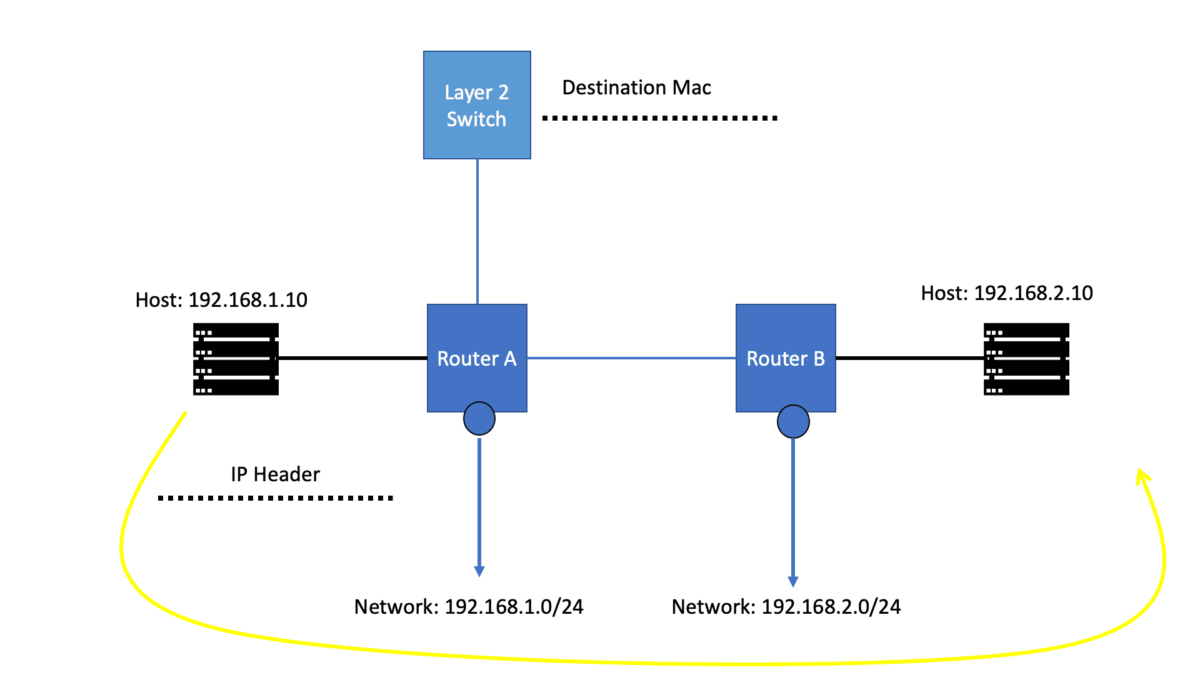
Devices on the same IP subnet can generally communicate through Layer 2 switching, provided the required addressing, VLAN and connectivity conditions are in place. Ethernet switches learn source MAC addresses and use their MAC address tables to determine how to forward Ethernet frames within a bridged network.

Communication with a destination outside the local IP subnet normally requires a Layer 3 forwarding decision. The host sends the packet to its configured default gateway, encapsulated in an Ethernet frame addressed to the gateway's MAC address. The router removes the incoming Layer 2 encapsulation, examines the IP destination and determines the next forwarding action.

Layer 2 · Local delivery
Switching frames

A switch uses its MAC address table and VLAN context to select an egress port, flood eligible unknown traffic, or filter a frame when appropriate. The destination IP prefix is not the normal basis of Ethernet switching.

Layer 3 · Routed delivery
Forwarding IP packets

A router performs a Layer 3 lookup against the packet's destination IP address, selects a matching forwarding entry, resolves the next hop and chooses an outgoing interface when a usable route is available.

1.2 · What happens when a packet reaches a router?

Consider a client in subnet 192.168.10.0/24 sending traffic to a server in subnet 192.168.20.0/24. The client identifies that the destination is outside its local subnet and sends the packet to its default gateway, for example 192.168.10.1.

The router then performs a series of operations. The precise implementation varies between platforms, but the logical forwarding process can be understood as follows.

  1. Receive and validate. The router receives the frame, processes the Layer 2 encapsulation and performs the applicable packet validation.
  2. Identify the IP destination. The router examines the destination address in the IP header and looks for a matching entry in its forwarding information.
  3. Select the forwarding action. The lookup identifies the applicable route or forwarding action, including a next hop and outgoing interface where required. A more specific matching prefix takes precedence over a less specific prefix.
  4. Resolve the next hop. The router uses its forwarding state and neighbour-resolution information to determine how to reach the next hop on the outgoing link.
  5. Transmit the packet. Where forwarding is permitted and the required information is available, the router updates relevant Layer 3 fields, constructs the appropriate outgoing Layer 2 frame and transmits it towards the next hop.

This process repeats at each routed hop until the packet reaches its destination network or encounters a condition that prevents successful delivery. A router does not normally need to know the entire end-to-end path in advance; it makes a forwarding decision using its own installed forwarding information.

1.3 · Routing control plane versus forwarding data plane

The control plane learns and evaluates reachability information. Routes may originate from directly connected networks, static configuration or dynamic routing protocols. A router evaluates candidate routes according to its routing process and installs eligible routes into its routing information base (RIB).

The forwarding plane uses the resulting forwarding information base (FIB) to make packet-forwarding decisions. The FIB is optimised for lookup and may be programmed into specialised forwarding hardware. The RIB and FIB are related, but they are not interchangeable: the presence of a route in one view does not by itself prove successful end-to-end delivery.

Engineering evidence · What should you verify?

When a destination is unreachable, inspect the route selected for the destination, the corresponding forwarding entry, next-hop reachability, outgoing interface state and relevant Layer 2 adjacency information. Then test the path and confirm where the observed behaviour first differs from the expected forwarding decision.

1.4 · Why routing protocols matter to forwarding

Routing protocols help routers learn and maintain reachability as networks change. RIP uses hop count as its metric. OSPF and IS-IS distribute link-state information and calculate paths using their respective link-state algorithms and metrics. EIGRP uses a composite metric and a diffusing computation mechanism, while BGP exchanges reachability between routing peers and applies policy to route selection and advertisement.

These protocols do not forward every application packet themselves. They contribute routing information that can affect which routes are selected and installed. Forwarding then applies the installed decision to traffic. Understanding this relationship is essential when investigating a route change, a failed link, a missing next hop or a forwarding path that differs from expectations.

Interactive Lab · Section 01

Trace the packet journey

In the interactive lab immediately below this section, follow a packet from a client to a remote subnet. Examine the local gateway decision, the router's destination lookup and the outgoing interface. Then change a forwarding condition and observe how the packet journey changes. Use the engineering readout to connect each action to the underlying networking principle.

Interactive Lab 01 · Forwarding Fundamentals

Trace the IP Packet

Follow a packet from a client to a remote server. Watch the router make a Layer 3 decision and rebuild the Layer 2 frame.

READY TO TRACE

Live packet path

STEP 0 / 8
CLIENT 192.168.1.10 Host SWITCH 1 Layer 2 MAC forwarding ROUTER Gi0/0 · LAN Gi0/1 · A Gi0/2 · B SWITCH 2 Layer 2 MAC forwarding SERVER A 10.1.1.10 Network A SERVER B 10.2.2.10 Network B
Active forwarding path Packet location Failed link
192.168.1.10End-to-end source
10.1.1.10Selected server
64Router decrements TTL
CreatedAwaiting first step
CURRENT EVENT
Ready to begin

Step forward to see how a host sends an IP packet to a destination on another subnet.

Packet journey0% complete

Frame & interface telemetry

LIVE
Current deviceClient
Ingress interface—
Egress interface—
Ethernet source MAC—
Ethernet destination MAC—
Layer 2 actionNo frame sent yet
Layer 3 actionPacket not yet routed

Forwarding decision

ROUTER LOOKUP
Connected networkOutgoing interfaceStatus
10.1.1.0/24Gi0/1Connected
10.2.2.0/24Gi0/2Connected
What should the router do?

The destination IP determines the Layer 3 forwarding decision. The router uses its forwarding table to select an outgoing interface.

Fault injection

Simulates the selected router interface becoming unavailable. Reset restores the link.

Packet event timeline

0 / 8 EVENTS

Section 2 · Routing State

Routing Tables, RIB and FIB

To understand why a router chooses a particular path, inspect the routing information it has learned, the route it selects and the forwarding entry it installs. The RIB and FIB are related, but they serve different purposes.

From route learning to packet forwarding

Connected routes, static configuration and routing protocols can supply candidate routes. The routing process evaluates those candidates using route preference, protocol-specific selection rules and policy. An eligible selected route may then be programmed into the forwarding information base, where it supports packet lookups.

1. LearnReceive or create candidate routing information.
2. SelectApply route preference, protocol rules and policy.
3. InstallProgram eligible forwarding information into the FIB.

Routing Information Base (RIB)

Contains routing information maintained by the routing system, including routes from different sources and the routes selected for use. The exact display and organization depend on the platform.

Forwarding Information Base (FIB)

Contains the entries used by the forwarding plane to make packet-forwarding decisions. These entries may include prefixes, next hops, interfaces and platform-specific forwarding actions.

Route selection

Determines which route is preferred for a destination among available candidates. Administrative distance, preference and protocol-specific rules vary by implementation.

Longest-prefix match

During a destination lookup, the most specific matching prefix is normally preferred among applicable FIB entries. This forwarding lookup is distinct from route selection.

Engineering principle

Do not stop when a route appears in the RIB. Check the selected route, the corresponding FIB entry and whether its next hop is resolved and usable.

Prepare for the interactive lab: Inspect the RIB and FIB

Compare routing information with installed forwarding entries. Follow a destination prefix through route selection and installation, then investigate what a missing or unresolved FIB entry means for packet delivery.

Section 02 · Routing State · Inspect

Routing Tables, RIB and FIB

A router can learn several possible paths to a destination, but learning a route is not the same as forwarding a packet. To understand the actual forwarding outcome, distinguish the information learned by routing protocols, the routes selected by the routing process and the forwarding entries used to handle traffic.

The Routing Information Base (RIB) and Forwarding Information Base (FIB) serve related but different roles. The RIB represents routing information and selected routes maintained by the routing system. The FIB contains the forwarding information derived from eligible routes and used for destination lookups. Their exact implementation and display vary across platforms.

2.1 · From route learning to packet forwarding

A router may learn reachability through connected interfaces, static configuration or routing protocols such as OSPF, IS-IS and BGP. It evaluates candidate routes using the relevant protocol rules, route preferences and configuration. The selected route can then be installed into the routing table and used to program forwarding state.

Control plane
RIB · Routing Information Base

Holds routing information and selected routes. It supports route evaluation, route installation and the control-plane processes that maintain reachability.

Forwarding plane
FIB · Forwarding Information Base

Holds destination-prefix forwarding entries used to select a next hop, outgoing interface or other forwarding action. Hardware platforms may program these entries into an ASIC or another forwarding engine.

2.2 · The route does not tell the whole story

Consider the destination prefix 10.20.30.0/24. A router might learn a route to this prefix from OSPF and another candidate from a different source. The router's route-selection process determines which route is eligible for installation according to the platform's routing rules and configuration.

Once the selected route is installed, the forwarding system needs sufficient information to carry traffic towards the destination. That can include a resolved next hop, an outgoing interface and Layer 2 adjacency information. If next-hop resolution fails or the interface is unavailable, the route information alone does not guarantee successful packet delivery.

Information layer Primary question What to investigate
Learned route How did the router learn the destination? Protocol state, received advertisements, connected networks and static configuration.
RIB / routing table Which route was selected for installation? Prefix length, route preference, metric, policy and competing candidates.
FIB / forwarding table What forwarding action will a destination lookup use? Matching prefix, next hop, outgoing interface and programmed forwarding state.
Adjacency / neighbour state Can the router transmit towards the next hop? ARP or IPv6 neighbour discovery, Layer 2 reachability and interface status.

2.3 · Longest-prefix match in the FIB

When forwarding a normal unicast IP packet, the router looks for matching destination prefixes in its forwarding information. Where multiple prefixes match, the most specific matching prefix is normally selected. This is known as longest-prefix match.

For example, a forwarding table may contain 10.20.0.0/16 through one next hop and 10.20.30.0/24 through another. A packet addressed to 10.20.30.45 matches both prefixes, but the /24 is more specific than the /16 and therefore takes precedence for that destination, assuming both entries are usable and the lookup is in the same forwarding context.

Engineering principle · Route selection is not longest-prefix match

Route selection determines which route or routes are installed for a given prefix. Longest-prefix match determines which installed forwarding prefix applies to a packet's destination. These are separate decisions and should be checked separately during troubleshooting.

2.4 · Why the RIB and FIB can appear different

A routing table may contain routes that are not installed in the active forwarding table. A route might lose to a competing route for the same prefix, depend on an unresolved next hop, or be affected by platform-specific forwarding constraints. The exact causes and diagnostic commands differ by vendor and operating system.

Some platforms also expose additional tables, such as protocol databases, Adj-RIB-In and Adj-RIB-Out for BGP, hardware forwarding views, or separate routing and forwarding instances. These views answer different questions. A BGP route received from a peer, for example, is not necessarily the best route, the route installed in the main RIB, or the entry ultimately used to forward a packet.

Troubleshooting sequence · Follow the evidence

Start with the destination prefix. Confirm the route source and selected route, inspect the forwarding entry, verify next-hop resolution and interface state, then test packet delivery. If the route is present but traffic fails, avoid assuming the routing protocol is at fault until the forwarding path has been checked.

2.5 · What to examine in the interactive lab

In the experiment below, use a destination address to compare candidate routes with the selected RIB entry and the resulting FIB lookup. Change prefix specificity or next-hop availability and observe which parts of the routing and forwarding state change. The goal is to identify the exact decision that explains the packet's outcome.

Interactive Lab · Section 02

Inspect the RIB and FIB

Use the interactive lab immediately below this section to inspect candidate routes, identify the selected route and trace the destination lookup through the forwarding table. Compare longest-prefix match with route selection, then introduce a next-hop or interface problem and examine the evidence before deciding where the failure occurs.

Interactive Lab 02 · Routing Information to Forwarding

RIB vs FIB: How a Route Becomes Forwarding State

Inspect candidate routes, install the selected route into the forwarding table, and trace a packet using the resulting forwarding entry.

ROUTE NOT INSTALLED

Control-plane to data-plane topology

STEP 0 / 7
ROUTINGPROCESSOSPF / BGP RIBRoute candidatesControl plane FIBSelected routesForwarding entries ROUTERLookupEgress interfaceNext hop NETWORK A10.1.1.0/24Gi0/1 NETWORK B10.2.2.0/24Gi0/2
Active processing stage Lookup marker Unavailable route
10.1.1.10Longest-prefix match
—Awaiting lookup
CandidateControl-plane state
EmptyForwarding state
CURRENT EVENT
Inspect the candidate routes

The routing process can learn multiple paths. The router selects a route for installation, then makes forwarding state available to the data plane.

Route installation sequence0% complete

Live forwarding lookup

DATA PLANE
Lookup resultNot run
Matched prefix—
Next hop—
Egress interface—
FIB entryNot installed
Forwarding outcomeWaiting for FIB
Key engineering principle

The RIB contains routing information. The FIB is the forwarding-oriented structure used to make packet decisions.

Routing Information Base (RIB)

CANDIDATE ROUTES
PrefixSourcePreferenceRIB role
10.1.1.0/24ConnectedDirectAvailable
10.2.2.0/24OSPFCost 10Available
10.2.2.128/25StaticAdmin 5More specific

Teaching model: a simplified set of route candidates. Real operating systems use platform-specific route-selection and installation rules.

Forwarding Information Base (FIB)

INSTALLED ENTRIES
PrefixNext hopInterfaceStatus
10.1.1.0/24DirectGi0/1Not installed
10.2.2.0/2410.0.0.2Gi0/2Not installed
10.2.2.128/2510.0.0.3Gi0/3Not installed

Engineering event timeline

0 / 7 EVENTS
Ready. Press Step Forward to inspect the RIB-to-FIB process.Lab 02 · Routing tables and forwarding state

Section 3 · Packet Processing

Forwarding Decisions and Packet Processing

A forwarding decision turns a destination address into a concrete action. Understanding the lookup, next-hop resolution, interface selection and packet handling sequence helps explain why a route can exist while traffic still fails.

How a router chooses the next step

The router evaluates the packet in the context of the receiving interface, routing table or VRF, destination address and applicable forwarding policies. It looks for a matching forwarding entry, resolves the selected next hop and determines how the packet should leave the device. The precise internal pipeline differs across router operating systems and hardware platforms.

Destination lookup

The forwarding lookup normally uses longest-prefix match among applicable entries. A more-specific prefix can therefore be used instead of a less-specific covering route.

Next-hop resolution

The router must have a usable forwarding action. For a directly connected Ethernet next hop, this often requires neighbor resolution through ARP for IPv4 or Neighbor Discovery for IPv6.

Header and Layer 2 handling

For ordinary routed IP forwarding, the IP hop limit or TTL is decremented and the IPv4 header checksum is updated. The outgoing Layer 2 header is prepared for the next link.

Policy and multipath

ACLs, firewall rules, VRFs, tunnels and other platform features can affect packet handling. With ECMP, eligible flows are commonly distributed using a hash rather than every packet being sent over every path.

Questions to ask when a forwarding result is unexpected

  • Which routing context is handling the packet?
  • Which prefix matches the destination, and is it the most specific applicable entry?
  • Is the selected next hop reachable and resolved?
  • Are interface state, access policies or encapsulation preventing transmission?
  • If multiple paths exist, which ECMP member is selected for this flow?
Engineering principle

Explain the actual forwarding action, not just the route that you expected to be used. Confirm the lookup result and next-hop resolution with platform state and traffic evidence.

Prepare for the interactive lab: Make and verify a forwarding decision

Use a destination address to test prefix matching, identify the selected next hop and outgoing interface, and examine how a more-specific route or an unresolved adjacency changes the forwarding outcome.

Section 03 · Packet Processing · Decide

Forwarding Decisions and Packet Processing

A forwarding table provides the information a router needs to move traffic, but the packet still has to pass through the forwarding process. The router must identify the applicable destination prefix, determine the next forwarding action, resolve the outgoing adjacency and apply the relevant interface and policy rules.

Understanding this sequence helps separate a route-selection problem from a packet-processing problem. A route may be correct while traffic is dropped because of an unresolved neighbour, an interface failure, an access-control rule, a forwarding policy or another data-plane condition.

3.1 · The forwarding lookup

For ordinary unicast forwarding, the destination IP address is the primary input to the route lookup. The router compares that address with its installed forwarding prefixes and selects the most specific usable match. The result identifies a forwarding action, which may include a next hop, outgoing interface or a special action such as discard.

Lookup input
Destination IP address

The destination address is checked against the forwarding table. For example, a packet addressed to 10.20.30.45 may match both a /16 route and a more specific /24 route.

Lookup result
Forwarding action

The selected entry determines how the router should handle the packet, subject to next-hop resolution, interface availability, policy and other forwarding requirements.

3.2 · Longest-prefix match in practice

Imagine a router with the following forwarding entries: 10.20.0.0/16 via Router A and 10.20.30.0/24 via Router B. A packet destined for 10.20.30.45 matches both entries. Because /24 is more specific than /16, the router selects the /24 entry if it is installed and usable in the applicable forwarding context.

Destination prefix Example next hop Specificity
10.20.0.0/16 Router A Less specific · 16 network bits
10.20.30.0/24 Router B More specific · 24 network bits
10.20.30.45 Router B is selected Both prefixes match; /24 wins

Longest-prefix match is not the same as comparing OSPF costs, BGP local preference or administrative distance. Those mechanisms help determine which route is installed for a prefix. The forwarding lookup then determines which installed prefix matches a particular destination address.

3.3 · Next-hop resolution and outgoing encapsulation

After selecting a forwarding entry, the router must be able to transmit towards the selected next hop. On an Ethernet link, this commonly requires a usable neighbour entry mapping the next-hop IP address to a MAC address. IPv4 commonly uses ARP, while IPv6 uses Neighbor Discovery.

If the next hop is unresolved, the router may initiate neighbour discovery, queue packets temporarily or drop packets, depending on the platform and circumstances. A valid destination route therefore does not guarantee that the outgoing Layer 2 frame can be constructed immediately.

  1. Match the destination. Find the most specific usable forwarding entry for the destination address.
  2. Identify the next hop. Determine whether the route is directly connected or forwards through another router or forwarding action.
  3. Resolve the adjacency. Confirm that the required neighbour and Layer 2 information are available on the outgoing link.
  4. Prepare the outgoing frame. Construct the appropriate Layer 2 encapsulation for the outgoing interface and next hop.
  5. Transmit or report a failure. Forward the packet when the required conditions are met, or apply the relevant drop, exception or error-handling behaviour.

3.4 · Header processing and policy checks

Forwarding can involve more than a destination lookup. Routers normally decrement the IPv4 Time to Live (TTL) or IPv6 Hop Limit when forwarding a packet. IPv4 routers also update the IPv4 header checksum after changing the TTL. If the TTL or Hop Limit expires, the packet is not forwarded normally.

Depending on the device and configuration, forwarding may also be affected by access-control lists, firewall rules, policy-based routing, VRF context, tunnelling, quality-of-service classification, NAT or other features. These mechanisms can change the selected path or prevent a packet from being forwarded even when a matching route exists.

Engineering principle · A matching route is only one condition

Confirm the forwarding entry, but also check the forwarding context, next-hop resolution, interface state and applicable policy. If the route looks correct but packets fail, collect evidence from each stage rather than assuming the routing table explains the entire outcome.

3.5 · ECMP and multiple forwarding paths

Equal-Cost Multipath (ECMP) allows a router to use multiple eligible next hops for a destination when the routing and forwarding system determines that the paths qualify. The forwarding plane commonly uses a hash based on selected packet fields to distribute traffic across those paths.

The exact hash inputs and load-sharing behaviour depend on the platform and configuration. Distribution is not necessarily equal for every individual flow, and a single flow is commonly kept on one path to reduce packet reordering. When a next hop fails, the forwarding system may remove it from the usable path set and redistribute affected traffic.

3.6 · Diagnose the packet, not just the route

A useful troubleshooting method follows the packet through the forwarding process. Verify the source and destination, identify the applicable routing or VRF context, inspect the selected forwarding entry, check the next hop and interface, and then examine policy or counters that could explain a drop. A packet capture or controlled test can help establish where observed behaviour differs from the expected path.

Interactive Lab · Section 03

Make and verify a forwarding decision

In the interactive lab immediately below this section, enter or select a destination, compare matching prefixes, and observe the chosen next hop. Then test a changed forwarding condition, such as a more specific route, unavailable adjacency or failed outgoing interface. Use the readout to identify the decision that changes the packet's outcome.

Interactive Lab 03 · Packet Processing

Inside the Forwarding Decision

Change the destination, inspect competing prefixes, and watch the router select a route, decrement TTL, and rewrite the Ethernet header.

READY TO TRACE

Live packet-processing path

STEP 0 / 7
INGRESS HOST 192.168.10.10 TTL 64 INGRESS Gi0/0 Decapsulate ROUTER FIB lookup TTL − 1 Rewrite L2 EGRESS A 10.20.1.0/24 Gi0/1 EGRESS B 10.20.2.0/24 Gi0/2
Active processing stage Forwarding completed Failed egress
10.20.1.25IP header destination
—Awaiting lookup
64Hop limit in IPv4 header
CreatedAwaiting first step
CURRENT EVENT
Ready to process packet

Advance the packet through ingress processing, FIB lookup, and egress encapsulation.

Packet processing sequence0% complete

Live forwarding decision

FIB LOOKUP
Ingress interface—
Matched route—
Next hop—
Egress interface—
New source MAC—
New destination MAC—
OutcomeWaiting for lookup
Engineering principle

The router uses the destination IP to select a forwarding entry. It does not choose the route based on the destination Ethernet MAC from the incoming frame.

Forwarding table

LONGEST-PREFIX MATCH
PrefixNext hopInterfacePrefix length
10.20.1.0/24DirectGi0/1/24
10.20.0.0/16192.0.2.2Gi0/2/16
10.20.2.0/24DirectGi0/2/24
172.16.0.0/16192.0.2.5Gi0/3/16

The forwarding table uses the most-specific matching prefix. The /24 for 10.20.2.0/24 wins over the overlapping 10.20.0.0/16 entry.

Packet header inspection

BEFORE / AFTER
Header fieldIngressAfter routing
Source IP192.168.10.10192.168.10.10
Destination IP10.20.1.2510.20.1.25
TTL64—
Ethernet source02:00:00:00:00:10—
Ethernet destination02:00:00:00:00:01—
Remember

For ordinary IPv4 routing without NAT, the source and destination IP addresses remain unchanged across the router. The TTL decreases and the Ethernet header is rebuilt for the outgoing link.

Packet-processing timeline

0 / 7 EVENTS

Section 4 · Network Change

Routing Protocols and Convergence

Forwarding depends on routing information that can change. When a link fails or a better route becomes available, routers must detect the change, update their routing state and install the appropriate forwarding entries. This process is known as convergence.

How routing protocols contribute

Different routing protocols discover and evaluate paths in different ways. RIP uses a distance-vector approach based on hop count. OSPF and IS-IS are link-state protocols that calculate paths from a network topology. BGP exchanges reachability information and path attributes, with policy playing a central role in route selection. EIGRP is generally classified as an advanced distance-vector routing protocol.

Detect the change

A physical interface event, adjacency loss, protocol timer or other detection mechanism identifies a possible topology or reachability change.

Recalculate or reselect

The routing system processes the new information using the protocol's algorithms, attributes and policies. Not every learned route becomes the selected route.

Update forwarding state

Eligible routing changes are installed into the forwarding plane. Programming, next-hop resolution and platform behaviour can affect when the new path becomes usable.

Verify traffic recovery

Check the forwarding path and real traffic. A routing protocol returning to a stable state does not alone prove that end-to-end connectivity has recovered.

A simplified convergence timeline

1 · EventA link or adjacency changes.
2 · DetectionThe router recognizes the change.
3 · Route updateRouting information is recalculated or reselected.
4 · RecoveryForwarding is updated and traffic is tested.
Engineering principle

Convergence is a sequence of events, not a single switch. Measure detection, route processing, forwarding installation and observed traffic recovery separately.

Prepare for the interactive lab: Simulate a link failure and recovery

Observe the network before and after a link failure. Identify the lost path, check whether an alternate route is available, and verify the routing and forwarding changes needed to restore connectivity.

Section 04 · Routing Protocols · Converge

Routing Protocols and Convergence

Forwarding depends on the routes installed in a router, and those routes can change as network conditions change. Routing protocols exchange reachability information, evaluate paths and react to events such as a failed link, a recovered interface or a newly advertised prefix. Convergence is the process through which the routing system responds to these changes and reaches a new stable state.

A routing change does not instantly guarantee that every router has the same information or that every forwarding device has updated its forwarding state. During a failure, some packets may be lost, a path may temporarily be unavailable, or different parts of the network may briefly have different views of reachability.

4.1 · How routing protocols learn paths

Routing protocols use different mechanisms to distribute reachability and calculate routes. Understanding their differences helps explain why they react differently to topology changes and why their metrics cannot be compared directly across protocols.

Distance vector
RIP

RIP exchanges routing information with neighbouring routers and uses hop count as its metric. Its simplicity is useful for learning the distance-vector model, although its convergence and scalability are limited compared with many modern routing designs.

Link state
OSPF and IS-IS

Routers distribute link-state information within the relevant routing domain and calculate paths using a shortest-path algorithm. The resulting route depends on topology, configured metrics and protocol rules.

Path vector
BGP

BGP exchanges reachability between peers and carries path attributes used for route selection and policy. Attributes such as AS_PATH and LOCAL_PREF help determine which route is preferred and how routes are advertised.

Advanced distance vector
EIGRP

EIGRP uses a composite metric and a diffusing computation mechanism to maintain loop-free paths. Its behaviour differs from both classic distance-vector protocols and link-state protocols.

4.2 · Route metrics and path selection

A routing protocol's metric helps compare candidate paths according to that protocol's calculation rules. RIP uses hop count. OSPF uses interface costs accumulated along a path; in many implementations, the default cost is derived from interface bandwidth and a configured reference bandwidth. Operators can adjust costs to influence path selection.

BGP follows a different model. It evaluates a sequence of path attributes and policy rules, which may include LOCAL_PREF, AS_PATH, origin, MED and other implementation-specific tie-breakers. The exact decision sequence depends on the BGP implementation and configuration.

Protocol Routing model Example path-selection input
RIP Distance vector Hop count
OSPF Link state Accumulated OSPF interface cost
IS-IS Link state Accumulated link metric
BGP Path vector Path attributes and routing policy
EIGRP Advanced distance vector Composite metric and feasibility conditions

These metrics describe different things. An OSPF cost of 20 and a BGP LOCAL_PREF of 200 are not values on a common scale. A router first applies the relevant routing-protocol rules and route preferences to determine which route is eligible for installation. Forwarding then uses the installed result.

4.3 · What happens when a link fails?

Consider a router that can reach a destination through a primary link and an alternative path. When the primary link fails, the router must detect the failure, update relevant routing state, calculate or select an alternative route, and update the forwarding information when the new path becomes usable.

  1. Detect the event. A physical interface transition, protocol adjacency failure or configured liveness mechanism identifies that a neighbour or path is no longer available.
  2. Update routing information. The routing protocol processes the event and updates its topology or neighbour state as appropriate.
  3. Recalculate or select a route. The router determines whether another eligible path is available and applies the relevant route-selection rules.
  4. Update forwarding state. The selected forwarding action is programmed or refreshed, subject to the platform's implementation and any forwarding dependencies.
  5. Verify recovery. Confirm that the new path is installed and usable, then test traffic and examine packet loss, counters and end-to-end reachability.

4.4 · Convergence is more than a routing-table update

Convergence time depends on failure detection, protocol behaviour, topology, configuration, route calculation, implementation and forwarding-programming time. A network with an alternate route may recover more quickly than one that must discover a new path, but a backup path alone does not guarantee hitless recovery.

During convergence, a router may temporarily have stale information, a neighbour may be unreachable, or traffic may encounter a transient forwarding inconsistency. Depending on the topology and protocol, these conditions can result in packet loss, transient loops or blackholing. Fast-reroute and precomputed backup mechanisms can reduce disruption, but their coverage and behaviour must be verified for the actual design.

Engineering principle · Measure the whole recovery path

Record the failure-detection time, routing-state change, route-selection outcome, forwarding-table update and first successful traffic test. These are related events, but they are not necessarily simultaneous. Use timestamps and packet-level evidence instead of treating a changed routing table as proof that the application path has recovered.

4.5 · ECMP, alternate paths and topology design

Networks often use redundant links to provide resilience. With ECMP, multiple qualifying next hops can be installed for a destination, allowing traffic to use more than one path. In other designs, one route may be preferred while another remains available as a backup.

The result depends on topology, metric design, route policy and forwarding-platform behaviour. A backup path should be checked for reachability, capacity, policy consistency and the ability to carry the expected traffic after a failure. In leaf-spine networks, for example, routed links and ECMP can provide multiple Layer 3 paths without relying on spanning tree to block redundant routed links.

4.6 · Investigating convergence with evidence

When a route disappears or traffic is interrupted, inspect the relevant interface and neighbour state, routing-protocol events, candidate and selected routes, forwarding entries and traffic counters. Compare the observed sequence with the expected failure and recovery process. If routing state has converged but traffic still fails, continue into next-hop resolution, interface state and policy rather than stopping at the routing protocol.

Interactive Lab · Section 04

Simulate a link failure and recovery

In the interactive lab immediately below this section, observe the initial route, introduce a link failure and follow the routing and forwarding changes. Compare the primary and alternate paths, then verify when traffic can use the recovered forwarding state. Focus on the order of events, not just the final route.

Interactive Lab 04 · Convergence Simulator

Routing Protocols & Convergence

Break a routing path, observe how the network detects the change, and step through the control-plane updates that lead to a new forwarding decision.

Stable · Primary path active

Network topology

Stage 0 / 5
OSPF adjacency Primary Backup Backup R1Ingress R2Primary R3Backup R4Egress 10.40.0.0/24
Convergence stage0 / 5
Selected next hopR2
Route stateStable

Routing table · R1

Illustrative RIB
PrefixNext hopMetricState
10.40.0.0/24R210Active
10.40.0.0/24R320Backup

Control-plane explanation

Primary route selected

R1 has a usable route through R2. The backup path through R3 is available but has a higher illustrative metric.

Convergence event log

Newest event last
Network stable. Primary path R1 → R2 → R4 is selected.

Engineering takeaway

Convergence is a sequence

Failure detection, routing-protocol processing, route selection, and forwarding-table programming are related but distinct steps. A backup route does not mean every router switches instantaneously.

Educational model: stages and metrics are illustrative, not a timing prediction for a particular vendor, protocol, or production network.

Section 5 · Advanced Operations

Advanced Forwarding, Failures and Troubleshooting

Real networks add layers of forwarding context, redundancy and policy. VRFs, multipath routing, tunnels, access controls and asymmetric paths can make failures difficult to diagnose. A reliable investigation follows the packet and tests each dependency using observable evidence.

Why a valid route may not mean successful delivery

A destination can have a valid route while traffic is dropped, misdirected or unable to reach its destination. The router may be using a different VRF than expected, a next hop may be unresolved, a policy may reject the packet, or a downstream device may lack a usable return path. Troubleshooting requires checking the complete forwarding chain rather than relying on a single routing-table entry.

VRFs and routing context

Virtual routing and forwarding instances maintain separate routing contexts on supported platforms. Verify that the route lookup is occurring in the intended VRF and that the connected interfaces and next hops belong to the correct context.

ECMP and alternate paths

Equal-cost multipath can distribute eligible flows across multiple next hops. A failure affecting one path or one hashed flow may not affect every connection identically.

Blackholing and policy drops

Traffic can be discarded by a missing route, an unusable forwarding action, a null route, an access-control rule or a downstream policy. Counters and packet captures help distinguish these cases.

Asymmetric routing

The forward and return directions may use different paths. Stateful firewalls, filtering and missing reverse routes can cause failures even when one direction appears healthy.

A repeatable incident-investigation method

  • Scope the incident: record source, destination, protocol, VRF, time and observed symptoms.
  • Trace the forward route: inspect the selected route, FIB entry, next hop and outgoing interface at each relevant hop.
  • Check dependencies: verify interface state, ARP or IPv6 Neighbor Discovery, encapsulation and applicable policies.
  • Investigate alternate paths: inspect ECMP members, recent topology changes and any route or link failures.
  • Verify the return path: trace responses back to the source and check for asymmetric-path or stateful-filtering problems.
  • Confirm the result: repeat the test, compare counters and captures, and document the evidence supporting the diagnosis.
Engineering principle

Diagnose the failing forwarding dependency before changing the network. A controlled test with a clear before-and-after comparison is more useful than making several changes at once.

Prepare for the interactive lab: Investigate a forwarding incident

Work through a simulated fault, identify the affected forwarding dependency and collect evidence before selecting a corrective action. Verify the result against routing state, forwarding state and the observed packet path.

Section 05 · Advanced Forwarding · Diagnose

Advanced Forwarding, Failures and Troubleshooting

Real networks combine routing protocols, forwarding tables, neighbour resolution, security policy, redundancy and platform-specific forwarding behaviour. When traffic fails, the challenge is to identify which part of that chain is responsible. A systematic investigation follows the evidence from the destination route through the forwarding path and out to the application.

This final section brings the earlier concepts together. It examines forwarding instances, ECMP, blackholing, asymmetric paths and the practical sequence an engineer can use to isolate a fault without confusing a routing symptom with the underlying cause.

5.1 · Forwarding contexts and VRFs

Large networks often separate routing and forwarding into distinct logical contexts. A Virtual Routing and Forwarding instance (VRF) maintains a separate routing context so that different tenants, services or network domains can use overlapping IP address space without sharing one common routing table.

Routing context
Separate route state

Each VRF has its own routing context and eligible routes. A destination may be reachable in one VRF but absent from another, even on the same physical router.

Forwarding context
Lookup in the correct table

The packet must be processed in the intended forwarding context. Inspecting only the default routing table can produce a misleading diagnosis when the traffic belongs to another VRF or routing instance.

VRF-aware troubleshooting begins by confirming the ingress interface, routing instance, source and destination addresses, and any configured route leaking or inter-VRF policy. A route in the wrong routing context does not automatically make a destination reachable to the affected traffic.

5.2 · ECMP and resilient forwarding

Equal-Cost Multipath can install multiple eligible next hops for a destination. The forwarding system commonly uses a hash of selected packet fields to assign flows to paths. This can improve aggregate link utilisation and provide alternative paths when one next hop becomes unavailable.

However, ECMP does not mean every packet is sent over every path, and traffic is not guaranteed to be divided evenly. Hash inputs, flow distribution, resilient hashing and failure handling vary by implementation. When investigating a path-specific fault, determine which next hop the affected flow is actually using.

5.3 · Common forwarding failure patterns

Observed symptom Possible cause Evidence to collect
No matching route Missing prefix, failed advertisement, wrong VRF or routing policy. Routing table, protocol state, prefix advertisements and lookup context.
Route exists, traffic fails Unresolved next hop, down interface, policy drop or stale forwarding state. FIB entry, neighbour table, interface counters and policy counters.
Only some flows fail ECMP path-specific issue, hash distribution, inconsistent policy or a partial failure. Flow details, selected next hop, per-link counters and path-specific tests.
Traffic fails after a change Convergence delay, unexpected route selection, incomplete programming or a dependency failure. Event timestamps, routing logs, FIB changes and packet tests.
One direction works Asymmetric return path, reverse-route problem, stateful firewall or policy mismatch. Forward and return paths, reverse routing state, ACLs and session state.

5.4 · Blackholing and asymmetric routing

A forwarding blackhole occurs when traffic is directed into a path that does not deliver it to the intended destination. This can happen when a route remains installed despite a downstream failure, a next hop is unusable, a discard route matches the destination or a forwarding dependency is broken. The precise cause must be established from the active route, forwarding entry and packet path.

Asymmetric routing occurs when traffic in one direction follows a different path from traffic in the other direction. It is not inherently a fault, but it can expose problems with stateful firewalls, NAT, path-specific policy or monitoring systems that assume both directions traverse the same devices.

Engineering principle · Test both directions

Confirm forward-path reachability and return-path reachability independently. A successful ping or connection in one direction does not prove that the reverse route, stateful policy or application response path is working correctly.

5.5 · A repeatable forwarding troubleshooting method

A disciplined sequence prevents engineers from changing routing configuration before they have established where the packet is failing. Start with a defined test flow and work through each layer, recording the observed state.

  1. Define the affected flow. Record the source, destination, protocol, ports where relevant, ingress interface and routing context.
  2. Check the selected route. Verify that the destination has an eligible route in the correct RIB or routing instance, and understand why that route was selected.
  3. Inspect the forwarding entry. Confirm the longest-prefix match, next hop, outgoing interface and any special forwarding action.
  4. Verify the next hop and link. Check neighbour resolution, interface state, VLAN or Layer 2 reachability where applicable, and relevant link counters.
  5. Check policy and packet processing. Examine access-control rules, firewall state, VRF selection, encapsulation and other features that could affect the flow.
  6. Test the path and return traffic. Use appropriate pings, traceroutes, packet captures or application tests. Interpret each tool's limits: control-plane probes and application traffic may be treated differently.
  7. Correlate events and verify recovery. Compare routing events, forwarding updates, counters and test results. After a change, confirm that the original failure is resolved and that the intended forwarding behaviour remains stable.

5.6 · Design for failure, not just normal operation

A robust forwarding design should be evaluated under both normal and degraded conditions. Redundant links, alternative next hops, ECMP, fast-reroute mechanisms, appropriate routing timers and consistent policy can reduce disruption, but each introduces behaviours that need to be validated.

Test realistic failure scenarios: a link going down, a neighbour becoming unavailable, a route being withdrawn, a next hop failing while the interface remains up, or only one ECMP path experiencing loss. Observe the routing state, forwarding state and actual traffic separately. This is the difference between assuming resilience and demonstrating it.

Final engineering takeaway

A successful forwarding diagnosis connects three kinds of evidence: the route the control plane selected, the action the forwarding plane installed, and the behaviour observed in real traffic. When those three views agree, the network's behaviour is easier to explain, verify and maintain.

Interactive Lab · Section 05

Investigate a forwarding incident

In the interactive lab immediately below this section, investigate a simulated fault using routing state, forwarding entries, interface and neighbour information, and traffic evidence. Identify the most likely failure point, make a controlled change and run the test again. The objective is to justify the diagnosis from evidence, not merely to make the symptom disappear.

Interactive Lab 05 · Advanced Troubleshooting

Advanced Forwarding, Failures & Troubleshooting

Investigate a forwarding failure by changing the destination, injecting a link fault, and checking the route, next hop, and forwarding outcome. Learn to distinguish a routing problem from a forwarding-path problem.

Healthy · Forwarding normally
Scenario: the destination is reachable through the primary next hop. Run diagnosis to inspect the forwarding state.

Forwarding topology

Router R1 · ingress
Primary Available Backup Available R1Ingress R2Primary R3Backup R4Egress 10.50.1.0/24
Route match10.50.1.0/24
Next hopR2
Forwarding resultReady

R1 forwarding table

Illustrative FIB
PrefixNext hopInterfaceState
10.50.1.0/24R2Gi0/1Ready
10.50.2.0/24R3Gi0/2Ready
0.0.0.0/0——No default

Diagnosis result

Ready to diagnose

Choose a destination and run the diagnosis. The lab will compare the destination against the available forwarding entries and report the expected outcome.

Troubleshooting checklist

Evidence-led workflow
01Identify the source and destination IP addresses.
02Find the longest matching prefix in the forwarding table.
03Verify the next hop and outgoing interface.
04Check link state, adjacency, and the next-hop resolution.
05Confirm the route is installed in the FIB and test again.

Engineering lesson

Routing and forwarding are different

Routing protocols help determine reachability and route preference. The forwarding plane uses the installed forwarding entry to process each packet. A route in a routing table is not, by itself, proof that packets can reach their destination.

Educational model: this lab simulates selected routing and forwarding conditions. It does not inspect a live router or perform real packet captures.

Conclusion · Engineering Takeaways

From Routing Decisions to Packet Forwarding

IP forwarding is the point where a network's control-plane decisions meet the packets travelling through it. Understanding how routes are selected, installed and used by forwarding hardware makes it easier to explain both normal traffic flow and unexpected failures.

What this guide has established

A router does more than look up a destination address. It receives a packet, evaluates the forwarding context, selects a matching forwarding entry, resolves the next hop and outgoing interface, updates the relevant packet fields, and transmits the packet. Each step creates evidence that can be inspected when traffic behaves unexpectedly.

The core engineering principle

A route in the routing table does not, by itself, prove that a packet will be forwarded successfully. Verify the installed forwarding entry, the next-hop resolution, the outgoing interface, applicable policies and the actual packet path.

Five principles to take into production

01

Separate routing from forwarding

Routing determines which paths are eligible and selected. Forwarding uses installed forwarding state to process individual packets.

02

Inspect both RIB and FIB

The RIB records routing information and route selection. The FIB supplies the entries used for packet forwarding. Differences between them can reveal installation or resolution issues.

03

Check longest-prefix match

Forwarding normally selects the most specific matching destination prefix among applicable entries, subject to the device's forwarding context and policies.

04

Account for convergence

A routing change can take time to propagate and be installed. During that interval, traffic may be interrupted, lost or sent along a temporarily different path.

05

Follow the packet's actual path

Validate the source and destination, route lookup, next hop, interface, encapsulation, policy and return path. Use counters, logs and packet captures to corroborate the result.

06

Test failures, not just success

Remove a link, change a route or introduce a policy constraint in a controlled lab. Observe how the routing and forwarding state changes before drawing conclusions.

A practical troubleshooting sequence

When a destination is unreachable, work through the path in a repeatable order instead of assuming the routing protocol is at fault.

  • Define the flow: identify source, destination, protocol and relevant VRF or routing context.
  • Check route selection: confirm the active route and the most specific matching prefix.
  • Verify the FIB: inspect the installed forwarding entry and its next-hop resolution.
  • Inspect the egress path: validate interface state, Layer 2 adjacency, encapsulation and policies.
  • Trace the return path: check for asymmetric routing, filtering or missing reverse routes.
  • Re-test and record evidence: compare counters, logs, packet captures and state before and after the change.

Continue learning with Network Insight

Use the resources below to move from the forwarding fundamentals in this article to practical routing investigations and interactive BGP experiments.

Learning Resource

BGP Learning Centre

Explore BGP architecture, route propagation, best-path selection and fault investigation, with a structured route from concepts to practical experiments.

Explore the Learning Centre ↗
Interactive Simulator

BGP Core Simulator

Investigate routing behaviour in an interactive environment. Explore route propagation, best-path decisions and how topology or link changes affect the network.

Launch the Simulator ↗
☕
Support Network Insight
Help support the development of interactive networking labs, BGP simulations, and educational content.
Support the Project