
Securing BGP Port 179: Session Exposure, Threat Detection and Defensive Engineering
Border Gateway Protocol (BGP) enables independently administered networks to exchange routing information. Its use of TCP port 179 provides the transport connection between BGP speakers, but a reachable port does not automatically mean that a BGP session can be established—or that the routing information exchanged is trustworthy.
For network engineers, the real security challenge is understanding the complete path from transport connectivity to an established BGP session, accepted routing updates and the forwarding decisions that affect traffic. A firewall rule, a successful TCP handshake and an Established BGP neighbor each provide different evidence. None should be treated as a complete assessment of routing security on its own.
This guide examines BGP port exposure from a defensive engineering perspective. We will explore how TCP and BGP establish a peer relationship, what session telemetry can reveal, how to investigate suspicious connection attempts or failed adjacencies, and how to apply layered controls at the network edge.
Understand the session
Follow the TCP three-way handshake and BGP finite state machine. Separate transport establishment from BGP negotiation and routing exchange.
Collect meaningful evidence
Compare connection logs, firewall decisions, packet captures, neighbor states and routing updates to establish what actually happened.
Verify and strengthen defenses
Investigate failed sessions and unusual traffic, then assess peer restrictions, authentication, control-plane protection and route validation.
If TCP port 179 is reachable, how do you determine whether the BGP peer is legitimate, the session is behaving correctly, and the routes it exchanges meet your network's security policy?
Scope: defensive BGP security, controlled troubleshooting and authorized validation. Any penetration-testing activity should be limited to systems and networks for which you have explicit permission.
Explore the TCP/179 Investigation
Follow the investigation from BGP session establishment to operational evidence, authorised security assessment and control-plane hardening. Select a stage to jump directly to its section introduction.
How TCP Port 179 Becomes a BGP Session
BGP uses TCP port 179 by default to establish a reliable transport connection between peers. TCP connectivity is only the beginning: the routers must also exchange BGP OPEN messages, negotiate session parameters and reach the Established state before normal route exchange can proceed.
How TCP Port 179 Supports BGP
Border Gateway Protocol (BGP) exchanges reachability information between routers using a TCP connection. TCP port 179 is the standard BGP listening port, but understanding its role requires separating network reachability, transport connectivity, BGP session establishment and route exchange.
BGP is a control-plane protocol used to exchange routing information between autonomous systems and, through internal BGP (iBGP), among routers within the same autonomous system. Instead of sending each routing update as an independent, connectionless message, BGP uses TCP to provide a reliable, ordered byte stream between its peers.
By default, a BGP speaker listens for incoming connections on TCP port
179. The router initiating a connection will typically use an
ephemeral source port and destination port 179. Return traffic normally
uses source port 179 and the initiator's ephemeral destination port.
The precise connection direction depends on which peer initiates the
session; both eBGP and iBGP use TCP by default.
From IP Reachability to Route Exchange
A working BGP session depends on several distinct stages. The peers must have IP connectivity to the intended addresses, and any required routing, firewall and security policies must permit the connection. Once TCP is established, BGP begins its own protocol-level negotiation.
Conceptual sequence: the TCP handshake comes before BGP session negotiation. Successful completion of one stage does not guarantee completion of the next.
TCP Handshake Versus BGP Handshake
These are two separate processes. TCP establishes the communication channel; BGP uses that channel to negotiate and maintain the routing session. Confusing the two can lead to incorrect troubleshooting conclusions.
| Stage | What happens | What success tells you |
|---|---|---|
| TCP three-way handshake | SYN, SYN-ACK, ACK | A TCP connection was established between the endpoints. |
| BGP OPEN | Peers exchange protocol parameters and capabilities. | BGP negotiation has begun; compatibility and configuration still matter. |
| KEEPALIVE | Peers acknowledge successful negotiation and maintain session liveness. | The session can progress toward or remain in Established. |
| UPDATE | Reachability information and path attributes are exchanged. | Routes can be advertised or withdrawn, subject to policy and protocol state. |
| NOTIFICATION | A protocol error or other session-ending condition is reported. | Inspect the notification and logs to identify the cause of termination. |
BGP also supports extensions such as Route Refresh, which can allow a peer to request that routes be re-advertised without tearing down the session. The capabilities negotiated during OPEN determine which extensions are available.
Why Port 179 Matters for Security
Because BGP can influence how a network reaches external destinations, unauthorised access to the BGP control plane can have consequences beyond a single TCP connection. Depending on the weakness and the surrounding controls, risks can include session disruption, resource exhaustion and the acceptance of incorrect routing information.
However, an open TCP/179 port is not, by itself, proof of a vulnerability. A router may intentionally expose BGP to a configured peer while rejecting other sources. A port scan cannot establish whether the remote device is vulnerable, whether a peer is authorised, or whether route policy is safe.
With the transport and protocol layers clearly separated, the next step is to examine the evidence available during a real session failure: TCP connection behaviour, BGP neighbor state, logs and route information.
TCP Port 179 → BGP Session
Neighbor state: not yet evaluated
Use TCP, BGP State and Logs Together
A useful diagnosis correlates transport evidence with the BGP finite-state machine and routing information. A successful TCP connection does not establish that the BGP session is healthy or that expected prefixes are being accepted.
How to Read TCP/179 and BGP Session Evidence
Effective BGP troubleshooting depends on correlating multiple sources of evidence. A TCP connection, a BGP neighbor state, a routing-table entry and a packet capture each reveal a different part of the session's health.
When a BGP peer is not establishing, avoid relying on a single command or an isolated packet capture. Start with the intended peer addresses and routing path, then compare transport-level behaviour with the BGP finite state machine (FSM), system logs and received route information. The aim is to identify the earliest stage that is not behaving as expected.
Four Evidence Sources
Look for connection attempts, completed handshakes, resets, retransmissions and timeouts. These observations help distinguish transport reachability from a BGP protocol problem.
Check the peer's FSM state, session duration, last reset reason and negotiated capabilities. Repeated resets may indicate an intermittent fault or a configuration mismatch.
Correlate timestamps with connection failures, BGP notifications, authentication errors, configuration changes and interface events.
Inspect received and accepted prefixes, route-policy decisions, best-path selection and installed routes. A healthy session does not guarantee that expected routes are accepted.
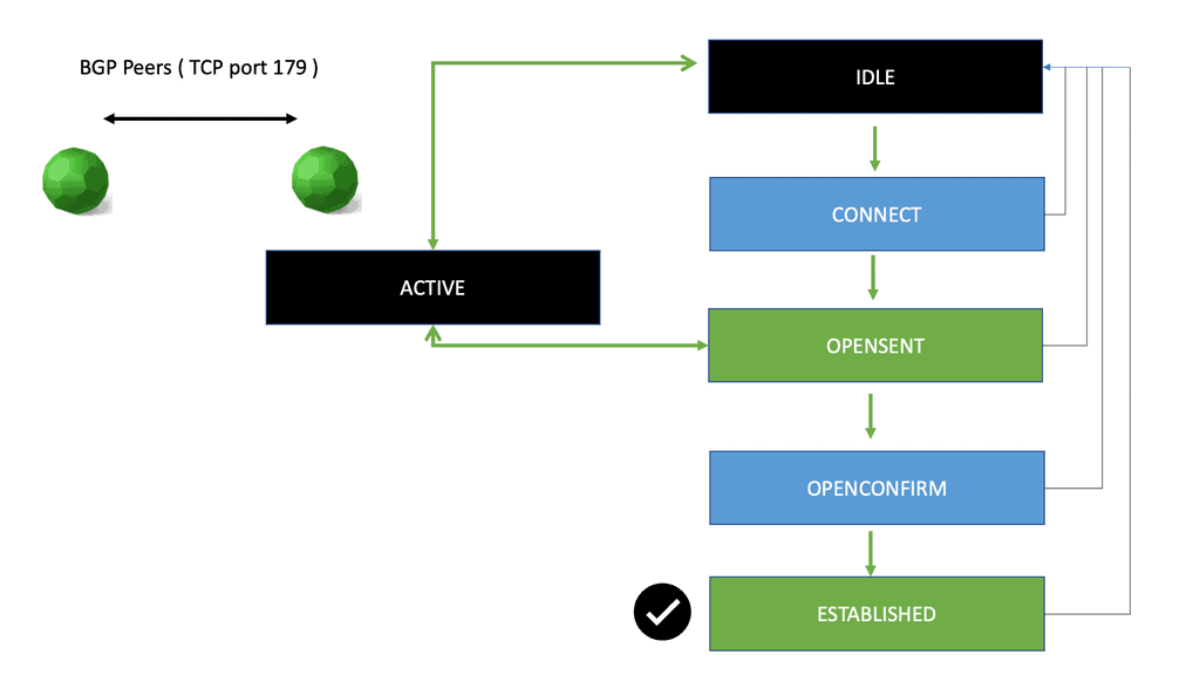
Interpret the BGP Finite State Machine
BGP uses a defined state machine to control session establishment. The current state narrows the investigation, but it should be interpreted alongside logs and transport evidence rather than treated as a complete diagnosis on its own.
Example: Read a Neighbor Summary
Network operating systems provide different command syntax, but a neighbor summary commonly exposes the remote peer, autonomous system, session state or uptime, and the number of prefixes received. The following is illustrative output, not a capture from a live router.
Neighbor        AS       State/PfxRcd
192.0.2.2       65002    24
192.0.2.3       65003    Active
In this simplified example, the first peer is established and has received 24 prefixes. The second peer is shown in Active, which warrants further investigation. The precise meaning of the summary field depends on the platform and command; confirm the detailed neighbor state before drawing a conclusion.
What a Packet Capture Can—and Cannot—Prove
A packet capture can help establish whether TCP traffic reaches the expected endpoint and whether the TCP handshake completes. If BGP negotiation begins, it may also expose OPEN messages, KEEPALIVE messages, UPDATEs or NOTIFICATIONs, subject to capture location, encryption or encapsulation elsewhere in the path, and platform behaviour.
| Observed evidence | Reasonable interpretation | Next check |
|---|---|---|
| No response to connection attempts | Possible filtering, unreachable peer, silent drop or unavailable endpoint. | Check routing, ACLs, firewall counters and peer availability at both ends. |
| TCP reset | The connection was reset; the packet alone may not identify the underlying cause. | Correlate reset timing, endpoints, device logs and session state. |
| TCP established, then BGP negotiation fails | Transport works, but BGP configuration or protocol negotiation may be failing. | Inspect OPEN messages, AS configuration, authentication and notifications. |
| BGP Established, expected prefix missing | The session is up, but advertisement, filtering, best-path selection or installation may differ from expectations. | Check Adj-RIB-In, policy, best-path output and the routing/forwarding tables. |
Correlate the Timeline
Use timestamps to align packet captures with neighbor-state changes, logs, interface events and configuration changes. For example, a peer reset immediately after a policy deployment suggests a different investigation path from a session that never completes the TCP handshake. Correlation helps build a defensible explanation instead of relying on assumptions.
- Record the peer address, local source address and time window.
- Identify the last successful stage: TCP connection, BGP negotiation or route exchange.
- Compare both peers' logs where access is authorised.
- Verify whether expected prefixes are received, accepted and installed.
- Preserve relevant logs and captures before changing configuration.
With the evidence correlated, the next stage is a controlled investigation: determine whether a peer is exposed as intended, isolate likely failure causes and assess security controls without disrupting production routing.
Correlate BGP State, TCP Evidence and Logs
| Neighbor | Remote AS | State / PfxRcd | Uptime | Inspect |
|---|---|---|---|---|
| 192.0.2.2 | 65002 | 24 prefixes | 02:14:38 | |
| 192.0.2.3 | 65003 | Active | — | |
| 192.0.2.4 | 65004 | 18 prefixes | 01:07:12 |
Select an incident and advance the evidence review.
Review not started.
Separate Reachability Problems from Security Risks
When a peer fails to establish, investigate the expected peer address, routing reachability, firewall rules, source-interface selection, autonomous system configuration and authentication. For security reviews, confirm that TCP/179 is exposed only where intended and assess controls using authorised, non-disruptive tests.
Diagnosing BGP Port 179 Exposure and Session Failures
Finding TCP port 179 open is the beginning of a security investigation, not its conclusion. Engineers must determine whether the listener is expected, which systems can reach it, whether BGP peers authenticate and negotiate correctly, and whether routing policy limits the impact of incorrect announcements.
A useful investigation separates two questions. The first is operational: why is a BGP session failing or behaving unexpectedly? The second is security-focused: are the control-plane service and routing policies protected against unauthorised access, disruption or invalid route advertisements? These questions overlap, but they require different evidence and should be documented separately.
Start with the Expected Network Design
Before testing a device, identify the authorised peers, their expected source addresses, the intended session type and the network paths between them. An external BGP peer may connect across a provider link, while an internal peer may use a loopback address and rely on an underlying IGP or static routes. Multihop configurations can change the reachability and filtering requirements.
Confirm the configured neighbor address, local source address, remote AS and expected peering relationship.
Check the route to the peer address, return-path availability, interface status and any required multihop configuration.
Review router ACLs, firewalls and control-plane policies for permitted sources, destinations and TCP/179 traffic.
Compare authentication, AS settings, timers, capabilities and TTL-security requirements at both ends.
Diagnose the Earliest Failed Stage
Use the TCP and BGP evidence gathered in Section 2 to identify where the session stops progressing. Change one variable at a time where practical, and preserve the initial evidence before modifying production configuration.
| Symptom | Potential causes | Investigation focus |
|---|---|---|
| Connection attempt times out | Routing failure, packet filtering, silent drop or unavailable peer. | Inspect routes, interface counters, ACL/firewall logs and captures at suitable points. |
| TCP connection is refused or reset | No suitable listener, explicit rejection, active device policy or a connection being terminated. | Correlate source/destination addresses, timestamps and logs on both endpoints where possible. |
| BGP repeatedly returns to Active | TCP establishment is failing or the session cannot progress consistently. | Check connection attempts, peer reachability, source address and transport filtering. |
| Failure during OPEN negotiation | AS mismatch, incompatible parameters, authentication issues or protocol-level errors. | Review detailed neighbor output, notification information and configuration at both ends. |
| Session is Established but routes are missing | Route advertisement problems, inbound/outbound policy, best-path selection or installation issues. | Inspect received prefixes, policy counters, advertised routes and routing/forwarding tables. |
Assess Port 179 Exposure Safely
For an authorised security review, compare the observed service exposure with the approved network design. A listener that is reachable from an unexpected network may indicate an access-control gap, even if no software vulnerability is demonstrated. Conversely, a listener intentionally reachable by configured peers is not automatically a security defect.
Where Metasploit Fits
Metasploit is a general-purpose penetration-testing framework. Its presence in a security workflow does not mean that a dedicated, applicable exploit exists for every protocol or open port. Before citing a specific BGP or TCP/179 module, verify that it exists in the current framework, understand the affected product and version, and consult the module's documentation.
An open port, a banner, a failed connection or a successful TCP handshake does not independently prove exploitability. A defensible finding should identify the actual weakness, affected component or configuration, the evidence supporting it, and the conditions required for impact. Where no vulnerability has been confirmed, report the observation accurately as exposure or a control gap rather than labelling it an exploit.
Understand the Routing Impact
BGP security is not limited to protecting TCP connections. A peer that is permitted to exchange routes can still advertise incorrect information if routing policy is weak or the peer is compromised. Route leaks and route origin hijacks are distinct routing problems; neither can be diagnosed simply by finding port 179 reachable.
- Use explicit inbound and outbound prefix policy for each peer.
- Apply appropriate AS-path policy and maximum-prefix limits.
- Use RPKI Route Origin Validation where supported, while recognising that it validates the origin AS against a Route Origin Authorization—not the correctness of the entire AS path.
- Monitor unexpected prefix changes, session resets and abnormal route volumes.
- Preserve control-plane and routing logs to support incident reconstruction.
Once the cause and exposure are understood, the final stage is to apply proportionate control-plane protections and prove that both session security and routing behaviour meet the intended design.
Investigate BGP TCP/179 Exposure
Working diagnosis
Reveal the evidence in order. Start with expected peer identity and transport reachability before drawing conclusions about BGP or security.
Harden the Control Plane and Prove Recovery
Protect BGP by limiting peer access, applying appropriate control-plane safeguards and enforcing route policy. After a change, verify both the session and the routes it exchanges; a neighbor showing Established is necessary, but not sufficient, evidence of correct routing.
Hardening BGP Port 179 and Verifying Recovery
BGP security requires layered controls: restrict who can reach a peer, protect the router's control plane, constrain the routes exchanged and continuously verify that the resulting routing behaviour matches the network design.
TCP port 179 is the standard BGP transport endpoint, not a security boundary by itself. A resilient deployment combines network access controls, suitable peer authentication, routing policy, monitoring and tested operational procedures. The exact configuration depends on the network platform, topology, software release and peering requirements.
Layer 1: Restrict Access to BGP Peers
Permit BGP connections only from authorised peer addresses and on the interfaces or control-plane paths where they are expected. Use router access-control lists, firewall policy and platform-specific control-plane protection to reduce unnecessary exposure. Account for legitimate multihop sessions and loopback-sourced peers rather than assuming every neighbour connects directly over a single link.
Allow only the intended peer addresses and required TCP traffic. Review both inbound and outbound filtering where relevant to the architecture.
Use supported policing and rate-limiting mechanisms to protect the router's CPU from excessive control-plane traffic without disrupting legitimate routing.
Keep administrative access on approved management paths, with strong authentication, least privilege and suitable logging.
Maintain an approved peer inventory and review changes to neighbor addresses, ACLs, route policy and session security.
Layer 2: Protect the BGP Session
Where supported, use an appropriate peer-authentication mechanism and configure it consistently at both ends. TCP MD5 is a legacy option found on many platforms; TCP Authentication Option (TCP-AO) is another mechanism where supported. These mechanisms protect TCP segments against certain forms of unauthorised injection, but they do not encrypt the session or replace access controls and routing policy.
Generalized TTL Security Mechanism (GTSM), often configured as TTL security, can also help protect suitable BGP sessions by restricting acceptable packet hop distance. It is particularly relevant to supported eBGP designs, but must be matched to the actual topology and multihop requirements.
Layer 3: Control the Routes Being Exchanged
A secure transport connection does not guarantee that advertised routes are appropriate. Define which prefixes each peer is permitted to announce and which routes your network is allowed to export. Apply policy at the relevant import and export boundaries, and test it against both normal operation and failure scenarios.
| Control | Purpose | Important limitation |
|---|---|---|
| Prefix filtering | Restricts advertised or accepted network prefixes to an approved policy. | Filters must reflect legitimate announcements and be maintained as the design changes. |
| AS-path policy | Applies policy based on autonomous-system path attributes. | It is not a cryptographic proof that every AS in the path is truthful. |
| Maximum-prefix limits | Limits the number of prefixes accepted from a peer and can help contain unexpected route volume. | Thresholds and exceed-limit actions need careful planning to avoid unintended session loss. |
| RPKI Route Origin Validation | Checks whether a prefix and origin AS are authorised by a valid Route Origin Authorization (ROA). | It does not validate the entire AS path or prevent every route leak or routing incident. |
| Monitoring and alerting | Detects unexpected prefix changes, session resets, route-volume changes and policy events. | Alerts need context and an operational response process to be useful. |
Layer 4: Monitor for Changes That Matter
Establish a baseline for each peer: expected session state, normal uptime, received prefixes, accepted routes, route changes and reset frequency. Alerting on meaningful deviations can help identify misconfiguration, connectivity failures or suspicious behaviour before they become a larger routing incident.
- Track neighbor state transitions and session reset reasons.
- Monitor unexpected prefix advertisements, withdrawals and route-volume changes.
- Correlate BGP events with interface, firewall and control-plane logs.
- Protect logs and configuration records so incident timelines can be reconstructed.
- Review current vendor security advisories and keep network software within supported maintenance policies.
Operational Verification After a Change
Hardening is incomplete until the change has been verified. Use a documented process to confirm that the intended access restrictions are active, legitimate peers still function, and route exchange and forwarding remain correct. Avoid using a single Established state as the only success criterion.
From Port Exposure to Control-Plane Assurance
BGP security is a system property rather than a single port setting. Filtering limits exposure, session protections help resist certain forms of unauthorised interference, routing policy constrains accepted information, and monitoring helps operators detect and respond to change. Each layer addresses a different part of the risk.
This completes the four-stage investigation: understand how BGP uses TCP port 179, observe the evidence, investigate exposure and failures, then harden the control plane and verify the operational result.
Harden BGP Port 179 & Verify Recovery
Engineer’s assessment
Select a scenario, enable appropriate controls, and verify the result. A secure configuration should protect the control plane without blocking the intended BGP peer.
BGP Port 179: Key Takeaways
TCP port 179 is the standard transport endpoint for BGP. Secure and reliable operation depends on more than port accessibility: engineers must validate session establishment, route policy, control-plane protections and forwarding outcomes together.
TCP Is Only the First Step
A completed TCP handshake does not guarantee a successful BGP session. BGP must negotiate its parameters and reach Established.
Correlate Multiple Evidence Sources
Compare packet captures, neighbor state, logs, received prefixes and installed routes to identify where behaviour diverges from expectations.
Exposure Is Not Proof of Exploitability
An open TCP/179 listener is not automatically vulnerable. Verify the expected access, product and version, configuration and supporting evidence.
Protect Both Sessions and Routes
Restrict peer access, use appropriate session protections, apply routing policy and monitor for unexpected changes.
Control-plane verification checklist

- BGP Solutions and Insights - October 8, 2026
- DMVPN - May 20, 2023
- Computer Networking: Building a Strong Foundation for Success - April 7, 2023