Cisco ACI

ACI Cisco

Cisco ACI Components

Cisco Application Centric Infrastructure (ACI) represents a different way of approaching data centre networking. Rather than treating the network primarily as a collection of individually configured switches and interfaces, ACI uses application requirements and policy as the foundation for how connectivity, segmentation, and network behaviour are defined. This becomes particularly valuable as organizations operate physical servers, virtual machines, containers, and workloads across increasingly dynamic environments.

Cisco ACI brings the physical data centre fabric and software-defined policy model together through a centralized operational framework. The underlying network still provides the forwarding infrastructure, but administrators can define how applications and workloads should communicate without having to express every requirement as a series of device-by-device configurations. This separation between intent and implementation is central to the ACI model.

A major benefit is policy consistency. Instead of relying entirely on individual switch configurations, teams can define application relationships, network connectivity, and security requirements through policy. Those policies can then be applied across the fabric as workloads are deployed or changed, helping reduce configuration drift and making large environments easier to operate.

Security is another important part of the architecture. ACI supports segmentation and policy-based control between application tiers and workloads, allowing organizations to restrict communication according to defined requirements rather than relying solely on broad network boundaries. Integration with external security and operational platforms can further extend visibility and enforcement across the environment.

The model is also designed for scale. Modern data centres may contain large numbers of applications, virtual workloads, containers, and rapidly changing endpoints. A policy-driven fabric allows network operations to respond to those changes through automation and orchestration rather than requiring every network change to be handled manually. This can improve deployment consistency while reducing operational overhead.

ACI also provides a framework for connecting traditional physical infrastructure with virtualized and container-based workloads. This is important because most enterprise environments are not completely homogeneous: legacy applications, modern distributed applications, databases, virtualization platforms, and containerized services often coexist within the same broader architecture.

Hybrid and multi-cloud environments add another dimension. Organizations increasingly need consistent connectivity and policy across on-premises infrastructure and external cloud platforms. ACI can participate in these architectures through its integration and multi-site capabilities, helping organizations extend network and application policy across environments while recognizing that each cloud still has its own native networking and security model.

Cisco ACI is therefore best understood as a policy-driven data centre networking architecture, rather than simply a replacement for traditional switching. Its value comes from combining a scalable fabric with centralized policy, automation, segmentation, and application-aware operational models. For organizations managing complex data centre environments, this approach can provide a more consistent way to connect applications, enforce policy, and adapt the network as workloads evolve.

Cisco ACI • Interactive Architecture
ACI Fabric Architecture Explorer
Explore how APIC policy, the spine–leaf fabric and endpoint connectivity work together to create a policy-driven data-center network.
Learning objective: Understand how Cisco ACI separates policy and management from distributed forwarding — APIC defines intent while leaf and spine switches enforce and transport that policy.
MANAGEMENT / POLICY PLANE SPINE FABRIC LEAF / DATA-PLANE EDGE ENDPOINTS / WORKLOADS APIC CLUSTER Policy • Management • Orchestration SPINE 1 Fabric Transit SPINE 2 Fabric Transit LEAF 1 Endpoint Edge LEAF 2 Endpoint Edge LEAF 3 Endpoint Edge SERVER A EPG: WEB SERVER B EPG: APP SERVER C EPG: DB MULTI-PATH FABRIC / ECMP POLICY ENFORCEMENT AT THE LEAF EDGE
Fabric
Policy
Endpoint
Interactive Inspector
Cisco ACI Fabric
Fabric concept
Select a device or connection in the diagram to see how that component participates in the ACI architecture.
Selected component
Architecture overview
ACI concept
Policy-driven spine–leaf fabric
Why it matters
ACI separates centralized policy definition from distributed packet forwarding.

Highlights: Cisco ACI Components

The ACI Fabric

Cisco ACI is a software-defined networking (SDN) solution that integrates with software and hardware. With the ACI, we can create software policies and use hardware for forwarding, an efficient and highly scalable approach offering better performance. The hardware for ACI is based on the Cisco Nexus 9000 platform product line. The APIC centralized policy controller drives the software, which stores all configuration and statistical data.

–The Cisco Nexus Family–

To build the ACI underlay, you must exclusively use the Nexus 9000 family of switches. You can choose from modular Nexus 9500 switches or fixed 1U to 2U Nexus 9300 models. Specific models and line cards are dedicated to the spine function in ACI fabric; others can be used as leaves, and some can be used for both purposes. You can combine various leaf switches inside one fabric without any limitations.

a) Cisco ACI Fabric: Cisco ACI’s foundation lies in its fabric, which forms the backbone of the entire infrastructure. The ACI fabric comprises leaf switches, spine switches, and the application policy infrastructure controller (APIC). Each component ensures a scalable, agile, and resilient network.

b) Leaf Switches: Leaf switches serve as the access points for endpoints within the ACI fabric. They provide connectivity to servers, storage devices, and other network devices. With their high port density and advanced features, such as virtual port channels (vPCs) and fabric extenders (FEX), leaf switches enable efficient and flexible network designs.

c) Spine Switches: Spine switches serve as the core of the ACI fabric, providing high-bandwidth connectivity between the leaf switches. They use a non-blocking, multipath forwarding mechanism to ensure optimal traffic flow and eliminate bottlenecks. With their modular design and support for advanced protocols like Ethernet VPN (EVPN), spine switches offer scalability and resiliency.

d) Application Policy Infrastructure Controller (APIC): At the heart of Cisco ACI is the APIC, a centralized management and policy control plane. The APIC acts as a single control point, simplifying network operations and enabling policy-based automation. It provides a comprehensive view of the entire fabric, allowing administrators to define and enforce policies across the network.

e) Integration with Virtualization and Cloud Environments: Cisco ACI seamlessly integrates with virtualization platforms such as VMware vSphere and Microsoft Hyper-V and cloud environments like Amazon Web Services (AWS) and Microsoft Azure. This integration enables consistent policy enforcement and visibility across physical, virtual, and cloud infrastructures, enhancing agility and simplifying operations.

Cisco ACI — Policy‑Driven, Application‑Centric Networking

Cisco ACI (Application Centric Infrastructure) is Cisco’s flagship data‑center fabric built around policy‑driven automation, centralized control, and application‑aware networking. Instead of configuring individual switches, ACI abstracts the network into application policies, endpoint groups, and contracts. This creates a programmable, intent‑based fabric where the network automatically aligns with application requirements. Data analytics strengthens ACI by providing visibility into fabric health, policy behavior, endpoint movement, and application flows, ensuring that the fabric remains consistent, secure, and optimized.

Policy Model — Endpoint Groups, Contracts, and Intent

ACI’s core innovation is its policy model:

  • Endpoint Groups (EPGs) define logical groupings of workloads
  • Contracts define how EPGs communicate
  • Application Network Profiles (ANPs) map application tiers to policies
  • Tenants provide multi‑domain isolation

This model replaces traditional VLANs, ACLs, and manual segmentation with intent‑based policies. Analytics enhances this by identifying unused contracts, misaligned EPGs, shadow policies, and unexpected east‑west flows. With analytics, ACI’s policy model becomes adaptive and identity‑aware rather than static.

Fabric Architecture — Spine‑Leaf, VXLAN, and Distributed Control

ACI uses a spine‑leaf architecture with VXLAN overlays and a centralized policy controller (APIC). The fabric provides:

  • consistent forwarding across all leaf switches
  • distributed anycast gateways
  • scalable multi‑tenant segmentation
  • automated endpoint learning

Analytics correlates fabric telemetry—routing updates, VXLAN behavior, endpoint mobility, and link performance—to detect anomalies such as asymmetric routing, endpoint flapping, or misconfigured policies. This ensures the fabric remains stable and predictable even under dynamic workloads.

Security and Microsegmentation in ACI

ACI provides built‑in microsegmentation through EPGs and contracts. Security becomes application‑centric rather than IP‑centric. Analytics enhances ACI security by monitoring:

  • unusual endpoint movement
  • abnormal contract usage
  • unexpected east‑west communication
  • privilege escalation inside application tiers

This transforms ACI into a Zero Trust‑aligned data‑center fabric where segmentation is continuously validated and enforced.

Operational Visibility — Telemetry, Health Scores, and Assurance

ACI includes extensive telemetry and health scoring across:

  • fabric nodes
  • policies
  • endpoints
  • application flows

Analytics consumes this telemetry to provide deeper insights into performance, security, and policy alignment. Tools like ACI AppDynamics integration, Nexus Dashboard Insights, and fabric assurance engines use analytics to detect drift, highlight anomalies, and recommend remediation. ACI becomes a self‑optimizing fabric driven by real‑time intelligence.

ACI in Hybrid and Multi‑Cloud Architectures

ACI extends beyond the data center into cloud environments through ACI Anywhere and Cloud ACI. Policies can be pushed to AWS, Azure, and GCP, creating a unified segmentation and security model across hybrid environments. Analytics ensures consistency across on‑prem and cloud fabrics, detecting mismatches, drift, and cross‑cloud anomalies. This creates a seamless, policy‑driven hybrid architecture.

–ACI Architecture: Spine and Leaf–

To be used as ACI spines or leaves, Nexus 9000 switches must be equipped with powerful Cisco CloudScale ASICs manufactured using 16-nm technology. The following figure shows the Cisco ACI based on the Nexus 9000 series. Cisco Nexus 9300 and 9500 platform switches support Cisco ACI. As a result, organizations can use them as spines or leaves to utilize an automated, policy-based systems management approach fully. 
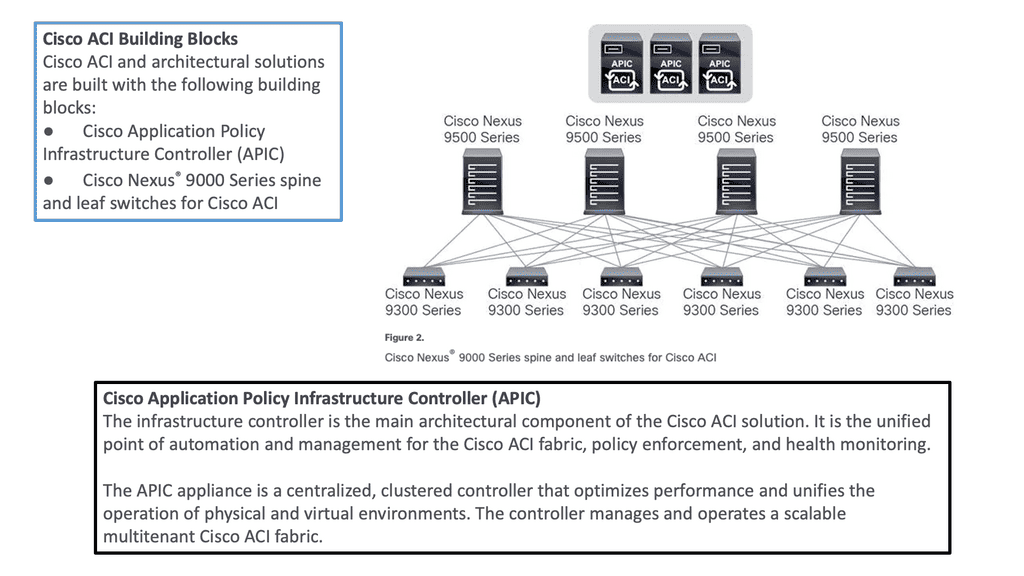
Cisco ACI Components
Diagram: Cisco ACI Components. Source is Cisco

**Hardware-based Underlay**

Server virtualization helped by decoupling workloads from the hardware, making the compute platform more scalable and agile. However, the server is not the main interconnection point for network traffic. So, we need to look at how we could virtualize the network infrastructure similarly to the agility gained from server virtualization.

**Mapping Network Endpoints**

This is carried out with software-defined networking and overlays that could map network endpoints and be spun up and down as needed without human intervention. In addition, the SDN architecture includes an SDN controller and an SDN network that enables an entirely new data center topology.

**Specialized Forwarding Chips**

In ACI, hardware-based underlay switching offers a significant advantage over software-only solutions due to specialized forwarding chips. Furthermore, thanks to Cisco’s ASIC development, ACI brings many advanced features, including security policy enforcement, microsegmentation, dynamic policy-based redirect (inserting external L4-L7 service devices into the data path), or detailed flow analytics—besides the vast performance and flexibility.


Cisco ACI • Fabric Mechanics

ACI Overlay & Underlay Lab

See how ACI builds the fabric: IS-IS provides the underlay, VXLAN carries the overlay, VTEPs connect endpoints, and COOP helps the fabric locate endpoints.
ACI FABRIC MECHANICS OVERLAY UNDERLAY ENDPOINTS VXLAN OVERLAY Leaf 1 VTEP Leaf 2 VTEP IS-IS UNDERLAY Spine Fabric transport Leaf 1 Underlay node Leaf 2 Underlay node COOP Endpoint database Server A Endpoint Server B Endpoint FABRIC TRANSPORT ATTACHMENT ATTACHMENT
IS-IS Underlay
VXLAN Overlay
COOP Control Plane
Endpoint Attachment
Selected Component
ACI Fabric Flow
Start here. ACI separates the physical transport network from the logical VXLAN overlay. Click a tab, node, or connection to explore how the pieces work together.
Technology
IS-IS + VXLAN + VTEP + COOP
Role
Build transport, carry overlay traffic, and locate endpoints.
Why it matters
This separation allows ACI to provide scalable fabric connectivity without making applications depend on the physical topology.

Cisco ACI Components

 Introduction to Leaf and Spine

The Cisco SDN ACI works with a Clos architecture, a fully meshed ACI network. Based on a spine leaf architecture. As a result, every Leaf is physically connected to every Spine, enabling traffic forwarding through non-blocking links. Physically, a leaf switch set creates a leaf layer attached to the spines in a full BIPARTITE graph. This means that each Leaf is connected to each Spine, and each Spine is connected to each Leaf. 

The ACI uses a horizontally elongated Leaf and Spine architecture with one hop to every host in an entirely messed ACI fabric, offering good throughput and convergence needed for today’s applications.

The ACI fabric: Does Not Aggregate Traffic

A key point in the spine-and-leaf design is the fabric concept, like a stretch network. One of the core ideas around a fabric is that it does not aggregate traffic. This does increase data center performance along with a non-blocking architecture. With the spine-leaf topology, we are spreading a fabric across multiple devices.

Required: Increased Bandwidth Available

The result of the fabric is that each edge device has the total bandwidth of the fabric available to every other edge device. This is one big difference from traditional data center designs; we aggregate the traffic by either stacking multiple streams onto a single link or carrying the streams serially.

Challenge: Oversubscription

With the traditional 3-tier design, we aggregate everything at the core, leading to oversubscription ratios that degrade performance. With the ACI Leaf and Spine design, we spread the load across all devices with equidistant endpoints, allowing us to carry the streams parallel.

Required: Routed Multipathing

Then, we have horizontal scaling load balancing.  Load balancing with this topology uses multipathing to achieve the desired bandwidth between the nodes. Even though this forwarding paradigm can be based on Layer 2 forwarding ( bridging) or Layer 3 forwarding ( routing), the ACI leverages a routed approach to the Leaf and Spine design, and we have Equal Cost Multi-Path (ECMP) for both Layer 2 and Layer 3 traffic. 

**Overlay and Underlay Design**

Mapping Traffic:

So you may be asking how we can have Layer 3 routed core and pass Layer 2 traffic. This is done using the overlay, which can map different traffic types to other overlays. So, we can have Layer 2 traffic mapped to an overlay over a routed core.

L3 active-active links: ACI links between the Leaf and the Spine switches are L3 active-active links. Therefore, we can intelligently load balance and traffic steer to avoid issues. We don’t need to rely on STP to block links or involve STP in fixing the topology.

Challenge: IP – Identity & Location

When networks were first developed, there was no such thing as an application moving from one place to another while it was in use. So, the original architects of IP, the communication protocol used between computers, used the IP address to indicate both the identity of a device connected to the network and its location on the network. Today, in the modern data center, we need to be able to communicate with an application or application tier, no matter where it is.

Required: Overlay Encapsulation

One day, it may be in location A and the next in location B, but its identity, which we communicate with, is the same on both days. An overlay is when we encapsulate an application’s original message with the location to which it needs to be delivered before sending it through the network. Once it arrives at its final destination, we unwrap it and deliver the original message as desired.

The identities of the devices (applications) communicating are in the original message, and the locations are in the encapsulation, thus separating the place from the identity. This wrapping and unwrapping is done on a per-packet basis and, therefore, must be done quickly and efficiently.

**Overlay and Underlay Components**

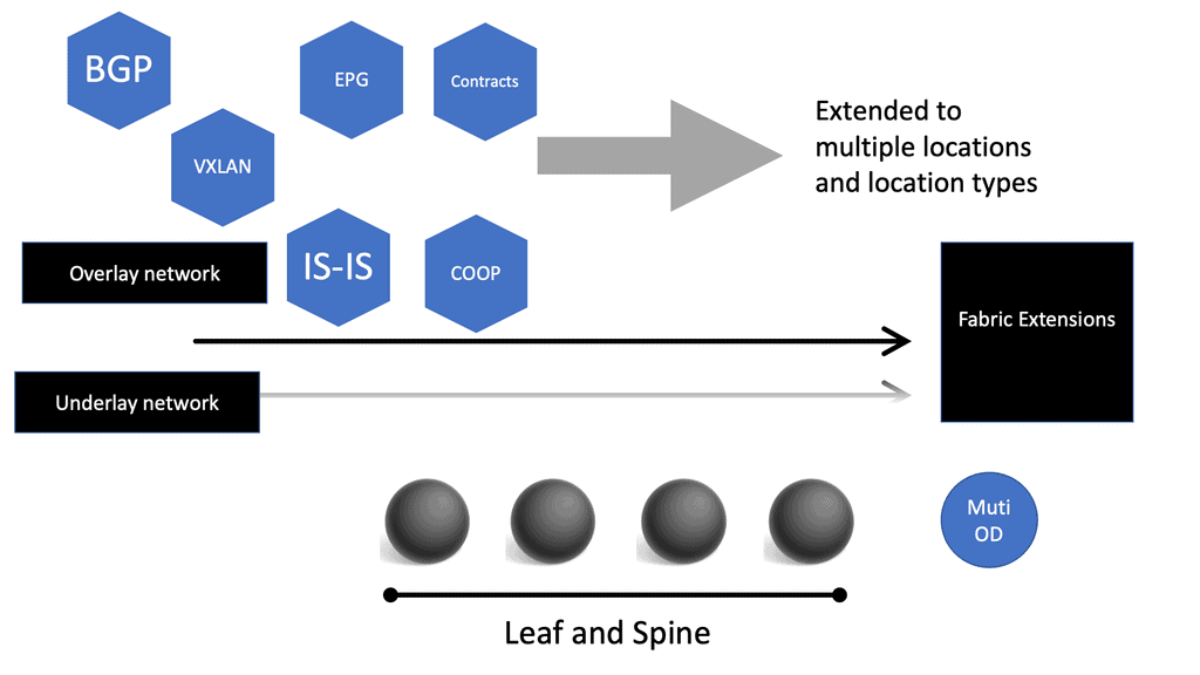
The Cisco SDN ACI has an overlay and underlay concept, which forms a virtual overlay solution. The role of the underlay is to glue together devices so the overlay can work and be built on top. So, the overlay, which is VXLAN, runs on top of the underlay, which is IS-IS. In the ACI, the IS-IS protocol provides the routing for the overlay, which is why we can provide ECMP from the Leaf to the Spine nodes. The routed underlay provides an ECMP network where all leaves can access Spine and have the same cost links. 
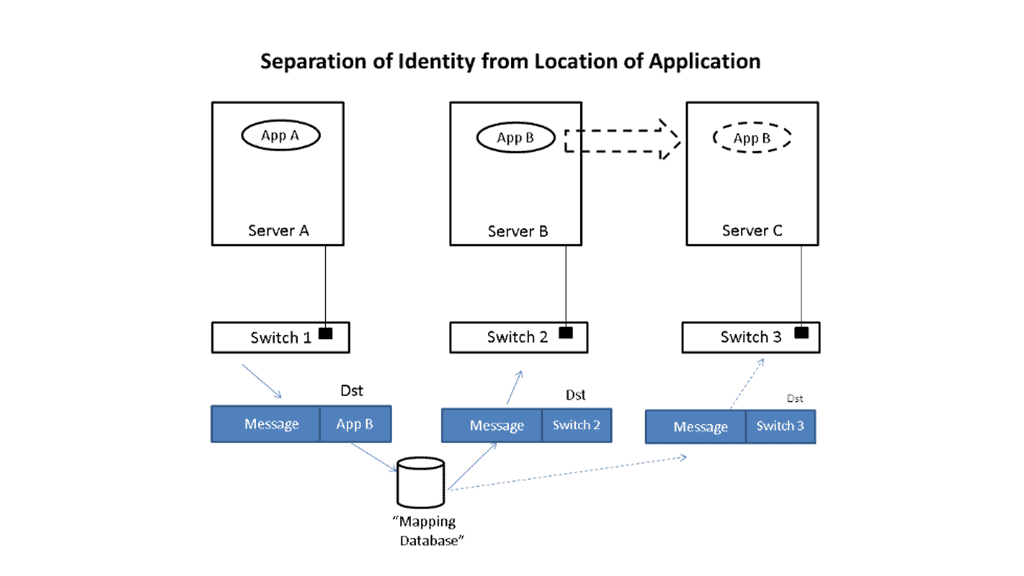
ACI overlay
Diagram: Overlay. Source Cisco

Underlay & Overlay Interaction

Example: 

Let’s take a simple example to illustrate how this is done. Imagine that application App-A wants to send a packet to App-B. App-A is located on a server attached to switch S1, and App-B is initially on switch S2. When App-A creates the message, it will put App-B as the destination and send it to the network; when the message is received at the edge of the network, whether a virtual edge in a hypervisor or a physical edge in a switch, the network will look up the location of App-B in a “mapping” database and see that it is attached to switch S2.

It will then put the address of S2 outside of the original message. So, we now have a new message addressed to switch S2. The network will forward this new message to S2 using traditional networking mechanisms. Note that the location of S2 is very static, i.e., it does not move, so using traditional mechanisms works just fine.

Upon receiving the new message, S2 will remove the outer address and thus recover the original message. Since App-B is directly connected to S2, it can easily forward the message to App-B. App-A never had to know where App-B was located, nor did the network’s core. Only the edge of the network, specifically the mapping database, had to know the location of App-B. The rest of the network only had to see the location of switch S2, which does not change.

Let’s now assume App-B moves to a new location switch S3. Now, when App-A sends a message to App-B, it does the same thing it did before, i.e., it addresses the message to App-B and gives the packet to the network. The network then looks up the location of App-B and finds that it is now attached to switch S3. So, it puts S3’s address on the message and forwards it accordingly. At S3, the message is received, the outer address is removed, and the original message is delivered as desired.

App-A did not track App-B’s movement at all. App-B’s address identified It, while the switch’s address, S2 or S3, identified its location. App-A can communicate freely with App-B no matter where It is located, allowing the system administrator to place App-B in any area and move it as desired, thus achieving the flexibility needed in the data center.

Multicast Distribution Tree (MDT)

We have a Multicast Distribution Tree MDT tree on top that is used to forward multi-destination traffic without having loops. The Multicast distribution tree is dynamically built to send flood traffic for specific protocols. Again, it does this without creating loops in the overlay network. The tunnels created for the endpoints to communicate will have tunnel endpoints. The tunnel endpoints are known as the VTEP. The VTEP addresses are assigned to each Leaf switch from a pool that you specify in the ACI startup and discovery process.

Normalize the transports

VXLAN tunnels in the ACI fabric normalize the transports in the ACI network. Therefore, traffic between endpoints can be delivered using the VXLAN tunnel, resulting in any transport network regardless of the device connecting to the fabric. 

So, using VXLAN in the overlay enables any network, and you don’t need to configure anything special on the endpoints for this to happen. The endpoints that connect to the ACI fabric do not need special software or hardware. The endpoints send regular packets to the leaf nodes they are connected to directly or indirectly. As endpoints come online, they send traffic to reach a destination.

Bridge Domains and VRF

Therefore, the Cisco SDN ACI under the hood will automatically start to build the VXLAN overlay network for you. The VXLAN network is based on the Bridge Domain (BD), or VRF ACI constructs deployed to the leaf switches. The Bridge Domain is for Layer 2, and the VRF is for Layer 3. So, as devices come online and send traffic to each other, the overlay will grow in reachability in the Bridge Domain or the VRF. 

Direct host routing for endoints

Routing within each tenant, VRF is based on host routing for endpoints directly connected to the Cisco ACI fabric. For IPv4, the host routing is based on the /32, giving the ACI a very accurate picture of the endpoints. Therefore, we have exact routing in the ACI.  In conjunction, we have a COOP database that runs on the Spines and offers remarkably optimized fabric to know where all the endpoints are located.

To facilitate this, every node in the fabric has a TEP address, and we have different types of TEPs depending on the device’s role. The Spine and the Leaf will have TEP addresses but will differ from each other.
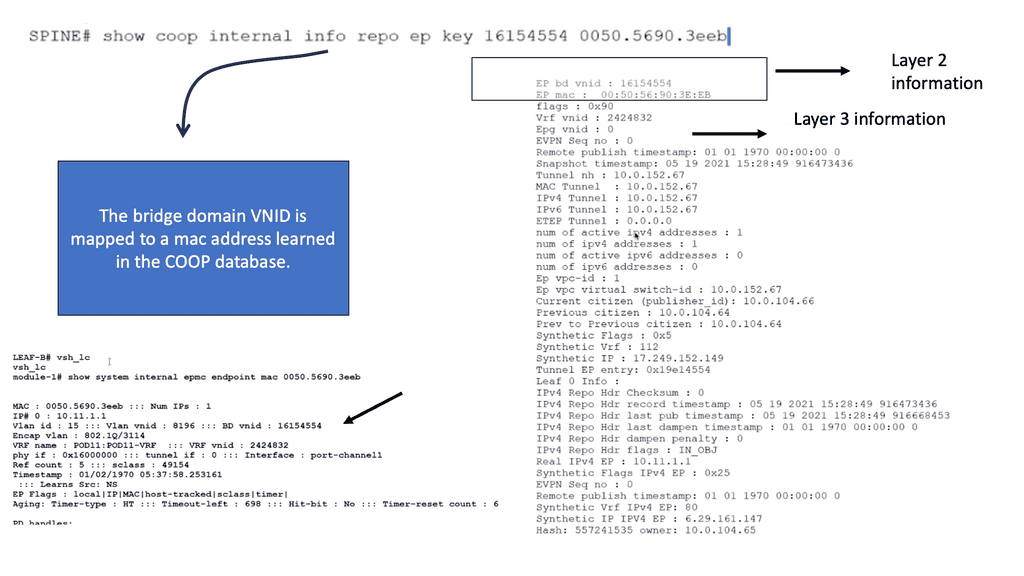
COOP database
Diagram: COOP database

The VTEP and PTEP

The Leaf’s nodes are the Virtual Tunnel Endpoints (VTEP), which are also known as the physical tunnel endpoints (PTEP) in ACI. These PTEP addresses represent the “WHERE” in the ACI fabric where an endpoint lives. Cisco ACI uses a dedicated VRF and a subinterface of the uplinks from the Leaf to the Spines as the infrastructure to carry VXLAN traffic. In Cisco ACI terminology, the transport infrastructure for VXLAN traffic is known as Overlay-1, which is part of the tenant “infra.” 

**The Spine TEP**

The Spines also have a PTEP and an additional proxy TEP, which are used for forwarding lookups into the mapping database. The Spines have a global view of where everything is, which is held in the COOP database synchronized across all Spine nodes. All of this is done automatically for you.

**Anycast IP Addressing**

For this to work, the Spines have an Anycast IP address known as the Proxy TEP. The Leaf can use this address if they do not know where an endpoint is, so they ask the Spine for any unknown endpoints, and then the Spine checks the COOP database. This brings many benefits to the ACI solution, especially for traffic optimizations and reducing flooded traffic in the ACI. Now, we have an optimized fabric for better performance.

The ACI optimizations

**Mouse and elephant flow**

This provides better performance for load balancing different flows. For example, in most data centers, we have latency-sensitive flows, known as mouse flows, and long-lived bandwidth-intensive flows, known as elephant flows. 

The ACI has more precisely load-balanced traffic using algorithms that optimize mouse and elephant flows and distribute traffic based on flow lets: flow let load-balancing. Within a Leaf, Spine latency is low and consistent from port to port.

The max latency of a packet from one port to another in the architecture is the same regardless of the network size. So you can scale the network without degrading performance. Scaling is often done on a POD-by-POD basis. For more extensive networks, each POD would be its Leaf and Spine network.

**ARP optimizations: Anycast gateways**

The ACI comes by default with a lot of traffic optimizations. Firstly, instead of using an ARP and broadcasting across the network, that can hamper performance. The Leaf can assume that the Spine will know where the destination is ( and it does via the COOP database ), so there is no need to broadcast to everyone to find a destination.

If the Spine knows where the endpoint is, it will forward the traffic to the other Leaf. If not, it will drop it.

**Fabric anycast addressing**

This again adds performance benefits to the ACI solution as the table sizes on the Leaf switches can be kept smaller than they would if they needed to know where all the destinations were, even if they were not or never needed to communicate with them. On the Leaf, we have an Anycast address too.

These fabric Anycast addresses are available for Layer 3 interfaces. On the Leaf ToR, we can establish an SVI that uses the same MAC address on every ToR; therefore, when an endpoint needs to route to a ToR, it doesn’t matter which ToR you use. The Anycast Address is spread across all ToR leaf switches. 

**Pervasive gateway**

Now we have predictable latency to the first hop, and you will use the local route VRF table within that ToR instead of traversing the fabric to a different ToR. This is the Pervasive Gateway feature that is used on all Leaf switches. The Cisco ACI has many advanced networking features, but the pervasive gateway is my favorite. It does take away all the configuration mess we had in the past.

ACI Cisco: Integrations

  • Routing Control Platform

Then came along Cisco SDN ACI, the ACI Cisco, which operates differently from the traditional data center with an application-centric infrastructure. The Cisco application-centric infrastructure achieves resource elasticity with automation through standard policies for data center operations and consistent policy management across multiple on-premises and cloud instances.

  • Extending & Integrating the fabric

What makes the Cisco ACI interesting is its several vital integrations. I’m not talking about extending the data center with multi-pod and multi-site, for example, with AlgoSec, Cisco AppDynamics, and SD-WAN. AlgoSec enables secure application delivery and policy across hybrid network estates, while AppDynamic lives in a world of distributed systems Observability. SD-WAN enabled path performance per application with virtual WANs.

Cisco Multi-Pod Design

Cisco ACI Multi-Pod is part of the “Single APIC Cluster / Single Domain” family of solutions, as a single APIC cluster is deployed to manage all the interconnected ACI networks. These separate ACI networks are named “pods,” Each looks like a regular two-tier spine-leaf topology. The same APIC cluster can manage several pods, and to increase the resiliency of the solution, the various controller nodes that make up the cluster can be deployed across different pods.
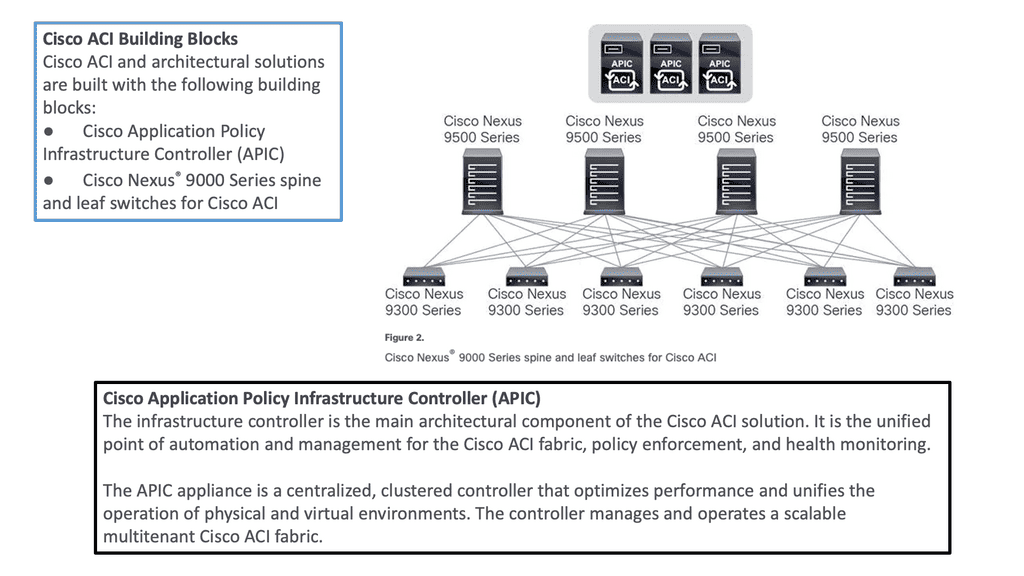
ACI Multi-Pod
Diagram: Cisco ACI Multi-Pod. Source Cisco.

ACI Cisco and AlgoSec

With AlgoSec integrated with the Cisco ACI, we can now provide automated security policy change management for multi-vendor devices and risk and compliance analysis. The AlgoSec Security Management Solution for Cisco ACI extends ACI’s policy-driven automation to secure various endpoints connected to the Cisco SDN ACI fabric.

These simplify network security policy management across on-premises firewalls, SDNs, and cloud environments. They also provide visibility into ACI’s security posture, even across multi-cloud environments. 

ACI Cisco and AppDynamics 

Then, with AppDynamics, we are heading into Observability and controllability. Now, we can correlate app health and network for optimal performance, deep monitoring, and fast root-cause analysis across complex distributed systems with numbers of business transactions that need to be tracked.

This will give your teams complete visibility of your entire technology stack, from your database servers to cloud-native and hybrid environments. In addition, AppDynamics works with agents that monitor application behavior in several ways. We will examine the types of agents and how they work later in this post.

ACI Cisco and SD-WAN 

SD-WAN brings a software-defined approach to the WAN. These enable a virtual WAN architecture to leverage transport services such as MPLS, LTE, and broadband internet services. So, SD-WAN is not a new technology; its benefits are well known, including improving application performance, increasing agility, and, in some cases, reducing costs.

The Cisco ACI and SD-WAN integration makes active-active data center design less risky than in the past. The following figures give a high-level overview of the Cisco ACI and SD-WAN integration. For pre-information generic to SD-WAN, go here: SD-WAN Tutorial
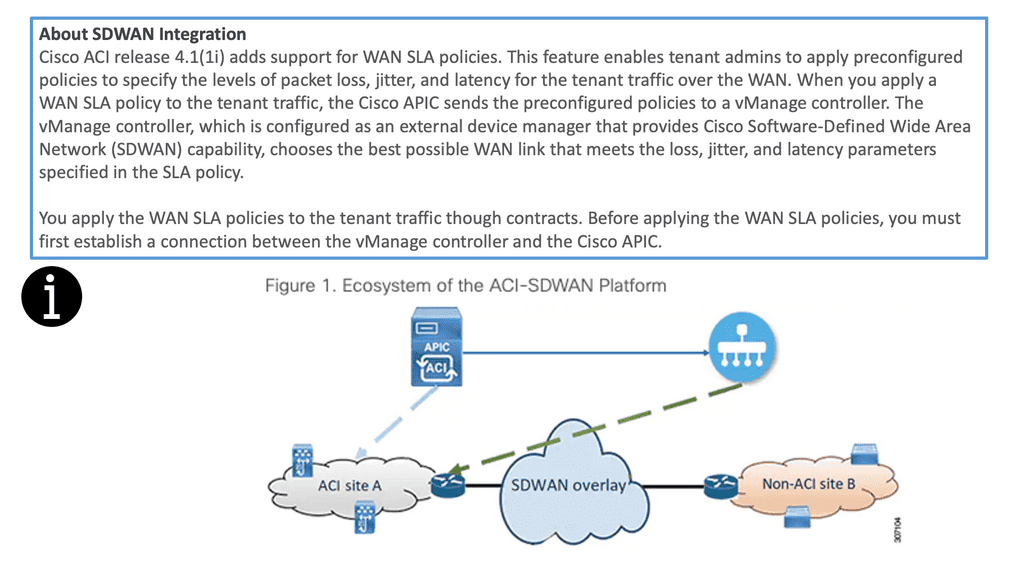
SD WAN integration
Diagram: Cisco ACI and SD-WAN integration

The Cisco SDN ACI with SD-WAN integration helps ensure an excellent application experience by defining application Service-Level Agreement (SLA) parameters. Cisco ACI releases 4.1(1i) and adds support for WAN SLA policies. This feature enables admins to apply pre-configured policies to specify the packet loss, jitter, and latency levels for the tenant traffic over the WAN.

When you apply a WAN SLA policy to the tenant traffic, the Cisco APIC sends the pre-configured policies to a vManage controller. The vManage controller, configured as an external device manager that provides SDWAN capability, chooses the best WAN link that meets the loss, jitter, and latency parameters specified in the SLA policy.

Openshift and Cisco SDN ACI

OpenShift Container Platform (formerly known as OpenShift Enterprise) or OCP is Red Hat’s offering for the on-premises private platform as a service (PaaS). OpenShift is based on the Origin open-source project and is a Kubernetes distribution, the defacto for container-based virtualization. The foundation of the OpenShift networking SDN is based on Kubernetes and, therefore, shares some of the same networking technology along with some enhancements, such as the OpenShift route construct.

Other data center integrations

Cisco SDN ACI has another integration with Cisco DNA Center/ISE that maps user identities consistently to endpoints and apps across the network, from campus to the data center. Cisco Software-Defined Access (SD-Access) provides policy-based automation from the edge to the data center and the cloud.

Cisco SD-Access provides automated end-to-end segmentation to separate user, device, and application traffic without redesigning the network. This integration will enable customers to use standard policies across Cisco SD-Access and Cisco ACI, simplifying customer policy management using Cisco technology in different operational domains.

OpenShift and Cisco ACI

OpenShift does this with an SDN layer and enhances Kubernetes networking to create a virtual network across all the nodes. It is made with the Open Switch standard. For OpenShift SDN, this pod network is established and maintained by the OpenShift SDN, configuring an overlay network using a virtual switch called the OVS bridge. This forms an OVS network that gets programmed with several OVS rules. The OVS is a popular open-source solution for virtual switching.

OpenShift SDN plugin

We mentioned that you could tailor the virtual network topology to suit your networking requirements, which can be determined by the OpenShift SDN plugin and the SDN model you select. With the default OpenShift SDN, several modes are available. This level of SDN mode you choose is concerned with managing connectivity between applications and providing external access to them. Some modes are more fine-grained than others. The Cisco ACI plugins offer the most granular.

Integrating ACI and OpenShift platform

The Cisco ACI CNI plugin for the OpenShift Container Platform provides a single, programmable network infrastructure, enterprise-grade security, and flexible micro-segmentation possibilities. The APIC can provide all networking needs for the workloads in the cluster. Kubernetes workloads become fabric endpoints, like Virtual Machines or Bare Metal endpoints.

Cisco ACI CNI Plugin

The Cisco ACI CNI plugin extends the ACI fabric capabilities to OpenShift clusters to provide IP Address Management, networking, load balancing, and security functions for OpenShift workloads. In addition, the Cisco ACI CNI plugin connects all OpenShift Pods to the integrated VXLAN overlay provided by Cisco ACI.

Cisco SDN ACI and AppDynamics

AppDynamis overview

So, an application requires multiple steps or services to work. These services may include logging in and searching to add something to a shopping cart. These services invoke various applications, web services, third-party APIs, and databases, known as business transactions.

The user’s critical path

A business transaction is the essential user interaction with the system and is the customer’s critical path. Therefore, business transactions are the things you care about. If they start to go, your system will degrade. So, you need ways to discover your business transactions and determine if there are any deviations from baselines. This should also be automated, as learning baseline and business transitions in deep systems is nearly impossible using the manual approach.

So, how do you discover all these business transactions?

AppDynamics automatically discovers business transactions and builds an application topology map of how the traffic flows. A topology map can view usage patterns and hidden flows, acting as a perfect feature for an Observability platform.

AppDynamic topology

AppDynamics will automatically discover the topology for all of your application components. It can then build a performance baseline by capturing metrics and traffic patterns. This allows you to highlight issues when services and components are slower than usual.

AppDynamics uses agents to collect all the information it needs. The agent monitors and records the calls that are made to a service. This is from the entry point and follows executions along its path through the call stack. 

Types of Agents for Infrastructure Visibility

If the agent is installed on all critical parts, you can get information about that specific instance, which can help you build a global picture. So we have an Application Agent, Network Agent, and Machine Agent for Server visibility and Hardware/OS.

  • App Agent: This agent will monitor apps and app servers, and example metrics will be slow transitions, stalled transactions, response times, wait times, block times, and errors.  
  • Network Agent: This agent monitors the network packets, TCP connection, and TCP socket. Example metrics include performance impact Events, Packet loss, and retransmissions, RTT for data transfers, TCP window size, and connection setup/teardown.
  • Machine Agent Server Visibility: This agent monitors the number of processes, services, caching, swapping, paging, and querying. Example Metrics include hardware/software interrupts, virtual memory/swapping, process faults, and CPU/DISK/Memory utilization by the process.
  • Machine Agent: Hardware/OS – disks, volumes, partitions, memory, CPU. Example metrics: CPU busy time, MEM utilization, and pieces file.

Automatic establishment of the baseline

A baseline is essential, a critical step in your monitoring strategy. Doing this manually is hard, if not impossible, with complex applications. It is much better to have this done automatically. You must automatically establish the baseline and alert yourself about deviations from it.

This will help you pinpoint the issue faster and resolve it before it can be affected. Platforms such as AppDynamics can help you here. Any malicious activity can be seen from deviations from the security baseline and performance issues from the network baseline.
Cisco ACI • Policy & Application Flow

ACI Policy & Application Flow Lab

Follow how ACI turns application requirements into policy: Tenant → VRF → Bridge Domain → EPG → Contract → Application Flow.
ACI POLICY MODEL TENANT & NETWORK CONTEXT APPLICATION GROUPS POLICY APPLICATION FLOW Tenant Administrative container NETWORK CONTEXT VRF Layer 3 routing context Bridge Domain Endpoint network Web EPG Web application endpoints App EPG Application endpoints CONTRACT ALLOWED APPLICATION FLOW Web Servers Endpoint group App Servers Endpoint group
Tenant / VRF
Network
EPG
Contract
Application Flow
Selected Component
ACI Policy Model
ACI expresses application connectivity through a hierarchy of objects. Start at the Tenant and follow the model down to the application flow.
Object
Tenant → VRF → Bridge Domain → EPG
Policy
Contracts define which EPGs can communicate.
Why it matters
ACI lets administrators describe application connectivity as policy rather than configuring every individual switch interface.

Summary: Cisco ACI Components

In the ever-evolving world of networking, organizations are constantly seeking ways to enhance their infrastructure’s performance, security, and scalability. Cisco ACI (Application Centric Infrastructure) presents a cutting-edge solution to these challenges. By unifying physical and virtual environments and leveraging network automation, Cisco ACI revolutionizes how networks are built and managed.

Understanding Cisco ACI Architecture

At the core of Cisco ACI lies a robust architecture that enables seamless integration between applications and the underlying network infrastructure. The architecture comprises three key components:

1. Application Policy Infrastructure Controller (APIC):

The APIC serves as the centralized management and policy engine of Cisco ACI. It provides a single point of control for configuring and managing the entire network fabric. Through its intuitive graphical user interface (GUI), administrators can define policies, allocate resources, and monitor network performance.

2. Nexus Switches:

Cisco Nexus switches form the backbone of the ACI fabric. These high-performance switches deliver ultra-low latency and high throughput, ensuring optimal data transfer between applications and the network. Nexus switches provide the necessary connectivity and intelligence to enable the automation and programmability features of Cisco ACI.

3. Application Network Profiles:

Application Network Profiles (ANPs) are a fundamental aspect of Cisco ACI. ANPs define the policies and characteristics required for specific applications or application groups. By encapsulating network, security, and quality of service (QoS) policies within ANPs, administrators can streamline the deployment and management of applications.

The Power of Network Automation

One of the most compelling aspects of Cisco ACI is its ability to automate network provisioning, configuration, and monitoring. Through the APIC’s powerful automation capabilities, network administrators can eliminate manual tasks, reduce human errors, and accelerate the deployment of applications. With Cisco ACI, organizations can achieve greater agility and operational efficiency, enabling them to rapidly adapt to evolving business needs.

Security and Microsegmentation with Cisco ACI

Security is a paramount concern for every organization. Cisco ACI addresses this by providing robust security features and microsegmentation capabilities. With microsegmentation, administrators can create granular security policies at the application level, effectively isolating workloads and preventing lateral movement of threats. Cisco ACI also integrates with leading security solutions, enabling seamless network enforcement and threat intelligence sharing.

Conclusion

Cisco ACI is a game-changer in the realm of network automation and infrastructure management. Its innovative architecture, coupled with powerful automation capabilities, empowers organizations to build agile, secure, and scalable networks. By leveraging Cisco ACI’s components, businesses can unlock new levels of efficiency, flexibility, and performance, ultimately driving growth and success in today’s digital landscape.

auto scaling observability

Auto Scaling Observability

Autoscaling Observability

Modern applications rarely operate at a constant workload. Traffic can change rapidly, services can be distributed across multiple hosts, and workloads may scale up or down automatically in response to demand. In this environment, autoscaling observability provides the visibility required to understand not only whether a system is scaling, but whether scaling decisions are producing the desired performance, reliability, and resource-efficiency outcomes.

Autoscaling is fundamentally a control loop. The platform observes one or more signals, compares them against a defined target or threshold, and adjusts capacity accordingly. These signals might include CPU utilisation, memory consumption, request rate, queue depth, latency, or application-specific metrics. Observability provides the surrounding evidence needed to determine whether those signals accurately represent workload demand and whether the resulting scaling behaviour is effective.

The foundation is the collection of metrics, logs, and traces. Metrics provide continuously measurable signals such as request rate, saturation, resource utilisation, replica count, scaling events, and response latency. Logs provide contextual information about application and infrastructure behaviour, while distributed traces allow individual requests to be followed across multiple services. Together, these telemetry sources provide a much more complete view of what is happening during scaling events.

Metrics and alerting are particularly important because autoscaling can introduce behaviours that are not immediately visible from infrastructure utilisation alone. An application may scale because CPU usage increases while user-facing latency continues to deteriorate, or it may repeatedly scale up and down because the selected metric is too sensitive. Monitoring replica counts, scaling events, request rates, saturation, latency, and error rates helps operators identify ineffective scaling policies and unstable control loops.

Logs and event data provide the operational context behind those metrics. Scaling events, failed deployments, application errors, resource constraints, scheduling problems, and configuration changes can explain why a workload behaved differently during a particular period. Correlating these events with metric data makes it easier to distinguish genuine demand changes from infrastructure or application problems.

For distributed applications, distributed tracing adds another dimension of visibility. A service may appear healthy at the infrastructure level while downstream dependencies introduce significant latency. Tracing individual requests across services can reveal where latency or failures occur during periods of increased demand and whether additional replicas are actually addressing the underlying bottleneck.

Effective autoscaling observability also requires carefully selected objectives. Rather than collecting every available metric, teams should identify the signals that represent user experience, workload demand, resource saturation, and system capacity. These signals can then be connected to dashboards, alerts, scaling policies, and operational runbooks.

Tool selection is equally important. A modern observability architecture may combine a metrics platform such as Prometheus, log aggregation, distributed tracing, dashboarding, cloud-native monitoring services, and application instrumentation. The objective is not simply to accumulate telemetry, but to create a coherent view in which scaling decisions can be analysed against application behaviour and business impact.

Finally, automation should extend beyond the scaling mechanism itself. Automated alerting, anomaly detection, telemetry collection, and event correlation can reduce the time required to identify scaling problems. However, automation should remain observable and explainable: engineers need to understand what caused a scaling decision, what changed afterwards, and whether the resulting behaviour improved the system.

Autoscaling observability therefore sits at the intersection of monitoring, application performance, infrastructure capacity, and automated control. By correlating scaling signals with metrics, logs, traces, and user-facing outcomes, organisations can move beyond simply adding or removing capacity and instead build systems that scale predictably, efficiently, and with measurable reliability.

Auto-Scaling Decision Lab

Change the telemetry signals and see how a simplified autoscaling engine decides whether to scale out, hold capacity, or scale in.

1. Adjust Observability Signals

Request Rate Normal
LowNormalHighSurge
CPU Utilisation Normal
30%55%75%90%
p95 Latency Normal
80ms150ms300ms700ms
Queue Depth Normal
LowNormalHighCritical
Error Rate Normal
0.1%0.5%2%5%+

2. Autoscaling Decision Path

TelemetrySignals
→
PolicyTargets
→
AutoscalerDecision
CapacityPods / Nodes
←
ActionScale
←
FeedbackNew telemetry
HOLD CAPACITY
Signals are within the expected operating range. No immediate capacity change is required.
Primary driverBalanced workload
Recommended actionMaintain capacity
Engineering takeaway: Autoscaling decisions are driven by configured metrics and policies. CPU may be the target for an HPA, while application metrics such as queue depth or request rate can provide a better signal for some workloads. Real autoscalers also use cooldowns, stabilization windows and capacity limits; this lab simplifies those mechanisms so the relationship between telemetry and scaling decisions is visible.

Highlights: Auto-scaling Observability

Understanding Auto-Scaling Observability

1: ) Auto-scaling observability refers to a system’s ability to adjust its resources based on real-time monitoring and analysis automatically. It combines two essential components: auto-scaling, which dynamically allocates resources, and observability, which provides insights into the system’s behavior and performance.

2: ) By leveraging advanced monitoring tools and intelligent algorithms, auto-scaling observability enables organizations to optimize resource allocation and respond swiftly to changing demands.

3: ) Auto scaling observability involves the continuous monitoring and analysis of system metrics to automate the scaling of resources. This process allows organizations to automatically increase or decrease their computing power based on current demand, ensuring that applications run smoothly without over-provisioning or incurring unnecessary costs.

Auto‑Scaling Observability

Auto‑scaling observability is the ability to see, measure, and understand how your infrastructure scales up and down in real time — across containers, microservices, Kubernetes clusters, serverless functions, cloud workloads, and distributed systems. It ensures that scaling decisions are correct, efficient, cost‑optimized, and aligned with application performance and user experience.

This section is written cleanly for direct copy‑and‑paste into your architecture notes or blog.

Core Observability Signals for Auto‑Scaling

  • Metrics — CPU, memory, queue depth, request rate, latency, p95/p99 spikes.

  • Logs — scaling events, pod lifecycle logs, autoscaler decisions.

  • Traces — request flow timing to detect bottlenecks before scaling triggers.

  • Kubernetes Events — HPA/VPA decisions, pod scheduling, node pressure.

  • Cloud Telemetry — AWS ASG, Azure VMSS, GCP MIG scaling signals.

  • Application Performance — throughput, error rate, saturation, concurrency.

These signals allow you to understand why scaling happened, whether it was correct, and how it impacted performance.

What Auto‑Scaling Observability Provides

1. Visibility into Scaling Decisions

You see exactly why the system scaled:

  • CPU threshold exceeded

  • latency spike

  • queue backlog

  • memory pressure

  • traffic surge

  • degraded user experience

2. Real‑Time Performance Correlation

Scaling is correlated with:

  • request rate

  • p95/p99 latency

  • error bursts

  • cold‑start delays

  • pod/container startup times

3. Cost and Efficiency Insights

Observability reveals:

  • over‑scaling

  • under‑scaling

  • wasted compute

  • inefficient autoscaler thresholds

  • unnecessary node expansions

4. Predictive Scaling Signals

Using ML‑driven analytics:

  • forecast traffic

  • detect anomalies

  • pre‑scale before peak load

  • avoid cascading failures

Auto‑Scaling Observability in Modern Architectures

Kubernetes (HPA/VPA)

Observability tracks:

  • pod lifecycle

  • node pressure

  • HPA decisions

  • VPA recommendations

  • cluster autoscaler behavior

  • container cold‑start impact

Serverless (Lambda, Functions, Cloud Run)

Observability shows:

  • concurrency spikes

  • cold‑start latency

  • throttling events

  • function execution time

  • scaling bursts

Microservices

Observability correlates:

  • service‑to‑service latency

  • dependency bottlenecks

  • trace‑driven scaling triggers

  • queue depth and backpressure

Cloud Auto‑Scaling Groups

Tracks:

  • VM provisioning time

  • scaling cooldown windows

  • load balancer health

  • network saturation

Tools for Auto‑Scaling Observability

  • Prometheus — metrics for HPA/VPA.

  • Grafana — dashboards for scaling behavior.

  • OpenTelemetry — traces + metrics for scaling triggers.

  • ThousandEyes — user experience impact during scaling events.

  • Splunk — logs + analytics + correlation.

  • CloudWatch / Azure Monitor / GCP Cloud Monitoring — native cloud scaling telemetry.

Together, these tools create a complete scaling observability fabric.

Outcome

Auto‑scaling observability delivers:

  • predictable scaling

  • reduced latency during load spikes

  • optimized resource usage

  • lower cloud cost

  • faster incident response

  • improved user experience

  • reliable microservices and Kubernetes operations

It transforms auto‑scaling from a reactive mechanism into an intelligent, data‑driven, self‑optimizing system.

Auto-Scaling – Key Points:

– Enhanced Scalability and Performance: Auto-scaling observability allows systems to scale resources up or down based on actual usage patterns. This ensures that the system can handle peak loads efficiently without overprovisioning resources during periods of low demand. Organizations can avoid costly downtime by dynamically adjusting resources and ensuring optimal performance during sudden traffic spikes.

– Cost Optimization: With auto-scaling observability, businesses can significantly reduce infrastructure costs. Organizations can avoid unnecessary idle resource expenditures by accurately provisioning resources based on real-time data. This cost optimization approach ensures that companies only pay for the resources required, resulting in considerable savings.

– Improved Fault Tolerance: Auto-scaling observability is crucial in enhancing system resilience. Organizations can promptly identify and address potential issues by continuously monitoring the system’s health. In case of anomalies or failures, the system can automatically scale resources or trigger alerts for immediate remediation. This proactive approach minimizes the impact of failures and enhances the system’s overall fault tolerance.

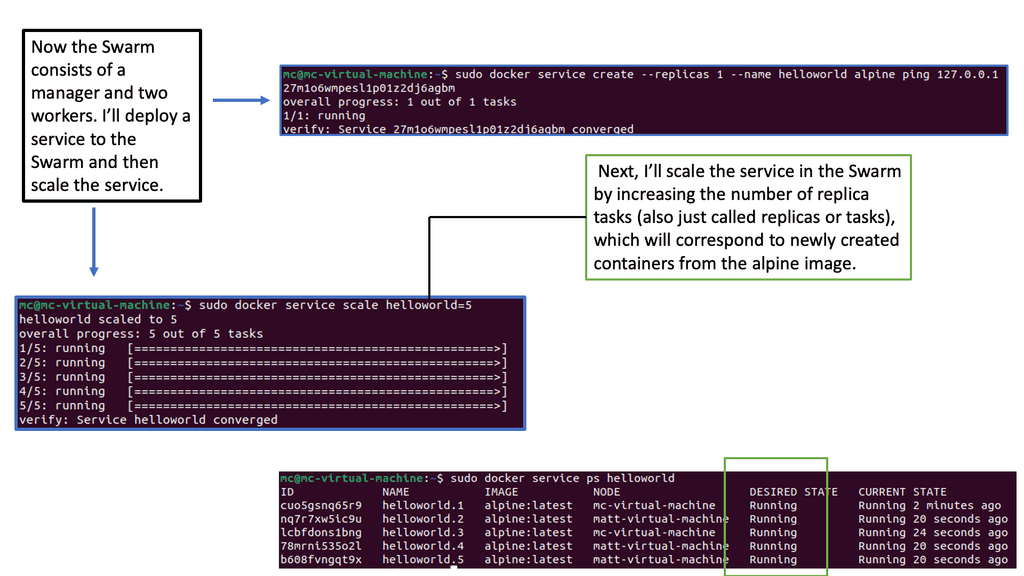
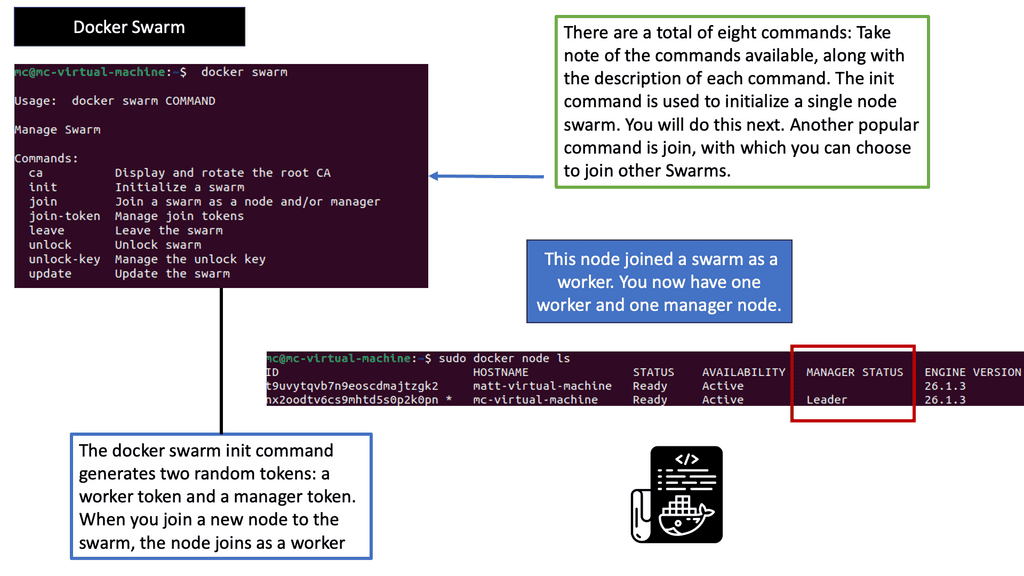
Auto-scaling Example: Scaling with Docker Swarm

Auto Scaling – Key Components:

To fully harness the power of auto scaling observability, it’s important to understand its key components. These include metrics collection, alerting, and automated responses. Let’s delve deeper into each of these elements:

1. **Metrics Collection:** Gathering data from various sources is the foundation of observability. This involves collecting CPU usage, memory utilization, network traffic, and other vital metrics. With comprehensive data, organizations can better understand their infrastructure’s behavior and make informed scaling decisions.

2. **Alerting:** Once data is collected, it’s essential to set up alerts for any anomalies or thresholds that are breached. Alerting enables teams to respond swiftly to potential issues, minimizing downtime and maintaining application performance.

3. **Automated Responses:** The ultimate goal of observability is to automate responses to fluctuating demands. By employing pre-defined rules and machine learning algorithms, businesses can ensure that resources are scaled up or down automatically, optimizing both performance and cost.

**The Role of the Metric**

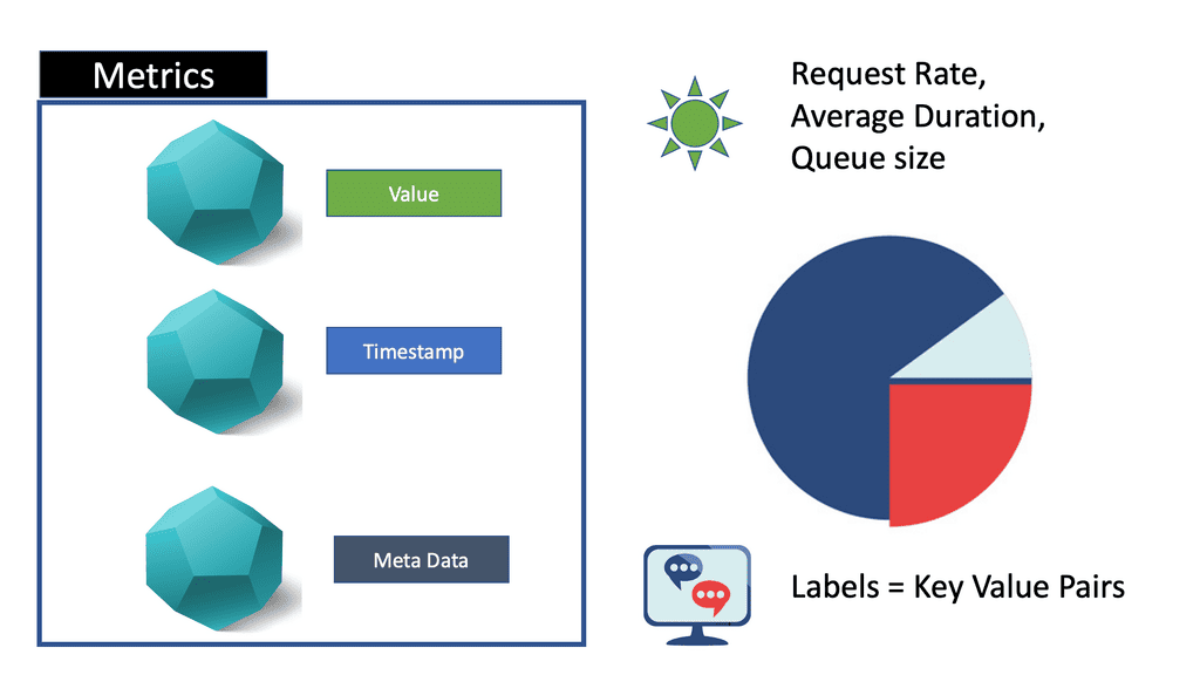
“What Is a Metric: Good for Known” Regarding auto-scaling observability and metrics, one must understand the metric’s downfall. A metric is a single number, with tags optionally appended for grouping and searching those numbers. They are disposable and cheap and have a predictable storage footprint.

A metric is a numerical representation of a system state over a recorded time interval. It can tell you if a particular resource is over or underutilized at a specific moment. For example, CPU utilization might be at 75% right now.

Implementing Auto-Scaling Observability

Choosing the Right Monitoring Tools: To effectively implement auto-scaling observability, organizations must select appropriate monitoring tools that provide real-time insights into system performance, resource utilization, and user behavior. These tools should offer robust analytics capabilities and seamless integration with auto-scaling platforms.

Defining Metrics and Thresholds: Accurate metrics and thresholds are critical for successful auto-scaling observability. Organizations must identify key performance indicators (KPIs) that align with their business objectives and set appropriate thresholds for scaling actions. For example, CPU utilization, response time, and error rates are standard metrics for auto-scaling decisions.

Automating Scaling Actions: Organizations should automate scaling actions based on predefined rules to fully leverage the benefits of auto-scaling observability. By integrating monitoring tools, auto-scaling platforms, and orchestration frameworks, businesses can ensure that resource allocation adjustments are performed seamlessly and without human intervention.

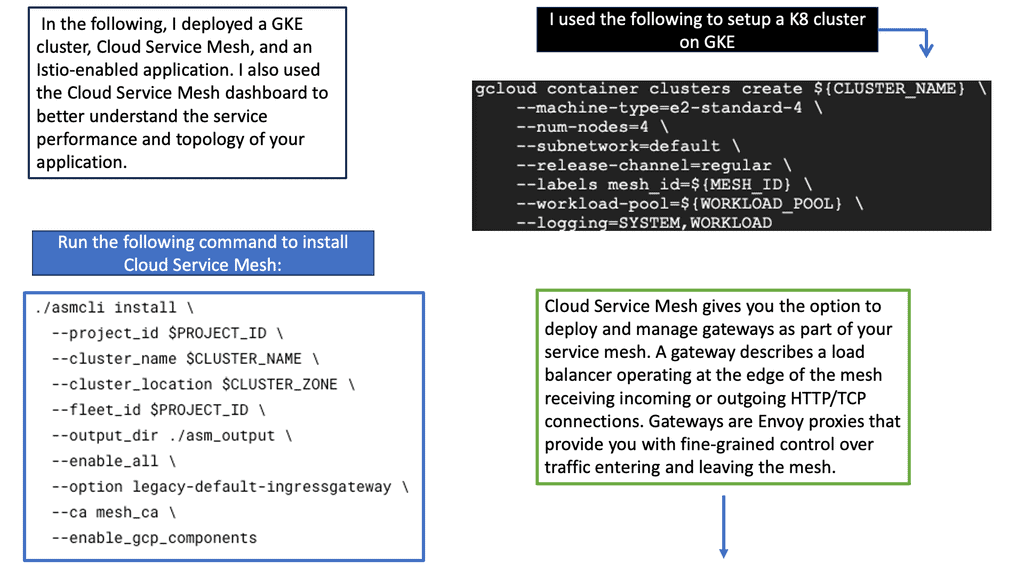
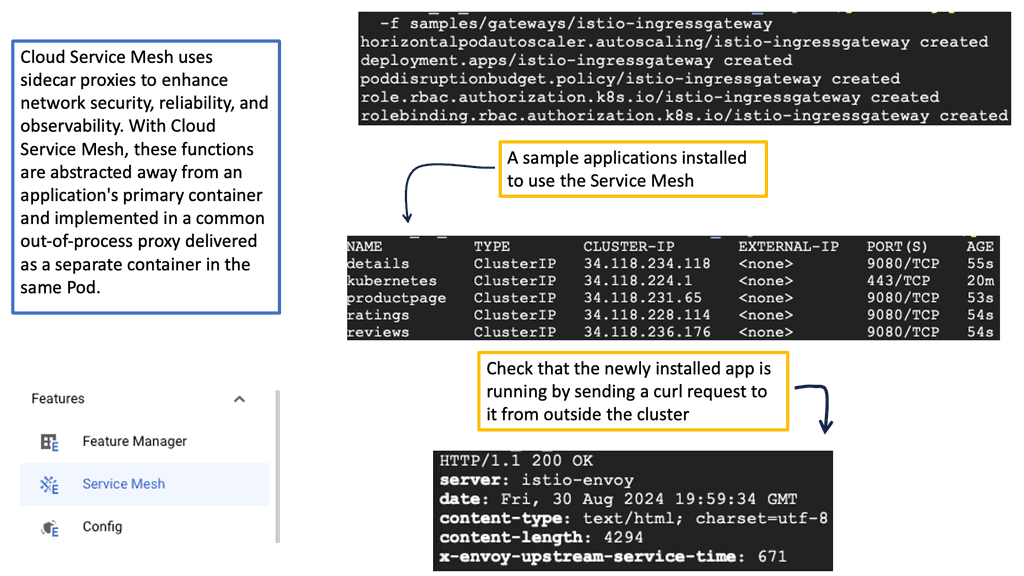
Service Mesh & Auto-Scaling

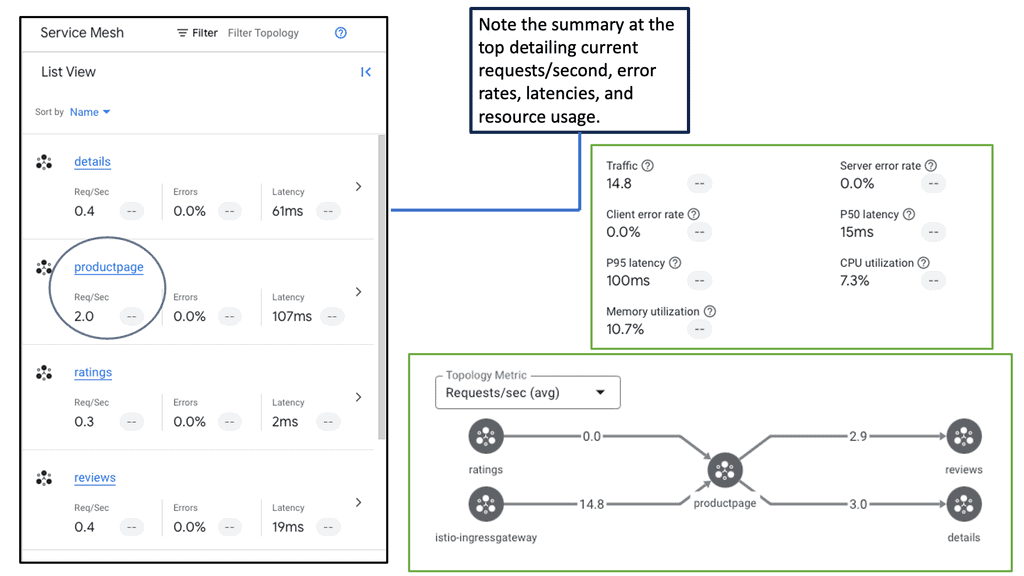
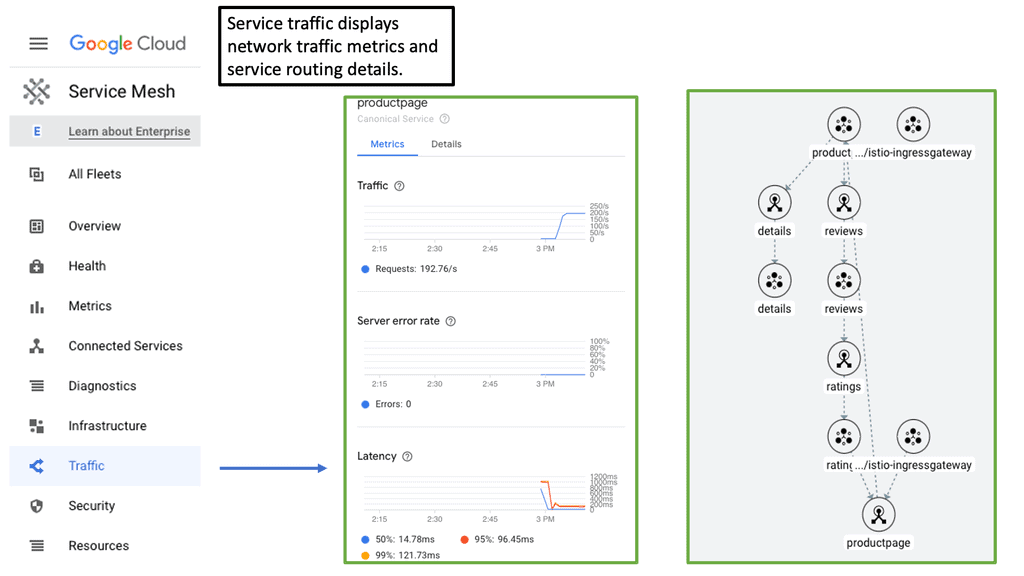
Service mesh acts as a dedicated infrastructure layer for managing service-to-service communications. It provides a suite of capabilities, including traffic management, security, and, most importantly, observability. By integrating a service mesh, such as Istio or Linkerd, into your auto scaling environment, you gain granular visibility into your microservices architecture. This includes detailed metrics, tracing, and logging, enabling you to monitor traffic patterns, latency, and error rates with precision.

### Implementing Service Mesh for Optimal Observability

Deploying a service mesh involves several considerations to maximize its observability benefits. Start by identifying the microservices that will benefit most from enhanced observability. Next, configure the service mesh to collect and process telemetry data effectively. Ensure your observability stack—comprising metrics, logs, and traces—is equipped to handle the data influx. Finally, leverage the insights gained to optimize your auto scaling strategy, ensuring minimal downtime and optimal performance.

### What is a Cloud Service Mesh?

A cloud service mesh is a dedicated infrastructure layer that manages service-to-service communication within a distributed application. It decouples the networking logic from the application code, enabling developers to focus on core functionality without worrying about the complexities of inter-service communication. Service meshes provide features like load balancing, service discovery, and security policies, making them indispensable for modern cloud-native applications.

### Key Benefits of Service Mesh

#### Simplified Networking

One of the primary benefits of a service mesh is the simplification of networking within a microservices architecture. By abstracting the communication logic, service meshes make it easier to manage and scale applications. Developers can implement features like retries, timeouts, and circuit breakers without modifying their application code.

#### Enhanced Security

Service meshes provide robust security features, including mutual TLS (mTLS) for service-to-service encryption and authentication. This ensures that communication between services is secure by default, reducing the risk of data breaches and unauthorized access.

#### Traffic Management

With a service mesh, you can intelligently route traffic between services based on various criteria such as load, service version, or geographic location. This level of control enables canary deployments, blue-green deployments, and A/B testing, making it easier to roll out new features with minimal risk.

### The Role of Observability

Observability is the ability to measure the internal states of a system based on the outputs it produces. In the context of a service mesh, observability involves collecting and analyzing metrics, logs, and traces to gain insight into the performance and behavior of the services.

### Why Observability Matters

Without proper observability, managing a service mesh can become a daunting task. Observability allows you to monitor the health of your services, detect anomalies, and troubleshoot issues in real-time. It provides the visibility needed to ensure that your service mesh is functioning as intended and that any problems are quickly identified and resolved.

### Tools and Techniques

Several tools can enhance observability in a service mesh, such as Prometheus for metrics, Jaeger for tracing, and Fluentd for logging. Combining these tools provides a comprehensive view of your service mesh’s performance and health, enabling proactive maintenance and quicker issue resolution.

Gaining Visibility with Google Ops Agent

**The Role of Google Ops Agent in Observability**

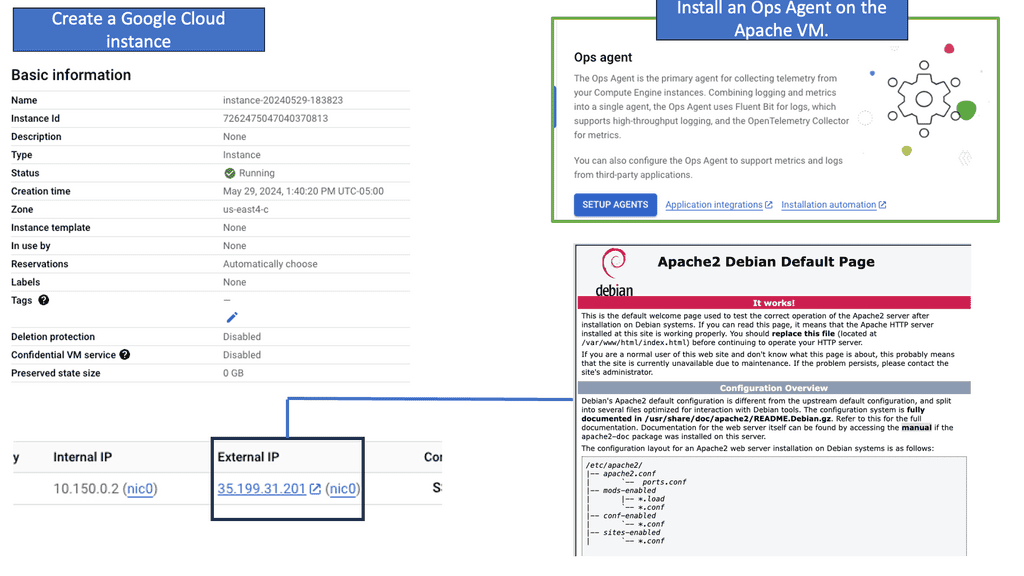
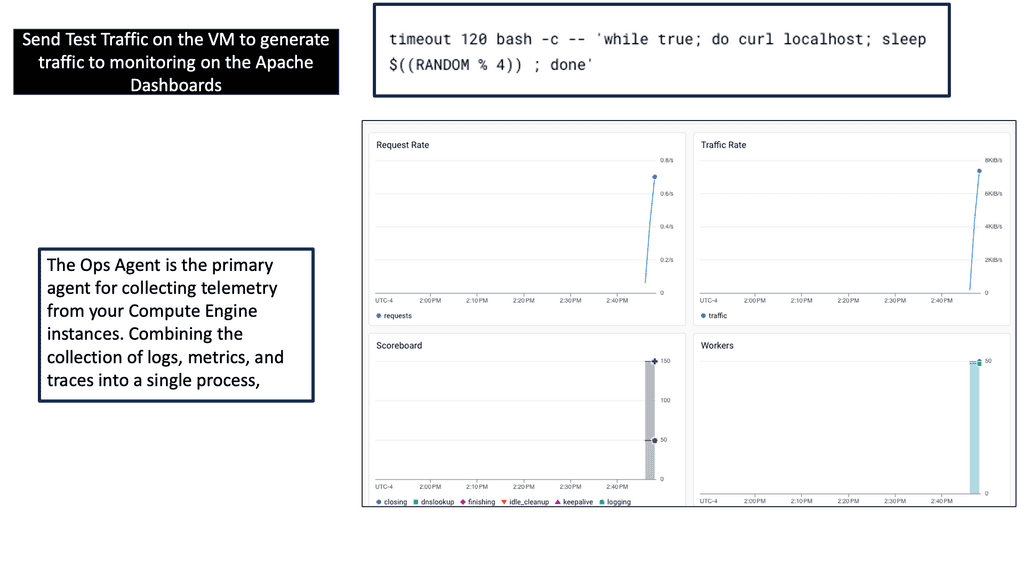
Google Ops Agent is a unified agent that simplifies the process of collecting telemetry data from your cloud environment. Its ability to seamlessly integrate with Google Cloud’s operations suite makes it an essential tool for businesses looking to enhance their auto-scaling observability. By providing detailed insights into CPU usage, memory utilization, and network traffic, Google Ops Agent ensures that your infrastructure is both monitored and optimized in real-time.

**Benefits of Enhanced Observability**

With Google Ops Agent in place, businesses gain a clearer picture of how their auto-scaling systems are functioning. This enhanced observability translates to several benefits: improved system reliability, faster troubleshooting, and better resource allocation. By actively monitoring metrics and logs, organizations can preemptively address issues before they escalate into significant problems. Furthermore, insights derived from this data can inform future scaling strategies and infrastructure investments.

**Example: Understanding Ops Agent**

Ops Agent is a lightweight and efficient monitoring agent developed by Google Cloud. It enables you to collect crucial metrics and logs from your Compute Engine instances, providing valuable insights into their performance and health. By leveraging Ops Agent, you can proactively detect issues, troubleshoot problems, and optimize the utilization of your instances.

To begin monitoring your Compute Engine instances with Ops Agent, install it on your virtual machines. The installation process is straightforward and can be done using package managers like apt or yum. Once installed, Ops Agent seamlessly integrates with Google Cloud Monitoring, allowing you to access and analyze the gathered data.

After installing Ops Agent, it is essential to configure the monitoring metrics that you want to collect. Ops Agent supports many metrics, including CPU usage, memory utilization, disk I/O, and network traffic. By tailoring the metrics collection to your specific needs, you can efficiently monitor the performance of your Compute Engine instances and identify any anomalies or bottlenecks.

What is GKE-Native Monitoring?

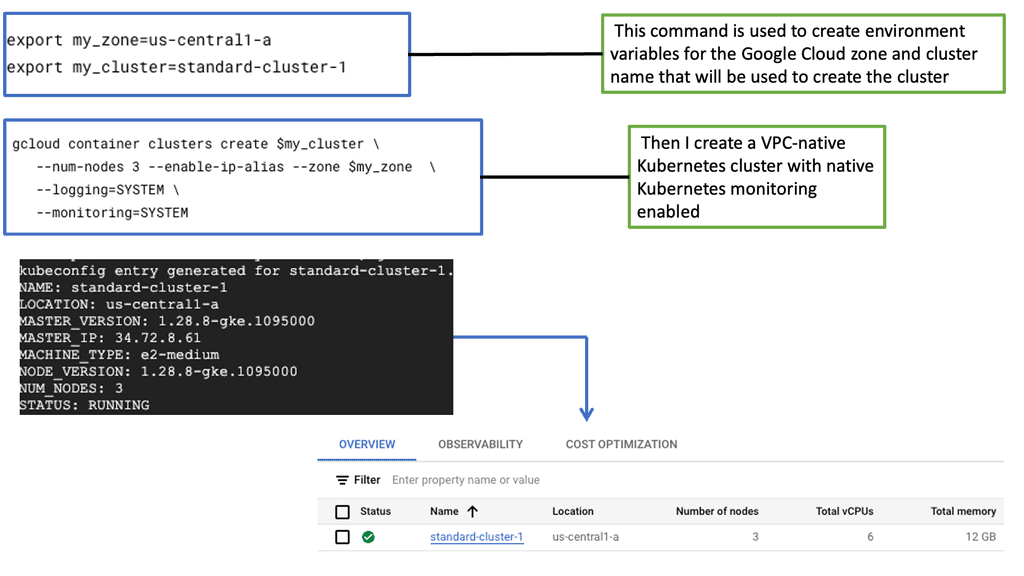
GKE-Native Monitoring is a powerful monitoring solution provided by Google Cloud Platform (GCP) designed explicitly for GKE clusters. It leverages the capabilities of Prometheus and Stackdriver, offering a unified monitoring experience within the GCP ecosystem. With GKE-Native Monitoring, users can effortlessly collect, visualize, and analyze metrics and logs related to their GKE clusters, enabling them to make data-driven decisions and proactively address any issues that may arise.

GKE-Native Monitoring offers a range of features that enhance observability and simplify monitoring workflows. Some notable features include:

1. Automatic Metric Collection: GKE-Native Monitoring automatically collects a rich set of metrics from every GKE cluster, including CPU and memory utilization, network traffic, and application-specific metrics. This eliminates the need for manual configuration and ensures comprehensive monitoring that is out of the box.

2. Custom Metrics and Alerts: Users can define custom metrics and alerts tailored to their applications and business requirements. This empowers them to monitor critical aspects of their clusters and receive notifications when predefined thresholds are crossed, enabling timely actions and proactive troubleshooting.

3. Integration with Stackdriver Logging: GKE-Native Monitoring integrates with Stackdriver Logging, allowing users to correlate log data with metrics. By combining logs and metrics, users can gain a holistic view of their application’s behavior and quickly identify the root causes of any issues.

Kubernetes Autoscaling

Kubernetes auto scaling involves dynamically adjusting the number of running pods in a cluster based on current demand. This ensures that applications remain responsive while optimizing resource utilization. With the right configuration, auto scaling can help maintain performance during traffic spikes and reduce costs during low-traffic periods.

**Benefits of Implementing Auto Scaling**

The implementation of Kubernetes auto scaling brings a multitude of benefits to organizations. Firstly, it enhances resource efficiency by ensuring that applications use only the necessary resources, reducing wastage and lowering operational costs. Secondly, it improves application performance and reliability by adapting to traffic fluctuations, ensuring a consistent user experience even during peak demand. Moreover, auto scaling supports rapid scaling for new deployments, enabling businesses to respond swiftly to market changes without manual intervention.

**Challenges and Best Practices**

While Kubernetes auto scaling offers significant advantages, it also presents challenges that organizations need to navigate. One common issue is configuring the right scaling metrics and thresholds to avoid over-provisioning or under-provisioning resources. It’s crucial to thoroughly test and monitor these settings in a staging environment before deploying them to production. Additionally, consider using custom metrics that align closely with your application’s performance indicators for more accurate scaling decisions. Regularly reviewing and updating your scaling policies ensures they remain effective as application workloads evolve.

### Types of Auto Scaling in Kubernetes

Kubernetes offers several types of auto scaling, each designed to address different aspects of resource management. The most commonly used are Horizontal Pod Autoscaler (HPA), Vertical Pod Autoscaler (VPA), and Cluster Autoscaler.

1. **Horizontal Pod Autoscaler (HPA):** HPA adjusts the number of pod replicas in a deployment or replication controller based on observed CPU utilization or other select metrics. It’s ideal for applications with varying workloads, ensuring that resources are available when needed and conserved when demand is low.

2. **Vertical Pod Autoscaler (VPA):** VPA automatically adjusts the CPU and memory requests and limits for containers within pods. This ensures that each pod has the right amount of resources, preventing over-provisioning and under-provisioning.

3. **Cluster Autoscaler:** This tool automatically adjusts the size of the Kubernetes cluster so that all pods have a place to run. It adds nodes when pods are unschedulable due to resource shortages and removes nodes when they’re underutilized.

### Configuring Auto Scaling in Kubernetes

To leverage Kubernetes auto scaling effectively, you’ll need to configure it to meet your application’s specific needs. The process typically involves setting up metrics and thresholds that trigger scaling actions.

For HPA, you’ll define the target CPU utilization or other custom metrics that the autoscaler should monitor. VPA requires setting up recommendations for resource requests and limits. Finally, the Cluster Autoscaler needs to be linked with your cloud provider to manage node scaling efficiently.

It’s crucial to regularly monitor and adjust these configurations to ensure optimal performance, as application demands can evolve over time.

### Best Practices for Kubernetes Auto Scaling

Implementing auto scaling in Kubernetes is not a set-it-and-forget-it task. Here are some best practices to consider:

– **Understand Your Workloads:** Analyze your application’s workload patterns to choose the right type of auto scaling and set appropriate thresholds.

– **Use Custom Metrics:** While CPU and memory are common metrics, consider using application-specific metrics to drive more accurate scaling decisions.

– **Test and Monitor:** Regularly test your auto scaling configurations in a non-production environment. Continuous monitoring and logging are essential to catch and resolve issues early.

You can dynamically scale up or down any architecture component through autoscaling.

An example of a good use of autoscaling is as follows:

You may need additional web servers to handle the surge in traffic at the end of the day when your website’s load increases. Where does the rest of the day fit in? Your servers can’t sit idle during most business hours. Especially if you’re using a cloud provider, you want to optimize your environment’s potential costs. An autoscale allows you to increase the number of components during a spike and scale down during a regular period.

Example: Prometheus Pull Approach

There can be many tools to gather metrics, such as Prometheus, along with several techniques used to collect these metrics, such as the PUSH and PULL approaches. There are pros and cons to each method. However, Prometheus metric types and its PULL approach are prevalent in the market. However, if you want full observability and controllability, remember it is solely in metrics-based monitoring solutions.  For additional information on Monitoring and Observability and their difference, visit this post on observability vs monitoring.

These autoscalers rely on Kubernetes’ metric server for scaling up or down k8s objects.

Adopting Auto-scaling

Autoscaling is a mechanism that automatically adjusts the number of computing resources allocated to an application based on its demand. By dynamically scaling resources up or down, autoscaling enables organizations to handle fluctuating workloads efficiently. However, robust observability is crucial to harness the power of autoscaling truly.

The Role of Observability in Autoscaling

Observability is the ability to gain insights into a system’s internal state based on its external outputs. It plays a pivotal role in understanding the system’s behavior, identifying bottlenecks, and making informed scaling decisions regarding autoscaling. It provides visibility into key metrics like CPU utilization, memory usage, and network traffic. With observability, you can make data-driven decisions and ensure optimal resource allocation.

 Monitoring and Metrics

To achieve effective autoscaling observability, comprehensive monitoring is essential. Monitoring tools collect various metrics, such as response times, error rates, and resource utilization, to provide a holistic view of your infrastructure. These metrics can be analyzed to identify patterns, detect anomalies, and trigger autoscaling actions when necessary. You can proactively address performance issues and optimize resource utilization by monitoring and analyzing metrics.

Logging and Tracing

In addition to monitoring, logging, and tracing are critical components of autoscaling observability. Logging captures detailed information about system events, errors, and activities, enabling you to troubleshoot issues and gain insights into system behavior. Tracing helps you understand the flow of requests across different services. Logging and tracing provide a granular view of your application’s performance, aiding in autoscaling decisions and ensuring smooth operation.

Automation and Alerting

Automation and alerting mechanisms are vital to mastering autoscaling observability. You can configure thresholds and triggers that initiate autoscaling actions based on predefined conditions by setting up automated processes. This allows for proactive scaling, ensuring your system is constantly optimized for performance. Additionally, timely alerts can notify you of critical events or anomalies, enabling you to take immediate action and maintain the desired scalability.

Autoscaling observability is the key to unlocking its true potential. By understanding your system’s behavior through comprehensive monitoring, logging, and tracing, you can make informed decisions and ensure optimal resource allocation. With automation and alerting mechanisms, you can proactively respond to changing demands and maintain high efficiency. Embrace autoscaling observability and take your infrastructure management to new heights.

Managed Instance Groups

### Auto Scaling: Adapting to Your Needs

One of the standout features of managed instance groups is auto scaling. With auto scaling, your infrastructure can dynamically adjust to the current demand. This ensures that your applications have the necessary resources without overspending. By setting up policies based on CPU usage, requests per second, or custom metrics, MIGs can efficiently allocate resources, keeping your applications responsive and your costs under control.

—

### Observability: Keeping a Close Watch

Observability is key in maintaining the health of your cloud infrastructure. Google Cloud’s managed instance groups provide comprehensive monitoring tools that give you insights into the performance and stability of your instances. By leveraging metrics, logs, and traces, you can detect anomalies, optimize performance, and ensure your applications run smoothly. This proactive approach to monitoring allows you to address potential issues before they impact your services.

—

### Integration with Google Cloud

Managed instance groups seamlessly integrate with various Google Cloud services, enhancing their utility and flexibility. From load balancing to deploying containerized applications with Google Kubernetes Engine, MIGs work in tandem with Google’s ecosystem to provide a cohesive and powerful cloud solution. This integration not only simplifies management but also boosts the scalability and reliability of your applications.

Managed Instance Group


Scaling Incident Investigation

The autoscaler reacted correctly — but the application is still slow. Investigate the telemetry to find the bottleneck.

INCIDENT: Checkout traffic has increased by 2.4×. HPA increased the API deployment from 4 to 10 pods, but customer-facing latency continues to rise. What is actually limiting performance?

Metrics — What is changing?

Investigation Clues

Scaling response HPA increased API replicas from 4 → 10.
API CPU CPU falls after additional pods are added.
Customer latency p95 remains above 900 ms.
Downstream dependency Database calls are consuming most request time.
Engineering conclusion: Scaling the API tier increased application capacity, but it did not remove the downstream bottleneck. Observability connects the scaling event with the user-facing symptom and shows where additional capacity stops helping.

Autoscaling Observability

Understanding Autoscaling

-Before we discuss observability, let’s briefly explore the concept of autoscaling. Autoscaling refers to the ability of an application or infrastructure to automatically adjust its resources based on demand. It enables organizations to handle fluctuating workloads and optimize resource allocation efficiently.

-Observability, in the context of autoscaling, refers to gaining insights into an autoscaling system’s performance, health, and efficiency. It involves collecting, analyzing, and visualizing relevant data to understand the application and infrastructure’s behavior and patterns.

-Through observability, organizations can make informed decisions to optimize autoscaling algorithms, resource allocation, and overall system performance. To achieve effective autoscaling observability, several critical components come into play. These include:

A. Metrics and Monitoring: Gathering and monitoring key metrics such as CPU utilization, response times, request rates, and error rates is fundamental for understanding the application and infrastructure’s performance.

B. Logging and Tracing: Logging captures detailed information about events and transactions within the system, while tracing provides insights into the flow of requests across various components. Both logging and tracing contribute to a comprehensive understanding of system behavior.

C. Alerting and Thresholds: Setting up appropriate alerts and thresholds based on predefined criteria ensures timely notifications when specific conditions are met.  

Tools and Technologies for Autoscaling Observability

A wide range of tools and technologies are available to facilitate autoscaling observability. Prominent examples include Prometheus, Grafana, Elasticsearch, Kibana, and CloudWatch. These tools provide robust monitoring, visualization, and analysis capabilities, enabling organizations to gain deep insights into their autoscaling systems.

The first component of observability is the channels that convey observations to the observer. There are three channels: logs, traces, and metrics. These channels are common to all areas of observability, including data observability.

1.Logs: Logs are the most typical channel and take several forms (e.g., a line of free text or JSON). They are intended to encapsulate information about an event.

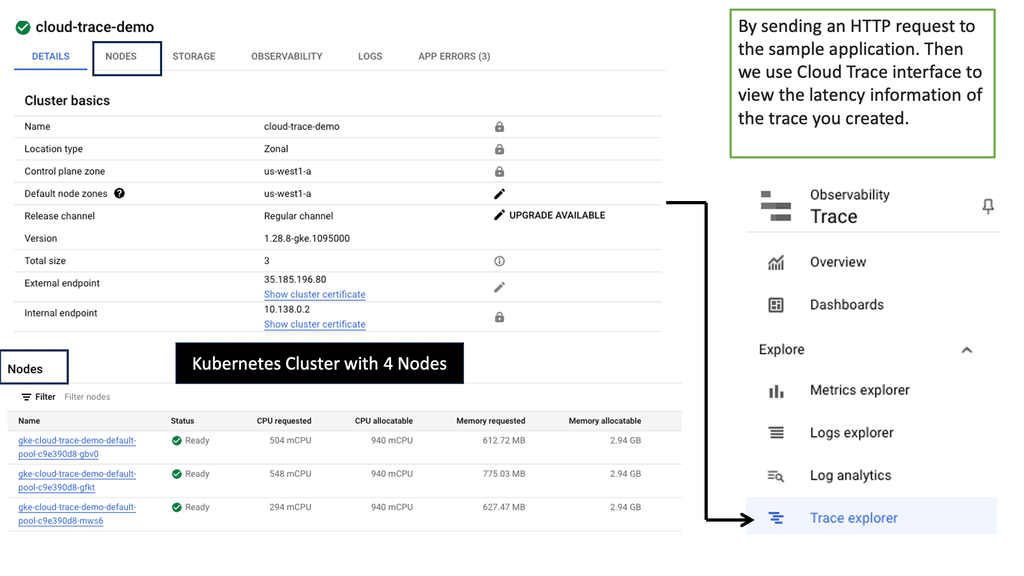
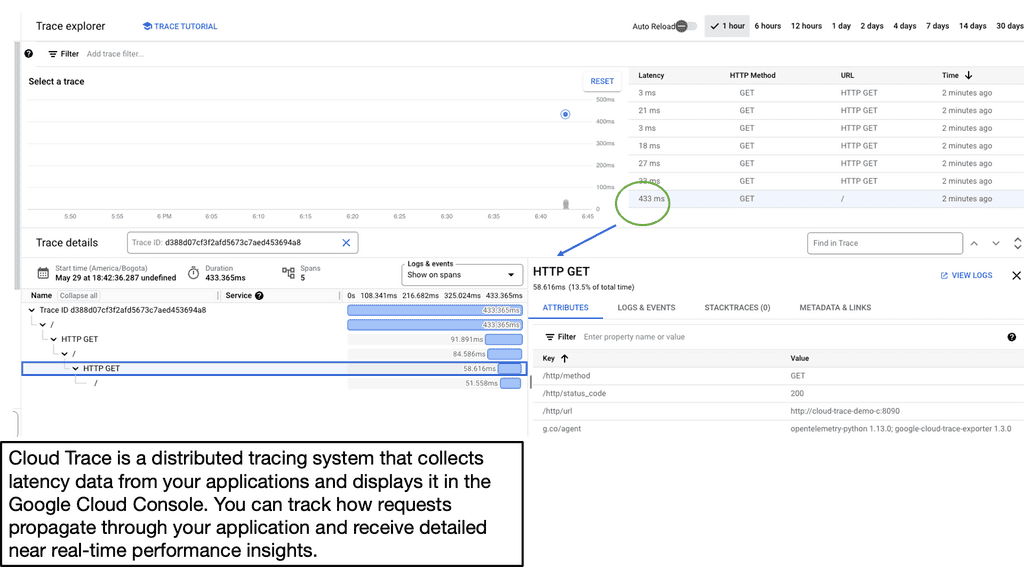
2.Traces: Traces allow you to do what logs don’t—reconnect the dots of a process. Because traces represent the link between all events of the same process, they allow the whole context to be derived from logs efficiently. Each pair of events, an operation, is a span that can be distributed across multiple servers.

3.Metrics: Finally, we have metrics. Every system state has some component that can be represented with numbers, and these numbers change as the state changes.

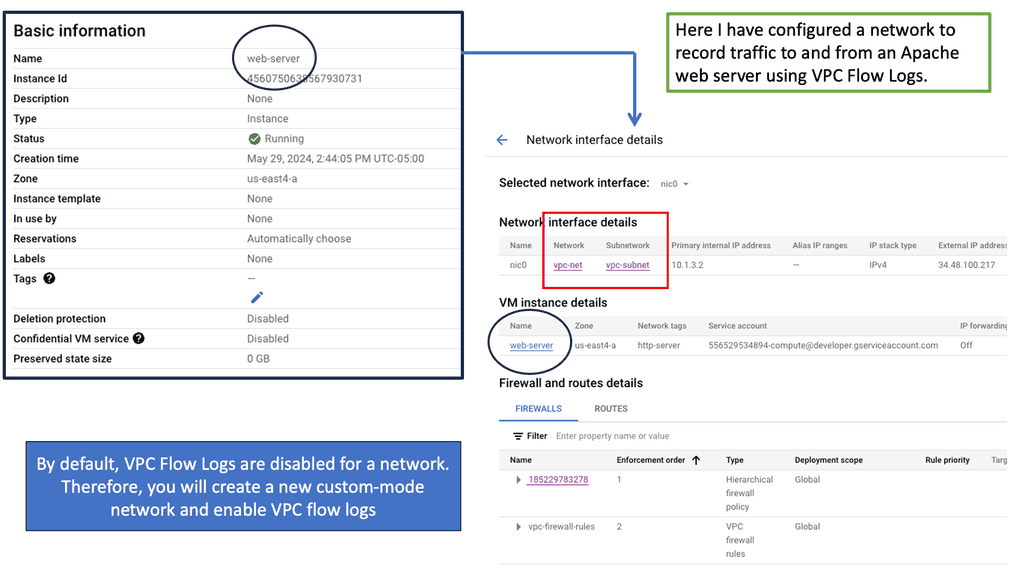
Understanding VPC Flow Logs

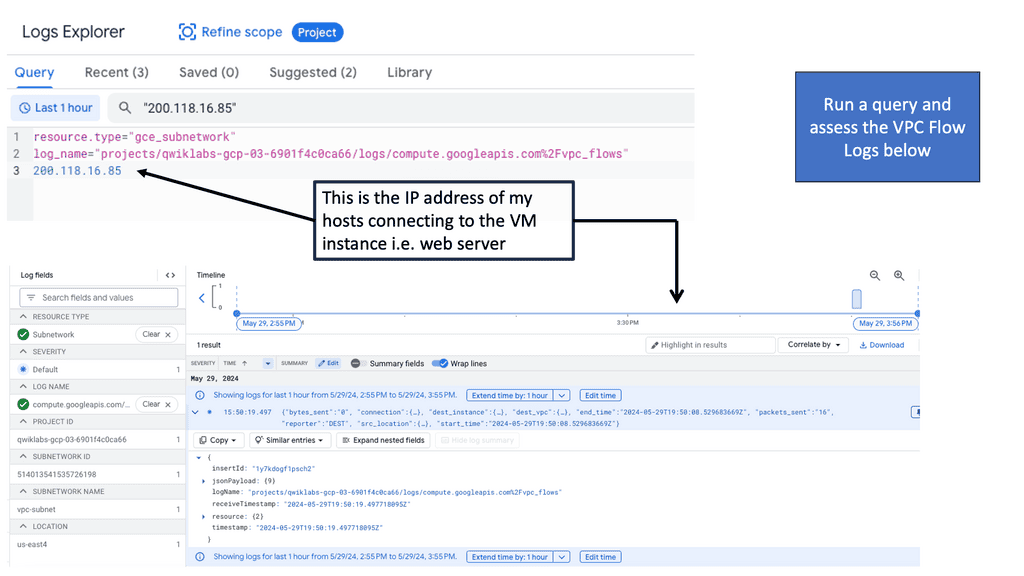
VPC Flow Logs capture information about the IP traffic going in and out of Virtual Private Clouds (VPCs) within Google Cloud. Enabling VPC Flow Logs allows you to gain visibility into network traffic at the subnet level, thereby facilitating network troubleshooting, security analysis, and performance monitoring.

Once the VPC Flow Logs are enabled and data starts flowing in, it’s time to tap into the potential of Google Cloud Logging. Using the appropriate filters and queries, you can sift through the vast amount of log data and extract meaningful insights. Whether it’s identifying suspicious traffic patterns, monitoring network performance metrics, or investigating security incidents, Google Cloud Logging provides a robust set of tools to facilitate these analyses.

Auto Scaling Observability

**Metrics: Resource Utilization Only**

– Metrics help us understand resource utilization. In a Kubernetes environment, these metrics are used for auto-healing and auto-scheduling. Monitoring performs several functions when it comes to metrics. First, it can collect, aggregate, and analyze metrics to identify known patterns that indicate troubling trends.

– The critical point here is that it shifts through known patterns. Then, based on a known event, metrics trigger alerts that notify when further investigation is needed. Finally, we have dashboards that display the metrics data trends adapted for visual consumption.

– These monitoring systems work well for identifying previously encountered known failures but don’t help as much for the unknown. Unknown failures are the norm today with disgruntled systems and complex system interactions.

– Metrics are suitable for dashboards, but there won’t be a predefined dashboard for unknowns, as it can’t track something it does not know about. Using metrics and dashboards like this is a reactive approach, yet it’s widely accepted as the norm. Monitoring is a reactive approach best suited for detecting known problems and previously identified patterns. 

**Metrics and intermittent problems**

– The metrics can help you determine whether a microservice is healthy or unhealthy within a microservices environment. Still, a metric will have difficulty telling you if a microservices function takes a long time to complete or if there is an intermittent problem with an upstream or downstream dependency. So, we need different tools to gather this type of information.

– We have an issue with auto-scaling metrics because they only look at individual microservices with a given set of attributes. So, they don’t give you a holistic view of the problem. For example, the application stack now exists in numerous locations and location types; we need a holistic viewpoint.

– A metric does not give this. For example, metrics track simplistic system states that indicate a service is running poorly or may be a leading indicator or an early warning signal. However, while those measures are easy to collect, they don’t turn out to be proper measures for triggering alerts.

Latency & Cloud Trace

Latency, in the context of applications, refers to the time it takes for a request to travel from the user to the server and back. Various factors, such as network delays, server processing time, and database queries influence it. Understanding latency is essential for developers to identify bottlenecks and optimize their applications for better performance.

Google Cloud Trace is a powerful tool provided by Google Cloud Platform that allows developers to analyze and diagnose application latency issues. By integrating Cloud Trace into their applications, developers can gain valuable insights into their code’s performance and identify areas for improvement.

Developers need to capture traces to analyze application latency effectively. Traces provide a detailed record of a request’s execution path, allowing developers to pinpoint the exact areas where latency occurs. With Cloud Trace, developers can easily capture and visualize traces in a user-friendly interface.

Auto-scaling metrics: Issues with dashboards

Useful only for a few metrics

So, these metrics are gathered and stored in time-series databases, and we have several dashboards to display these metrics. These dashboards were first built, and there weren’t many system metrics to worry about. You could have gotten away with 20 or so dashboards. But that was about it.

As a result, it was easy to see the critical data anyone should know about for any given service. Moreover, those systems were simple and did not have many moving parts. This contrasts with modern services that typically collect so many metrics that fitting them into the same dashboard is impossible.

Issues with aggregate metrics

So, we must find ways to fit all the metrics into a few dashboards. Here, the metrics are often pre-aggregated and averaged. However, the issue is that the aggregate values no longer provide meaningful visibility, even when we have filters and drill-downs. Therefore, we need to predeclare conditions that describe conditions we expect in the future. 

This is where we use instinctual practices based on past experiences and rely on gut feeling. Remember the network and software hero? It would help to avoid aggregation and averaging within the metrics store. On the other hand, we have percentiles that offer a richer view. Keep in mind, however, that they require raw data.

**Auto Scaling Observability: Any Question**

A: ) For auto-scaling observability, we take on an entirely different approach. They strive for other exploratory methods to find problems. Essentially, those operating observability systems don’t sit back and wait for an alert or something to happen. Instead, they are always actively looking and asking random questions to the observability system.

B: ) Observability tools should gather rich telemetry for every possible event, having full content of every request and then being able to store it and query it. In addition, these new auto-scaling observability tools are specifically designed to query against high-cardinality data. High cardinality allows you to interrogate your event data in any arbitrary way that we see fit. Now, we ask any questions about your system and inspect its corresponding state. 

**No predictions in advance**

C: ) Due to the nature of modern software systems, you want to understand any inner state and services without anticipating or predicting them in advance. For this, we need to gain valuable telemetry and use some new tools and technological capabilities to gather and interrogate this data once it has been collected. Telemetry needs to be constantly gathered in flexible ways to debug issues without predicting how failures may occur. 

D: ) Conditions affecting infrastructure health change infrequently and are relatively more straightforward to monitor. In addition, we have several well-established practices to predict, such as capacity planning and the ability to remediate automatically, e.g., auto-scaling in a Kubernetes environment. All of these can be used to tackle these types of known issues.

E: ) Due to its relatively predictable and slowly changing nature, the aggregated metrics approach monitors and alerts perfectly for infrastructure problems. So here, a metric-based system works well. Metrics-based systems and their associated signals help you see when capacity limits or known error conditions of underlying systems are being reached.

F: ) So, metrics-based systems work well for infrastructure problems that don’t change much but fall dramatically short in complex distributed systems. For these systems, you should opt for an observability and controllability platform. 

Kubernetes Autoscaling Architecture Builder

Build an autoscaling architecture and see which observability signals each component can use — and where its visibility stops.

1. Choose Your Architecture

Current model: HPA can use resource metrics such as CPU/memory and, when configured, custom or external metrics. Logs and traces provide investigation context but are not automatically HPA scaling signals.

2. Architecture Flow

APPLICATION
User requests, application workload and dependencies.
Pods Services
↓
TELEMETRY
Metrics + application metrics + logs
↓
OBSERVABILITY
Collection, correlation and analysis.
OpenTelemetry Prometheus Grafana
↓
AUTOSCALER
HPA evaluates configured metrics against targets.
↓
CAPACITY
Workload and infrastructure capacity changes.
Pod count Node count
↓
USER EXPERIENCE
Availability, latency, errors and application performance.
Engineering takeaway: Autoscaling and observability are related, but they are not the same thing. The autoscaler acts on configured signals; observability gives engineers the broader context needed to understand whether scaling actually improved the system. A healthy architecture therefore closes the loop: telemetry → decision → capacity → user experience → investigation.