
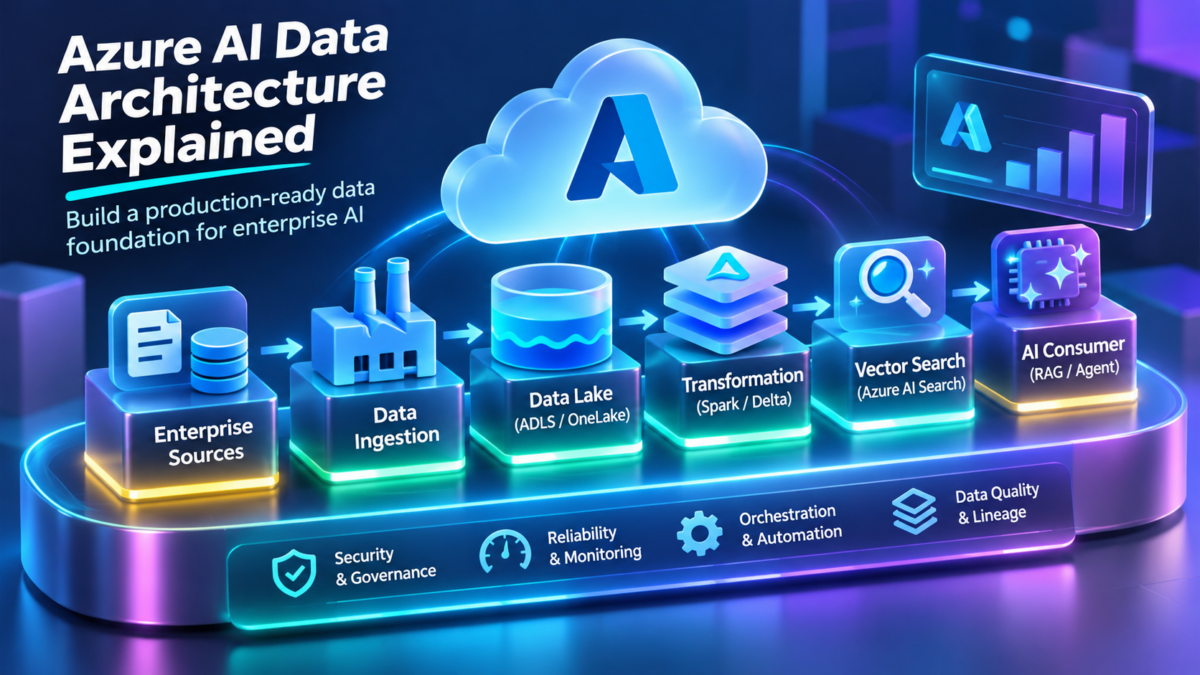
Azure AI Data Architecture Explained
Enterprise AI systems depend on more than powerful models. They require reliable data ingestion, scalable storage, distributed processing, secure data access, and efficient delivery of trusted information to AI applications.
Azure provides a collection of services for building these data platforms, including Microsoft Fabric, OneLake, Azure Data Lake Storage, Azure Data Factory, Azure Databricks, and Azure AI Search.
Understanding how these services interact is essential when designing production retrieval-augmented generation applications, machine learning pipelines, enterprise AI agents, and analytics-driven systems.
Inside the Enterprise AI Data Platform
A modern AI data platform separates data ingestion, persistent storage, transformation, indexing, and AI consumption into logical architecture layers. These layers may be implemented using different Azure services depending on workload requirements.
Why Data Architecture Matters for AI
AI model quality is influenced by the availability, accuracy, freshness, and accessibility of the data supporting the application. A reliable data platform must handle both structured enterprise records and unstructured knowledge sources, while maintaining suitable security and governance controls.
Ingest and orchestrate data across operational systems, cloud storage, and analytical platforms.
Transform large datasets into validated, organized, AI-ready information.
Deliver appropriately governed data to retrieval systems, agents, and ML applications.
Azure AI data architecture is not simply a collection of storage and analytics services. It is the engineering discipline of moving enterprise data from its original source into secure, reliable, observable, and AI-consumable forms.
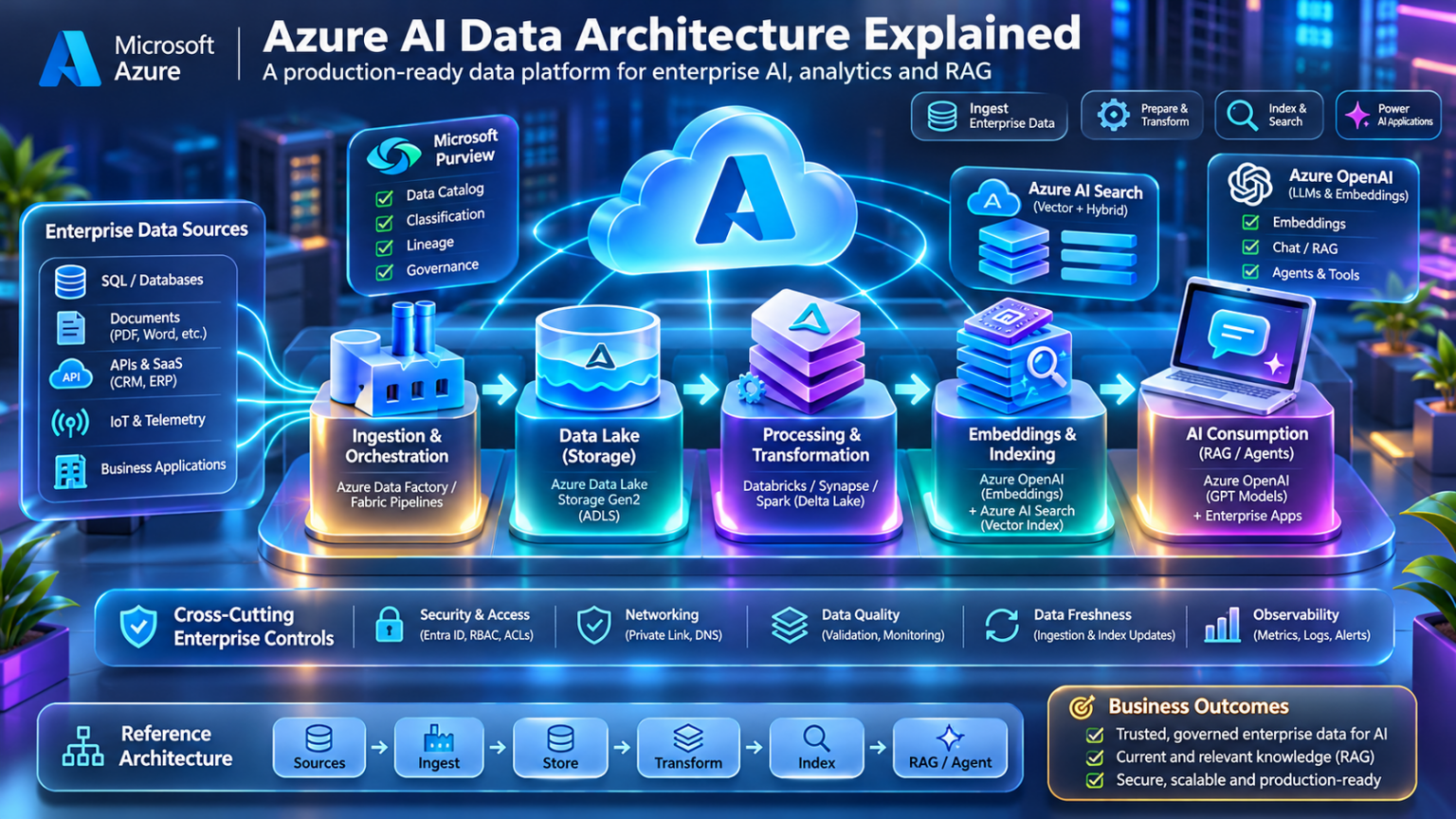
Explore the Azure AI Data Universe
Nine interconnected engineering domains. One enterprise AI data architecture. Explore the floating 3D knowledge universe, select an architecture node, and navigate directly to its detailed technical section.
Navigate the Nine Engineering Domains
Each colored node links to its corresponding editorial section.
Azure AI Data Architecture Fundamentals
Enterprise AI data architecture defines how information moves from operational systems into reliable, governed, and AI-consumable datasets. It establishes the boundaries between ingestion, persistent storage, transformation, indexing, and application access.
Unlike a traditional reporting platform, an AI data architecture must support multiple consumption patterns. Structured records may feed predictive models, unstructured documents may support retrieval-augmented generation, and streaming events may provide near-real-time operational context.
The architecture must therefore balance data freshness, processing cost, consistency, security, and the latency requirements of downstream AI applications.
Understanding the Enterprise AI Data Plane
The data plane is responsible for the actual movement, storage, transformation, and delivery of information. It includes data connectors, storage systems, compute engines, indexes, and application-facing retrieval interfaces.
A useful reference architecture separates the data plane into six logical stages. These stages are not necessarily six separate services; a platform such as Microsoft Fabric may implement several within a unified environment.
The data plane carries and processes information. The control plane configures and coordinates operations such as scheduling, permissions, metadata management, and policy enforcement. Governance requirements span both planes.
Batch, Streaming, and Change Data Capture
Data ingestion determines how source information enters the AI data platform. The correct ingestion method depends on source capabilities, volume, acceptable delay, and downstream processing needs.
Batch Ingestion
Transfers datasets on a schedule or in response to a workflow trigger. Suitable for periodic exports, historical datasets, and large transformations that do not require continuous updates.
Event Streaming
Processes continuously arriving events using services such as Azure Event Hubs and compatible stream-processing consumers. Useful for telemetry and event-driven AI applications.
Change Data Capture
Captures inserts, updates, and deletes from supported source systems. CDC can reduce the need for repeated full-table extraction, although implementation depends on the connector.
API-Based Ingestion
Retrieves records or documents through application interfaces. Engineers must account for pagination, authentication, quotas, retries, and incremental synchronization.
Fast ingestion does not automatically mean fresh AI responses. Transformation schedules, index updates, caches, and application retrieval behavior can introduce additional delays.
Separating Raw, Curated, and AI-Ready Data
Persistent storage provides a durable foundation for reprocessing, auditing, and downstream consumption. In Azure, ADLS Gen2 and OneLake can support lake-oriented architectures, while operational databases and analytical warehouses serve different access patterns.
Raw Data
Retains source information with limited transformation. Useful for replay, auditing, and rebuilding derived datasets.
Validated Data
Applies schema checks, deduplication, normalization, and business-quality rules before broader consumption.
Curated Data
Organizes trusted, business-oriented datasets for analytics, feature generation, and downstream AI workflows.
AI Retrieval Data
Prepares selected content for application retrieval, potentially including chunks, metadata, embeddings, and searchable indexes.
These are logical data states rather than mandatory physical storage accounts. Different workloads may share storage while maintaining separate namespaces, permissions, processing rules, and lifecycle policies.
Transforming Enterprise Data into AI-Ready Information
Processing engines convert source information into formats suitable for analysis, model training, retrieval, and application access.
Azure Databricks, Fabric Spark workloads, SQL-based transformations, and other compute services can implement different parts of the processing architecture.
Schema Validation
Verify required fields, data types, constraints, and compatibility with downstream consumers.
Data Quality
Detect duplicates, null values, unexpected distributions, and invalid business records.
Data Enrichment
Join related datasets, normalize entities, and add useful context for analytics and AI.
AI Preparation
Generate features, prepare document text, attach metadata, and produce inputs for indexing or model workflows.
Some transformations occur during ingestion, others within a lakehouse, and others within search indexing or application pipelines. The important design decision is ownership of each transformation and its output contract.
Designing Reliable Interfaces Between Data Producers and Consumers
A data contract defines expectations about a dataset or event stream. It helps prevent upstream changes from silently breaking AI pipelines and application dependencies.
| Contract Element | Engineering Requirement | Failure Prevented |
|---|---|---|
| Schema | Required fields, types, and compatibility rules | Unexpected parsing or transformation failures |
| Freshness | Expected update interval and acceptable delay | Outdated downstream information |
| Quality | Completeness, uniqueness, and validation thresholds | Corrupt or unreliable AI inputs |
| Ownership | Responsible producer and escalation path | Unresolved cross-team data incidents |
| Security | Classification and authorized usage | Unauthorized data exposure |
| Versioning | Change policy and compatibility expectations | Breaking changes to consumers |
This YAML is a conceptual contract example, not a native Azure service configuration. Enforcement requires compatible validation, orchestration, and governance tooling.
Choosing the Correct Data Movement Architecture
Batch and streaming pipelines solve different engineering problems. Neither is inherently superior for every AI workload.
| Dimension | Batch | Streaming |
|---|---|---|
| Processing Trigger | Schedule, manual execution, or workflow event | Continuously arriving events |
| Typical Freshness | Minutes to days, depending on design | Potentially seconds or less, depending on system |
| Operational Model | Bounded jobs and scheduled pipelines | Long-running consumers and event processing |
| Recovery | Job reruns and partition reprocessing | Offsets, checkpoints, replay, and deduplication |
| Typical AI Use | Training datasets and periodic knowledge updates | Live operational signals and event-driven context |
Enterprise AI platforms frequently combine batch processing for historical data with streaming pipelines for operational events. A unified consumption layer can expose outputs from both patterns.
How Different AI Workloads Consume Enterprise Data
Data architecture must be designed around consumer requirements rather than assuming that all AI applications need the same storage or retrieval interface.
Machine Learning Training
Requires reproducible datasets, suitable feature preparation, lineage, and controlled access to training inputs.
Retrieval-Augmented Generation
Requires searchable content, appropriate chunking, metadata, indexing, and freshness management.
Enterprise AI Agents
May retrieve knowledge and query authorized operational APIs while enforcing access and action boundaries.
Predictive Analytics
Consumes structured and curated datasets through analytical stores, feature pipelines, or application-specific serving interfaces.
Vector indexing is valuable for semantic retrieval, but structured queries, analytical tables, feature stores, and operational APIs may be more appropriate for other workloads.
Engineering Tradeoffs in Enterprise AI Data Platforms
Selecting an architecture requires balancing technical requirements against cost, operational complexity, security, and reliability.
| Decision | Primary Tradeoff | Engineering Question |
|---|---|---|
| Centralized vs Federated Data | Unified governance versus distributed ownership | Where should authoritative data remain? |
| Batch vs Streaming | Freshness versus operational complexity | How quickly must updates reach consumers? |
| Lakehouse vs Warehouse | Flexible file processing versus SQL-oriented serving | What access patterns dominate? |
| Direct Access vs Materialized Copies | Data duplication versus source dependency | Can consumers tolerate source availability constraints? |
| Shared vs Isolated Processing | Resource efficiency versus workload isolation | What are the security and performance boundaries? |
| Index Freshness vs Cost | Update frequency versus processing expense | How stale can retrieved information become? |
Begin with data sensitivity, source systems, consumer access patterns, freshness targets, and recovery requirements. Select Azure services only after defining these constraints.
Establishing a Reliable Foundation for Azure AI Data
Enterprise AI data architecture connects operational information with machine learning, retrieval systems, and intelligent applications. Its foundations are clear data boundaries, reliable ingestion, appropriate storage, controlled transformation, and trustworthy serving interfaces.
Microsoft Fabric, OneLake, Azure Data Lake Storage, Azure Data Factory, Azure Databricks, and Azure AI Search can contribute different capabilities to this architecture. The right combination depends on the requirements of the workload.
A successful Azure AI data platform is designed around the complete data lifecycle: acquisition, validation, persistence, transformation, governance, delivery, and recovery. Data quality and freshness must be engineered end to end, not assumed from the capabilities of individual services.
Enterprise AI Data Architecture Explorer
Design an Azure enterprise AI data journey. Select ingestion, storage, transformation and serving components, then evaluate architecture compatibility, freshness and governance.
Enterprise Architecture Configuration
Architecture Assessment Metrics
Enterprise AI Data Flow
Architecture Engineering Assessment
Configure the pipeline and run the assessment.
Data Plane Engineering Console
Microsoft Fabric and OneLake Architecture
Microsoft Fabric provides a unified analytics platform that brings data integration, data engineering, data warehousing, real-time intelligence, business intelligence, and related workloads into a shared SaaS environment.
At the center of this architecture is OneLake, the logical, organization-wide data lake that provides a common storage foundation for Fabric data workloads.
For enterprise AI systems, Fabric can provide governed, prepared, and reusable datasets that support analytics, machine learning, and downstream AI applications.
Understanding Microsoft Fabric as a Unified Data Platform
Microsoft Fabric combines multiple analytical experiences within a managed SaaS platform. Rather than deploying a completely separate infrastructure stack for each workload, organizations can manage many data operations through shared workspaces, capacities, identity integration, and OneLake storage.
Fabric does not eliminate the need to understand individual processing engines or security boundaries. Lakehouse, warehouse, real-time, and business intelligence workloads still have different compute and access characteristics.
Fabric unifies many analytical experiences, but workload-specific compute engines, permissions, performance characteristics, and supported data access methods remain important design considerations.
How OneLake Organizes Enterprise Data
OneLake is the logical data lake for a Fabric tenant. It provides a shared storage foundation for supported Fabric data items, including lakehouses and warehouses.
OneLake uses a hierarchical organization that includes workspaces and data items. Workspaces provide collaboration and administration boundaries, while individual items expose the data and interfaces associated with their workload type.
Fabric Tenant
Establishes the organization-level environment containing Fabric workspaces, settings, and associated OneLake data.
Workspaces
Organize data items, access roles, collaboration, and workload resources.
Data Items
Lakehouses, warehouses, and other supported items provide workload-specific storage and consumption interfaces.
Data Organization
Tables, files, schemas, and other structures organize information according to the capabilities of each data item.
This structure is illustrative. A production organization may use separate workspaces for development, testing, production, security domains, or business units.
Combining Data Lake Flexibility with Structured Analytics
A Fabric lakehouse combines file-oriented storage with managed tables that can be processed through supported analytical engines.
Lakehouse tables commonly use Delta Lake, providing transactional table capabilities over data files. This supports structured processing while retaining the flexibility of lake-based storage.
Files Area
Stores file-based data such as CSV, JSON, Parquet, and documents used by ingestion and processing workloads.
Tables Area
Contains managed analytical tables used by Spark and supported SQL consumption interfaces.
Spark Processing
Supports distributed transformations, data preparation, notebooks, and large-scale processing.
SQL Analytics Endpoint
Provides a SQL-oriented query interface over supported lakehouse tables, with capabilities distinct from a full Fabric warehouse.
A lakehouse emphasizes flexible data engineering and file-based processing. A warehouse emphasizes SQL-oriented analytical workloads and supported transactional data operations. The appropriate choice depends on ingestion, transformation, and consumption requirements.
SQL-Oriented Analytics in a Unified Platform
Fabric Data Warehouse provides a managed analytical environment for SQL-centric workloads. It supports structured data modeling, transformation, and query access within the Fabric ecosystem.
Warehouse workloads can participate in a broader architecture where lakehouse processing prepares datasets and SQL interfaces expose curated information to analytical consumers.
| Capability | Fabric Lakehouse | Fabric Warehouse |
|---|---|---|
| Primary Focus | Data engineering and flexible file processing | SQL-oriented analytical processing |
| Processing | Spark and supported SQL interfaces | Warehouse SQL engine |
| Storage Model | Files and Delta tables | Managed analytical tables |
| Typical Use | Data preparation, lake processing, ML inputs | Curated enterprise analytics and SQL workloads |
| Engineering Consideration | File layout, Spark jobs, table maintenance | SQL modeling, query optimization, workload management |
Accessing Data Without Always Creating Another Physical Copy
OneLake shortcuts allow supported data locations to be referenced through a Fabric-accessible namespace. They can connect to eligible internal and external storage locations, depending on connector support.
This can reduce unnecessary copying and make selected datasets available to Fabric workloads without requiring a traditional ingestion pipeline for every source.
Internal Shortcuts
Reference eligible data located elsewhere in OneLake, supporting reuse across supported Fabric items.
External Shortcuts
Reference supported external storage systems using configured connections and the relevant access controls.
Reduced Duplication
Avoid some unnecessary materialized copies when direct access satisfies workload and performance requirements.
Source Dependency
Availability, credentials, performance, and supported operations may depend on the referenced source.
A shortcut does not automatically create an independent, synchronized copy of the source dataset. Evaluate external dependencies, supported operations, authorization, and recovery requirements before using shortcuts in critical pipelines.
Reliable Table Storage for Data Engineering
Delta Lake adds transactional table capabilities to lake-oriented data. It uses a transaction log to track committed changes and support consistent table operations.
Delta tables are important in AI data architecture because downstream processing often depends on repeatable, validated, and incrementally updated datasets.
ACID Transactions
Support consistent committed changes and transactional table operations.
Schema Enforcement
Help prevent incompatible data from silently entering managed tables.
Versioned Table State
Maintain transaction history that can support historical reads where retained data and engine capabilities permit.
Incremental Processing
Enable processing patterns that work with changed or newly committed table data.
This is a simplified example. Production pipelines should define idempotency, incremental update behavior, schema evolution policies, and appropriate write semantics rather than relying on full overwrites.
Separating Logical Data Storage from Processing Resources
Fabric workspaces and data items are associated with platform resources and capacity arrangements that determine available processing capabilities.
Although OneLake provides a shared storage foundation, Spark workloads, warehouse queries, pipelines, and reporting operations can have different resource consumption patterns.
| Workload | Primary Resource Concern | Engineering Approach |
|---|---|---|
| Spark Processing | Distributed compute and job execution | Optimize transformations, partitions, and scheduling |
| Warehouse Queries | SQL execution and concurrency | Optimize data models and query patterns |
| Data Pipelines | Activity execution and orchestration | Control concurrency, retries, and dependencies |
| Business Intelligence | Model processing and query workloads | Manage refresh schedules and consumption patterns |
| AI Data Preparation | Large-scale transformations and indexing inputs | Separate expensive preparation from serving paths |
A shared platform does not imply unlimited compute resources. Monitor capacity utilization, workload interference, throttling, and operational cost when multiple teams share Fabric resources.
Securing Data Across Fabric Workspaces and OneLake
Enterprise Fabric environments require identity-aware access, appropriate workspace permissions, data classification, auditing, and supported item-level or data-level security controls.
Microsoft Entra identity integration and Microsoft Purview capabilities can contribute to enterprise governance, while Fabric-specific permissions determine access to platform resources.
Identity and Access
Assign appropriate roles and permissions to users, service principals, and supported automated workloads.
Workspace Isolation
Separate environments and organizational responsibilities through workspace design and administrative controls.
Data Classification
Identify sensitive information and apply suitable governance and handling requirements.
Lineage and Auditing
Track supported data dependencies and investigate how information is produced and consumed.
Review item permissions, supported data-level security, shortcut authorization, external connections, and consumer identities. Do not assume that every Fabric engine enforces identical access semantics.
Designing Fabric as an Enterprise AI Data Foundation
Microsoft Fabric and OneLake provide a unified environment for many data integration, engineering, analytical, and business intelligence workloads.
For AI architecture, the primary benefit is the ability to build governed and reusable data products that can support downstream machine learning, retrieval, and application workflows.
Successful implementations still require careful decisions about workspace organization, data ownership, table formats, processing engines, security boundaries, capacity utilization, and external data dependencies.
OneLake provides a shared logical data foundation, while Fabric workloads provide specialized processing and consumption capabilities. The architecture succeeds when engineers combine these services with clear ownership, reliable data contracts, appropriate security, and predictable operational performance.
OneLake Data Flow Explorer
Explore Microsoft Fabric data access patterns. Compare managed lakehouse storage, warehouse consumption, OneLake shortcuts and physical data ingestion copies.
Microsoft Fabric Data Access Configuration
Shortcuts create logical references to supported storage locations. They do not automatically copy the referenced dataset into the destination lakehouse.
Data Architecture Metrics
OneLake Data Access Journey
OneLake Engineering Assessment
Choose a Fabric access pattern and evaluate the architecture.
Fabric Data Access Console
Azure Data Lake Storage Architecture
Azure Data Lake Storage Gen2 provides scalable object storage capabilities for enterprise analytics and AI workloads. It combines Azure Blob Storage with a hierarchical namespace that supports directory-oriented data operations.
For AI infrastructure, ADLS Gen2 can serve as a persistent storage foundation for raw enterprise data, processed datasets, model training inputs, document collections, and analytical file formats.
A well-designed data lake must address namespace organization, access control, lifecycle management, performance, availability, and downstream processing requirements.
Understanding ADLS Gen2 Architecture
ADLS Gen2 is implemented through Azure Storage accounts with the hierarchical namespace capability enabled. It uses the underlying Azure Blob Storage platform while exposing directory-aware operations through supported interfaces.
This makes it suitable for large-scale analytical workloads that organize data into directories, partitions, and structured datasets.
/enterprise-data/curated/customers/
/enterprise-data/ai/documents/
ADLS Gen2 is not a separate storage service deployed alongside Blob Storage. It is a capability of compatible Azure Storage accounts that enables hierarchical namespace operations.
How Directory-Aware Storage Changes Data Lake Operations
The hierarchical namespace introduces directory-oriented organization into the storage account. This enables supported operations such as directory renaming and movement within the namespace.
Directory semantics are useful for analytical engines that process partitioned datasets and manage large numbers of files.
File Systems
Containers act as file systems within the Data Lake Storage namespace.
Directories
Organize data into hierarchical paths that support analytical partitioning and access controls.
Files
Store data objects such as Parquet, JSON, CSV, images, documents, and model artifacts.
Namespace Operations
Support directory-aware operations that can be more efficient than copying individual objects.
This directory structure is illustrative. Production designs may use additional storage accounts or file systems to separate environments, security domains, and data ownership boundaries.
Choosing Storage Accounts, File Systems, and Isolation Boundaries
Storage account design determines important operational boundaries, including network access, redundancy configuration, supported capabilities, and account-level management.
A single storage account may contain multiple file systems, but high-security or independently managed workloads may benefit from separate accounts.
| Design Element | Engineering Consideration | Typical Decision |
|---|---|---|
| Storage Account | Network, redundancy, and management boundary | Separate by environment or security requirement |
| File System | Logical dataset grouping and access scope | Organize by data domain or workload |
| Directory | Partitioning and fine-grained organization | Use predictable, documented paths |
| Region | Latency, residency, and service proximity | Align with processing and compliance needs |
| Redundancy | Durability and regional recovery capabilities | Choose supported LRS, ZRS, GRS, or GZRS options |
Storage redundancy protects against particular infrastructure failures, but it does not automatically provide recovery from accidental deletion, data corruption, or application errors. Evaluate supported recovery features and independent backup strategies.
Understanding Azure RBAC and Directory ACLs
ADLS Gen2 supports identity-based authorization through Microsoft Entra ID, Azure role-based access control, and POSIX-like access control lists.
Azure RBAC can grant broad data access at supported scopes, while ACLs provide directory and file-level permissions for applicable authorization scenarios.
Azure RBAC
Assign data roles at appropriate Azure resource scopes to users, groups, or workload identities.
Access Control Lists
Apply read, write, and execute permissions to files and directories for supported identity-based access.
Managed Identities
Allow supported Azure workloads to authenticate without embedding long-lived account credentials.
Shared Access Signatures
Provide delegated access with defined permissions and constraints. Protect SAS tokens as sensitive credentials.
ACLs do not override access already granted through an applicable Azure data role. Engineers must evaluate all effective authorization paths, including RBAC, ACLs, SAS, and shared-key access where enabled.
Securing Data Lake Traffic with Private Connectivity
Enterprise data lakes often contain sensitive operational information. Network access should therefore be designed alongside identity and authorization controls.
Azure Storage supports private endpoints, network access restrictions, and secure transport requirements. ADLS Gen2 workloads may need private connectivity to both Blob and DFS endpoints, depending on the operations and clients involved.
Private Endpoints
Provide private IP connectivity to supported storage subresources through Azure Private Link.
Private DNS
Resolve storage service hostnames to the appropriate private endpoint addresses in connected networks.
Storage Firewalls
Restrict public network access using supported network rules and access settings.
Encrypted Transport
Require secure client connections and validate that data access uses supported TLS configurations.
A private endpoint controls the network path to a storage service. It does not replace identity authentication, Azure RBAC, or file and directory ACLs.
Optimizing Data Lake Layout for AI Processing
Data lake performance depends not only on storage throughput but also on how files are organized and consumed.
Columnar formats such as Parquet are frequently useful for analytical processing because they can reduce unnecessary data reads.
| Format | Characteristics | Typical AI Data Use |
|---|---|---|
| CSV | Simple text-based tabular format | Source imports and interoperability |
| JSON | Flexible structured or semi-structured records | API data and event ingestion |
| Parquet | Columnar storage with compression | Analytical datasets and ML preparation |
| Delta Lake | Transactional table format built over data files | Reliable curated datasets and incremental processing |
| PDF / DOCX | Unstructured document formats | Enterprise knowledge ingestion for RAG |
Very large numbers of small files can increase metadata and task scheduling overhead for distributed processing engines. Consider compaction, sensible partition granularity, and workload-specific file sizing.
Controlling Data Retention and Storage Cost
Enterprise AI platforms accumulate raw extracts, intermediate datasets, training inputs, documents, and historical processing artifacts.
Storage lifecycle policies can help manage eligible objects through supported tiering and deletion rules. Policy capabilities and tier availability depend on the storage account configuration and supported features.
Active Data
Frequently accessed datasets requiring predictable read and processing performance.
Historical Data
Older datasets retained for audit, replay, or analytical comparison.
Retention Policies
Define how long datasets must remain available and when eligible data can be deleted.
Recovery Requirements
Evaluate versioning, soft delete, backup, and other supported protection mechanisms.
Not every Blob Storage feature, access tier, redundancy option, or recovery mechanism is supported identically on hierarchical-namespace accounts. Verify compatibility before designing lifecycle and recovery policies.
Diagnosing Data Lake Bottlenecks and Access Failures
Data lake incidents may originate from network configuration, authentication, authorization, service limits, file layout, or downstream processing behavior.
Troubleshooting should separate storage access failures from compute-side performance problems.
| Symptom | Possible Cause | Engineering Check |
|---|---|---|
| 403 Authorization Failure | Insufficient RBAC, ACLs, or invalid credentials | Inspect effective permissions and identity |
| Connection Timeout | DNS, private endpoint, routing, or firewall issue | Validate name resolution and network path |
| Slow Spark Reads | Small files, poor partitioning, or compute bottleneck | Inspect file layout and Spark execution metrics |
| Throttling | Request pressure or service limits | Review storage metrics and retry behavior |
| Missing Data | Ingestion failure, incorrect path, or incomplete processing | Trace source-to-storage pipeline execution |
Correlate storage diagnostics, Azure Monitor metrics, application logs, pipeline runs, and processing engine telemetry. A slow AI application may be experiencing an upstream data problem rather than a model issue.
Designing ADLS Gen2 for Enterprise AI Workloads
Azure Data Lake Storage Gen2 provides a scalable foundation for storing enterprise datasets used by analytics, machine learning, and AI applications.
Its hierarchical namespace enables directory-aware operations, while Azure Storage capabilities provide options for identity-based access, network protection, redundancy, monitoring, and lifecycle management.
Successful AI data lake architecture depends on selecting appropriate isolation boundaries, organizing datasets predictably, enforcing access controls, and optimizing storage layouts for processing engines.
ADLS Gen2 should be treated as a production data infrastructure component rather than a simple file repository. Its namespace, security model, network connectivity, data layout, and recovery strategy directly affect the reliability and performance of downstream Azure AI workloads.
Data Lake Storage Design Lab
Design an ADLS Gen2 storage environment. Explore hierarchical namespaces, enterprise directory structures, access permissions and data lifecycle decisions.
ADLS Gen2 Storage Configuration
The lab uses a simplified role and ACL model. Real ADLS authorization also depends on Azure RBAC, ACL traversal, network restrictions and the configured authentication method.
Storage Engineering Metrics
Enterprise Data Lake Organization
Storage Engineering Assessment
Build the storage architecture to begin.
ADLS Storage Operations Console
Azure Data Factory and Data Pipelines
Azure Data Factory is a managed cloud data integration and orchestration service used to coordinate data movement, transformation, and scheduled workflows across enterprise systems.
In an Azure AI architecture, Data Factory can move operational records, documents, and analytical datasets into storage and processing environments that prepare information for machine learning, retrieval, and enterprise AI applications.
The key engineering challenge is not simply copying data. It is ensuring that every pipeline executes reliably, handles failures, preserves data quality, and delivers information within the required freshness window.
Understanding Azure Data Factory Architecture
Azure Data Factory separates pipeline orchestration from the compute and connectivity resources used to perform individual activities.
Pipelines define workflow logic, activities perform individual operations, linked services define connections, datasets describe data structures or locations, and integration runtimes provide the execution and connectivity environment for supported activities.
Data Factory coordinates workflows, while supported activities use integration runtimes or external compute services to perform data movement and processing. This separation is important when diagnosing network access and performance.
Linked Services, Datasets, Pipelines, and Activities
ADF pipelines are composed of reusable resources that define how data sources are accessed and how operations execute.
Linked Services
Define connection information for supported data stores and compute services, including authentication and integration runtime settings.
Datasets
Describe data structures or locations used by activities, such as tables, files, directories, and formats.
Pipelines
Group activities into a logical workflow with parameters, dependencies, and execution rules.
Activities
Execute operations such as copying data, running transformations, evaluating conditions, or invoking supported external services.
The resource relationships allow connection definitions and datasets to be reused across multiple pipelines, reducing duplicated configuration.
Understanding the Data Factory Execution and Connectivity Layer
Integration runtimes provide the execution infrastructure and network connectivity used by supported Data Factory activities.
Runtime selection is particularly important when data sources reside in private networks, on-premises environments, or restricted Azure network segments.
| Runtime Type | Primary Role | Typical Use |
|---|---|---|
| Azure Integration Runtime | Managed cloud data movement and supported activity execution | Cloud-to-cloud integration |
| Self-Hosted Integration Runtime | Customer-managed runtime with access to private resources | On-premises and restricted-network sources |
| Azure-SSIS Integration Runtime | Managed execution of supported SSIS packages | Migration or continued operation of SSIS workloads |
Self-hosted integration runtimes are commonly used when source systems cannot be accessed through standard public cloud connectivity. Managed virtual network capabilities provide additional options for supported Azure Integration Runtime scenarios.
Triggers, Dependencies, and Workflow Execution
Pipeline orchestration defines when work starts, how activities depend on one another, and what happens when operations succeed or fail.
Data Factory supports several triggering patterns, including scheduled execution and supported event-driven triggers.
Schedule Triggers
Start workflows according to configured recurrence rules.
Event-Based Triggers
Respond to supported events, such as eligible storage events.
Activity Dependencies
Control downstream execution based on success, failure, completion, or skip conditions.
Parameterized Pipelines
Reuse workflow definitions with different datasets, paths, and processing parameters.
A downstream activity should not assume that an upstream operation produced valid data simply because the activity completed successfully. Include explicit data validation where correctness matters.
Watermarks, Change Data Capture, and Efficient Data Movement
Repeatedly copying an entire source dataset can be expensive and inefficient.
Incremental ingestion reduces unnecessary movement by selecting new or changed records using suitable source capabilities.
Watermark Columns
Track a source timestamp or monotonically increasing identifier to identify candidate changed records.
Change Data Capture
Consume supported database change information, potentially including inserts, updates, and deletes.
Partition-Based Loads
Process selected source partitions rather than repeatedly scanning the entire dataset.
Idempotent Processing
Design reruns so that repeated execution does not introduce unwanted duplicates or corruption.
Timestamp-based extraction requires careful handling of late updates, clock precision, concurrent changes, and deletion events. CDC or overlap-and-deduplication strategies may be preferable where supported.
Coordinating Spark, SQL, and Mapping Data Flows
Data Factory can coordinate transformations executed by supported services and engines. It also provides mapping data flows for supported visual transformation workloads.
Transformation architecture should distinguish between pipeline control and the actual compute engine.
| Approach | Processing Location | Typical Use |
|---|---|---|
| Mapping Data Flow | Managed data flow execution environment | Visual transformations and joins |
| Azure Databricks | Databricks compute | Large-scale Spark processing |
| SQL Transformation | Supported SQL engine | Relational transformations and stored procedures |
| External Compute | Invoked service or application environment | Specialized processing workflows |
When a Data Factory activity invokes another service, monitor both the pipeline activity and the external compute operation. Pipeline orchestration metrics alone may not explain processing bottlenecks.
Tracking Pipeline Runs, Activity Failures, and Data Freshness
Production pipelines require monitoring beyond simple success or failure states.
Engineers should track execution duration, activity retries, transferred data volume, source-to-destination lag, and downstream data quality.
Pipeline Runs
Track workflow status, execution duration, parameters, and run history.
Activity Runs
Inspect individual activity execution results, errors, and relevant performance details.
Azure Monitor
Use supported diagnostic settings, metrics, alerts, and centralized log analysis.
Freshness Metrics
Measure the age of the latest validated dataset available to AI consumers.
A pipeline may finish successfully while processing zero records, publishing an outdated partition, or failing to trigger downstream indexing. Validate the resulting data state, not only execution status.
Investigating Pipeline Failures and Recovery
Pipeline failures can originate from connectivity, authentication, schema changes, service limits, compute errors, or incorrect workflow dependencies.
| Symptom | Possible Cause | Engineering Check |
|---|---|---|
| Source Connection Failure | Network, DNS, firewall, or runtime issue | Validate linked service and integration runtime connectivity |
| Authentication Error | Expired secret or insufficient permissions | Inspect identity and credential configuration |
| Copy Activity Timeout | Slow source, large transfer, or resource limits | Review throughput and activity diagnostics |
| Schema Failure | Source structure changed | Compare current schema against expected contract |
| Duplicate Records | Incorrect watermark or non-idempotent retry | Inspect checkpoint and destination merge logic |
| Missing AI Documents | Ingestion or downstream indexing incomplete | Trace pipeline output through indexing and retrieval |
Reliable pipelines should support controlled retries, restartable processing, checkpoint management, alerting, and reconciliation between source and destination. Avoid automatically retrying non-idempotent operations without appropriate safeguards.
Building Reliable Azure AI Data Pipelines
Azure Data Factory provides orchestration and integration capabilities that connect enterprise data sources with storage, processing, and AI consumption environments.
Its architecture separates workflow definitions, connection resources, execution runtimes, and transformation services.
Effective implementations combine incremental ingestion, data contracts, secure connectivity, dependency management, and observable recovery mechanisms.
The reliability of an Azure AI data pipeline is measured by the correctness and freshness of its delivered information, not simply whether its orchestration activities succeed. Design every pipeline to detect failures, recover safely, and verify the data received by downstream AI systems.
Data Pipeline Orchestration Simulator
Execute a dependency-aware data pipeline. Explore ingestion modes, activity retries, checkpoint consistency, failure handling and downstream AI dataset publication.
Pipeline Execution Configuration
Each activity runs only after its predecessor succeeds. The watermark advances only after successful publication, representing a simplified commit-safe checkpoint policy.
Pipeline State
Activity Dependency Graph
Execution Assessment
Select a scenario and execute the pipeline.
Pipeline Activity Console
AI Data Processing and Transformation
Enterprise AI systems require data that is accurate, consistent, appropriately structured, and suitable for downstream consumption. Distributed data processing platforms transform raw information into validated datasets, analytical tables, and AI-ready inputs.
Azure Databricks, Microsoft Fabric Spark, Apache Spark, and Delta Lake provide capabilities for processing large datasets, managing transactional tables, and building repeatable data engineering workflows.
The central architectural challenge is converting diverse enterprise data into reliable information while controlling processing cost, schema compatibility, data quality, and operational complexity.
Understanding Distributed Data Processing for AI
Distributed processing divides data operations across multiple compute resources. This allows large datasets to be processed in parallel rather than requiring all computation to execute on a single machine.
Apache Spark provides a distributed processing engine, while Azure Databricks and Fabric Spark provide managed environments for supported Spark workloads.
Data Sources
Operational databases, files, events, and analytical stores supply the input datasets.
Distributed Compute
Spark tasks execute across available compute resources to process data partitions.
Transactional Storage
Delta Lake tables provide consistent data management for supported analytical workloads.
AI Consumption
Curated datasets support training, feature preparation, retrieval, and analytical applications.
Many Azure analytical architectures separate persistent storage from processing compute. This allows datasets to remain durable while compute resources are scaled or managed independently, subject to platform capabilities.
Bronze, Silver, and Gold Data Transformation Layers
Medallion architecture organizes data processing into progressively refined layers. The Bronze layer preserves ingested source data, Silver applies validation and normalization, and Gold exposes curated business-oriented datasets.
This separation supports data lineage, repeatable processing, controlled quality improvements, and different downstream consumption requirements.
Source Fidelity
Historical Records
Deduplication
Standardization
Business Models
AI-Ready Outputs
| Layer | Primary Responsibility | Typical Operations |
|---|---|---|
| Bronze | Preserve ingested source information | Landing, ingestion metadata, source capture |
| Silver | Produce validated and consistent datasets | Schema checks, deduplication, normalization |
| Gold | Publish curated, consumer-oriented data products | Business joins, aggregations, feature preparation |
Drivers, Executors, Tasks, and Data Partitions
Apache Spark distributes computation using a driver process that coordinates execution and executor processes that perform tasks on data partitions.
Understanding this execution model is important when diagnosing slow transformations, memory pressure, excessive shuffling, and inefficient data distribution.
Driver
Coordinates application execution, constructs execution plans, and schedules work.
Executors
Execute distributed tasks, process partitions, and maintain relevant execution state.
Partitions
Divide datasets into units of parallel processing. Partition distribution affects execution efficiency.
Shuffle Operations
Redistribute data between processing stages for operations such as joins and aggregations.
Poor partitioning, data skew, excessive shuffles, and small-file overhead can make distributed jobs slower and more expensive. Inspect execution plans and runtime metrics before scaling compute.
Managed Spark Processing and Enterprise Data Engineering
Azure Databricks provides a managed data and AI platform that supports Spark-based engineering, SQL analytics, and additional data processing capabilities.
In an Azure AI data architecture, Databricks can transform raw datasets, manage Delta tables, build curated data products, and prepare inputs for downstream machine learning or retrieval workflows.
Notebooks
Develop transformations using supported programming languages and Spark APIs.
Jobs and Workflows
Schedule and coordinate production processing tasks with dependencies and monitoring.
Delta Tables
Manage transactional datasets used across data engineering and analytical workloads.
Governance
Apply supported catalog, access, and lineage capabilities to managed data assets.
Both support Spark-based data processing, but they differ in platform integration, management, governance options, and operational capabilities. Select based on existing architecture, workload requirements, and supported service features.
Transactional Data Management for AI Pipelines
Delta Lake adds transactional table semantics to data lake processing. Its transaction log records committed table changes and supports consistent reads and writes.
This is important for AI workloads that depend on reproducible datasets, incremental updates, and reliable downstream processing.
ACID Transactions
Provide transactional consistency for supported table operations.
Schema Enforcement
Validate table structure and reduce unintended incompatible writes.
Version History
Support historical table access where retained data and engine capabilities permit.
Incremental Updates
Support merge and update patterns for suitable processing workloads.
Production implementations must define unique keys, source deduplication, delete handling, and schema compatibility. Merge behavior depends on the target table and supported engine.
Validating Enterprise Data Before AI Consumption
AI systems can produce unreliable results when upstream data is incomplete, duplicated, inconsistent, or incorrectly labeled.
Data quality controls should operate throughout ingestion, transformation, and publishing workflows rather than being deferred until model execution.
| Quality Dimension | Validation Example | Potential AI Impact |
|---|---|---|
| Completeness | Required fields are populated | Missing features or incomplete context |
| Uniqueness | Business identifiers are not duplicated | Incorrect counts or duplicated knowledge |
| Validity | Values satisfy defined constraints | Invalid model inputs |
| Consistency | Related records agree across sources | Conflicting AI responses |
| Freshness | Updates arrive within the required window | Outdated predictions or retrieval |
When validation fails, production pipelines may isolate rejected records for investigation while preserving diagnostic information and preventing invalid data from entering trusted serving layers.
Managing Changes to Enterprise Data Structures
Source schemas evolve as business systems introduce new fields, rename attributes, or change data types.
Without appropriate compatibility controls, these changes can break transformation jobs, analytical tables, and downstream AI applications.
Additive Changes
New optional fields may be introduced with controlled compatibility.
Breaking Changes
Renamed fields, removed attributes, or incompatible types may require coordinated consumer updates.
Schema Contracts
Define expected structure, ownership, versioning, and validation rules.
Controlled Evolution
Apply supported schema evolution features only when downstream compatibility is understood.
Allowing all incoming schema changes to propagate automatically can destabilize curated datasets. Validate changes against contracts and consumer requirements before publishing.
Diagnosing Slow Spark Jobs and Transformation Failures
Processing performance depends on partition distribution, data size, file organization, memory availability, network transfer, and execution plan efficiency.
Troubleshooting should begin with workload metrics and execution diagnostics rather than immediately increasing compute resources.
| Symptom | Possible Cause | Engineering Investigation |
|---|---|---|
| Slow Join | Large shuffle or data skew | Inspect physical plan and task distribution |
| Executor Failure | Memory pressure or resource exhaustion | Review executor logs and memory metrics |
| Slow File Reads | Excessive small files or poor partition pruning | Inspect storage layout and scan statistics |
| Delta Write Failure | Concurrent modification or schema incompatibility | Inspect transaction and schema errors |
| Incorrect Gold Data | Transformation logic or source quality issue | Trace lineage through Bronze and Silver |
| Outdated AI Inputs | Delayed transformation or publishing | Measure source-to-consumer freshness |
Optimize data layout, partitioning, joins, caching, and processing logic before assuming that additional compute is the correct solution.
Building Reliable AI-Ready Data Products
AI data processing transforms enterprise source information into trusted datasets suitable for analytical and intelligent applications.
Apache Spark provides distributed processing, Azure Databricks and Fabric Spark provide managed execution environments, and Delta Lake contributes transactional table capabilities.
Medallion architecture provides a useful organizational model for separating raw ingestion, validated processing, and curated consumption layers.
Reliable AI data transformation depends on more than distributed compute performance. Engineers must establish clear data contracts, validate quality, manage schema evolution, optimize processing, and maintain traceability from raw source records to the final AI-ready dataset.
Bronze–Silver–Gold Transformation Lab
Process raw enterprise records through a medallion architecture. Apply schema validation, deduplication, quality controls and curated AI data publishing.
Transformation Engineering Configuration
Bronze preserves source records. Silver applies validation and cleansing. Gold publishes curated datasets after a quality gate succeeds.
Data Processing Metrics
Medallion Transformation Architecture
Record-Level Data Quality Inspection
| Record ID | Customer | Amount | Status |
|---|
Transformation Assessment
Run the pipeline to validate records.
Spark / Delta Processing Console
Vector Index Engineering Lab
Explore vector similarity, embedding dimensions, chunk size, hybrid retrieval and search performance. Configure an AI Search index and inspect the retrieval behavior of an enterprise knowledge dataset.
Vector Index Configuration
Vector fields require compatible query and index dimensions. Hybrid retrieval combines lexical and vector result lists; Azure AI Search commonly uses Reciprocal Rank Fusion for this combination.
Index Engineering Metrics
Conceptual Embedding Space
The 2D view is a conceptual projection, not the actual high-dimensional embedding space.
Ranked Retrieval Results
Build the index and execute a search.
Retrieval Engineering Assessment
Build the vector index to begin.
Vector Search Engineering Console
Vector Databases and Azure AI Search Architecture
Vector search enables AI applications to retrieve information based on semantic similarity rather than relying exclusively on exact keyword matching.
Azure AI Search provides a managed search platform that supports full-text search, vector search, hybrid retrieval, filtering, and semantic ranking capabilities.
In enterprise AI architecture, these capabilities help connect large collections of documents and structured information to retrieval-augmented generation, knowledge assistants, and intelligent applications.
Understanding Vector Search in Enterprise AI Systems
Traditional keyword search identifies documents using lexical matching and ranking. Vector search represents content as numerical embeddings, allowing retrieval based on similarity in vector space.
A production retrieval system often combines both approaches. Keyword search can identify exact technical terms, while vector search can retrieve semantically related information.
A search index is generally a retrieval-optimized representation of source information. Source documents and authoritative records should remain governed independently of the search index.
How Embedding Models Represent Semantic Meaning
Embedding models convert supported inputs into numerical vectors. The vector dimensions encode learned relationships that can be used for similarity search.
Documents and queries must be embedded using compatible model configurations so that their vectors can be compared meaningfully.
Document Embeddings
Represent document chunks as vectors that can be stored in a search index.
Query Embeddings
Transform incoming search queries into vectors compatible with the index.
Vector Dimensions
Define the length of the embedding representation. The index field must match the configured vector dimensions.
Similarity Metrics
Compare vectors using supported metrics such as cosine similarity, Euclidean distance, or dot product.
Changing embedding models can alter vector dimensions and semantic relationships. Production migrations may require re-embedding content and rebuilding or introducing new vector fields or indexes.
HNSW and Exhaustive K-Nearest Neighbors
Vector search requires an algorithm for identifying vectors that are close to a query vector.
Azure AI Search supports approximate nearest-neighbor search using HNSW and exhaustive nearest-neighbor search for supported vector configurations.
| Algorithm | Characteristics | Engineering Tradeoff |
|---|---|---|
| HNSW | Graph-based approximate nearest-neighbor search | Low-latency retrieval with tunable recall and resource use |
| Exhaustive KNN | Evaluates candidate vectors exhaustively within the search scope | Exact nearest-neighbor retrieval with potentially greater query cost |
HNSW Graph
Builds navigable relationships between vectors to reduce the search space for approximate retrieval.
Recall
Measures how many relevant nearest neighbors are recovered compared with a suitable reference result.
Latency
Measures time required to execute a retrieval request under defined workload conditions.
Memory and Storage
Index configuration, vector dimensions, and compression influence resource requirements.
HNSW prioritizes efficient nearest-neighbor retrieval while allowing approximate results. Engineers should evaluate recall, latency, index size, and cost together.
Combining BM25 Keyword Ranking with Vector Retrieval
Hybrid search combines lexical and vector retrieval in a single search request.
Azure AI Search can use reciprocal rank fusion to combine ranked result lists from supported retrieval operations.
BM25 Keyword Search
Effective for exact terms, product identifiers, technical names, and lexical relevance.
Vector Search
Retrieves semantically related information even when exact wording differs.
Reciprocal Rank Fusion
Combines rankings from multiple result sets using rank-based scoring.
Semantic Reranking
Optionally improves ranking of eligible candidate results using semantic relevance.
Enterprise queries frequently combine semantic intent with exact identifiers. Hybrid retrieval can preserve lexical relevance while improving discovery of semantically related content.
Designing Chunk Size, Overlap, and Context Boundaries
Large documents are commonly divided into smaller chunks before embedding and indexing.
Chunking influences retrieval precision, context completeness, index size, and downstream token consumption.
Fixed-Size Chunking
Divides content according to configured character or token limits.
Semantic Chunking
Attempts to preserve meaningful content boundaries such as topics or sections.
Chunk Overlap
Repeats selected content between adjacent chunks to reduce boundary-related context loss.
Parent-Child Retrieval
Associates smaller searchable chunks with larger source document contexts.
| Chunking Choice | Potential Benefit | Potential Risk |
|---|---|---|
| Small Chunks | Focused retrieval and reduced irrelevant text | Loss of surrounding context |
| Large Chunks | More complete contextual information | Lower precision and increased token use |
| Overlapping Chunks | Improved continuity across boundaries | Duplicate content and index growth |
| Structure-Aware Chunks | Preservation of document sections | More complex extraction and parsing |
The correct chunking strategy depends on document structure, embedding model constraints, retrieval behavior, and downstream application needs. Evaluate using representative queries and known relevant answers.
Combining Semantic Retrieval with Structured Constraints
Vector similarity alone does not determine whether a document is appropriate for a particular user, application, or business context.
Metadata fields can support structured filtering by attributes such as category, tenant, department, publication status, and access scope.
Category Filters
Restrict retrieval to selected business domains or document types.
Tenant Isolation
Apply appropriate application-enforced tenant constraints to retrieval queries.
Document Status
Exclude withdrawn, expired, or unpublished content where metadata is maintained correctly.
Authorization Metadata
Support permission-aware retrieval using a trusted identity and authorization enforcement design.
This simplified JSON illustrates a metadata filter. A production application must also authenticate the caller, enforce authorization, and construct permitted filters server-side.
A client-supplied filter should not be trusted as a security boundary. Applications must enforce access decisions using verified identities and appropriate search service security capabilities.
Balancing Search Quality, Memory, Latency, and Cost
Vector indexes can consume substantial storage and memory as document collections and embedding dimensions grow.
Azure AI Search supports vector compression options for compatible configurations, helping reduce resource requirements while introducing retrieval-quality tradeoffs.
Vector Dimensions
Higher-dimensional embeddings may increase vector storage and processing requirements.
Quantization
Represents vectors using reduced-precision encodings where supported.
Oversampling
Retrieves additional candidates for possible rescoring in supported compression configurations.
Recall Evaluation
Compares retrieval quality against known relevant documents or an appropriate baseline.
Index performance should be evaluated alongside query embedding latency, filter execution, result fusion, semantic reranking, and downstream model context preparation.
Diagnosing Retrieval Failures and Search Performance
Search quality incidents may originate from indexing failures, embedding incompatibility, filtering mistakes, stale source data, or query configuration.
Troubleshooting should distinguish between retrieval relevance, index freshness, authorization, and service performance.
| Symptom | Possible Cause | Engineering Check |
|---|---|---|
| Relevant Documents Missing | Chunking, embedding, indexing, or filter issue | Inspect source coverage, index fields, and query settings |
| High Search Latency | Expensive queries, resource pressure, or reranking overhead | Measure individual retrieval stages and service metrics |
| Outdated Search Results | Index refresh delay or failed updates | Compare source timestamps with indexed records |
| Incorrect Tenant Results | Missing or incorrect authorization filtering | Audit identity propagation and enforced query constraints |
| Low Vector Recall | Embedding mismatch or ANN configuration | Compare against a suitable exhaustive baseline |
| Indexing Errors | Invalid fields, dimension mismatch, or source processing failure | Inspect indexing diagnostics and document schemas |
Maintain a representative evaluation dataset containing queries and expected relevant documents. Measure retrieval quality after changing embedding models, chunking, ranking, filtering, or index configuration.
Designing Reliable Vector Retrieval Infrastructure
Vector search provides semantic retrieval capabilities that complement traditional lexical search.
Azure AI Search combines vector indexing, keyword retrieval, hybrid search, filtering, and optional semantic ranking within a managed search platform.
Reliable production retrieval requires careful decisions about embeddings, chunking, index algorithms, metadata, security, freshness, and performance evaluation.
High-quality enterprise AI retrieval is not achieved simply by storing embeddings. Engineers must design the complete retrieval architecture, including source preparation, indexing, hybrid ranking, authorization, monitoring, and systematic relevance evaluation.
Vector Index Engineering Lab
Explore vector similarity, embedding dimensions, chunk size, hybrid retrieval and search performance. Configure an AI Search index and inspect the retrieval behavior of an enterprise knowledge dataset.
Vector Index Configuration
Vector fields require compatible query and index dimensions. Hybrid retrieval combines lexical and vector result lists; Azure AI Search commonly uses Reciprocal Rank Fusion for this combination.
Index Engineering Metrics
Conceptual Embedding Space
The 2D view is a conceptual projection, not the actual high-dimensional embedding space.
Ranked Retrieval Results
Build the index and execute a search.
Retrieval Engineering Assessment
Build the vector index to begin.
Vector Search Engineering Console
RAG Data Architecture and Knowledge Pipelines
Retrieval-Augmented Generation connects language models to external information retrieved at request time. Its reliability depends heavily on the data engineering architecture that prepares, publishes, and maintains that information.
A production RAG system must do more than extract text and generate embeddings. It must track source versions, preserve document identity, handle updates and deletions, enforce access policies, and ensure that retrieved information reflects the intended knowledge state.
Azure Data Factory, Azure Data Lake Storage, Azure AI Search, Azure AI Document Intelligence, and model services can contribute to this architecture, depending on the selected implementation.
Understanding the Enterprise RAG Data Lifecycle
Enterprise knowledge pipelines transform source documents into a retrieval-ready representation while maintaining links to the original information.
The pipeline typically separates source acquisition, content extraction, validation, indexing, publication, and ongoing synchronization.
A retrieval index is a derived data product. The knowledge pipeline must maintain consistency between authoritative source records and the searchable representation used by AI applications.
Capturing Enterprise Knowledge from Multiple Sources
Enterprise RAG systems commonly ingest information from document repositories, cloud storage, business applications, databases, and internal knowledge bases.
Each source can have different authentication requirements, update mechanisms, document formats, and retention policies.
Scheduled Ingestion
Periodically enumerate eligible source records and detect additions or changes.
Event-Driven Ingestion
Respond to supported source notifications to initiate processing after changes.
Incremental Synchronization
Use source change tokens, versions, timestamps, or supported change feeds to identify updates.
Full Reconciliation
Periodically compare source inventory against indexed records to detect missing changes and deletions.
A stable source identifier is essential because one source document may produce many indexed chunks. The ingestion system needs to determine which chunks belong to each source version.
A pipeline that processes only newly created or modified documents can leave deleted source information searchable. Deletion detection and reconciliation are essential for reliable synchronization.
Converting Documents into Structured Knowledge
Document extraction converts source content into text and structural information that downstream processing can interpret.
Simple text extraction may work for well-formed documents, while scanned files, complex tables, and multi-column layouts may require OCR or layout-aware processing.
Text Extraction
Recover textual content from supported document and file formats.
Layout Analysis
Preserve headings, paragraphs, tables, and other structural relationships where supported.
OCR Processing
Extract machine-readable text from scanned images and documents using appropriate recognition services.
Extraction Validation
Detect empty outputs, missing pages, corrupted text, and unsupported document structures.
| Document Feature | Engineering Challenge | Recommended Control |
|---|---|---|
| Multi-column PDF | Incorrect reading order | Layout-aware extraction and validation |
| Complex Table | Lost row and column relationships | Preserve table structure or explicit serialization |
| Scanned Document | No embedded text layer | OCR and confidence-aware review |
| Technical Manual | Commands separated from explanations | Section-aware extraction and chunk boundaries |
| Policy Document | Version and approval context lost | Retain effective dates and approval metadata |
Azure AI Document Intelligence can support extraction and layout analysis for suitable document types. The appropriate model and processing strategy depend on document format, service capabilities, and quality requirements.
Preserving Context, Document Identity, and Provenance
After extraction, a knowledge pipeline must organize content into records that can be retrieved and traced back to authoritative sources.
This stage may normalize text, preserve headings, associate metadata, remove irrelevant boilerplate, and create chunk identifiers.
Stable Document Identity
Associate all generated records with an authoritative source identifier.
Chunk Provenance
Preserve source location, section, page, and version information where available.
Knowledge Classification
Attach appropriate classification and ownership metadata.
Content Normalization
Standardize suitable text representations without changing the intended technical meaning.
The record above is an illustrative knowledge document, not a required Azure AI Search schema.
When an AI answer cites a policy, an engineer should be able to identify the exact source document and version used to produce the retrieved evidence.
Publishing Consistent Knowledge into Azure AI Search
Index publication converts validated knowledge records into the schema and representations required by the retrieval service.
The process may generate embeddings, populate searchable text fields, attach metadata, and submit document updates to Azure AI Search.
Index Schema
Define keys, searchable fields, vector fields, and appropriate filterable metadata.
Embedding Generation
Generate compatible vectors for approved knowledge content.
Batch Publication
Submit records using supported indexing operations with failure handling.
Publication Verification
Confirm expected records are searchable and appropriate retrieval queries return them.
Updating multiple search documents does not automatically provide a single atomic publication transaction across an entire knowledge collection. Design publication and rollback strategies around the actual indexing guarantees.
Measuring the Delay Between Source Changes and AI Retrieval
Knowledge freshness describes how closely the searchable representation reflects the intended authoritative source state.
A source document may change immediately, but several processing stages can delay when the updated information becomes retrievable.
| Freshness Stage | Possible Delay | Operational Metric |
|---|---|---|
| Source Detection | Polling interval or missed event | Change detection lag |
| Extraction | Document processing backlog | Extraction queue age |
| Embedding | Model throughput or rate limits | Embedding completion lag |
| Index Publication | Batch failures or indexing delay | Index update completion lag |
| Application Retrieval | Cache or routing to an older index | Verified query-visible version |
Define a service-level objective for the maximum acceptable age of searchable knowledge. The correct target depends on business risk: a technical manual may tolerate a different delay from an urgent security advisory.
Preventing Stale, Withdrawn, and Duplicate Knowledge
Enterprise documents are not static. Policies change, manuals are revised, access rights are updated, and records may be deleted.
A reliable knowledge pipeline must synchronize the derived retrieval index with these lifecycle events.
Document Updates
Reprocess changed content and publish records associated with the new source version.
Chunk Replacement
Identify and retire superseded chunks so old and new versions do not coexist unintentionally.
Source Deletion
Propagate approved deletion events to all affected derived search records.
Permission Changes
Ensure changes in document authorization are reflected in retrieval access controls.
A document may remain technically relevant while no longer being authorized for a particular user. Access revocation must not rely solely on eventual content reindexing where immediate enforcement is required.
Diagnosing Knowledge Pipeline Failures
RAG failures are often attributed to the language model even when the underlying problem is missing, outdated, or incorrectly processed source information.
Effective troubleshooting follows the complete knowledge lifecycle, from the authoritative source through extraction, indexing, retrieval, and context assembly.
| Symptom | Possible Cause | Engineering Investigation |
|---|---|---|
| New Document Missing | Change detection or indexing failure | Trace source event, processing run, and index record |
| Outdated Answer | Old source version or cached retrieval | Compare source, indexed, and retrieved versions |
| Incorrect Citation | Lost provenance or wrong chunk mapping | Inspect source IDs, page metadata, and evidence mapping |
| Missing Table Content | Extraction failed to preserve layout | Inspect extracted text against original document |
| Deleted Document Still Found | Deletion not propagated to index | Audit source inventory and indexed chunk IDs |
| Unauthorized Retrieval | Incorrect identity or access enforcement | Review caller identity, permissions, and query controls |
If the correct evidence was never retrieved, investigate the knowledge and search pipelines. If correct evidence was retrieved but the model misrepresented it, investigate context assembly, instructions, and answer evaluation.
Designing Reliable Enterprise RAG Knowledge Systems
Production RAG depends on a continuous data engineering process rather than a one-time document embedding exercise.
Enterprise knowledge pipelines must preserve document identity, extract information accurately, publish searchable representations, synchronize updates, and enforce appropriate access restrictions.
The reliability of the AI application depends on both retrieval quality and the correctness of the underlying knowledge lifecycle.
A production RAG platform should treat knowledge as a governed, versioned, continuously maintained data product. Engineers must measure source-to-search freshness, preserve citation provenance, propagate deletions and permission changes, and verify that the AI application retrieves the intended authoritative information.
RAG Knowledge Freshness Simulator
Investigate how enterprise document updates propagate through ingestion, chunking, embeddings and vector indexing. Detect stale knowledge and restore a synchronized RAG dataset.
Knowledge Pipeline Configuration
Source and index versions are tracked independently. A document update does not automatically guarantee that the vector index contains the latest content.
Knowledge Freshness Metrics
RAG Knowledge Update Pipeline
Source Versus Indexed Knowledge
Current policy value
Retrievable policy value
Knowledge Reliability Assessment
The source and search index contain the same version.
RAG Knowledge Operations Console
AI Data Security, Governance, and Networking
Enterprise AI platforms process information that may contain sensitive business records, regulated data, intellectual property, and confidential operational knowledge.
Protecting this information requires coordinated identity, authorization, network, encryption, governance, and monitoring controls across the complete data architecture.
Azure provides services and capabilities such as Microsoft Entra ID, Azure RBAC, managed identities, Private Link, Key Vault, and Microsoft Purview to support secure data platform design.
Understanding Security Boundaries in Azure AI Data Platforms
Zero Trust architecture assumes that access requests must be evaluated explicitly rather than trusted because they originate from a particular network location.
In Azure AI data architecture, security boundaries exist between users, applications, processing services, storage, search indexes, and model consumption layers.
Identity controls, network restrictions, encryption, and data governance address different risks. No single control should be treated as a substitute for the others.
Microsoft Entra ID, Managed Identities, and Azure RBAC
Microsoft Entra ID provides identity capabilities used by many Azure services for authenticating users, applications, and workloads.
Managed identities allow supported Azure resources to obtain tokens without embedding long-lived application secrets.
Human Identities
Users authenticate through supported identity and access policies.
Managed Identities
Azure workloads authenticate to supported services using managed credentials.
Azure RBAC
Role assignments grant permitted operations at supported resource scopes.
Least Privilege
Assign only the permissions required for each workload and operational responsibility.
Permission to manage an Azure resource does not necessarily grant access to its stored data. Evaluate management-plane and data-plane permissions separately.
Understanding Azure RBAC and ADLS Gen2 ACLs
Azure Data Lake Storage Gen2 supports multiple authorization mechanisms, including Azure role-based access control and POSIX-like access control lists.
RBAC can provide broad data permissions at supported scopes, while ACLs support more granular directory and file permissions for applicable identity-based access scenarios.
| Control | Purpose | Engineering Consideration |
|---|---|---|
| Azure RBAC | Resource and data role assignments | Check effective permissions across scopes |
| ADLS ACLs | Directory and file access permissions | Validate path traversal and inherited defaults |
| Managed Identity | Workload authentication | Assign the correct data permissions |
| SAS | Delegated access to supported storage operations | Constrain permissions and protect tokens |
| Shared Key | Account-key-based authorization where enabled | Evaluate whether key-based access should be disabled |
A broad Azure data role can authorize access independently of narrower ACL permissions. Security design must consider all enabled authorization paths, not only the directory ACL.
Private Endpoints, Private DNS, and Network Isolation
Private networking reduces exposure to public network paths by allowing supported Azure services to be reached through private endpoints.
Azure Private Link assigns private connectivity to supported service subresources, while DNS resolution directs clients to the appropriate private addresses.
Private Endpoints
Provide private IP connectivity to supported Azure service endpoints.
Private DNS Zones
Support correct hostname resolution for private endpoint connections.
Network Security
Restrict permitted connectivity using appropriate network controls and service settings.
Hybrid Connectivity
Use supported private network paths to connect enterprise environments with Azure resources.
Creating a private endpoint does not by itself guarantee that public network access has been disabled. Review each service's network access configuration.
Protecting Data at Rest, in Transit, and During Processing
Encryption protects data confidentiality across storage and communication boundaries, but it does not replace authorization or application security.
Azure services provide encryption capabilities that vary by service, including platform-managed encryption and supported customer-managed key options.
Encryption at Rest
Protect stored data using service-supported encryption mechanisms.
Encryption in Transit
Use secure protocols and supported TLS configurations for service communication.
Customer-Managed Keys
Use supported key management options where organizational requirements demand them.
Azure Key Vault
Protect secrets, keys, and certificates using appropriate access policies and controls.
Customer-managed key support and configuration differ between Azure services. Validate service-specific requirements, supported key stores, and operational recovery procedures.
Data Discovery, Classification, Cataloging, and Lineage
Microsoft Purview provides governance capabilities that can help organizations discover, classify, catalog, and understand data assets.
Governance becomes especially important when data moves between ingestion systems, data lakes, transformation engines, search indexes, and AI applications.
Data Discovery
Identify supported enterprise data assets and their locations.
Classification
Apply supported classifications to help identify sensitive information.
Data Lineage
Trace supported data relationships and processing dependencies across integrated systems.
Ownership and Cataloging
Document business meaning, stewardship, and relevant governance metadata.
Classifying or cataloging a dataset does not automatically prevent unauthorized access. Enforcement depends on the relevant service permissions and configured security integrations.
Preventing Unauthorized Knowledge Exposure in RAG Systems
Retrieval-Augmented Generation introduces a security boundary between enterprise knowledge repositories and the AI application consuming them.
An application must ensure that retrieved documents are authorized for the requesting identity and intended business context.
User Identity
Authenticate the requesting user or application.
Authorization Context
Determine permitted knowledge sources, tenants, and document scopes.
Permission-Aware Retrieval
Apply supported authorization mechanisms and trusted query constraints before exposing results.
Output Controls
Prevent sensitive retrieved information from being exposed to unauthorized consumers.
A user must not be able to bypass authorization simply by changing a search filter or tenant identifier. Enforce access restrictions through trusted application logic and supported service security capabilities.
Investigating Identity, Network, and Governance Failures
Azure AI data security incidents often involve multiple layers of authentication, authorization, network connectivity, and application policy.
Engineers should investigate each control independently rather than assuming all access failures have the same cause.
| Symptom | Possible Cause | Engineering Investigation |
|---|---|---|
| 403 Data Access Error | Insufficient data role or ACL permissions | Inspect identity and effective authorization |
| Private Endpoint Timeout | DNS, routing, firewall, or endpoint configuration | Validate resolution and network path |
| Managed Identity Failure | Incorrect identity, token scope, or role assignment | Inspect token acquisition and permissions |
| Unauthorized Search Result | Incorrect permission-aware retrieval | Audit identity propagation and enforced access rules |
| Missing Governance Lineage | Unsupported or incomplete lineage integration | Inspect source registration and connector capabilities |
| Key Access Failure | Key Vault permissions or unavailable key | Review key access and service-specific encryption configuration |
Centralize appropriate identity, resource, network, and application diagnostics. Correlating these signals makes it easier to distinguish authentication failures, authorization denials, and connectivity problems.
Building a Governed and Secure Azure AI Data Platform
Azure AI data security requires coordinated controls across identities, data resources, processing workloads, networks, and AI applications.
Microsoft Entra ID and Azure authorization mechanisms support identity-based access. Private Link and network controls support restricted connectivity, while encryption protects data confidentiality.
Microsoft Purview can contribute data discovery, classification, and lineage capabilities to the broader governance architecture.
Secure Azure AI data architecture depends on defense in depth. Engineers must combine verified identities, least-privilege authorization, private connectivity, encryption, governance metadata, and permission-aware AI retrieval. No single Azure security feature provides complete protection across the data lifecycle.
AI Data Access and Governance Lab
Evaluate an enterprise AI data access request through identity, networking, Azure authorization, directory permissions, sensitive-data policy and audit controls.
Enterprise Access Configuration
In ADLS Gen2, an applicable data-plane RBAC role can grant access without requiring an ACL grant. ACLs are evaluated when RBAC does not already authorize the operation. Governance policy is modeled as an additional application control.
Security Decision Metrics
End-to-End Security Evaluation
Security Architecture Assessment
Configure an access request and evaluate the controls.
Identity, Network and Governance Console
Production AI Data Troubleshooting and Reliability
Enterprise AI systems depend on continuous data movement across ingestion, storage, processing, indexing, and application layers. A failure in any stage can affect data freshness, retrieval quality, analytical accuracy, and AI responses.
Production reliability requires engineers to understand the complete data lifecycle and distinguish infrastructure incidents from data quality, transformation, and application-level failures.
Azure Monitor, Azure Data Factory monitoring, storage diagnostics, Spark execution metrics, Azure AI Search telemetry, and application tracing can provide evidence for investigating these incidents.
Understanding End-to-End AI Data Failure Domains
A production AI data platform contains multiple independent failure domains. A pipeline can report success while downstream data remains incomplete, outdated, or incorrectly indexed.
Engineers must therefore validate both processing execution and the resulting data products.
A successful pipeline run confirms that configured activities completed according to their success criteria. It does not automatically prove that the final AI application is using correct, complete, and current information.
Investigating Azure Data Factory Orchestration Incidents
Azure Data Factory coordinates ingestion and transformation activities through pipelines, triggers, linked services, datasets, and integration runtimes.
Pipeline incidents can originate from source connectivity, authentication, execution dependencies, capacity, data format changes, or destination failures.
Authentication Failure
Expired credentials, incorrect identity, or missing data permissions prevent source access.
Integration Runtime Failure
Connectivity, runtime availability, or resource problems interrupt data movement.
Dependency Failure
Downstream activities fail or are skipped because required upstream work did not complete.
Data Format Failure
Unexpected source structure or unsupported values cause ingestion or transformation errors.
Automatically retrying non-idempotent data operations can introduce duplicate records or inconsistent state. Design replay and retry behavior around the processing operation's actual semantics.
Diagnosing Delayed and Missing Enterprise Data
Data freshness measures how current a data product is relative to the authoritative source.
AI applications can produce technically valid responses based on outdated information when freshness is not monitored end to end.
| Stage | Freshness Risk | Useful Metric |
|---|---|---|
| Source | Late or missing source updates | Latest source change timestamp |
| Ingestion | Delayed pipeline or event backlog | Ingestion watermark lag |
| Transformation | Processing backlog or failed job | Latest successful data window |
| Search Index | Delayed or incomplete publication | Latest query-visible source version |
| AI Application | Cached or superseded context | Retrieved evidence version and age |
A source timestamp or successful indexing request is not sufficient evidence that an application retrieves the current version. Validate freshness at the final consumption boundary.
Investigating Changes That Break AI Data Products
Schema drift occurs when source data structures change over time. These changes may affect ingestion mappings, Spark transformations, curated tables, and search index fields.
Data quality incidents can also occur without schema changes, including missing values, duplicate records, invalid references, and inconsistent business logic.
New Source Fields
Additional attributes may require schema validation and downstream mapping updates.
Changed Data Types
Incompatible values may cause parsing, casting, or transformation failures.
Duplicate Records
Incorrect replay or ingestion behavior can create duplicate analytical records.
Missing Business Data
Partial extraction, incorrect joins, or filtering mistakes can silently remove required information.
Automatic schema evolution can be useful for compatible changes, but it should not silently approve modifications that violate downstream data contracts.
Diagnosing ADLS Gen2 and Spark Bottlenecks
Data processing performance depends on storage layout, request patterns, compute resources, partition distribution, and network connectivity.
Increasing compute capacity may not resolve a bottleneck caused by excessive small files, data skew, inefficient joins, or storage request limits.
| Symptom | Potential Cause | Engineering Check |
|---|---|---|
| Slow Storage Reads | Small-file overhead or inefficient access pattern | Inspect file counts, sizes, and request metrics |
| Storage Throttling | Request or throughput limits | Review throttling responses and account metrics |
| Slow Spark Join | Shuffle overhead or skewed keys | Inspect physical plan and task distribution |
| Executor Failure | Memory pressure or resource exhaustion | Review executor diagnostics and memory use |
| Slow Delta Processing | Data layout, file fragmentation, or write contention | Inspect table history and processing metrics |
| Intermittent Access Failure | Network, DNS, identity, or service-side issue | Correlate errors with connectivity and authentication logs |
Review data layout, execution plans, partitioning, file sizes, and service metrics before adding compute capacity. Scaling is most effective when the bottleneck has been identified.
Investigating Index Synchronization and Retrieval Failures
Azure AI Search and RAG introduce additional data consistency requirements. A source document may be correct while its searchable representation is outdated, incomplete, or inaccessible.
Engineers must distinguish indexing failures, retrieval configuration issues, authorization errors, and model generation behavior.
Index Synchronization
Confirm source changes and deletions are reflected in the retrieval index.
Embedding Compatibility
Verify query and document embeddings use compatible model configurations.
Retrieval Evaluation
Measure whether representative queries return the expected relevant documents.
Authorization Enforcement
Ensure retrieved knowledge is permitted for the requesting identity and context.
If the correct evidence was never retrieved, investigate the data and retrieval pipelines. If the evidence was available but the model misrepresented it, investigate context assembly and generation.
Building End-to-End Monitoring for AI Data Infrastructure
Observability helps engineers understand system behavior using metrics, logs, traces, and data quality measurements.
Azure Monitor, Log Analytics, service-specific diagnostics, and application telemetry can contribute to a unified operational view.
Infrastructure Metrics
Resource consumption, request latency, throttling, and service availability.
Pipeline Telemetry
Execution status, duration, retries, activity failures, and processing backlogs.
Data Quality Metrics
Row counts, validation failures, duplicate rates, and completeness.
AI Retrieval Metrics
Search latency, retrieval quality, index freshness, and evidence provenance.
| Reliability Objective | Example Measurement | Operational Purpose |
|---|---|---|
| Availability | Successful service operations over a defined period | Detect platform outages |
| Freshness | Source-to-consumer data age | Detect outdated knowledge |
| Completeness | Expected versus processed records | Detect missing data |
| Latency | Processing and retrieval duration | Identify performance degradation |
| Correctness | Validation and retrieval evaluation results | Detect silent data failures |
Use consistent run identifiers, source IDs, document versions, and appropriate trace correlation to connect evidence across ingestion, processing, indexing, and consumption.
Designing Reliable Replay, Recovery, and Validation Procedures
Production recovery should restore the intended data state, not merely restart failed services.
Recovery procedures may require replaying ingestion windows, rebuilding derived tables, republishing indexes, and verifying application behavior.
Replay Strategy
Reprocess known source windows using idempotent operations where possible.
Checkpointing
Track successfully processed source positions or versions.
Data Reconciliation
Compare expected and actual records after recovery.
Consumer Validation
Confirm downstream search and AI applications use the corrected data.
A completed replay does not prove recovery. Confirm that the final data product meets completeness, correctness, freshness, and access requirements before closing the incident.
Operating Reliable Enterprise AI Data Infrastructure
Enterprise AI data reliability requires coordinated monitoring and incident response across ingestion, storage, processing, search, and application layers.
Engineers must investigate both visible infrastructure failures and silent data correctness problems.
A reliable operating model combines service telemetry, data quality validation, freshness measurements, recovery procedures, and consumer-level verification.
Production AI data reliability is measured by the correctness, availability, freshness, and security of information delivered to the final consumer. Successful infrastructure operations are necessary, but they are not sufficient. Engineers must validate the complete data journey from authoritative sources to AI application responses.
AI Data Pipeline Incident Simulator
Investigate a production Azure AI data failure. Examine architecture health, inspect diagnostic telemetry, identify the root cause, apply remediation and verify that downstream AI services recover.
Incident Investigation Controls
Use diagnostic evidence to select the root cause before applying a repair. Downstream failures may be symptoms rather than the original fault.
Production Reliability Metrics
Production Azure AI Data Architecture
Incident Event Timeline
Investigation Assessment
Start an incident to begin troubleshooting.
Production Diagnostic Console

- Azure AI Gateway Architecture - November 16, 2026
- Azure AI High-Performance Networking Explained - November 16, 2026
- Azure OpenAI Architecture Explained - November 16, 2026