
Inside Azure OpenAI: From API Request to Model Response
Azure OpenAI provides managed access to supported AI models through Azure-hosted deployment and API capabilities. Enterprise applications use these deployments for text generation, reasoning, embeddings, and other supported model workloads.
Understanding Azure OpenAI requires more than learning how to send an API request. Engineers must understand deployment choices, token processing, quota allocation, throughput, authentication, networking, security controls, and operational reliability.
CORE
Nine Engineering Domains Behind Azure OpenAI
Select an architecture domain to understand its role in enterprise AI infrastructure. Each domain is explored in depth in a dedicated section of this engineering guide.
Azure OpenAI Architecture Fundamentals
Enterprise applications call supported Azure OpenAI endpoints associated with model deployments. The architecture separates resource configuration, request access, model inference, and operational controls.
Azure OpenAI is a managed model-serving capability. Engineers configure resources, deployments, networking, identities, application integrations, and monitoring. The underlying model-serving infrastructure is managed by Microsoft and is not exposed as customer-managed GPU hosts.
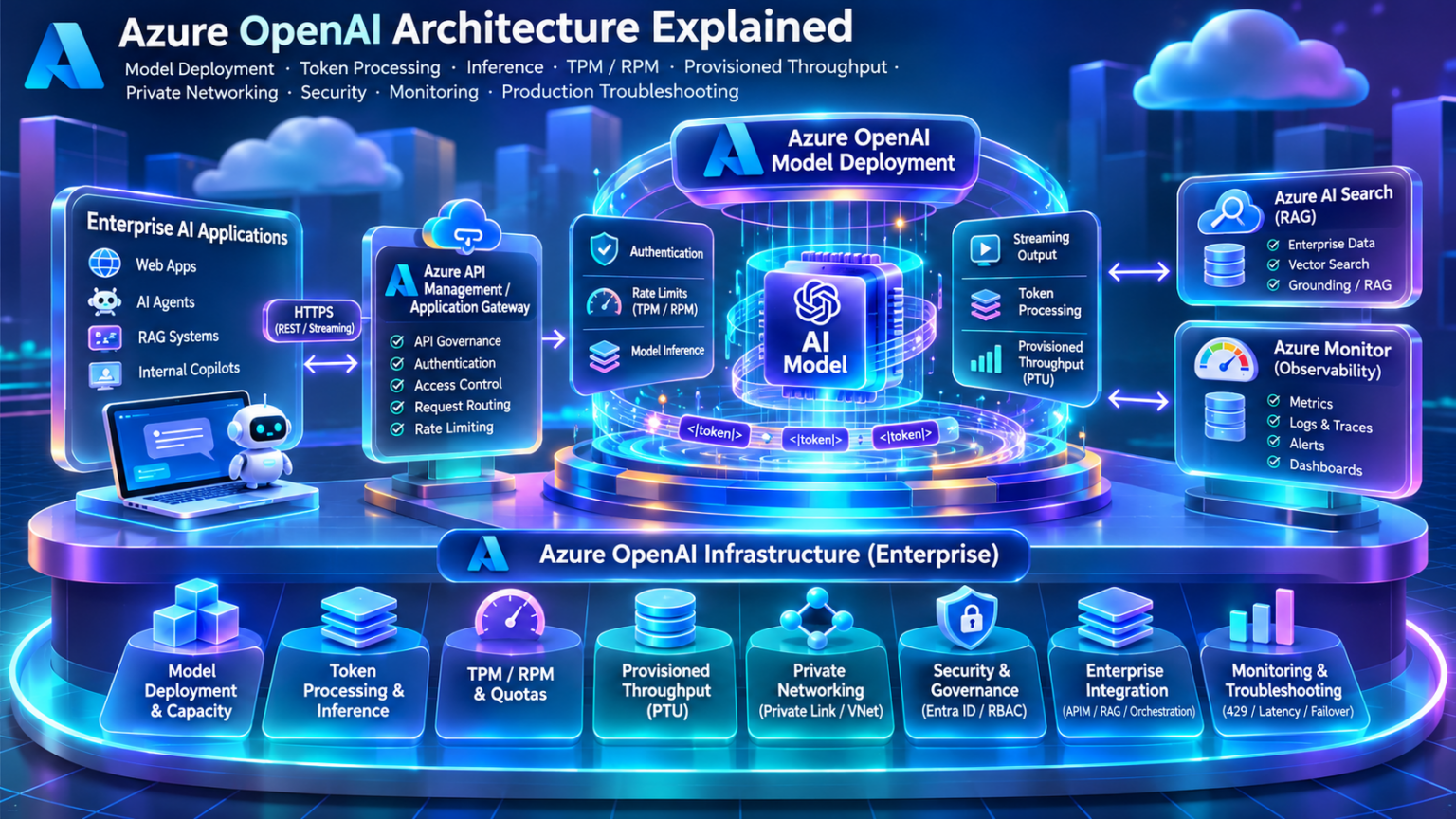
Explore Azure OpenAI Architecture
Nine engineering domains orbit a central AI inference platform. Explore model deployments, transformer inference, token quotas, provisioned throughput, private networking, security, enterprise integration, and production reliability.
Explore the Nine Engineering Domains
Select a topic to jump to its sectionAzure OpenAI Architecture Fundamentals
Azure OpenAI provides managed access to supported AI models through Azure resources, deployments, and APIs. Enterprise applications use these capabilities to build generative AI systems without operating the underlying model-serving GPU infrastructure.
Understanding Azure OpenAI architecture requires separating resource configuration from live inference traffic, identifying deployment boundaries, and understanding how applications authenticate, submit requests, and receive generated responses.
Understanding the Azure OpenAI Service Model
Azure OpenAI is a managed model-serving capability within the Azure AI ecosystem. Engineers configure resources and supported model deployments, while Microsoft manages the underlying infrastructure responsible for serving inference requests.
Applications interact with Azure OpenAI through supported APIs rather than directly accessing GPU nodes, model-serving containers, or internal inference schedulers.
Azure Resource
Provides the administrative boundary for supported deployments, access controls, networking, and service settings.
Model Deployment
Associates a supported model and version with serving configuration and deployment capacity.
Inference Endpoint
Exposes supported request interfaces for application access to deployed models.
Operational Controls
Include quota allocation, authentication, networking, service diagnostics, and applicable safety controls.
Azure OpenAI customers configure the managed service and their application integrations. They do not directly manage the internal GPU clusters or physical model-serving topology.
Separating Deployment Management from Inference Traffic
Azure OpenAI architecture can be understood through two distinct operational responsibilities: the control plane and the inference data plane.
The control plane handles resource and deployment configuration. The data plane processes supported application requests against model endpoints.
Permission to configure an Azure resource does not automatically imply permission to invoke every supported model endpoint. Management and data-plane authorization must be evaluated separately.
Azure Subscriptions, Resources, and Model Deployments
Azure OpenAI resources exist within the standard Azure resource management hierarchy.
An organization may use separate subscriptions, resource groups, and Azure OpenAI resources to organize environments, apply governance policies, and isolate workloads.
Each deployment is identified by a deployment name that applications reference using the supported API interface.
Resource placement also influences regional availability, network configuration, quota management, and operational boundaries.
Understanding the Deployment Abstraction
A model deployment is a configuration that makes a supported model available for inference through an Azure OpenAI resource.
Deployment settings can include the model, model version, deployment type, and capacity or quota allocation, depending on the supported configuration.
| Component | Purpose | Engineering Consideration |
|---|---|---|
| Deployment Name | Application-facing deployment identifier | Keep naming consistent across environments |
| Model | Selected supported AI model | Verify capabilities and API compatibility |
| Model Version | Version of the deployed model | Manage lifecycle and compatibility changes |
| Deployment Type | Serving and processing configuration | Review regional, global, and capacity options |
| Capacity / Quota | Configured serving allocation or limits | Evaluate traffic profile and rate constraints |
Applications can reference stable deployment identifiers while infrastructure teams manage the underlying supported model configuration. Changes must still be tested for compatibility, behavior, and availability.
How Applications Communicate with Azure OpenAI
Enterprise applications access Azure OpenAI through supported HTTP APIs and SDKs. The application submits an authenticated request to an endpoint associated with the Azure resource and requested model deployment.
API shapes differ across supported interfaces and API versions. Some interfaces use deployment-oriented paths, while newer interfaces may accept deployment identifiers through model parameters.
Supported authentication methods include Microsoft Entra ID token-based authentication and resource API keys, subject to the relevant service configuration.
Do not assume every model supports the same endpoint, parameters, streaming behavior, or response format. Validate the selected model against the intended API interface.
Tracing an Enterprise AI Request
An Azure OpenAI request passes through several logical stages before the application receives a generated response.
Request Construction
The application builds the request using supported messages, input content, and generation parameters.
Authentication
The service validates supported credentials and applicable access permissions.
Admission and Controls
The request is subject to relevant rate limits, quota, and configured service controls.
Model Inference
The managed serving infrastructure processes the input and generates supported model output.
Response Delivery
The application receives a response or, when supported and enabled, streamed output.
Operational Telemetry
Relevant service and application metrics support monitoring, troubleshooting, and capacity analysis.
This request lifecycle describes logical responsibilities rather than a guaranteed sequence of internal Microsoft implementation steps. Internal processing can vary by model, deployment type, and API.
Integrating Azure OpenAI into Production Applications
Enterprise deployments commonly place Azure OpenAI behind an application service or API layer that handles business logic, request validation, identity, and integration with other systems.
Azure API Management can be introduced when centralized API governance, authentication policies, traffic controls, or gateway-level observability are required.
Retrieval-Augmented Generation systems may retrieve authorized enterprise information from Azure AI Search or other knowledge systems before constructing the model request.
This retrieval and context assembly typically occur in the application or orchestration layer, unless a specific managed integration provides those functions.
What Azure OpenAI Manages and What Engineers Must Design
Azure OpenAI abstracts model-serving infrastructure, but production application architecture remains an engineering responsibility.
| Architecture Area | Managed Service Responsibility | Customer Engineering Responsibility |
|---|---|---|
| GPU Serving Infrastructure | Underlying managed inference infrastructure | Choose supported models and deployment capacity |
| Model Endpoint | Supported inference API service | Implement compatible application requests |
| Authentication | Supported service authentication mechanisms | Configure identities, credentials, and access |
| Network Connectivity | Supported service networking features | Configure network access and client connectivity |
| Application Reliability | Service behavior under applicable terms | Implement timeouts, retries, monitoring and resilience |
| Enterprise Knowledge | Model inference over supplied context | Implement appropriate retrieval, authorization and freshness controls |
A managed inference endpoint does not remove the need for application capacity planning, secure integration, failure handling, data governance, or production monitoring.
Understanding the Foundations of Azure OpenAI Architecture
Azure OpenAI provides a managed abstraction for deploying and accessing supported AI models through Azure resources and inference APIs.
Its architecture can be understood through resource configuration, deployment management, application request processing, and operational controls.
Enterprise engineers must understand these boundaries before designing production inference capacity, private networking, security policies, and resilient AI application integrations.
Azure OpenAI separates customer-managed deployment configuration and application integration from Microsoft-managed model-serving infrastructure. Reliable enterprise architecture depends on understanding resource boundaries, deployment identifiers, API compatibility, authentication, rate limits, networking, and operational responsibilities.
Azure OpenAI Architecture Explorer
Build an enterprise Azure OpenAI architecture, inspect the control plane and data plane, configure a model deployment and trace an inference request from application to generated response.
Azure OpenAI Resource Configuration
Azure OpenAI resources expose API endpoints. Model deployments provide a named target for inference requests. Available models, regions, deployment types and authentication options depend on the service configuration.
Architecture Metrics
3D-Inspired Azure OpenAI Inference Architecture
Architecture Engineering Assessment
Configure the resource and deploy the architecture.
Azure OpenAI Request Trace
Model Deployment and Inference Architecture
Azure OpenAI model deployments define how supported AI models are made available to applications. Deployment architecture influences serving capacity, processing geography, latency characteristics, model lifecycle management, and production resilience.
Selecting a model is only one part of production engineering. Teams must also choose an appropriate deployment type, understand available regional or global processing options, allocate capacity, and manage deployment changes without disrupting dependent applications.
What Happens When an Azure OpenAI Model Is Deployed?
A model deployment creates an application-facing configuration that associates a supported AI model with serving characteristics and an identifier used by API requests.
The deployment does not expose a customer-managed virtual machine or GPU server. Instead, it connects application requests to Microsoft's managed model-serving infrastructure.
Model Selection
Select a supported model with the capabilities, context limits, and API compatibility required by the workload.
Deployment Configuration
Define a deployment name, supported model version, deployment type, and relevant serving settings.
Capacity Allocation
Allocate supported quota or provisioned capacity according to the deployment type and expected application traffic.
Application Integration
Configure applications to call the deployment through a compatible endpoint and authentication mechanism.
A deployment name identifies a serving configuration. It should not be interpreted as a physical GPU host, a dedicated Kubernetes pod, or a guarantee of isolated hardware.
How Deployment Configuration Connects to Managed Inference
Azure OpenAI separates the application's logical deployment configuration from the managed infrastructure that performs model inference.
Deployment options determine which processing geography and capacity characteristics are available for supported models.
The three branches illustrate different deployment considerations, not three mandatory sequential request paths. Global, data-zone, regional, standard, and provisioned options must be evaluated according to the combinations actually supported by Azure OpenAI.
Standard and Provisioned Model Serving
Azure OpenAI provides different deployment models to support varying application requirements. The two major capacity approaches are standard and provisioned serving.
| Characteristic | Standard Deployment | Provisioned Deployment |
|---|---|---|
| Capacity Model | Quota-based, shared managed serving capacity | Allocated provisioned throughput capacity |
| Planning Focus | TPM, RPM, traffic patterns and throttling | PTUs, workload profiles and utilization |
| Typical Use | Variable or less predictable workloads | Steadier, planned production workloads |
| Latency Consideration | Latency varies with model, workload and service conditions | Capacity can be planned for more predictable performance |
| Cost Model | Generally usage-based pricing | Provisioned capacity pricing and applicable commitments |
| Availability | Depends on model and deployment geography | Depends on model, geography and available capacity |
Standard deployments are often suitable for development, experimentation, and variable-demand applications. Provisioned deployments are commonly evaluated for workloads with sustained demand and explicit performance objectives.
Provisioned throughput provides allocated capacity, but request characteristics, model behavior, and deployment limits still determine achievable throughput. Workload testing is essential.
Regional, Data Zone, and Global Deployment Architecture
Processing geography is a major enterprise architecture consideration. Azure OpenAI supports different geographic processing configurations for eligible models and deployment types.
Regional
Regional deployment options are designed around a selected Azure region and its supported processing scope.
Data Zone
Eligible data-zone deployments use supported processing locations within a defined geographic data zone.
Global
Eligible global deployments can use supported processing infrastructure across multiple global locations.
Processing geography must not be confused with resource location, data-at-rest commitments, or customer-defined network routing. These are related but distinct architectural concerns.
For regulated workloads, verify the current Microsoft documentation and contractual terms for the exact model, deployment type, processing geography, and data-handling configuration. Do not infer residency guarantees from the Azure resource's region alone.
Managing Model Versions and Deployment Lifecycles
Model versions are part of the deployment lifecycle. New versions may introduce capability improvements, behavioral differences, changes in supported parameters, or updated performance characteristics.
Production engineering teams should treat model upgrades as controlled application changes rather than assuming backward compatibility.
Version Inventory
Track model identifiers, deployed versions, deployment names, and supported API interfaces.
Compatibility Testing
Evaluate prompts, output formats, tool behavior, token usage, and application integrations.
Lifecycle Monitoring
Monitor announced model retirement dates, version availability, and deployment upgrade requirements.
Controlled Rollout
Use separate deployments and application-level traffic control where supported to validate a replacement model.
Why Request Characteristics Affect Deployment Capacity
Two applications using the same model can place very different demands on serving capacity.
Inference performance depends on workload characteristics such as input token volume, output generation length, concurrency, model architecture, and supported serving optimizations.
| Workload | Typical Characteristics | Capacity Consideration |
|---|---|---|
| Interactive Chat | Variable prompts and generated responses | Responsiveness and concurrent sessions |
| RAG Application | Retrieved context increases input size | Input token volume and end-to-end latency |
| Document Processing | Potentially large inputs and structured outputs | Context limits and sustained processing demand |
| Agent Workflows | Multiple model calls and tool interactions | Request amplification and concurrency |
| Batch Processing | Asynchronous or scheduled workloads | Batch API eligibility, throughput and completion objectives |
Equal token counts do not necessarily produce equal inference latency or capacity consumption. Input/output proportions, model architecture, reasoning behavior, and request concurrency can materially affect performance.
Engineering Deployment Capacity for Production Demand
Capacity planning begins with a realistic workload profile rather than a simple request-count estimate.
Engineers should measure typical and peak request rates, input and output token distributions, concurrency, response latency, and error rates.
This calculation provides a starting estimate for actual workload token volume. Azure rate-limit admission accounting may differ from final billed token usage.
Provisioned throughput capacity planning also requires model-specific workload testing and supported capacity estimation guidance.
Provisioned throughput requirements cannot be reliably derived from a universal tokens-per-minute-to-PTU conversion. Capacity varies by model, deployment type, workload characteristics, and supported service behavior.
Designing Production Deployment Boundaries
Enterprise deployment strategy should account for workload isolation, model lifecycle management, traffic characteristics, governance, and resilience.
Separate deployments can support independent application testing, controlled upgrades, and workload-specific capacity allocation.
Environment Isolation
Separate development, staging, and production configurations where appropriate for security and operational control.
Workload Separation
Consider independent deployments for workloads with substantially different performance and capacity needs.
Version Migration
Validate replacement model versions before shifting production application traffic.
Resilience Planning
Design appropriate fallback behavior, retry controls, and alternative deployments where supported.
A global processing deployment does not automatically provide every form of application failover. Engineers must validate supported service behavior and implement appropriate application-level recovery strategies.
Understanding Azure OpenAI Deployment Architecture
Azure OpenAI model deployments provide the logical connection between supported AI models and managed inference infrastructure.
Deployment architecture influences processing geography, capacity planning, model version management, application integration, and production reliability.
Engineers should select deployment configurations based on measured workload characteristics, supported service options, security requirements, and operational objectives.
A production Azure OpenAI deployment is more than a model selection. It is a combination of model capabilities, deployment type, processing geography, serving capacity, version lifecycle, and application resilience design. Successful deployments require workload measurement, compatibility validation, and deliberate operational planning.
Model Deployment Strategy Lab
Compare Azure OpenAI deployment approaches, processing boundaries, capacity models and workload requirements. Evaluate a deployment design before releasing enterprise AI applications into production.
Enterprise Deployment Requirements
Actual deployment support depends on the model, region, Azure subscription, quota, available capacity and deployment SKU. Provisioned deployments also have processing-scope variants; selecting provisioned throughput alone does not establish residency.
Deployment Engineering Metrics
Azure OpenAI Deployment Architecture Options
Deployment Strategy Assessment
Configure the workload and evaluate the strategy.
Deployment Engineering Console
Token Processing and Transformer Inference Architecture
Token processing is central to understanding how many generative AI models convert application requests into generated output. For autoregressive transformer models, inference commonly involves tokenization, prompt processing, attention computation, and iterative token generation.
These operations influence context limits, time to first token, output generation speed, memory requirements, throughput, and the responsiveness of enterprise AI applications.
How Text Becomes Model Input Tokens
Language models do not typically process raw text as a continuous string. Text is converted into token identifiers using a tokenizer associated with the model.
Tokens can represent words, word fragments, punctuation, whitespace, or other text units. Their boundaries depend on the tokenizer and the input content.
Token counts influence context consumption, API usage, rate-limit accounting, and application capacity planning.
A word can occupy multiple tokens, and some tokens represent only part of a word. Token counts also vary with language, formatting, and model tokenizer.
From Input Tokens to Generated Responses
Autoregressive transformer inference can be understood as a sequence of logical operations: token preparation, prompt processing, iterative decoding, and output delivery.
The prefill-and-decode explanation applies to common autoregressive transformer workloads. Embedding models, multimodal models, and other supported model architectures may have different inference behavior.
Understanding Input Context and Model Limits
A context window defines how much model-compatible input and generated content can be handled within the applicable model and API limits.
Applications must account for system instructions, user messages, conversation history, retrieved documents, tool-related content, and output allowances.
Larger contexts can increase processing requirements and time to first token. They may also influence retrieval design, prompt compression, and application cost.
A model may support a large context window while imposing a substantially smaller maximum output size. Engineers must validate both constraints for the selected model.
How the Model Processes the Input Prompt
During the prefill phase of a typical autoregressive transformer, the model processes the supplied input sequence and computes the representations needed to begin generation.
Attention operations allow token representations to incorporate relevant contextual information, subject to the model's attention architecture.
Input Length
Larger prompts generally require more processing, although optimizations and architecture can change the relationship.
Attention Computation
The model computes contextual representations using its supported attention mechanisms.
Cache Preparation
Applicable transformer serving systems prepare attention state that can be reused during subsequent decoding.
First-Token Readiness
Prompt processing contributes to the delay before the first generated output becomes available.
Prefill performance is particularly important for RAG applications that attach large amounts of retrieved context to every model request.
How Models Generate Output Tokens
After prompt processing, an autoregressive language model generates output incrementally. Each new token is conditioned on the preceding context and generated tokens.
Token selection can depend on model behavior and supported decoding parameters such as sampling controls.
Longer generated outputs require more decoding iterations and can increase total response latency.
Some reasoning-capable models perform additional internal computation before or during response generation. Visible output length alone may not represent the full inference workload.
Why Attention Caching Matters for Inference
In many autoregressive transformer architectures, the key/value cache stores attention-related representations from previously processed tokens.
During decoding, this state can be reused so the model does not need to recompute all prior key/value projections at every generation step.
Reduced Recalculation
Cached attention state reduces repeated computation during autoregressive decoding.
Memory Consumption
Cache memory requirements depend on sequence length, model architecture, precision, and active request concurrency.
Concurrency Tradeoffs
More concurrent sequences can increase aggregate cache memory pressure in model-serving systems.
Serving Optimizations
Internal serving systems may use specialized cache allocation and batching strategies.
KV caching is useful for understanding inference performance, but Azure OpenAI customers do not directly administer internal GPU memory or KV cache allocation. Supported prompt caching features are separate API-level capabilities with their own rules.
How Streaming Changes Application Responsiveness
Supported Azure OpenAI APIs can deliver generated output incrementally rather than waiting for the complete response.
Streaming can improve perceived responsiveness because the application can display partial output as it arrives. It does not necessarily reduce the total computation required by the model.
Application streaming requires appropriate HTTP connection handling, timeout configuration, cancellation behavior, and error management.
Streaming primarily changes when generated output becomes visible to the application. Total completion time can remain similar, depending on model, network, and serving behavior.
Time to First Token, Generation Speed, and End-to-End Latency
Production inference performance is commonly evaluated using several complementary measurements.
| Metric | Meaning | Engineering Use |
|---|---|---|
| TTFT | Time until the first generated output token becomes available | Interactive responsiveness |
| Inter-Token Latency | Time between generated tokens | Streaming smoothness and decoding speed |
| Output Tokens per Second | Generated output rate over a measured interval | Decode performance |
| End-to-End Latency | Total time from application request to completion | User experience and application SLAs |
| Concurrency | Number of overlapping active requests | Capacity and throughput analysis |
| Input / Output Tokens | Token volume submitted and generated | Workload profiling and cost analysis |
Engineers should measure these metrics across realistic prompt sizes, output lengths, concurrency levels, and production traffic patterns rather than relying on isolated single-request tests.
Understanding Transformer Inference Performance
Token processing provides the conceptual foundation for understanding generative model inference behavior.
Tokenization determines how content is represented, context limits constrain the request, prefill processes the input, and autoregressive decoding produces output incrementally.
KV caching, batching, model architecture, and serving capacity influence performance, while streaming determines how generated output becomes visible to applications.
Azure OpenAI inference performance cannot be understood from request counts alone. Engineers must evaluate input context size, generated output length, time to first token, decoding speed, concurrency, and end-to-end latency. These measurements provide the foundation for throughput planning, deployment sizing, and production performance troubleshooting.
Token Processing and Inference Visualizer
Trace the lifecycle of an inference request: tokenization, context validation, transformer prefill, KV-cache allocation, autoregressive decoding and streamed output generation.
Transformer Inference Configuration
The values are synthetic workload sizes. Actual tokenization, context limits, KV-cache implementation and streaming behavior depend on the selected model and deployment.
Inference Engineering Metrics
3D Transformer Inference Engine
Conceptual Causal Attention Matrix
Illustrative lower-triangular attention visibility: a token can attend to itself and earlier positions. This does not display real attention weights.
KV-Cache Context Occupancy
0% of configured context window occupied.
Inference Engineering Assessment
Configure a prompt workload and start inference.
Transformer Processing Console
Tokens per Minute, Requests per Minute, Quotas and Rate Limiting
Azure OpenAI uses quota and rate-management controls to regulate inference traffic. Applications must account for token-based limits, request-based limits, deployment capacity, and traffic bursts to operate reliably under production demand.
Rate limiting is not simply a restriction on the number of API calls. A workload can reach its token-based admission limit even when request volume is low, or exhaust its request-rate allowance while consuming relatively few tokens.
Understanding Azure OpenAI Quota and Rate Limits
Azure OpenAI quota represents capacity allocation available to supported deployments under the applicable model, subscription, deployment type, and regional or geographic quota scope.
Rate limits regulate how requests consume that allocation over time. The exact enforcement behavior depends on the model and deployment configuration.
Quota Allocation
Defines the supported capacity available for allocation to model deployments.
Tokens per Minute
Limits token-based request admission according to the applicable deployment accounting rules.
Requests per Minute
Limits the number of requests admitted over the relevant enforcement interval.
Throttling
Requests exceeding applicable limits may receive HTTP 429 responses and require controlled retry behavior.
Do not assume a single subscription-wide token pool is shared uniformly across every model and region. Azure OpenAI quota allocation is dependent on supported model and deployment quota scopes.
How TPM and RPM Work Together
Token-based and request-based limits constrain different aspects of application traffic. Both must be satisfied for a request to be admitted under the applicable service controls.
A deployment may have unused token allowance but still be throttled because request-rate limits are exceeded. Conversely, large prompts or output allowances can exhaust token admission capacity before RPM is reached.
Understanding Tokens per Minute
Tokens per minute represents a token-based rate allowance for supported deployment configurations.
Importantly, admission accounting may use an estimate of the request's potential token consumption, rather than waiting for the final response token count.
This simplified estimate demonstrates why larger input contexts and output allowances can reduce the number of requests admitted within a capacity window.
Rate-limit token estimation is not necessarily identical to final billed usage. Azure OpenAI can evaluate an estimated request cost before inference completes, while usage accounting reflects applicable processing and billing rules.
Understanding Requests per Minute
Requests per minute constrains the rate at which API calls can be admitted.
RPM is especially important for applications that generate many relatively small requests, including multi-agent workflows and high-concurrency interactive services.
Request bursts may trigger throttling even when the average request rate appears to remain within a published per-minute allowance.
Rate-limit enforcement can evaluate traffic over shorter intervals or use service-specific admission logic. Engineers should distribute requests smoothly instead of sending a large burst at the start of each minute.
Why Different Workloads Reach Different Limits
Two workloads with identical request rates can consume very different token capacity.
Likewise, workloads with identical token volume can differ significantly in the number of API calls required.
| Workload | Request Pattern | Likely Pressure | Engineering Response |
|---|---|---|---|
| Short Chat Messages | Many small requests | RPM | Smooth traffic and manage concurrency |
| Large RAG Contexts | Fewer, token-heavy requests | TPM | Reduce unnecessary context and manage output allowance |
| Agent Tool Loops | Multiple model calls per task | RPM and TPM | Control call amplification and request scheduling |
| Document Summarization | Large prompts and variable output | TPM and latency | Chunk documents and use suitable processing strategies |
| Traffic Bursts | Many simultaneous requests | Short-window rate limits | Queue and pace requests |
Actual bottlenecks depend on the model, deployment type, quota allocation, request parameters, and service behavior.
Allocating Capacity Across Azure OpenAI Deployments
Supported Azure OpenAI quota can be allocated across deployments within the applicable quota scope.
Infrastructure teams should consider workload priority, expected demand, environment separation, and future growth when allocating available capacity.
Production Priority
Reserve appropriate capacity for critical production workloads.
Environment Boundaries
Separate development and production demand where operationally appropriate.
Quota Monitoring
Track allocated quota, observed utilization, and throttling trends.
Capacity Requests
Plan ahead for supported quota increases and regional availability constraints.
Understanding Throttling and Retry Behavior
When an applicable rate limit is exceeded, Azure OpenAI may return HTTP 429 to indicate that the request has been throttled.
Applications should implement bounded retry strategies and respect applicable retry guidance rather than immediately resubmitting requests.
Immediate retries can increase request pressure on an already constrained deployment. Coordinated backoff, jitter, queueing, and concurrency controls help prevent cascading failures.
Designing Applications to Stay Within Rate Limits
Reliable Azure OpenAI applications should actively manage request volume and token demand.
Capacity engineering combines application traffic shaping, workload profiling, monitoring, and deployment planning.
Request Queueing
Smooth bursts by scheduling requests according to application priorities.
Concurrency Controls
Limit overlapping requests to protect application resources and reduce traffic spikes.
Token Budgeting
Estimate prompt and output demand before submitting requests.
Deployment Capacity
Evaluate quota allocation, supported deployment options, and workload-specific performance requirements.
Increasing simultaneous requests can raise queueing pressure, throttling frequency, and end-to-end latency. Throughput should be measured against actual capacity and application service objectives.
Understanding Azure OpenAI Rate Limiting Architecture
Azure OpenAI rate limiting combines token-based admission, request-rate controls, and deployment-specific capacity management.
TPM and RPM are related but distinct constraints. Large prompts can consume token allowance quickly, while high-frequency small requests can exhaust request-rate capacity.
Production systems should monitor both constraints and implement traffic shaping, controlled retries, and capacity planning.
Reliable Azure OpenAI applications must manage both TPM and RPM constraints. Engineers should distinguish estimated admission tokens from actual usage, account for traffic bursts, avoid retry storms, and allocate deployment capacity according to measured workload demand.
TPM / RPM Capacity Engineering Simulator
Configure Azure OpenAI request traffic, estimate token demand, inspect independent TPM and RPM limits, simulate throttling and evaluate client retry strategies.
Inference Capacity Configuration
Azure OpenAI rate-limit behavior varies by deployment type, model, region and API. This simulation uses fixed 60-second budgets for learning; real services may use shorter enforcement windows and estimated token reservations.
Capacity Engineering Metrics
Live Capacity Budget
60-Second Request Traffic Timeline
Each column represents a five-second interval. Amber/red columns indicate one or more simulated throttling events.
Capacity Engineering Assessment
Configure capacity and run a simulated workload.
Inference Rate-Limit Console
Provisioned Throughput and Performance Engineering
Azure OpenAI provisioned throughput provides a capacity allocation model for supported production inference workloads. Provisioned Throughput Units, or PTUs, represent allocated model-serving capacity rather than a fixed number of requests, tokens, or customer-visible GPUs.
Performance engineering requires understanding how workload characteristics interact with serving capacity, concurrency, prompt length, generated output, model architecture, and application latency objectives.
Understanding Provisioned Throughput Architecture
Provisioned throughput allows organizations to allocate supported inference capacity to a deployment.
Unlike standard deployments, where requests operate under a quota-based shared serving model, provisioned deployments use an allocated throughput capacity model designed for more predictable workload planning.
Capacity Allocation
A provisioned deployment is configured with a supported amount of serving capacity.
Workload Profiling
Capacity requirements depend on input tokens, output tokens, concurrency, and model behavior.
Utilization Monitoring
Engineers monitor provisioned utilization, throttling, and latency to assess capacity adequacy.
Performance Planning
Provisioned capacity supports workload engineering against defined performance and reliability objectives.
A PTU is a service capacity unit. It should not be interpreted as one GPU, one GPU server, or a universal number of tokens per second.
How Provisioned Capacity Supports Inference Requests
Applications submit inference requests to a provisioned deployment using a supported API.
Request processing is governed by the deployment's capacity and applicable service admission behavior.
Provisioned deployments remain subject to capacity constraints and supported service admission behavior. Requests may be throttled when workload demand exceeds available processing capacity.
Understanding Provisioned Throughput Units
PTUs represent provisioned model-serving capacity for eligible Azure OpenAI deployments.
The amount of work supported by a PTU varies with model, deployment configuration, prompt size, output length, and other workload characteristics.
| Capacity Factor | Why It Matters | Engineering Action |
|---|---|---|
| Model Family | Different models have different compute characteristics | Benchmark the selected model |
| Input Tokens | Prompt processing consumes serving capacity | Measure realistic context sizes |
| Output Tokens | Generation adds decoding work | Profile response length distributions |
| Concurrency | Overlapping requests increase capacity pressure | Test expected and peak concurrency |
| Latency Objective | Performance targets influence required headroom | Measure p50, p95 and p99 latency |
| Traffic Bursts | Short spikes can exceed available capacity | Introduce pacing and controlled queueing |
There is no universal conversion from PTUs to tokens per minute. Use supported Azure capacity estimation guidance and benchmark the actual workload before committing to production sizing.
Monitoring Provisioned Deployment Utilization
Provisioned utilization provides insight into how heavily allocated capacity is being used.
Sustained high utilization can indicate that demand is approaching or exceeding the capacity available for the workload.
Low Utilization
May indicate spare capacity, low demand, or overprovisioning.
Moderate Utilization
Indicates active use of provisioned capacity with potential headroom.
High Utilization
Can increase the likelihood of capacity admission throttling under additional load.
Utilization should be interpreted alongside latency, error rates, request volume, and workload characteristics.
Azure OpenAI provisioned utilization is a service-level capacity indicator. It does not expose the underlying GPU's physical compute utilization or memory usage.
Understanding Time to First Token and Response Latency
Production inference performance must be evaluated using end-to-end latency and model-generation timing metrics.
Latency depends on application processing, network communication, request admission, prompt processing, decoding, and response delivery.
Time to First Token
Measures how quickly the first generated output becomes available.
Generation Speed
Measures output generation rate during the decoding phase.
End-to-End Latency
Measures total application request duration, including relevant external dependencies.
Tail Latency
p95 and p99 measurements reveal slower requests that averages can conceal.
How Prompt Caching Can Improve Inference Efficiency
Supported Azure OpenAI models and configurations may provide prompt caching capabilities that reuse eligible previously processed prompt prefixes.
Prompt caching can reduce repeated processing for workloads that share substantial identical prompt prefixes.
Azure OpenAI prompt caching is a supported service capability with defined eligibility and usage behavior. It does not give customers direct control over internal inference memory or GPU cache allocation.
Understanding Batch Processing and Inference Scheduling
Batch-oriented workloads process groups of requests asynchronously or according to scheduled application workflows.
Azure OpenAI batch capabilities, where supported, have distinct eligibility, quota, processing, and completion characteristics.
| Workload Type | Architecture | Primary Objective |
|---|---|---|
| Interactive Inference | Synchronous or streamed application requests | Responsive user interaction |
| Provisioned Online Inference | Online requests using allocated provisioned capacity | Predictable capacity planning |
| Batch API Processing | Supported asynchronous batch jobs | Large-scale non-interactive processing |
Customer-visible asynchronous batch processing should not be confused with internal model-serving batching optimizations. Azure OpenAI does not expose arbitrary control over internal GPU request scheduling.
Optimizing Throughput Without Sacrificing Reliability
Production performance optimization combines application design, prompt efficiency, capacity planning, and operational measurement.
Profile Real Workloads
Measure input/output distributions, concurrency, latency, and throttling under representative demand.
Optimize Context
Remove unnecessary prompt content and avoid excessive retrieval context when it does not improve quality.
Control Request Pressure
Use bounded concurrency, request pacing, queueing, and controlled retries.
Monitor Capacity
Correlate provisioned utilization, latency, request failures, and workload changes.
Scaling decisions should be based on measured service behavior rather than assumptions about tokens per second per PTU.
Understanding Azure OpenAI Provisioned Throughput
Provisioned throughput provides a supported capacity allocation approach for production Azure OpenAI inference.
PTUs represent service capacity, while achievable throughput depends on the model, input/output token characteristics, concurrency, and serving behavior.
Reliable capacity engineering requires representative benchmarking, utilization monitoring, latency analysis, and controlled application traffic.
Azure OpenAI provisioned throughput should be sized using measured workload demand and model-specific capacity guidance. PTUs are not fixed GPU counts or universal token-throughput units. Production performance depends on capacity allocation, request characteristics, concurrency, latency objectives, and operational monitoring.
Provisioned Throughput Performance Lab
Explore reserved inference capacity, prefill and decode pressure, concurrent demand, prompt caching, batching and latency behavior in a simulated Azure OpenAI provisioned deployment.
Provisioned Deployment Configuration
PTUs represent provisioned throughput capacity, not a universal fixed number of tokens per second. Actual performance varies by model, deployment, input/output mix and service behavior.
Performance Engineering Metrics
3D Provisioned Inference Compute Cluster
The four visual compute tiles are illustrative processing stages, not a representation of physical Azure GPU nodes or PTU-to-GPU mapping.
Provisioned Throughput Assessment
Configure the workload and evaluate the deployment.
Inference Performance Console
Azure OpenAI Networking and Private Connectivity Architecture
Azure OpenAI can be integrated into enterprise network architectures using supported private connectivity, identity, and network access controls. Azure Private Link enables private endpoint connectivity from authorized networks to supported Azure OpenAI resources.
Secure deployment design requires understanding private endpoint IP addressing, DNS resolution, VNet connectivity, public network access restrictions, firewall policies, and the distinction between network reachability and API authorization.
Understanding Azure OpenAI Connectivity Models
Enterprise applications communicate with Azure OpenAI through supported HTTPS endpoints.
Depending on the resource configuration, applications may access the service through permitted public endpoint connectivity or an approved private endpoint.
Public Endpoint Access
Applications connect to a publicly resolvable service endpoint, subject to configured access restrictions.
Private Endpoint Access
A private endpoint provides a private IP address in a customer VNet for supported service connectivity.
Hybrid Connectivity
On-premises clients can use appropriate private network connectivity and DNS integration to reach private endpoints.
Network Restrictions
Supported service networking settings can restrict or disable public network access.
Private Link provides private connectivity to a supported Azure service. It does not replace authentication, authorization, application security, or data governance.
How Azure OpenAI Private Endpoint Connectivity Works
A private endpoint is a network interface with a private IP address in a customer-managed VNet.
The endpoint provides private connectivity to the supported Azure OpenAI resource through Azure Private Link.
The private endpoint resides in the customer VNet, but Azure OpenAI remains a managed Azure service. Private Link provides private connectivity to that service, not customer ownership of its underlying inference infrastructure.
Why DNS Resolution Is Critical to Private Connectivity
Private endpoint connectivity depends on correct DNS resolution.
Clients should continue to use the supported Azure OpenAI service hostname. In a correctly configured private DNS environment, that hostname resolves through the relevant private-link DNS records to the private endpoint IP.
Azure OpenAI private endpoint configurations commonly use the private DNS zone associated with the service's Private Link namespace.
For Azure OpenAI endpoints using the openai.azure.com namespace, the relevant private DNS zone is commonly privatelink.openai.azure.com. Other Azure AI endpoint types can require different private DNS zones.
Designing Azure OpenAI Connectivity Across VNets
Enterprise Azure environments often use hub-and-spoke network architectures.
Applications may run in one VNet, while private endpoints are hosted in another, provided routing, DNS, and network controls support the connection.
Application Spoke
Hosts application workloads that require Azure OpenAI access.
Connectivity Hub
Can provide shared DNS, routing, firewall, and hybrid connectivity services.
Private Endpoint Network
Hosts approved private endpoints for supported Azure services.
Peered VNets can exchange permitted network traffic, but DNS resolution still requires deliberate design. Private DNS zone links, custom DNS forwarders, or Azure DNS Private Resolver may be necessary.
Restricting Azure OpenAI Public Network Connectivity
Azure OpenAI networking controls can restrict access through public service endpoints.
A private endpoint can be used alongside a configuration that disables public network access, subject to the supported resource settings.
| Control | Purpose | Engineering Consideration |
|---|---|---|
| Public Network Access | Controls supported public endpoint access | Verify permitted clients and required exceptions |
| Private Endpoint | Provides private connectivity to the service | Validate approval and endpoint IP configuration |
| Private DNS | Resolves service hostnames to private endpoint addresses | Test resolution from every client network |
| Network Security Controls | Restrict permitted traffic paths | Review NSGs, firewalls and applicable routes |
| Identity Controls | Authorize supported API access | Configure Entra ID roles or approved credentials |
Disabling public network access without validating private DNS, routing, and client connectivity can interrupt production inference traffic.
Managed Identities and Azure OpenAI Authentication
Network connectivity determines whether an application can reach the service endpoint.
Authentication and authorization determine whether the application is permitted to invoke supported model operations.
Microsoft Entra ID
Provides token-based authentication for supported Azure OpenAI operations.
Managed Identity
Enables supported Azure workloads to obtain tokens without embedding long-lived secrets in application code.
Azure RBAC
Controls authorized actions according to assigned roles and applicable resource scopes.
API Keys
Supported key-based authentication requires secure storage, rotation, and controlled distribution.
A successful TCP connection to a private endpoint does not prove that an application has permission to use the Azure OpenAI deployment. Authentication and RBAC must be validated separately.
Controlling Enterprise Inference Traffic
Enterprise networking teams must account for routing, security policies, and any required inspection points between application workloads and private endpoints.
The client must have a valid network path to the private endpoint IP, and permitted HTTPS traffic must reach the service.
Network security groups, user-defined routes, firewalls, and private endpoint network policies must be evaluated according to the actual subnet and routing design.
If traffic is routed through an inspection device, verify symmetric connectivity, TLS handling, supported network policies, and application compatibility.
Diagnosing Azure OpenAI Private Connectivity Failures
Private connectivity failures should be investigated systematically across DNS, routing, transport, TLS, and API authorization.
| Symptom | Potential Cause | Engineering Check |
|---|---|---|
| Hostname resolves to public IP | Private DNS configuration incomplete | Inspect DNS records, forwarding and VNet links |
| TCP connection timeout | Routing or firewall restriction | Validate effective routes and permitted TCP 443 traffic |
| TLS validation failure | Incorrect hostname or inspection configuration | Verify certificate validation and endpoint hostname |
| HTTP 401 | Missing or invalid authentication | Validate token, audience and credential configuration |
| HTTP 403 | Authorization or network access restriction | Inspect roles, policies and service access settings |
| HTTP 429 | Rate or capacity throttling | Inspect deployment limits and utilization |
DNS and TCP connectivity tests establish only part of the request path. A successful HTTPS connection does not confirm deployment availability, valid authorization, quota capacity, or inference success.
Understanding Secure Azure OpenAI Network Architecture
Azure OpenAI private connectivity uses supported Azure Private Link capabilities to provide private network access to managed model-serving endpoints.
Successful enterprise connectivity depends on private endpoint configuration, DNS resolution, VNet routing, security policies, and independent API authentication.
Network engineers should validate the complete request path before restricting public network access or moving production workloads to private connectivity.
Azure OpenAI Private Link provides private connectivity to a managed AI service without placing the underlying inference infrastructure inside the customer VNet. Reliable deployment requires correct private DNS, routing, firewall configuration, endpoint approval, TLS validation, and independent identity authorization.
Private Endpoint Connectivity Troubleshooting Lab
Investigate Azure OpenAI private connectivity. Inspect private DNS resolution, VNet routing, TCP 443, TLS, identity and authorization. Repair the failing layer and verify the end-to-end inference path.
Private Connectivity Configuration
These incidents assume an application running inside a connected Azure VNet, an existing private endpoint and a configured Azure OpenAI deployment. Diagnostic results are synthetic.
Network Engineering Metrics
3D-Inspired Private Connectivity Architecture
End-to-End Connectivity Checks
Connectivity Investigation Assessment
Select an incident and start troubleshooting.
Network Diagnostic Console
Azure OpenAI Security, Governance and Responsible AI Architecture
Enterprise Azure OpenAI security requires multiple complementary controls. Identity, authorization, private networking, data protection, model safety, and application governance must work together to protect AI workloads and their connected systems.
Azure OpenAI provides managed service security capabilities, but organizations remain responsible for application authorization, secure prompt construction, protection of enterprise data, safe tool execution, and operational governance.
Understanding Enterprise Azure OpenAI Security Architecture
A production AI application crosses several trust boundaries before and after model inference.
A secure design applies controls at each boundary rather than depending on one authentication mechanism or content filter.
Identity Security
Authenticate users and workloads using supported identity mechanisms.
Network Security
Control connectivity through supported network restrictions, private endpoints, and firewall policies.
Data Protection
Apply appropriate encryption, data minimization, access control, and retention policies.
Model Safety
Use applicable content safety capabilities and application-level output validation.
AI applications should not assume that a request is trustworthy simply because it originates from an internal network or authenticated user.
Five Security Layers Around Azure OpenAI
Enterprise security can be organized into five complementary layers surrounding the model deployment.
Content filtering cannot replace access control, secure tool execution, network restrictions, or application authorization. AI outputs must be treated as potentially untrusted data.
Microsoft Entra ID and Role-Based Access Control
Microsoft Entra ID provides supported token-based authentication for Azure OpenAI operations.
Azure RBAC determines which actions an identity is authorized to perform within an applicable resource scope.
| Identity / Control | Purpose | Engineering Consideration |
|---|---|---|
| Microsoft Entra ID | Token-based authentication | Validate identity, audience and token permissions |
| Managed Identity | Workload identity without embedded long-lived secrets | Assign the required identity and resource roles |
| Azure RBAC | Authorization for supported operations | Apply least privilege and distinguish management from inference roles |
| API Keys | Supported key-based service authentication | Protect, rotate and restrict access to credentials |
| Application Authorization | Controls what end users may do | Enforce permissions before invoking models or tools |
A valid Entra ID token proves an authenticated identity under the applicable mechanism. It does not automatically grant permission to invoke every Azure OpenAI operation.
Securing Application-to-Model Authentication
Managed identities allow supported Azure-hosted workloads to obtain Microsoft Entra access tokens without embedding long-lived credentials in application code.
This reduces credential management overhead and supports centralized identity governance.
An application may use one managed identity to access Azure OpenAI on behalf of many users. The application must still enforce each user's permissions over enterprise data and tools.
Protecting Enterprise Data Used in AI Requests
Azure OpenAI applications often process sensitive enterprise information, including documents, internal knowledge, customer records, and operational data.
Data protection must cover the complete application workflow, including retrieval, prompt construction, model requests, response handling, logging, and downstream storage.
Data Minimization
Send only the information required for the intended AI operation.
Encryption
Use supported encryption controls for data in transit and applicable stored data.
Retrieval Authorization
Ensure RAG applications retrieve only information the requesting user may access.
Retention Governance
Review service data-handling terms, application logs, storage retention, and applicable privacy requirements.
Azure OpenAI service data-handling commitments differ from consumer AI services. Customer prompts and outputs are not used to train OpenAI foundation models without permission. However, applicable abuse monitoring, retention, and data-processing arrangements must still be reviewed for the selected service configuration.
Responsible AI and Content Filtering Architecture
Azure OpenAI includes applicable content safety mechanisms designed to help detect or restrict certain categories of harmful content.
Available filtering configurations, categories, and enforcement options depend on the supported model and service configuration.
| Safety Area | Architectural Role | Engineering Consideration |
|---|---|---|
| Input Filtering | Evaluates applicable incoming content | Handle blocked or rejected requests |
| Output Filtering | Evaluates applicable generated content | Handle filtered or interrupted responses |
| Prompt Attack Detection | Supports detection of certain attack patterns where available | Combine with application-level defenses |
| Application Validation | Checks outputs against business requirements | Validate structure, permissions and downstream actions |
| Human Oversight | Reviews high-impact decisions or actions | Define approval and escalation procedures |
Safety systems can produce false positives and false negatives. Organizations must design additional safeguards for sensitive workflows, especially where AI outputs influence real business actions.
Defending Against Untrusted Instructions in AI Workflows
Prompt injection occurs when attacker-controlled or otherwise untrusted content attempts to influence a model's behavior beyond its intended authority.
In enterprise systems, such content may enter through retrieved documents, websites, emails, tool responses, or user-submitted material.
Trust Separation
Distinguish trusted application instructions from untrusted retrieved content.
Tool Permissions
Restrict model-accessible tools to the minimum actions required.
Output Validation
Validate generated tool parameters and structured outputs before execution.
Human Approval
Require authorization before high-impact operations such as data deletion or external transmission.
Telling a model to ignore malicious instructions is not sufficient. Security-sensitive operations must be enforced through deterministic application controls outside the model.
Operational Governance for Production AI Systems
Enterprise AI governance includes deployment approval, access reviews, model version management, data handling, monitoring, and incident response.
Azure-native governance services can support resource policy, configuration management, logging, and operational visibility.
Azure Policy
Apply supported organizational resource configuration and compliance requirements.
Azure Monitor
Monitor available service metrics, diagnostics, and application health signals.
Access Reviews
Periodically review identities, roles, credentials, and privileged access.
Incident Response
Define procedures for credential compromise, unsafe outputs, data exposure, and application misuse.
Application logs should not indiscriminately capture sensitive prompts, retrieved documents, credentials, or generated confidential data. Apply appropriate redaction, access controls, and retention policies.
Understanding Azure OpenAI Enterprise Security
Azure OpenAI security requires defense in depth across identity, network access, application logic, enterprise data, and model interactions.
Microsoft Entra ID, RBAC, managed identities, private connectivity, and applicable content safety capabilities provide important building blocks.
However, organizations must independently enforce user authorization, retrieval permissions, secure tool execution, data governance, and incident response.
Enterprise Azure OpenAI security is not achieved through a single firewall, identity role, or content filter. It requires layered controls that separate trusted application authority from untrusted model inputs and outputs, protect sensitive enterprise data, restrict tool execution, and provide ongoing governance and operational monitoring.
AI Request Security and Policy Enforcement Lab
Trace an enterprise AI request through identity, RBAC, application governance, content safety and audit controls. Investigate a security failure, apply remediation and verify policy enforcement.
Enterprise AI Security Scenario
Content safety and governance decisions are modeled conceptually. Azure OpenAI service filters, Azure RBAC and application-defined policies are separate controls with different enforcement and configuration mechanisms.
Security Engineering Metrics
3D-Inspired AI Security Enforcement Engine
Identity → Authorization → Application Policy → Content Safety → Audit Evidence
Security Control Verification
Security Investigation Assessment
Select an incident and begin the investigation.
Security Decision Console
Enterprise Integration and Application Architecture
Azure OpenAI becomes a production AI platform when model inference is integrated with enterprise applications, identity systems, API gateways, retrieval services, workflow orchestration, observability, and operational resilience.
Enterprise architecture must manage more than the model API call. It must control request routing, application authorization, retrieval permissions, tool execution, streaming responses, latency, quota consumption, and failure recovery.
Understanding the Enterprise AI Application Stack
Enterprise AI applications typically contain several logical layers between the end user and the managed model deployment.
These layers provide authentication, policy enforcement, business logic, retrieval, orchestration, and operational monitoring.
Application Layer
Web applications, internal portals, assistants, and enterprise workflow interfaces.
API Gateway Layer
Centralized API access, authentication, traffic policy, and routing controls.
Orchestration Layer
Prompt construction, retrieval, tool coordination, and application workflow logic.
Inference Layer
Azure OpenAI deployments provide supported managed model inference.
Enterprise applications should avoid exposing privileged model credentials or unrestricted backend capabilities directly to untrusted clients. Sensitive operations belong behind appropriate application authorization boundaries.
How Enterprise Requests Reach Azure OpenAI
A typical request enters through an application interface and passes through gateway and orchestration services before invoking a model deployment.
Azure OpenAI can be accessed without Azure API Management. A gateway is an architectural choice that may improve centralized control, governance, and traffic management.
Using API Management as an AI Gateway
Azure API Management can provide a managed gateway layer between enterprise applications and Azure OpenAI.
Supported gateway policies can help enforce authentication, request controls, backend selection, and observability.
| Gateway Capability | Architectural Purpose | Engineering Consideration |
|---|---|---|
| Authentication | Validate supported client credentials or tokens | Use appropriate policies and identity boundaries |
| Rate Controls | Limit or shape application request traffic | Gateway limits do not replace model deployment capacity limits |
| Backend Routing | Select among configured model backends | Validate model and API compatibility |
| Managed Identity | Authenticate gateway access to supported Azure resources | Assign required Azure RBAC permissions |
| Telemetry | Observe request behavior and gateway performance | Protect sensitive payloads in diagnostics |
A request may be rejected by a gateway policy before reaching Azure OpenAI, or it may reach the deployment and receive a service-side throttling response. Engineers must identify which layer generated the rejection.
Integrating Azure OpenAI with Enterprise Knowledge
Retrieval-augmented generation allows applications to supplement model prompts with relevant enterprise information retrieved from approved data sources.
Azure AI Search can support keyword, vector, and hybrid retrieval strategies within an enterprise RAG architecture.
Document Ingestion
Process approved enterprise content into searchable representations.
Retrieval
Find relevant passages using supported search and ranking techniques.
Grounded Prompt
Provide retrieved context to the model with appropriate instructions.
Response Validation
Evaluate accuracy, citations, authorization, and application safety requirements.
Applications must enforce appropriate document-level authorization. Retrieved context should not expose documents the requesting user is not permitted to access.
Connecting Azure OpenAI to Enterprise Tools and Workflows
Agent-oriented applications combine model inference with tool selection, workflow state, external systems, and application decision logic.
The model may propose a tool invocation, but the application must validate and authorize the requested action.
The model can help select or parameterize tools, but application code must enforce permissions, argument validation, execution limits, and approval requirements.
Designing Low-Latency Streaming AI Applications
Streaming allows supported model responses to be delivered incrementally as output becomes available.
Applications can display partial responses instead of waiting for the entire generated output to complete.
First Output Latency
Streaming can improve perceived responsiveness by displaying early output.
Gateway Compatibility
Gateways and proxies must support the relevant streaming transport behavior.
Client Rendering
Applications progressively render streamed output while handling connection interruptions.
Stream Validation
Applications must handle partial output, errors, and applicable content safety behavior.
Streaming primarily changes how output is delivered to the client. Total model generation time still depends on workload characteristics and serving performance.
Routing Requests Across Multiple Azure OpenAI Deployments
Enterprise systems may use multiple Azure OpenAI deployments to support different workload requirements, capacity allocations, or resilience strategies.
Routing logic can select a deployment based on supported model capabilities, workload classification, availability, and operational policies.
Different model versions or deployments may have different API behavior, context limits, capabilities, safety configurations, and data-processing characteristics. Fallback is not always transparent.
Designing Reliable Enterprise AI Integration
Production AI systems should anticipate transient errors, throttling, downstream dependency failures, and partial workflow completion.
Resilience requires coordinated behavior across gateways, orchestration services, retrieval systems, model deployments, and application clients.
Timeout Budgets
Set appropriate request deadlines across application and downstream dependencies.
Controlled Retries
Use bounded retries and jitter for suitable transient failures.
Circuit Breakers
Reduce repeated calls to unhealthy downstream dependencies.
Distributed Tracing
Correlate requests across gateway, orchestration, retrieval, and inference components.
| Failure Scenario | Potential Impact | Recommended Investigation |
|---|---|---|
| Gateway Policy Rejection | Request blocked before inference | Inspect gateway policies and authentication |
| RAG Retrieval Failure | Missing or incomplete context | Inspect search connectivity and retrieval permissions |
| Model Throttling | HTTP 429 and delayed requests | Inspect capacity and retry behavior |
| Tool API Failure | Agent workflow interruption | Inspect downstream service health and tool execution logs |
| Streaming Interruption | Partial user response | Inspect transport, gateway timeouts and client handling |
Retrying an entire agent workflow can repeat external tool operations. Sensitive or state-changing actions should use appropriate idempotency, execution tracking, and authorization controls.
Understanding Enterprise Azure OpenAI Integration
Enterprise Azure OpenAI architecture extends beyond managed model inference.
Applications require gateway controls, secure orchestration, retrieval authorization, tool validation, streaming support, routing policies, and operational resilience.
Successful designs separate application responsibilities from model-serving responsibilities and make security, capacity, and observability explicit architectural concerns.
Azure OpenAI should be treated as one component of a broader enterprise AI platform. Reliable production architecture combines controlled API access, authorized retrieval, secure agent execution, compatible model routing, streaming, resilience patterns, and end-to-end observability.
Enterprise AI Request Routing Lab
Explore enterprise AI request orchestration through API Management, RAG retrieval, multiple model deployments, backend routing and resilience policies. Inject failures and evaluate fallback behavior.
Enterprise Routing Configuration
Routing and resilience behavior are implemented by the application, API Management policies or orchestration layer. They are not automatically guaranteed by an Azure OpenAI deployment.
Request Routing Metrics
3D-Inspired Enterprise AI Routing Architecture
Enterprise Routing Assessment
Configure routing and send an inference request.
AI Request Routing Console
Production Troubleshooting, Monitoring and Reliability
Operating Azure OpenAI in production requires visibility across the complete inference request path. Engineers must distinguish application failures, network connectivity problems, authentication errors, quota throttling, capacity saturation, and model-serving latency.
A reliable operational architecture combines Azure Monitor, application telemetry, distributed tracing, capacity metrics, structured incident investigation, and controlled recovery strategies.
Understanding Where Azure OpenAI Requests Can Fail
An inference request crosses multiple components before the application receives a model response.
Each component introduces different failure modes and requires different diagnostic evidence.
Application Failures
Invalid request construction, malformed payloads, client timeouts, or application logic errors.
Network Failures
DNS resolution, private endpoint, routing, firewall, TLS, or connectivity problems.
Identity Failures
Invalid credentials, incorrect token audience, missing roles, or access restrictions.
Capacity Failures
Quota exhaustion, throttling, excessive concurrency, or insufficient provisioned capacity.
A network timeout requires a different investigation from an HTTP 429 response. Avoid treating all Azure OpenAI failures as model availability problems.
Tracing an Inference Incident Across the Application Stack
Production investigations should follow the request through the gateway, application backend, and model deployment.
Correlated telemetry helps engineers identify where latency or failure originates.
API gateways, application proxies, security controls, and downstream services can generate their own HTTP errors. Identify the response origin before diagnosing the model deployment.
Understanding Azure OpenAI Error Responses
HTTP status codes provide useful starting points for production troubleshooting.
However, the response body, request metadata, gateway telemetry, and service documentation are required to determine the actual cause.
| Status / Symptom | Possible Cause | Engineering Investigation |
|---|---|---|
| HTTP 400 | Invalid request parameters, payload or unsupported operation | Inspect API version, deployment compatibility and request body |
| HTTP 401 | Missing, expired or invalid authentication | Validate token, credential and authentication configuration |
| HTTP 403 | Authorization or network access restriction | Inspect RBAC, service networking settings and policy |
| HTTP 404 | Incorrect endpoint, deployment or API route | Verify resource URL, deployment name and supported API path |
| HTTP 429 | Rate or serving-capacity throttling | Inspect limits, utilization and retry guidance |
| HTTP 5xx | Service, gateway or upstream failure | Identify error origin and review service health |
| Connection Timeout | Network, DNS, TLS or upstream response delay | Inspect client path and timeout budget |
Record the timestamp, deployment, API operation, HTTP status, relevant request identifiers, client region, and sanitized error details. These help correlate incidents across application and service telemetry.
Diagnosing Quota Exhaustion and Capacity Throttling
HTTP 429 indicates that a request has been throttled by an applicable service or gateway limit.
For Azure OpenAI, this may involve request-rate limits, token-rate admission, or provisioned serving-capacity constraints.
Request Pressure
Excessive request frequency can trigger applicable request-rate limits.
Token Pressure
Large prompts or high output allowances can increase rate-limit admission pressure.
Provisioned Saturation
Workload demand can exceed the allocated provisioned serving capacity.
Immediate repeated retries can amplify traffic and increase capacity pressure. Use bounded exponential backoff with jitter, respect applicable retry guidance, and apply client-side admission controls.
Investigating Slow Azure OpenAI Responses
Latency spikes may originate in the application, gateway, retrieval system, network, or model inference path.
Engineers should distinguish total application latency from the time spent waiting for or receiving model output.
Long Prompts
Larger context can increase prompt-processing work and request duration.
Long Responses
More generated output can increase total decoding time.
Dependency Delays
Search, database, and tool calls may dominate total application latency.
Capacity Pressure
High demand can affect admission behavior and application retry patterns.
Average latency can hide poor user experiences. Monitor p50, p95, and p99 response durations using a consistent measurement boundary.
Building Azure OpenAI Observability
Azure Monitor provides access to supported Azure resource metrics and diagnostic capabilities.
Application Insights and OpenTelemetry-based instrumentation can provide additional application-level request visibility and distributed tracing.
| Telemetry Category | What It Reveals | Operational Use |
|---|---|---|
| Request Volume | Traffic trends and workload changes | Detect bursts and forecast demand |
| HTTP Failures | Error rates and status distributions | Identify failure patterns |
| Token Usage | Supported usage and consumption indicators | Understand workload intensity |
| Provisioned Utilization | Allocated serving-capacity pressure where available | Investigate capacity saturation |
| Application Latency | End-to-end and dependency timings | Identify slow request stages |
| Distributed Traces | Correlated application and dependency operations | Locate failures across components |
Available metrics, dimensions, diagnostic categories, and retention depend on the resource type and Azure configuration. Verify supported telemetry before designing production alerts or dashboards.
Correlating Gateway, RAG, Tool and Model Requests
Distributed tracing helps identify the component responsible for an application's observed latency or failure.
A trace can represent application operations and downstream dependency calls using correlated spans.
Propagate appropriate trace context across gateway and application components. Capture supported service request identifiers without logging secrets or sensitive prompt content.
Designing Reliable Failover and Production Recovery
Production resilience requires predefined procedures for throttling, deployment failures, upstream outages, and degraded application performance.
Recovery mechanisms must account for model compatibility, data processing requirements, available capacity, and downstream application behavior.
Retry with Backoff
Retry suitable transient failures using bounded exponential backoff and jitter.
Capacity Management
Reduce burst pressure, control concurrency, and evaluate quota or provisioned capacity.
Approved Fallback
Route to an alternative compatible deployment when policy and capacity permit.
Graceful Degradation
Preserve essential application functions when AI inference is temporarily unavailable.
Alternative regions or deployment types may introduce different data-processing, latency, model availability, or compliance characteristics. Validate these constraints before enabling automatic failover.
Operating Reliable Azure OpenAI Production Systems
Azure OpenAI production reliability depends on understanding the complete application and inference request path.
Engineers must distinguish network, authentication, gateway, capacity, dependency, and model-serving failures using appropriate telemetry.
Azure Monitor, application tracing, structured runbooks, capacity planning, controlled retries, and approved fallback strategies support reliable production operations.
Reliable Azure OpenAI operations require more than monitoring model availability. Production engineering must correlate HTTP errors, latency, token demand, deployment capacity, network connectivity, application dependencies, and identity controls. A structured incident workflow turns these signals into accurate diagnosis, controlled recovery, and continuous reliability improvement.
Azure OpenAI Production Incident Simulator
Investigate production inference incidents using telemetry, request traces, deployment health, root-cause analysis and recovery verification. Diagnose failures and restore a simulated AI service.
Production Incident Configuration
The incident profiles and metrics are synthetic. Production diagnosis should correlate service metrics, application traces, request identifiers and deployment-specific telemetry.
Incident Observability Metrics
Production AI Service Architecture
Incident Engineering Assessment
Select an incident scenario and begin the investigation.
Production Observability Console

- Azure AI Gateway Architecture - November 16, 2026
- Azure AI High-Performance Networking Explained - November 16, 2026
- Azure OpenAI Architecture Explained - November 16, 2026