
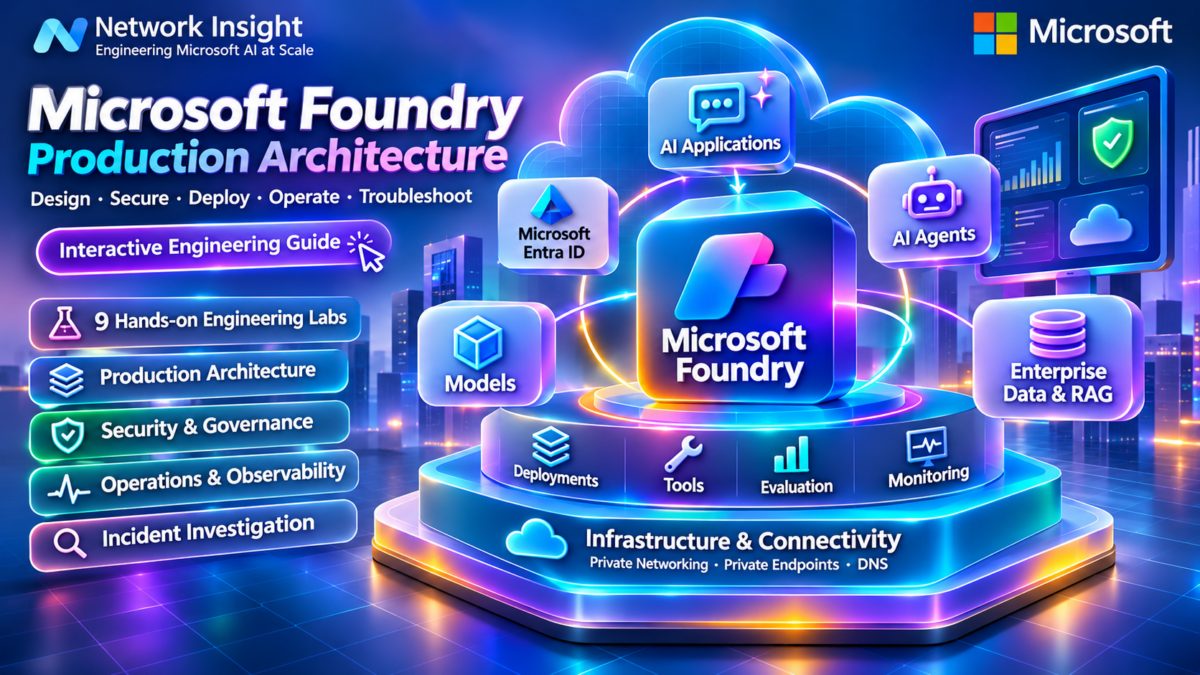
Microsoft Foundry Architecture Explained: Inside the Enterprise AI Production Stack
Microsoft Foundry provides an environment for building, deploying, evaluating and operating AI applications and agents. Production implementations combine Foundry capabilities with model endpoints, identity systems, enterprise data, search services, network connectivity, security controls and operational monitoring.
A production AI application is not simply a model endpoint receiving prompts. It is a distributed system in which application requests move through authentication, policy enforcement, model inference, optional agent execution, tool integration and data retrieval before a response is returned.
Understanding these dependencies is essential when designing reliable AI platforms, controlling cost, enforcing security boundaries and investigating production failures.
Architecture interpretation: The diagram represents logical responsibilities, not a fixed network topology. Model deployments, agents, search services and security components may use different resources, endpoints and deployment boundaries depending on the Foundry architecture selected.
The Six Layers of a Production Foundry Platform
Application Layer
Enterprise applications, copilots, APIs and user-facing AI experiences generate requests and consume model or agent responses.
Identity and Governance
Authentication, API access control, quotas, policies and workload identity govern application interactions.
Foundry Control Layer
Projects, model deployment management, agent configuration and evaluation support AI application engineering.
Inference and Agents
Model endpoints process inference requests while agents may coordinate tools and multi-step execution.
Enterprise Knowledge
Search indexes, retrieval pipelines, enterprise data and grounding services provide contextual information.
Infrastructure and Operations
Private networking, DNS, identity, telemetry, security and CI/CD support reliable production delivery.
Why Microsoft Foundry Requires Production Architecture Engineering
Building a working model demonstration is only the first stage of AI application engineering. Production platforms must manage request volume, authentication, access to sensitive data, dependency failures, latency, model quality, operational cost and change management.
A model endpoint can be healthy while the application fails because a tool cannot authenticate, a search index returns irrelevant documents or a private DNS configuration prevents connectivity to a dependent service.
Similarly, an agent may successfully execute its instructions but produce an incorrect result because of inadequate retrieval context, unsafe tool permissions or missing evaluation controls.
Control Plane vs Inference Data Plane
Control Plane
The control plane manages the configuration and lifecycle of projects, deployments, identities, policies and supporting resources. It is primarily concerned with provisioning, administration and governance.
Inference and Execution Plane
The execution plane processes application requests, model inference, agent operations, tool interactions and retrieval workloads. It is primarily concerned with runtime performance and behaviour.
Production Request Lifecycle
| Stage | Operation | Engineering concern |
|---|---|---|
| 1. Request | Application submits an AI request | Authentication and request validation |
| 2. Governance | Identity and policy controls evaluate access | Authorisation, quotas and safety |
| 3. Orchestration | Application or agent selects execution steps | Tool permissions and workflow state |
| 4. Retrieval | Optional enterprise knowledge retrieval | Search quality and data access |
| 5. Inference | Model deployment processes the request | Latency, throughput and token usage |
| 6. Response | Application returns the result | Output validation and user experience |
| 7. Operations | Telemetry and evaluations capture execution evidence | Reliability, quality, security and cost |
Engineering distinction: Not every request traverses every stage. A direct model inference call may not involve an agent or retrieval system. Production architecture should be designed around the actual application execution path rather than assuming every Foundry capability is required.
What This Engineering Guide Will Teach
This guide develops the complete production architecture of Microsoft Foundry through nine engineering sections: platform fundamentals, model deployment, agent orchestration, enterprise RAG, private networking, identity and security, observability, CI/CD automation and production troubleshooting. The objective is to connect AI platform concepts with the infrastructure, networking and operational skills required to deploy reliable enterprise AI systems.
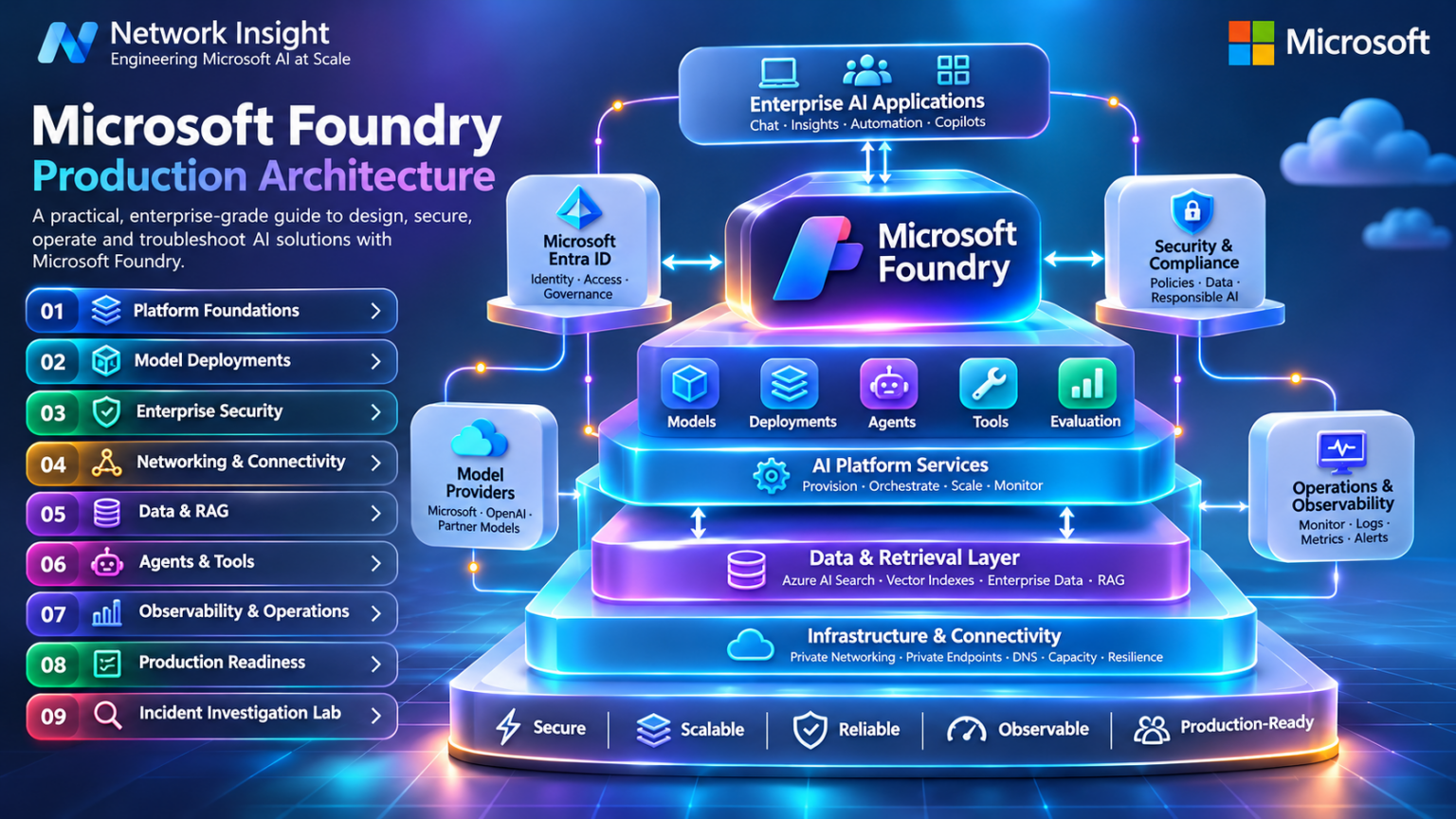
Explore the Microsoft Foundry Architecture
Nine connected engineering disciplines, from Foundry fundamentals and model deployments to agent orchestration, RAG, networking, security, observability, CI/CD and production troubleshooting. Select any architecture component to navigate to its engineering section.
Microsoft Foundry Architecture Fundamentals: Resources, Projects, Models, Agents and Runtime Execution
Microsoft Foundry provides capabilities for organising AI development, deploying models, building agents, integrating tools and operating enterprise AI applications. Its production architecture is best understood as a set of related management, execution, identity and infrastructure responsibilities rather than a single monolithic AI service.
A Foundry solution typically connects an application to one or more model deployments, with optional agent orchestration, enterprise knowledge retrieval and external tool execution. Foundry resources and projects help organise these capabilities, while Azure identity, networking and monitoring services provide the surrounding production environment.
1.1 — Foundry Resource and Project Architecture
A Foundry resource provides an Azure management boundary for supported platform capabilities. Projects provide an organisational context for application development and related assets. Exact resource relationships, endpoint types and supported features depend on the selected Foundry experience and service configuration.
Architecture note: The diagram is conceptual. It illustrates how multiple projects may organise application work around Foundry capabilities. It should not be interpreted as a universal resource hierarchy or a guarantee that all assets are isolated per project.
1.2 — Core Foundry Architecture Components
Foundry Resources
Azure-managed resources supporting the configured Foundry capabilities, identities and service access.
Projects
Organisational contexts for developing and managing related AI application assets.
Model Deployments
Configured inference deployments with model-specific capabilities, capacity and endpoint behaviour.
Agents
Agent configurations and execution workflows coordinating model interactions and supported tools.
Tools and Connections
Integration paths to external services, APIs and enterprise information systems.
Operations
Monitoring, evaluations, security, access governance and production lifecycle management.
1.3 — Foundry Control Plane vs Runtime Execution
Production engineers must distinguish management operations from the runtime processing of application requests.
Control Plane
Management operations include resource provisioning, project administration, deployment configuration, role assignments and supported lifecycle operations.
These operations are governed through the applicable Azure management APIs and platform permissions.
Runtime / Data Plane
Runtime operations include model inference, agent execution, retrieval calls and interactions with supported tools or services.
They require the appropriate endpoint connectivity, authentication, authorisation and service capacity.
Engineering distinction: Permissions to manage an Azure resource do not automatically imply permission to perform every data-plane operation. Validate the required roles and scopes for the specific API and Foundry capability being used.
1.4 — Model Deployment and Endpoint Relationships
A model deployment represents a configured model-serving capability. Applications connect through supported endpoints and APIs, using deployment identifiers and credentials or identities appropriate to the service.
Endpoint architecture matters because an application may encounter authentication failures, invalid deployment identifiers, unsupported request parameters, throttling or model capacity constraints.
1.5 — Agents, Tools and Execution Responsibilities
Agent-based applications introduce additional runtime responsibilities beyond a direct model inference call.
| Component | Engineering responsibility | Production concern |
|---|---|---|
| Agent configuration | Instructions, model selection and supported tool definitions | Consistency, safety and version control |
| Execution workflow | Coordinates model calls and tool interactions | Latency, retries and execution failures |
| Tool connection | Provides access to an API or enterprise service | Authentication and least privilege |
| Enterprise knowledge | Supplies retrieved information when required | Data access, freshness and relevance |
| Application boundary | Validates requests and processes results | Business rules and output handling |
1.6 — Production Request Flow and Dependency Analysis
A typical enterprise request may pass through multiple services, each with its own identity, network and availability requirements.
| Stage | Operation | Failure domain |
|---|---|---|
| 1. Client | Submits request to enterprise application | Client connectivity or application availability |
| 2. Authentication | Validates caller identity and permissions | Token, role or policy failure |
| 3. Orchestration | Determines direct model or agent workflow | Invalid configuration or execution error |
| 4. Retrieval | Obtains relevant knowledge when needed | Search or data service failure |
| 5. Inference | Processes model request | Quota, latency or endpoint error |
| 6. Tool execution | Invokes approved external operations when required | Permission, connectivity or tool failure |
| 7. Response | Returns processed result to application | Output validation or downstream failure |
Architecture principle: These stages represent possible responsibilities, not a mandatory sequence for every application. Direct model calls, retrieval-augmented workflows and agent-based systems have different execution paths.
1.7 — Production Design Decisions
Resource Boundaries
Choose project and resource boundaries based on operational ownership and isolation requirements.
Endpoint Strategy
Determine model access, deployment selection, authentication and capacity requirements.
Identity Architecture
Use appropriate managed identities, workload credentials and least-privilege access.
Network Connectivity
Validate private access, DNS resolution and dependent service connectivity.
Observability
Collect relevant request, dependency, latency and operational telemetry.
Lifecycle Management
Control configuration changes, deployment versions and production release processes.
Section 1 — Engineering Takeaway
Microsoft Foundry production architecture combines Azure-managed resources, projects, model deployments, agent execution, enterprise integrations, identity and infrastructure services. Engineers must understand the separation between management operations and runtime execution, identify service dependencies and design appropriate resource, security and operational boundaries. These fundamentals provide the foundation for model deployment, agent engineering and enterprise AI operations.
Foundry Architecture Explorer
Configure a conceptual Microsoft Foundry application architecture. Select a deployment pattern, enable model and agent capabilities, attach enterprise knowledge services and validate the relationships between the project, inference endpoints, tools and operational controls.
Architecture configuration
Component engineering inspector
Foundry Project
Architecture validation console
Dependency validation and engineering findings
Microsoft Foundry Model Deployment and Inference Engineering: Capacity, Latency, Throughput and Production Reliability
Model deployment engineering is the process of selecting an appropriate AI model, configuring its serving environment, allocating supported capacity and designing the application request path for predictable performance, reliability and cost.
In Microsoft Foundry, model availability, deployment methods, API capabilities, regional support and capacity controls vary by model and underlying service. Production engineers must therefore evaluate both the model's capabilities and the operational characteristics of the deployment that serves it.
2.1 — Production Model-Serving Architecture
A production inference path commonly includes the application, an optional API gateway, authentication and routing logic, a supported model endpoint and operational telemetry.
Architecture interpretation: The diagram illustrates logical responsibilities rather than a mandatory internal request sequence. Gateways and observability services are optional architectural components; model capacity controls depend on the selected deployment type.
2.2 — Model Selection and Deployment Decisions
Model Capability
Evaluate supported modalities, context limits, reasoning capabilities, tool support and response quality.
Deployment Availability
Confirm supported deployment types, regions, model versions and service compatibility.
Capacity
Understand quota allocations, request limits and provisioned throughput where applicable.
Latency
Measure time to first token, generation speed and complete response duration.
Cost
Evaluate token-based charges, deployment capacity commitments and operational overhead.
Reliability
Design retries, timeouts, fallback behaviour and dependency monitoring.
2.3 — Understanding Model Deployment Types
Deployment options differ in how capacity is allocated, how workloads are served and which operational constraints apply.
| Deployment approach | Typical characteristic | Engineering consideration |
|---|---|---|
| Standard / Consumption | Usage-based serving subject to applicable limits | Quota, latency variation and workload demand |
| Provisioned Throughput | Reserved serving capacity for supported models and services | Capacity sizing, utilisation and commitment cost |
| Global Deployment | Serving capacity may be distributed across supported geographies | Data processing requirements and deployment support |
| Data Zone Deployment | Serving within a supported defined data zone | Availability and applicable data processing boundaries |
| Regional Deployment | Serving associated with a selected Azure region where supported | Regional availability, capacity and residency needs |
Important: These categories describe common deployment characteristics and are not a universal mutually exclusive list. Exact Foundry deployment choices vary by model, provider, service and region.
2.4 — Token Processing and Inference Lifecycle
Token processing is central to model performance engineering. The amount of input context, output generation and concurrent workload affects latency, throughput and cost.
For autoregressive language models, prefill processes the input context, while decoding generates output tokens over successive steps. The resulting performance depends on model architecture, serving infrastructure, batching and workload characteristics.
2.5 — Capacity Planning and Throughput Engineering
A useful starting point is estimating the workload's token demand. This is an approximation rather than a guarantee of provider capacity.
This estimate does not account for peak bursts, concurrency, caching, model-specific quota accounting, provider throttling or differing processing costs between input and output tokens.
Capacity principle: Use real workload measurements to validate capacity assumptions. Provisioned throughput and consumption-based quotas may use different capacity and admission-control mechanisms.
2.6 — Latency and Performance Metrics
| Metric | Meaning | Engineering use |
|---|---|---|
| End-to-End Latency | Total application request duration | Measure user experience |
| Time to First Token | Delay before first streamed output token | Evaluate responsiveness |
| Output Token Rate | Generated output tokens per second | Measure generation speed |
| Requests per Minute | Request arrival or processing rate | Capacity planning |
| Tokens per Minute | Token workload or service accounting rate | Quota and throughput analysis |
| Throttling Rate | Requests rejected due to applicable limits | Identify capacity pressure |
| Error Rate | Failed requests over total requests | Reliability monitoring |
2.7 — Production Reliability and Request Control
Production applications should anticipate temporary failures, throttling, network delays and downstream dependency problems.
Timeouts
Bound request duration and prevent indefinite waiting on model operations.
Retries
Use bounded retries with backoff and jitter for appropriate transient failures.
Concurrency
Control simultaneous requests to avoid unnecessary overload and throttling.
Fallback
Design approved alternative behaviours when the preferred deployment is unavailable.
Monitoring
Track request errors, token usage, latency and capacity pressure.
Cost Controls
Apply workload budgets, usage monitoring and application-level limits.
2.8 — Production Model Deployment Troubleshooting
| Symptom | Possible cause | Engineering investigation |
|---|---|---|
| HTTP 401 | Missing or invalid authentication credentials | Verify token, credential configuration and endpoint requirements |
| HTTP 403 | Insufficient permission or access restriction | Inspect effective authorisation and service policies |
| HTTP 404 | Incorrect endpoint, deployment identifier or API route | Verify endpoint URL, deployment name and supported API version |
| HTTP 429 | Throttling or capacity limits | Inspect quota, request rates and retry guidance |
| High latency | Long context, generation workload, queueing or network delays | Separate client, gateway, model and dependency latency |
| Unexpected cost | High token volume, repeated calls or inefficient orchestration | Review token usage, request patterns and deployment pricing |
Operational warning: HTTP status codes provide useful diagnostic signals but are not sufficient by themselves to identify root cause. Inspect service error details, request identifiers, logs and the selected API contract.
Section 2 — Engineering Takeaway
Microsoft Foundry model deployment engineering combines model selection, endpoint architecture, capacity allocation, token processing, latency analysis, reliability controls and cost management. Production performance cannot be determined from model capability alone. Engineers must measure real workloads, understand deployment-specific limits and design applications that respond predictably to throttling, failures and changes in demand.
Model Deployment and Capacity Planner
Estimate how model selection, deployment capacity, token demand and traffic concurrency affect a production AI inference workload. Compare illustrative deployment profiles, investigate quota pressure and identify potential throughput and latency constraints.
Inference workload configuration
Estimated capacity utilisation
Deployment engineering inspector
Model Deployment
Capacity diagnostics console
Capacity findings and production recommendations
Agent Execution and Tool-Call Trace
Trace a multi-step enterprise agent workflow from user request to model decision, tool selection, authorisation, execution and final response. Inject failures, inspect tool-call evidence and practise safe recovery and approval decisions.
Agent workflow configuration
Agent engineering inspector
Agent Runtime
Agent execution console
Execution trace and tool-call evidence
Microsoft Foundry Agents and Tool Orchestration: Execution Architecture, State, Tools and Production Control
AI agents extend model inference by combining language-model reasoning with instructions, tools, execution state and external system interactions. In Microsoft Foundry, supported agent capabilities provide ways to construct workflows in which models can select or request tool operations and use their results to continue processing.
An enterprise agent is therefore not simply a prompt connected to a model. It is an execution system that must coordinate model requests, tool permissions, state management, network dependencies, retries, timeouts and application-level approval boundaries.
3.1 — Production Agent Orchestration Architecture
A production agent workflow connects the application to an agent execution layer, a model deployment and one or more supported tools.
Architecture interpretation: The diagram represents logical responsibilities rather than a mandatory Foundry internal implementation. Tool execution may be handled by a managed capability, application code or another authorised runtime, depending on the tool type and supported agent architecture.
3.2 — Six Core Agent Engineering Components
Instructions
Define agent purpose, operational boundaries, expected behaviour and response requirements.
Model
Provides language understanding, reasoning and supported tool-selection capabilities.
Tools
Expose approved operations such as retrieval, API calls or enterprise actions.
Execution State
Maintains relevant conversation, workflow and tool-result context as designed.
Permissions
Restrict agent access to authorised data and external operations.
Observability
Records execution traces, latency, failures and relevant tool interactions.
3.3 — Agent Tool-Call Lifecycle
A tool call introduces a boundary between model-generated instructions and an external operation. The model may propose a tool call, but the execution system must validate and authorise the action.
| Stage | Operation | Engineering control |
|---|---|---|
| 1. Request | Application submits task to agent | Authenticate caller and validate request |
| 2. Planning | Model determines next supported action | Constrain tool definitions and instructions |
| 3. Tool proposal | Model emits a structured tool request | Validate name, arguments and schema |
| 4. Authorisation | Execution system evaluates permission | Enforce policy and approval requirements |
| 5. Execution | Approved tool performs operation | Apply timeouts, identity and network controls |
| 6. Result | Tool output returns to agent workflow | Validate and treat output as untrusted data |
| 7. Continuation | Agent processes result and continues or responds | Bound execution steps and capture telemetry |
3.4 — Agent Instructions vs Enforcement Controls
Agent instructions can influence behaviour, but they are not a substitute for technical security enforcement.
Instruction-Level Controls
Define intended behaviour, approved workflows, response formatting and restrictions communicated to the model.
Execution-Level Controls
Enforce identity permissions, tool allowlists, parameter validation, network restrictions, approval requirements and audit logging outside model-generated text.
Security principle: A model instruction such as "do not delete production data" cannot reliably replace IAM restrictions, application authorisation or explicit approval gates for destructive operations.
3.5 — Agent State and Workflow Continuity
Multi-step agents often need to maintain relevant context between model calls and tool interactions.
| State category | Purpose | Production consideration |
|---|---|---|
| Conversation context | Preserves relevant user and assistant exchanges | Retention, privacy and context limits |
| Tool results | Supplies external operation results | Data validation and sensitivity |
| Workflow progress | Tracks completed and pending steps | Recovery and duplicate execution |
| Approval state | Records authorised high-impact operations | Identity verification and audit evidence |
| Execution telemetry | Supports diagnosis and performance analysis | Log security and trace correlation |
3.6 — Multi-Step Agent Execution Patterns
Production agent workflows may combine several operations before returning a final result.
The application should control maximum execution steps, overall time budgets, retry behaviour and external operation permissions.
3.7 — Tool Integration and Enterprise API Security
Identity
Use an appropriate workload identity and scope access to required operations.
Input Validation
Validate tool arguments before invoking an external service.
Network Controls
Restrict connectivity to approved endpoints where applicable.
Approval Gates
Require explicit approval for sensitive or irreversible actions.
Timeouts and Retries
Prevent indefinite execution and uncontrolled repeated operations.
Auditability
Correlate user requests, tool invocations and resulting changes.
3.8 — Agent Reliability and Failure Domains
| Failure | Potential cause | Engineering response |
|---|---|---|
| Agent fails to select expected tool | Ambiguous instructions or tool descriptions | Review tool schemas, instructions and evaluation results |
| Tool returns 401/403 | Invalid identity or insufficient permission | Inspect execution identity and effective access |
| Tool call times out | Slow service, network failure or excessive workload | Investigate dependency latency and timeout settings |
| Repeated tool calls | Missing termination controls or ineffective workflow state | Enforce step limits and inspect execution traces |
| Incorrect final answer | Unreliable reasoning, incomplete evidence or bad tool output | Review intermediate results and evaluation cases |
| Duplicate external action | Retry after ambiguous operation completion | Use idempotency controls and reconcile operation status |
Operational caution: Retrying a read-only retrieval operation is different from retrying an action that changes infrastructure or business data. Side-effecting tools require explicit idempotency and recovery design.
3.9 — Production Agent Engineering Checklist
A production-ready agent architecture should establish clear operational boundaries before exposing tools to model-driven workflows.
Design Controls
Define agent responsibilities. Select supported models. Document tool contracts. Establish identity boundaries. Limit high-impact operations. Define approval requirements.
Operational Controls
Configure timeouts and retries. Bound execution steps. Capture trace correlation. Protect sensitive state. Evaluate tool behaviour. Test failure recovery.
Section 3 — Engineering Takeaway
Microsoft Foundry agent engineering combines model execution, instructions, tools, state, authorisation and workflow control. Production agents must be treated as distributed execution systems with external dependencies and potentially significant operational permissions. Reliable designs enforce security outside model instructions, validate tool requests, control side effects and capture sufficient telemetry to investigate every important execution step.
Enterprise RAG Architecture: Azure AI Search, Vector Retrieval, Grounding and Knowledge Integration
Retrieval-Augmented Generation (RAG) connects generative AI models to external knowledge systems. Rather than relying exclusively on information represented in model parameters, a RAG application retrieves relevant enterprise content and supplies it as context for response generation.
In Microsoft Foundry architectures, RAG may combine a model deployment, application or agent orchestration, Azure AI Search, embedding models and enterprise data repositories. The retrieval workflow is responsible for finding useful evidence, while the generation workflow uses that evidence to construct an answer.
A production RAG implementation must address more than semantic similarity. Engineers must design ingestion pipelines, document security, index freshness, retrieval relevance, context limits, citation provenance, monitoring and failure recovery.
4.1 — Enterprise RAG Architecture: Two Connected Pipelines
A production RAG system has two distinct engineering workflows: an offline or asynchronous knowledge ingestion pipeline, and an online retrieval and generation pipeline.
Architecture distinction: The ingestion pipeline prepares knowledge for retrieval. The online pipeline retrieves and uses relevant content during an application request. Neither process automatically guarantees answer correctness or enforces document-level authorisation without appropriate security configuration.
4.2 — Six Core Components of Enterprise RAG
Data Sources
Documents, databases, knowledge repositories and enterprise content systems.
Ingestion
Extraction, normalisation, chunking, metadata processing and index updates.
Embeddings
Vector representations supporting similarity-based retrieval for compatible text and query inputs.
Search Index
Stores searchable fields, metadata and configured vector representations.
Retrieval Logic
Combines query processing, filters, ranking and context selection.
Grounded Generation
Supplies selected evidence to the model and preserves source provenance.
4.3 — Document Ingestion and Chunking Engineering
Enterprise documents are often too large or heterogeneous to index as single retrieval units. Chunking divides extracted content into smaller passages that can be searched and supplied to the model efficiently.
Chunk size influences retrieval precision, context completeness and index volume. Small chunks may retrieve specific facts but lose surrounding meaning. Large chunks preserve more context but can introduce irrelevant material and consume additional tokens.
| Design parameter | Purpose | Engineering trade-off |
|---|---|---|
| Chunk size | Controls passage length | Precision versus context completeness |
| Chunk overlap | Preserves continuity across boundaries | Context retention versus duplication |
| Metadata | Stores source, title, owner and other attributes | Filtering and provenance requirements |
| Document identifiers | Connect chunks to original records | Update, deletion and citation correctness |
| Extraction quality | Converts source documents into usable text | Tables, layouts, scanned content and formatting |
| Index freshness | Keeps search data aligned with source changes | Ingestion frequency and update latency |
Engineering caution: Chunking settings should be validated against real queries. There is no universal optimal chunk size. Document structure, language, retrieval method and expected question types all affect the result.
4.4 — Vector Search, Keyword Search and Hybrid Retrieval
Azure AI Search supports multiple retrieval techniques. A production system can combine lexical matching with vector similarity and optional semantic ranking where supported and configured.
Keyword and Lexical Search
Matches indexed text using search terms and lexical ranking techniques. It is useful for exact technical identifiers, product names, error codes and terminology.
Vector Search
Uses vector representations to retrieve content with similar semantic characteristics. It can help find relevant passages even when the question and document use different wording.
Hybrid search: Combining lexical and vector retrieval can improve coverage for enterprise technical content. Semantic reranking may further refine candidate results, but retrieval quality must still be measured against representative questions.
4.5 — Retrieval Ranking and Context Construction
Retrieval produces candidate documents or chunks. The application must decide which passages should become model context. This step may include filtering, reranking, deduplication and token-budget management.
A retrieval score does not establish that a document is factually correct, current or authorised for the requesting user. Those properties require additional application and data-governance controls.
4.6 — Grounding, Citations and Answer Reliability
Grounding supplies retrieved evidence to the generation process. The model can then use that context when constructing an answer.
Citations should connect claims to identifiable source records or passages. Reliable implementations retain document identifiers, source locations and appropriate provenance metadata through retrieval and response processing.
| Control | Engineering purpose | Failure if missing |
|---|---|---|
| Source IDs | Track retrieved evidence | Unverifiable citations |
| Context validation | Detect incomplete or irrelevant evidence | Unsupported answers |
| Freshness metadata | Identify document age or revision | Outdated guidance |
| Response evaluation | Measure answer relevance and grounding | Undetected quality regressions |
| Abstention policy | Handle insufficient evidence | Confident unsupported responses |
4.7 — Enterprise RAG Security and Document Access
Enterprise retrieval systems must preserve the security boundaries of their underlying knowledge sources. A user should not receive restricted content simply because it appears in a shared search index.
Identity
Authenticate users and workloads accessing the retrieval application.
Authorisation
Apply effective document or record permissions before releasing content.
Metadata Filtering
Use appropriate security attributes to constrain retrieval results.
Private Connectivity
Protect supported service connections using approved network architecture.
Data Protection
Control sensitive content, logging, retention and data exposure.
Auditability
Record relevant retrieval access and application execution evidence.
Security principle: Search filters are only effective security controls when their values are derived from trusted identity and authorisation logic. Never trust a user-supplied filter as proof that the user may access a document.
4.8 — Production RAG Observability and Quality Metrics
| Metric | What it measures | Engineering use |
|---|---|---|
| Retrieval latency | Time required to obtain search results | Identify search bottlenecks |
| Recall at K | Relevant results found within top K | Evaluate retrieval coverage |
| Precision at K | Relevant proportion of top K results | Evaluate retrieval relevance |
| Groundedness | Degree to which answer claims follow supplied evidence | Assess unsupported generation |
| Citation correctness | Whether citations support associated claims | Validate source attribution |
| Index freshness | Delay between source changes and searchable updates | Monitor ingestion reliability |
| Context token usage | Tokens consumed by retrieved evidence | Optimise cost and context budget |
4.9 — Production RAG Troubleshooting
| Symptom | Likely investigation area | Engineering action |
|---|---|---|
| Relevant document not found | Ingestion, index fields, filters or ranking | Inspect indexed content and retrieval queries |
| Incorrect answer despite relevant source | Context selection or model generation | Compare retrieved evidence with final prompt and response |
| Outdated answer | Index freshness or stale source documents | Verify ingestion updates and source revisions |
| Slow responses | Search, reranking, model inference or network latency | Measure each pipeline stage separately |
| Incorrect citations | Source mapping or response attribution | Trace document and chunk identifiers |
| Unauthorised document exposure | Access-control enforcement failure | Contain exposure and inspect identity, filters and logs |
| Embedding mismatch | Incompatible vector dimensions or embedding configuration | Verify index schema and embedding model compatibility |
Investigation method: Separate ingestion failures, retrieval failures, authorisation failures and generation failures. A model cannot reliably use evidence that the retrieval pipeline never supplied, while a successful search request does not guarantee a correct answer.
Section 4 — Engineering Takeaway
Enterprise RAG engineering combines document ingestion, chunking, embeddings, Azure AI Search, hybrid retrieval, grounding, citations, security and observability. The objective is not merely to retrieve similar text. A reliable production RAG system must retrieve relevant and authorised evidence, preserve provenance, manage context efficiently and provide enough telemetry to explain why an answer was produced.
RAG Retrieval Quality Workbench
Investigate how chunking, retrieval strategy, ranking and Top-K selection affect enterprise knowledge retrieval. Compare synthetic search results, inspect grounding evidence and diagnose missing or weak citations before a model generates its response.
Retrieval engineering configuration
Retrieval engineering inspector
Azure AI Search
Retrieval diagnostics console
Ranked retrieval results
Grounded answer assessment
Microsoft Foundry Networking Architecture: Private Endpoints, VNets, DNS, Egress and Secure AI Connectivity
Enterprise Microsoft Foundry deployments depend on network connectivity between applications, model endpoints, agent execution environments, identity providers, retrieval systems and supporting Azure services.
Although AI platforms are often described in terms of models and agents, their production reliability depends heavily on familiar cloud networking principles: IP addressing, DNS resolution, routing, firewall policy, private connectivity and service dependency management.
A secure architecture must determine which components require private access, which operations need outbound connectivity and how traffic crosses trust boundaries. The exact network capabilities available depend on the selected Foundry resources, agent runtime, model deployment and supporting Azure services.
5.1 — Enterprise Foundry Hub-and-Spoke Network Architecture
A common Azure enterprise design uses a hub-and-spoke network topology. Shared security and connectivity services reside in the hub, while applications and private service endpoints are organised into spokes.
Architecture interpretation: This is a conceptual enterprise network design, not a requirement that Foundry services are deployed inside customer VNets. Private endpoints expose supported Azure service interfaces through private IP addresses in a VNet. The underlying managed service remains operated by Azure. Actual packet paths depend on peering, routes, DNS, endpoint configuration and service-specific network support.
5.2 — Six Foundry Networking Building Blocks
Azure VNets
Provide private IP addressing, subnets and network boundaries for customer-managed workloads.
Private Endpoints
Expose supported Azure service interfaces using private IP addresses.
Private DNS
Resolves supported service names to the correct private endpoint addresses.
Firewall Policy
Controls permitted traffic between workloads and external destinations.
Controlled Egress
Restricts outbound connections to approved services and APIs.
Identity Connectivity
Supports token acquisition, authentication and access to protected service APIs.
5.3 — Private Endpoint Architecture and Traffic Flow
Azure Private Link allows supported Azure services to be accessed through private endpoints. A private endpoint creates a network interface with a private IP address inside a selected subnet.
Applications continue to use the service's supported DNS name, while private DNS configuration resolves that name to the appropriate private endpoint IP address.
Important: Private endpoint connectivity does not automatically disable public network access. Where supported, configure the service's public access settings separately and validate the effective security posture.
5.4 — Private DNS and Name Resolution Engineering
Private DNS is one of the most important dependencies in private Azure AI networking. An application can have correct routing and firewall permissions but still fail because its service hostname resolves to an unexpected public address.
In hybrid environments, DNS forwarding and Azure DNS Private Resolver may be used to connect on-premises DNS infrastructure with Azure private zones. The exact private DNS zone names depend on the Azure service and endpoint type.
Engineering sequence: Confirm the hostname, inspect the DNS response, verify the expected private IP address, examine routing, then test TCP/TLS connectivity and application authentication. A successful DNS lookup does not prove that the service API is reachable.
5.5 — Foundry Network Dependency Matrix
| Dependency | Traffic purpose | Engineering consideration |
|---|---|---|
| Model endpoint | Inference requests and responses | Endpoint type, DNS, authentication and network support |
| Foundry management APIs | Resource and project administration | Management-plane connectivity and permissions |
| Agent tools | External tool operations | Execution location, egress and identity |
| Azure AI Search | Knowledge retrieval | Private access, index API connectivity and authorisation |
| Azure Storage | Documents, artifacts or supporting data | Service endpoints, private access and DNS |
| Microsoft Entra ID | Token acquisition and identity operations | Required identity service connectivity |
| Monitoring services | Logs, metrics and traces | Telemetry ingestion paths and data protection |
Not every deployment requires every dependency listed above. Engineers should document the actual services used by their application and agent execution architecture.
5.6 — Controlled Outbound Access and Tool Connectivity
AI agents may require outbound access to enterprise APIs, search services, databases or approved third-party systems. The network architecture must distinguish between traffic originating from the application and traffic originating from a managed or customer-hosted agent execution environment.
Application-Controlled Egress
Customer-managed applications can use appropriate subnet routing, network security groups, firewall policies and approved outbound connectivity.
Managed Runtime Egress
Managed agent or tool execution environments may have different network integration capabilities. Validate supported private networking and outbound controls for the selected runtime.
Security consideration: Do not assume that placing an application in a VNet automatically makes every agent tool call originate from that VNet. Identify the actual execution location and network boundary for each tool integration.
5.7 — Routing, Firewall and Network Security Controls
Route Tables
Control next-hop selection for supported workload subnet traffic.
Network Security Groups
Filter permitted traffic at applicable subnet or interface boundaries.
Azure Firewall
Provides centralised network and application traffic controls.
Private DNS Zones
Map supported private service names to private endpoint addresses.
Private Link
Enables private access to supported managed service interfaces.
Network Monitoring
Supports investigation of reachability, routing and filtering.
User-defined routes and centralised firewall insertion must be designed carefully. Private endpoint traffic can be subject to specific routing and network policy behaviour, depending on subnet configuration and supported Azure capabilities.
5.8 — Production Foundry Network Troubleshooting
| Symptom | Potential cause | Investigation |
|---|---|---|
| Endpoint resolves to public IP | Incorrect private DNS configuration | Check zone records, VNet links and DNS forwarding |
| DNS resolves but connection times out | Routing, filtering or endpoint connectivity issue | Inspect routes, NSGs, firewall rules and endpoint state |
| HTTP 401/403 | Identity, authorisation or access policy failure | Verify credentials, roles and service access restrictions |
| Search works publicly but not privately | Private endpoint or DNS mismatch | Validate search endpoint configuration and private resolution |
| Agent tool cannot reach API | Unsupported or restricted runtime egress | Identify actual tool execution environment |
| Intermittent connectivity | DNS inconsistency, transient service or network issues | Correlate DNS answers, connection traces and timestamps |
| Telemetry missing | Monitoring configuration or ingestion connectivity | Verify diagnostic settings and telemetry destinations |
Recommended troubleshooting order: Start with the service FQDN and expected network path. Validate DNS, IP reachability, TCP/TLS connectivity, service access policy, identity and finally application-level API behaviour. This avoids treating every connectivity problem as a model deployment failure.
5.9 — Production Network Architecture Checklist
Connectivity Design
Document service endpoints, DNS zones, private endpoint subnets, VNet relationships, routing paths and required outbound dependencies.
Security and Operations
Validate public access restrictions, firewall policy, identity boundaries, network monitoring, change controls and incident recovery procedures.
Section 5 — Engineering Takeaway
Microsoft Foundry networking combines Azure VNets, private endpoints, Private DNS, routing, firewall policy, identity connectivity and controlled service dependencies. Production engineers must understand where application and agent traffic originates, which endpoints support private access and how DNS and routing influence the actual request path. A secure AI deployment requires both application security and a validated network architecture.
Private AI Network Path Investigator
Trace a conceptual application-to-Azure-service connection. Investigate private DNS resolution, private endpoint readiness, routing, security controls and service authorisation. Inject failures to identify exactly where an enterprise AI network path breaks.
Network investigation configuration
Network engineering inspector
Private Endpoint
Network diagnostics console
Hop-by-hop path investigation
Microsoft Foundry Security Architecture: Identity, RBAC, Agent Permissions, Data Protection and Zero Trust Governance
Enterprise AI security requires more than protecting model endpoints. Microsoft Foundry environments may connect applications, model deployments, agents, enterprise knowledge systems, external APIs and sensitive business workflows. Each connection introduces an identity, authorisation, network or data-trust boundary.
A production security architecture must enforce least privilege, protect credentials, restrict access to sensitive information, validate agent tool operations and establish appropriate governance over model and application behaviour.
Microsoft Entra ID, Azure role-based access control, managed identities, Key Vault, network security controls, content safety mechanisms and operational monitoring can contribute to these requirements. Their exact configuration depends on the Foundry services and deployment architecture being used.
6.1 — Zero Trust Security Architecture for Foundry
A useful design approach is to treat every interaction between the user, application, model, agent, tool and data service as an explicit trust-boundary crossing.
Security interpretation: The diagram illustrates logical trust boundaries. It does not imply that every Foundry component runs inside a single customer-controlled network. Managed services and agent execution environments may have separate identity, network and administrative boundaries.
6.2 — Six Core Security Controls
Authentication
Establish the identity of users, applications and service workloads.
Authorisation
Apply least-privilege permissions to resources, APIs, tools and data.
Network Security
Restrict supported service access and unnecessary connectivity.
Data Protection
Protect sensitive prompts, retrieved data, outputs and logs.
Agent Controls
Validate tool requests and require approval for sensitive actions.
Governance
Apply policy, monitoring, evaluations and change management to AI systems.
6.3 — Microsoft Entra ID and Managed Identity Architecture
Microsoft Entra ID provides identity capabilities used by Azure applications and services. Managed identities allow supported Azure workloads to obtain credentials without embedding long-lived secrets in application code.
The identity used by an application may differ from the identity used by an agent execution environment or external tool. Engineers must identify the actual security principal at every service boundary.
| Identity type | Typical use | Security consideration |
|---|---|---|
| User identity | Interactive user authentication | User permissions and delegated access |
| System-assigned managed identity | Identity associated with an Azure resource | Lifecycle and scope of access |
| User-assigned managed identity | Reusable identity assigned to supported resources | Shared permission exposure and ownership |
| Service principal | Application or automation identity | Credential lifecycle and least privilege |
| API key | Authentication for supported service APIs | Storage, rotation and key exposure |
Engineering principle: Managed identity removes the need to manage certain application credentials, but it does not automatically grant access to a service. Appropriate permissions must still be assigned to the correct principal.
6.4 — Azure RBAC and Permission Boundaries
Azure role-based access control assigns permissions to security principals at supported scopes. A production Foundry environment may require different permissions for resource administration, model inference, agent operations and access to enterprise data.
| Boundary | Example operation | Control objective |
|---|---|---|
| Resource management | Create or configure supported Azure resources | Restrict administrative privileges |
| Model inference | Invoke an authorised model endpoint | Limit runtime model access |
| Agent execution | Run approved agent workflows | Constrain runtime capabilities |
| Search access | Query protected enterprise indexes | Enforce data access policy |
| Tool execution | Invoke an external enterprise API | Restrict permitted business operations |
| Monitoring | Read operational telemetry | Protect sensitive diagnostic information |
Role names and supported permissions vary by service and API. Production configuration should be validated against the current permission model for each Foundry capability.
6.5 — Secrets and Credential Protection
Applications may require credentials for external APIs, databases or other enterprise systems. Secrets should not be embedded in prompts, source code, logs or agent instructions.
Key Vault
Centralise supported secret and certificate storage and access.
Credential Rotation
Establish procedures for replacing credentials without uncontrolled downtime.
Least Privilege
Restrict credential access to approved workload identities.
Log Redaction
Prevent secrets from entering traces, diagnostics and audit records.
Environment Separation
Use appropriate development, test and production credential boundaries.
Incident Recovery
Support revocation, rotation and investigation after credential exposure.
6.6 — Prompt Injection and Agent Tool Security
Prompt injection occurs when untrusted content attempts to influence the model or agent outside its intended instruction hierarchy. The content may arrive through a user message, retrieved document, web page or tool result.
The principal risk is that a model may treat untrusted source content as an instruction and attempt an unauthorised tool operation or disclose protected data.
Critical control: Prompt filtering and agent instructions alone cannot guarantee protection against prompt injection. Enforce authorisation, tool restrictions, input validation and approval requirements outside model-generated instructions.
6.7 — Content Safety and Data Governance
Content safety controls can help identify or restrict categories of unsafe input and output where supported. However, content filtering is distinct from data authorisation, privacy controls and tool security.
| Control area | Purpose | Engineering requirement |
|---|---|---|
| Input filtering | Evaluate supported categories of risky requests | Configure appropriate safety behaviour |
| Output filtering | Evaluate generated responses | Define handling of blocked or flagged outputs |
| Data classification | Identify sensitive enterprise information | Apply access and handling policies |
| Retention | Control stored conversations, traces and artifacts | Define lifecycle and deletion requirements |
| Data residency | Meet applicable processing-location requirements | Validate deployment-specific commitments |
| Audit logging | Support accountability and investigation | Protect logs and control access |
6.8 — Governance and Policy Enforcement
Enterprise AI governance should apply to infrastructure, model access, agent tools, application releases, data handling and operational monitoring.
Infrastructure Governance
Azure Policy and infrastructure-as-code controls can help standardise supported resource configurations, network settings and security requirements.
AI Application Governance
Model evaluations, agent testing, approval workflows, release controls and runtime monitoring help govern application behaviour.
Governance distinction: Azure resource policies do not automatically validate the correctness, safety or reliability of model-generated answers and agent actions. Application-level evaluation and runtime enforcement remain necessary.
6.9 — Production Security Troubleshooting
| Symptom | Potential cause | Investigation |
|---|---|---|
| Model request returns 401 | Invalid or missing authentication | Inspect token audience, credential and endpoint requirements |
| Model request returns 403 | Insufficient permission or access restriction | Inspect effective roles and service policies |
| Agent tool access denied | Tool identity lacks required permissions | Identify actual execution principal and target API authorisation |
| Unexpected document access | Retrieval authorisation or filtering failure | Inspect document permissions and trusted filter enforcement |
| Secret appears in logs | Inadequate logging or redaction controls | Contain exposure, rotate credential and review telemetry |
| Agent proposes unsafe action | Prompt injection or insufficient tool controls | Review tool policy, approval gates and execution trace |
| Deployment blocked | Policy or permission enforcement | Inspect deployment errors and applicable policy assignments |
Incident response: For suspected data exposure or unauthorised tool execution, prioritise containment, credential revocation, preservation of audit evidence and investigation of the affected trust boundary.
Section 6 — Engineering Takeaway
Microsoft Foundry security engineering combines Microsoft Entra ID, managed identities, Azure RBAC, credential protection, network controls, agent tool authorisation, content safety, data governance and operational monitoring. Production security requires independent enforcement at every important trust boundary. Model instructions can guide behaviour, but identity permissions, application policies and explicit approval controls must determine what the system is actually allowed to do.
AI Security Boundary Inspector
Investigate how user identity, managed identities, resource roles, tool permissions, retrieval access and data protection controls govern a production AI application. Configure security controls, inject policy failures and trace whether an operation should be permitted, denied or flagged for review.
Security investigation configuration
Security engineering inspector
Microsoft Entra ID
Security decision console
Security boundary findings
Microsoft Foundry Observability and Evaluation: Distributed Tracing, Model Performance, Agent Telemetry and Production Quality
Production AI observability extends traditional application monitoring by introducing model-specific and agent-specific execution behaviour. A single user request may trigger model inference, knowledge retrieval, multiple tool calls, agent orchestration and external service dependencies.
Engineers must be able to answer several operational questions: Where did latency occur? Which model deployment processed the request? How many tokens were consumed? Which tools were invoked? What evidence was retrieved? Did the response meet quality and safety expectations?
Microsoft Foundry monitoring and evaluation capabilities can be combined with Azure Monitor, Application Insights, OpenTelemetry-compatible instrumentation and application-specific quality evaluation workflows, depending on the selected services and runtime.
7.1 — End-to-End Production AI Telemetry Architecture
A useful observability design connects application traces, agent execution events, model request metrics, retrieval telemetry and tool dependency records into a correlated operational view.
Architecture interpretation: This diagram represents logical telemetry collection. Not every Foundry capability automatically emits every metric or trace shown. Production instrumentation must be designed and validated for the specific application, SDK, model API, agent runtime and supporting services.
7.2 — Six Observability Dimensions
Application Reliability
Request success, errors, availability and end-to-end latency.
Model Performance
Inference latency, token consumption, throughput and throttling.
Agent Execution
Workflow steps, tool calls, retries, failures and completion.
Retrieval Quality
Search latency, relevance, grounding and citation correctness.
Safety and Quality
Evaluation results, policy outcomes and response quality.
Cost and Capacity
Token demand, deployment utilisation and operational expenditure.
7.3 — Distributed Tracing Across AI Request Paths
Distributed tracing records the timing and relationships between operations involved in a request. A parent application span may contain child spans for agent execution, retrieval, model inference and tool calls.
The waterfall above is illustrative rather than measured telemetry. Real traces may contain parallel operations, multiple model calls, repeated tool execution and nested agent workflows.
Tracing principle: Capture correlation identifiers and span relationships, but avoid recording sensitive prompts, credentials, retrieved documents or personal information without an approved data-handling policy.
7.4 — Model Inference Performance Metrics
| Metric | Meaning | Engineering use |
|---|---|---|
| End-to-end latency | Total application response time | Measure user experience |
| Time to first token | Delay before first streamed output token | Measure responsiveness |
| Output token rate | Generated output tokens per second | Evaluate generation performance |
| Input tokens | Prompt and context consumption | Analyse context efficiency |
| Output tokens | Generated token consumption | Analyse latency and cost |
| HTTP 429 rate | Throttled requests | Detect quota or capacity pressure |
| Error rate | Failed requests over total requests | Monitor reliability |
| Concurrency | Simultaneous active operations | Understand workload pressure |
7.5 — Agent Execution Telemetry
Agent observability requires visibility into the workflow, not just the final answer. An agent may successfully return a response while performing unnecessary tool calls or consuming excessive model capacity.
Execution Steps
Number and order of workflow operations.
Tool Calls
Invoked tools, arguments and outcomes under approved logging rules.
Retries
Repeated model or dependency operations.
Execution Duration
Total time spent in agent workflows.
Failure Location
Specific operation that caused an error.
Approval Events
Human authorisation and high-impact operation decisions.
7.6 — Production AI Evaluation Framework
Traditional infrastructure monitoring measures whether a service is available and responsive. AI evaluation additionally measures whether the system produces useful, accurate and appropriate results.
| Evaluation dimension | Question | Example method |
|---|---|---|
| Relevance | Does the answer address the question? | Reference datasets and evaluator scoring |
| Groundedness | Are claims supported by supplied evidence? | Compare response claims with retrieved context |
| Retrieval quality | Were relevant documents returned? | Precision, recall and labelled queries |
| Tool correctness | Did the agent invoke appropriate tools? | Execution trace evaluation |
| Safety | Does output satisfy defined safety requirements? | Policy tests and supported evaluators |
| Task completion | Did the workflow achieve its objective? | Scenario-based acceptance tests |
| Regression | Did quality change after a release? | Compare evaluation results across versions |
Evaluation caution: Automated evaluator scores are estimates and may themselves be imperfect. For high-impact workflows, combine automated evaluation with representative datasets, human review and application-specific acceptance criteria.
7.7 — Service Level Objectives for AI Applications
Production teams can define service level objectives for reliability and performance, while separately tracking AI response quality.
These are example objectives, not Microsoft Foundry service guarantees. Appropriate thresholds depend on the workload, deployment type, business criticality and measured baseline.
7.8 — Token Usage, Capacity and Cost Observability
Token consumption affects both operating cost and serving capacity. Agent applications may make several model calls for a single user request, making per-task cost more useful than per-request model cost alone.
Cost engineering: Pricing varies by model, deployment type, region, usage category and supporting services. Use current service billing data rather than assuming a fixed token price across all Foundry deployments.
7.9 — Production Observability Troubleshooting
| Symptom | Investigation area | Engineering action |
|---|---|---|
| High end-to-end latency | Application, retrieval, model or tools | Inspect correlated spans and dependency durations |
| Unexpected token growth | Prompt context or repeated model calls | Review token accounting and agent execution steps |
| Missing trace spans | Instrumentation or context propagation | Validate telemetry configuration and trace correlation |
| Agent task fails intermittently | Tool dependency or execution state | Compare successful and failed execution traces |
| Quality regression | Model, prompt, retrieval or tool changes | Compare versioned evaluation datasets and outputs |
| Unexpected cost increase | Usage growth, retries or capacity configuration | Correlate billing, tokens and workload volume |
| Missing monitoring data | Diagnostic configuration or telemetry ingestion | Inspect instrumentation, permissions and ingestion paths |
Section 7 — Engineering Takeaway
Production Microsoft Foundry observability combines distributed tracing, model performance metrics, agent execution telemetry, retrieval evaluation, response quality, safety monitoring, capacity analysis and cost engineering. A successful HTTP response does not necessarily mean an AI task succeeded. Engineers must observe both the infrastructure that executes the workload and the quality of the outcome it produces.
AI Production Telemetry Analyzer
Investigate production AI health using request latency, token consumption, error rates, quality indicators and cost estimates. Compare incident scenarios, inspect individual traces and identify which signals reveal the likely operational failure domain.
Telemetry investigation configuration
Production telemetry timeline
Synthetic request traces
Request trace inspector
Production telemetry
Select a request trace to inspect its execution details.
Observability diagnostics console
Operational findings and incident hypotheses
Microsoft Foundry CI/CD and MLOps Architecture: Infrastructure as Code, Evaluation Gates, Release Pipelines and Rollback
Production AI applications require repeatable deployment processes, controlled changes, automated testing and reliable recovery procedures. Microsoft Foundry workloads introduce additional release dependencies beyond traditional application code, including model deployments, agent instructions, tool definitions, retrieval indexes and evaluation datasets.
A mature delivery pipeline must coordinate infrastructure configuration, application artifacts, model selection, security permissions, agent behaviour and operational readiness.
CI/CD and MLOps practices provide a framework for managing these dependencies through version control, automated validation, environment promotion, approval gates and production monitoring.
8.1 — Production AI Delivery Pipeline Architecture
An enterprise delivery workflow typically begins with a source-controlled change and progresses through build, validation, evaluation, approval and production release.
Architecture interpretation: This diagram represents a logical delivery process. Azure DevOps, GitHub Actions or another approved CI/CD platform may implement the pipeline. Deployment steps and automation interfaces depend on the selected Foundry services, model providers and runtime capabilities.
8.2 — Six Components of Production AI Release Engineering
Version Control
Track application code, agent configuration, infrastructure and evaluation definitions.
Infrastructure as Code
Provision supported Azure resources through repeatable declarative configuration.
Automated Testing
Validate application logic, configuration, security and integrations.
AI Evaluations
Measure response quality, grounding, safety and task completion.
Release Gates
Require approval when changes exceed defined risk boundaries.
Rollback
Restore a validated configuration after a failed deployment.
8.3 — Infrastructure as Code for Foundry Environments
Infrastructure as code helps standardise Azure resource deployment, network configuration, identity assignments, monitoring and supported Foundry service configuration.
Bicep, ARM templates and Terraform can be used for supported Azure infrastructure resources. Not every Foundry runtime artifact or model operation is necessarily managed through the same infrastructure provider or deployment API.
Engineering caution: Infrastructure-as-code support changes over time. Validate current provider and API support before assuming every Foundry project, agent, model deployment or runtime configuration can be managed declaratively.
8.4 — Development, Staging and Production Environments
Environment separation reduces the risk that experimentation or testing affects production workloads.
| Environment | Purpose | Engineering controls |
|---|---|---|
| Development | Implement and experiment with changes | Restricted test data and limited permissions |
| Integration | Validate dependent service interactions | API contracts, identity and network tests |
| Staging | Exercise release candidate under representative conditions | Performance, safety and regression evaluations |
| Production | Serve approved business workloads | Controlled access, monitoring and rollback |
Separate environments may use different model deployments, capacity allocations and service endpoints. The pipeline should make these differences explicit and prevent unintended cross-environment access.
8.5 — Model, Prompt and Agent Version Management
AI release engineering must track more than application source code. A change in model version, system instructions, tool schema or retrieval configuration can alter application behaviour.
| Versioned component | Potential impact | Release control |
|---|---|---|
| Application code | Business logic and API behaviour | Automated tests and artifact versioning |
| Model deployment | Capabilities, latency and response behaviour | Compatibility and evaluation testing |
| Agent instructions | Workflow decisions and output structure | Regression evaluation |
| Tool definitions | Available actions and argument contracts | Schema and permission validation |
| Retrieval configuration | Knowledge selection and grounding | Retrieval relevance testing |
| Evaluation dataset | Quality acceptance criteria | Dataset versioning and review |
8.6 — AI Evaluation Gates in CI/CD
A conventional software pipeline may validate that code compiles and unit tests pass. An AI pipeline should also validate that important application behaviours remain within approved quality and safety thresholds.
Evaluation principle: Quality gates should use representative and versioned test datasets. A model change that improves one evaluation score may still introduce regressions in other workload categories.
8.7 — Deployment Strategies and Controlled Rollout
Staged Deployment
Validate a release in lower environments before production.
Canary Release
Direct a limited portion of eligible traffic to a new version.
Blue-Green
Maintain separate serving environments where architecture supports it.
Feature Flags
Enable or disable application capabilities without a full redeployment.
Traffic Control
Use application or gateway routing where supported and appropriate.
Rollback
Return to a known-good application and configuration baseline.
Deployment limitation: Canary and blue-green strategies require appropriate application, gateway or serving architecture. They are not automatically available as native traffic-splitting features for every Foundry model deployment type.
8.8 — Rollback and Release Recovery Engineering
Rollback must account for dependencies between application code, model endpoints, agent configuration, retrieval indexes and identity permissions.
Application Rollback
Restore the previous validated application artifact and associated configuration while preserving required runtime compatibility.
AI Configuration Rollback
Restore approved model references, agent instructions, tool definitions and retrieval settings where previous versions remain supported.
Recovery principle: A rollback is not guaranteed merely because a previous configuration is stored in Git. The underlying model version, deployment capacity and dependent services must still be available and compatible.
8.9 — Production CI/CD Troubleshooting
| Failure | Potential cause | Engineering investigation |
|---|---|---|
| Infrastructure deployment fails | Invalid template, permission or policy | Inspect deployment operation and policy errors |
| Model deployment unavailable | Unsupported model, region or capacity | Verify deployment support and current limits |
| Agent evaluation fails | Prompt, tool or model behaviour regression | Compare versioned traces and test cases |
| Staging works but production fails | Environment-specific identity, DNS or configuration | Compare effective environment settings |
| Release increases latency | Model, context or dependency change | Compare pre- and post-release telemetry |
| Rollback fails | Missing artifact or incompatible dependency | Inspect release manifests and dependency availability |
| Unexpected production behaviour | Configuration drift or incomplete release validation | Compare deployed state with approved release baseline |
Section 8 — Engineering Takeaway
Microsoft Foundry CI/CD and MLOps engineering combine version control, infrastructure as code, automated testing, AI evaluations, environment promotion, release approval, deployment strategies and rollback planning. Production AI delivery must manage both deterministic software components and model-driven behaviour. A reliable release process validates infrastructure correctness, application security, AI quality and operational readiness before changes reach production.
AI Release Pipeline Simulator
Simulate a production AI release from version-controlled configuration through Infrastructure as Code validation, model evaluation, security checks, staging deployment, approval, canary traffic and production promotion. Investigate release failures and practise rollback decisions.
Release engineering configuration
Release engineering inspector
Production Release
Select a pipeline stage to inspect its engineering purpose.
Release diagnostics console
Release audit trail
Microsoft Foundry Production Troubleshooting: Model Failures, Agent Incidents, Network Diagnostics and Recovery Engineering
Production Microsoft Foundry applications combine multiple distributed components: client applications, identity services, API gateways, model deployments, agent runtimes, retrieval systems, enterprise tools and monitoring platforms.
When an AI application fails, the visible symptom may appear far from the actual cause. A model timeout may originate from network connectivity, an agent failure may be caused by an external API, and an incorrect answer may originate from stale retrieval data rather than the model itself.
Effective troubleshooting requires a structured method that separates failure domains, correlates evidence and validates recovery against a known-good baseline.
9.1 — Production Incident Investigation Architecture
The first engineering task is to map the affected request path and determine which component failed. A useful investigation follows the request from the application through identity, model inference, retrieval and tools.
Architecture interpretation: The diagram represents logical dependencies. Actual request ordering varies by application, agent design and service configuration. Identity checks, retrieval and tool calls may occur at several points within one request.
9.2 — Six Production Failure Domains
Application
Invalid requests, timeouts, configuration errors and client failures.
Identity
Authentication, RBAC, token scope and permission failures.
Model
Deployment errors, throttling, capacity and inference latency.
Retrieval
Search failures, stale indexes and incorrect evidence.
Agent Tools
External API failures, execution loops and invalid tool calls.
Networking
DNS, private endpoints, routing and firewall restrictions.
9.3 — Structured Fault Isolation Method
A consistent investigation process reduces the risk of changing unrelated components during an incident.
Engineering principle: Do not begin with random configuration changes. First establish the failure boundary and collect evidence from the affected request path.
9.4 — Model Endpoint and API Failure Investigation
| Symptom | Potential cause | Investigation |
|---|---|---|
| HTTP 400 | Invalid request, unsupported parameters or malformed payload | Inspect request schema and API contract |
| HTTP 401 | Missing or invalid authentication | Verify credential, token and endpoint requirements |
| HTTP 403 | Insufficient permission or access restriction | Inspect effective roles and service policy |
| HTTP 404 | Incorrect endpoint, route or deployment reference | Verify endpoint URL and deployment configuration |
| HTTP 429 | Quota or capacity throttling | Review request rate, limits and retry guidance |
| HTTP 5xx | Service or downstream failure | Inspect service error details and dependency health |
| High latency | Long context, generation workload, queueing or dependencies | Compare inference and end-to-end timing |
HTTP diagnostics: Status codes indicate failure categories, not definitive root causes. Capture safe request identifiers, response error details and timestamps for correlation. Avoid logging sensitive prompt content unnecessarily.
9.5 — HTTP 429 Throttling and Capacity Incidents
Throttling can occur when a workload exceeds applicable request, token or capacity limits. The exact limits and accounting behaviour depend on the selected model and deployment type.
Immediate Mitigation
Reduce unnecessary concurrency, respect supported retry guidance, apply bounded exponential backoff and investigate unexpected request bursts.
Long-Term Remediation
Measure peak workload demand, optimise token usage, review available quota or capacity and redesign traffic distribution where appropriate.
Reliability warning: Unbounded retries can increase system pressure and amplify incidents. For agent tool operations that modify external state, verify idempotency before repeating the operation.
9.6 — Agent Execution and Tool-Call Failures
Agent failures may occur because the model selects an inappropriate tool, a tool request fails validation, the runtime lacks permissions or an external API becomes unavailable.
| Failure | Investigation | Control |
|---|---|---|
| Tool not invoked | Inspect tool definitions and agent instructions | Improve schemas and test scenarios |
| Tool returns 403 | Identify execution identity and effective permissions | Correct least-privilege access |
| Tool timeout | Inspect dependency latency and network connectivity | Apply timeouts and safe retries |
| Repeated tool calls | Inspect workflow state and termination conditions | Enforce execution limits |
| Incorrect final response | Compare intermediate tool results with generated answer | Evaluate grounding and task completion |
| Duplicate external action | Inspect retries and operation completion status | Use idempotency and reconciliation |
9.7 — Azure AI Search and RAG Incident Investigation
RAG incidents often appear as model quality problems even when the actual failure occurs during document ingestion, indexing, retrieval or context construction.
Missing Documents
Verify source ingestion, index fields and query filters.
Stale Knowledge
Inspect index refresh and source update timestamps.
Low Relevance
Review query formulation, retrieval strategy and ranking.
Incorrect Citations
Trace chunk identifiers and source mapping.
Search Latency
Measure query execution and downstream dependency timing.
Access Failures
Validate search identity, permissions and document-level controls.
9.8 — Private Endpoint, DNS and Network Troubleshooting
Network incidents should be investigated from the perspective of the workload making the request. A private endpoint may be correctly configured while a client resolves the wrong address or follows an unexpected route.
| Observation | Possible fault domain | Next check |
|---|---|---|
| Unexpected public DNS answer | Private DNS configuration | Zone links and resolver forwarding |
| Private IP resolves but TCP fails | Routing or filtering | Routes, firewall, NSG and endpoint state |
| TLS handshake fails | Certificate, proxy or TLS configuration | Hostname, trust chain and intermediary policy |
| Connection succeeds but API returns 403 | Identity or service access policy | Authentication, roles and endpoint restrictions |
| Agent cannot reach a tool | Runtime egress or tool network configuration | Identify actual execution environment |
Network investigation: Validate DNS, routing, TCP connectivity, TLS negotiation, service access policy and authentication as separate stages. A successful TCP connection does not prove that a request is authorised.
9.9 — Incident Timeline and Change Correlation
A production incident should be correlated with configuration changes, model updates, agent releases, identity modifications and service health events.
The timeline is illustrative. Real investigations should record exact timestamps, time zones, affected deployments, request IDs, changes and recovery verification evidence.
9.10 — Production Incident Recovery Framework
| Phase | Engineering objective | Expected evidence |
|---|---|---|
| Detect | Identify abnormal service behaviour | Alerts, metrics and user reports |
| Triage | Determine impact and affected scope | Incident severity and service inventory |
| Isolate | Identify failing dependency or change | Correlated traces and configuration comparisons |
| Mitigate | Reduce impact safely | Approved operational action |
| Recover | Restore expected service behaviour | Successful requests and stable metrics |
| Validate | Confirm technical and AI quality recovery | Functional tests and evaluation results |
| Review | Prevent recurrence | Root-cause analysis and corrective actions |
Recovery principle: Restoring HTTP availability is not sufficient if the AI application continues producing incorrect or unauthorised results. Validate both service health and application behaviour before closing the incident.
9.11 — Production Troubleshooting Checklist
Technical Investigation
Confirm endpoint and deployment configuration. Inspect DNS and network connectivity. Verify authentication and effective permissions. Correlate model, retrieval and agent execution traces. Review recent changes.
Recovery and Governance
Apply controlled mitigation. Validate model and agent behaviour. Monitor latency, errors and capacity. Preserve incident evidence. Document root cause and corrective actions.
Section 9 — Engineering Takeaway
Production Microsoft Foundry troubleshooting requires multi-layer fault isolation, model endpoint diagnostics, agent execution analysis, retrieval investigation, identity validation, network troubleshooting, distributed tracing and controlled incident recovery. The objective is to identify the first failing dependency, restore service safely and validate that the AI application once again produces reliable, authorised and operationally acceptable results.
Production Incident Investigation Lab
Investigate simulated Microsoft Foundry production incidents using service telemetry, identity diagnostics, network checks, model capacity evidence, retrieval results and agent tool traces. Determine the root cause, select the correct remediation and verify recovery.
Incident investigation configuration
Incident diagnostic terminal
Root-cause investigation and remediation
Collected investigation evidence

- BGP Troubleshooting: Real-World Failures - November 18, 2026
- Kubernetes Security Architecture - November 18, 2026
- AI Networking Architecture: Ethernet, RoCEv2 and InfiniBand - November 18, 2026