In Kubernetes, managing applications that maintain persistent state requires different considerations from running stateless workloads. Web front ends and many API services can often be replaced or rescheduled without preserving the identity of an individual Pod. Databases, distributed queues, clustered storage systems, and other stateful workloads may require persistent storage, stable network identity, predictable startup behaviour, and controlled updates.
The Kubernetes resource designed for this purpose is the StatefulSet. StatefulSet was originally introduced as PetSet and was renamed as Kubernetes evolved. The current StatefulSet API provides a declarative mechanism for managing Pods that require persistent identity and storage while still benefiting from Kubernetes scheduling, service discovery, health management, and automation.
A StatefulSet gives each Pod a predictable identity based on its ordinal position. For example, a StatefulSet with three replicas might create Pods named database-0, database-1, and database-2. These identities remain associated with the corresponding Pods even when individual instances are rescheduled. This predictable identity is particularly useful for distributed systems where members need to discover and distinguish one another.
Persistent storage is another fundamental StatefulSet capability. StatefulSets can use volumeClaimTemplates to create persistent volume claims associated with individual Pod identities. When a Pod is recreated, Kubernetes can reattach the appropriate persistent storage rather than treating the replacement as an entirely new stateless instance. The actual durability and availability characteristics depend on the underlying StorageClass and storage platform.
StatefulSets also provide controlled Pod management. Depending on the configured policy, Pods can be created, updated, or terminated in an ordered manner. This can be important for clustered applications that need members to start in a particular sequence or require controlled membership changes. However, ordering should not be confused with application-level consistency; the application itself remains responsible for replication, quorum, transactions, and data integrity.
Stable network identity is commonly provided through a Kubernetes Service, often a headless Service, combined with the StatefulSet’s predictable Pod identities. This allows distributed applications to discover individual members rather than communicating only with an interchangeable load-balanced endpoint. DNS-based service discovery can then provide stable names even as Pods are rescheduled.
StatefulSets support rolling updates and recovery mechanisms, but they do not automatically make a stateful application highly available. Kubernetes can restart or reschedule a failed Pod, but database replication, leader election, quorum management, backup, recovery, and consistency are responsibilities of the application or an appropriate Kubernetes operator. For complex databases and distributed systems, operators can provide application-specific automation that goes beyond the generic StatefulSet abstraction.
Storage design is therefore a critical part of any StatefulSet deployment. Engineers should consider the StorageClass, access modes, performance characteristics, failure domains, backup strategy, snapshot capabilities, encryption, and recovery procedures. Persistent volumes provide storage persistence, but persistence is not the same as backup. A resilient stateful platform needs a tested recovery strategy in addition to persistent storage.
Observability is equally important. Stateful workloads should be monitored for Pod health, storage capacity, I/O performance, replication status, application errors, restart frequency, resource consumption, and cluster-specific conditions. Kubernetes metrics and events can provide infrastructure-level information, while application telemetry is often required to understand whether the database or distributed system itself is operating correctly.
StatefulSets are therefore best understood as a Kubernetes mechanism for providing stable identity, persistent storage relationships, and controlled lifecycle management. They are not a generic solution that turns any stateful application into a distributed, fault-tolerant service.
The modern Kubernetes approach is to combine StatefulSets with persistent storage, Services, appropriate scheduling and disruption policies, observability, backup and recovery processes, and—where appropriate—application-specific operators. Used correctly, this provides a strong foundation for running stateful workloads while preserving the declarative and automated operating model that makes Kubernetes powerful.
Kubernetes Stateful Workloads
Pets vs Cattle Lab
See why Kubernetes treats ordinary stateless replicas differently from stateful workloads that need persistent identity, storage and predictable lifecycle behaviour.
INTERACTIVE MODEL
Stateless DeploymentCATTLE
◇
web-7f84c
Replaceable replica · no fixed identity
READY
◇
web-5c91a
Replaceable replica · no fixed identity
READY
◇
web-2bd77
Replaceable replica · no fixed identity
READY
VS
StatefulSetPET
◆
db-0
Stable identity · PVC db-data-db-0
READY
◆
db-1
Stable identity · PVC db-data-db-1
READY
◆
db-2
Stable identity · PVC db-data-db-2
READY
Network Identity
Different
Storage Identity
Ephemeral
Replacement Model
Anonymous
Lifecycle
Flexible
Engineering Insight
Stateless replicas are intentionally replaceable. If one disappears, Kubernetes can create another equivalent replica without preserving that pod's individual identity.
Ready. Select an operation above to change the model.
Highlights: Kubernetes PetSets
Stateful Applications with Kubernetes PetSets
a) PetSets, introduced in Kubernetes version 1.3, provides a higher-level abstraction for managing stateful applications. Unlike traditional Kubernetes deployments, which focus on stateless workloads, PetSets offer features like stable network identities, ordered deployment, and automated scaling while considering the application’s stateful nature.
b) One key challenge in scaling stateful applications is ensuring stable network identities. PetSets addresses this by providing stable hostnames and domain names for each replica of the stateful application. This allows clients to consistently connect to the same replica, even when scaling or restarting instances.
c) PetSets enable ordered deployment and scaling of stateful applications. This is crucial when dealing with applications that rely on specific ordering or coordination between instances. With PetSets, you can define a startup order for your replicas, ensuring that each replica is fully operational before the next one starts.
Benefits of PetSets
PetSets offer several advantages over traditional Kubernetes deployments:
1. Stable Network Identity: PetSets assigns each pod a stable hostname and DNS identity, enabling seamless communication between pods and external services. This stability is essential for applications relying on peer-to-peer communication or distributed databases.
2. Ordered Deployment: PetSets ensure the ordered deployment and scaling of pods. This is particularly useful for applications where the order of creation or scaling matters, such as databases or distributed systems.
3. Persistent Volumes: PetSets facilitate the association of persistent volumes with pods, ensuring data durability and allowing applications to retain their state even if the pods are rescheduled.
4. Rolling Updates: PetSets supports rolling updates, enabling you to update your stateful applications without downtime. This process ensures that each pod is gracefully terminated and replaced by a new one with the updated configuration, minimizing service interruptions.
Understanding Kubernetes PetSet
A – ) Kubernetes PetSet, also known as StatefulSet in more recent versions, is designed to manage stateful applications that require stable network identities and persistent storage. Unlike traditional Kubernetes Deployments, PetSet ensures that each pod in a set has a unique and stable hostname, allowing applications to maintain their identity and communicate effectively with other components in the cluster.
B – ) PetSet offers several key features that make it a valuable tool for managing stateful applications. One of its primary benefits is the ability to automatically provision and manage persistent volumes for each pod in the set. This ensures data durability and allows applications to seamlessly recover from pod failures without losing critical data. Additionally, PetSet provides ordered pod creation and termination, allowing for smooth scaling and rolling updates while preserving the application’s state.
C – ) Kubernetes PetSet finds application in various scenarios where stateful workloads are involved. One common use case is running databases, such as MySQL or PostgreSQL, in a distributed fashion. PetSet ensures that each replica of the database has a stable and unique identity, enabling seamless replication and failover. Other use cases include running distributed file systems, message queues, and other stateful applications that require stable network identities and persistent storage.
D – ) To effectively utilize Kubernetes PetSet, it’s essential to follow some best practices. Firstly, carefully design your application to ensure it can handle pod failures and rescheduling. Leveraging persistent volumes and configuring appropriate storage classes is crucial for data durability and availability. Additionally, monitoring the health and performance of your PetSet pods and implementing proper scaling strategies will help optimize the overall performance of your stateful application.
PetSets Use Cases: –
PetSets are ideal for various stateful applications, including databases, distributed systems, and legacy applications that require stable network identities and persistent storage. Some everyday use cases for PetSets include:
1. Running a replicated database cluster, such as MySQL or PostgreSQL, where each pod corresponds to a separate database node.
2. Managing distributed messaging systems, like Apache Kafka or RabbitMQ, where each pod represents a separate broker or message queue.
3. Deploying legacy applications that rely on stable network identities and persistent storage, such as content management systems or enterprise resource planning software.
**Example: Detera and stateful applications**
In Kubernetes, persistent volumes are critical as customers migrate from stateless workloads to stateful applications. Pet Sets have significantly improved Kubernetes’ support for stateful applications like MySQL, Kafka, Cassandra, and Couchbase. It was possible to automate the scaling of the “Pets” (applications that need persistent placement and consistent handling) using sequencing provisioning and startup procedures.
The Role of FlexVolume:
Datera integrates seamlessly with Kubernetes using FlexVolume, an elastic block storage system for cloud deployments. Based on the first principles of containers, Datera decouples the provisioning of application resources from the underlying physical infrastructure. Clean contracts (i.e., not dependent on physical infrastructure), declarative formats, and declarative formats can eventually make stateful applications portable.
YAML Configurations:
With Datera, Kubernetes allows the underlying application infrastructure to be defined through YAML configurations, which are passed to the storage infrastructure. Datara AppTemplates can automate the scaling of stateful applications in a Kubernetes environment.
**The Role of Kubernetes**
Kubernetes Pets and PetSets are core components of Kubernetes operations. Firstly, Kubernetes is a container orchestration platform that runs and manages containers. It changes the focus of container deployment to an application level, not the machine. The shift of focus point enables an abstraction level and the removal of dependencies between the application and its physical deployment.
**The Role of Decoupling**
This act of decoupling services from the details of low-level physical deployment enables better service management. For anything to scale, you need to provide some abstraction. For container networking, we have seen this in the overlay world with underlay and abstraction enabling networks to support millions of tenants.
**Kubernetes Networking 101**
Kubernetes Networking 101 allows the deployment of applications to a “sea of abstracted computes,” enabling a self-healing orchestrated infrastructure. While this scaling and deployment have been helpful for stateless services, they fall short in the stateful world with the base Kubernetes distribution. Most of this has been solved today with Red Hat products, including OpenShift networking, which has several new network and security constructs that aid with stateful application support.
Kubernetes Stateful Workloads
StatefulSet Identity & Scaling Lab
Scale a stateful workload and watch Kubernetes preserve ordinal identity, persistent-volume relationships and predictable lifecycle behaviour.
HANDS-ON MODEL
Desired Replicas3
StatefulSet replicas3 pods
Observe: StatefulSet replicas use stable ordinal identities such as
db-0, db-1, and db-2. Scaling changes membership without turning those identities into anonymous replicas.
Lifecycle Rules
Scale Outdb-0→db-1→db-2
Scale Indb-2→db-1→db-0
The ordering shown is an educational model of StatefulSet lifecycle behaviour. Exact termination/startup behaviour can also depend on StatefulSet configuration and application readiness.
StatefulSet: database-cluster3
Stable Pod + Storage Relationships
Kubernetes PetSets
Discussing StatefulSets
Kubernetes started providing a resource to manage stateful workloads with the alpha release of PetSets in the 1.3 release. This capability has matured and is now known as StatefulSets. A StatefulSet has some similarities to a ReplicaSet in that it is responsible for managing the lifecycle of a set of Pods, but how it goes about this management has some noteworthy differences. PetSet might seem like an odd name for a Kubernetes resource, and it has since been replaced.
Still, it provides fascinating insights into the Kubernetes community’s thought process for supporting stateful workloads. The fundamental idea is that there are two ways of handling servers: to treat them as pets that require care, feeding, and nurturing or to treat them as cattle to which you don’t develop an attachment or provide much individual attention. If you’re logging into a server regularly to perform maintenance activities, you treat it as a pet.
**Contrasting Application Models**
As applications serve a growing user base around the globe, single cluster and data center solutions are no longer satisfying. Clustered applications and federations enable workloads to spread across multiple locations and container clusters for improved efficiency and scale. You will find contrasting deployment models when you examine the application types and scaling modes (for example, scale-up and scale-out clustering ).
There are substantial differences between deploying and running single applications to applications that operate within a cluster. Different application architectures require different deployment solutions and network identities. For example, a database node requires persistent volumes, or a node within a cluster uses specific elections where identity is essential.
**Kubernetes Pets **
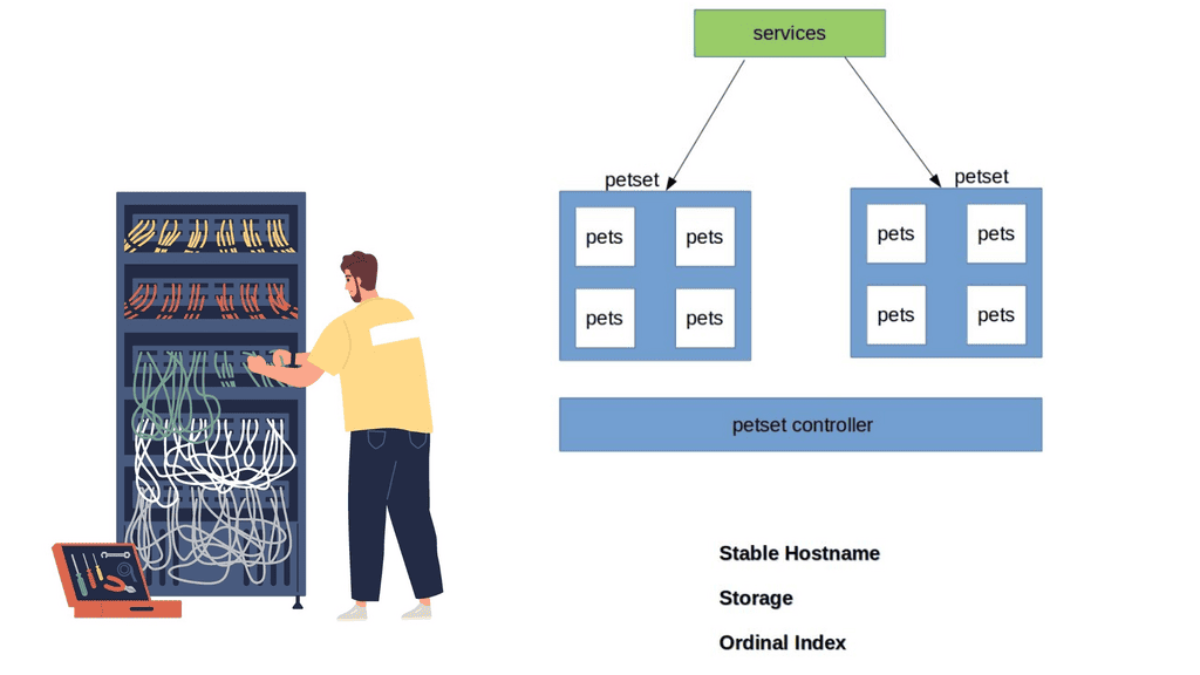
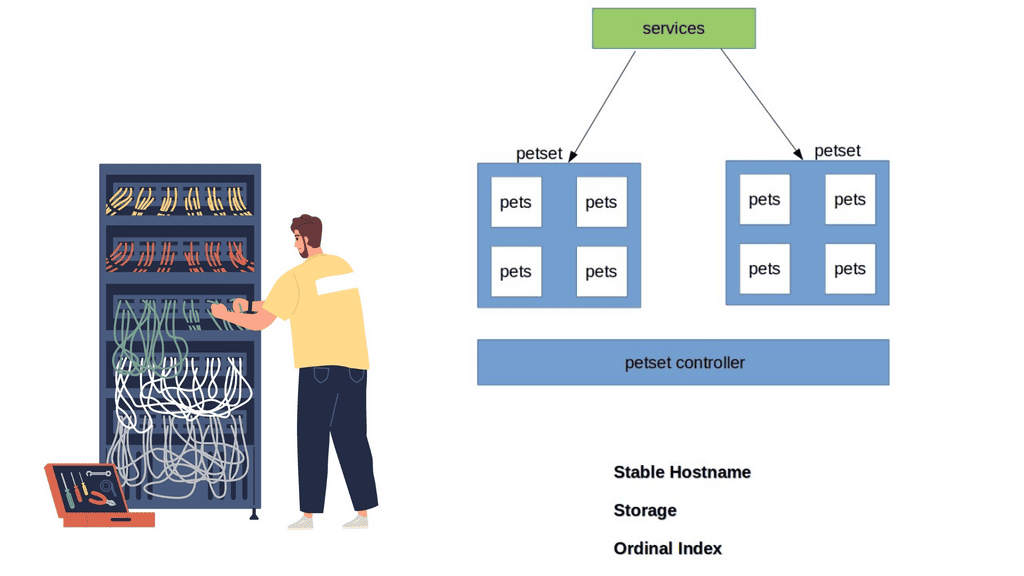
Kubernetes has recently ramped up by introducing a new Kubernetes object called PetSets. PetSets is geared towards improving stateful support and is currently an alpha resource in Kubernetes release 1.3. It holds a group of Kubernetes Pets, aka stateful applications that require stable hostnames, persistent disks, a structured lifecycle process, and group identity.
PetSets are used for non-homogenous instances where each POD has a stable distinguishable identity. A different identity is viewed in terms of stable network and storage.
A ) Stable network identities such as DNS and hostname.
B ) Stable storage identity.
Before PetSets, stateful applications were supported but exceedingly challenging to deploy and manage, especially regarding distributed stateful clusters. In addition, PODs had random names that could not be relied upon. With the introduction of PetSets controllers and Kubernetes Pets, Kubernetes has sharpened its support for stateful and distributed stateful applications.
Diagram: Kubernetes PetSets
Challenges: PODs and their shortcomings
Kubernetes enables the specification of applications as a POD file, expressed in YAML or JSON format. The file specifies what containers are to be in a POD. PODs are the smallest deployment unit in Kubernetes and present several challenges for some stateful services. They do not offer a singleton pattern and are temporary by design.
Their constructs are mortal as they are born and die but never resurrected. When a POD dies, it’s permanently gone and replaced with a new instance and fresh identity. This operation model may suit some applications but falls short for others who want to retain identity and storage across restart / reschedule.
Challenges: Replication Controllers and their shortcomings
If you want a POD to resurrect, you need a Replication Controller ( RC ). The RC enables a singleton pattern to set replication patterns to a specific number of PODs.
The introduction of the RC is undoubtedly a step in the right direction, as it ensures the correct number of replicas are always running at any given time. The RC works alongside services before the RC, using labels to map inbound requests to certain PODs.
Services provide a level of abstraction so that the application endpoint never changes. RC is suitable for application deployments requiring weak uncoupled identities, and when naming individual PODs doesn’t matter to the application architecture.
However, they lack certain functionalities that the new PetSet controller provides. So you could say that a PetSet controller is an enhanced RC controller in shiny new clothes.
A key point: “Pets and Cattle.”
The best way to understand Kubernetes Pets and PetSets is to perceive the cloud infrastructure with the “Pets and Cattle” metaphor. A“Pet” is a special snowflake you have emotional ties towards and requires special handling, for example, when it’s sick, unlike “Cattle,” which is viewed as an easily replaceable commodity.
Cattle are similar enough to each other that you can treat them all as equals. Therefore, the application does not suffer much if a cattle dies or needs replacement.
Cattle refers to stateless applications, and Pets refer to stateful, “build once, run anywhere” applications.
Discussing Stateless applications
A stateless application takes in a request and responds, but nothing is left behind to fulfill subsequent connections. The stateless pattern derives from another independent system’s ability to satisfy subsequent requests/responses. Stateful applications store data for further use. These types of applications can be inspected with a stateful inspection firewall.
Note: PetSet Objects
Stateful applications are grouped into what’s known as a PetSet object. The PetSet controller has a family-orientated approach, as opposed to the traditional RC, which is mainly concerned with the number of replicas. PODs are stateless disposable units that can be removed and interchanged without affecting the application. The Pets, conversely, are groups of stateful PODs requiring stronger different identities.
Note: PetSet Identities
Within a PetSet, Pets ( stateful applications ) have a unique, distinguishable identity. The identities stick and do not change when restarting/rescheduling. They have an explicit purpose/role in life that is known throughout the family—a definitive startup carried out in a structured order that fits within its responsibility in the application’s framework.
Initially, the cattle approach forced us to view cloud components as anonymous resources. However, this approach does not fit all application requirements. Stateful applications require us to rethink the new pet-style approach.
Workloads and Application Types Suitable for Pets:
Stateful application within a PetSet object requires unique identities such as :
Storage
Ordinal index
Stable Hostname
The PetSet object supports clustered applications that require stricter membership and identity requirements, such as :
Discovery of peers for quorum
Startup and Teardown
Workloads that benefit from PetSets include, for example :
Relationshional Databases – MySQL or PostgreSQL requiring persistent volumes.
Application Roles & Responsibilities
Applications have different roles and responsibilities, requiring different deployment models. For example, a Cassandra cluster has strict membership and identity requirements; specific nodes are designated seed nodes used during startup to discover the cluster.
They come first and act as the contact points for all other nodes to get information about the cluster. All nodes require one seed node, and all nodes within a cluster must have the same seed node. No node can join the cluster without a seed node, meaning their role is vital for the application framework.
Note: Zookeeper – Identification of Peers
Zookeeper or etcd requires the identification of peers and instances clients should contact. Other databases have a master/slave model where the master has unidirectional control over the slave. The “primary” server has a different role and identity requirements than the “slave.” Properly running these types of services requires more complex features in Kubernetes.
Closing Points on Kubernetes PetSets
PetSets, now more commonly known as StatefulSets, are a Kubernetes resource designed to manage stateful applications. Unlike the standard ReplicaSets that manage stateless applications by treating all replicas as identical, PetSets offer a more sophisticated way to manage pods. Each pod in a PetSet has a guaranteed unique identity, stable networking, and persistent storage, making them ideal for databases, caches, and other applications that require stable identities.
One of the standout features of PetSets is their ability to maintain a stable identity for each pod, which is crucial for stateful applications. This includes:
– **Persistent Storage:** Each pod in a PetSet can have its own persistent volume, ensuring that data is retained across restarts.
– **Ordered Deployment and Scaling:** PetSets ensure that pods are deployed or scaled up in a specific order, which is essential for applications with interdependencies.
– **Stable Network Identity:** Each pod retains its network identity, which is important for applications that rely on consistent access to resources.
Deploying a stateful application using PetSets involves defining a StatefulSet resource in your Kubernetes cluster. This resource specifies the desired number of replicas, the template for the pods, and any associated persistent volumes. By following best practices in your configurations, you can ensure that your stateful applications benefit from the stability and reliability that PetSets offer.
PetSets are particularly beneficial for applications like databases (e.g., MySQL, Cassandra), distributed file systems (e.g., HDFS), and other systems that require stable identities and persistent storage. By utilizing PetSets, organizations can ensure high availability and resilience for their critical stateful applications, even in dynamic environments.
Kubernetes Stateful Troubleshooting
Stateful Failure Investigation
A database member has failed. Investigate the workload before deciding what to do. Stable identity, persistent storage, readiness and quorum all matter.
INCIDENT MODE
IncidentFAILURE
database-1 is no longer responding. The application reports degraded service.
Your task is to identify the safest recovery action.
Your Mission
Choose the action that preserves the stateful workload's identity and data relationship while allowing Kubernetes to recover the failed member.
What to Check
Before acting, inspect the four signals shown in the cluster.
They represent the reasoning required when operating stateful workloads.
Identity
Stable
Storage
Persistent
Quorum
2 / 3
Readiness
Degraded
database-clusterDEGRADED
StatefulSet Members · 3 Replicas
0
database-0
Hostname: database-0
PVC: db-data-database-0
Role: member
READY
1
database-1
Hostname: database-1
PVC: db-data-database-1
Role: member
FAILED
2
database-2
Hostname: database-2
PVC: db-data-database-2
Role: member
READY
Service / discovery:
clients continue to address the logical workload while the failed member is recovered.
Stable identity is especially important for clustered applications that maintain membership or peer relationships.
Event Console
[INCIDENT] database-1 health check failed
[INFO] database-0 READY
[INFO] database-2 READY
[INFO] quorum currently 2 / 3
[WARN] stateful member requires recovery
Diagnosis
The failed member has a stable ordinal identity and an associated persistent-volume relationship. The recovery decision should preserve both.
Container-based virtualization, or containerization, is a popular technology revolutionizing how we deploy and manage applications. In this blog post, we will explore what container-based virtualization is, why it is gaining traction, and how it differs from traditional virtualization techniques.
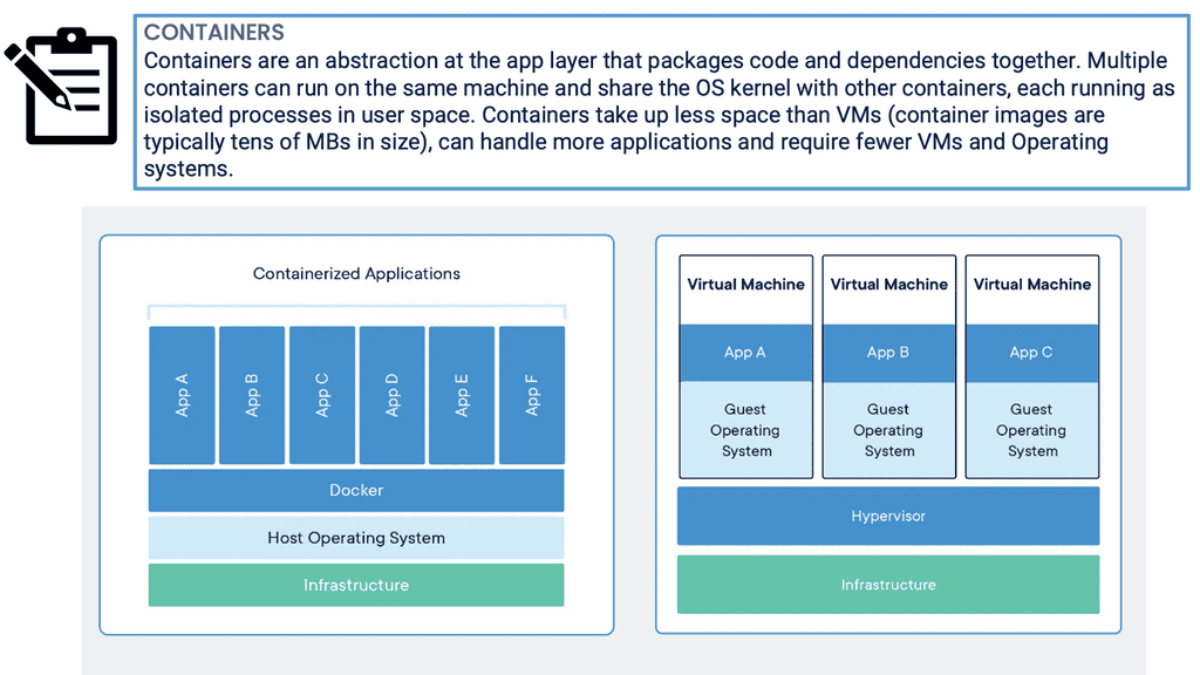
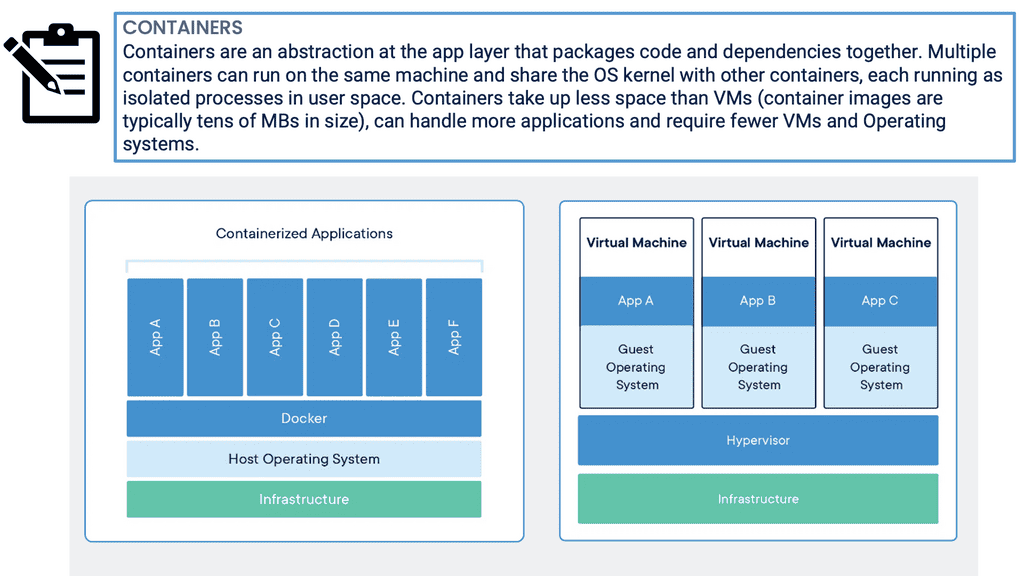
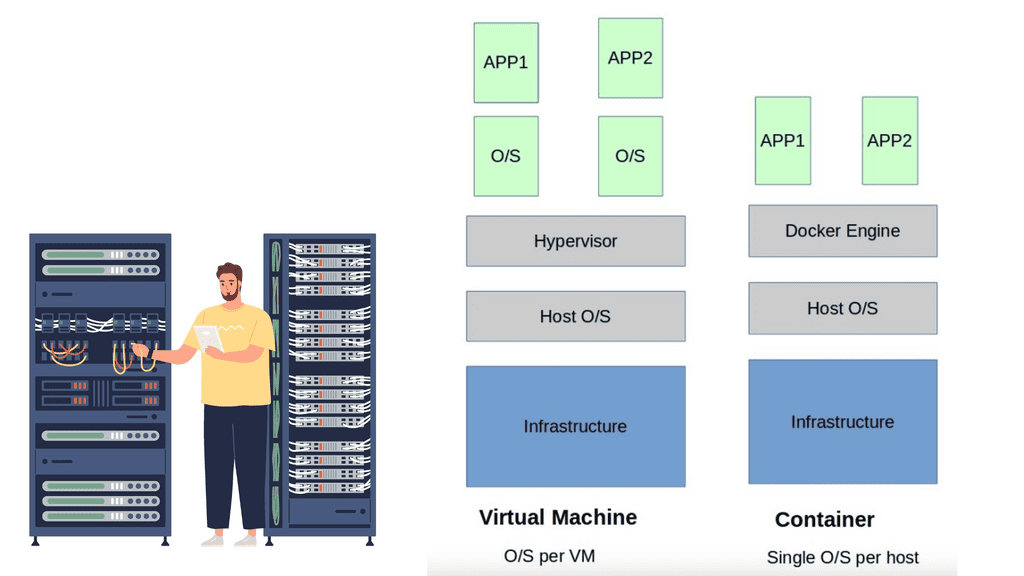
Container-based virtualization is a lightweight alternative to traditional methods such as hypervisor-based virtualization. Unlike virtual machines (VMs), which require a separate operating system (OS) instance for each application, containers share the host OS. This means containers can be more efficient regarding resource utilization and faster to start and stop.
Container-based virtualization, also known as operating system-level virtualization, is a lightweight virtualization method that allows multiple isolated user-space instances, known as containers, to run on a single host operating system. Unlike traditional virtualization techniques, which rely on hypervisors and full-fledged guest operating systems, containerization leverages the host operating system's kernel to provide resource isolation and process separation. This streamlined approach eliminates the need for redundant operating system installations, resulting in improved performance and efficiency.
Enhanced Portability: Containers encapsulate all the dependencies required to run an application, making them highly portable across different environments. Developers can package their applications with all the necessary libraries, frameworks, and configurations, ensuring consistent behavior regardless of the underlying infrastructure.
Scalability and Resource Efficiency: Containers enable efficient resource utilization by sharing the host's operating system and kernel. With their lightweight nature, containers can be rapidly provisioned, scaled up or down, and migrated across hosts, ensuring optimal resource allocation and responsiveness.
Isolation and Security: Containers provide isolation at the process level, ensuring that each application runs in its own isolated environment. This isolation prevents interference and minimizes security risks, making container-based virtualization an attractive choice for multi-tenant environments and cloud-native applications.
Container-based virtualization has gained significant traction across various industries and use cases. Some notable examples include:
Microservices Architecture: Containerization seamlessly aligns with the principles of microservices, allowing applications to be broken down into smaller, independent services. Each microservice can be encapsulated within its own container, enabling rapid development, deployment, and scaling.
DevOps and Continuous Integration/Continuous Deployment (CI/CD): Containers play a crucial role in modern DevOps practices, streamlining the software development lifecycle. With container-based virtualization, developers can easily package, test, and deploy applications across different environments, ensuring consistency and reducing deployment complexities.
Hybrid and Multi-Cloud Environments: Containers facilitate hybrid and multi-cloud strategies by abstracting away the underlying infrastructure dependencies. Applications can be packaged as containers and seamlessly deployed across different cloud providers or on-premises environments, enabling flexibility and avoiding vendor lock-in.
Container Virtualization Lab
Containers vs VMs: What Actually Changes?
Experiment with the virtualization boundary. See how workload density,
isolation and resource overhead change when the same application set is
deployed as containers or virtual machines.
4
Medium
Virtualization BoundaryReady
Physical / Cloud Host
Hypervisor layer
Shared host operating-system kernel
Workloads4
Resource OverheadLow
IsolationProcess
DensityHigh
[ready] Architecture waiting for evaluation.
Engineering Insight
Containers generally reduce per-workload overhead by sharing the host
kernel, while VMs provide a stronger virtualization boundary by
virtualizing complete guest operating systems.
Conceptual simulation for learning. Real isolation, performance and
security depend on the runtime, kernel configuration, hardware,
workload and deployment architecture.
Highlights: Container Based Virtualization
What is Container-Based Virtualization?
Container-based virtualization, also known as operating-system-level virtualization, is a lightweight approach to virtualization that allows multiple isolated containers to run on a single host operating system. Unlike traditional virtualization techniques, containerization does not require a full-fledged operating system for each container, resulting in enhanced efficiency and performance.
Unlike traditional hypervisor-based virtualization, which relies on full-fledged virtual machines, containerization offers a more lightweight and efficient approach. Containers share the host OS kernel, resulting in faster startup times, reduced resource overhead, and improved overall performance.
Benefits:
Increased Resource Utilization: By sharing the host operating system, containers can efficiently use system resources, leading to higher resource utilization and cost savings.
Rapid Deployment and Scalability: Containers offer fast deployment and scaling capabilities, enabling developers to quickly build, deploy, and scale applications in seconds. This agility is crucial in today’s fast-paced development environments.
Isolation and Security: Containers provide a high level of isolation between applications, ensuring that one container’s activities do not affect others. This isolation enhances security and minimizes the risk of system failures.
Use Cases:
Microservices Architecture: Containerization plays a vital role in microservices architecture. Developers can independently develop, test, and deploy services by encapsulating each microservice within its container, increasing flexibility and scalability.
Cloud Computing: Container-based virtualization is widely used in cloud computing platforms. It allows users to deploy applications seamlessly across different cloud environments, making migrating and managing workloads easier.
DevOps and Continuous Integration/Continuous Deployment (CI/CD): Containerization is a crucial enabler of DevOps practices. With container-based virtualization, developers can ensure consistency in development, testing, and production environments, enabling smoother CI/CD workflows.
**Container Management and Orchestration**
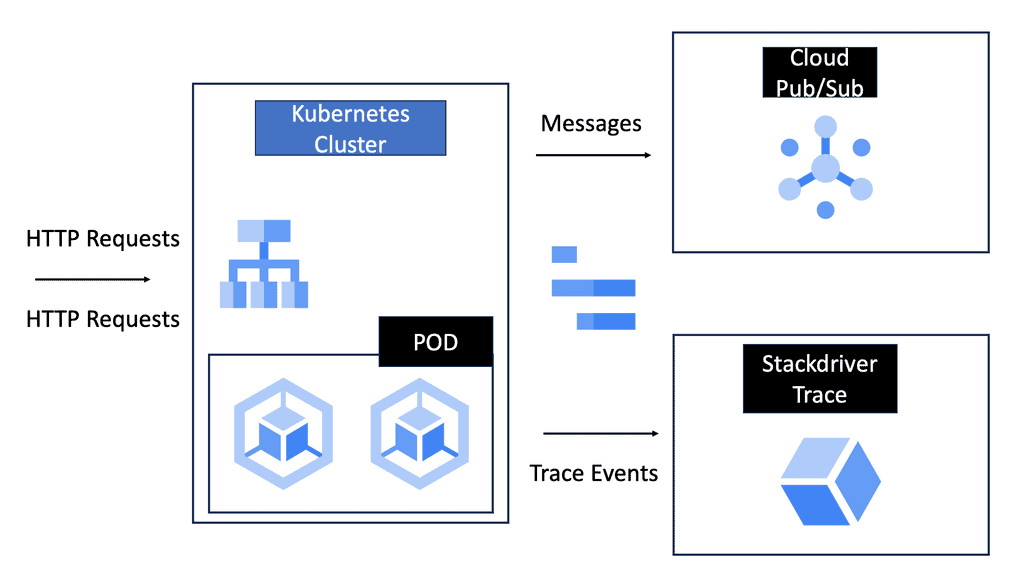
Managing containers at scale necessitates the use of orchestration tools, with Kubernetes being one of the most popular options. Kubernetes automates the deployment, scaling, and management of containerized applications, providing a robust framework for managing large clusters of containers. It handles tasks like load balancing, scaling applications up or down based on demand, and ensuring the desired state of the application is maintained, making it indispensable for organizations leveraging container-based virtualization.
**Security Considerations in Containerization**
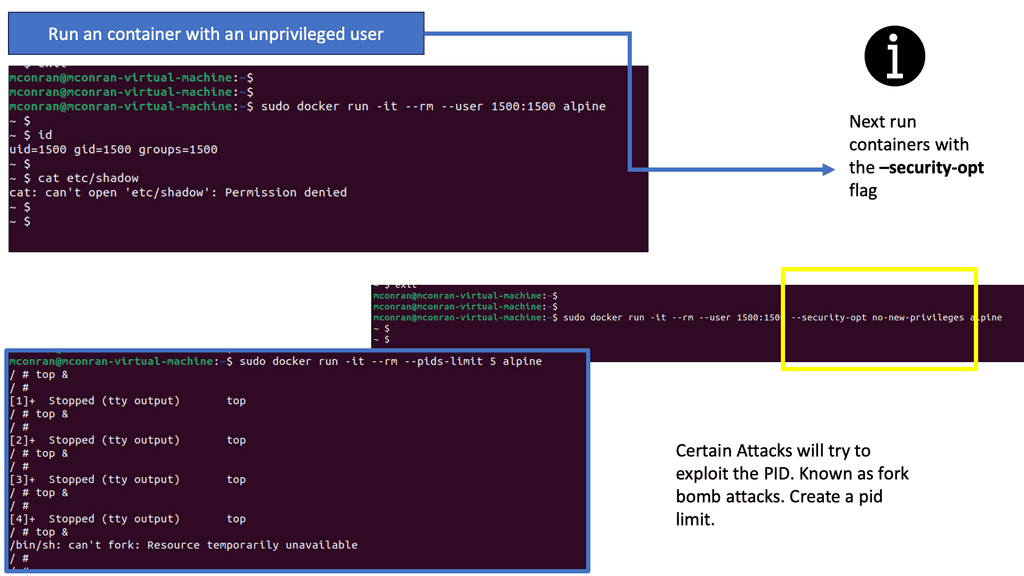
While containers offer numerous advantages, they also introduce unique security challenges. The shared kernel architecture, while efficient, necessitates stringent security measures to prevent vulnerabilities. Ensuring that container images are secure, implementing robust access controls, and regularly updating and patching container environments are critical steps in safeguarding containerized applications. Tools and best practices specifically designed for container security are vital components of a comprehensive security strategy.
Container Networking
Docker Networks
Container networking refers to the communication and connectivity between containers within a containerized environment. It allows containers to interact with each other and external networks and services. Isolating network resources for each container enables secure and efficient data exchange.
In this section, we will explore some essential concepts in container networking:
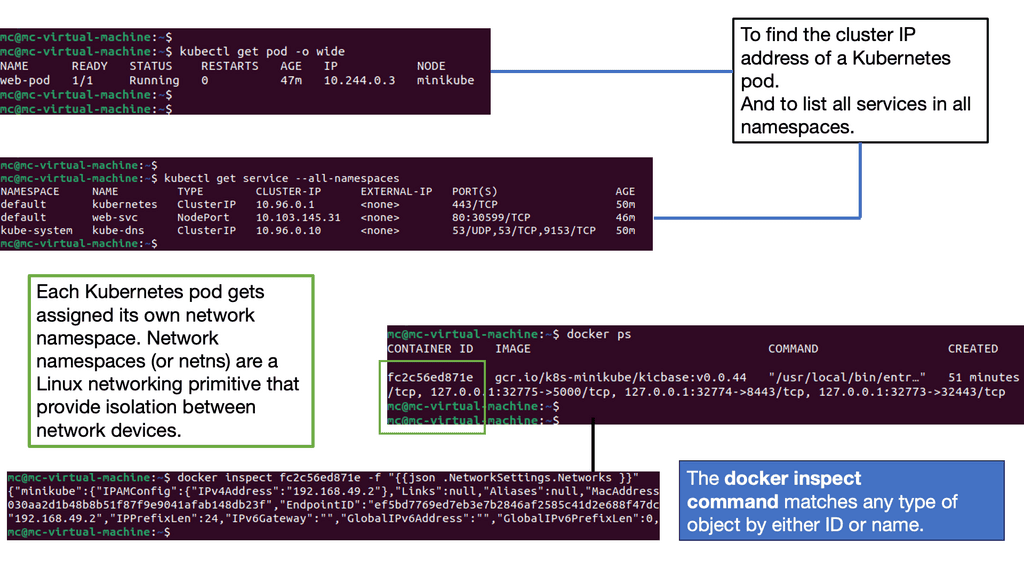
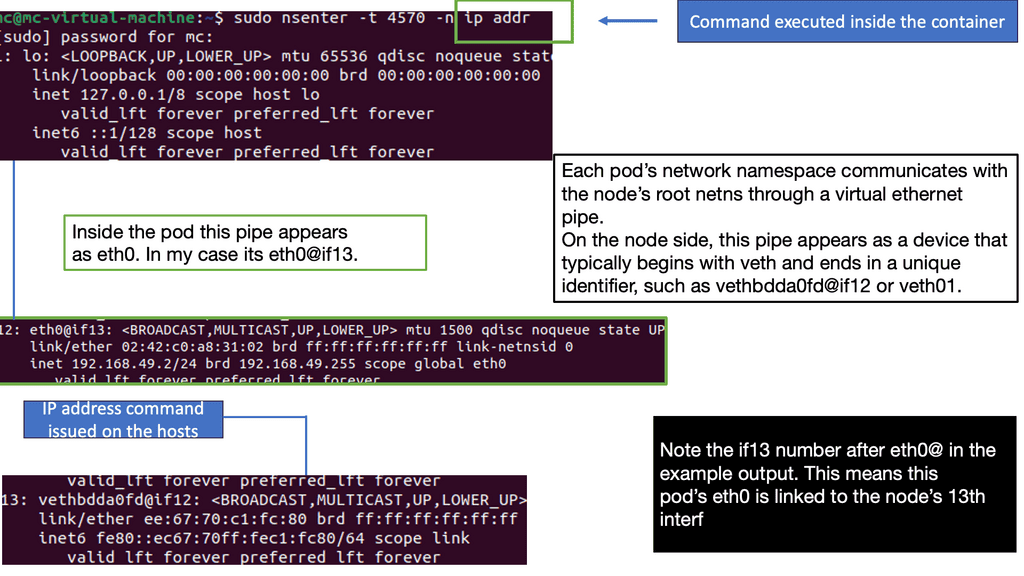
1. Network Namespaces: Container runtimes use network namespaces to create isolated container network environments. Each container has its network namespace, providing separation and isolation.
2. Bridge Networks: Bridge networks serve as a virtual bridge connecting containers within the same host. They enable container communication by assigning unique IP addresses and facilitating network traffic routing.
3. Overlay Networks: Overlay networks connect containers across multiple hosts or nodes in a cluster. They provide a seamless communication layer, allowing containers to communicate as if they were on the same network.
Docker Default Networking
Docker default networking is an essential feature that enables containerized applications to communicate with each other and the outside world. By default, Docker provides three types of networks: bridge, host, and none. These networks serve different purposes and have distinct characteristics.
– The bridge network is Docker’s default networking mode. It creates a virtual network interface on the host machine, allowing containers to communicate with each other through this bridge. By default, containers connected to the bridge network can reach each other using their IP addresses.
– The host network mode allows containers to bypass the isolation provided by Docker networking and use the host machine’s network directly. When a container uses the host network, it shares the same network namespace as the host, resulting in improved network performance but sacrificing the container’s isolation.
– The non-network mode completely isolates the container from network access. Containers using this mode have no network interfaces and cannot communicate with the outside world or other containers. This mode is useful for scenarios where network access is not required.
Docker provides various options to customize default networking behavior. You can create custom bridge networks, define IP ranges, configure DNS resolution, and map container ports to host ports. Understanding these configuration options empowers you to design networking setups that align with your application requirements.
Application Landscape Changes
The application landscape has changed from a monolithic design to a design consisting of microservices. Today, applications are constantly developed. Patches usually patch only certain parts of the application, and the entire application is built from loosely coupled components instead of existing tightly coupled ones. The entire application stack is broken into components and spread over multiple servers and locations, all requiring cross-communication. For example, users connect to a presentation layer, the presentation layer then connects to some shopping cart, and the shopping cart connects to a catalog library.
These components are potentially stored on different servers, maybe different data centers. The application is built from several small parts, known as microservices. Each component or microservice can now be put into a lightweight container—a scaled-down VM. VMware and KVM are virtualization systems that allow you to run Linux kernels and operating systems on top of a virtualized layer, commonly known as a hypervisor. Because each VM is based on its operating system kernel in its memory space, this approach provides extreme isolation between workloads.
Containers differ fundamentally from shared kernel systems since they implement isolation between workloads entirely within the kernel. This is called operating system virtualization.
A major advantage of containers is resource efficiency since each isolated workload does not require a whole operating system instance. Sharing a kernel reduces the amount of indirection between isolated tasks and their real hardware. The kernel only manages a container when a process is running inside a container. Unlike a virtual machine, an actual machine has no second layer. The process would have to bounce into and out of privileged mode twice when calling the hardware or hypervisor in a VM, significantly slowing down many operations.
Traditional Deployment Models
So, how do containers facilitate virtualization? Traditional application deployment was based on a single-server approach. As a result, one application was installed per physical server, wasting server resources, and components such as RAM and CPU were never fully utilized. There was also considerable vendor lock-in, making moving applications from one hardware vendor to another hard.
Then, the world of hypervisor-based virtualization was introduced, and the concept of a virtual machine (VM) was born. Soon after, we had container-based applications. Container-based virtualization introduced container networking, and new principles arose for security around containers, specifically, Docker container security.
Introducing hypervisors
We still deployed physical servers but introduced hypervisors on the physical host, enabling the installation of multiple VMs on a single server. Each VM is isolated from its operating system. Hypervisor-based virtualization introduced better resource pooling as one physical server could now be divided into multiple VMs, each hosting a different application type. This was years better than single-server deployments and opened the doors to open networking.
The VM deployment approach increased agility and scalability, as applications within a VM are scaled by simply spinning up more VMs on any physical host. While hypervisor-based virtualization was a step in the right direction, a guest operating system for each application is pretty intensive. Each VM requires RAM, CPU, storage, and an entire guest OS, all-consuming resources.
Introducing Virtualization
Another advantage of virtualization is the ability to isolate applications or services. Each virtual machine operates independently, with its resources and configurations. This enhances security and stability, as issues in one virtual machine do not affect others. It also allows for easy testing and development, as virtual machines can be quickly created and discarded.
Virtualization also offers improved disaster recovery and business continuity. By encapsulating the entire virtual machine, including its operating system, applications, and data, into a single file, organizations can quickly back up, replicate, and restore virtual machines. This ensures that critical systems and data are protected and can rapidly recover during a failure or disaster.
Furthermore, virtualization enables workload balancing and dynamic resource allocation. Virtual machines can be dynamically migrated between physical servers to optimize resource utilization and performance. This allows for better utilization of computing resources and the ability to respond to changing workload demands.
Container Orchestration
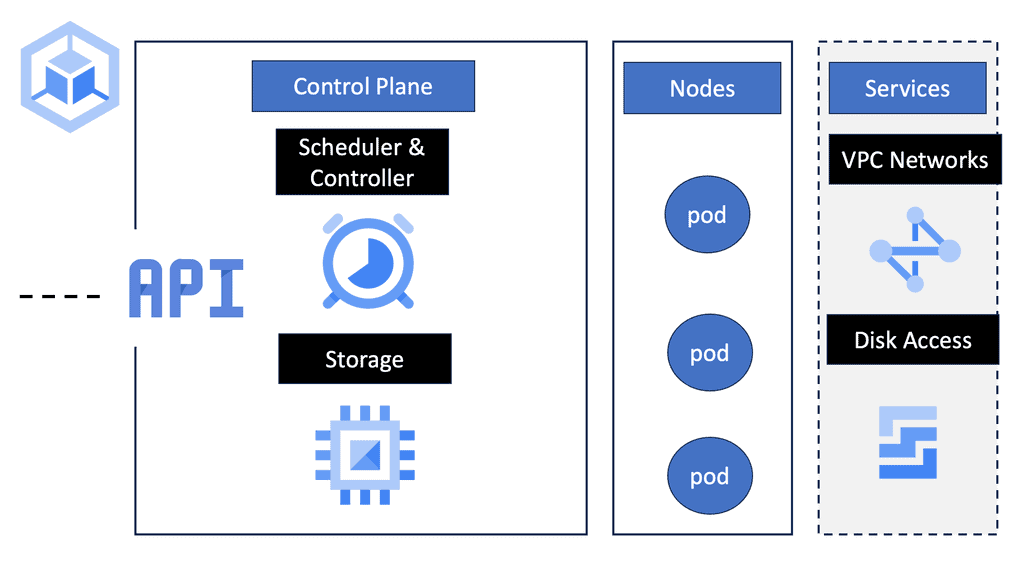
**What is Google Kubernetes Engine?**
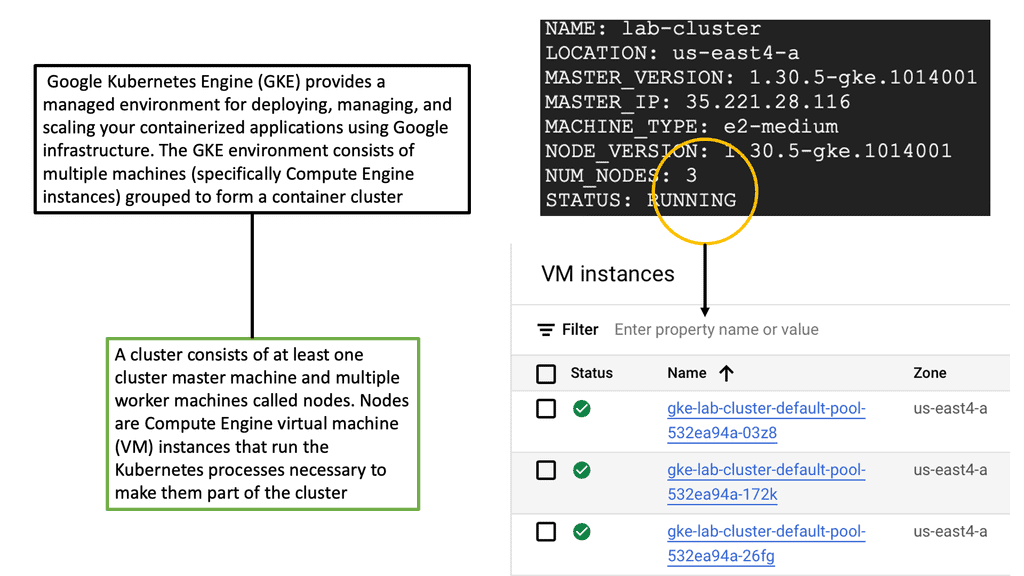
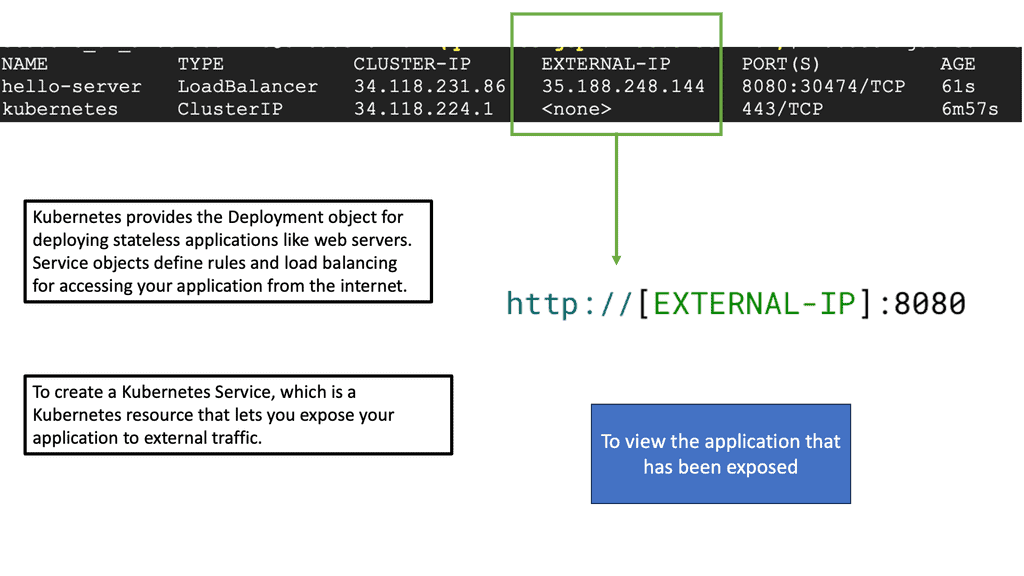
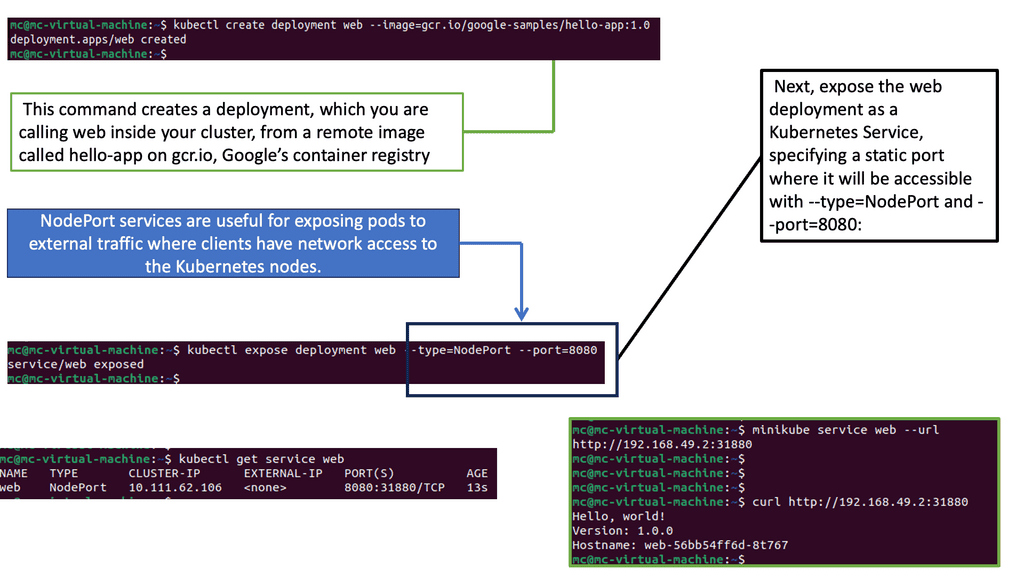
Google Kubernetes Engine is a managed environment for deploying, managing, and scaling containerized applications using Google infrastructure. GKE is built on Kubernetes, an open-source container orchestration system that automates the deployment, scaling, and management of containerized applications. With GKE, developers can focus on building applications without worrying about the complexities of managing the underlying infrastructure.
**The Benefits of Container-Based Virtualization**
Container-based virtualization is a game-changer in the world of cloud computing. Unlike traditional virtual machines, containers are lightweight and share the host system’s kernel, leading to faster start-up times and reduced overhead. GKE leverages this technology to offer seamless scaling and efficient resource utilization. This means businesses can run more applications on fewer resources, reducing costs and improving performance.
**GKE Features: What Sets It Apart?**
One of GKE’s standout features is its ability to auto-scale, which ensures that applications can handle varying loads by automatically adjusting the number of running instances. Additionally, GKE provides robust security features, including vulnerability scanning and automated updates, safeguarding your applications from potential threats. The integration with other Google Cloud services also enhances its functionality, offering a comprehensive suite of tools for developers.
**Getting Started with GKE**
For businesses looking to harness the potential of Google Kubernetes Engine, getting started is straightforward. Google Cloud provides extensive documentation and tutorials, making it easy for developers to deploy their first applications. With its intuitive user interface and powerful command-line tools, GKE simplifies the process of managing containerized applications, even for those new to Kubernetes.
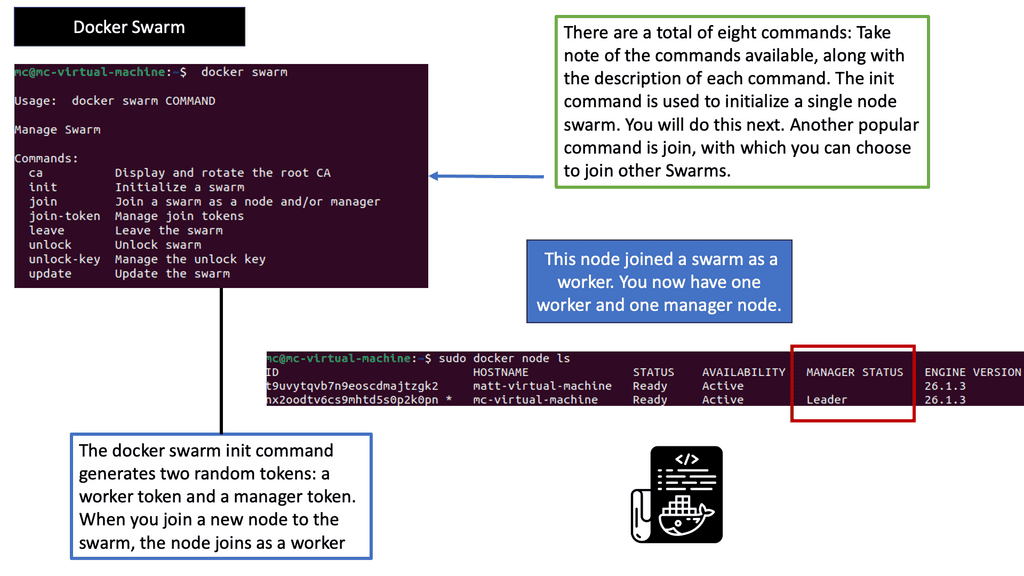
Understanding Docker Swarm
Docker Swarm provides native clustering and orchestration capabilities for Docker. It allows you to create and manage a swarm of Docker nodes, forming a single virtual Docker host. By leveraging the power of swarm mode, you can seamlessly deploy and manage containers across a cluster of machines, enabling high availability, fault tolerance, and scalability.
One of Docker Swarm’s key features is its simplicity. With just a few commands, you can initialize a swarm, join nodes to the swarm, and deploy services across the cluster. Additionally, Swarm provides load balancing, automatic container placement, rolling updates, and service discovery, making it an ideal choice for managing and scaling containerized applications.
Scaling Services with Docker Swarm
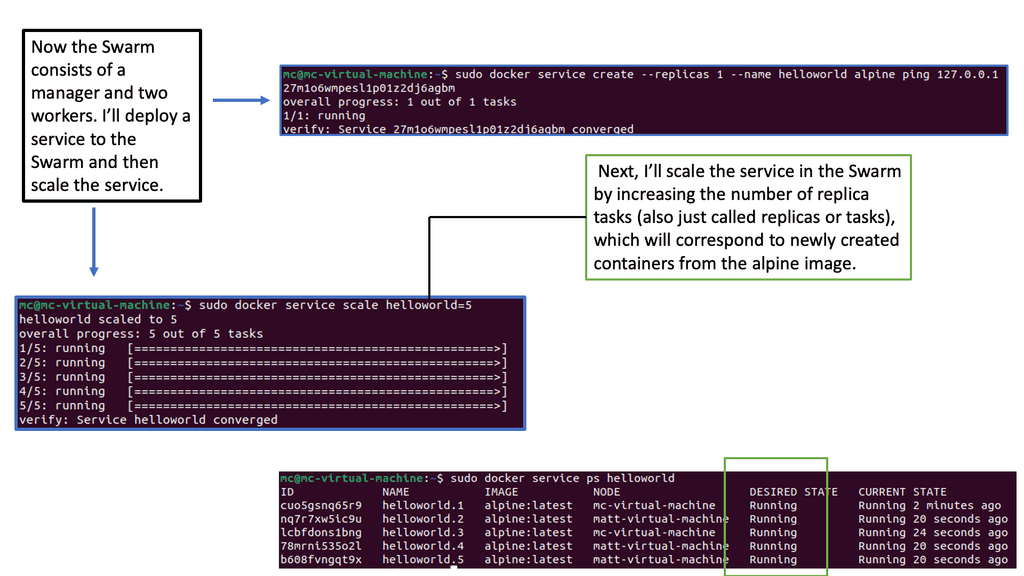
To create a Docker Swarm, you need at least one manager node and one or more worker nodes. The manager node acts as the central control plane, handling service orchestration and managing the swarm’s state. On the other hand, Worker nodes execute the tasks assigned to them by the manager. Setting up a swarm allows you to distribute containers across the cluster, ensuring efficient resource utilization and fault tolerance.
One of Docker Swarm’s significant benefits is its ability to deploy and scale services effortlessly. With a simple command, you can create a service, specify the number of replicas, and let Swarm distribute the workload across the available nodes. Scaling a service is as simple as updating the desired number of replicas, and Swarm will automatically adjust the deployment accordingly, ensuring high availability and efficient resource allocation.
Docker Swarm is a native clustering and orchestration solution for Docker. It allows you to create and manage a swarm of Docker nodes, enabling the deployment and scaling of containers across multiple machines. With its simplicity and ease of use, Docker Swarm is an excellent choice for those looking to dive into container orchestration without a steep learning curve.
The Power of Kubernetes
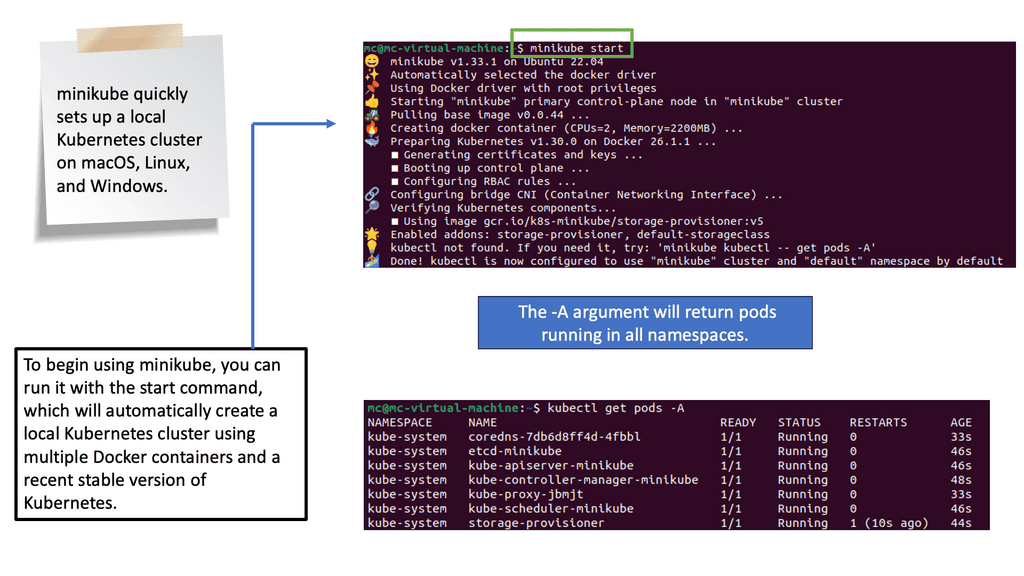
Kubernetes, often called “K8s,” is an open-source container orchestration platform developed by Google. It provides a robust and scalable solution for managing containerized applications. With its advanced features, such as automatic scaling, load balancing, and self-healing capabilities, Kubernetes has gained widespread adoption in the industry.
Example Technology: Virtual Switching
Understanding Open vSwitch
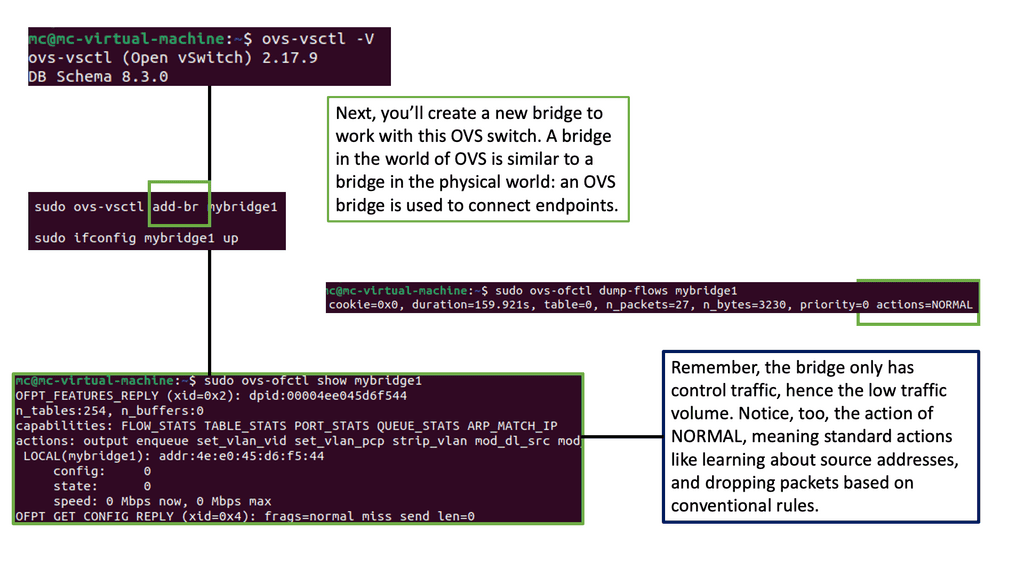
Open vSwitch, called OVS, is an open-source virtual switch that efficiently creates and manages virtual networks. It operates at the data link layer of the networking stack, enabling seamless communication between virtual machines, containers, and physical network devices. With extensibility in mind, OVS offers a wide range of features contributing to its popularity and widespread adoption.
– Flexible Network Topologies: One of the standout features of Open vSwitch is its ability to support a variety of network topologies. Whether a simple flat network or a complex multi-tiered architecture, OVS provides the flexibility to design and deploy networks that suit specific requirements. This level of adaptability makes it a preferred choice for cloud service providers, data centers, and enterprises seeking dynamic network setups.
– Virtual Network Overlays: Open vSwitch enables virtual network overlays, allowing multiple virtual networks to coexist and operate independently on the same physical infrastructure. By leveraging technologies like VXLAN, GRE, and Geneve, OVS facilitates the creation of isolated network segments that are transparent to the underlying physical infrastructure. This capability simplifies network management and enhances scalability, making it an ideal solution for cloud environments.
– Flow-based Forwarding: Flow-based forwarding is a powerful mechanism provided by Open vSwitch. It allows for fine-grained control over network traffic by defining flows based on specific criteria such as source/destination IP addresses, ports, protocols, and more. This granular control enables efficient traffic steering, load balancing, and network monitoring, enhancing performance and security.
Controlling Security
Understanding SELinux
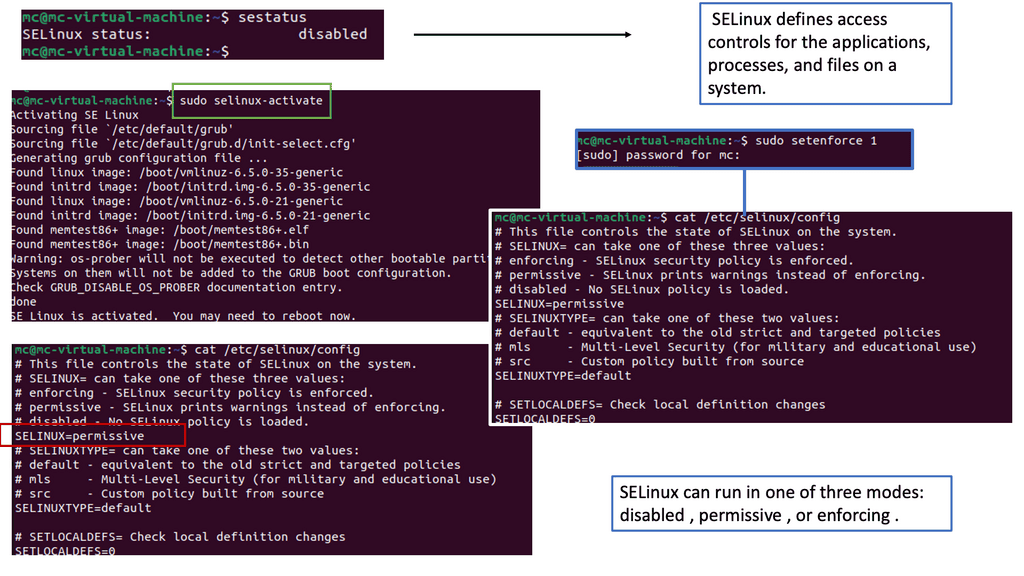
SELinux, which stands for Security-Enhanced Linux, is a security framework built into the Linux kernel. It provides a fine-grained access control mechanism beyond traditional discretionary access controls (DAC). SELinux implements mandatory access controls (MAC) based on the principle of least privilege. This means that processes and users are granted only the bare minimum permissions required to perform their tasks, reducing the potential attack surface.
Container-based virtualization has revolutionized the way applications are deployed and managed. However, it also introduces new security challenges. This is where SELinux shines. By enforcing strict access controls on container processes and limiting their capabilities, SELinux helps prevent unauthorized access and potential exploits. It adds an extra layer of protection to the container environment, making it more resilient against attacks.
Container Networking Lab
How Does the Network Change the Container Boundary?
Change the network model and traffic requirement to see how containers gain
connectivity, isolation and multi-host reachability. The simulation is
conceptual: real implementations depend on the runtime, CNI, host networking
and platform configuration.
Logical Network Path
Network Boundary
A
App ContainerNetwork namespace
⇄
Virtual NetworkBridge / veth path
B
Target ContainerApplication endpoint
Namespace IsolationMedium
Network ScopeSingle Host
Cross-HostNot Available
Port MappingNot Required
SegmentationShared Network
Connectivity ResultNot tested
Network Reachability0%
Isolation Strength0%
Network Event Console
[ready] Experiment waiting for configuration.
Engineering Insight
Choose a network model and traffic scope, then run the test.
Educational simulation only. Network behaviour varies by container runtime,
CNI/plugin, host configuration, routing, firewalling and orchestration platform.
Container Based Virtualization
The Traditional World
Before we address how containers facilitate virtualization, let’s address the basics. In the past, we could solely run one application per server. However, the open-systems world of Windows and Linux didn’t have the technologies to safely and securely run multiple applications on the same server.
So, whenever we needed a new application, we would buy a new server. We had the virtual machine (VM) to solve the waste of resources. With the VM, we had a technology that permitted us to safely and securely run applications on a single server. Unfortunately, the VM model also has additional challenges.
Migrating VMs
For example, VMs are slow to boot, and portability isn’t great — migrating and moving VM workloads between hypervisors and cloud platforms is more complicated than it needs to be. All of these factors drove the need for new container technology with container virtualization.
How do containers facilitate virtualization? We needed a lightweight tool without losing the scalability and agility benefits of the VM-based application approach. The lightweight tool is container-based virtualization, and Docker is at the forefront. The container offers a similar capability to object-oriented programming. It lets you build composable modular building blocks, making it easier to design distributed systems.
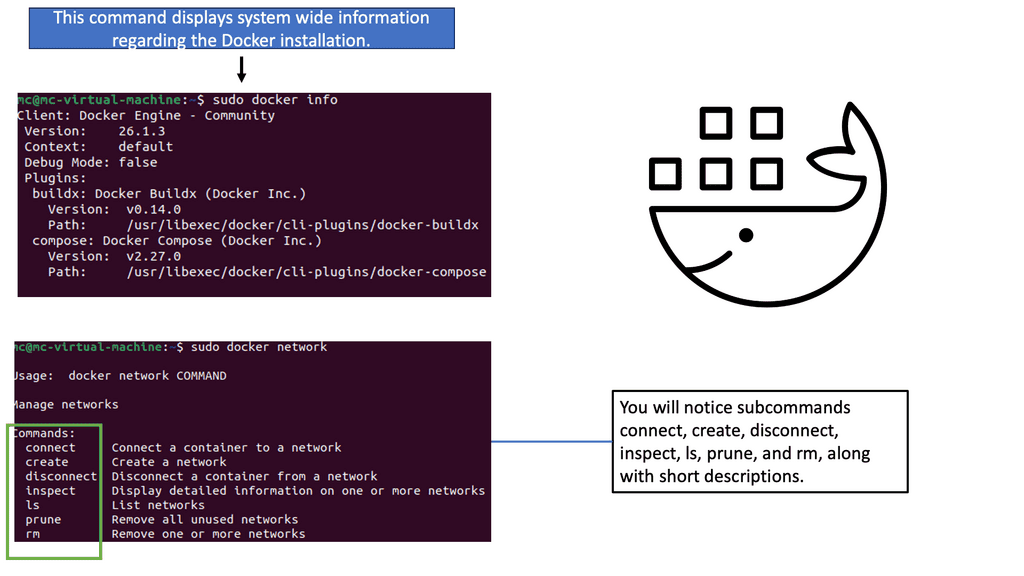
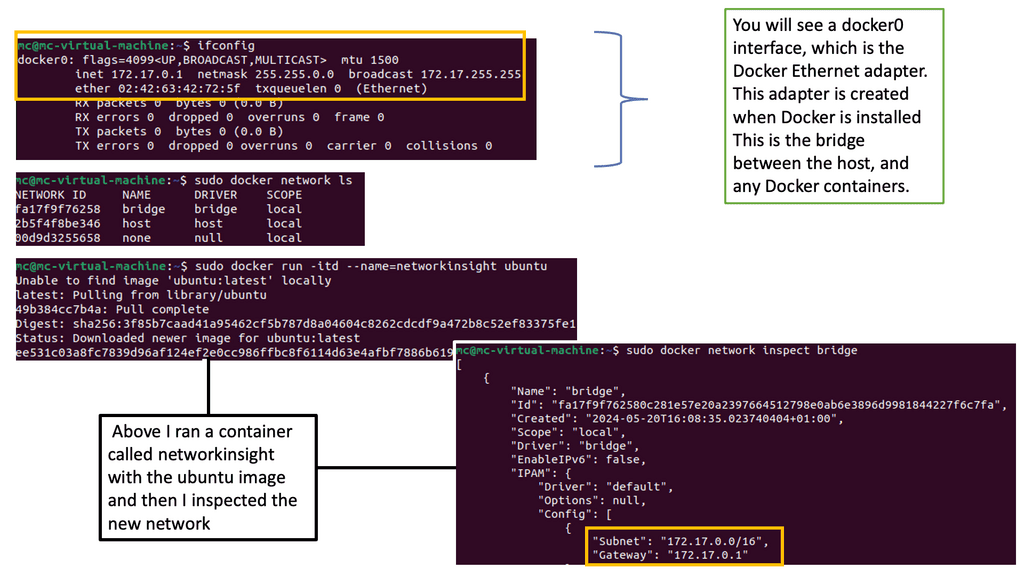
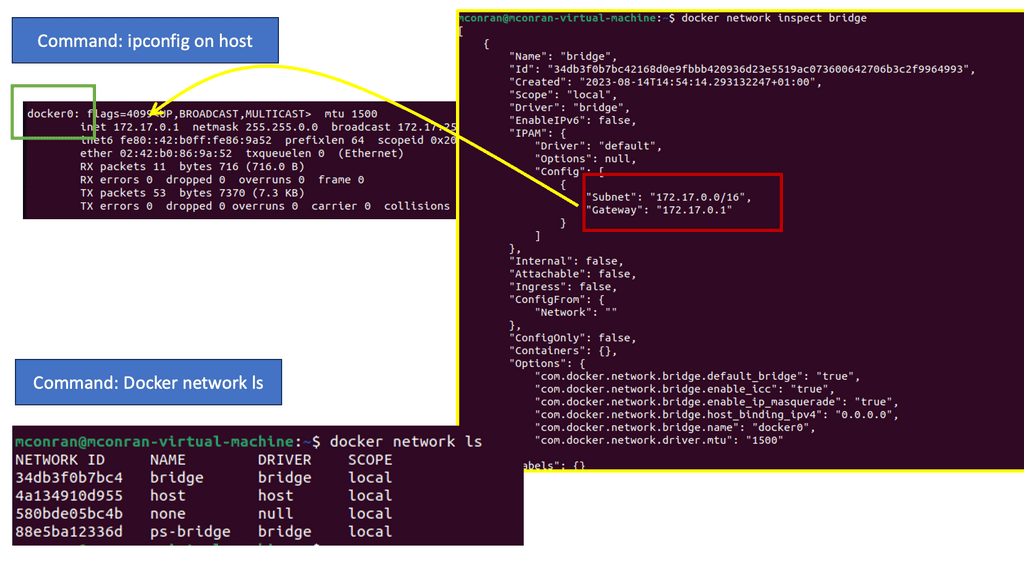
In the following example, we have one Docker host. We can list the available networks for these Docker hosts with the command docker network ls. These are not WAN or VPN networks; they are only Docker networks.
Docker networks are virtual networks that allow containers to communicate with each other and the outside world. They provide isolation, security, and flexibility to manage network traffic flow between containers. By default, when you create a new Docker container, it is connected to a default bridge network, which allows communication with other containers on the same host.
Notice the subnets assigned of 172.17.0.0/16. So, the default gateway ( exit point) is set to the docker0 bridge.
Diagram: Docker networking
Types of Docker Networks:
Docker offers various types of networks, each serving a specific purpose:
1. Bridge Network:
The bridge network is the default network that enables communication between containers on the same host. Containers connected to the bridge network can communicate using IP addresses or container names. It provides a simple way to connect containers without exposing them to the outside world.
2. Host Network:
In the host network mode, a container shares the network stack with the host, using its network interface directly. This mode provides maximum network performance as no network address translation (NAT) is involved. However, it also means the container is directly exposed to the host’s network, potentially introducing security risks.
3. Overlay Network:
The overlay network allows containers to communicate across multiple Docker hosts, even in different physical or virtual networks. It achieves this by encapsulating network packets and routing them to the appropriate destination. Overlay networks are essential for creating distributed and scalable applications.
4. Macvlan Network:
The Macvlan network mode allows containers to have MAC addresses and appear as separate devices. This mode is useful when assigning IP addresses to containers and making them accessible from the external network. It is commonly used when containers must be treated as physical devices.
5. None Network:
The non-network mode isolates a container from all networking. It effectively disables all networking capabilities and prevents the container from communicating with other containers or the outside world. This mode is typically used when networking is not required or desired.
Guide Container Networking
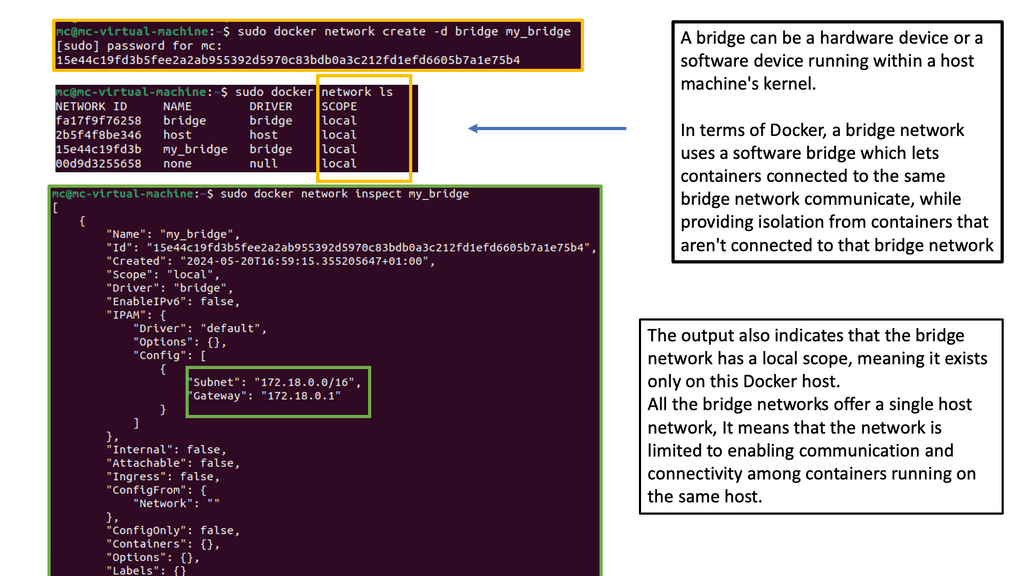
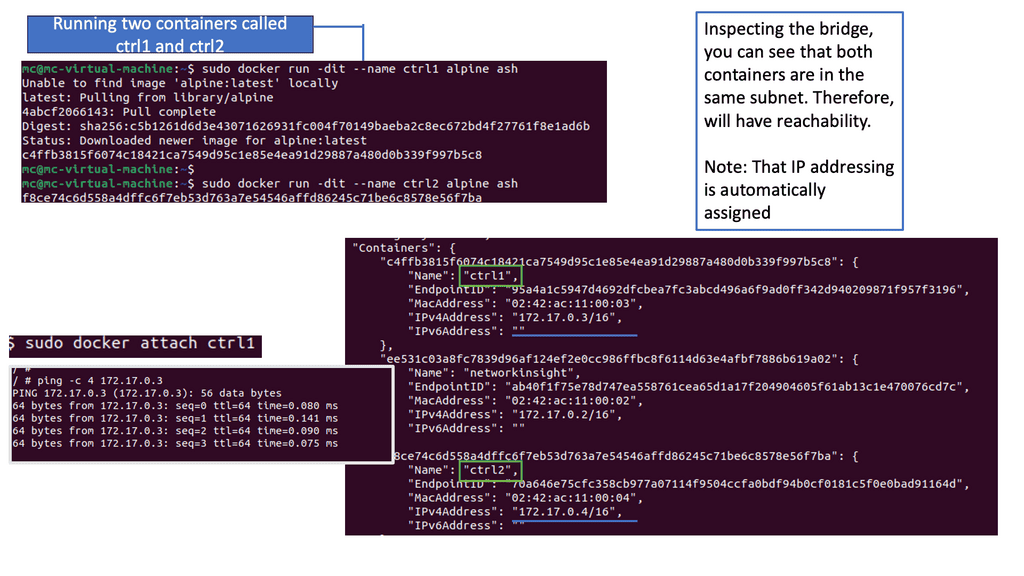
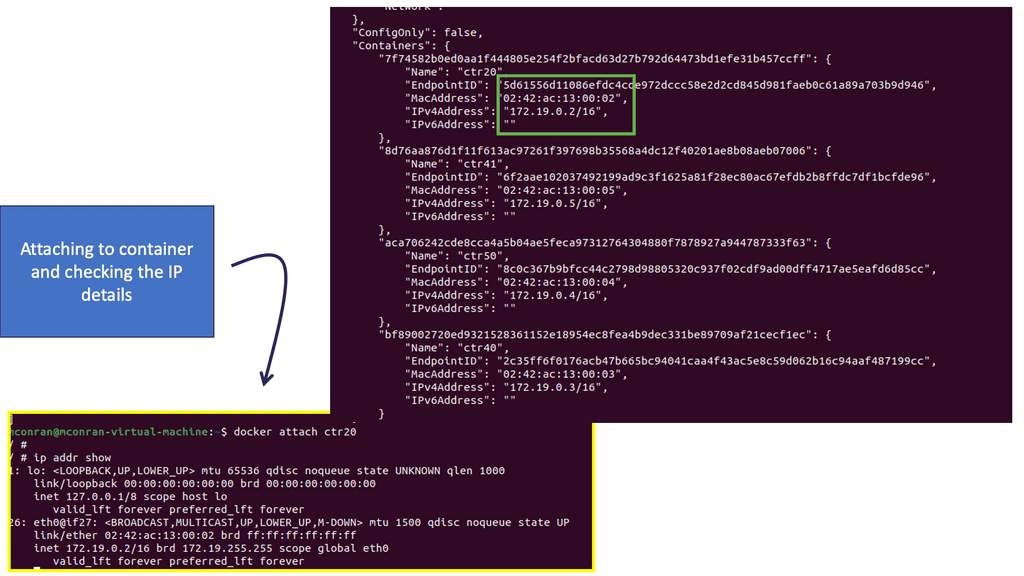
You can attach as many containers as you like to a bridge. They will be assigned IP addresses within the same subnet, meaning they can communicate by default. You can have a container with two Ethernet interfaces ( virtual interfaces ) connected to two different bridges on the same host and have connectivity to two networks simultaneously.
Also, remember that the scope is local when you are doing this, and even if the docker hosts are on the same underlying network but with different hosts, they won’t have IP reachability. In this case, you may need a VXLAN overlay network to connect containers on different docker hosts.
Diagram: Inspecting container networks
Container-based Virtualization
One critical benefit of container-based virtualization is its portability. Containers encapsulate the application and all its dependencies, allowing it to run consistently across different environments, from development to production. This portability eliminates the “it works on my machine” problem and makes it easier to maintain and scale applications.
Scalability
Another advantage of containerization is its scalability. Containers can be easily replicated and distributed across multiple hosts, making it straightforward to scale applications horizontally. Furthermore, container orchestration platforms, like Kubernetes, provide automated management and scaling of containers, simplifying the deployment and management of complex applications.
Security
Security is crucial to any virtualization technology, and container-based virtualization is no exception. Containers provide isolation between applications, preventing them from interfering with each other. However, it is essential to note that containers share the same kernel as the host OS, which means a compromised container can potentially impact other containers. Proper security measures, such as regular updates and vulnerability scanning, are essential to ensure the security of containerized applications.
Tooling
Container-based virtualization also offers various tools and platforms for application development and deployment. Docker, for example, is a popular containerization platform that provides a user-friendly interface for building, running, and managing containers. It simplifies container image creation and enables developers to package their applications and dependencies.
Understanding Kubernetes Networking Architecture
Kubernetes networking architecture comprises several crucial components that enable seamless communication between pods, services, and external resources. The fundamental building blocks of Kubernetes networking include pods, nodes, containers, and the Container Network Interface (CNI). r.
Network security is paramount to any Kubernetes deployment. Network policies provide a powerful tool to control ingress and egress traffic, enabling fine-grained access control between pods. Kubernetes has the concept of network policies and demonstrates how to define and enforce them to enhance the security posture of your Kubernetes cluster.
Applications of Container-Based Virtualization:
1. DevOps and Continuous Integration/Continuous Deployment (CI/CD): Containerization enables developers to package applications, libraries, and configurations into portable and reproducible containers. This simplifies the deployment process and ensures consistency across different environments, facilitating faster software delivery.
2. Microservices Architecture: Container-based virtualization aligns well with the microservices architectural pattern. Organizations can develop, deploy, and scale each service independently using containers by breaking down complex applications into more minor, loosely coupled services. This approach enhances modularity, scalability, and fault tolerance.
3. Hybrid Cloud and Multi-Cloud Environments: Containers provide a unified platform for deploying applications across hybrid and multi-cloud environments. With container orchestration tools, organizations can leverage the benefits of multiple cloud providers while ensuring consistent deployment and management practices.
How do containers facilitate virtualization?
Container-Based Applications
Now, we have complex distributed software stacks based on microservices. Its base consists of loosely coupled components that may change and software that runs on various hardware, including test machines, in-house clusters, cloud deployments, etc. The web front end may include the following:
Ruby + Rail.
API endpoints with Python 2.7.
Stack website with Nginx.
A variety of databases.
We have a very complex stack on top of various hardware devices. While the traditional monolithic application will likely remain for some time, containers still exhibit the use case to modernize the operational model for conventional stacks. Both monolithic and container-based applications can live together.
The application’s complexity, scalability, and agility requirements have led us to the market of container-based virtualization. Container-based virtualization uses the host’s kernel to run multiple guest instances. Now, we can run multiple guest instances (containers), and each container will have its root file system, process, and network stack.
Containers allow you to package an application with all its parts in an isolated environment. They are a complete abstraction and do not need to run dependencies on the hosts. Docker, a type of container (first based on Linux Containers but now powered by runC), separates the application from infrastructure using container technologies.
Similar to how VMs separate the operating system from bare metal, containers let you build a layer of isolation in software that reduces the burden of human communication and specific workflows. An excellent way to understand containers is to accept that they are not VMs—they are simple wrappers around a single Unix process. Containers contain everything they need to run (runtime, code, libraries, etc.).
Linux kernel namespaces
Isolation or variants of isolation have been around for a while. We have mount namespacing in 2.4 kernels and userspace namespacing in 3.8. These technologies allow the kernel to create partitions and isolate PIDs. Linux containers (Lxc) started in 2008, and Docker was introduced in Jan 2013, with a public release of 1.0 in 2014. We are now at version 1.9, which has some new networking enhancements.
Docker uses Linux kernel namespaces and control groups, providing an isolated workspace, which offers the starting grounds for the Docker security options. Namespaces offer an isolated workspace that we call a container. They help us fool the container.
We have PID for process isolation, MOUNT for storage isolation, and NET for network-level isolation. The Linux network subsystem has the correct information for additional Linux network information.
Container-based application: Container operations
Containers use schedulers. A scheduler starts containers on the correct host and then connects them. It also needs to manage container failover and handle container scalability when there is too much data to process for a single instance. Popular container schedulers include Docker Swarm, Apache Mesos, and Google Kubernetes.
The correct host is selected depending on the type of scheduler used. For example, Docker Swarm will have three strategies: spread, binpack, and random. Spread means node selection is based on the fewest containers, disregarding their states. Binpack selection is based on hosts with minimum resources, i.e., the most packed. Finally, random strategy selections are chosen randomly.
Containers are quick to start.
How do containers facilitate virtualization? First, they are quick. Starting a container is much faster than starting a VM—lightweight containers can be started in as little as 300ms. Initial tests on Docker revealed that a newly created container from an existing image takes up only 12 kilobytes of disk space.
A VM could take up thousands of megabytes. The container is lightweight, as its references point to a layered filesystem image. Container deployment is also swift and network-efficient.
Fewer data needs to travel across the network and storage fabrics. Elastic applications that have frequent state changes can be built more efficiently. Both Docker and Linux containers fundamentally change application consumption.
As a side note, not all workloads are suitable for containers, and heavy loads like databases are put into VMs to support multi-cloud environments.
Docker networking
Docker networking is an essential aspect of containerization that allows containers to communicate with each other and external networks. In this document, we will explore the different networking options available in Docker and how they can facilitate seamless communication between containers.
By default, Docker provides three networking options: bridge, host, and none. The bridge network is the default network created when Docker is installed. It allows containers to communicate with each other using IP addresses. Containers within the same bridge network can communicate with each other directly without the need for port mapping.
As the name suggests, the host network allows containers to share the network namespace with the host system. This means containers using the host network can directly access the host system’s interfaces. This option is helpful for scenarios where containers must bind to specific network interfaces on the host.
On the other hand, the non-network option completely isolates the container from the network. Containers using the none network cannot communicate with other containers or external networks. This option is useful when running a container in complete isolation.
Creating custom networks
In addition to these default networking options, Docker also provides the ability to create custom networks. Custom networks allow containers to communicate with each other, even if they are not in the same network namespace. Custom networks can be made using the `docker network create` command, specifying the desired driver (bridge, overlay, macvlan, etc.) and any additional options.
One of the main benefits of using custom networks is the ability to define network-level access control. Docker provides the ability to define network policies using network labels. These labels can control which containers can communicate with each other and which ports are accessible.
Closing Points on Docker networking
Networking is very different in Docker than what we are used to. Networks are domains that interconnect sets of containers. So, if you give access to a network, you can access all containers. However, you must specify rules and port mapping if you want external access to other networks or containers.
A driver backs every network, be it a bridge or overlay driver. These Docker-based drivers can be swapped out with any ecosystem driver. The team at Docker views them as pluggable batteries.
Docker utilizes the concept of scope—local (default) and Global. The local scope is a local network, and the global scope has visibility across the entire cluster. If your driver is a global scope driver, your network belongs to a global scope. A local scope driver corresponds to the local scope.
Containers and Microsegmentation
Microsegmentation is a security technique that divides a network into smaller, isolated segments, allowing organizations to create granular security policies. This approach provides enhanced control and visibility over network traffic, preventing lateral movement and limiting the impact of potential security breaches.
Microsegmentation offers organizations a proactive approach to network security, allowing them to create an environment more resilient to cyber threats. By implementing microsegmentation, organizations can enhance their security posture, minimize the risk of lateral movement, and protect their most critical assets. As the cyber threat landscape continues to evolve, microsegmentation is an effective strategy to safeguard network infrastructure in an increasingly interconnected world.
Docker and Micro-segmentation
Docker 0 is the default bridge. They have now extended into bundles of multiple networks, each with independent bridges. Different bridges cannot directly talk to each other. It is a private, isolated network offering micro-segmentation and multi-tenancy features.
The only way for them to communicate is via host namespace and port mapping, which is administratively controlled. Docker multi-host networking is a new feature in 1.9. A multi-host network comprises several docker hosts that form a cluster.
Several containers in each host form the cluster by pointing to the same KV (example -zookeeper) store. The KV store that you point to defines your cluster. Multi-host networking enables the creation of different topologies and lets the container belong to several networks. The KV store may also be another container, allowing you to stay in a 100% container world.
Final points on container-based virtualization
In recent years, container-based virtualization has become famous for deploying and managing applications. Unlike traditional virtualization, which relies on hypervisors to run multiple virtual machines on a single physical server, container-based virtualization leverages lightweight, isolated containers to run applications.
So, what exactly is container-based virtualization, and why is it gaining traction in the technology industry? In this blog post, we will explore the concept of container-based virtualization, its benefits, and how it differs from traditional virtualization.
Operating system-level virtualization
Container-based virtualization, also known as operating system-level virtualization, is a form of virtualization that allows multiple containers to run on a single operating system kernel. Each container is isolated from the others, ensuring that applications and their dependencies are encapsulated within their runtime environment. This isolation eliminates application conflicts and provides a consistent environment across deployment platforms.
Diagram: Docker default networking 101
Critical advantages of container virtualization
One critical advantage of container-based virtualization is its lightweight nature. Containers are designed to be portable and efficient, allowing for rapid application deployment and scaling. Unlike virtual machines, which require an entire operating system to run, containers share the host operating system kernel, reducing resource overhead and improving performance.
Another benefit of container-based virtualization is its ability to facilitate microservices architecture. By breaking down applications into more minor, independent services, containers enable developers to build and deploy applications more efficiently. Each microservice can be encapsulated within its container, making it easier to manage and update without impacting other application parts.
Greater flexibility and scalability
Moreover, container-based virtualization offers greater flexibility and scalability. Containers can be easily replicated and distributed across hosts, allowing for seamless horizontal scaling. This ability to scale quickly and efficiently makes container-based virtualization ideal for modern, dynamic environments where applications must adapt to changing demands.
Container virtualization is not a complete replacement.
It’s important to note that container-based virtualization is not a replacement for traditional virtualization. Instead, it complements it. While traditional virtualization is well-suited for running multiple operating systems on a single physical server, container-based virtualization is focused on maximizing resource utilization within a single operating system.
In conclusion, container-based virtualization has revolutionized application deployment and management. Its lightweight nature, isolation capabilities, and scalability make it a compelling choice for modern software development and deployment. As technology continues to evolve, container-based virtualization will likely play a significant role in shaping the future of application deployment.
Container-based virtualization has transformed how we develop, deploy, and manage applications. Its lightweight nature, scalability, portability, and isolation capabilities make it an attractive choice for modern software development. By adopting containerization, organizations can achieve greater efficiency, agility, and cost savings in their software development and deployment processes. As container technologies continue to evolve, we can expect even more exciting possibilities in virtualization.
Google Cloud Data Centers
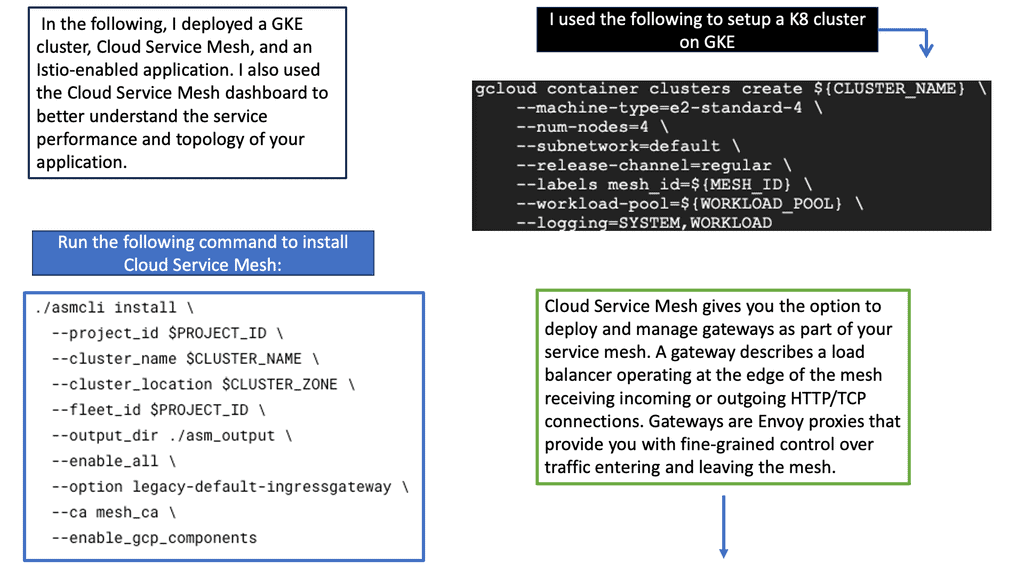
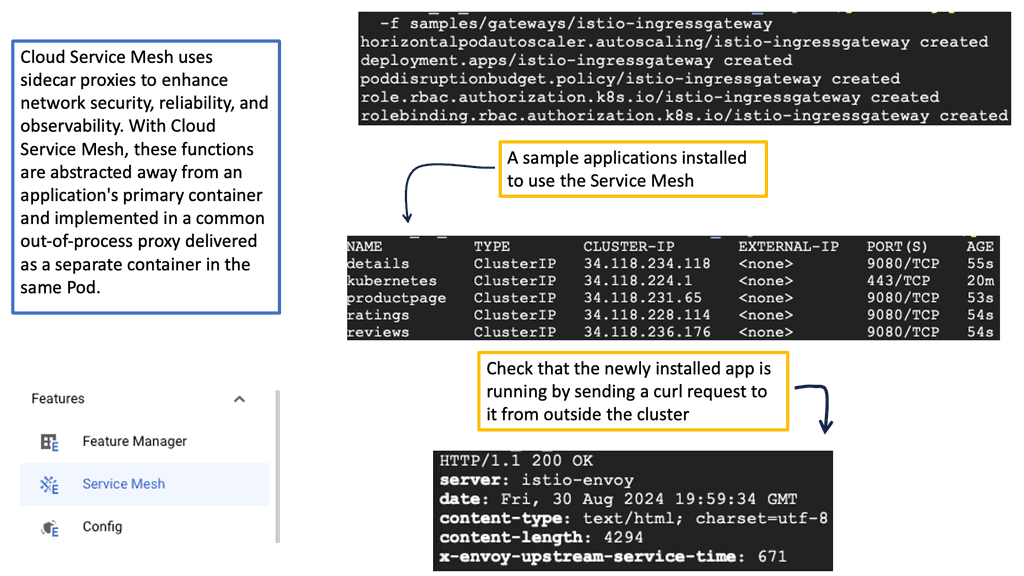
### What is a Cloud Service Mesh?
A cloud service mesh is essentially a network of microservices that manage and optimize communication between application components. It operates behind the scenes, abstracting the complexity of inter-service communication from developers. With a service mesh, you get a unified way to secure, connect, and observe microservices without changing the application code.
### Key Benefits of Using a Cloud Service Mesh
#### Improved Observability
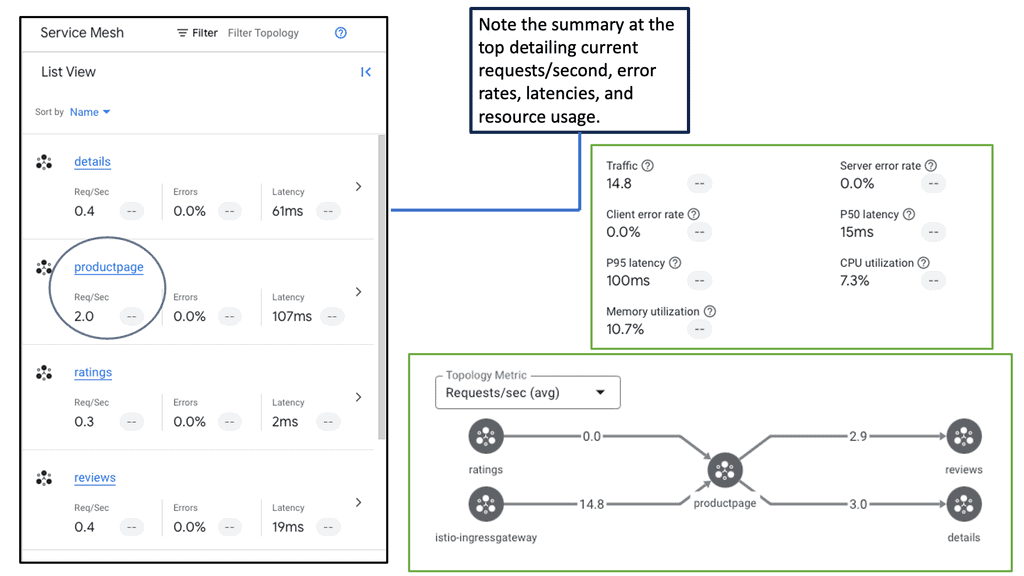
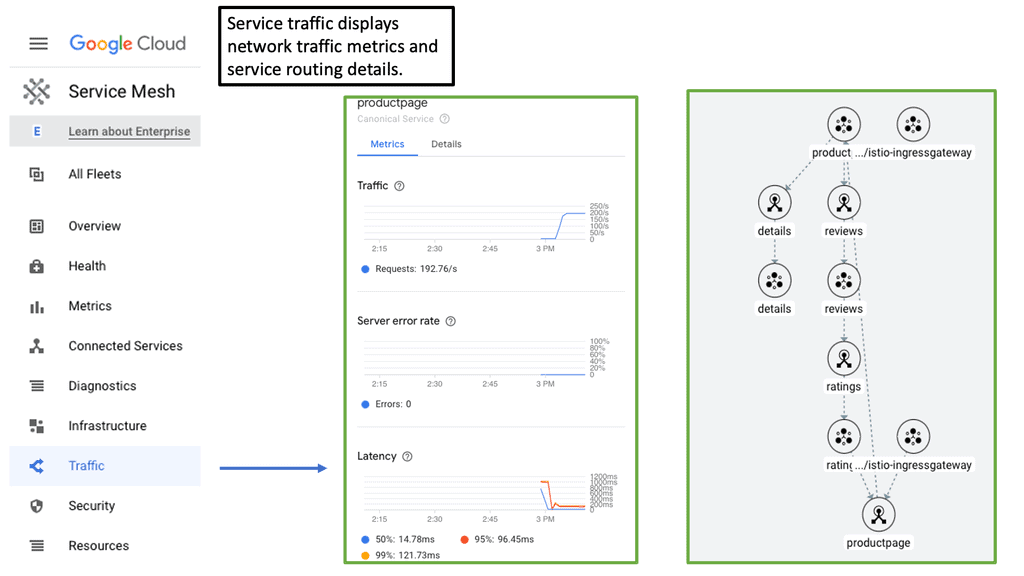
One of the standout features of a service mesh is enhanced observability. By providing detailed insights into traffic flows, latencies, error rates, and more, it allows developers to easily monitor and debug their applications. Tools like Prometheus and Grafana can integrate with service meshes to offer real-time metrics and visualizations.
#### Enhanced Security
Security in a microservices environment can be complex. A cloud service mesh simplifies this by providing built-in security features such as mutual TLS (mTLS) for encrypted service-to-service communication. This ensures that data remains secure and tamper-proof as it travels across the network.
#### Simplified Traffic Management
With a service mesh, traffic management becomes a breeze. Advanced routing capabilities allow for blue-green deployments, canary releases, and circuit breaking, making it easier to roll out new features and updates without downtime. This level of control ensures that applications remain resilient and performant.
### The Role of Container Networking
Container networking is a critical aspect of cloud-native architectures, and a service mesh enhances it significantly. By decoupling the networking logic from the application code, a service mesh provides a standardized way to manage communication between containers. This not only simplifies the development process but also ensures consistent network behavior across different environments.
### Popular Cloud Service Mesh Solutions
Several service mesh solutions have emerged as leaders in the industry. Notable mentions include:
– **Istio:** One of the most popular service meshes, Istio offers a robust set of features for traffic management, security, and observability.
– **Linkerd:** Known for its simplicity and performance, Linkerd focuses on providing essential service mesh capabilities with minimal overhead.
– **Consul Connect:** Developed by HashiCorp, Consul Connect integrates seamlessly with other HashiCorp tools, offering a comprehensive solution for service discovery and mesh networking.
Architecture Challenge
Choose the Right Isolation Model
A modern application does not always need every workload to use the same
isolation boundary. Read the requirements, choose an architecture, and
decide where containers, networking and stronger isolation should be used.
Scenario
Modern Three-Tier Application
A platform team is deploying a public web tier, an internal API and a
sensitive database. The platform needs rapid deployment and scaling,
private east-west communication and controlled exposure to the Internet.
✓
Fast deployment and scalingApplication components should remain lightweight and portable.
✓
Controlled Internet exposureOnly the public web tier should have an externally reachable path.
✓
Private east-west trafficAPI and database communication should stay on private application networks.
✓
Stronger isolation where justifiedSensitive workloads may require a stronger boundary than ordinary application containers.
Select an Architecture
Architecture Assessment0 / 4
Web
→
Controlled Ingress
→
Private API
→
Protected DB
Architecture Decision Console
[ready] Challenge loaded.
[info] Four architecture patterns available.
[hint] Look for the balance between agility, exposure and isolation.
Engineering Insight
The important design question is not simply “containers or VMs?”
It is which isolation boundary is appropriate for each workload and
how networking controls exposure between application tiers.
Educational architecture challenge. Real production decisions also depend
on threat model, runtime security, orchestration, compliance requirements,
performance, operational maturity and workload characteristics.
Shopping Basket
We use cookies on our website to give you the most relevant experience by remembering your preferences and repeat visits. By clicking “Accept”, you consent to the use of ALL the cookies.
This website uses cookies to improve your experience while you navigate through the website. Out of these, the cookies that are categorized as necessary are stored on your browser as they are essential for the working of basic functionalities of the website. We also use third-party cookies that help us analyze and understand how you use this website. These cookies will be stored in your browser only with your consent. You also have the option to opt-out of these cookies. But opting out of some of these cookies may affect your browsing experience.
Necessary cookies are absolutely essential for the website to function properly. This category only includes cookies that ensures basic functionalities and security features of the website. These cookies do not store any personal information.
Any cookies that may not be particularly necessary for the website to function and is used specifically to collect user personal data via analytics, ads, other embedded contents are termed as non-necessary cookies. It is mandatory to procure user consent prior to running these cookies on your website.