Cisco Secure Workload

Cisco Umbrella CASB

Network Insight · Engineering Guide

Cisco Umbrella CASB: Cloud Visibility, Data Protection and Zero Trust Investigation

Cloud applications have changed where users work, where data is stored and where security decisions must be made. A modern Cloud Access Security Broker (CASB) approach is therefore not simply about blocking applications. It is about discovering cloud activity, understanding identity and data context, applying proportionate controls, and investigating what actually happened.

Discover

Identify sanctioned and unsanctioned SaaS activity and build visibility into the real cloud environment.

Decide

Combine identity, application, device, data and requested activity before making a policy decision.

Investigate

Correlate cloud, identity, DNS, web and security evidence to distinguish signals from confirmed incidents.

Engineering path Cloud Discovery → Context → Enforcement → Investigation
Network Insight · Interactive Architecture

Cisco Umbrella CASB Architecture Explorer

Explore how cloud application discovery, identity context, data protection and security policy fit together. Select any component to examine its engineering role.

Select an architecture component

Identity & policy Visibility & data Risk & response
01

Cloud Application Visibility: Discovering the Real SaaS Environment

Before a security team can protect cloud applications, it needs to understand what applications are actually being used. SaaS adoption rarely follows the approved application catalogue. Employees may introduce new services, connect third-party applications through OAuth, or move business data between platforms without the security team having complete visibility.

What CASB visibility needs to establish

  • Which cloud applications are being accessed?
  • Which applications are sanctioned and which are unknown?
  • Which users, devices and identities are involved?
  • What type of activity is taking place?
  • What data could be exposed or transferred?
  • How much risk does the application introduce?
Engineering principle Discovery comes before enforcement. A security control cannot reliably protect a cloud environment that it cannot see.

Cloud Application Visibility: Discovering the Real SaaS Environment

Cloud application security starts with visibility. Organisations may have an approved catalogue of SaaS services, but real-world usage is usually much broader. Users can introduce applications, connect third-party services through OAuth, and move business information between cloud platforms without those activities appearing in a traditional application inventory.

What the security team needs to discover

CASB visibility should establish which applications are being used, who is using them, what devices are involved, what activity is taking place and whether sensitive information may be entering or leaving the organisation.

SaaS application
User identity
Device context
Cloud activity
Data movement
Application risk
Why discovery matters

An unknown application is not automatically a security incident. It is a visibility signal that requires context. The security team needs to understand the application, its users, its data and its business purpose before deciding whether enforcement is appropriate.

CASB LAB 01 · CLOUD DISCOVERY

SaaS Discovery Explorer

Explore a simplified cloud environment and determine which applications require attention based on usage, approval status and risk.

Discovered SaaS Environment 6 applications
Microsoft 365 Low
Approved collaboration platform
Salesforce Low
Approved business application
Canva Medium
Unapproved SaaS usage detected
Dropbox Medium
External file-sharing activity
Unknown AI Tool High
Potential sensitive-data destination
GitHub Low
Approved development platform
Application Inspector
Application Microsoft 365
Approval Yes
Observed users 184
Risk Low
Engineering readout: Select an application to inspect its cloud-risk context.
02

Identity, Application and Data Context: Turning Cloud Activity Into Policy

Application identity alone is not enough to make a useful security decision. The same SaaS application may be appropriate for one user, device or dataset and unacceptable for another. CASB policy therefore combines multiple dimensions of context before determining what should happen to a cloud request.

Identity Who is making the request?
Device Is the endpoint trusted and healthy?
Application Is the SaaS service approved and appropriate?
Data What information is being accessed or moved?
Action What is the user attempting to do?
Policy principle

The strongest CASB decisions are contextual decisions: identity + device + application + data + activity. This allows security teams to apply controls proportionately instead of treating every cloud interaction as equally risky.

Identity, Application and Data Context: Turning Cloud Activity Into Policy

Once cloud activity has been discovered, the next challenge is deciding what that activity means. A CASB policy should not simply ask whether a user is accessing a particular SaaS application. It should evaluate the identity, device, application, data and requested action together.

Identity Who is making the request and what privileges do they have?
Device Is the endpoint trusted, managed and in an acceptable state?
Application Is the cloud service approved and appropriate for the organisation?
Data Does the activity involve sensitive or regulated information?
Action Is the user viewing, downloading, uploading or sharing data?
Context changes the decision

The same SaaS application can represent very different levels of risk depending on who is using it, what device they are using and what information they are attempting to move.

From signal to policy

Identity, application risk, data classification and activity context provide the evidence required to move from simple visibility toward a defensible security policy.

Network Insight · Interactive Policy Lab

CASB SaaS Access & Data Protection Engine

Change the identity, application, data sensitivity and requested action. Run the scenario to see how a sample CASB policy evaluates the available context and selects a response.

1. Configure the scenario

Application categories are illustrative policy inputs, not live reputation data.
The path affects which responses this example considers technically available.

2. Policy evaluation

Ready to evaluate

Awaiting scenario

Choose the scenario inputs, then run the policy engine to generate a decision and its explanation.

Decision reasoning
  • The engine evaluates the selected user, application, data and activity.
  • The available enforcement path limits the actions that can be taken.
Recommended next step
Run the scenario to see the recommended response.
Policy logic is deliberately simplified for learning. Real deployments require product-specific capabilities, identity signals, application support, licensing and validated organisational rules.
CASB POLICY LAB

CASB Policy Decision Engine

Evaluate cloud activity using identity, device posture, application risk, data sensitivity and requested action — rather than treating every SaaS request as equal.

Policy Inputs Context → Risk → Decision
Policy evaluation path
Identity → Device → SaaS → Data → Action → Policy
03

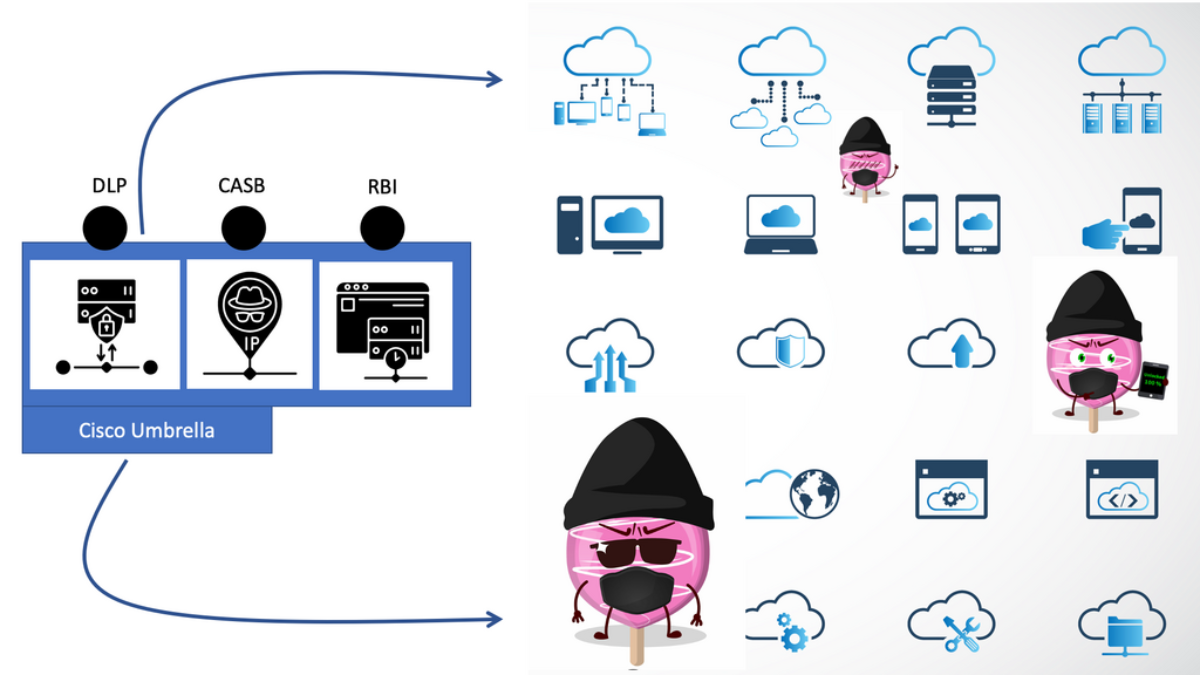
CASB Enforcement: DLP, SASE and Remote Browser Isolation

Visibility and policy decisions only become useful when they can drive an appropriate control. Modern cloud security can combine inline inspection, API-based controls, Data Loss Prevention (DLP), SASE enforcement and Remote Browser Isolation (RBI). The engineering challenge is choosing the right control for the evidence and the risk.

I
Inline CASB Inspect activity while the user is actively accessing a cloud service.
A
API CASB Inspect cloud-hosted data and activity through application integrations.
D
DLP Identify sensitive information and control inappropriate data movement.
R
RBI Isolate risky web content so the endpoint has less direct exposure.
Engineering principle: enforcement should be proportional to risk. Blocking, restricting, inspecting or isolating are different control responses and should be selected according to identity, application, data and activity context.

CASB Enforcement: DLP, SASE and Remote Browser Isolation

Visibility and policy decisions become operational security controls when they can trigger an appropriate enforcement mechanism. Modern cloud security architectures can combine inline CASB controls, API-based inspection, Data Loss Prevention and Remote Browser Isolation, often as part of a broader SASE architecture.

IN
Inline CASB

Inspect and control cloud activity while traffic or sessions are actively being used.

API
API CASB

Analyse data and activity already stored within connected SaaS platforms.

DLP
Data Loss Prevention

Identify sensitive information and apply controls to inappropriate data movement.

RBI
Remote Browser Isolation

Separate risky web content from the endpoint to reduce direct exposure.

Engineering principle

Enforcement should be proportional to evidence and risk. A mature cloud security architecture does not automatically block every anomaly; it selects the control that best matches the identity, application, data and activity involved.

Network Insight · Incident Investigation Lab

Shadow IT & Data Exposure Investigator

Act as the security analyst. Review a simulated SaaS security incident, examine the evidence and select a response supported by what the evidence actually establishes.

Investigation briefing A cloud application or SaaS activity has triggered an alert. Determine what is known, what remains uncertain and which containment or remediation action is justified.

1. Select an incident

2. Review the evidence

Incident ID: NI-CASB-104 · Simulated evidence · Times are illustrative

09:14:02
New SaaS destination observed

DNS and web gateway telemetry show connections to a service not present in the approved application catalogue.

Discovery signal
09:14:18
Repeated user activity

Several requests are associated with the same source identity, where identity mapping is available.

Activity pattern
09:16:40
Content exposure not verified

No SaaS audit record or API evidence has yet confirmed that sensitive files were uploaded.

Evidence gap
What is the most defensible initial response?

3. Analyst findings

Investigation not submitted

Select an incident, review its evidence and choose the response that best fits the facts. You will receive feedback explaining the evidence and limitations.

Analyst objective: separate a detection signal from a confirmed policy violation or data exposure.
Investigation checklist
STEP 1
Establish scope

Identify the user, application, activity, relevant time window and available data sources.

STEP 2
Corroborate evidence

Compare network records with SaaS audit events, identity logs and API evidence where available.

STEP 3
Apply proportionate response

Choose a supported control, preserve evidence and verify that remediation worked.

CLOUD PROTECTION CONTROL PLANE

Where Should the Control Live?

CASB is not a single enforcement point. Select a protection mechanism and inspect where it operates across the user request, cloud activity, stored data and endpoint exposure.

Inline CASB

Inline CASB provides visibility and policy enforcement while the user is actively accessing a cloud application.

Primary role
REAL-TIME
Control Placement Map Click a mechanism to compare coverage
User Request
Policy decision during active cloud access.
ACTIVE
Cloud Activity
Visibility into SaaS transactions and user actions.
CONTEXT
Stored Cloud Data
Inspection of data already residing in SaaS platforms.
LIMITED
Endpoint Exposure
Protection of the endpoint from risky web content.
LIMITED
Primary control point Supporting visibility
Engineering Readout Inline CASB is strongest when the organisation needs to evaluate and enforce policy during an active cloud session. It is about controlling the transaction as it happens.
Educational model: these mechanisms can overlap in real architectures. The important engineering question is where visibility is obtained, where policy is evaluated and where enforcement can actually occur.
04

Cloud Security Investigation: From Alert to Defensible Response

A cloud security alert is not automatically a confirmed incident. Effective investigation requires analysts to correlate the original signal with identity, SaaS activity, DNS and web telemetry, endpoint context and application evidence. The objective is to establish what happened, determine the confidence of the finding and select a defensible response.

01 · DETECT
Capture the signal Start with the alert, anomaly or suspicious cloud activity.
02 · CORRELATE
Build context Connect identity, application, DNS, endpoint and data evidence.
03 · VALIDATE
Test the hypothesis Separate supporting evidence from assumptions and missing data.
04 · RESPOND
Choose the action Contain, monitor, remediate or escalate according to confidence.
Shadow IT

An unknown SaaS application becomes more significant when combined with sensitive data movement, unusual identity activity or unexpected OAuth permissions.

Data Exposure

A suspected exposure should be investigated through the actual data classification, recipient, activity and available audit evidence rather than the alert alone.

Cloud Security Investigation: From Alert to Defensible Response

Security analytics becomes valuable when individual alerts can be connected to a broader evidence chain. A suspicious SaaS application, unusual OAuth permission or possible data exposure should therefore be investigated across identity, application, DNS, web, endpoint and audit evidence before an operational decision is made.

01 · DETECT
Capture the signal

Start with the alert, anomaly or suspicious cloud activity that triggered the investigation.

02 · CORRELATE
Build the evidence chain

Connect identity, SaaS, DNS, endpoint, data and audit information.

03 · VALIDATE
Test the finding

Determine what the evidence proves, what it suggests and what remains unknown.

04 · RESPOND
Choose the action

Contain, monitor, remediate or escalate according to confidence and business impact.

Shadow IT investigation

An unknown SaaS application becomes more significant when combined with unusual authentication, sensitive data movement, risky OAuth permissions or other supporting evidence.

Defensible response

The objective is not simply to react to an alert. It is to establish a sufficiently supported finding and select a response that matches the available evidence.

SECURITY INVESTIGATION LAB

Shadow IT Investigation Lab

Move from an alert to a defensible conclusion. Select an incident, collect the available evidence, correlate the signals and decide whether the activity represents a genuine security concern.

Unapproved SaaS Application

A previously unknown cloud application has appeared in enterprise traffic. Determine whether this is simply unsanctioned software or a genuine security concern.

NOT INVESTIGATED
Evidence Inspector 0 / 4 collected
Identity Telemetry Pending
Who performed the activity?
Awaiting collection
SaaS Activity Pending
What application activity occurred?
Awaiting collection
Data Evidence Pending
What information was involved?
Awaiting collection
Network / DNS Pending
What infrastructure or destination was involved?
Awaiting collection
Investigation readout
Begin by selecting an incident and collecting evidence. An alert alone is not enough to establish a security event.
Confidence
0%
Analyst finding No finding submitted. Collect evidence before deciding whether the alert represents a confirmed security concern.
Educational simulation: the evidence model is intentionally simplified. In a production investigation, analysts would combine identity, application, DNS/web, endpoint, DLP and SaaS audit evidence with organisational policy and incident-response procedures.
tion
```
☕
Support Network Insight
Help support independent engineering guides, interactive networking tools, and future learning labs.
Support Network Insight ```
Technician working in network card labaratory

What is Remote Browser Isolation

What is Remote Browser Isolation

In today's digital landscape, remote browser isolation has emerged as a powerful solution for enhancing cybersecurity and protecting sensitive data. This innovative technology isolates web browsing activities from the local device, creating a secure environment that shields users from potential threats. In this blog post, we will dive into the world of remote browser isolation, exploring its benefits, implementation, and future prospects.

Remote browser isolation, also known as web isolation or browser isolation, is a security approach that separates web browsing activities from the user's device. By executing web sessions in a remote environment, remote browser isolation prevents potentially malicious code or content from infiltrating the user's system. It acts as a barrier between the user and the internet, ensuring a safe and secure browsing experience.

Enhanced Security: One of the primary advantages of remote browser isolation is its ability to mitigate web-based threats. By isolating web content and executing it in a separate environment, any malicious code or malware is contained and unable to affect the user's device. This significantly reduces the risk of cyberattacks such as phishing, drive-by downloads, and zero-day exploits.
Protection Against Zero-Day Vulnerabilities: Zero-day vulnerabilities are software vulnerabilities that are unknown to the vendor and, therefore, unpatched. Remote browser isolation provides a powerful defense against such vulnerabilities by executing web sessions in an isolated environment. Even if a website contains a zero-day exploit, it poses no threat to the user's device as the execution occurs remotely.

BYOD (Bring Your Own Device) Security: With the rise of remote work and the increasing use of personal devices for business purposes, remote browser isolation offers a robust security solution. It allows employees to access corporate resources and browse the internet securely, without the need for complex VPN setups or relying solely on endpoint security measures.
Cloud-Based Deployments: Cloud-based remote browser isolation solutions have gained popularity due to their scalability and ease of deployment. These solutions route web traffic to a remote virtual environment, where browsing sessions are executed. The rendered content is then transmitted back to the user's device, ensuring a seamless browsing experience.

On-Premises Deployment: For organizations with specific compliance requirements or highly sensitive data, on-premises remote browser isolation solutions provide an alternative. In this approach, the isolation environment is hosted within the organization's infrastructure, granting greater control and customization options.

As cyber threats continue to evolve, remote browser isolation is expected to play an increasingly important role in cybersecurity strategies. The adoption of this technology is likely to grow, driven by the need for robust protection against web-based attacks. Moreover, advancements in virtualization and cloud technologies will further enhance the performance and scalability of remote browser isolation solutions.

Remote browser isolation is a game-changer in the realm of cybersecurity. By creating a secure and isolated browsing environment, it provides effective protection against web-based threats, zero-day vulnerabilities, and enables secure BYOD practices. Whether implemented through cloud-based solutions or on-premises deployments, remote browser isolation is poised to shape the future of web security, ensuring safer digital experiences for individuals and organizations alike.

Remote Browser Isolation • Interactive Lab 01

Remote Browser Isolation Architecture Lab

Explore what happens when web browsing is moved away from the endpoint. Identify where the browser executes, where web content is processed, and what actually remains on the user's device.

Browser Isolation Data Path
💻
User Device Input, display and local browser boundary
→
🛡
RBI Gateway Policy, session steering and access control
→
🌐
Isolated Browser Remote browser execution environment
→
☁
Internet Web content and remote resources
Architecture Evidence
Local Device User input and rendered session output remain local.
Browser Execution Web code executes inside the isolated browser environment.
Threat Boundary Untrusted web content is separated from the endpoint.
Session Handling Session behaviour is controlled by the RBI architecture.
Architecture Assessment
Execution Location Remote
Endpoint Exposure Reduced
Deployment Cloud RBI
Policy Requirement Required
RBI ARCHITECTURE CONSOLE
[READY] Remote Browser Isolation architecture loaded. [INFO] Select a destination, deployment model and session behaviour. [INFO] The objective is to identify where web execution occurs.
Engineering takeaway: RBI moves browser execution and untrusted web processing into an isolated environment. The endpoint still participates in the session through user input and rendered output, so RBI reduces endpoint exposure rather than making the endpoint completely irrelevant. Security also depends on policy, session controls, downloads/uploads and the protection of the isolated environment itself.

Highlights: What is Remote Browser Isolation

What is Browser Isolation

With browser isolation (remote browsing), internet browsing activity is separated from loading and displaying webpages locally.

Most website visitors load content and code directly from their local browsers. The content and code on the Internet often come from unknown sources (e.g., cloud hosting and web servers), which makes browsing the Internet somewhat risky from a security perspective. Web content is loaded and executed in the cloud by remote browser isolation (RBI), which underpins browser isolation.

Detecting hazardous web content is “outsourced” to remote browsing, like machines monitoring hazardous environments to protect humans. Consequently, users are protected from malicious websites (and the networks they connect to) that carry malware.

Types: Remote Browser Isolation?

Remote browser isolation (RBI), or cloud-hosted browser isolation, involves loading and executing webpages and code on a cloud server far from users’ local devices. Any malicious cookies or downloads are deleted after the user’s browsing session ends.

RBI technology protects users and corporate networks from untrusted browser activity. Users’ web browsing activities are typically conducted on a cloud server controlled by RBI vendors. Through RBI, users can interact with webpages normally without loading the entire website on their local device or browser. User actions, such as mouse clicks, keyboard inputs, and form submissions, are sent to a cloud server for further processing.

1. Enhanced Security: The primary advantage of remote browser isolation is its ability to provide enhanced web security. By isolating the browsing activity in a remote environment, any potential malware, zero-day exploits, or malicious websites are contained within the isolated environment, ensuring they cannot reach the user’s device. This dramatically reduces the risk of successful cyber attacks, as the user’s device remains protected even if a website is compromised.

2. Protection Against Phishing Attacks: Phishing attacks are a significant concern for individuals and organizations. Remote browser isolation offers a robust defense against such attacks. By isolating the browsing session, any attempts to trick users into revealing sensitive information through fraudulent websites or email links are ineffective, as the malicious code is contained within the isolated environment.

3. Mitigation of Web-Based Threats: Remote browser isolation effectively mitigates web-based threats by preventing the execution of potentially malicious code on the user’s device. Whether it’s malware, ransomware, or drive-by downloads, all potentially harmful elements are executed within the isolated environment, ensuring the user’s device remains unharmed. This approach significantly reduces the attack surface and minimizes the potential impact of web-based threats.

4. Compatibility and Ease of Use: One key advantage of remote browser isolation is its compatibility with various platforms and devices. Users can access isolated browsing sessions from any device, including desktops, laptops, and mobile devices, without compromising security. This flexibility ensures a seamless user experience while maintaining high security.

Example Technology: Browser Caching

Understanding Browser Caching

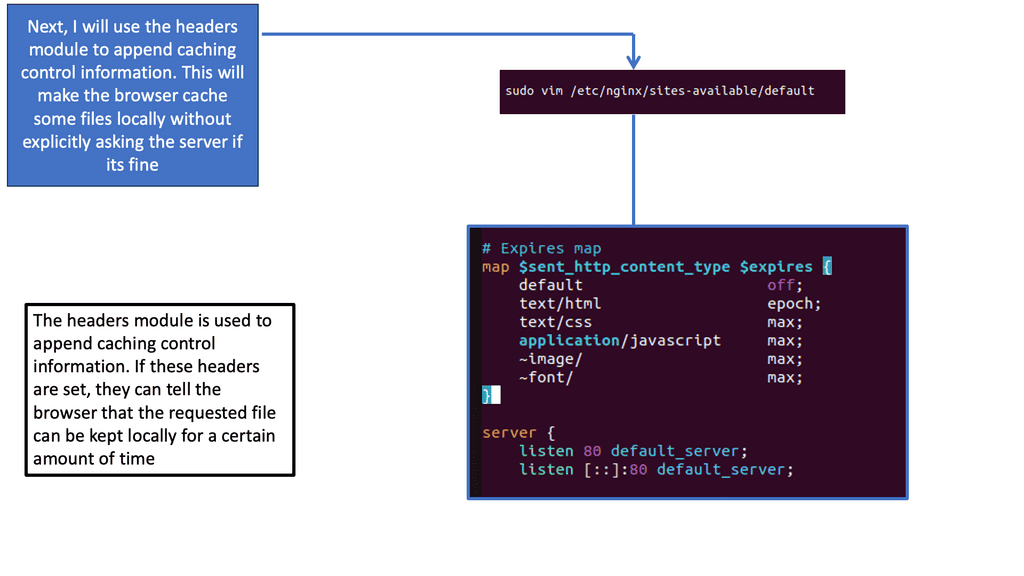
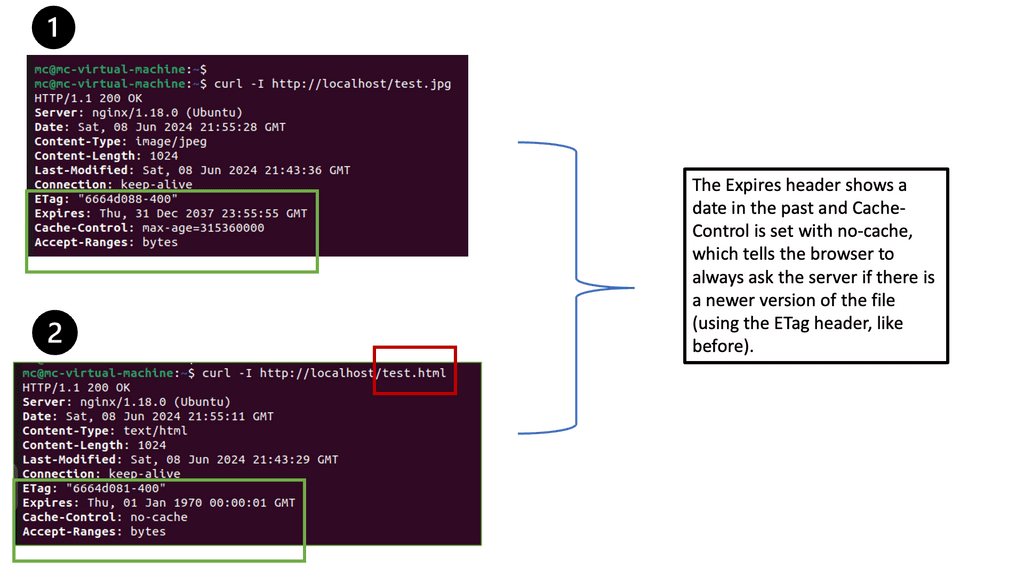
Browser caching is a mechanism that allows web browsers to store static files locally, such as images, CSS files, and JavaScript scripts. When a user revisits a website, the browser can retrieve these cached files from the local storage instead of making a new request to the server. This significantly reduces page load time and minimizes bandwidth usage.

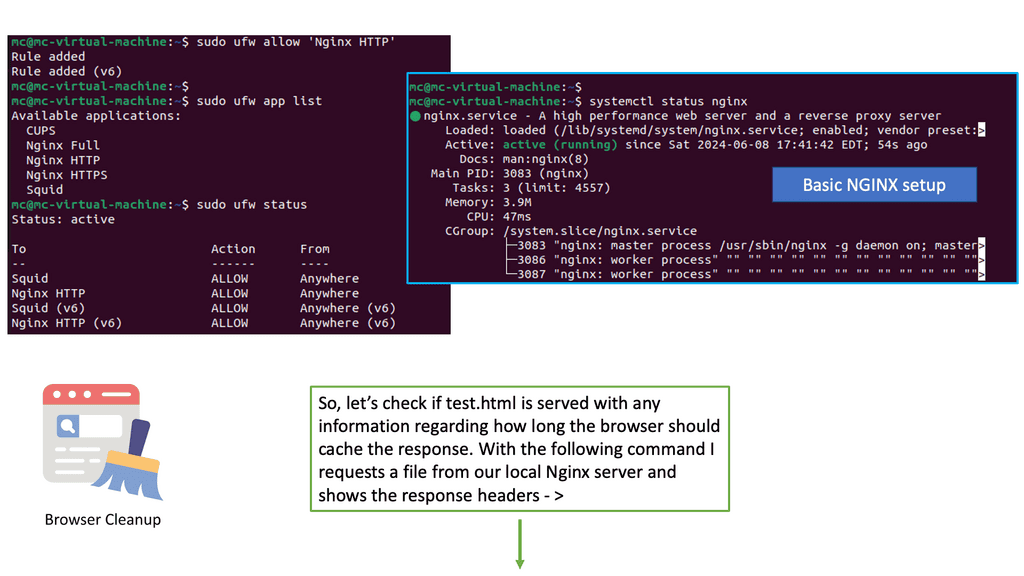
Nginx, a popular web server, offers a powerful module called “header” that enables fine-grained control over HTTP response headers. By utilizing this module, we can easily configure browser caching directives and control cache expiration for different types of files.

Implementing Browser Caching

To start leveraging browser caching with Nginx, we need to modify the server configuration. First, we define the types of files we want to cache, such as images, CSS, and JavaScript. Then, we set the desired expiration time for each file type, specifying how long the browser should keep the cached versions before checking for updates.

While setting a fixed expiration time for cached files is a good start, it’s important to fine-tune our cache expiration strategies based on file update frequency. For static files that rarely change, we can set longer expiration times. However, for dynamic files that are updated frequently, we should use techniques like cache busting or versioning to ensure users always receive the latest versions.

Implementing Remote Browser Isolation:

– Implementing remote browser isolation typically involves deploying a virtualized browsing environment that runs on a server or in the cloud. When a user initiates a web session, the web content is rendered within this isolated environment and securely transmitted to the user’s device as a visual stream, ensuring no potentially harmful code reaches the endpoint.

– Various approaches to implementing remote browser isolation exist, ranging from on-premises solutions to cloud-based services. Organizations can choose the option that best suits their requirements, considering scalability, ease of management, and integration with existing security infrastructure.

The Rise of Threats:

– The majority of attacks originate externally. Why? The Internet can be dirty because we can’t control what we don’t know. Browsing the Internet and clicking on uniform resource identifier (URL) links exposes the enterprise to compromise risks.

– These concerns can be very worrying for individuals who need to use the internet regularly, as they want a safe online browsing experience. Cyber security is becoming an increasingly vital consideration to be aware of when using the internet, with rising cyber-attacks forcing the need for Remote Browser Isolation (RBI). 


Remote Browser Isolation • Interactive Lab 02

Browser Threat Investigation Lab

Investigate what happens when a user encounters hostile web content. Follow the threat through the browsing path and determine which risks RBI reduces, which risks remain, and where security policy is still required.

Incident Path
Endpoint Local user device
→
Isolation Boundary RBI processing layer
→
Threat Site Hostile web content
Drive-by Web Exploit
Malicious browser content attempts to exploit a vulnerable browser component when the page is loaded.
Investigation Assessment
Endpoint Exposure Reduced
Threat Containment High
Policy Dependency Medium
Residual Risk Requires Review
Forensic Evidence
Execution Browser execution occurs inside the isolated environment.
Endpoint Endpoint receives session interaction and rendered output.
Threat Malicious content is processed within the remote browser.
Policy Isolation does not remove the need for security policy.
RBI THREAT INVESTIGATION CONSOLE
[READY] Threat investigation engine loaded. [INFO] Select an incident and isolation state. [INFO] Determine what RBI contains and what policy must still control.
Engineering takeaway: RBI can substantially reduce direct endpoint exposure to hostile web content, but it is not a complete security control by itself. Phishing, credential theft, downloads, uploads, identity abuse and data loss still require appropriate policy and security controls.

What is Remote Browser Isolation

The Challenging Landscape

It is estimated that the distribution of exploits used in cyber attacks by type of application attacked showed over 40% related to browser attacks. Android was next in line with 27% of the attack surface. As a result, we need to provide more security regarding Internet browsing.

Most compromises involve web-based attacks and standard plugins, such as Adobe, supported in the browser. Attacks will always happen, but your ability to deal with them is the key. If you use the Internet daily, check the security of your proxy server.

Challenge: Browser Attacks

Attacking through the browser is too easy, and the targets are too rich. Once an attacker has penetrated the web browser, they can move laterally throughout the network, targeting high-value assets such as a database server. Data exfiltration is effortless these days.

Attackers use social media accounts such as Twitter and even domain name systems (DNS) commonly not inspected by firewalls as file transfer mechanisms. We need to apply the zero trust network design default-deny posture to web browsing. This is known as Remote Browser Isolation.

Remote Browser Isolation: Zero Trust

Neil McDonald, an analyst from Gartner, is driving the evolution of Remote Browser Isolation. This feature is necessary to offer a complete solution to the zero-trust model. The zero-trust model already consists of micro-segmentation vendors that can be SDN-based, network-based appliances (physical or virtual), microservices-based, host-based, container-centric, IaaS built-in segmentation, or API-based. There are also a variety of software-defined perimeter vendors in the zero-trust movement.

So, what is Remote Browser Isolation (RBI)? Remote Browser Isolation starts with a default-deny posture, contains the ability to compromise, reduces the surface area for an attack, and, as sessions are restored to a known good state after each use, it is like having a dynamic segment of 1 for surfing the Internet. Remote browser offerings are a subset of browser isolation technologies that remove the browser process from the end user’s desktop.

You can host a browser on a terminal server and then use the on-device browser to browse to that browser, increasing the security posture. When you use HTML 5 connectivity, the rendering is done in the remote browser.

RBI – Sample Solution

Some vendors are coming out with a Linux-based, proxy-based solution. A proxy – often hosted on sites like https://www.free-proxy-list.net/ – acts as an internet gateway, a middleman for internet interactions. Usually, when you browse the Internet, you go to a non-whitelist site, but if it hasn’t been blacklisted, you will be routed to the remote system.

Real-time Rendering

You could have a small Linux-based solution in the demilitarized zone (DMZ) or the cloud in the proxy-based system. That container with docker container security best practices enabled will do the browsing for you. It will render the information in real time and send it back to the user using HTML5 as the protocol using images. For example, if you are going to a customer relationship management (CRM) system right now, you will go directly to that system as it is whitelisted.

Best Browsing Experience

But when you go to a website that hasn’t been defined, the system will open a small container, and that dedicated container can give you the browsing experience, and you won’t know the difference. As a result, you can mimic a perfect browsing experience without any active code running on your desktop while browsing.

Separating Browsing Activities

Remote browser isolation has emerged as a powerful solution in the fight against web-based cyber threats. Separating browsing activities from the user’s local device provides enhanced security, protects against phishing attacks, mitigates web-based threats, and offers compatibility across different platforms and devices.

As the digital landscape continues to evolve, remote browser isolation is set to play a crucial role in safeguarding individuals and organizations from the ever-present dangers of the web.

Closing Points on RBI

Remote Browser Isolation is a security measure designed to protect users from web-based threats by isolating web browsing activities from the local network. Unlike traditional security measures that rely on detecting and blocking threats, RBI assumes that all web content could be potentially harmful. It works by executing web pages in a secure, isolated environment—often in the cloud—thus preventing any malicious content from reaching the user’s device. This proactive approach ensures that even if a web page is infected, the threat remains contained within the isolated environment.

The benefits of Remote Browser Isolation stretch beyond mere threat containment. Firstly, it significantly reduces the risk of phishing attacks, a common method used by cybercriminals. By isolating web pages, users are protected from inadvertently downloading ransomware or malware. Secondly, RBI improves compliance and data protection, essential for industries handling sensitive information. Additionally, it provides a seamless user experience, as the isolation occurs in real-time without noticeable delays, maintaining productivity and efficiency.

Implementing RBI in your organization involves several key steps. Begin by assessing your current cybersecurity posture and identifying areas where RBI can complement existing defenses. Collaborate with IT professionals to ensure a smooth integration process. Training and educating employees about the benefits and functionality of RBI will also enhance adoption rates. Moreover, regularly updating and maintaining the isolation environment is crucial to adapt to evolving cyber threats.

Many organizations across various sectors are already reaping the benefits of Remote Browser Isolation. Financial institutions, for example, utilize RBI to safeguard sensitive customer data from phishing and malware attacks. Educational institutions employ RBI to create a safe browsing environment for students and staff. These success stories highlight the versatility and effectiveness of RBI in enhancing cyber resilience and protecting critical information.


Remote Browser Isolation • Interactive Lab 03

RBI Policy & Deployment Lab

Design an RBI deployment by balancing security policy, deployment location, trusted applications and risky Internet browsing. Explore how cloud and on-premises models change the operational considerations without changing the core isolation concept.

Policy → Isolation → Internet Access
User / Endpoint User device and browser interface
→
Policy Gateway Identity, destination and session policy
→
RBI Environment Isolated browser execution
→
Internet Web destinations
Deployment Assessment
Scalability High
Operational Control Provider Managed
Policy Strictness Balanced
Primary Concern Policy Design
Design Evidence
Session Web browsing is routed through the RBI environment.
Downloads Downloads require explicit policy consideration.
Trusted Apps Trusted destinations may follow a different access policy.
Failure Availability depends on the RBI deployment architecture.
RBI POLICY & DEPLOYMENT CONSOLE
[READY] RBI policy and deployment engine loaded. [INFO] Select a deployment model, policy and operational event. [INFO] Evaluate security, scalability and operational dependencies.
Engineering takeaway: Cloud and on-premises RBI can implement the same fundamental isolation model, but they differ in operational ownership, scalability, integration and control. The most important design decision is not simply where the isolated browser runs — it is how identity, destination access, downloads, uploads, authentication and session policies are enforced.