
1. The Core Components:
The Linux Networking Subsystem comprises several core components that work in unison to deliver robust networking capabilities. These components include:
Network Devices: Linux supports many network devices, including Ethernet, Wi-Fi, Bluetooth, and Virtual Private Network (VPN) interfaces. The Linux kernel provides the necessary drivers to communicate with these devices, ensuring seamless integration and compatibility.
Network Protocols: Linux supports a plethora of network protocols, such as Internet Protocol (IP), Transmission Control Protocol (TCP), User Datagram Protocol (UDP), and Internet Control Message Protocol (ICMP). These protocols form the foundation of reliable and efficient data transmission over networks.
Network Interfaces: Linux offers various network interfaces that enable communication between different network layers. These interfaces include loopback, ethernet, wireless, and virtual interfaces. Each interface serves a specific purpose and is crucial in maintaining network connectivity.
2. Network Configuration:
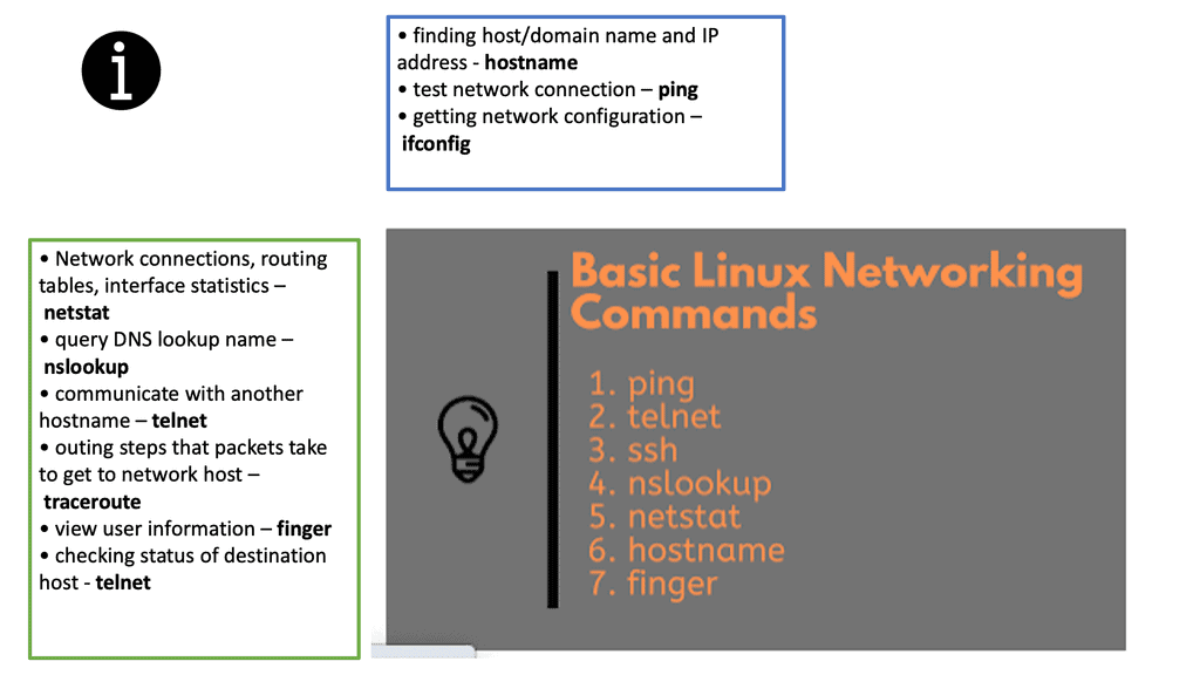
The Linux Networking Subsystem provides comprehensive tools to configure network settings. Administrators can leverage these tools to manage IP addresses, set up routing tables, configure network interfaces, apply firewall rules, and monitor network traffic. Some of the commonly used tools include ifconfig, ip, route, firewall-cmd, and tcpdump.
3. Network Virtualization:
Virtualization has become an integral part of modern IT infrastructure. With its robust networking subsystem, Linux offers excellent network virtualization support. Technologies like Virtual LAN (VLAN), Virtual Extensible LAN (VXLAN), and Network Namespaces enable the creation of isolated network environments, allowing multiple virtual networks to coexist on a single physical infrastructure.
4. Packet Filtering and Firewalling:
The Linux Networking Subsystem incorporates Netfilter, a powerful packet-filtering framework. Netfilter enables administrators to implement firewall rules, perform network address translation (NAT), and control traffic flow. With tools like iptables and nftables, Netfilter empowers administrators with fine-grained control over network security and access control.
5. Network Monitoring and Troubleshooting:
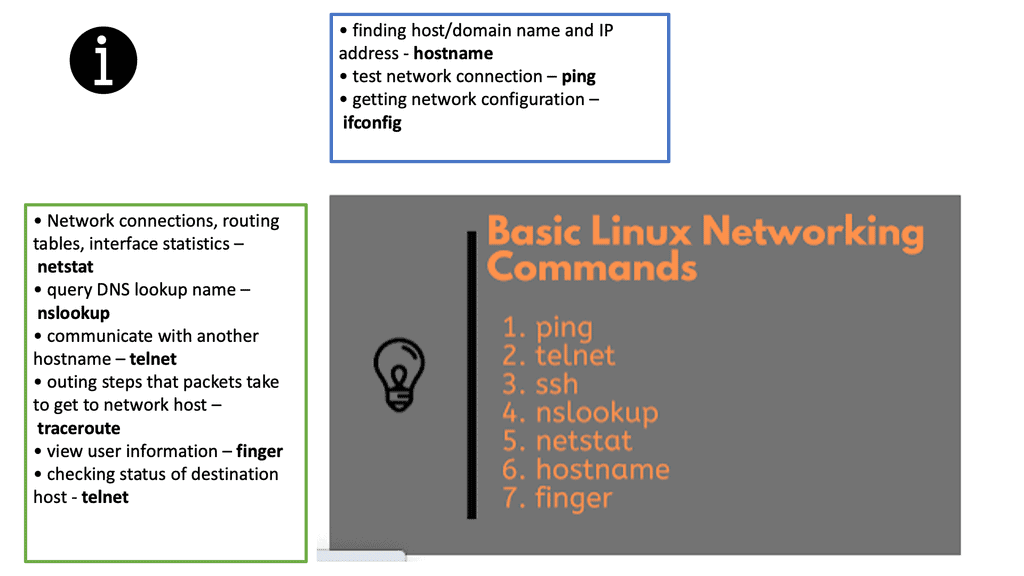
With Linux’s Networking Subsystem, network administrators have various tools to monitor and troubleshoot network-related issues. Tools like tcpdump, Wireshark, netstat, and ping enable administrators to capture and analyze network packets, monitor network connections, diagnose network problems, and measure network performance.
Highlighting Linux Networking
Linux is a powerful and versatile operating system, capable of powering a wide range of devices, from the smallest Raspberry Pi to the largest supercomputers. It is also well-respected for its networking capabilities. Linux networking technologies provide users a secure, reliable, and fast way to connect to the Internet and other devices on the same network.
Linux supports several popular networking protocols, such as TCP/IP, IPv4, IPv6, and the latest wireless technologies. Linux also supports a wide range of networking hardware, from Ethernet cards to wireless routers. With the help of these networking technologies, users can easily connect to the Internet, share files and printers, and access networked resources from other computers.
Linux provides a range of tools for managing and configuring networks. These include a range of graphical user interfaces and powerful command-line tools such as netstat and ifconfig. Network administrators can also use tools such as iptables and iproute to set up firewalls and control network access.
Linux has almost forever had an integrated firewall available.
Linux Firewall is an essential security feature for any Linux system. It is a barrier between the outside world and the internal network, keeping malicious and unauthorized users from accessing your system. Firewalls also help protect against viruses, worms, Trojans, and other malware.
A Linux firewall is a combination of software and hardware components that together provide a secure network environment. It is designed to permit or deny network traffic based on user-defined rules. Rules can be based on various criteria, such as the source or destination IP address, type of service, or application.
To configure a Linux firewall, you must use the iptables command. This command line utility allows you to set up rules for filtering and routing data within your network. Iptables is a powerful tool that can be used to create complex firewall rules. The following figure shows an example of a firewall that can filter requests based on protocol or target-based rules.
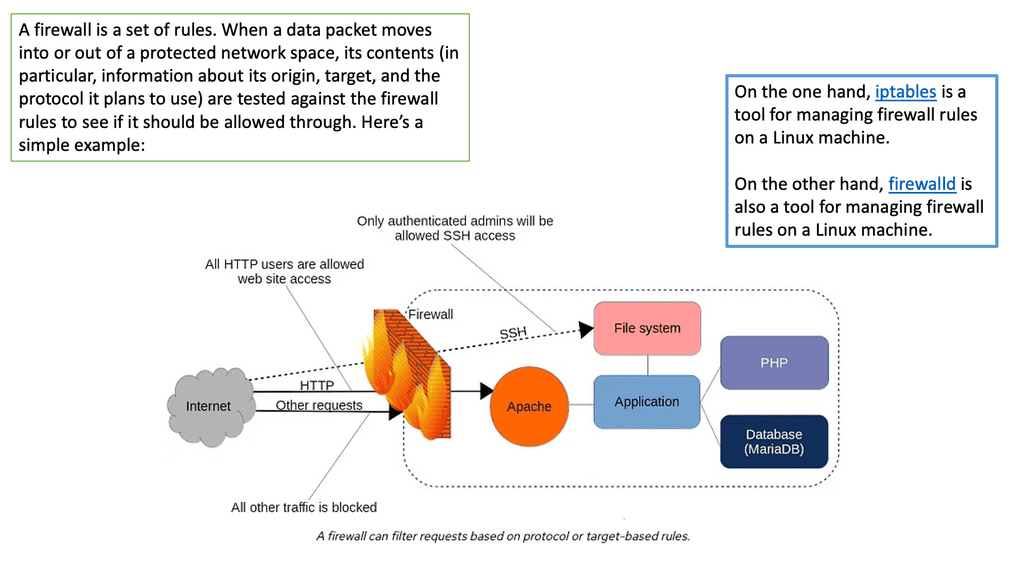
With the native firewall tools, you can prepare a traditional perimeter firewall with address translation or a proxy server. While egress filtering (outbound access controls) is recommended, this is often implemented at network perimeters – on firewalls and routers between VLANs or facing less-trusted networks such as the public internet.
Linux Network Subsystem: Netlink Linux
The Linux system architecture contains the user space, kernel, and hardware. At the top of the Linux framework, user space exists with various user applications—the kernel space forwards packets in the middle, accepting instruction from the user space element.
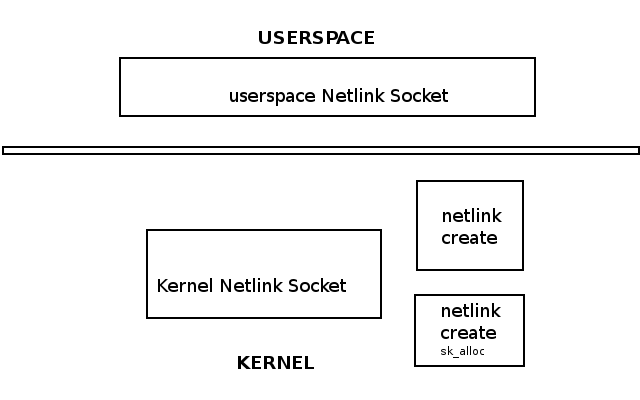
At the bottom, we have the hardware, such as CPU, RAM, and NIC. One way to communicate between userspace and kernel is via Netlink. The Linux Netlink socket handles bidirectional communication between the two.
It can be created in user space with the socket() system call or in the kernel with netlink_kernel_create(). For example, the following shows a Netlink Linux socket created in both the kernel and user space.
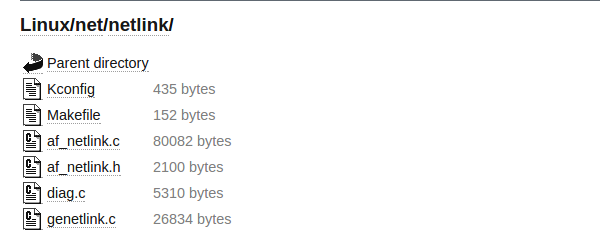
The Linux Netlink protocol implementation resides under the net/netlink folder listed below. In addition, the af_netlink provides the Netlink Linux kernel socket API, genetlink provides the generic Netlink API, and diag provides information about the Netlink sockets.
The Linux networking subsystem is part of the kernel space and is one of the most critical subsystems. Even if hosts are not connected, the network subsystem is used for the client-server interaction of X-Windows. The Linux Kernel networking stack processes incoming packets from Layer 2 to the network layer.
It then passes for local delivery to the transport layer protocols listening to TCP or UDP sockets. Any packets not destined for the local system are sent back down the stack for transmission. The kernel does not handle anything above Layer 4. Userspace applications handle all layers above Layer 4.
The sk_buff and net_device
The sk_buff and net_device are fundamental to the networking subsystem. The network device driver ( net_device structure ) receives and transmits packets to pass them up the stack ( Layer 3 to Layer 4 ) or transmit them to an outgoing interface. The routing subsystem looks up every incoming/outgoing packet to determine the interface and specific packet handling activities.
Many things may affect packet traversal, such as Netfilter hooks, IPsec subsystem, TTL, etc. The sk_buff ( Socket Buffer ) represents data and headers. Packets are received on the wire by a NIC (net device), placed in the sk_buff, and passed through the network stack.
The userspace networking stack can slow down the CPU’s performance. Everything that crosses over to the kernel affects performance, so if the application crosses over the user/kernel boundary, it will cost a lot.
It would help if you minimized this by keeping as much in the kernel and below as possible and only going to userspace for a quick breath. For example, transit traffic might not need to go to userspace constantly.
Linux Networking and Android
Linux is used extensively as the base for Android phones. The Linux networking stack has different needs for mobile devices than for data center devices. The phone moves continuously, connecting to other networks of varying quality. Phones are connected to multiple networking nearly all the time.
If devices are on the WIFI network and require sending an SMS, you must bring up the cell network on a different IP interface.
Multipath TCP
Users want all networks simultaneously, and the Linux stack must seamlessly switch across network boundaries. For this, the application has to shoot all the TCP connections so they don’t get blocked on reads they will never compete.
Usually, when you remove the IP address in Linux, the TCP connection will stay there, hoping that the IP address will return. As a result, the TCP connections are closed for every network switch.
Linux must also support different applications and socket routing, such as connecting to a wireless printer while on the CELL network. There is also a method to let users know if they are connecting to a WIFI network that doesn’t have a backhaul connection.
To do this, Linux must use DNS and open a TCP connection on the backhaul network. The networking stack needs to handle many functions for such a small device.
Linux Network subsystem: Linux networking and the data center
Linux has accelerated in the data center and is the base for open-source cloud environments and containerized architecture in the Kubernetes network namespace environments. Many virtual switch functions are available with hardware offload for accelerated performance.
The Linux kernel supports three software bridges – Bridge, macvlan, and Open vSwitch. A NIC-embedded switch solution with SR-IOV may be used instead of the software switch. Recently, there have been many new bridge features such as FDB manipulation, VLAN filtering, Learning/flooding control, Non-promiscuous bridge, and VLAN filtering for 802.1as (Q-in-Q).
- A typical packet processing pipeline of a switch includes:
- Packet parsing and classification – L2, L3, L4, tunneling, VXLAN VNI, inner packet L2, L3, L4.
- Push/pop for VLAN or encapsulation/decapsulation for tunneling.
- QoS-related functions such as Metering, Shaping, Marking, and scheduling.
- Switching operations.
The data plane is accelerated by decomposing the packet processing pipeline and offloading some stages to the hardware ASICs. For example, layer 2 features that can be offloaded to ASIC may include MAC learning and aging, STP handling, IGMP snooping, and VLXAN. It is also possible to offload Layer 3 functions to ASICs.
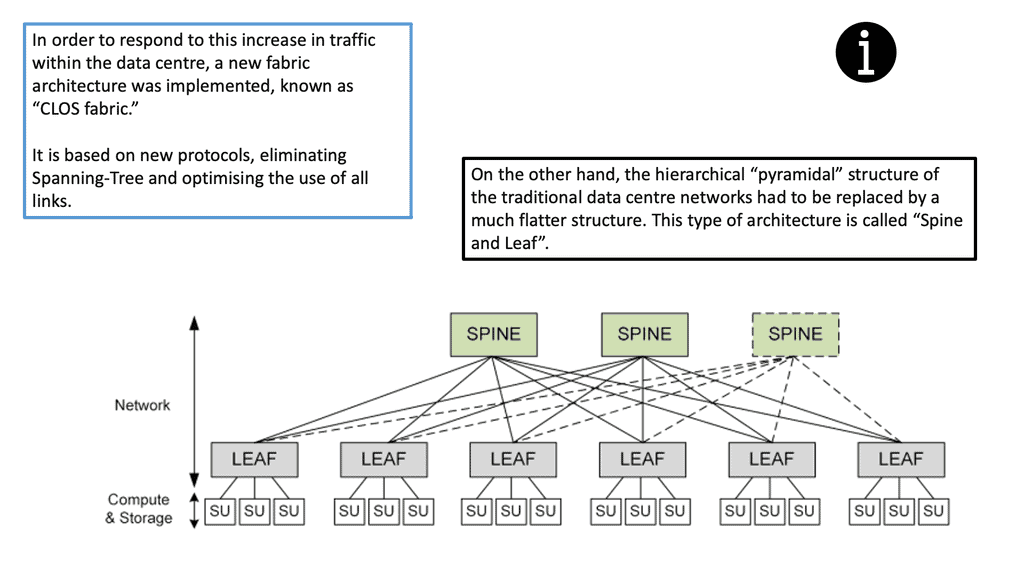
The following figure shows an example of a data center design known as the leaf and spine. Each node can run a version of Linux to perform Linux networking for the data center.
Linux switch types
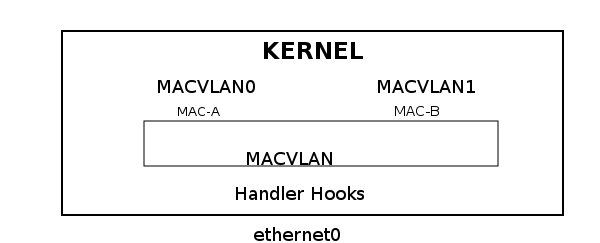
The bridge is a MAC&VLAN standard bridge containing an FDB ( forwarding DB), STP ( spanning tree), and IGMP functions. The FDB contains a record of MAC to port allocation. Building up the FDB is called “MAC learning” or simply the “learning process.” MAC VLAN is a switch based on STATIC MAC&VLAN.
It uses unicast filtering instead of promiscuous mode and supports several modes – private, VEPA, bridge, and pass-thru. MAC VLAN is a reverse VLAN under Linux. It takes a single interface and creates multiple virtual interfaces with different MAC addresses.
Essentially, it enables the creation of independent logical devices over a single ethernet device – a “many to one” relationship in contrast to a “one to many” relationship where you map a single NIC to multiple networks. In addition, MAC VLAN offers isolation because it will only see traffic on an interface with a specified MAC address.
Open vSwitch is a flow-based switch that performs MAC learning like the Linux bridge enabling container networking. It supports protocols like STP and, more importantly, OpenFlow. Its forwarding is based on flows, and everything is based on a flow table. It is becoming the de facto software switch and has an impressive feature list, now including stateful services and connection tracking.
It is also used in complex cases involving nested Open vSwitch designs with OVN (Open-source virtual networking). By default, the OVS acts as a learning switch and learns like a standard Layer 2 switch. For advanced operations, it can be connected to an SDN controller, or the command line can be used to add OpenFlow rules manually.
The Linux Networking Subsystem is a critical component that underpins the networking capabilities of Linux-based systems. Its robust architecture, comprehensive toolset, and support for virtualization make it a preferred choice for network administrators. By delving into the core components, network configuration, virtualization, packet filtering, and network monitoring, we have gained a deeper understanding of the Linux Networking Subsystem’s significance and its role in enabling efficient networking in Linux environments.