
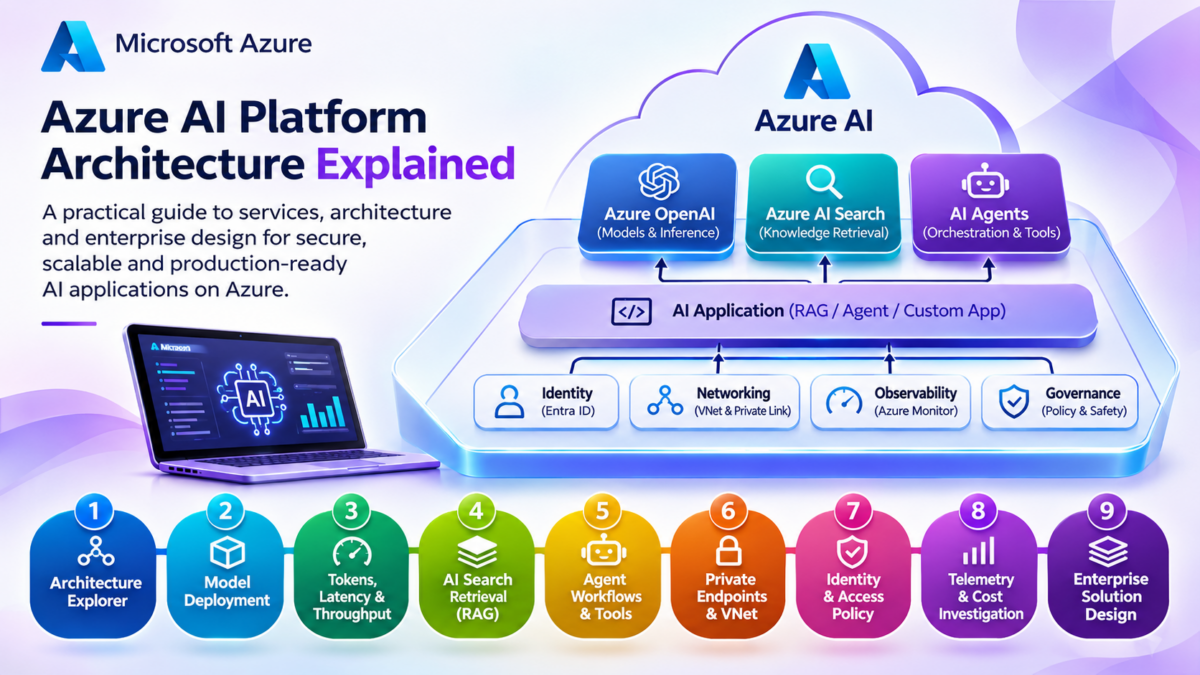
Azure AI Architecture Explained
Microsoft Azure provides a cloud ecosystem for building, deploying, connecting, securing, and operating artificial intelligence applications. From foundation model inference and Retrieval-Augmented Generation to autonomous agents and private enterprise connectivity, Azure AI architecture combines model services with application engineering, data platforms, networking, identity, and observability.
Enterprise AI architecture is more than selecting a language model and sending it a prompt. A production AI application requires an execution environment, access to relevant data, secure connectivity, identity controls, monitoring, and operational governance.
Azure brings these capabilities together through services such as Microsoft Foundry, Azure OpenAI, Azure AI Search, Azure networking, Microsoft Entra ID, and supporting application and data infrastructure.
This guide explores how the components fit together from an engineering perspective. We will examine inference requests, model deployment, RAG pipelines, agent orchestration, private networking, security boundaries, and production operations.
Conceptual layered architecture. Actual AI requests may traverse multiple services and return through different paths. Networking, identity, and security are cross-cutting controls rather than a final sequential processing stage.
The Four Engineering Pillars of Azure AI
Azure AI solutions are built from several cooperating architectural layers. Understanding their responsibilities helps engineers select services, design secure integrations, and diagnose production problems.
Models and Inference
Deploy and consume foundation models through supported Azure model services and endpoints. Understand latency, throughput, token usage, and model selection.
Knowledge and Agents
Connect AI applications to enterprise knowledge through retrieval pipelines, and enable agents to execute controlled workflows using tools.
Networking and Security
Protect AI workloads using private connectivity, managed identities, role-based access, network controls, and data governance.
Operations and Reliability
Measure quality, performance, costs, and application health. Establish monitoring, evaluation, deployment, and recovery practices.
What You Will Learn
This guide follows an architecture-first approach, progressing from the Azure AI platform to the design and operation of a complete enterprise AI solution.
Azure AI Is a Distributed Cloud Architecture
A production Azure AI application is not a single model endpoint. It is a distributed system connecting applications, model inference, retrieval, agents, enterprise data, networking, identity, and observability. Engineering these dependencies correctly is essential for security, reliability, and predictable performance.
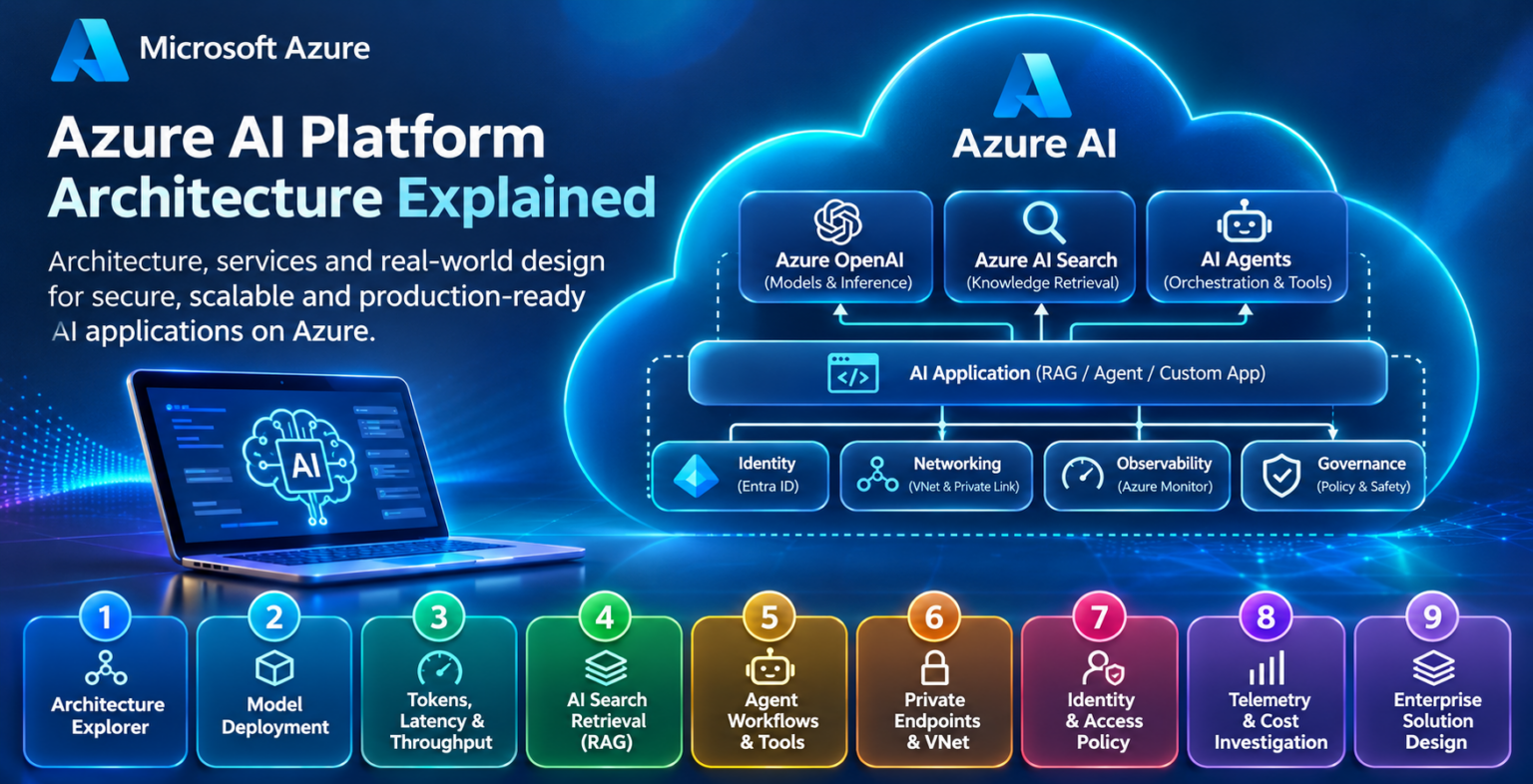
Explore the Azure AI Architecture
Follow nine connected engineering stages, from Azure AI platform foundations and model inference to enterprise networking, security, observability, and production deployment. Select any stage to explore its architecture.
Understanding Azure AI Platform Architecture
Azure AI is a collection of cloud services and development capabilities that support model inference, intelligent applications, retrieval systems, agent workflows, and enterprise AI operations. Understanding how these services relate to one another is the foundation for designing secure and scalable Azure AI solutions.
Microsoft Azure provides infrastructure and managed services for running AI workloads. Rather than operating as one monolithic platform, an Azure AI solution combines several specialised services.
Some services provide model inference. Others manage AI development workflows, search enterprise knowledge, host applications, enforce identity policies, or connect private networks.
Microsoft Foundry provides a unified environment for working with supported models, AI applications, agents, and evaluation capabilities. It operates alongside the wider Azure infrastructure ecosystem.
1.1 The Azure AI Service Architecture
An enterprise AI application typically contains an application layer, an AI execution layer, data and retrieval services, and supporting cloud infrastructure.
The application accepts requests and manages user interactions. Model endpoints generate responses. Retrieval services provide additional knowledge, while networking and identity controls govern how components communicate.
Logical service relationships rather than a literal packet-forwarding path. Security, identity, and monitoring apply across the architecture.
1.2 Microsoft Foundry and the Azure AI Ecosystem
Microsoft Foundry provides development and management capabilities for AI solutions, including supported model deployments, agent development, evaluation, and related operational workflows.
It is important to distinguish the development platform from the services that supply infrastructure, data, networking, and application hosting.
Microsoft Foundry
A unified environment for AI development, model deployment, agent workflows, and evaluation.
Azure OpenAI
Managed access to supported OpenAI models through Azure-hosted deployments and inference endpoints.
Azure AI Search
Search and retrieval capabilities for enterprise knowledge, including keyword, vector, and hybrid search.
Application Hosting
Azure App Service, Azure Container Apps, and AKS can host APIs, applications, and orchestration logic.
Azure Networking
Virtual Networks, Private Endpoints, private DNS, and routing provide connectivity and isolation.
Monitoring and Governance
Azure Monitor, access controls, policies, and evaluation processes support production operations.
1.3 Azure Resources, Foundry Resources, and Projects
Azure AI solutions are deployed within the standard Azure management hierarchy. Subscriptions and resource groups provide organisational, billing, and management boundaries.
Foundry resources and projects provide AI-specific development and management boundaries. The precise resource relationships and supported features depend on the selected Foundry experience and resource type.
Simplified conceptual hierarchy. Supporting Azure resources such as Search, Storage, networking, and monitoring can exist as separately managed resources and be connected to the AI solution.
1.4 Choosing the Correct Azure AI Services
Service selection should follow the application's functional and operational requirements rather than the number of features offered by an individual platform.
| Engineering Requirement | Relevant Azure Capability | Design Consideration |
|---|---|---|
| Generate model responses | Azure OpenAI / supported Foundry model deployments | Model capability, latency, quota, cost, and deployment region |
| Build agent workflows | Microsoft Foundry agent capabilities | Tool permissions, orchestration, state, and execution boundaries |
| Retrieve enterprise knowledge | Azure AI Search | Index design, access controls, relevance, and retrieval latency |
| Host application APIs | App Service / Container Apps / AKS | Scaling, runtime management, availability, and deployment model |
| Provide private connectivity | VNet / Private Link / Private DNS | Endpoint support, name resolution, routing, and isolation |
| Secure service access | Microsoft Entra ID / Managed Identities / RBAC | Least privilege, service authentication, and authorisation |
| Operate production AI | Azure Monitor / evaluation tooling | Latency, errors, model quality, usage, and operational cost |
1.5 Azure AI as a Distributed Application
A request to an enterprise AI application may involve several network and application transactions.
The application authenticates the user, retrieves relevant information, calls a model endpoint, processes the response, and returns the result to the client.
Each stage introduces its own dependencies. An unavailable retrieval service, incorrect private DNS configuration, exhausted model quota, or insufficient application capacity can affect the overall user experience.
Engineers should therefore consider the complete request path, not only the performance of the language model.
1.6 Architecture and Operational Boundaries
Azure AI services do not all share the same deployment, security, or availability characteristics.
Some components are managed platform services, while others are customer-managed application resources. Their networking capabilities, supported regions, identity models, and scaling limits may differ.
Production designs should document these boundaries explicitly and verify the capabilities of each selected service and deployment configuration.
Azure AI Is an Ecosystem of Connected Services
Microsoft Foundry and Azure AI model services provide important AI development and inference capabilities, but a production solution also depends on application hosting, retrieval infrastructure, identity, networking, observability, and governance. Understanding the responsibility and boundary of each component is the first step towards building a secure, scalable enterprise AI architecture.
Azure AI Service Architecture Explorer
Explore the components of an enterprise Azure AI application. Select a service, inspect its architectural responsibility and trace how requests move between application, inference, retrieval and operational services.
01 / Azure service catalogue
02 / Azure AI application architecture
azure-ai:~$

Select a service or trace an AI request.
Azure AI applications are assembled from multiple independently managed capabilities. Model inference, retrieval, orchestration, storage, identity, networking and monitoring have different responsibilities. Understanding their dependencies is essential for reliable production architecture.
Microsoft Foundry and Model Deployment Architecture
Model deployment connects the AI development environment to production inference. Microsoft Foundry provides capabilities for discovering supported models, configuring deployments, and integrating inference endpoints into applications. The architecture must account for deployment types, regional availability, quotas, throughput, latency, and operational reliability.
A foundation model cannot be treated as an unlimited application dependency. Every model deployment has operational characteristics that influence how applications behave under load.
Engineers must understand how models are selected, exposed through endpoints, accessed by applications, and monitored after deployment.
2.1 The Model Deployment Lifecycle
A typical Azure AI model deployment begins with identifying an appropriate model and evaluating its capabilities. The deployment configuration then determines how the application will access the model and which operational limits apply.
Discover
Review available models and supported capabilities.
Evaluate
Test model quality, latency, context limits, and cost.
Deploy
Choose a deployment option, region, and capacity model.
Integrate
Connect the application to an authenticated inference endpoint.
Operate
Monitor performance, errors, utilisation, and model quality.
Logical deployment workflow. The exact steps and deployment options depend on the model, Foundry resource type, region, and supported serving capability.
2.2 Model Catalogues and Model Selection
Microsoft Foundry provides access to a catalogue of supported models from different providers. Model availability, deployment methods, and commercial conditions can vary.
A model should be selected against the application's requirements rather than benchmark rankings alone. Important considerations include reasoning quality, context length, structured output, tool support, latency, cost, and regional availability.
Model Capability
Evaluate instruction following, reasoning, multimodal support, context limits, and compatibility with application workflows.
Inference Performance
Measure time to first token, response duration, output throughput, and performance under representative concurrent load.
Deployment Constraints
Check regional support, deployment availability, quota allocation, authentication options, pricing, and lifecycle requirements.
2.3 Model Deployment Types and Capacity
Azure-hosted model services may offer different deployment and capacity options. For Azure OpenAI, these can include standard consumption-oriented deployments and provisioned throughput options, subject to model and regional support.
Some deployment options provide regional processing characteristics, while others may use broader deployment geographies. These distinctions matter for data residency, latency, availability, and compliance requirements.
| Deployment Consideration | Engineering Question | Operational Impact |
|---|---|---|
| Standard Capacity | Is consumption-based serving appropriate? | Request limits, variable demand, and cost management |
| Provisioned Throughput | Is reserved processing capacity required? | Capacity planning, utilisation, and predictable workload support |
| Regional Placement | Where must inference processing occur? | Residency requirements, service availability, and latency |
| Quota Allocation | How much model capacity is available? | Rate limiting, admission control, and scaling constraints |
| Model Version | Which version is deployed? | Compatibility, evaluation, and upgrade planning |
| Endpoint Security | How will applications authenticate? | Identity controls, credentials, and permitted network access |
2.4 The Model Inference Request Lifecycle
Once deployed, the model becomes accessible through a supported inference endpoint. An application submits a request containing input data, instructions, and generation parameters.
The service authenticates and processes the request, applies relevant capacity controls, executes inference, and returns a response.
Application
Constructs the request and selects the configured model deployment.
Inference Endpoint
Receives the API request and enforces authentication and service controls.
Model Execution
Processes input tokens and generates the model output.
Response
Returns generated content and available usage or response metadata.
2.5 Quotas, Rate Limits, and Throughput
Model endpoints operate within service-specific capacity limits. These may include token-based and request-based limits, provisioned capacity, or other restrictions associated with the deployment type.
A high volume of concurrent requests can cause increased latency, throttling, or application-level backpressure if demand exceeds the available serving capacity.
Production applications should implement bounded concurrency, appropriate retry handling, exponential backoff, and monitoring of rate-limit responses. Retry behaviour must avoid amplifying overload.
2.6 Regional Design and Availability
Model availability differs across Azure regions and deployment configurations. Not every model or deployment type is available in every location.
Architecture decisions should account for the location of users, application services, retrieval systems, and model deployments.
Multi-region designs may improve resilience, but require explicit traffic steering, capacity planning, data handling decisions, and validation of regional feature support.
2.7 Model Versioning and Lifecycle Management
AI models evolve over time. Changes to a model version can influence response quality, latency, output format, tool behaviour, and cost.
Engineers should maintain version records, evaluate changes against representative workloads, and establish a controlled process for deployment updates and rollback where supported.
2.8 Production Deployment Checklist
A Model Deployment Is a Production Service Dependency
Deploying a model involves more than selecting an AI capability. Engineers must design for endpoint access, authentication, capacity, quotas, latency, regional availability, model lifecycle, and operational resilience. These characteristics determine whether an Azure AI application can deliver predictable behaviour under production demand.
Model Deployment and Inference Request Simulator
Configure an illustrative Microsoft Foundry model deployment, publish a simulated endpoint, send inference traffic and diagnose request admission failures.
01 / Model deployment configuration
02 / Inference request lifecycle
03 / Request history
| Request | Model | Reserved tokens | HTTP |
|---|
foundry:~$

No model deployment is currently active.
Model deployments require appropriate capacity, quotas and endpoint configuration. A request can fail before inference if its estimated token demand exceeds available admission capacity. Production systems should handle throttling with appropriate retries, backoff, monitoring and workload shaping.
Azure OpenAI and AI Inference Architecture
Azure OpenAI provides managed model inference through Azure-hosted deployments. Understanding how requests are tokenised, processed, generated, streamed, and returned is essential for designing responsive and scalable AI applications.
Inference is the process of executing a trained model against new input. Unlike training, which adjusts model parameters, inference uses an existing model to generate predictions or responses.
For language models, inference involves processing input tokens and generating output tokens. The resulting performance depends on model architecture, input size, output length, serving capacity, concurrent demand, and application-side processing.
3.1 The AI Inference Request Path
A typical inference transaction begins when an application constructs a model request. The request travels to an authenticated endpoint, where the serving system processes the input and produces a response.
Application
Prepare instructions, context, and request parameters.
API Endpoint
Authenticate, validate, and admit the request.
Input Processing
Tokenise input and process prompt context.
Generation
Produce output tokens using the model.
Response
Return generated output and available usage metadata.
Simplified logical request lifecycle. Internal serving implementation and processing stages vary by model and service.
3.2 Tokenisation and Context Processing
Language models process tokens rather than individual words. A token may represent a word, part of a word, punctuation, or another unit of text.
The application input can include system instructions, user messages, retrieved documents, conversation history, and tool results. These components contribute to the input token count.
Illustrative logical chunks, not actual tokenizer output. Real token boundaries depend on the selected model.
3.3 Prefill and Token Generation
Transformer-based language model inference is commonly described using two broad computational phases: prefill and generation.
During prefill, the model processes the input context. During autoregressive generation, it produces output tokens sequentially, although serving systems may optimise execution and scheduling internally.
Large input contexts can increase prefill work. Long generated responses increase the amount of output computation and can extend total response time.
Bar lengths are illustrative only and do not represent measured Azure OpenAI latency or a fixed timing ratio.
3.4 Streaming Versus Non-Streaming Responses
With a non-streaming request, the application typically waits for the generated response to be returned as a completed result.
With streaming, the application receives response increments as they become available. This can improve perceived responsiveness because the user can see output before generation has finished.
Streaming does not necessarily reduce the total computational work performed by the model. It changes how generated output is delivered to the application.
3.5 Inference Performance Metrics
Production AI systems should be measured using metrics that describe both user experience and underlying serving behaviour.
Time to First Token
Time from the start of a request until the first generated output token is observed. Particularly useful for streaming workloads.
Tokens per Second
The rate at which output tokens are produced. It can vary with model, load, output length, and serving configuration.
End-to-End Latency
Total time from the application initiating a request to receiving the complete response.
Concurrency
The number of requests being processed simultaneously. Higher concurrency can increase contention and queueing.
3.6 Concurrency, Throughput, and Capacity
AI applications may generate highly variable workloads. One user might submit a short prompt, while another submits a large document and requests a lengthy response.
These requests consume different amounts of model processing capacity. Therefore, request count alone is not sufficient for understanding inference demand.
Engineers should monitor token usage, request concurrency, latency distributions, throttling, and workload composition.
| Performance Factor | Typical Effect | Engineering Response |
|---|---|---|
| Large Input Context | More input processing work | Reduce unnecessary context and improve retrieval relevance |
| Long Output | Longer generation duration | Control response length and use streaming when appropriate |
| High Concurrency | Increased demand and possible queueing | Apply concurrency limits and capacity planning |
| Rate Limiting | Requests may be rejected or delayed | Use bounded retries, backoff, and admission control |
| Network Latency | Additional request and response transit time | Review endpoint placement, connectivity, and routing |
| Application Processing | Extra latency outside the model | Profile orchestration, data access, and serial dependencies |
3.7 Inference Performance Engineering
Performance optimisation should begin with measurement. Engineers need to distinguish between latency introduced by the application, network, model endpoint, and any supporting retrieval or tool services.
Techniques such as prompt reduction, retrieval filtering, response length controls, request batching where supported, caching where appropriate, and concurrency management may improve overall system efficiency.
Optimisation must also preserve response quality. Reducing input context indiscriminately can remove information the model needs to answer accurately.
3.8 Production Inference Checklist
Inference Performance Is an End-to-End Engineering Problem
Azure OpenAI inference performance depends on more than the model itself. Engineers must understand token processing, prefill, generation, streaming, concurrency, endpoint capacity, application overhead, and network latency. Reliable production systems measure these components separately and optimise the complete request path.
Token Processing, Latency and Throughput Explorer
Model the stages of an Azure OpenAI inference request. Explore how prompt size, generated tokens and concurrency influence response latency and throughput.
01 / Inference performance controls
02 / Inference execution pipeline
03 / Latency contribution
inference:~$

Awaiting performance model execution.
Prompt processing and autoregressive token generation contribute differently to inference latency. Longer prompts can increase prefill time, while longer outputs increase decode time. Higher concurrency may improve aggregate throughput but can also increase queueing, resource contention and time to first token.
Retrieval-Augmented Generation with Azure AI Search
Retrieval-Augmented Generation, or RAG, extends a language model with information retrieved from external knowledge sources. On Azure, Azure AI Search can provide indexing, vector retrieval, keyword search, and hybrid search capabilities that connect enterprise information to AI applications.
Foundation models generate responses using their trained capabilities and the information supplied in a request. However, enterprise applications often need access to documents, procedures, product information, or operational records that are not available within the model's training data.
RAG addresses this by retrieving relevant information at request time and incorporating it into the model's context. This approach can improve factual grounding and make enterprise knowledge available without retraining the foundation model.
4.1 Azure RAG Architecture
A typical Azure RAG solution combines an application, a retrieval service, an enterprise knowledge index, and a model inference endpoint.
The application receives a user query, retrieves relevant content from Azure AI Search, builds a grounded prompt, and sends the resulting context to a model deployment.
User Query
Question submitted through an AI application.
Application Orchestration
Identity, query processing, retrieval, and prompt assembly.
Access Controls
Authorisation and permitted knowledge scope.
Azure AI Search
Keyword retrieval · Vector retrieval · Hybrid search · Filtering · Optional semantic ranking
Knowledge Index
Document chunks, metadata, and vector fields.
Retrieved Context
Selected evidence supplied to the application.
Azure OpenAI
Generate a response using the supplied context.
Conceptual component relationships, not a literal sequential packet path. In a typical RAG request, the application retrieves from Search before invoking the model. Access controls must be enforced before protected content is supplied to the model.
4.2 Document Ingestion and Indexing
RAG systems require a preparation pipeline that transforms enterprise content into a searchable representation. Documents may originate from storage accounts, databases, business applications, or other supported data sources.
The ingestion process extracts useful text, divides it into manageable chunks, enriches metadata, generates embeddings where vector search is required, and stores searchable fields in an index.
Ingest
Collect documents from approved data sources.
Extract
Parse text and identify useful document structure.
Chunk
Split content into retrievable passages.
Embed
Generate vector representations where needed.
Index
Store searchable text, vectors, and metadata.
4.3 Chunking and Embedding Design
Chunking determines the size and boundaries of the passages that the retrieval system can return. Very large chunks may contain irrelevant material, while excessively small chunks can lose context.
Effective chunking considers document structure, headings, semantic boundaries, and the type of questions users are expected to ask.
Embeddings represent text as numerical vectors. A query embedding can be compared with indexed document embeddings to retrieve semantically related content.
Vector similarity is not a guarantee of factual relevance. Retrieved passages still need to be evaluated against the user's information need.
4.4 Keyword, Vector, and Hybrid Retrieval
Azure AI Search supports multiple retrieval approaches. These methods are complementary rather than interchangeable.
Keyword Search
Retrieves documents using textual matching. Useful for exact identifiers, technical terms, product names, and explicit phrases.
Vector Search
Retrieves content using vector similarity. Useful for semantic relationships and queries that differ from document wording.
Hybrid Search
Combines keyword and vector retrieval, helping capture both exact terminology and semantically related information.
4.5 Retrieval Results and Grounding
After retrieval, the application selects the passages to include in the model context. These passages may contain document identifiers, source references, timestamps, and access metadata.
The model is then instructed to answer using the retrieved evidence. Applications can also present source citations to help users inspect the underlying material.
Private Endpoint Design
Explains private connectivity and supported endpoint configurations for Azure services.
Private DNS Resolution
Describes how service names resolve to private endpoint addresses.
Identity and Access
Covers managed identity, RBAC, and authorisation requirements.
Fictional documents for teaching purposes. No live search or relevance scores are represented.
4.6 RAG Retrieval and Index Design Decisions
| Design Area | Engineering Decision | Potential Failure Mode |
|---|---|---|
| Chunk Size | Balance context preservation and retrieval precision | Missing context or excessive irrelevant content |
| Embedding Model | Select compatible embeddings and vector dimensions | Incompatible vectors or poor semantic retrieval |
| Hybrid Retrieval | Combine keyword and vector retrieval appropriately | Exact technical identifiers are overlooked |
| Metadata Filters | Apply tenant, document, and authorisation constraints | Unauthorised or irrelevant documents are returned |
| Index Freshness | Define ingestion and update frequency | Outdated enterprise knowledge |
| Context Selection | Choose useful evidence within model context limits | Truncation, irrelevant evidence, or poor grounding |
| Source Attribution | Preserve document identifiers and citations | Answers cannot be verified against source material |
4.7 Enterprise Security and Access Control
Enterprise RAG systems must enforce access to the underlying knowledge. A user should not receive restricted document content merely because that content is present in a shared search index.
Application identity, document-level permissions, tenant isolation, metadata filters, and supported security trimming approaches must be designed according to the data sensitivity and access model.
Private connectivity can protect network access to supported services, but it does not replace user authorisation or document-level access checks.
4.8 RAG Performance and Troubleshooting
A RAG application introduces additional latency and dependencies compared with a direct model request. Document retrieval, filtering, ranking, context assembly, and model inference all contribute to the final response time.
Troubleshooting should distinguish retrieval failures from model generation failures. A fluent but incorrect answer may result from missing documents, poor ranking, outdated content, or insufficient evidence.
Useful measurements include retrieval latency, relevance against labelled queries, groundedness, citation accuracy, access-control correctness, and end-to-end response time.
4.9 Production RAG Engineering Principles
Production RAG systems should maintain reliable ingestion pipelines, explicit access controls, index lifecycle procedures, and measurable retrieval quality.
Evaluation should include difficult queries, exact technical identifiers, missing information, conflicting documents, and requests that users are not authorised to fulfil.
The goal is not simply to retrieve the greatest number of documents. It is to supply the most relevant, permitted, and current evidence for each user request.
RAG Quality Begins Before the Model Is Called
Azure AI Search can provide the retrieval layer for enterprise AI applications, but effective RAG depends on document ingestion, chunking, embeddings, hybrid retrieval, metadata, access control, index freshness, and grounding evaluation. The model can only use the evidence it receives; retrieval engineering is therefore a critical part of overall AI system reliability.
Azure AI Search Retrieval Pipeline Simulator
Explore how documents are chunked, indexed, retrieved and assembled into context for a retrieval-augmented generation application.
01 / Retrieval configuration
02 / RAG retrieval pipeline
rag:~$

No search index has been built.
Retrieval quality depends on how documents are prepared, chunked, indexed and ranked. Keyword search identifies lexical matches, vector retrieval uses semantic representations, and hybrid retrieval combines result sets. A RAG application should preserve source attribution and treat retrieved content as untrusted evidence rather than instructions.
AI Agents and Tool Integration with Microsoft Foundry
AI agents extend language model applications by combining model reasoning with tools, state, and controlled execution. Microsoft Foundry provides capabilities for building and operating supported agent workflows, while Azure services supply the enterprise APIs, data platforms, identities, and infrastructure that agents interact with.
A traditional language model application primarily accepts input and generates output. An agent-based application can go further by selecting tools, retrieving information, invoking APIs, and using the results to continue a workflow.
This introduces new engineering responsibilities. Agents require execution boundaries, permissions, state management, error handling, monitoring, and safeguards against unintended actions.
5.1 Microsoft Foundry Agent Architecture
Microsoft Foundry provides agent development and orchestration capabilities for supported configurations. An agent typically combines model access, instructions, tools, and an execution environment.
The model can determine which available tool to request, but the surrounding runtime is responsible for validating and executing the operation according to the configured permissions and workflow.
Model
Interpret requests and propose next actions.
Orchestration
Manage tool calls, execution steps, and limits.
State and Context
Maintain relevant conversation and workflow information.
Enterprise APIs
Controlled business operations.
Knowledge Search
Retrieve approved information.
Data Services
Read permitted application data.
Automation
Invoke approved operational workflows.
Conceptual architecture. Tool availability and execution behaviour depend on the selected agent framework, runtime, integration, and permissions.
5.2 The Agent Reasoning-and-Action Lifecycle
Agent workflows are commonly implemented as repeated cycles of model evaluation, tool selection, tool execution, and result interpretation.
The application may allow multiple tool calls before producing a final answer, but it should enforce limits on execution depth, time, cost, and permitted operations.
Receive
Accept the user request and establish context.
Decide
Determine whether a tool or response is needed.
Execute
Invoke an authorised tool through the runtime.
Observe
Validate and interpret the tool result.
Respond
Continue the workflow or return the outcome.
5.3 Tool Integration Patterns
Agents can integrate with external capabilities through supported tool interfaces, application functions, API integrations, and workflow services.
Tool definitions should describe the available operation, required inputs, and expected output. The execution environment must validate inputs and enforce permissions independently of the model.
Function Calling
The model proposes structured function arguments. Application code validates and executes the function before returning results to the workflow.
Enterprise API Integration
Agents interact with business systems through approved API interfaces, authentication, authorisation, and execution controls.
Workflow Orchestration
External workflow systems coordinate deterministic business processes, approvals, and long-running operations around agent decisions.
5.4 Agent State and Context Management
Agent workflows often require state across multiple execution steps. This can include user intent, prior tool results, task progress, and references to relevant documents.
State should be managed deliberately. Conversation history alone is not a reliable substitute for durable workflow records, transactional state, or authoritative business data.
Engineers should distinguish temporary model context from persistent application state and define retention, recovery, and privacy requirements.
5.5 Agent Permissions and Execution Boundaries
The most important distinction in agent security is between deciding to request an action and having authority to perform that action.
A model-generated tool call must not bypass authentication, role-based access controls, business rules, or approval requirements.
5.6 Agent Execution Failure Modes
| Failure Mode | Engineering Risk | Recommended Control |
|---|---|---|
| Incorrect Tool Selection | Wrong operation or irrelevant result | Tool descriptions, validation, and evaluation |
| Invalid Arguments | API errors or unintended behaviour | Schema validation and strict input constraints |
| Excessive Tool Calls | Runaway cost, latency, or execution loops | Step limits, budgets, and timeouts |
| Permission Escalation | Unauthorised system access | Least privilege and independent authorisation |
| Prompt Injection | Untrusted content influences tool decisions | Trust boundaries, tool policies, and input handling |
| Partial Workflow Failure | Inconsistent application state | Idempotency, checkpoints, and recovery logic |
| Missing Observability | Difficult incident investigation | Structured traces, tool logs, and correlation IDs |
5.7 Human Approval and High-Impact Actions
Not every agent action should execute automatically. Read-only knowledge retrieval has a different risk profile from changing a firewall policy, modifying a database, or deploying infrastructure.
High-impact operations may require approval gates, change records, rollback plans, and separation between recommendation and execution.
This is particularly relevant when agents interact with Azure infrastructure, enterprise security platforms, or production network devices.
5.8 Agent Observability and Evaluation
Agent monitoring must extend beyond the final response. Engineers need visibility into model decisions, tool requests, tool outcomes, execution time, errors, and cost.
Evaluation should measure task completion, correctness, tool-use accuracy, policy compliance, recovery behaviour, and the handling of ambiguous or adversarial requests.
5.9 Production Agent Engineering Checklist
Agents Require Controlled Execution, Not Unlimited Autonomy
Microsoft Foundry can support agent development and orchestration, but reliable enterprise agents depend on validated tool interfaces, independent permissions, explicit execution boundaries, state management, observability, and recovery. The model may propose actions; the surrounding application must determine which actions are safe and authorised to execute.
Agent Workflow and Tool Execution Explorer
Investigate how an AI agent coordinates retrieval, tool calls and external operations. Configure tool permissions, simulate failures and examine the execution trace.
01 / Agent configuration
Tool registry and permissions
02 / Agent execution architecture
03 / Execution timeline
agent:~$

Awaiting task execution.
Tool-enabled AI agents require explicit authorization boundaries, deterministic tool interfaces, error handling and auditable execution records. Tool failures should not automatically trigger unsafe retries, particularly when an operation could change production infrastructure.
Azure AI Networking Architecture
Enterprise Azure AI deployments require more than model endpoints and application code. They depend on secure connectivity between application workloads, AI services, retrieval platforms, and enterprise networks. Azure Virtual Networks, Private Link, Private Endpoints, DNS, routing, and hybrid connectivity form the networking foundation for these architectures.
An Azure AI application may communicate with several managed services during a single user request. The application could call a model endpoint, query Azure AI Search, retrieve documents from storage, and interact with enterprise APIs.
Each connection introduces networking decisions: whether traffic uses public or private endpoints, how names resolve, which routes are available, and which network security controls apply.
6.1 Azure AI Hub-and-Spoke Network Architecture
A hub-and-spoke topology is a common enterprise Azure networking pattern. Shared connectivity services can be placed in a hub VNet, while applications and supporting workloads run in separate spoke VNets.
Private Endpoints provide private IP connectivity to supported Azure platform services. The services themselves remain managed Azure resources rather than becoming virtual machines inside the customer VNet.
On-Premises Network
Enterprise users, applications, and private data centres.
Azure Hub VNet
Shared connectivity, DNS, and firewall services.
Hybrid Connectivity
ExpressRoute or site-to-site VPN connectivity.
Application Subnet
10.20.1.0/24
Application workloads and APIs
Private Endpoint Subnet
10.20.2.0/24
Private service interfaces
Operations Subnet
10.20.3.0/24
Supporting operational workloads
Azure AI Model Service
Managed inference service reached through supported endpoints.
Azure AI Search
Enterprise search and retrieval service.
Azure Storage
Document and object storage for AI workflows.
Conceptual enterprise topology. VNet connectivity, peering, routing, Private Endpoint configuration, and service-specific network support must be implemented explicitly. The diagram does not represent a literal packet route.
6.2 Virtual Networks and Subnet Design
Azure Virtual Networks provide private address spaces for customer-managed workloads and supported integrated services.
Subnets can separate application workloads, Private Endpoints, and operational components. Network Security Groups and other controls can restrict permitted traffic where applicable.
Address planning should avoid overlaps with connected on-premises networks and other Azure VNets, particularly when using VNet peering, VPNs, or ExpressRoute.
6.3 Azure Private Link and Private Endpoints
Azure Private Link enables private connectivity to supported services. A Private Endpoint is a network interface with a private IP address within a customer VNet, associated with a particular supported service resource or subresource.
Applications can connect to the service through that private IP when DNS and network connectivity are configured correctly.
Private Endpoint support and required subresources vary between Azure services. Some Microsoft Foundry capabilities and related dependencies have additional networking requirements that must be checked against the chosen deployment configuration.
Virtual Network
Provides private addressing, subnet boundaries, and connectivity for supported Azure workloads.
Private Link
Provides private connectivity to supported platform services through Private Endpoints.
Private DNS
Ensures supported service hostnames resolve to the intended private endpoint addresses.
6.4 Private DNS Resolution for Azure AI
DNS is one of the most important components of private Azure service connectivity.
Applications normally connect using a service hostname rather than directly specifying a Private Endpoint IP address.
The DNS configuration must resolve the relevant hostname to the correct private address from the application's network context.
Application Query
Resolve the configured Azure service hostname.
DNS Resolution
DNS follows the relevant private endpoint naming configuration.
Private Address
Return the appropriate private endpoint IP, for example 10.20.2.10.
Private Connection
Establish an authorised connection to the service through that endpoint.
Illustrative IP address. Actual private DNS zones, aliases, endpoint hostnames, and records depend on the Azure service and endpoint type.
6.5 Routing, Firewalls, and Traffic Inspection
Azure AI traffic can traverse application subnets, VNet peering, hybrid connections, and Private Endpoints depending on the design.
User-defined routes, Network Security Groups, Azure Firewall, and other network controls may influence connectivity where supported.
Private Endpoint traffic handling requires attention to Azure's service-specific routing and network policy behaviour. Engineers should validate the effective route and inspection path rather than assume all traffic automatically traverses a central firewall.
6.6 Hybrid Azure AI Connectivity
Enterprises may require AI applications to access on-premises databases, internal APIs, or private knowledge systems.
Azure VPN Gateway and ExpressRoute provide connectivity options between Azure and enterprise networks.
The design must account for address allocation, route propagation, DNS forwarding, firewall rules, authentication, and resilience.
6.7 Azure AI Networking Design Decisions
| Design Component | Engineering Question | Common Failure Mode |
|---|---|---|
| Virtual Network | Where will AI applications and Private Endpoints reside? | Overlapping address spaces or missing connectivity |
| Private Endpoint | Does the selected service and subresource support private access? | Endpoint not approved or wrong target resource |
| Private DNS | Does the application resolve the service to the intended private IP? | Public address returned or incorrect private record |
| Routing | Can the source reach the endpoint through the intended path? | Incorrect route, asymmetric connectivity, or unreachable endpoint |
| Firewall Policy | Are required ports and service flows permitted? | Blocked TLS connections or incomplete dependencies |
| Hybrid Connectivity | How do on-premises clients reach Azure AI services? | Missing routes, DNS forwarding, or network access |
| Public Access Policy | Should public endpoint access remain enabled? | Unexpected exposure or broken clients after restriction |
6.8 Troubleshooting Azure AI Connectivity
Troubleshooting should follow a structured sequence: confirm the configured service endpoint, resolve its hostname, inspect the returned address, verify network reachability, and test authentication.
A successful DNS lookup does not guarantee that the application can establish a connection. Similarly, successful TCP or TLS connectivity does not prove that the caller is authorised to access the service.
Engineers should distinguish network failures from authentication errors, quota responses, unsupported endpoint configurations, and application-level failures.
6.9 Production Azure AI Networking Checklist
Private Azure AI Connectivity Depends on DNS, Routing, and Identity
Secure enterprise Azure AI architecture requires coordinated design across Virtual Networks, Private Link, Private Endpoints, private DNS, routing, hybrid connectivity, firewalls, and identity controls. Engineers must validate the complete application-to-service path rather than assume that enabling private networking automatically secures every dependency.
Private Endpoint and VNet Traffic Investigation
Trace an application request through Azure private networking. Investigate DNS resolution, virtual network reachability, NSG policies, Private Link and endpoint access restrictions.
01 / Network investigation controls
Application subnet: 10.20.1.0/24
Private endpoint subnet: 10.20.2.0/24
Application host: 10.20.1.10
Private endpoint IP: 10.20.2.5
Protocol: HTTPS / TCP 443
02 / Azure AI connectivity topology
03 / Traffic-path investigation
azure-network:~$

Awaiting connectivity investigation.
Private Endpoint connectivity depends on correct name resolution, IP reachability, network security policy and service-side authorization. Private Link provides a private network path to supported services, but does not replace identity, access control or application security.
Azure AI Security and Governance
Enterprise AI security requires coordinated controls across identities, applications, model endpoints, retrieval systems, data stores, and agent tools. Microsoft Entra ID, Azure RBAC, managed identities, Key Vault, network restrictions, monitoring, and governance policies provide important components of a defence-in-depth Azure AI architecture.
AI applications introduce security concerns that extend beyond traditional web applications. Sensitive data may be supplied to models, retrieved from enterprise indexes, or exposed through agent tools.
A secure architecture must control who can access the application, which services the application can call, which documents users can retrieve, and which operations an agent is authorised to perform.
7.1 Azure AI Defence-in-Depth Architecture
A production Azure AI deployment can be viewed as a collection of overlapping security layers. Each layer protects a different boundary and addresses different failure modes.
Conceptual defence-in-depth model. Controls apply across service boundaries and must be configured according to the selected Azure resources.
7.2 Microsoft Entra ID and Workload Identity
Microsoft Entra ID provides identity services for users, applications, and supported Azure workloads. Authentication establishes the identity of the caller, while authorisation determines which operations that caller may perform.
Managed identities allow supported Azure resources to obtain credentials for accessing other services without embedding long-lived application secrets in source code.
The target service must still support the selected identity mechanism and grant the workload the required permissions.
7.3 Managed Identity Access Flow
A managed identity-based request involves obtaining a token and presenting it to the target service. The target validates the token and applies its own authorisation rules.
Application
Azure-hosted workload requests access to a protected service.
Identity Token
Workload obtains a token through its managed identity mechanism.
Service Request
Application sends the token to the supported target endpoint.
Authorisation
Target service validates the request and applicable permissions.
Simplified token flow. Token acquisition, validation, and authorisation details vary by service and identity configuration.
7.4 Azure RBAC and Least Privilege
Azure role-based access control assigns permissions to identities at supported scopes such as subscriptions, resource groups, and resources.
Production AI applications should receive only the permissions needed to perform their intended operations.
For example, a read-only retrieval application should not automatically receive permissions to modify search indexes, manage model deployments, or delete storage resources.
7.5 Secrets, Keys, and Data Protection
Azure Key Vault can protect application secrets, certificates, and cryptographic keys. Managed identities should be preferred where supported to reduce reliance on stored credentials.
Data protection also requires attention to encryption, retention, logging, regional processing, and the handling of sensitive information supplied to model endpoints.
Organisations should verify the data handling and residency characteristics of their selected model service and deployment type.
Identity Security
Use supported workload identities, least-privilege permissions, and independently enforced authorisation.
Data Protection
Protect documents, prompts, outputs, credentials, and stored application information throughout their lifecycle.
AI-Specific Safeguards
Evaluate prompt injection, unsafe outputs, tool misuse, sensitive information exposure, and application-specific AI risks.
7.6 Prompt Injection and Agent Tool Security
Prompt injection occurs when untrusted content attempts to influence a model's behaviour outside the intended instructions or policies.
This content may appear in user input, retrieved documents, web pages, or tool results. The risk becomes more significant when the model can request external actions.
Effective controls include treating external content as untrusted, validating tool arguments, limiting tool permissions, and requiring independent authorisation for sensitive actions.
7.7 Security Threats and Engineering Controls
| Security Threat | Potential Impact | Engineering Control |
|---|---|---|
| Exposed API Credentials | Unauthorised model or service access | Managed identities, Key Vault, credential rotation |
| Excessive RBAC Permissions | Privilege misuse or unintended resource changes | Least privilege and periodic access reviews |
| Unauthorised RAG Retrieval | Exposure of restricted enterprise documents | Document-level authorisation and security trimming |
| Prompt Injection | Manipulated responses or unsafe tool requests | Trust boundaries, validation, and tool execution policies |
| Public Endpoint Exposure | Unwanted network accessibility | Supported private connectivity and network restrictions |
| Sensitive Data in Logs | Disclosure through telemetry systems | Redaction, access restrictions, and retention policies |
| Uncontrolled Agent Actions | Unauthorised business or infrastructure changes | Approval gates, execution limits, and audit records |
7.8 Governance, Policy, and Compliance
Azure Policy can help organisations evaluate and enforce supported configuration requirements. Governance processes should also address model selection, approved use cases, data classification, access reviews, and operational risk.
AI governance is broader than infrastructure configuration. It includes evaluating model behaviour, documenting limitations, managing changes, and reviewing how AI systems affect business processes.
Compliance requirements must be assessed against the specific service configuration, deployment region, data processing arrangements, and organisational obligations.
7.9 Production Security Checklist
Enterprise AI Security Depends on Enforced Trust Boundaries
A secure Azure AI architecture combines identity, least privilege, managed credentials, private connectivity, data authorisation, AI safeguards, governance, and operational monitoring. Security controls must be independently enforced across application, model, retrieval, and tool execution boundaries rather than relying on model instructions alone.
Identity, Access and Data-Boundary Policy Lab
Evaluate an AI application's access request against identity validity, resource permissions, operation scope and enterprise data-boundary rules. Diagnose why an operation is allowed or denied.
01 / Security policy controls
02 / Security decision pipeline
03 / Policy evaluation details
security:~$

Awaiting policy evaluation.
Authentication proves the identity of a caller, while authorization determines permitted operations. Managed identities reduce the need to store application secrets. Azure RBAC and service-specific data-plane permissions should be scoped to the minimum necessary privileges. Sensitive data also requires application-level governance controls.
Monitoring, Evaluation, and Azure AI Cost Engineering
Production Azure AI applications must be observable, measurable, and economically sustainable. Azure Monitor, Application Insights, distributed tracing, model evaluation, token usage analysis, and cost governance help engineering teams understand application behaviour, investigate failures, and control operating costs.
A successful model response does not necessarily mean that the application is operating correctly. The answer may be slow, poorly grounded, expensive, or produced after multiple failed retrieval attempts.
Traditional infrastructure metrics remain important, but AI applications also require measurements of response quality, retrieval relevance, tool execution, and token consumption.
8.1 Azure AI Observability Architecture
Azure Monitor provides a platform for collecting and analysing telemetry from supported Azure resources and applications.
Application Insights can capture application requests, dependencies, exceptions, and traces when appropriate instrumentation is configured.
Model usage and agent execution telemetry may require additional instrumentation, supported service metrics, and evaluation integrations depending on the deployment.
Application
Requests, errors, and dependency timings.
Retrieval
Search latency, relevance, and result quality.
Model Inference
Token usage, response time, and failures.
Agent Tools
Tool calls, outcomes, and execution steps.
Azure Monitor and Application Insights
Metrics · Logs · Distributed Traces · Alerts · Dashboards · Operational Analysis
Conceptual telemetry architecture. Data collection depends on service capabilities, diagnostic settings, application instrumentation, and telemetry configuration.
8.2 Distributed Tracing Across an AI Request
A single AI request may involve multiple distributed components. The application can authenticate a user, query Azure AI Search, assemble a prompt, invoke a model endpoint, and return a response.
Distributed tracing allows engineers to correlate these operations and identify where time is spent.
Correlation identifiers and trace context should be propagated across supported application and service boundaries.
Ingress
User request enters the application.
Identity
Authentication and access checks.
Retrieval
Search and context selection.
Inference
Model processing and generation.
Response
Output validation and delivery.
Illustrative sequence. Actual applications may execute additional or parallel operations.
8.3 AI Performance and Reliability Metrics
Traditional application metrics such as availability, request rate, error rate, and latency remain essential.
AI-specific measurements add visibility into generation speed, token consumption, retrieval behaviour, and model response quality.
Latency
Tail response time across application requests.
Time to First Token
Initial streaming response delay where applicable.
Tokens per Minute
Token throughput or quota consumption.
Error Rate
Failed requests, timeouts, and service errors.
8.4 Model Quality and Application Evaluation
Monitoring whether an API request succeeded is not the same as evaluating whether the model produced a useful answer.
AI evaluation may include correctness, groundedness, relevance, safety, and task completion against representative test cases.
RAG applications also require retrieval evaluation. Agent applications need additional measurements of tool-use correctness, policy compliance, and workflow completion.
Response Quality
Evaluate correctness, relevance, groundedness, and the ability to answer representative user questions.
Retrieval Evaluation
Measure whether the correct evidence is retrieved, ranked, authorised, and supplied to the model.
Agent Evaluation
Measure tool selection, execution correctness, policy compliance, and task completion.
8.5 Token Usage and Azure AI Cost Drivers
Model inference costs commonly depend on the selected model, deployment pricing, and usage characteristics.
Token-based billing can distinguish input tokens, output tokens, and other pricing categories where supported. Provisioned capacity and alternative deployment models may use different commercial arrangements.
A RAG application can also incur costs for search infrastructure, embeddings, storage, application hosting, and supporting Azure services.
8.6 Azure AI Cost Engineering Decisions
| Cost Component | Primary Driver | Optimisation Approach |
|---|---|---|
| Model Input | Prompt and retrieved context tokens | Reduce unnecessary context and repeated content |
| Model Output | Generated response tokens | Set appropriate response limits and output requirements |
| Embeddings | Text processed for vector generation | Avoid redundant embedding operations |
| Azure AI Search | Service capacity, features, and selected pricing tier | Right-size search resources and index design |
| Application Hosting | Compute resources and workload utilisation | Right-size infrastructure and scale appropriately |
| Agent Execution | Repeated model calls and external tool operations | Limit execution depth and unnecessary tool calls |
| Observability | Telemetry ingestion, retention, and analysis | Apply sampling, retention, and data governance |
8.7 Cost Forecasting and Budget Controls
AI cost forecasting should consider expected request volume, average input and output tokens, retrieval overhead, model selection, and infrastructure capacity.
Engineers should estimate both normal traffic and peak demand, especially where model quotas or provisioned capacity affect throughput.
Azure Cost Management, budgets, and alerts can support financial visibility, but application-level limits may also be needed to prevent excessive agent execution or unexpectedly large prompts.
8.8 Production AI Troubleshooting
Troubleshooting should separate infrastructure and application failures from model-quality failures.
A slow response might originate from search latency, a large prompt, model processing, tool execution, or downstream API dependencies.
A poor answer may originate from missing retrieval evidence, incorrect context selection, unsuitable instructions, or model limitations rather than a transport-level error.
8.9 Production Monitoring Checklist
Production AI Requires Visibility into Performance, Quality, and Cost
Operating Azure AI reliably requires distributed tracing, infrastructure metrics, model evaluation, retrieval analysis, agent monitoring, token accounting, and cost governance. Engineering teams must understand not only whether an AI request completed, but also whether it was correct, secure, efficient, and economically sustainable.
AI Application Telemetry and Cost Investigation
Analyse synthetic production telemetry from an Azure AI application. Investigate latency, failures, token consumption, estimated cost and operational alert conditions.
01 / Monitoring configuration
02 / AI application operations dashboard
03 / Synthetic request latency trend
04 / Operational alerts
observability:~$

Awaiting telemetry generation.
Production AI monitoring must correlate application latency, model requests, error rates, token usage and cost. A single infrastructure metric rarely explains the complete user experience. Reliable operations require workload-aware dashboards, alerts, traces and evaluation of answer quality alongside availability.
Production Azure AI Reference Architecture
A production Azure AI solution combines application hosting, Microsoft Foundry capabilities, model inference, enterprise retrieval, agent tools, secure networking, identity, governance, and observability. The architecture must operate as a reliable distributed system rather than a collection of independently configured services.
Enterprise AI architecture is a systems engineering problem. Model selection is important, but the production solution also depends on networking, data access, security, orchestration, reliability, and operational processes.
The reference architecture below illustrates how these capabilities can be organised into a cohesive Azure AI application.
9.1 Enterprise Azure AI Reference Architecture
A typical enterprise solution begins with a user-facing application hosted on an appropriate Azure compute platform.
The application coordinates model inference, retrieval, and optional agent tool execution. Supporting services provide knowledge access, network connectivity, identity, and monitoring.
Enterprise Users
Authenticated users and business applications.
Application Hosting
App Service, Container Apps, AKS, or other supported compute.
Application API
Business logic, validation, and orchestration.
Model Inference
Azure OpenAI and supported model deployments.
Agent Orchestration
Tool integration and controlled workflows.
AI Evaluation
Model and application quality assessment.
Azure AI Search
Enterprise retrieval and indexed knowledge.
Enterprise Data
Storage, databases, and approved knowledge sources.
Enterprise Tools
Approved APIs, functions, and operational workflows.
Entra ID / RBAC
Private Networking
Key Vault / Policy
Azure Monitor
Logical architecture showing service relationships and cross-cutting controls. It is not a literal packet path or a requirement that all workloads use the same hosting and deployment configuration.
9.2 Application Request and Data Flow
When a user submits a request, the application authenticates the caller and validates the requested operation.
If enterprise knowledge is needed, the application retrieves authorised information through the search and data services.
The application then sends the appropriate instructions and context to the model endpoint. Agent-based applications may perform additional authorised tool calls before producing the final response.
9.3 Infrastructure and Deployment Boundaries
A production architecture should separate development, testing, and production environments where appropriate.
Infrastructure as Code can help maintain consistent configuration across resource groups, networks, application platforms, identities, and service dependencies.
Deployment pipelines should include security checks, configuration validation, application tests, and AI evaluation before production release.
9.4 Production Deployment Lifecycle
Design
Define architecture, data flows, and service boundaries.
Provision
Deploy networks, identities, compute, and AI resources.
Integrate
Connect inference, retrieval, tools, and monitoring.
Validate
Test security, quality, performance, and failure recovery.
Operate
Monitor, evaluate, optimise, and govern production usage.
9.5 Reliability and Resilience Engineering
Production AI applications must account for model service errors, throttling, retrieval failures, tool timeouts, and infrastructure dependencies.
Reliability controls may include request timeouts, bounded retries, circuit breakers, workload queues, capacity planning, and fallback behaviour.
Regional resilience and deployment redundancy depend on the supported model, service availability, data residency requirements, and the organisation's recovery objectives.
Service Resilience
Design for endpoint errors, quota limits, dependency failures, and recovery across supported service configurations.
Security Boundaries
Enforce identity, authorisation, data access controls, private connectivity, and tool permissions.
Operational Readiness
Maintain monitoring, evaluation, cost visibility, incident response, and deployment rollback procedures.
9.6 Enterprise Architecture Design Decisions
| Architecture Domain | Key Decision | Production Consideration |
|---|---|---|
| Application Hosting | Select suitable compute and orchestration platform | Scaling, deployment model, network integration |
| Model Inference | Choose model, deployment type, and region | Latency, quotas, availability, and cost |
| Enterprise Retrieval | Design indexing, chunking, and retrieval strategy | Grounding, freshness, and access controls |
| Agent Execution | Define tools, permissions, and workflow limits | Safety, approval gates, and recovery |
| Networking | Design VNet, Private Endpoint, DNS, and routing architecture | Reachability, isolation, and hybrid connectivity |
| Identity | Configure Entra ID, managed identities, and RBAC | Least privilege and access reviews |
| Observability | Instrument application, retrieval, inference, and tools | Tracing, evaluation, alerts, and troubleshooting |
| Cost Governance | Define usage limits, budgets, and capacity strategy | Predictability and economic sustainability |
9.7 Architecture Failure Scenarios
Production readiness should be tested through realistic failure scenarios rather than only successful application requests.
Example scenarios include a model endpoint returning a throttling response, a Private Endpoint resolving incorrectly, a retrieval index containing outdated information, or an agent tool becoming unavailable.
The application should fail safely, produce useful diagnostic information, and recover according to documented operational procedures.
9.8 Architecture Readiness Assessment
Before deployment, engineering teams should verify that the design meets its functional, security, operational, and business requirements.
9.9 From Reference Architecture to Production Engineering
The most important outcome of an Azure AI architecture project is not a single model deployment. It is an application platform that can operate securely, reliably, and predictably under real enterprise demand.
Microsoft Foundry and Azure AI services provide important building blocks, but successful deployment requires integration across application development, networking, security, data engineering, and operations.
Organisations should treat AI applications as production distributed systems, with measurable service objectives, documented dependencies, and continuous quality evaluation.
Enterprise Azure AI Is a Complete Systems Architecture
A production Azure AI platform brings together Microsoft Foundry, model inference, retrieval-augmented generation, agent orchestration, Azure networking, identity, security, monitoring, evaluation, and cost governance. The engineering challenge is not merely connecting these services, but designing the complete system to remain secure, observable, reliable, and maintainable throughout its lifecycle.
Enterprise AI Solution Design and Deployment Lab
Design a production-ready Azure AI application. Select architecture controls, evaluate enterprise requirements and generate a simulated deployment readiness report.
01 / Enterprise architecture challenge
02 / Architecture configuration
03 / Enterprise Azure AI reference architecture
04 / Architecture validation
azure-architect:~$

Awaiting architecture validation.
Production AI architecture requires more than deploying a model. Enterprise solutions must combine identity, networking, retrieval, observability, governance and reliability controls. The appropriate design depends on workload requirements, risk tolerance, performance objectives and operational cost.

- Azure AI Architecture Explained - November 13, 2026
- GPU Cluster Network Design Explained - November 13, 2026
- Understanding AI Networking Architecture - November 13, 2026