
Azure AI Networking Architecture Explained: How Azure Connects, Secures, and Scales Enterprise AI Workloads
Enterprise artificial intelligence depends on more than models and compute resources. Reliable AI applications require carefully designed networking, private connectivity, secure service access, routing, DNS, application delivery, and operational visibility.
This engineering guide explores how Microsoft Azure networking services support enterprise AI architectures, connecting applications, AI models, data platforms, and hybrid environments through secure and observable network infrastructure.
Enterprise Applications
Web applications, APIs, internal systems, and AI-enabled workloads
Azure Network Boundary
Virtual networks, private endpoints, DNS, routing, and security controls
AI and Data Services
Foundry models, Azure AI Search, storage, and supporting services
Why Networking Matters for Enterprise AI
Modern AI applications often operate across multiple services rather than inside a single isolated environment. A user request may reach an application gateway, enter a private application environment, retrieve enterprise data, invoke an AI model, and return a response through controlled application interfaces.
Each connection introduces architectural considerations: how names resolve, which network path is selected, whether traffic crosses a public endpoint, which identities are authorized, and how failures are diagnosed.
Azure provides networking capabilities such as Virtual Networks, Private Link, VPN Gateway, ExpressRoute, Azure Firewall, Application Gateway, and Network Watcher. These services can be combined with Azure AI and application services to create controlled enterprise environments.
Three Foundations of Azure AI Networking
Connectivity
Establish predictable communication between applications, AI endpoints, enterprise data, and hybrid infrastructure through appropriate routing and DNS.
Security and Isolation
Apply private connectivity, identity-based authorization, segmentation, and controlled ingress and egress to reduce unnecessary exposure.
Resilience and Visibility
Design observable network paths, reliable application delivery, failure recovery, and operational diagnostics for production AI workloads.
A Real-World Azure AI Networking Challenge
Consider an enterprise deploying an internal AI assistant that retrieves knowledge from Azure AI Search and sends selected context to an AI model endpoint.
The application works during development but fails after the organization introduces private endpoints and restricts public network access.
Why Can the Application No Longer Reach Its AI Services?
Resolve
Verify the service hostname resolves to the intended private endpoint address.
Route
Check the effective route and connectivity between the application environment and private endpoint.
Secure
Examine applicable network policies, firewall rules, and service-side access configuration.
Verify
Confirm successful authenticated service requests and inspect logs for remaining application errors.
This scenario demonstrates an important distinction: successful network connectivity does not automatically guarantee successful AI service access. DNS, routing, network filtering, identity, service authorization, and application configuration must all align.
What You Will Learn
This guide progresses from foundational Azure networking concepts to a complete production architecture for enterprise AI applications.
Engineering Perspective
Azure AI networking is not simply about connecting applications to model APIs. It is about building secure, observable, resilient communication paths between users, applications, AI services, enterprise data, and hybrid infrastructure. Understanding these paths is essential for designing and troubleshooting production AI environments.
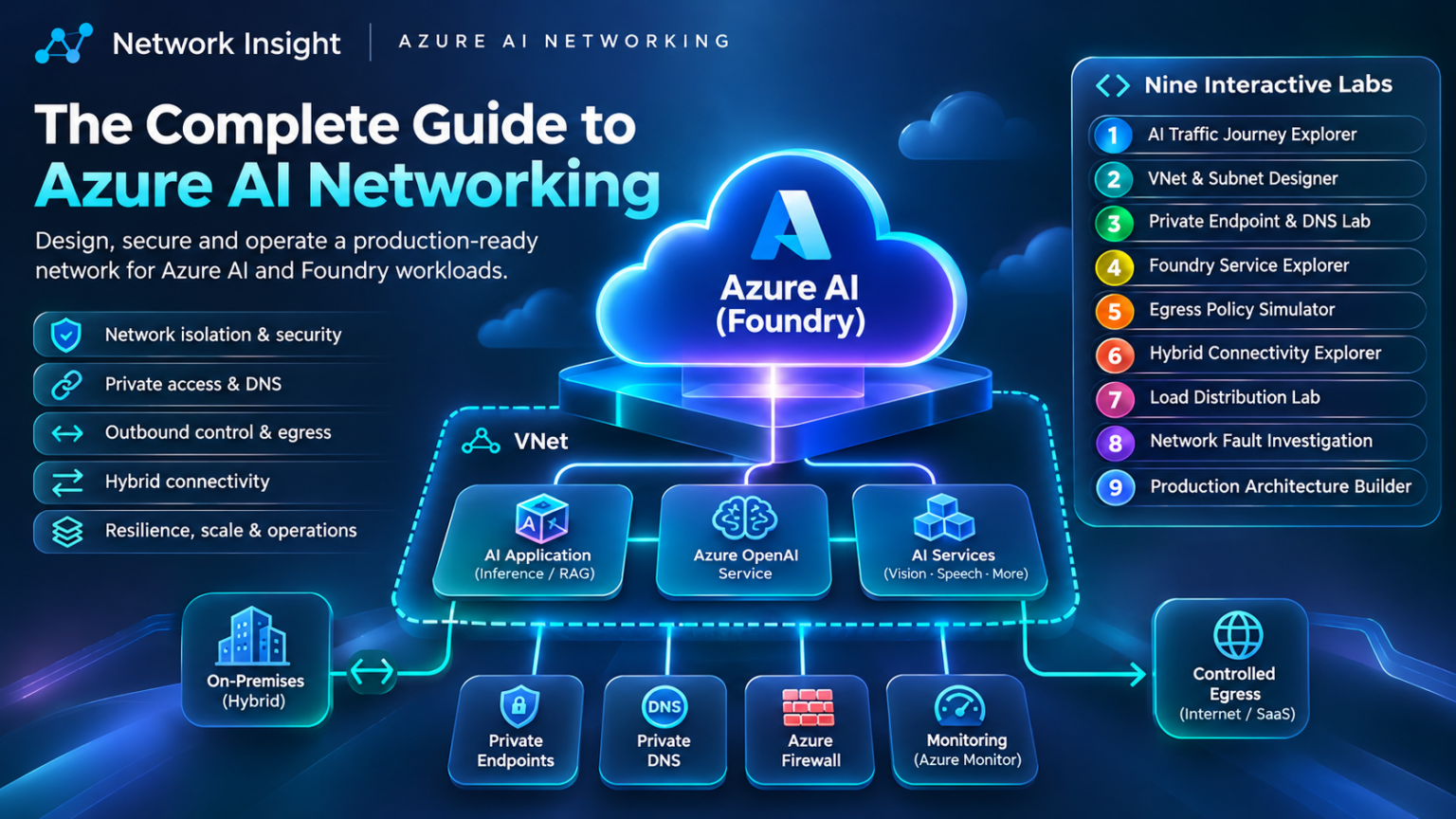
Explore Azure AI Networking
Follow nine connected engineering chapters, from foundational Azure networking to a complete production AI architecture. Select any node to jump directly to its section.
Azure AI Network Architecture
An end-to-end engineering journey through connectivity, segmentation, private access, AI services, security, hybrid networking, application delivery, troubleshooting, and production architecture.
Select a chapter to navigate. Each chapter builds toward a complete enterprise Azure AI networking architecture.
Understanding Azure AI Networking Architecture
Azure AI networking architecture describes how enterprise applications, AI services, data platforms, and hybrid infrastructure communicate through secure and reliable network paths. It combines Azure networking capabilities with managed AI services, application platforms, identity controls, and operational monitoring.
Enterprise AI applications rarely operate as isolated model endpoints. A production AI solution may include application APIs, orchestration services, model inference, vector search, object storage, monitoring, and enterprise identity systems.
These components often span multiple Azure services and network boundaries. Engineers must understand not only which services are involved, but also how traffic moves between them, where access is enforced, and which organization is responsible for each control.
1.1 The Five Layers of Azure AI Networking
A useful way to understand Azure AI architecture is to divide it into five logical layers. These are engineering responsibilities, not five mandatory Azure deployment tiers.
Application and User Access
Users, enterprise applications, API clients, and application delivery services initiate requests and receive responses.
Compute and Application Hosting
Azure-hosted applications, containers, virtual machines, and other compute environments process requests and coordinate calls to downstream services.
Network Connectivity and Security
Virtual Networks, routing, Private Link, private DNS, network security policies, and firewalls control communication paths.
AI and Enterprise Data Services
Microsoft Foundry services, model endpoints, Azure AI Search, storage, and databases provide inference and supporting data.
Identity, Monitoring, and Governance
Microsoft Entra ID, managed identities, Azure Monitor, policy, and audit mechanisms support authorized and observable operations.
1.2 Understanding the AI Application Traffic Flow
Consider a retrieval-augmented generation application hosted in Azure. A user submits a question through a web interface. The application retrieves relevant enterprise information and sends selected context to a model endpoint.
The networking architecture must support communication between the user, application, data retrieval service, and AI model. The exact sequence and direction of requests depend on the application design.
User Request
An authenticated user submits a question.
Application API
The application validates and processes the request.
Network Controls
DNS, routing, and security policies govern service access.
Data Retrieval
Relevant information is retrieved from an authorized source.
Model Inference
Selected context is supplied to the model endpoint.
1.3 Azure Virtual Networks and Managed AI Services
An Azure Virtual Network provides a private IP networking environment for supported Azure resources. Engineers can create subnets, configure routing, apply network security groups, and connect the environment to other networks.
However, many managed Azure AI and data services are platform services rather than virtual machines deployed directly into customer subnets.
Where supported, Azure Private Link allows clients to access a managed service through a private endpoint associated with a private IP address in a Virtual Network.
This distinction is important: a private endpoint provides private connectivity to a supported service; it does not mean that the entire managed service has moved into the customer's VNet.
1.4 Three Important Service Boundaries
Application Boundary
Defines how users and application clients reach the workload, including authentication, ingress, and API protection.
Network Boundary
Defines which network paths and endpoints are reachable through routing, DNS, segmentation, and filtering controls.
Service Authorization Boundary
Defines which identities can invoke AI services, access data, or perform administrative operations.
These boundaries work together but solve different problems. A private IP address does not grant permission to access a model. Likewise, a valid identity cannot compensate for broken DNS resolution or blocked network connectivity.
1.5 Key Azure Networking Services
| Azure Service | Architectural Responsibility | AI Networking Relevance |
|---|---|---|
| Azure Virtual Network | Private addressing, subnets, and network connectivity | Hosts supported application resources and private endpoint connections |
| Azure Private Link | Private access to supported services | Reduces reliance on public service endpoints |
| Azure DNS / Private DNS | Name resolution | Resolves supported service names to intended private endpoint addresses |
| Azure Firewall | Centralized network traffic control | Enforces supported network and application filtering policies |
| Application Gateway | Layer 7 application delivery and routing | Supports controlled HTTP(S) ingress to suitable AI applications |
| VPN Gateway / ExpressRoute | Hybrid connectivity | Connects on-premises enterprise environments to Azure networks |
| Azure Monitor / Network Watcher | Monitoring and network diagnostics | Supports troubleshooting and operational visibility |
1.6 Shared Responsibility in Azure AI Networking
Azure manages the underlying infrastructure of its managed cloud services, while customers remain responsible for configuring their applications, identities, data access, and relevant network security settings.
The precise division of responsibilities depends on whether the workload uses infrastructure, platform, or managed AI services.
For example, Azure operates the infrastructure behind a managed model endpoint, but the customer must still configure supported access restrictions, permissions, and application integration correctly.
1.7 Engineering Scenario: AI Service Connectivity Failure
An AI Application Works Publicly but Fails After Private Connectivity Is Enabled
An enterprise deploys an internal AI assistant and subsequently introduces private endpoints and public network restrictions. The application begins reporting connection failures.
DNS Investigation
Confirm that the service hostname resolves to the correct private endpoint IP from the application environment.
Network Investigation
Validate the route, applicable filtering policies, and connectivity between the application and the private endpoint.
Service Investigation
Verify private endpoint approval, service configuration, identity permissions, and application request logs.
A disciplined investigation separates DNS resolution, network reachability, and service authorization. This prevents engineers from treating every application error as a routing failure.
1.8 Engineering Design Principles
Strong Azure AI networking architecture begins with explicit traffic-flow requirements and a clear understanding of the boundaries between applications, networks, identities, and managed services.
Engineers should identify each required connection, choose the appropriate public or private access model, establish DNS and routing requirements, and define how connectivity and service authorization will be verified.
Key Engineering Takeaway
Azure AI networking is not a single product or isolated configuration. It is an architectural discipline combining application connectivity, private service access, DNS, routing, identity, security, and observability. Understanding these relationships provides the foundation for designing secure and reliable enterprise AI environments.
Azure AI Traffic Journey Explorer
Follow an AI inference request from the application through Azure networking, private connectivity and the inference service. Inspect every stage of the journey.
01 / Choose a traffic architecture
02 / Network traffic topology
03 / Journey timeline
Select a stage to inspect its networking role.
04 / Engineering inspection
Azure Virtual Networks and AI Workload Segmentation
Azure Virtual Networks provide the private networking foundation for many enterprise AI applications. Through deliberate subnet design, routing policies, security controls, and connectivity boundaries, organizations can separate application workloads, private service endpoints, shared infrastructure, and operational systems.
As AI applications evolve from prototypes into production services, their network requirements become more complex. A single AI application may communicate with model endpoints, vector databases, storage services, monitoring systems, and enterprise APIs.
Without a clear network architecture, these connections can become difficult to secure, monitor, and troubleshoot. Azure Virtual Networks, subnets, network security groups, and route tables provide mechanisms for organizing the network and controlling supported traffic.
2.1 Understanding Azure Virtual Networks
An Azure Virtual Network, or VNet, is a logical network boundary within Azure. It provides private IP addressing and connectivity for supported Azure resources.
A VNet contains one or more address spaces, and these address spaces are divided into subnets. Resources deployed into supported subnets can communicate according to Azure routing behavior and applicable security policies.
VNets can also connect to other Azure networks and on-premises environments using mechanisms such as VNet peering, VPN connections, and ExpressRoute.
2.2 Designing Subnets for AI Workloads
A practical enterprise AI design may separate application hosting, internal APIs, private endpoints, and shared supporting infrastructure.
The following diagram illustrates a conceptual VNet design. The address ranges are examples rather than mandatory Azure deployment requirements.
Application Subnet
10.40.10.0/24Supported application compute and internal processing workloads.
API Services Subnet
10.40.20.0/24Internal application APIs and supported integration services.
Private Endpoint Subnet
10.40.30.0/24Private endpoints for supported AI, search, storage, and data services.
Operations Subnet
10.40.40.0/24Supported management, diagnostics, and operational components.
Logical segmentation example. Actual subnet delegation, resource placement, private endpoint network policies, and address requirements depend on the selected Azure services.
2.3 Three Principles of AI Network Segmentation
Separate Workload Responsibilities
Distinguish application processing, internal APIs, private endpoints, and operational resources where separate network controls are beneficial.
Minimize Unnecessary Reachability
Define required source, destination, protocol, and port relationships. Restrict connections that are not necessary for the workload.
Preserve Operational Visibility
Make network paths, effective policies, and service dependencies understandable to engineers investigating performance or connectivity failures.
2.4 Network Security Groups and AI Traffic Control
Azure Network Security Groups, or NSGs, provide stateful packet-filtering rules for supported network interfaces and subnets.
Rules can match source and destination addresses, protocols, and ports. They are evaluated according to rule priority, with lower numerical priority values processed first.
NSGs include default rules, including rules that permit certain Virtual Network traffic. Therefore, deploying separate subnets does not automatically create a deny-by-default security boundary.
| Traffic Requirement | Example Policy | Engineering Purpose |
|---|---|---|
| Application to internal API | Permit approved application sources to API destinations on required ports | Support internal service communication |
| Application to private AI endpoint | Permit required HTTPS connectivity to the private endpoint IP | Enable private model service access |
| Application to unrelated workload | Deny traffic not included in the approved communication policy | Reduce unnecessary lateral connectivity |
| Operational access | Permit authorized management paths using appropriate access controls | Support controlled diagnostics and administration |
These examples are policy objectives, not complete deployable NSG rules. Production implementations must account for service dependencies, Azure default rules, and the effective network policy on each traffic path.
2.5 User-Defined Routes and Traffic Inspection
Azure automatically creates system routes for VNets. Engineers can use route tables with user-defined routes, or UDRs, to influence traffic forwarding in supported configurations.
For example, a hub-and-spoke architecture may use UDRs to direct selected traffic from an application subnet toward a central Azure Firewall.
However, route design must consider longest-prefix matching, route precedence, private endpoint routing behavior, and whether the intended inspection path is supported.
2.6 Hub-and-Spoke Networking for Enterprise AI
Hub-and-spoke networking is a common Azure design pattern in which shared network services are concentrated in a hub VNet, while applications are deployed into separate spoke VNets.
The hub may provide centralized connectivity, firewall services, and hybrid network integration. Individual spokes can contain AI applications, business workloads, or separate environments.
AI Application Spoke
Application compute, APIs, and private service connectivity.
Shared Connectivity Hub
Firewall, hybrid connectivity, routing, and shared network services.
Data Services Spoke
Supporting data workloads and private access infrastructure.
Conceptual peering relationships, not a guarantee of transitive routing. Spoke-to-spoke connectivity requires an explicitly supported routing and forwarding design.
VNet peering provides connectivity between peered networks, but peering alone does not create automatic transitive connectivity through a hub.
If traffic must pass between spokes through a central inspection point, engineers must design the necessary routes and forwarding behavior and validate both directions of the path.
2.7 Example IP Addressing Plan
Address planning becomes particularly important when Azure AI environments must connect to enterprise data centres, multiple Azure regions, or additional cloud networks.
| Network Component | Example Address Space | Purpose |
|---|---|---|
| Connectivity Hub VNet | 10.10.0.0/16 | Shared connectivity and network services |
| Production AI Spoke VNet | 10.40.0.0/16 | Production AI application workloads |
| Development AI Spoke VNet | 10.50.0.0/16 | Development and testing workloads |
| Data Services Spoke VNet | 10.60.0.0/16 | Supporting data and integration services |
| On-Premises Network | 172.20.0.0/16 | Example enterprise data centre network |
These ranges are illustrative. Actual deployments must avoid overlapping address spaces across networks that need to communicate. Subnet sizing should also account for Azure-reserved addresses, service-specific minimum sizes, future expansion, and delegated subnet requirements.
2.8 Engineering Scenario: AI Workload Isolation
Separating a Production AI Assistant from Development Workloads
An organization operates a production AI assistant that accesses confidential enterprise knowledge. Developers also maintain experimental AI applications within Azure.
The engineering objective is to prevent development workloads from gaining unnecessary network access to production services while preserving approved shared infrastructure.
Separate Environments
Deploy production and development workloads into appropriately isolated networks or subnets with distinct security policies.
Restrict Connectivity
Define approved communication paths, enforce network filtering, and restrict service access using appropriate identities.
Validate Isolation
Test both permitted and prohibited paths. Confirm effective routes, security rules, and service authorization.
This scenario highlights why network segmentation and identity-based access control must be considered together. Preventing unauthorized network reachability is valuable, but production data access must also be protected at the application and service layers.
2.9 Azure AI Network Design Checklist
Key Engineering Takeaway
Azure Virtual Networks provide the foundation for organizing and connecting enterprise AI workloads, but secure segmentation requires more than separate address ranges. Engineers must combine subnet design, NSGs, effective routing, private service access, and identity controls to create predictable, enforceable network boundaries.
VNet and Subnet Segmentation Designer
Design a segmented Azure AI network. Configure subnet isolation, test workload connectivity and validate the security posture of your architecture.
Logical network segmentation
01 / Subnet policy designer
Select a subnet above and modify its simplified security controls.
Application subnet
Separate application, compute, private endpoint and management functions. Use explicit security policies instead of relying on subnet boundaries alone.
02 / Connectivity test
Test a simplified TCP 443 flow between two workload zones.
03 / Architecture readiness
Not validated
Validate the design to review its controls.
Azure subnets provide IP address separation, but they do not automatically enforce workload isolation. NSGs, routing, firewall policies and Private Link configuration determine effective connectivity. This lab models selected security intentions rather than evaluating real Azure effective rules.
Private Endpoints, Private Link, and DNS
Azure Private Link enables private connectivity to supported Azure services through private endpoints associated with IP addresses inside a Virtual Network. For enterprise AI applications, this architecture can reduce exposure to public service endpoints while preserving access to managed AI and data platforms.
Many enterprise AI applications rely on managed Azure services such as model endpoints, Azure AI Search, storage, and databases.
These services may expose publicly resolvable hostnames and support public connectivity unless access restrictions are configured.
Organizations with stricter security requirements often need a private access model in which applications reach supported services using private IP connectivity.
Azure Private Link and private endpoints provide an important mechanism for implementing this design.
3.1 Understanding Azure Private Link
Azure Private Link provides private connectivity to supported platform services and privately published services through Azure's networking infrastructure.
A private endpoint is a network interface assigned a private IP address from a subnet in an Azure VNet. It connects to a specific supported service resource or subresource.
When a client resolves the service hostname to the private endpoint address and the required network path is available, the client can reach that service privately.
The connection must also be approved where required, and the service must authorize the application request.
3.2 Private Endpoint Architecture
AI Application
Application hosted in a supported Azure environment with connectivity to the VNet.
Private Endpoint
10.40.30.10Private IP interface associated with the target service.
Managed AI Service
Supported Azure AI resource accessed through the private connection.
Example private endpoint address. The private endpoint is located in the customer VNet, while the managed service remains on Azure's managed platform. The right-hand connection is conceptual, not a customer-managed VNet hop.
3.3 Why Private DNS Is Essential
Creating a private endpoint does not automatically ensure that every application resolves the target service hostname to the correct private address.
DNS resolution is a critical part of the private connectivity architecture.
Applications generally continue using the service's normal hostname rather than replacing it with a hardcoded IP address. Private DNS configuration ensures that supported clients resolve that name to the appropriate private endpoint IP.
Azure Private DNS zones can be linked to VNets, and private endpoint DNS zone groups can help manage the required DNS records for supported services.
Application Query
The application requests the configured AI service hostname.
DNS Resolution
The configured DNS resolver follows the applicable resolution path.
Private Record
The private DNS configuration returns the intended private endpoint address.
Private Connection
The application establishes a connection using the resolved private IP.
The precise DNS record chain and private zone name depend on the Azure service and endpoint type.
Engineers should follow the documented DNS configuration for the specific resource rather than assuming every Azure AI service uses the same private DNS zone.
3.4 Public DNS vs Private DNS Resolution
| Characteristic | Public Resolution | Private Resolution |
|---|---|---|
| Resolved Address | Public service connectivity address where supported | Private endpoint address for the configured resource |
| Network Path | Public service access path, subject to service configuration | Private connectivity through the VNet and Private Link |
| DNS Requirements | Standard public DNS resolution | Correct private DNS zone and resolver integration |
| Authorization | Service authentication and authorization still required | Service authentication and authorization still required |
| Security Consideration | Public network access must be evaluated and restricted appropriately | Private reachability and service access restrictions must be validated |
3.5 Three Private Connectivity Design Principles
Use the Correct Service Endpoint
Identify the exact Azure resource and supported subresource that the application must access.
Design DNS Before Deployment
Determine how Azure workloads and hybrid clients will resolve service names to private endpoint IPs.
Validate the Full Access Path
Confirm endpoint approval, DNS resolution, network connectivity, service restrictions, and identity permissions.
3.6 Hybrid DNS and On-Premises Connectivity
Hybrid Azure AI architectures may require applications running in enterprise data centres to access Azure services through private endpoints.
Private network connectivity can be established through supported VPN or ExpressRoute configurations.
However, the network path alone does not solve private DNS resolution.
On-premises DNS servers may need conditional forwarding to an Azure DNS resolution service, such as Azure DNS Private Resolver, or another supported resolver architecture.
Enterprise DNS
On-premises clients and DNS forwarding configuration.
Azure DNS Resolution
Supported resolver architecture and linked private DNS zones.
Private Endpoint Record
Private DNS record mapping the service to its IP.
Logical DNS query and response path. Actual forwarding configuration, resolver placement, and DNS zone linkage depend on the hybrid architecture.
3.7 Private Endpoints and Public Network Restrictions
A private endpoint does not necessarily disable the public endpoint of a managed Azure service.
For services that support public network access controls, organizations should explicitly configure the desired access policy and verify that the service behaves as expected.
Production designs should distinguish between creating a private connection and enforcing a private-only service access model.
3.8 Routing and Private Endpoint Network Policies
Private endpoint traffic can have routing and security characteristics that differ from ordinary virtual machine traffic.
Engineers must account for effective routes, the subnet's private endpoint network policy configuration, and any supported user-defined routes or NSG policies that should apply.
If centralized inspection through Azure Firewall is required, the forwarding design must be validated for the specific private endpoint traffic path.
A default route to a firewall is not sufficient evidence that all private endpoint connections are inspected.
3.9 Troubleshooting Private AI Connectivity
The AI Application Cannot Reach Its Private Model Endpoint
An application successfully accessed an Azure AI model during development. After private endpoints were introduced and public access was restricted, model requests began failing.
DNS Investigation
Check the application hostname and its resolved address. Confirm the expected private endpoint record is returned from the application's DNS environment.
Network Investigation
Validate connectivity to the private IP, effective routes, applicable network security policies, and endpoint connection state.
Service Investigation
Confirm the correct endpoint, supported service configuration, identity permissions, and application request details.
This layered troubleshooting approach helps engineers distinguish DNS failures, network reachability problems, and service authorization errors.
3.10 Private Connectivity Design Checklist
Key Engineering Takeaway
Private Azure AI connectivity depends on more than creating a private endpoint. A reliable design requires correct service targeting, private DNS resolution, network reachability, public access restrictions, and application authorization. These components must work together to provide secure and predictable enterprise AI service access.
Private Endpoint and DNS Resolution Lab
Investigate how an Azure AI application resolves a service hostname to a Private Endpoint IP address. Introduce DNS faults, inspect resolution output and repair the configuration.
01 / Select a DNS investigation
02 / DNS resolution architecture
Private Link · Azure AI03 / DNS configuration
Modify the simulated resolver and Private DNS configuration, then test the result.
azure-ai-lab:~$ nslookup ai-prod.openai.azure.com

Select Run DNS lookup to inspect resolution.
04 / Resolution diagnostics
Evaluate the configuration and identify the point where private resolution fails.
05 / Engineering interpretation
Run a lookup to examine the DNS resolution chain.
Private Endpoints require correct DNS integration. A client should continue using the service's normal hostname, while DNS resolves that name to the appropriate private IP address. Custom DNS deployments may require conditional forwarding to an Azure DNS resolution path that can access the linked Private DNS zone.
Microsoft Foundry and Azure AI Service Connectivity
Enterprise AI applications depend on reliable communication between application workloads, model inference endpoints, data retrieval services, and identity systems. Microsoft Foundry provides capabilities for developing and operating AI applications, while Azure networking and security services determine how those applications securely reach their dependencies.
Modern enterprise AI systems frequently combine multiple managed services rather than relying on a single model API. An application may retrieve documents from Azure AI Search, invoke a deployed model, access enterprise storage, and record telemetry during a single request.
From a networking perspective, these are separate service connections with potentially different endpoints, access policies, DNS requirements, and authentication mechanisms.
Understanding the distinction between AI application logic and the underlying service connectivity architecture is essential for production design and troubleshooting.
4.1 Understanding Microsoft Foundry
Microsoft Foundry is Microsoft's platform for building, deploying, and operating AI applications and agents. Depending on the selected capabilities and resource types, an enterprise solution may use model deployments, agent services, evaluation tools, and supporting Azure resources.
Engineers should distinguish the management and development experience from the runtime endpoints used by applications. Creating or configuring a model deployment is not the same operation as sending an inference request.
Different Foundry resource types and service capabilities can have different networking requirements. Private endpoint support, DNS configuration, and managed networking behavior must therefore be verified for the actual deployment.
4.2 The Azure AI Service Connectivity Architecture
A typical enterprise application connects to an AI inference endpoint and one or more supporting data services. The application controls the request sequence, while Azure networking and service policies govern the underlying connections.
Enterprise User
Authenticated user accessing an AI-enabled application.
AI Application
Application logic, prompt construction, retrieval orchestration, and response handling.
Model Endpoint
Managed model inference service accessed through an authorized API connection.
Azure AI Search
Search and retrieval of indexed enterprise knowledge.
Enterprise Storage
Source documents, application data, and supporting information.
Microsoft Entra ID
Identity services, managed identities, and authorization integration.
Logical architecture. Supporting services connect to the application or to configured service workflows as required. Actual endpoints, DNS paths, identity mechanisms, and network boundaries depend on the deployment.
4.3 Three Core AI Service Responsibilities
Model Inference
A deployed model processes an authorized inference request and returns generated output. Applications must use the correct endpoint, deployment, API configuration, and credentials.
Enterprise Retrieval
Azure AI Search can retrieve relevant indexed content for a user query. Retrieval permissions and document-level authorization remain important application design responsibilities.
Identity and Access
Microsoft Entra ID and managed identities can support credential management and authorized service access where the target service and API support them.
4.4 End-to-End Retrieval-Augmented Generation Flow
Retrieval-augmented generation, commonly called RAG, allows an AI application to use relevant external information as context for a model request.
From a networking perspective, a RAG workflow often involves at least two distinct outbound service connections: one for retrieval and another for inference.
User Request
The application receives and authenticates the user request.
Search Query
The application queries Azure AI Search for relevant content.
Context Selection
Retrieved information is filtered and selected according to application requirements.
Model Invocation
The application sends the prompt and selected context to the model.
Response
The application processes the model output and returns the response.
This example uses application-controlled retrieval. Other Azure AI architectures may use managed orchestration or agent services, resulting in additional service-to-service communication requirements.
4.5 Networking Requirements for AI Service Access
Each service dependency requires an explicit connectivity model. Engineers must determine whether the application will use a public service endpoint, a private endpoint, or another supported service-specific network configuration.
| Dependency | Network Consideration | Operational Check |
|---|---|---|
| Model Endpoint | Correct endpoint hostname, supported private access, DNS, and routing | Verify a successful authenticated inference request |
| Azure AI Search | Search endpoint connectivity and applicable public or private access restrictions | Execute an authorized query and inspect service response |
| Storage Service | Required storage subresource endpoints, DNS, and access policies | Validate access to the intended data resource |
| Microsoft Entra ID | Reachability of required identity and token endpoints | Confirm token acquisition and expected authorization |
| Monitoring Services | Telemetry ingestion connectivity and supported private monitoring options | Confirm telemetry arrives in the intended monitoring destination |
4.6 Managed Identities and Service Authorization
Managed identities allow supported Azure resources to obtain Microsoft Entra tokens without storing long-lived credentials directly in application code.
Where supported by the target service, an application can use its managed identity to request a token and access an authorized resource.
However, identity and network access remain separate control planes. A valid token does not guarantee network connectivity, and a reachable private endpoint does not grant application permissions.
4.7 Private Connectivity for Foundry Workloads
Organizations may use private endpoints and supported network isolation capabilities to restrict connectivity to AI and supporting data services.
The available options depend on the specific Foundry resource, service capability, and deployment model. Some workflows may also require managed outbound connectivity or access to additional dependent services.
Engineers should map the complete dependency graph before restricting public access. Otherwise, a model endpoint may be reachable while a supporting service or identity dependency remains inaccessible.
4.8 Engineering Investigation: Model Works, Retrieval Fails
The Model Responds Successfully, but the Enterprise AI Assistant Cannot Retrieve Documents
An organization deploys a private AI application. Model inference requests succeed, but the application returns empty retrieval results or errors when accessing Azure AI Search.
Validate Connectivity
Confirm the Azure AI Search hostname, private DNS resolution, endpoint approval, effective routes, and network filtering policies.
Validate Authorization
Verify the application's identity, assigned permissions, and the authentication mechanism expected by the search service.
Validate Retrieval
Inspect the search request, target index, query filters, indexing state, and returned service errors.
This scenario illustrates why successful model inference does not prove that the entire AI application architecture is functioning.
Each supporting service has its own connectivity, identity, configuration, and operational dependencies.
4.9 Production AI Service Connectivity Checklist
Key Engineering Takeaway
Microsoft Foundry and supporting Azure AI services provide the application and model capabilities required for enterprise AI solutions. Reliable production deployments depend on explicit service connectivity, correct endpoint configuration, identity authorization, and operational visibility. Every AI service dependency must be treated as a distinct architectural and engineering responsibility.
Foundry Service Connectivity Explorer
Investigate the networking dependencies of an Azure AI application. Select a service, inspect its connectivity requirements and evaluate whether the architecture supports private access.
01 / AI application dependency map
Logical service relationships02 / Service connectivity configuration
Select a dependency above and configure its simplified connectivity controls.
Model inference
Select a service to examine its networking and security dependencies.
03 / Dependency inspection
04 / Connectivity diagnosis
A production AI application rarely depends on a single endpoint. Inference, retrieval, storage, secrets and telemetry can each introduce separate networking and authorisation requirements. Private connectivity must be designed for the individual services and supported subresources.
Azure Firewall, Egress Control, and AI Security
Enterprise AI applications require controlled access to model endpoints, data services, identity platforms, and external APIs. Azure Firewall can provide centralized network security enforcement for supported traffic, helping organizations implement outbound access policies, monitor connections, and reduce unnecessary network exposure.
AI applications frequently communicate with multiple external and internal services. These connections may include model inference endpoints, retrieval services, enterprise APIs, storage platforms, and monitoring destinations.
Unrestricted outbound connectivity can increase the risk of accidental data disclosure, unauthorized service access, and unmanaged dependencies.
A secure architecture identifies the destinations that each workload requires and establishes policies governing how those destinations can be reached.
5.1 Understanding Azure Firewall
Azure Firewall is a managed, stateful network security service that supports centralized traffic filtering in Azure environments.
Depending on the selected SKU and configuration, Azure Firewall provides capabilities including network rules, application rules, threat intelligence filtering, logging, and additional inspection features.
Azure Firewall is commonly deployed within a hub network architecture, allowing supported spoke workloads to use a shared security enforcement point.
However, only traffic that actually traverses the firewall can be evaluated by its policies.
5.2 Azure AI Egress Architecture
AI Application Spoke
Application compute, APIs, and workloads initiating outbound service connections.
Azure Firewall
Centralized policy evaluation for traffic routed through the firewall.
Approved Destinations
Permitted public AI endpoints, enterprise APIs, and other required services.
Illustrates selected routed egress traffic. Private endpoint connections, platform-managed flows, and other service-specific paths may require separate routing and security designs.
5.3 Three Foundations of AI Egress Security
Destination Control
Define the external services and endpoints that AI applications are permitted to access, and restrict unnecessary destinations.
Network Inspection
Apply supported filtering and inspection controls to traffic that traverses the designated security enforcement point.
Security Visibility
Collect relevant network logs and correlate them with application, identity, and service telemetry.
5.4 Network Rules vs Application Rules
Azure Firewall supports different rule types for different traffic requirements.
Network rules are commonly used for traffic matching based on source, destination, protocol, and port information.
Application rules support filtering of supported outbound application protocols, including HTTP and HTTPS, using destination information such as FQDNs.
| Control | Primary Matching | AI Networking Example |
|---|---|---|
| Network Rule | Source, destination, protocol, and port | Permit required connectivity to an approved private network destination |
| Application Rule | Supported application protocol and destination FQDN | Permit outbound HTTPS access to an approved public service hostname |
| Threat Intelligence | Supported threat intelligence indicators | Alert on or block connections associated with known malicious destinations |
| TLS Inspection | Supported encrypted traffic inspection with appropriate configuration | Apply deeper inspection where supported and operationally appropriate |
TLS inspection capabilities depend on the firewall SKU, configuration, certificate trust, and supported protocols. It should not be assumed that every encrypted AI request can or should be decrypted by the firewall.
5.5 User-Defined Routes and Controlled Egress
User-defined routes can direct selected subnet traffic toward an Azure Firewall deployed as a virtual appliance next hop.
For example, a route table associated with an application subnet may contain a default route pointing toward a central firewall.
The effective forwarding path still depends on Azure route selection, more-specific routes, service-specific behavior, and network configuration.
Identify Dependencies
Inventory required AI endpoints, enterprise APIs, identity services, and monitoring destinations.
Design Routes
Determine which traffic should traverse the centralized security path.
Apply Policies
Configure the required firewall rules and deny unnecessary destinations.
Validate and Monitor
Test permitted and denied flows, inspect effective routes, and review logs.
5.6 Private Link and Firewall Inspection Boundaries
Private endpoints introduce important considerations for centralized security inspection.
Traffic destined for a private endpoint may follow a more specific route than a general default route toward Azure Firewall.
Private endpoint network policy configuration and supported routing patterns determine how security controls can be applied.
Engineers must verify the actual traffic path before claiming that private AI connections are centrally inspected.
5.7 Forced Tunnelling and Hybrid Security
Some enterprises require outbound traffic to pass through an on-premises security environment rather than using direct Azure internet egress.
Forced tunnelling architectures can route supported traffic through hybrid connectivity and designated security controls.
Azure Firewall also supports specific forced tunnelling deployment patterns. These require careful planning of management connectivity, routing, and operational dependencies.
Engineers should evaluate latency, bandwidth, resilience, and service reachability before introducing additional network inspection hops into AI request paths.
5.8 AI Data Exfiltration and Network Controls
Enterprise AI applications may process confidential information, internal documents, or sensitive business data.
Restricting outbound network destinations can reduce the number of external services to which an application can transmit data.
However, firewall controls alone cannot determine whether every authorized AI request contains appropriate information.
Data protection requires complementary controls such as identity authorization, application-level validation, data classification, approved model usage, and monitoring.
5.9 Engineering Investigation: AI Requests Blocked by Firewall
A Production AI Application Stops Working After Centralized Egress Filtering Is Enabled
An organization introduces Azure Firewall and updates application subnet routing to enforce outbound security policies.
Shortly afterward, model requests begin timing out and some supporting service operations fail.
Confirm the Route
Inspect the effective route toward the destination and confirm whether the traffic actually reaches Azure Firewall.
Inspect Firewall Policy
Review matching rule collections, denied connections, destination FQDNs, and required application dependencies.
Validate the Application
Test authorized model requests, identity token acquisition, retrieval services, and telemetry delivery.
The correct resolution is not necessarily to permit all outbound HTTPS traffic.
Instead, engineers should identify the missing approved dependencies and implement narrowly scoped policies appropriate to the application.
5.10 Production AI Egress Security Checklist
Key Engineering Takeaway
Azure Firewall can provide centralized enforcement for supported enterprise AI network traffic, but effective security requires more than deploying a firewall. Engineers must combine documented service dependencies, deliberate routing, appropriate filtering policies, private connectivity, and application-level data protection to build secure and operationally reliable AI environments.
Azure AI Egress Policy Simulator
Configure outbound firewall rules for an Azure AI application. Evaluate destination policies, inspect rule matches and investigate blocked service access.
01 / Outbound traffic path
Logical firewall inspection02 / Outbound firewall policy
Rules are evaluated in the displayed order. The first matching rule determines the decision.
03 / Traffic generator
04 / Firewall decision log
Inspect matched rules, decisions and simulated traffic events.
05 / Policy validation
Run validation to assess the configured outbound security rules.
AI applications often require outbound access to model endpoints, retrieval services, storage, identity and platform dependencies. A secure egress architecture should explicitly permit required destinations while restricting unnecessary Internet access. Effective Azure Firewall behaviour also depends on rule collection types, priorities, DNS, routing and TLS inspection configuration.
Hybrid AI Networking: VPN, ExpressRoute, and On-Premises Integration
Many enterprise AI applications require secure communication between Azure-hosted services and existing on-premises systems. Azure VPN Gateway and ExpressRoute provide different hybrid connectivity options, while BGP, route propagation, DNS, and network security policies determine whether AI workloads can reliably reach enterprise resources.
Enterprise AI adoption rarely occurs in complete isolation from existing infrastructure.
Organizations may host model inference services in Azure while maintaining databases, identity systems, operational applications, and sensitive datasets within private data centres.
Hybrid networking allows these environments to communicate through controlled connectivity architectures.
6.1 Why Enterprise AI Requires Hybrid Networking
An AI application running in Azure may need to retrieve information from an on-premises database or invoke an internal enterprise API.
Similarly, an application hosted in a corporate data centre may need to access an Azure AI model endpoint through private connectivity.
These workflows introduce several network requirements, including address reachability, bidirectional routing, secure access, and predictable response times.
6.2 Hybrid Azure AI Reference Architecture
Enterprise Data Centre
Internal applications, databases, identity services, and enterprise routing.
Hybrid Connectivity
Site-to-site VPN or ExpressRoute connectivity between enterprise and Azure networks.
Azure AI Environment
Application VNets, private endpoints, supporting data services, and model access.
Logical topology. Actual deployments may include hub-and-spoke networks, VPN or ExpressRoute gateways, virtual WAN hubs, firewalls, and separate private endpoint subnets.
6.3 Site-to-Site VPN for Azure AI Workloads
Azure VPN Gateway supports encrypted site-to-site connectivity between Azure VNets and compatible on-premises VPN devices.
This approach can provide a practical hybrid connectivity option for organizations that do not require a dedicated private connectivity service.
Site-to-site VPN connectivity normally traverses the public internet, with IPsec protecting traffic between the VPN endpoints.
Performance depends on gateway capacity, network conditions, routing design, and the selected VPN configuration.
6.4 ExpressRoute for Enterprise AI Connectivity
Azure ExpressRoute provides private connectivity between enterprise networks and Microsoft cloud services through a connectivity provider.
ExpressRoute can offer more predictable connectivity characteristics than internet-based VPN designs, subject to the provider, circuit configuration, and end-to-end network architecture.
ExpressRoute private peering enables connectivity to supported Azure private network resources through the appropriate gateway or routing architecture.
ExpressRoute connectivity is not automatically end-to-end encrypted. Organizations requiring encryption must design appropriate additional protection mechanisms.
6.5 VPN vs ExpressRoute vs Combined Connectivity
Site-to-Site VPN
Uses IPsec over internet connectivity. Suitable for many hybrid deployments where encrypted transport and operational flexibility are priorities.
ExpressRoute
Provides private connectivity through a connectivity provider. Often selected for enterprise network integration and predictable connectivity needs.
Combined Architecture
VPN and ExpressRoute can be combined in supported coexistence designs. Route preferences and failover behavior must be tested.
| Characteristic | Site-to-Site VPN | ExpressRoute |
|---|---|---|
| Transport | Internet-based IPsec tunnels | Private connectivity through a provider |
| Encryption | IPsec encryption for tunnel traffic | Not inherently encrypted end-to-end |
| Routing | Static or supported BGP configurations | BGP-based route exchange |
| Performance | Influenced by internet conditions and gateway capacity | Influenced by circuit, provider, and network design |
| Typical AI Use | Hybrid application integration and secure remote connectivity | Enterprise hybrid integration and sustained private network connectivity |
6.6 BGP Route Exchange in Hybrid Azure Networks
BGP plays an important role in many Azure hybrid networking designs.
ExpressRoute uses BGP to exchange routing information between Microsoft and customer or provider network equipment.
Azure VPN Gateway also supports BGP in compatible configurations.
The resulting route advertisements determine which address prefixes are reachable across the hybrid connection.
Establish Connectivity
Provision the VPN or ExpressRoute connection and required gateways.
Establish BGP
Configure the supported BGP peering parameters and verify session state.
Exchange Prefixes
Advertise authorized network prefixes and verify received routes.
Validate Forwarding
Inspect effective routes and confirm the expected forward and return paths.
Route exchange does not guarantee that every application flow will succeed. Subnet route tables, firewall policies, DNS resolution, and application permissions must also be correct.
6.7 Hybrid DNS for Private AI Endpoints
Private Azure AI connectivity frequently depends on DNS resolution across hybrid environments.
An on-premises application may resolve an Azure service hostname through enterprise DNS servers.
If the application is intended to use a private endpoint, the DNS architecture must return the appropriate private endpoint address.
Azure DNS Private Resolver can be used in supported hybrid DNS designs to enable forwarding between enterprise DNS infrastructure and Azure private DNS resolution.
6.8 Latency and AI Application Performance
AI applications may involve multiple sequential requests across hybrid network boundaries.
For example, an Azure-hosted application may query an on-premises database, retrieve additional documents, and then invoke a model endpoint.
Each additional network round trip contributes to overall response time, particularly when operations must occur sequentially.
Engineers should measure latency, throughput, packet loss, and application response times across the complete request path.
Where appropriate, caching, asynchronous processing, data placement, and application-level optimization can reduce dependence on repeated hybrid round trips.
6.9 Engineering Investigation: Hybrid AI Retrieval Failure
Azure AI Application Cannot Reach an On-Premises Enterprise Database
An organization deploys an AI application in Azure and connects its hub network to a corporate data centre through ExpressRoute.
The ExpressRoute circuit reports an operational connection, but database requests from the AI application time out.
Verify Route Exchange
Check the advertised and received BGP prefixes and confirm that both networks have the necessary routes.
Inspect Forwarding
Review effective Azure routes, hub routing, firewall policies, and the on-premises return path.
Validate Application Access
Test DNS, destination port reachability, database listener availability, and authentication.
This scenario demonstrates that hybrid troubleshooting must examine control-plane routing, data-plane forwarding, and application connectivity separately.
6.10 Production Hybrid AI Design Checklist
Key Engineering Takeaway
Hybrid Azure AI networking combines cloud service access with traditional enterprise infrastructure. Successful deployments depend on appropriate transport, accurate BGP route exchange, bidirectional forwarding, hybrid DNS resolution, security controls, and application performance validation. A connected circuit is only the starting point for a reliable enterprise AI architecture.
Hybrid Connectivity Path Explorer
Compare ExpressRoute and Site-to-Site VPN paths between an on-premises AI application and Azure. Modify route preferences, inject failures and inspect how the selected hybrid path changes.
01 / Hybrid AI connectivity
On-premises ↔ Azure02 / Hybrid routing configuration
Configure the simulated route preferences for two paths advertising the same Azure prefix.
Preference values are abstract local policy scores for the on-premises router. Higher values win when both paths are available. They are not Azure ExpressRoute or VPN gateway route-selection attributes.
03 / Route selection
04 / Routing event log
ExpressRoute and VPN can provide alternative hybrid connectivity paths. Reliable failover requires appropriate route advertisement, policy, gateway configuration and return-path reachability. Actual Azure route selection cannot be inferred from arbitrary preference values alone.
Application Delivery, Load Balancing, and AI Scalability
Production AI applications require more than secure connectivity to model endpoints. They must also accept user traffic, distribute requests across healthy application instances, protect exposed services, and scale as demand changes. Azure provides multiple application delivery and load-balancing services to support these requirements.
Enterprise AI applications often expose web interfaces, REST APIs, and internal application endpoints.
These services may receive highly variable traffic volumes, particularly when users interact with AI assistants, retrieval systems, or automated agent workflows.
A production architecture must provide controlled ingress, healthy backend selection, application scaling, and resilience when individual components fail.
7.1 Understanding AI Application Delivery
Application delivery refers to the network and application services responsible for receiving client requests and forwarding them to the appropriate application workloads.
In Azure, the selected delivery architecture depends on whether an application is internet-facing, privately accessible, regional, or globally distributed.
Different Azure services operate at different networking layers and provide different capabilities.
7.2 Azure AI Application Delivery Architecture
Enterprise Users
Authorized clients accessing the AI application through its configured ingress endpoint.
Application Gateway
Regional HTTP/HTTPS routing, backend health monitoring, and optional WAF protection.
AI Application Instances
Multiple application instances processing user requests.
Logical example of regional ingress. Application instances may separately connect to model inference, search, storage, and identity services. Backend hosting and network integration depend on the selected Azure compute platform.
7.3 Azure Application Gateway
Azure Application Gateway is a regional Layer 7 application delivery service for HTTP and HTTPS workloads.
It supports capabilities such as host-based routing, path-based routing, TLS termination, and backend health monitoring.
Application Gateway can be deployed with a public or private frontend, depending on the architecture and supported configuration.
For enterprise AI, Application Gateway may serve as the ingress point for an internal assistant application or a regional AI API service.
7.4 Web Application Firewall Protection
Azure Web Application Firewall can help protect supported HTTP and HTTPS application traffic against common web-based attacks.
WAF protection is available through supported Azure application delivery services, including Application Gateway WAF and Azure Front Door WAF.
WAF rules operate on web application traffic and are not a substitute for AI-specific authorization, prompt safety, content validation, or data governance.
7.5 Azure Load Balancer vs Application Gateway vs Front Door
Azure Load Balancer
Layer 4 traffic distribution for supported TCP and UDP workloads. Useful where transport-level load balancing is required.
Application Gateway
Regional Layer 7 HTTP/HTTPS delivery with application routing and health monitoring. Suitable for many regional AI web applications.
Azure Front Door
Global HTTP/HTTPS application delivery using Microsoft's edge network, with supported routing, acceleration, and security features.
| Service | Primary Function | Typical AI Architecture Role |
|---|---|---|
| Azure Load Balancer | Regional Layer 4 TCP/UDP distribution | Transport-level balancing for supported backend workloads |
| Application Gateway | Regional Layer 7 application delivery | HTTP/HTTPS ingress for regional AI applications |
| Azure Front Door | Global HTTP/HTTPS application delivery | Global entry point for supported multi-region AI applications |
| Application Gateway WAF | Web application threat filtering | Protection of regional HTTP/HTTPS application ingress |
7.6 Health Probes and Backend Availability
Load-balancing services use supported health checks to determine whether backend instances should receive traffic.
For Application Gateway, a health probe can validate a configured backend endpoint.
If a backend fails its health check, the gateway can stop forwarding new requests to that backend while healthy alternatives remain available.
A well-designed application health endpoint should accurately represent the readiness of the application without introducing unnecessary dependency failures or excessive load.
7.7 End-to-End AI Request Distribution
Client Request
The client connects to the configured application endpoint.
Ingress Processing
The application delivery service applies its configured routing rules.
Backend Selection
A healthy application instance receives the request.
AI Processing
The application invokes retrieval and inference services as required.
Response
The result returns through the application delivery path to the client.
7.8 Scaling AI Application Compute
AI application workloads may run on platforms such as Azure Kubernetes Service, Azure Container Apps, Azure App Service, or virtual machines.
Each hosting platform provides different scaling mechanisms and network integration capabilities.
Horizontal scaling increases the number of application instances available to process requests.
Vertical scaling increases the resources allocated to an existing workload instance.
The appropriate strategy depends on workload behavior, application state, resource limits, and service dependencies.
7.9 The AI Inference Bottleneck
Increasing application replicas does not necessarily increase the throughput available from a managed model deployment.
Model endpoints may enforce quotas, throughput limits, concurrency restrictions, or service-specific capacity constraints.
If application demand exceeds available model capacity, requests may experience throttling, increased latency, or failures.
Engineers should distinguish application scaling from model inference capacity planning.
7.10 Resilience and Multi-Region AI Applications
Multi-region architectures can improve resilience when supported services, application state, and data dependencies are designed appropriately.
Azure Front Door can provide global HTTP/HTTPS routing to supported regional application origins.
However, regional application failover does not automatically guarantee that model deployments, search indexes, storage data, and identity dependencies are available in the destination region.
A resilient AI architecture must account for the entire dependency chain.
7.11 Engineering Investigation: AI Application Under Load
The AI Application Remains Healthy, but User Requests Begin Timing Out
An organization deploys an AI assistant behind Azure Application Gateway.
During peak usage, application instances remain healthy, but response times increase and some users experience failed requests.
Inspect Ingress
Review gateway backend health, request metrics, response codes, and configured timeout behavior.
Inspect Application
Examine instance utilization, concurrency, request queues, and application processing time.
Inspect Model Capacity
Check inference latency, service quotas, throttling responses, and downstream dependency health.
If the model endpoint is throttling requests, increasing application instances may increase the pressure on the model deployment rather than resolve the problem.
The correct solution depends on identifying the constrained component and applying an appropriate capacity or application design change.
7.12 Production AI Application Delivery Checklist
Key Engineering Takeaway
Azure application delivery services help enterprise AI applications receive, route, and distribute user traffic. Reliable scalability requires healthy backend selection, secure ingress, appropriate compute scaling, model capacity planning, and end-to-end dependency resilience. The complete AI request path must scale together.
AI Application Load Distribution Lab
Simulate inference requests across multiple backend instances. Compare scheduling algorithms, investigate backend failures and observe how capacity affects request distribution.
01 / Inference request architecture
Logical application scheduler02 / Load distribution configuration
03 / Backend capacity controls
Each backend has a configurable concurrent request capacity. A request is accepted only when the selected backend has available capacity. Heavy inference requests occupy capacity for more simulation steps.
04 / Inference distribution analytics
05 / Engineering interpretation
Compare algorithms under different backend capacity and health conditions.
AI inference workloads can vary significantly in processing cost. Request distribution, concurrency limits, health checks and capacity planning influence application availability. Azure networking load balancers and application gateways do not all implement the same scheduling algorithms, and managed model endpoints may have their own internal scaling behaviour.
Azure AI Network Monitoring and Troubleshooting
Reliable enterprise AI networking requires visibility into DNS resolution, effective routes, security policies, application connectivity, and downstream AI service performance. Azure Monitor, Network Watcher, and service-specific diagnostic capabilities help engineers investigate failures across these interconnected layers.
An AI application can fail even when its underlying compute infrastructure remains healthy.
A private endpoint may be unreachable, a DNS record may resolve to an unexpected address, a route may direct traffic through an incorrect next hop, or a service may reject an unauthorized request.
These problems require a structured investigation that separates network reachability from identity, application, and model service behavior.
8.1 Understanding Azure Network Observability
Azure network observability combines platform metrics, diagnostic logs, connectivity tests, and application telemetry.
No single tool provides a complete view of every Azure AI request.
Engineers must correlate evidence across Azure networking resources, application hosting platforms, and managed AI services.
8.2 Azure AI Observability Architecture
Network Layer
DNS, effective routes, NSGs, firewalls, private endpoints, and connectivity.
Application Layer
Request traces, application errors, dependency calls, latency, and correlation IDs.
AI Service Layer
Inference responses, service quotas, throttling, authorization, and availability.
Troubleshooting requires evidence from multiple layers. A healthy network path does not guarantee successful application authorization or AI service execution.
8.3 Three Foundations of AI Network Monitoring
Network Visibility
Observe routing, filtering, endpoint health, and supported network connection diagnostics.
Application Tracing
Track requests across application components and identify failing dependencies.
Service Monitoring
Review supported AI service metrics, errors, throttling, and operational availability.
8.4 Azure Monitor and Application Insights
Azure Monitor provides a platform for collecting, analyzing, and acting on supported metrics and logs from Azure resources.
Application Insights, part of Azure Monitor, supports application performance monitoring, distributed tracing, dependency tracking, and exception analysis when the application is appropriately instrumented.
For AI applications, dependency telemetry can help identify whether latency occurs during document retrieval, model inference, storage access, or another application operation.
Network diagnostic logs and application traces should be correlated using timestamps and, where available, request identifiers.
8.5 Azure Network Watcher Diagnostics
Azure Network Watcher provides network monitoring and diagnostic capabilities for supported Azure networking resources.
Useful capabilities include connection troubleshooting, effective security rule inspection, next-hop analysis, and supported network topology and monitoring features.
Availability of individual diagnostic capabilities depends on the resource type and configuration. VM-focused diagnostics should not be assumed to operate identically for every managed Azure service.
| Diagnostic Capability | Engineering Purpose | Example AI Investigation |
|---|---|---|
| Effective Routes | Inspect routes applied to a supported network interface | Verify the route toward an AI private endpoint |
| Next Hop | Identify the selected next hop for supported source and destination inputs | Determine whether traffic follows a firewall or another route |
| IP Flow Verify | Evaluate supported NSG filtering behavior for a traffic tuple | Investigate a suspected NSG deny on a VM |
| Connection Troubleshoot | Test connectivity from supported Azure sources | Investigate a failed connection to a service endpoint |
| Azure Monitor Logs | Query collected diagnostic and operational data | Correlate firewall denies with application errors |
8.6 DNS Diagnostics for Private Endpoints
DNS resolution is a frequent source of private connectivity failures.
When an application uses an Azure private endpoint, the service hostname must resolve appropriately from the application's DNS environment.
Engineers should inspect the actual DNS response, the resolver being queried, private DNS zone associations, and hybrid forwarding configuration.
DNS testing should be performed from the affected application network, not only from an administrator's workstation.
8.7 Routing and Security Diagnostics
Azure route selection determines the next hop used to reach a destination.
User-defined routes, system routes, BGP-propagated routes, and private endpoint routing behavior can influence forwarding.
When investigating connectivity failures, engineers should inspect effective routes where supported and compare them with the intended architecture.
Security diagnostics should include NSG rules, firewall policy, service network access restrictions, and applicable private endpoint network policies.
For NSG traffic visibility, engineers should use currently supported logging approaches such as Virtual Network flow logs where appropriate. Legacy NSG flow logs should not be treated as the preferred design for new deployments.
8.8 A Structured Five-Stage Troubleshooting Method
Resolve
Confirm the destination hostname resolves to the expected address.
Route
Inspect the expected forwarding path and next hop.
Secure
Validate NSG, firewall, private endpoint, and service access policies.
Connect
Test transport connectivity, TLS negotiation, and endpoint responsiveness.
Authorize
Validate identity, permissions, API requests, and service responses.
This sequence separates network and application concerns, reducing the risk of making unnecessary configuration changes.
8.9 Understanding AI Service Errors
HTTP response codes and application exceptions can provide useful diagnostic evidence.
For example, an HTTP 401 response commonly indicates an authentication problem, while an HTTP 403 response can indicate an authorization or access restriction issue.
HTTP 429 responses often indicate throttling or rate limits, while timeouts can originate from network, application, or service processing delays.
Engineers should interpret these signals in the context of the specific Azure service and its documented error behavior.
8.10 Engineering Investigation: Private AI Endpoint Failure
An AI Application Cannot Reach Its Model Endpoint After Public Network Access Is Disabled
An enterprise AI application previously accessed a managed model endpoint through public connectivity.
The organization deploys a supported private endpoint and disables public network access.
Application requests now fail despite the private endpoint appearing healthy in Azure.
Verify DNS
Resolve the model endpoint hostname from the application environment and confirm the expected private address.
Verify Network Path
Inspect effective routing, supported connection tests, NSGs, and relevant security controls.
Verify Service Access
Confirm endpoint approval, supported private access configuration, authentication, and service response details.
If the application resolves the public endpoint rather than the intended private address, the failure may be rooted in DNS configuration rather than a firewall or model deployment issue.
This illustrates why a structured investigation is more reliable than making speculative changes across multiple network components.
8.11 Production Azure AI Monitoring Checklist
Key Engineering Takeaway
Azure AI network troubleshooting requires visibility across DNS, routing, security policies, transport connectivity, application behavior, and managed AI service operations. By combining Azure Monitor, Network Watcher, and application telemetry, engineers can isolate failures systematically and maintain reliable enterprise AI connectivity.
Azure Network Fault Investigation
Investigate a simulated production outage affecting an Azure AI application. Collect evidence, identify the root cause, apply remediation and verify recovery.
01 / Production network context
02 / Diagnostic investigation
Run simulated engineering diagnostics. The fault is hidden until you collect evidence.
incident-console:~$

Select a diagnostic tool to collect evidence.
03 / Root-cause assessment
Choose the most likely fault after reviewing the available evidence.
04 / Incident timeline
Troubleshooting private Azure AI connectivity requires separating DNS resolution, network reachability, routing, security policy and endpoint availability. A successful DNS lookup does not guarantee that TCP connectivity or application requests will succeed.
Designing a Production-Ready Azure AI Network
A production Azure AI network brings together application delivery, private service connectivity, enterprise routing, security enforcement, identity, hybrid networking, and observability. The objective is not simply to connect an application to an AI model, but to create a secure, scalable, resilient, and operationally manageable enterprise architecture.
Azure provides numerous networking and security services that can support enterprise AI applications.
However, deploying individual services does not automatically produce a coherent production architecture.
Engineers must define the intended traffic paths, security boundaries, routing behavior, DNS architecture, service dependencies, and operational responsibilities.
A successful design treats the AI application, its supporting infrastructure, and managed AI services as parts of a single distributed system.
9.1 Establishing the Production Design Objectives
Before selecting Azure networking components, organizations should define their functional and non-functional requirements.
These requirements may include private connectivity, enterprise identity, hybrid data access, predictable performance, regional availability, regulatory controls, and operational observability.
The architecture should reflect actual workload requirements rather than adopting unnecessary infrastructure complexity.
9.2 Production Azure AI Reference Architecture
Application Access
Authorized enterprise users, private applications, and supported external clients.
Application Delivery
Application Gateway, supported WAF protection, and application ingress policies.
AI Application Compute
Supported application hosting platforms, APIs, orchestration, and application processing.
Azure Network Connectivity and Security
Hub-and-spoke connectivity, Azure Firewall, route control, private DNS resolution, hybrid network gateways, and centrally governed network services.
AI Model Services
Supported Microsoft Foundry resources, model endpoints, and private connectivity.
Enterprise Data Services
Azure AI Search, storage, databases, and approved retrieval sources.
Hybrid Enterprise Network
On-premises applications and data centres connected through VPN or ExpressRoute.
Logical component map, not a literal packet forwarding sequence. Traffic does not necessarily traverse the hub for every service connection. Actual paths depend on peering, routing, private endpoint behavior, firewall policy, and application hosting. Identity and monitoring operate across all architectural layers.
9.3 Six Principles of Production Azure AI Networking
Segmentation
Separate application, private endpoint, operational, and other workloads according to trust boundaries and service requirements.
Private Connectivity
Use supported private endpoints and network integration features to minimize unnecessary public service exposure.
Identity and Authorization
Apply managed identities, appropriate role assignments, and least-privilege service permissions.
Controlled Routing
Define expected forwarding paths, inspect effective routes, and validate hybrid route exchange.
Resilience
Design for application failures, dependency outages, service capacity limits, and recovery requirements.
Observability
Collect meaningful network diagnostics, application traces, service metrics, and operational alerts.
9.4 Designing the Azure Network Foundation
A production Azure AI environment may use a hub-and-spoke network topology to separate shared connectivity services from application workloads.
The hub can host appropriate shared networking components, including firewalls, gateways, and DNS infrastructure.
Spoke networks can provide dedicated address spaces and security boundaries for application environments.
Hub-and-spoke networking should not be interpreted as automatic traffic inspection. Route tables, peering configuration, and supported network policies must direct traffic through the intended inspection points.
9.5 Integrating Microsoft Foundry and AI Services
Microsoft Foundry and related Azure AI services provide capabilities for model access, application development, and AI workload orchestration.
Network integration depends on the specific resource, service feature, and deployment configuration.
Where supported, private endpoints can provide private connectivity from authorized networks to managed service endpoints.
However, private connectivity does not replace application identity, service authorization, or resource-level access controls.
Engineers should verify the supported private networking features of each selected AI service before finalizing the architecture.
9.6 Building a Complete Private DNS Strategy
Private endpoint connectivity depends on correct name resolution.
The application should ordinarily continue using the service's expected hostname, with DNS returning the appropriate private endpoint address.
Azure Private DNS zones, virtual network links, and supported hybrid forwarding designs must be configured consistently.
For hybrid environments, Azure DNS Private Resolver or appropriately configured DNS forwarding infrastructure may be required.
9.7 Network Security and Egress Control
Production AI applications may communicate with model endpoints, search services, storage accounts, identity providers, monitoring services, and approved external APIs.
Organizations should classify these dependencies and establish appropriate network access policies.
Azure Firewall can provide centralized traffic filtering for supported network paths.
However, effective inspection depends on actual traffic routing, supported service behavior, and the configured security policies.
Private endpoint routing and subnet network policy settings require particular attention when designing inspection paths.
9.8 Production Component Selection
| Architecture Layer | Azure Components | Production Responsibility |
|---|---|---|
| Network Foundation | VNets, subnets, peering, route tables | Addressing, segmentation, and forwarding |
| Private Connectivity | Private Link, private endpoints, Private DNS | Private service access and correct name resolution |
| Security | Azure Firewall, NSGs, service access controls | Network filtering and controlled access paths |
| Application Delivery | Application Gateway, WAF, Front Door | Supported ingress, routing, and application protection |
| Application Hosting | AKS, Container Apps, App Service, VMs | Application execution, scaling, and network integration |
| AI Services | Microsoft Foundry, supported model deployments | AI inference and orchestration capabilities |
| Enterprise Data | Azure AI Search, storage, databases | Retrieval and supporting data access |
| Hybrid Connectivity | VPN Gateway, ExpressRoute, BGP routing | Enterprise network integration |
| Observability | Azure Monitor, Network Watcher, Application Insights | Diagnostics, performance monitoring, and incident response |
9.9 High Availability and Disaster Recovery
Production AI applications should be designed around explicit availability and recovery objectives.
High availability may involve redundant application instances, supported availability zone configurations, and resilient network services.
Disaster recovery may require additional regional deployments, replicated application data, and alternative model service capacity.
Not every managed AI service offers identical availability, regional deployment, or recovery capabilities.
Engineers must validate the resilience of every critical dependency rather than assuming that application failover alone provides complete service recovery.
9.10 Production Deployment Roadmap
Foundation
Define address spaces, VNets, subnets, peering, route design, and security boundaries.
Private Access
Deploy supported private endpoints, DNS integration, and service access controls.
Application Integration
Connect application hosting, identity, model endpoints, and approved data services.
Validation
Test DNS, routing, security, performance, capacity, and failure behavior.
Operations
Enable monitoring, alerts, incident procedures, governance, and continuous improvement.
9.11 Engineering Case Study: Enterprise AI Assistant
Building a Private Enterprise AI Assistant with Hybrid Data Access
An organization plans to deploy an enterprise AI assistant that answers questions using internal documents and approved operational data.
The application must communicate with Azure-hosted AI services, retrieve information from enterprise data sources, and support authorized users.
Design Connectivity
Establish application network integration, private service access, correct DNS resolution, and required hybrid routes.
Apply Security
Implement identity controls, least privilege, approved data access, and appropriate network filtering.
Validate Operations
Test application requests, dependency failures, inference capacity, logging, alerting, and recovery procedures.
This architecture illustrates an important principle: the AI model is only one component of the enterprise service.
The complete solution depends on application delivery, private connectivity, identity, data access, routing, monitoring, and operational resilience.
9.12 Final Production Readiness Checklist
Final Engineering Perspective
Azure AI networking is not simply a collection of VNets, private endpoints, firewalls, and gateways.
It is the connectivity foundation that allows enterprise applications, AI models, data platforms, and users to communicate securely and reliably.
A production-ready architecture brings together network segmentation, private connectivity, identity and authorization, controlled routing, hybrid integration, application scalability, observability, and operational resilience.
The ultimate engineering objective is to create an AI environment where every critical request follows an understood, governed, observable, and validated path.
Production Azure AI Architecture Builder
Assemble an Azure AI network architecture, evaluate design trade-offs and validate security, resilience, connectivity and operational readiness.
01 / Select an architecture profile
02 / Architecture component selection
Enable or disable infrastructure components. The blueprint updates immediately.
Build an architecture suitable for the selected workload profile.
03 / Live architecture blueprint
04 / Engineering readiness
Not validated
Validate the selected architecture against its workload requirements.
Production Azure AI networking is an architectural system, not a single service configuration. Network isolation, DNS, service dependencies, outbound controls, hybrid routing, availability, observability and operational processes must be designed together. A valid architecture balances these requirements against cost, complexity and application objectives.

- Azure AI Networking Architecture - November 12, 2026
- AI Agents vs Agentic AI - November 12, 2026
- Agentic AI Architecture - November 11, 2026