Chaos Engineering

Chaos Engineering Kubernetes

Chaos Engineering Kuberentes

In Kubernetes environments, reliability cannot be measured simply by whether workloads are running. Distributed applications can remain technically available while experiencing increased latency, elevated error rates, resource exhaustion, or degraded dependencies. Chaos Engineering provides a controlled way to expose these weaknesses before they become production incidents.

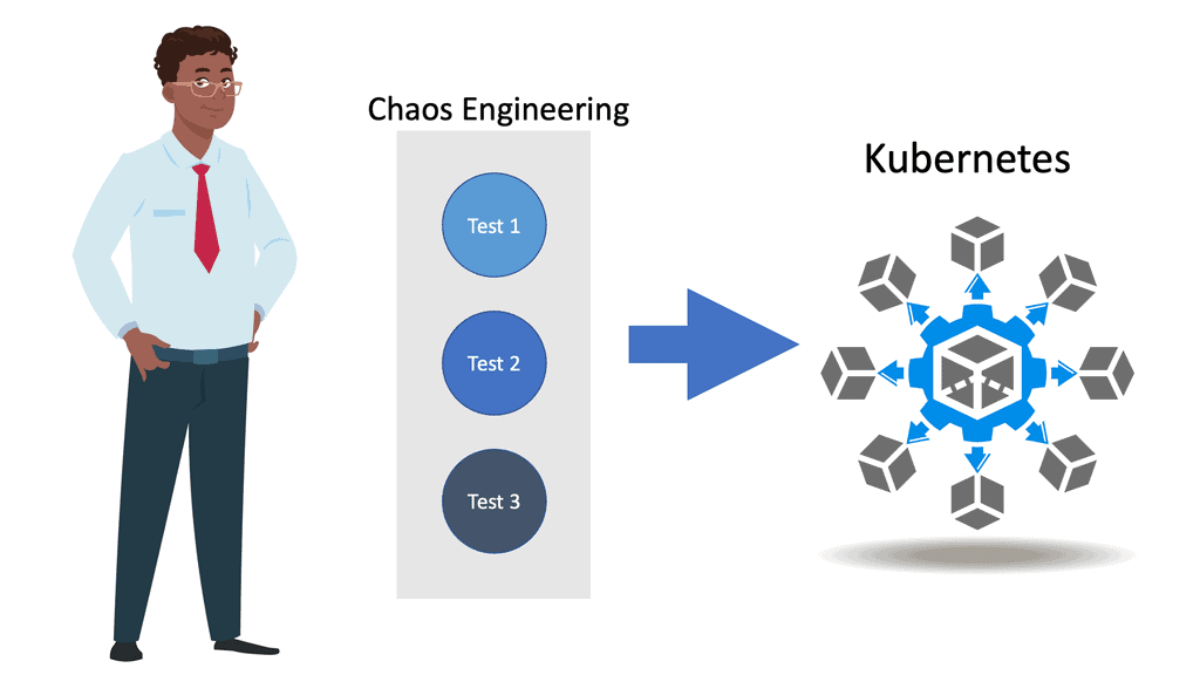
Chaos Engineering involves deliberately introducing controlled failures or abnormal conditions into a system and observing how it responds. The objective is not to cause disruption for its own sake, but to validate resilience assumptions, identify unknown failure modes, and improve the system’s ability to recover. In Kubernetes, experiments can target workloads, nodes, networking, storage, dependencies, or resource availability.

A successful experiment begins with a hypothesis. Engineers define what they expect to happen if a particular component fails and establish the signals that will demonstrate whether the system remained within acceptable limits. A controlled fault is then introduced while telemetry is collected, allowing the resulting behaviour to be compared with the original reliability expectations.

This makes metrics and observability fundamental to Chaos Engineering. Key signals can include request latency, error rates, throughput, CPU and memory utilisation, pod restarts, resource saturation, queue depth, and application-specific service-level indicators. Looking at these signals together provides a much clearer picture of system health than relying on a single metric.

Latency metrics help reveal how a failure affects application response times. Introducing network delay, dependency latency, or resource contention can demonstrate whether timeouts, retries, load balancing, and application fallbacks behave as expected. A service may remain available while its latency increases enough to create a significant user-facing impact.

Error and availability metrics show whether the system continues to meet its reliability objectives when components fail. Controlled pod termination, dependency failures, or network disruption can reveal whether Kubernetes workloads restart correctly and whether applications have sufficient redundancy and graceful failure mechanisms.

Resource and saturation metrics provide another important perspective. CPU throttling, memory pressure, constrained capacity, or excessive workload demand can expose weak resource limits, inefficient scheduling, or scaling assumptions. These experiments can help validate whether Kubernetes workloads respond correctly when the underlying resources become constrained.

The real value of Chaos Engineering comes from connecting these experiments to observable outcomes. A useful experiment should establish a hypothesis, introduce a controlled fault, monitor the relevant telemetry, measure the impact, and capture what was learned. The results can then feed back into application design, Kubernetes configuration, alerting, capacity planning, and incident response.

Chaos Engineering therefore becomes more than deliberately creating failures. It is a practical method for testing whether a Kubernetes platform and the applications running on it can detect, tolerate, and recover from unexpected conditionsbefore those conditions become real-world incidents.

Interactive Chaos Engineering / Experiment 01

Chaos Engineering Experiment Loop

Chaos engineering is not simply breaking a system. The engineering process is to define normal behavior, form a hypothesis, introduce a realistic failure, observe the system, and use the evidence to improve resilience.

Experiment Objective
Prove that the application can tolerate failure
Start with measurable steady-state behavior. Then introduce one controlled fault and determine whether the application remains within its reliability objectives or successfully recovers.
p99 < 200ms
Errors < 1%
Availability > 99.9%
CPU < 70%
Engineering Principle
Test the hypothesis
A useful experiment attempts to disprove an assumption about system resilience rather than simply generate failure.
Experiment Lifecycle
01
Steady State
Establish measurable normal behavior.
02
Hypothesis
Predict how the system should respond.
03
Inject Failure
Introduce a controlled realistic fault.
04
Observe
Measure system behavior during failure.
05
Compare
Compare results against steady state.
06
Improve
Fix weaknesses and repeat the experiment.
Selected Stage
01 — Steady State
BASELINE
Before introducing chaos, define what healthy behavior looks like. The baseline should be measurable so that the experiment has something meaningful to compare against.
Question: What does “healthy” look like for this application?
Engineering principle: If you cannot measure steady state, you cannot reliably determine whether a chaos experiment caused meaningful degradation.
Experiment Telemetry
p99 Latency
142 ms
Error Rate
0.3%
Availability
99.98%
CPU Usage
54%
Experiment Result
HYPOTHESIS SUPPORTED
The simulated failure produced a measurable change, but the service recovered and returned toward its defined steady state.
Engineering Takeaway: Chaos engineering should be treated as a controlled scientific experiment. Define the steady state first, introduce a realistic failure with a known blast radius, observe the system, compare the result with the baseline, and feed the learning back into the design.
STEADY STATE → HYPOTHESIS → FAILURE → OBSERVE → COMPARE → IMPROVE → REPEAT

Highlights: Chaos Engineering Kuberentes

The Principles of Chaos Engineering

Chaos Engineering is grounded in several core principles. First, it is about embracing failure as a learning opportunity. By simulating failures, teams can understand how their systems react under stress. Another principle is to conduct experiments in a controlled environment, ensuring any disruptions do not affect end users. Lastly, Chaos Engineering emphasizes continuous learning and improvement, turning insights from experiments into actionable changes.

**Tools and Techniques**

Implementing chaos engineering requires a robust set of tools and techniques to simulate real-world disruptions effectively. Some popular tools in the chaos engineering toolkit include Chaos Monkey, Gremlin, and Litmus, each offering unique features to test system resilience. These tools enable engineers to automate experiments, analyze results, and derive actionable insights. By using these advanced tools, organizations can run experiments at scale and gain confidence in their systems’ ability to handle unpredictable events.

**Why Chaos Engineering Matters**

Modern systems are complex and often distributed across multiple platforms and services. This complexity makes it difficult to predict how systems will behave under unexpected conditions. Chaos Engineering allows teams to identify hidden vulnerabilities, improve system reliability, and enhance user experience. Companies like Netflix and Amazon have successfully used Chaos Engineering to maintain their competitive edge by ensuring their services remain robust and available.

**The Traditional Application**

When considering Chaos Engineering kubernetes, we must start from the beginning. Not too long ago, applications ran in single private data centers, potentially two data centers for high availability. These data centers were on-premises, and all components were housed internally. Life was easy, and troubleshooting and monitoring any issues could be done by a single team, if not a single person, with predefined dashboards. Failures were known, and there was a capacity planning strategy that did not change too much, and you could carry out standard dropped packet test

**A Static Infrastructure**

The network and infrastructure had fixed perimeters and were pretty static. There weren’t many changes to the stack, for example, daily. Agility was at an all-time low, but that did not matter for the environments in which the application and infrastructure were housed. However, nowadays, we are in a completely different environment with many more moving parts with an increasing need to support a reliable distributed system.

Complexity is at an all-time high, and business agility is critical. Now, we have distributed applications with components/services located in many different places and types of places, on-premises and in the cloud, with dependencies on both local and remote services. So, in this land of complexity, we must find system reliability. A reliable system is one that you can trust will be reliable.

Chaos Engineering in Kubernetes — Designing for Failure in Cloud‑Native Systems

Chaos engineering in Kubernetes is the discipline of intentionally injecting failure into clusters to validate resilience, uncover hidden weaknesses, and ensure workloads behave correctly under stress. Instead of waiting for outages, chaos engineering forces the system to experience them in a controlled, observable way. Kubernetes is a perfect environment for chaos experiments because it is inherently dynamic, distributed, and built around self‑healing primitives.

Why Chaos Engineering Matters in Kubernetes

Kubernetes abstracts infrastructure, but abstraction hides failure. Chaos engineering exposes how workloads behave when:

  • nodes crash
  • pods restart unexpectedly
  • network latency spikes
  • storage becomes slow or unavailable
  • API server becomes overloaded
  • autoscaling triggers aggressively
  • controllers misbehave

Chaos engineering ensures your cluster is resilient by design, not by assumption.

Core Principles of Kubernetes Chaos Engineering

Chaos engineering in Kubernetes follows four foundational principles:

1. Define Steady State

You must know what “normal” looks like.

Examples:

  • p99 latency under 200ms
  • error rate < 1%
  • CPU usage < 70%
  • pods healthy and ready

Steady state becomes the baseline for evaluating chaos impact.

2. Introduce Realistic Failure

Chaos experiments should mimic real‑world failures:

  • node shutdown
  • pod eviction
  • network partition
  • DNS failure
  • container crash loops
  • storage throttling

Chaos must be representative, not random.

3. Observe System Behavior

Use Kubernetes observability tools:

  • Prometheus metrics
  • Loki logs
  • Jaeger/Tempo traces
  • Kiali (service mesh)
  • OpenTelemetry pipelines

Chaos without observability is just destruction.

4. Improve and Repeat

Chaos engineering is iterative.

Each experiment reveals weaknesses that must be fixed, validated, and re‑tested.

Common Chaos Experiments in Kubernetes

Here are the most valuable chaos tests for real‑world clusters:

1. Pod Kill / Pod Restart

Simulates container crashes.

Validates:

  • readiness/liveness probes
  • retry logic
  • graceful shutdown
  • autoscaling behavior

2. Node Failure / Node Drain

Simulates hardware failure or maintenance.

Validates:

  • pod rescheduling
  • replica distribution
  • disruption budgets
  • cluster autoscaler behavior

3. Network Latency / Packet Loss

Simulates degraded network conditions.

Validates:

  • microservices resilience
  • timeout handling
  • circuit breakers
  • service mesh routing

4. API Server Stress

Simulates control‑plane overload.

Validates:

  • controller stability
  • admission webhook behavior
  • cluster responsiveness

5. Storage Throttling / Volume Detach

Simulates slow or failing storage.

Validates:

  • database failover
  • persistent volume resilience
  • application retry logic

6. Service Mesh Failure

Simulates sidecar or proxy issues.

Validates:

  • fallback routing
  • mesh control‑plane resilience
  • degraded mode behavior

Chaos Engineering + Kubernetes Operators

Operators automate application lifecycle management.

Chaos engineering validates operator logic:

  • reconciliation loops
  • state recovery
  • CRD consistency
  • failover automation

If an operator cannot recover state after chaos, it is not production‑ready.

Chaos Engineering for Security

Chaos engineering can also test security controls:

  • RBAC misconfigurations
  • network policy gaps
  • pod escape attempts
  • privilege escalation
  • secret rotation failures

Security chaos engineering ensures Zero Trust principles hold under stress.

Tools for Kubernetes Chaos Engineering

Popular tools include:

  • LitmusChaos — CNCF project for Kubernetes chaos workflows
  • Chaos Mesh — powerful, Kubernetes‑native chaos platform
  • Gremlin — enterprise chaos engineering suite
  • Kube‑Monkey — pod‑kill chaos inspired by Netflix’s Chaos Monkey

These tools integrate with CI/CD pipelines, allowing chaos tests to run automatically.

Outcome — A Resilient, Self‑Healing Kubernetes Platform

Chaos engineering ensures Kubernetes workloads:

  • survive node failures
  • recover from pod crashes
  • tolerate network degradation
  • handle storage instability
  • maintain service reliability
  • enforce security under stress

Chaos engineering transforms Kubernetes from “works in ideal conditions” to “works under real‑world failure.”

Implementing Chaos Engineering

Implementing Chaos Engineering involves several steps. First, start by defining a “steady state” of your system’s normal operations. Next, develop hypotheses about potential failure points and design experiments to test these. Use tools like Chaos Monkey or Gremlin to introduce controlled disruptions and observe the outcomes. Finally, analyze the results and apply any necessary changes to improve system resilience.

Challenges and Considerations

While Chaos Engineering offers many benefits, it also presents challenges. Resistance from stakeholders who are wary of intentional disruptions can be a hurdle. Additionally, ensuring that experiments are conducted safely and do not impact customers is crucial. To overcome these challenges, it’s important to foster a culture of transparency, continuous learning, and collaboration among teams.

Benefits of Chaos Engineering in Kubernetes:

1. Enhanced Reliability: By subjecting Kubernetes deployments to controlled failures, Chaos Engineering helps organizations identify weak points and vulnerabilities, enabling them to build more resilient systems that can withstand unforeseen events.

2. Improved Incident Response: Chaos Engineering allows organizations to test and refine their incident response processes by simulating real-world failures. This helps teams understand how to quickly detect and mitigate potential issues, reducing downtime and improving the overall incident response capabilities.

3. Cost Optimization: Chaos engineering can help optimize resource utilization within a Kubernetes cluster by identifying and addressing performance bottlenecks and inefficient resource allocation. This, in turn, leads to cost savings and improved efficiency.

Personal Note: Today’s standard explanation for Chaos Engineering is “The facilitation of experiments to uncover systemic weaknesses.” The following is true for Chaos Engineering.

  1. Begin by defining “steady state” as some measurable output of a system that indicates normal behavior.
  2. Hypothesize that this steady state will persist in both the control and experimental groups.
  3. Submit variables that mirror real-world events like servers that crash, hard drives that malfunction, severed network connections, etc.
  4. Then, as a final step, try to disprove the hypothesis by looking for a steady-state difference between the control and experimental groups.

Chaos Engineering Scenarios in Kubernetes:

Chaos Engineering in Kubernetes involves deliberately introducing failures into the system to observe how it behaves and recovers. This proactive approach enables teams to understand the system’s response to unexpected disruptions, whether it’s a pod failure, network latency, or a node shutdown.

**Implementing Chaos Experiments in Kubernetes**

To harness the full potential of Chaos Engineering, it’s essential to implement chaos experiments thoughtfully. Start by identifying critical components of your Kubernetes cluster that need testing. Tools like LitmusChaos and Chaos Mesh provide a framework for defining and executing chaos experiments. These experiments simulate disruptions such as pod deletions, CPU stress, and network partitioning, allowing teams to evaluate system behavior and improve fault tolerance.

**Chaos Engineering Kubernetes**

1. Pod Failures: Simulating failures of individual pods within a Kubernetes cluster allows organizations to evaluate how the system responds to such events. By randomly terminating pods, Chaos Engineering can help ensure that the system can handle pod failures gracefully, redistributing workload and maintaining high availability.

2. Network Partitioning: Introducing network partitioning scenarios can help assess the resilience of a Kubernetes cluster. By isolating specific nodes or network segments, Chaos Engineering enables organizations to test how the group reacts to network disruptions and evaluate the effectiveness of load balancing and failover mechanisms.

3. Resource Starvation: Chaos Engineering can simulate resource scarcity scenarios by intentionally consuming excessive resources, such as CPU or memory, within a Kubernetes cluster. This allows organizations to identify potential performance bottlenecks and optimize resource allocation strategies.

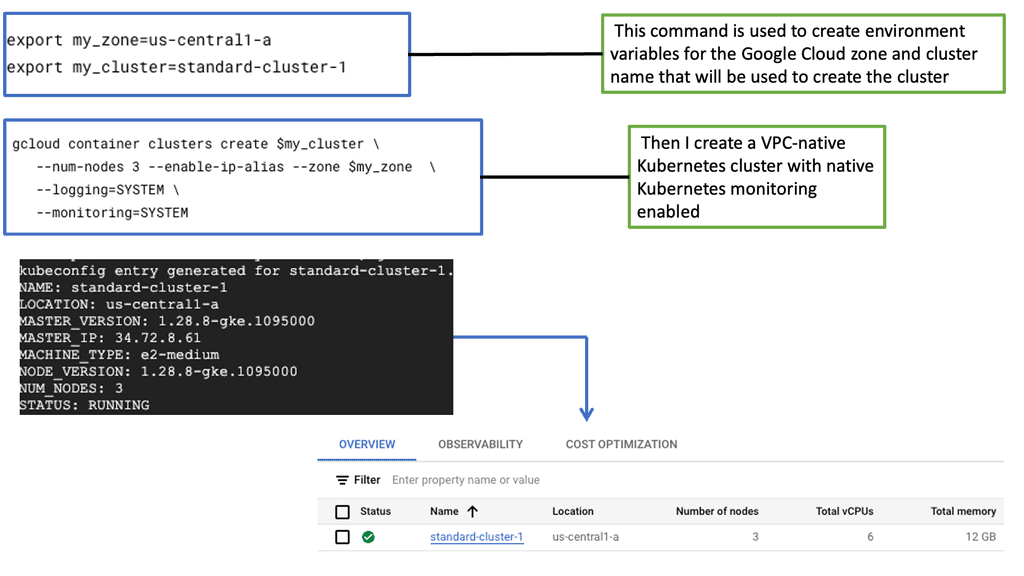
Understanding GKE-Native Monitoring

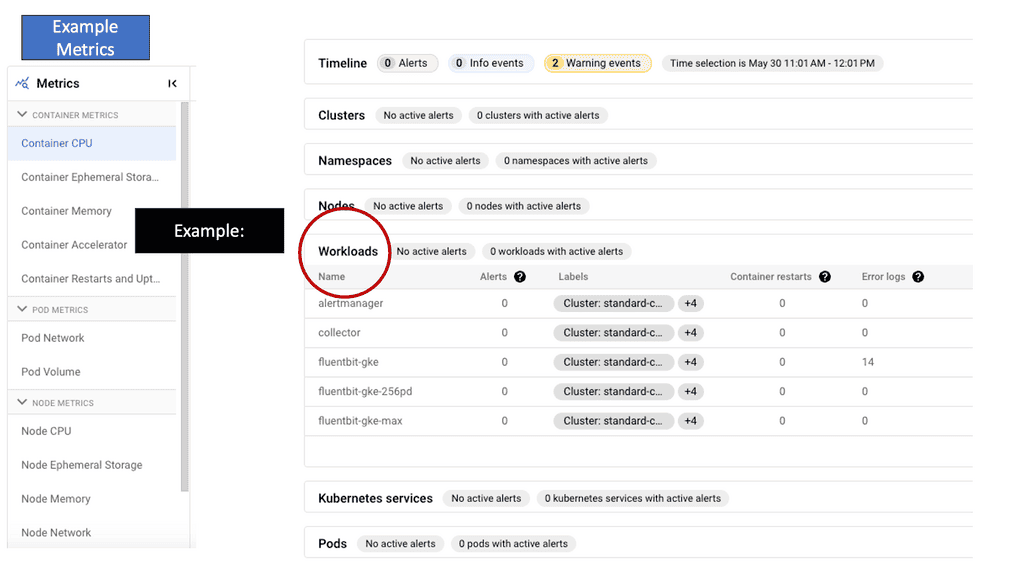
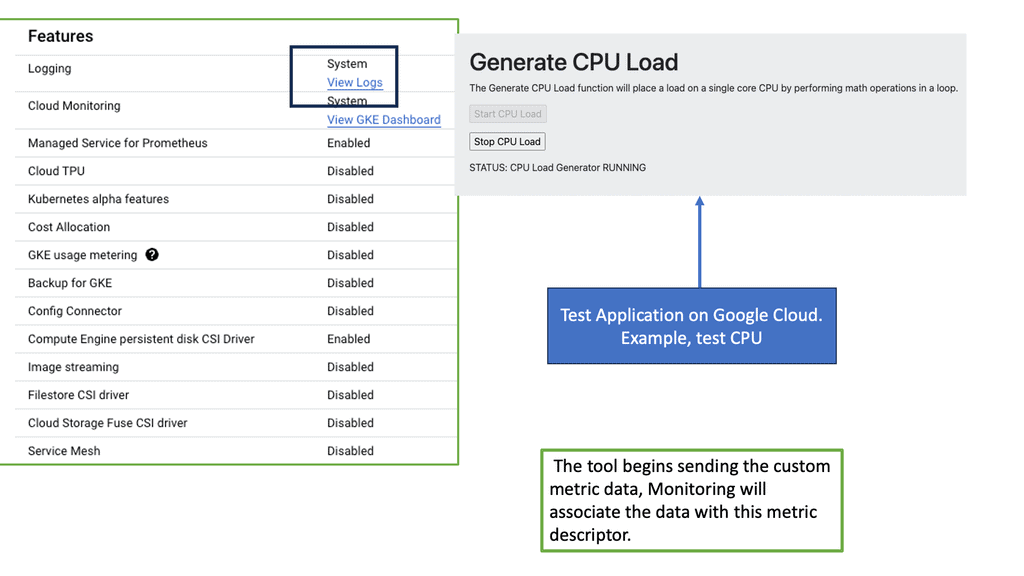
GKE-Native Monitoring is a comprehensive solution designed for Google Kubernetes Engine (GKE). It empowers developers and operators with real-time insights into the health and performance of their Kubernetes clusters, pods, and containers. Leveraging the power of Prometheus, GKE-Native Monitoring offers a wide range of monitoring metrics, such as CPU and memory utilization, network traffic, and custom application metrics.

GKE-Native Monitoring: Features

GKE-Native Monitoring boasts several key features that enhance observability and troubleshooting capabilities. One notable feature is the ability to create custom dashboards, enabling users to visualize and analyze critical metrics tailored to their needs. GKE-Native Monitoring integrates seamlessly with Stackdriver, Google Cloud’s unified monitoring and logging platform, allowing for centralized management and alerting across multiple GKE clusters.
The Rise of Chaos Engineering

Infrastructure is becoming increasingly complex, and let’s face it, a lot can go wrong. It’s imperative to have a global view of all the infrastructure components and a good understanding of the application’s performance and health. In a large-scale container-based application design, there are many moving pieces and parts, and trying to validate the health of each piece manually is hard. 

With these new environments, especially cloud-native at scale. Complexity is at its highest, and many more things can go wrong. For this reason, you must prepare as much as possible so the impact on users is minimal.

So, the dynamic deployment patterns you get with frameworks with Kubernetes allow you to build better applications. But you need to be able to examine the environment and see if it is working as expected. Most importantly, this course’s focus is that to prepare effectively, you need to implement a solid strategy for monitoring in production environments.

Chaos Engineering Kubernetes

For this, you need to understand practices and tools like Chaos Engineering and how they can improve the reliability of the overall system. Chaos Engineering is the ability to perform tests in a controlled way. Essentially, we intentionally break things to learn how to build more resilient systems.

So, we are injecting faults in a controlled way to make the overall application more resilient by injecting various issues and faults. It comes down to a trade-off and your willingness to accept it. There is a considerable trade-off with distributed computing. You have to monitor efficiently, have performance management, and, more importantly, accurately test the distributed system in a controlled manner. 

Service Mesh Chaos Engineering

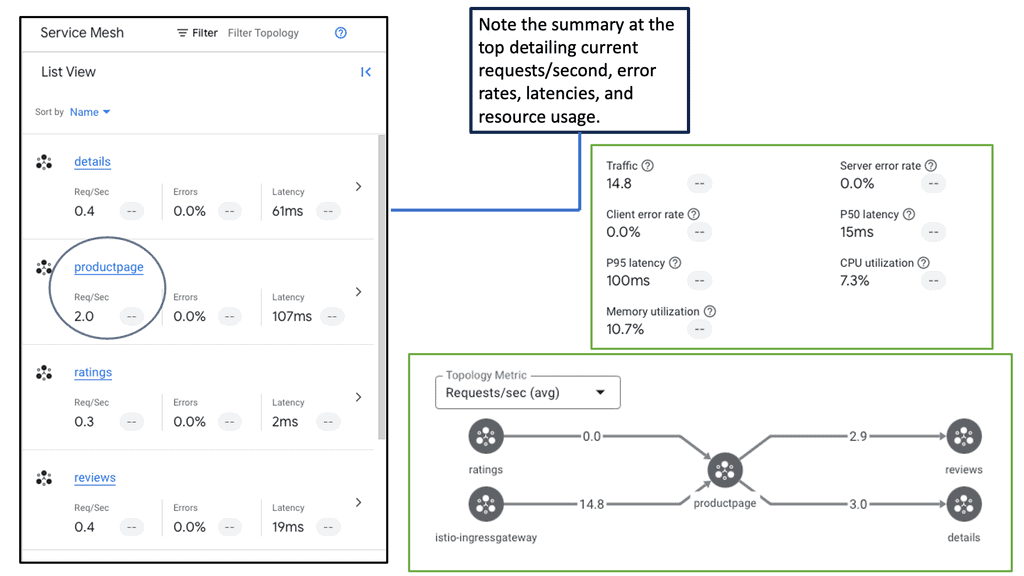
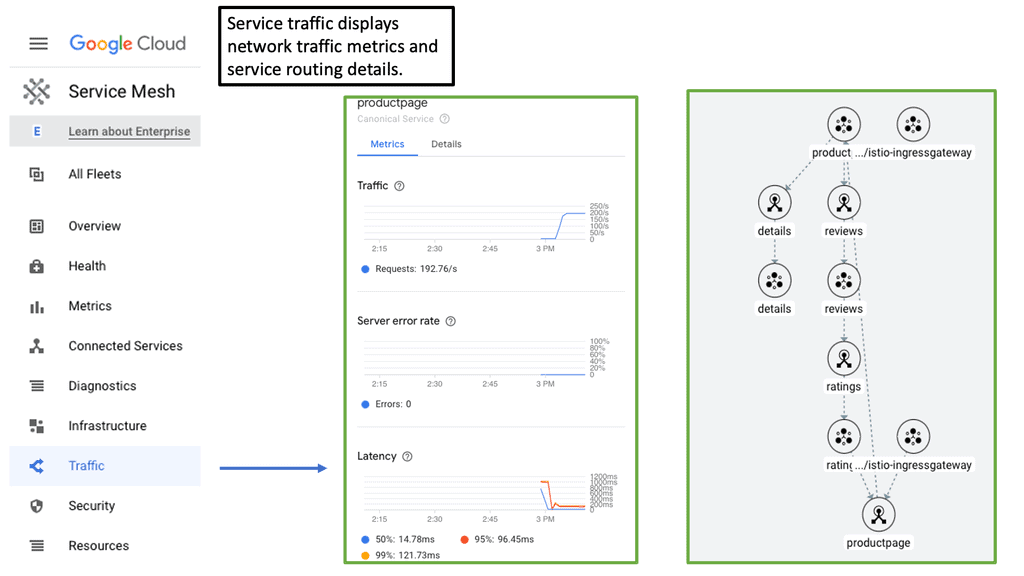
 Service Mesh is an option to use to implement Chaos Engineering. You can also implement Chaos Engineering with Chaos Mesh, a cloud-native Chaos Engineering platform that orchestrates tests in the Kubernetes environment. The Chaos Mesh project offers a rich selection of experiment types. Here are the choices, such as the POD lifecycle test, network test, Linux kernel, I/O test, and many other stress tests.

Implementing practices like Chaos Engineering will help you understand and manage unexpected failures and performance degradation. The purpose of Chaos Engineering is to build more robust and resilient systems. 

Cloud Service Mesh:

### The Role of Cloud Service Mesh in Modern Architecture

Traditional monolithic applications are being replaced by microservices architectures, which break down applications into smaller, independent services. While this shift offers numerous benefits such as scalability and flexibility, it also introduces complexities in managing the interactions between these services. This is where a Cloud Service Mesh comes into play. It provides a structured method to handle service discovery, load balancing, failure recovery, metrics, and monitoring without adding heavy burdens to the developers.

### Google’s Pioneering Efforts in Cloud Service Mesh

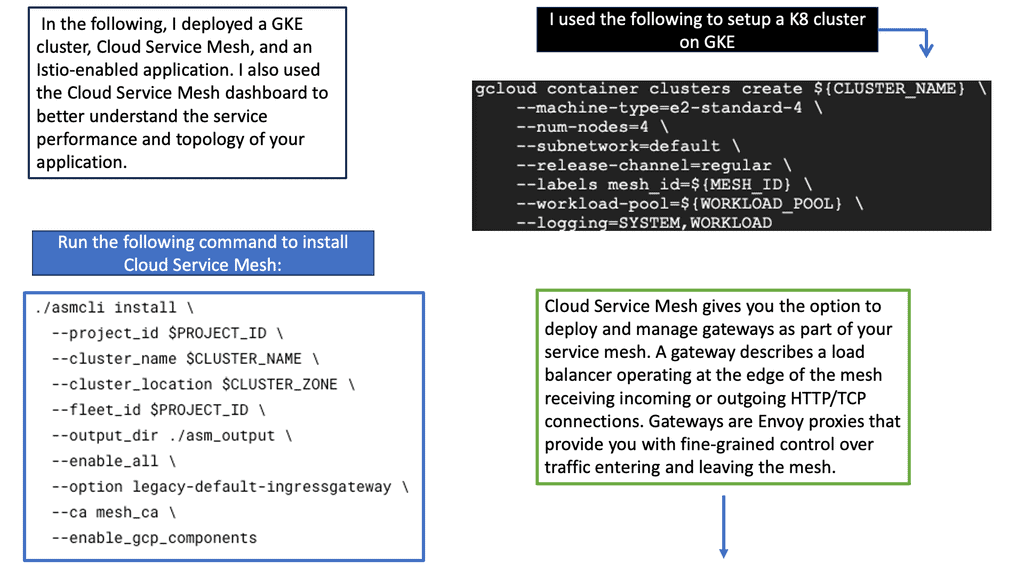
Google has been at the forefront of cloud innovation, and its contributions to the development of Cloud Service Mesh technologies are no exception. Through its open-source project Istio, Google has provided a robust framework for managing microservices.

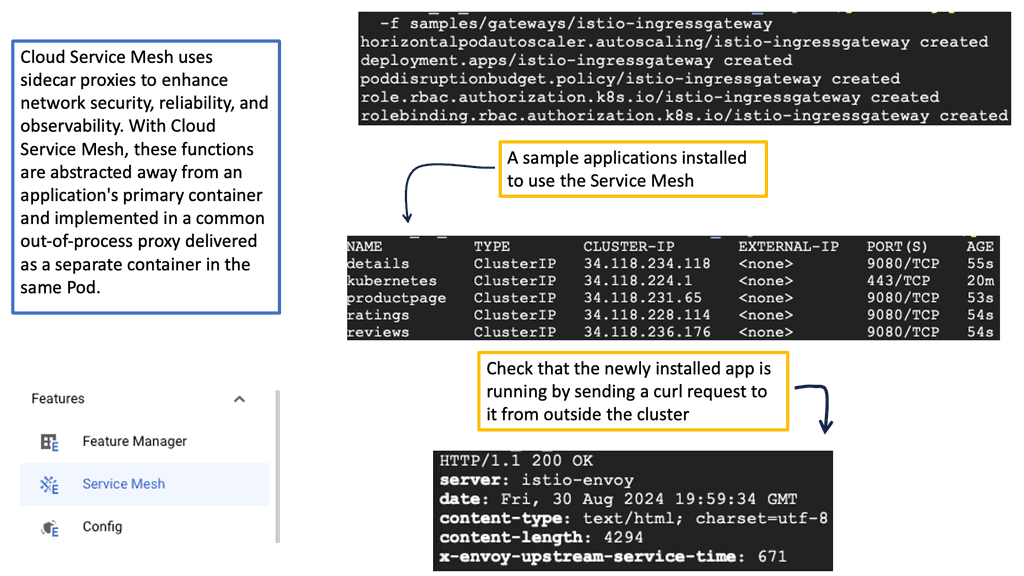
Istio simplifies the observability, security, and management of microservices, making it easier for enterprises to adopt and scale their cloud-native applications. By integrating Istio with their Google Kubernetes Engine (GKE), Google has made it seamless for organizations to deploy and manage their service meshes.
### Enhancing Reliability with Chaos Engineering

One of the most intriguing aspects of utilizing a Cloud Service Mesh is its ability to enhance system reliability through Chaos Engineering. This practice involves intentionally injecting faults into the system to test its resilience and identify potential weaknesses.

By simulating real-world failures, organizations can better prepare for unexpected issues and ensure their services remain robust under pressure. The granular control provided by a Cloud Service Mesh makes it an ideal platform for implementing Chaos Engineering practices, helping to create more resilient and dependable cloud environments.
 

Interactive Chaos Engineering / Kubernetes Failure Lab

Kubernetes Failure Injection

Select a realistic failure scenario and trace what should happen next: failure injection, Kubernetes response, application impact and recovery. The goal is not to break Kubernetes randomly — it is to test a resilience hypothesis.

Selected Experiment
Pod Failure
Terminate one application pod and observe whether the Service continues directing traffic to healthy replicas while the Deployment recreates the failed workload.
◆
Application
→
×
Pod Fails
→
↻
Replica Recovery
→
✓
Service Restored
Failure Injected Application pod termination
Kubernetes Reaction Controller recreates the desired replica
What To Observe Endpoint health, pod readiness and request errors
Recovery Signal Healthy replica returns to service
Potential Impact: A correctly configured replicated application should experience little or no user-visible disruption.
Experiment Console
chaos-engineering / kubernetes
$ experiment --scenario pod-failure
[baseline] replicas=3 ready=3 error_rate=0.3%
[inject] terminating pod/frontend-7d8c9
[event] pod state=Terminating
[controller] desired replicas=3
[scheduler] replacement pod created
[recovery] replicas=3 ready=3
Experiment Complete
The simulated failure was introduced and the recovery path completed. Check whether the application remained inside its reliability objectives.
Engineering Takeaway: Each chaos experiment should connect a realistic failure to an expected Kubernetes response and a measurable recovery signal. The question is not simply “did something break?” — it is “did the platform and application recover the way we designed them to?”

Chaos Engineering Kuberentes

Monitoring & Troubleshooting 

Beyond the Complexity Horizon

Therefore, monitoring and troubleshooting are much more demanding, as everything is interconnected, making it difficult for a single person in one team to understand what is happening entirely. The edge of the network and application boundary surpasses one location and team. Enterprise systems have gone beyond the complexity horizon, and you can’t understand every bit of every single system.

Even if you are a developer closely related to the system and truly understand the nuts and bolts of the application and its code, no one can understand every bit of every single system.  So, finding the correct information is essential, but once you see it, you have to give it to those who can fix it. So monitoring is not just about finding out what is wrong; it needs to alert, and these alerts need to be actionable.

Troubleshooting: Chaos engineering kubernetes

– Chaos Engineering aims to improve a system’s reliability by ensuring it can withstand turbulent conditions. Chaos Engineering makes Kubernetes more secure. So, if you are adopting Kubernetes, you should adopt Chaos Engineering as an integral part of your monitoring and troubleshooting strategy.

– Firstly, we can pinpoint the application errors and understand, at best, how these errors arose. This could be anything from badly ordered scripts on a web page to a database query that has bad sequel calls or even unoptimized code-level issues.

– Or there could be something more fundamental going on. It is expected to have issues with how something is packaged into a container. You can pull in the incorrect libraries or even use a debug version of the container.

– Or there could be nothing wrong with the packaging and containerization of the container; it is all about where the container is being deployed. There could be something wrong with the infrastructure, either a physical or logical problem—incorrect configuration or a hardware fault somewhere in the application path.

**Non-ephemeral and ephemeral services**

With the introduction of containers and microservices observability, monitoring solutions need to manage non-ephemeral and ephemeral services. We are collecting data for applications that consist of many different benefits.

So when it comes to container monitoring and performing chaos engineering kubernetes tests, we need to understand the nature and the full application that lies upon it. Everything is dynamic by nature. It would be best if you had monitoring and troubleshooting in place that can handle the dynamic and transient nature. When monitoring a containerized infrastructure, you should consider the following.

A: Container Lifespan: Containers have a short lifespan; they are provisioned and commissioned based on demand. This is compared to VMs or bare-metal workloads, which generally have a longer lifespan. As a generic guideline, containers have an average lifespan of 2.5 days, while traditional and cloud-based VMs have an average lifespan of 23 days. Containers can move, and they do move frequently.

One day, we could have workload A on cluster host A, and the next day or even on the same day, the same cluster host could be hosting Application workload B. Therefore, different types of impacts could depend on the time of day.

B: Containers are Temporary: Containers are dynamically provisioned for specific use cases temporarily. For example, we could have a new container based on a specific image. New network connections, storage, and any integrations to other services that make the application work will be set up for that container. All of this is done dynamically and can be done temporarily.

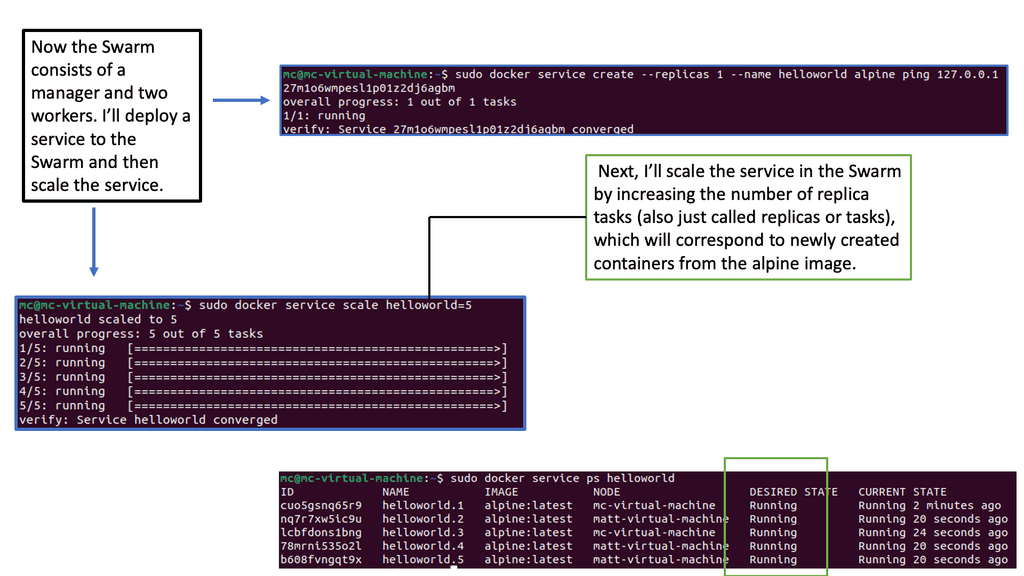
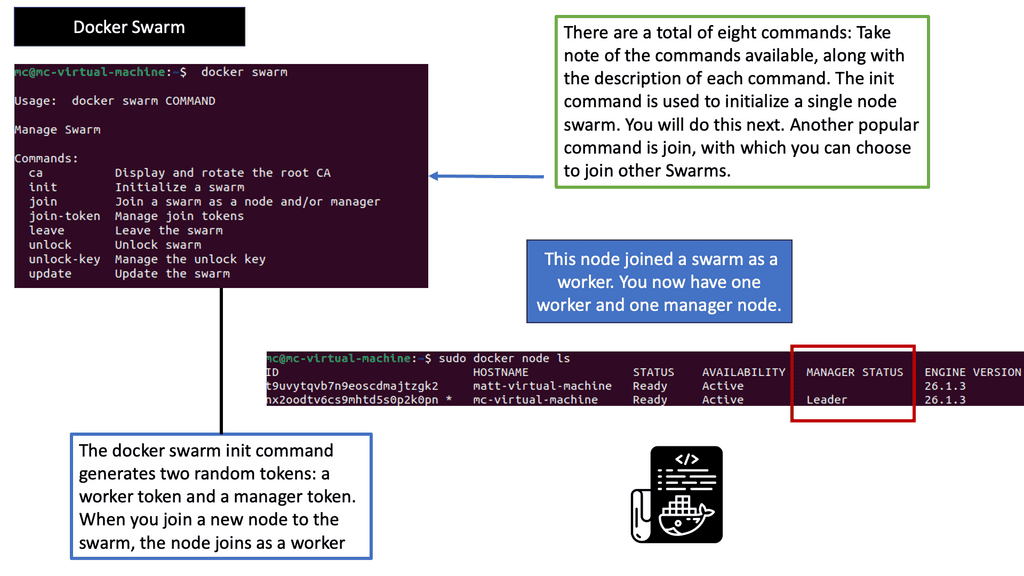
Example: Orchestration with Docker Swarm
C: Different monitoring levels: In a Kubernetes environment, there are many monitoring levels. The components that make up the Kubernetes deployment will affect application performance. We have nodes, pods, and application containers. We also monitor at different levels, such as the VM, storage, and microservice levels.

D: Microservices change fast and often: Microservices consist of constantly evolving apps. New microservices are added, and existing ones are decommissioned quickly. So, what does this mean to usage patterns? This will result in different usage patterns on the infrastructure. If everything is often changing, it can be hard to derive the baseline and build a topology map unless you have something automatic in place. 

E: Metric overload: We now have loads of metrics, including additional metrics for the different containers and infrastructure levels. We must consider metrics for the nodes, cluster components, cluster add-on, application runtime, and custom application metrics. This is compared to a traditional application stack, where we use metrics for components such as the operating system and the application. 

Metric Explosion

Note: Prometheus Scrapping Metrics

In the traditional world, we didn’t have to be concerned with the additional components such as an orchestrator or the dynamic nature of many containers. With a container cluster, we must consider metrics from the operating system, application, orchestrator, and containers.  We refer to this as a metric explosion. So now we have loads of metrics that need to be gathered. There are also different ways to pull or scrape these metrics.

Prometheus is expected in the world of Kubernetes and uses a very scalable pull approach to getting those metrics from HTTP endpoints either through Prometheus client libraries or exports.
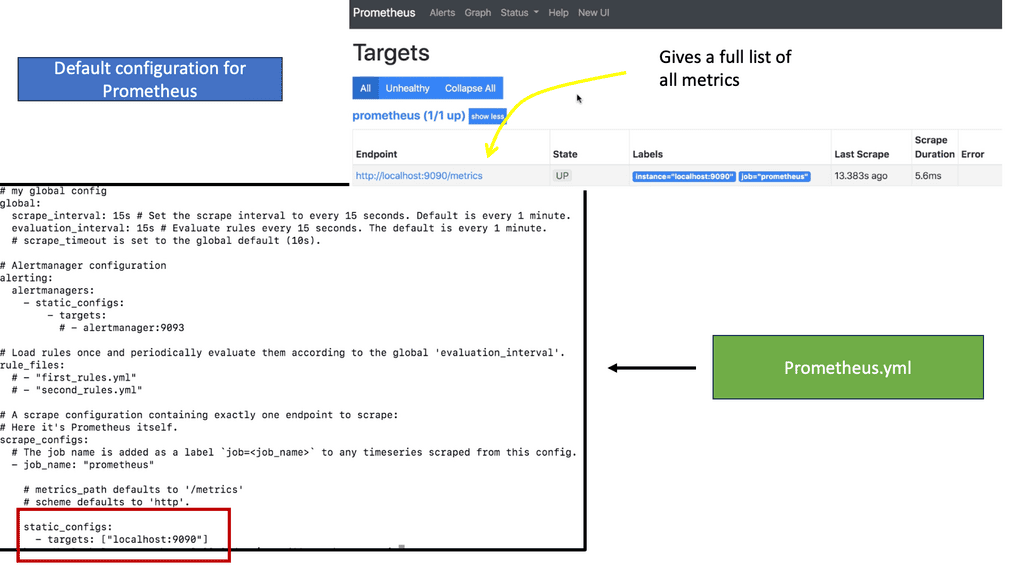
Prometheus YAML file
Diagram: Prometheus YAML file

**A key point: What happens to visibility**  

So, we need complete visibility now more than ever—not just for single components but visibility at a holistic level. Therefore, we need to monitor a lot more data points than we had to in the past. We need to monitor the application servers, Pods and containers, clusters running the containers, the network for service/pod/cluster communication, and the host OS.

All of the monitoring data needs to be in a central place so trends can be seen and different queries to the data can be acted on. Correlating local logs would be challenging in a sizeable multi-tier application with docker containers. We can use Log forwarders or Log shippers, such as FluentD or Logstash, to transform and ship logs to a backend such as Elasticsearch.

**A key point: New avenues for monitoring**

Containers are the norm for managing workloads and adapting quickly to new markets. Therefore, new avenues have opened up for monitoring these environments. So we have, for example, AppDynamics and Elastic search, which are part of the ELK stack, and the various log shippers that can be used to help you provide a welcome layer of unification. We also have Prometheus to get metrics. Keep in mind that Prometheus works only in the land of metrics. There will be different ways to visualize all this data, such as Grafana and Kibana. 

Distributed Systems Visbility

What happens to visibility? We need complete visibility now more than ever, not just for single components but at a holistic level. Therefore, we need to monitor a lot more data points than we had to in the past. We need to monitor the application servers, Pods and containers, clusters running the containers, the network for service/pod/cluster communication, and the host OS. 

All of the monitoring data needs to be in a central place so trends can be seen and different queries to the data can be acted on. Correlating local logs would be challenging in a sizeable multi-tier application with docker containers. We can use Logforwarders or Log shippers, such as FluentD or Logstash, to transform and ship logs to a backend such as Elasticsearch.

Containers are the norm for managing workloads and adapting quickly to new markets. Therefore, new avenues have opened up for monitoring these environments. So, I have mentioned AppDynamics, Elastic search, which is part of the ELK stack, and the various log shippers that can be used to help you provide a layer of unification. We also have Prometheus. There will be different ways to visualize all this data, such as Grafana and Kibana. 

A: – Microservices Complexity

With the wave towards microservices, we get the benefits of scalability and business continuity, but managing them is very complex. The monolith is much easier to manage and monitor. Also, as separate components, they don’t need to be written in the same language or toolkits, so you can mix and match different technologies.

This approach has a lot of flexibility, but we can increase latency and complexity. There are a lot more moving parts that will increase complexity.

We have, for example, reverse proxies, load balancers, firewalls, and other infrastructure support services. What used to be method calls or interprocess calls within the monolith host now go over the network and are susceptible to deviations in latency. 

B: – Debugging Microservices

With the monolith, the application is simply running in a single process, and it is relatively easy to debug. Many traditional tooling and code instrumentation technologies have been built, assuming you have the idea of a single process. However, with microservices, we have a completely different approach with a distributed application.

Now, your application has multiple processes running in other places. The core challenge is trying to debug microservices applications.

So much of the tooling we have today has been built for traditional monolithic applications. So, there are new monitoring tools for these new applications, but there is a steep learning curve and a high barrier to entry. New tools and technologies such as distributed tracing and chaos engineering kubernetes are not the simplest to pick up on day one.

C: – Automation and monitoring

Automation comes into play with the new environment. With automation, we can do periodic checks not just on the functionality of the underlying components but also implement health checks of how the application performs. All can be automated for specific intervals or in reaction to certain events.

With the rise of complex systems and microservices, it is more important to have real-time performance monitoring and metrics that tell you how the systems behave. For example, what is the usual RTT, and how long can transactions occur under normal conditions?
Interactive Chaos Engineering / Observability Lab

Observability & Resilience

A chaos experiment is only useful if you can prove what happened, where it happened, how the application responded, and whether the system recovered.

Select Incident
Kubernetes Service Path
User Request
→
Ingress Entry point
→
Service Discovery
→
Pods Failure target
→
Node Compute
→
Cluster Control plane
Observability Signal Matrix

Metrics

p99 142ms
errors 0.3%

Quantifies system behaviour and SLO impact.

Logs

request OK
pod Ready

Shows application and component-level evidence.

Traces

124ms total
service OK

Shows where request time or failure occurred.

Events

Normal
Ready

Provides Kubernetes lifecycle evidence.

SLO

99.98%
Healthy

Connects telemetry to user-facing reliability.

Incident Timeline BASELINE
00:00
Baseline established — application operating normally.
00:05
Observability signals are within expected thresholds.
Engineering Takeaway

Never treat a single dashboard metric as proof of recovery. Correlate metrics, logs, traces and Kubernetes events, then verify that the user-facing SLO has returned to its expected state.

Chaos Engineering

Baseline Engineering

Baseline Engineering

In modern networks, “normal” is not a single number. Network behaviour changes throughout the day as users connect, applications scale, workloads move between data centres and cloud platforms, and traffic patterns shift. Network baseline engineering provides a structured way to understand that normal behaviour and use it as a reference for detecting meaningful changes.

A network baseline is a measured representation of expected network behaviour over time. Instead of relying on a single bandwidth or latency value, an effective baseline can include interface utilisation, packet loss, latency, jitter, application response time, routing changes, flow volumes, errors and discards, CPU and memory utilisation, connection rates, and other service-specific indicators.

The objective is not simply to record historical statistics. A useful baseline provides operational context: is the current behaviour expected, unusual, or indicative of a developing problem?

Proactive Anomaly Detection

Once normal behaviour has been established, current telemetry can be compared against the expected range. A sudden increase in packet loss, an unusual latency pattern, unexpected interface utilisation, or a significant change in traffic flows can indicate congestion, equipment failure, routing problems, security events, or application issues.

Modern monitoring platforms can go beyond simple threshold alerts by using historical trends, statistical ranges, seasonal patterns, and anomaly detection. This helps reduce the number of alerts generated by normal variations while highlighting changes that deserve investigation.

Performance Optimisation

A baseline also provides the evidence needed to optimise network performance. Engineers can compare utilisation and application behaviour across different periods, identify persistent bottlenecks, and determine whether performance problems are caused by network capacity, routing, infrastructure, or dependent services.

For example, consistently high utilisation on an uplink during a predictable business period may represent normal demand rather than an incident. However, if utilisation suddenly increases outside that normal pattern while latency and packet loss also rise, the baseline provides valuable context for identifying the change.

Capacity Planning

Baseline data is particularly valuable for network capacity planning. Historical utilisation trends can reveal how quickly links, devices, wireless infrastructure, VPN gateways, or cloud connectivity are approaching their practical limits.

Capacity decisions can therefore be based on observed demand rather than assumptions. Engineers can identify sustained growth, recurring peak periods, and infrastructure approaching saturation before performance degradation becomes a user-facing problem.

Building a Network Baseline

The first stage is collecting representative telemetry. Depending on the environment, this may include interface counters, SNMP metrics, streaming telemetry, NetFlow or IPFIX records, application performance measurements, routing information, device health statistics, logs, and synthetic tests.

The collection period should cover enough normal operating conditions to reveal meaningful patterns. A business network, for example, may behave very differently during working hours, evenings, weekends, maintenance windows, and scheduled batch-processing periods.

Baseline Analysis

Collected data can then be analysed to identify typical behaviour and acceptable variation. Useful statistical measures can include averages, medians, percentiles, standard deviation, minimum and maximum values, and historical ranges.

Percentiles are particularly useful for network engineering because averages can hide short periods of severe degradation. For latency-sensitive services, for example, the 95th or 99th percentile may provide a much better representation of user experience than the average latency alone.

Baselines should also be segmented where appropriate. A single baseline for an entire network may be too broad to be useful. Separate baselines can be created for different interfaces, sites, applications, services, traffic classes, time periods, or business-critical workloads.

Baseline Maintenance

A network baseline is not a static document. Infrastructure changes, application deployments, cloud migrations, new users, routing changes, and changes in business activity can all alter normal network behaviour.

The baseline should therefore evolve with the environment. However, changes should not automatically be incorporated into the baseline without investigation. Otherwise, a gradual performance problem could eventually become classified as “normal.”

A mature approach separates genuine changes in expected behaviour from degradation that should trigger engineering investigation.

From Monitoring to Network Intelligence

Network baseline engineering becomes significantly more powerful when combined with modern observability. Metrics can show what changed, flow telemetry can help explain where traffic moved, logs can provide operational context, and traces or application telemetry can help determine whether a network symptom is actually caused by an application or dependency.

This creates a more complete operational workflow:

Measure → Establish Normal Behaviour → Detect Deviation → Investigate Context → Remediate → Reassess the Baseline

The goal is not to eliminate variation from the network. Networks are dynamic systems and variation is expected. The goal is to understand that variation well enough to distinguish normal behaviour from meaningful change.

A well-engineered network baseline therefore becomes more than a historical performance report. It provides an operational reference for troubleshooting, anomaly detection, performance optimisation, capacity planning, and long-term infrastructure decisions.

For modern networks, establishing what “normal” looks like is one of the most effective foundations for recognising when something has genuinely changed.

Interactive Baseline Engineering Lab 01

Network Baseline Builder

Establish a measurable picture of normal network behaviour, then compare a later live sample against it. The goal is to turn “something feels slow” into evidence-based baseline drift.

Scenario

You are establishing a baseline for a distributed application during normal business operation. Record representative values first. Then test a later sample to determine whether the environment remains within its expected range.

1. Normal Operating Sample

Known-good state
WAN Latency ms
22 ms
Jitter ms
4 ms
Packet Loss %
0.2 %
Throughput Mbps
640 Mbps
CPU Utilisation %
48 %
App Response ms
180 ms

2. Baseline Profile

Not created
Set the normal operating values on the left and select Create Baseline.

3. Live Sample

Compare current telemetry
WAN Latency ms
24 ms
Jitter ms
5 ms
Packet Loss %
0.2 %
Throughput Mbps
625 Mbps
CPU Utilisation %
52 %
App Response ms
190 ms
Baseline Comparison
WAITING
Why baseline engineering matters

A baseline is not simply a target number. It is a measured representation of normal behaviour under defined conditions. A useful baseline should be representative, repeatable and connected to operational or user expectations. Thresholds in this simulation are teaching tolerances, not universal production values.

ENGINEERING TAKEAWAY

Measure normal behaviour first. Once you have a reliable reference point, live telemetry can be compared against it to identify drift, investigate anomalies and decide whether a change requires action.

Highlights: Baseline Engineering

1. Understanding Baseline Engineering

Baseline engineering serves as the bedrock for any engineering project. It involves creating a reference point or baseline from which all measurements, evaluations, and improvements are made. By establishing this starting point, engineers gain insights into the project’s progress, performance, and potential deviations from the original plan.

Baseline engineering follows a systematic and structured approach. It starts with defining project objectives and requirements, then data collection and analysis. This data provides a snapshot of the initial conditions and helps engineers set realistic targets and benchmarks. Through careful monitoring and periodic assessments, deviations from the baseline can be detected early, enabling timely corrective actions.

2. Traditional Network Infrastructure

Baseline Engineering was easy in the past; applications ran in single private data centers, potentially two data centers for high availability. There may have been some satellite PoPs, but generally, everything was housed in a few locations. These data centers were on-premises, and all components were housed internally. As a result, troubleshooting, monitoring, and baselining any issues was relatively easy. The network and infrastructure were pretty static, the network and security perimeters were known, and there weren’t many changes to the stack, for example, daily.

3. Distributed Applications

However, nowadays, we are in a completely different environment. We have distributed applications with components/services located in many other places and types of places, on-premises and in the cloud, with dependencies on both local and remote services. We span multiple sites and accommodate multiple workload types.

In comparison to the monolith, today’s applications have many different types of entry points to the external world. All of this calls for the practice of Baseline Engineering and Chaos engineering kubernetes so you can fully understand your infrastructure and scaling issues. 

Baseline Engineering

Baseline engineering is the discipline of establishing foundational, measurable, repeatable standards for systems before scaling, optimizing, or securing them. In distributed systems, cloud platforms, Kubernetes, SD‑WAN, SASE, or microservices, a baseline is the known good state — the reference point that allows teams to detect drift, measure reliability, enforce SLOs, and maintain operational consistency.

Think of baseline engineering as the “ground truth” for performance, security, configuration, and architecture.

Concise Takeaway

Baseline engineering defines the minimum acceptable, reproducible state of a system — covering performance, security, configuration, and operational behavior — so deviations can be detected early and corrected automatically.


🧩 Core Components of Baseline Engineering

  • Performance Baselines — p95 latency, throughput, CPU/memory norms, queue depth.

  • Security Baselines — RBAC, network policies, encryption, patch levels.

  • Configuration Baselines — infrastructure-as-code templates, cluster configs, node settings.

  • Reliability Baselines — SLOs, error budgets, failover behavior.

  • Network Baselines — WAN latency, SD‑WAN path performance, DNS resolution times.

  • Observability Baselines — metrics, logs, traces, dashboards, alert thresholds.

These baselines define what “normal” looks like.


Why Baseline Engineering Matters

Distributed systems drift. Cloud environments change. Kubernetes clusters evolve. SD‑WAN paths fluctuate. Without baselines:

  • anomalies go undetected

  • performance regressions hide

  • security gaps widen

  • reliability becomes unpredictable

  • SLOs burn without warning

  • troubleshooting becomes guesswork

Baseline engineering creates predictability.


Baseline Engineering in Modern Architectures

1. Kubernetes & OpenShift

Baselines include:

  • pod startup time

  • node pressure thresholds

  • HPA/VPA scaling behavior

  • network overlay latency

  • API server performance

This allows early detection of cluster degradation.

2. Distributed Systems

Baselines include:

  • service‑to‑service latency

  • retry patterns

  • queue depth norms

  • database response time

  • cache hit ratios

This prevents cascading failures.

3. Cloud & Serverless

Baselines include:

  • cold‑start latency

  • concurrency limits

  • API gateway performance

  • IAM permission behavior

This ensures predictable scaling and routing.

4. SD‑WAN & SASE

Baselines include:

  • path latency

  • jitter

  • packet loss

  • PoP reachability

  • DNS resolution time

This enables fast detection of ISP or routing issues.


How Baseline Engineering Works (Step‑by‑Step)

  1. Define critical metrics (latency, error rate, throughput).

  2. Measure normal behavior over a stable period.

  3. Set thresholds based on SLOs and user expectations.

  4. Automate baseline enforcement using IaC, GitOps, and policy engines.

  5. Continuously compare live telemetry against baselines.

  6. Alert on drift (performance, security, configuration).

  7. Auto‑remediate deviations where possible.

  8. Review baselines regularly as systems evolve.

Baseline engineering is a living process — not a one‑time setup.

Baseline Engineering Best Practices

  • define baselines early, before scaling

  • use real user behavior to set thresholds

  • automate everything (GitOps, IaC, policy engines)

  • integrate baselines with observability pipelines

  • tie baselines to SLOs and error budgets

  • update baselines after major releases

  • enforce baselines across all environments (dev → prod)

Baselines must be measurable, enforceable, and observable.

Outcome

Baseline engineering delivers:

  • predictable performance

  • stable distributed systems

  • strong security posture

  • reliable auto‑scaling

  • fast anomaly detection

  • reduced MTTR

  • consistent cloud and Kubernetes operations

  • trustworthy SLO compliance

It transforms complex systems into controlled, measurable, and self‑correcting architectures.

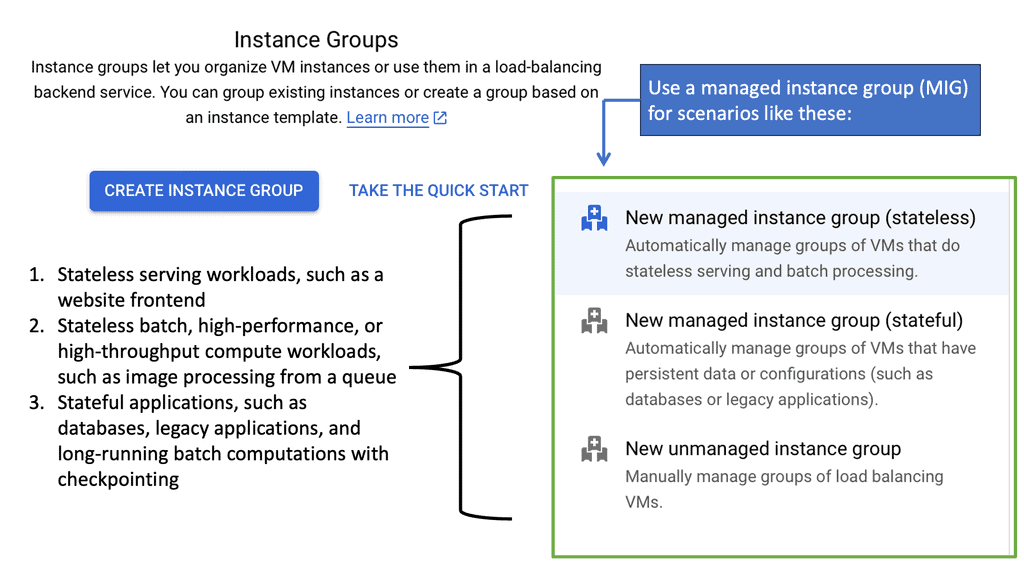
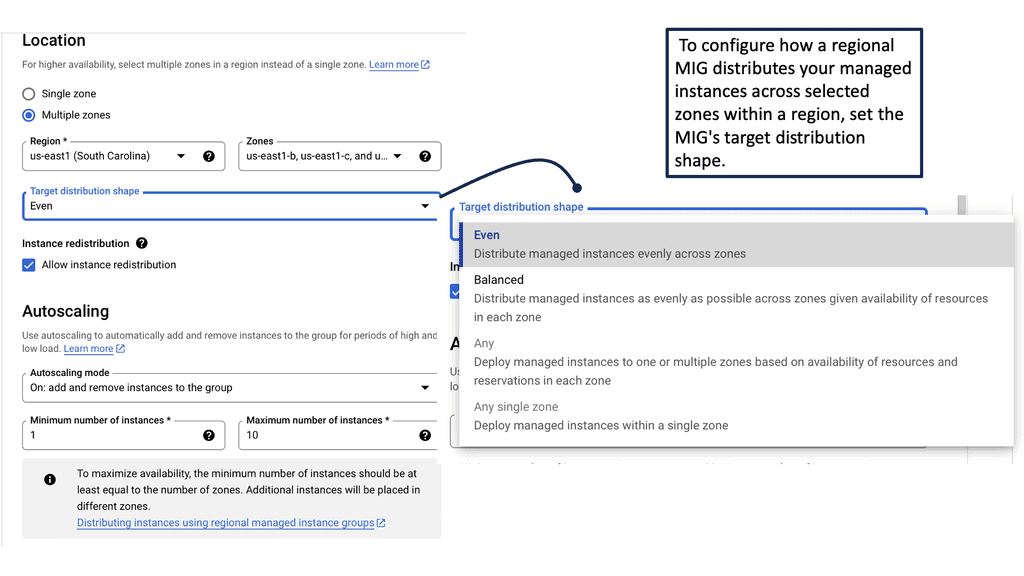
Managed Instance Groups

**Introduction to Managed Instance Groups**

In the fast-evolving world of cloud computing, maintaining scalability, reliability, and efficiency is essential. Managed instance groups (MIGs) on Google Cloud offer an innovative solution to achieve these goals. Whether you’re a seasoned cloud engineer or new to the Google Cloud ecosystem, understanding MIGs can significantly enhance your infrastructure management capabilities.

—

**The Role of Managed Instance Groups in Baseline Engineering**

Baseline engineering focuses on establishing a stable foundation for software development and operations. Managed instance groups play a crucial role in this process by automating the deployment and scaling of virtual machines (VMs). By setting up MIGs, baseline engineering can achieve consistent performance, reduce manual intervention, and enhance the system’s resilience to changes in demand. This automation allows engineers to focus on optimizing and innovating rather than maintaining infrastructure.

—

**Automating Scalability and Load Balancing**

One of the standout features of managed instance groups is their ability to automate scalability and load balancing. As your application experiences varying levels of traffic, MIGs automatically adjust the number of instances to meet the demand. This capability ensures that your application remains responsive and cost-efficient, as you only use the resources you need. Additionally, Google Cloud’s load balancing solutions work seamlessly with MIGs, distributing traffic evenly across instances to maintain optimal performance.

—

**Achieving Reliability with Health Checks and Autohealing**

Reliability is a cornerstone of any cloud-based application, and managed instance groups provide robust mechanisms to ensure it. Through health checks, MIGs continuously monitor the status of your VMs. If an instance fails or becomes unhealthy, the autohealing feature kicks in, replacing it with a new, healthy instance. This proactive approach minimizes downtime and maintains service continuity, contributing to a more reliable application experience for end-users.

—

**Optimizing Costs with Managed Instance Groups**

Cost management is a critical consideration in cloud computing, and managed instance groups help optimize expenses. By automatically scaling the number of instances based on demand, MIGs eliminate the need for overprovisioning resources. This dynamic resource allocation ensures that you are only paying for the compute capacity you need. Moreover, when combined with Google Cloud’s pricing models, such as sustained use discounts and committed use contracts, MIGs allow for significant cost savings.

Managed Instance Group

Google Data Centers – Service Mesh

**What is Cloud Service Mesh?**

A cloud service mesh is a dedicated infrastructure layer designed to manage service-to-service communication within a microservices architecture. It provides a way to control how different parts of an application share data with one another. Essentially, it acts as a network of microservices that make up cloud applications and ensures that communication between services is secure, fast, and reliable.

**Benefits of Cloud Service Mesh**

1. **Enhanced Security**: One of the primary advantages of a cloud service mesh is the improved security it offers. By managing communication between services, it can enforce security policies, authenticate service requests, and encrypt data in transit. This reduces the risk of data breaches and unauthorized access.

2. **Increased Reliability**: Cloud service meshes enhance the reliability of service interactions. They provide load balancing, traffic routing, and failure recovery, ensuring that services remain available even in the face of failures. This is particularly crucial for applications that require high availability and resilience.

3. **Improved Observability**: With a cloud service mesh, engineering teams can gain greater visibility into the interactions between services. This includes monitoring performance metrics, logging, and tracing requests. Such observability helps in identifying and troubleshooting issues more efficiently, leading to faster resolution times.

**Impact on Baseline Engineering**

Baseline engineering involves establishing a standard level of performance, security, and reliability for an organization’s infrastructure. The introduction of a cloud service mesh has significantly impacted this field by providing a more robust foundation for managing microservices. Here’s how:

1. **Standardization**: Cloud service meshes help in standardizing the way services communicate, making it easier to maintain consistent performance across the board. This is especially important in complex systems with numerous interdependent services.

2. **Automation**: Many cloud service meshes come with built-in automation capabilities, such as automatic retries, circuit breaking, and service discovery. This reduces the manual effort required to manage service interactions, allowing engineers to focus on more strategic tasks.

3. **Scalability**: By managing service communication more effectively, cloud service meshes enable organizations to scale their applications more easily. This is crucial for businesses that experience varying levels of demand and need to adjust their resources accordingly.

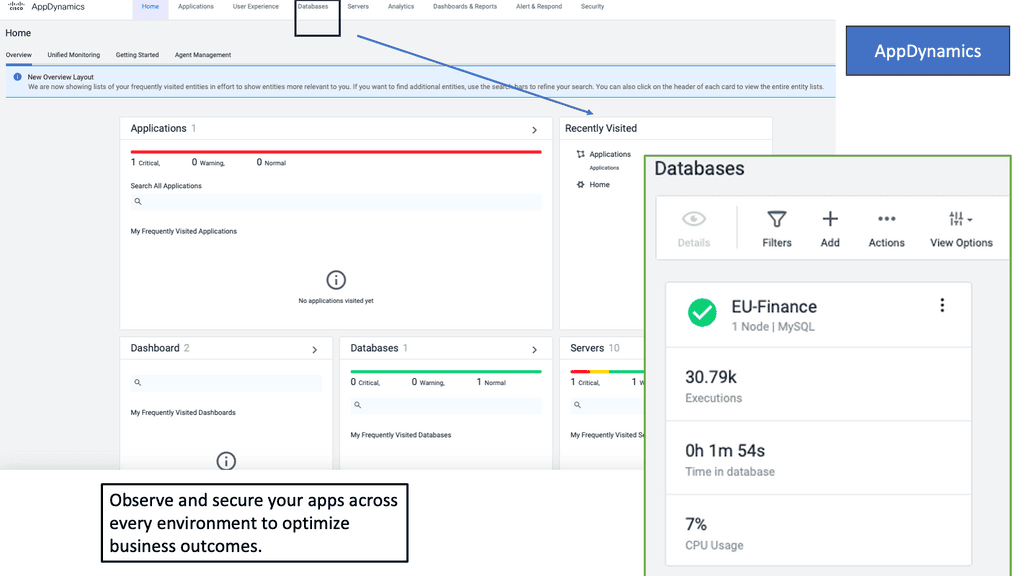
Example Product: Cisco AppDynamics

### Key Features of Cisco AppDynamics

**1. Real-Time Monitoring and Analytics**

One of the standout features of Cisco AppDynamics is its ability to provide real-time monitoring and analytics. This allows businesses to gain instant visibility into application performance and user interactions. By leveraging real-time data, organizations can quickly identify performance bottlenecks, understand user behavior, and make informed decisions to enhance application efficiency.

**2. End-to-End Transaction Visibility**

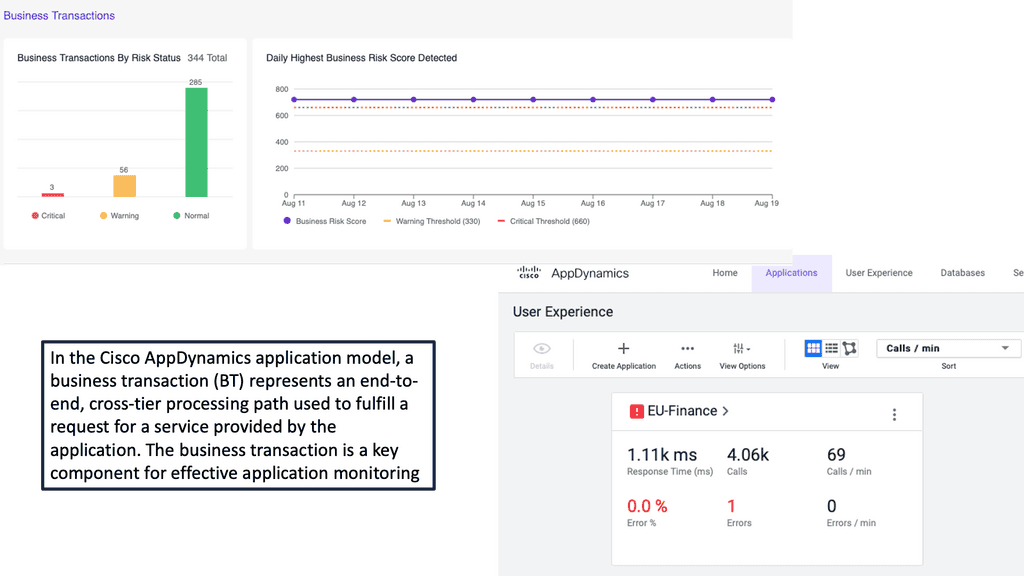
With Cisco AppDynamics, you get a comprehensive view of end-to-end transactions, from user interactions to backend processes. This visibility helps in pinpointing the exact location of issues within the application stack, whether it’s in the code, database, or infrastructure. This holistic approach ensures that no problem goes unnoticed, enabling swift resolution and minimizing downtime.

**3. AI-Powered Anomaly Detection**

Cisco AppDynamics employs advanced AI and machine learning algorithms to detect anomalies in application performance. These intelligent insights help predict and prevent potential issues before they impact end users. By learning the normal behavior of your applications, the system can alert you to deviations that might signify underlying problems, allowing proactive intervention.

### Benefits of Implementing Cisco AppDynamics

**1. Enhanced User Experience**

By continuously monitoring application performance and user interactions, Cisco AppDynamics helps ensure a smooth and uninterrupted user experience. Instant alerts and detailed reports enable IT teams to address issues swiftly, reducing the likelihood of user dissatisfaction and churn.

**2. Improved Operational Efficiency**

Cisco AppDynamics automates many aspects of performance monitoring, freeing up valuable time for IT teams. This automation reduces the need for manual checks and troubleshooting, allowing teams to focus on strategic initiatives and innovation. The platform’s ability to integrate with various IT tools further streamlines operations and enhances overall efficiency.

**3. Data-Driven Decision Making**

The rich data and analytics provided by Cisco AppDynamics empower businesses to make data-driven decisions. Whether it’s optimizing application performance, planning for capacity, or enhancing security measures, the insights gained from AppDynamics drive informed strategies that align with business goals.

### Getting Started with Cisco AppDynamics

**1. Easy Deployment**

Cisco AppDynamics offers flexible deployment options, including on-premises, cloud, and hybrid environments. The straightforward installation process and intuitive user interface make it accessible even for teams with limited APM experience. Comprehensive documentation and support further ease the onboarding process.

**2. Customizable Dashboards**

Users can create customizable dashboards to monitor the metrics that matter most to their organization. These dashboards provide at-a-glance views of key performance indicators (KPIs), making it easy to track progress and identify areas for improvement. Custom alerts and reports ensure that critical information is always at your fingertips.

**3. Continuous Learning and Improvement**

Cisco AppDynamics encourages continuous learning and improvement through its robust training resources and community support. Regular updates and enhancements keep the platform aligned with the latest technological advancements, ensuring that your APM strategy evolves alongside your business needs.

What is GKE-Native Monitoring?

GKE-Native Monitoring is a comprehensive monitoring solution provided by Google Cloud specifically designed for Kubernetes workloads running on GKE. It offers deep visibility into the performance and health of your clusters, allowing you to identify and address issues before they impact your applications proactively.

a) Automatic Cluster Monitoring: GKE-Native Monitoring automatically collects and visualizes key metrics from your GKE clusters, making monitoring your workloads’ overall health and resource utilization effortlessly.

b) Customizable Dashboards: With GKE-Native Monitoring, you can create personalized dashboards tailored to your specific monitoring needs. Visualize metrics that matter most to you and gain actionable insights at a glance.

c) Alerting and Notifications: Use GKE-Native Monitoring’s robust alerting capabilities to stay informed about critical events and anomalies in your GKE clusters. Configure alerts based on thresholds and receive notifications through various channels to ensure prompt response and issue resolution.

The Role of Network Baselining

Network baselining involves capturing and analyzing network traffic data to establish a benchmark or baseline for normal network behavior. This baseline represents the typical performance metrics of the network under regular conditions. It encompasses various parameters such as bandwidth utilization, latency, packet loss, and throughput. By monitoring these metrics over time, administrators can identify patterns, trends, and anomalies, enabling them to make informed decisions about network optimization and troubleshooting.

Understanding TCP Performance Parameters

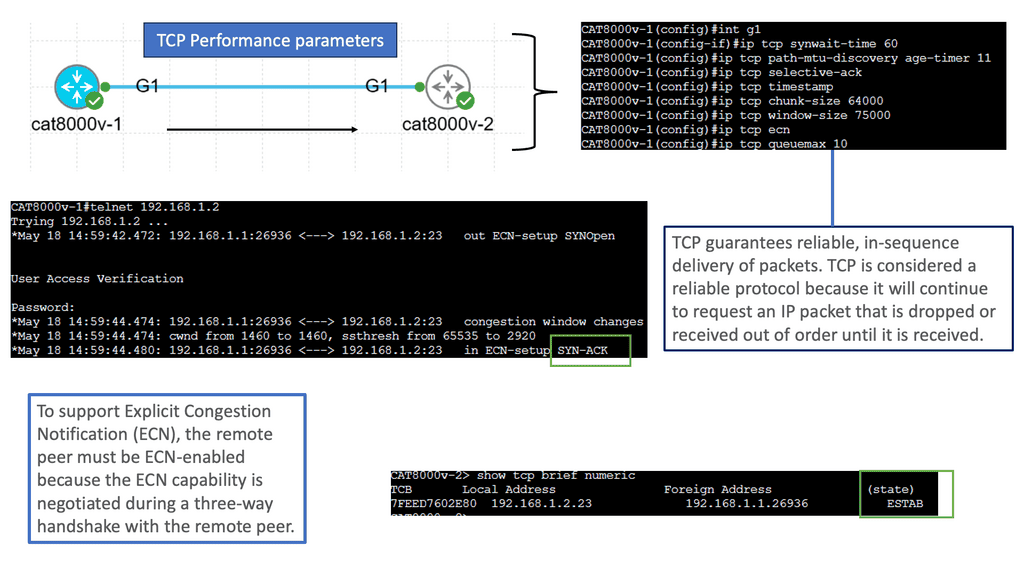
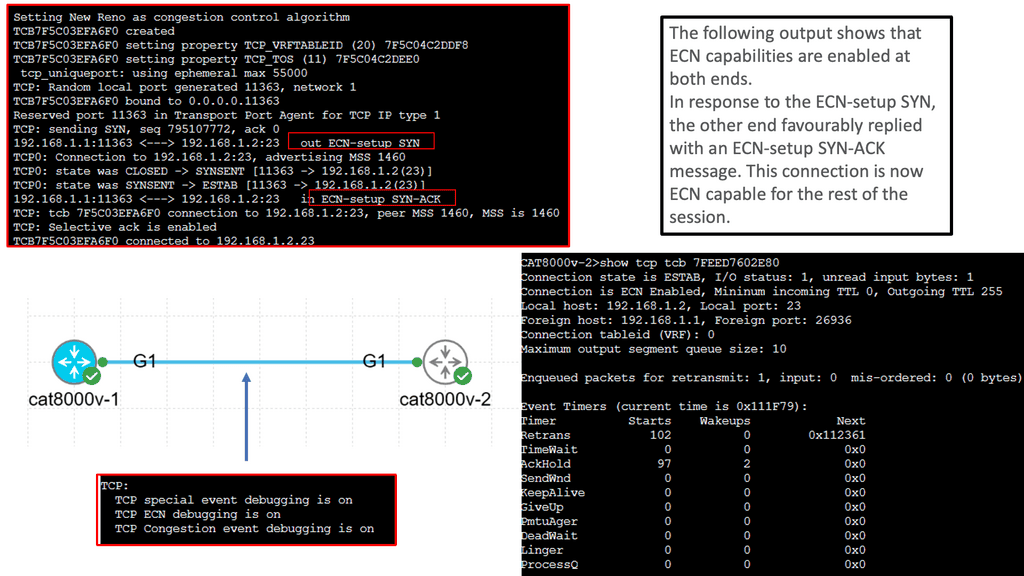
TCP, or Transmission Control Protocol, is a vital protocol that governs reliable data transmission over networks. Behind its seemingly simple operation lies a complex web of performance parameters that can significantly impact network efficiency, latency, and throughput. In this blog post, we will dive deep into TCP performance parameters, understanding their importance and how they influence network performance.

TCP performance parameters determine various aspects of the TCP protocol’s behavior. These parameters include window size, congestion control algorithms, maximum segment size (MSS), retransmission timeout (RTO), and many more. Each parameter plays a crucial role in shaping TCP’s performance characteristics, such as reliability, congestion avoidance, and flow control.

The Impact of Window Size: Window size, also known as the receive window, represents the amount of data a receiving host can accept before requiring acknowledgment from the sender. A larger window size allows for more extensive data transfer without waiting for acknowledgments, thereby improving throughput. However, a vast window size can lead to network congestion and increased latency. Finding the optimal window size requires careful consideration and tuning.

Congestion Control Algorithms: Congestion control algorithms, such as TCP Reno, Cubic, and New Reno, regulate the flow of data in TCP connections to avoid network congestion. These algorithms dynamically adjust parameters like the congestion window and the slow-start threshold based on various congestion indicators. Understanding the different congestion control algorithms and selecting the appropriate one for specific network conditions is crucial for achieving optimal performance.

Maximum Segment Size (MSS): The Maximum Segment Size (MSS) refers to the most significant amount of data TCP can encapsulate within a single IP packet. It is determined by the underlying network’s Maximum Transmission Unit (MTU). A higher MSS can enhance throughput by reducing the overhead associated with packet headers, but it should not exceed the network’s MTU to avoid fragmentation and subsequent performance degradation.

Retransmission Timeout (RTO): Retransmission Timeout (RTO) is the duration at which TCP waits for an acknowledgment before retransmitting a packet. Setting an appropriate RTO value is crucial to balance reliability and responsiveness. A too-short RTO may result in unnecessary retransmissions and increased network load, while a too-long RTO can lead to higher latency and decreased throughput. Factors like network latency, jitter, and packet loss rate influence the optimal RTO configuration.


Baseline Engineering

Interactive Baseline Engineering Lab 02

Baseline Drift & Anomaly Investigation

Your baseline has already been established. Now investigate a live telemetry sample that looks different from normal. Identify the strongest evidence before choosing a likely cause.

Incident Scenario

Users report that a distributed application is responding slowly. Do not immediately blame the application. Compare current telemetry with the known baseline and determine where the strongest deviation appears.

Telemetry Comparison

Baseline vs Live
WAN Latency
22 ms
67 ms
Packet Loss
0.2%
0.3%
Throughput
640 Mbps
635 Mbps
App Response
180 ms
420 ms

Choose an Investigation Path

Evidence first
WAN / Network Path Check whether latency, jitter or loss has moved significantly from the established network baseline.
Application Dependency Check service-to-service latency, dependency response time and whether a downstream component is slowing the request path.
Capacity / Resource Pressure Check CPU, queue depth, throughput and other capacity indicators before concluding that the network is the problem.

Investigation Evidence

Awaiting selection
WAN Latency 22 ms → 67 ms
+204%
Packet Loss 0.2% → 0.3%
Small increase
Throughput 640 → 635 Mbps
Near baseline
Investigation console ready.
Baseline reference loaded.
Live telemetry sample loaded.

Investigation principle: A baseline identifies deviation; it does not automatically identify root cause. Correlate multiple signals and follow the dependency path before making a remediation decision.
ENGINEERING TAKEAWAY

Baseline comparison converts an unclear symptom into measurable evidence. When application latency rises, compare network, capacity and dependency signals together. The largest deviation is an investigation clue—not automatically the root cause.

Chaos Engineering

Chaos engineering is a methodology for experimenting with a software system to build confidence in its capability to withstand turbulent environments in production. It is an essential part of the DevOps philosophy, allowing teams to experiment with their system’s behavior in a safe and controlled manner.

This type of baseline engineering allows teams to identify weaknesses in their software architecture, such as potential bottlenecks or single points of failure, and take proactive measures to address them. By injecting faults into the system and measuring the effects, teams gain insights into system behavior that can be used to improve system resilience.

Finally, chaos Engineering teaches you to develop and execute controlled experiments that uncover hidden problems. For instance, you may need to inject system-shaking failures that disrupt system calls, networking, APIs, and Kubernetes-based microservices infrastructures.

Chaos engineering is “the discipline of experimenting on a system to build confidence in the system’s capability to withstand turbulent conditions in production.” In other words, it’s a software testing method that concentrates on finding evidence of problems before users experience them.

Network Baselining

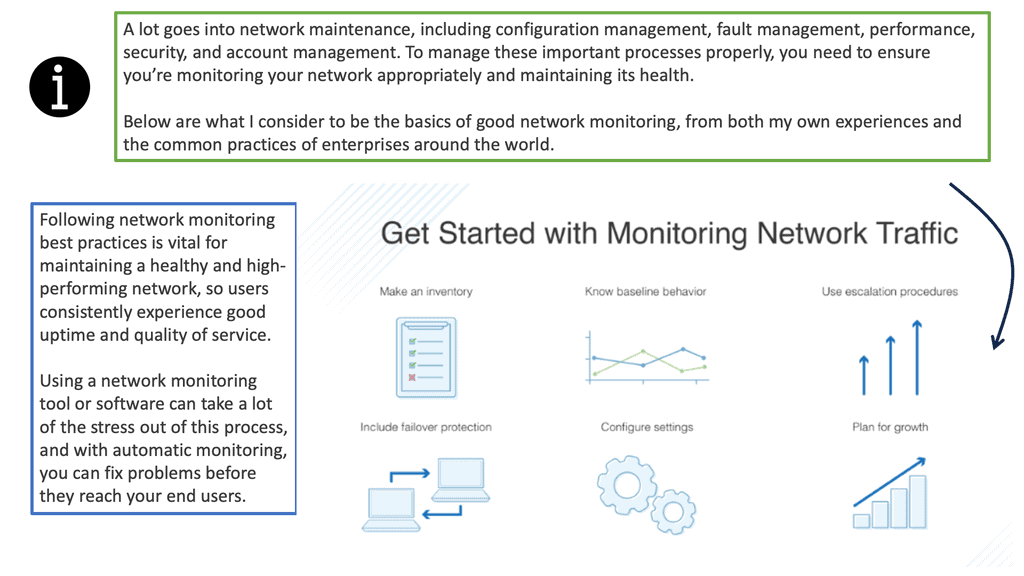
Network baseline involves measuring the network’s performance at different times. This includes measuring throughput, latency, and other performance metrics and the network’s configuration. It is important to note that performance metrics can vary greatly depending on the type of network being used. This is why it is essential to establish a baseline for the network to be used as a reference point for comparison.

Network baselining is integral to network management. It allows organizations to identify and address potential issues before they become more serious. Organizations can be alerted to potential problems by analyzing the network’s performance. This can help organizations avoid costly downtime and ensure their networks run at peak performance.

network baselining
Diagram: Network Baselining. Source is DNSstuff

**The Importance of Network Baselining**

Network baselining provides several benefits for network administrators and organizations:

1. Performance Optimization: Baselining helps identify bottlenecks, inefficiencies, and abnormal behavior within the network infrastructure. By understanding the baseline, administrators can optimize network resources, improve performance, and ensure a smoother user experience.

2. Security Enhancement: Baselining also plays a crucial role in detecting and mitigating security threats. Administrators can identify unusual or malicious activities by comparing current network behavior against the established baseline, such as abnormal traffic patterns or unauthorized access attempts.

3. Capacity Planning: Understanding network baselines enables administrators to forecast future capacity requirements accurately. By analyzing historical data, they can determine when and where network upgrades or expansions may be necessary, ensuring consistent performance as the network grows.

**Establishing a Network Baseline**

To establish an accurate network baseline, administrators follow a systematic approach:

1. Data Collection: Network traffic data is collected using specialized monitoring tools like network analyzers or packet sniffers. These tools capture and analyze network packets, providing detailed insights into performance metrics.

2. Duration: Baseline data should ideally be collected over an extended period, typically from a few days to a few weeks. This ensures the baseline accounts for variations due to different network usage patterns.

3. Normalizing Factors: Administrators consider various factors impacting network performance, such as peak usage hours, seasonal variations, and specific application requirements. Normalizing the data can establish a more accurate baseline that reflects typical network behavior.

4. Analysis and Documentation: Once the baseline data is collected, administrators analyze the metrics to identify patterns and trends. This analysis helps establish thresholds for acceptable performance and highlights any deviations that may require attention. Documentation of the baseline and related analysis is crucial for future reference and comparison.

Network Baselining: A Lot Can Go Wrong

Infrastructure is becoming increasingly complex, and let’s face it, a lot can go wrong. It’s imperative to have a global view of all the infrastructure components and a good understanding of the application’s performance and health. In a large-scale container-based application design, there are many moving pieces and parts, and it is hard to validate the health of each piece manually.  

Therefore, monitoring and troubleshooting are much more complex, especially as everything is interconnected, making it difficult for a single person in one team to understand what is happening entirely. Nothing is static anymore; things are moving around all the time. This is why it is even more important to focus on the patterns and to be able to see the path of the issue efficiently.

Some modern applications could simultaneously be in multiple clouds and different location types, resulting in numerous data points to consider. If any of these segments are slightly overloaded, the sum of each overloaded segment results in poor performance on the application level. 

What does this mean to latency?

Distributed computing has many components and services, with far-apart components. This contrasts with a monolith, with all parts in one location. Because modern applications are distributed, latency can add up. So, we have both network latency and application latency. The network latency is several orders of magnitude more significant.

As a result, you need to minimize the number of Round-Trip Times and reduce any unneeded communication to an absolute minimum. When communication is required across the network, it’s better to gather as much data together as possible to get bigger packets that are more efficient to transfer. Also, consider using different types of buffers, both small and large, which will have varying effects on the dropped packet test.

With the monolith, the application is simply running in a single process, and it is relatively easy to debug. Many traditional tooling and code instrumentation technologies have been built, assuming you have the idea of a single process. The core challenge is trying to debug microservices applications. So much of the tooling we have today has been built for traditional monolithic applications. So, there are new monitoring tools for these new applications, but there is a steep learning curve and a high barrier to entry.

A new approach: Network baselining and Baseline engineering

For this, you need to understand practices like Chaos Engineering, along with service level objectives (SLOs), and how they can improve the reliability of the overall system. Chaos Engineering is a baseline engineering practice that allows tests to be performed in a controlled way. Essentially, we intentionally break things to learn how to build more resilient systems.

So, we are injecting faults in a controlled way to make the overall application more resilient by injecting various issues and faults. Implementing practices like Chaos Engineering will help you understand and manage unexpected failures and performance degradation. The purpose of Chaos Engineering is to build more robust and resilient systems.

**A final note on baselines: Don’t forget them**

Creating a good baseline is a critical factor. You need to understand how things work under normal circumstances. A baseline is a fixed point of reference used for comparison purposes. You usually need to know how long it takes to start the application to the actual login and how long it takes to do the essential services before there are any issues or heavy load. Baselines are critical to monitoring.

It’s like security; if you can’t see what, you can’t protect. The same assumptions apply here. Go for a good baseline and if you can have this fully automated. Tests need to be carried out against the baseline on an ongoing basis. You need to test constantly to see how long it takes users to use your services. Without baseline data, estimating any changes or demonstrating progress is difficult.

Network baselining is a critical practice for maintaining optimal network performance and security. By establishing a baseline, administrators can proactively monitor, analyze, and optimize their networks. This approach enables them to promptly identify and address performance issues, enhance security measures, and plan for future capacity requirements. Organizations can ensure a reliable and efficient network infrastructure that supports their business objectives by investing time and effort in network baselining.

Interactive Baseline Engineering Lab 03

Chaos Engineering & Baseline Validation

A baseline is only useful if it survives controlled testing. Inject a fault, observe how telemetry changes, recover the system and decide whether the original baseline still represents normal behaviour.

Scenario

The production baseline says the service normally operates with low latency, minimal packet loss and predictable application response time. You will deliberately introduce controlled failure conditions and observe the resulting telemetry. This is a teaching simulation of chaos engineering—not a production fault-injection system.

Controlled Failure Injection

Healthy
Client Requests
Load Balancer Traffic
Service Application
Database Dependency
Network Latency Introduce additional path delay.
Packet Loss Simulate degraded network delivery.
Traffic Increase Push the service beyond its normal workload.
Instance Failure Remove an application instance from service.
Database Delay Increase downstream database response time.

Live Telemetry

Compared with baseline
WAN Latency
22 ms
22 ms
Packet Loss
0.2%
0.2%
Throughput
640 Mbps
640 Mbps
CPU
48%
48%
App Response
180 ms
180 ms
Baseline
Fault Injected
Observe
Recover

Experiment Console

Ready
Experiment environment initialised.
Known-good baseline loaded.
Waiting for controlled fault injection.

ENGINEERING TAKEAWAY

Chaos engineering deliberately introduces controlled failure to test system behaviour. Baseline engineering gives you the reference point needed to determine what changed, whether recovery worked and whether the original definition of “normal” still reflects the system.