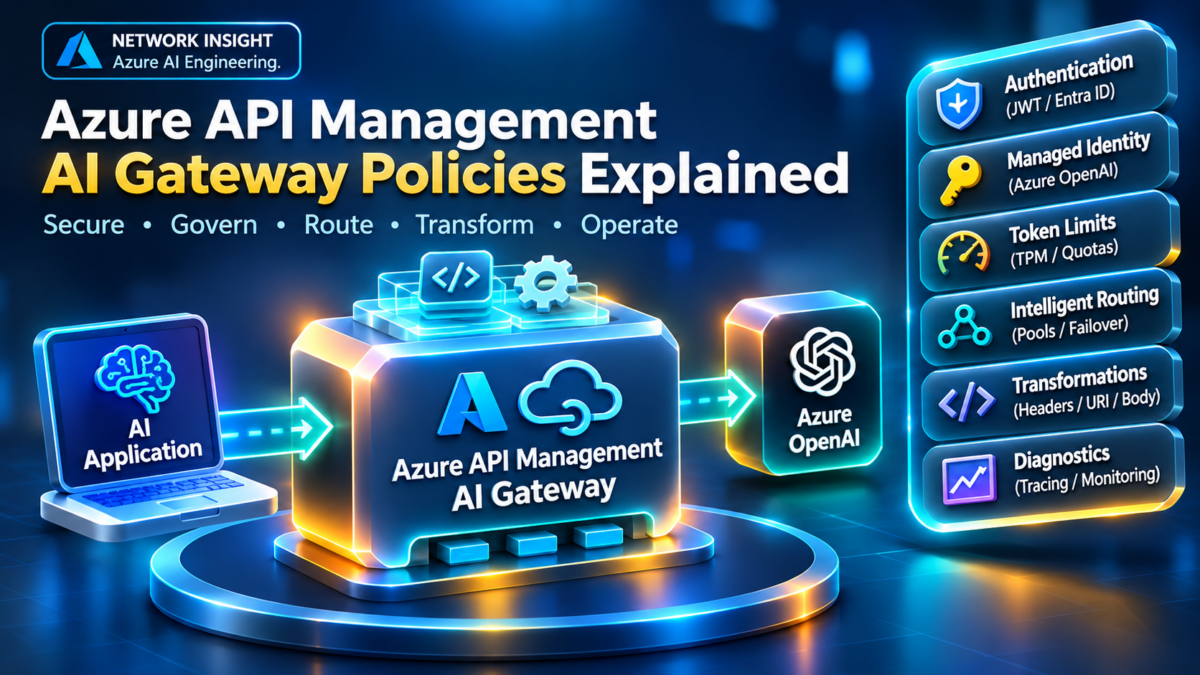
Inside the Azure AI Gateway
Policy Engine
Enterprise AI applications need more than a network connection to a model endpoint. They need a controlled execution layer that authenticates callers, authorizes operations, governs token consumption, selects compatible model deployments and records operational telemetry.
Azure API Management (APIM) can provide this policy-driven gateway layer for supported Azure OpenAI, Microsoft Foundry and other compatible AI model endpoints. Its XML policy configuration allows engineers to define how requests and responses are processed through the gateway.
This engineering guide moves beyond conceptual AI gateway architecture to examine the actual configuration responsibilities: policy scopes, inheritance, Microsoft Entra ID, managed identity, token governance, backend selection, request transformations, diagnostics and production failure handling.
AI Agent
HTTPS Request
Identity · Governance
Backend Selection
Microsoft Foundry
Compatible Endpoint
Authorization
Request quotas
Managed identity
Diagnostics
Why Azure AI Gateways Need a Policy Engine
As enterprise AI adoption grows, applications increasingly share model deployments, identity infrastructure and inference capacity. Configuring security and traffic behavior separately inside every application creates inconsistent controls and increases operational complexity.
Azure API Management policies provide a centralized mechanism for defining supported request validation, authorization, rate limiting, token governance, backend routing and response processing.
Use supported identity validation and authorization policies to control which applications and workloads can access protected AI APIs.
Apply configured request and token limits to manage shared gateway consumption without assuming those limits increase backend model capacity.
Manage eligible backend selection, authentication, transformations and diagnostics through version-controlled gateway configuration.
Understanding the Four APIM Policy Sections
APIM organizes policy processing into four sections: inbound, backend, outbound and on-error. These sections define where configured policies execute during request processing and error handling.
Authenticate callers, evaluate authorization, enforce traffic policies and prepare backend requests.
Execute configured backend forwarding and eligible retry behavior.
Apply supported response policies before returning the result to the application.
Process applicable gateway execution errors and produce configured error-handling behavior.
Understand global, product, API and operation scopes and the placement of inherited policies.
Use supported managed identity authentication and least-privilege backend authorization.
APIM policy execution is not the same as model inference. The gateway evaluates configured controls and forwards eligible requests. The selected AI backend performs model processing and independently enforces its supported capacity, authorization and service constraints.
From Architecture to Production XML Policies
The following sections examine how engineers define, combine, validate and troubleshoot APIM policies. Practical examples will distinguish valid XML policy structure from conceptual architecture pseudocode.
The interactive engineering labs progressively cover policy inheritance, JWT validation, managed identities, token controls, backend selection, transformations, diagnostics and incident recovery.
Azure API Management provides a configurable policy execution layer for enterprise AI gateways. Reliable production deployments require correctly ordered XML policies, validated identities, compatible model backends, controlled capacity, secure credentials and observable request processing.
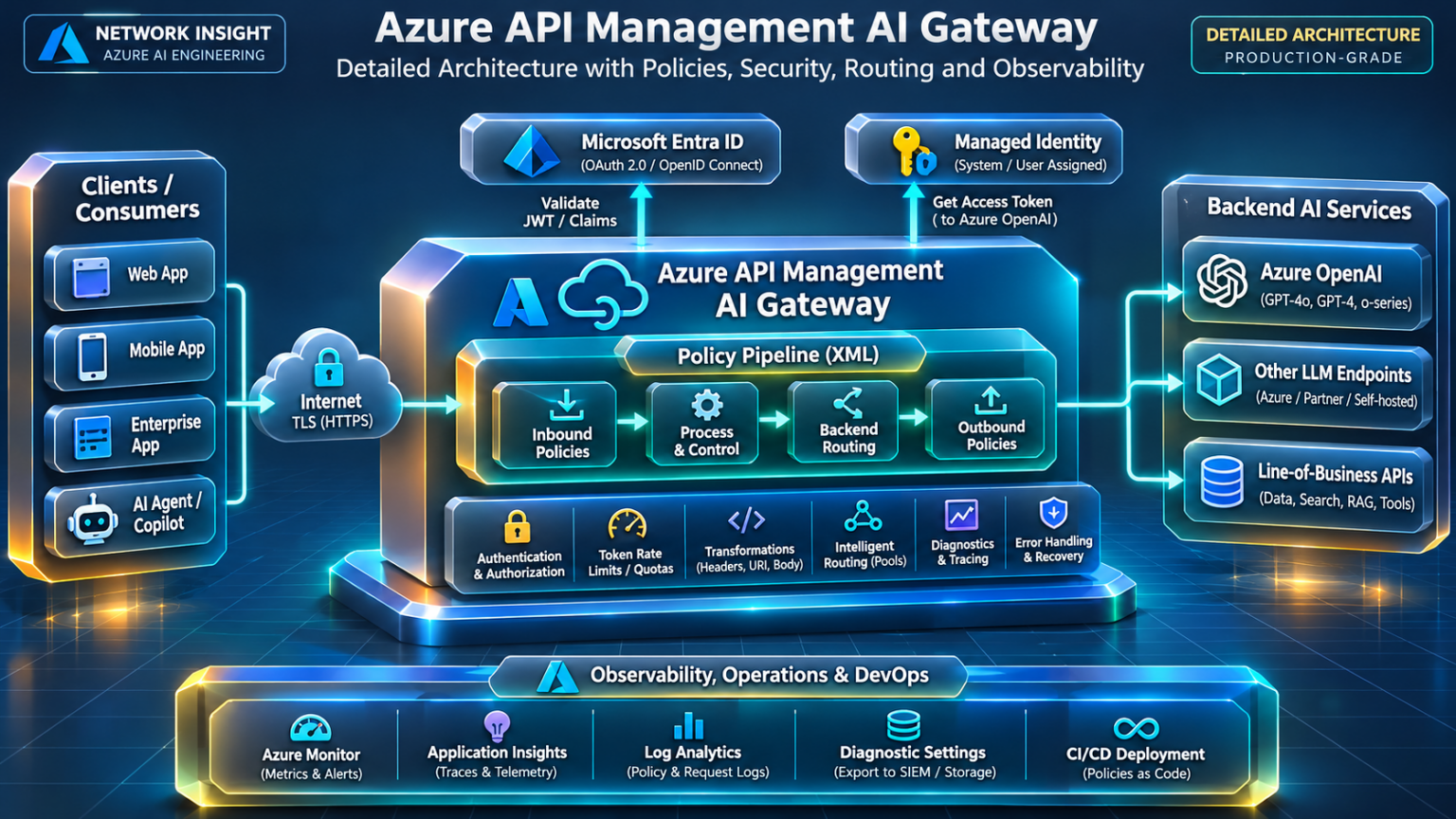
Explore the AI Gateway Policy Architecture
Navigate nine production engineering topics covering Azure API Management AI Gateway policy design, authentication, token governance, intelligent routing, transformations, diagnostics and recovery.
APIM AI Gateway Policy Architecture
Azure API Management policies define how the gateway evaluates, transforms, routes and processes API requests. For enterprise AI workloads, these policies can provide centralized authentication, authorization, token governance, backend selection and response handling.
Unlike a traditional application integration in which every client independently manages model credentials, routing decisions and consumption controls, an APIM-based AI gateway introduces a shared policy execution layer. This allows engineering teams to apply consistent controls across supported Azure OpenAI, Microsoft Foundry and compatible model endpoints.
What Is the APIM AI Gateway Policy Engine?
The APIM policy engine evaluates XML-defined policy statements during request and response processing. These statements can validate identities, inspect request metadata, apply traffic controls, configure backend destinations and transform supported messages.
Policies are associated with supported configuration scopes and execute according to the effective policy document. Their order matters because an early rejection can prevent subsequent policies or backend forwarding from occurring.
Validate configured access tokens, evaluate claims and reject requests that fail required access controls.
Apply supported request-rate, token-rate and quota policies to manage shared AI demand.
Select configured destinations and authenticate to supported model services using appropriate backend credentials or managed identities.
APIM policies control supported gateway behavior. They do not execute AI inference, increase model deployment quota or automatically guarantee backend availability. Those responsibilities remain with the model service and the broader infrastructure.
Inside the APIM Policy Processing Pipeline
APIM organizes policies into inbound, backend, outbound and on-error sections. The normal request path passes through inbound processing, backend forwarding and outbound processing. Applicable gateway execution errors can enter the on-error path.
HTTPS Inference Request
Access · Tokens · Routing
Microsoft Foundry
Transform · Route
Eligible Retries
Transformations
Error Processing
| Policy Section | Primary Responsibility | AI Gateway Example |
|---|---|---|
| Inbound | Process incoming requests before backend forwarding | JWT validation, token limits, backend selection |
| Backend | Execute backend request forwarding | Forward inference request and eligible retry handling |
| Outbound | Process responses before returning to callers | Response transformation and supported telemetry policies |
| On-error | Handle applicable policy processing errors | Gateway error diagnostics and controlled error responses |
A JWT validation failure may terminate processing before a token-rate policy or backend-routing policy executes. The effective XML configuration determines the actual order of evaluation.
Understanding the APIM Policy Document
APIM policies are expressed using an XML document containing the four policy sections. Supported statements are placed within the appropriate section according to their execution requirements.
<policies>
  <inbound>
    <base />

    <!-- Request validation and
         AI traffic policies -->

  </inbound>

  <backend>
    <base />
  </backend>

  <outbound>
    <base />
  </outbound>

  <on-error>
    <base />
  </on-error>
</policies>
The base element specifies where policies inherited from broader configuration scopes execute within the current section. Its placement can change the effective processing order.
This is a structural XML example rather than a complete AI gateway configuration. Real deployments require supported policy statements, valid attributes, configured APIs and backends, and appropriate authorization and networking.
Where APIM Policies Are Applied
API Management supports policy configuration at multiple scopes. Broader scopes can define common controls, while more specific scopes can introduce operation-specific behavior.
| Scope | Typical Responsibility | Engineering Consideration |
|---|---|---|
| Global | Common gateway-wide policy configuration | Changes can affect many APIs |
| Product | Controls associated with an APIM product | Product membership and inheritance require review |
| API | Policies associated with a particular API | Useful for shared AI API behavior |
| Operation | Policies for individual API operations | Useful for endpoint-specific controls |
Effective policy execution depends on the applicable scopes, the placement of base elements and supported inheritance rules. Product-scope behavior also depends on the relevant API and subscription configuration.
Separating Control-Plane Configuration from Data-Plane Execution
Engineers should distinguish between defining a policy and executing it against a live request. This separation is important for deployment, troubleshooting and change management.
Configure APIs, policy XML, backend resources, named values, identities and diagnostics.
Evaluate applicable policies, select backends, forward requests and process responses.
Inspect deployment outcomes, request traces, policy failures and supported usage telemetry.
A syntactically valid policy can still fail at runtime because of incorrect token audiences, missing role assignments, unreachable backends, unsupported request formats or exhausted model capacity.
How the Gateway Authenticates to Azure OpenAI
An APIM AI gateway commonly operates across two distinct identity boundaries: caller-to-gateway authentication and gateway-to-model authentication.
The client may authenticate using a Microsoft Entra access token that the gateway validates. Separately, APIM can use a supported managed identity to obtain an access token for the Azure OpenAI backend.
CLIENT APPLICATION
       |
       | Caller access token
       v
AZURE API MANAGEMENT
       |
       +-- Validate caller JWT
       +-- Evaluate authorization
       +-- Apply traffic policies
       |
       +-- Obtain backend token
       |   using managed identity
       |
       v
AZURE OPENAI ENDPOINT
       |
       +-- Validate backend identity
       +-- Enforce backend permissions
       +-- Process eligible inference
       |
       v
MODEL RESPONSE
Enabling an APIM managed identity does not automatically grant model access. The identity requires the appropriate backend permissions, a valid token audience and working connectivity.
Extending Traditional API Policies for AI Workloads
AI inference introduces additional governance requirements involving token consumption, variable request sizes, model compatibility, long-running responses and backend throttling.
Apply supported token-based policies to compatible AI APIs and consumers.
Choose configured compatible model deployments according to policy logic.
Modify supported request headers, URLs and message structures where required.
Use bounded recovery behavior for eligible failures without amplifying overload.
Collect available request, latency, error and consumption measurements.
Protect backend authentication and prevent unnecessary exposure of secrets.
Availability of AI-specific policies depends on supported APIM features, gateway configuration, backend compatibility and relevant service requirements. Not every conceptual AI gateway capability is automatically available in every deployment.
Designing Maintainable AI Gateway Policies
Production policy engineering should prioritize security, predictable execution, version control, observability and controlled deployment.
| Design Principle | Engineering Practice | Risk Addressed |
|---|---|---|
| Least Privilege | Validate callers and restrict backend identities | Unauthorized model access |
| Explicit Policy Order | Review XML execution sequence and inheritance | Unexpected bypass or rejection |
| Capacity Alignment | Coordinate gateway limits with backend quota | Excessive throttling |
| Version Control | Maintain reviewed policy definitions in source control | Untracked configuration changes |
| Safe Diagnostics | Use correlation IDs and minimize sensitive logging | Data leakage and difficult troubleshooting |
| Rollback Planning | Test policy changes and maintain recovery procedures | Production-wide policy regressions |
Understanding APIM as a Policy-Driven AI Control Point
Azure API Management can implement a centralized policy execution layer between enterprise AI applications and supported model endpoints. Its XML policy pipeline controls request validation, traffic governance, backend forwarding, response processing and applicable error handling.
Effective production design requires understanding policy scopes, inheritance, execution order, identity boundaries, backend compatibility and operational diagnostics.
APIM AI gateway policies provide a configurable mechanism for securing, governing and routing inference traffic. Their effectiveness depends on correct XML configuration, predictable execution order, authorized backend access, supported capabilities and disciplined production operations.
APIM AI Gateway Policy Architecture Designer
Engineer the request lifecycle of an Azure API Management AI gateway. Configure policy stages, execute simulated AI requests, inspect security decisions and trace the path to an Azure OpenAI backend.
01 · Policy Configuration
DESIGNEnable or disable each policy capability. Observe how gateway decisions change.
02 · Live Policy Architecture
SIMULATEDWatch the request progress through the four APIM policy sections. The active stage is highlighted.
JWT validation · AI token governance
Backend selection · Upstream forwarding
Response headers · Transformation
Handle gateway execution errors
03 · Policy Execution Trace
DIAGNOSTICS04 · XML Policy Preview
EDUCATIONALIllustrative APIM policy structure. The token budget slider represents a per-request simulation, not an actual Azure token quota.
05 · Engineering Interpretation
LEARNInbound policies execute before forwarding. Backend policies control upstream processing. Outbound policies process the response. On-error policies run when an error occurs during policy processing.
XML Policy Structure, Scope & Inheritance
Azure API Management uses XML policies to define how incoming API requests are validated, transformed, forwarded and processed. Understanding policy structure, scope and inheritance is essential when building secure, maintainable AI gateways.
A policy may appear correct when viewed in isolation but behave differently after inherited policies are included. This is particularly important for AI gateways, where authentication, authorization, token limits, backend credentials and routing rules can be configured across multiple scopes.
How APIM XML Policies Are Organized
An APIM policy document contains a root policies element and four processing sections: inbound, backend, outbound and on-error.
<policies>
  <inbound>
    <base />

    <!-- Request policies -->

  </inbound>

  <backend>
    <base />
  </backend>

  <outbound>
    <base />
  </outbound>

  <on-error>
    <base />
  </on-error>
</policies>
Each section has a specific execution responsibility. Policy statements must be supported in the section where they are configured, and their order can affect runtime behavior.
Validate access tokens, apply traffic controls, transform incoming requests and select backend destinations.
Execute configured request forwarding and supported retry behavior.
Apply supported response transformations and response-related policies.
Handle applicable gateway execution errors using configured diagnostic and recovery logic.
APIM does not execute every section for every possible request outcome. An inbound rejection, failed policy expression or other applicable error can change the processing path.
Global, Product, API and Operation Policies
APIM allows policies to be configured at multiple scopes. These scopes enable shared governance controls while permitting more specific API and operation behavior.
Common policy configuration
Subscription context
Shared model endpoint controls
Fine-grained behavior
| Scope | Typical Use | AI Gateway Example |
|---|---|---|
| Global | Common policies across the APIM gateway | Shared security headers and diagnostics |
| Product | Controls associated with an API product | Product-specific traffic governance |
| API | Controls shared by an individual API | AI API authorization and backend selection |
| Operation | Policies for an individual API operation | Inference-operation request handling |
Understanding the <base /> Element
The base element determines where applicable policies from broader scopes are included within the current policy section.
Its position is significant. Policies placed before the base element execute before the inherited policy statements in that section, while policies placed after it execute afterward, subject to normal policy processing behavior.
<policies>
  <inbound>

    <!-- Local policy executes first -->
    <set-header name="x-gateway-tier"
                exists-action="override">
      <value>enterprise</value>
    </set-header>

    <!-- Insert inherited policies here -->
    <base />

  </inbound>

  <backend>
    <base />
  </backend>

  <outbound>
    <base />
  </outbound>

  <on-error>
    <base />
  </on-error>
</policies>
Placing a local policy before inherited validation changes the execution order. Engineers should not assume inherited authentication or authorization has already run when evaluating a local policy placed before the base element.
How Missing Inheritance Can Weaken Gateway Security
A frequent configuration risk occurs when a more specific policy document omits a base element from a section that was expected to inherit broader controls.
If an API-level inbound section does not inherit applicable broader inbound policies, the expected global authentication, authorization or governance controls may not be present in the effective configuration.
The effective inbound configuration includes applicable broader validation policies followed by the API-specific policies.
A more specific inbound policy omits inheritance, potentially excluding expected broader controls.
<!-- Example of a risky API-level inbound section -->

<inbound>

  <!-- No base element -->

  <set-header name="x-ai-api"
              exists-action="override">
    <value>enabled</value>
  </set-header>

</inbound>
Verify the effective policy at the relevant operation and subscription context. Do not assume that a security policy configured at a broader scope is necessarily present in every downstream request path.
Why XML Policy Order Matters
APIM processes policies according to the effective section configuration. This means that policy placement can change request processing, including when requests are rejected and which later policies execute.
Evaluate the configured JWT or other authentication requirements.
Evaluate supported traffic and token-consumption controls.
Choose the configured destination and prepare backend authentication.
This is an illustrative design order, not an automatic APIM execution sequence. The actual order is determined by the XML statements and inherited policy configuration.
Reducing Configuration Duplication
APIM policy fragments allow supported reusable policy statements to be maintained centrally and referenced from policy documents.
This can help standardize repeated gateway configuration patterns, such as common header processing or other supported policy logic, across multiple APIs.
<policies>
  <inbound>
    <base />

    <include-fragment
      fragment-id="ai-common-inbound" />

  </inbound>

  <backend>
    <base />
  </backend>

  <outbound>
    <base />
  </outbound>

  <on-error>
    <base />
  </on-error>
</policies>
The referenced fragment must exist, contain supported policy statements and be valid for its insertion context. Fragments are not a substitute for reviewing the complete effective policy.
Managing XML Policies as Engineering Artifacts
Production AI gateway policies should be maintained as reviewed, version-controlled configuration rather than unmanaged changes applied directly to production.
Track policy changes, reviewers, deployment history and rollback versions.
Validate supported syntax, scope inheritance and runtime behavior.
Use supported infrastructure-as-code and deployment workflows where appropriate.
Retain known-good configurations and test recovery procedures.
Diagnosing XML Policy Scope and Inheritance Problems
When a policy appears to be ignored, the investigation should begin with the effective configuration and request context rather than the isolated XML snippet.
| Symptom | Possible Cause | Engineering Check |
|---|---|---|
| Expected JWT validation does not run | Missing inheritance or wrong policy scope | Inspect effective inbound policy and base placement |
| Unexpected request rejection | Inherited policy executes before local policy | Review effective policy order and request conditions |
| Product-specific controls are absent | Product policy not applicable to request context | Verify product association and subscription behavior |
| Policy deployment fails | Invalid XML or unsupported policy statement | Validate syntax, placement and policy support |
| Reusable policy fails | Missing or invalid referenced fragment | Inspect fragment ID, contents and insertion context |
Designing Predictable Policy Inheritance
Azure API Management XML policies provide flexible control over request processing, backend forwarding, response handling and applicable gateway errors.
The four policy sections define processing responsibilities, while configuration scopes and base elements determine how broader policies are incorporated into the effective configuration.
Secure AI gateway policy engineering requires more than valid XML. Engineers must verify policy scope, inheritance, base placement, execution order and the effective configuration applied to real inference requests.
XML Policy Scope & Inheritance Explorer
Build an effective Azure API Management policy pipeline. Select a scope, change policy inheritance, inspect XML, and simulate how policy placement affects AI gateway security.
01 · Policy Scope Hierarchy
SELECT SCOPESelect a scope to edit its inbound policies. This lab models one representative request path.
This is a teaching path, not a universal APIM scope chain. Workspace policies apply only to applicable workspace APIs. Product policies are conditional on product association and request context. Actual execution order must be evaluated using the applicable APIM scope rules.
02 · Selected Scope Configuration
POLICY EDITOREnable policies at this scope
03 · Effective Inbound Policy Pipeline
LIVE COMPOSITIONThe visualization expands the modeled policy inheritance chain for the selected request path. A missing <base /> stops inheritance at that scope.
04 · Scope XML Preview
XMLView the selected scope's illustrative APIM policy document. Replace placeholders before real deployment.
05 · Request Execution Trace
DIAGNOSTICS06 · Engineering Troubleshooting Challenge
INVESTIGATEGlobal scope contains a JWT validation policy. An API-level policy is introduced without <base />. A request with no bearer token reaches the AI backend.
Identify the configuration mistake, then restore inherited JWT enforcement.
A policy defined at a parent scope is not necessarily present in the effective pipeline. Inheritance depends on <base /> placement at applicable child scopes.
JWT Validation & Microsoft Entra ID
Enterprise AI gateways must verify the identity and permissions of applications, users and automated workloads before allowing access to protected model APIs. Microsoft Entra ID provides OAuth 2.0 identity infrastructure, while Azure API Management can validate issued JSON Web Tokens using XML policies.
The key architectural principle is that authentication and authorization are separate security decisions. A valid token proves that it satisfies configured validation requirements, but it does not automatically grant permission to invoke every AI model or operation.
How Microsoft Entra ID Protects AI Gateway Access
A typical enterprise architecture uses Microsoft Entra ID to issue access tokens to registered applications or workloads. The caller includes an access token in its request to the APIM gateway.
APIM evaluates the token against configured requirements, including trusted issuer, intended audience, cryptographic signature, validity period and applicable claims. Authorized requests can then proceed to subsequent gateway processing.
AI Agent / Workload
Access Token Issuer
Claims · Signature
Separate Backend Authentication
Never treat network location, a subscription key or the mere presence of a bearer token as proof of authorization. Validate the intended token audience, trusted issuer and permissions required for the requested operation.
Understanding JSON Web Token Claims
A signed JWT commonly contains three Base64URL-encoded components separated by periods: header, payload and signature.
HEADER.PAYLOAD.SIGNATURE

Header:
{
  "alg": "RS256",
  "typ": "JWT",
  "kid": "signing-key-id"
}

Payload:
{
  "iss": "https://login.microsoftonline.com/TENANT_ID/v2.0",
  "aud": "api://AI_GATEWAY_APP_ID",
  "exp": 1893456000,
  "tid": "TENANT_ID",
  "scp": "AI.Invoke"
}
The payload above is illustrative, not a real issued token. Claims vary according to token version, client type, requested permissions and Microsoft Entra configuration.
| Claim | Meaning | Security Requirement |
|---|---|---|
| iss | Token issuer | Match an explicitly trusted issuer |
| aud | Intended resource audience | Match the protected AI gateway API |
| exp | Expiration timestamp | Reject expired tokens |
| nbf | Not-before timestamp, when present | Reject tokens not yet valid |
| tid | Microsoft Entra tenant identifier | Validate tenant context where required |
| scp | Delegated OAuth scopes | Check required delegated permission |
| roles | Application or user-assigned roles | Check required role-based permission |
| azp / appid | Authorized client application identifier | Restrict approved client applications when needed |
Configuring JWT Validation in XML
The APIM validate-jwt policy validates a JWT supplied by the caller. OpenID Connect metadata can provide trusted signing-key information and issuer configuration.
The following example uses a Microsoft Entra tenant-specific OpenID Connect configuration, a required audience and an explicit issuer.
<policies>
  <inbound>
    <base />

    <validate-jwt
      header-name="Authorization"
      require-scheme="Bearer"
      failed-validation-httpcode="401"
      failed-validation-error-message="Unauthorized">

      <openid-config
        url="https://login.microsoftonline.com/TENANT_ID/v2.0/.well-known/openid-configuration" />

      <audiences>
        <audience>api://AI_GATEWAY_APP_ID</audience>
      </audiences>

      <issuers>
        <issuer>https://login.microsoftonline.com/TENANT_ID/v2.0</issuer>
      </issuers>

    </validate-jwt>

  </inbound>

  <backend>
    <base />
  </backend>

  <outbound>
    <base />
  </outbound>

  <on-error>
    <base />
  </on-error>
</policies>
Replace TENANT_ID and AI_GATEWAY_APP_ID with the correct values. Confirm the actual access-token version, issuer and audience produced by your Microsoft Entra application registration. The example assumes a v2.0 token and a configured API identifier URI matching the audience shown.
Restricting Access to AI Operations
A token can have a valid signature, issuer and audience while still lacking permission to invoke a protected AI operation.
APIM can enforce required claims using the required-claims element within validate-jwt.
<validate-jwt
  header-name="Authorization"
  require-scheme="Bearer"
  failed-validation-httpcode="401">

  <openid-config
    url="https://login.microsoftonline.com/TENANT_ID/v2.0/.well-known/openid-configuration" />

  <audiences>
    <audience>api://AI_GATEWAY_APP_ID</audience>
  </audiences>

  <issuers>
    <issuer>https://login.microsoftonline.com/TENANT_ID/v2.0</issuer>
  </issuers>

  <required-claims>
    <claim name="roles" match="any">
      <value>AI.Invoke</value>
    </claim>
  </required-claims>

</validate-jwt>
This example requires an AI.Invoke value in the roles claim. It is appropriate only when the Microsoft Entra application registration and permission assignment actually issue that application role.
Delegated access tokens commonly use the scp claim, while application-only access tokens commonly use roles. Choose a policy that matches the intended authorization model. Do not assume that checking roles automatically validates delegated scopes, or vice versa.
How APIM Establishes Trust in a JWT
JWT signatures protect token integrity and establish whether a token was signed using a trusted signing key.
With OpenID Connect metadata configured, APIM can retrieve and cache the associated signing-key information. Key rotation and metadata refresh behavior are managed by the gateway according to its supported validation implementation.
Use the configured OpenID Connect metadata endpoint to obtain relevant issuer and signing-key information.
Validate the token signature against the applicable trusted key.
Validate issuer, audience, time constraints and required authorization claims.
Decoding a JWT payload is not the same as validating it. Anyone possessing a JWT can usually decode its header and payload without proving the signature is trustworthy.
Separating Caller Identity from Backend Identity
Enterprise AI gateways commonly use two independent authentication flows. The first authenticates the client to APIM. The second authenticates APIM to the model backend.
Validate the caller's access token, enforce application permissions and authorize protected AI operations.
Use a supported managed identity or other authorized backend credential to access the model service.
The backend independently validates its access requirements and enforces permissions and service constraints.
A valid caller JWT does not automatically authenticate APIM to Azure OpenAI. Similarly, a correctly configured APIM managed identity does not prove that the original caller was authorized. Both boundaries must be secured.
Common JWT Validation Problems
| Symptom | Likely Cause | Engineering Investigation |
|---|---|---|
| 401 from APIM | Missing or invalid bearer token | Check Authorization header and validation policy |
| Audience mismatch | Token issued for another resource | Compare aud with configured gateway API audience |
| Issuer mismatch | Wrong tenant or token version | Compare iss and OpenID metadata configuration |
| Required claim missing | Role or delegated scope not granted | Inspect app registration, consent and token claims |
| Signature validation fails | Untrusted key or metadata configuration issue | Check issuer metadata, signing keys and rotation |
| Token expired | Client token renewal failure | Inspect exp and token acquisition lifecycle |
| APIM accepts but backend rejects | Separate backend identity or permission failure | Inspect APIM managed identity and backend RBAC |
JWT Validation Best Practices for AI Gateways
Production gateway security should use explicit trust configuration, least-privilege authorization and controlled deployment practices.
Use an intentional issuer trust model rather than accepting arbitrary identity providers.
Reject tokens issued for unrelated services or applications.
Check application roles or delegated scopes appropriate to each protected operation.
Reject expired or not-yet-valid tokens using configured validation.
Log appropriate failure categories without exposing raw access tokens.
Validate policy inheritance, unauthorized request behavior and rollback procedures.
Never publish or routinely log complete bearer tokens. Access tokens are sensitive credentials and can expose protected resources if improperly handled.
Building Identity-Aware AI Gateways
Microsoft Entra ID and APIM JWT validation provide an identity-aware security boundary for protected AI APIs.
Correct configuration requires validation of token signatures, trusted issuers, intended audiences, validity periods and the permissions required by the requested operation.
Backend authentication must be designed separately, because APIM's identity relationship with Azure OpenAI is independent of the caller's token.
A production AI gateway should accept only appropriately validated and authorized caller tokens, protect signing-key trust, enforce least privilege and maintain a separate secure identity boundary for backend model access.
JWT Validation & Microsoft Entra ID Workbench
Engineer the authentication boundary of an Azure API Management AI gateway. Inspect JWT claims, configure validation requirements, simulate authentication failures and examine the resulting gateway decisions.
01 · Entra ID Authentication Architecture
ANIMATED REQUEST PATH02 · JWT Claim Editor
MODIFY TOKENModify the simulated access-token claims. These fields represent decoded token metadata, not an actual signed JWT.
03 · Gateway Validation Policy
SECURITY CONTROLSConfigure the simulated checks performed by the APIM inbound authentication policy.
Signature trust is mandatory in this educational validator. Disabling its switch demonstrates an unsafe design but does not make an unsigned or tampered token pass. The generated XML does not disable cryptographic verification.
Quick Fault Injection
04 · Decoded JWT Structure
CLAIMS INSPECTIONRS256 · kid
iss · aud · exp · roles
Trusted key
05 · Authentication Execution Trace
LIVE DIAGNOSTICS06 · APIM validate-jwt XML
POLICY PREVIEWIllustrative APIM policy XML with issuer, audience and optional role enforcement. Replace placeholders with your registered Entra application details.
07 · Security Engineering Interpretation
INVESTIGATIONA valid access token proves that the gateway accepted the token's identity and trust properties. Authorization requires additional checks such as application roles or delegated scopes.
Managed Identity Authentication to Azure OpenAI
Azure API Management can authenticate to supported Azure OpenAI endpoints using Microsoft Entra managed identities, reducing the need to distribute and maintain long-lived backend API keys.
Managed identity allows the APIM service to obtain access tokens for a configured resource audience. Azure OpenAI then validates the backend identity and its assigned permissions before allowing supported inference operations.
How APIM Managed Identity Authentication Works
An APIM gateway can use a system-assigned or user-assigned managed identity to request an access token for Azure OpenAI.
The gateway presents that token to the backend, where Microsoft Entra-based authorization and Azure RBAC determine whether the identity is permitted to invoke the requested operation.
Managed Identity Enabled
Token Issuance
RBAC Authorization
Identity: APIM Managed Identity
Authorization: Azure RBAC
Caller-to-APIM authentication and APIM-to-Azure OpenAI authentication are independent security controls. A valid client token does not automatically authorize the gateway's managed identity to access the model backend.
System-Assigned vs User-Assigned Managed Identity
Azure supports two managed identity models. Both allow supported Azure resources to authenticate without embedding traditional application secrets in their configuration.
| Identity Type | Lifecycle | AI Gateway Design Consideration |
|---|---|---|
| System-assigned | Associated with the APIM resource lifecycle | Simple identity model for a dedicated gateway |
| User-assigned | Independent Azure identity resource | Supports explicit identity selection and reuse |
Identity is enabled on the APIM service and tied to its resource lifecycle.
Identity is created separately and attached to supported Azure resources.
Choose identities based on deployment boundaries, permissions and operational ownership rather than convenience alone.
Configuring authentication-managed-identity
APIM provides the authentication-managed-identity policy to obtain an access token using a configured managed identity.
For Azure OpenAI, the resource audience commonly used is: https://cognitiveservices.azure.com.
<policies>
  <inbound>
    <base />

    <authentication-managed-identity
      resource="https://cognitiveservices.azure.com"
      output-token-variable-name="backendToken"
      ignore-error="false" />

    <set-header
      name="Authorization"
      exists-action="override">

      <value>@("Bearer " +
        (string)context.Variables["backendToken"])</value>

    </set-header>

  </inbound>

  <backend>
    <base />
  </backend>

  <outbound>
    <base />
  </outbound>

  <on-error>
    <base />
  </on-error>
</policies>
The policy obtains a token and stores it in a context variable. The following set-header policy constructs the backend Authorization header.
The token variable example illustrates explicit header construction. APIM can also set the Authorization header automatically when the token output variable is omitted. Confirm the supported behavior and policy placement for your APIM configuration before deployment.
Selecting a User-Assigned Managed Identity
When multiple identities are attached to APIM, a user-assigned identity can be selected using its client identifier.
<authentication-managed-identity
  resource="https://cognitiveservices.azure.com"
  client-id="USER_ASSIGNED_IDENTITY_CLIENT_ID"
  ignore-error="false" />
The specified identity must be assigned to the APIM resource and authorized to access the target Azure OpenAI backend.
The client-id attribute identifies the user-assigned managed identity. It is not a client secret. Identity attachment and Azure RBAC permissions are still required.
Granting APIM Permission to Invoke Azure OpenAI
Enabling a managed identity does not automatically grant permission to use Azure OpenAI.
The managed identity requires an appropriate Azure RBAC role assignment at the correct resource scope. For inference scenarios, the Cognitive Services OpenAI User role is a commonly used built-in role.
Enable a system-assigned identity or attach a user-assigned identity to APIM.
Grant the identity the required Azure RBAC permissions on the target Azure OpenAI resource.
Confirm the token audience, backend connectivity and actual inference authorization.
Avoid assigning broad management roles when a narrower inference role satisfies the workload. Role assignments should be scoped appropriately and periodically reviewed.
Combining Managed Identity with Private Networking
Managed identity secures the authentication boundary, but it does not create a network path to the Azure OpenAI endpoint.
When using private endpoints or restricted network access, the APIM gateway must have supported network connectivity, working DNS resolution and appropriate routing to reach the backend.
Obtains and presents a token representing the configured managed identity.
Requires supported private or public connectivity and correct name resolution.
Determines whether the authenticated identity can invoke the requested operation.
A private endpoint does not replace authentication or authorization. Likewise, successful token acquisition does not prove the gateway can reach the private backend.
Managed Identity Token Acquisition and Caching
Managed identity tokens have finite validity periods. APIM handles token acquisition and can reuse cached tokens according to the supported policy implementation.
Engineers should distinguish between token acquisition failures, backend authorization failures and network connectivity failures. These problems can produce different operational symptoms.
| Failure Domain | Example | Investigation |
|---|---|---|
| Identity configuration | Managed identity not enabled or attached | Inspect APIM identity settings |
| Token acquisition | Incorrect identity selection or token acquisition failure | Inspect authentication-managed-identity policy errors |
| Authorization | Backend returns an access-denied response | Inspect Azure RBAC and requested operation |
| Connectivity | Private endpoint unreachable | Inspect DNS, routing and supported APIM networking |
| Backend capacity | Azure OpenAI returns throttling | Inspect model quota, deployment capacity and request rate |
Diagnosing APIM Managed Identity Failures
A reliable investigation should identify whether the failure occurs before token acquisition, during token acquisition, during backend forwarding or at the backend authorization boundary.
Confirm the intended managed identity is enabled or attached to APIM.
Verify the configured resource audience matches the backend authentication requirements.
Inspect role assignments, authorization propagation and the target resource scope.
Validate private DNS, routing, firewall rules and supported gateway connectivity.
Confirm the managed identity policy executes before the backend request is forwarded.
Use permitted APIM diagnostics and backend telemetry without exposing access tokens.
A backend 403 response is not necessarily a JWT validation failure at the client-facing gateway. It may indicate that APIM successfully authenticated the caller but lacks sufficient permissions to access Azure OpenAI.
Securing AI Model Access with Managed Identity
Managed identity provides a credential-management approach for APIM-to-Azure OpenAI authentication without requiring applications to embed backend API keys.
Successful implementation requires a correctly configured APIM identity, the appropriate token audience, backend RBAC permissions, valid policy XML and working connectivity.
Managed identity strengthens the backend authentication boundary but must be combined with least-privilege Azure RBAC, secure network design, correct policy placement and operational diagnostics to create a reliable production AI gateway.
Managed Identity Configuration Lab
Secure the connection between Azure API Management and Azure OpenAI. Configure managed identity, assign Azure RBAC permissions, simulate token acquisition and diagnose authentication failures across the backend trust boundary.
01 · Managed Identity Authentication Architecture
LIVE SIMULATIONThe client-to-APIM authentication boundary is separate from the APIM-to-Azure OpenAI identity boundary. Watch how APIM acquires and forwards a backend token.
02 · Identity Configuration
CONFIGURE03 · Token Acquisition Workbench
IDENTITY FLOWA managed identity eliminates the need to store an application secret for APIM's Entra token acquisition. It does not automatically grant Azure OpenAI access. Azure RBAC and backend configuration remain essential.
04 · Production Fault Injection
TROUBLESHOOTInject a realistic backend authentication problem. The lab changes the configuration and runs the corresponding diagnostic sequence.
05 · Authentication Execution Trace
DIAGNOSTICS06 · APIM Managed Identity XML
POLICY PREVIEWGenerate a backend authentication policy using authentication-managed-identity. Replace the example backend URL with your Azure OpenAI endpoint.
07 · Engineering Interpretation
ROOT CAUSEClient JWT validation protects access to APIM. Managed identity authentication protects APIM's connection to Azure OpenAI. These mechanisms solve different problems and should be configured separately.
Token Rate Limits & Consumption Quotas
AI inference introduces consumption patterns that differ from traditional API traffic. Requests vary in prompt size, generated output length, processing time and token usage. Azure API Management can apply supported AI token-limit policies to help govern consumption before requests overwhelm shared model capacity.
Production gateway engineering requires distinguishing between request-rate limits, token-rate limits, longer-term consumption quotas and Azure OpenAI backend capacity constraints. These mechanisms operate at different layers and should be designed together.
Why AI Gateways Need Token-Aware Governance
Two requests to the same model endpoint can consume very different amounts of compute. A short classification prompt may use relatively few tokens, while a long document-analysis request can consume thousands.
Traditional RPM controls count requests, but they do not directly measure the token consumption of each request. Token-aware governance provides another dimension for managing shared inference workloads.
Limits the number of requests allowed within the configured rate-control window.
Controls token consumption using the supported policy's estimation and accounting behavior.
Constrains cumulative usage over a defined renewal period where the selected policy supports quota enforcement.
APIM token governance and Azure OpenAI deployment quota are not interchangeable. APIM can enforce configured gateway limits, while the backend independently enforces its own capacity and throttling constraints.
Inside the AI Gateway Token Control Path
A typical design evaluates caller identity and applicable governance controls before forwarding a request to the selected model backend. Supported token policies can estimate prompt consumption and update accounting using available response usage information.
Consumer Identity
Token Accounting
Model Inference
Configuring azure-openai-token-limit
The azure-openai-token-limit policy provides token-based rate limiting and quota capabilities for supported Azure OpenAI APIs.
The following example illustrates a consumer-specific token-rate limit. A subscription identifier is used as the counter key, so separate subscriptions can be accounted for independently.
<policies>
  <inbound>
    <base />

    <azure-openai-token-limit
      counter-key="@(context.Subscription.Id)"
      tokens-per-minute="10000"
      estimate-prompt-tokens="true"
      remaining-tokens-variable-name="remainingTokens" />

  </inbound>

  <backend>
    <base />
  </backend>

  <outbound>
    <base />
  </outbound>

  <on-error>
    <base />
  </on-error>
</policies>
This example assumes the API requires an APIM subscription and the counter key resolves to a valid subscription identifier. For APIs that permit requests without subscriptions, use an appropriate authenticated consumer identifier instead. Validate policy support and syntax against the APIM gateway type and API operation before production deployment.
With prompt estimation enabled, the policy can account for estimated prompt consumption before forwarding and reconcile supported usage information afterward. This is not equivalent to reserving an exact number of output tokens for every request.
Understanding llm-token-limit
The llm-token-limit policy provides token governance for supported language-model APIs. It is useful when engineering a gateway that handles compatible model services beyond a single Azure OpenAI integration.
<llm-token-limit
  counter-key="@(context.Subscription.Id)"
  tokens-per-minute="10000"
  estimate-prompt-tokens="true" />
The general LLM policy and the Azure OpenAI-specific policy have different supported scenarios and compatibility requirements. Engineers should choose the policy that matches the backend protocol, gateway capability and desired accounting behavior.
Token accounting depends on supported request and response formats. Do not assume every custom model endpoint, streaming protocol or response structure can be governed identically by an AI token policy.
Designing Short-Term and Long-Term Controls
Token-rate limits protect short-term gateway capacity, while quotas can constrain cumulative consumption over a longer renewal interval. Both may be useful for shared AI platforms.
| Control | Purpose | Example |
|---|---|---|
| Request rate | Limit incoming request frequency | 120 requests per minute per consumer |
| Token rate | Govern short-term AI token usage | 10,000 tokens per minute per consumer |
| Token quota | Govern cumulative token consumption | 1 million tokens per renewal period |
| Backend quota | Protect model deployment capacity | Azure OpenAI deployment-specific limits |
For a supported Azure OpenAI policy configuration, token quotas can be expressed using a token quota and a renewal period in seconds.
<azure-openai-token-limit
  counter-key="@(context.Subscription.Id)"
  tokens-per-minute="10000"
  token-quota="1000000"
  token-quota-period="86400"
  estimate-prompt-tokens="true" />
The example uses an 86,400-second renewal period, representing 24 hours. It is an illustrative rolling or renewal-based policy configuration, not a promise of a midnight calendar-day reset. Check the supported policy renewal semantics for your deployment.
Estimating Sustainable AI Request Throughput
Token consumption can be used to estimate an approximate request-throughput ceiling. Actual throughput also depends on model behavior, prompt length, output length, concurrency, service limits and latency.
This calculation is a planning approximation, not a guaranteed Azure OpenAI admission rate. Azure OpenAI may apply request-time token estimates and other deployment-level constraints that differ from final billed token usage.
Long prompts consume more of the available token budget.
Generated output contributes to overall consumption and capacity demand.
Concurrent inference can create burst pressure even when average usage appears acceptable.
Understanding Gateway and Backend Rejections
An HTTP 429 response indicates that a rate or quota control has rejected the request. In an AI gateway architecture, throttling may originate from APIM or from the model backend.
| Failure Source | Possible Cause | Investigation |
|---|---|---|
| APIM gateway | Configured request or token limit reached | Inspect policy counter key, limits and gateway diagnostics |
| Azure OpenAI | Deployment rate or capacity limit reached | Inspect model deployment quota and backend telemetry |
| Shared consumers | Multiple clients use the same counter identity | Review subscription, user or application counter-key design |
| Retry amplification | Clients retry aggressively after rejection | Inspect retry logic, backoff and concurrency |
Do not assume every 429 is generated by APIM. Determine which layer returned the response before increasing limits or changing retry behavior. Raising gateway limits cannot increase Azure OpenAI deployment capacity.
Building Reliable Token Governance Policies
Use stable identifiers that reflect the intended consumer or workload isolation boundary.
Design gateway controls around realistic deployment capacity and expected usage.
Use appropriate backoff and retry budgets to avoid amplifying overload.
Monitor available token usage, gateway throttling, backend errors and latency.
Consider different policies for interactive, batch and high-priority workloads.
Validate short bursts, sustained demand and concurrent request patterns.
Counter behavior and synchronization can vary across gateway instances, regions and deployment configurations. Validate the effective enforcement characteristics rather than assuming a perfectly synchronized global counter.
Controlling AI Consumption Without Hiding Capacity Limits
Azure API Management token policies provide a governance layer for supported AI workloads. They can help control short-term token usage, enforce configured quotas and separate consumption across appropriate counter keys.
Effective production engineering requires aligning these controls with backend deployment quota, consumer identity, request concurrency, retry behavior and observability.
Token-aware gateway governance helps allocate and protect AI consumption, but it does not replace model capacity planning. Treat APIM policy limits, Azure OpenAI quota and application retry behavior as distinct, coordinated layers of the production architecture.
AI Token Governance Policy Builder
Engineer token consumption controls for an Azure API Management AI gateway. Configure token limits, simulate concurrent inference requests, inspect consumption, diagnose throttling and generate an illustrative APIM token governance policy.
01 · Token Governance Configuration
POLICY DESIGN02 · Live Token Consumption
SIMULATED TELEMETRY03 · AI Gateway Token Enforcement Architecture
REQUEST FLOW04 · Request-Level Token Telemetry
LIVE REQUEST LOG| Request | Prompt | Completion | Total Tokens | Decision |
|---|---|---|---|---|
| No requests executed | ||||
05 · Token Governance Troubleshooting
FAULT INJECTIONInject production-style load scenarios and observe the effect on token consumption and throttling.
06 · APIM Token Policy XML
POLICY PREVIEWInspect the Azure OpenAI token-limit policy structure. The XML preview uses the APIM azure-openai-token-limit policy.
07 · Engineering Interpretation
ANALYSISAI workloads consume variable numbers of prompt and completion tokens. Token-based governance allows engineers to control resource consumption rather than relying only on requests per second.
Backend Pools & Intelligent Routing
Production AI gateways often connect to multiple model deployments rather than relying on a single endpoint. Azure API Management provides backend configuration capabilities that can help distribute traffic across compatible AI services, prioritize preferred backends, and reduce the impact of certain backend failures.
The engineering challenge is not simply choosing a destination. A reliable AI gateway must account for model compatibility, deployment availability, backend authentication, capacity constraints, retry safety and failover behavior.
Why Multi-Backend AI Gateways Matter
A single Azure OpenAI deployment can become a bottleneck when demand exceeds its available capacity or when a regional service experiences disruption.
Multiple compatible deployments can provide additional routing options. APIM can reference configured backend entities and supported backend pools to select destinations for incoming inference requests.
Spread suitable workloads across configured backend deployments to manage traffic concentration.
Provide alternate backend options when a selected deployment becomes unavailable or unhealthy.
Route requests according to approved backend configuration and workload requirements.
A backend pool is not automatically a semantic model router. APIM backend selection does not by itself guarantee that different model deployments have identical APIs, model capabilities, context limits or response behavior.
How APIM Routes Requests Across Model Deployments
The architecture below illustrates a client sending an inference request to APIM, followed by backend selection from a group of configured model endpoints.
Authenticated Caller
Routing & Governance
Separating Backend Configuration from Policy XML
APIM backend entities represent configured backend services. They can centralize endpoint information and supported backend-related settings.
Policies can reference a backend entity by its identifier rather than embedding the destination URL directly into every API policy.
<policies>
  <inbound>
    <base />

    <set-backend-service
      backend-id="azure-openai-primary" />

  </inbound>

  <backend>
    <base />
  </backend>

  <outbound>
    <base />
  </outbound>

  <on-error>
    <base />
  </on-error>
</policies>
The backend entity named azure-openai-primary must already exist in APIM and point to the intended service. The XML reference does not create the backend entity.
Load Balancing Across Compatible AI Deployments
Supported APIM backend pools allow multiple backend entities to participate in a shared routing configuration.
Pool configuration can include supported load-balancing weights and priority groups. The gateway uses these settings when selecting an eligible backend.
| Pool Setting | Purpose | Engineering Consideration |
|---|---|---|
| Backend membership | Defines eligible destinations | Verify model and API compatibility |
| Weight | Influences traffic distribution among eligible members | Align weights with practical capacity |
| Priority | Defines preferred backend groups | Understand fallback eligibility and recovery |
| Circuit breaker | Temporarily limits selection of unhealthy backends under configured conditions | Choose failure thresholds carefully |
<!-- Example: reference a preconfigured pool -->

<set-backend-service
  backend-id="azure-openai-production-pool" />
The pool itself is configured as an APIM backend resource. Its members, priorities, weights and supported circuit-breaker settings are not defined by this XML statement.
Preferred Deployments and Failover Groups
Priority groups can be used to express a preference for certain backend destinations.
A production design might prefer a primary group of compatible deployments while retaining a secondary group for eligible failover scenarios.
Use the preferred backend group when eligible capacity and health conditions permit.
Provide alternative compatible deployments when preferred destinations are unavailable.
Allow configured health and circuit-breaker behavior to influence backend eligibility.
Priority configuration does not guarantee that an already-failed request will be retried successfully against another backend. Backend eligibility and request retry behavior are separate concerns.
Protecting the Gateway from Repeated Backend Failures
Circuit breakers help reduce repeated traffic to backends that meet configured failure conditions.
Depending on supported backend configuration, circuit breakers can react to specified backend response conditions and temporarily remove affected destinations from normal selection.
Requests can be routed to the backend under normal configured conditions.
The configured circuit-breaker condition has restricted normal selection of the backend.
The backend may become eligible again according to supported recovery behavior.
Azure OpenAI throttling can influence backend health and routing decisions when explicitly supported and configured. Do not assume every HTTP 429 automatically opens a circuit breaker or causes failover.
Understanding Retry Safety for AI Requests
Retry policies can improve resilience in selected transient failure scenarios, but retries can also amplify model demand and increase cost.
The APIM retry policy can be used in supported policy sections to repeat configured child policies when its condition is satisfied.
<backend>

  <retry
    condition="@(context.Response != null && context.Response.StatusCode == 503)"
    count="2"
    interval="2"
    first-fast-retry="false">

    <forward-request />

  </retry>

</backend>
This illustrative backend section retries forwarding when a response with HTTP status 503 is available and the configured condition evaluates to true.
Retrying an inference request can produce duplicate processing or additional token charges, particularly when the first attempt was processed but its response was lost. Consider request replayability, streaming, timeouts, idempotency and retry budgets before enabling retries.
Diagnosing AI Backend Routing Failures
| Symptom | Possible Cause | Engineering Check |
|---|---|---|
| Unexpected backend selected | Pool priority or weight configuration | Inspect backend membership and routing settings |
| All requests reach one deployment | Priority group or eligibility constraints | Review eligible members and observed distribution |
| Failover does not occur | No eligible alternative or missing retry design | Inspect circuit-breaker state and policy behavior |
| Backend returns 401 or 403 | Managed identity or backend permission issue | Validate backend authentication and Azure RBAC |
| Backend returns 429 | Model deployment quota or throttling | Inspect backend capacity and retry amplification |
| Backend returns 404 | Incorrect deployment name, API path or version | Verify backend URL and deployment compatibility |
| Gateway returns connectivity error | DNS, private networking or backend reachability | Inspect name resolution, routing and network controls |
Correlate gateway diagnostics, backend response codes, selected backend identifiers, model deployment metrics and request timing. Avoid logging full prompts or access tokens unless explicitly justified and protected.
Designing Resilient Multi-Backend AI Gateways
APIM backend entities and supported backend pools provide useful building blocks for distributing AI requests across compatible model deployments.
Production routing requires coordinated configuration of backend identity, model compatibility, pool priorities, traffic weights, circuit-breaker behavior and safe retry policies.
Intelligent AI routing is not simply load balancing. It requires explicit control over destination eligibility, backend capacity, failure detection, request replay safety and recovery behavior.
Azure OpenAI Backend Routing & Failover Designer
Design a resilient AI gateway across three regional model deployments. Compare routing strategies, adjust traffic weights, inject backend failures and observe circuit-breaker behavior, latency and availability.
01 · Routing Policy Configuration
CONTROL PLANE02 · Live Multi-Region Architecture
DATA PLANE03 · Backend Health & Failure Injection
OPERATIONSChange backend health independently, then run traffic. An unhealthy backend is skipped. An overloaded backend returns a simulated 429 and can trigger retry or circuit breaker behavior.
04 · Request Execution Trace
LIVE EVENTS| Region | Attempts | Success | Failures | Circuit |
|---|
05 · APIM Routing Policy XML
ILLUSTRATIVE CONFIGURATIONThis preview demonstrates registered backend selection and policy-driven routing. The XML uses a simple priority/fallback expression; the weighted and latency-aware algorithms in the simulator are not automatically reproduced by this XML.
06 · Engineering Interpretation
ROOT CAUSE ANALYSISA production gateway needs appropriate backend selection, failure detection, capacity planning, retry safety and observability.
Request Transformation & AI Responses
Azure API Management can transform supported API requests and responses as they pass through an AI gateway. These capabilities help engineers separate the public API contract from backend endpoint details, manage headers, adapt request paths and normalize selected response metadata.
However, AI inference introduces additional engineering constraints. Streaming responses, large JSON payloads, model-specific schemas, token usage metadata and long-running requests can make transformations more complex than conventional REST API mediation.
Separating the Public AI API from Backend Details
A gateway can expose a stable public endpoint while routing requests to a backend with a different URL structure, required headers or API-version convention.
APIM transformations should preserve the semantic meaning of the request. A valid JSON transformation is not necessarily compatible with the target model API.
Translate public API paths into the required backend operation paths.
Add, replace or remove supported HTTP headers according to policy.
Modify supported request or response payloads while preserving API compatibility.
Inside the APIM Request and Response Path
The diagram illustrates a conceptual request entering APIM, being transformed for a selected backend and returning through the outbound policy section.
JSON Request
Outbound Policies
Model Response
Using set-header in APIM Policies
The set-header policy can add, override, append or delete supported HTTP headers.
For AI gateways, headers may carry correlation identifiers, content types, approved routing metadata and backend authentication credentials.
<policies>
  <inbound>
    <base />

    <set-header
      name="x-gateway-source"
      exists-action="override">

      <value>network-insight-apim</value>

    </set-header>

    <set-header
      name="Content-Type"
      exists-action="override">

      <value>application/json</value>

    </set-header>

  </inbound>

  <backend>
    <base />
  </backend>

  <outbound>
    <base />
  </outbound>

  <on-error>
    <base />
  </on-error>
</policies>
Never trust caller-supplied internal authorization or routing headers without validation. Sensitive backend credentials should be generated or retrieved through trusted gateway configuration, not accepted blindly from incoming requests.
Using rewrite-uri for Backend Compatibility
The rewrite-uri policy can modify the request path and query string used for backend forwarding.
This is useful when the public API route differs from the route expected by a configured Azure OpenAI deployment.
<rewrite-uri
  template="/openai/deployments/DEPLOYMENT_NAME/chat/completions"
  copy-unmatched-params="false" />

<set-query-parameter
  name="api-version"
  exists-action="override">

  <value>SUPPORTED_API_VERSION</value>

</set-query-parameter>
This example illustrates a deployment-based Azure OpenAI chat-completions route. Replace the deployment name and API version with values supported by the target endpoint.
Azure OpenAI supports different endpoint conventions across API versions and service interfaces. Do not apply a deployment-based rewrite to an incompatible endpoint or API contract.
Using set-body for Supported JSON Payloads
The set-body policy can replace the request body with a generated payload.
For JSON-based AI requests, policy expressions can read and modify the request body, provided the payload format and policy execution context support the operation.
<set-body>@{
    var body =
      context.Request.Body.As<JObject>(
        preserveContent: true
      );

    body["temperature"] = 0.2;

    return body.ToString();
}</set-body>
The example modifies a JSON temperature parameter. It is appropriate only for a backend operation that supports that parameter and value.
Reading or rewriting a body may require buffering and can increase memory consumption and latency. Avoid unnecessary transformations of large inference payloads.
Using Outbound Policies for Response Metadata
Outbound policies can modify supported response headers and response bodies before the gateway returns data to the client.
Response normalization is useful when applications require a consistent gateway-level metadata contract across compatible backends.
<outbound>
  <base />

  <set-header
    name="x-ai-gateway"
    exists-action="override">

    <value>apim-production</value>

  </set-header>

</outbound>
Header normalization is generally less invasive than rewriting model-generated content. Response-body transformations require careful consideration of JSON schema, streaming and client compatibility.
Why Streaming AI Responses Need Special Handling
AI streaming commonly delivers incremental response events rather than a single complete JSON document.
Policies that require the complete response body can interfere with streaming behavior or introduce buffering.
Model output may arrive as a sequence of streamed events or chunks.
Body processing can delay the first visible response and increase memory use.
Transformations must preserve the expected client streaming format.
Avoid whole-body response transformations on streaming inference paths unless the selected APIM policy and gateway configuration explicitly support the intended behavior.
Diagnosing AI Request and Response Transformation Failures
| Symptom | Possible Cause | Engineering Investigation |
|---|---|---|
| Backend returns 404 | Incorrect rewritten path or deployment name | Inspect final backend URL and supported API route |
| Backend returns 400 | Unsupported request parameter or malformed payload | Compare transformed JSON with backend API contract |
| Backend returns 401 or 403 | Authentication header or backend permission problem | Inspect identity policy and backend authorization |
| Streaming output stalls | Buffering or incompatible response transformation | Review response-body policies and streaming behavior |
| Unexpected JSON schema | Transformation changed required fields | Validate client and backend schemas |
| High gateway latency | Expensive body parsing or transformation | Inspect payload sizes and policy execution costs |
Building Predictable AI API Transformations
APIM transformation policies help decouple the client-facing API contract from backend implementation details.
Production implementations should preserve model API compatibility, secure authentication headers, avoid unnecessary body processing and protect streaming response behavior.
AI gateway transformations should be minimal, explicit and validated against the actual backend protocol. A transformation that produces syntactically valid JSON can still break inference semantics, streaming or authentication.
AI Gateway Request & Response Transformation Lab
Inspect how Azure API Management modifies inference requests and backend responses. Engineer deployment paths, request headers, JSON payloads and response metadata while preserving the AI application's expected API contract.
01 · AI Gateway Transformation Pipeline
ANIMATED MESSAGE FLOW02 · Transformation Policy Designer
CONFIGURATION03 · Live HTTP Message Inspector
REQUEST / RESPONSE04 · Production Fault Injection
TROUBLESHOOTINGInject a transformation problem and execute the request. Inspect the message stage at which the simulated contract breaks.
05 · Transformation Execution Trace
LIVE DIAGNOSTICS06 · APIM Transformation XML
POLICY PREVIEWIllustrative policy for a deployment-specific Azure OpenAI chat completions endpoint, using set-backend-service, rewrite-uri and set-header.
07 · Engineering Interpretation
CONTRACT VALIDATIONRequest rewriting, header injection and response sanitization should be predictable, observable and compatible with the backend API.
Policy Diagnostics, Tracing & Deployment
Production Azure API Management gateways require reliable observability and controlled deployment practices. XML policies influence authentication, authorization, backend routing, token governance and response processing, making policy-level diagnostics essential for troubleshooting AI inference failures.
A mature engineering approach combines gateway telemetry, secure tracing, policy-as-code, automated validation, deployment approvals and tested rollback procedures.
Understanding the APIM Diagnostics Pipeline
APIM can provide gateway-level diagnostics and integrate with supported Azure monitoring services. These capabilities help engineers investigate request failures, latency, backend behavior and policy execution.
The observability architecture should distinguish between client-facing gateway results and backend service responses. A failure visible to the caller may originate from authentication, policy execution, networking or model deployment capacity.
Inspect request outcomes, gateway processing and configured diagnostic data.
Collect supported metrics and diagnostic logs for operational analysis.
Correlate supported request telemetry, dependencies and application performance data.
Tracing an AI Request Across the Gateway
The following conceptual architecture shows a request entering APIM, reaching a configured AI backend and producing telemetry for investigation.
Client Response
Gateway Diagnostics
Backend Telemetry
Investigating Policy Execution
APIM tracing can help authorized engineers understand the policy processing path for a request. Supported tracing workflows can expose relevant execution stages, policy decisions and backend interactions.
Production tracing should be enabled only through supported, authorized diagnostic workflows. Trace output may contain sensitive request metadata and must be handled carefully.
Use the supported APIM tracing authorization workflow for the API.
Submit a controlled request using the authorized tracing mechanism.
Inspect relevant policy stages, errors and backend forwarding.
Do not rely on legacy tracing headers or subscription-key-based tracing assumptions. Use the current supported APIM tracing authorization and retrieval workflow for your deployment.
Using trace for Controlled Policy Diagnostics
APIM provides a trace policy that can emit diagnostic information to supported tracing and monitoring destinations when configured.
<trace source="ai-gateway"
       severity="information">

  <message>
    AI gateway request entered
  </message>

  <metadata name="api-id"
            value="@(context.Api.Id)" />

</trace>
This example records a simple diagnostic event and the API identifier. It avoids logging prompts, tokens or full request bodies.
Do not include raw bearer tokens, API keys, private prompts or sensitive model responses in policy traces. Apply appropriate access controls, retention limits and data-handling policies.
Correlating Gateway and Backend Performance
Azure Monitor and Application Insights can help engineers observe request outcomes, dependency performance and supported gateway metrics.
A useful operational model separates client-visible status codes, APIM processing latency, backend response latency and model-specific consumption telemetry.
| Signal | Engineering Purpose | Typical Investigation |
|---|---|---|
| Gateway response status | Measure client-visible failures | 401, 403, 429 and 5xx patterns |
| Backend response status | Identify backend-generated failures | Model throttling and service errors |
| Gateway latency | Understand gateway processing overhead | Policy and networking impact |
| Backend latency | Measure service response time | Model execution and backend congestion |
| Token consumption | Understand AI workload demand | Capacity and cost governance |
| Correlation identifier | Associate related events | Cross-service incident investigation |
Not every metric is automatically emitted by APIM. Token consumption and model-level signals may require supported AI policies, backend metrics or additional instrumentation.
Version-Controlling APIM XML Policies
XML policy files should be managed as engineering configuration artifacts. Version control provides traceability, review history and a foundation for repeatable deployment.
A typical repository can organize policy XML alongside infrastructure definitions and automated validation procedures.
apim-ai-gateway/
|
+-- infrastructure/
|   +-- main.bicep
|   +-- parameters/
|
+-- policies/
|   +-- global.xml
|   +-- ai-api.xml
|   +-- inference-operation.xml
|
+-- tests/
|   +-- policy-validation/
|   +-- authentication/
|   +-- backend-routing/
|
+-- pipelines/
    +-- validate.yml
    +-- deploy.yml
This repository structure is illustrative. Production teams may use Bicep, ARM templates, Terraform or supported APIM DevOps tooling according to their deployment platform.
Validating Policies Before Production
A reliable policy deployment workflow should validate configuration before applying changes to production gateways.
Review XML changes, scope inheritance and security implications.
Validate XML structure and supported APIM policy definitions.
Test authentication, routing and expected failure behavior.
Apply appropriate change control for production deployment.
Publish the approved policy configuration through automation.
Run post-deployment checks and monitor operational telemetry.
XML syntax validation alone cannot prove that an APIM policy is secure or operationally correct. Runtime tests must verify effective policy inheritance, backend access and actual request behavior.
Recovering from Faulty Policy Deployments
A policy change can cause widespread service disruption even when the XML is syntactically valid.
Common risks include invalid JWT audiences, missing inheritance, incorrect backend IDs, incompatible request transformations and overly restrictive rate limits.
Monitor error rates, latency and expected API behavior immediately after deployment.
Use version-controlled artifacts and tested deployment procedures to restore service.
Run authentication, routing and inference checks after rollback.
| Post-Deployment Symptom | Potential Policy Regression | Immediate Check |
|---|---|---|
| Sudden increase in 401 | Issuer, audience or claim validation change | Compare deployed JWT policy with known-good version |
| Sudden increase in 403 | Authorization or backend identity change | Inspect role requirements and backend RBAC |
| Sudden increase in 429 | Token or request limit changed | Review rate-limit values and counter keys |
| Backend 404 or 502 | Backend selection or URI rewrite regression | Inspect backend entity and transformed path |
| Streaming failure | Incompatible response-body transformation | Inspect outbound policy changes |
Operating APIM AI Policies as Production Infrastructure
Reliable APIM AI gateways require more than correctly written XML policies. Engineers must understand how policies behave under real traffic, how failures are observed and how configuration changes are safely deployed.
Gateway diagnostics, controlled tracing, Azure monitoring, version-controlled policy definitions and tested rollback procedures form the foundation of production policy operations.
Treat APIM policy XML as production software. Validate changes, review security implications, deploy through controlled pipelines, monitor results and maintain a tested recovery path.
APIM Policy Deployment & Diagnostics Workbench
Validate, test and release Azure API Management AI gateway policies through development, staging and production. Investigate policy failures, inspect simulated gateway traces and practise controlled rollback.
01 · Policy Release Pipeline
CHANGE LIFECYCLE02 · Policy XML Editor
CONFIGURATIONModify the example AI gateway policy, then validate it. The editor supports a focused teaching subset of APIM XML.
03 · Policy Validation Engine
STATIC ANALYSIS04 · Deployment Environments
RELEASE MANAGEMENT05 · Gateway Request Test Bench
SIMULATED TRACE06 · Fault Injection & Recovery
ENGINEERING CHALLENGESIntroduce common policy authoring faults and investigate how validation and release gates respond.
07 · Release Engineering Interpretation
CHANGE ANALYSISA production APIM policy must pass XML validation, gateway-specific policy validation, functional tests, security checks and deployment approval.
Production Troubleshooting & Recovery
Production AI gateway incidents often cross several technical boundaries: client identity, APIM XML policies, managed identity, token governance, backend routing, network connectivity and model service capacity.
Effective troubleshooting requires identifying where a request failed, which component generated the error, what changed and which recovery action is safe.
Understanding the AI Gateway Failure Domains
An HTTP error returned to an AI application does not always identify the component responsible for the failure.
Engineers should separate client authentication, APIM policy processing, backend authentication and model service execution before attempting remediation.
Invalid JWT, incorrect audience, expired token or missing permissions.
Incorrect XML scope, inheritance, rate limits or request transformations.
Managed identity token acquisition or Azure RBAC authorization failure.
Incorrect backend entity, pool selection or deployment path.
DNS resolution, private endpoint routing or transport failure.
Backend throttling, unavailable capacity or service errors.
Tracing a Production AI Gateway Failure
The following animation illustrates a hypothetical incident in which a request passes client authentication but fails at the backend authorization boundary.
Inference Request
XML Policies
Azure RBAC
Inference Service
Diagnosing Client-Facing 401 and 403 Responses
JWT validation failures commonly involve incorrect token audiences, untrusted issuers, expired tokens, invalid signatures or missing required claims.
Engineers should inspect the effective validate-jwt policy and compare it with the actual access-token claims issued for the protected API.
| Symptom | Potential Cause | Engineering Check |
|---|---|---|
| 401 at APIM | Missing or invalid bearer token | Check Authorization header and validation configuration |
| Audience mismatch | Token intended for another API | Compare aud with configured gateway audience |
| Issuer mismatch | Incorrect tenant or token version | Compare iss and trusted issuer configuration |
| Required claim missing | Application role or delegated scope absent | Inspect app registration and permission assignments |
| Signature failure | Untrusted signing key or metadata problem | Inspect OpenID metadata and key configuration |
Authentication failures commonly return 401. Authorization failures may return 403, but the actual status depends on the configured APIM policy and the component generating the response. A required-claims failure inside validate-jwt can return its configured failed-validation status.
Diagnosing APIM-to-Azure OpenAI Authorization
Successful client authentication does not prove that APIM can authenticate to the model backend.
Managed identity failures may occur during token acquisition, backend token presentation or Azure RBAC authorization.
Confirm the intended system-assigned or user-assigned identity is available to APIM.
Verify the configured backend resource audience matches Azure OpenAI authentication requirements.
Confirm the managed identity has the required backend permissions.
<authentication-managed-identity
  resource="https://cognitiveservices.azure.com"
  ignore-error="false" />
When the backend rejects a managed identity, verify the exact identity principal, assigned role, assignment scope and propagation state before changing caller authentication policies.
Separating APIM 429 from Azure OpenAI 429
A throttling response can originate from the gateway or from the model backend. The correct recovery action depends on which layer enforced the limit.
Configured request or token counters may reject traffic before forwarding.
Azure OpenAI may reject traffic due to its own deployment-level constraints.
Aggressive retries can increase pressure and prolong the incident.
A safe investigation should compare gateway diagnostics, backend response codes, configured token policies, deployment quota and observed request rates.
Increasing APIM token limits cannot increase Azure OpenAI deployment capacity. Coordinate gateway admission controls with backend quota and application retry budgets.
Investigating Backend Selection and Network Failures
Backend routing failures can involve incorrect backend identifiers, incompatible API paths, unavailable destinations or network connectivity problems.
| Symptom | Potential Cause | Investigation |
|---|---|---|
| Backend 404 | Incorrect deployment path or API version | Inspect rewritten URI and backend endpoint |
| Backend 429 | Deployment throttling | Inspect model quota and backend traffic |
| Gateway 502 or 504 | Backend connectivity or timeout problem | Inspect DNS, network path and backend response timing |
| Unexpected backend selected | Pool priority or weight configuration | Inspect backend pool settings and eligibility |
| Failover not occurring | No eligible alternative or missing retry design | Inspect circuit-breaker and retry configuration |
Finding the Policy Change That Broke Production
A valid XML deployment can still introduce operational failures. Engineers must compare the deployed effective policy with the last known-good configuration.
Common regressions include missing base inheritance, incorrect validation claims, changed backend IDs, unsupported request rewrites and overly restrictive token limits.
Identify changes in XML policy elements, expressions and scope.
Review applicable inherited policies and supported traces.
Test the suspected regression in a controlled environment.
Removing or repositioning the base element can change inherited policy behavior. Always inspect the effective policy across relevant scopes, not only the XML edited in the latest change.
Restoring Service Without Creating a Second Incident
Production recovery should prioritize restoring a secure, known-good service state while minimizing further disruption.
Identify abnormal error rates, latency or inference failures.
Determine affected APIs, operations, consumers and backends.
Identify the responsible policy, identity, routing or backend boundary.
Apply a tested, proportionate fix or restore a known-good configuration.
Confirm authentication, authorization, routing and inference behavior.
Document root cause, timeline, contributing factors and prevention.
Restore the last known-good configuration when appropriate, preserve essential security controls, validate the recovery using representative requests, and continue monitoring until service stability is confirmed.
Avoid disabling JWT validation, bypassing authorization or exposing backend credentials as an emergency shortcut. Recovery should restore availability without removing essential security boundaries.
Operating Production AI Gateways with Confidence
Azure API Management AI gateway policies provide a powerful control layer for enterprise inference architectures.
Secure and reliable operation requires engineers to understand how XML policy inheritance, caller authentication, managed identity, token governance, backend routing, request transformation and observability interact.
Production troubleshooting is most effective when engineers isolate failures by trust boundary and execution stage rather than relying on HTTP status codes alone.
A production AI gateway is a security, governance, routing and reliability platform. Treat its XML policies as version-controlled production infrastructure, test failure conditions, preserve observability and maintain a safe recovery procedure.
AI Gateway XML Policy Builder & Troubleshooting Lab
Build a secure Azure API Management policy, simulate production failures, inspect the execution path and validate recovery decisions. Complete all five engineering checks to graduate from the AI Gateway Policies series.
01 · Production AI Gateway Architecture
REQUEST EXECUTION PATH02 · Gateway Policy Configuration
CONTROL PLANE03 · Live APIM Policy XML Builder
GENERATED CONFIGURATIONXML updates as you modify the policy controls. Replace example resource identifiers and validate the complete policy in your Azure environment before deployment.
04 · Production Incident Generator
FAULT INJECTIONSelect an incident, inspect the resulting failure and use the recovery controls. Each incident tests a different production engineering skill.
Choose a scenario to begin a production troubleshooting exercise.
05 · Gateway Execution Trace
DIAGNOSTICS06 · Production Readiness Assessment
SECURITY & RELIABILITY07 · Engineering Graduation
CAPSTONE COMPLETIONResolve all five incidents and achieve a 5/5 policy readiness score to complete the interactive capstone.

- Azure API Management AI Gateway Security Explained - November 23, 2026
- Azure API Management AI Gateway Policies Explained - November 23, 2026
- Designing Data-Intensive Applications: Reliable, Scalable, and Maintainable Systems - November 22, 2026