

IPFIX Big Data
Modern networks generate enormous volumes of telemetry, and understanding that telemetry is essential for performance, capacity planning, security, and operational visibility. IPFIX (Internet Protocol Flow Information Export) provides a standardised way for network devices to export information about observed traffic flows. When these records are collected at scale and combined with modern analytics platforms, they become a powerful source of network intelligence.
IPFIX is designed to describe traffic flows rather than capture complete packet payloads. An exporter can report information such as source and destination addresses, transport ports, protocol, timestamps, packet and byte counts, interfaces, and other flow attributes. The exact fields depend on the device and configured IPFIX templates. This makes IPFIX particularly useful for understanding who is communicating with whom, how much traffic is being exchanged, which applications or services are involved, and how traffic changes over time.
The value of large-scale IPFIX analysis comes from combining flow records with other operational data. Flow telemetry can be enriched with routing information, device and interface metadata, identity, application context, cloud information, DNS data, security events, and infrastructure telemetry. Streaming and historical analytics can then identify traffic patterns, unusual behaviour, capacity trends, and operational anomalies that would be difficult to see from individual devices alone.
Network Performance and Observability: IPFIX provides visibility into traffic volumes, top applications and destinations, interface utilisation, traffic direction, and changes in network behaviour. Engineers can use this information alongside interface counters, latency, errors, logs, and other telemetry to investigate congestion, unexpected traffic flows, and service-impacting events.
Security Analytics: Flow records can provide valuable network-level evidence for security operations. Large traffic spikes, unusual external destinations, unexpected east-west communication, scanning behaviour, data-transfer patterns, and changes in normal communication relationships can all provide signals for investigation. IPFIX is not a replacement for packet inspection or endpoint security, but it can provide broad visibility across large environments with significantly less data than full packet capture.
Capacity Planning: Historical flow data provides a foundation for understanding how bandwidth and network resources are being consumed. Engineers can identify sustained growth, recurring utilisation patterns, heavily used links, and changing application behaviour. This supports capacity forecasting and helps determine where additional bandwidth, infrastructure, or architectural changes may be required.
Application and Business Visibility: Flow analytics can also help organisations understand how applications and services consume network resources. When flow records are enriched with application, identity, site, cloud, or business context, network teams can move beyond raw bandwidth measurements and investigate the operational impact of specific services and traffic patterns.
Large-scale IPFIX environments introduce their own engineering challenges. Data volume and cardinality can grow rapidly as the number of exporters, interfaces, endpoints, applications, and flow records increases. Collectors and analytics platforms therefore need appropriate ingestion, filtering, aggregation, retention, indexing, and storage strategies. Streaming pipelines may be used for near-real-time detection, while longer-term data stores support historical analysis and capacity planning.
Data quality also matters. Different vendors and platforms may expose different IPFIX information elements, sampling behaviours, template configurations, and application classifications. Analysts therefore need to understand what the exporter is actually measuring before drawing conclusions from the resulting dataset. Sampling can reduce collection overhead, but it also affects the accuracy of some traffic measurements and security analyses.
Privacy and security must also be considered. Flow records can reveal communication relationships, user activity, destinations, application usage, and other sensitive operational information even when packet payloads are not captured. Appropriate access controls, retention policies, encryption, data minimisation, and regulatory controls should therefore be applied to the collection and analysis pipeline.
The modern approach is to treat IPFIX as one component of a broader network telemetry and observability architecture. IPFIX flow records provide traffic context; metrics, logs, traces, routing information, security events, and application telemetry provide additional evidence. When these sources are correlated, organisations can build a much more complete understanding of network behaviour.
IPFIX therefore remains valuable not because it is simply “Big Data for networking”, but because it provides a structured and scalable source of network flow intelligence. Combined with modern streaming analytics, observability platforms, security analytics, and historical data analysis, IPFIX can help organisations detect anomalies, understand application behaviour, plan capacity, investigate incidents, and make better infrastructure decisions.
IPFIX Flow Explorer
A network device sees packets. IPFIX turns related packets into structured flow records that can be exported to a collector and analysed at scale. Click a field below to see what it contributes to the flow record.
Explore the Flow Record
Select a field to understand why it matters when analysing network traffic.
Example IPFIX Record
Think of this as one structured observation exported from the network.
A single flow record is only one observation. The real value appears when large numbers of flow records are correlated over time — revealing traffic trends, unusual sources, application behaviour, capacity pressure and potential security events.
Highlights: IPFIX Big Data
Understanding IPFIX and Big Data
IPFIX, which stands for Internet Protocol Flow Information Export, is a flexible and extensible protocol that allows for the collection and export of network flow data. It provides essential information about network traffic, including source and destination IP addresses, ports, protocols, and more. By capturing and analyzing this data, organizations can gain deep visibility into their network infrastructure and identify potential bottlenecks, anomalies, or security threats.
Big data analytics has revolutionized decision-making processes across industries, and IPFIX is no exception. By applying advanced analytics techniques to IPFIX data, organizations can uncover hidden patterns, detect anomalies, and derive actionable insights. Whether it is monitoring network performance, optimizing resource allocation, or identifying potential security breaches, IPFIX big data analytics empowers businesses to make data-driven decisions and stay ahead of the curve.
IPFIX Big Data Considerations:
1. Network Performance Optimization:
IPFIX big data enables organizations to monitor and analyze network traffic in real-time, providing valuable insights into bandwidth utilization, latency, and packet loss. By identifying performance bottlenecks and optimizing network resources, businesses can enhance user experience, streamline operations, and reduce costs.
2. Security Threat Detection:
The richness of IPFIX data allows for effective detection and prevention of security threats. By analyzing network flow data, organizations can identify suspicious activities, detect malware infections, and mitigate potential cyber-attacks. IPFIX big data analytics serves as a powerful tool in ensuring network security and safeguarding sensitive information.
3. Capacity Planning:
IPFIX big data analytics provides organizations with the ability to forecast future network demands and plan capacity accordingly. By analyzing historical traffic patterns, businesses can accurately predict resource requirements, optimize infrastructure investments, and ensure scalability to meet growing demands.
4. Quality of Service Enhancement:
With IPFIX big data, organizations can gain insights into network traffic patterns and prioritize critical applications or services. By implementing Quality of Service (QoS) measures based on IPFIX analytics, businesses can optimize network performance, reduce latency, and improve overall user experience.
The Role of Big Data
– Big Data is a field devoted to analyzing, processing, and storage of extensive collections of data that continually originate from disparate sources. Consequently, Big Data solutions and practices are typically required when more than traditional data analysis, processing, and storage technologies and techniques are needed. Mainly, Big Data addresses distinct requirements, such as combining multiple unrelated datasets, processing large amounts of unstructured data, and harvesting hidden information time-sensitively.
– IPFIX, short for IP Flow Information Export, is a protocol that allows for the collection and export of flow records from network devices. It provides valuable insights into network traffic patterns, including source and destination IP addresses, ports, and protocols. By capturing and analyzing IPFIX data, organizations gain a comprehensive understanding of their network infrastructure and can make data-driven decisions to optimize performance and security.
– The true power of IPFIX lies in its ability to handle big data. With the exponential growth of network traffic, traditional analysis methods fall short. IPFIX big data solutions, on the other hand, leverage advanced analytics and machine learning algorithms to process massive amounts of flow data in real time. This enables network administrators to identify anomalies, detect security threats, and troubleshoot performance issues with unmatched precision and speed.
Use Cases of IPFIX Big Data
1. Network Performance Optimization: By analyzing IPFIX data, organizations can identify bandwidth bottlenecks, optimize network configurations, and ensure efficient resource allocation. This leads to enhanced network performance, reduced latency, and improved user experience.
2. Security Threat Detection: With the help of IPFIX big data analytics, organizations can detect and mitigate security threats in real-time. By monitoring flow patterns, identifying suspicious behavior, and employing machine learning algorithms, IPFIX enables proactive threat detection and response, safeguarding networks from cyberattacks.
3. Capacity Planning and Traffic Engineering: IPFIX big data offers valuable insights into network traffic patterns, allowing organizations to plan for future capacity needs. Organizations can ensure smooth operations and avoid costly downtime by analyzing historical data, predicting traffic trends, and optimizing network infrastructure.
IP Flow Information Export
a) IPFIX is overseen by the Internet Engineering Task Force (IETF). Flow information can be exported from routers, switches, firewalls, and other infrastructure devices using IPFIX. Exporters and collectors use IPFIX to format and transfer flow information. Several RFCs, including 7011 through 7015 and RFC 503, describe IPFIX. Version 9 of NetFlow is the basis and primary reference for IPFIX. IPFIX is essentially the same as NetFlow Version 9, except for a few terminologies.
b) Push protocols are considered IPFIX protocols. IPFIX-enabled devices automatically send IPFIX messages to configured collectors (receivers) without user input. In most cases, the sender orchestrates IPFIX data messages. To construct these flow data messages, IPFIX introduces the concept of templates. User-defined data types can also be used in IPFIX messages. IPFIX prefers Stream Control Transmission Protocol (SCTP) as the transport layer protocol; however, Transmission Control Protocol (TCP) and User Datagram Protocol (UDP) can also be used.
c) UDP messages are usually used to export Cisco NetFlow records. On the sending device, the IP address of the NetFlow collector and the destination UDP port must be configured. The NetFlow standard does not specify a specific NetFlow listening port (RFC 3954). In addition to UDP port 2055, NetFlow can use ports such as 9555 or 9995, 9025, and 9026. IPFIX uses UDP port 4739 by default.
Attacking Tools are Readily Available
Attacker tools are readily available, making DDoS defense much harder than attack. It’s hard to blame anyone; the ISP is just transiting traffic, and end users don’t know if they are compromised and part of a BotNet farm. There is no service of abuse or license for the Internet, making tracking and detection between independent service provider locations difficult. Recently, there has been a shift in application footprints. We now have multi-tiered applications dispersed across various sites, all requiring cross-communication.
- New Attack Surface
New application architecture results in new attacks, and with any application segment, you are only as strong as the weakest link, requiring a new set of network visibility. That can help you correlate disparate data points. The birth of the cloud and new technologies increased the attack surface, making quick and accurate DDoS detection using tools such as IPFIX Big data an enchantment to other DDoS solutions such as BGP Flowspec.
- The Ability to Stop DDoS
Companies require mechanisms to stop and slow down DDoS attacks. The IETF introduced best practices with BCP38, and service providers started incorporating ingress filtering into their designs and cross-checking incoming frames. However, ISPs are not forced by contract to implement these features. The only way to adequately mitigate DDoS attacks is adequate detection. How long should this take? What timeframe is acceptable?
All this depends on the traffic analysis solution you have in place. Initially, traffic analysis began monitoring up/down interfaces with introductory statistics. They then moved to Syslog servers and single source basic flow capturing. We need a system that captures enriched flow data and groups infrastructure and application information together. Enriching data from all elements allows the network and its traffic to be viewed as one holistic entity.
IPFIX Traffic Investigation Lab
Flow analytics becomes powerful when you stop looking at individual records and start looking for changes in behaviour. Run the investigation and look for the traffic pattern that deserves attention.
Traffic Volume Over Time
IPFIX records can be aggregated into time windows to reveal changes that are difficult to see from individual flows.
Investigation View
A useful investigation combines volume with additional context rather than relying on a single metric.
Traffic is relatively stable. No obvious volume anomaly is visible. This is your baseline for comparison.
IPFIX Big Data
The Rise of Big Data:
Big Data refers to the exponential growth and availability of structured and unstructured data. IPFIX Big Data refers to applying Big Data principles to IPFIX data. With the increasing volume, velocity, and variety of network traffic, traditional network monitoring tools struggle to keep up. IPFIX Big Data leverages advanced analytics and processing techniques to extract valuable insights from this massive data.
Benefits of IPFIX Big Data:
Advanced Network Monitoring: Organizations comprehensively understand their network behavior by analyzing IPFIX Big Data. This allows for proactive monitoring, rapid detection of anomalies, and improved security incident response. Additionally, IPFIX Big Data enables the identification of network bottlenecks, performance optimization, and capacity planning.
Enhanced Traffic Analysis: IPFIX Big Data allows for granular analysis of network traffic patterns, allowing organizations to identify trends, troubleshoot issues, and optimize network performance. By leveraging advanced analytics and machine learning algorithms, IPFIX Big Data can detect and classify different types of traffic, leading to a better quality of service and improved user experience.
Real-Time Insights: IPFIX Big Data provides near real-time insights into network traffic, allowing organizations to respond quickly to emerging threats or issues. By combining streaming analytics with historical data analysis, organizations can detect and respond to network incidents faster, minimizing downtime and maintaining service reliability.
Enhanced Network Security: IPFIX big data is pivotal in bolstering network security. By analyzing flow data, organizations can identify and mitigate potential threats in real time. Suspicious traffic patterns, anomalies, and known attack signatures can be detected promptly, enabling swift action to safeguard the network.
Network Performance Optimization: IPFIX big data offers valuable insights into network performance. Organizations can identify bottlenecks, optimize bandwidth allocation, and improve overall network efficiency by monitoring flow data. This enables them to provide a seamless user experience and maximize productivity.
Capacity Planning and Resource Allocation: With IPFIX big data, organizations can accurately forecast resource requirements and plan their network capacity accordingly. They gain insights into traffic patterns, peak usage times, and resource utilization trends through comprehensive flow analysis. This empowers them to allocate resources effectively and avoid potential network congestion.
Challenges and Considerations:
Implementing IPFIX Big Data comes with its own set of challenges. Organizations must ensure they have sufficient storage and processing capabilities to handle large volumes of data. They must also consider privacy and security concerns when collecting and storing IPFIX data. Additionally, the complexity of IPFIX data requires specialized skills and tools for practical analysis and interpretation.
IPFIX Big Data: Enhanced Data Sources
DDoS traffic analysis solutions extract various types of flow data from network devices. The flow record consists of fields from multiple data types, including NetFlow, IPFIX, and sFlow. In addition, DDoS Big Data solutions can enrich records at the ingest layer by performing a lookup of the source and destination in the flow, BGP table, and GeoIP database. These values are added as volumes and fields stored with the original flow. The extra information lets administrators slice the traffic at ingesting, enabling a fantastic multi-dimensional view of network traffic.
Tools like sFlOW and IPFIX variants like IPFIX BGP are critical in DDoS detection. Classic flow fields based on 5-tuples include IP address and source/destination port numbers, which are later expanded to include MAC address, MPLS, and application schematics like URLs, HTTP host headers, DNS queries, and responses.
The availability of advanced fields enables the detection of sophisticated attacks higher up the protocol stack. For example, access to the HTTP host header for each request allows precise identification down to the URL
A key point: Different attacking vectors.
Not all DDoS attacks and DNS reflection attacks are easily detected. Volumetric attacks, such as SynFlood, are more accessible to catch than SlowLoris and RUDY attacks. Layer 7 attacks usually don’t exceed the packet/sec threshold, a standard parameter for detecting volumetric-based attacks.
To combat this, we must go deeper than the standard 5-tuple with augmented flows. Augmented flows contain additional fields to include a variety of advanced metrics such as connection counts, congestion windows, and TCP RTT. Traditional flow data does not provide this level of detailed information.
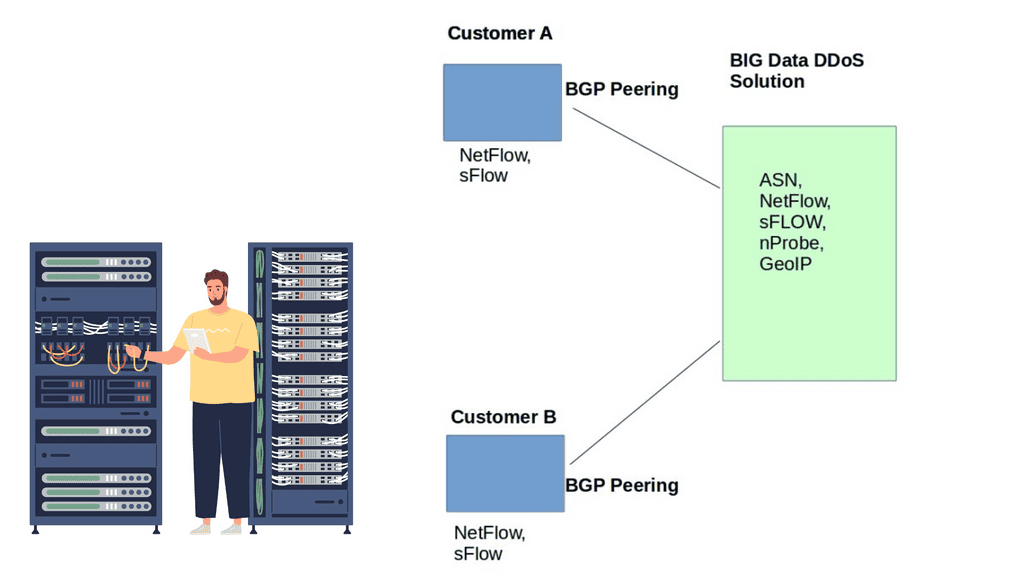
Data source variations
Netflow and IPFIX, flow record creation, is based on packets sharing the same fields. Flow state is held, hitting system resources. To save system resources, flows are exported at predefined times. As a result, traffic measurement is accurate, but it might not hit the detector for up to one minute.
sFlow sends packet samples every 1 in N, streaming flows as soon as they are prepared. sFlOW draws fewer system resources than its Netflow counterpart. It is considered faster and has better accuracy, meaning it’s an excellent tool for DDoS detection.
sFlow is better at carrying the source MAC address than NetFlow and IPFIX. With NetFlow and IPFIX, the source MAC is possible but not usually implemented by all vendors. NetFlow is useful for some requirements, while IPFIX and sFlow are for others.
To get all the possible knobs, it’s better to extract them from all data sources and combine them into one database that can easily be viewed with a single portal. Combining all data sources into one unified store makes the protocol type less relevant.
IPFIX BGP
DDoS solution: Irregularities with ASN Information
DDoS solutions can peer EBGP with customers by giving them a copy of the BGP table. Customer route updates are reflected through the standard BGP propagation procedure. It’s a non-intrusive peering agreement; BGP’s next hops are not altered, meaning customers’ data plane traffic flows as usual. The contents of the BGP table provide access to customers’ control plane information, enabling complete visibility of the data source and destination.
The manual approach with BGP can be cumbersome. BGP offers a string of information about DDoS sources and destinations, but it can be hard to craft regular expressions to extract this information. Not everyone can craft regular expressions, a skill for senior engineers.
Netflow and BGP
Netflow does provide some BGP ASN information, but you only have access to the source and destination of the Peer or Origin ASN. Some high-end platforms do both, but it’s restricted to specific devices and vendor discretion. NetFlow should not hold all BGP-type information; this would be a suboptimal solution.
Also, Netflow does have drawbacks and inaccuracies when determining the source ASN. The destination ASN is never usually a problem. The BGP process/daemon performs a REVERSE BGP Lookup to determine the source ASN and populate the FIB.
However, this type of BGP lookup does not guarantee the correctness of results. A REVERSE BGP Lookup primarily determines how to route back to the source, but this does not correlate with how the source may route to you.
Most networks are asymmetric, meaning the source-destination path differs from the reverse direction. An IP packet traversing from source A to destination B will take a different return path. Due to the shared nature of asymmetric routing, traditional monitoring systems misrepresent the BGP table with inaccurate source ASNs.
Legacy traffic analysis systems that don’t peer EBGP with customers will report inaccurate source ASN. It is not very good when troubleshooting a DDoS attack, and the source ASN information is incorrect.
Most legacy systems don’t offer accurate, complete AS-Path information, leading to false positives and the inability to determine friend from foe. It’s far better for the solution to peer BGP with the customer, extract NetFlow / IPFIX BGP / sFlow locally, and then correlate the data to provide a unified source of truth.
A key point: IPFIX BGP
BGP data can be correlated with IPFIX data so that the paths available in the network are shown, what paths are being used, and the traffic volume on each path between autonomous systems. BGP IPFIX Analysis correlates IPFIX records with BGP routing info to visualize AS paths and how much traffic is traversing these paths in real-time. IPFIX BGP: Analysis correlates IPFIX records with BGP routing info to visualize AS paths and how much traffic is traversing these paths in real-time.
Origin ASN and Peer ASN provide the data flow endpoints, and NetFlow is used in the middle. We can utilize GeoIP Information to analyze the county, region, and city. Correlate this with the complete AS-Path list, and you now have a full view of the source and destination paths with all the details of the middle points.
Closing Points on IPFIX Big Data
IPFIX is a protocol developed for exporting flow information from routers, switches, and other network devices. It allows organizations to capture detailed information about IP traffic, thus providing a comprehensive view of network behavior. By exporting flow records to a collector, IPFIX facilitates real-time monitoring and analysis, making it an indispensable tool in network management.
In the realm of Big Data, the ability to process and analyze vast amounts of information quickly is crucial. IPFIX contributes significantly by providing structured, high-fidelity data that can be easily ingested into Big Data platforms. This integration allows organizations to conduct deeper network analysis, detect anomalies, and optimize traffic flow efficiently. The granularity of IPFIX data ensures that even the most minute details are available for scrutiny, enhancing the overall analytical capability.
1. **Enhanced Network Security:** By providing detailed insights into network traffic, IPFIX helps in identifying potential security threats and breaches, allowing for timely intervention.
2. **Optimized Network Performance:** With IPFIX data, organizations can monitor network performance in real-time, identifying bottlenecks and ensuring optimal operation.
3. **Cost Efficiency:** By enabling precise traffic analysis, IPFIX aids in resource allocation and bandwidth management, leading to reduced operational costs.
While the benefits are substantial, integrating IPFIX with Big Data analytics poses certain challenges. These include the need for robust data storage solutions to handle the volume of data generated and ensuring data privacy and security. Additionally, organizations must invest in skilled personnel to interpret and act on the insights provided by IPFIX data effectively.
Correlate Flow Data With BGP
Flow telemetry can tell you who is communicating and how much traffic is moving. BGP adds routing context. Correlating the two gives an analyst a much richer view of traffic across autonomous systems and available paths.
Routing Context
BGP provides the control-plane context needed to understand which autonomous systems and paths are available.
Correlated Flow
Now combine the routing information with the traffic actually observed by the network.
Flow + BGP correlation: the traffic record tells us what is happening, while the BGP information provides routing context. Together they show both the traffic volume and the path available to that traffic.
