
OpenvSwitch Performance
Open vSwitch (OVS) is an open-source multilayer virtual switch designed for programmable networking in virtualized, containerized, and software-defined infrastructure. It provides a way to connect virtual machines, containers, physical interfaces, and logical networks while supporting features such as VLANs, tunnelling, flow-based forwarding, QoS, traffic control, mirroring, and integration with larger network-control systems.
OVS is commonly used where networking needs to be dynamically created and controlled alongside compute workloads. Rather than treating the switch configuration as a fixed physical appliance, virtual switching allows network connectivity to be created, modified, and removed through software. This makes OVS particularly useful in cloud platforms, virtualization environments, OpenStack deployments, and network virtualization architectures.
Architecture and Datapath: A useful way to understand OVS is to separate its management and forwarding functions. OVSDB stores and manages much of the switch configuration, while OpenFlow can be used to program forwarding behaviour. The datapath is responsible for actually processing packets. Depending on the deployment, packet forwarding can involve the Linux kernel datapath, userspace mechanisms, or accelerated paths such as DPDK or hardware offload.
Virtual Switching: OVS can connect virtual interfaces to one another and to physical network interfaces. Virtual machines and containers can therefore participate in logical networks without requiring a dedicated physical switch port for every workload. OVS can also apply VLAN tags, manipulate traffic, implement flow rules, and connect workloads across different network segments.
Overlay Networking: Modern virtualized environments frequently require isolated logical networks to share the same physical infrastructure. OVS can participate in overlay architectures using technologies such as VXLAN and Geneve. The physical network provides IP transport while the overlay provides logical connectivity between workloads. This separation allows virtual networks to be created independently of the underlying physical topology.
Flow-Based Forwarding: OVS provides programmable flow processing rather than relying only on traditional destination-MAC switching. Flow entries can match characteristics such as Ethernet fields, VLANs, IP addresses, protocols, ports, and other packet attributes, depending on the available pipeline and configuration. Actions can then determine how matching traffic should be forwarded, modified, mirrored, or otherwise processed.
Performance and Acceleration: OVS performance depends heavily on the datapath, workload, packet size, rule complexity, CPU resources, NIC capabilities, and traffic pattern. Modern deployments can use techniques such as DPDK, Receive Side Scaling, CPU affinity, batching, NIC offloads, and hardware-assisted flow processing where supported. Hardware offload can move selected packet-processing work into the network interface or switching hardware, reducing CPU overhead. These techniques should be treated as deployment-specific optimizations rather than assumptions about every OVS installation.
Connection to Physical Networks: OVS can bridge virtual workloads toward physical interfaces, allowing virtual machines and containers to communicate with external networks. VLANs, routing infrastructure, overlay tunnels, and provider-network designs can be combined depending on the architecture. In cloud platforms such as OpenStack, OVS may form part of a larger networking stack controlled through higher-level networking APIs.
Quality of Service and Traffic Control: OVS can participate in traffic-management architectures that control bandwidth, queueing, and packet treatment. This is important when multiple workloads share the same physical infrastructure and applications have different performance requirements. QoS design should consider the complete path, because controlling traffic at a virtual switch does not automatically guarantee end-to-end service quality.
Observability and Troubleshooting: OVS provides several mechanisms for understanding forwarding behaviour. Administrators can inspect bridges, ports, interfaces, flows, counters, connection state, and datapath information. Tools such as ovs-vsctl, ovs-ofctl, and ovs-appctl can help investigate configuration and forwarding behaviour. External telemetry and packet-capture tools can then be used to correlate OVS activity with host, interface, and physical-network conditions.
Monitoring Traffic: OVS environments can also integrate with broader network monitoring architectures. Flow information, interface counters, packet statistics, mirroring, and external telemetry can provide visibility into traffic patterns and performance. Modern observability should correlate virtual-switch information with host CPU usage, NIC statistics, application telemetry, physical network data, and overlay behaviour rather than treating the virtual switch in isolation.
High Availability and Failure Domains: OVS itself is a switching component rather than a complete high-availability architecture. Production designs must consider what happens when a host, physical interface, tunnel endpoint, controller connection, or upstream network fails. Redundant links, multiple hosts, resilient control-plane components, routing protocols, and appropriate network designs are required when continuous connectivity is a requirement.
Open vSwitch can therefore be viewed as a programmable virtual networking layer between workloads and the underlying infrastructure:
VMs / Containers → Virtual Interfaces → Open vSwitch → Overlay / Physical Network → External Infrastructure
Its value comes from combining programmable forwarding with virtualization, network segmentation, overlays, traffic control, observability, and optional acceleration.
The key to achieving high performance with OVS is therefore not simply enabling one feature such as DPDK. It is designing the entire datapath correctly — from workload interfaces and CPU placement through OVS flows and offloads to the NIC and physical network. When those layers are engineered together, OVS can provide a flexible and highly programmable foundation for modern cloud and virtualized networking.
Follow a Packet Through Open vSwitch
OVS performance depends heavily on how packets move through the datapath. Experiment with an established flow, a new flow that requires additional processing, and a stateful flow using connection tracking.
Packet generated
Flow lookup
Matched flow
Control processing
External path
Highlights: OpenvSwitch Performance
Highlighting the OVS
OVS is an essential part of networking in the OpenStack cloud. Open vSwitch is not a part of the OpenStack project. However, OVS is used in most implementations of OpenStack clouds. It has also been integrated into other virtual management systems, including OpenQRM, OpenNebula, and oVirt. Open vSwitch can support protocols such as OpenFlow, GRE, VLAN, VXLAN, NetFlow, sFlow, SPAN, RSPAN, and LACP. In addition, it can work in distributed configurations with a central controller.
1. High Throughput: OpenvSwitch is known for its high throughput capabilities, which allow it to handle a large volume of network traffic without compromising performance. By leveraging hardware offloading and advanced flow processing techniques, OpenvSwitch ensures optimal packet processing and forwarding, reducing latency and maximizing network efficiency.
2. Flexible Load Balancing: Load balancing is crucial in modern networks to distribute traffic evenly across multiple network paths, preventing congestion and maximizing network utilization. OpenvSwitch supports various load balancing algorithms, including Layer 2, Layer 3, and Layer 4 load balancing, enabling organizations to achieve efficient traffic distribution and enhance network performance.
3. Scalability: OpenvSwitch provides excellent scalability, allowing organizations to expand their network infrastructure seamlessly. With OpenvSwitch, network administrators can easily add new virtual machines, containers, or hosts without disrupting the overall network performance. This flexibility ensures that organizations can adapt to changing network requirements without compromising performance.
4. Network Virtualization: OpenvSwitch supports network virtualization, enabling the creation of virtual network overlays. These overlays help improve network agility and efficiency by allowing organizations to isolate and manage different network segments independently. By leveraging OpenvSwitch’s network virtualization capabilities, organizations can optimize network performance and enhance network security.
5. Integration with SDN Controllers: OpenvSwitch can seamlessly integrate with Software-Defined Networking (SDN) controllers, such as OpenDaylight and OpenStack, providing centralized network management and control. This integration allows organizations to automate network provisioning, configuration, and optimization, improving network performance and operational efficiency.
6. Monitoring and Analytics: OpenvSwitch offers extensive monitoring and analytics capabilities, allowing organizations to gain valuable insights into network performance and traffic patterns. By leveraging these features, network administrators can identify bottlenecks, optimize network configurations, and proactively address performance issues, improving network efficiency.
**Understanding OpenvSwitch Performance**
OpenvSwitch, an open-source multi-layer virtual switch, serves as the backbone of virtualized networks. It provides a flexible and programmable platform for managing network flows, enabling seamless communication between virtual machines and physical networks. By supporting various protocols like OpenFlow, it empowers network administrators with granular control and monitoring capabilities.
To harness the full potential of OpenvSwitch, it is crucial to optimize its performance. Let’s explore some techniques that can enhance OpenvSwitch performance:
1. Kernel Bypass: Leveraging technologies like DPDK (Data Plane Development Kit) or XDP (eXpress Data Path) can bypass the kernel and directly access network interfaces, reducing latency and improving throughput.
2. Offloading: Utilizing hardware offloading capabilities, such as SR-IOV (Single Root I/O Virtualization) or OVS-DPDK (OpenvSwitch with DPDK), can offload packet processing tasks to specialized network interface cards, boosting performance.
3. Flow Table Optimization: Fine-tuning the flow table size, timeouts, and lookup algorithms can significantly impact OpenvSwitch performance. By carefully configuring these parameters, administrators can optimize resource utilization and minimize packet processing overhead.
To evaluate the performance of OpenvSwitch, comprehensive benchmarking is essential. Let’s explore some key metrics and benchmarks employed to gauge OpenvSwitch performance:
1. Throughput: Measuring the amount of data that can be processed by OpenvSwitch per unit of time provides insights into its performance capabilities. Tools like iperf or pktgen can be used to generate synthetic traffic and measure throughput.
2. Latency: Assessing the time taken for packets to traverse through OpenvSwitch is critical for latency-sensitive applications. Tools like ping or DPDK-pktgen can be employed to measure latency and identify potential bottlenecks.
3. Scalability: OpenvSwitch performance should be evaluated under different network loads and configurations. Scalability tests can help identify the maximum number of flows, ports, or virtual machines that OpenvSwitch can handle efficiently.
The virtual world of networking
1: – Virtualization requires an understanding of how virtual networking works. Without virtual networking, justifying the costs would be very difficult. You can run multiple virtual machines using a virtualization host, each with its dedicated physical network port.
2: – By implementing virtual networking, we can consolidate networking in a more manageable way regarding cost and administration. We can use an approximate metaphor if you are familiar with VMware-based networking – Open vSwitch is similar to vSphere Distributed Switch.
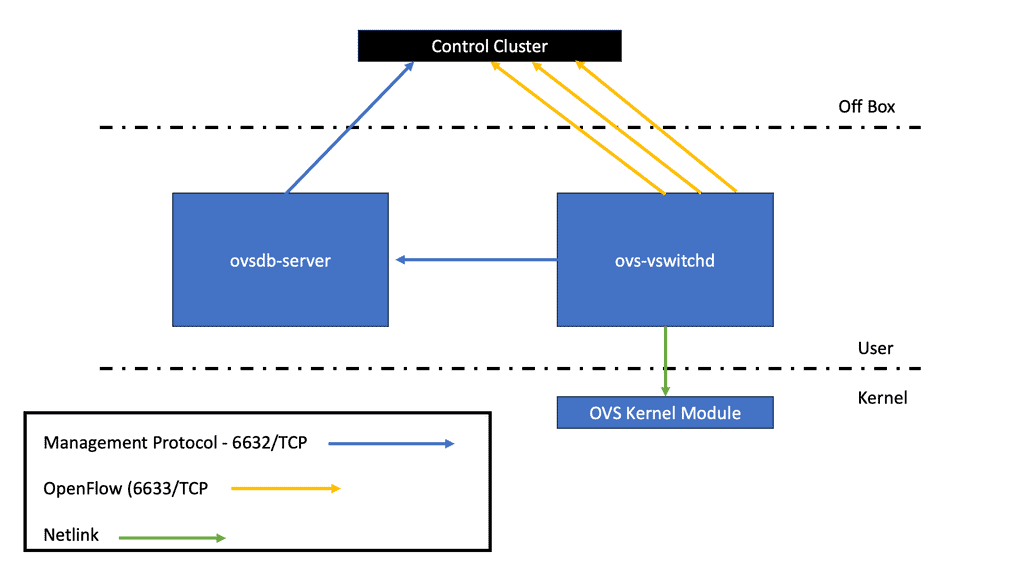
3: – The implementation of Open vSwitch consists of the kernel module (the data plane) and the user-space tools (the control panel). The data plane was moved into the kernel to process incoming data packets as fast as possible. The switch daemon implements and manages several OVS switches using the Netlink socket.
There is no specific SDN controller
Unlike VMware’s NSX and vSphere distributed switches, Open vSwitch has no specific SDN controller to manage its capabilities. Several NSX components are used, including vCenter. OVS controls an SDN controller from another company that uses the OpenFlow protocol using ovs-vswitchd. The OVSDB server maintains a switch table database that external clients can access via JSON-RPC. The persistent database ovsdb, designed to survive restarts, currently has around 13 tables.
Many clients prefer VMware’s NSX approach to SDN and Open vSwitch. VMware’s integration with OpenStack and NSX integration with Linux-based KVM hosts (via Open vSwitch and additional agents) can be beneficial.
As an example of the use of Open vSwitch-based technologies in NSX, there are things such as hardware VTEP integration through Open vSwitch Database, GENEVE networks being extended to KVM hosts using Open vSwitch/NSX integration, etc.
Bridges and Flow Rules
Open vSwitch is a software switch commonly seen in Open Networking used to connect physically to virtual interfaces. When considering OpenvSwitch’s performance, it uses virtual bridges and flow rules to forward packets and consists of several switches, including provider, integration, and tunnel bridge. Each virtual switch has a different role in the network—the tunnel bridge creates the overlay, and the integration switch is the leading connectivity bridge.
OVS Bridge
The terms bridge and switch are used interchangeably with Neutron networking. The OVS bridge has user actions issued in userspace and a set of flows programmed in the Linux kernel with match criteria and actions. The kernel module is where all the packet processing occurs, similar to an ASIC on a standard physical/hardware switch.
The OVS has its daemon as the userspace element, running in userspace, controlling how the kernel gets programmed. It also uses an Open vSwitch Database Server (OVSDB), a network configuration protocol.
What Actually Changes OVS Performance?
Run the same conceptual workload with different traffic patterns, packet sizes and acceleration options. Watch how new-flow pressure, packet processing load and offload availability influence the simulated performance profile.
Highlights: OpenvSwitch Performance
Linux Networking Subsystem
– Initially, OpenvSwitch’s performance was good with steady-state traffic. The kernel was multithreaded, so established flows performed excellently. However, specific traffic patterns would give OpenvSwitch a headache and degrade its performance. For example, peer-to-peer applications initiating many quickly generated connections would hit it poorly.
– This is because the kernel contained recently cached flows, and when a packet that wasn’t an exact cache match would result in a cache miss and get sent to userspace. In addition, continuous user-kernel space interaction kills performance. Unlike the kernel, userspace is single-threaded and does not have the performance to process large amounts of packets or set up connections quickly.
– They needed to improve the OpenvSwitch performance of the connection setup. So they added Megaflow and wildcard entries in the kernel, made userspace multithreaded, and introduced various enhancements to the classifier.
– They have spent much time putting mega flows in the kernel and don’t want to undo all that good work. This is a foundation design principle to support stateful service and connection tracking implementation. Anything they add to Open vSwitch must not affect performance.
Stateless vs. stateful functionality
It’s an excellent stateless flow-forwarding device and supports finer-grained flow fields, but there is a gap in supporting stateful services. They are currently expanding their feature set to include stateful connection tracking, stateful inspection firewall, and deep packet inspection services.
The current matching enables you to match IP and port numbers. Nothing higher up the application stack, such as application ID, is used. Stateless services offer better protection than stateless services as it delves deeper into the packet.
What is a stateless function?
Stateless means once a packet arrives, the device can only affect what’s currently in that packet. It looks at the headers and bases the policy on those it just inspected. Evaluation is performed on packet contents statically and is unaware of any data patterns.
Typically, stateless inspects the following elements within a packet – source/destination IP, source/destination port, and protocol type. No additional Layer 3 or 4 inspection, such as TCP control flags, sequence numbers, and ACK fields, is carried out.
For example, if the requirement involves matching on a TCP window parameter, stateless tracking won’t be able to track if packets are within a specific window. Regarding Network Address Translation (NAT), performing stateless translation from one IP address to another is possible, as well as adjusting the MAC address for external forwarding, but it won’t handle anything complicated.
Today’s security requires more advanced filtering than Layer 3 and 4 headers. The stateful function watches everything end-to-end and knows precisely the TCP connection’s stage. This enables more detailed information than source/destination IP or port numbers.
Connection tracking is fundamental to the stateful virtual firewall and supports enhanced NAT functionality. We need to consider when traffic is based on sessions and filter according to other parameters, such as a connection’s state.
The stateful inspection goes deeper and tracks every connection, examining the packet headers and the application layer information in the payload. Stateful devices can determine if a connection has been negotiated, reset, established, and closed.
In addition, it provides complete protection against many high-level attacks by allowing administrators to be specific with their filtering, such as not allowing the peer-to-peer (P2P) application to be transferred over HTTP tunnels.
Traditionally, Open vSwitch has two stateless approaches to firewalling:
Match on TCP flags
The ability to match on TCP flags and enforce policy on the SYN packets, permitting ALL ACK and RST. This approach gains in performance due to cached entries existing in the kernel. Keeping as much as possible in the kernel limits cache misses and user space interaction.
What it gains in performance is what it lacks in security. It is not very secure, as you allow ANY packet with an ACK or RST bit set. It will enable non-established flows through with ACT or RST set. An attacker could quickly probe with a standard TCP port scanning tool, sending an ACK in and examining received responses.
Use the “learn” action.
The Open vSwitch ovs-vswitchd process default acts like a standard bridge and learns MAC addresses. It will continue to connect to the controller in the background, and when it succeeds, it will stop acting like a traditional MAC-learning switch. The userspace element maintains MAC tables and generates flows with matches and actions. This allows new OpenFlow rules to be inserted into userspace.
When a packet arrives, it gets pushed to userspace, and the userspace function uses the “learn” action to create the reverse of the five tuples, inserting a new flow into the OpenFlow table. The process comes at a performance cost and is not as quick as having an existing connection. It forces every new flow into userspace.
These methods are sufficient for some network requirements but don’t carry out any deep actions on TCP to ensure there are no overlapping segments, for example. In addition, they cannot inspect related flows to support complex protocols like FTP and SIP, which have different flows for data and control.
The control channel negotiates with the remote end of the data flow configuration. For example, the client initiates a TCP port 21 control connection with FTP. The remote FTP server then opens up a data socket on port 20.
OpenvSwitch Performance: Contract integration with Open vSwitch
The Open vSwitch team proposes using the conntrack module in Linux to enable stateful services. This is an alternative to using Linux Bridge with IPtables.
Contract stores the state of all connections and informs the Netfilter framework of the connection state. Transit packets are connection tracked in the PRE_ROUTING chain, and anything locally generated is performed in the OUTPUT chain. Packets may have four userland states: NEW, ESTABLISHED, RELATED, and INVALID. Outside of the userland state, we have packet states in the kernel; for example, TCP SYN_SENT lets us know we have only seen a TCP SYN in one direction.
If the conntrack sees one SYN packet, it considers the packet new. Once it sees a return TCP SYN/ACK, it thinks the connection is established, and data can be transmitted. Once a return packet is received, the packet state changes to ESTABLISHED in the PRE_ROUTING chain of the nat table.
The Open vSwitch can call into the kernel connection tracker. This will allow stateful tracking of flows and also the support of Application Layer Gateway (ALG) to punch holes for related “data” channels needed for protocols like FTP and SIP.
Netfilter Framework
A fundamental part of connection tracking is the Netfilter framework. The Netfilter framework provides a variety of functionalities – packet selection, packet filtering, connection tracking, and NAT. In addition, the Netfilter framework enables callbacks in the packet traversing the network stack.
These callbacks are known as Netfilter hooks, which enable an operation on the packet. The essence of Netfilter is the ability to activate hooks.
They are called upon at distinct points along with packet traversal in the kernel. The five points in the network stack where you can implement hooks include NF_INET_PRE_ROUTING, NF_INET_LOCAL_IN, NF_INET_FORWARD, NF_INET_POST_ROUTING, NF_INET_LOCAL_OUT. Once a packet comes in and passes initial tests ( checksum, etc.), they are passed to the Netfilter framework NF_IP_PRE_ROUTING hook.
Once the packet passes this code, a routing decision is made. If locally destined, the Netfilter framework is called for the NF_IP_LOCAL_IN or externally forwarded via the NF_IP_FORWARD hook. The packet finally goes to the NF_IP_POST_ROUTING before being placed on the wire for transmission.
Netfilter conntrack integration
Packets arrive at the Open vSwitch flow table and are sent to Netfilter connection tracking. This is the original Linux connection tracker; it hasn’t changed. The connection tracking table enforces the flow and TCP window sizes and makes the flow state available to the Open vSwitch table—NEW, ESTABLISHED, etc. Now, it gets sent back to the Open vSwitch flow tables with the connection bits set.
Connection tracking allows tracking to set 5 tuples and store some information within the datapath. It exposes generic concepts about those connections or whether they are parts of a related flow, like FTP or SIP.
This functionality enables the steering of microflows based on a policy, whether the packet is part of a NEW or ESTABLISHED flow state, rather than simply applying a policy based on IP or port number.
OpenvSwitch is an excellent choice for organizations looking to enhance their network performance. Its high throughput, flexible load balancing, scalability, network virtualization, integration with SDN controllers, and monitoring capabilities make it a powerful tool for optimizing network efficiency. By leveraging OpenvSwitch’s performance-enhancing features, organizations can ensure a smooth and efficient network infrastructure that meets their growing demands.
Why Did OVS Performance Collapse?
You have a healthy OVS deployment carrying established traffic. Throughput looks good during long-lived flows, but performance drops sharply when the application starts creating large numbers of short-lived connections. Identify the most likely performance pressure before changing the network.
Long-lived flows maintain strong throughput and normal latency. During a connection-heavy application test, CPU utilisation rises, latency increases and throughput falls.
Established flows: stable forwarding behaviour.
Short-lived flows: significantly higher processing pressure.
Question: what should you investigate first?

